warning TOYOTA TACOMA 2019 Owners Manual (in English)
[x] Cancel search | Manufacturer: TOYOTA, Model Year: 2019, Model line: TACOMA, Model: TOYOTA TACOMA 2019Pages: 60, PDF Size: 3.28 MB
Page 3 of 60
1
OVERVIEW
FEATURES & OPERATIONS
TOYOTA SAFETY SENSE
SAFETY & EMERGENCY FEATURES
1 Visit your Toyota dealer for information on customizing this feature.2 Programmable by customer. Refer to the Owner’s Manual for instructio\
ns and more information.3 HomeLink® is a registered trademark of Gentex Corporation.
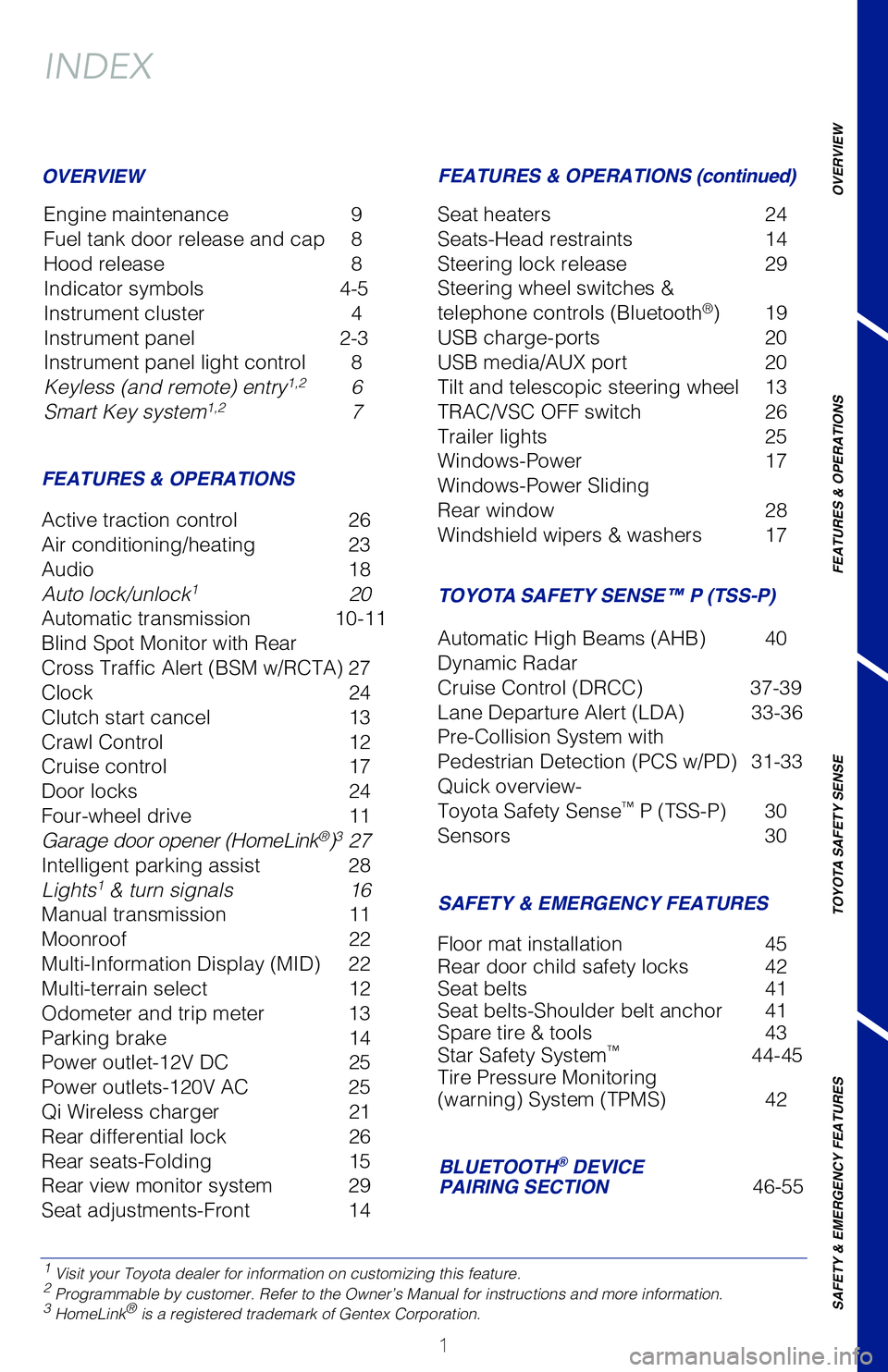
INDEX
Engine maintenance 9
Fuel tank door release and cap 8
Hood release 8
Indicator symbols 4-5
Instrument cluster 4
Instrument panel 2-3
Instrument panel light control 8
Keyless (and remote) entry
1,2 6
Smart Key system1,2 7
OVERVIEW
FEATURES & OPERATIONS FEATURES & OPERATIONS (continued)
SAFETY & EMERGENCY FEATURES
Active traction control
26
Air conditioning/heating 23
Audio 18
Auto lock/unlock
1 20
Automatic transmission 10-11
Blind Spot Monitor with Rear
Cross Traffic Alert (BSM w/RCTA) 27
Clock 24
Clutch start cancel 13
Crawl Control 12
Cruise control 17
Door locks 24
Four-wheel drive 11
Garage door opener (HomeLink
®)3 27
Intelligent parking assist 28
Lights
1 & turn signals 16
Manual transmission 11
Moonroof 22
Multi-Information Display (MID) 22
Multi-terrain select 12
Odometer and trip meter 13
Parking brake 14
Power outlet-12V DC 25
Power outlets-120V AC 25
Qi Wireless charger 21
Rear differential lock 26
Rear seats-Folding 15
Rear view monitor system 29
Seat adjustments-Front 14 Seat heaters
24
Seats-Head restraints 14
Steering lock release 29
Steering wheel switches &
telephone controls (Bluetooth
®) 19
USB charge-ports 20
USB media/AUX port 20
Tilt and telescopic steering wheel 13
TRAC/VSC OFF switch 26
Trailer lights 25
Windows-Power 17
Windows-Power Sliding
Rear window 28
Windshield wipers & washers 17
Floor mat installation 45
Rear door child safety locks 42
Seat belts 41
Seat belts-Shoulder belt anchor 41
Spare tire & tools 43
Star Safety System
™ 44-45
Tire Pressure Monitoring
(warning) System (TPMS) 42
TACOMA 2019
This Quick Reference Guide is a summary of basic vehicle
operations. It contains brief descriptions of fundamental
operations so you can locate and use the vehicle’s main
equipment quickly and easily.
The Quick Reference Guide is not intended as a substitute for
the Owner’s Manual located in your vehicle’s glove box. We
strongly encourage you to review the Owner’s Manual and
supplementary manuals so you will have a better understanding
of your vehicle’s capabilities and limitations.
Your dealership and the entire staff of Toyota Motor North
America, Inc. wish you many years of satisfied driving in your
new Tacoma.
A word about safe vehicle operations
This Quick Reference Guide is not a full description of Tacoma operation\
s.
Every Tacoma owner should review the Owner’s Manual that accompanies
this vehicle.
Pay special attention to the boxed information highlighted in color throughout
the Owner’s Manual. Each box contains safe operating instructions to \
help you
avoid injury or equipment malfunction.
All information in this Quick Reference Guide is current at the time of \
printing.
Toyota reserves the right to make changes at any time without notice.
BLUETOOTH® DEVICE
PAIRING SECTION 46-55
TOYOTA SAFETY SENSE™ P (TSS-P)
Automatic High Beams (AHB) 40
Dynamic Radar
Cruise Control (DRCC) 37-39
Lane Departure Alert (LDA) 33-36
Pre-Collision System with
Pedestrian Detection (PCS w/PD) 31-33
Quick overview-
Toyota Safety Sense
™ P (TSS-P) 30
Sensors 30
142230_MY19_Tacoma_QRG_GUTS.indd 18/14/18 12:43 PM
Page 4 of 60
2
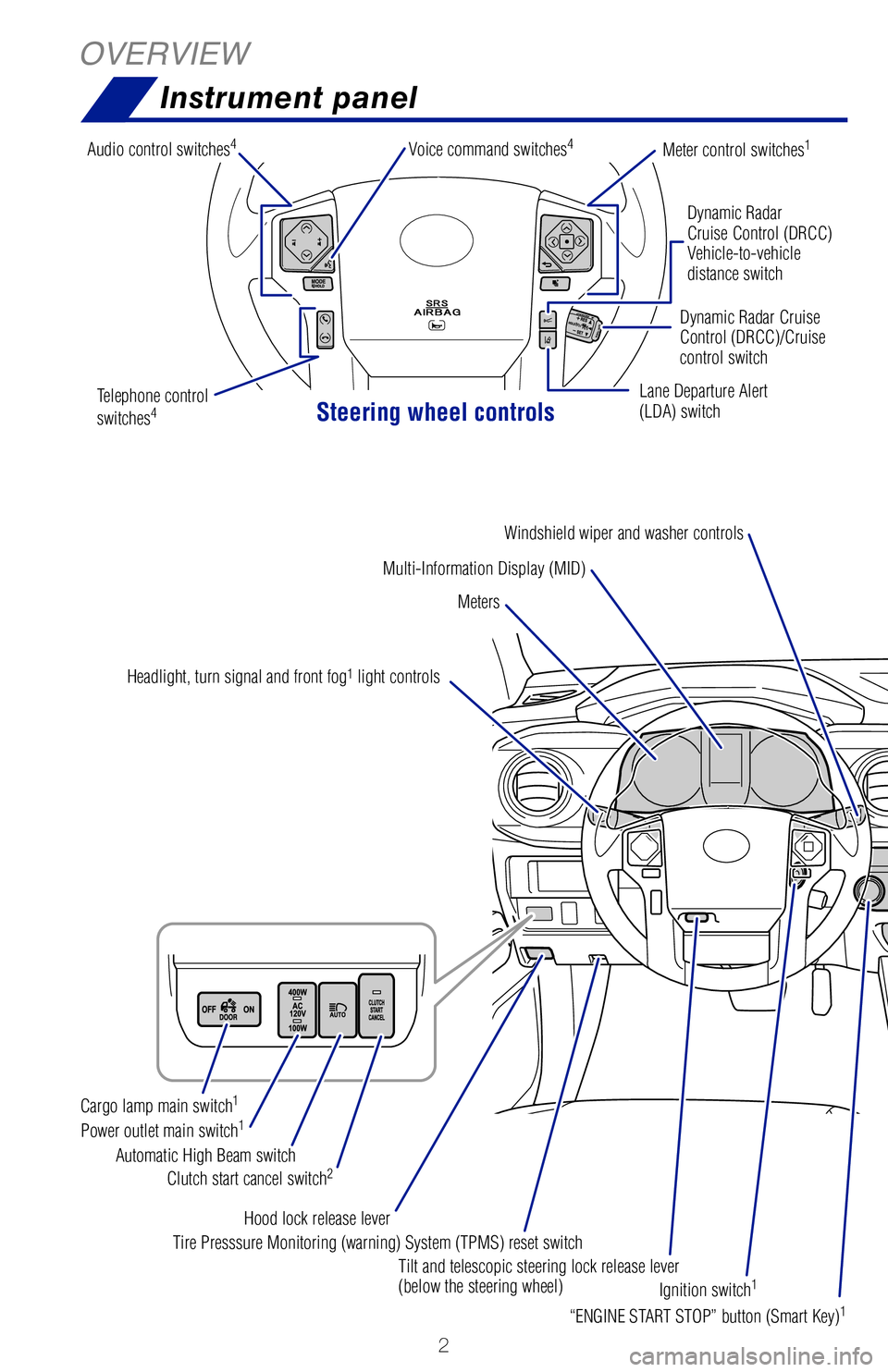
OVERVIEWInstrument panel
Steering wheel controls
Dynamic Radar
Cruise Control (DRCC)
Vehicle-to-vehicle
distance switch
Lane Departure Alert
(LDA) switch Dynamic Radar Cruise
Control (DRCC)/Cruise
control switch
Multi-Information Display (MID)
Meters
Meter control switches1
Headlight, turn signal and front fog1 light controls
Audio control switches
4Voice command switches4
Windshield wiper and washer controls
“ENGINE START STOP” button (Smart Key)
1
Tilt and telescopic steering lock release lever
(below the steering wheel)
Hood lock release lever
Clutch start cancel switch
2Automatic High Beam switch
Power outlet main switch
1Cargo lamp main switch1
Tire Presssure Monitoring (warning) System (TPMS) reset switch
Ignition switch
1
Parking brake
Telephone control
switches4 1
If equipped.2 Manual transmission only.3 Automatic transmission only.4 For details, refer to the “Navigation and Multimedia System Owner’s Manual” and “2019 Entune™ Audio
Quick Reference Guide.”
142230_MY19_Tacoma_QRG_GUTS.indd 28/13/18 4:02 PM
Page 6 of 60
 4
OVERVIEWInstrument cluster
For details, refer to “Indicators and warning lights,” Section 2, \
2019 Owner’s
Manual.
Speedometer
Fuel gauge
Odometer/trip meter
“ODO/TRIP” display switch an")
4
OVERVIEWInstrument cluster
For details, refer to “Indicators and warning lights,” Section 2, \
2019 Owner’s
Manual.
Speedometer
Fuel gauge
Odometer/trip meter
“ODO/TRIP” display switch and
instrument panel light control button
Engine coolant temperature gauge Outside temperature
Multi-Information Display (MID)
Shift position and shift range
(vehicles with an automatic transmission)
Tachometer
Blind Spot Monitor (BSM)
outside rear view mirror indicator5
Brake system warning1
Automatic Transmission fluid
temperature warning
Airbag SRS warning1
Anti-lock Brake System (ABS) warning1
Crawl control indicator5
Brake Override System warning lightAIR BAG ON/OFF indicators1
Charging system warning1AUTO Limited Slip Differential
(AUTO LSD) indicator1
Active traction control system indicator5
Automatic High Beam (AHB) indicator
Constant speed cruise control
idicator/Constant speed cruise
control SET indicator
1 If the indicator does not turn off within a few seconds of starting the \
engine, there may be a
malfunction. Have the vehicle inspected by your Toyota dealer.
2 If the indicator flashes, there may be a malfunction. Refer to the Owner\
’s Manual.3 If the indicator flashes rapidly, there may be a malfunction. Refer to t\
he Owner’s Manual.4 If the indicator flashes, it indicates that the system is operating.5 If equipped.
Indicator symbols
Service indicators and reminders
142230_MY19_Tacoma_QRG_GUTS.indd 48/13/18 4:02 PM
Page 7 of 60
5
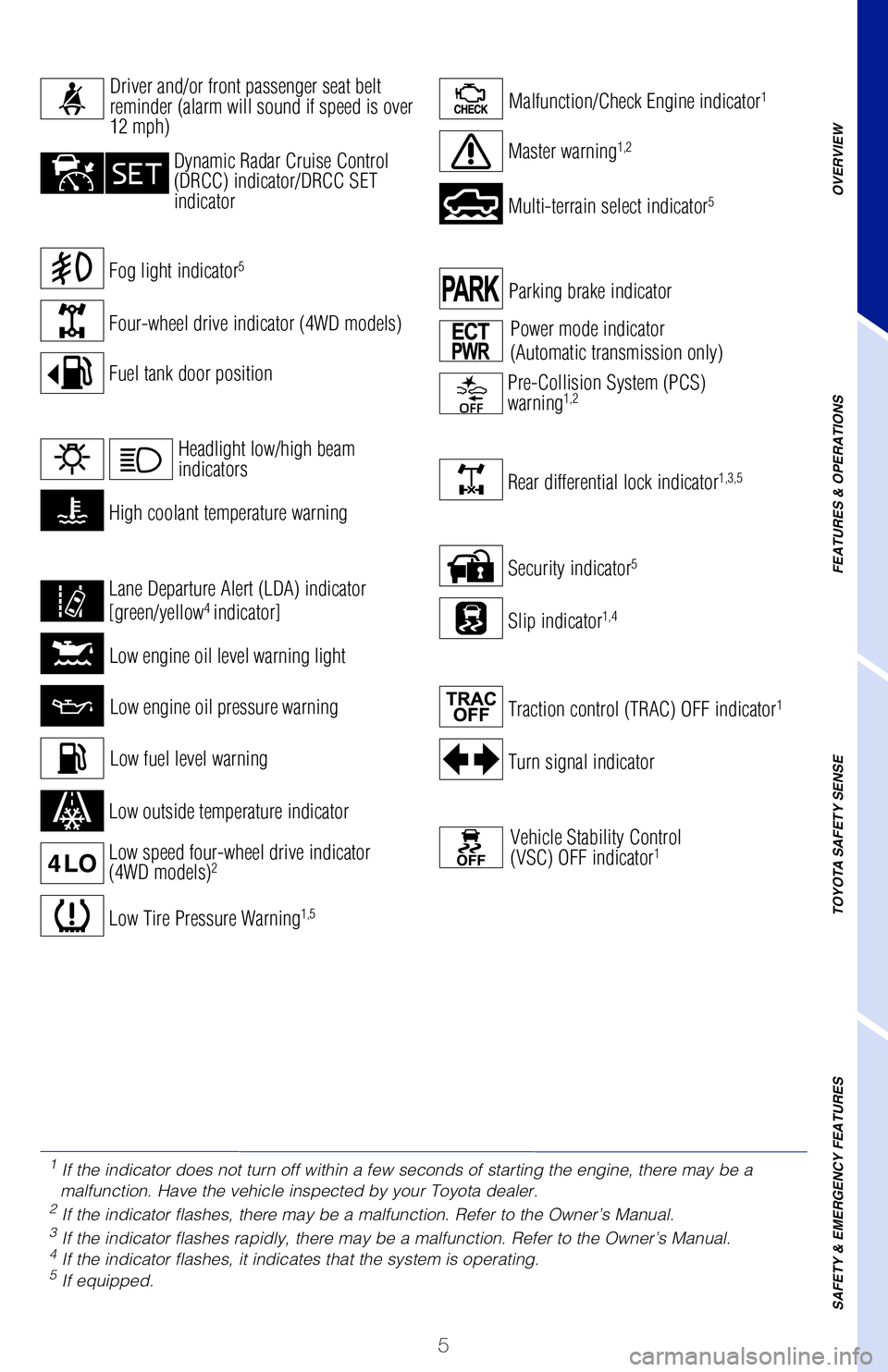
Turn signal indicator
Security indicator5
Parking brake indicator
Slip indicator1,4
Rear differential lock indicator1,3,5
Traction control (TRAC) OFF indicator1
Vehicle Stability Control
(VSC) OFF indicator1
Power mode indicator
(Automatic transmission only)
Pre-Collision System (PCS)
warning1,2
Fog light indicator5
For details, refer to “Indicators and warning lights,” Section 2, \
2019 Owner’s
Manual.
Speedometer
Low engine oil pressure warning
Low engine oil level warning light
Malfunction/Check Engine indicator1
Low Tire Pressure Warning1,5
Low outside temperature indicator
Multi-terrain select indicator5
Crawl control indicator5
Master warning1,2
Low fuel level warning
Four-wheel drive indicator (4WD models)
OVERVIEW
FEATURES & OPERATIONS
TOYOTA SAFETY SENSE
SAFETY & EMERGENCY FEATURES
Fuel tank door position
Constant speed cruise control
idicator/Constant speed cruise
control SET indicator
Driver and/or front passenger seat belt
reminder (alarm will sound if speed is over
12 mph)
Dynamic Radar Cruise Control
(DRCC) indicator/DRCC SET
indicator
High coolant temperature warning
Low speed four-wheel drive indicator
(4WD models)2
Lane Departure Alert (LDA) indicator
[green/yellow4 indicator]
Headlight low/high beam
indicators
1
If the indicator does not turn off within a few seconds of starting the \
engine, there may be a
malfunction. Have the vehicle inspected by your Toyota dealer.
2 If the indicator flashes, there may be a malfunction. Refer to the Owner\
’s Manual.3 If the indicator flashes rapidly, there may be a malfunction. Refer to t\
he Owner’s Manual.4 If the indicator flashes, it indicates that the system is operating.5 If equipped.
Service indicators and reminders
142230_MY19_Tacoma_QRG_GUTS.indd 58/13/18 4:02 PM
Page 24 of 60
22
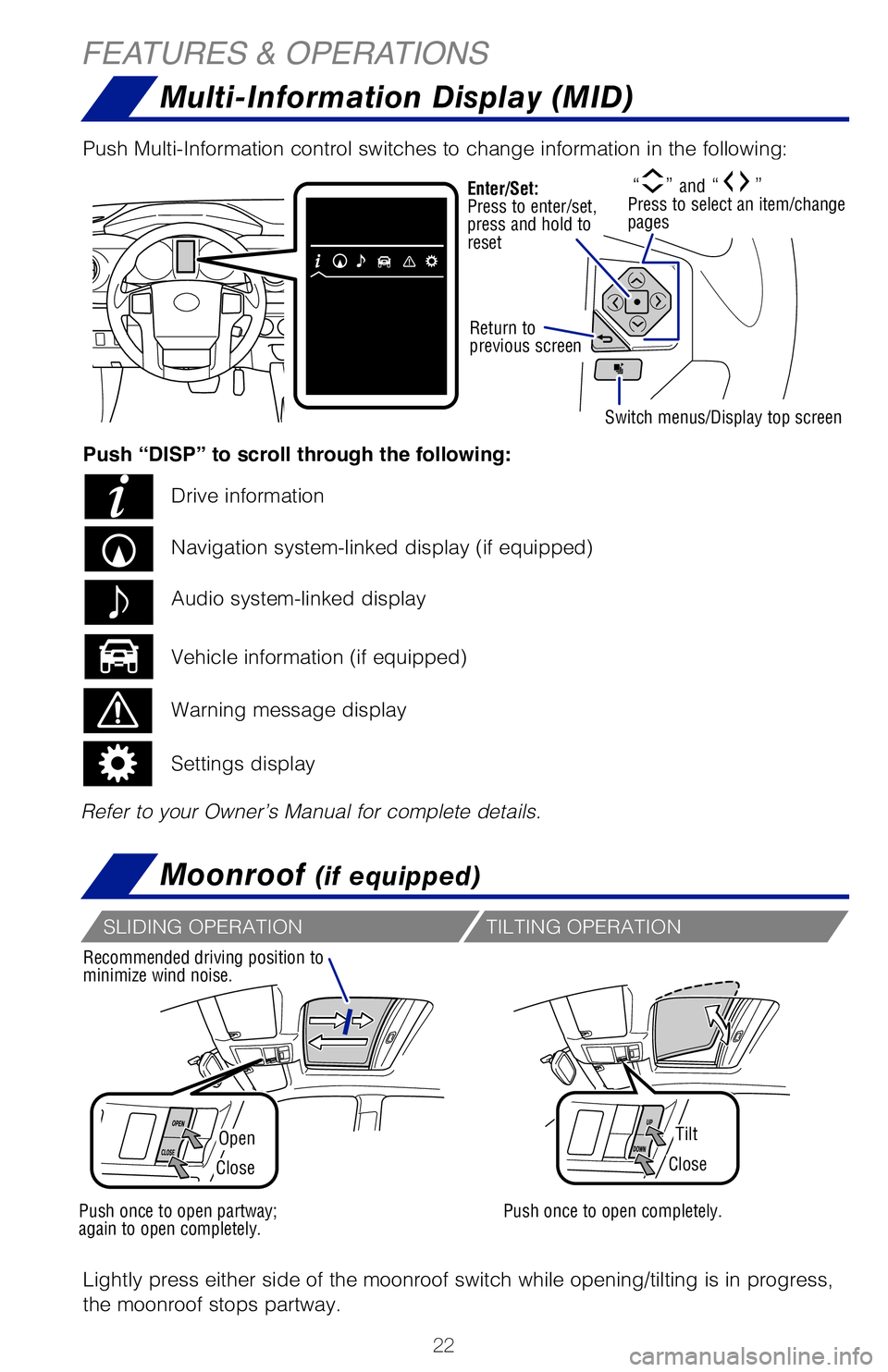
Multi-Information Display (MID)
Moonroof (if equipped)
FEATURES & OPERATIONS
OpenTilt
CloseClose
Recommended driving position to
minimize wind noise.
Lightly press either side of the moonroof switch while opening/tilting is in pr\
ogress,
the moonroof stops partway. Push Multi-Information control switches to change information in the followi\
ng:
Push once to open partway;
again to open completely.Push once to open completely.
TILTING OPERATIONSLIDING OPERATION
AUTOMATIC AIR CONDITIONING (IF EQUIPPED)
MANUAL AIR CONDITIONING (IF EQUIPPED)
Display
Selectors and switches
“” and “” Press to select an item/change
pagesEnter/Set:
Press to enter/set,
press and hold to
reset
Return to
previous screen
Switch menus/Display top screen
Refer to your Owner’s Manual for complete details.Push “DISP” to scroll through the following:
Drive information
Navigation system-linked display (if equipped)
Vehicle information (if equipped) Audio system-linked display
Warning message display
Settings display
Temperature (driver’s side)
Outside rear view
mirror defogger
Outside rear view
mirror defogger
Automatic climate control ON
Adjusting the temperature setting
will cause the airflow vents, air intake and fan to adjust
automatically.
142230_MY19_Tacoma_QRG_GUTS.indd 228/13/18 4:06 PM
Page 32 of 60
 30
The Pre-Collision System uses a radar sensor and camera sensor to help d\
etect a
vehicle or pedestrian in front of your vehicle.
As there is a limit to the degree of recognition accuracy and cont")
30
The Pre-Collision System uses a radar sensor and camera sensor to help d\
etect a
vehicle or pedestrian in front of your vehicle.
As there is a limit to the degree of recognition accuracy and control pe\
rformance
that this system can provide, do not overly rely on this system. This sy\
stem will not
prevent collisions or lessen collision damage or injury in every situati\
on. Do not use
PCS instead of normal braking operations under any circumstances. Do not\
attempt
to test the operation of the pre-collision system yourself, as the syste\
m may not
operate or engage, possibly leading to an accident. In some situations, \
such as
when driving in inclement weather such as heavy rain, fog, snow or a san\
dstorm or
while driving on a curve and for a few seconds after driving on a curve,\
a vehicle
may not be detected by the radar and camera sensors, preventing the syst\
em from
operating or engaging properly.
Refer to a Toyota Owner’s Manual for a list of additional situations \
in which the
system may not operate properly.Refer to a Toyota Owner’s Manual for additional information on PCS w/\
PD operation,
settings adjustments, limitations, and precautions before attempting to \
use it. Pre-Collision Warning
When the system determines that the possibility of a frontal collision i\
s high, a
buzzer will sound and a warning message will be displayed on the Multi-I\
nformation
Display (MID) to urge the driver to take evasive action.
Pre-Collision Brake Assist
If the driver notices the hazard and brakes, the system may provide addi\
tional
braking force using Brake Assist. This system may prime the brakes and m\
ay apply
greater braking force in relation to how strongly the brake pedal is dep\
ressed.
Pre-Collision Braking
If the driver does not brake in a set time and the system determines tha\
t the
possibility of a frontal collision with a preceding vehicle is extremely\
high, the
system may automatically apply the brakes, reducing speed in order to he\
lp the
driver reduce the impact and in certain cases avoid the collision.
Quick overview-Toyota Safety Sense™ P (TSS-P)
Sensors
TSS-P combines an in-vehicle camera mounted in front of the inside rear \
view mirror
and a millimeter-wave radar mounted in the front grill. These sensors su\
pport the
driver assist systems.
TOYOTA SAFETY SENSE™
Toyota Safety Sense™ P (TSS-P) is a set of active safety technologies designed
to help mitigate or prevent collisions across a wide range of traffic si\
tuations, in
certain conditions. TSS-P is designed to help support the driver’s aw\
areness,
decision making and vehicle operation contributing to a safe driving exp\
erience.
Refer to the Owner’s Manual for operation, setting adjustments, limitations and
more details to understand these functions and complete safety precautions. For
more information, please go to http://www.toyota.com/safety-sense
Automatic High Beams (AHB)AHB is designed to detect the headlights of oncoming vehicles and the ta\
il
lights of preceding vehicles and switch between high beams and low beams\
as appropriate. Pre-Collision System with Pedestrian Detection (PCS w/PD)
PCS w/PD is designed to provide alert, mitigation, and/or avoidance
support in certain conditions, when the system detects a potential
collision with a preceding vehicle is likely to occur.
The advanced millimeter-wave radar sensor system is designed to
work with the camera sensor to help recognize a preceding pedestrian,
and provide an alert, mitigation and/or avoidance support in certain
conditions.
Dynamic Radar Cruise Control (DRCC)
DRCC is designed to help maintain a pre-set distance to a preceding vehi\
cle
when the preceding vehicle is traveling at a lower speed.
Lane Departure Alert (LDA)
LDA is designed to provide notification when the system detects an
unintended lane departure.
Camera sensor
Radar sensor
142230_MY19_Tacoma_QRG_GUTS.indd 308/13/18 4:07 PM
Page 33 of 60
 31
OVERVIEW
FEATURES & OPERATIONS
TOYOTA SAFETY SENSE
SAFETY & EMERGENCY FEATURES
The Pre-Collision System uses a radar sensor and camera sensor to help d\
etect a
vehicle or pedestrian in front of y")
31
OVERVIEW
FEATURES & OPERATIONS
TOYOTA SAFETY SENSE
SAFETY & EMERGENCY FEATURES
The Pre-Collision System uses a radar sensor and camera sensor to help d\
etect a
vehicle or pedestrian in front of your vehicle.
As there is a limit to the degree of recognition accuracy and control pe\
rformance
that this system can provide, do not overly rely on this system. This sy\
stem will not
prevent collisions or lessen collision damage or injury in every situati\
on. Do not use
PCS instead of normal braking operations under any circumstances. Do not\
attempt
to test the operation of the pre-collision system yourself, as the syste\
m may not
operate or engage, possibly leading to an accident. In some situations, \
such as
when driving in inclement weather such as heavy rain, fog, snow or a san\
dstorm or
while driving on a curve and for a few seconds after driving on a curve,\
a vehicle
may not be detected by the radar and camera sensors, preventing the syst\
em from
operating or engaging properly.
Refer to a Toyota Owner’s Manual for a list of additional situations \
in which the
system may not operate properly.
Refer to a Toyota Owner’s Manual for additional information on PCS w/\
PD operation,
settings adjustments, limitations, and precautions before attempting to \
use it. Pre-Collision Warning
When the system determines that the possibility of a frontal collision i\
s high, a
buzzer will sound and a warning message will be displayed on the Multi-I\
nformation
Display (MID) to urge the driver to take evasive action.
Pre-Collision Brake Assist
If the driver notices the hazard and brakes, the system may provide addi\
tional
braking force using Brake Assist. This system may prime the brakes and m\
ay apply
greater braking force in relation to how strongly the brake pedal is dep\
ressed.
Pre-Collision Braking
If the driver does not brake in a set time and the system determines tha\
t the
possibility of a frontal collision with a preceding vehicle is extremely\
high, the
system may automatically apply the brakes, reducing speed in order to he\
lp the
driver reduce the impact and in certain cases avoid the collision.
Pre-Collision System with Pedestrian
Detection (PCS w/PD)
Quick overview-Toyota Safety Sense™ P (TSS-P)
Sensors
TSS-P combines an in-vehicle camera mounted in front of the inside rear \
view mirror
and a millimeter-wave radar mounted in the front grill. These sensors su\
pport the
driver assist systems.
Toyota Safety Sense
™ P (TSS-P) is a set of active safety technologies designed
to help mitigate or prevent collisions across a wide range of traffic si\
tuations, in
certain conditions. TSS-P is designed to help support the driver’s aw\
areness,
decision making and vehicle operation contributing to a safe driving exp\
erience.
Refer to the Owner’s Manual for operation, setting adjustments, limitations and
more details to understand these functions and complete safety precautions. For
more information, please go to http://www.toyota.com/safety-sense
Automatic High Beams (AHB)AHB is designed to detect the headlights of oncoming vehicles and the ta\
il
lights of preceding vehicles and switch between high beams and low beams\
as appropriate. Pre-Collision System with Pedestrian Detection (PCS w/PD)
PCS w/PD is designed to provide alert, mitigation, and/or avoidance
support in certain conditions, when the system detects a potential
collision with a preceding vehicle is likely to occur.
The advanced millimeter-wave radar sensor system is designed to
work with the camera sensor to help recognize a preceding pedestrian,
and provide an alert, mitigation and/or avoidance support in certain
conditions.
Dynamic Radar Cruise Control (DRCC)
DRCC is designed to help maintain a pre-set distance to a preceding vehi\
cle
when the preceding vehicle is traveling at a lower speed.
Lane Departure Alert (LDA)
LDA is designed to provide notification when the system detects an
unintended lane departure.
142230_MY19_Tacoma_QRG_GUTS.indd 318/13/18 4:07 PM
Page 36 of 60
 34
TOYOTA SAFETY SENSE™
ADJUSTING LDA ALERT SENSITIVITY
The driver can adjust the sensitivity of the LDA (warning) function fr\
om the
Multi-Information Display (MID) customization screen.High - Is")
34
TOYOTA SAFETY SENSE™
ADJUSTING LDA ALERT SENSITIVITY
The driver can adjust the sensitivity of the LDA (warning) function fr\
om the
Multi-Information Display (MID) customization screen.High - Is designed to warn approximately before the front
tire crosses the lane marker.
Normal - Is designed to warn approximately when the front
tire crosses the lane marker.
(1) Press “SETUP” or “APPS” switches on the multimedia sys\
tem.
If you have Entune AudIo Plus, select “Setup” on the “Apps” \
screen.
(2) Select “Vehicle” on the “Setup” screen.
(3) Select “Vehicle Customization” on the “Vehicle Settings”\
screen.
(4) Choose a category to display the settings.
(5) Select the setting to be changed.
(6) Select “+” or “-” to choose the desired level, then se\
lect “OK.”
Note: Operation of the LDA system and setting adjustments continues in the
same condition regardless of Ignition cycle until changed by the driver or the
system is reset.
LANE DEPARTURE ALERT (CONTINUED)TURNING THE LDA SYSTEM ON/OFF
L ane Departure Alert
Below Approx.
32 MPH
Unavailable
Press the LDA switch to turn the LDA system on. Depress again to turn it\
off.
Note: Operation of the LDA system and setting adjustments continues in the
same condition regardless of Ignition cycle until changed by the driver or the
system is reset.
Refer to a Toyota Owner’s Manual for additional information on LDA op\
eration,
settings adjustments, limitations, and precautions before attempting to \
use it.
LANE DEPARTURE ALERT
LDA function display
Lane makers
(2)
(1)
Lane Departure Alert (LDA) indicator’s illumination shows the syste\
m operation
status.
The LDA function displays when the Multi-Information Display (MID) is
switched to the driving assist system information screen.
(1) The system displays solid white lines on the LDA indicator when vi\
sible lane
markers on the road are detected. A side flashes orange to alert the dri\
ver when
the vehicle deviates from its lane.
(2) The system displays outlines on the LDA indicator when lane marker\
s on the
road are not detected or the function is temporarily cancelled.
Note: When operation conditions are no longer met, a function may be
temporarily canceled. However, when the operation conditions are met again,
operation of the function is automatically restored. For example, LDA may not
function on the side(s) where white/yellow lines are not detectable.
142230_MY19_Tacoma_QRG_GUTS.indd 348/13/18 4:08 PM
Page 37 of 60
 35
ADJUSTING LDA ALERT SENSITIVITY
The driver can adjust the sensitivity of the LDA (warning) function fr\
om the
Multi-Information Display (MID) customization screen.High - Is designed to warn approx")
35
ADJUSTING LDA ALERT SENSITIVITY
The driver can adjust the sensitivity of the LDA (warning) function fr\
om the
Multi-Information Display (MID) customization screen.High - Is designed to warn approximately before the front
tire crosses the lane marker.
Normal - Is designed to warn approximately when the front
tire crosses the lane marker.
(1) Press “SETUP” or “APPS” switches on the multimedia sys\
tem.
If you have Entune AudIo Plus, select “Setup” on the “Apps” \
screen.
(2) Select “Vehicle” on the “Setup” screen.
(3) Select “Vehicle Customization” on the “Vehicle Settings”\
screen.
(4) Choose a category to display the settings.
(5) Select the setting to be changed.
(6) Select “+” or “-” to choose the desired level, then se\
lect “OK.”
Note: Operation of the LDA system and setting adjustments continues in the
same condition regardless of Ignition cycle until changed by the driver or the
system is reset.
LANE DEPARTURE ALERT (CONTINUED)
Press the LDA switch to turn the LDA system on. Depress again to turn it\
off.
Note: Operation of the LDA system and setting adjustments continues in the
same condition regardless of Ignition cycle until changed by the driver or the
system is reset.
Refer to a Toyota Owner’s Manual for additional information on LDA op\
eration,
settings adjustments, limitations, and precautions before attempting to \
use it.
Lane Departure Alert (LDA) indicator’s illumination shows the syste\
m operation
status.
The LDA function displays when the Multi-Information Display (MID) is
switched to the driving assist system information screen.
(1) The system displays solid white lines on the LDA indicator when vi\
sible lane
markers on the road are detected. A side flashes orange to alert the dri\
ver when
the vehicle deviates from its lane.
(2) The system displays outlines on the LDA indicator when lane marker\
s on the
road are not detected or the function is temporarily cancelled.
Note: When operation conditions are no longer met, a function may be
temporarily canceled. However, when the operation conditions are met again,
operation of the function is automatically restored. For example, LDA may not
function on the side(s) where white/yellow lines are not detectable.OVERVIEW
FEATURES & OPERATIONS
TOYOTA SAFETY SENSE
SAFETY & EMERGENCY FEATURES
142230_MY19_Tacoma_QRG_GUTS.indd 358/13/18 4:08 PM
Page 38 of 60
 36
TOYOTA SAFETY SENSE™
TURNING SYSTEM ON/OFF
ADJUSTING SET SPEED
DRCC helps maintain a pre-set distance to a preceding vehicle when the p\
receding
vehicle is traveling at a lower speed. This mode")
36
TOYOTA SAFETY SENSE™
TURNING SYSTEM ON/OFF
ADJUSTING SET SPEED
DRCC helps maintain a pre-set distance to a preceding vehicle when the p\
receding
vehicle is traveling at a lower speed. This mode is always selected firs\
t when the
cruise control button is depressed. Constant speed cruise control mode i\
s also
available.
SWAY WARNING SYSTEM
SWS is a function of LDA and is designed to detect swaying based on the \
vehicle
location in the lane and the driver’s steering wheel operation. To he\
lp prevent
swaying, the system alerts the driver using a buzzer sound and a warning\
displays
in the MID.
Continuous lane deviations from
swaying.
Gentle swaying from driver’s
inattentiveness.
Acute steering wheel operation after the
number of operations decrease due to driver’s
inattentiveness.
DISABLING LDA SWAY WARNING SYSTEM
ADJUSTING SWAY ALERT SENSITIVITY
(1) Press “” switches and select from the Multi-Information Display (MID).
(2) Press “
” switches and select the setting function and then press “.”
(3) Press “
” to go back to the menu. Also, use “” to switch menus or display
top screen.
(1) Press “SETUP” or “APPS” switches on the multimedia sys\
tem.
If you have Entune AudIo Plus, select “Setup” on the “Apps” \
screen.
(2) Select “Vehicle” on the “Setup” screen.
(3) Select “Vehicle Customization” on the “Vehicle Settings”\
screen.
(4) Choose a category to display the settings.
(5) Select the setting to be changed.
(6) Select “+” or “-” to choose the desired level, then se\
lect “OK.”
Note: Operation of the LDA system and setting adjustments continues in the
same condition regardless of Ignition cycle until changed by the driver or the
system is reset.
Vehicle will cruise at a set speed, decelerate to maintain selected dist\
ance from a
slower vehicle traveling in front and accelerate back up to the selected\
speed if the
vehicle in front changes lanes or speeds up.
(1) Push the ON-OFF button. The “RADAR READY” or “” indicator will come on.
(2) Push the lever down to SET speed, push it up to Resume and pull it\
or depress brake to Cancel.
(3) Push up to increase the set speed, push down to decrease (1 mph [\
1.6 km/h] or 1 km/h [0.6 mph] increments).
Refer to page 39 for switching to Constant Speed (Cruise) Control Mode\
.
1 The set speed may also be cancelled by depressing the brake pedal.2 The set speed may be resumed once vehicle speed exceeds 25 mph (40 km/h\
).
142230_MY19_Tacoma_QRG_GUTS.indd 368/13/18 4:10 PM