ABS TOYOTA TACOMA 2019 (in English) User Guide
[x] Cancel search | Manufacturer: TOYOTA, Model Year: 2019, Model line: TACOMA, Model: TOYOTA TACOMA 2019Pages: 700, PDF Size: 12.83 MB
Page 322 of 700

3224-5. Using the driving support systems
■Sounds and vibrations caused by th e ABS, Multi Terrain ABS, brake
assist, VSC, TRAC and Trailer Sway Control systems
● A sound may be heard from the engine compartment when the brake pedal
is depressed repeatedly, when the engine is started or just aft er the vehicle
begins to move. This sound does not indicate that a malfunction has
occurred in any of these systems.
● Any of the following conditions may occur when the above system s are
operating. None of these indicates that a malfunction has occur red.
• Vibrations may be felt through the vehicle body and steering.
• A motor sound may be heard after the vehicle comes to a stop.
• The brake pedal may pulsate slightly after the ABS is activate d.
• The brake pedal may move down slightly after the ABS is activa ted.
■ Automatic reactivation of TRAC, VSC and Trailer Sway Control sy stems
after turning off the engine
Turning off the engine after turning off the TRAC, VSC and Trailer Sway Con-
trol systems will automatically reactivate them.
■ Automatic reactivation of TRAC system (AUTO LSD mode)
With AUTO LSD mode, VSC off and “A UTO LSD” indicator lights turn on.
The VSC and TRAC systems will turn on when the vehicle speed in creases.
■ Automatic reactivation of TRAC, V SC and Trailer Sway Control systems
If the TRAC, VSC and Trailer Sway Control systems are turned off, automatic
reactivation will not occur when vehicle speed increases
■ If the brake system overheats
TRAC will cease operation and a buzzer will sound to alert the driver. Stop
the vehicle in a safe place. (There is no problem with continuing normal driv-
ing.)
■ When the VSC or TRAC system is turned off by pressing the VSC o ff
switch
On vehicles with pre-collision system, pre-collision brake assi st and pre-colli-
sion braking will also be disabled. The PCS warning light will come on and
the message will be shown on the multi-information display. (→P . 587)
■ Operating conditions of hill-start assist control
When the following four conditions are met, the hill-start assi st control will
operate:
● The shift lever is in a position other than P or N (when starting off forward/
backward on an upward incline).
● The vehicle is stopped.
● The accelerator pedal is not depressed.
● The parking brake is not engaged.
Page 323 of 700
3234-5. Using the driving support systems
4
Driving
■Automatic system cancelation of hill-start assist control
The hill-start assist control will turn off in any of the follo wing situations:
● The shift lever is moved to P or N.
● The accelerator pedal is depressed.
● The parking brake is engaged.
● Approximately 2 seconds elapse after the brake pedal is release d.
WARNING
■The ABS does not operate effectively when
● The limits of tire gripping performance have been exceeded (such as
excessively worn tires on a snow covered road).
● The vehicle hydroplanes while driving at high speed on wet or s lick roads.
■ Stopping distance when the ABS or Multi Terrain ABS is operatin g may
exceed that of normal conditions
The ABS and Multi Terrain ABS are not designed to shorten the v ehicle’s
stopping distance. Always maintain a safe distance from the vehicle in front
of you, especially in the following situations:
● When driving on dirt, gravel or snow-covered roads
● When driving with tire chains
● When driving over bumps in the road
● When driving over roads with potholes or uneven surfaces
■ TRAC may not operate effectively when
Directional control and power may not be achievable while driving on slip-
pery road surfaces, even if the TRAC system is operating.
Drive the vehicle carefully in conditions where stability and p ower may be
lost.
■ Hill-start assist control does not operate effectively when
● Do not overly rely on hill-start assist control. Hill-start assist control may
not operate effectively on steep inclines and roads covered wit h ice.
● Unlike the parking brake, hill-st art assist control is not intended to hold the
vehicle stationary for an extended period of time. Do not attempt to use
hill-start assist control to hold the vehicle on an incline, as doing so may
lead to an accident.
■ When the VSC and Trailer Sway Control are activated
The slip indicator light flashes. Always drive carefully. Reckless driving may
cause an accident. Exercise particular care when the indicator light flashes.
Page 324 of 700

3244-5. Using the driving support systems
WARNING
■When the TRAC/VSC/Trailer Sway Control systems are turned off
Be especially careful and drive at a speed appropriate to the r oad condi-
tions. As these are the systems to help ensure vehicle stability and driving
force, do not turn the TRAC/VSC/Trailer Sway Control systems off unless
necessary.
■ Replacing tires
Make sure that all tires are of the specified size, brand, trea d pattern and
total load capacity. In addition, make sure that the tires are inflated to the
recommended tire inflation pressure level.
The ABS, Multi Terrain ABS, TRAC, VSC and Trailer Sway Control systems
will not function correctly if different tires are installed on the vehicle.
Contact your Toyota dealer for further information when replaci ng tires or
wheels.
■ Handling of tires and the suspension
Using tires with any kind of problem or modifying the suspensio n will affect
the driving assist systems, and may cause a system to malfunction.
■ Trailer Sway Control precaution
The Trailer Sway Control system is not able to reduce trailer sway in all situ-
ations. Depending on many factors such as the conditions of the vehicle,
trailer, road surface, and driving environment, the Trailer Swa y Control sys-
tem may not be effective. Refer to your trailer owner’s manual for informa-
tion on how to tow your trailer properly.
■ If trailer sway occurs
Observe the following precautions.
Failure to do so may cause death or serious injury.
● Firmly grip the steering wheel. Steer straight ahead.
Do not try to control trailer swaying by turning the steering w heel.
● Begin releasing the accelerator pedal immediately but very grad ually to
reduce speed.
Do not increase speed. Do not apply vehicle brakes.
If you make no extreme correction with the steering or brakes, your vehicle
and trailer should stabilize. ( P. 189)
Page 386 of 700
3865-9. Bluetooth® phone
Using a Bluetooth® phone
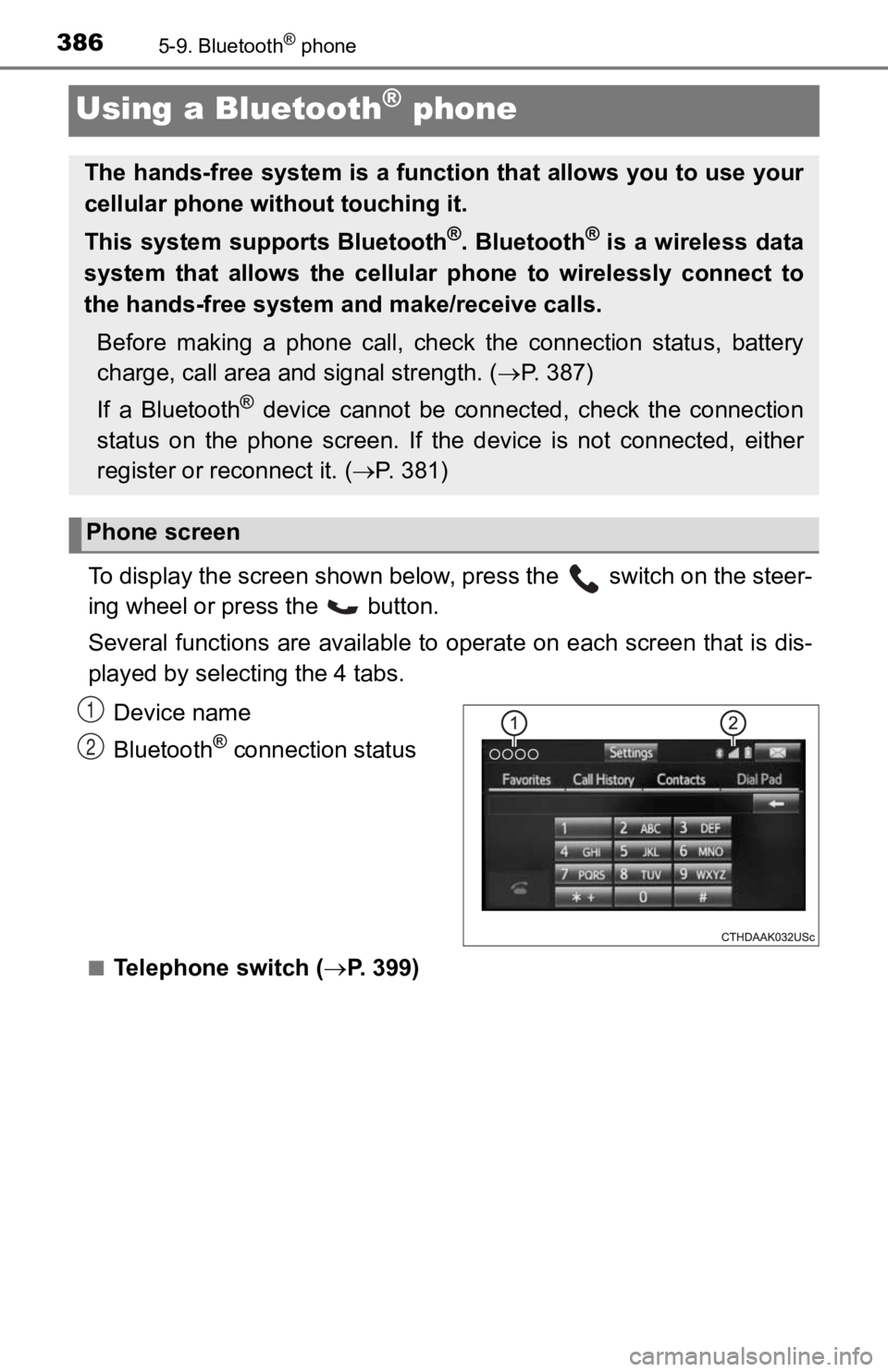
To display the screen shown below, press the switch on the steer-
ing wheel or press the button.
Several functions are available to operate on each screen that is dis-
played by select ing the 4 tabs.
Device name
Bluetooth
® connection status
■Telephone switch ( P. 399)
The hands-free system is a function that allows you to use your
cellular phone without touching it.
This system supports Bluetooth
®. Bluetooth® is a wireless data
system that allows the cellular phone to wirelessly connect to
the hands-free system and make/receive calls.
Before making a phone call, check the connection status, batter y
charge, call area and signal strength. ( P. 3 8 7 )
If a Bluetooth
® device cannot be connected, check the connection
status on the phone screen. If the device is not connected, eit her
register or reconnect it. ( P. 3 8 1 )
Phone screen
1
2
Page 516 of 700
5167-3. Do-it-yourself maintenance
■Brake fluid can absorb moisture from the air
Excess moisture in the brake fluid can cause a dangerous loss o f braking effi-
ciency. Use only newly opened brake fluid.
■
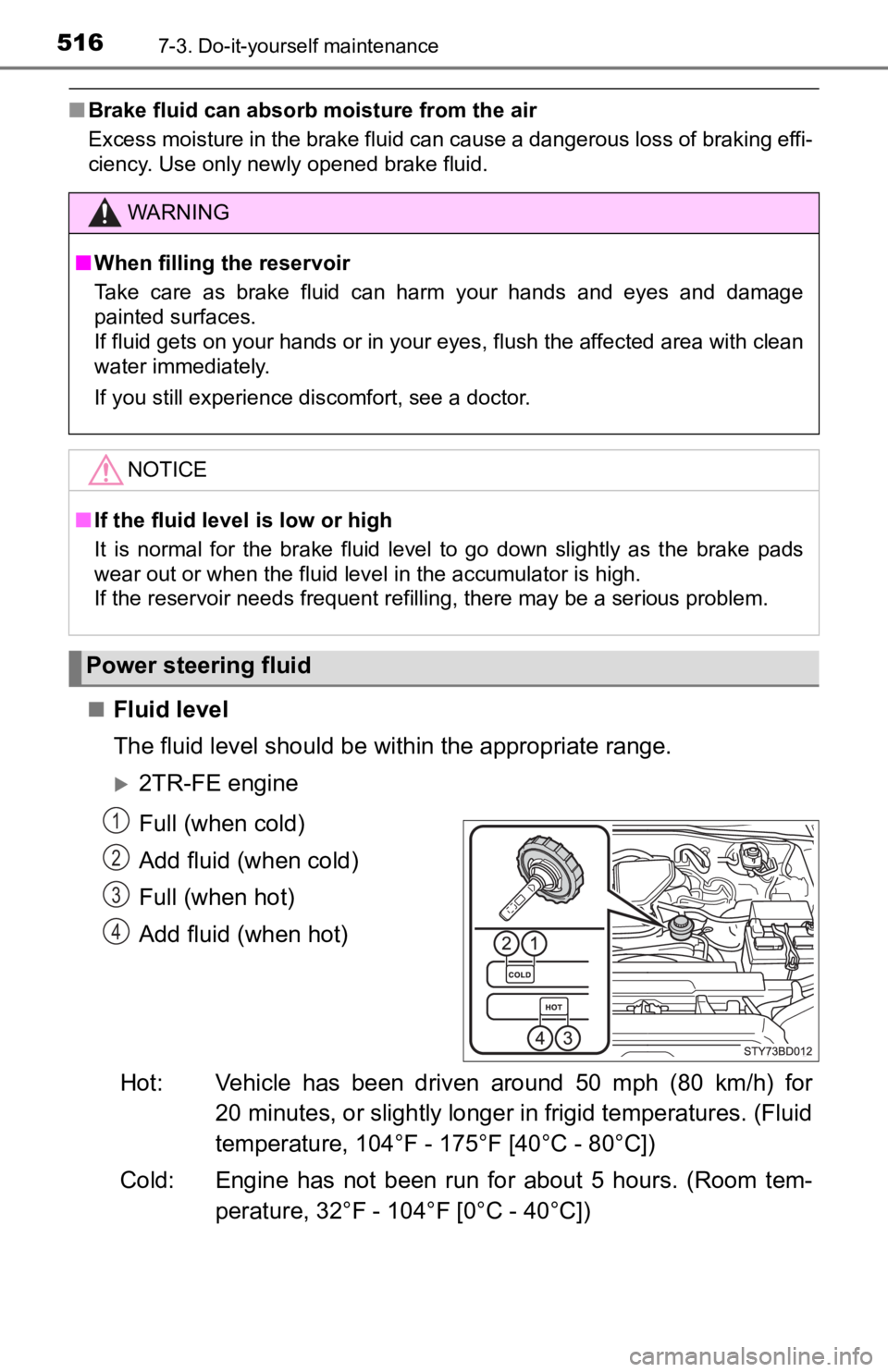
Fluid level
The fluid level should be within the appropriate range.
2TR-FE engine
Full (when cold)
Add fluid (when cold)
Full (when hot)
Add fluid (when hot)
Hot: Vehicle has been driven around 50 mph (80 km/h) for 20 minutes, or slightly longer in frigid temperatures. (Fluid
temperature, 104°F - 175°F [40°C - 80°C])
Cold: Engine has not been run for about 5 hours. (Room tem- perature, 32°F - 104°F [0°C - 40°C])
WARNING
■ When filling the reservoir
Take care as brake fluid can harm your hands and eyes and damage
painted surfaces.
If fluid gets on your hands or in your eyes, flush the affected area with clean
water immediately.
If you still experience discomfort, see a doctor.
NOTICE
■ If the fluid level is low or high
It is normal for the brake fluid level to go down slightly as the brake pads
wear out or when the fluid level in the accumulator is high.
If the reservoir needs frequent refilling, there may be a serious problem.
Power steering fluid
1
2
3
4
Page 542 of 700
5427-3. Do-it-yourself maintenance
Checking and replacing fuses
Vehicles without a smart key system:
Turn the engine switch to the “LOCK” position.
Vehicles with a smart key system:
Turn the engine switch off.
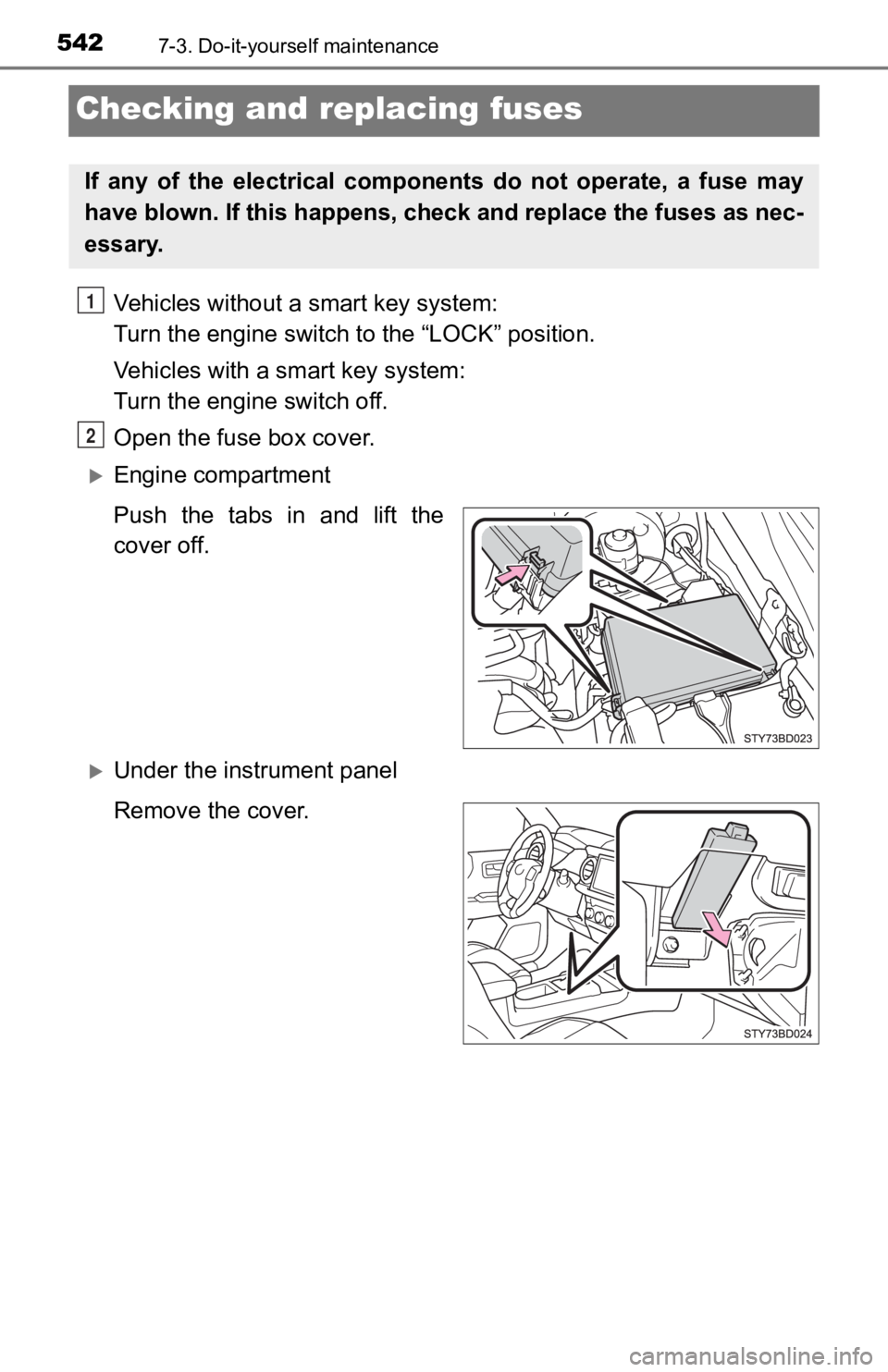
Open the fuse box cover.
Engine compartment
Push the tabs in and lift the
cover off.
Under the instrument panel
Remove the cover.
If any of the electrical components do not operate, a fuse may
have blown. If this happens, check and replace the fuses as nec-
essary.
1
2
Page 547 of 700
5477-3. Do-it-yourself maintenance
7
Maintenance and care
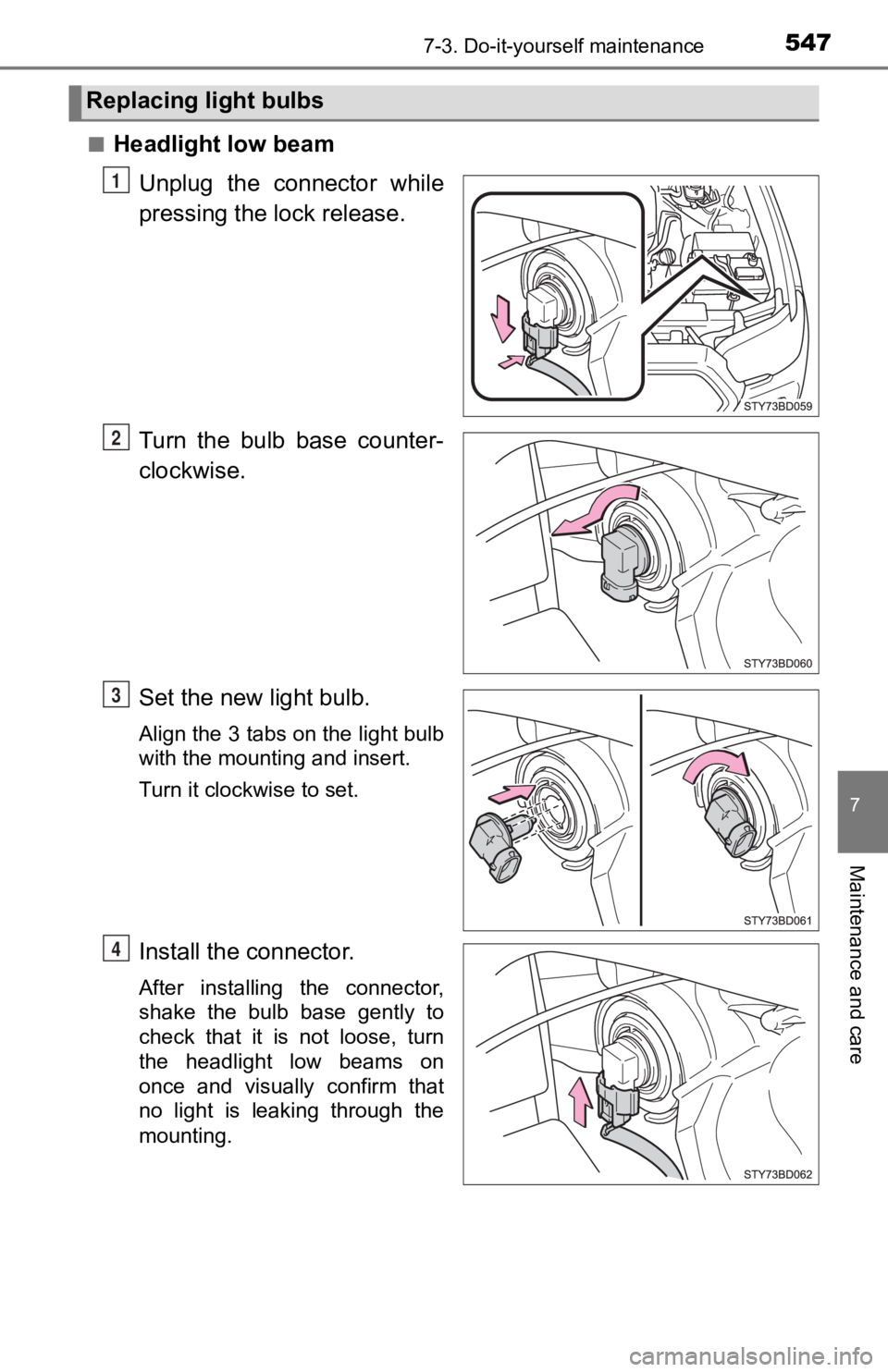
■Headlight low beamUnplug the connector while
pressing the lock release.
Turn the bulb base counter-
clockwise.
Set the new light bulb.
Align the 3 tabs on the light bulb
with the mounting and insert.
Turn it clockwise to set.
Install the connector.
After installing the connector,
shake the bulb base gently to
check that it is not loose, turn
the headlight low beams on
once and visually confirm that
no light is leaking through the
mounting.
Replacing light bulbs
1
2
3
4
Page 548 of 700
5487-3. Do-it-yourself maintenance
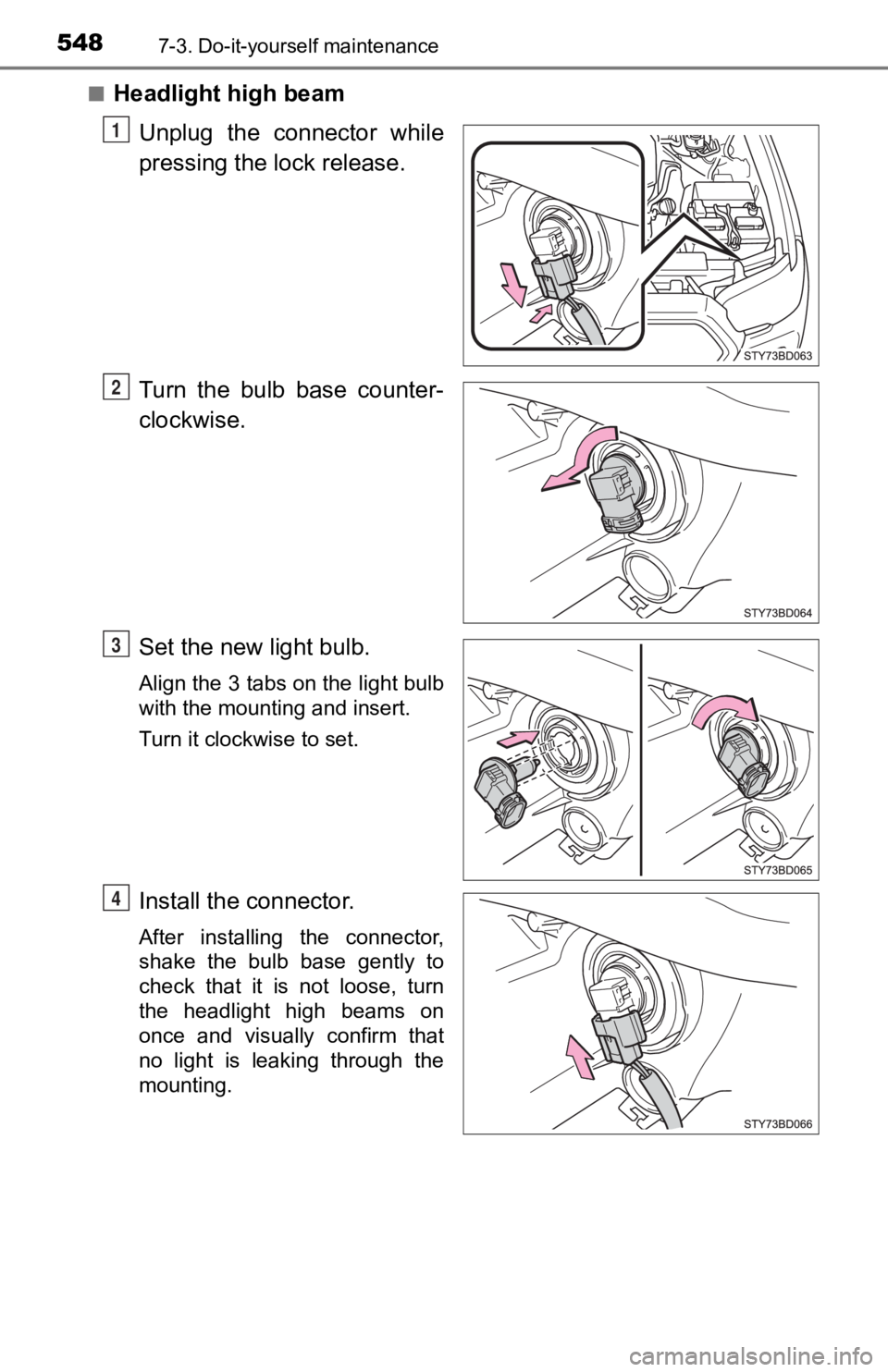
■Headlight high beamUnplug the connector while
pressing the lock release.
Turn the bulb base counter-
clockwise.
Set the new light bulb.
Align the 3 tabs on the light bulb
with the mounting and insert.
Turn it clockwise to set.
Install the connector.
After installing the connector,
shake the bulb base gently to
check that it is not loose, turn
the headlight high beams on
once and visually confirm that
no light is leaking through the
mounting.
1
2
3
4
Page 552 of 700
5527-3. Do-it-yourself maintenance
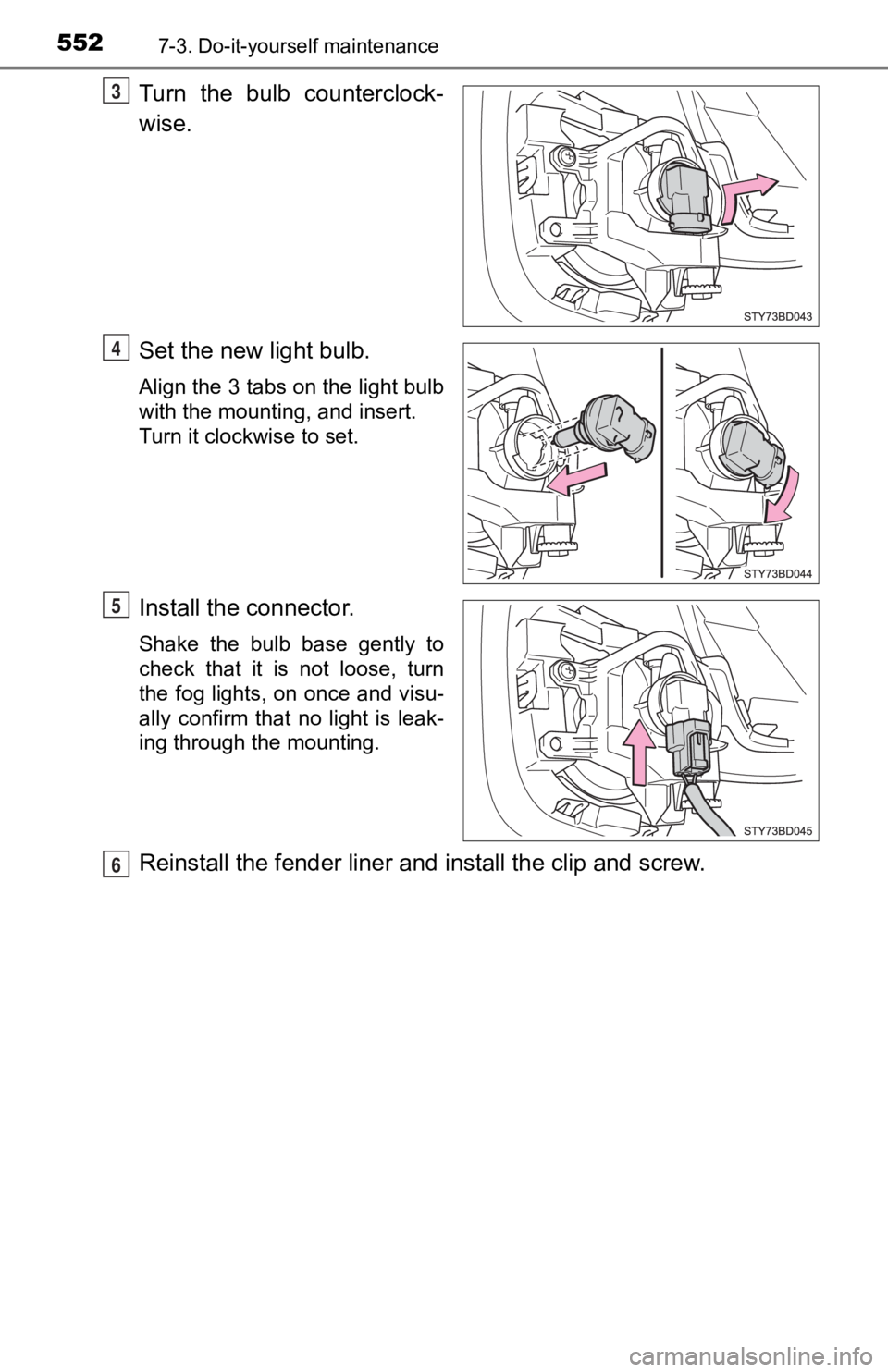
Turn the bulb counterclock-
wise.
Set the new light bulb.
Align the 3 tabs on the light bulb
with the mounting, and insert.
Turn it clockwise to set.
Install the connector.
Shake the bulb base gently to
check that it is not loose, turn
the fog lights, on once and visu-
ally confirm that no light is leak-
ing through the mounting.
Reinstall the fender liner and install the clip and screw.
3
4
5
6
Page 568 of 700
5688-2. Steps to take in an emergency
If a warning light turns on or a war ning
buzzer sounds
Calmly perform the following actions if any of the warning ligh ts
comes on or flashes. If a light comes on or flashes, but then
goes off, this does not necessarily indicate a malfunction in the
system. However, if this continues to occur, have the vehicle
inspected by your Toyota dealer.
Warning light and w arning buzzer list
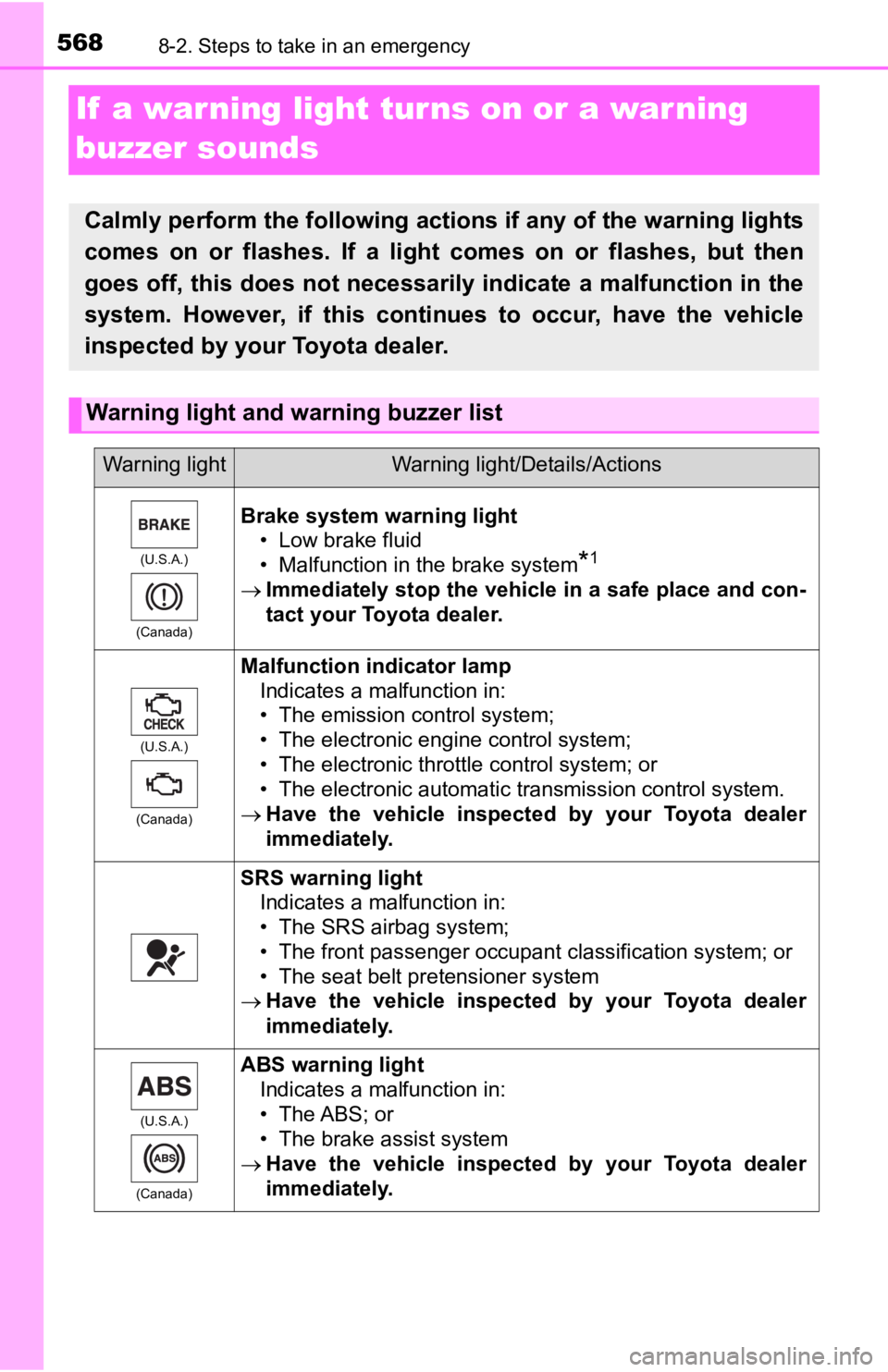
Warning lightWarning light/Details/Actions
(U.S.A.)
(Canada)
Brake system warning light • Low brake fluid
• Malfunction in the brake system
*1
Immediately stop the vehicle in a safe place and con-
tact your Toyota dealer.
(U.S.A.)
(Canada)
Malfunction indicator lamp Indicates a malfunction in:
• The emission control system;
• The electronic engine control system;
• The electronic throttle control system; or
• The electronic automatic transmission control system.
Have the vehicle inspected by your Toyota dealer
immediately.
SRS warning light
Indicates a malfunction in:
• The SRS airbag system;
• The front passenger occupant classification system; or
• The seat belt pretensioner system
Have the vehicle inspected by your Toyota dealer
immediately.
(U.S.A.)
(Canada)
ABS warning light Indicates a malfunction in:
• The ABS; or
• The brake assist system
Have the vehicle inspected by your Toyota dealer
immediately.