clutch TOYOTA TACOMA 2019 (in English) User Guide
[x] Cancel search | Manufacturer: TOYOTA, Model Year: 2019, Model line: TACOMA, Model: TOYOTA TACOMA 2019Pages: 700, PDF Size: 12.83 MB
Page 300 of 700

3004-5. Using the driving support systems
■Shifting from “2WD” to “4H”
Reduce vehicle speed to less than 62 mph (100 km/h).
Turn the front-wheel drive control switch to “4H”.
The four-wheel drive indicator will come on.
■
Shifting from “4H” to “2WD”
Turn the front-wheel drive co ntrol switch to “2WD”.
This can be done at any speed. Y ou need not depress the clutch
pedal. (manual transmission only)
The four-wheel drive indicator will go off.
■
Shifting from “4H” to “4L”
Automatic transmission
Stop the vehicle completely and continue to depress the brake
pedal.
Shift the shift lever to N.
Push and turn the front-wheel drive control switch to “4L”.
The “4LO” indicator will come on.
If the four-wheel drive indicator flashes and the buzzer sounds, try the
above steps again.
Manual transmission
Stop the vehicle or reduce your speed to less than 2 mph (3 km/ h).
Depress and hold the clutch pedal.
Push and turn the front-wheel drive control switch to “4L”.
The “4LO” indicator will come on.
If the four-wheel drive indicator flashes and the buzzer sounds, try the
above steps again.
Shifting between “2WD” and “4H”
Shifting between “4H” and “4L”
1
2
1
2
3
1
2
3
Page 301 of 700

3014-5. Using the driving support systems
4
Driving
■Shifting from “4L” to “4H”
Automatic transmission
Stop the vehicle completely and continue to depress the brake
pedal.
Shift the shift lever to N.
Push and turn the front-wheel drive control switch to “4H”.
The “4LO” indicator will go off.
If the four-wheel drive indicator flashes and the buzzer sounds, try the
above steps again.
Manual transmission
Stop the vehicle or reduce your speed to less than 2 mph (3 km/ h).
Depress and hold the clutch pedal.
Push and turn the front-wheel dr ive control switch to “4H”.
The “4LO” indicator will go off.
If the four-wheel drive indicator flashes and the buzzer sounds, try the
above steps again.
■If the four-wheel dri ve indicator light or the “4LO” indicator light blinks
● Shifting from “2WD” to “4H”
• If the four-wheel drive indicator continues to blink, drive straight ahead
while accelerating or decelerating.
• If the four-wheel drive indicator continues to blink and the b uzzer sounds,
stop the vehicle or reduce the vehicle speed to less than 62 mp h
(100 km/h). Operate the switch again.
● Shifting from “4H” to “2WD”
If the four-wheel drive indicator continues to blink, drive str aight ahead
while accelerating or decelerating, or drive forward or backwar d in a short
distance.
1
2
3
1
2
3
Page 302 of 700

3024-5. Using the driving support systems
●Shifting to “4H” or “4L”
Automatic transmission
If the “4LO” indicator continues to blink when you operate the front-wheel
drive control switch to the “4H” or “4L” position, drive forwar d or backward
in a short distance, then stop the vehicle completely, shift th e shift lever
securely to N and operate the switch again.
Manual transmission
If the “4LO” indicator continues to blink when you operate the front-wheel
drive control switch to the “4H” or “4L” position, drive forwar d or backward
in a short distance, then stop the vehicle completely, depress the clutch
pedal and operate the switch again.
If the indicator light continues to blink even if doing so, contact your Toyota
dealer as soon as possible. There may be a trouble in the four- wheel drive
system.
■ Shifting to “4L”
VSC is automatically turned off.
■ Four-wheel drive usage frequency
You should drive in four-wheel drive for at least 10 miles (16 km) each month.
This will assure that the front drive components are lubricated.
WARNING
■Caution while driving
● Never shift the front-wheel drive control switch from “2WD” to “4H” if the
wheels are slipping.
Stop the slipping or spinning before shifting.
● For normal driving on dry and hard surface roads, use “2WD” pos ition.
Driving on dry and hard surface roads in “4H” or “4L” position may cause
drive component oil leakage, seizure, or other problems resulti ng in an
accident. Further, it may cause tire wear and increased fuel consumption.
● Avoid turning suddenly in “4H” or “4L” position. If you do turn suddenly, the
difference in turning speeds between the front and rear wheels may have
a similar effect to braking, thus making driving difficult.
● Do not shift the front-wheel drive control switch when the vehicle is turning
or when its wheels are spinning freely off the ground.
Page 306 of 700

3064-5. Using the driving support systems
Manual transmission
Before using the rear differential lock system.
Stop the vehicle or reduce your speed to less than 2 mph (3 km/h ).
Depress the clutch pedal and turn the front-wheel drive control
switch in the “4L” position to see if this is sufficient. If th is has no
effect, additionally use the re ar differential lock system.
Be sure to stop the wheels.
Depress the clutch pedal.
Press the rear differential lock switch.
After the rear differential is locked, the indicator will come on.
Slowly release th e clutch pedal.
Unlock the rear differential as soon as the vehicle moves.
To unlock the rear different ial, press the switch again.
■Locking the rear differential
●When the rear differential is locked, VSC is automatically turn ed off.
(The rear differential lock and VSC off indicators come on.)
● The following systems do not operate when the rear differential is locked. It
is normal operation for the ABS warning light and VSC off indic ator to be on
at this time.
•ABS
• Multi Terrain ABS (if equipped)
• Brake assist system
•VSC
•TRAC
• Pre-Collision System (if equipped)
• Dynamic radar cruise control system (if equipped)
• Cruise control system (if equipped)
• Hill-start assist control (if equipped on 4WD models)
■ The rear differential lock is disengaged when
●Vehicles without a smart key system: When the engine switch is turned to
the “LOCK” position
● Vehicles with a smart key system: When the engine switch is tur ned off
● 4WD models only: Turn the front-wheel drive control switch to “ 2WD” or “4H”
position.
Never forget to turn off the switch after using this feature.
1
2
3
4
5
Page 308 of 700
3084-5. Using the driving support systems
Active traction control system
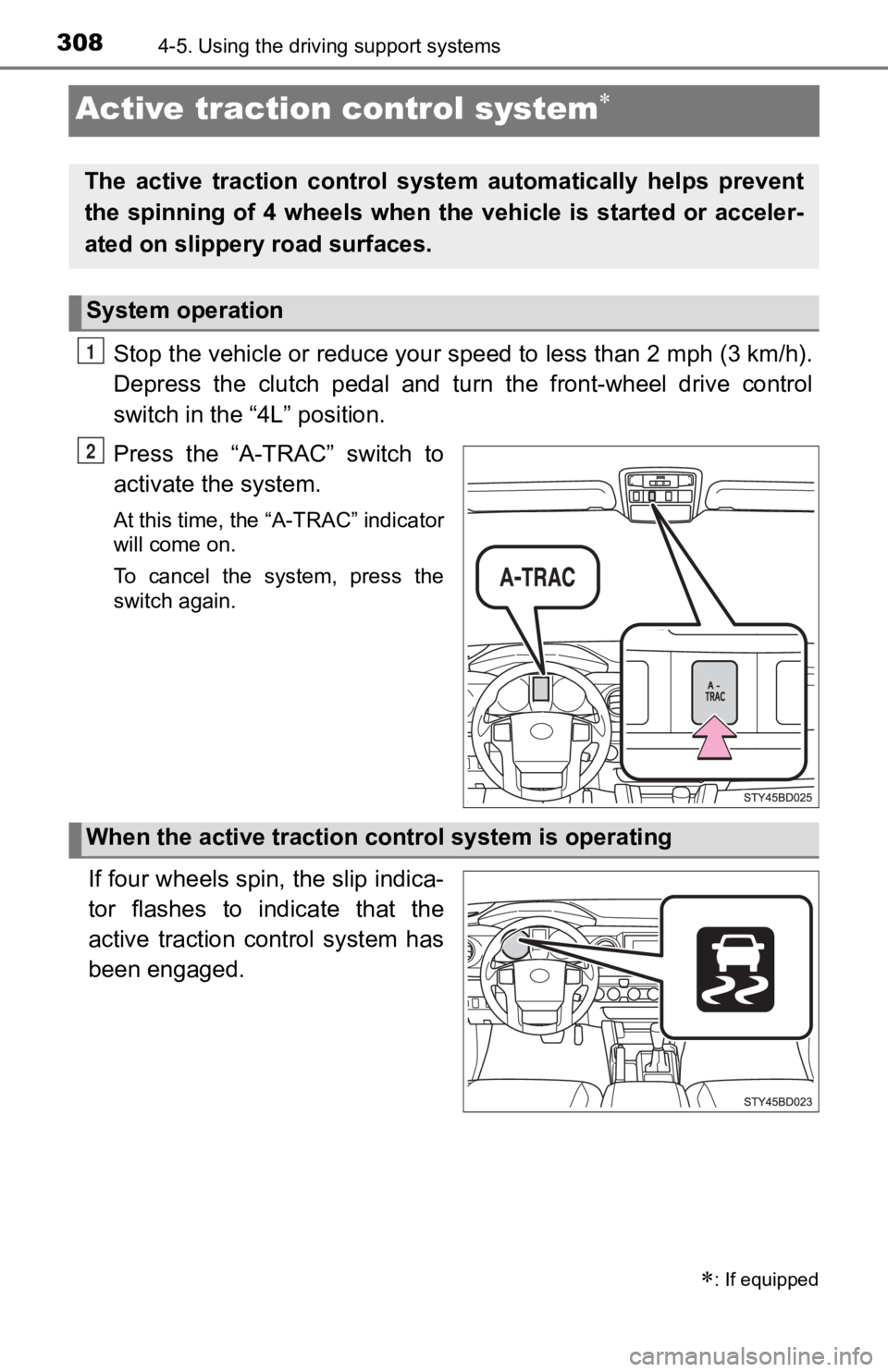
Stop the vehicle or reduce your speed to less than 2 mph (3 km/h ).
Depress the clutch pedal and turn the front-wheel drive control
switch in the “4L” position.
Press the “A-TRAC” switch to
activate the system.
At this time, the “A-TRAC” indicator
will come on.
To cancel the system, press the
switch again.
If four wheels spin, the slip indica-
tor flashes to indicate that the
active traction control system has
been engaged.
: If equipped
The active traction control syst em automatically helps prevent
the spinning of 4 wheels when the vehicle is started or acceler -
ated on slippery road surfaces.
System operation
1
2
When the active traction co ntrol system is operating
Page 318 of 700
3184-5. Using the driving support systems
Clutch star t cancel switch
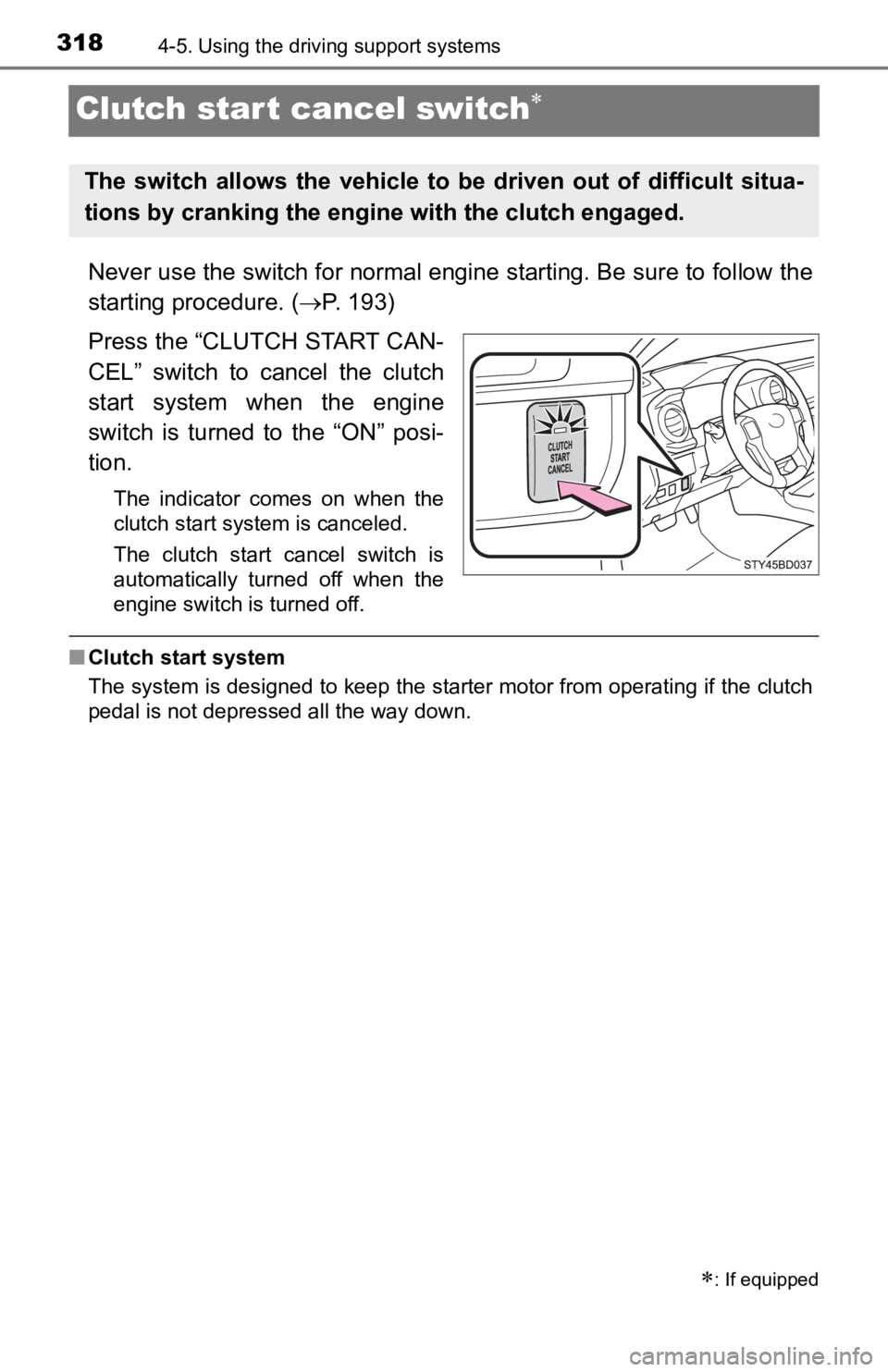
Never use the switch for normal engine starting. Be sure to fol low the
starting procedure. ( P. 1 9 3 )
Press the “CLUTCH START CAN-
CEL” switch to cancel the clutch
start system when the engine
switch is turned to the “ON” posi-
tion.
The indicator comes on when the
clutch start system is canceled.
The clutch start cancel switch is
automatically turned off when the
engine switch is turned off.
■ Clutch start system
The system is designed to keep the starter motor from operating if the clutch
pedal is not depressed all the way down.
: If equipped
The switch allows the vehicle t o be driven out of difficult situa-
tions by cranking the engine with the clutch engaged.
Page 454 of 700
4546-3. Using the storage features
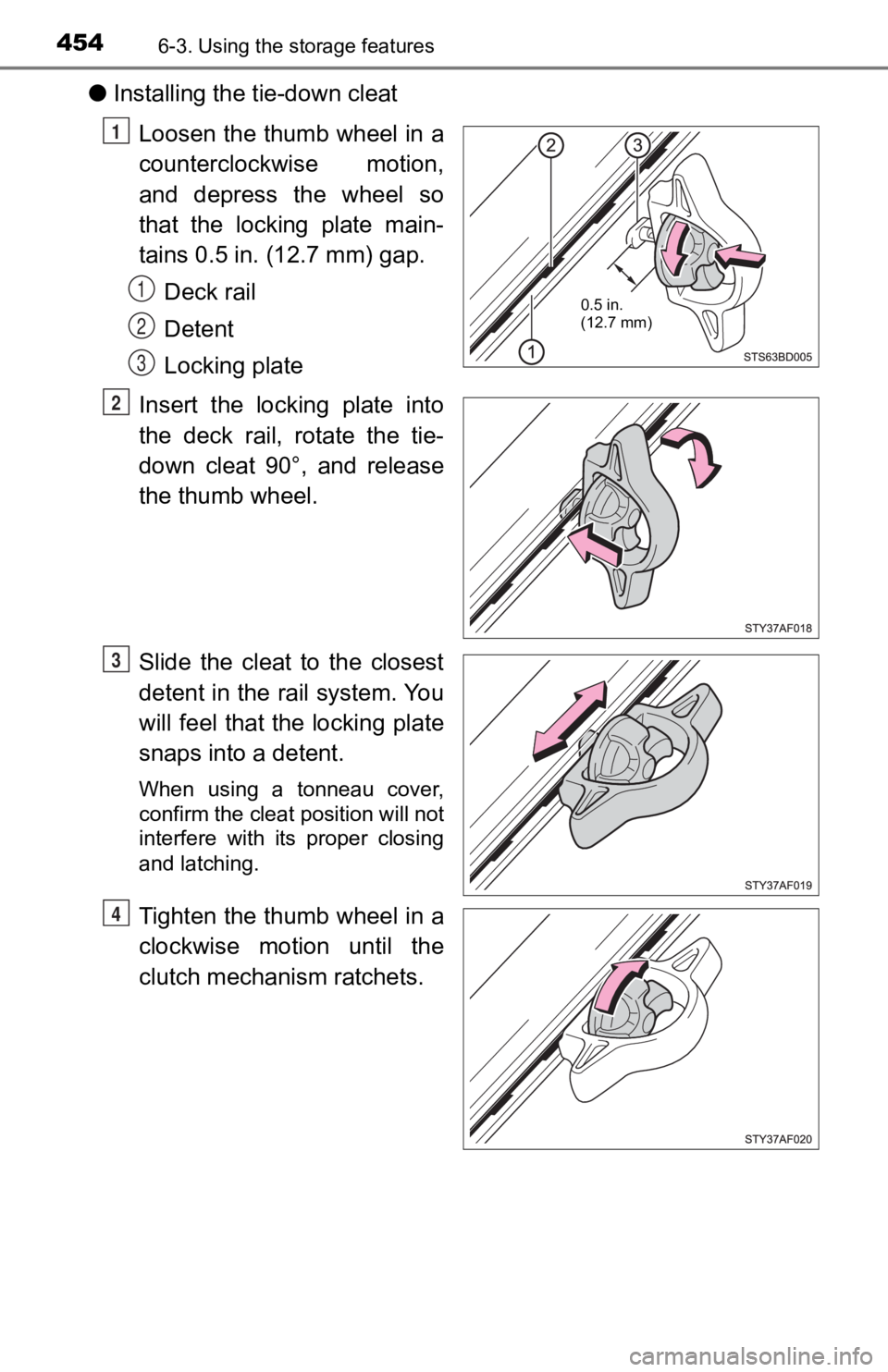
●Installing the tie-down cleat
Loosen the thumb wheel in a
counterclockwise motion,
and depress the wheel so
that the locking plate main-
tains 0.5 in. (12.7 mm) gap.Deck rail
Detent
Locking plate
Insert the locking plate into
the deck rail, rotate the tie-
down cleat 90°, and release
the thumb wheel.
Slide the cleat to the closest
detent in the rail system. You
will feel that the locking plate
snaps into a detent.
When using a tonneau cover,
confirm the cleat position will not
interfere with its proper closing
and latching.
Tighten the thumb wheel in a
clockwise motion until the
clutch mechanism ratchets.
0.5 in.
(12.7 mm)
1
1
2
3
2
3
4
Page 466 of 700
4666-4. Other interior features
■Maximum available capacity of the power outlet
●While the vehicl e is being driven
The maximum capacity of the power outlet is always 120 V AC/
100 W.
● When the vehicle is stationary
The maximum capacity of the power outlet varies depending on
the following conditions:
• The maximum capacity is 120 V AC/100 W when the following conditions applies:
Vehicles with an automatic transmission
The shift lever is moved to any positions other than P and N.
Vehicles with a manual transmission
The clutch pedal is depressed.
• The maximum capacity is 120 V AC/400 W when the followingconditions applies:
Vehicles with an automatic transmission
The shift lever is in P or N.
Vehicles with a manual transmission
The shift lever is in N and the clutch pedal is not depressed.
The maximum capacity of 400 W can only be restored by turning the
power outlet main switch off and then on again under condition
described above.
■ The power outlet can be used when
The engine is running.
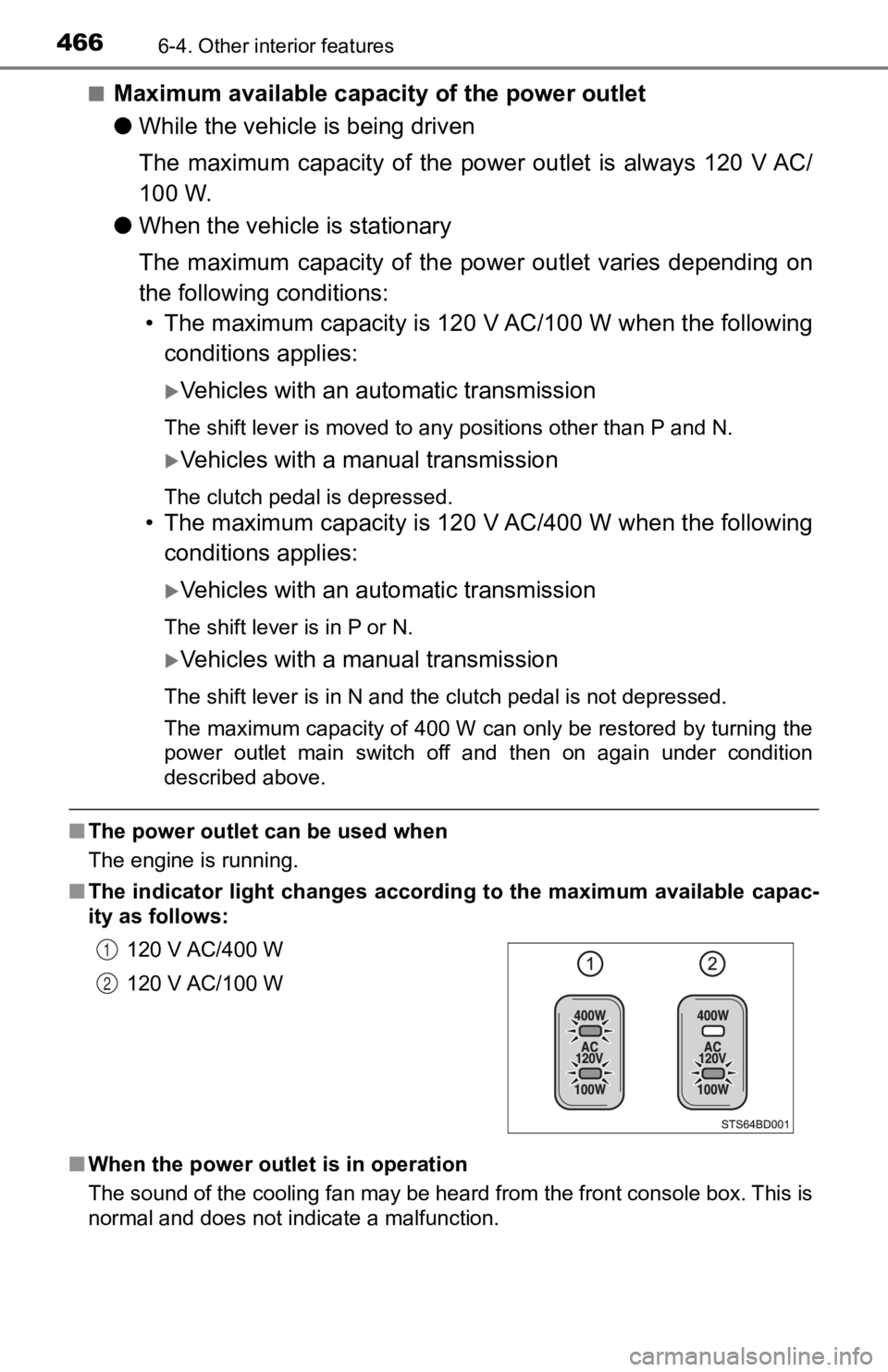
■ The indicator light changes according to the maximum available capac-
ity as follows:
■ When the power outlet is in operation
The sound of the cooling fan may be heard from the front consol e box. This is
normal and does not indicate a malfunction. 120 V AC/400 W
120 V AC/100 W
1
2
Page 467 of 700

4676-4. Other interior features
6
Interior features
■If the engine is started with th e power outlet main switch on
The maximum capacity of the power supply may decrease to below the stan-
dard, or may be cut off completely, even when the vehicle is st ationary.
■ The protection circuit may be act ivated to cut the power supply if any of
the following conditions apply:
● The engine is started with the power outlet main switch on.
● Use of electrical appliances exceeding the maximum capacity is attempted.
A sound may be heard when the protection circuit is activated. This is nor-
mal and does not indicate a malfunction.
● Electrical appliances, which consume power exceeding 100 W, have been
used continuously for a long time period.
● The total power usage by all electrical features (headlights, a ir conditioning,
etc.) has exceeded the total vehicle maximum for an extended period of
time.
■ If the protection circuit is act ivated and the power supply is cut, conduct
the following procedure:
Park the vehicle in a safe place, and then securely apply the parking
brake.
Check and ensure the following conditions:
Vehicles with an automatic transmission
The shift lever is in P or N.
Vehicles with a manual transmission
The shift lever is in N and the clutch pedal is not depressed.
Make sure that the power consumption of the electric appliance is within
the maximum capacity of the power outlet and the appliance is n ot bro-
ken.
Press the power outlet main switch again.
When the cabin temperature is high, open the windows to cool th e tempera-
ture down. Once it reaches the normal temperature, turn the pow er outlet
main switch on again.
If the power supply does not resume even after the above procedure has
been performed, have the vehicle inspected by your Toyota deale r.
1
2
3
4
Page 502 of 700
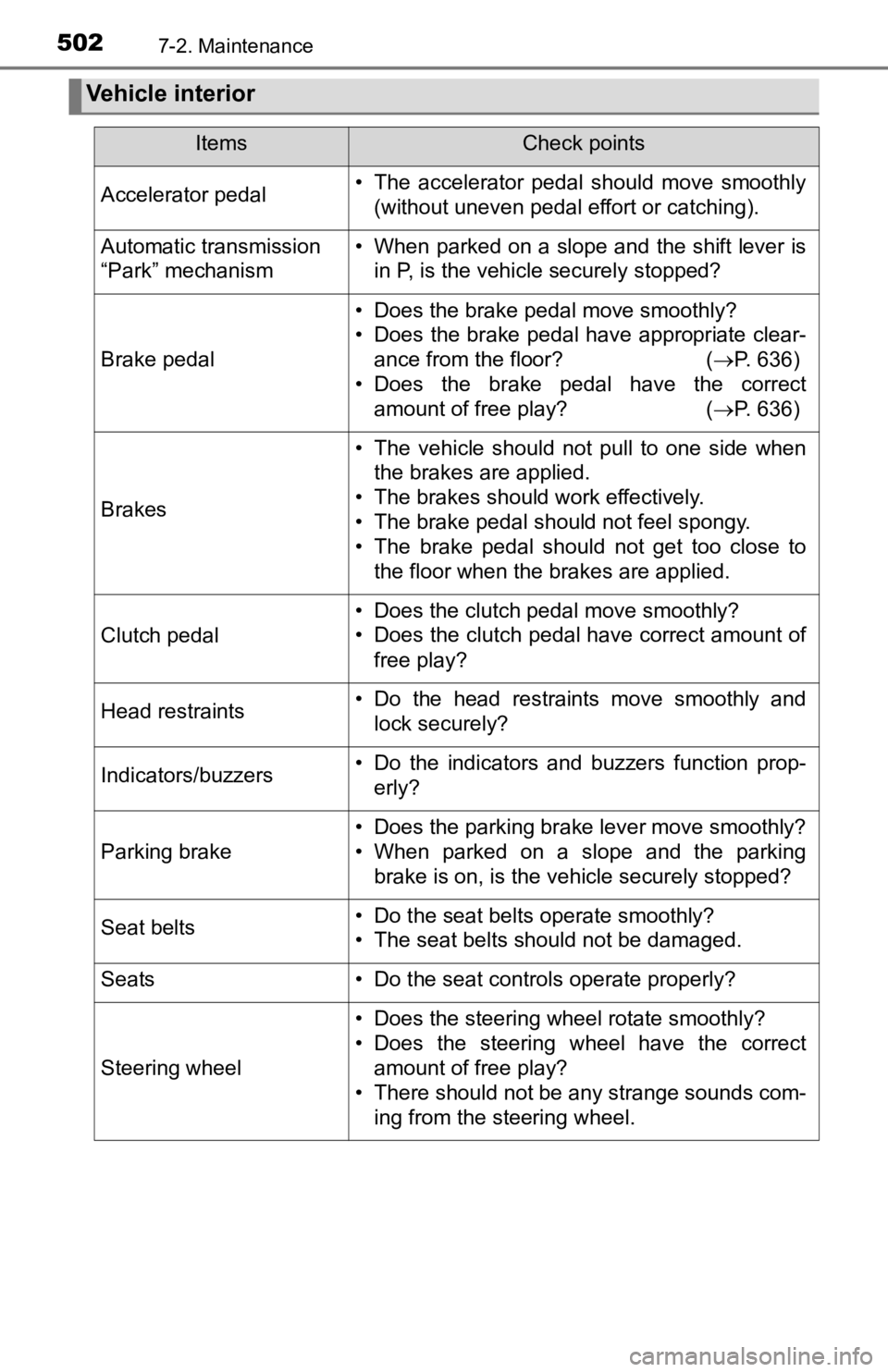
5027-2. Maintenance
Vehicle interior
ItemsCheck points
Accelerator pedal• The accelerator pedal should move smoothly(without uneven pedal effort or catching).
Automatic transmission
“Park” mechanism• When parked on a slope and the shift lever isin P, is the vehicle securely stopped?
Brake pedal
• Does the brake pedal move smoothly?
• Does the brake pedal have appropriate clear-ance from the floor? ( P. 636)
• Does the brake pedal have the correct amount of free play? ( P. 636)
Brakes
• The vehicle should not pull to one side when
the brakes are applied.
• The brakes should work effectively.
• The brake pedal should not feel spongy.
• The brake pedal should not get too close to the floor when the brakes are applied.
Clutch pedal
• Does the clutch pedal move smoothly?
• Does the clutch pedal have correct amount of
free play?
Head restraints• Do the head restraints move smoothly andlock securely?
Indicators/buzzers• Do the indicators and buzzers function prop-erly?
Parking brake
• Does the parking brake lever move smoothly?
• When parked on a slope and the parkingbrake is on, is the vehicle securely stopped?
Seat belts• Do the seat belts operate smoothly?
• The seat belts should not be damaged.
Seats• Do the seat controls operate properly?
Steering wheel
• Does the steering wheel rotate smoothly?
• Does the steering wheel have the correctamount of free play?
• There should not be any strange sounds com-
ing from the steering wheel.