window TOYOTA TACOMA 2019 (in English) User Guide
[x] Cancel search | Manufacturer: TOYOTA, Model Year: 2019, Model line: TACOMA, Model: TOYOTA TACOMA 2019Pages: 700, PDF Size: 12.83 MB
Page 80 of 700
801-2. Theft deterrent system
■System maintenance
The vehicle has a maintenance-free type alarm system.
■ Items to check before locking the vehicle
To prevent unexpected triggering of the alarm and vehicle theft , make sure of
the following:
● Nobody is in the vehicle.
● The windows and moon roof (if equipped) are closed before the a larm is set.
● No valuables or other personal items are left in the vehicle.
■ Triggering of the alarm
The alarm may be triggered in the following situations:
(Stopping the alarm deactivates the alarm system.)
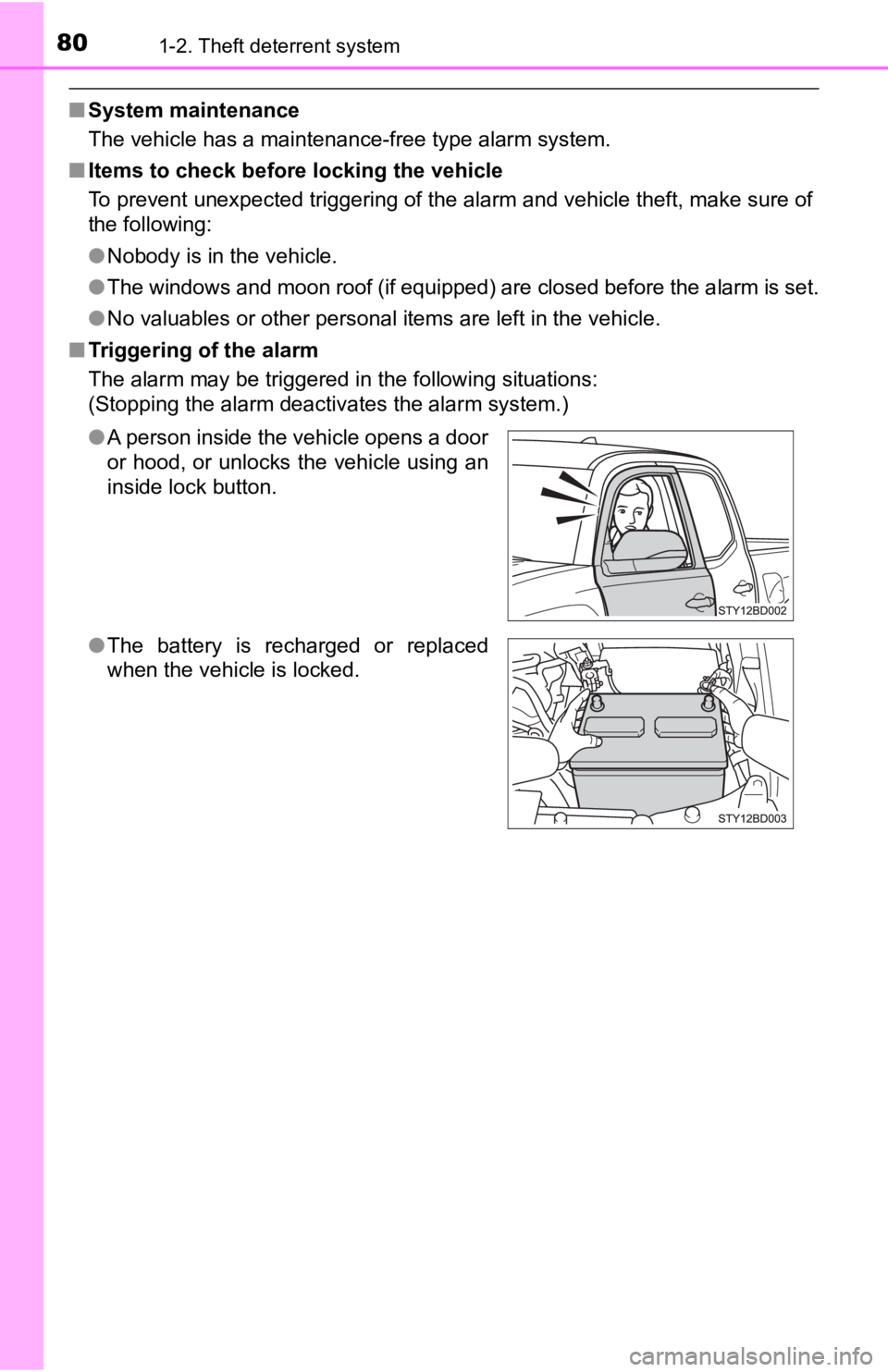
●A person inside the vehicle opens a door
or hood, or unlocks the vehicle using an
inside lock button.
● The battery is recharged or replaced
when the vehicle is locked.
Page 103 of 700

103
3
Operation of
each component
3-1. Key information
Keys .................................. 104
3-2. Opening, closing and locking the doors
Doors ................................ 111
Tailgate ............................. 118
Smart key system.............. 123
3-3. Adjusting the seats Front seats ........................ 131
Rear seats ......................... 133
Head restraints .................. 136
3-4. Adjusting the steering
wheel and mirrors
Steering wheel .................. 140
Inside rear view mirror....... 142
Outside rear view mirrors ............................. 145 3-5. Opening, closing the
windows and moon roof
Power windows ................. 147
Back window (vehicles with sliding type) ............. 150
Power back window .......... 151
Moon roof .......................... 153
Page 126 of 700

1263-2. Opening, closing and locking the doors
■Conditions affecting operation
The smart key system uses weak radio waves. In the following si tuations, the
communication between the electronic key and the vehicle may be affected,
preventing the smart key system, wireless remote control and en gine immobi-
lizer system from operating properly. (Ways of coping: P. 614)
● When the electronic key battery is depleted
● Near a TV tower, electric power plant, gas station, radio stati on, large dis-
play, airport or other facility that generates strong radio wav es or electrical
noise
● When carrying a portable radio, cellular phone, cordless phone or other
wireless communication device
● When the electronic key is in contact with, or is covered by th e following
metallic objects
• Cards to which aluminum foil is attached
• Cigarette boxes that have aluminum foil inside
• Metallic wallets or bags
• Coins
• Hand warmers made of metal
• Media such as CDs and DVDs
● When multiple electronic keys are in the vicinity
● When other wireless keys (that emit radio waves) are being used nearby
● When carrying the electronic key together with the following devices that
emit radio waves
• Another vehicle’s electronic key or a wireless key that emits radio waves
• Personal computers or personal digital assistants (PDAs)
• Digital audio players
• Portable game systems
● If window tint with a metallic content or metallic objects are attached to the
back window
● When the electronic key is placed near a battery charger or ele ctronic
devices
Page 127 of 700

1273-2. Opening, closing and locking the doors
3
Operation of each component
■Note for the entry function
●Even when the electronic key is within the effective range (detection areas),
the system may not operate properly in the following cases:
• The electronic key is too close to the window or outside door handle, near
the ground, or in a high place when the doors are locked or unl ocked.
• The electronic key is on the instrument panel or floor, or in the console
box or glove box when the engine is started or engine switch mo des are
changed.
● Do not leave the electronic key on top of the instrument panel or near the
door pockets when exiting the vehicle. Depending on the radio w ave recep-
tion conditions, it may be detected by the antenna outside the cabin and the
door will become lockable from the outside, possibly trapping the electronic
key inside the vehicle.
● As long as the electronic key is within the effective range, th e doors may be
locked or unlocked by anyone. However, only the doors detecting the elec-
tronic key can be used to unlock the vehicle.
● Even if the electronic key is not inside the vehicle, it may be possible to start
the engine if the electronic key is near the window.
● The doors may unlock or lock if a large amount of water splashes on the
door handle, such as in the rain or in a car wash, when the electronic key is
within the effective range. (The doors will automatically be lo cked after
approximately 60 seconds if the doors are not opened and closed.)
● If the wireless remote control is used to lock the doors when t he electronic
key is near the vehicle, there is a possibility that the door m ay not be
unlocked by the entry function. (Use the wireless remote contro l to unlock
the doors.)
● Touching the door lock or unlock sensor while wearing gloves ma y prevent
lock or unlock operation. Remove the gloves and touch the lock sensor
again.
● When the lock operation is performed using the lock sensor, rec ognition sig-
nals will be shown up to two consecutive times. After this, no recognition
signals will be given.
● If the door handle becomes wet while the electronic key is with in the effec-
tive range, the door may lock and unlock repeatedly. In this case, follow the
following correction procedures to wash the vehicle:
• Place the electronic key in a location 6 ft. (2 m) or more awa y from the
vehicle. (Take care to ensure that the key is not stolen.)
• Set the electronic key to battery-saving mode to disable the s mart key
system. ( P. 125)
● If the electronic key is inside the vehicle and a door handle b ecomes wet
during a car wash, a message may be shown on the multi-informat ion dis-
play and a buzzer will sound outside the vehicle. To turn off t he alarm, lock
all the doors.
Page 147 of 700
1473-5. Opening, closing the windows and moon roof
3
Operation of each component
Power windows
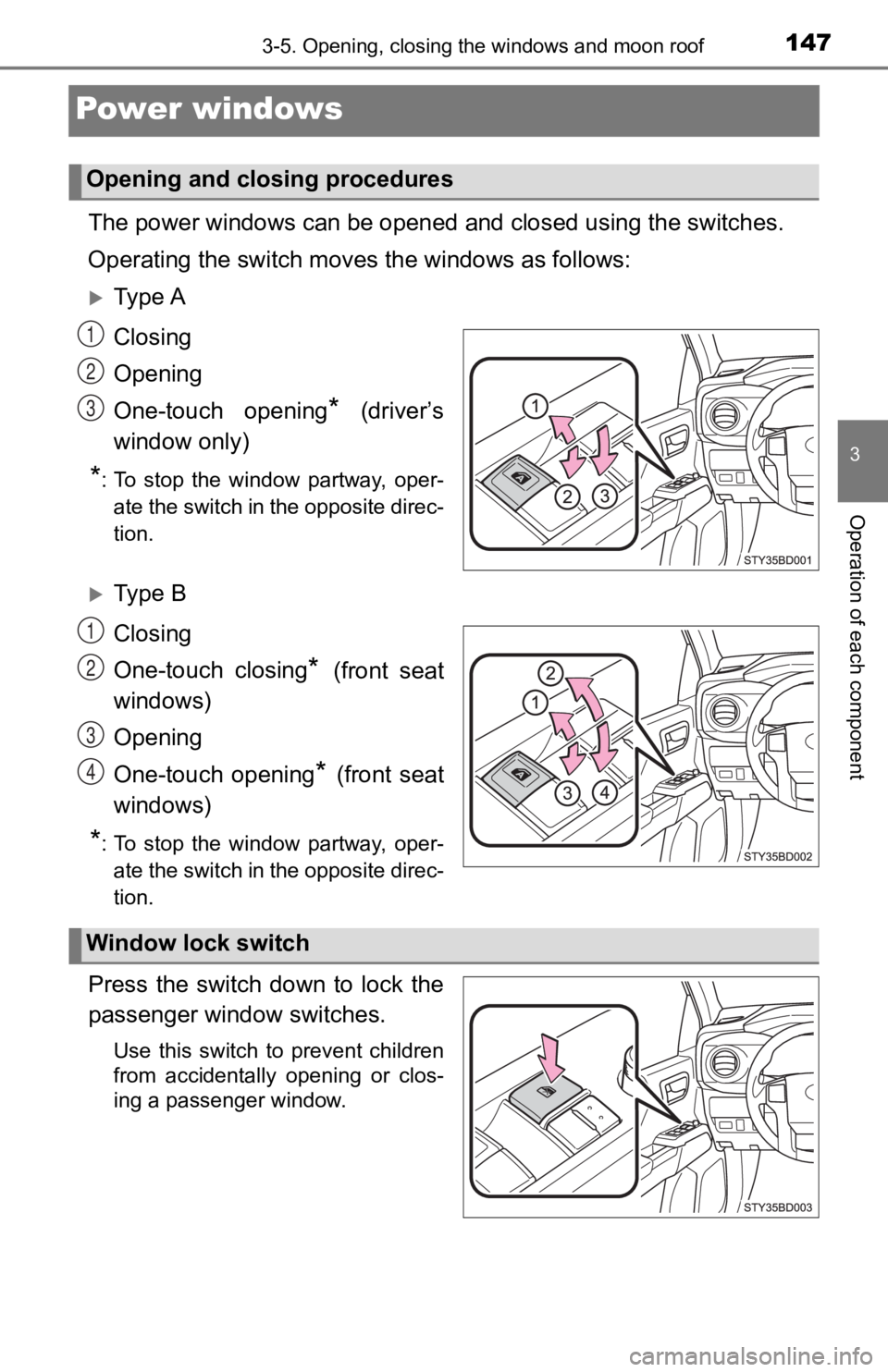
The power windows can be opened and closed using the switches.
Operating the switch moves the windows as follows:
Ty p e A
Closing
Opening
One-touch opening
* (driver’s
window only)
*: To stop the window partway, oper- ate the switch in the opposite direc-
tion.
Ty p e B
Closing
One-touch closing
* (front seat
windows)
Opening
One-touch opening
* (front seat
windows)
*: To stop the window partway, oper- ate the switch in the opposite direc-
tion.
Press the switch down to lock the
passenger window switches.
Use this switch to prevent children
from accidentally opening or clos-
ing a passenger window.
Opening and closing procedures
1
2
3
1
2
3
4
Window lock switch
Page 148 of 700

1483-5. Opening, closing the windows and moon roof
■The power windows can be operated when
Vehicles without a smart key system
The engine switch is in the “ON” position.
Vehicles with a smart key system
The engine switch is in IGNITION ON mode.
■ Operating the power windows after turning the engine off
Vehicles without a smart key system
The power windows can be operated for approximately 45 seconds even
after the engine switch is turned to the “ACC” or “LOCK” positi on. They can-
not, however, be operated once either front door is opened.
Vehicles with a smart key system
The power windows can be operated for approximately 45 seconds even
after the engine switch is turned to ACCESSORY mode or turned o ff. They
cannot, however, be operated once either front door is opened.
■ Jam protection function (type B only)
If an object becomes caught between the window and the window f rame, win-
dow travel is stopped and the window is opened slightly.
■ When the power window does not close normally (type B only)
If the jam protection function is operating abnormally and a wi ndow cannot be
closed, perform the following operations using the power window switch on
the relevant door.
● After stopping the vehicle, the window can be closed by holding the power
window switch in the one-touch closing position while the engine switch is
turned to IGNITION ON mode.
● If the window still cannot be closed even by carrying out the o peration as
explained above, initialize the function by performing the following proce-
dure.
Hold the power window switch in the one-touch closing position. Continue
holding the switch for a further 4 seconds after the window has closed.
If jam detection occurs during step , repeat step within 4 seconds of
jam occurrence.
Hold the power window switch in the one-touch opening position. Con-
tinue holding the switch for more than 1 second after the window has
opened completely.
Hold the power window switch in the one-touch closing position once
again. Continue holding the switch for more than 1 second after the win-
dow has closed.
If you release the switch while the window is moving, start aga in from the
beginning.
If the window continues to close but then re-open slightly even after perform-
ing the above procedure correctly, have the vehicle inspected b y your Toyota
dealer.
1
11
2
3
Page 149 of 700

1493-5. Opening, closing the windows and moon roof
3
Operation of each component
WARNING
Observe the following precautions.
Failure to do so may result in death or serious injury.
■Closing the windows
● The driver is responsible for all the power window operations, including the
operation for the passengers. In order to prevent accidental op eration,
especially by a child, do not let a child operate the power windows. It is
possible for children and other passengers to have body parts c aught in
the power window. Also, when riding with a child, it is recommended to use
the window lock switch. ( P. 147)
● Check to make sure that all passengers do not have any part of their body
in a position where it could be caught when a window is being o perated.
● When exiting the vehicle, turn the engine switch to the “LOCK” position
(vehicles without a smart key system) or off (vehicles with a smart key sys-
tem), carry the key and exit the vehicle along with the child. There may be
accidental operation, due to mischief, etc., that may possibly lead to an
accident.
■ Jam protection function (type B only)
● Never use any part of your body to intentionally activate the jam protection
function.
● The jam protection function may not work if something gets caught just
before the window fully closes.
Page 150 of 700
1503-5. Opening, closing the windows and moon roof
Back window (vehicles with sliding type)
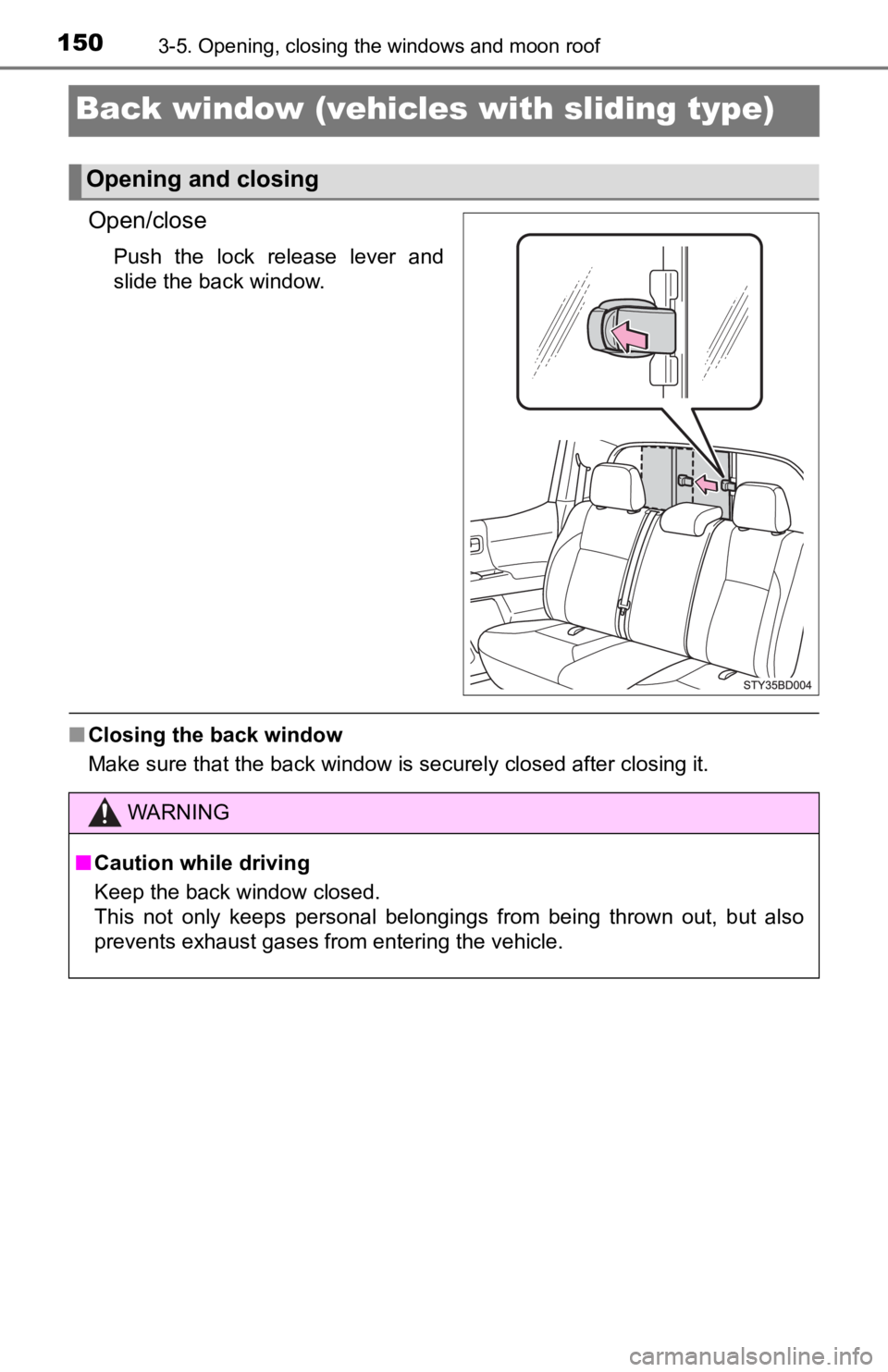
Open/close
Push the lock release lever and
slide the back window.
■Closing the back window
Make sure that the back window is securely closed after closing it.
Opening and closing
WARNING
■Caution while driving
Keep the back window closed.
This not only keeps personal belongings from being thrown out, but also
prevents exhaust gases from entering the vehicle.
Page 151 of 700
1513-5. Opening, closing the windows and moon roof
3
Operation of each component
Power back window
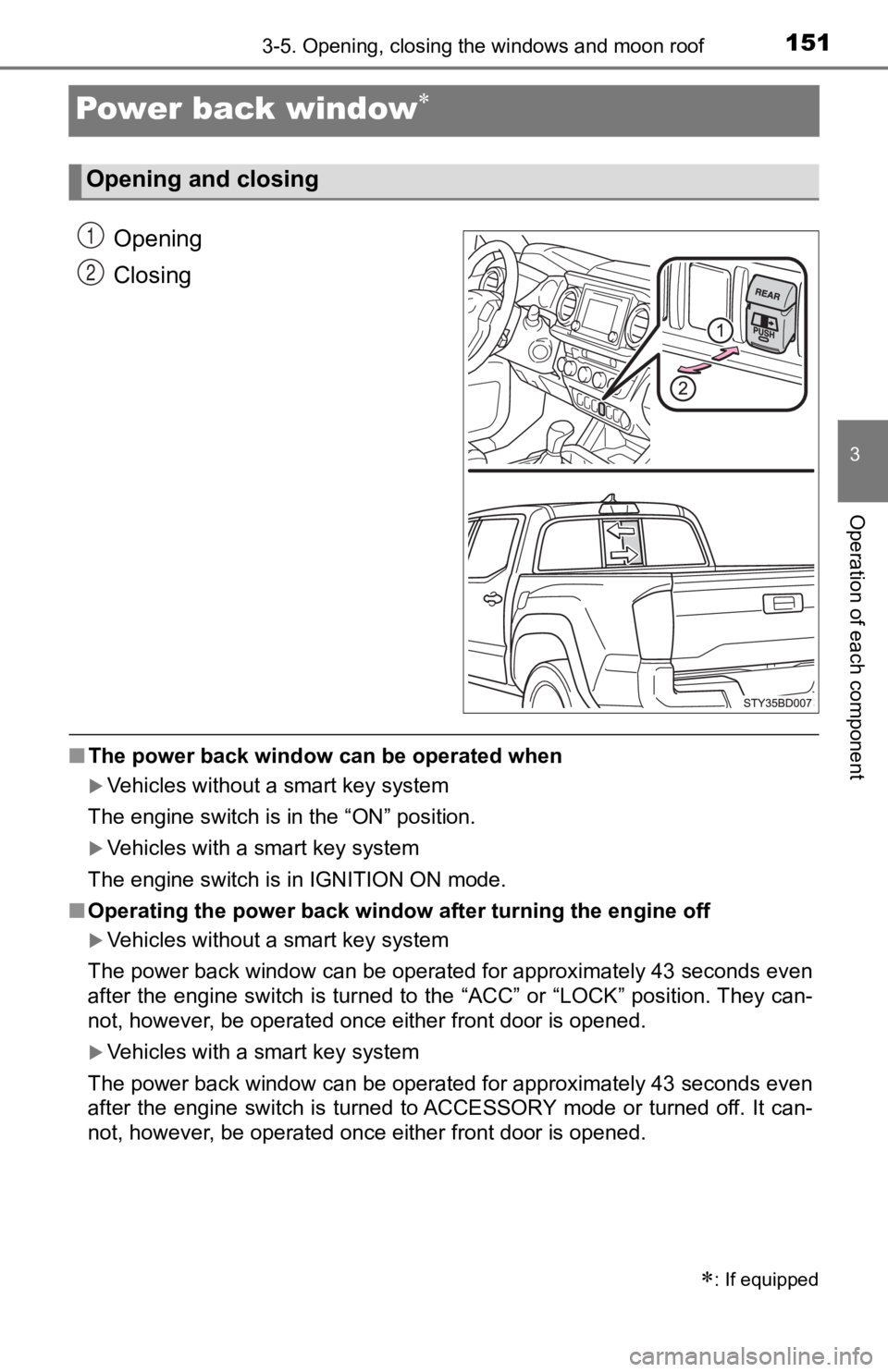
Opening
Closing
■The power back window can be operated when
Vehicles without a smart key system
The engine switch is in the “ON” position.
Vehicles with a smart key system
The engine switch is in IGNITION ON mode.
■ Operating the power back window after turning the engine off
Vehicles without a smart key system
The power back window can be operated for approximately 43 seco nds even
after the engine switch is turned to the “ACC” or “LOCK” positi on. They can-
not, however, be operated once either front door is opened.
Vehicles with a smart key system
The power back window can be operated for approximately 43 seco nds even
after the engine switch is turned to ACCESSORY mode or turned off. It can-
not, however, be operated once either front door is opened.
: If equipped
Opening and closing
1
2
Page 152 of 700

1523-5. Opening, closing the windows and moon roof
WARNING
Observe the following precautions.
Failure to do so may result in death or serious injury.
■Caution while driving
Keep the back window closed while driving.
If the back window is left open, the luggage may be unexpectedly thrown
out, causing an accident.
In addition, exhaust gases may enter the vehicle, causing death or a seri-
ous health hazard. Make sure to close the back window before dr iving.
■ Closing the power back window
● The driver is responsible for power back window opening and clo sing
operation. In order to prevent accidental operation, especially by a child,
do not let a child operate the power back window. It is possible for children
and other passengers to have body parts caught in the power back win-
dow.
● Check to make sure that all passengers do not have any part of their body
in a position where it could be caught when a window is being o perated.
● When exiting the vehicle, turn the engine switch to the “LOCK” position
(vehicles without a smart key system) or off (vehicles with a smart key sys-
tem), carry the key and exit the vehicle along with the child. There may be
accidental operation, due to mischief, etc., that may possibly lead to an
accident.