audio TOYOTA TACOMA 2019 (in English) Owner's Manual
[x] Cancel search | Manufacturer: TOYOTA, Model Year: 2019, Model line: TACOMA, Model: TOYOTA TACOMA 2019Pages: 700, PDF Size: 12.83 MB
Page 338 of 700
3385-1. Basic Operations
Audio system
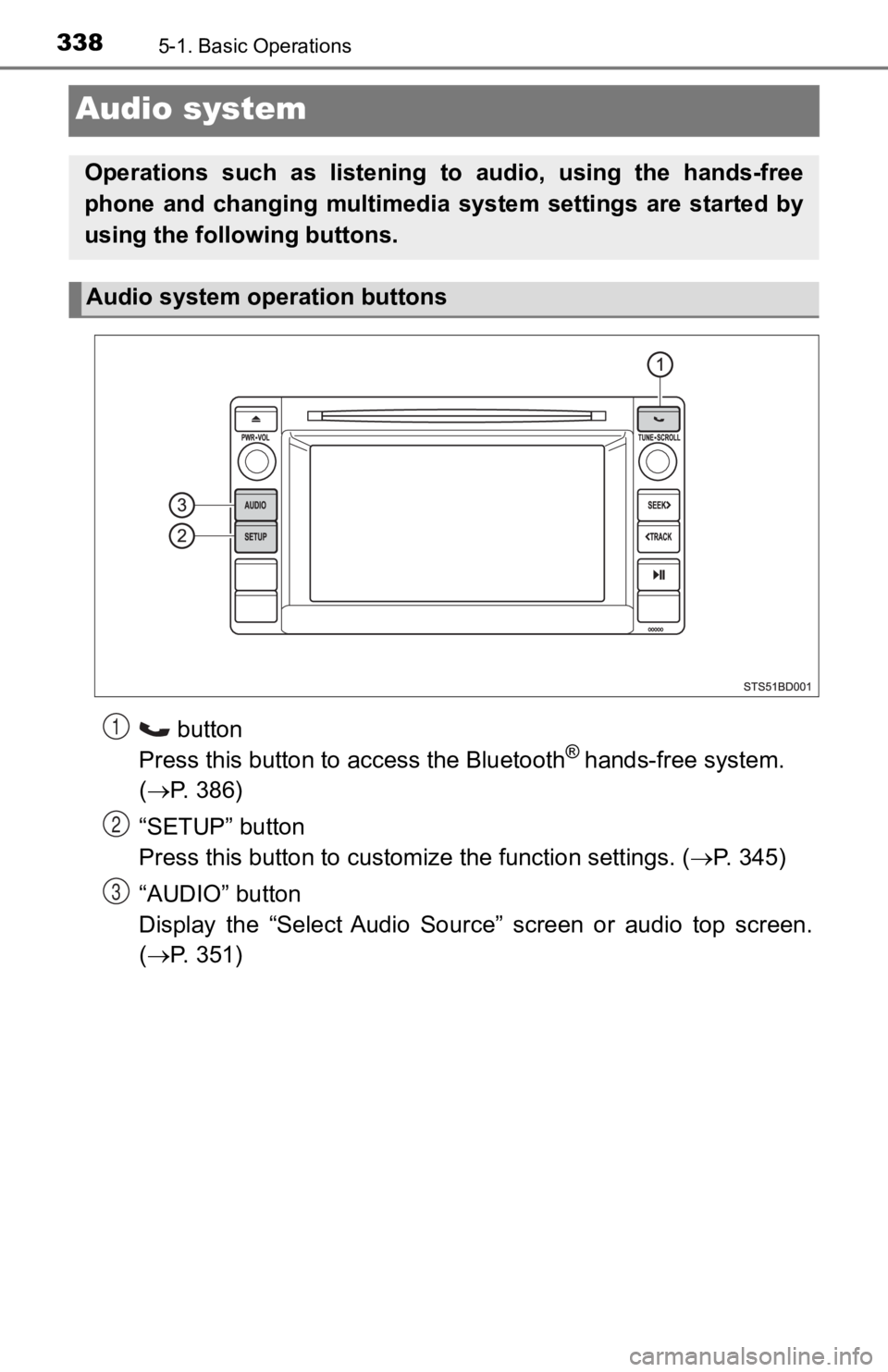
button
Press this button to a ccess the Bluetooth® hands-free system.
( P. 386)
“SETUP” button
Press this button to customi ze the function settings. (P. 345)
“AUDIO” button
Display the “Select Audio Source” screen or audio top screen.
( P. 351)
Operations such as listening to audio, using the hands-free
phone and changing multimedia system settings are started by
using the following buttons.
Audio system operation buttons
1
2
3
Page 340 of 700
3405-1. Basic Operations
Steering wheel audio switches
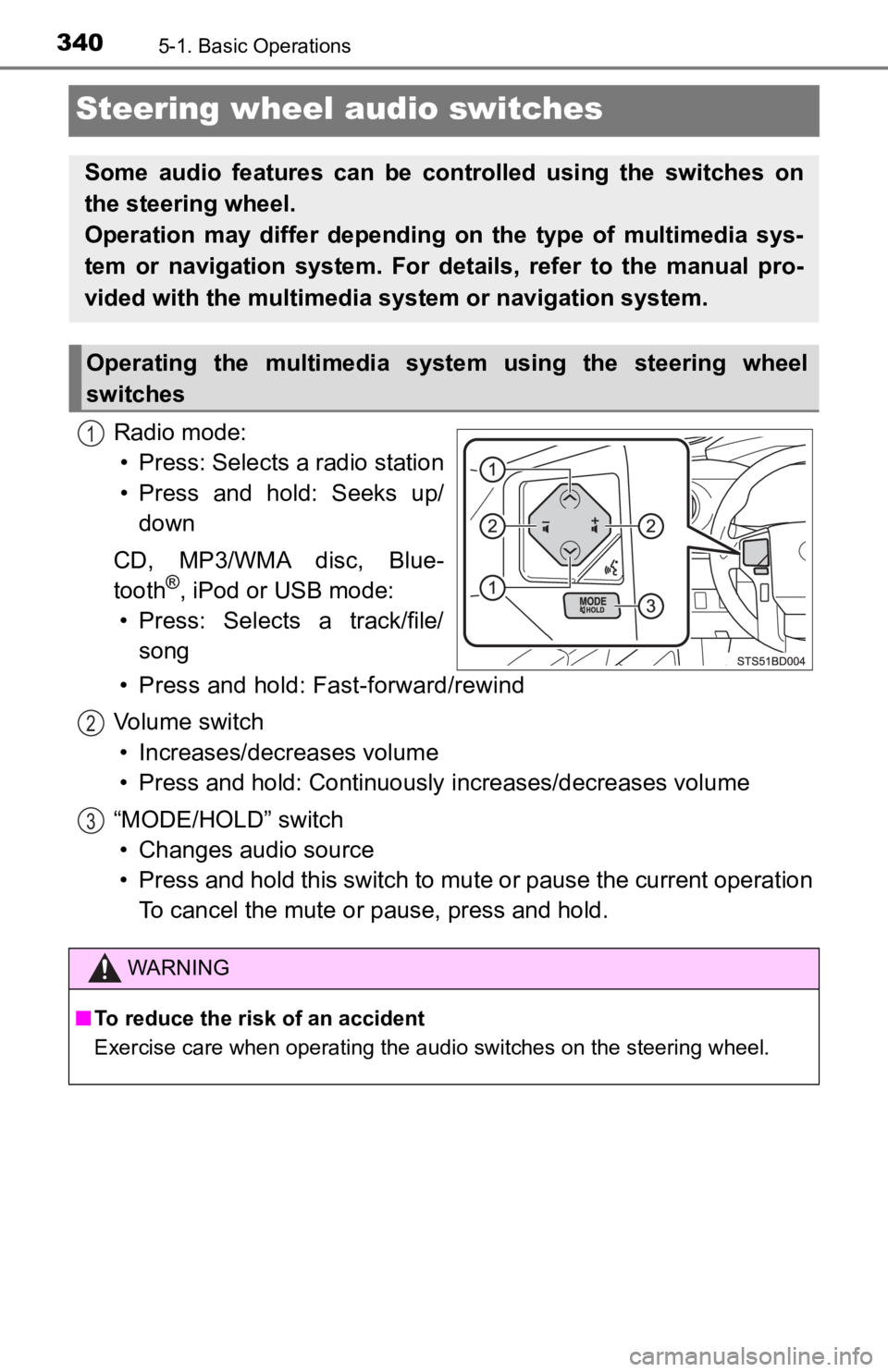
Radio mode:• Press: Selects a radio station
• Press and hold: Seeks up/ down
CD, MP3/WMA disc, Blue-
tooth
®, iPod or USB mode:
• Press: Selects a track/file/ song
• Press and hold: Fast-forward/rewind
Volume switch • Increases/dec reases volume
• Press and hold: Continuously increases/decreases volume
“MODE/HOLD” switch • Changes audio source
• Press and hold this switch to mute or pause the current operat ion
To cancel the mute or pause, press and hold.
Some audio features can be cont rolled using the switches on
the steering wheel.
Operation may differ depending on the type of multimedia sys-
tem or navigation system. For details, refer to the manual pro-
vided with the multimedia system or navigation system.
Operating the multimedia system using the steering wheel
switches
1
WARNING
■ To reduce the risk of an accident
Exercise care when operating the audio switches on the steering wheel.
2
3
Page 341 of 700
3415-1. Basic Operations
5
Multimedia
USB Por t/AUX Port
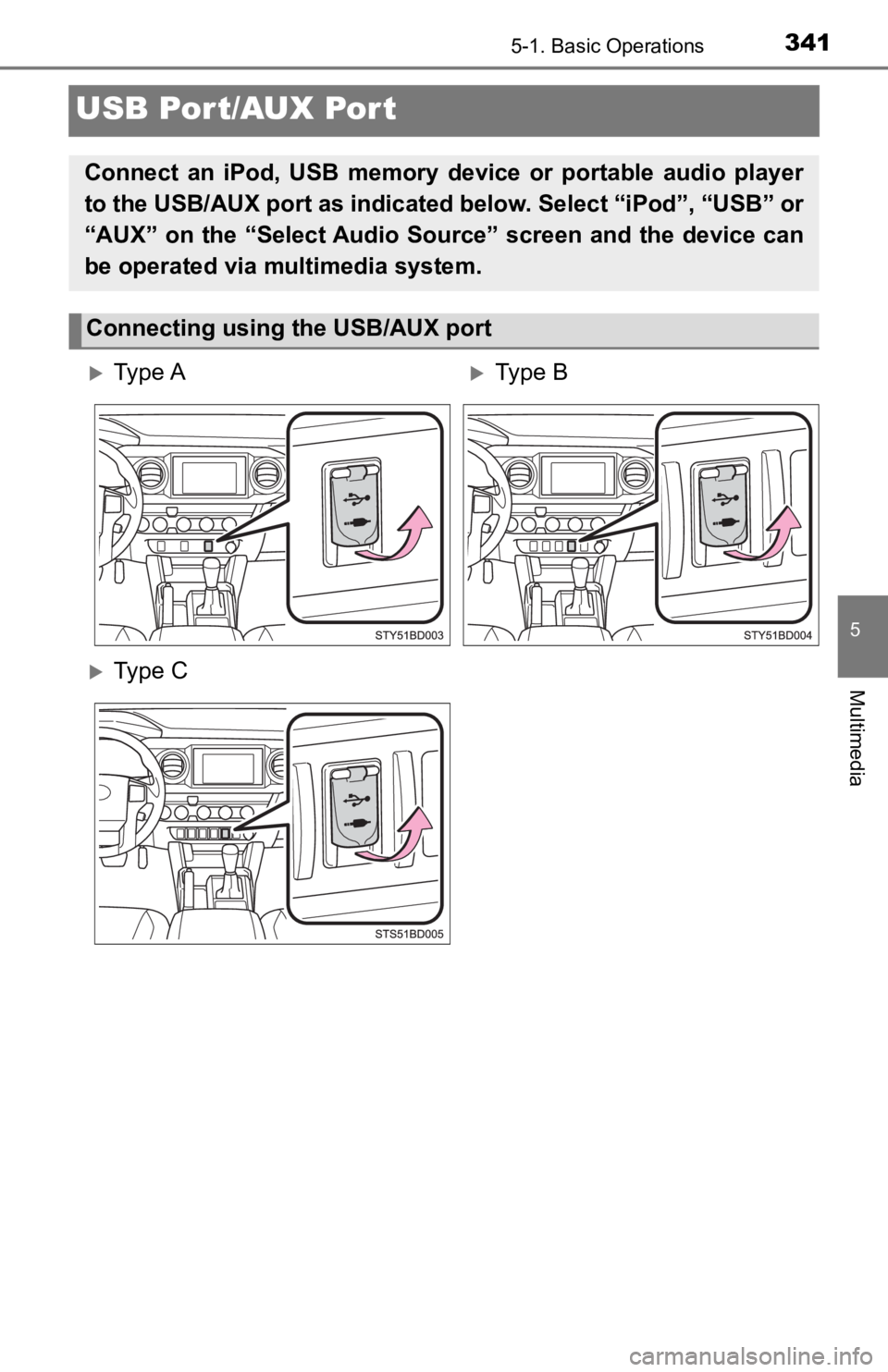
Connect an iPod, USB memory device or portable audio player
to the USB/AUX port as indicated below. Select “iPod”, “USB” or
“AUX” on the “Select Audio Source” screen and the device can
be operated via multimedia system.
Connecting using the USB/AUX port
Ty p e AType B
Ty p e C
Page 342 of 700

3425-1. Basic Operations
■iPod
Open the cover and connect an iPod using an iPod cable.
Turn on the power of the iPod if it is not turned on.
■
USB memory
Open the cover and connec t the USB memory device.
Turn on the power of the USB memory device if it is not turned on.
■
Portable audio player
Open the cover and connect the portable audio player.
Turn on the power of the portable audio player if it is not tur ned on.
■
AUX port
The AUX port only supports audio input.
WARNING
■ While driving
Do not connect a device or operate the device controls.
Page 343 of 700
3435-1. Basic Operations
5
Multimedia
Basic audio operations
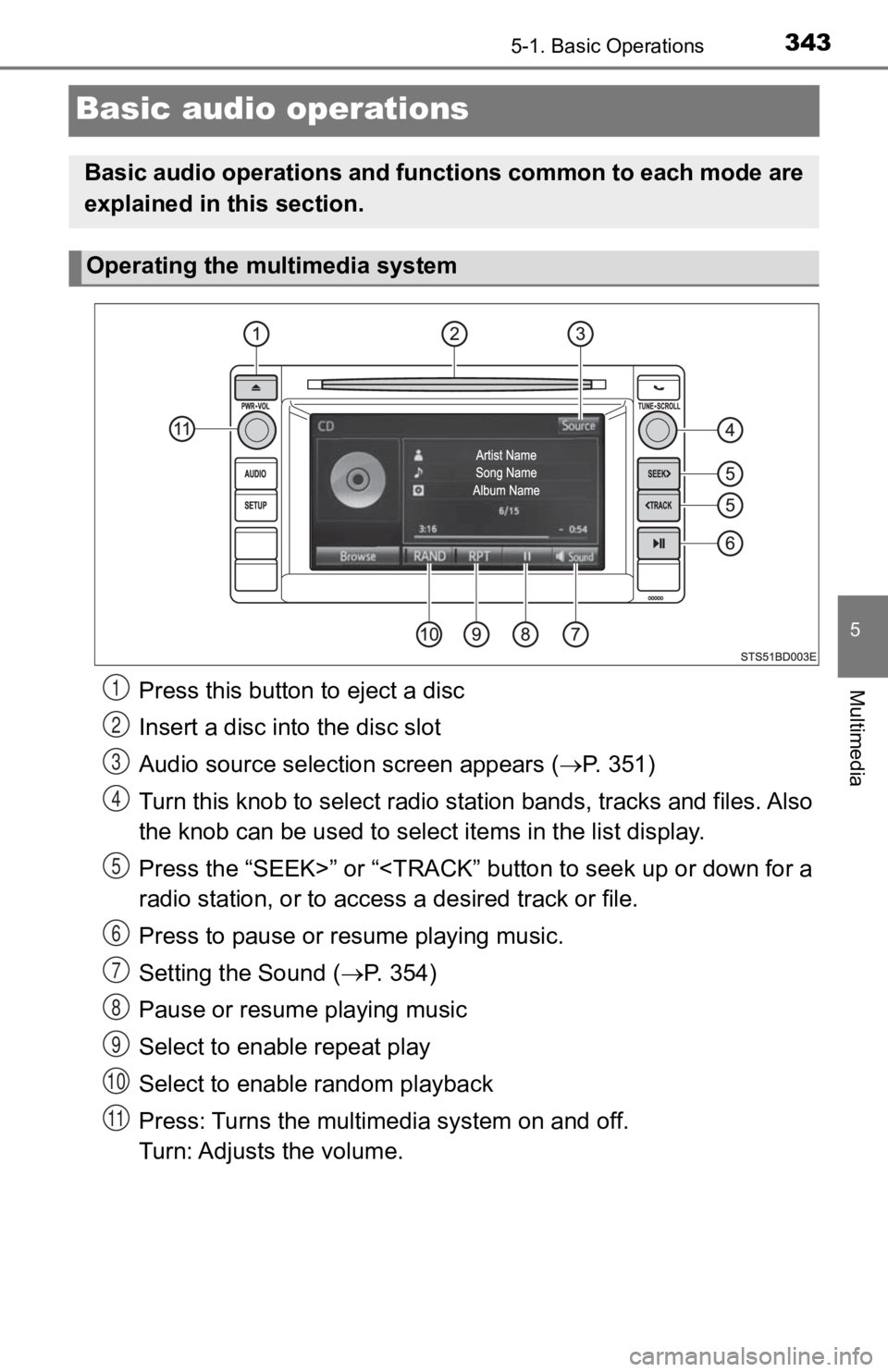
Press this button to eject a disc
Insert a disc into the disc slot
Audio source selection screen appears ( P. 3 5 1 )
Turn this knob to select radio station bands, tracks and files. A l s o
the knob can be used to select items in the list display.
Press the “SEEK>” or “
Press to pause or resume playing music.
Setting the Sound ( P. 354)
Pause or resume playing music
Select to enable repeat play
Select to enable random playback
Press: Turns the multimedia system on and off.
Turn: Adjusts the volume.
Basic audio operations and func tions common to each mode are
explained in this section.
Operating the multimedia system
1
2
3
4
5
6
7
8
9
10
11
Page 345 of 700
3455-2. Setup
5
Multimedia
Setup menu
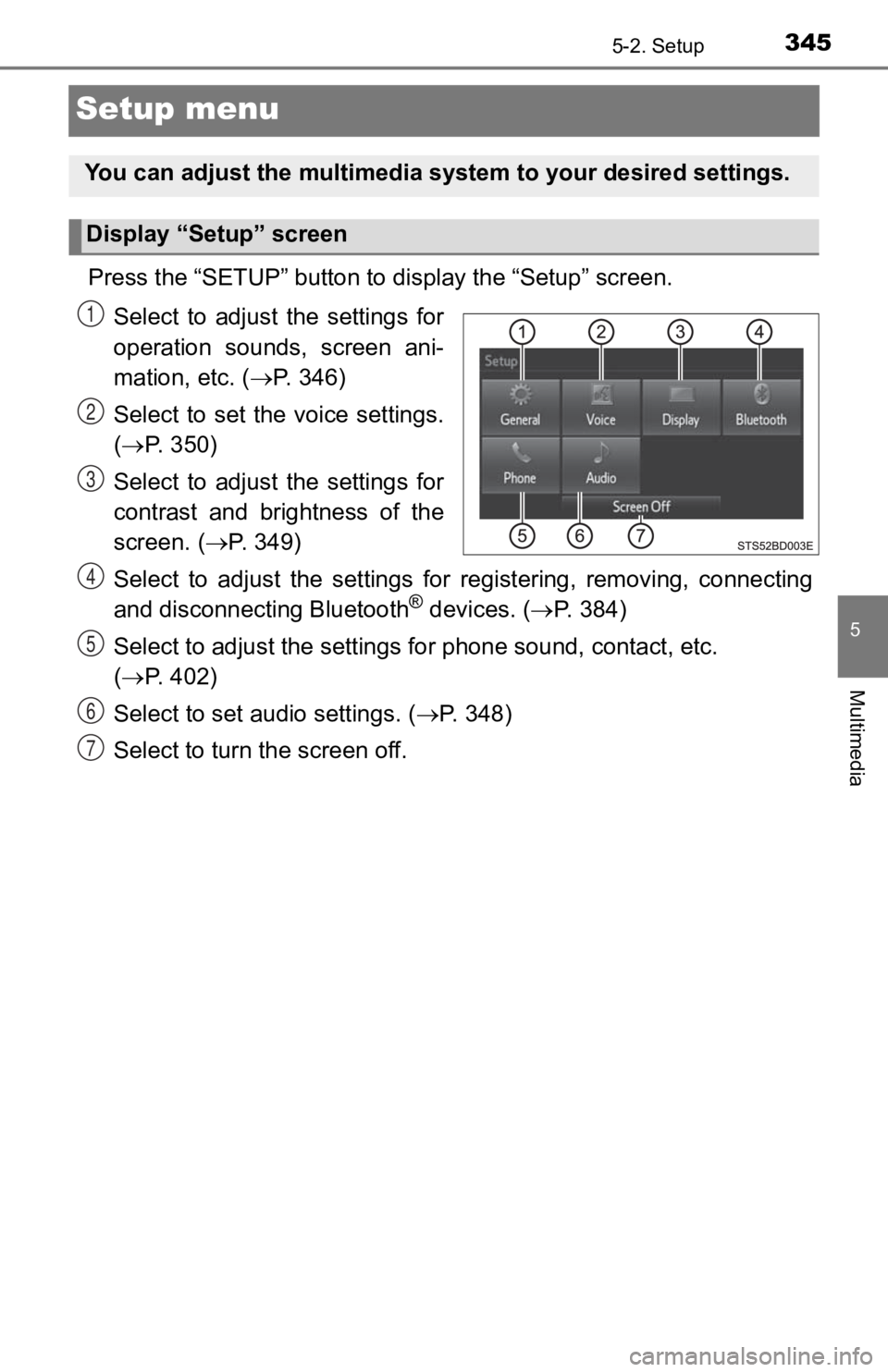
Press the “SETUP” button to display the “Setup” screen.
Select to adjust the settings for
operation sounds, screen ani-
mation, etc. ( P. 346)
Select to set the voice settings.
( P. 350)
Select to adjust the settings for
contrast and brightness of the
screen. ( P. 3 4 9 )
Select to adjust the settings for registering, removing, connec ting
and disconnecting Bluetooth
® devices. ( P. 3 8 4 )
Select to adjust the settings f or phone sound, contact, etc.
( P. 402)
Select to set audio settings. ( P. 3 4 8 )
Select to turn the screen off.
You can adjust the multimedia system to your desired settings.
Display “Setup” screen
1
2
3
4
5
6
7
Page 347 of 700
3475-2. Setup
5
Multimedia
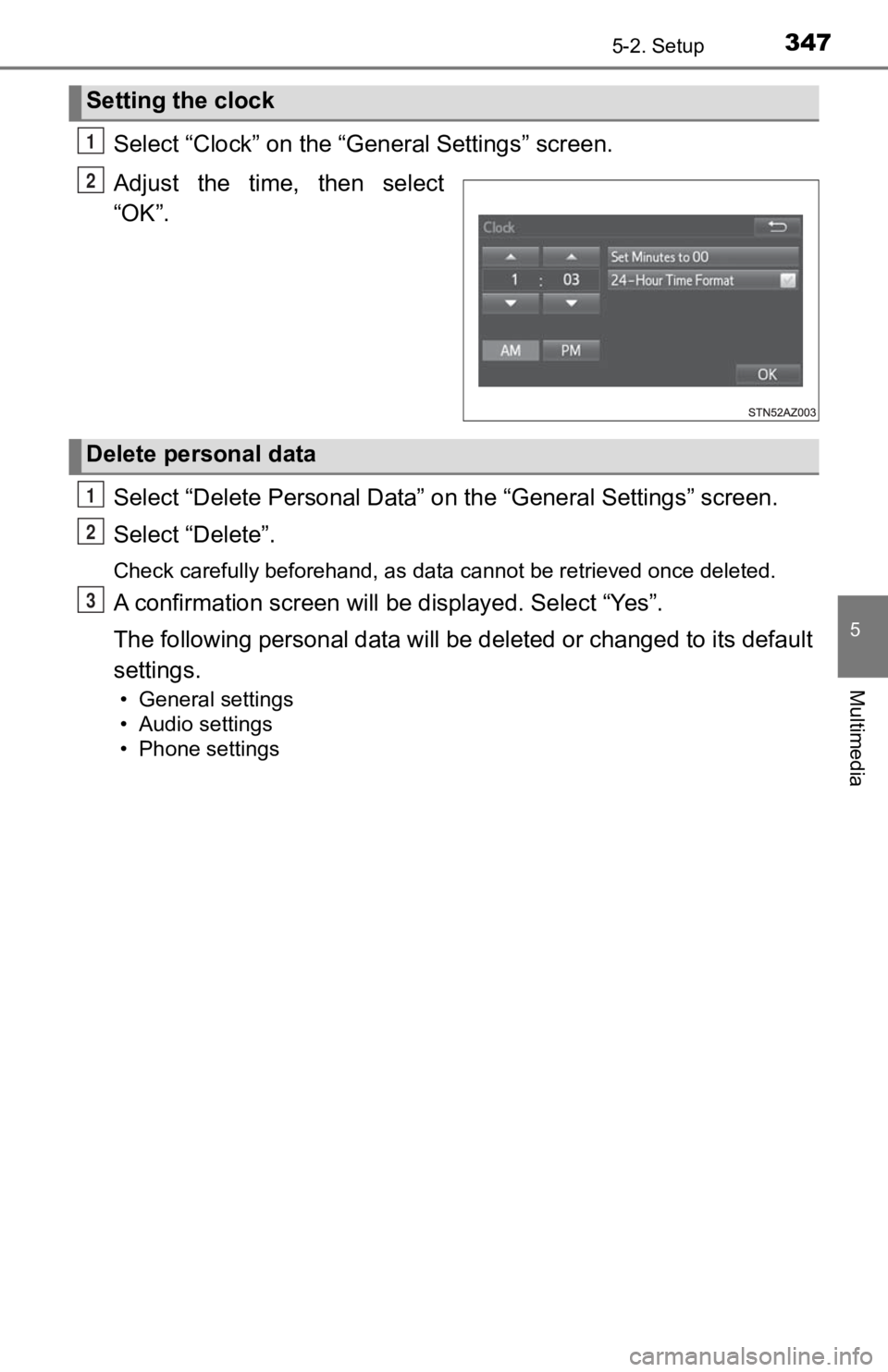
Select “Clock” on the “General Settings” screen.
Adjust the time, then select
“OK”.
Select “Delete Personal Data” on the “General Settings” screen.
Select “Delete”.
Check carefully beforehand, as data cannot be retrieved once de leted.
A confirmation screen will be displayed. Select “Yes”.
The following personal data will be deleted or changed to its d efault
settings.
• General settings
• Audio settings
• Phone settings
Setting the clock
1
2
Delete personal data
1
2
3
Page 348 of 700
3485-2. Setup
Audio settings
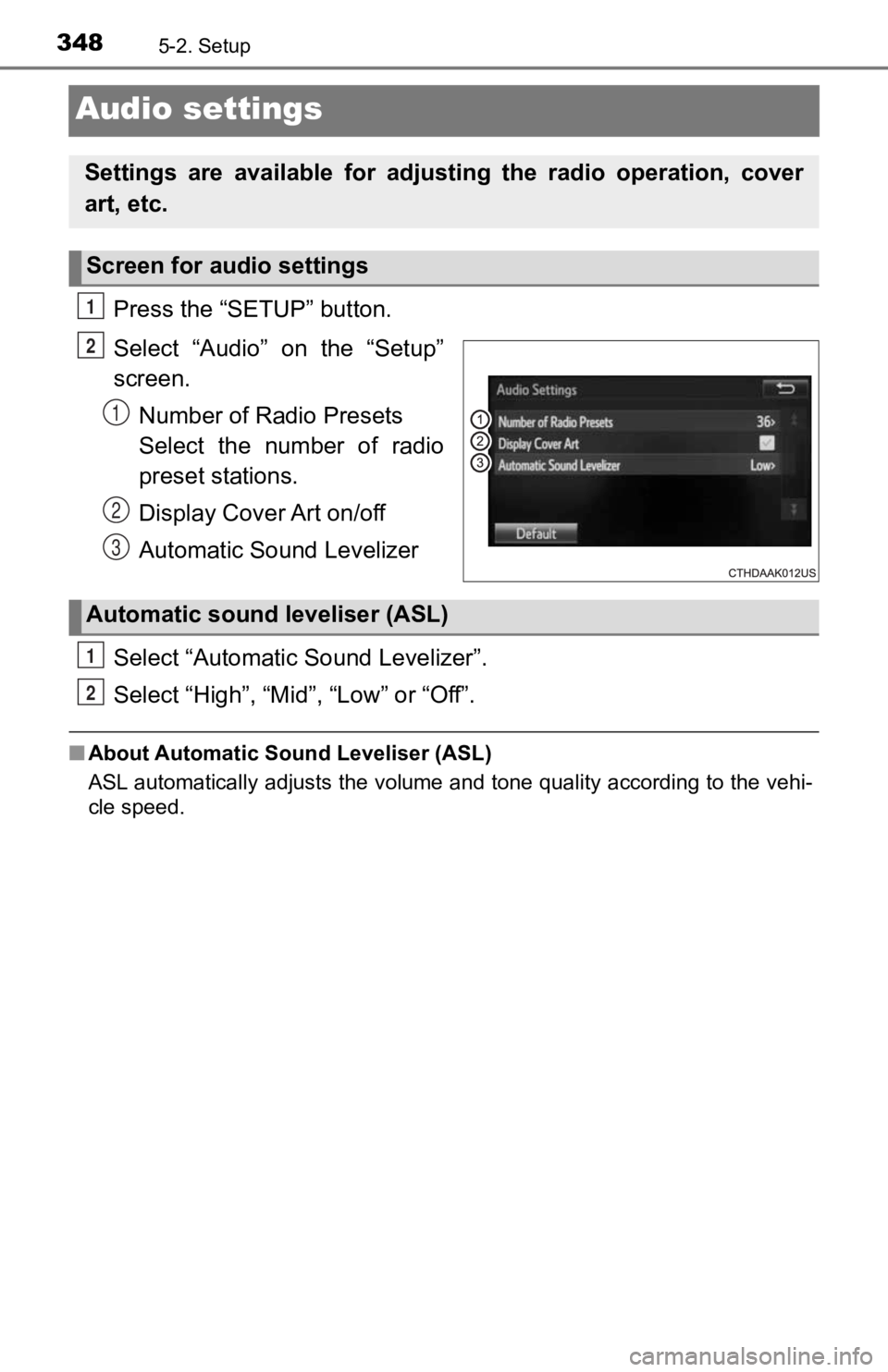
Press the “SETUP” button.
Select “Audio” on the “Setup”
screen.Number of Radio Presets
Select the number of radio
preset stations.
Display Cover Art on/off
Automatic Sound Levelizer
Select “Automatic Sound Levelizer”.
Select “High”, “Mid”, “Low” or “Off”.
■ About Automatic Sound Leveliser (ASL)
ASL automatically adjusts the volume and tone quality according to the vehi-
cle speed.
Settings are available for adjusting the radio operation, cover
art, etc.
Screen for audio settings
1
2
1
2
3
Automatic sound leveliser (ASL)
1
2
Page 351 of 700
3515-3. Using the multimedia system
5
Multimedia
Selecting the audio source
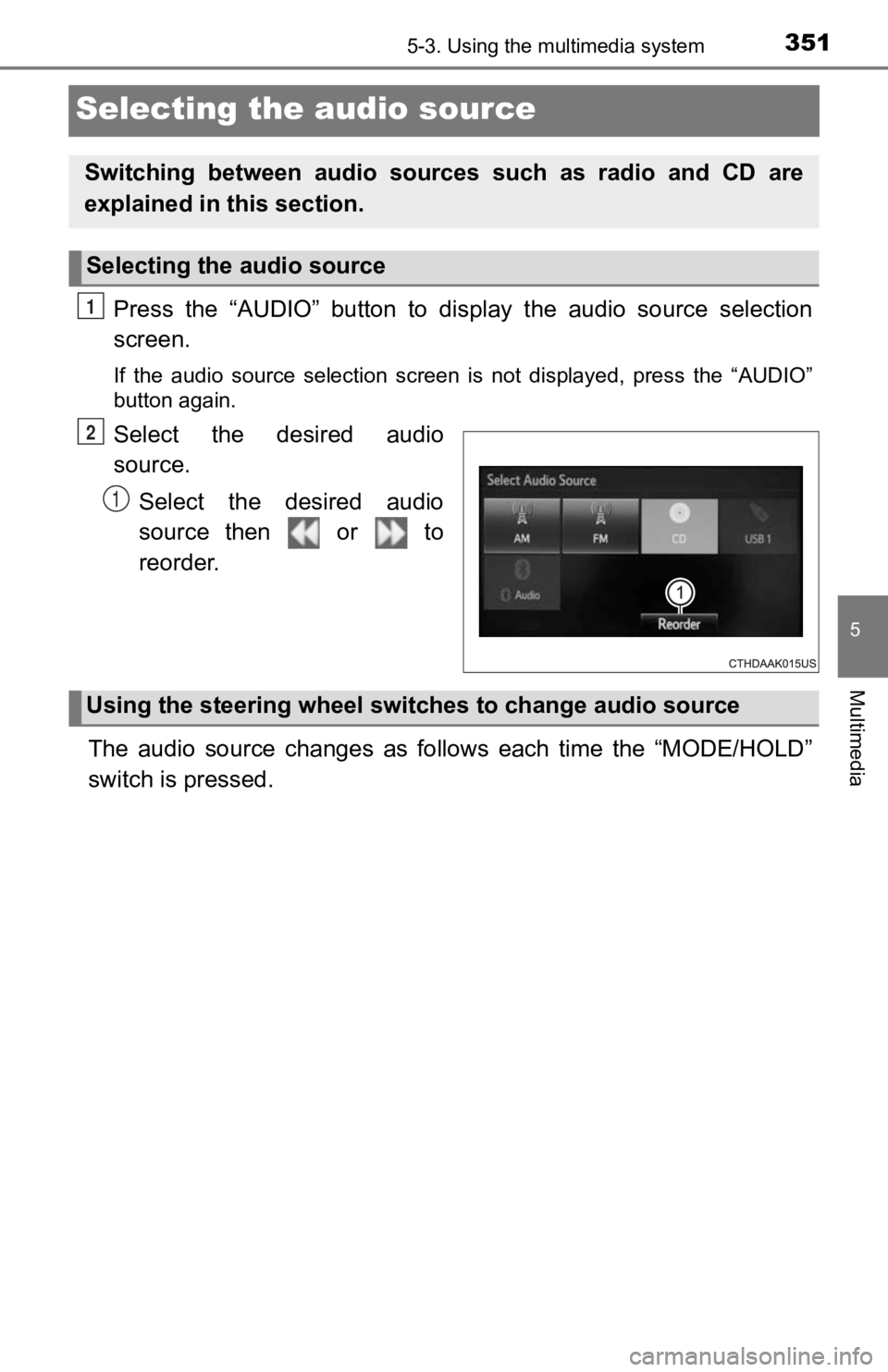
Press the “AUDIO” button to display the audio source selection
screen.
If the audio source selection screen is not displayed, press the “AUDIO”
button again.
Select the desired audio
source.
Select the desired audio
source then or to
reorder.
The audio source changes as follows each time the “MODE/HOLD”
switch is pressed.
Switching between audio sources such as radio and CD are
explained in t his section.
Selecting the audio source
1
2
1
Using the steering wheel switches to change audio source
Page 353 of 700
3535-3. Using the multimedia system
5
Multimedia
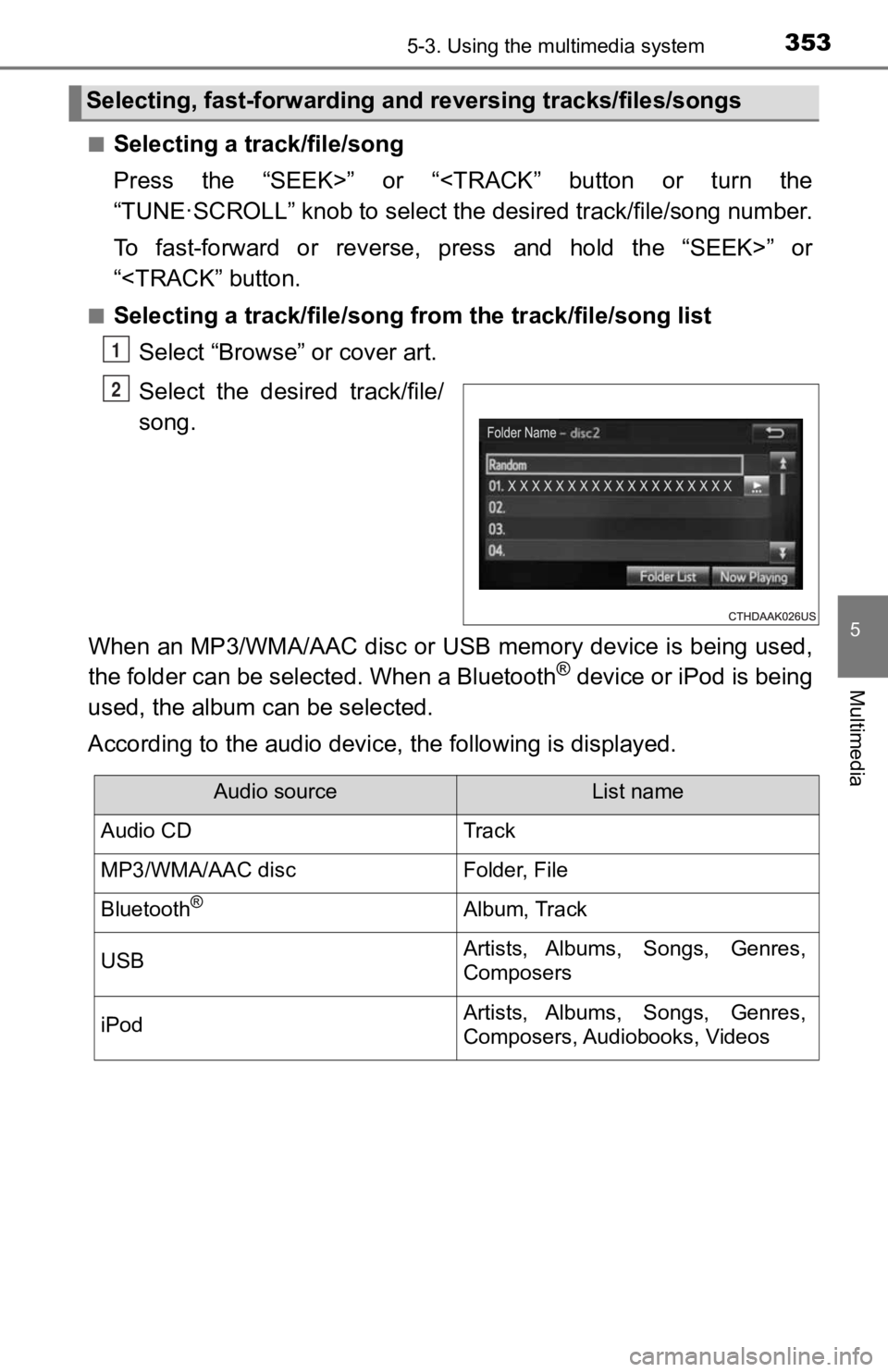
■Selecting a track/file/song
Press the “SEEK>” or “
To fast-forward or reverse, press and hold the “SEEK>” or
“
Select “Browse” or cover art.
Select the desir ed track/file/
song.
When an MP3/WMA/AAC disc or USB memory device is being used,
the folder can be selected. When a Bluetooth
® device or iPod is being
used, the album can be selected.
According to the audio device, the following is displayed.
Selecting, fast-forwarding and reversing trac ks/files/songs
1
2
Audio sourceList name
Audio CDTrack
MP3/WMA/AAC discFolder, File
Bluetooth®Album, Track
USBArtists, Albums, Songs, Genres,
Composers
iPodArtists, Albums, Songs, Genres,
Composers, Audiobooks, Videos