roof TOYOTA TACOMA 2019 (in English) Owner's Manual
[x] Cancel search | Manufacturer: TOYOTA, Model Year: 2019, Model line: TACOMA, Model: TOYOTA TACOMA 2019Pages: 700, PDF Size: 12.83 MB
Page 155 of 700

1553-5. Opening, closing the windows and moon roof
3
Operation of each component
■When the moon roof d oes not close normally
Perform the following procedure:
● If the moon roof closes but then re-opens slightly
Stop the vehicle.
Press and hold the “CLOSE” (sliding close) switch.
*1
The moon roof will close, reopen and pause for approximately 10 sec-
onds.
*2 Then it will close again, tilt up and pause for approximately 1 sec-
ond. Finally, it will tilt down, open and close.
Check to make sure that the moon roof is completely closed and then
release the switch.
● If the moon roof tilts down but then tilts back up
Stop the vehicle.
Press and hold the “UP” (tilt up) switch
*1 until the moon roof moves into
the tilt up position and stops.
Release the “UP” (tilt up) switch once and then press and hold the “UP”
(tilt up) switch again.
*1
The moon roof will pause for approximately 10 seconds in the tilt up posi-
tion.
*2 Then it will adjust slightly and pause for approximately 1 sec ond.
Finally, it will tilt down, open and close.
Check to make sure that the moon roof is completely closed and then
release the switch.
*1: If the switch is released at the incorrect time, the procedure will have to
be performed again from the beginning.
*2: If the switch is released after the above mentioned 10 seconds pause,
automatic operation will be disabled. In that case, press and h old the
“CLOSE” (sliding close) or “UP” (tilt up) switch, and the moon roof will tilt
up and pause for approximately 1 second. Then it will tilt down , open and
close. Check to make sure that the moon roof is completely closed and
then release the switch.
If the moon roof does not fully close even after performing the above proce-
dure correctly, have the vehicle inspected by your Toyota deale r.
■ Moon roof open reminder function
An alarm will sound and message will be shown on the multi-info rmation dis-
play when the driver’s door is opened with the moon roof not fu lly closed and
the engine switch off.
1
2
3
1
2
3
4
Page 156 of 700

1563-5. Opening, closing the windows and moon roof
■When the battery is disconnected
The moon roof must be initialized in order to ensure proper operation.
Push and hold the switch toward the “UP” (tilt up) side or “CLO SE” (slid-
ing close) side.
After the moon roof will tilt up and down, release the switch.
To ensure the initialization is complete, make sure automatic opening and
closing functions work properly.
■ Customization that can be configured at Toyota dealer
Settings (e.g. linke
d door lock operation) can be changed.
(Customizable features : P. 654)
WARNING
Observe the following precautions.
Failure to do so may cause death or serious injury.
■ Opening the moon roof
● Do not allow any passengers to put their hands or heads outside the vehi-
cle while it is moving.
● Do not sit on top of the moon roof.
■ Closing the moon roof
● The driver is responsible for moon roof opening and closing operations. In
order to prevent accidental operation, especially by a child, d o not let a
child operate the moon roof. It is possible for children and other passen-
gers to have body parts caught in the moon roof.
● Check to make sure that all passengers do not have any part of their body
in a position where it could be caught when the moon roof is being oper-
ated.
● When exiting the vehicle, turn the engine switch off, carry the key and exit
the vehicle along with the child. There may be accidental operation, due to
mischief, etc., that may possibly lead to an accident.
■ Jam protection function
● Never use any part of your body to intentionally activate the jam protection
function.
● The jam protection function may not work if something gets caught just
before the moon roof fully closes.
1
2
3
Page 157 of 700

1573-5. Opening, closing the windows and moon roof
3
Operation of each component
Page 290 of 700

2904-5. Using the driving support systems
NOTICE
■How to use the camera
● The rear view monitor system may not operate properly in the following
cases.
• If the back of the vehicle is hit, the position and mounting angle of the
camera may change.
• As the camera has a water proof construction, do not detach, d isassem-
ble or modify it. This may cause incorrect operation.
• When cleaning the camera lens, flush the camera with a large quantity of water and wipe it with a soft and wet cloth. Strongly rubbin g the cam-
era lens may cause the camera lens to be scratched and unable to
transmit a clear image.
• Do not allow organic solvent, car wax, window cleaner or a gla ss coat-
ing to adhere to the camera. If this happens, wipe it off as soon as pos-
sible.
• If the temperature changes rapidly, such as when hot water is poured
on the vehicle in cold weather, the system may not operate normally.
• When washing the vehicle, do not apply intensive bursts of wat er to the
camera or camera area. Doing so may result in the camera malfunc-
tioning.
● Do not expose the camera to strong impact as this could cause a malfunc-
tion. If this happens, have the vehicle inspected by your Toyota dealer as
soon as possible.
Page 325 of 700
3254-6. Driving tips
4
Driving
Winter driving tips
●Use fluids that are appropriate t o the prevailing outside tempera-
tures. • Engine oil
• Engine coolant
• Washer fluid
● Have a service technician inspec t the condition of the battery.
● Have the vehicle fitted with four snow tires or purchase a set of tire
chains for the rear tires.
Ensure that all tires are the same size and brand, and that chains match
the size of the tires.
Perform the following according to the driving conditions:
● Do not try to forcibly open a window or move a wiper that is fr ozen.
Pour warm water over the frozen area to melt the ice. Wipe away
the water immediately to p revent it from freezing.
● To ensure proper operation of the climate control system fan,
remove any snow that has accumulated on the air inlet vents in
front of the windshield.
● Check for and remove any excess ic e or snow that may have accu-
mulated on the exterior lights, vehicle’s roof, chassis, around the
tires or on the brakes.
● Remove any snow or mud from the bottom of your shoes before
getting in the vehicle.
Accelerate the vehicle slowly, keep a safe distance between you and
the vehicle ahead, and drive at a reduced speed suitable to roa d con-
ditions.
Carry out the necessary preparations and inspections before
driving the vehicle in winter. Always drive the vehicle in a ma n-
ner appropriate to the prevailing weather conditions.
Preparation for winter
Before driving the vehicle
When driving the vehicle
Page 330 of 700
3304-6. Driving tips
When driving your vehicle off-road, please observe the following pre-
cautions to ensure your driving enjoyment and to help prevent the clo-
sure of areas to off-road vehicles.
● Drive your vehicle only in areas where off-road vehicles are pe rmit-
ted to travel.
● Respect private property. Get owner’s permission before entering
private property.
● Do not enter areas that are closed. Honor gates, barriers and s igns
that restrict travel.
● Stay on established roads. When conditions are wet, driving tec h-
niques should be changed or travel delayed to prevent damage to
roads.
WARNING
■ Off-road vehicle precautions
Always observe the following precautions to minimize the risk of death, seri-
ous injury or damage to your vehicle:
● In a rollover crash, an unbelted person is significantly more likely to die
than a person wearing a seat belt. Therefore, the driver and al l passengers
should always fasten their seat belts.
● Avoid sharp turns or abrupt maneuvers, if at all possible.
Failure to operate this vehicle correctly may result in loss of control or
vehicle rollover causing death or serious injury.
● Avoid loading any items on the roof that will raise the vehicle’s center of
gravity.
● Always slow down in gusty crosswinds. Because of its profile and higher
center of gravity, your vehicle is more sensitive to side winds than an ordi-
nary passenger car. Slowing down will allow you to have better control.
● When driving off-road or in rugged terrain, do not drive at excessive
speeds, jump, make sharp turns, strike objects, etc. This may cause loss
of control or vehicle rollover causing death or serious injury. You are also
risking expensive damage to your vehicle’s suspension and chass is.
● Do not drive horizontally across steep slopes. Driving straight up or
straight down is preferred. Your vehicle (or any similar off-road vehicle)
can tip over sideways much more easily than forward or backward.
Off-road driving
Page 356 of 700

3565-4. Using the radio
Search for desired stations by turning the “TUNE·SCROLL” knob or
pressing the “SEEK>” or “
To change the preset station to a different one, select and hol d the preset
station.
Select “Yes”.
Select “OK” after setting the new preset station.
■Refreshing the station list
Select “Refresh” on the “Station List” screen.
To cancel the refresh, select “Cancel Refresh”.
■Reception sensitivity
●Maintaining perfect radio reception at all times is difficult d ue to the continu-
ally changing position of the antenna, differences in signal strength and sur-
rounding objects, such as trains, transmitters, etc.
● The radio antenna is mounted on the roof.
Setting station presets
1
2
3
4
Page 387 of 700
3875-9. Bluetooth® phone
5
Multimedia
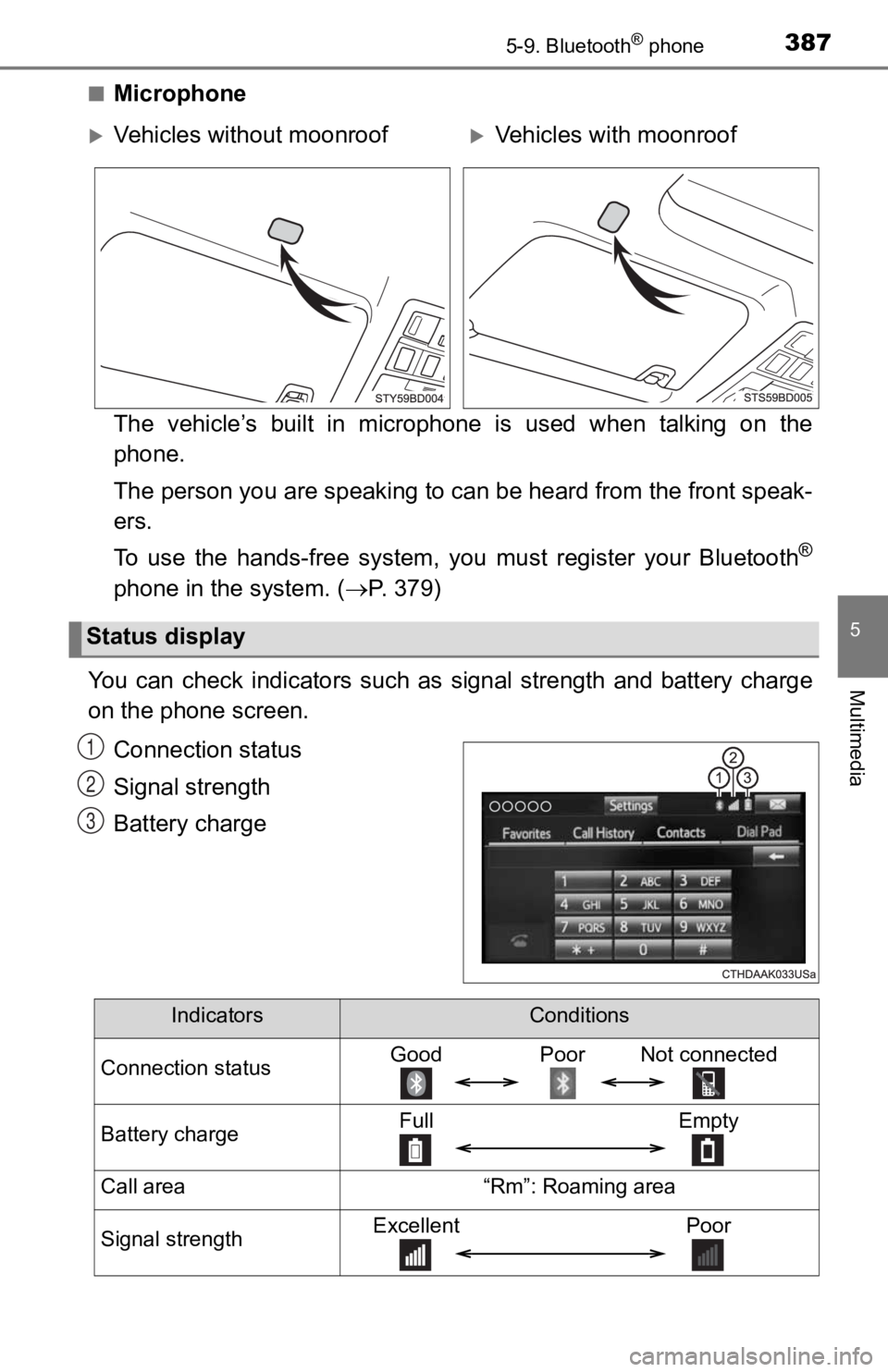
■Microphone
The vehicle’s built in microphone is used when talking on the
phone.
The person you are speaking to can be heard from the front speak-
ers.
To use the hands-free system, y ou must register your Bluetooth
®
phone in the system. (P. 379)
You can check indicators such as signal strength and battery ch arge
on the phone screen.
Connection status
Signal strength
Battery charge
Vehicles without moonroofVehicles with moonroof
Status display
1
2
3
IndicatorsConditions
Connection statusGood Poor Not connected
Battery chargeFull Empty
Call area“Rm”: Roaming area
Signal strengthExcellent Poor
Page 415 of 700

4155-10. Bluetooth®
5
Multimedia
Bluetooth®
■When using the Bluetooth® audio system
● In the following conditions, the system may not function.
• If the portable audio player is turned off
• If the portable audio player is not connected
• If the portable audio player’s battery is low
● There may be a delay if a cellular phone connection is made dur ing
Bluetooth
® audio play.
● Depending on the type of portable audio player that is connecte d to the sys-
tem, operation may differ slightly and certain functions may no t be available.
■ When using the hands-free system
●The multimedia system is muted when making a call.
● If both parties speak at the same time, it may be difficult to hear.
● If the received call volume is overly loud, an echo may be heard.
If the Bluetooth
® phone is too close to the system, quality of the sound may
deteriorate and connection status may deteriorate.
● In the following circumstances, it may be difficult to hear the other party:
• When driving on unpaved roads
• When driving at high speeds
• If a roof or window is open
• If the air conditioning is blowing directly on the microphone
• If there is interference from the network of the cellular phon e
■ Conditions under which the system will not operate
● If using a cellular phone that does not support Bluetooth
®
●If the cellular phone is turned off
● If you are outside of cellular phone service coverage
● If the cellular phone is not connected
● If the cellular phone’s battery is low
● When outgoing calls are controlled, due to heavy traffic on tel ephone lines,
etc.
● When the cellular phone itself cannot be used
● When transferring contact data from the cellular phone
Page 421 of 700
4215-11. Using the voice command system
5
Multimedia
■Microphone
P. 387
■ When using the microphone
●It is unnecessary to speak directly into the microphone when gi ving a com-
mand.
● Voice commands may not be recognized if:
• Spoken too quickly.
• Spoken at a low or high volume.
• The roof or windows are open.
• Passengers are talking while voice commands are spoken.
• The air conditioning speed is set high.
• The air conditioning vents are turned towards the microphone.
● In the following conditions, the system may not recognize the command
properly and using voice commands may not be possible:
• The command is incorrect or unclear. Note that certain words, accents or
speech patterns may be difficult for the system to recognize.
• There is excessive background noise, such as wind noise.
Due to natural language speech recognition technology, this sys tem
enables recognition of a command when spoken naturally. However ,
the system cannot recognize ever y variation of each command.
In some situations, it is possi ble to omit the command for the proce-
dure and directly state the desired operation.
Not all voice commands are displayed in the short cut menu.
This function is available in English, Spanish and French.
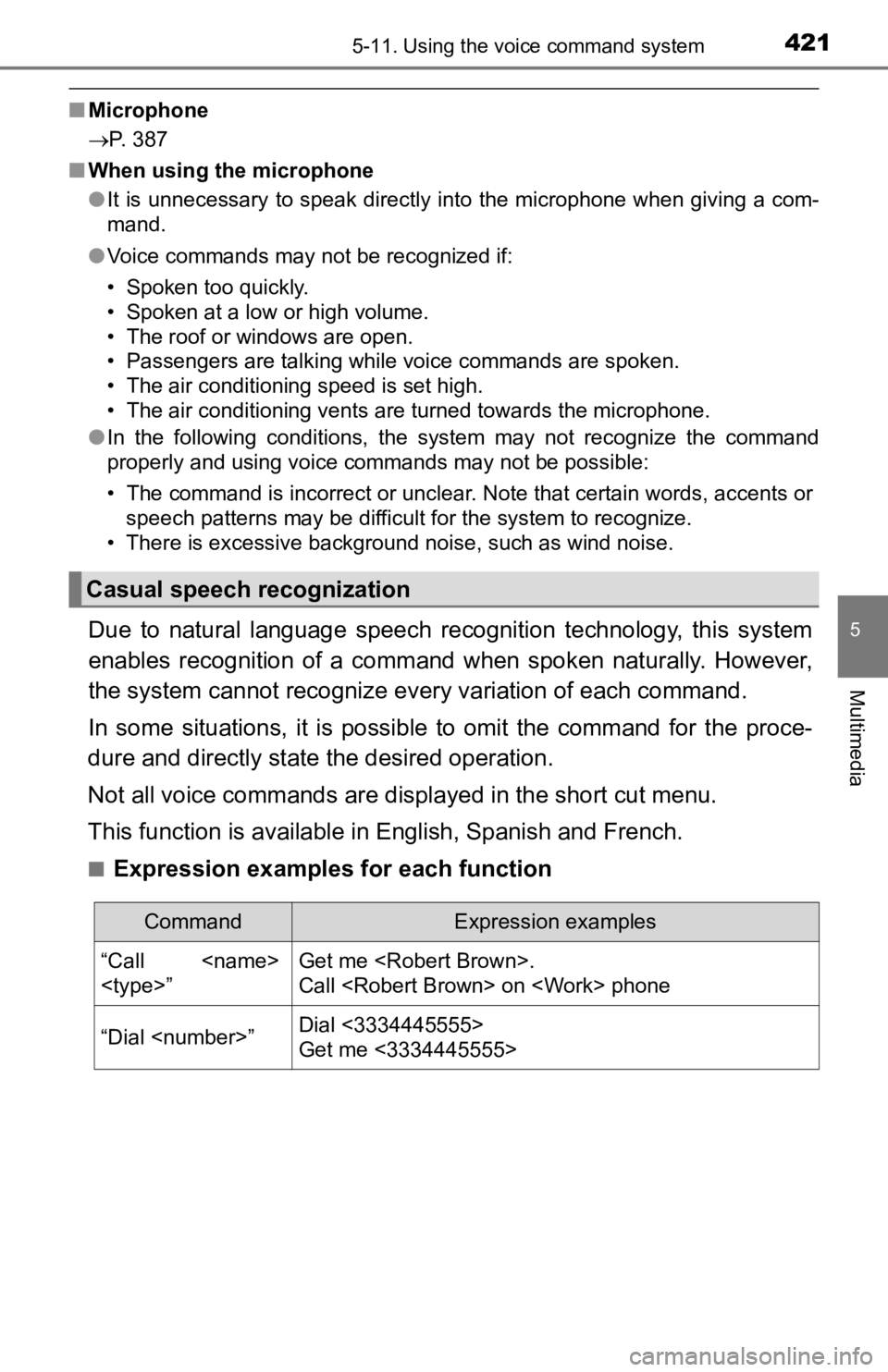
■Expression examples for each function
Casual speech recognization
CommandExpression examples
“Call
Call
“Dial
Get me <3334445555>