trailer TOYOTA TACOMA 2019 (in English) Owner's Manual
[x] Cancel search | Manufacturer: TOYOTA, Model Year: 2019, Model line: TACOMA, Model: TOYOTA TACOMA 2019Pages: 700, PDF Size: 12.83 MB
Page 189 of 700

1894-1. Before driving
4
Driving
■Break-in schedule
If your vehicle is new or equipped with any new power train com ponents
(such as an engine, transmission, differential or wheel bearing ), Toyota rec-
ommends that you do not tow a trailer until the vehicle has bee n driven for
over 500 miles (800 km).
After the vehicle has been driven for over 500 miles (800 km), you can start
towing. However, for the next 500 miles (800 km), drive the veh icle at a speed
of less than 50 mph (80 km/h) when towing a trailer, and avoid full throttle
acceleration.
■ Maintenance
●If you tow a trailer, your vehicle will require more frequent m aintenance due
to the additional load. (See “Owner’s Warranty Information Book let” or
“Scheduled Maintenance Guide”/“Owner’s Manual Supplement”.)
● Retighten the fixing bolts of the towing ball and bracket after approximately
600 miles (1000 km) of trailer towing.
■ If trailer sway occurs
One or more factors (crosswinds, passing vehicles, rough roads, etc.) can
adversely affect handling of your vehicle and trailer, causing instability.
● If trailer swaying occurs:
• Firmly grip the steering wheel. Steer straight ahead.
Do not try to control trailer swaying by turning the steering wheel.
• Begin releasing the accelerator pedal immediately but very gra dually to
reduce speed.
Do not increase speed. Do not apply vehicle brakes.
If you make no extreme correction with the steering or brakes, your vehicle
and trailer should stabilize. (if enabled, Trailer Sway Control can also help to
stabilize the vehicle and trailer.)
● After the trailer swaying has stopped:
• Stop in a safe place. Get all occupants out of the vehicle.
• Check the tires of the vehicle and the trailer.
• Check the load in the trailer.
Make sure the load has not shifted.
Make sure the tongue weight is appropriate, if possible.
• Check the load in the vehicle. Make sure the vehicle is not overloaded after occupants get in.
If you cannot find any problems, the speed at which trailer swaying occurred
is beyond the limit of your particular vehicle-trailer combinat ion.
Drive at a lower speed to prevent instability. Remember that sw aying of the
towing vehicle-trailer increases as speed increases.
Page 190 of 700

1904-1. Before driving
WARNING
■Trailer towing precautions
To tow a trailer safely, use extreme care and drive the vehicle in accordance
with the trailer’s characteristics and operating conditions. Failure to do so
could cause an accident resulting in death or serious injury. V ehicle stability
and braking performance are affected by trailer stability, brake setting and
performance, and the hitch. Your vehicle will handle differentl y when towing
a trailer.
■ To avoid accident or injury
● Do not exceed the TWR, unbraked TWR, GCWR, GVWR or GAWR.
● If the gross trailer weight is over 2000 lb. (907 kg), a sway control device
with sufficient capacity is required.
● If the gross trailer weight is over 5000 lb. (2268 kg), a weight distributing
hitch with sufficient capacity is required.
● Adjust the tongue weight within the appropriate range. Place heavier loads
as close to the trailer axle as possible.
● Do not exceed 65 mph (104 km/h), the posted towing speed limit or the
speed limit for your trailer as set forth in your trailer owner’s manual,
whichever is lowest. Slow down sufficiently before making a tur n, in cross-
winds, on wet or slippery surface, etc., to help avoid an accident. If you
experience a vehicle-trailer instability from reducing a certain speed, slow
down and make sure you keep your vehicle speed under the speed of
which you experience the instability.
● Do not make jerky, abrupt or sharp turns.
● Do not apply the brakes suddenly as you may skid, resulting in jackknifing
and loss of vehicle control. This is especially true on wet or slippery sur-
faces.
● Do not exceed the trailer hitch assembly weight, gross vehicle weight,
gross axle weight and trailer tongue weight capacities.
● Do not use cruise control (if equipped) or dynamic radar cruise control (if
equipped) when towing.
● Slow down and downshift before descending steep or long downhil l
grades. Do not make sudden downshifts while descending steep or long
downhill grades.
● Vehicle-trailer instability is more likely on steep long downhi lls. Before
descending steep or long downhill grades, slow down and downshi ft. Do
not make sudden downshifts when descending steep or long downhi ll
grades. Avoid holding the brake pedal down too long or applying the
brakes too frequently. This could cause the brakes to overheat and result
in reduced braking efficiency.
● Do not tow a trailer when the temporary spare tire is installed on your vehi-
cle.
Page 191 of 700
1914-1. Before driving
4
Driving
WARNING
■Hitch
Trailer hitch assemblies have different weight capacities estab lished by the
hitch manufacturer. Even though the vehicle may be physically capable of
towing a higher weight, the operator must determine the maximum weight
rating of the particular hitch assembly and never exceed the ma ximum
weight rating specified for the trailer-hitch. Exceeding the maximum weight
rating set by the trailer-hitch manufacturer can cause an accid ent resulting
in death or serious personal injuries.
■ When towing a trailer
Toyota recommends trailers with brakes that conform to any appl icable fed-
eral and state/provincial regulations.
● If the gross trailer weight exceeds unbraked TWR, trailer brakes are
required. Toyota recommends trailers with brakes that conform t o all appli-
cable federal and state/provincial regulations.
● Never tap into your vehicle’s hydraulic system, as this will lo wer the vehi-
cle’s braking effectiveness.
● Never tow a trailer without using a safety chain securely attac hed to both
the trailer and the vehicle. If damage occurs to the coupling u nit or hitch
ball, there is danger of the trailer wandering into another lan e.
NOTICE
■When installing a trailer hitch
Use only the position recommended by your Toyota dealer. Do not install
the trailer hitch on the bumper; this may cause body damage.
■ Do not directly splice trailer lights
Do not directly splice trailer lights. Directly splicing traile r lights may damage
your vehicle’s electrical system and cause a malfunction.
Page 203 of 700
2034-2. Driving procedures
4
Driving
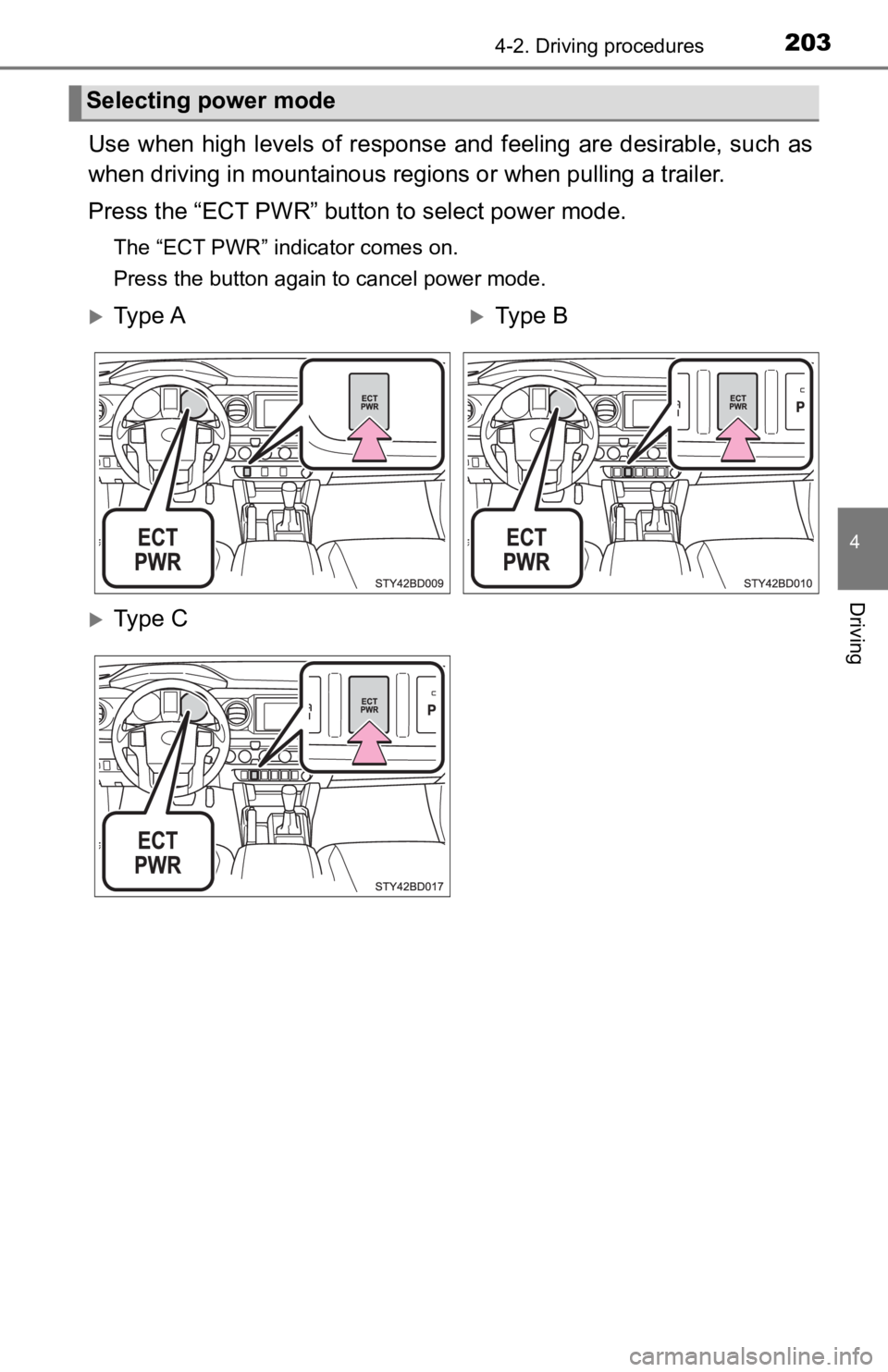
Use when high levels of response and feeling are desirable, such as
when driving in m ountainous regions or when pulling a trailer.
Press the “ECT PWR” butt on to select power mode.
The “ECT PWR” indicator comes on.
Press the button again to cancel power mode.
Selecting power mode
Ty p e AType B
Ty p e C
Page 218 of 700

2184-3. Operating the lights and wipers
●The high beam may be turned on or off when the driver does not expect it.
● Bicycles or similar objects may not be detected.
● In the situations shown below, the system may not be able to accurately
detect surrounding brightness levels. This may cause the low be ams to
remain on or the high beams to cause problems for pedestrians, vehicles
ahead or other parties. In these cases, manually switch between the high
and low beams.
• In bad weather (rain, snow, fog, sandstorms, etc.)
• The windshield is obscured by fog, mist, ice, dirt, etc.
• The windshield is cracked or damaged.
• The camera sensor is deformed or dirty.
• The camera sensor temperature is extremely high.
• Surrounding brightness levels are equal to those of headlights , tail lights
or fog lights.
• Vehicles ahead have headlights that are either switched off, d irty, are
changing color, or are not aimed properly.
• When driving through an area of intermittently changing brightness and
darkness.
• When frequently and repeatedly driving ascending/descending roads, or roads with rough, bumpy or uneven surfaces (such as stone-paved
roads, gravel tracks, etc.).
• When frequently and repeatedly taking curves or driving on a w inding
road.
• There is a highly reflective object ahead of the vehicle, such as a sign or a mirror.
• The back of a vehicle ahead is highly reflective, such as a co ntainer on a
truck.
• The vehicle’s headlights are damaged or dirty.
• The vehicle is listing or tilting, due to a flat tire, a trailer being towed etc.
• The high beam and low beam are repeatedly being switched betwe en in
an abnormal manner.
• The driver believes that the high beam may be causing problems or dis-
tress to other drivers or pedestrians nearby.
Page 245 of 700
2454-5. Using the driving support systems
4
Driving
• When there are patterns or paint on the road or a wall that may be mis-taken for a vehicle or pedestrian
• When driving near an object that reflects radio waves, such as a large
truck or guardrail
• When driving near a TV tower, broadcasting station, electric power plant,
or other location where strong radio waves or electrical noise may be
present
■ Situations in which the syst em may not operate properly
● In some situations such as the following, a vehicle may not be detected by
the radar sensor and camera sensor, preventing the system from operating
properly:
• If an oncoming vehicle is approaching your vehicle
• If a vehicle ahead is a motorcycle or bicycle
• When approaching the side or front of a vehicle
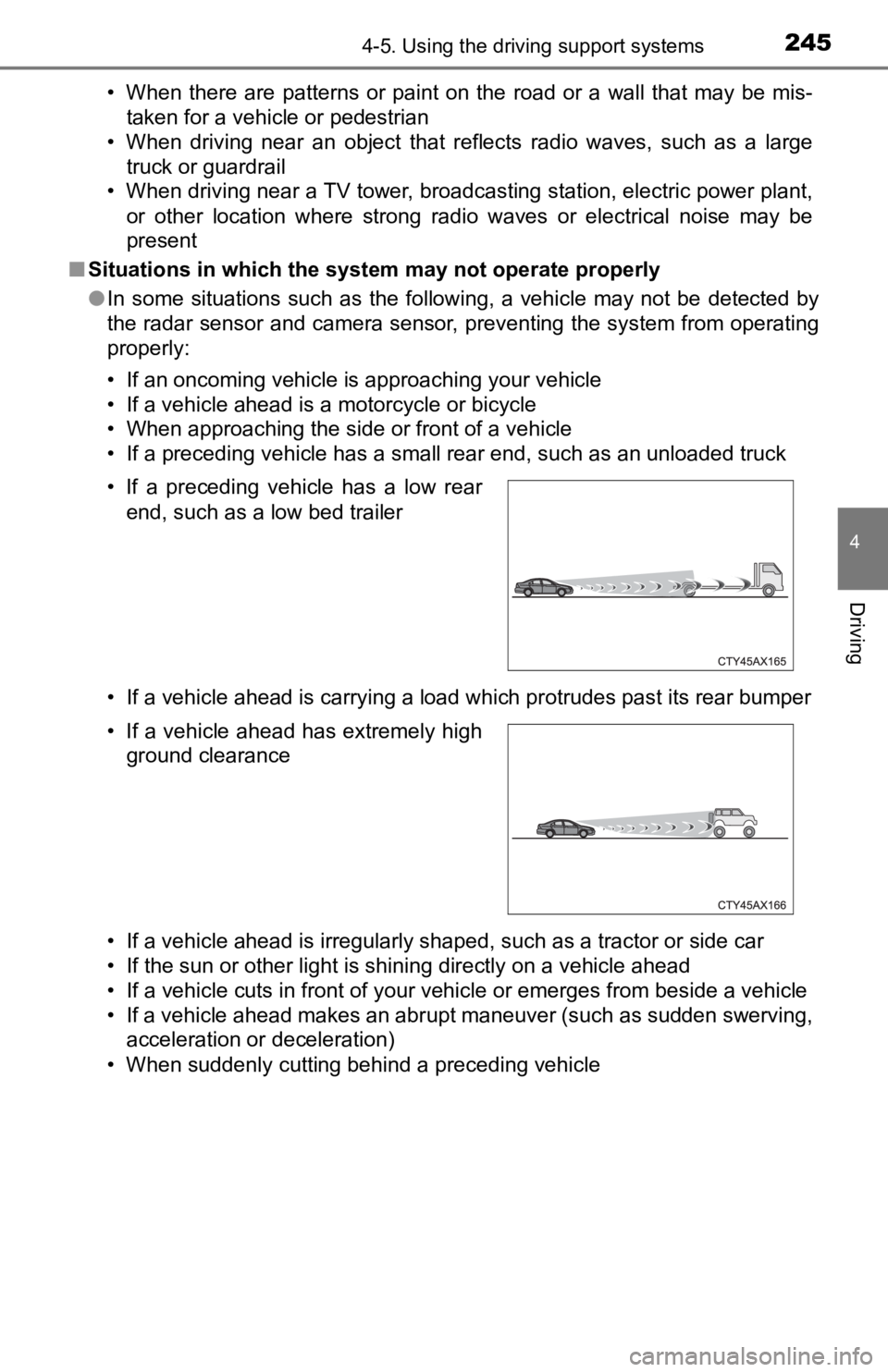
• If a preceding vehicle has a small rear end, such as an unload ed truck
• If a vehicle ahead is carrying a load which protrudes past its rear bumper
• If a vehicle ahead is irregularly shaped, such as a tractor or side car
• If the sun or other light is shining directly on a vehicle ahe ad
• If a vehicle cuts in front of your vehicle or emerges from bes ide a vehicle
• If a vehicle ahead makes an abrupt maneuver (such as sudden sw erving,
acceleration or deceleration)
• When suddenly cutting behind a preceding vehicle • If a preceding vehicle has a low rear end, such as a low bed trailer
• If a vehicle ahead has extremely high ground clearance
Page 259 of 700

2594-5. Using the driving support systems
4
Driving
WARNING
●Assisting the driver to operate the vehicle
The dynamic radar cruise control has limited capability to prev ent or avoid
a collision with a vehicle traveling ahead. Therefore, if there is ever any
danger, the driver must take immediate and direct control of th e vehicle
and act appropriately in order to ensure the safety of all involved.
■ Situations unsuitable for dynamic radar cruise control
Do not use dynamic radar cruise control in any of the following situations.
Doing so may result in inappropriate speed control and could ca use an acci-
dent resulting in death or serious injury.
● Roads where there are pedestrians, cyclists, etc.
● In heavy traffic
● On roads with sharp bends
● On winding roads
● On slippery roads, such as those covered with rain, ice or snow
● On steep downhills, or where there are sudden changes between s harp up
and down gradients
Vehicle speed may exceed the set speed when driving down a stee p hill.
● At entrances to freeways and highways
● When weather conditions are bad enough that they may prevent the sen-
sors from detecting correctly (fog, snow, sandstorm, heavy rain, etc.)
● When there is rain, snow, etc., on the front surface of the rad ar sensor or
camera sensor
● In traffic conditions that require frequent repeated acceleration and decel-
eration
● When your vehicle is towing a trailer or during emergency towin g
● When an approach warning buzzer is heard often
Page 269 of 700
2694-5. Using the driving support systems
4
Driving
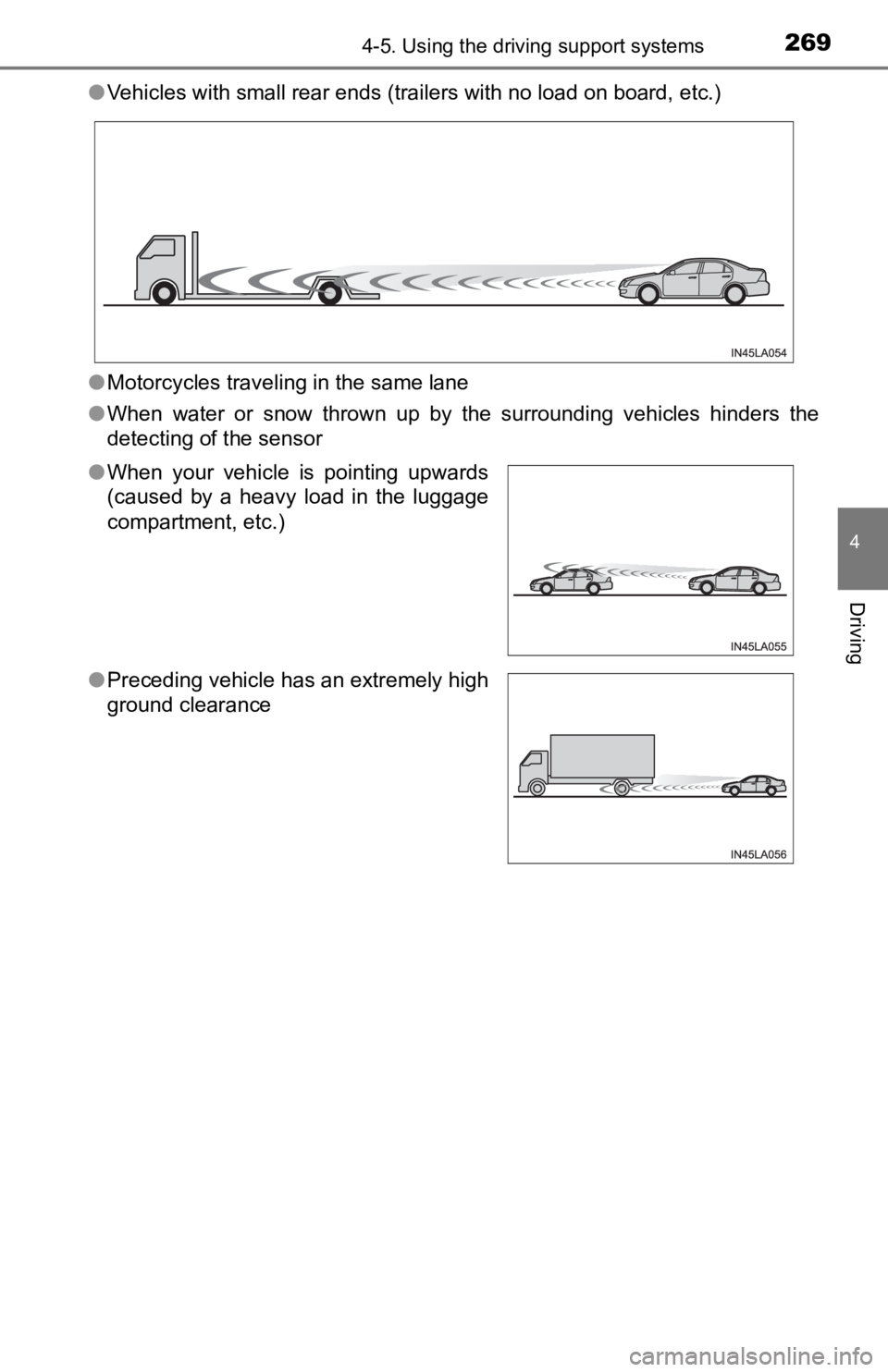
●Vehicles with small rear ends (trailers with no load on board, etc.)
● Motorcycles traveling in the same lane
● When water or snow thrown up by the surrounding vehicles hinders the
detecting of the sensor
●When your vehicle is pointing upwards
(caused by a heavy load in the luggage
compartment, etc.)
● Preceding vehicle has an extremely high
ground clearance
Page 274 of 700

2744-5. Using the driving support systems
WARNING
■To avoid operating the cruise control by mistake
Switch the cruise control off using the “ON-OFF” button when not in use.
■ Situations unsuitable for cruise control
Do not use cruise control in any of the following situations.
Doing so may result in loss of control and could cause an accident resulting
in death or serious injury.
● In heavy traffic
● On roads with sharp bends
● On winding roads
● On slippery roads, such as those covered with rain, ice or snow
● On steep hills
Vehicle speed may exceed the set speed when driving down a steep hill.
● When your vehicle is towing a trailer or during emergency towin g
Page 295 of 700

2954-5. Using the driving support systems
4
Driving
■The Blind Spot Monitor function is operational when
●The BSM main switch is set to on.
● Vehicle speed is greater than approximately 10 mph (16 km/h)
■ The Blind Spot Monitor functio n will detect a vehicle when
● A vehicle in an adjacent lane overtakes the vehicle.
● Another vehicle enters the detection area when it changes lanes .
■ Conditions under which the Blind Spot Monitor function will not detect a
vehicle
The Blind Spot Monitor function is not designed to detect the f ollowing types
of vehicles and/or objects:
● Small motorcycles, bicycles, pedestrians, etc.
*
●Vehicles traveling in the opposite direction
● Guardrails, walls, signs, parked vehicles and similar stationar y objects
*
●Following vehicles that are in the same lane*
●Vehicles driving 2 lanes across from your vehicle*
*
: Depending on conditions, detection of a vehicle and/or object may occur
■ Conditions under which the Blind Spot Monitor function may not func-
tion correctly
● The Blind Spot Monitor function may not detect vehicles correct ly in the fol-
lowing conditions:
• During bad weather such as heavy rain, fog, snow, etc.
• When ice or mud, etc., is attached to the rear bumper
• When driving on a road surface that is wet due to rain, standi ng water,
etc.
• When there is a significant difference in speed between your v ehicle and
the vehicle that enters the detection area
• When a vehicle is in the detection area from a stop and remains in the detection area as your vehicle accelerates
• When driving up or down consecutive steep inclines, such as hills, a dip
in the road, etc.
• When multiple vehicles approach with only a small gap between each vehicle
• When vehicle lanes are wide, and the vehicle in the next lane is too far
away from your vehicle
• When the vehicle that enters the detection area is traveling a t about the
same speed as your vehicle
• When towing anything such as trailer, boat, etc.
• When there is a significant difference in height between your vehicle and
the vehicle that enters the detection area
• Directly after the BSM main switch is set to on
• When items such as a bicycle carrier are installed on the rear of the vehi-
cle