change wheel TOYOTA TACOMA 2019 Owners Manual (in English)
[x] Cancel search | Manufacturer: TOYOTA, Model Year: 2019, Model line: TACOMA, Model: TOYOTA TACOMA 2019Pages: 700, PDF Size: 12.83 MB
Page 37 of 700
371-1. For safe use
1
For safety and security
WARNING
■SRS airbag precautions
Observe the following precautions regarding the SRS airbags.
Failure to do so may cause death or serious injury.
● The driver and all passengers in the vehicle must wear their se at belts
properly.
The SRS airbags are supplemental devices to be used with the se at belts.
● The SRS driver airbag deploys with considerable force, and can cause
death or serious injury especially if the driver is very close to the airbag.
The National Highway Traffic Safety Administration (NHTSA) advi ses:
Since the risk zone for the driver’s airbag is the first 2 - 3 in. (50 - 75 mm)
of inflation, placing yourself 10 in. (250 mm) from your driver airbag pro-
vides you with a clear margin of safety. This distance is measured from
the center of the steering wheel to your breastbone. If you sit less than
10 in. (250 mm) away now, you can change your driving position i n sev-
eral ways:
• Move your seat to the rear as far as you can while still reach ing the ped-
als comfortably.
• Slightly recline the back of the seat. Although vehicle designs vary, many drivers can achieve the 10 in.
(250 mm) distance, even with the driver seat all the way forward , simply
by reclining the back of the seat somewhat. If reclining the ba ck of your
seat makes it hard to see the road, raise yourself by using a firm, non-
slippery cushion, or raise the seat if your vehicle has that feature.
• If your steering wheel is adjustable, tilt it downward. This points the air- bag toward your chest instead of your head and neck.
The seat should be adjusted as recommended by NHTSA above, while
still maintaining control of the foot pedals, steering wheel, and your view
of the instrument panel controls.
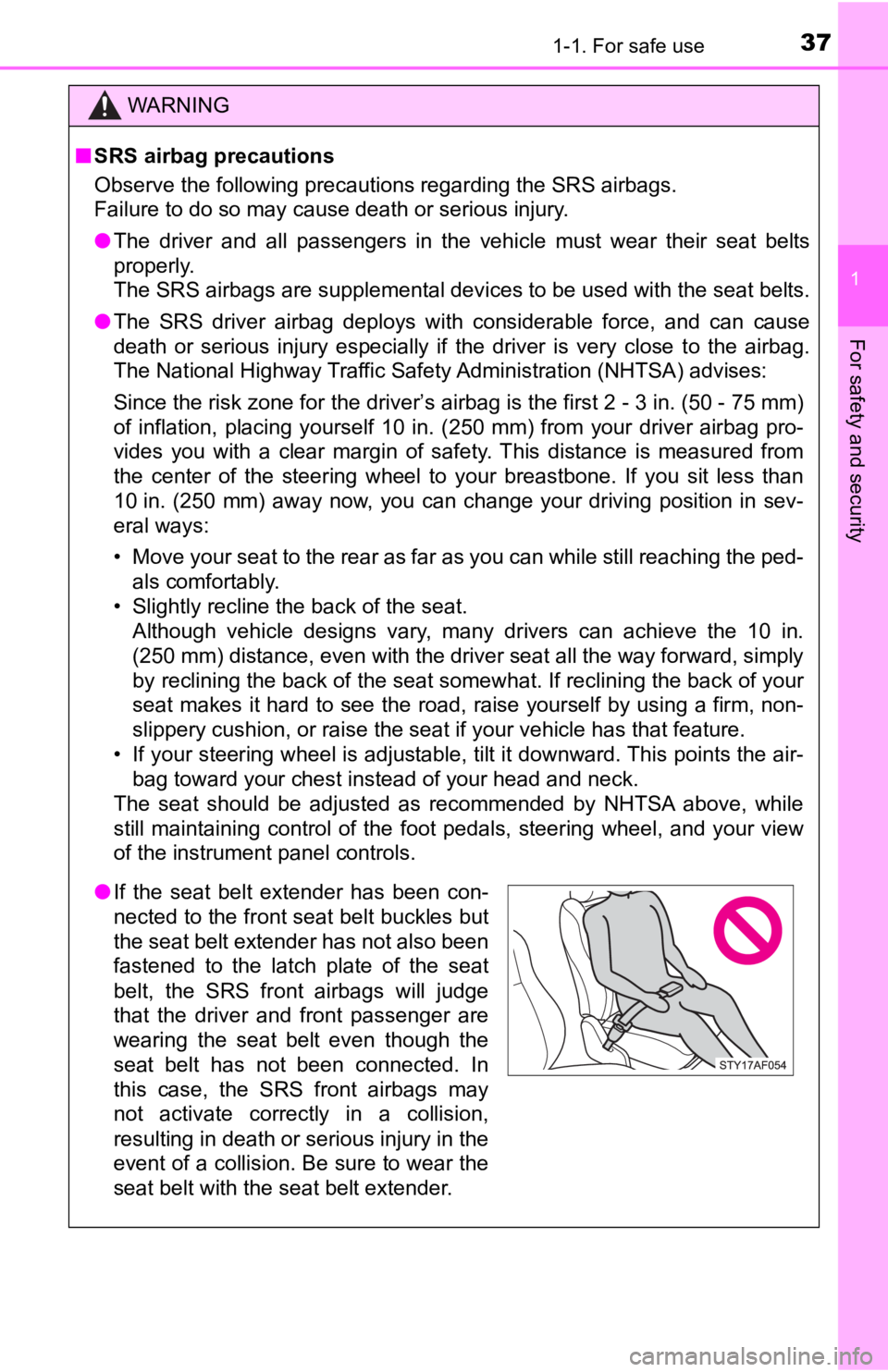
● If the seat belt extender has been con-
nected to the front seat belt buckles but
the seat belt extender has not also been
fastened to the latch plate of the seat
belt, the SRS front airbags will judge
that the driver and front passenger are
wearing the seat belt even though the
seat belt has not been connected. In
this case, the SRS front airbags may
not activate correctly in a collision,
resulting in death or serious injury in the
event of a collision. Be sure to wear the
seat belt with the seat belt extender.
Page 169 of 700

1694-1. Before driving
4
Driving
NOTICE
■If you get a flat tire while driving
A flat or damaged tire may cause the following situations. Hold the steering
wheel firmly and gradually depress the brake pedal to slow down the vehi-
cle.
● It may be difficult to control your vehicle.
● The vehicle will make abnormal sounds or vibrations.
● The vehicle will lean abnormally.
Information on what to do in case of a flat tire ( P. 597)
■ When encountering flooded roads
Do not drive on a road that has flooded after heavy rain, etc. Doing so may
cause the following serious damage to the vehicle:
● Engine stalling
● Short in electrical components
● Engine damage caused by water immersion
In the event that you drive on a flooded road and the vehicle i s flooded, be
sure to have your Toyota dealer check the following:
● Brake function
● Changes in quantity and quality of oil and fluid used for the engine, trans-
mission, transfer (4WD models) differentials, etc.
● Lubricant condition for the propeller shaft, bearings and suspe nsion joints
(where possible), and the function of all joints, bearings, etc.
Page 199 of 700
1994-2. Driving procedures
4
Driving
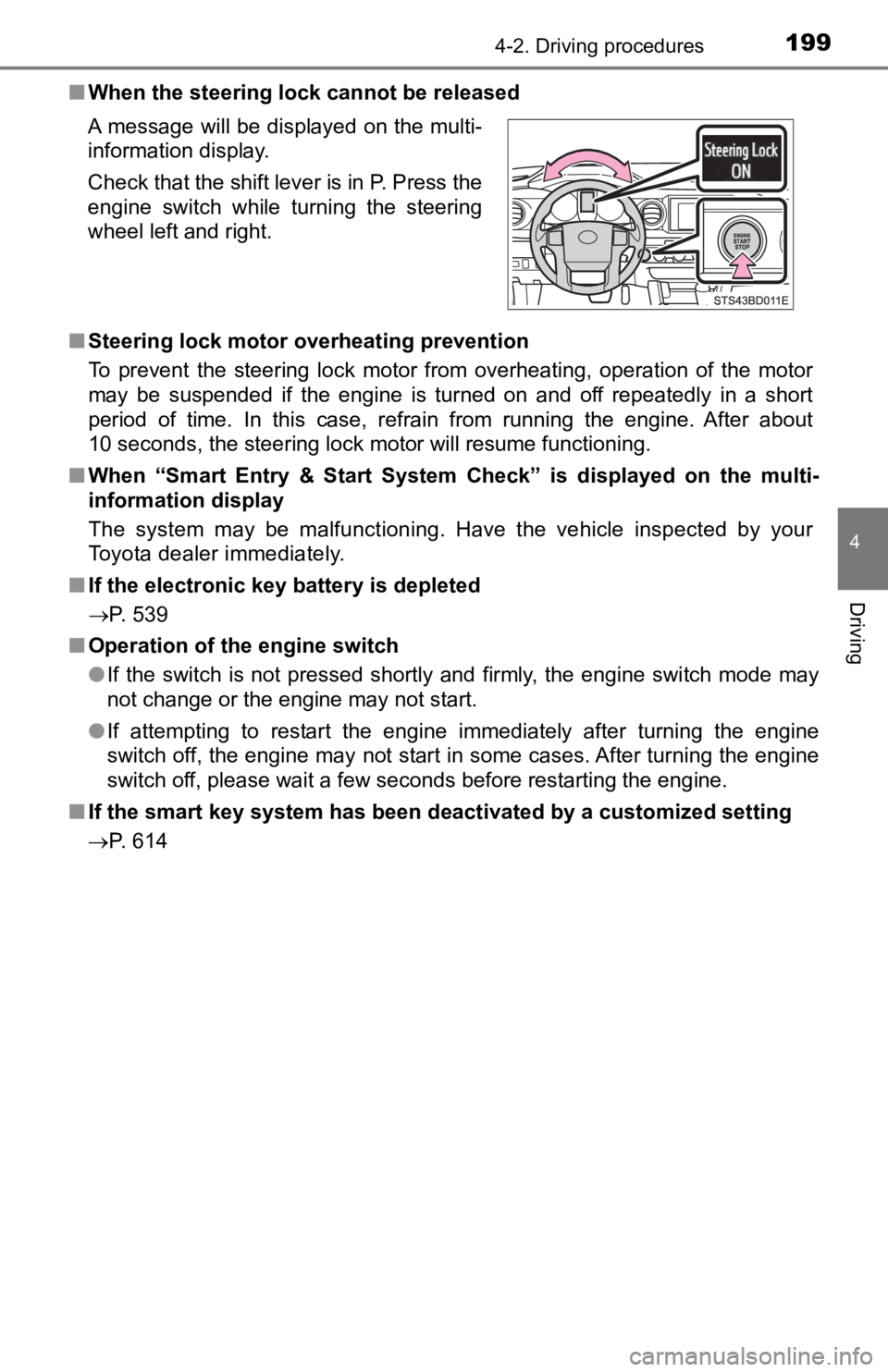
■When the steering lock cannot be released
■ Steering lock motor overheating prevention
To prevent the steering lock motor from overheating, operation of the motor
may be suspended if the engine is turned on and off repeatedly in a short
period of time. In this case, refrain from running the engine. After about
10 seconds, the steering lock motor will resume functioning.
■ When “Smart Entry & Start System Check” is displayed on the multi-
information display
The system may be malfunctioning. Have the vehicle inspected by your
Toyota dealer immediately.
■ If the electronic key battery is depleted
P. 539
■ Operation of the engine switch
●If the switch is not pressed shortly and firmly, the engine swi tch mode may
not change or the engine may not start.
● If attempting to restart the engine immediately after turning t he engine
switch off, the engine may not start in some cases. After turni ng the engine
switch off, please wait a few seconds before restarting the eng ine.
■ If the smart key system has been d eactivated by a customized setting
P. 614 A message will be displayed on the multi-
information display.
Check that the shift lever is in P. Press the
engine switch while turning the steering
wheel left and right.
Page 237 of 700

2374-5. Using the driving support systems
4
Driving
WARNING
■Limitations of the pre-collision system
● The driver is solely responsible for safe driving. Always drive safely, taking
care to observe your surroundings.
Do not use the pre-collision system instead of normal braking o perations
under any circumstances. This system will not prevent collision s or lessen
collision damage or injury in every situation. Do not overly re ly on this sys-
tem. Failure to do so may lead to an accident, resulting in dea th or serious
injury.
● Although this system is designed to help avoid a collision or h elp reduce
the impact of the collision, its effectiveness may change according to vari-
ous conditions, therefore the system may not always be able to achieve
the same level of performance.
Read the following conditions carefully. Do not overly rely on this system
and always drive carefully.
• Conditions under which the system may operate even if there is no pos- sibility of a collision: P. 243
• Conditions under which the system may not operate properly: P. 245
● Do not attempt to test the operation of the pre-collision system yourself, as
the system may not operate properly, possibly leading to an accident.
■ Pre-collision braking
● When the pre-collision braking function is operating, a large a mount of
braking force will be applied.
● If the vehicle is stopped by the operation of the pre-collision braking func-
tion, the pre-collision braking function operation will be canceled after
approximately 2 seconds. Depress the brake pedal as necessary.
● The pre-collision braking function may not operate if certain operations are
performed by the driver. If the accelerator pedal is being depressed
strongly or the steering wheel is being turned, the system may determine
that the driver is taking evasive action and possibly prevent the pre-colli-
sion braking function from operating.
● In some situations, while the pre-collision braking function is operating,
operation of the function may be canceled if the accelerator pedal is
depressed strongly or the steering wheel is turned and the syst em deter-
mines that the driver is taking evasive action.
● If the brake pedal is being depressed, the system may determine that the
driver is taking evasive action and possibly delay the operation timing of
the pre-collision braking function.
Page 246 of 700
2464-5. Using the driving support systems
• When driving in inclement weather such as heavy rain, fog, snow or a
sandstorm
• When the vehicle is hit by water, snow, dust, etc., from a veh icle ahead
• When driving through steam or smoke
• When driving in a place where the surrounding brightness changes sud- denly, such as at the entrance or exit of a tunnel
• When a very bright light, such as the sun or the headlights of oncoming
traffic, shines directly into the camera sensor
• When the surrounding area is dim, such as at dawn or dusk, or while at
night or in a tunnel
• After the engine has started the vehicle has not been driven for a certain amount of time
• While making a left/right turn and for a few seconds after mak ing a left/
right turn
• While driving on a curve and for a few seconds after driving o n a curve
• If your vehicle is skidding
• If the wheels are misaligned
• If a wiper blade is blocking the camera sensor
• The vehicle is wobbling.
• The vehicle is being driven at extremely high speeds.
• When driving on a hill
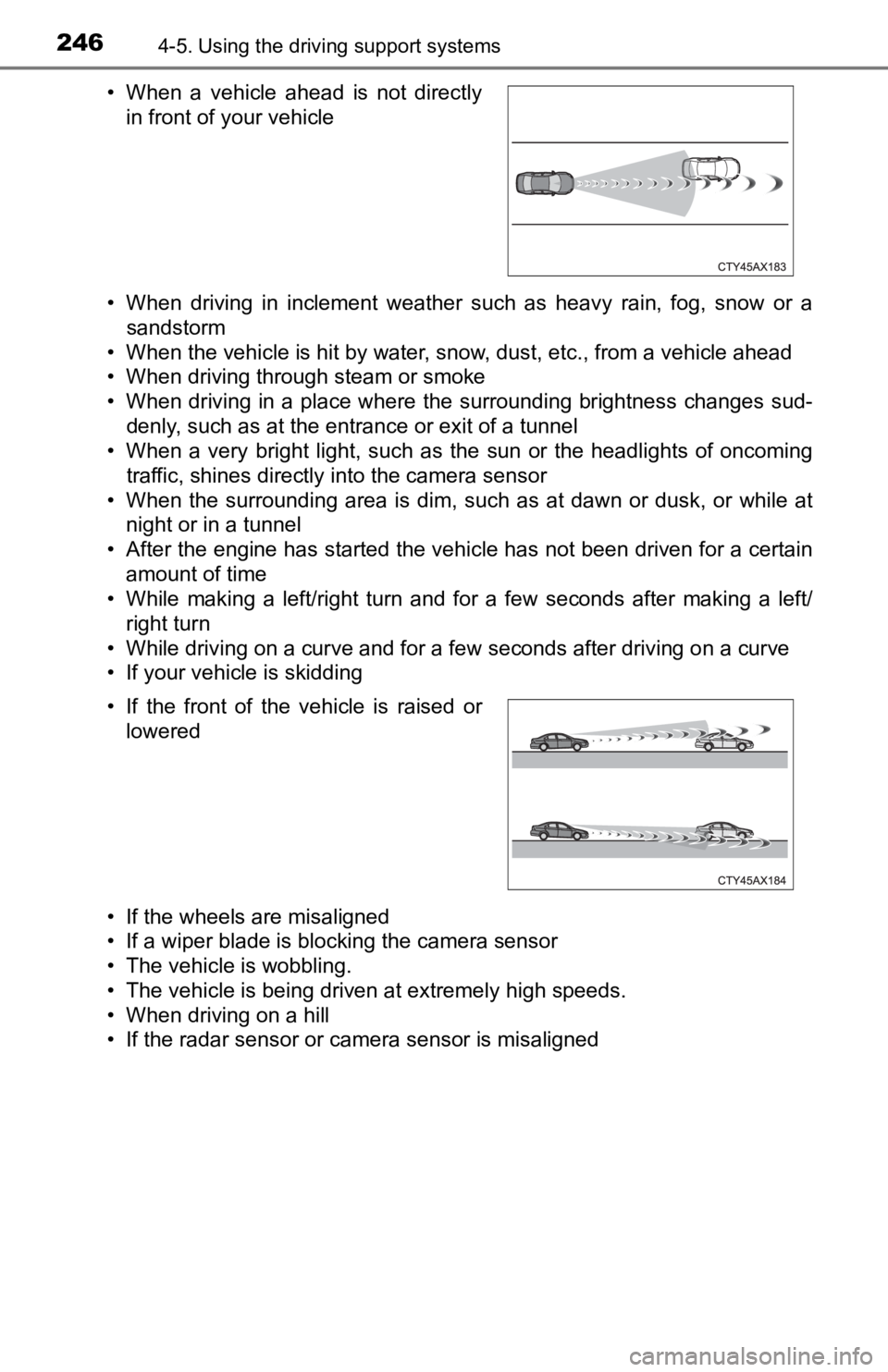
• If the radar sensor or camera sensor is misaligned • When a vehicle ahead is not directly in front of your vehicle
• If the front of the vehicle is raised or lowered
Page 289 of 700

2894-5. Using the driving support systems
4
Driving
WARNING
■When using the rear view monitor system
The rear view monitor system is a supplemental device intended to assist
the driver when backing up. When backing up, be sure to visually check all
around the vehicle both directly and using the mirrors before proceeding.
Observe the following precautions to avoid an accident that cou ld result in
death or serious injuries.
● Never depend on the rear view monitor system entirely when backing up.
The image and the position of the guide lines displayed on the screen may
differ from the actual state.
Use caution, just as you would when backing up any vehicle.
● Be sure to back up slowly, depressing the brake pedal to control vehicle
speed.
● The instructions given are only guidelines.
When and how much to turn the steering wheel will vary according to traf-
fic conditions, road surface conditions, vehicle condition, etc ., when park-
ing. It is necessary to be fully aware of this before using the rear view
monitor system.
● When parking, be sure to check that the parking space will accommodate
your vehicle before maneuvering into it.
● Do not use the rear view monitor system in the following cases:
• On icy or slick road surfaces, or in snow
• When using tire chains or the emergency tire
• When the tailgate is not closed completely
• On roads that are not flat or straight, such as curves or slopes
● In low temperatures, the screen may darken or the image may bec ome
faint. The image could distort when the vehicle is moving, or y ou may
become unable to see the image on the screen. Be sure to visual ly check
all around the vehicle both directly and using the mirrors before proceed-
ing.
● If the tire sizes are changed, the position of the fixed guide lines displayed
on the screen may change.
● The camera uses a special lens. The distances between objects a nd
pedestrians that appear in the image displayed on the screen will differ
from the actual distances. ( P. 284)
Page 340 of 700
3405-1. Basic Operations
Steering wheel audio switches
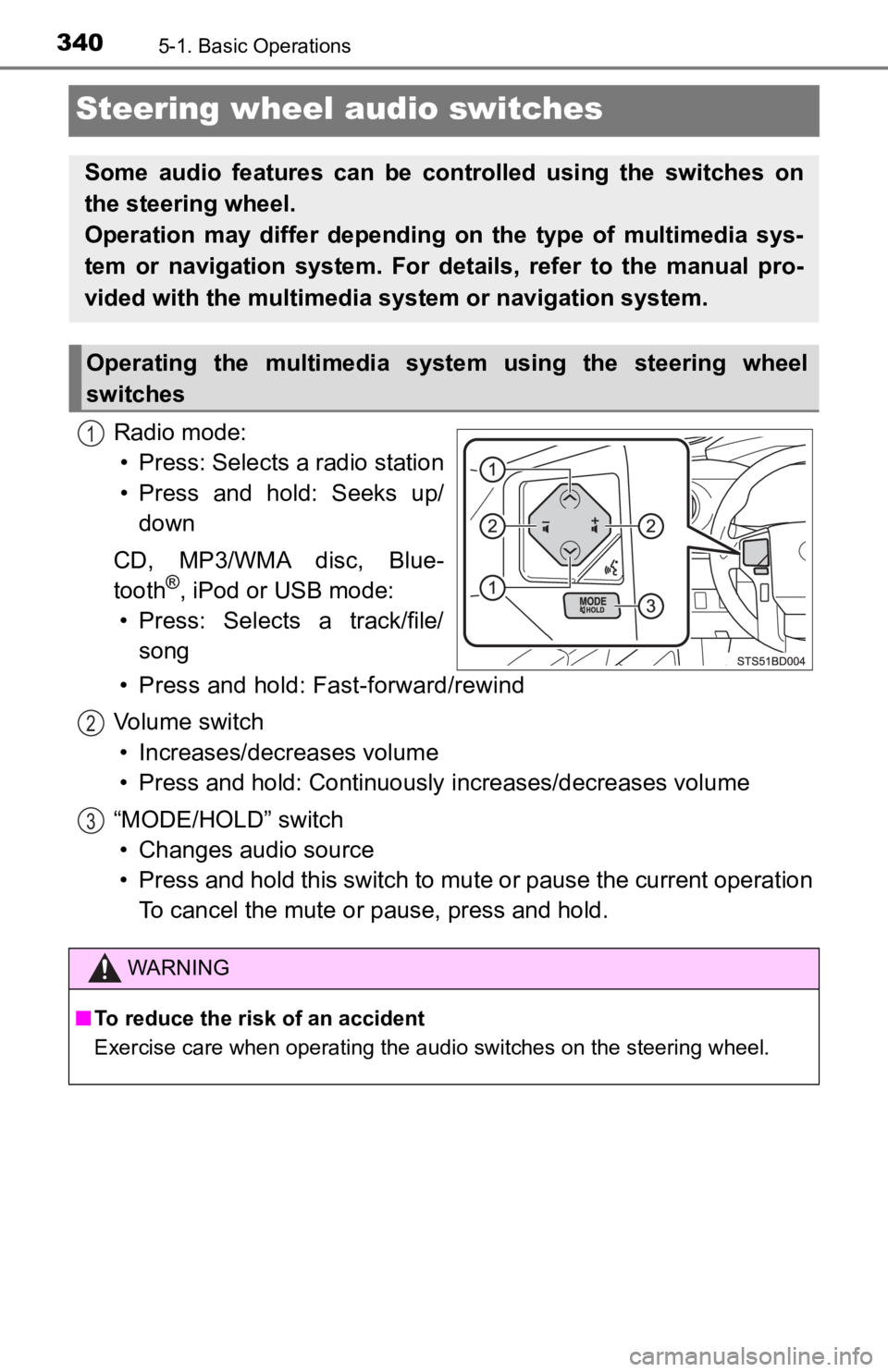
Radio mode:• Press: Selects a radio station
• Press and hold: Seeks up/ down
CD, MP3/WMA disc, Blue-
tooth
®, iPod or USB mode:
• Press: Selects a track/file/ song
• Press and hold: Fast-forward/rewind
Volume switch • Increases/dec reases volume
• Press and hold: Continuously increases/decreases volume
“MODE/HOLD” switch • Changes audio source
• Press and hold this switch to mute or pause the current operat ion
To cancel the mute or pause, press and hold.
Some audio features can be cont rolled using the switches on
the steering wheel.
Operation may differ depending on the type of multimedia sys-
tem or navigation system. For details, refer to the manual pro-
vided with the multimedia system or navigation system.
Operating the multimedia system using the steering wheel
switches
1
WARNING
■ To reduce the risk of an accident
Exercise care when operating the audio switches on the steering wheel.
2
3
Page 351 of 700
3515-3. Using the multimedia system
5
Multimedia
Selecting the audio source
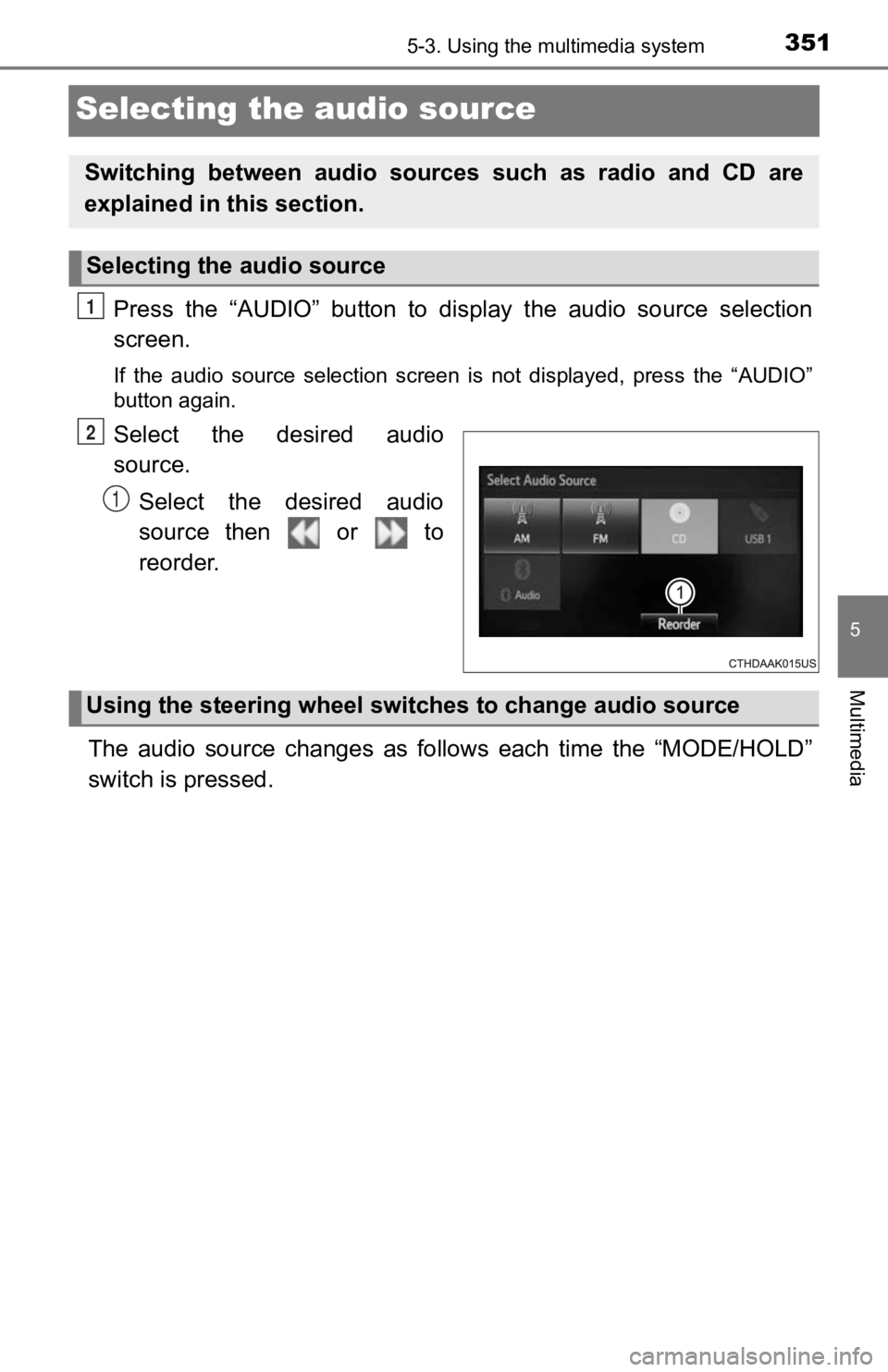
Press the “AUDIO” button to display the audio source selection
screen.
If the audio source selection screen is not displayed, press the “AUDIO”
button again.
Select the desired audio
source.
Select the desired audio
source then or to
reorder.
The audio source changes as follows each time the “MODE/HOLD”
switch is pressed.
Switching between audio sources such as radio and CD are
explained in t his section.
Selecting the audio source
1
2
1
Using the steering wheel switches to change audio source
Page 564 of 700
5648-2. Steps to take in an emergency
WARNING
Observe the following precautions.
Failure to do so may result in death or serious injury.
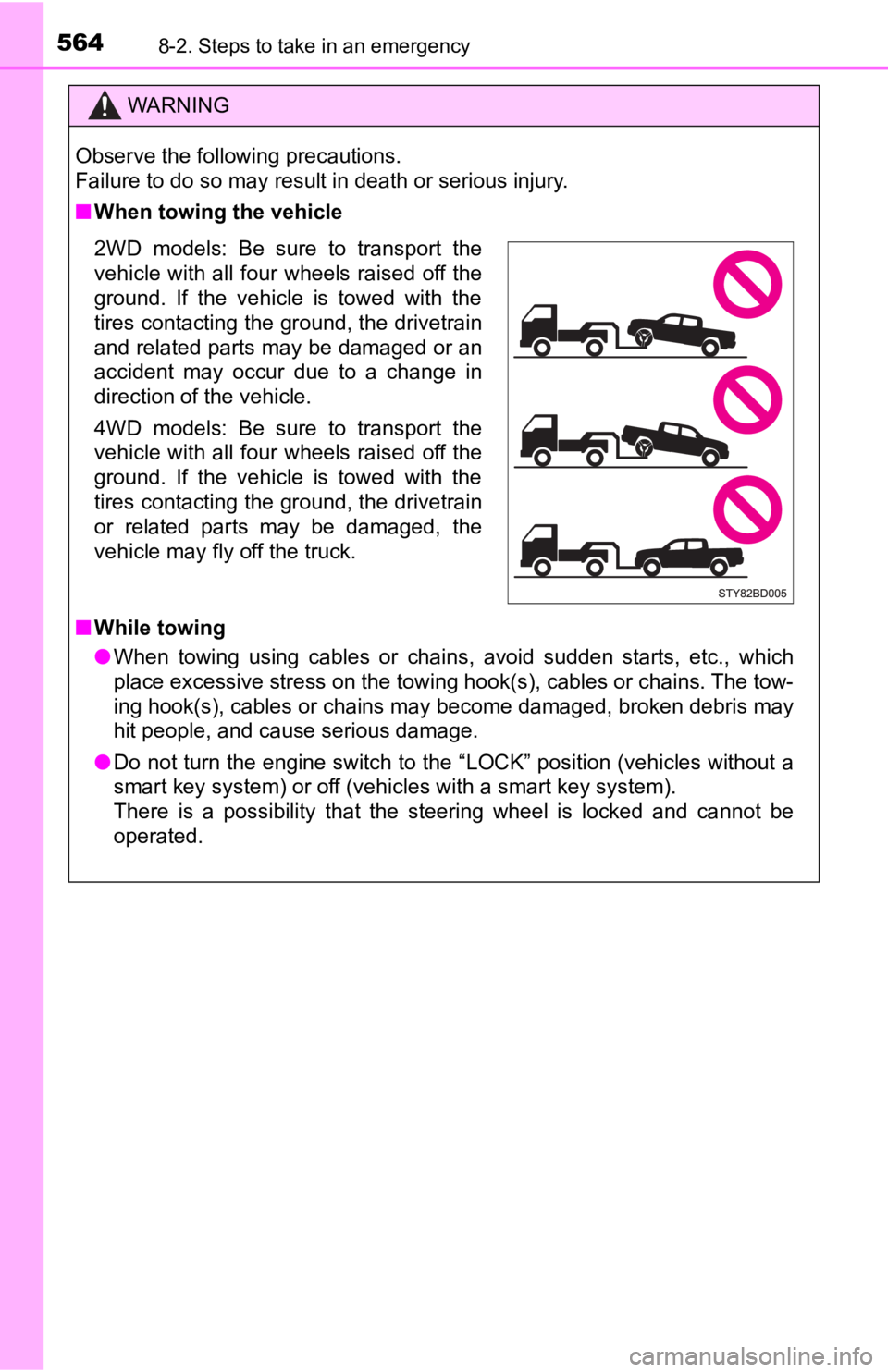
■When towing the vehicle
2WD models: Be sure to transport the
vehicle with all four wheels raised off the
ground. If the vehicle is towed with the
tires contacting the ground, the drivetrain
and related parts may be damaged or an
accident may occur due to a change in
direction of the vehicle.
4WD models: Be sure to transport the
vehicle with all four wheels raised off the
ground. If the vehicle is towed with the
tires contacting the ground, the drivetrain
or related parts may be damaged, the
vehicle may fly off the truck.
■While towing
● When towing using cables or chains, avoid sudden starts, etc., which
place excessive stress on the towing hook(s), cables or chains. The tow-
ing hook(s), cables or chains may become damaged, broken debris may
hit people, and cause serious damage.
● Do not turn the engine switch to the “LOCK” position (vehicles without a
smart key system) or off (vehicles with a smart key system).
There is a possibility that the steering wheel is locked and ca nnot be
operated.
Page 573 of 700

5738-2. Steps to take in an emergency
8
When trouble arises
WARNING
■If both the ABS and the brake system warning lights remain on
Stop your vehicle in a safe place immediately and contact your Toyota
dealer. The vehicle will become extremely unstable during braki ng, and the
ABS system may fail, which could cause an accident resulting in death or
serious injury.
■ If the tire pressure warning light comes on (if equipped)
Be sure to observe the following precautions. Failure to do so could cause a
loss of vehicle control and result in death or serious injury.
● Stop your vehicle in a safe place as soon as possible. Adjust the tire infla-
tion pressure immediately.
● If the tire pressure warning light comes on even after tire inf lation pressure
adjustment, it is probable that you have a flat tire. Check the tires. If a tire
is flat, change it with the spare tire and have the flat tire repaired by the
nearest Toyota dealer.
● Avoid abrupt maneuvering and braking. If the vehicle tires dete riorate, you
could lose control of the steering wheel or the brakes.
■ If a blowout or sudden air leakage should occur (vehicles with the tire
pressure warning system)
The tire pressure warning system may not activate immediately.
■
Maintenance of the tires (vehicles with the tire pressure warning
system)
Each tire, including the spare (if provided), should be checked monthly
when cold and inflated to the inflation pressure recommended by the
vehicle manufacturer on the vehicle placard or tire inflation p ressure
label (tire and load information label). (If your vehicle has t ires of a dif-
ferent size than the size indicated on the vehicle placard or t ire inflation
pressure label [tire and load information label], you should de termine
the proper tire inflation p ressure for those tires.)
As an added safety feature, your vehicle has been equipped with a tire
pressure monitoring system (TPMS -tire pressure warning system) that
illuminates a low tire pressure telltale (tire pressure warning light) when
one or more of your tires is significantly under-inflated. Acco rdingly,
when the low tire pressure telltale (tire pressure warning ligh t) illumi-
nates, you should stop and check your tires as soon as possible , and
inflate them to the proper pressure. Driving on a significantly under-
inflated tire causes the tire to overheat and can lead to tire failure.
Under-inflation also reduces fuel efficiency and tire tread lif e, and may
affect the vehicle’s handling and stopping ability.