windshield wipers TOYOTA TACOMA 2019 Owners Manual (in English)
[x] Cancel search | Manufacturer: TOYOTA, Model Year: 2019, Model line: TACOMA, Model: TOYOTA TACOMA 2019Pages: 700, PDF Size: 12.83 MB
Page 3 of 700

3
1
9 8
7 5 4
3
2
10
6
4-1. Before drivingDriving the vehicle ............. 160
Cargo and luggage............ 170
Vehicle load limits ............. 174
Trailer towing..................... 175
Dinghy towing.................... 192
4-2. Driving procedures Engine (ignition) switch (vehicles without
a smart key system) ........ 193
Engine (ignition) switch (vehicles with a smart
key system) ..................... 196
Automatic transmission ..... 201
Manual transmission ......... 207
Turn signal lever................ 209
Parking brake .................... 210
4-3. Operating the lights and wipers
Headlight switch ................ 211
Automatic High Beam ....... 215
Fog light switch ................. 220
Windshield wipers and washer ............................ 221
4-4. Refueling Opening the fuel tank cap .................................. 224 4-5. Using the driving support
systems
Toyota Safety Sense P ...... 228
PCS (Pre-Collision System)..... 235
LDA (Lane Departure Alert)..... 249
Dynamic radar cruise control ................... 257
Cruise control .................... 271
Intuitive parking assist ....... 275
Rear view monitor system ............................. 281
BSM (Blind Spot Monitor)......... 291
• The Blind Spot Monitor function.......................... 293
• The Rear Cross Traffic Alert function ................. 296
Four-wheel drive system ... 299
AUTO LSD system ............ 303
Rear differential lock system ............................. 305
Active traction control system ............................. 308
Multi-terrain Select............. 310
Crawl Control ..................... 314
Clutch start cancel switch .............................. 318
Driving assist systems ....... 319
4-6. Driving tips Winter driving tips .............. 325
Off-road precautions .......... 329
4Driving
Page 14 of 700
14Pictorial index
Pictorial index
■
Exterior
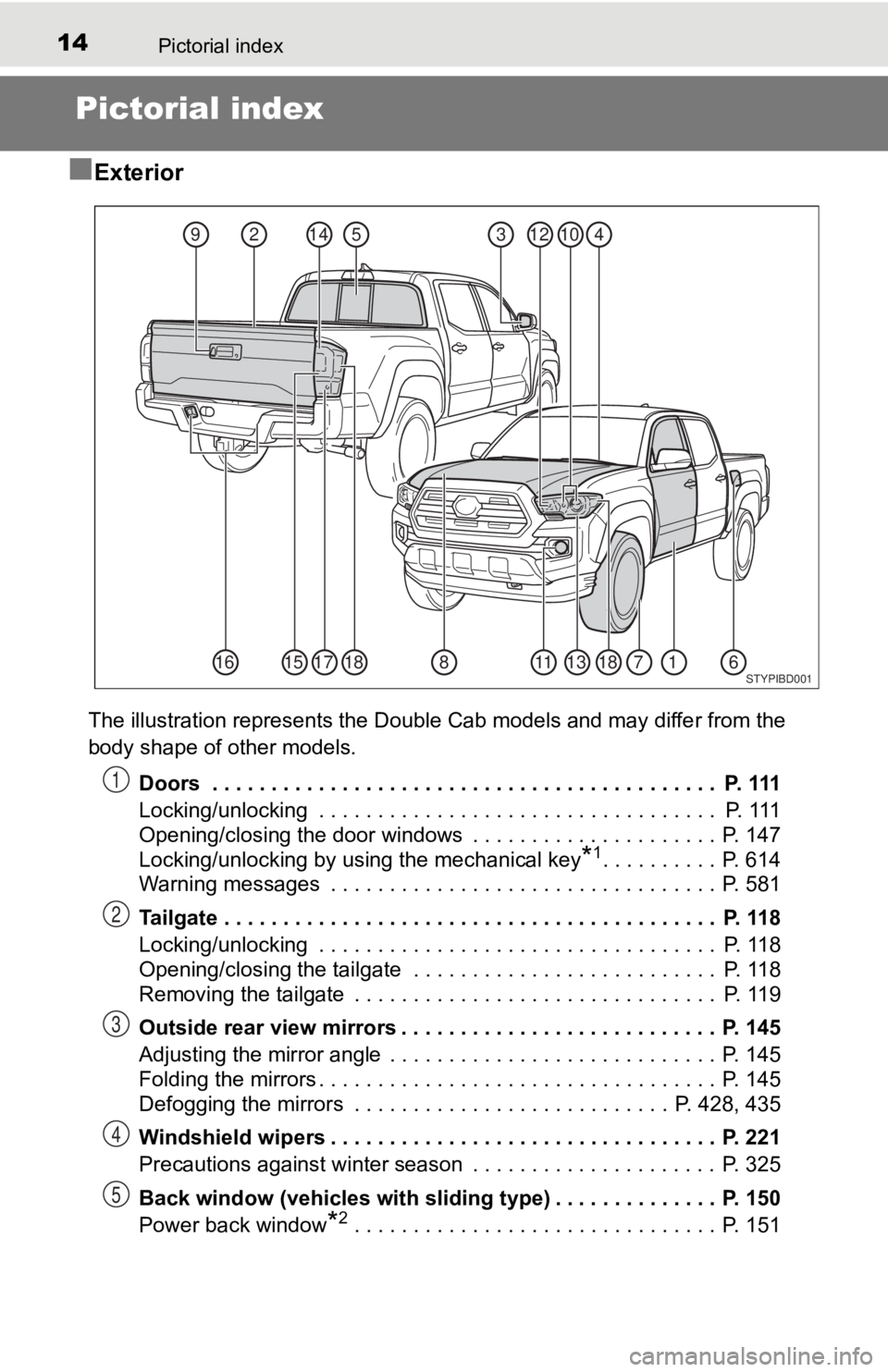
The illustration represents the Double Cab models and may diffe r from the
body shape of other models.
Doors . . . . . . . . . . . . . . . . . . . . . . . . . . . . . . . . . . . . . . . . . . . P. 111
Locking/unlocking . . . . . . . . . . . . . . . . . . . . . . . . . . . . . . . . . . P. 111
Opening/closing the door windows . . . . . . . . . . . . . . . . . . . . . P. 147
Locking/unlocking by using the mechanical key
*1. . . . . . . . . . P. 614
Warning messages . . . . . . . . . . . . . . . . . . . . . . . . . . . . . . . . . P. 581
Tailgate . . . . . . . . . . . . . . . . . . . . . . . . . . . . . . . . . . . . . . . . . . P. 118
Locking/unlocking . . . . . . . . . . . . . . . . . . . . . . . . . . . . . . . . . . P. 118
Opening/closing the tailgate . . . . . . . . . . . . . . . . . . . . . . . . . . P. 118
Removing the tailgate . . . . . . . . . . . . . . . . . . . . . . . . . . . . . . . P. 119
Outside rear view mirrors . . . . . . . . . . . . . . . . . . . . . . . . . . . P. 145
Adjusting the mirror angle . . . . . . . . . . . . . . . . . . . . . . . . . . . . P. 145
Folding the mirrors . . . . . . . . . . . . . . . . . . . . . . . . . . . . . . . . . . P. 145
Defogging the mirrors . . . . . . . . . . . . . . . . . . . . . . . . . . . P. 428, 435
Windshield wipers . . . . . . . . . . . . . . . . . . . . . . . . . . . . . . . . . P. 221
Precautions against winter season . . . . . . . . . . . . . . . . . . . . . P. 325
Back window (vehicles with sliding type) . . . . . . . . . . . . . . P. 150
Power back window
*2 . . . . . . . . . . . . . . . . . . . . . . . . . . . . . . . P. 151
53124102149
181115171871138166STYPIBD001
1
2
3
4
5
Page 158 of 700

158
4-1. Before drivingDriving the vehicle............. 160
Cargo and luggage ........... 170
Vehicle load limits ............. 174
Trailer towing .................... 175
Dinghy towing ................... 192
4-2. Driving procedures Engine (ignition) switch (vehicles without
a smart key system) ........ 193
Engine (ignition) switch (vehicles with a smart
key system)..................... 196
Automatic transmission ..... 201
Manual transmission ......... 207
Turn signal lever ............... 209
Parking brake .................... 210
4-3. Operating the lights and
wipers
Headlight switch ................ 211
Automatic High Beam ....... 215
Fog light switch ................. 220
Windshield wipers and washer ............................ 221
4Driving
Page 213 of 700
2134-3. Operating the lights and wipers
4
Driving
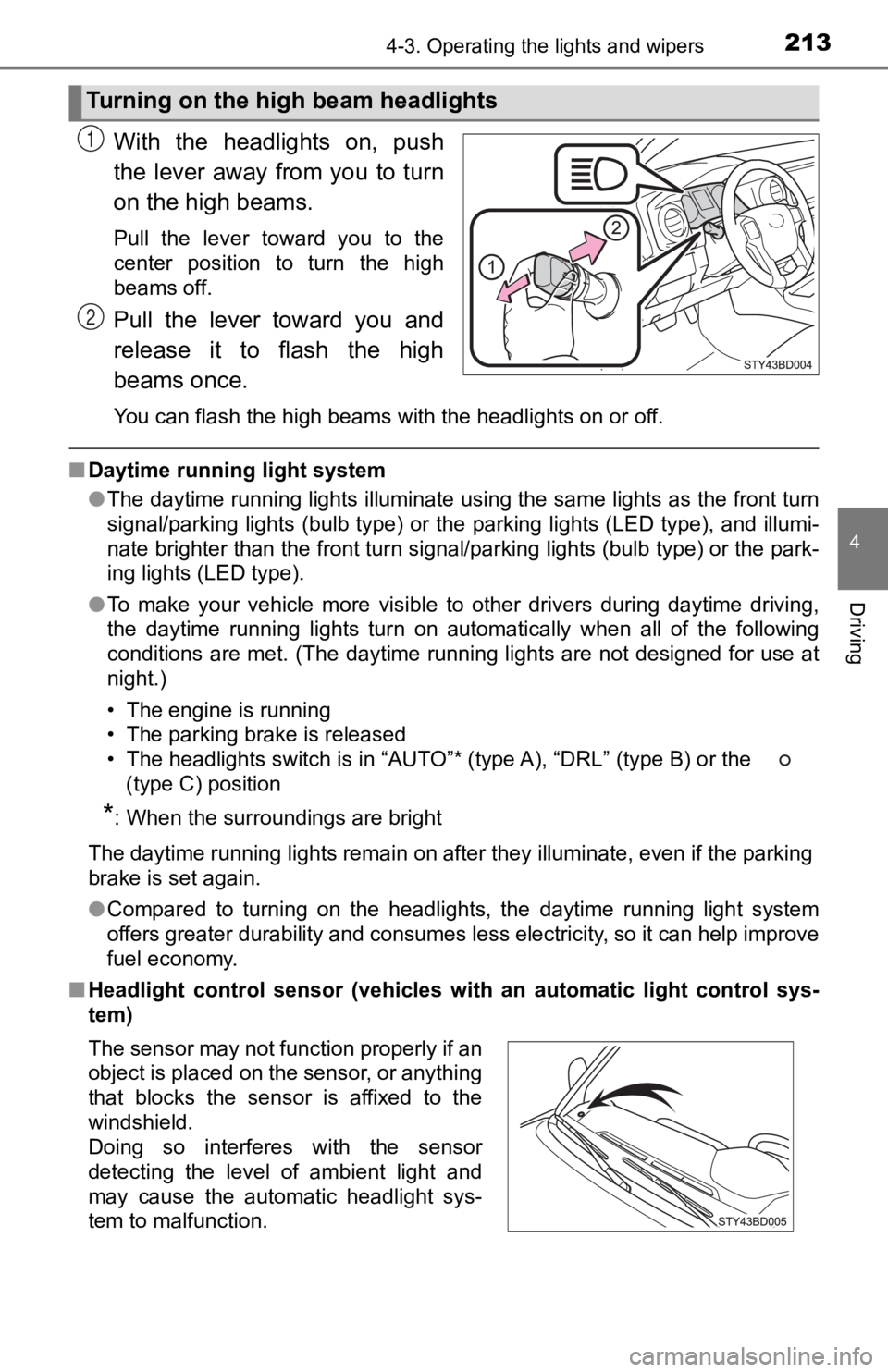
With the headlights on, push
the lever away from you to turn
on the high beams.
Pull the lever toward you to the
center position to turn the high
beams off.
Pull the lever toward you and
release it to flash the high
beams once.
You can flash the high beams with the headlights on or off.
■Daytime running light system
●The daytime running lights illuminate using the same lights as the front turn
signal/parking lights (bulb type) or the parking lights (LED ty pe), and illumi-
nate brighter than the front turn signal/parking lights (bulb t ype) or the park-
ing lights (LED type).
● To make your vehicle more visible to other drivers during dayti me driving,
the daytime running lights turn on automatically when all of the following
conditions are met. (The daytime running lights are not designe d for use at
night.)
• The engine is running
• The parking brake is released
• The headlights switch is in “AUTO”* (type A), “DRL” (type B) o r the
(type C) position
*: When the surroundings are bright
The daytime running lights remain on after they illuminate, even if the parking
brake is set again.
● Compared to turning on the headlights, the daytime running ligh t system
offers greater durability and consumes less electricity, so it can help improve
fuel economy.
■ Headlight control sensor (vehicl es with an automatic light control sys-
tem)
Turning on the high beam headlights
1
2
The sensor may not function properly if an
object is placed on the sensor, or anything
that blocks the sensor is affixed to the
windshield.
Doing so interferes with the sensor
detecting the level of ambient light and
may cause the automatic headlight sys-
tem to malfunction.
Page 218 of 700

2184-3. Operating the lights and wipers
●The high beam may be turned on or off when the driver does not expect it.
● Bicycles or similar objects may not be detected.
● In the situations shown below, the system may not be able to accurately
detect surrounding brightness levels. This may cause the low be ams to
remain on or the high beams to cause problems for pedestrians, vehicles
ahead or other parties. In these cases, manually switch between the high
and low beams.
• In bad weather (rain, snow, fog, sandstorms, etc.)
• The windshield is obscured by fog, mist, ice, dirt, etc.
• The windshield is cracked or damaged.
• The camera sensor is deformed or dirty.
• The camera sensor temperature is extremely high.
• Surrounding brightness levels are equal to those of headlights , tail lights
or fog lights.
• Vehicles ahead have headlights that are either switched off, d irty, are
changing color, or are not aimed properly.
• When driving through an area of intermittently changing brightness and
darkness.
• When frequently and repeatedly driving ascending/descending roads, or roads with rough, bumpy or uneven surfaces (such as stone-paved
roads, gravel tracks, etc.).
• When frequently and repeatedly taking curves or driving on a w inding
road.
• There is a highly reflective object ahead of the vehicle, such as a sign or a mirror.
• The back of a vehicle ahead is highly reflective, such as a co ntainer on a
truck.
• The vehicle’s headlights are damaged or dirty.
• The vehicle is listing or tilting, due to a flat tire, a trailer being towed etc.
• The high beam and low beam are repeatedly being switched betwe en in
an abnormal manner.
• The driver believes that the high beam may be causing problems or dis-
tress to other drivers or pedestrians nearby.
Page 221 of 700
2214-3. Operating the lights and wipers
4
Driving
Windshield wipers and washer
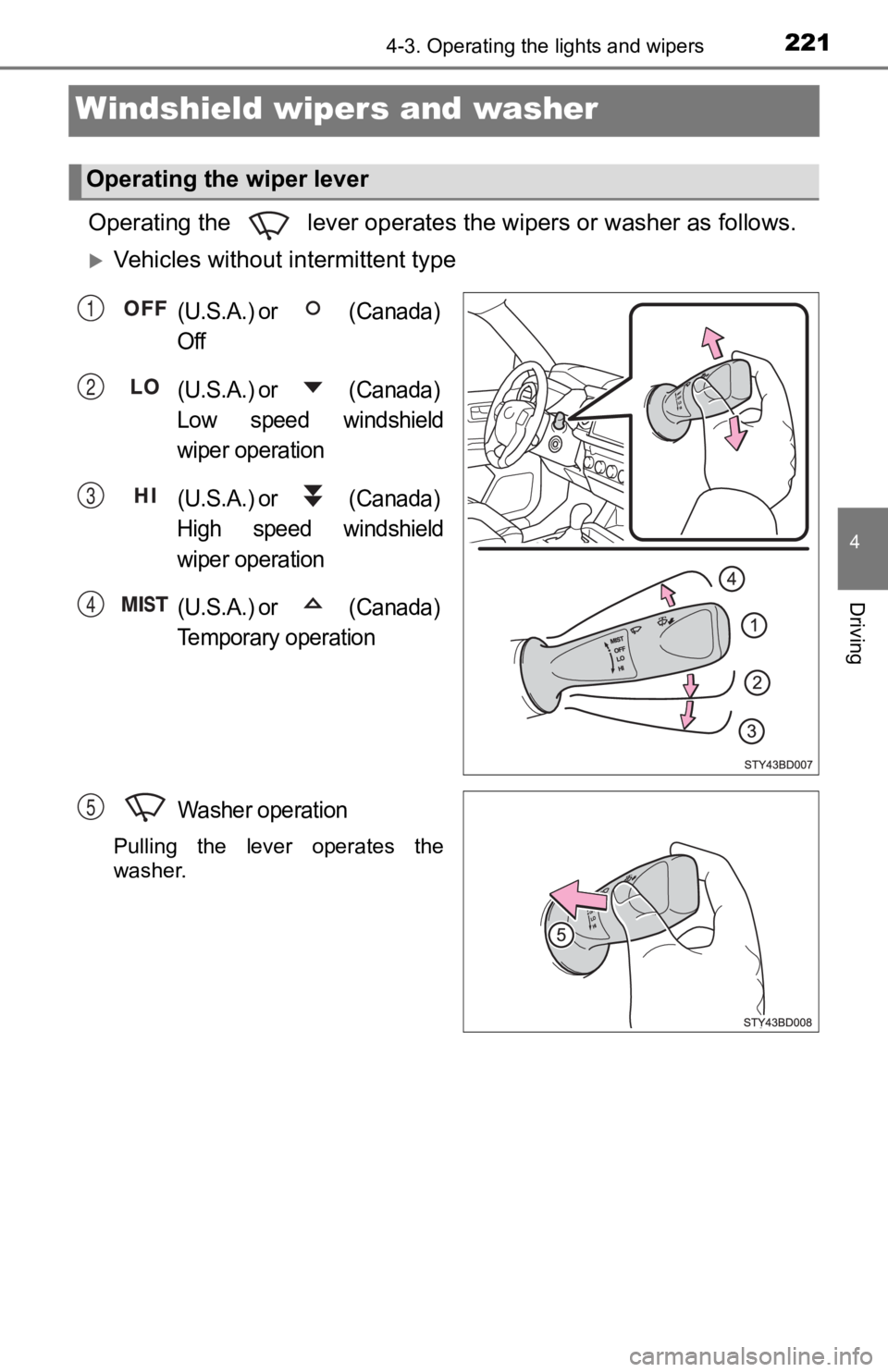
Operating the lever operates the wipers or washer as follows.
Vehicles without intermittent type
(U.S.A.) or (Canada)
Off
(U.S.A.) or (Canada)
Low speed windshield
wiper operation
(U.S.A.) or (Canada)
High speed windshield
wiper operation
(U.S.A.) or (Canada)
Temporary operation
Washer operation
Pulling the lever operates the
washer.
Operating the wiper lever
1
2
3
4
5
Page 222 of 700
2224-3. Operating the lights and wipers
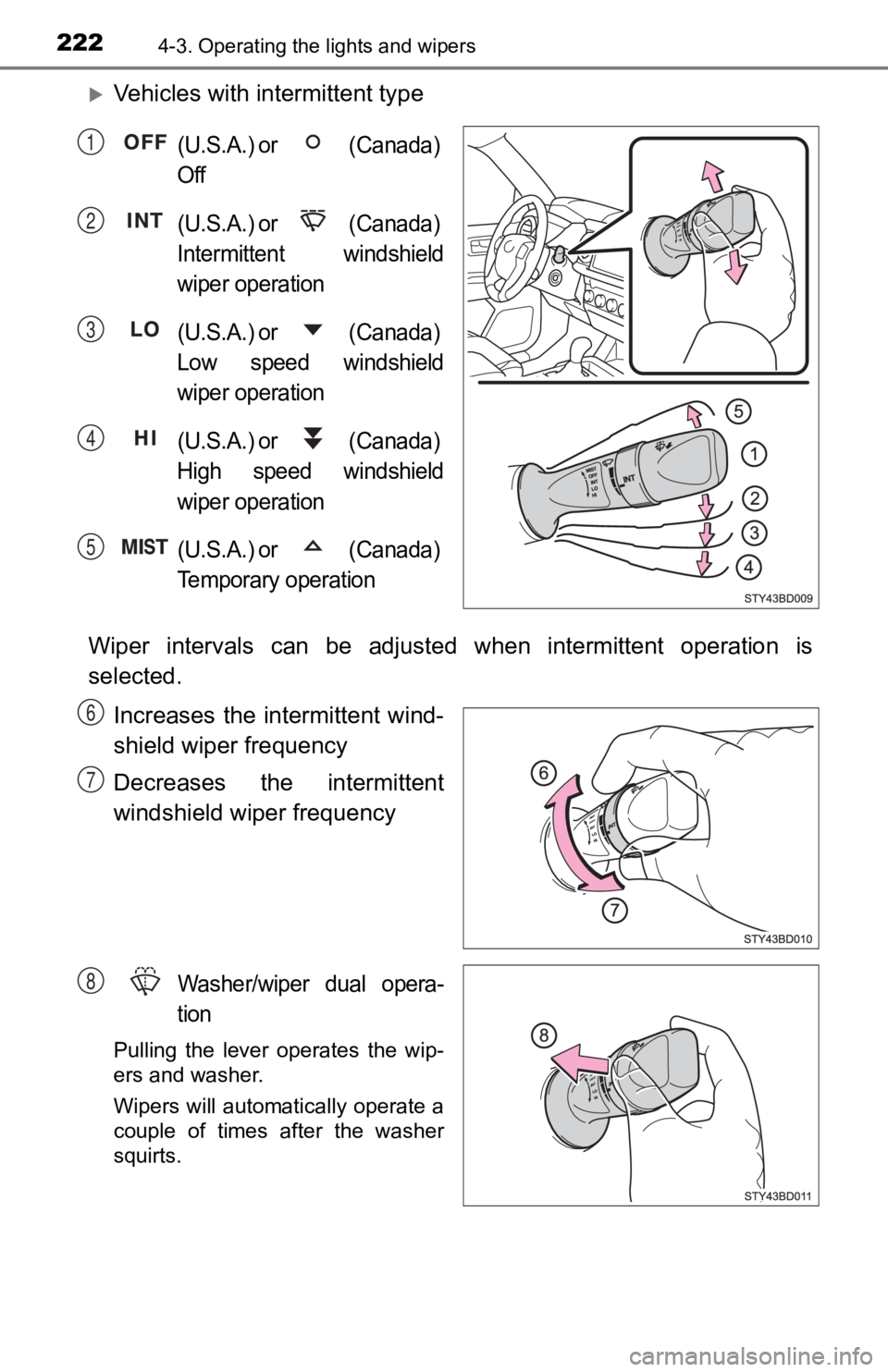
Vehicles with intermittent type
(U.S.A.) or (Canada)
Off
(U.S.A.) or (Canada)
Intermittent windshield
wiper operation
(U.S.A.) or (Canada)
Low speed windshield
wiper operation
(U.S.A.) or (Canada)
High speed windshield
wiper operation
(U.S.A.) or (Canada)
Temporary operation
Wiper intervals can be adjusted when intermittent operation is
selected.
Increases the intermittent wind-
shield wiper frequency
Decreases the intermittent
windshield wiper frequency
Washer/wiper dual opera-
tion
Pulling the lever operates the wip-
ers and washer.
Wipers will automatically operate a
couple of times after the washer
squirts.
1
2
3
4
5
6
7
8
Page 223 of 700

2234-3. Operating the lights and wipers
4
Driving
■The windshield wipers and washer can be operated when
Vehicles without a smart key system
The engine switch is in the “ON” position.
Vehicles with a smart key system
The engine switch is in IGNITION ON mode.
■ If no windshield washer fluid sprays
Check that the washer nozzles are not blocked if there is washe r fluid in the
windshield washer fluid reservoir.
WARNING
■ Caution regarding the use of washer fluid
When it is cold, do not use the washer fluid until the windshie ld becomes
warm. The fluid may freeze on the windshield and cause low visi bility. This
may lead to an accident, resulting in death or serious injury.
NOTICE
■ When the windshield is dry
Do not use the wipers, as they may damage the windshield.
■ When the washer fluid tank is empty
Do not operate the switch continually as the washer fluid pump may over-
heat.
■ When a nozzle becomes blocked
In this case, contact your Toyota dealer.
Do not try to clear it with a pin or other object. The nozzle will be damaged.
Page 231 of 700
2314-5. Using the driving support systems
4
Driving
WARNING
●Do not attach accessories, stickers (including transparent stic kers) or
other items to the radar sensor, front grille emblem or surrounding area.
● Do not subject the radar sensor or surrounding area to a strong impact.
If the radar sensor, front grille, or front bumper has been subjected to a
strong impact, have the vehicle inspected by your Toyota dealer.
● Do not disassemble the radar sensor.
● Do not modify or paint the radar sensor, front grille emblem or surrounding
area.
● If the radar sensor, front grille, or front bumper needs to be removed and
installed, or replaced, contact your Toyota dealer.
■ To avoid malfunction of the camera sensor
Observe the following precautions.
Otherwise, the camera sensor may not operate properly, possibly leading to
an accident resulting in death or serious injury.
● Keep the windshield clean at all times.
• If the windshield is dirty or covered with an oily film, water droplets,
snow, etc., clear the windshield.
• If a glass coating agent is applied to the windshield, it will still be neces- sary to use the windshield wipers to remove water droplets, etc., from
the area of the windshield in front of the camera sensor.
• If the inner side of the windshield where the camera sensor is installed is dirty, contact your Toyota dealer.
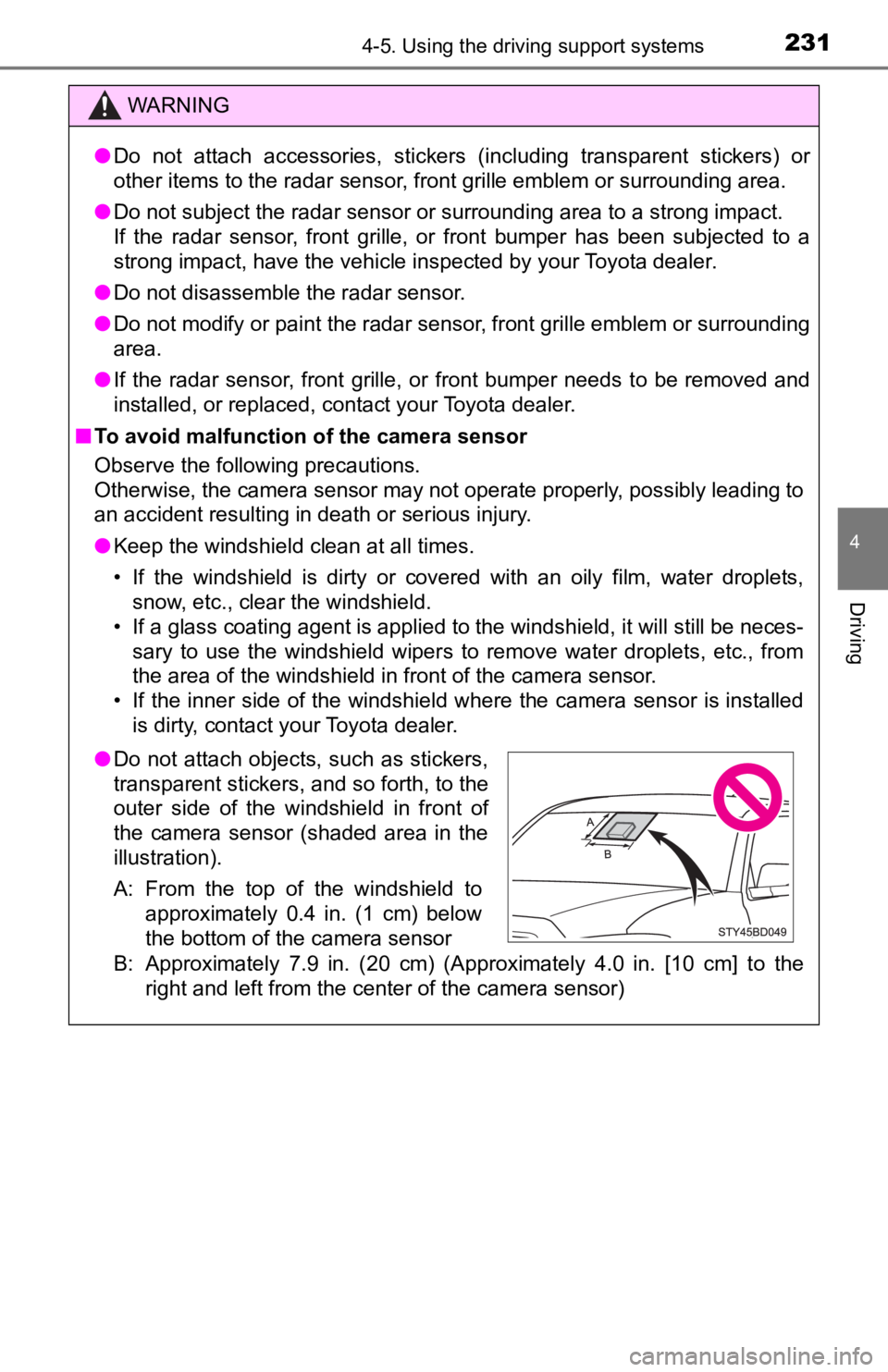
B: Approximately 7.9 in. (20 cm) (Approximately 4.0 in. [10 cm] to the
right and left from the center of the camera sensor)
● Do not attach objects, such as stickers,
transparent stickers, and so forth, to the
outer side of the windshield in front of
the camera sensor (shaded area in the
illustration).
A: From the top of the windshield to
approximately 0.4 in. (1 cm) below
the bottom of the camera sensor
Page 232 of 700

2324-5. Using the driving support systems
WARNING
●If the part of the windshield in front of the camera sensor is fogged up or
covered with condensation or ice, use the windshield defogger t o remove
the fog, condensation or ice. ( P. 428, 435)
● If water droplets cannot be properly removed from the area of t he wind-
shield in front of the camera sensor by the windshield wipers, replace the
wiper insert or wiper blade.
If the wiper inserts or wiper blades need to be replaced, contact your
Toyota dealer.
● Do not attach window tinting to the windshield.
● Replace the windshield if it is damaged or cracked.
If the windshield needs to be replaced, contact your Toyota dealer.
● Do not get the camera sensor wet.
● Do not allow bright lights to shine into the camera sensor.
● Do not dirty or damage the camera sensor.
When cleaning the inside of the windshield, do not allow glass cleaner to
contact the lens. Also, do not touch the lens.
If the lens is dirty or damaged, contact your Toyota dealer.
● Do not subject the camera sensor to a strong impact.
● Do not change the installation position or direction of the camera sensor or
remove it.
● Do not disassemble the camera sensor.
● Do not modify any components of the vehicle around the camera sensor
(inside rear view mirror, etc.) or ceiling.
● Do not attach any accessories that may obstruct the camera sens or to the
hood, front grille or front bumper. Contact your Toyota dealer for details.
● If a surfboard or other long object is to be mounted on the roo f, make sure
that it will not obstruct the camera sensor.
● Do not modify the headlights or other lights.