steering wheel TOYOTA TACOMA 2020 Owners Manual (in English)
[x] Cancel search | Manufacturer: TOYOTA, Model Year: 2020, Model line: TACOMA, Model: TOYOTA TACOMA 2020Pages: 52, PDF Size: 5.97 MB
Page 3 of 52
1
OVERVIEW
FEATURES & OPERATIONS
TOYOTA SAFETY SENSE
SAFETY & EMERGENCY FEATURES
1 Visit your Toyota dealer for information on customizing this feature.2 Programmable by customer. Refer to the Owner’s Manual for instructio\
ns and more information.3 HomeLink® is a registered trademark of Gentex Corporation.
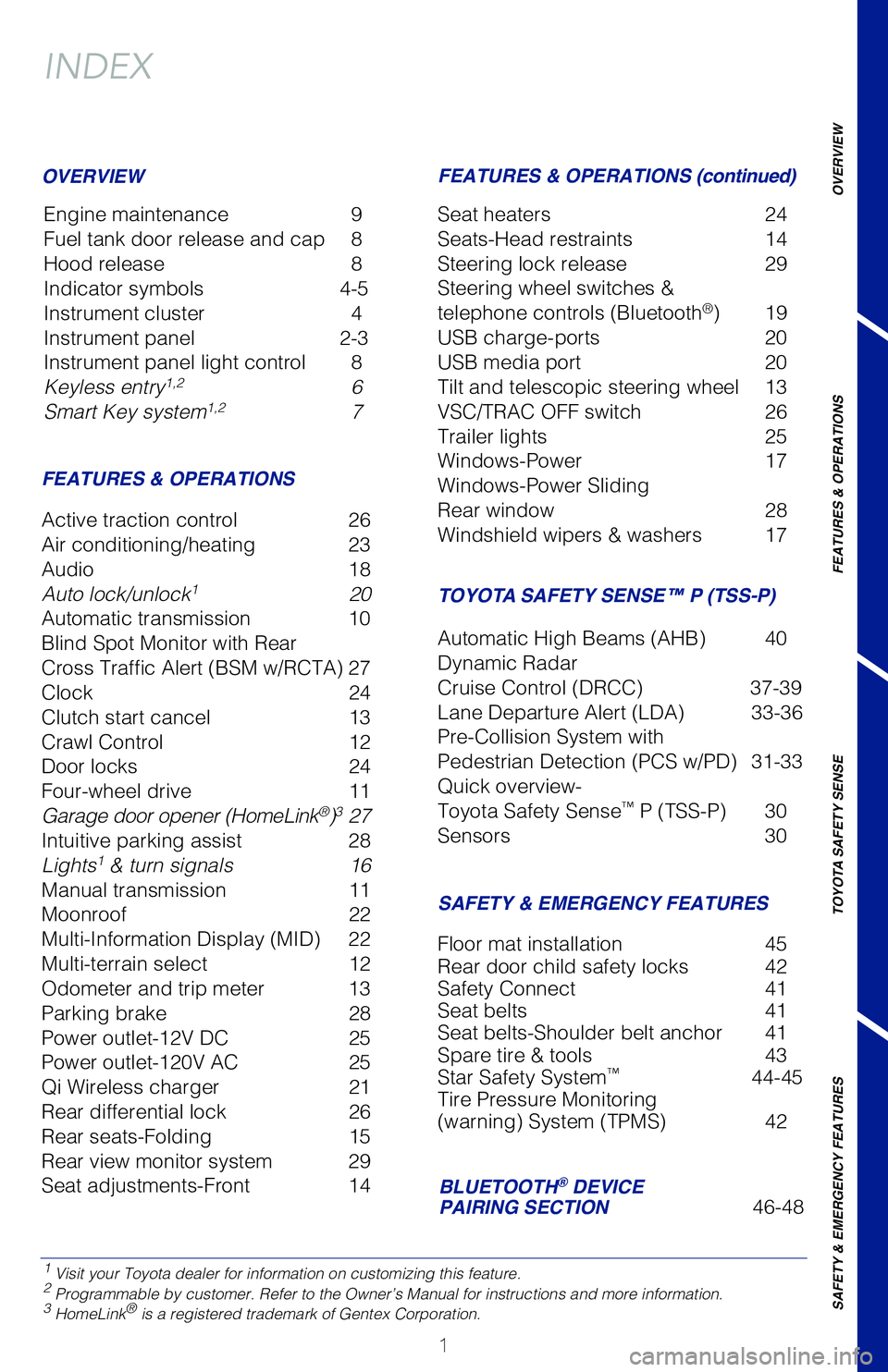
INDEX
Engine maintenance 9
Fuel tank door release and cap 8
Hood release 8
Indicator symbols 4-5
Instrument cluster 4
Instrument panel 2-3
Instrument panel light control 8
Keyless entry
1,2 6
Smart Key system1,2 7
OVERVIEW
FEATURES & OPERATIONS FEATURES & OPERATIONS (continued)
SAFETY & EMERGENCY FEATURES
Active traction control
26
Air conditioning/heating 23
Audio 18
Auto lock/unlock
1 20
Automatic transmission 10
Blind Spot Monitor with Rear
Cross Traffic Alert (BSM w/RCTA) 27
Clock 24
Clutch start cancel 13
Crawl Control 12
Door locks 24
Four-wheel drive 11
Garage door opener (HomeLink
®)3 27
Intuitive parking assist 28
Lights
1 & turn signals 16
Manual transmission 11
Moonroof 22
Multi-Information Display (MID) 22
Multi-terrain select 12
Odometer and trip meter 13
Parking brake 28
Power outlet-12V DC 25
Power outlet-120V AC 25
Qi Wireless charger 21
Rear differential lock 26
Rear seats-Folding 15
Rear view monitor system 29
Seat adjustments-Front 14 Seat heaters
24
Seats-Head restraints 14
Steering lock release 29
Steering wheel switches &
telephone controls (Bluetooth
®) 19
USB charge-ports 20
USB media port 20
Tilt and telescopic steering wheel 13
VSC/TRAC OFF switch 26
Trailer lights 25
Windows-Power 17
Windows-Power Sliding
Rear window 28
Windshield wipers & washers 17
Floor mat installation 45
Rear door child safety locks 42
Safety Connect 41
Seat belts 41
Seat belts-Shoulder belt anchor 41
Spare tire & tools 43
Star Safety System
™ 44-45
Tire Pressure Monitoring
(warning) System (TPMS) 42
TACOMA 2020
This Quick Reference Guide is a summary of basic vehicle
operations. It contains brief descriptions of fundamental
operations so you can locate and use the vehicle’s main
equipment quickly and easily.
The Quick Reference Guide is not intended as a substitute for
the Owner’s Manual located in your vehicle’s glove box. We
strongly encourage you to review the Owner’s Manual and
supplementary manuals so you will have a better understanding
of your vehicle’s capabilities and limitations.
Your dealership and the entire staff of Toyota Motor North
America, Inc. wish you many years of satisfied driving in your
new Tacoma.
A word about safe vehicle operations
This Quick Reference Guide is not a full description of Tacoma operation\
s.
Every Tacoma owner should review the Owner’s Manual that accompanies
this vehicle.
Pay special attention to the boxed information highlighted in color throughout
the Owner’s Manual. Each box contains safe operating instructions to \
help you
avoid injury or equipment malfunction.
All information in this Quick Reference Guide is current at the time of \
printing.
Toyota reserves the right to make changes at any time without notice.
BLUETOOTH® DEVICE
PAIRING SECTION 46-48
TOYOTA SAFETY SENSE™ P (TSS-P)
Automatic High Beams (AHB) 40
Dynamic Radar
Cruise Control (DRCC) 37-39
Lane Departure Alert (LDA) 33-36
Pre-Collision System with
Pedestrian Detection (PCS w/PD) 31-33
Quick overview-
Toyota Safety Sense
™ P (TSS-P) 30
Sensors 30
MY20_Tacoma_QRG_V3_ML_0812_Guts.indd 18/16/19 5:34 AM
Page 4 of 52
2
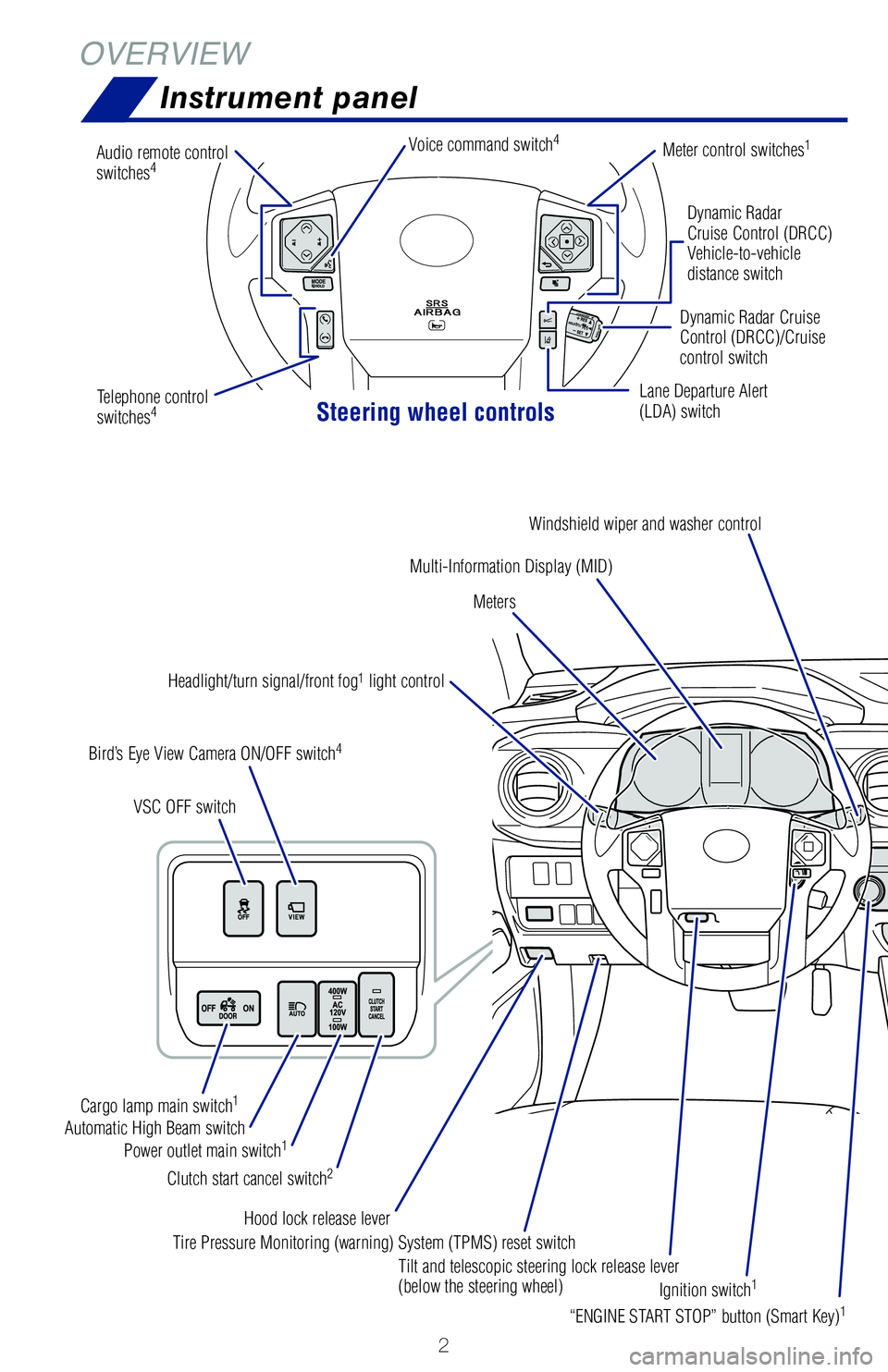
OVERVIEWInstrument panel
Steering wheel controls
Dynamic Radar
Cruise Control (DRCC)
Vehicle-to-vehicle
distance switch
Lane Departure Alert
(LDA) switch Dynamic Radar Cruise
Control (DRCC)/Cruise
control switch
Multi-Information Display (MID)
Meters
Bird’s Eye View Camera ON/OFF switch
4
VSC OFF switch
Meter control switches1
Headlight/turn signal/front fog1 light control
Audio remote control
switches
4Voice command switch4
Windshield wiper and washer control
“ENGINE START STOP” button (Smart Key)
1
Tilt and telescopic steering lock release lever
(below the steering wheel)
Hood lock release lever
Clutch start cancel switch
2
Automatic High Beam switch
Power outlet main switch1
Cargo lamp main switch1
Tire Pressure Monitoring (warning) System (TPMS) reset switch
Ignition switch
1
Parking brake
Telephone control
switches4 1
If equipped.2 Manual transmission only.3 Automatic transmission only.4 For details, refer to the “Navigation and Multimedia System Owner’s Manual” or visit www.toyota.com/
audio-multimedia for additional resources.
MY20_Tacoma_QRG_V3_ML_0812_Guts.indd 28/16/19 5:52 AM
Page 15 of 52
 13
Clutch start cancel (if equipped)
Tilt and telescopic steering wheel
Odometer and trip meter
Allows travel on extremely rough off-road surfaces at a fixed low speed \
without
pressing the accelera")
13
Clutch start cancel (if equipped)
Tilt and telescopic steering wheel
Odometer and trip meter
Allows travel on extremely rough off-road surfaces at a fixed low speed \
without
pressing the accelerator or brake pedal.Refer to Section 4-5 of the Owner’s Manual for more information. Refer to Section 4-5 of the Owner’s Manual for more information. Improves driveability in off-road situations. Select one of five modes t\
hat most
closely matches the terrain on which you are driving. Brake control can \
be optimized
in accordance with the selected mode.
Hold wheel, push lever down, set angle and length, and return lever.
NOTE: Do not attempt to adjust while the vehicle is in motion.
Length
Angle
Lock release lever
The engine switch must be in the “ON” position.
The clutch start cancel switch allows you to start the engine and drive \
out of difficult
situations where the vehicle should not be allowed to roll backwards.
Refer to Section 4-5 of the Owner’s Manual for more information.
Push to switch display
OVERVIEW
FEATURES & OPERATIONS
TOYOTA SAFETY SENSE
SAFETY & EMERGENCY FEATURES
(1) Low to (2) Between low and medium - Rock, mogul (downhill) and gravel (downhill)
(2) Between low and medium to (3) Medium - Mogul (uphill)
(3) Medium to (5) High - Snow, mud, gravel (uphill), sand, dirt, mogul (uphill) and grass
Crawl control on/off switch
MY20_Tacoma_QRG_V3_ML_0812_Guts.indd 138/16/19 5:40 AM
Page 20 of 52
 18
FEATURES & OPERATIONS
Refer to the “Navigation and Multimedia System Owner’s Manual” \
or visit www.toyota.com/audio-multimedia for additional resources.
NOTE: Concentrating on the road shou")
18
FEATURES & OPERATIONS
Refer to the “Navigation and Multimedia System Owner’s Manual” \
or visit www.toyota.com/audio-multimedia for additional resources.
NOTE: Concentrating on the road should always be your first priority whi\
le
driving. Do not use the Audio Multimedia System if it will distract you.
“MODE/HOLD”
Push to change
audio source or
push and hold to
mute or pause
current operation.
“>>” Use to
search within the
selected audio feature.
Bluetooth® technology allows dialing or receipt of calls without removing your han\
ds
from the steering wheel.
Refer to the Bluetooth
® device pairing in this guide or the Navigation and
Multimedia System Owner’s Manual for additional user instructions.
NOTE: Concentrating on the road should always be your first priority while
driving. Do not use the Audio Multimedia System if it will distract you.
Microphone
Type A (without moonroof)
Push to turn ON/OFF or
turn to adjust volume
Seek station/
track/file select
Push to display
the audio/visual
screen
Push to display
the map screen Push to display
the menu screen Push to display
the home screen Touch screen display
Push to access
Bluetooth hands-
free system
Turn to tune radio stations
manually or select tracks or files
Push to display
APPS screen
Audio
MY20_Tacoma_QRG_V3_ML_0812_Guts.indd 188/16/19 5:41 AM
Page 21 of 52
 19
Refer to the “Navigation and Multimedia System Owner’s Manual” \
or visit www.toyota.com/audio-multimedia for additional resources.
NOTE: Concentrating on the road should always be your firs")
19
Refer to the “Navigation and Multimedia System Owner’s Manual” \
or visit www.toyota.com/audio-multimedia for additional resources.
NOTE: Concentrating on the road should always be your first priority whi\
le
driving. Do not use the Audio Multimedia System if it will distract you.
“MODE/HOLD”
Push to change
audio source or
push and hold to
mute or pause
current operation.
Start callEnd call
“>>” Use to
search within the
selected audio feature.
Voice command switch
VolumeOVERVIEW
FEATURES & OPERATIONS
TOYOTA SAFETY SENSE
SAFETY & EMERGENCY FEATURES
Steering wheel switches
& telephone controls (Bluetooth®)
Bluetooth® technology allows dialing or receipt of calls without removing your han\
ds
from the steering wheel.
Refer to the Bluetooth
® device pairing in this guide or the Navigation and
Multimedia System Owner’s Manual for additional user instructions.
NOTE: Concentrating on the road should always be your first priority while
driving. Do not use the Audio Multimedia System if it will distract you.
Microphone
Type A (without moonroof)Type B (with moonroof)
Seek station/
track/file select
Push to access
Bluetooth hands-
free system
Turn to tune radio stations
manually or select tracks or files Push to display
APPS screen
Audio
MY20_Tacoma_QRG_V3_ML_0812_Guts.indd 198/16/19 6:11 AM
Page 30 of 52
 28
Intuitive parking assist (if equipped)
Windows-Power Sliding Rear window (if equipped)
FEATURES & OPERATIONS
If the sensors detect an obstacle, the buzzer and MID display informs th\
e driver of
t")
28
Intuitive parking assist (if equipped)
Windows-Power Sliding Rear window (if equipped)
FEATURES & OPERATIONS
If the sensors detect an obstacle, the buzzer and MID display informs th\
e driver of
the approximate position and distance of the obstacle by illuminating co\
ntinuously
(far) or blinking (near). Depending on your Audio Multimedia System,\
you can
adjust settings.
Refer to the Owner’s Manual for limitations and more details.
Push
The rear view monitor system displays an image of the view from the bump\
er of the
rear area of the vehicle. The camera for the rear view monitor system is\
integrated
in the tailgate handle.
To adjust the image on the rear view monitor screen, press the “SETUP\
” button
and select “Display” on the “Setup” screen. Select “Came\
ra” to adjust the screen
contrast and brightness.
Refer to the Navigation and Multimedia System Owner’s Manual for limi\
tations and
more details on this system.
Open
Close
Rear
center sensor
Rear corner
sensors Rear corner
sensors
When starting the engine, the engine
switch may seem stuck in the “LOCK”
position. To free it, turn the key while
turning the steering wheel slightly left
and right.
Without Smart Key system
Parking brake
(1) Pull slightly
(3) Lower
SetRelease(2) PushPull
MY20_Tacoma_QRG_V3_ML_0812_Guts.indd 288/16/19 6:18 AM
Page 31 of 52
 29
Rear view monitor systemWindows-Power Sliding Rear window (if equipped)
If the sensors detect an obstacle, the buzzer and MID display informs th\
e driver of
the approximate position and distance")
29
Rear view monitor systemWindows-Power Sliding Rear window (if equipped)
If the sensors detect an obstacle, the buzzer and MID display informs th\
e driver of
the approximate position and distance of the obstacle by illuminating co\
ntinuously
(far) or blinking (near). Depending on your Audio Multimedia System,\
you can
adjust settings.
Refer to the Owner’s Manual for limitations and more details.
The rear view monitor system displays an image of the view from the bump\
er of the
rear area of the vehicle. The camera for the rear view monitor system is\
integrated
in the tailgate handle.
To adjust the image on the rear view monitor screen, press the “SETUP\
” button
and select “Display” on the “Setup” screen. Select “Came\
ra” to adjust the screen
contrast and brightness.
Refer to the Navigation and Multimedia System Owner’s Manual for limi\
tations and
more details on this system.
Rear corner
sensors
When starting the engine, the engine
switch may seem stuck in the “LOCK”
position. To free it, turn the key while
turning the steering wheel slightly left
and right.A message will be displayed on the
multi-information display.
Check that the shift lever is in P. Press
the engine switch while turning the
steering wheel left and right.
Steering lock release
With Smart Key system
Without Smart Key system
Push
Turn
Turn
Turn
(1) Pull slightly
OVERVIEW
FEATURES & OPERATIONS
TOYOTA SAFETY SENSE
SAFETY & EMERGENCY FEATURES
MY20_Tacoma_QRG_V3_ML_0812_Guts.indd 298/16/19 6:19 AM
Page 34 of 52
32
DISABLING PRE-COLLISION SYSTEM (PCS)
TOYOTA SAFETY SENSE™
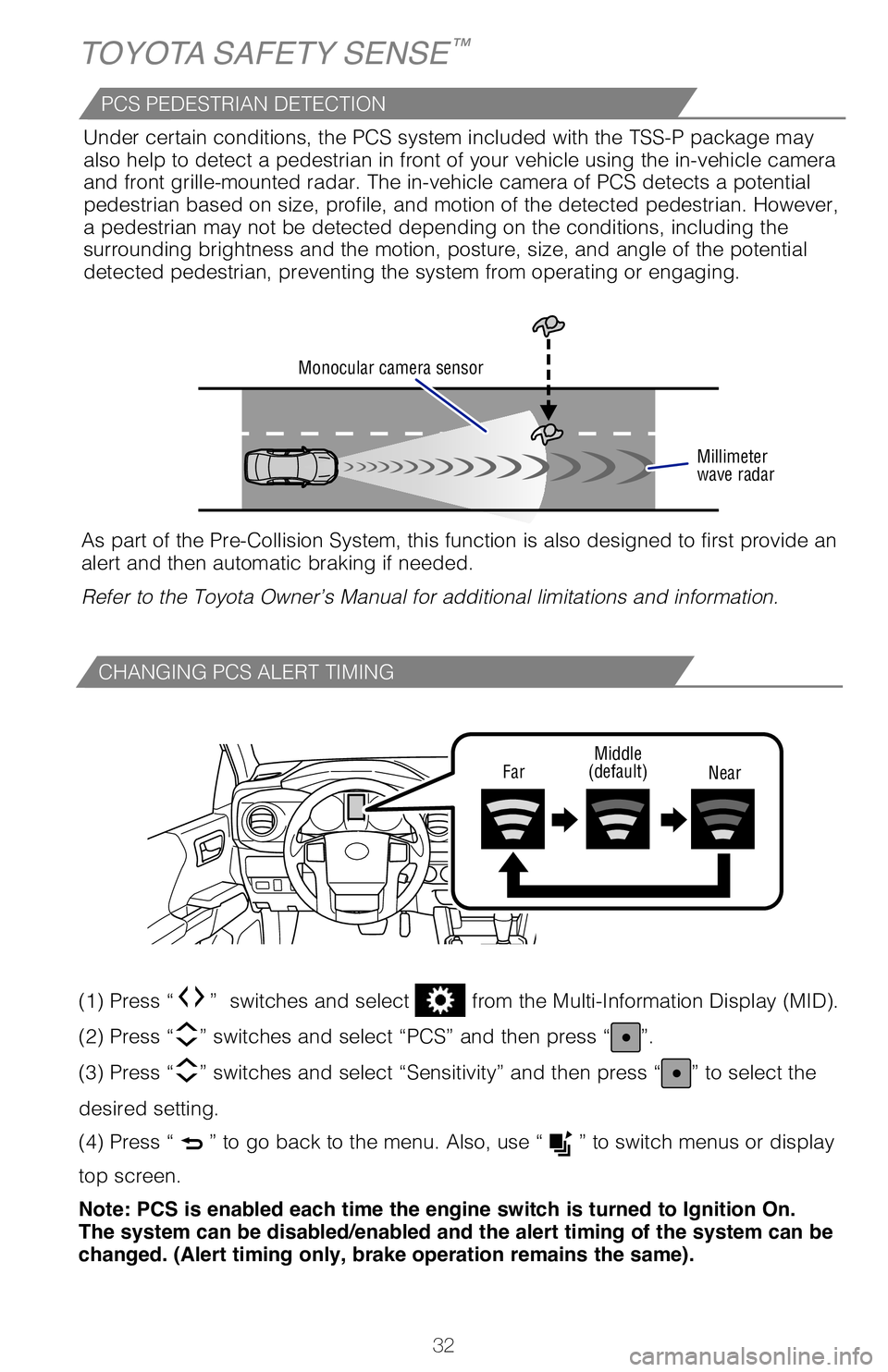
CHANGING PCS ALERT TIMING
FarMiddle
(default) Near
(1) Press “” switches and select from the Multi-Information Display (MID).
(2) Press “
” switches and select “PCS” and then press “”.
(3) Press “
” switches and select “Sensitivity” and then press “” to select the
desired setting.
(4) Press “
” to go back to the menu. Also, use “” to switch menus or display
top screen.
Note: PCS is enabled each time the engine switch is turned to Ignition On.
The system can be disabled/enabled and the alert timing of the system can be
changed. (Alert timing only, brake operation remains the same).
(1) Press “ ” switches and select from the Multi-Information Display (MID).
(2) Press “ ” switches and select “PCS” from the MID and then press “
”.
(3) Press “ ” switches and select “PCS” and then press “
” to select the desired
setting ON/OFF.
(4) Press “
” to go back to the menu. Also, use “ ” to switch menus or display
top screen.
Refer to the Toyota Owner’s Manual for additional information on PCS \
operation,
settings adjustments, limitations, and precautions before attempting to \
use it.
Monocular camera sensor
Millimeter
wave radar
As part of the Pre-Collision System, this function is also designed to f\
irst provide an
alert and then automatic braking if needed.
Refer to the Toyota Owner’s Manual for additional limitations and inf\
ormation.Under certain conditions, the PCS system included with the TSS-P package\
may
also help to detect a pedestrian in front of your vehicle using the in-v\
ehicle camera
and front grille-mounted radar. The in-vehicle camera of PCS detects a p\
otential
pedestrian based on size, profile, and motion of the detected pedestrian\
. However,
a pedestrian may not be detected depending on the conditions, including \
the
surrounding brightness and the motion, posture, size, and angle of the p\
otential
detected pedestrian, preventing the system from operating or engaging.
PCS PEDESTRIAN DETECTION
LDA in TSS-P uses an in-vehicle camera designed to detect visible white \
and yellow
lane markers in front of the vehicle and the vehicle’s position on th\
e road. If the
system determines that the vehicle is starting to unintentionally deviat\
e from its lane,
the system alerts the driver with an audio and visual alert. When the al\
erts occur,
the driver must check the surrounding road situation and carefully opera\
te the
steering wheel to move the vehicle back to the center part of their lane\
.
LDA is designed to function at speeds of approximately 32 mph (50 km/h)\
or higher
on relatively straight roadways.
MY20_Tacoma_QRG_V3_ML_0812_Guts.indd 328/16/19 6:24 AM
Page 35 of 52
33
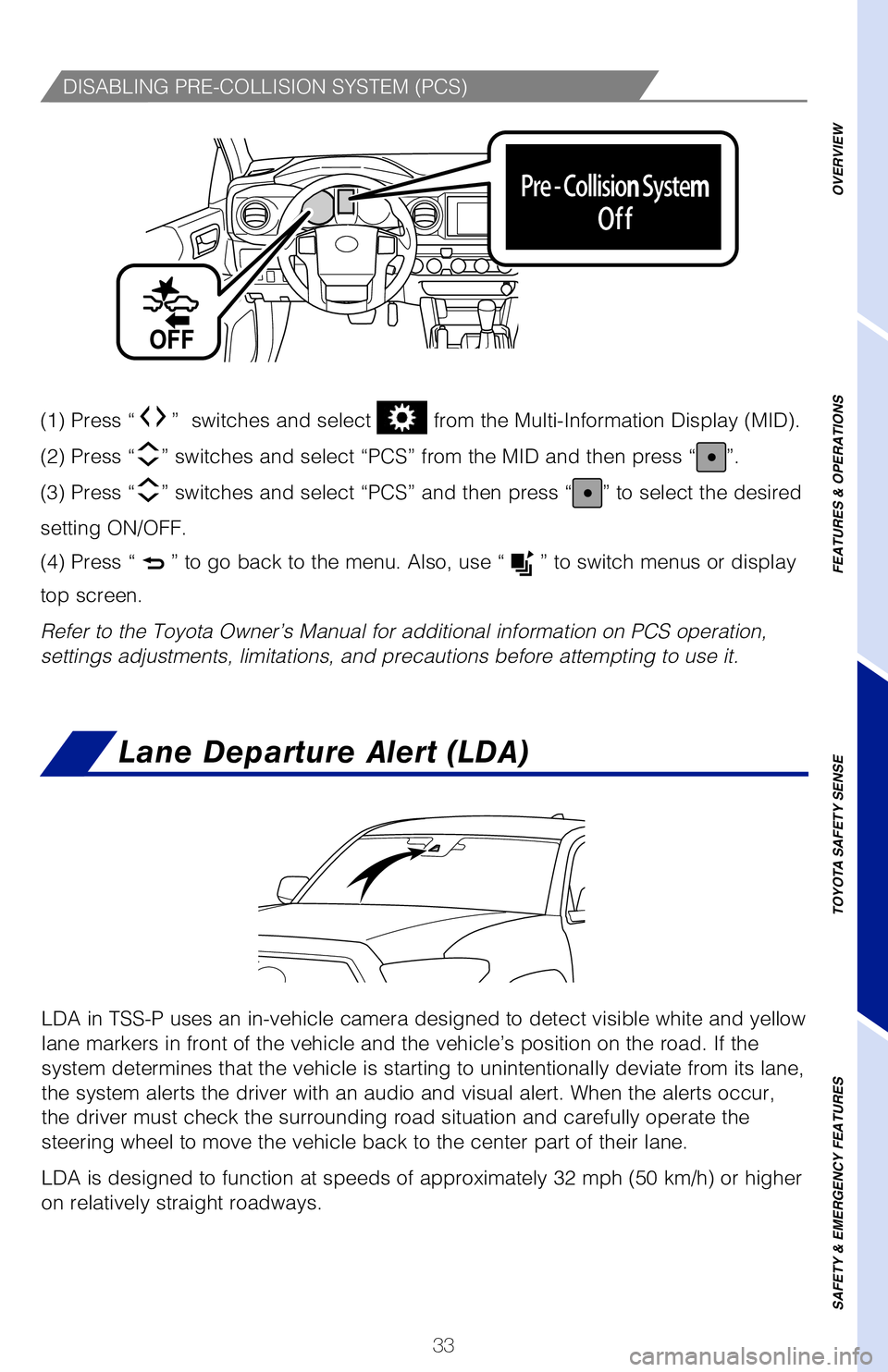
DISABLING PRE-COLLISION SYSTEM (PCS)
(1) Press “” switches and select from the Multi-Information Display (MID).
(2) Press “” switches and select “PCS” and then press “”.
(3) Press “ ” switches and select “Sensitivity” and then press “
” to select the
desired setting.
(4) Press “
” to go back to the menu. Also, use “ ” to switch menus or display
top screen.
Note: PCS is enabled each time the engine switch is turned to Ignition On.
The system can be disabled/enabled and the alert timing of the system can be
changed. (Alert timing only, brake operation remains the same).
(1) Press “” switches and select from the Multi-Information Display (MID).
(2) Press “
” switches and select “PCS” from the MID and then press “”.
(3) Press “
” switches and select “PCS” and then press “” to select the desired
setting ON/OFF.
(4) Press “
” to go back to the menu. Also, use “” to switch menus or display
top screen.
Refer to the Toyota Owner’s Manual for additional information on PCS opera\
tion,
settings adjustments, limitations, and precautions before attempting to use it.As part of the Pre-Collision System, this function is also designed to fir\
st provide an alert and then automatic braking if needed.
Refer to the Toyota Owner’s Manual for additional limitations and informat\
ion. Under certain conditions, the PCS system included with the TSS-P package may
also help to detect a pedestrian in front of your vehicle using the in-vehic\
le camera and front grille-mounted radar. The in-vehicle camera of PCS detects a pote\
ntial pedestrian based on size, profile, and motion of the detected pedestrian. However,\
a pedestrian may not be detected depending on the conditions, including t\
he
surrounding brightness and the motion, posture, size, and angle of the potential
detected pedestrian, preventing the system from operating or engaging.
LDA in TSS-P uses an in-vehicle camera designed to detect visible white and\
yellow
lane markers in front of the vehicle and the vehicle’s position on the ro\
ad. If the
system determines that the vehicle is starting to unintentionally deviate from\
its lane,
the system alerts the driver with an audio and visual alert. When the alert\
s occur,
the driver must check the surrounding road situation and carefully operate \
the
steering wheel to move the vehicle back to the center part of their lane.
LDA is designed to function at speeds of approximately 32 mph (50 km/h) o\
r higher
on relatively straight roadways.
OVERVIEW
FEATURES & OPERATIONS
TOYOTA SAFETY SENSE
SAFETY & EMERGENCY FEATURES
Lane Departure Alert (LDA)
MY20_Tacoma_QRG_V3_ML_0812_Guts.indd 338/16/19 6:24 AM
Page 38 of 52
36
TOYOTA SAFETY SENSE™
TURNING SYSTEM ON/OFF
ADJUSTING SET SPEED
DRCC helps maintain a pre-set distance to a preceding vehicle when the
preceding vehicle is traveling at a lower speed. This mode is always sel\
ected first
when the cruise control button is depressed. Constant speed cruise contr\
ol mode
is also available. DRCC is designed to function at speeds between approx\
imately
30 to 110 MPH and is intended for highway use.
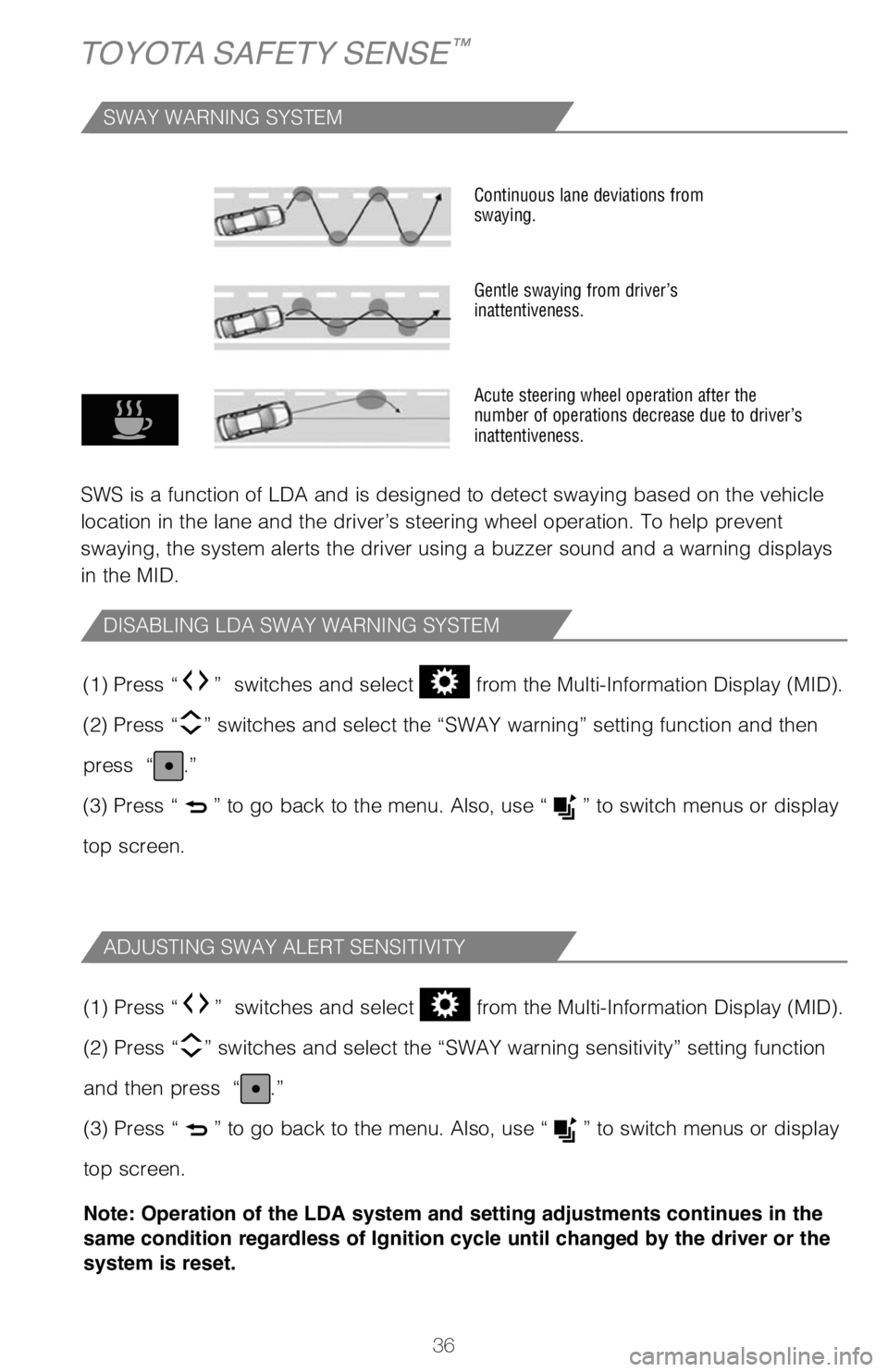
SWAY WARNING SYSTEM
SWS is a function of LDA and is designed to detect swaying based on the \
vehicle
location in the lane and the driver’s steering wheel operation. To he\
lp prevent
swaying, the system alerts the driver using a buzzer sound and a warning\
displays
in the MID.
Continuous lane deviations from
swaying.
Gentle swaying from driver’s
inattentiveness.
Acute steering wheel operation after the
number of operations decrease due to driver’s
inattentiveness.
DISABLING LDA SWAY WARNING SYSTEM
ADJUSTING SWAY ALERT SENSITIVITY
(1) Press “” switches and select from the Multi-Information Display (MID).
(2) Press “
” switches and select the “SWAY warning” setting function and t\
hen
press “
.”
(3) Press “
” to go back to the menu. Also, use “” to switch menus or display
top screen.
(1) Press “
” switches and select from the Multi-Information Display (MID).
(2) Press “
” switches and select the “SWAY warning sensitivity” setting fu\
nction
and then press “
.”
(3) Press “
” to go back to the menu. Also, use “” to switch menus or display
top screen.
Note: Operation of the LDA system and setting adjustments continues in the
same condition regardless of Ignition cycle until changed by the driver or the
system is reset.
Vehicle will cruise at a set speed, decelerate to maintain selected dist\
ance from a
slower vehicle traveling in front and accelerate back up to the selected\
speed if the
vehicle in front changes lanes or speeds up.
(1) Push the ON-OFF button. The “RADAR READY” and “” indicator will come on.
(2) Push the lever down to SET speed, push it up to Resume and pull it\
or depress brake to Cancel.
(3) Push up to increase the set speed, push down to decrease (1 mph [\
1.6 km/h] or 1 km/h [0.6 mph] increments).
Refer to page 39 for switching to Constant Speed (Cruise) Control Mode\
.
1 The set speed may also be cancelled by depressing the brake pedal.2 The set speed may be resumed once vehicle speed exceeds 25 mph (40 km/h\
).
MY20_Tacoma_QRG_V3_ML_0812_Guts.indd 368/16/19 6:24 AM