TOYOTA TUNDRA 2010 2.G Navigation Manual
TUNDRA 2010 2.G
TOYOTA
TOYOTA
https://www.carmanualsonline.info/img/14/6830/w960_6830-0.png
TOYOTA TUNDRA 2010 2.G Navigation Manual
Page 265 of 328
SETUP
265
2010 TUNDRA Navigation from April.09 Prod.(OM34481U)
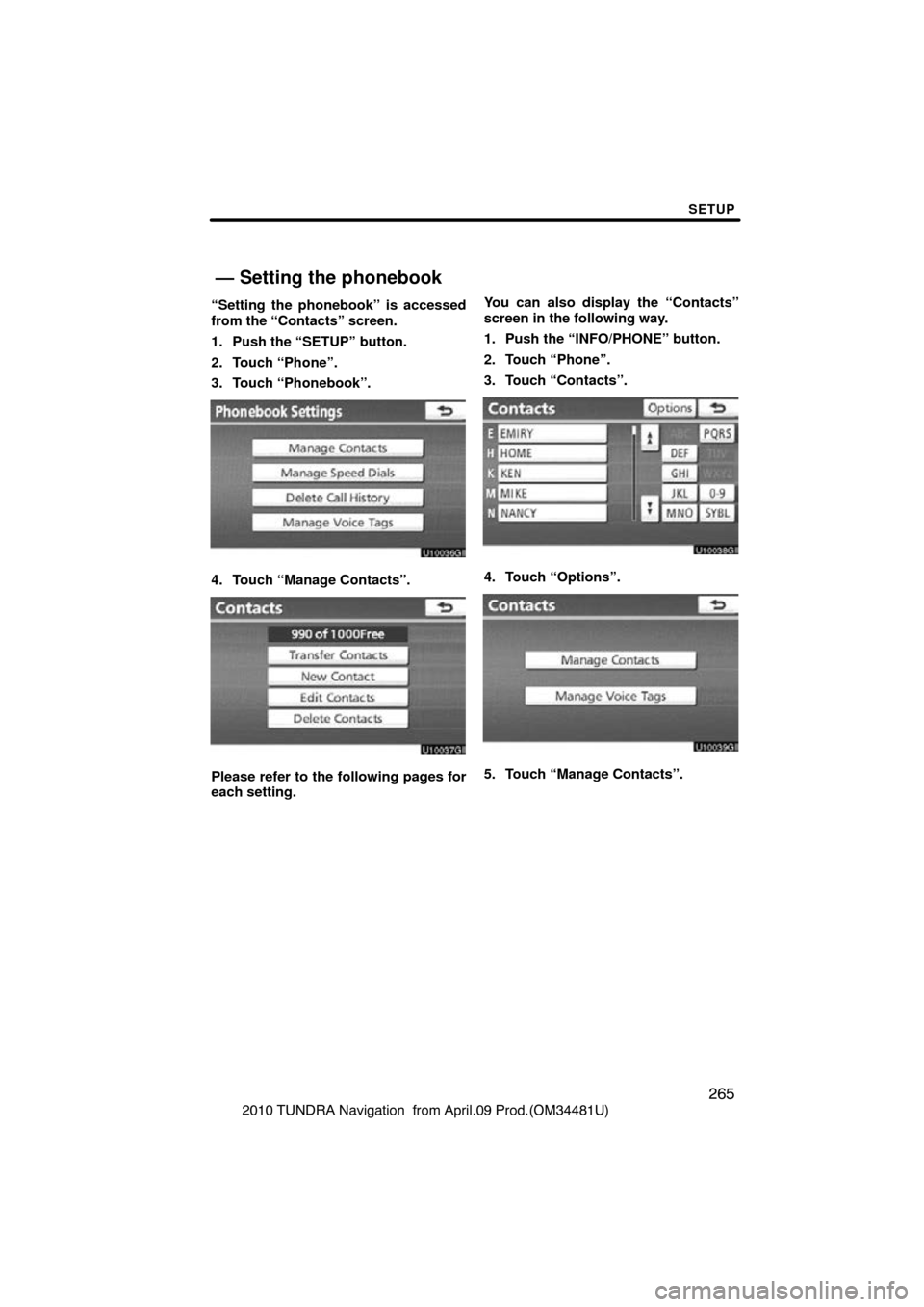
“Setting the phonebook” is accessed
from the “Contacts” screen.
1. Push the “SETUP” button.
2. Touch “Phone”.
3. Touch “Phonebook”.
4. Touch “Manage Contacts”.
Please refer to the following pages for
each setting.
You can also display the “Contacts”
screen in the following way.
1. Push the “INFO/PHONE” button.
2. Touch “Phone”.
3. Touch “Contacts”.
4. Touch “Options”.
5. Touch “Manage Contacts”.
— Setting the phonebook
Page 266 of 328
SETUP
266
2010 TUNDRA Navigation from April.09 Prod.(OM34481U)
�Transferring a phone number
You can transfer the phone numbers in
your Bluetooth� phone to the system.
The phonebook manages a maximum
of 4 phonebooks in all. Up to 1000 per-
son’s data (up to 3 numbers a person)
can be registered in total of phone-
books.
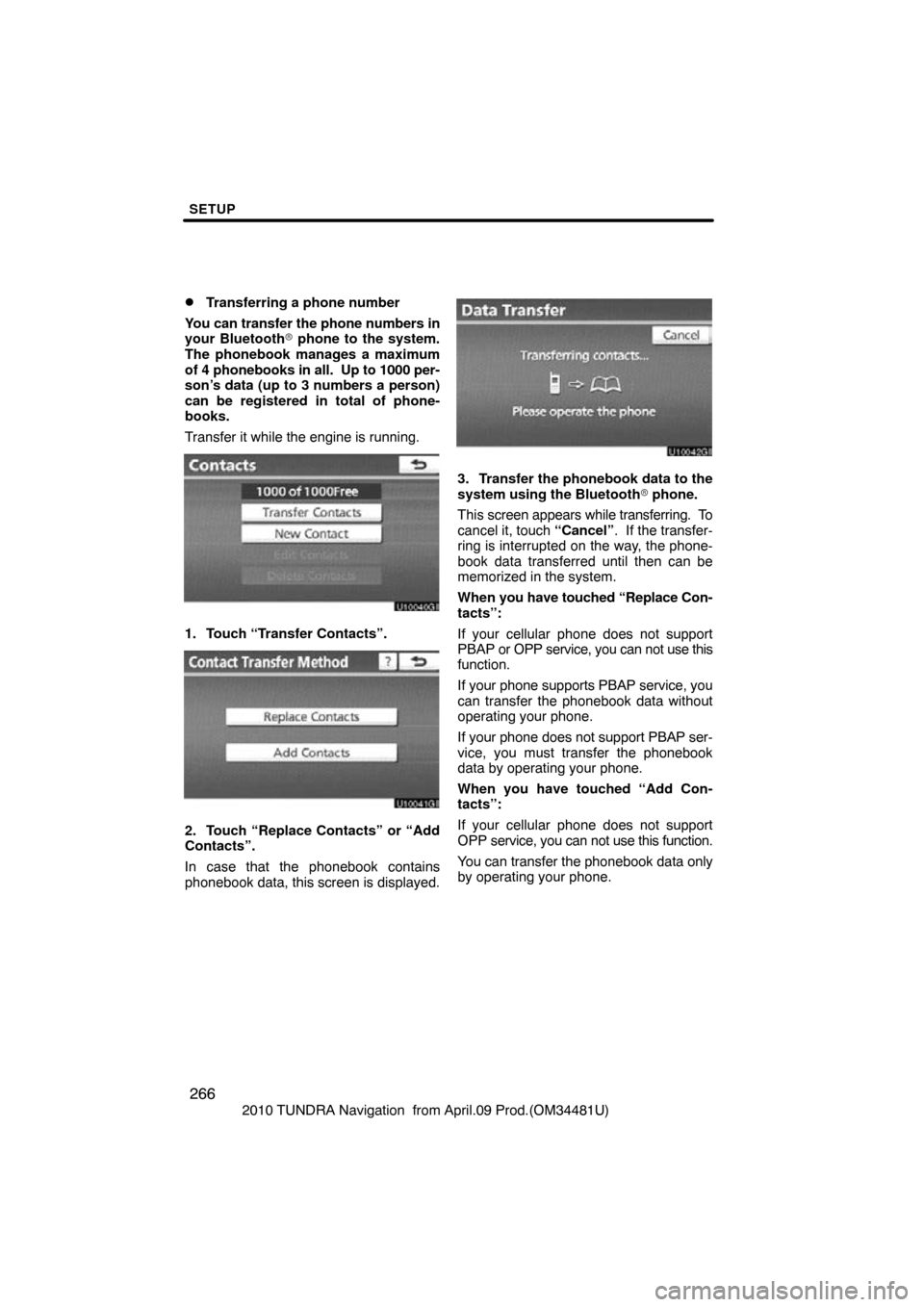
Transfer it while the engine is running.
1. Touch “Transfer Contacts”.
2. Touch “Replace Contacts” or “Add
Contacts”.
In case that the phonebook contains
phonebook data, this screen is displayed.
3. Transfer the phonebook data to the
system using the Bluetooth � phone.
This screen appears while transferring. To
cancel it, touch “Cancel”. If the transfer-
ring is interrupted on the way, the phone-
book data transferred until then can be
memorized in the system.
When you have touched “Replace Con-
tacts”:
If your cellular phone does not support
PBAP or OPP service, you can not use this
function.
If your phone supports PBAP service, you
can transfer the phonebook data without
operating your phone.
If your phone does not support PBAP ser-
vice, you must transfer the phonebook
data by operating your phone.
When you have touched “Add Con-
tacts”:
If your cellular phone does not support
OPP service, you can not use this function.
You can transfer the phonebook data only
by operating your phone.
Page 267 of 328
SETUP
267
2010 TUNDRA Navigation from April.09 Prod.(OM34481U)
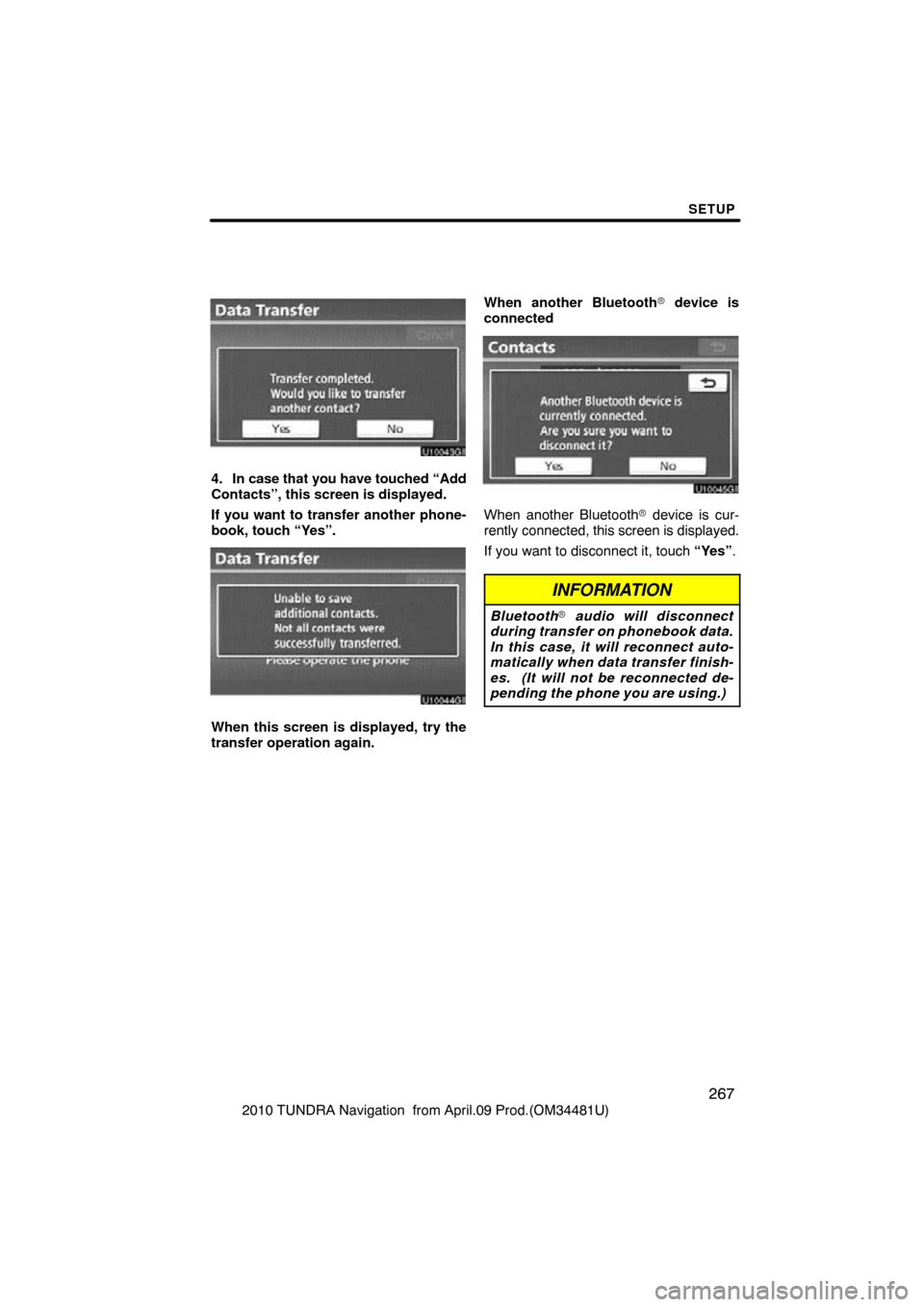
4. In case that you have touched “Add
Contacts”, this screen is displayed.
If you want to transfer another phone-
book, touch “Yes”.
u10044gi
When this screen is displayed, try the
transfer operation again.When another Bluetooth
� device is
connected
When another Bluetooth � device is cur-
rently connected, this screen is displayed.
If you want to disconnect it, touch “Yes”.
INFORMATION
Bluetooth � audio will disconnect
during transfer on phonebook data.
In this case, it will reconnect auto-
matically when data transfer finish-
es. (It will not be reconnected de-
pending the phone you are using.)
Page 269 of 328
SETUP
269
2010 TUNDRA Navigation from April.09 Prod.(OM34481U)
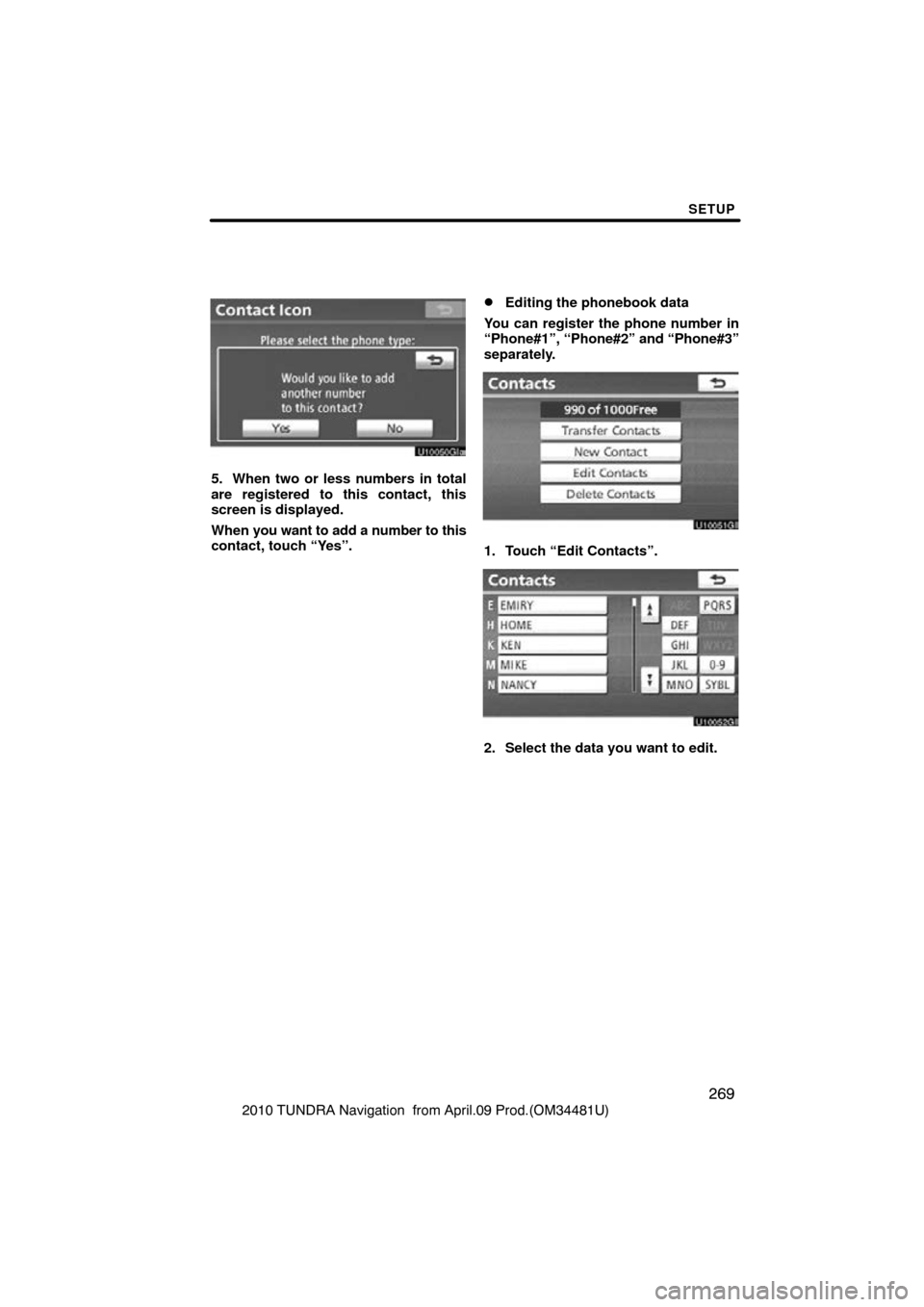
5. When two or less numbers in total
are registered to this contact, this
screen is displayed.
When you want to add a number to this
contact, touch “Yes”.
�Editing the phonebook data
You can register the phone number in
“Phone#1”, “Phone#2” and “Phone#3”
separately.
1. Touch “Edit Contacts”.
2. Select the data you want to edit.
Page 270 of 328
SETUP
270
2010 TUNDRA Navigation from April.09 Prod.(OM34481U)
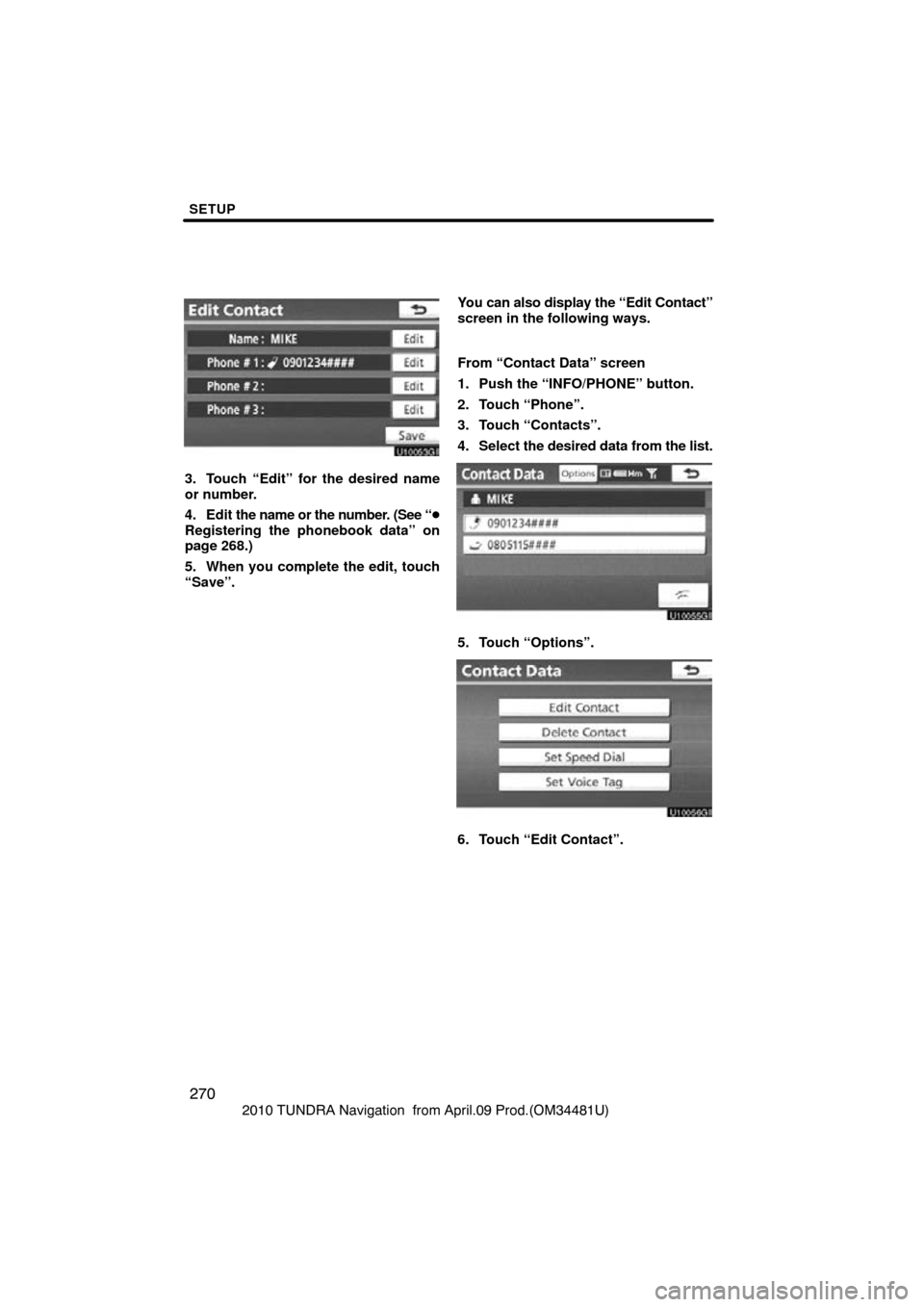
3. Touch “Edit” for the desired name
or number.
4. Edit the name or the number. (See “�
Registering the phonebook data” on
page 268.)
5. When you complete the edit, touch
“Save”. You can also
display the “Edit Contact”
screen in the following ways.
From “Contact Data” screen
1. Push the “INFO/PHONE” button.
2. Touch “Phone”.
3. Touch “Contacts”.
4. Select the desired data from the list.
5. Touch “Options”.
6. Touch “Edit Contact”.
Page 271 of 328
SETUP
271
2010 TUNDRA Navigation from April.09 Prod.(OM34481U)
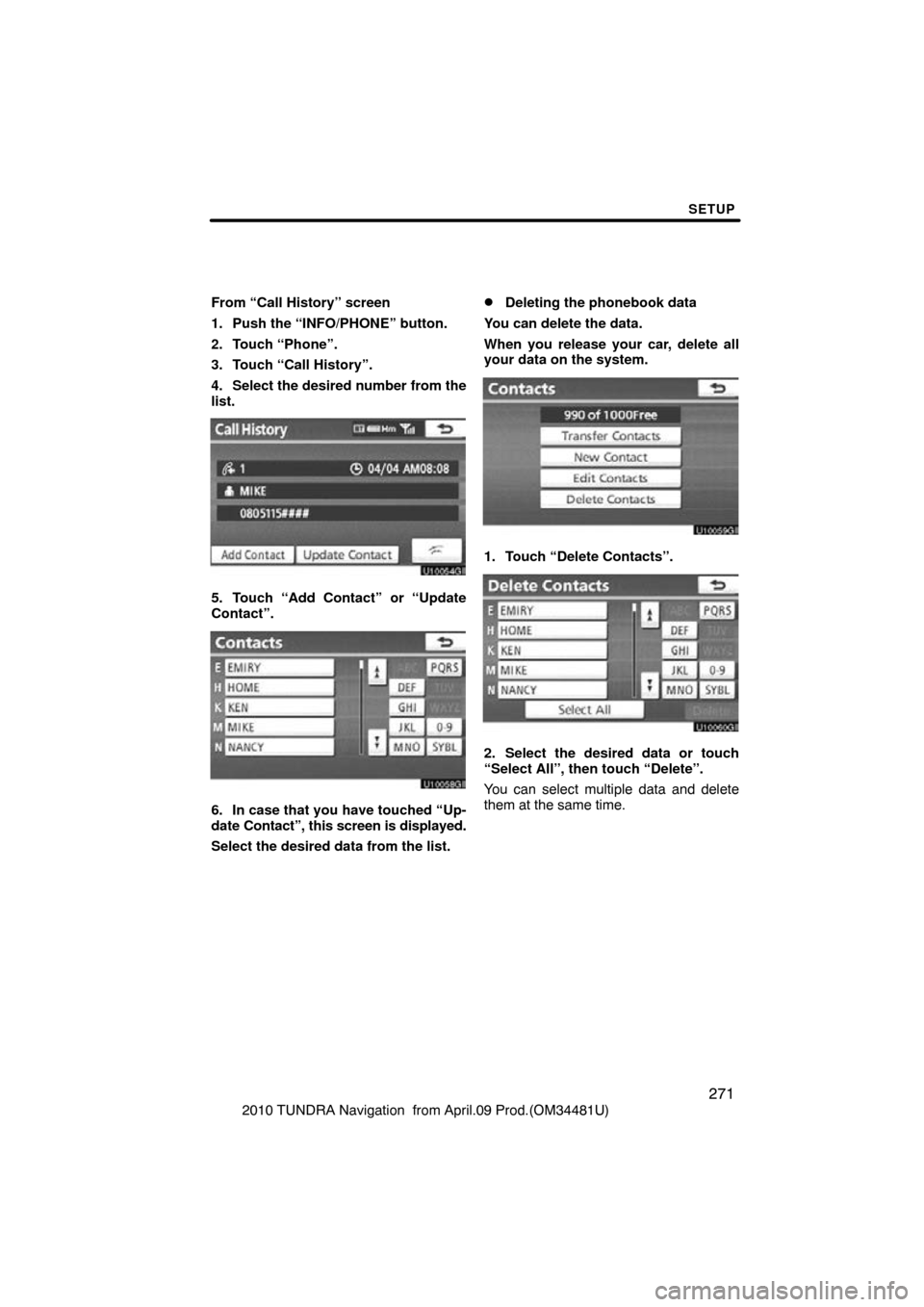
From “Call History” screen
1. Push the “INFO/PHONE” button.
2. Touch “Phone”.
3. Touch “Call History”.
4. Select the desired number from the
list.
5. Touch “Add Contact” or “Update
Contact”.
6. In case that you have touched “Up-
date
Contact”, this screen is displayed.
Select the desired data from the list.
�Deleting the phonebook data
You can delete the data.
When you release your car, delete all
your data on the system.
1. Touch “Delete Contacts”.
2. Select the desired data or touch
“Select All”, then touch “Delete”.
You can select multiple data and delete
them at the same time.
Page 274 of 328
SETUP
274
2010 TUNDRA Navigation from April.09 Prod.(OM34481U)
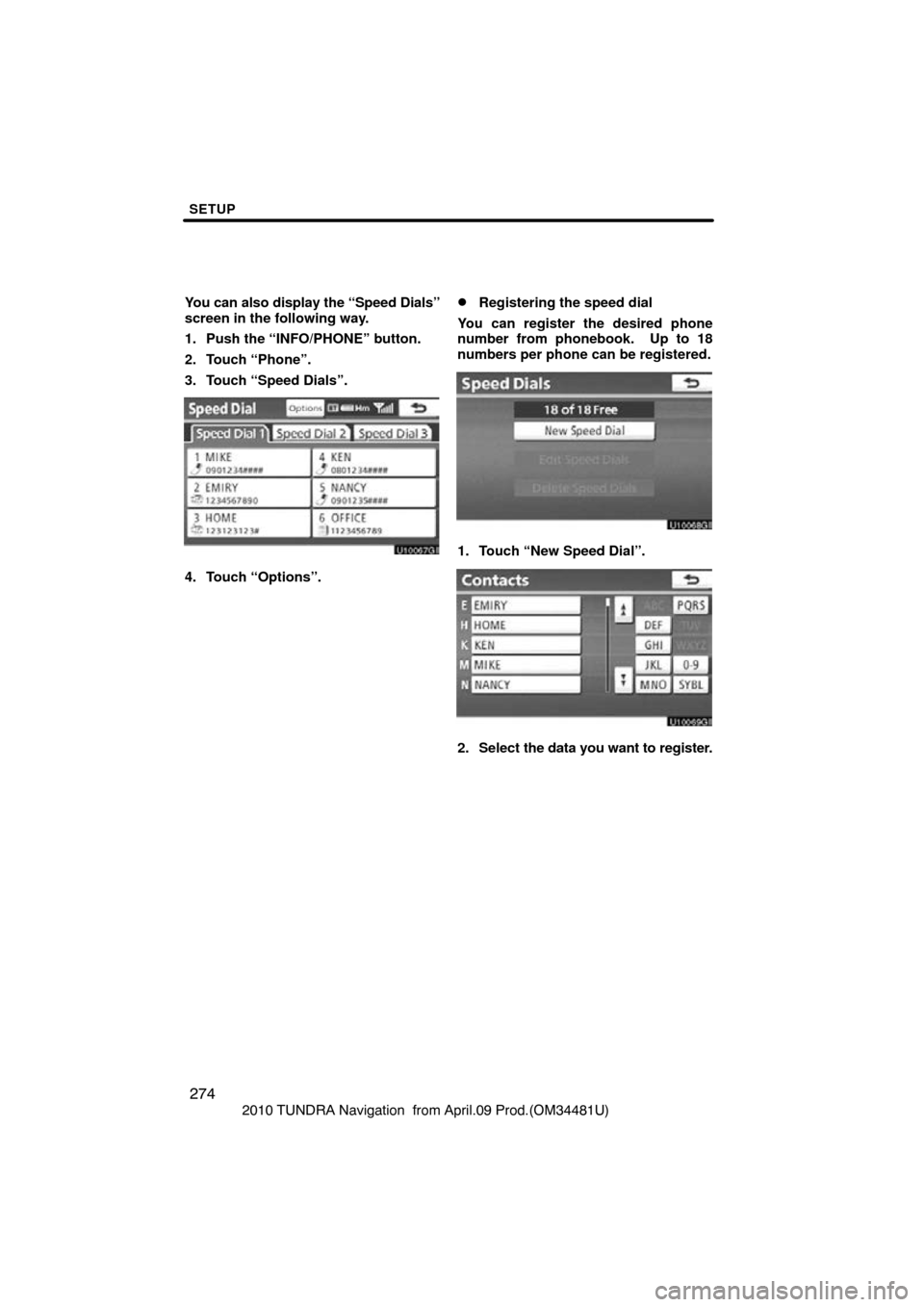
You can also display the “Speed Dials”
screen in the following way.
1. Push the “INFO/PHONE” button.
2. Touch “Phone”.
3. Touch “Speed Dials”.
4. Touch “Options”.
�Registering the speed dial
You can register the desired phone
number from phonebook. Up to 18
numbers per phone can be registered.
1. Touch “New Speed Dial”.
2. Select the data you want to register.
Page 275 of 328
SETUP
275
2010 TUNDRA Navigation from April.09 Prod.(OM34481U)
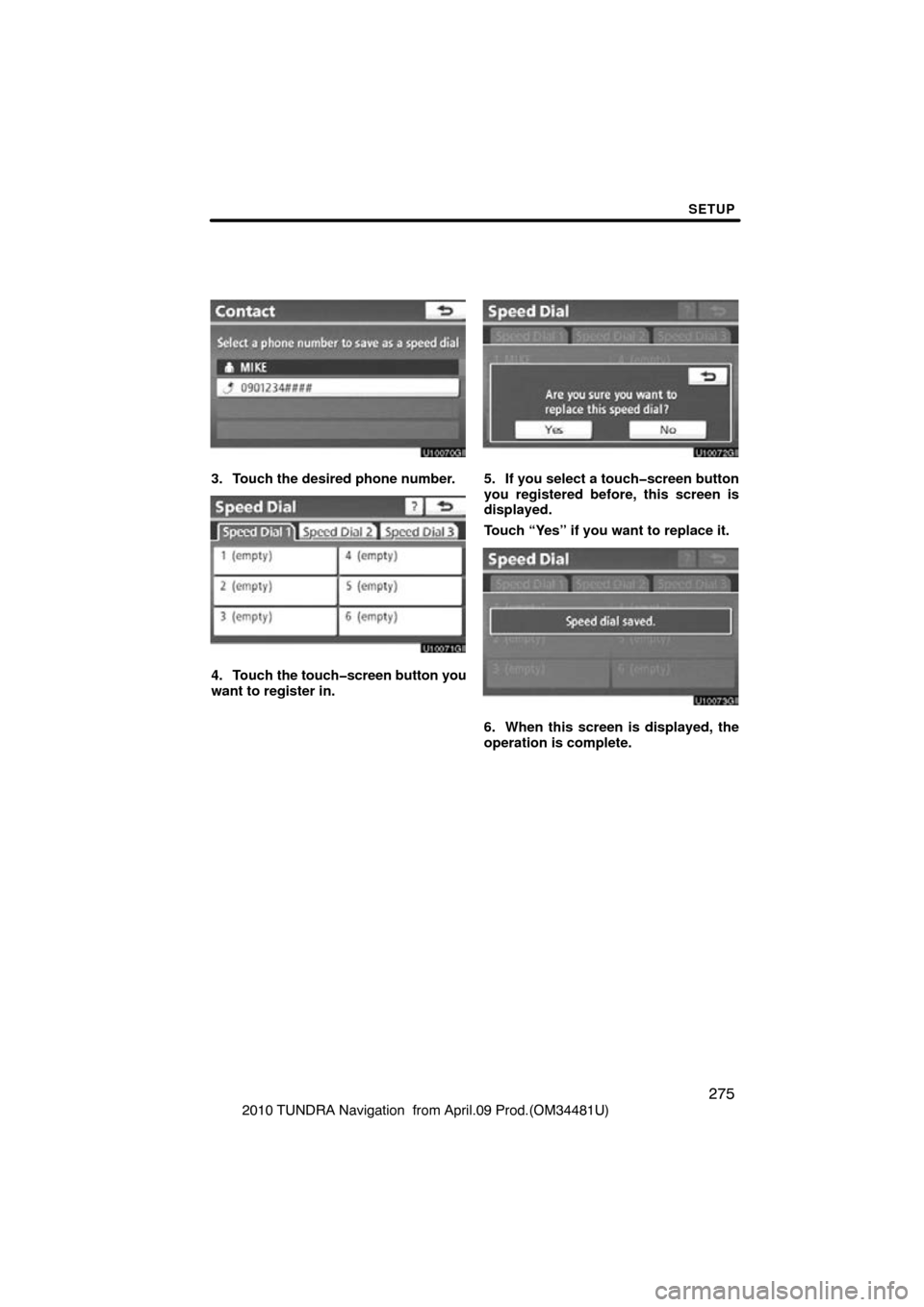
3. Touch the desired phone number.
4. Touch the touchscreen button you
want to register in.
5. If you select a touchscreen button
you registered before, this screen is
displayed.
Touch “Yes” if you want to replace it.
6. When this screen is displayed, the
operation is complete.
Page 277 of 328
SETUP
277
2010 TUNDRA Navigation from April.09 Prod.(OM34481U)
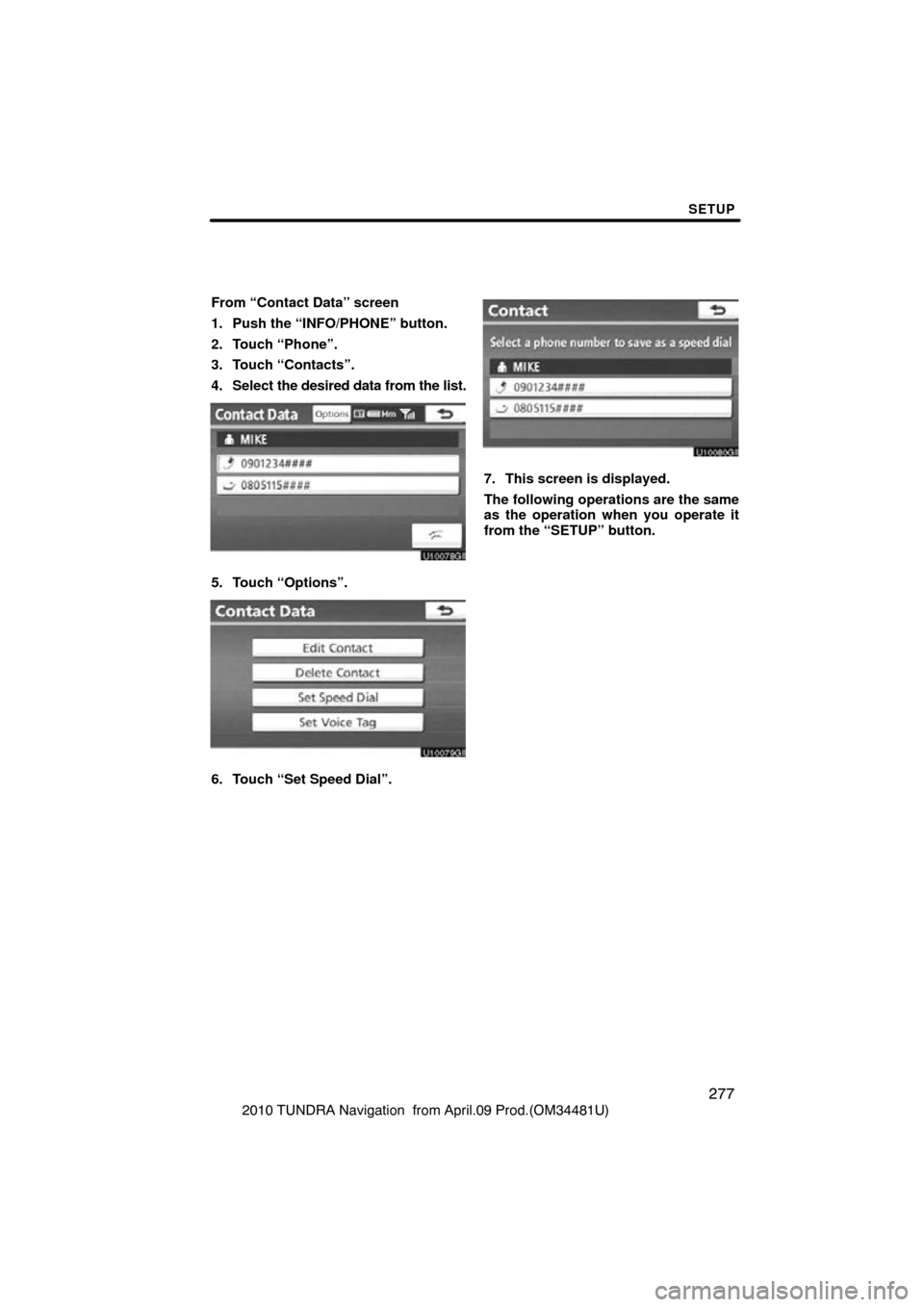
From “Contact Data” screen
1. Push the “INFO/PHONE” button.
2. Touch “Phone”.
3. Touch “Contacts”.
4. Select
the desired data from the list.
5. Touch “Options”.
6. Touch “Set Speed Dial”.
7. This screen is displayed.
The following operations are the same
as the operation when you operate it
from the “SETUP” button.
Page 281 of 328
SETUP
281
2010 TUNDRA Navigation from April.09 Prod.(OM34481U)
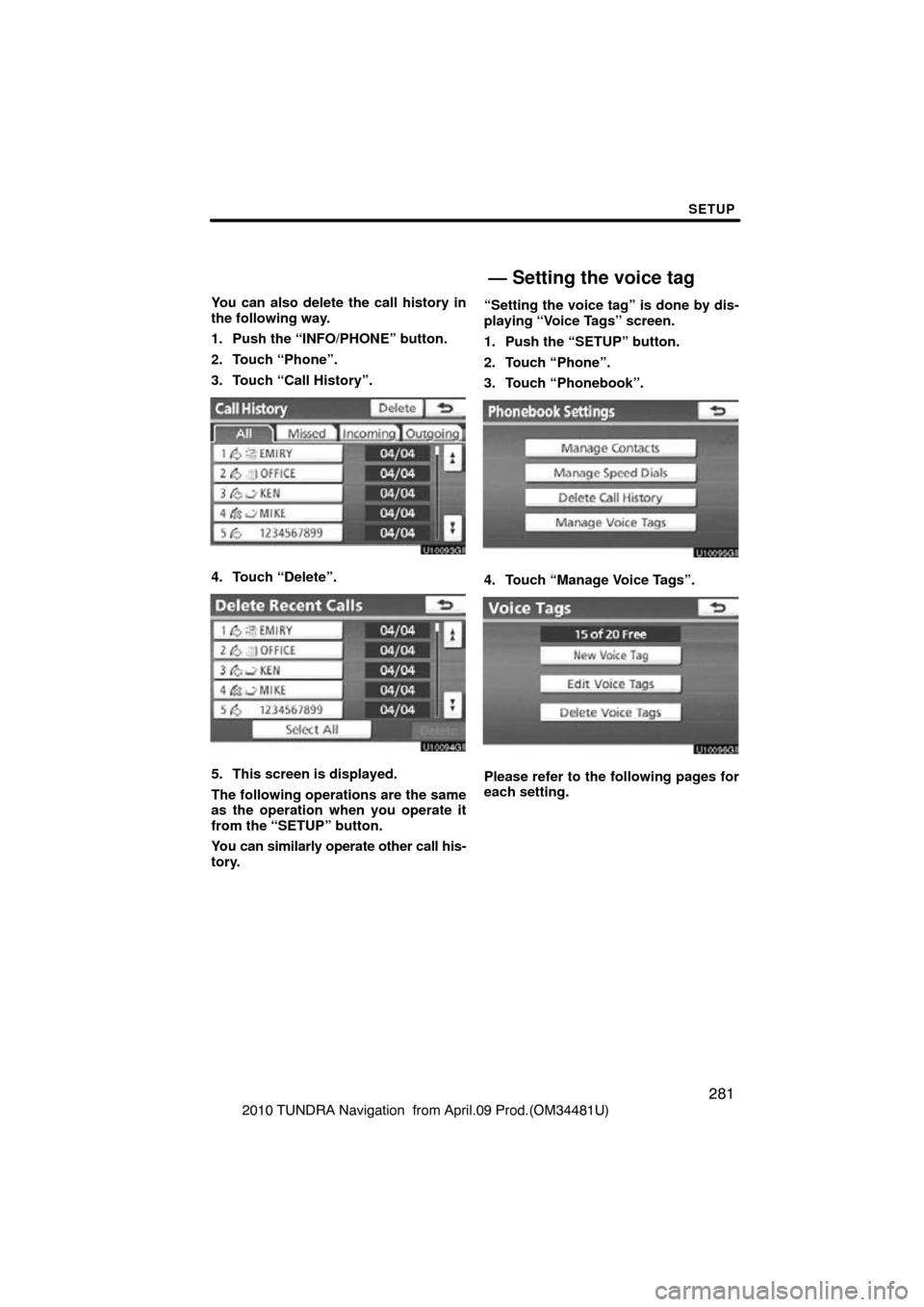
You can also delete the call history in
the following way.
1. Push the “INFO/PHONE” button.
2. Touch “Phone”.
3. Touch “Call History”.
4. Touch “Delete”.
5. This screen is displayed.
The following operations are the same
as the operation when you operate it
from the “SETUP” button.
You can similarly operate other call his-
tory.
“Setting the voice tag” is done by dis-
playing “Voice Tags” screen.
1. Push the “SETUP” button.
2. Touch “Phone”.
3. Touch “Phonebook”.
4. Touch “Manage Voice Tags”.
Please refer to the following pages for
each setting.
— Setting the voice tag