engine TOYOTA TUNDRA 2014 2.G Repair Manual
[x] Cancel search | Manufacturer: TOYOTA, Model Year: 2014, Model line: TUNDRA, Model: TOYOTA TUNDRA 2014 2.GPages: 576, PDF Size: 10.54 MB
Page 185 of 576

1854-2. Driving procedures
4
Driving
■AI-SHIFT
AI-SHIFT automatically selects the suitable gear according to the driver per-
formance and driving conditions.
AI-SHIFT automatically operates when the shift lever is in the D position.
(Shifting the shift lever to the S position cancels the function.)
■ When driving with cruise cont rol activated (if equipped)
Even when performing the following actions with the intent of enabling engine
braking, engine braking will not activate while driving in S mode and down-
shifting to 5 or 4 (6-speed models) or 4 (5-speed models) because cruise
control will not be canceled. ( P. 200)
■ If the shift lever cannot be shift from P
P. 491
■ If the “S” indicator does not come on even after shifting the shift lever to
S
This may indicate a malfunction in the automatic transmission system. Have
the vehicle inspected by your Toyota dealer, immediately.
(In this situation, the transmission will operate in the same manner as when
the shift lever is in D.)
■ Downshifting restrictions warning buzzer (S mode)
To help ensure safety and driving performance, downshifting operation may
sometimes be restricted. In some circumstances, downshifting may not be
possible even when the shift lever is operated. (A buzzer will sound twice.)
CAUTION
■When driving on slippery road surfaces
Do not accelerate or shift gears suddenly.
Sudden changes in engine braking may cause the vehicle to spin or skid,
resulting in an accident.
Page 186 of 576
1864-2. Driving procedures
Turn signal lever
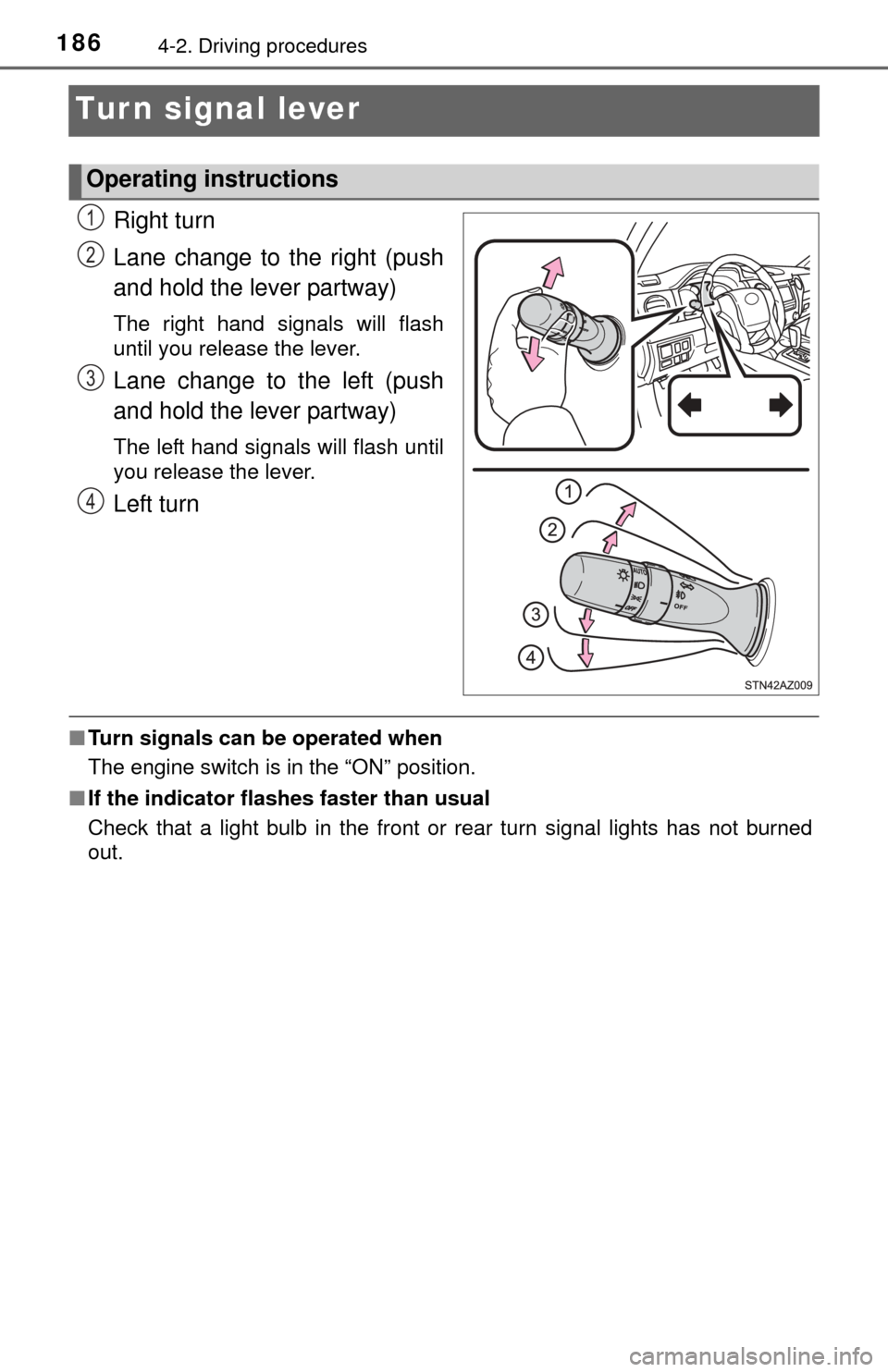
Right turn
Lane change to the right (push
and hold the lever partway)
The right hand signals will flash
until you release the lever.
Lane change to the left (push
and hold the lever partway)
The left hand signals will flash until
you release the lever.
Left turn
■Turn signals can be operated when
The engine switch is in the “ON” position.
■ If the indicator flashes faster than usual
Check that a light bulb in the front or rear turn signal lights has not burned
out.
Operating instructions
1
2
3
4
Page 189 of 576
1894-3. Operating the lights and wipers
4
Driving
Headlight switch
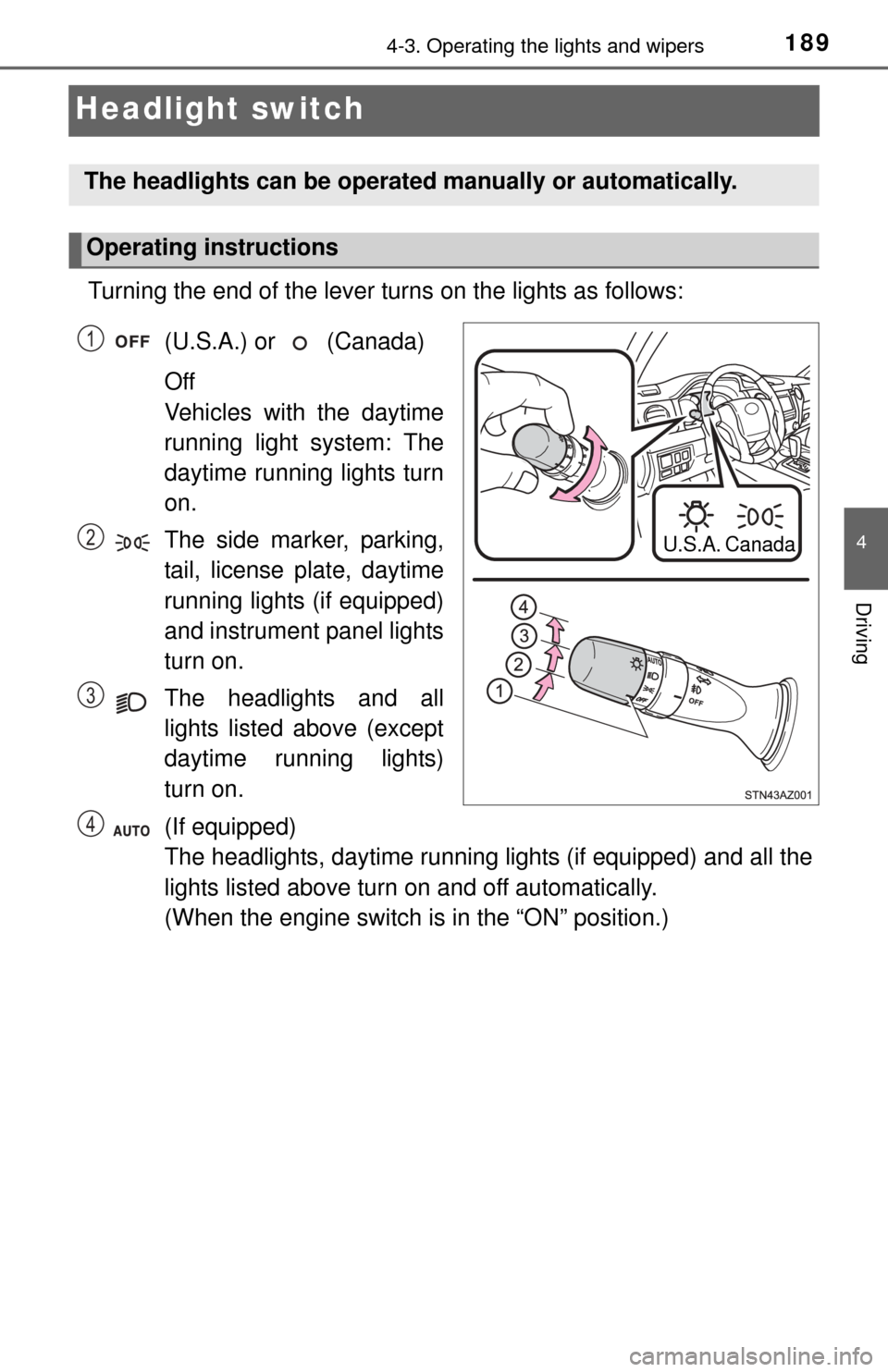
Turning the end of the lever turns on the lights as follows:(U.S.A.) or (Canada)
Off
Vehicles with the daytime
running light system: The
daytime running lights turn
on.
The side marker, parking,
tail, license plate, daytime
running lights (if equipped)
and instrument panel lights
turn on.
The headlights and all
lights listed above (except
daytime running lights)
turn on.
(If equipped)
The headlights, daytime running lights (if equipped) and all the
lights listed above turn on and off automatically.
(When the engine switch is in the “ON” position.)
The headlights can be operated manually or automatically.
Operating instructions
U.S.A.Canada
1
2
3
4
Page 191 of 576
1914-3. Operating the lights and wipers
4
Driving
■Daytime running light system (if equipped)
●To make your vehicle more visible to other drivers, the daytime running
lights turn on automatically whenever the engine is started and the parking
brake is released. Daytime running lights are not designed for use at night.
● Compared to turning on the headlights, the daytime running light system
offers greater durability and consumes less electricity, so it can help improve
fuel economy.
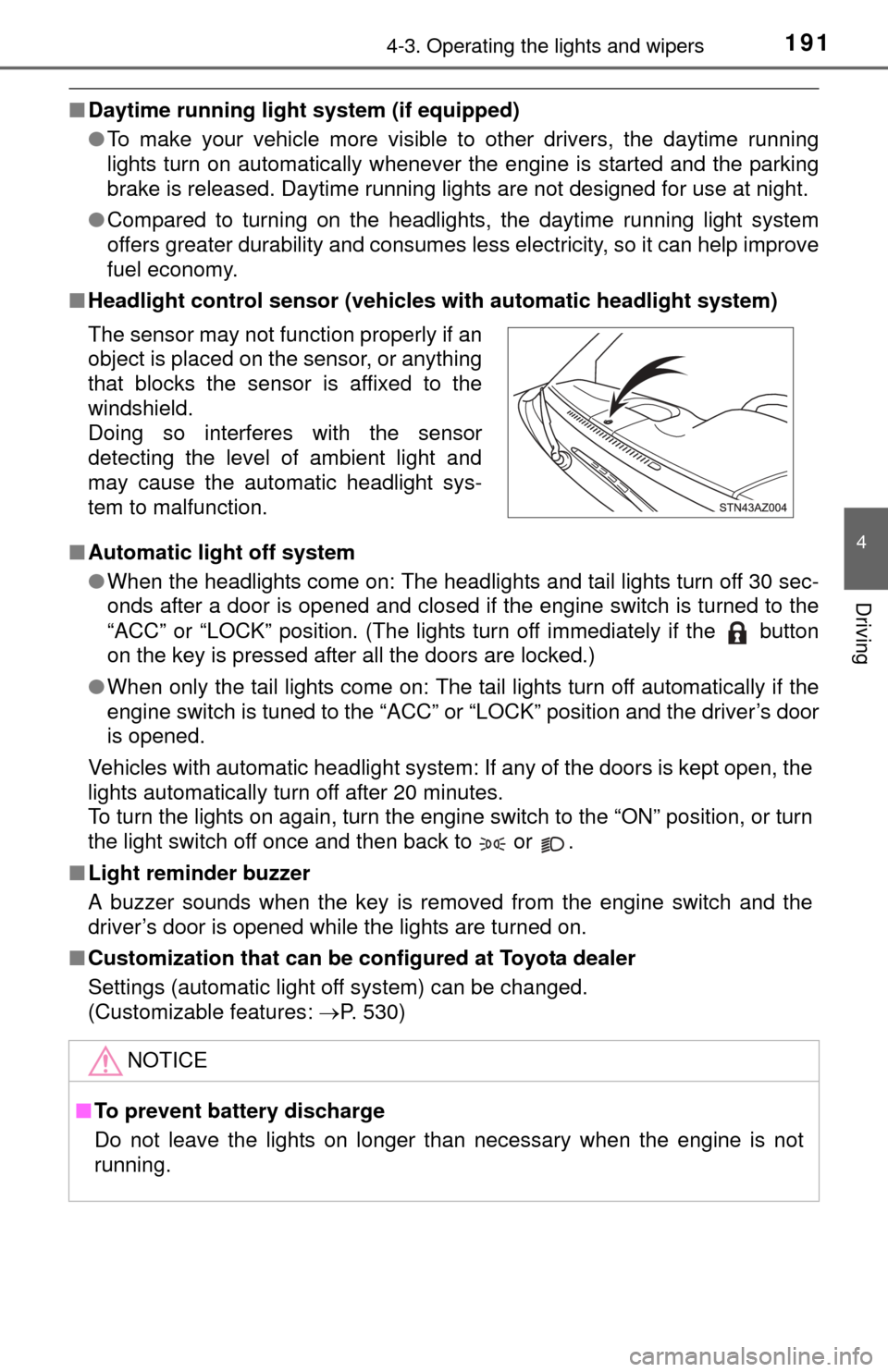
■ Headlight control sensor (vehicl es with automatic headlight system)
■ Automatic light off system
●When the headlights come on: The headlights and tail lights turn off 30 sec-
onds after a door is opened and closed if the engine switch is turned to the
“ACC” or “LOCK” position. (The lights turn off immediately if the button
on the key is pressed after all the doors are locked.)
● When only the tail lights come on: The tail lights turn off automatically if the
engine switch is tuned to the “ACC” or “LOCK” position and the driver’s door
is opened.
Vehicles with automatic headlight system: If any of the doors is kept open, the
lights automatically turn off after 20 minutes.
To turn the lights on again, turn the engine switch to the “ON” position, or turn
the light switch off once and then back to or .
■ Light reminder buzzer
A buzzer sounds when the key is removed from the engine switch and the
driver’s door is opened while the lights are turned on.
■ Customization that can be co nfigured at Toyota dealer
Settings (automatic light off system) can be changed.
(Customizable features: P. 530)
The sensor may not function properly if an
object is placed on the sensor, or anything
that blocks the sensor is affixed to the
windshield.
Doing so interferes with the sensor
detecting the level of ambient light and
may cause the automatic headlight sys-
tem to malfunction.
NOTICE
■
To prevent battery discharge
Do not leave the lights on longer than necessary when the engine is not
running.
Page 195 of 576
1954-3. Operating the lights and wipers
4
Driving
■The windshield wipers and washer can be operated when
The engine switch is in the “ON” position.
■ If no windshield washer fluid sprays
Check that the washer nozzles are not blocked if there is washer fluid in the
windshield washer fluid reservoir.
CAUTION
■Caution regarding the use of washer fluid
When it is cold, do not use the washer fluid until the windshield becomes
warm. The fluid may freeze on the windshield and cause low visibility. This
may lead to an accident, resulting in death or serious injury.
NOTICE
■When the windshield is dry
Do not use the wipers, as they may damage the windshield.
■ When the washer fluid tank is empty
Do not operate the switch continually as the washer fluid pump may over-
heat.
■ When a nozzle becomes blocked
In this case, contact your Toyota dealer.
Do not try to clear it with a pin or other object. The nozzle will be damaged\
.
Page 196 of 576
1964-4. Refueling
Opening the fuel tank cap
●Close all the doors and windows, and turn the engine switch to the
“LOCK” position.
● Confirm the type of fuel.
■Fuel types
Gasoline vehicles
Unleaded gasoline (Octane rating 87 [Research Octane Number 91] or
higher)
Flex-fuel vehicles
Unleaded gasoline (Octane rating 87 [Research Octane Number 91] or
higher), E85 or a blend of these two fuels. ( P. 516)
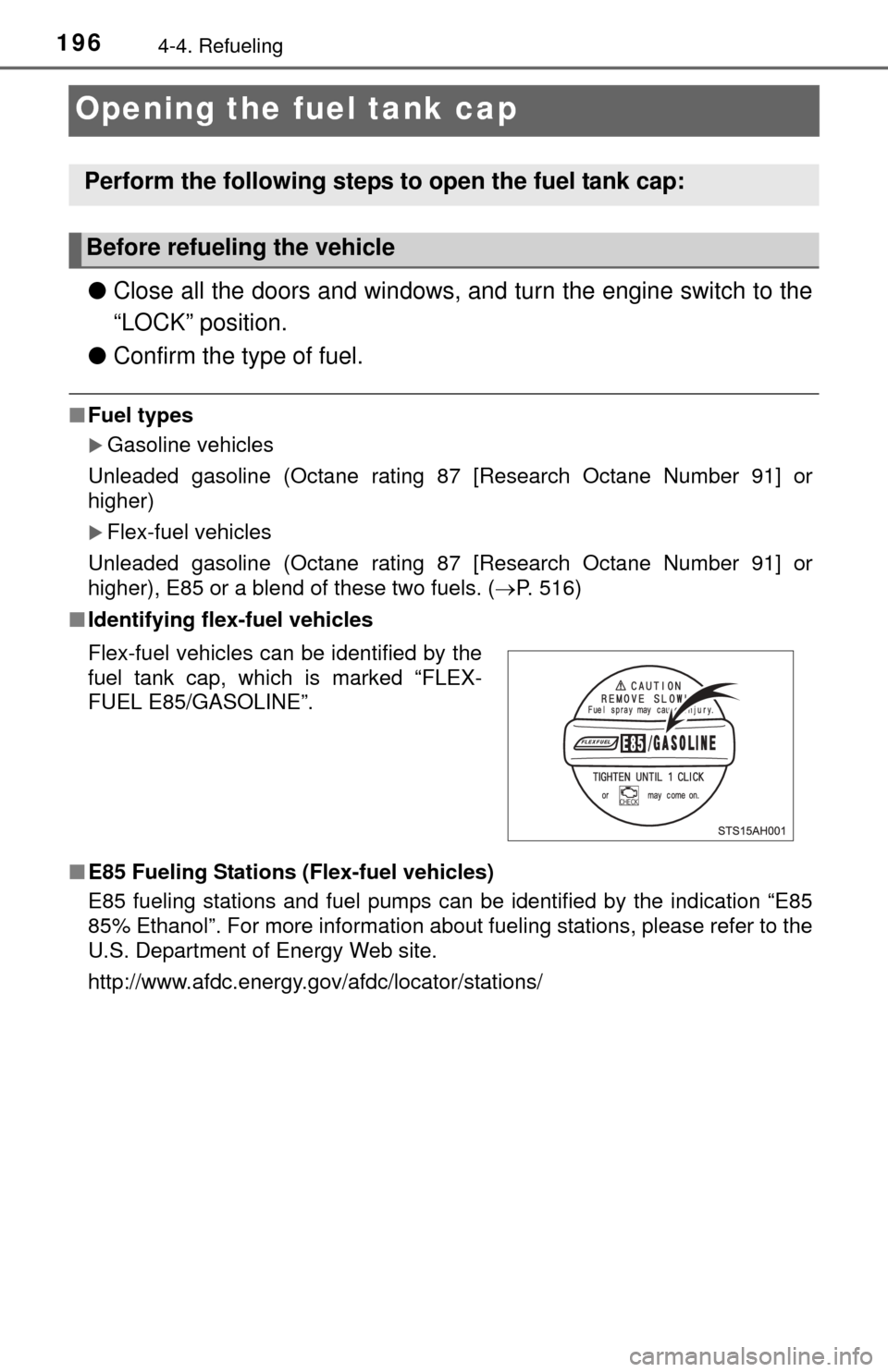
■ Identifying flex-fuel vehicles
■ E85 Fueling Stations (Flex-fuel vehicles)
E85 fueling stations and fuel pumps can be identified by the indication “E85
85% Ethanol”. For more information about fueling stations, please refer to the
U.S. Department of Energy Web site.
http://www.afdc.energy.gov/afdc/locator/stations/
Perform the following steps to open the fuel tank cap:
Before refueling the vehicle
Flex-fuel vehicles can be identified by the
fuel tank cap, which is marked “FLEX-
FUEL E85/GASOLINE”.
Page 197 of 576

1974-4. Refueling
4
Driving
■Refueling (Flex-fuel vehicles)
Observe the following precautions when switching fuels, in order to maintain
starting and driving performance.
●Do not change fuels when the fuel level is 1/4 or less.
● Always add at least 2.6 gal. (10 L) of fuel.
● After filling up with fuel, warm up the engine or drive the vehicle for at least 5
minutes or 7 miles (11 km).
● Do not accelerate rapidly immediately after refueling.
CAUTION
■When refueling the vehicle
Observe the following precautions while refueling the vehicle.
Failure to do so may result in death or serious injury.
● After exiting the vehicle and before opening the fuel door, touch an
unpainted metal surface to discharge any static electricity. It is important to
discharge static electricity before refueling because sparks resulting from
static electricity can cause fuel vapors to ignite while refueling.
● Always hold the grips on the fuel tank cap and turn it slowly to remove it.
A whooshing sound may be heard when the fuel tank cap is loosened.
Wait until the sound cannot be heard before fully removing the cap. In hot
weather, pressurized fuel may spray out the filler neck and cause injury.
● Do not allow anyone that has not discharged static electricity from their
body to come close to an open fuel tank.
● Do not inhale vaporized fuel.
Fuel contains substances that are harmful if inhaled.
● Do not smoke while refueling the vehicle.
Doing so may cause the fuel to ignite and cause a fire.
● Do not return to the vehicle or touch any person or object that is statically
charged.
This may cause static electricity to build up, resulting in a possible ignition
hazard.
■ When refueling
Observe the following precautions to prevent fuel overflowing from the fuel
tank:
● Securely insert the fuel nozzle into the fuel filler neck.
● Stop filling the tank after the fuel nozzle automatically clicks off.
● Do not top off the fuel tank.
Page 198 of 576
1984-4. Refueling
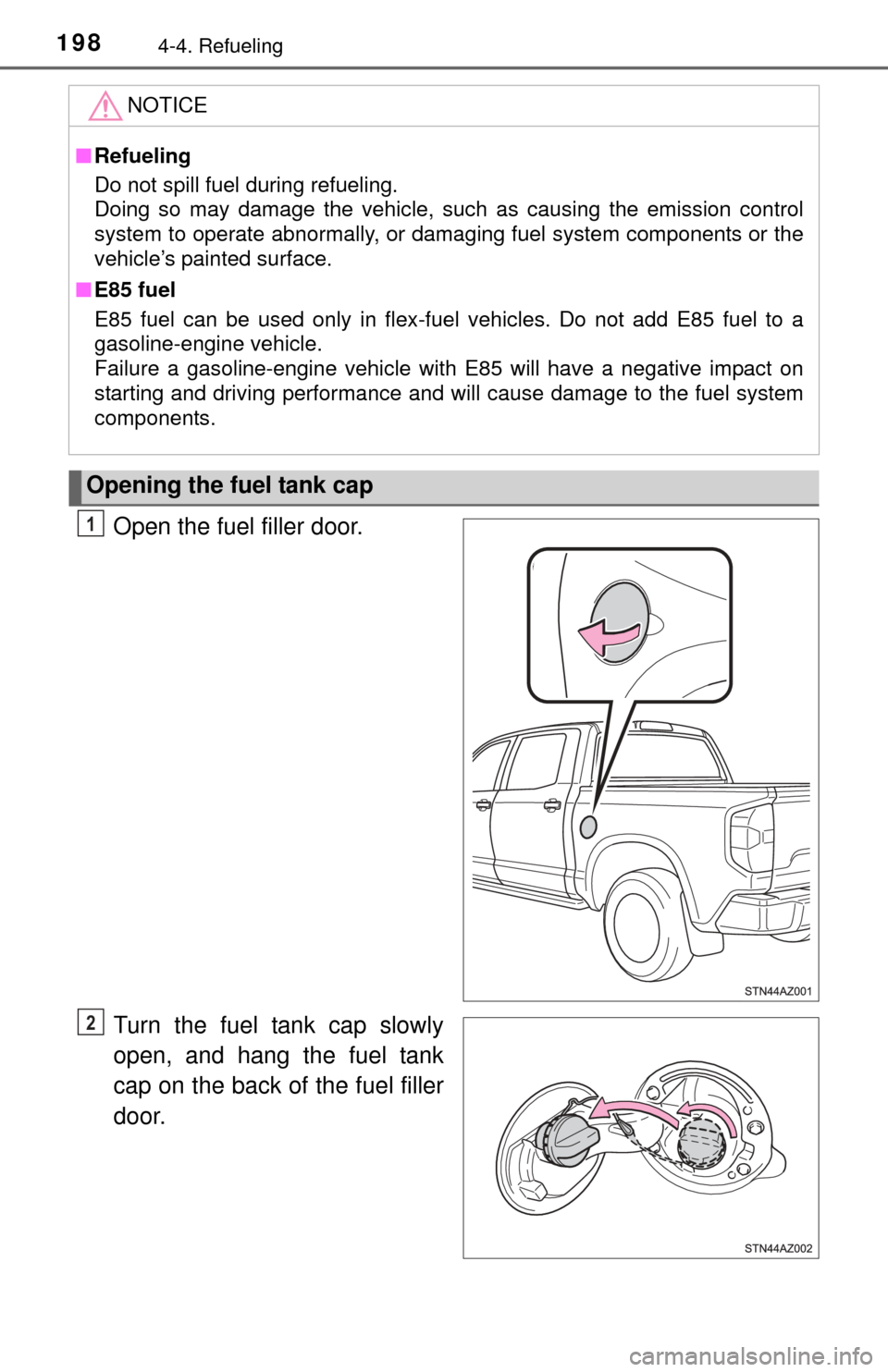
Open the fuel filler door.
Turn the fuel tank cap slowly
open, and hang the fuel tank
cap on the back of the fuel filler
door.
NOTICE
■ Refueling
Do not spill fuel during refueling.
Doing so may damage the vehicle, such as causing the emission control
system to operate abnormally, or damaging fuel system components or the
vehicle’s painted surface.
■ E85 fuel
E85 fuel can be used only in flex-fuel vehicles. Do not add E85 fuel to a
gasoline-engine vehicle.
Failure a gasoline-engine vehicle with E85 will have a negative impact on
starting and driving performance and will cause damage to the fuel system
components.
Opening the fuel tank cap
1
2
Page 206 of 576

2064-5. Using the driving support systems
■The intuitive parking assist can be operated when
●Front corner sensors:
• The engine switch is in the “ON” position.
• The shift lever is in R.
• The shift lever is not in P or R and vehicle speed is less than about 6 mph
(10 km/h).
● Rear corner and rear center sensors:
• The engine switch is in the “ON” position.
• The shift lever is in R.
■ Sensor detection information
●The sensor’s detection areas are limited to the areas around the vehicle’s
front corner and rear bumpers.
● Certain vehicle conditions and the surrounding environment may affect the
ability of the sensor to correctly detect obstacles. Particular instances where
this may occur are listed below.
• There is dirt, snow or ice on the sensor. (Wiping the sensors will resolve
this problem.)
• The sensor is frozen. (Thawing the area will resolve this problem.)
• The sensor is covered in any way.
• The vehicle is leaning considerably to one side.
• On an extremely bumpy road, on an incline, on gravel, or on grass.
• The vicinity of the vehicle is noisy due to vehicle horns, motorcycle
engines, air brakes of large vehicles, or other loud noises producing ultra-
sonic waves.
• There is another vehicle equipped with parking assist sensors in the
vicinity.
• The sensor is coated with a sheet of spray or heavy rain.
• The vehicle is equipped with a fender pole or radio antenna.
• The bumper or sensor receives a strong impact.
• The vehicle is approaching a tall or curved curb.
• In harsh sunlight or intense cold weather.
• The area directly under the bumpers is not detected.
• If obstacles draw too close to the sensor.
• A non-genuine Toyota suspension (lowered suspension, etc.) is installed.
• People may not be detected if they are wearing certain types of clothing.
In addition to the examples above, there are instances in which, because of
their shape, signs and other objects may be judged by the sensor to be closer
than they are.
Page 209 of 576
2094-5. Using the driving support systems
4
Driving
Rear view monitor system
Vehicles with Entune Audio Plus or Entune Premium Audio
(Multimedia system types: P. 250)
Refer to the “NAVIGATION SYSTEM OWNER’S MANUAL”.
Vehicles with Entune Audio (Multimedia system types: P. 250)
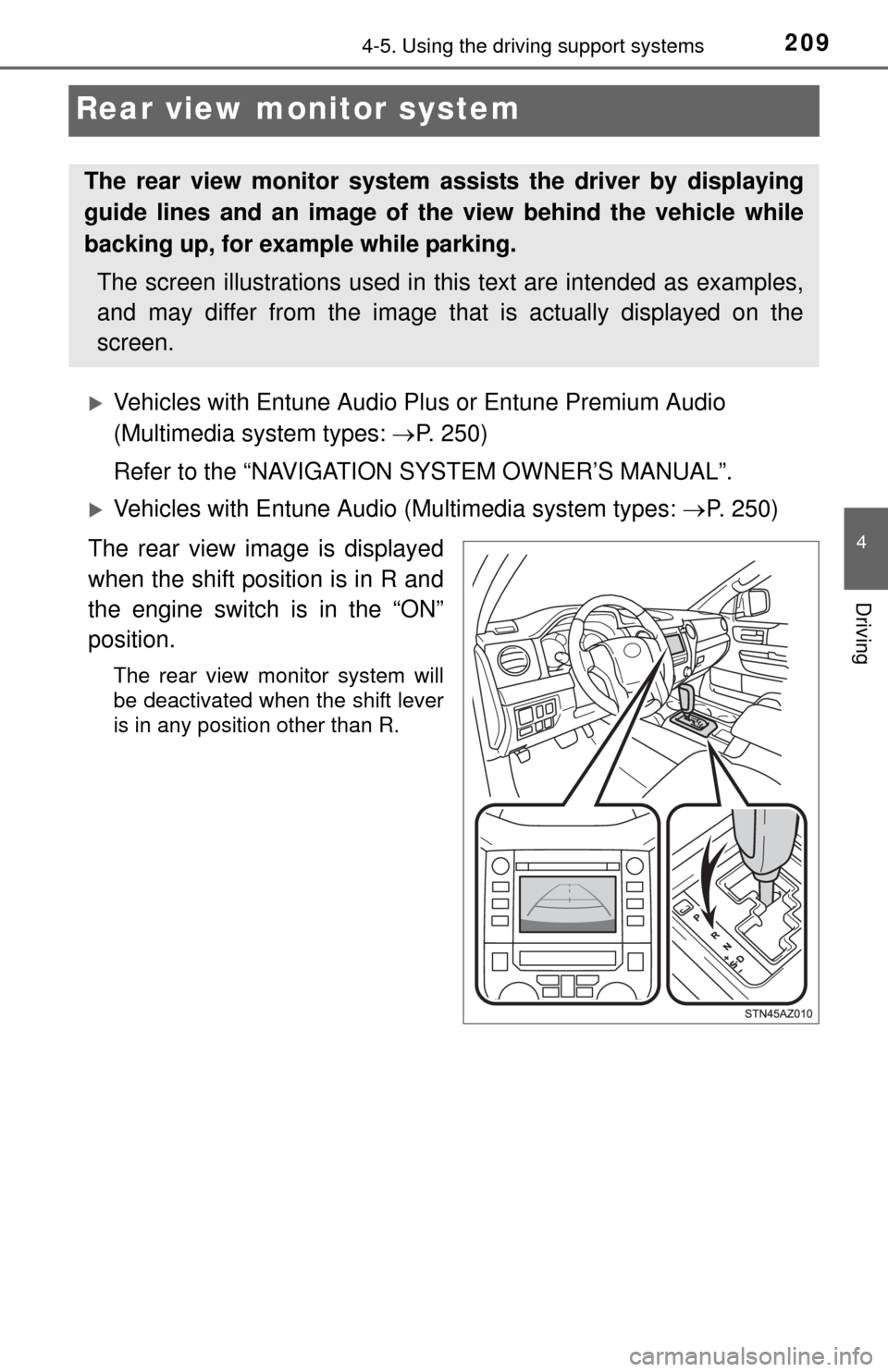
The rear view image is displayed
when the shift position is in R and
the engine switch is in the “ON”
position.
The rear view monitor system will
be deactivated when the shift lever
is in any position other than R.
The rear view monitor system as sists the driver by displaying
guide lines and an image of the view behind the vehicle while
backing up, for example while parking.
The screen illustrations used in this text are intended as examples,
and may differ from the image that is actually displayed on the
screen.