lock TOYOTA TUNDRA 2015 2.G Navigation Manual
[x] Cancel search | Manufacturer: TOYOTA, Model Year: 2015, Model line: TUNDRA, Model: TOYOTA TUNDRA 2015 2.GPages: 280, PDF Size: 7.57 MB
Page 18 of 280
18
1. CONTROLS AND FEATURES
STATUS DISPLAY
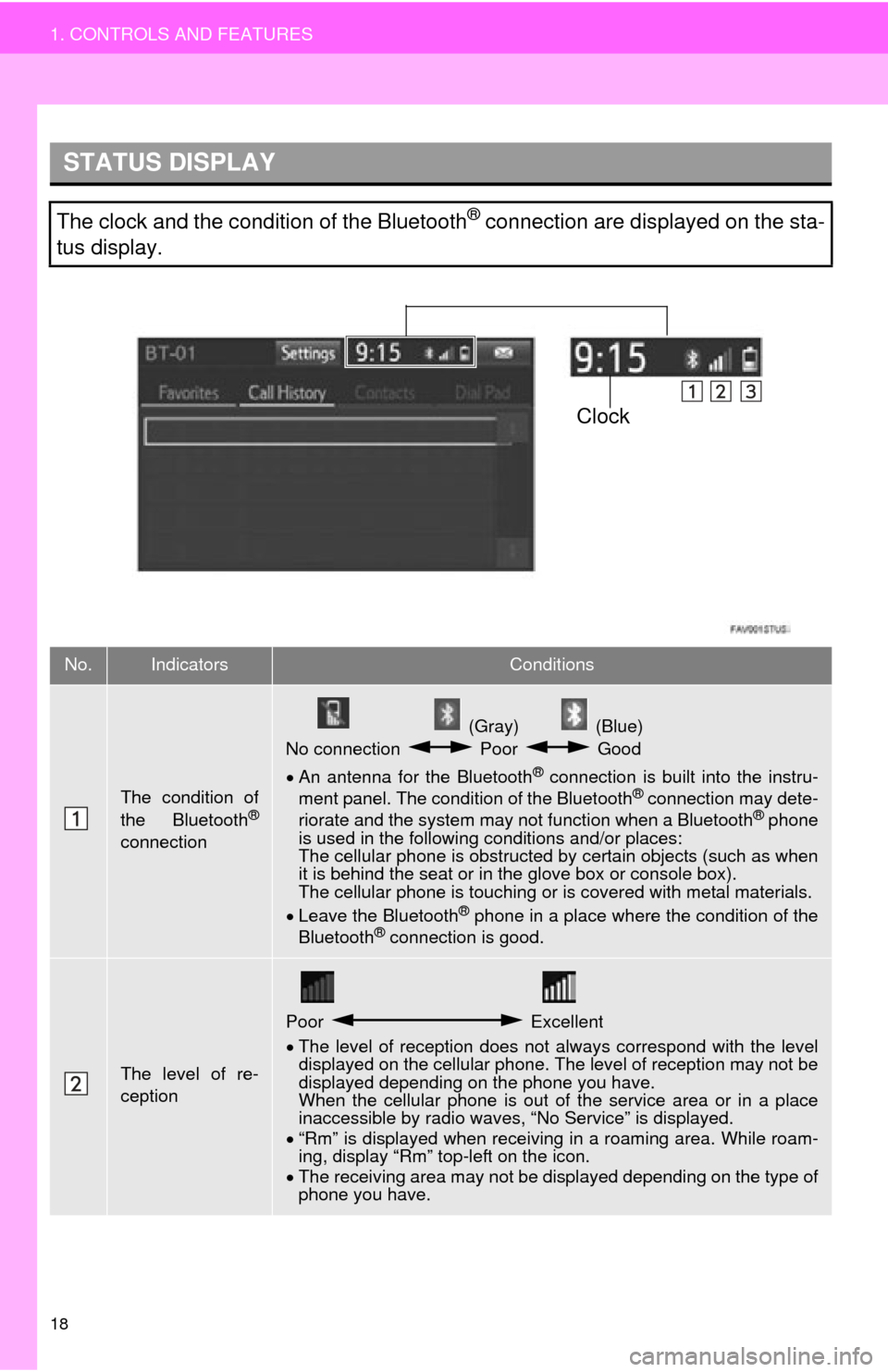
The clock and the condition of the Bluetooth® connection are displayed on the sta-
tus display.
No.IndicatorsConditions
The condition of
the Bluetooth®
connection
(Gray) (Blue)
No connection Poor Good
An antenna for the Bluetooth® connection is built into the instru -
ment panel. The condition of the Bluetooth® connection may dete -
riorate and the system may not function when a Bluetooth® phone
is used in the following conditions and/or places:
The cellular phone is obstructed by cert
ain objects (such as when
it is behind the seat or in the glove box or console box).
The cellular phone is touching or is covered with metal materials.
Leave the Blu
etooth® phone in a place where the condition of the
Bluetooth® connection is good.
The level of re-
ception
Poor Excellent
The level of reception does not always correspond with the level
displayed on the cellular phone. The level of reception may not be
displayed depending on the phone you have.
When the cellular phone is out of t
he service area or in a place
inaccessible by radio waves, “No Service” is displayed.
“Rm”
is displayed when receiving in a roaming area. While roam -
ing, display “Rm” top-left on the icon.
The
receiving area may not be di splayed depending on the type of
phone you have.
Clock
Page 56 of 280
56
3. OTHER SETTINGS*: Entune Premium Audio only
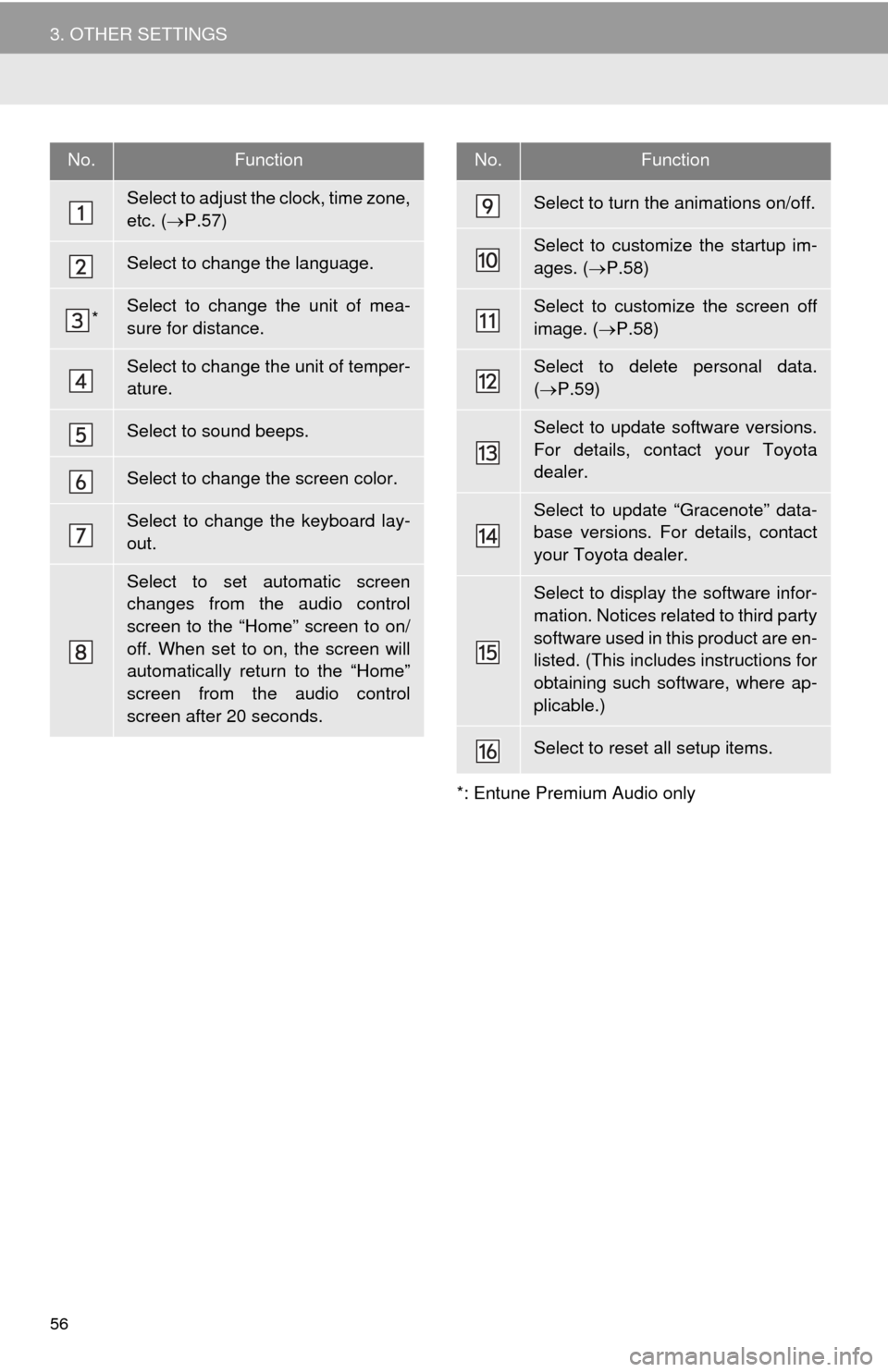
No.Function
Select to adjust the clock, time zone,
etc. (P.57)
Select to change the language.
*Select to change the unit of mea-
sure for distance.
Select to change the unit of temper-
ature.
Select to sound beeps.
Select to change the screen color.
Select to change the keyboard lay-
out.
Select to set automatic screen
changes from the audio control
screen to the “Home” screen to on/
off. When set to on, the screen will
automatically return to the “Home”
screen from the audio control
screen after 20 seconds.
Select to turn the animations on/off.
Select to customize the startup im-
ages. ( P.58)
Select to customize the screen off
image. ( P.58)
Select to delete personal data.
( P.59)
Select to update software versions.
For details, contact your Toyota
dealer.
Select to update “Gracenote” data-
base versions. For details, contact
your Toyota dealer.
Select to display the software infor-
mation. Notices related to third party
software used in this product are en-
listed. (This includes instructions for
obtaining such software, where ap-
plicable.)
Select to reset all setup items.
No.Function
Page 57 of 280
57
3. OTHER SETTINGS
BASIC FUNCTION
2
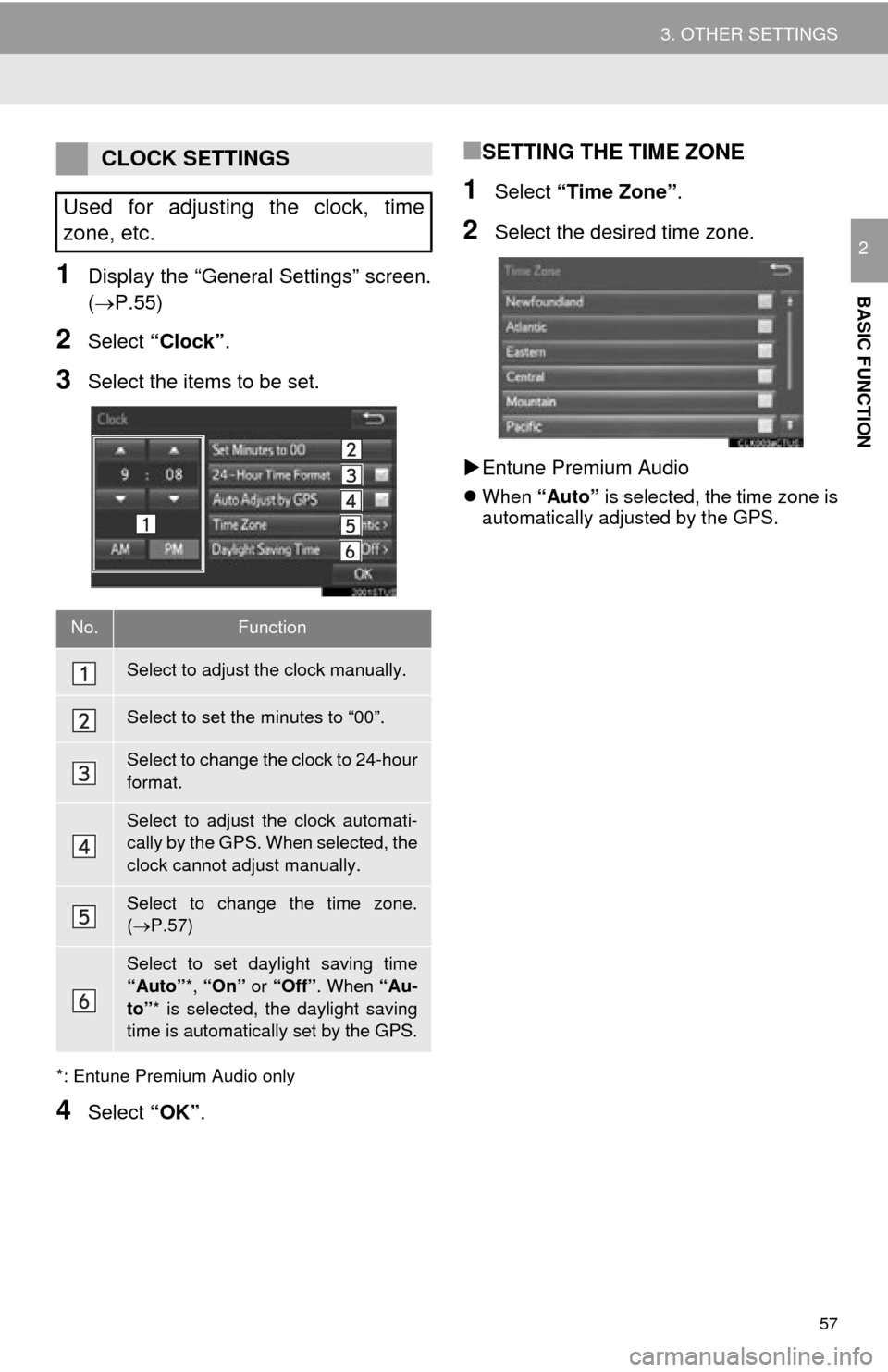
1Display the “General Settings” screen.
(P.55)
2Select “Clock”.
3Select the items to be set.
*: Entune Premium Audio only
4Select “OK”.
■SETTING THE TIME ZONE
1Select “Time Zone” .
2Select the desired time zone.
En
tune Premium Audio
When “Auto” is selected, the time zone is
automatically adjusted by the GPS.
CLOCK SETTINGS
Used for adjusting the clock, time
zone, etc.
No.Function
Select to adjust the clock manually.
Select to set the minutes to “00”.
Select to change the clock to 24-hour
format.
Select to adjust the clock automati-
cally by the GPS. When selected, the
clock cannot adjust manually.
Select to change the time zone.
( P.57)
Select to set daylight saving time
“Auto” *, “On” or “Off” . When “Au-
to” * is selected, the daylight saving
time is automatically set by the GPS.
Page 86 of 280
86
2. RADIO OPERATION
HOW TO SUBSCRIBE TO XM
Satellite Radio
To listen to a satellite radio broadcast
in the vehicle, a subscription to the XM
Satellite Radio service is necessary.
An XM Satellite Radio is a tuner de-
signed exclusively to receive broad-
casts provided under a separate
subscription. Availability is limited to
the 48 contiguous U.S. states and
some Canadian provinces.
HOW TO SUBSCRIBE
It is necessary to enter into a separate
service agreement with XM Satellite
Radio in order to receive satellite
broadcast programming in the vehicle.
Additional activation and service sub-
scription fees apply that are not includ-
ed in the purchase price of the vehicle
and digital satellite tuner.
For complete information on subscrip-
tion rates and terms, or to subscribe to
XM Satellite Radio:
U.S.A.
Refer to
www.siriusxm.com or call
1-800-967-2346.
Canada
Refer to www.xmradio.ca
or call
1-877-209-0079.
NOTICE
● XM Radio Services Legal Disclaimers
and Warnings
• Fees and Taxes Subscription fee,
taxes, one time activation fee, and
other fees may apply. Subscription fee
is consumer only. All fees and pro-
gramming subject to change.
Subscriptions subject to Customer
Agreement available at www.siri-
usxm.com. (U.S.A.) or www.xmra-
dio.ca (Canada) XM service only
available in the 48 contiguous United
States and Canada.
Explicit Language Notice Channels
with frequent explicit language are indi-
cated with an “XL” preceding the chan-
nel name. Channel blocking is
available for XM Satellite Radio receiv-
ers by notifying XM at;
U.S.A. Customers:
Visit www.siriusxm.com or calling
1-800-967-2346
Canadian Customers:
Visit www.xmradio.ca or calling
1-877-209-0079
● It is prohibited to copy, decompile, disas-
semble, reverse engineer, hack, manip-
ulate, or otherwise make available any
technology or software incorporated in
receivers compatible with the XM Satel-
lite Radio System or that support the XM
website, the Online Service or any of its
content. Furthermore, the AMBE
® voice
compression software included in this
product is protected by intellectual prop-
erty rights including patent rights, copy-
rights, and trade secrets of Digital Voice
Systems, Inc.
● Note: this applies to XM receivers only
and not XM Ready devices.
Page 111 of 280
111
AUDIO SYSTEM
3
6. TIPS FOR OPERATING THE AUDIO SYSTEM
1. OPERATING INFORMATION
Fading and drifting stations: Generally, the
effective range of FM is about 25 miles (40
km). Once outside this range, you may no-
tice fading and drifting, which increase with
the distance from the radio transmitter.
They are often accompanied by distortion.
Multi-path: FM signals are reflective, mak-
ing it possible for 2 signals to reach the ve-
hicle’s antenna at the same time. If this
happens, the signals will cancel each other
out, causing a momentary flutter or loss of
reception.
Static and fluttering: These occur when
signals are blocked by buildings, trees or
other large objects. Increasing the bass
level may reduce static and fluttering.
Station swapping: If the FM signal being
listened to is interrupted or weakened, and
there is another st rong station nearby on
the FM band, the radio may tune in the
second station until the original signal can
be picked up again.
Fading: AM broadcasts are reflected by
the upper atmosphere — especially at
night. These reflected signals can interfere
with those received directly from the radio
station, causing the radio station to sound
alternately strong and weak.
Station interference: When a reflected sig-
nal and a signal received directly from a ra-
dio station are very nearly the same
frequency, they can interfere with each
other, making it difficult to hear the broad-
cast.
Static: AM is easily affected by external
sources of electrical noise, such as high
tension power lines, lightening or electrical
motors. This results in static.
NOTICE
● To avoid damage to the audio system:
• Be careful not to spill beverages over
the audio system.
• Do not put anything other than an appropriate disc into the disc slot.
INFORMATION
● The use of a cellular phone inside or
near the vehicle may cause a noise from
the speakers of the audio system which
you are listening to. However, this does
not indicate a malfunction.
RADIO
Usually, a problem with radio reception
does not mean there is a problem with
the radio — it is just the normal result
of conditions outside the vehicle.
For example, nearby buildings and ter-
rain can interfere with FM reception.
Power lines or phone wires can inter-
fere with AM signals. And of course, ra-
dio signals have a limited range. The
farther the vehicle is from a station, the
weaker its signal will be. In addition, re-
ception conditions change constantly
as the vehicle moves.
Here, some common reception prob-
lems that probably do not indicate a
problem with the radio are described.
FM
AM