navigation TOYOTA TUNDRA 2016 2.G Navigation Manual
[x] Cancel search | Manufacturer: TOYOTA, Model Year: 2016, Model line: TUNDRA, Model: TOYOTA TUNDRA 2016 2.GPages: 284, PDF Size: 5.07 MB
Page 240 of 284
240
4. MEMORY POINTS
■CHANGING THE NAME
1Select “Edit” next to “Name”.
2Enter a name and select “OK”.
■CHANGING THE LOCATION
1Select “Edit” next to “Location”.
2Scroll the map to the desired point
(P.197 ) and select “OK”.
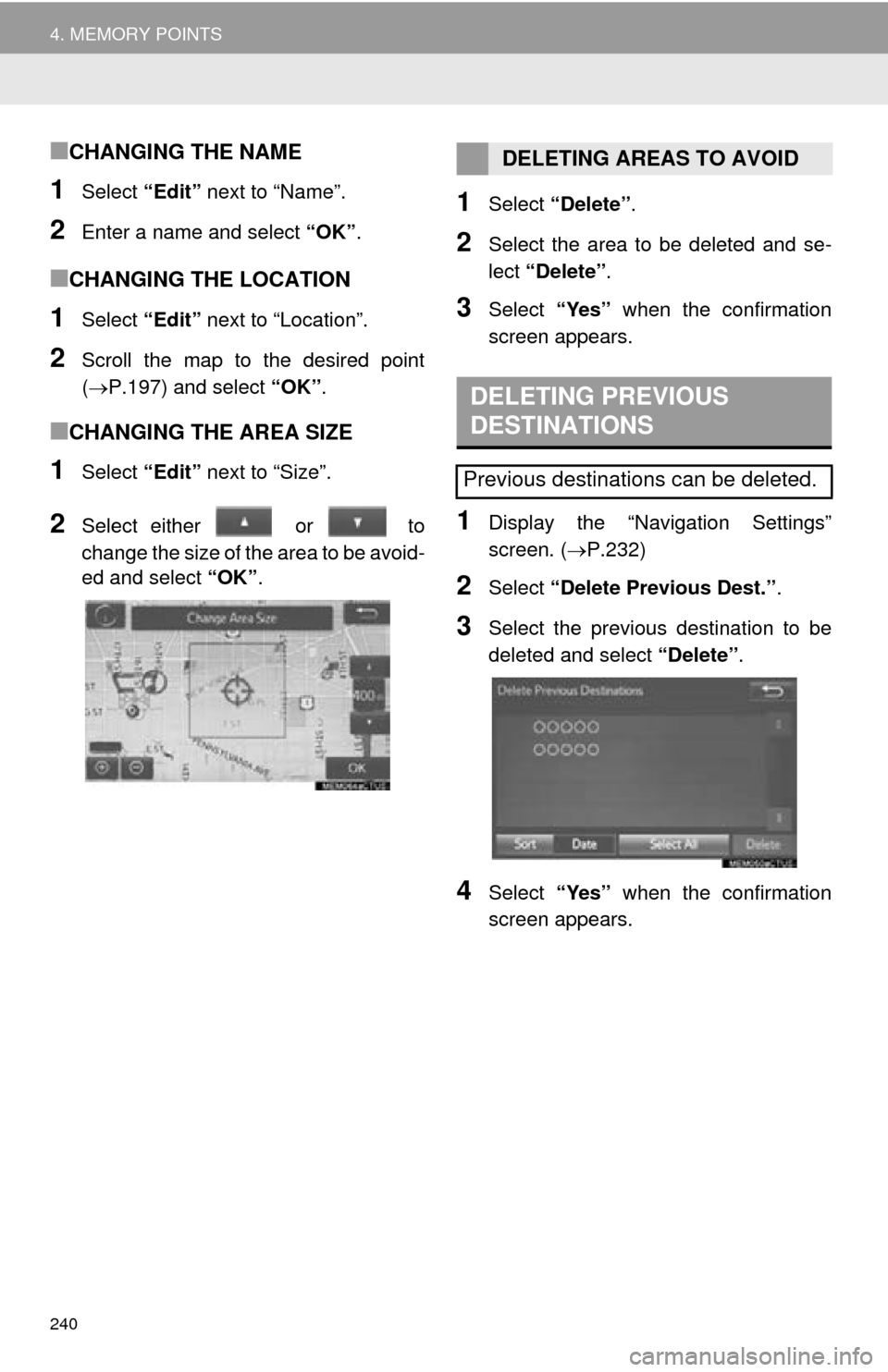
■CHANGING THE AREA SIZE
1Select “Edit” next to “Size”.
2Select either or to
change the size of the area to be avoid -
ed and select “O
K”.
1Select “Delete” .
2Select the area to be deleted and se -
lect “D
elete” .
3Select “Yes” when the confirmation
screen appears.
1Display the “Navigation Settings”
screen. ( P.232)
2Select “Delete Previous Dest.” .
3Select the previous destination to be
deleted and select “Delete”.
4Select “Yes” when the confirmation
screen appears.
DELETING AREAS TO AVOID
DELETING PREVIOUS
DESTINATIONS
Previous destinations can be deleted.
Page 241 of 284
241
NAVIGATION SYSTEM
8
5. SETUP
1. DETAILED NAVIGATION SETTINGS
1Press the “APPS” button.
2Select “Setup” .
3Select “Navigation” .
4Select “Detailed Navi. Settings” .
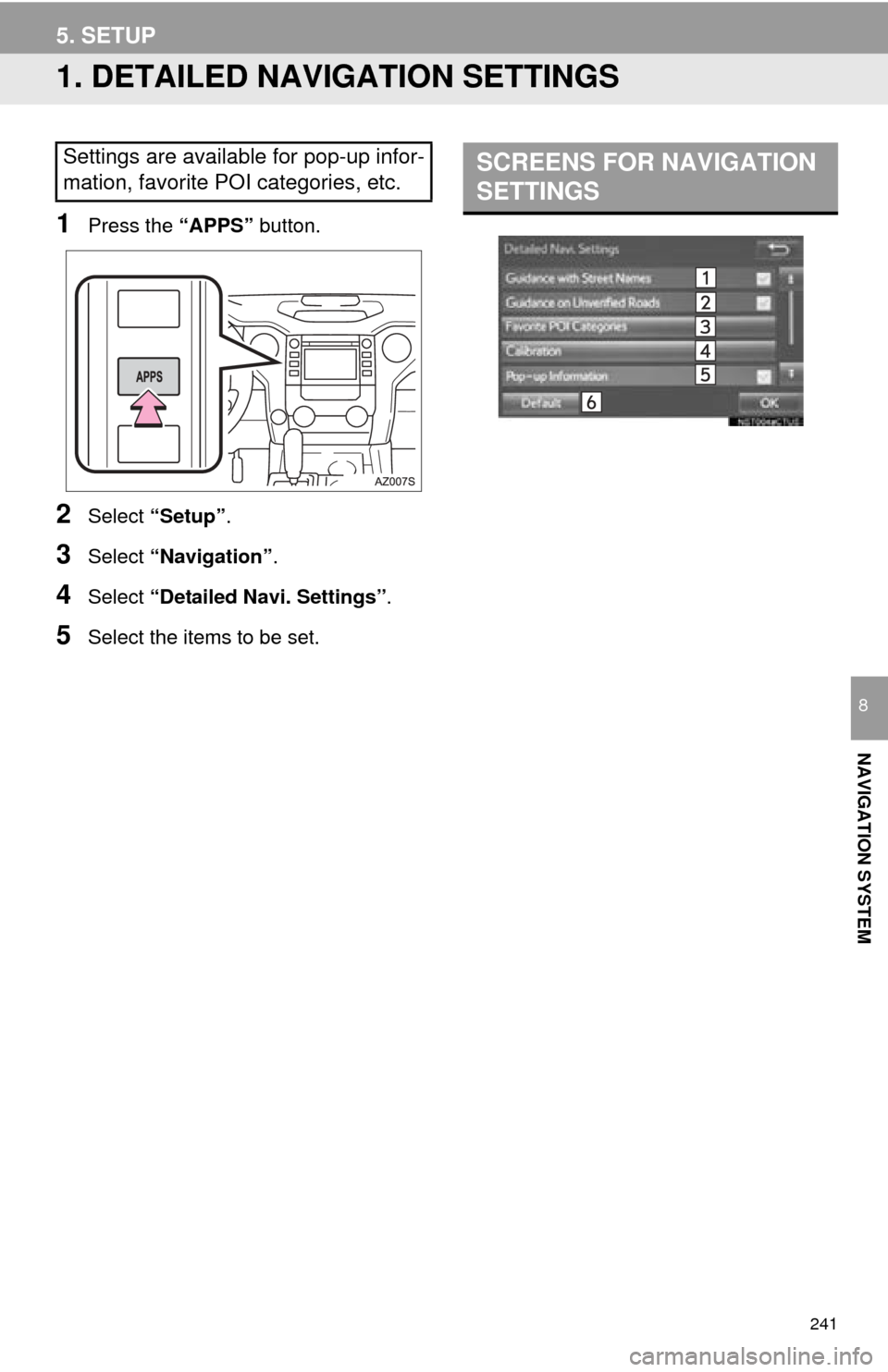
5Select the items to be set.
Settings are available for pop-up infor-
mation, favorite POI categories, etc.SCREENS FOR NAVIGATION
SETTINGS
Page 243 of 284
243
5. SETUP
NAVIGATION SYSTEM
8
1Display the “Detailed Navi. Settings”
screen. (P.241)
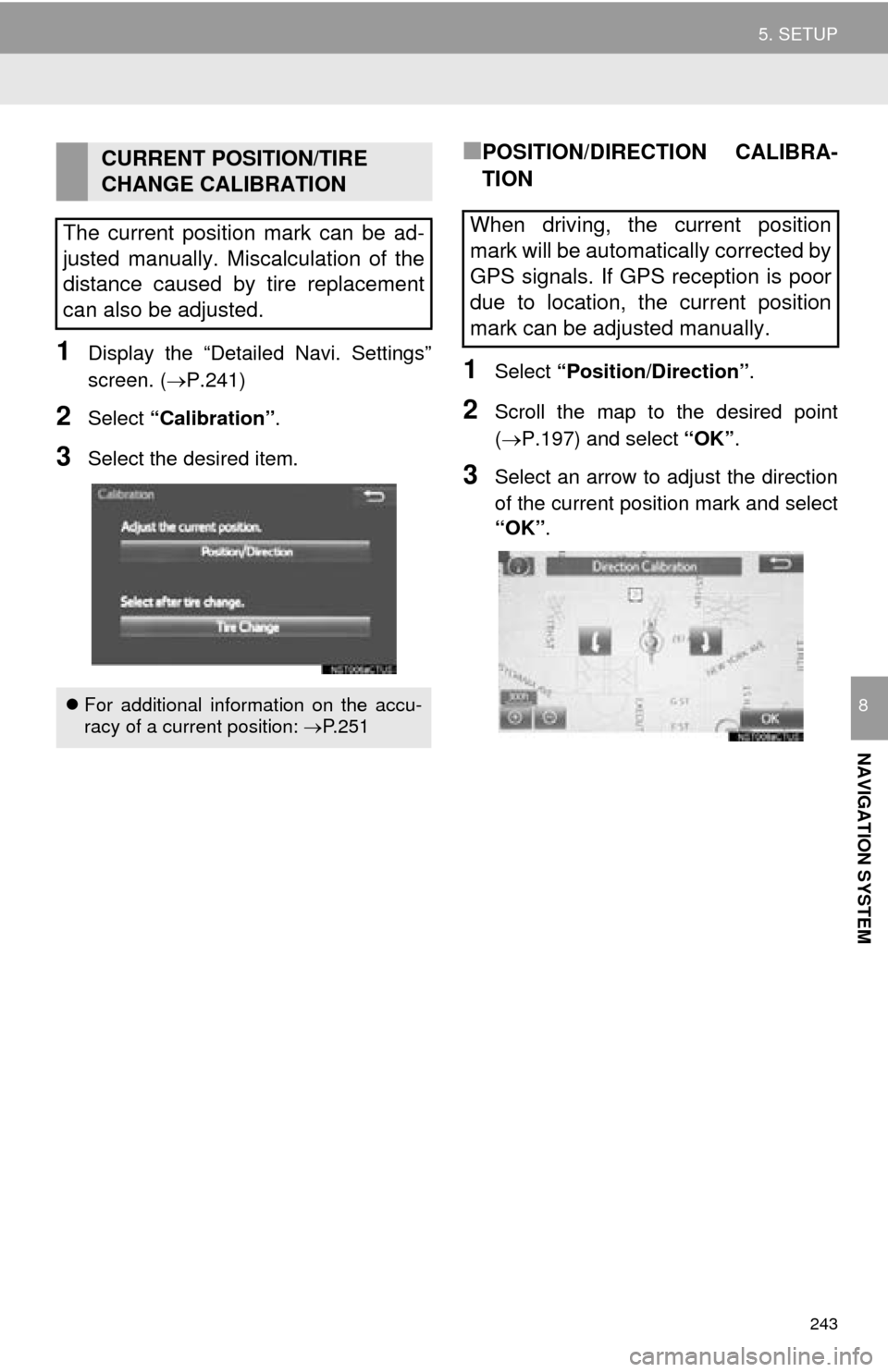
2Select “Calibration” .
3Select the desired item.
■POSITION/DIRECTION CALIBRA-
TION
1Select “Position/Direction” .
2Scroll the map to the desired point
(P.197) and select “OK”.
3Select an arrow to adjust the direction
of the current position mark and select
“OK”.
CURRENT POSITION/TIRE
CHANGE CALIBRATION
The current position mark can be ad-
justed manually. Miscalculation of the
distance caused by tire replacement
can also be adjusted.
For additional information on the accu-
racy of a current position: P. 2 5 1
When driving, the current position
mark will be automatically corrected by
GPS signals. If GPS reception is poor
due to location, the current position
mark can be adjusted manually.
Page 245 of 284
245
5. SETUP
NAVIGATION SYSTEM
8
2. TRAFFIC SETTINGS
1Press the “APPS” button.
2Select “Setup” .
3Select “Traffic” .
4Select the items to be set.
Traffic information such as traffic con-
gestion or traffic incident warnings can
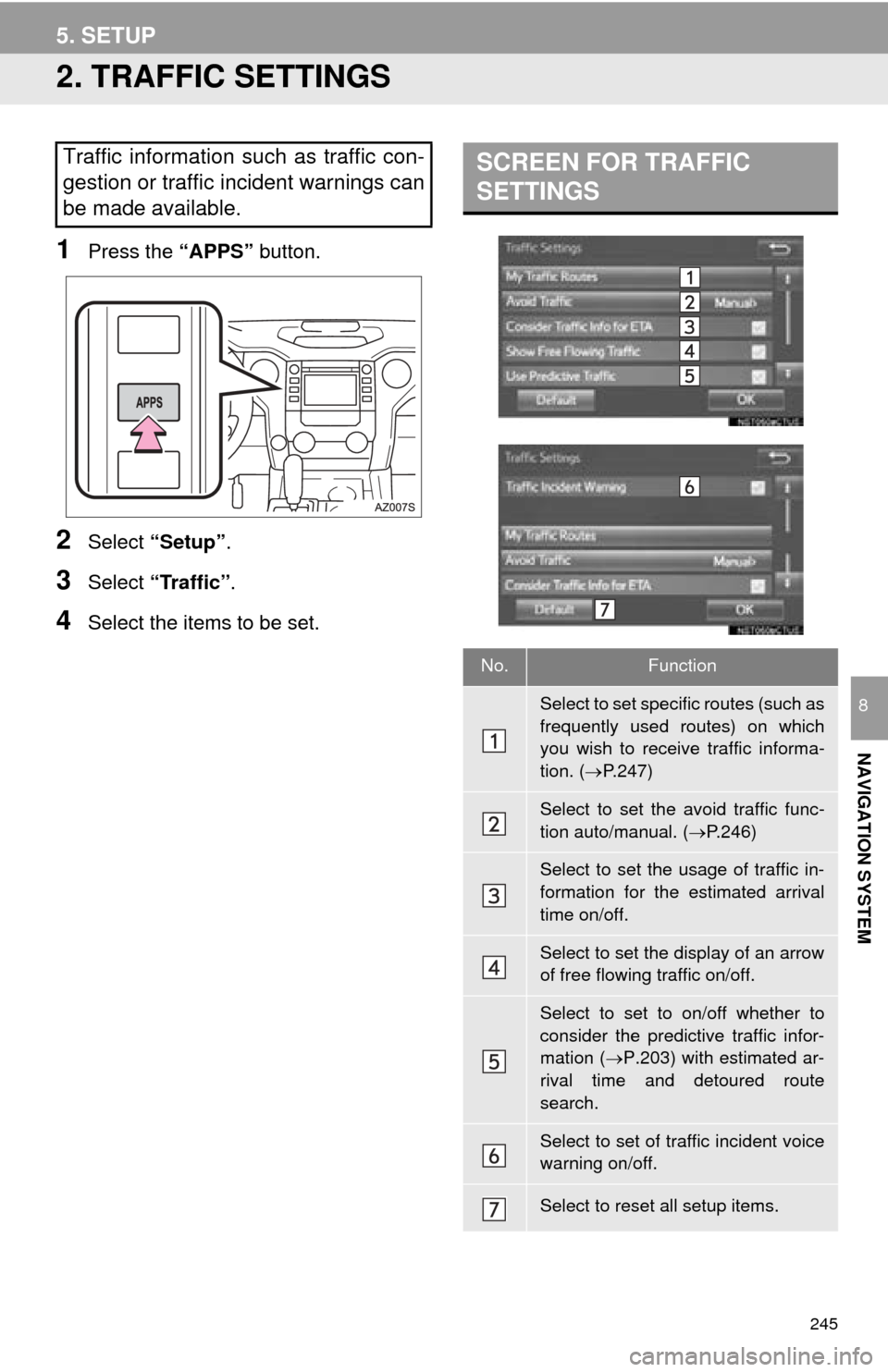
be made available. SCREEN FOR TRAFFIC
SETTINGS
No.Function
Select to set specific routes (such as
frequently used routes) on which
you wish to receive traffic informa-
tion. (P.247)
Select to set the avoid traffic func-
tion auto/manual. ( P.246)
Select to set the usage of traffic in-
formation for the estimated arrival
time on/off.
Select to set the display of an arrow
of free flowing traffic on/off.
Select to set to on/off whether to
consider the predictive traffic infor-
mation ( P.203) with estimated ar-
rival time and detoured route
search.
Select to set of traffic incident voice
warning on/off.
Select to reset all setup items.
Page 246 of 284
246
5. SETUP
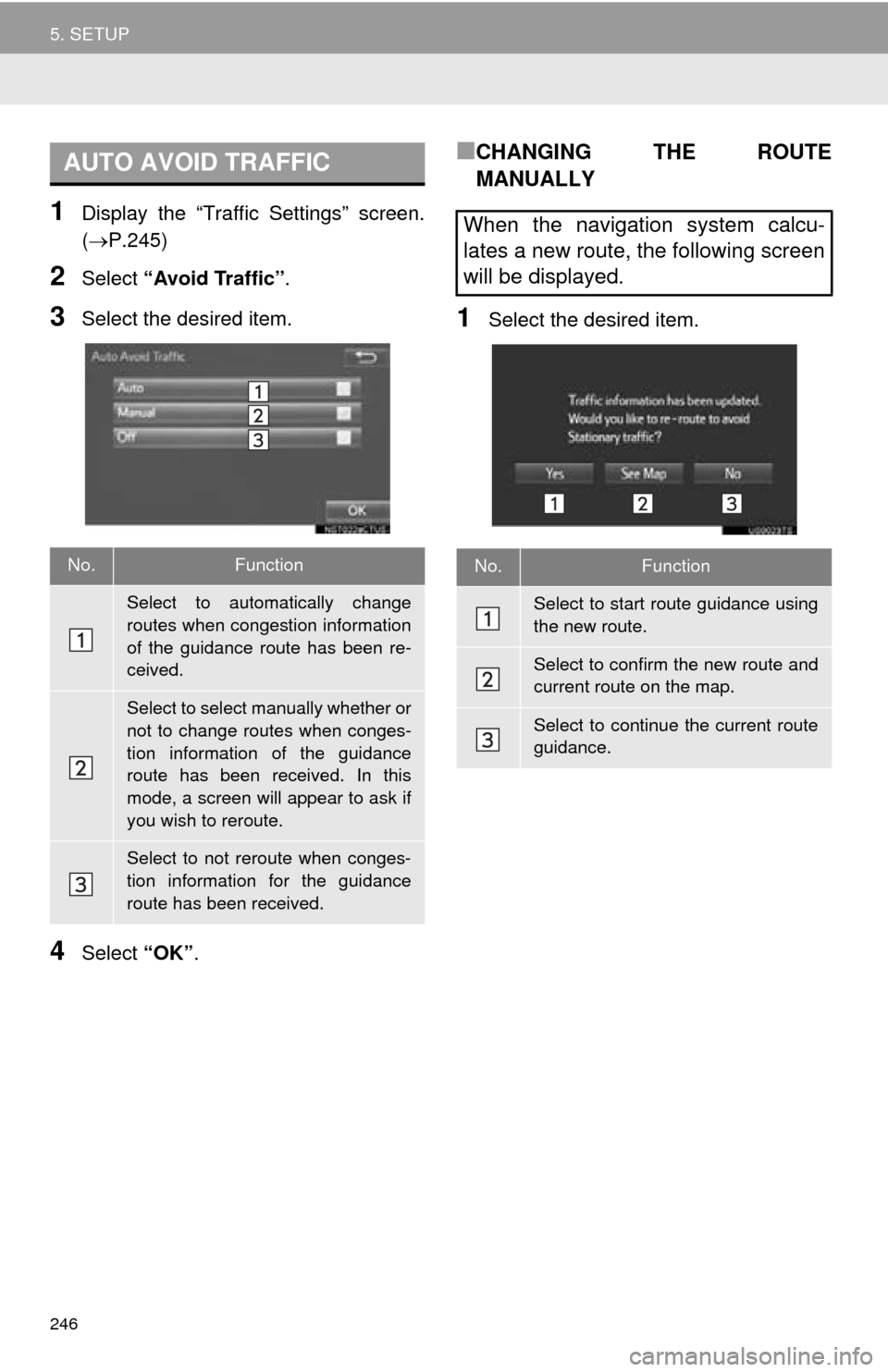
1Display the “Traffic Settings” screen.
(P.245)
2Select “Avoid Traffic” .
3Select the desired item.
4Select “OK”.
■CHANGING THE ROUTE
MANUALLY
1Select the desired item.
AUTO AVOID TRAFFIC
No.Function
Select to automatically change
routes when congestion information
of the guidance route has been re-
ceived.
Select to select manually whether or
not to change routes when conges-
tion information of the guidance
route has been received. In this
mode, a screen will appear to ask if
you wish to reroute.
Select to not reroute when conges-
tion information for the guidance
route has been received.
When the navigation system calcu-
lates a new route, the following screen
will be displayed.
No.Function
Select to start route guidance using
the new route.
Select to confirm the new route and
current route on the map.
Select to continue the current route
guidance.
Page 247 of 284
247
5. SETUP
NAVIGATION SYSTEM
8
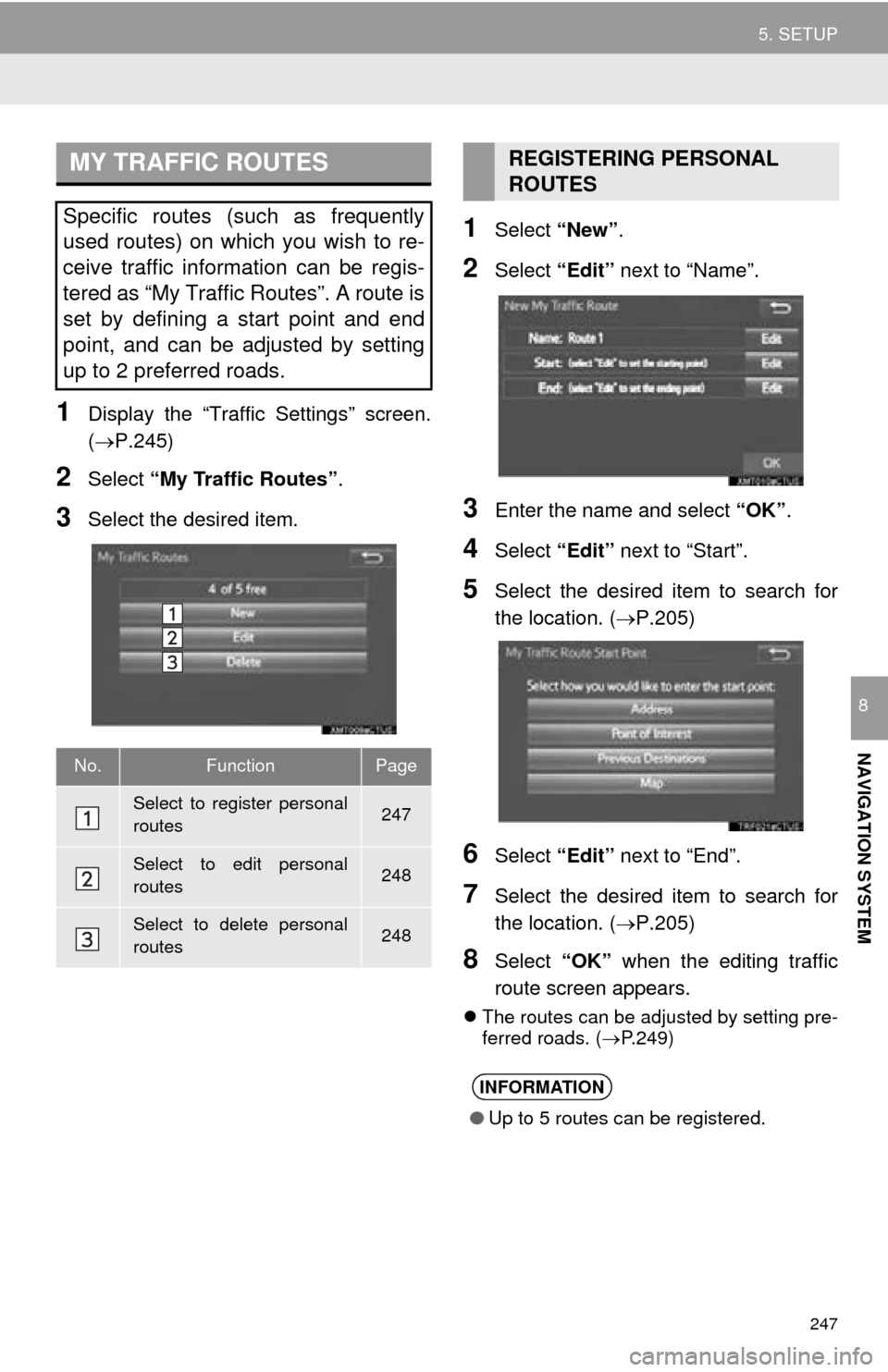
1Display the “Traffic Settings” screen.
(P.245)
2Select “My Traffic Routes” .
3Select the desired item.
1Select “New”.
2Select “Edit” next to “Name”.
3Enter the name and select “OK”.
4Select “Edit” next to “Start”.
5Select the desired item to search for
the location. ( P.205)
6Select “Edit” next to “End”.
7Select the desired item to search for
the location. ( P.205)
8Select “OK” when the editing traffic
route screen appears.
The routes can be adjusted by setting pre -
ferred roads. ( P.249)
MY TRAFFIC ROUTES
Specific routes (such as frequently
used routes) on which you wish to re-
ceive traffic information can be regis-
tered as “My Traffic Routes”. A route is
set by defining a start point and end
point, and can be adjusted by setting
up to 2 preferred roads.
No.FunctionPage
Select to register personal
routes247
Select to edit personal
routes248
Select to delete personal
routes248
REGISTERING PERSONAL
ROUTES
INFORMATION
● Up to 5 routes can be registered.
Page 249 of 284
249
5. SETUP
NAVIGATION SYSTEM
8
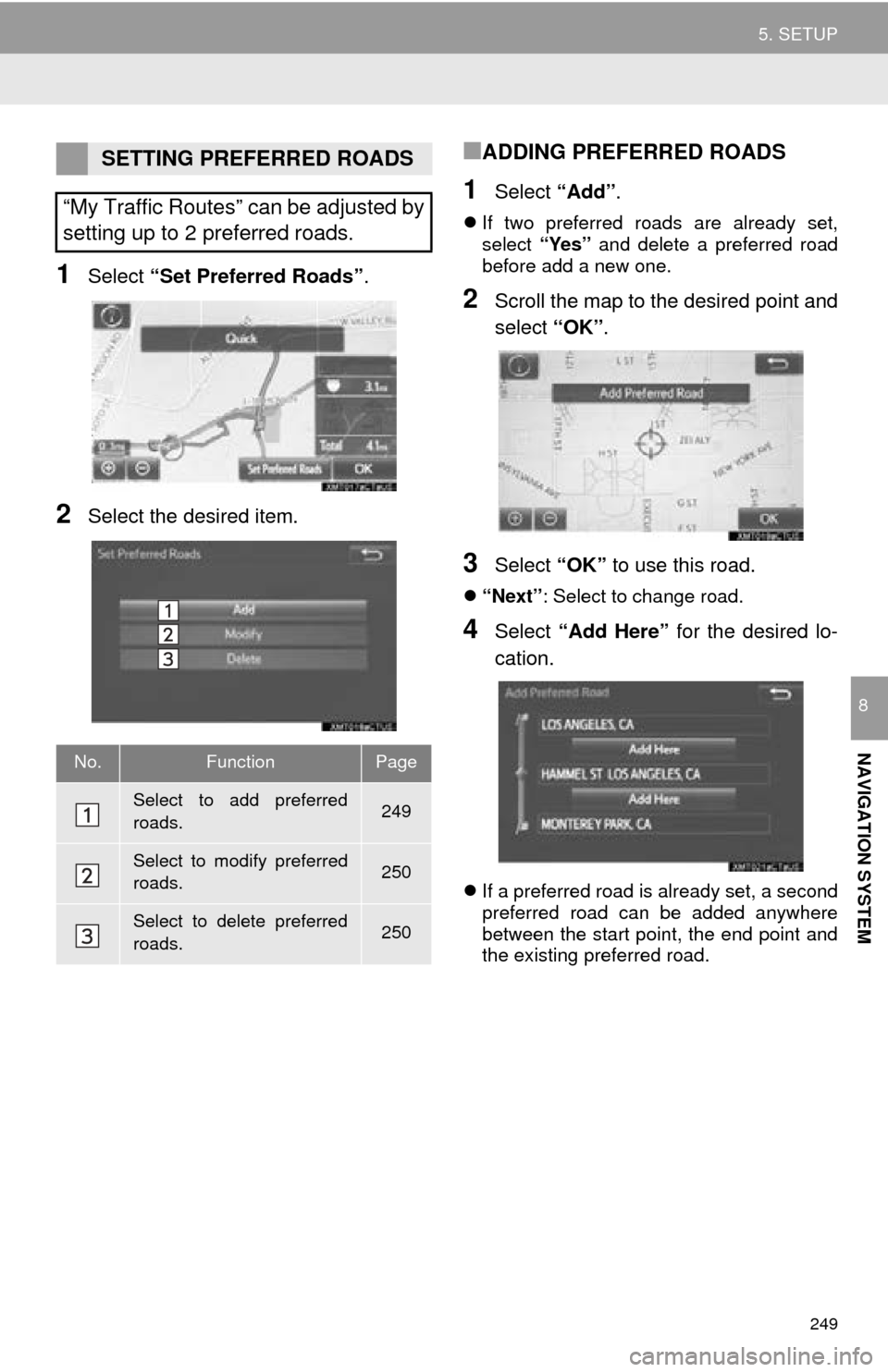
1Select “Set Preferred Roads” .
2Select the desired item.
■ADDING PREFERRED ROADS
1Select “Add”.
If two preferred roads are already set,
select “Yes” and delete a preferred road
before add a new one.
2Scroll the map to the desired point and
select “OK”.
3Select “OK” to use this road.
“Next” : Select to change road.
4Select “Add Here” for the desired lo -
cation.
If a preferred road is already set, a second
preferred road can be added anywhere
between the start point, the end point and
the existing preferred road.
SETTING PREFERRED ROADS
“My Traffic Routes” can be adjusted by
setting up to 2 preferred roads.
No.FunctionPage
Select to add preferred
roads.249
Select to modify preferred
roads.250
Select to delete preferred
roads.250
Page 251 of 284
251
NAVIGATION SYSTEM
8
6. TIPS FOR THE NAVIGATION SYSTEM
1. GPS (GLOBAL POSITIONING SYSTEM)
The Global Positioning System (GPS) de-
veloped and operated by the U.S. Depart-
ment of Defense provides an accurate
current position, normally using 4 or more
satellites, and in some case 3 satellites.
The GPS system has a certain level of in-
accuracy. While the navigation system
compensates for this mo st of the time, oc-
casional positioning errors of up to 300 ft.
(100 m) can and should be expected. Gen-
erally, position errors will be corrected
within a few seconds.
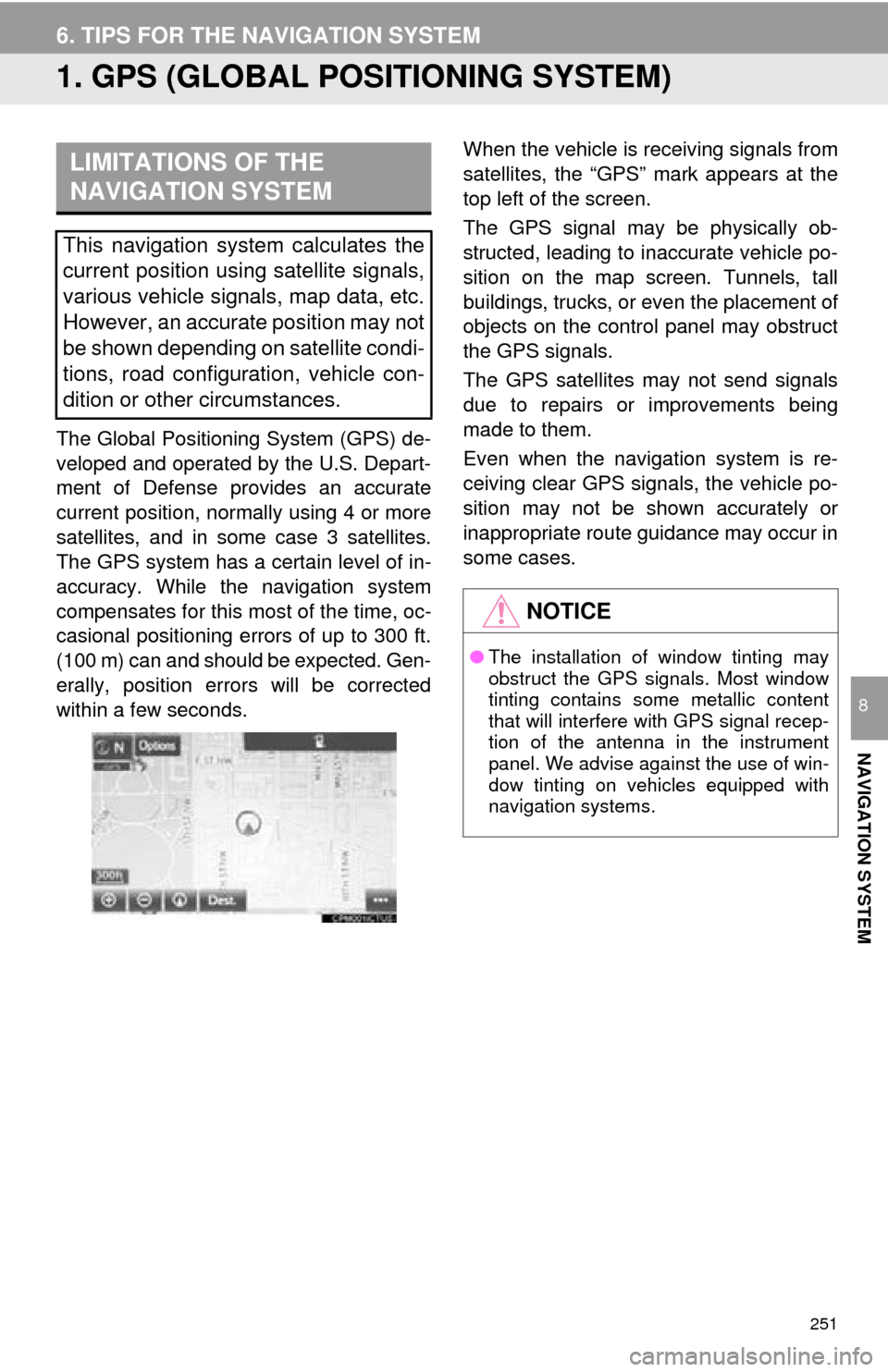
When the vehicle is receiving signals from
satellites, the “GPS” mark appears at the
top left of the screen.
The GPS signal may be physically ob-
structed, leading to inaccurate vehicle po-
sition on the map screen. Tunnels, tall
buildings, trucks, or even the placement of
objects on the control panel may obstruct
the GPS signals.
The GPS satellites may not send signals
due to repairs or improvements being
made to them.
Even when the navigation system is re-
ceiving clear GPS signals, the vehicle po-
sition may not be shown accurately or
inappropriate route guidance may occur in
some cases.LIMITATIONS OF THE
NAVIGATION SYSTEM
This navigation system calculates the
current position using satellite signals,
various vehicle signals, map data, etc.
However, an accurate position may not
be shown depending on satellite condi-
tions, road configuration, vehicle con-
dition or other circumstances.
NOTICE
● The installation of window tinting may
obstruct the GPS signals. Most window
tinting contains some metallic content
that will interfere with GPS signal recep-
tion of the antenna in the instrument
panel. We advise against the use of win-
dow tinting on vehicles equipped with
navigation systems.
Page 252 of 284
252
6. TIPS FOR THE NAVIGATION SYSTEM
Accurate current position may not be
shown in the following cases:
• When driving on a small angled Y-
sha
ped road.
• When driving on a winding road.
• When driving on a slippery road such as i
n sand, gravel, snow, etc.
• When driving on a long straight road.
• When freeway and surface streets run in pa
rallel.
• After moving by ferry or vehicle carrier.
• When a long route is searched during hi
gh speed driving.
• When driving without setting the current
po
sition calibration correctly.
• After repeating a change of direction by go
ing forward and backward, or turning
on a turntable in a parking lot.
• When leaving a covered parking lot or
p
arking garage.
• When a roof carrier is installed.
• When driving with tire chains installed.
• When the tires are worn.
• After replacing a tire or tires.
• When using tires that are smaller or l
arger than the factory specifications.
• When the tire pressure in any of the 4 ti
res is not correct.
Inappropriate route guidance may occur in
the following cases:
• When turning at an intersection off the d
esignated route guidance.
• If you set more than 1 destination but
sk
ip any of them, auto reroute will dis -
play a route returning to the destination
on
the previous route.
• When turning at an intersection for which t
here is no route guidance.
• When passing through an intersection
fo
r which there is no route guidance.
• During auto reroute, the route guidance ma
y not be available for the next turn to
the right or left.
• During high speed driving, it may take a
l
ong time for auto reroute to operate. In
auto reroute, a detour route may be
shown.
• After auto reroute, the route may not be
ch
anged.
• If an unnecessary U-turn is shown or a
nnounced.
• If a location has multiple names and the sy
stem announces 1 or more of them.
• When a route cannot be searched.
• If the route to your destination includes g
ravel, unpaved roads or alleys, the
route guidance may not be shown.
• Your destination point might be shown o
n the opposite side of the street.
• When a portion of the route has regula -
tions prohibiting the entry of the vehicle
t
hat vary by time or season or other rea -
sons.
• The road and map data stored in the n
avigation system may not be complete
or may not be the latest version.
If the vehicle cannot receive GPS sig-
nals, the current position can be
adjusted manually. For information on
setting the current position calibration:
P. 2 4 3
After replacing a tire: P. 2 4 4
INFORMATION
● This navigation system uses tire turning
data and is designed to work with fac-
tory-specified tires for the vehicle.
Installing tires that are larger or smaller
than the originally equipped diameter
may cause inaccurate display of the cur-
rent position. The tire pressure also
affects the diameter of the tires, so make
sure that the tire pressure of all 4 tires is
correct.
Page 253 of 284
253
6. TIPS FOR THE NAVIGATION SYSTEM
NAVIGATION SYSTEM
8
2. MAP DATABASE VERSION AND COVERED AREA
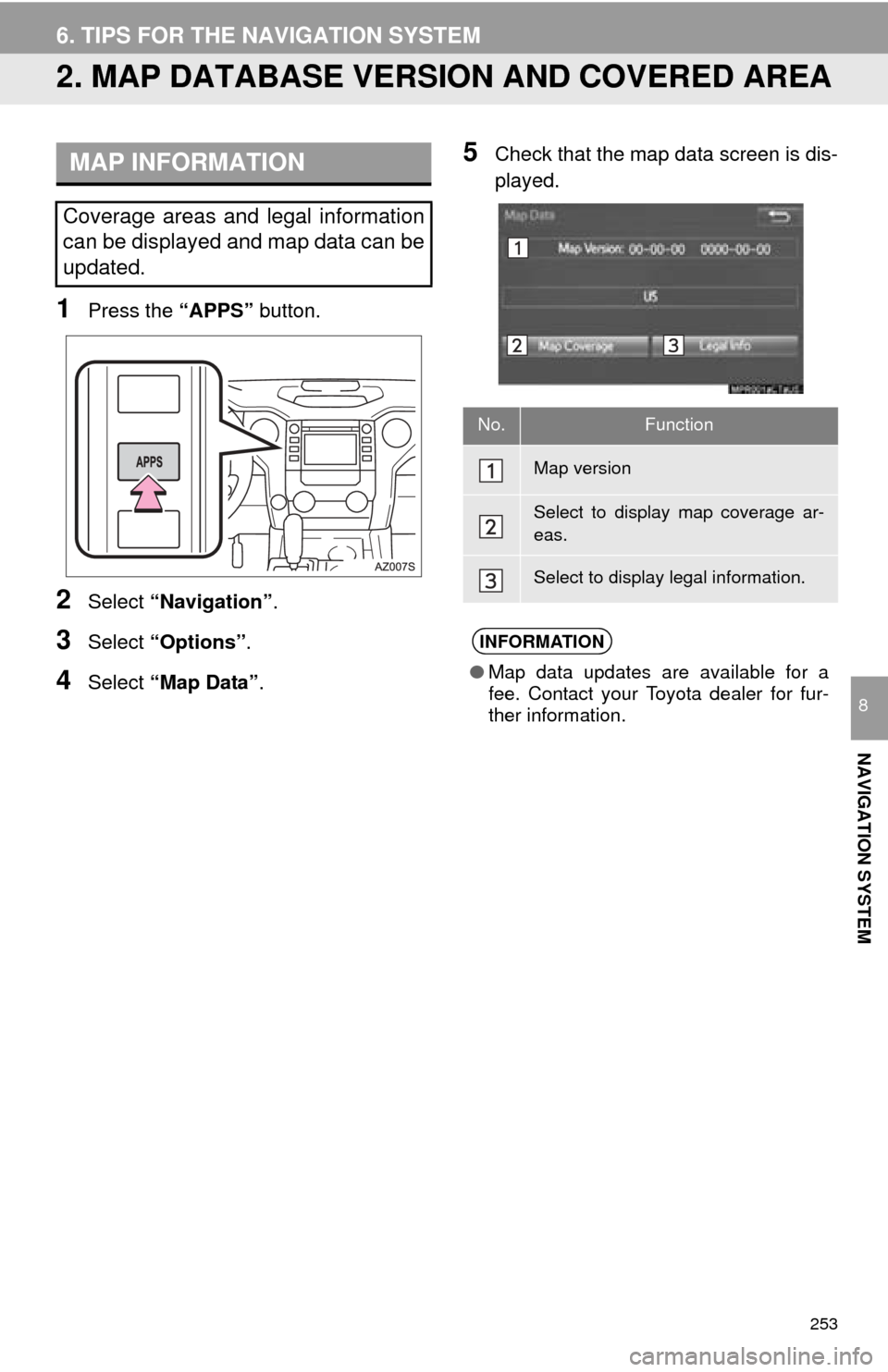
1Press the “APPS” button.
2Select “Navigation” .
3Select “Options”.
4Select “Map Data” .
5Check that the map data screen is dis -
played.MAP INFORMATION
Coverage areas and legal information
can be displayed and map data can be
updated.
No.Function
Map version
Select to display map coverage ar-
eas.
Select to display legal information.
INFORMATION
● Map data updates are available for a
fee. Contact your Toyota dealer for fur-
ther information.