tow TOYOTA TUNDRA 2016 2.G Service Manual
[x] Cancel search | Manufacturer: TOYOTA, Model Year: 2016, Model line: TUNDRA, Model: TOYOTA TUNDRA 2016 2.GPages: 588, PDF Size: 13.44 MB
Page 192 of 588
1924-3. Operating the lights and wipers
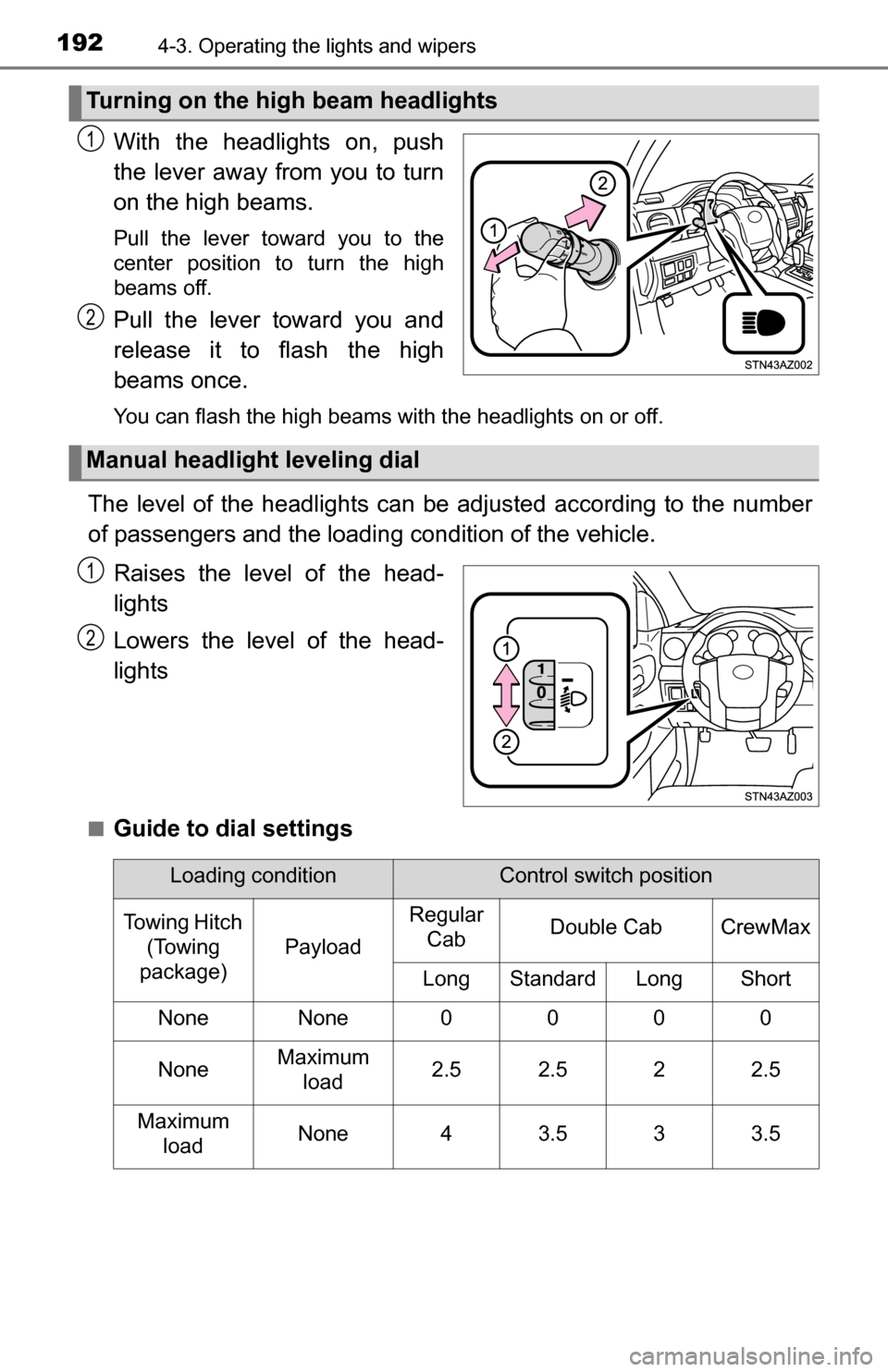
With the headlights on, push
the lever away from you to turn
on the high beams.
Pull the lever toward you to the
center position to turn the high
beams off.
Pull the lever toward you and
release it to flash the high
beams once.
You can flash the high beams with the headlights on or off.
The level of the headlights can be adjusted according to the number
of passengers and the loading condition of the vehicle.
Raises the level of the head-
lights
Lowers the level of the head-
lights
■Guide to dial settings
Turning on the high beam headlights
1
2
Manual headlight leveling dial
1
2
Loading conditionControl switch position
Towing Hitch (Towing
package)
Payload
Regular CabDouble CabCrewMax
LongStandardLongShort
NoneNone0000
NoneMaximum
load2.52.522.5
Maximum loadNone43.533.5
Page 203 of 588
2034-5. Using the driving support systems
4
Driving
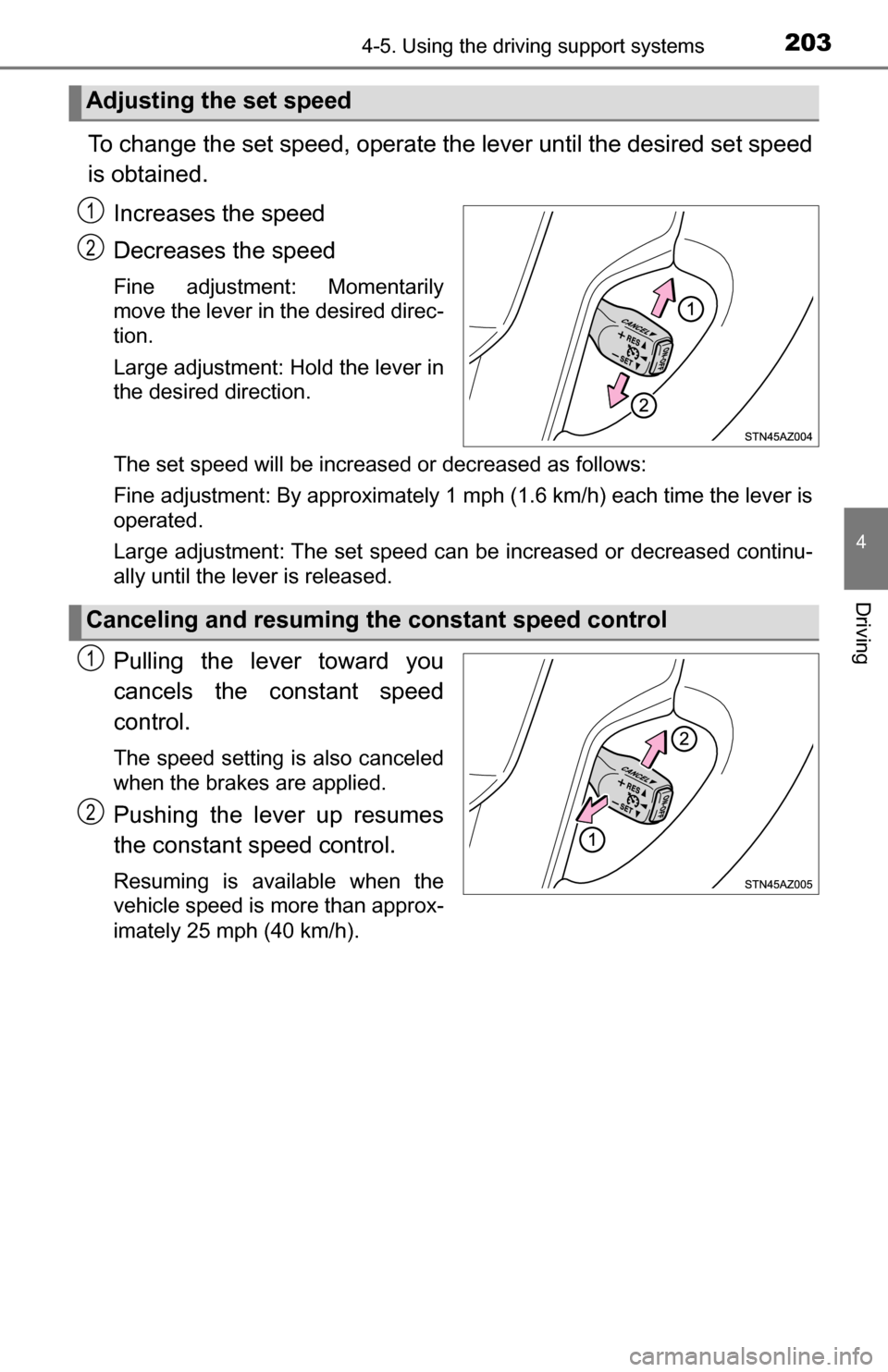
To change the set speed, operate the lever until the desired set speed
is obtained.Increases the speed
Decreases the speed
Fine adjustment: Momentarily
move the lever in the desired direc-
tion.
Large adjustment: Hold the lever in
the desired direction.
The set speed will be increased or decreased as follows:
Fine adjustment: By approximately 1 mph (1.6 km/h) each time the lever is
operated.
Large adjustment: The set speed can be increased or decreased continu-
ally until the lever is released.
Pulling the lever toward you
cancels the c onstant speed
control.
The speed setting is also canceled
when the brakes are applied.
Pushing the lever up resumes
the constant speed control.
Resuming is available when the
vehicle speed is more than approx-
imately 25 mph (40 km/h).
Adjusting the set speed
1
2
Canceling and resuming the constant speed control
1
2
Page 204 of 588
2044-5. Using the driving support systems
■Cruise control can be set when
●The shift lever is in D or range 4 or higher of S has been selected.
● Vehicle speed is above approximately 25 mph (40 km/h).
■ Accelerating after setting the vehicle speed
●The vehicle can be accelerated normally. After acceleration, the set speed
resumes.
● Even without canceling the cruise control, the set speed can be increased
by first accelerating the vehicle to the desired speed and then pushing the
lever down to set the new speed.
■ Automatic cruise control cancellation
Cruise control will stop maintaining the vehicle speed in any of the following
situations.
●Actual vehicle speed falls more than approximately 10 mph (16 km/h) below
the preset vehicle speed.
At this time, the memorized set speed is not retained.
● Actual vehicle speed is below approximately 25 mph (40 km/h).
● VSC is activated.
● 4WD models: The operation cannot be switched for 5 seconds or more after
operating the front-wheel drive control switch.
■ If the cruise control indicator light flashes
Press the “ON-OFF” button once to deactivate the system, and then press
the button again to reactivate the system.
If the cruise control speed cannot be set or if the cruise control cancels imme-
diately after being activated, there may be a malfunction in the cruise control
system. Have the vehicle inspected by your Toyota dealer.
CAUTION
■ To avoid operating the cruise control by mistake
Switch the cruise control off using the “ON-OFF” button when not in use.
■ Situations unsuitable for cruise control
Do not use cruise control in any of the following situations.
Doing so may result in loss of control and could cause an accident resulting
in death or serious injury.
● In heavy traffic
● On roads with sharp bends
● On winding roads
● On slippery roads, such as those covered with rain, ice or snow
● On steep hills
Vehicle speed may exceed the set speed when driving down a steep hill.
● When your vehicle is towing a trailer or during emergency towing
Page 224 of 588
2244-5. Using the driving support systems
■The Blind Spot Monitor function is operational when
●The BSM main switch is set to on.
● Vehicle speed is greater than approximately 25 mph (40 km/h).
■ The Blind Spot Monitor function will detect a vehicle when
●A vehicle in an adjacent lane overtakes the vehicle.
● Another vehicle enters the detection area when it changes lanes.
■ Conditions under which the Blind Spot Monitor function will not detect a
vehicle
The Blind Spot Monitor function is not designed to detect the following types
of vehicles and/or objects:
●Small motorcycles, bicycles, pedestrians, etc.
*
●Vehicles traveling in the opposite direction
● Guardrails, walls, signs, parked vehicles and similar stationary objects\
*
●Following vehicles that are in the same lane*
●Vehicles driving 2 lanes across from your vehicle*
*
: Depending on conditions, detection of a vehicle and/or object may occur
■ Conditions under which the Blind Spot Monitor function may not func-
tion correctly
●The Blind Spot Monitor function may not detect vehicles correctly in the fol-
lowing conditions:
• During bad weather such as heavy rain, fog, snow, etc.
• When ice or mud, etc., is attached to the rear bumper
• When driving on a road surface that is wet due to rain, standing water,
etc.
• When there is a significant difference in speed between your vehicle and the vehicle that enters the detection area
• When a vehicle is in the detection area from a stop and remains in the detection area as your vehicle accelerates
• When driving up or down consecutive steep inclines, such as hills, a dip
in the road, etc.
• When multiple vehicles approach with only a small gap between each vehicle
• When vehicle lanes are wide, and the vehicle in the next lane is too far away from your vehicle
• When the vehicle that enters the detection area is traveling at about the
same speed as your vehicle
• When towing anything such as trailer, boat, etc.
• When there is a significant difference in height between your vehicle and
the vehicle that enters the detection area
• Directly after the BSM main switch is set to on
• When towing a trailer
• When items such as a bicycle carrier are installed on the rear of the vehi- cle
Page 227 of 588
2274-5. Using the driving support systems
4
Driving
■The Rear Cross Traffic Alert function is operational when
● The BSM main switch is set to on.
● The shift lever is in R.
● Vehicle speed is less than approximately 5 mph (8 km/h).
● Approaching vehicle speed is between approximately 5 mph (8 km/h) and
18 mph (28 km/h).
■ Conditions under which the Rear Cr oss Traffic Alert function will not
detect a vehicle
The Rear Cross Traffic Alert function is not designed to detect the following
types of vehicles and/or objects.
● Small motorcycles, bicycles, pedestrians, etc.
*
●Vehicles approaching from directly behind
● Guardrails, walls, signs, parked vehicles and similar stationary objects\
*
●Vehicles moving away from your vehicle
● Vehicles approaching from the parking spaces next to your vehicle
*
●Vehicles backing up in the parking space next to your vehicle*
*
: Depending on conditions, detection of a vehicle and/or object may occur.
■ Conditions under which the Rear Cr oss Traffic Alert function may not
function correctly
The Rear Cross Traffic Alert function may not detect vehicles correctly in the
following conditions.
● When ice or mud, etc., is attached to the rear bumper
● During bad weather such as heavy rain, fog, snow, etc.
● When multiple vehicles approach continuously
● Shallow angle parking
● When a vehicle is approaching at high speed
● When parking on a steep incline, such as hills, a dip in the road, etc.
● Directly after the BSM main switch is set to on
● Directly after the engine is started with the BSM main switch on
● When towing a trailer
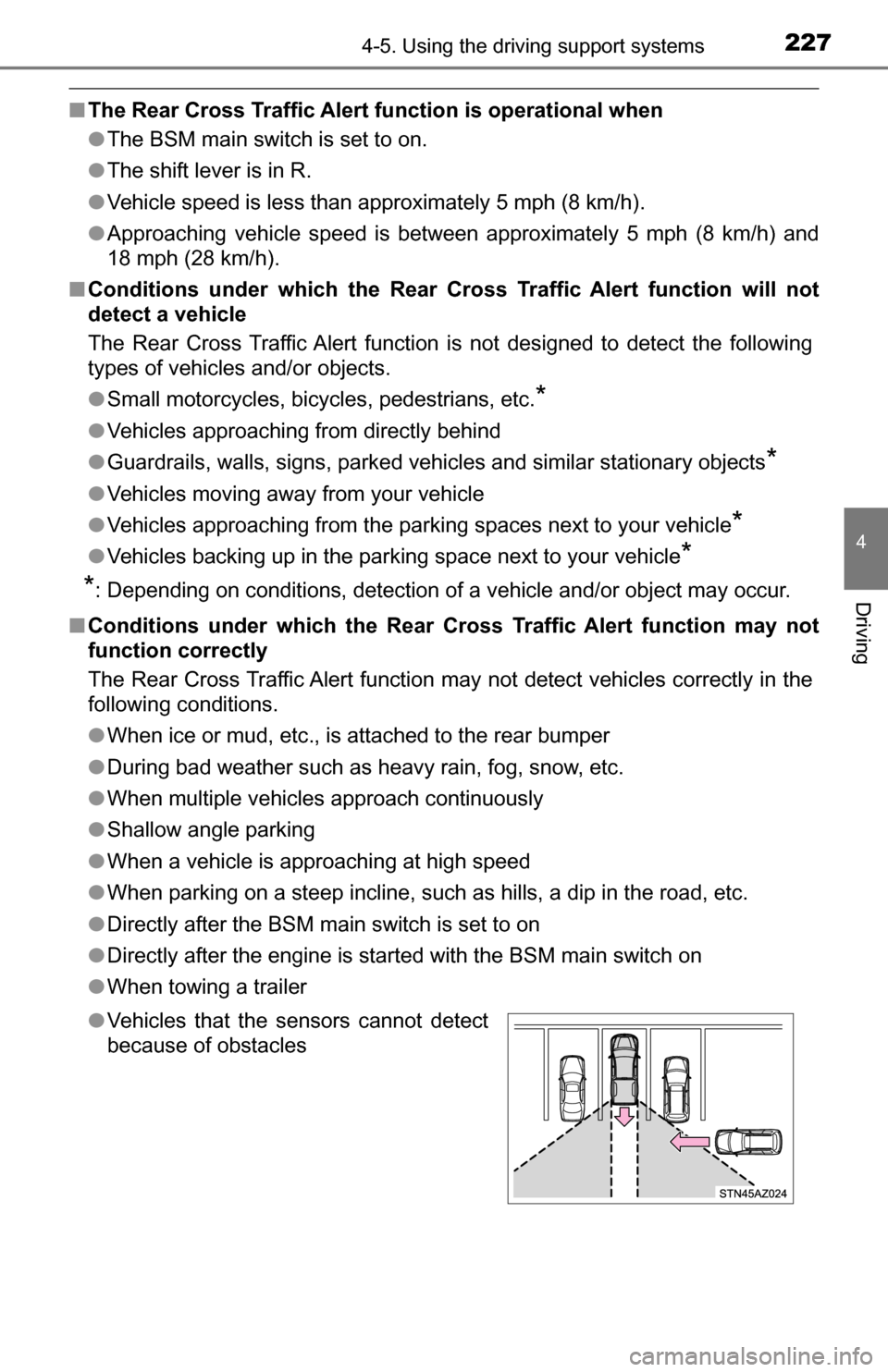
● Vehicles that the sensors cannot detect
because of obstacles
Page 239 of 588
2394-5. Using the driving support systems
4
Driving
CAUTION
■Replacing tires
Make sure that all tires are of the specified size, brand, tread pattern and
total load capacity. In addition, make sure that the tires are inflated to the
recommended tire inflation pressure level.
The ABS, TRAC, A-TRAC, VSC and Trailer Sway Control systems will not
function correctly if different tires are installed on the vehicle.
Contact your Toyota dealer for further information when replacing tires or
wheels.
■ Handling of tires and the suspension
Using tires with any kind of problem or modifying the suspension will affect
the driving assist systems, and may cause a system to malfunction.
■ Trailer Sway Control precaution
The Trailer Sway Control system is not able to reduce trailer sway in all situ-
ations. Depending on many factors such as the conditions of the vehicle,
trailer, road surface, and driving environment, the Trailer Sway Control sys-
tem may not be effective. Refer to your trailer owner’s manual for informa-
tion on how to tow your trailer properly.
■ If trailer sway occurs
Observe the following precautions.
Failure to do so may cause death or serious injury.
● Firmly grip the steering wheel. Steer straight ahead.
Do not try to control trailer swaying by turning the steering wheel.
● Begin releasing the accelerator pedal immediately but very gradually to
reduce speed.
Do not increase speed. Do not apply vehicle brakes.
If you make no extreme correction with the steering or brakes, your vehicle
and trailer should stabilize. (P. 178)
Page 241 of 588
2414-5. Using the driving support systems
4
Driving
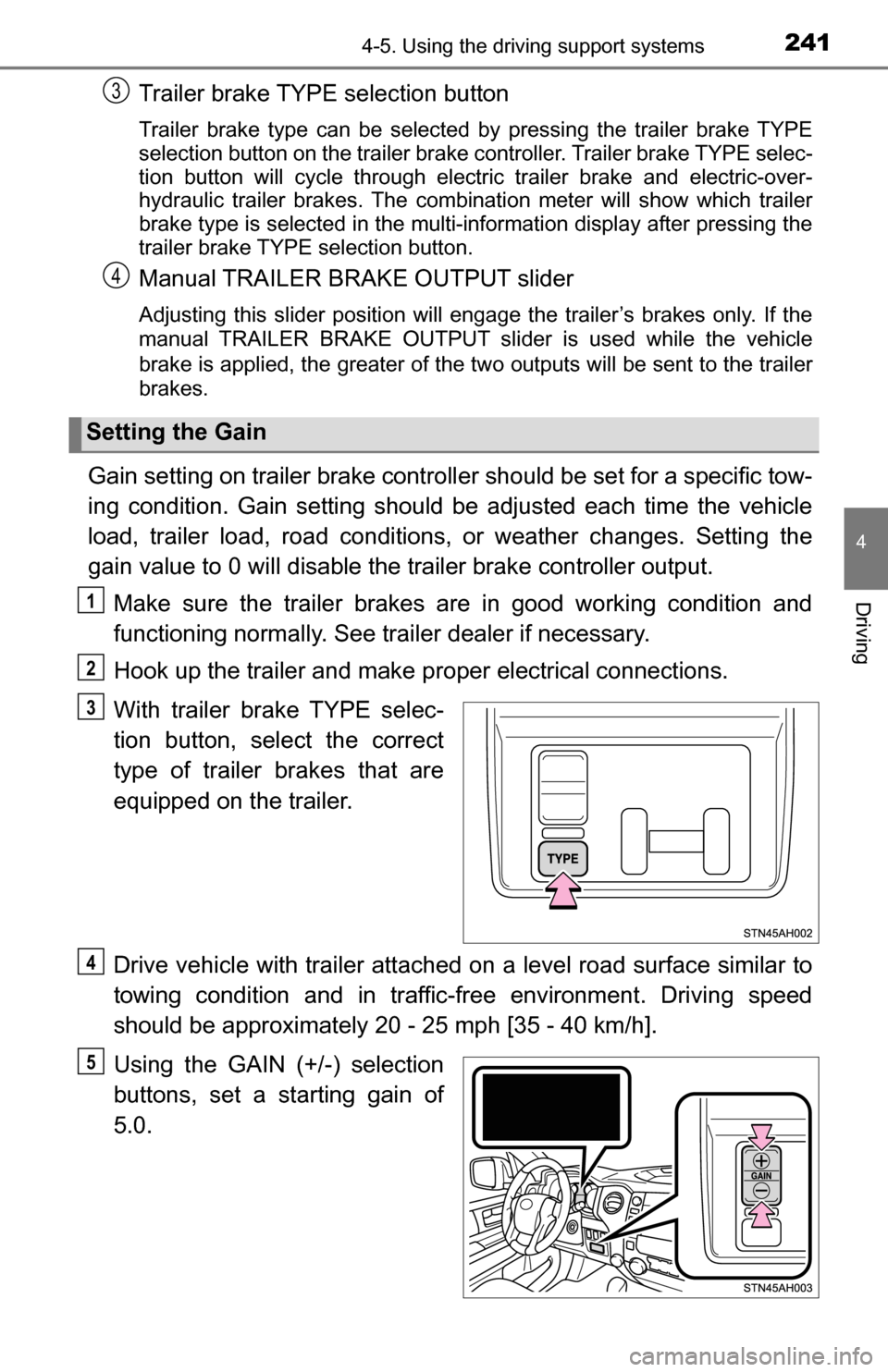
Trailer brake TYPE selection button
Trailer brake type can be selected by pressing the trailer brake TYPE
selection button on the trailer brake controller. Trailer brake TYPE selec-
tion button will cycle through electric trailer brake and electric-over-
hydraulic trailer brakes. The combination meter will show which trailer
brake type is selected in the multi-information display after pressing the
trailer brake TYPE selection button.
Manual TRAILER BRAKE OUTPUT slider
Adjusting this slider position will engage the trailer’s brakes only. If the
manual TRAILER BRAKE OUTPUT slider is used while the vehicle
brake is applied, the greater of the two outputs will be sent to the trailer
brakes.
Gain setting on trailer brake controller should be set for a specific tow-
ing condition. Gain setting should be adjusted each time the vehicle
load, trailer load, road conditions, or weather changes. Setting the
gain value to 0 will disable the trailer brake controller output.
Make sure the trailer brakes are in good working condition and
functioning normally. See trailer dealer if necessary.
Hook up the trailer and make proper electrical connections.
With trailer brake TYPE selec-
tion button, select the correct
type of trailer brakes that are
equipped on the trailer.
Drive vehicle with trailer attached on a level road surface similar to
towing condition and in traffic-free environment. Driving speed
should be approximately 20 - 25 mph [35 - 40 km/h].
Using the GAIN (+/-) selection
buttons, set a starting gain of
5.0.
Setting the Gain
3
4
1
2
3
4
5
Page 242 of 588
![TOYOTA TUNDRA 2016 2.G Service Manual 2424-5. Using the driving support systems
While driving 20 - 25 mph [35 - 40 km/h], fully apply the manual
TRAILER BRAKE OUTPUT
slider.
Adjust the gain setting, using the GAIN (+/-) selection buttons](/img/14/6842/w960_6842-241.png "TOYOTA TUNDRA 2016 2.G Service Manual 2424-5. Using the driving support systems
While driving 20 - 25 mph [35 - 40 km/h], fully apply the manual
TRAILER BRAKE OUTPUT
slider.
Adjust the gain setting, using the GAIN (+/-) selection buttons")
2424-5. Using the driving support systems
While driving 20 - 25 mph [35 - 40 km/h], fully apply the manual
TRAILER BRAKE OUTPUT
slider.
Adjust the gain setting, using the GAIN (+/-) selection buttons, to
either increase or decrease to just below the point of trailer wheel
lock-up.
For confirmation, repeat steps and until desired gain setting
is reached (just below point of trailer wheel lock-up).
■ When using the trailer brake control system
Please turn off the intuitive parking assist while towing a trailer. If left on,
sonar sensors will detect the trailer being towed.
■ When setting the gain
Wheel lock-up occurs when the trailer wheel squeals or tire smoke occurs.
Trailer wheels may not lock-up while driving heavily loaded trailer. During this
case, adjust the Trailer gain to the highest allowable setting for the towing
condition.
■ When disconnecting and reco nnecting battery terminals
The gain setting data will be reset.
CAUTION
■ Trailer brake type setting
It is the responsibility of the driver to make sure the trailer brakes are func-
tioning normally and adjusted appropriately. Failure to check and maintain
trailer brakes may result in loss of vehicle control, crash, or serious injury.
Trailer brake control system will work with most electric and electric-over-
hydraulic trailer braking systems up to 3 axles (24A output to trailer brakes).
Please be sure to test compatibility with the system at low speeds and in a
safe area. When a warning message appears in the multi-information dis-
play (P. 483), the gain setting may be too high. Please use the trailer
brakes with reduced gain. If there is still a problem, have the vehicle
inspected by your Toyota dealer immediately.
Some electric-over-hydraulic trailer brakes will take some minimum output
to activate. Trailer brake control system will not work with trailer hydraulic
surge brakes.
■ When driving on slippery road surfaces
When stopping with ABS activated, output to the trailer might be reduced in
order to reduce the likelihood of trailer to sway or trailer wheels to lock. The
trailer is not equipped with ABS. Drive safely on slippery road surfaces.
6
7
867
Page 333 of 588
3335-10. Using the voice command system
5
Multimedia
■Microphone
P. 304
■ When using the microphone
●It is unnecessary to speak directly into the microphone when giving a com-
mand.
● Voice commands may not be recognized if:
• Spoken too quickly.
• Spoken at a low or high volume.
• The roof or windows are open.
• Passengers are talking while voice commands are spoken.
• The air conditioning speed is set high.
• The air conditioning vents are turned towards the microphone.
● In the following conditions, the system may not recognize the command
properly and using voice commands may not be possible:
• The command is incorrect or unclear. Note that certain words, accents or
speech patterns may be difficult for the system to recognize.
• There is excessive background noise, such as wind noise.
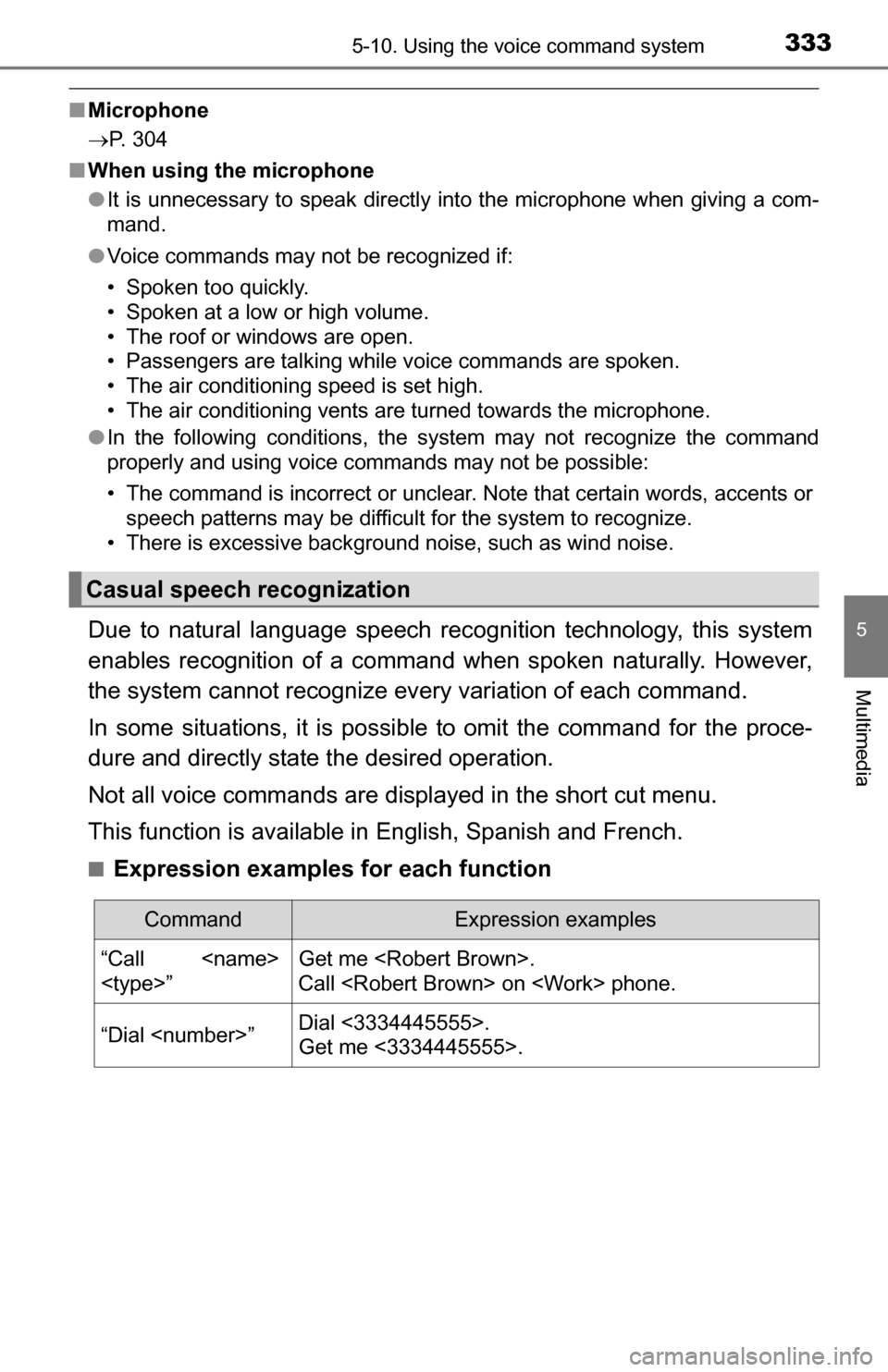
Due to natural language speech recognition technology, this system
enables recognition of a command when spoken naturally. However,
the system cannot recognize ev ery variation of each command.
In some situations, it is possibl e to omit the command for the proce-
dure and directly state the desired operation.
Not all voice commands are displayed in the short cut menu.
This function is available in English, Spanish and French.
■Expression examples for each function
Casual speech recognization
CommandExpression examples
“Call
Call
“Dial
Get me <3334445555>.
Page 376 of 588
3766-3. Using the storage features
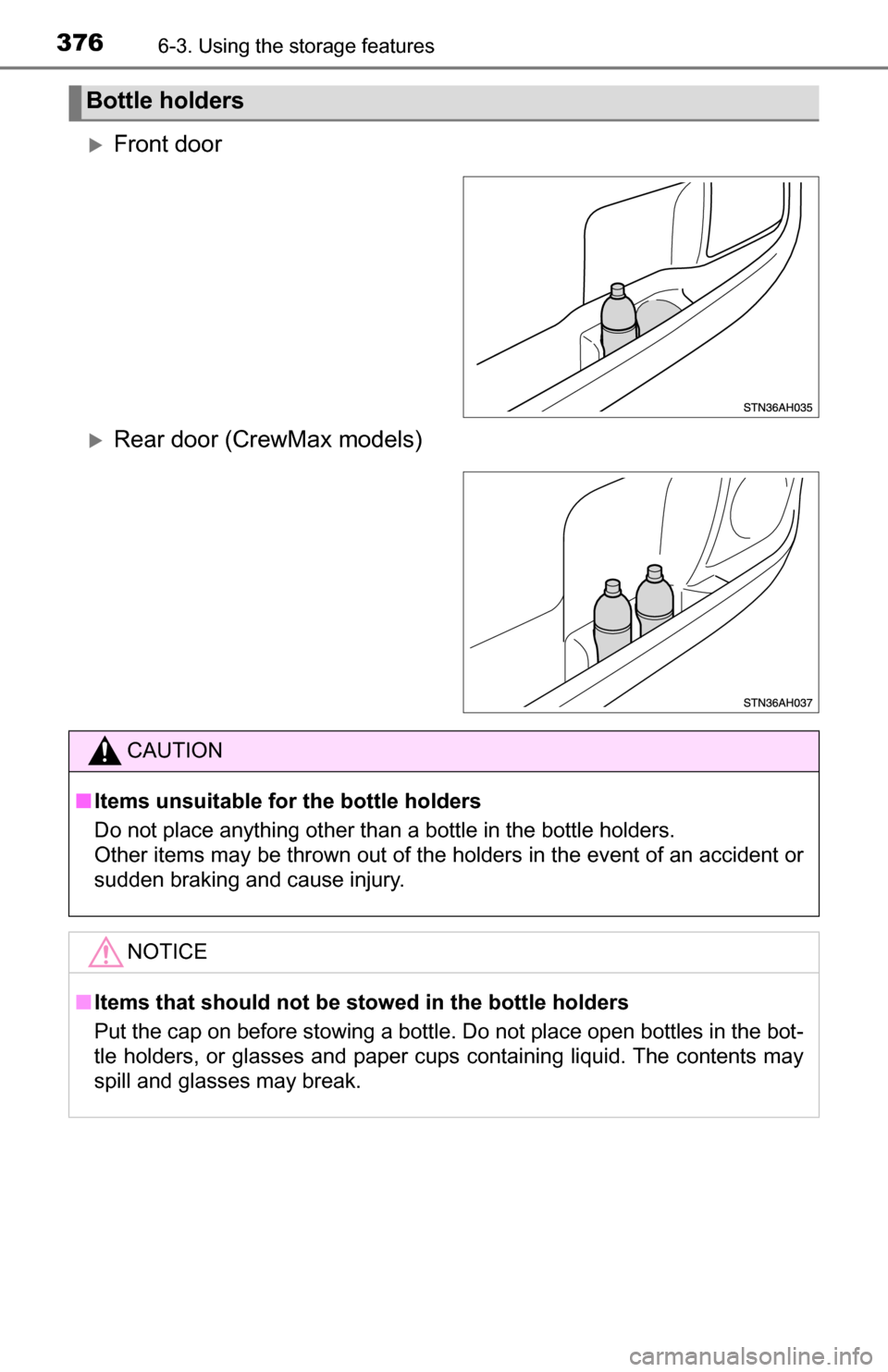
Front door
Rear door (CrewMax models)
Bottle holders
CAUTION
■Items unsuitable for the bottle holders
Do not place anything other than a bottle in the bottle holders.
Other items may be thrown out of the holders in the event of an accident or
sudden braking and cause injury.
NOTICE
■Items that should not be stowed in the bottle holders
Put the cap on before stowing a bottle. Do not place open bottles in the bot-
tle holders, or glasses and paper cups containing liquid. The contents may
spill and glasses may break.