battery TOYOTA TUNDRA 2018 Owners Manual (in English)
[x] Cancel search | Manufacturer: TOYOTA, Model Year: 2018, Model line: TUNDRA, Model: TOYOTA TUNDRA 2018Pages: 672, PDF Size: 14.09 MB
Page 6 of 672

TABLE OF CONTENTS6
7-1. Maintenance and careCleaning and protecting the vehicle exterior .......... 470
Cleaning and protecting the vehicle interior ........... 473
7-2. Maintenance Maintenance requirements ................... 476
General maintenance ........ 478
Emission inspection and maintenance (I/M)
programs ......................... 481
7-3. Do-it-yourself maintenance Do-it-yourself service precautions ..................... 482
Hood.................................. 484
Engine compartment ......... 485
Tires .................................. 495
Tire inflation pressure........ 507
Wheels .............................. 510
Air conditioning filter .......... 513
Wireless remote control battery ............................. 516
Checking and replacing fuses ............................... 518
Light bulbs ......................... 521 8-1. Essential information
Emergency flashers ........... 538
If your vehicle has to be stopped in
an emergency.................. 539
8-2. Steps to take in an emergency
If your vehicle needs to be towed .......................... 540
If you think something is wrong............................... 545
Fuel pump shut off system ............................. 546
If a warning light turns on or a warning buzzer
sounds ............................. 547
If a warning message is displayed ......................... 555
If you have a flat tire .......... 565
If the engine will not start ................................. 580
If the vehicle battery is discharged ....................... 582
If your vehicle overheats.... 585
If the vehicle becomes stuck ................................ 588
7Maintenance and care8When trouble arises
Page 86 of 672
861-2. Theft deterrent system
■System maintenance
The vehicle has a maintenance-free type alarm system.
■ Items to check before locking the vehicle
To prevent unexpected triggering of the alarm and vehicle theft , make sure of
the following:
● Nobody is in the vehicle.
● The windows and moon roof (if equipped) are closed before the a larm is set.
● No valuables or other personal items are left in the vehicle.
■ Triggering of the alarm
The alarm may be triggered in the following situations:
(Stopping the alarm deactivates the alarm system.)
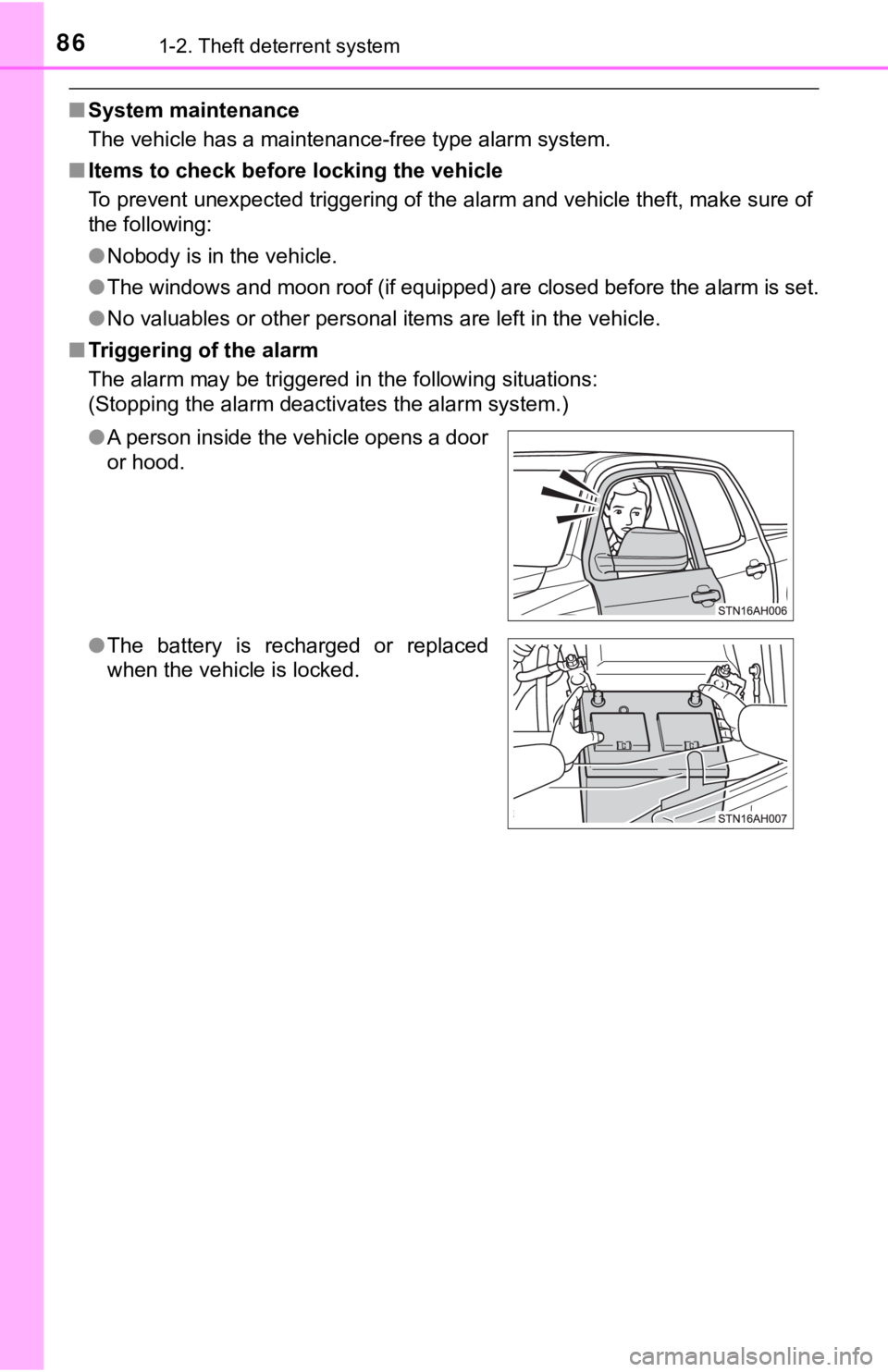
●A person inside the vehicle opens a door
or hood.
● The battery is recharged or replaced
when the vehicle is locked.
Page 87 of 672

871-2. Theft deterrent system
1
For safety and security
■Alarm-operated door lock
In the following cases, depending on the situation, the door ma y automatically
lock to prevent improper entry into the vehicle:
● When a person remaining in the vehicle locks the door and the a larm is acti-
vated.
● While the alarm is activated, a person remaining in the vehicle unlocks the
door.
● When recharging or replacing the battery.
NOTICE
■To ensure the system operates correctly
Do not modify or remove the system. If modified or removed, the proper
operation of the system cannot be guaranteed.
Page 99 of 672
992. Instrument cluster
2
Instrument cluster
NOTICE
■To prevent damage to the engine and its components
● Do not let the indicator needle of the tachometer enter the red zone, which
indicates the maximum engine speed.
● The engine may be overheating if the engine coolant temperature gauge is
in the red zone (H). In this case, immediately stop the vehicle in a safe
place, and check the engine after it has cooled completely. ( P. 5 8 5 )
■ Vo l t m e t e r
When the voltmeter indicates 19 V or higher or 9 V or lower whi le the engine
is running, there may be a battery or charging system malfunction. Have the
vehicle inspected at your Toyota dealer.
■ Engine oil pressure gauge
When the value of the engine oil pressure gauge drops while the engine is
running, stop the vehicle in a safe place immediately and check the amount
of engine oil. ( P. 486)
When the oil pressure drops even though the engine oil amount h as not
decreased, or if the oil pressure does not increase when engine oil is
added, contact your Toyota dealer, as there may be a problem wi th the lubri-
cation system.
Page 105 of 672

1052. Instrument cluster
2
Instrument cluster
■Setting items
●“Vehicle Settings” and “Meter Settings” setting items are not s electable
during driving and cannot be operated.
Also, the settings screen is temporarily canceled in the follow ing situations.
• When a warning message appears.
• When the vehicle begins to move.
● Settings for functions not equipped to the vehicle are not displayed.
● When a function is turned off, the related settings for that fu nction are not
selectable.
■ Pop-up display
In some situations, such as when a switch operation is performe d, a pop-up
display will be temporarily displayed on the multi-information display.
■ When disconnecting and reco nnecting battery terminals
The drive information will be reset.
■ Trip summary display
When the engine switch is turned off, each of the following wil l be displayed
on the multi-information display, and will clear after approximately 30 sec-
onds.
● Distance traveled
● Average fuel consumption
● Driving range
■ Tire inflation pressure
●It may take a few minutes to display the tire inflation pressur e after the
engine switch is turned to the “ON” position. It may also take a few minutes
to display the tire inflation pressure after inflation pressure has been
adjusted.
● “---” may be displayed if the tire position information cannot be determined
due to unfavorable radio wave conditions.
● Tire inflation pressure changes with temperature. The displayed values may
also be different from the values measured using a tire pressur e gauge.
■ Liquid crystal display
Small spots or light spots may appear on the display. This phen omenon is
characteristic of liquid crystal displays, and there is no prob lem continuing to
use the display.
Page 106 of 672
1062. Instrument cluster
WARNING
■Caution for use while driving
● When operating the multi-information display while driving, pay extra
attention to the safety of the area around the vehicle.
● Do not look continuously at the multi-information display while driving as
you may fail to see pedestrians, objects on the road, etc. ahea d of the
vehicle.
■ Cautions during setting up the display
As the engine needs to be running during setting up the display , ensure that
the vehicle is parked in a place with adequate ventilation. In a closed area
such as a garage, exhaust gases including harmful carbon monoxi de (CO)
may collect and enter the vehicle. This may lead to death or a serious
health hazard.
NOTICE
■ During setting up the display
To prevent battery discharge, ensure that the engine is running while setting
up the display features.
Page 111 of 672
1113-1. Key information
3
Operation of each component
■If you lose your keys
New genuine key can be made by your Toyota dealer using the other key and
the key number stamped on your key number plate.
Keep the plate in a safe place such as your wallet, not in the vehicle.
■ Panic mode (vehicles with wireless remote control)
■ When riding in an aircraft (vehic les with wireless remote control)
When bringing a wireless key onto an aircraft, make sure you do not press
any buttons on the wireless key while inside the aircraft cabin . If you are car-
rying a wireless key in your bag, etc., ensure that the buttons are not likely to
be pressed accidentally. Pressing a button may cause the wirele ss key to
emit radio waves that could interfere with the operation of the aircraft.
■ Conditions affecting operation (vehicles with wireless remote c ontrol)
The wireless remote control function may not operate normally i n the following
situations.
● Near a TV tower, radio station, electric power plant, airport o r other facility
that generates strong radio waves
● When carrying a portable radio, cellular phone or other wireles s communi-
cation device
● When multiple wireless keys are in the vicinity
● When the wireless key has come into contact with, or is covered by a metal-
lic object
● When a wireless key (that emits radio waves) is being used near by
● When the wireless key has been left near an electrical applianc e such as a
personal computer
■ Key battery depletion (vehicles with wireless remote control)
If the wireless remote control function does not operate, the b attery may be
depleted. Replace the battery when necessary. ( P. 516)
■ Replacing the battery (vehicles with wireless remote control)
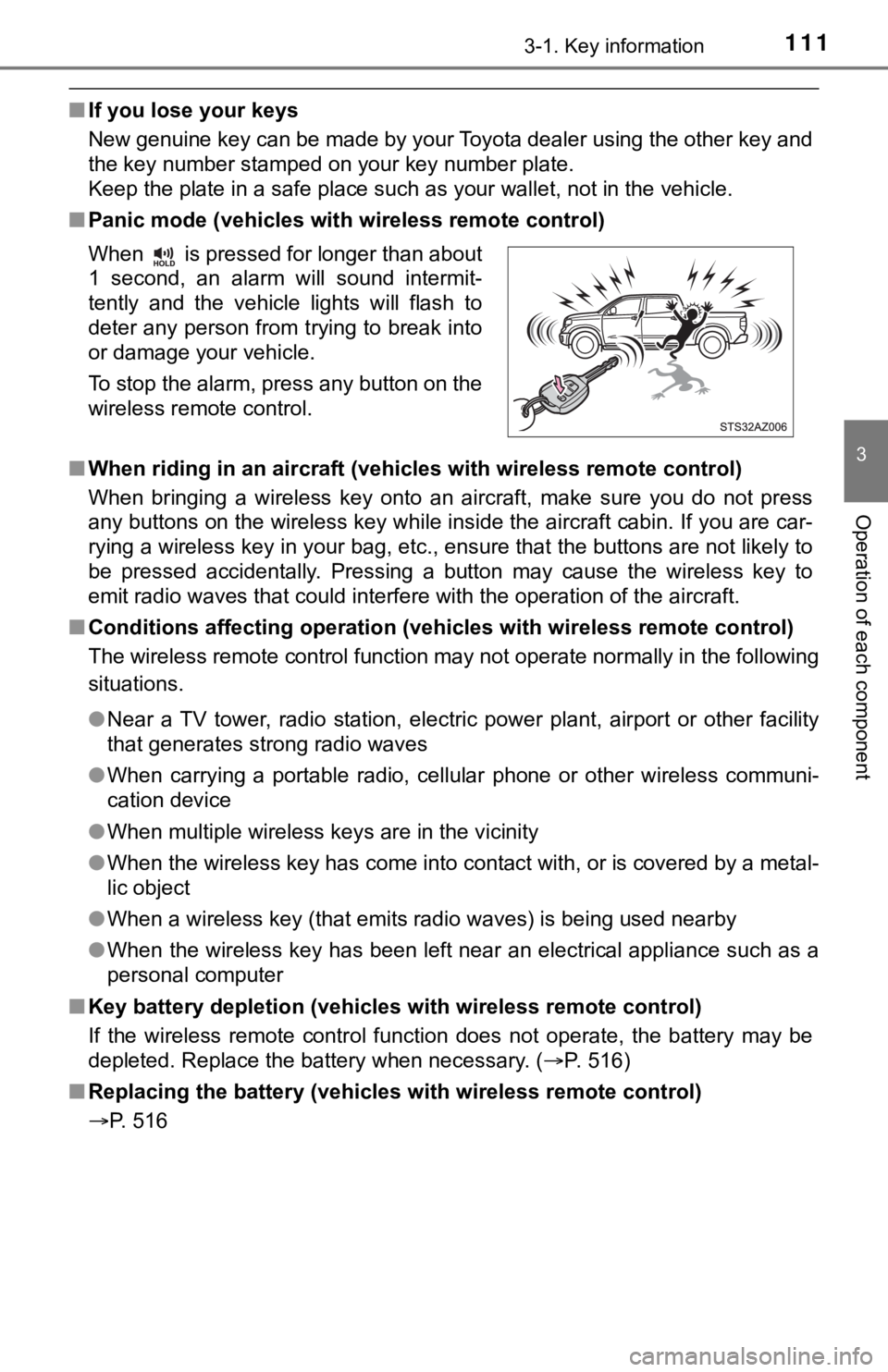
P. 516 When is pressed for longer than about
1 second, an alarm will sound intermit-
tently and the vehicle lights will flash to
deter any person from trying to break into
or damage your vehicle.
To stop the alarm, press any button on the
wireless remote control.
Page 112 of 672

1123-1. Key information
■Certification for wireless remote control (vehicles with wireless remote
control)
For vehicles sold in the U.S.A.
FCC ID: GQ4-52T
FCC ID: GQ4-49R
NOTE:
This device complies with part 15 of the FCC Rules. Operation is subject to
the following two conditions: (1) This device may not cause har mful interfer-
ence, and (2) this device must accept any interference received, including
interference that may cause undesired operation.
FCC WARNING:
Changes or modifications not expressly approved by the party re sponsible for
compliance could void the user’s authority to operate the equip ment.
The FCC ID/IC Certification number is affixed inside the equipment. You can
find the ID/number when replacing the battery.
For vehicles sold in Canada
NOTE:
This device complies with Industry Canada’s license-exempt RSSs . Opera-
tion is subject to the following two conditions: (1) This devic e may not cause
interference; and (2) This device must accept any interference, including
interference that may cause undesired operation of the device.
The FCC ID/IC Certification number is affixed inside the equipment. You can
find the ID/number when replacing the battery.
NOTE:
Le présent appareil est conforme aux CNR d’Industrie Canada app licables
aux appareils radio exempts de licence. L’exploitation est auto risée aux deux
conditions suivantes:(1) l’appareil ne doit pas produire de bro uillage; (2) l’util-
isateur de l’appareil doit accepter tout brouillage radioélectr ique subi, même
si le brouillage est susceptible d’en compromettre le fonctionn ement.
L’identification FCC/Ie numéro d’accréditation IC est apposé(e) à l’intérieur
de l’appareil.
Page 131 of 672
1313-3. Adjusting the seats
3
Operation of each component
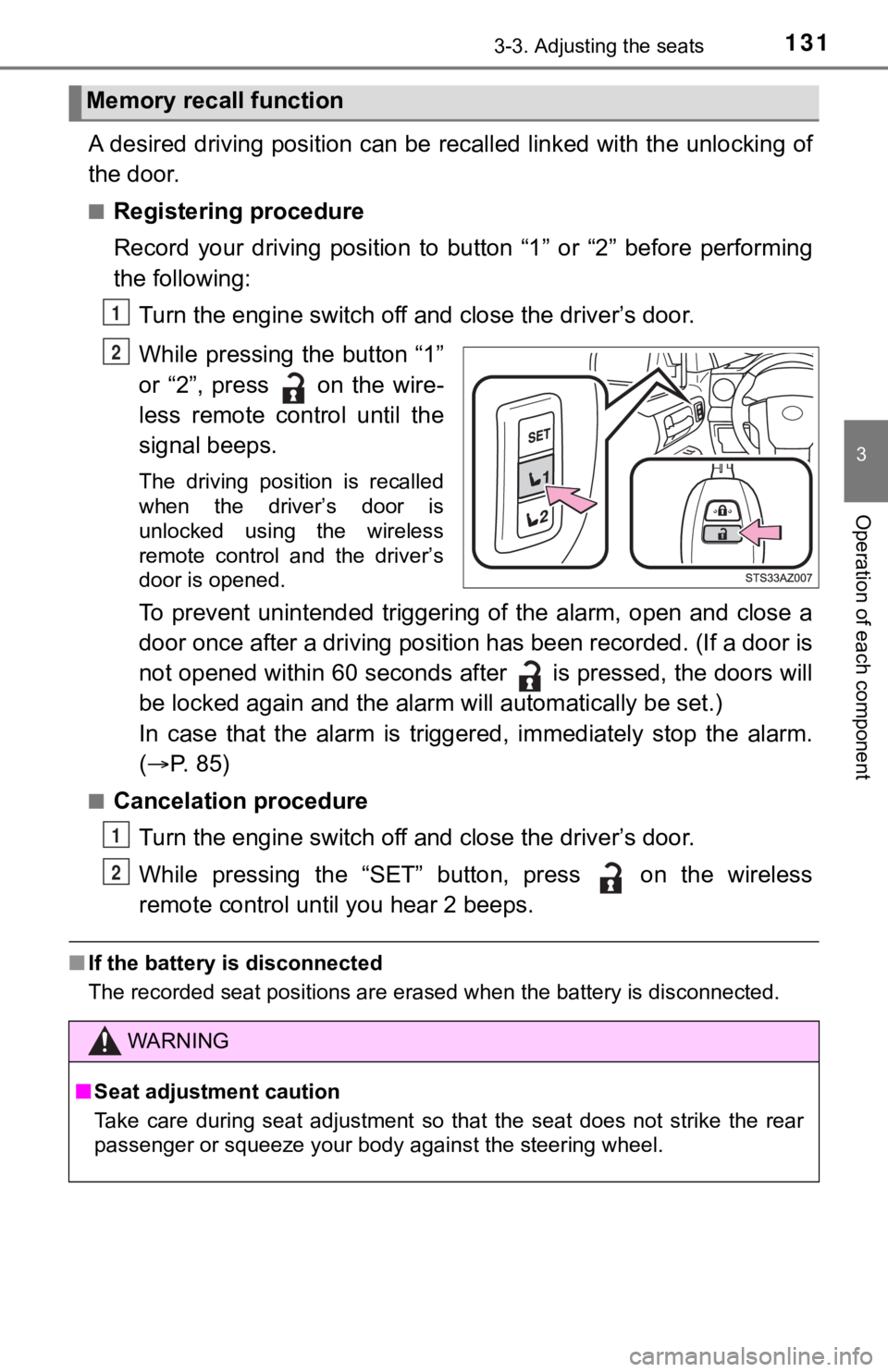
A desired driving position can be recalled linked with the unlo cking of
the door.
■Registering procedure
Record your driving position to button “1” or “2” before perfor ming
the following:
Turn the engine switch off and close the driver’s door.
While pressing the button “1”
or “2”, press on the wire-
less remote control until the
signal beeps.
The driving position is recalled
when the driver’s door is
unlocked using the wireless
remote control and the driver’s
door is opened.
To prevent unintended triggering of the alarm, open and close a
door once after a driving position has been recorded. (If a doo r is
not opened within 60 seconds after is pressed, the doors will
be locked again and the alarm will au tomatically be set.)
In case that the alarm is triggered, immediately stop the alarm .
( P. 85)
■Cancelation procedure
Turn the engine switch off and close the driver’s door.
While pressing the “SET” button, press on the wireless
remote control until you hear 2 beeps.
■ If the battery is disconnected
The recorded seat positions are erased when the battery is disc onnected.
Memory recall function
1
2
WARNING
■Seat adjustment caution
Take care during seat adjustment so that the seat does not stri ke the rear
passenger or squeeze your body against the steering wheel.
1
2
Page 156 of 672

1563-5. Opening, closing the windows and moon roof
■Moon roof open reminder function
The buzzer sounds and a message is shown on the multi-informati on display
in the instrument cluster when the engine switch is turned off and the driver’s
door is opened with the moon roof open.
■ When the battery is disconnected
The moon roof must be initialized in order to ensure proper ope ration.
Push and hold the switch toward the “UP” (tilt up) side or “ ▼” (sliding
close) side.
After the moon roof will tilt up and down, release the switch.
To ensure the initialization is complete, make sure automatic opening and
closing functions work properly.
■ Customization that can be configured at Toyota dealer
Settings (e.g. linked door lock operation) can be changed.
(Customizable features: P. 624)
1
2
3