wheel TOYOTA TUNDRA 2020 Owners Manual (in English)
[x] Cancel search | Manufacturer: TOYOTA, Model Year: 2020, Model line: TUNDRA, Model: TOYOTA TUNDRA 2020Pages: 52, PDF Size: 3.85 MB
Page 3 of 52
1
OVERVIEW
FEATURES & OPERATIONS
TOYOTA SAFETY SENSE
SAFETY & EMERGENCY FEATURES
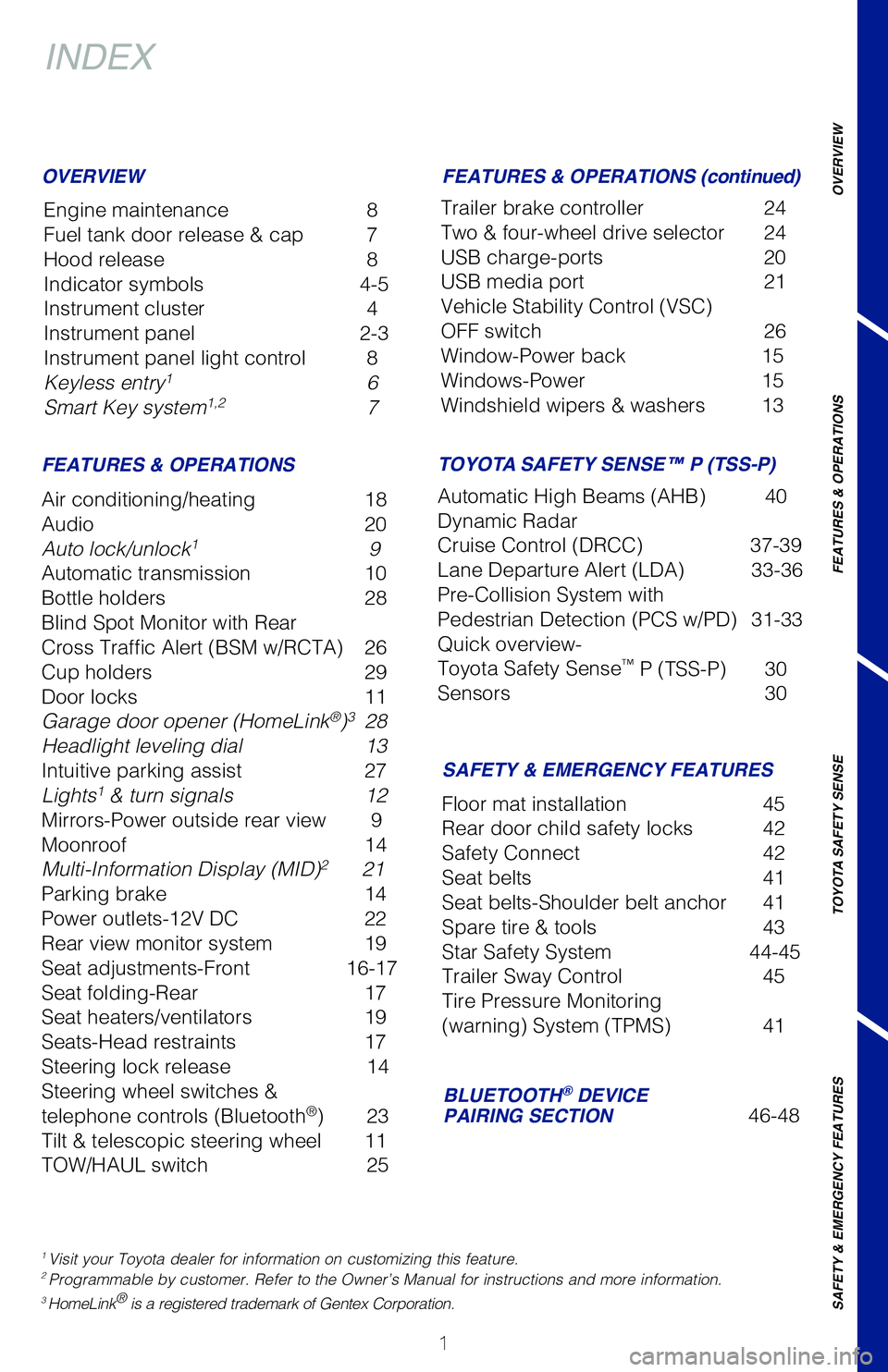
INDEX
Engine maintenance 8
Fuel tank door release & cap 7
Hood release 8
Indicator symbols 4-5
Instrument cluster 4
Instrument panel 2-3
Instrument panel light control 8
Keyless entry1 6
Smart Key system1,2 7
OVERVIEW
FEATURES & OPERATIONS
FEATURES & OPERATIONS (continued)
SAFETY & EMERGENCY FEATURES
Air conditioning/heating 18
Audio 20
Auto lock/unlock1 9
Automatic transmission 10
Bottle holders 28
Blind Spot Monitor with Rear
Cross Traffic Alert (BSM w/RCTA) 26
Cup holders 29
Door locks 11
Garage door opener (HomeLink®)3 28
Headlight leveling dial 13
Intuitive parking assist 27
Lights1 & turn signals 12
Mirrors-Power outside rear view 9
Moonroof 14
Multi-Information Display (MID)2 21
Parking brake 14
Power outlets-12V DC 22
Rear view monitor system 19
Seat adjustments-Front 16-17
Seat folding-Rear 17
Seat heaters/ventilators 19
Seats-Head restraints 17
Steering lock release 14
Steering wheel switches &
telephone controls (Bluetooth®) 23
Tilt & telescopic steering wheel 11
TOW/HAUL switch 25
Trailer brake controller 24
Two & four-wheel drive selector 24
USB charge-ports 20
USB media port 21
Vehicle Stability Control (VSC)
OFF switch 26
Window-Power back 15
Windows-Power 15
Windshield wipers & washers 13
Floor mat installation 45
Rear door child safety locks 42
Safety Connect 42
Seat belts 41
Seat belts-Shoulder belt anchor 41
Spare tire & tools 43
Star Safety System 44-45
Trailer Sway Control 45
Tire Pressure Monitoring
(warning) System (TPMS) 41
BLUETOOTH® DEVICE PAIRING SECTION 46-48
1 Visit your Toyota dealer for information on customizing this feature.2 Programmable by customer. Refer to the Owner’s Manual for instructions and more information.3 HomeLink® is a registered trademark of Gentex Corporation.
TOYOTA SAFETY SENSE™ P (TSS-P)
Automatic High Beams (AHB) 40
Dynamic Radar
Cruise Control (DRCC) 37-39
Lane Departure Alert (LDA) 33-36
Pre-Collision System with
Pedestrian Detection (PCS w/PD) 31-33
Quick overview-
Toyota Safety Sense™ P (TSS-P) 30
Sensors 30
Page 4 of 52
2
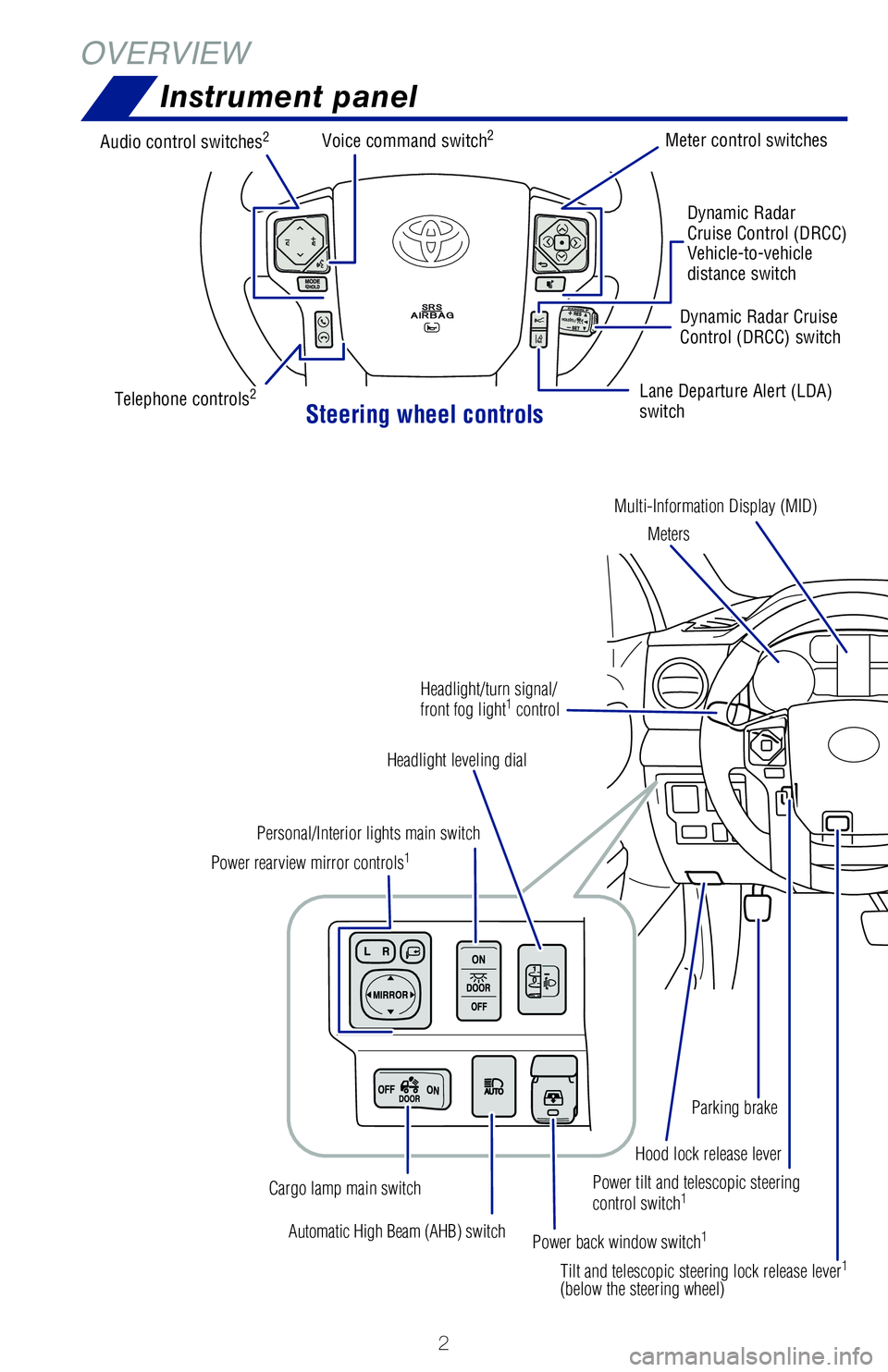
Instrument panel
OVERVIEW
Power tilt and telescopic steering control switch1
Automatic High Beam (AHB) switch
Power rearview mirror controls1
Personal/Interior lights main switch
Headlight leveling dial
Power back window switch1
Cargo lamp main switch
Tilt and telescopic steering lock release lever1
(below the steering wheel)
Hood lock release lever
Parking brake
Headlight/turn signal/ front fog light1 control
Steering wheel controls
Audio control switches2
Telephone controls2
Voice command switch2Meter control switches
Dynamic RadarCruise Control (DRCC)Vehicle-to-vehicle distance switch
Lane Departure Alert (LDA) switch
Dynamic Radar Cruise Control (DRCC) switch
Multi-Information Display (MID)
Meters
Page 5 of 52
3
OVERVIEW
FEATURES
& OPERATIONS
TOYOTA
SAFETY
SENSE
SAFETY
& EMERGENCY
FEATURES
1 If equipped.2 For details, refer to the “Navigation and Multimedia System Owner’s Manual” or
visit www.toyota.com/audio-multimedia for additional resources.
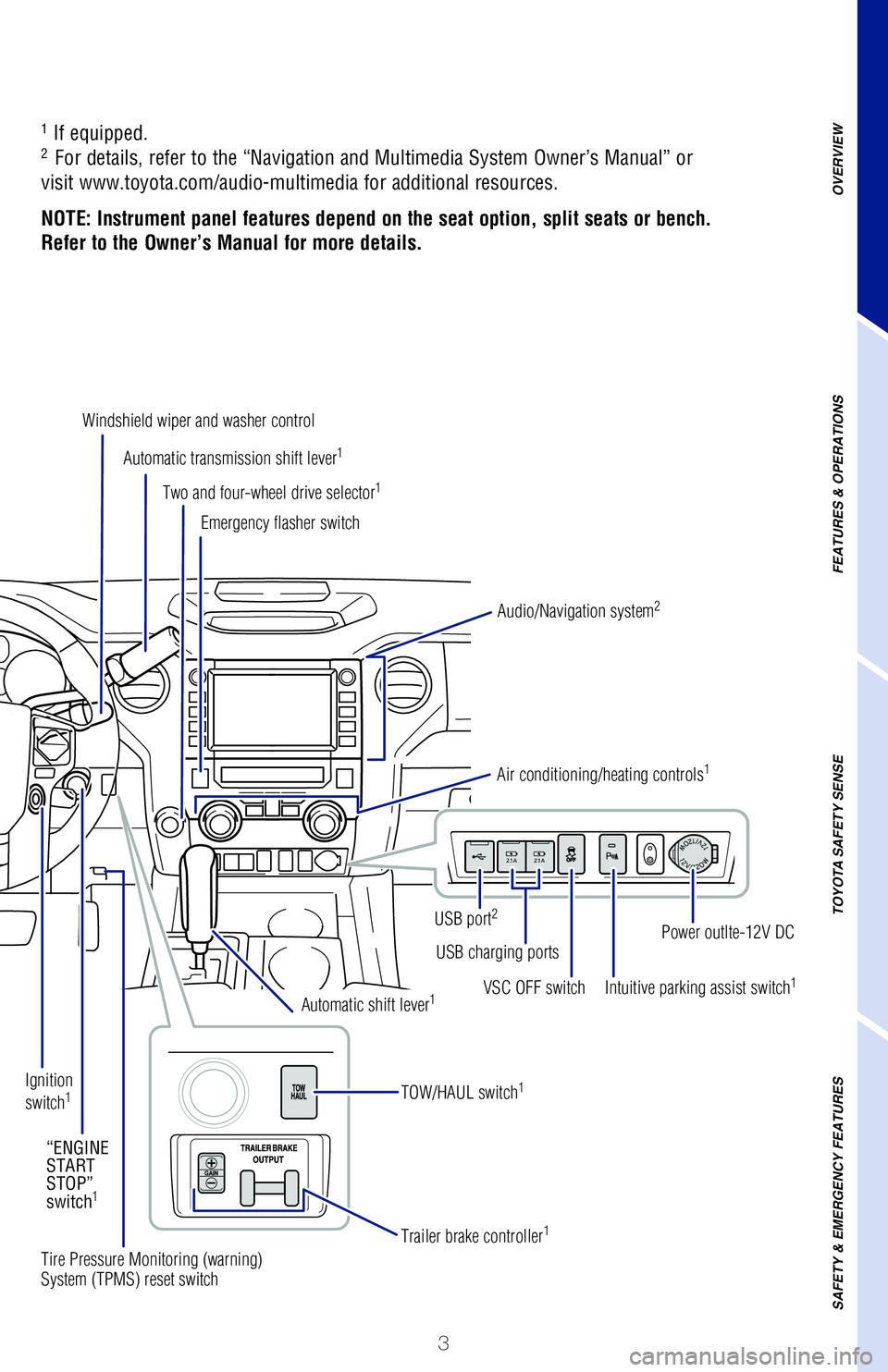
NOTE: Instrument panel features depend on the seat option, split seats or bench.
Refer to the Owner’s Manual for more details.
Automatic transmission shift lever1
Windshield wiper and washer control
Two and four-wheel drive selector1
Audio/Navigation system2
USB port2
USB charging ports
VSC OFF switchIntuitive parking assist switch1
Power outlte-12V DC
Emergency flasher switch
Air conditioning/heating controls1
Tire Pressure Monitoring (warning) System (TPMS) reset switch
Trailer brake controller1
Automatic shift lever1
TOW/HAUL switch1Ignition switch1
“ENGINE START STOP” switch1
Page 7 of 52
5
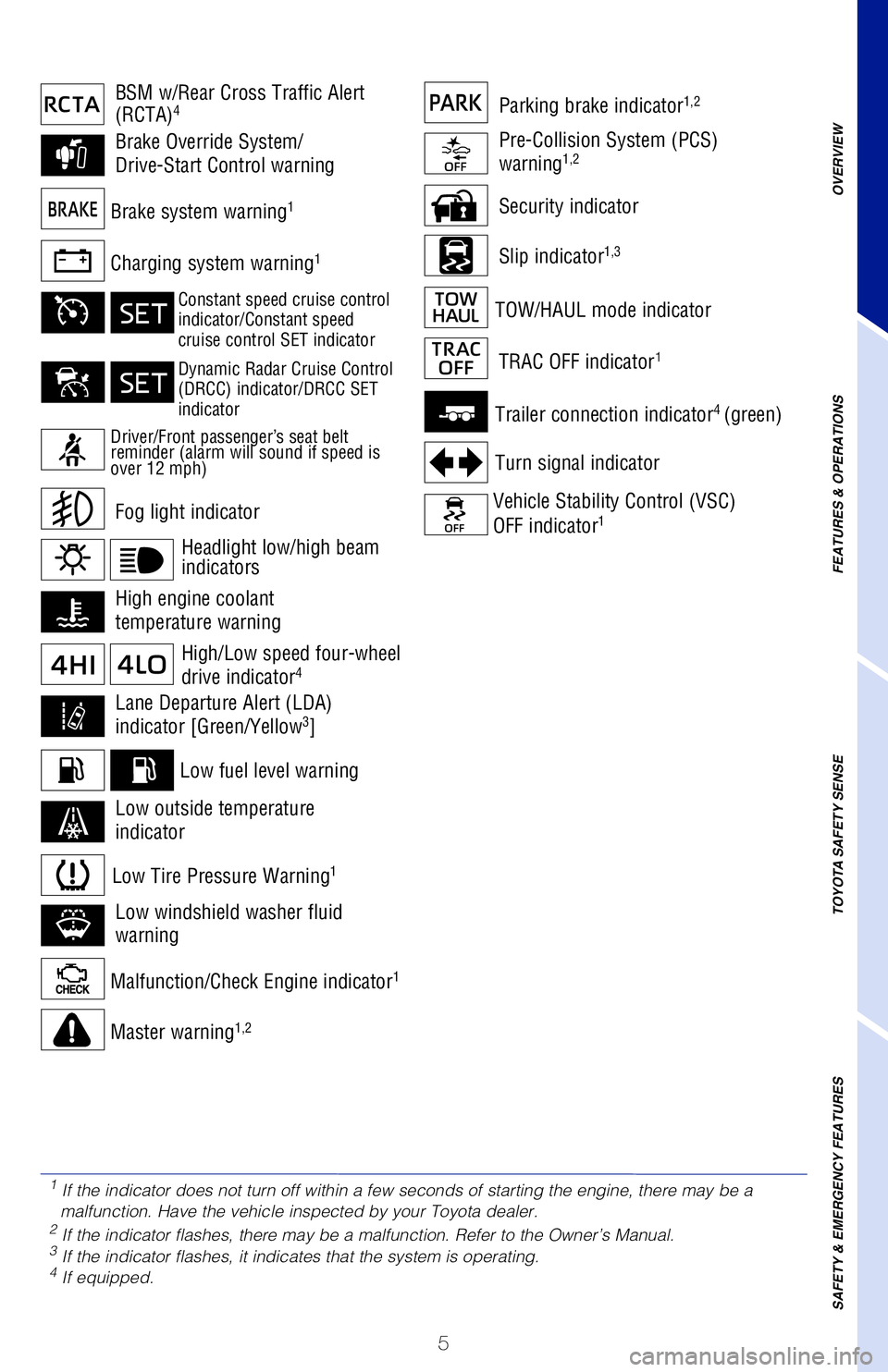
Security indicator
Slip indicator1,3Charging system warning1
Brake system warning1
Malfunction/Check Engine indicator1
Low fuel level warning
Master warning1,2
Trailer connection indicator4 (green)
Turn signal indicator
Vehicle Stability Control (VSC)
OFF indicator1
TOW/HAUL mode indicator
Low Tire Pressure Warning1
Fog light indicator
Brake Override System/
Drive-Start Control warning
BSM w/Rear Cross Traffic Alert (RCTA)4
High engine coolant
temperature warning
TRAC OFF indicator1
Lane Departure Alert (LDA)
indicator [Green/Yellow3]
Pre-Collision System (PCS)
warning1,2
Low windshield washer fluid
warning
Low outside temperature
indicator
Parking brake indicator1,2
High/Low speed four-wheel
drive indicator4
1 If the indicator does not turn off within a few seconds of starting the engine, there may be a malfunction. Have the vehicle inspected by your Toyota dealer.2 If the indicator flashes, there may be a malfunction. Refer to the Owner’s Manual.3 If the indicator flashes, it indicates that the system is operating.4 If equipped.
Driver/Front passenger’s seat belt reminder (alarm will sound if speed is over 12 mph)
Constant speed cruise control indicator/Constant speedcruise control SET indicator
Dynamic Radar Cruise Control (DRCC) indicator/DRCC SET indicator
Headlight low/high beam indicators
OVERVIEW
FEATURES & OPERATIONS
TOYOTA SAFETY SENSE
SAFETY & EMERGENCY FEATURES
Page 13 of 52
11
OVERVIEW
FEATURES & OPERATIONS
TOYOTA SAFETY SENSE
SAFETY & EMERGENCY FEATURES
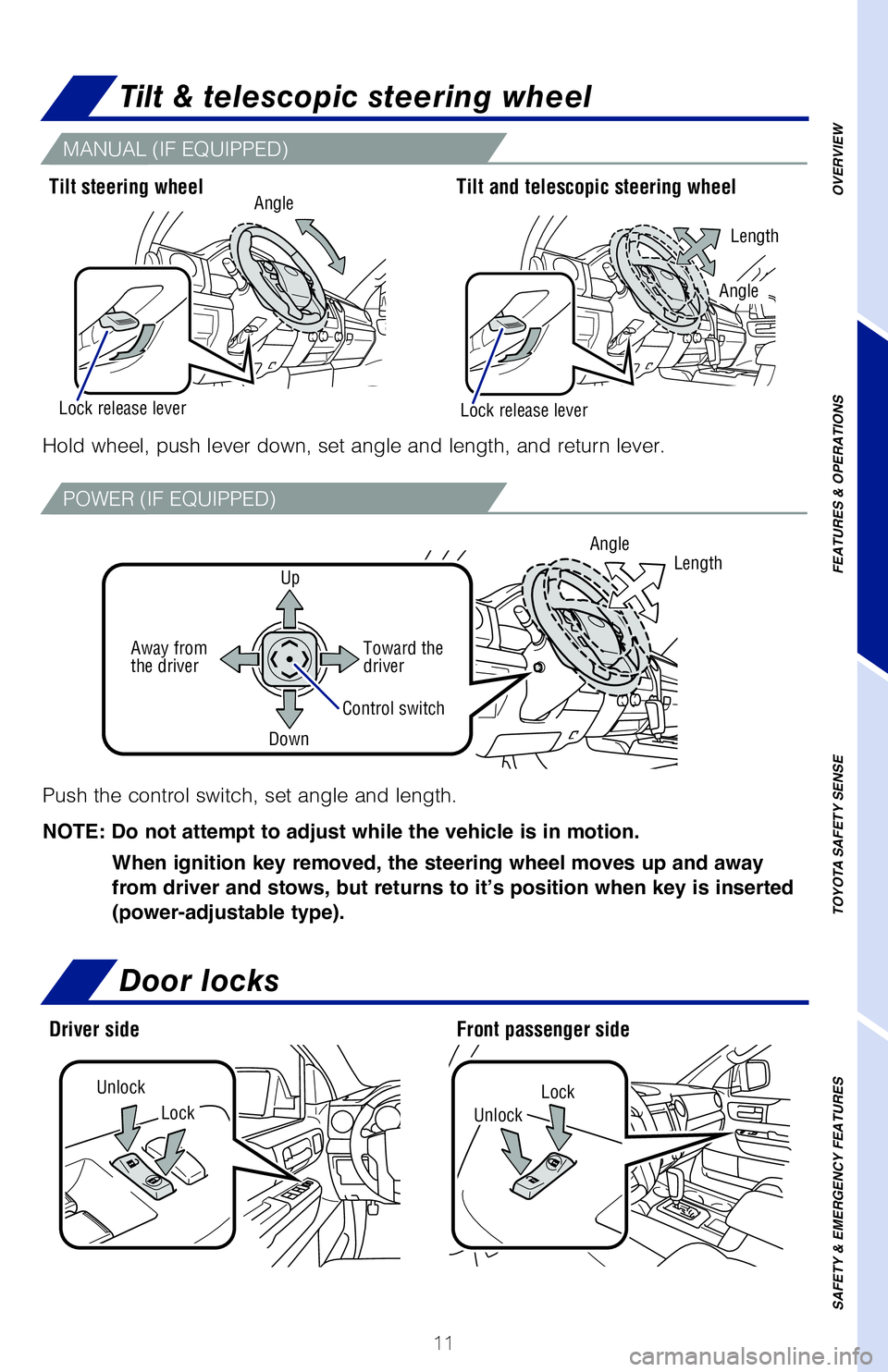
Tilt & telescopic steering wheel
Door locks
LockLockUnlock
Unlock
Hold wheel, push lever down, set angle and length, and return lever.
Tilt steering wheel
Driver side
Tilt and telescopic steering wheel
Front passenger side
Length
Lock release leverLock release lever
Angle
Push the control switch, set angle and length.
NOTE: Do not attempt to adjust while the vehicle is in motion.
When ignition key removed, the steering wheel moves up and away
from driver and stows, but returns to it’s position when key is inserted
(power-adjustable type).
Angle
Control switch
LengthUp
Toward the driverAway from the driver
Down
Angle
MANUAL (IF EQUIPPED)
POWER (IF EQUIPPED)
Page 16 of 52
14
FEATURES & OPERATIONS
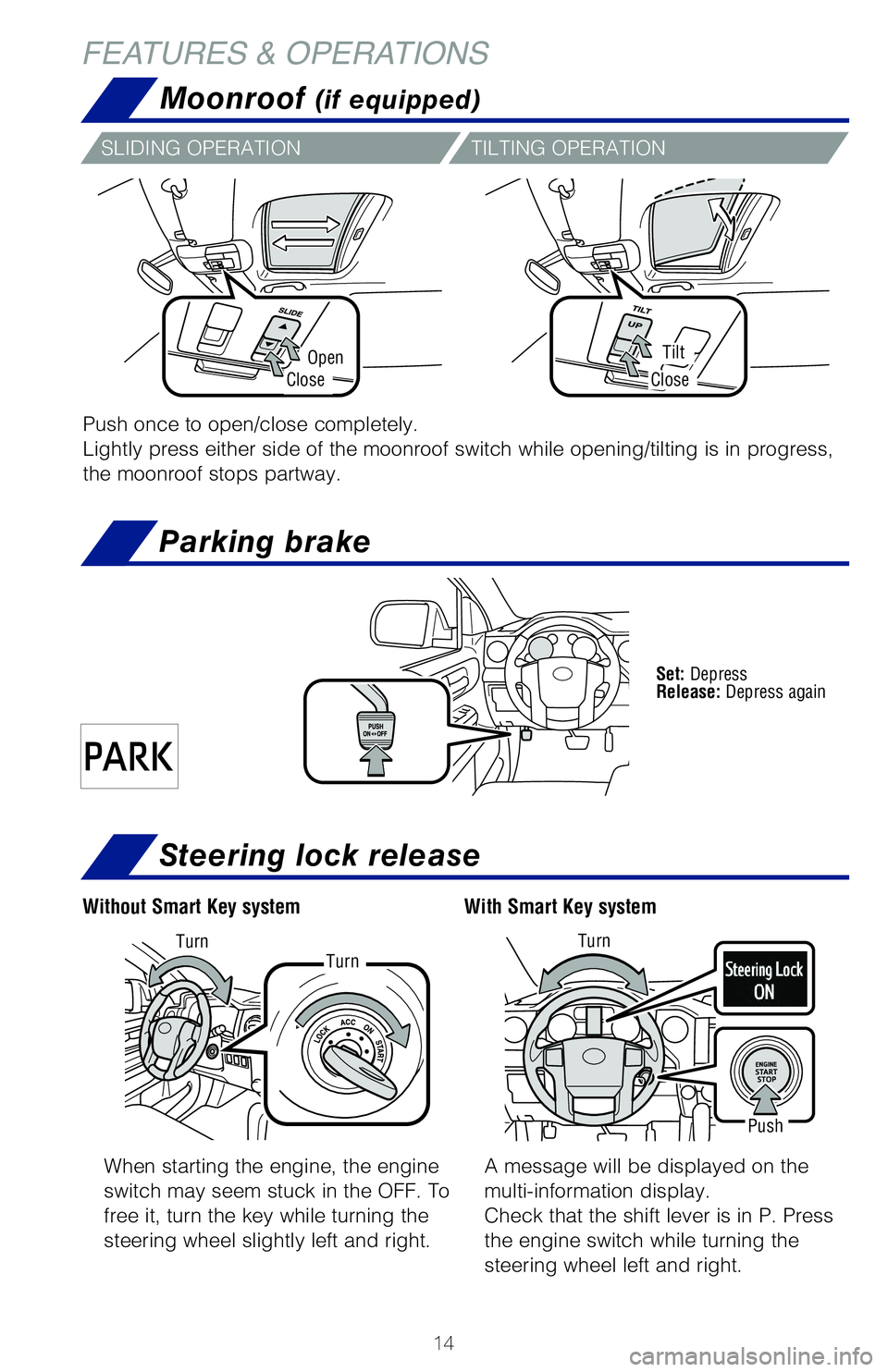
Moonroof (if equipped)
OpenTilt
CloseClose
Push once to open/close completely.
Lightly press either side of the moonroof switch while opening/tilting is in progress,
the moonroof stops partway.
SLIDING OPERATIONTILTING OPERATION
Set: Depress Release: Depress again
Parking brake
Steering lock release
When starting the engine, the engine
switch may seem stuck in the OFF. To
free it, turn the key while turning the
steering wheel slightly left and right.
A message will be displayed on the
multi-information display.
Check that the shift lever is in P. Press
the engine switch while turning the
steering wheel left and right.
With Smart Key systemWithout Smart Key system
Push
TurnTurnTurn
Page 25 of 52
23
Bluetooth® technology allows dialing or receipt of calls without removing your
hands from the steering wheel.
Refer to the Bluetooth® device pairing in this guide or the Navigation and
Multimedia System Owner’s Manual for additional user instructions.
NOTE: Concentrating on the road should always be your first priority while
driving. Do not use the Audio Multimedia System if it will distract you.
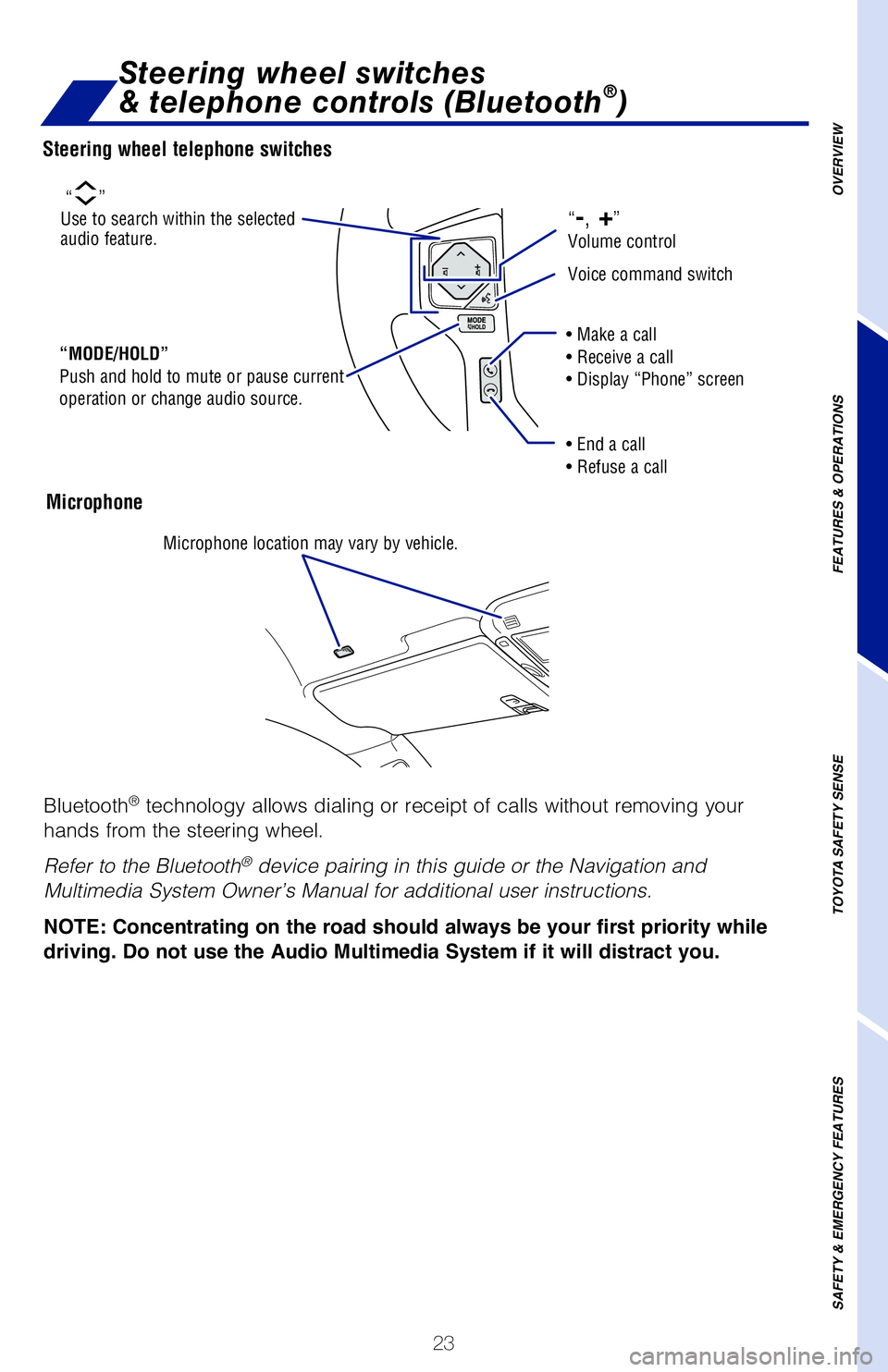
Microphone
Steering wheel telephone switches
Steering wheel switches
& telephone controls (Bluetooth®)
OVERVIEW
FEATURES & OPERATIONS
TOYOTA SAFETY SENSE
SAFETY & EMERGENCY FEATURES
“MODE/HOLD” Push and hold to mute or pause current operation or change audio source.
“”Use to search within the selected audio feature.
Microphone location may vary by vehicle.
• Make a call • Receive a call• Display “Phone” screen
• End a call• Refuse a call
“-, +” Volume control
Voice command switch
Page 26 of 52
24
FEATURES & OPERATIONS
Push and turnTurn
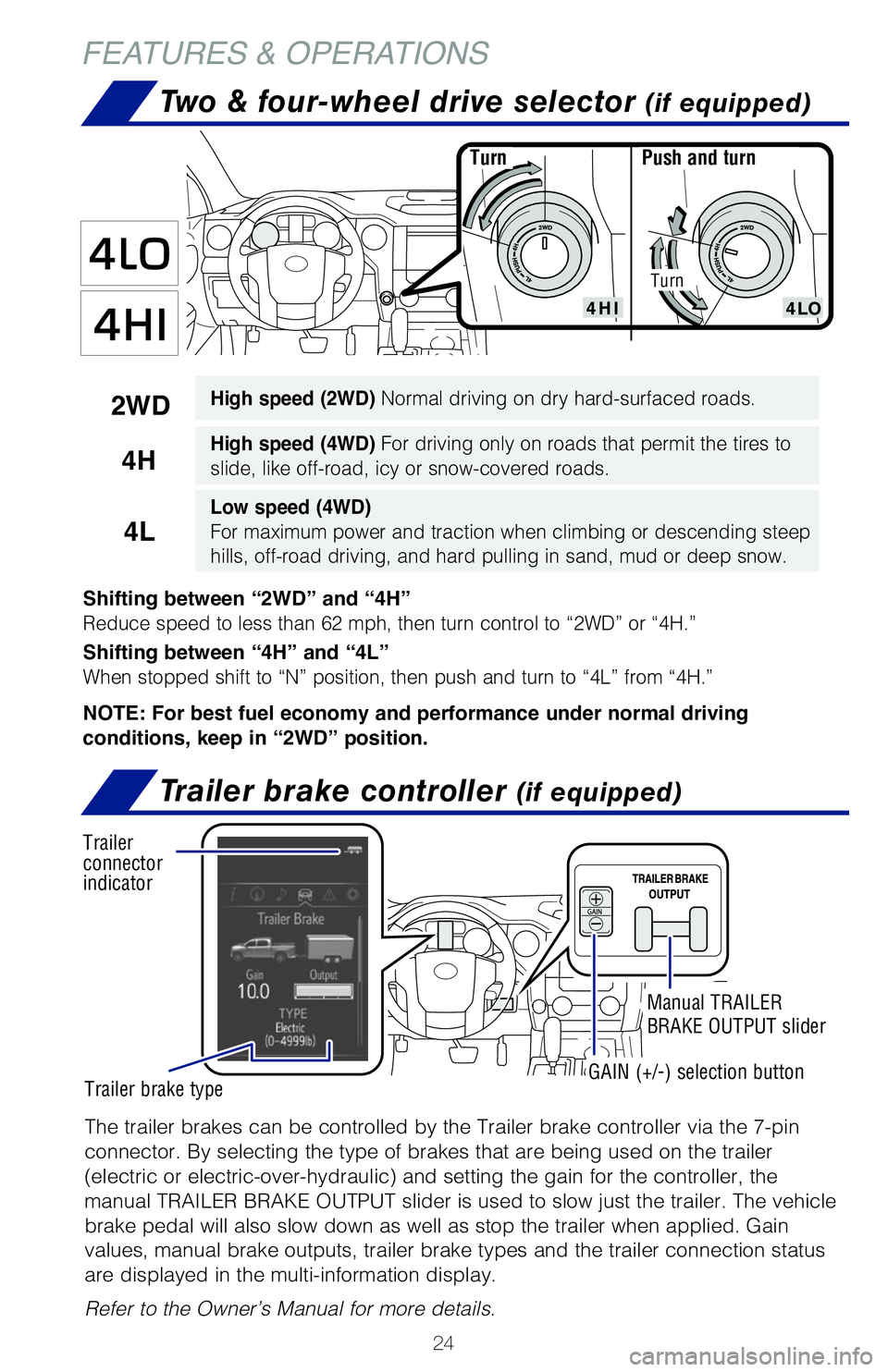
Shifting between “2WD” and “4H”
Reduce speed to less than 62 mph, then turn control to “2WD” or “4H.”
Shifting between “4H” and “4L”
When stopped shift to “N” position, then push and turn to “4L” from “4H.”
NOTE: For best fuel economy and performance under normal driving
conditions, keep in “2WD” position.
2WDHigh speed (2WD) Normal driving on dry hard-surfaced roads.
4HHigh speed (4WD) For driving only on roads that permit the tires to
slide, like off-road, icy or snow-covered roads.
4L
Low speed (4WD)
For maximum power and traction when climbing or descending steep
hills, off-road driving, and hard pulling in sand, mud or deep snow.
Turn
Two & four-wheel drive selector (if equipped)
The trailer brakes can be controlled by the Trailer brake controller via the 7-pin
connector. By selecting the type of brakes that are being used on the trailer
(electric or electric-over-hydraulic) and setting the gain for the controller, the
manual TRAILER BRAKE OUTPUT slider is used to slow just the trailer. The vehicle
brake pedal will also slow down as well as stop the trailer when applied. Gain
values, manual brake outputs, trailer brake types and the trailer connection status
are displayed in the multi-information display.
Refer to the Owner’s Manual for more details.
Trailer brake controller (if equipped)
Trailer connector indicator
Trailer brake typeGAIN (+/-) selection button
Manual TRAILER
BRAKE OUTPUT slider
Page 35 of 52
33
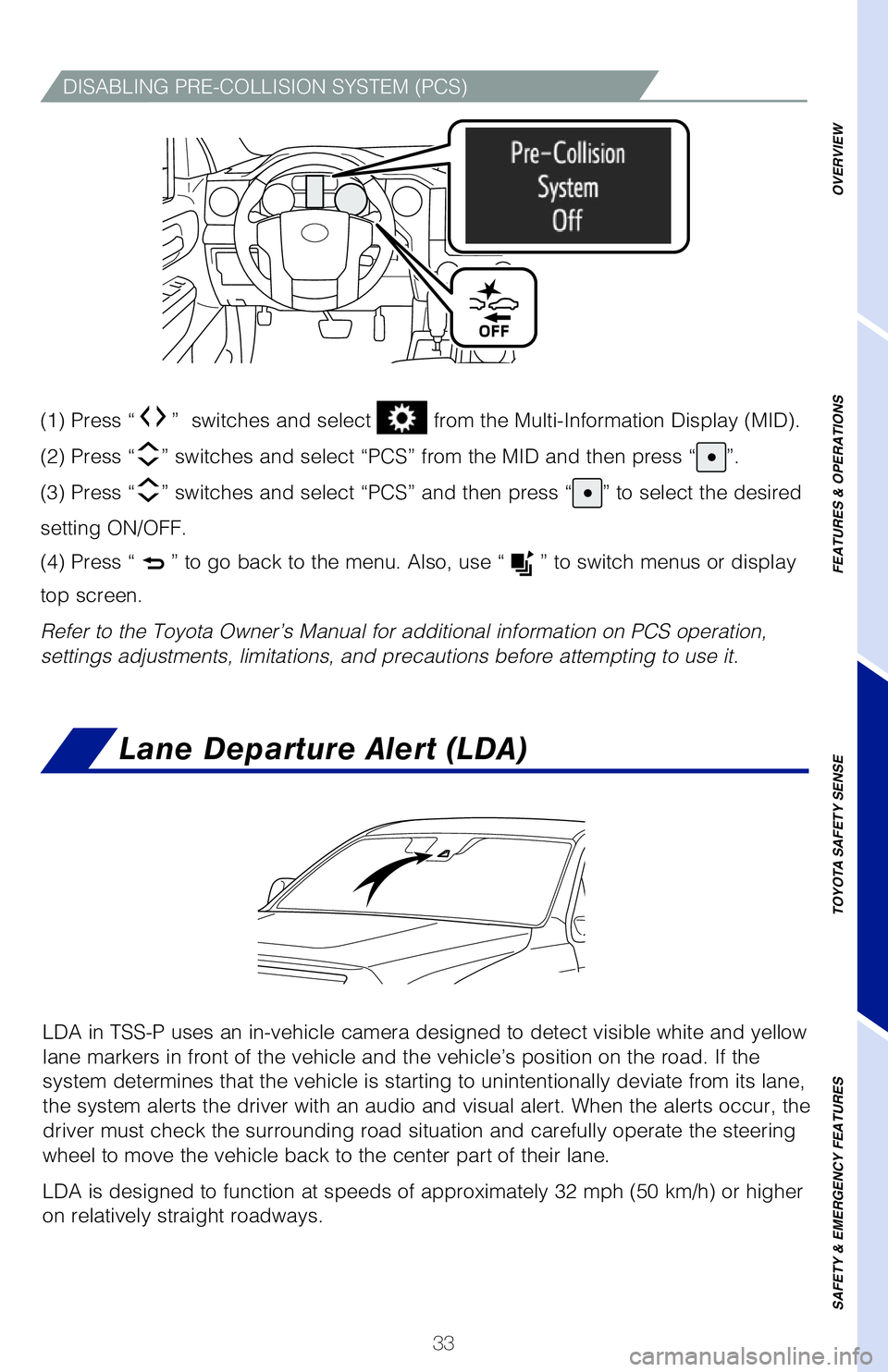
DISABLING PRE-COLLISION SYSTEM (PCS)
(1) Press “” switches and select from the Multi-Information Display (MID).
(2) Press “” switches and select “PCS” from the MID and then press “”.
(3) Press “” switches and select “PCS” and then press “” to select the desired
setting ON/OFF.
(4) Press “” to go back to the menu. Also, use “” to switch menus or display
top screen.
Refer to the Toyota Owner’s Manual for additional information on PCS operation,
settings adjustments, limitations, and precautions before attempting to use it.
Lane Departure Alert (LDA)
LDA in TSS-P uses an in-vehicle camera designed to detect visible white and yellow
lane markers in front of the vehicle and the vehicle’s position on the road. If the
system determines that the vehicle is starting to unintentionally deviate from its lane,
the system alerts the driver with an audio and visual alert. When the alerts occur, the
driver must check the surrounding road situation and carefully operate the steering
wheel to move the vehicle back to the center part of their lane.
LDA is designed to function at speeds of approximately 32 mph (50 km/h) or higher
on relatively straight roadways.
OVERVIEW
FEATURES & OPERATIONS
TOYOTA SAFETY SENSE
SAFETY & EMERGENCY FEATURES
Page 38 of 52
36
TOYOTA SAFETY SENSE™
SWAY WARNING SYSTEM
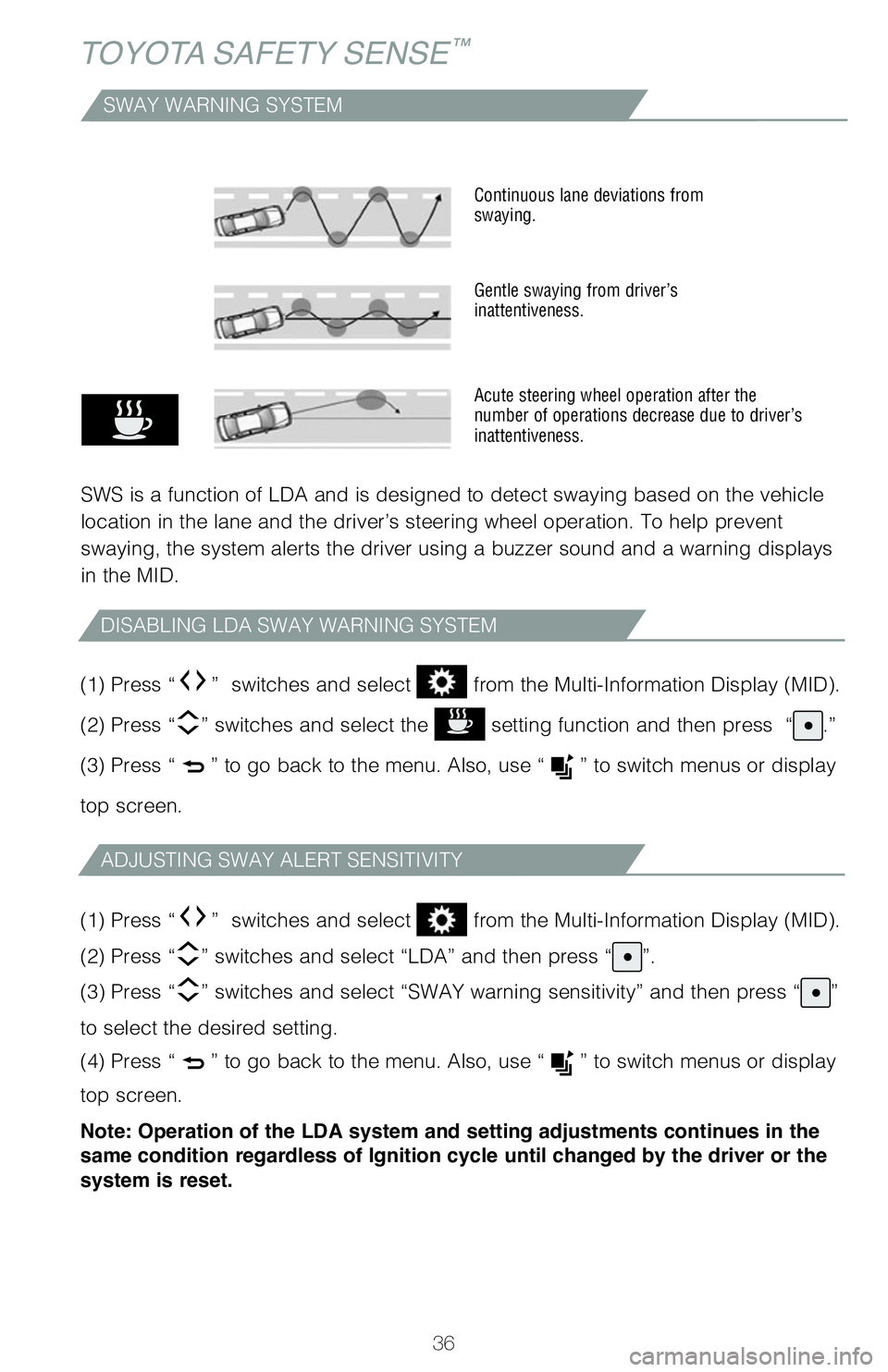
SWS is a function of LDA and is designed to detect swaying based on the vehicle
location in the lane and the driver’s steering wheel operation. To help prevent
swaying, the system alerts the driver using a buzzer sound and a warning displays
in the MID.
Continuous lane deviations from swaying.
Gentle swaying from driver’s inattentiveness.
Acute steering wheel operation after the number of operations decrease due to driver’s inattentiveness.
DISABLING LDA SWAY WARNING SYSTEM
ADJUSTING SWAY ALERT SENSITIVITY
(1) Press “” switches and select from the Multi-Information Display (MID).
(2) Press “” switches and select the setting function and then press “.”
(3) Press “” to go back to the menu. Also, use “” to switch menus or display
top screen.
(1) Press “” switches and select from the Multi-Information Display (MID).
(2) Press “” switches and select “LDA” and then press “”.
(3) Press “” switches and select “SWAY warning sensitivity” and then press “”
to select the desired setting.
(4) Press “” to go back to the menu. Also, use “” to switch menus or display
top screen.
Note: Operation of the LDA system and setting adjustments continues in the
same condition regardless of Ignition cycle until changed by the driver or the
system is reset.