change time TOYOTA TUNDRA 2020 (in English) User Guide
[x] Cancel search | Manufacturer: TOYOTA, Model Year: 2020, Model line: TUNDRA, Model: TOYOTA TUNDRA 2020Pages: 608, PDF Size: 13.19 MB
Page 284 of 608

2844-5. Using the driving support systems
Example of constant speed cruising
When there are no vehicles ahead
The vehicle travels at the speed set by the driver. The desired vehicle-to-
vehicle distance can also be set by operating the vehicle-to-ve hicle dis-
tance switch.
Example of deceleration crui sing and follow-up cruising
When a preceding vehicle driving slower than the set speed
appears
When a vehicle is detected running ahead of you, the system automatically
decelerates your vehicle. When a greater reduction in vehicle s peed is
necessary, the system applies the brakes (the stop lights will come on at
this time). The system will respond to changes in the speed of the vehicle
ahead in order to maintain the vehicle-to-vehicle distance set by the driver.
Approach warning warns you when the system cannot decelerate su ffi-
ciently to prevent your vehicle from closing in on the vehicle ahead.
Example of acceleration
When there are no longer any preceding vehicles driving slower
than the set speed
The system accelerates until the set speed is reached. The syst em then
returns to constant speed cruising.
1
2
3
Page 286 of 608
2864-5. Using the driving support systems
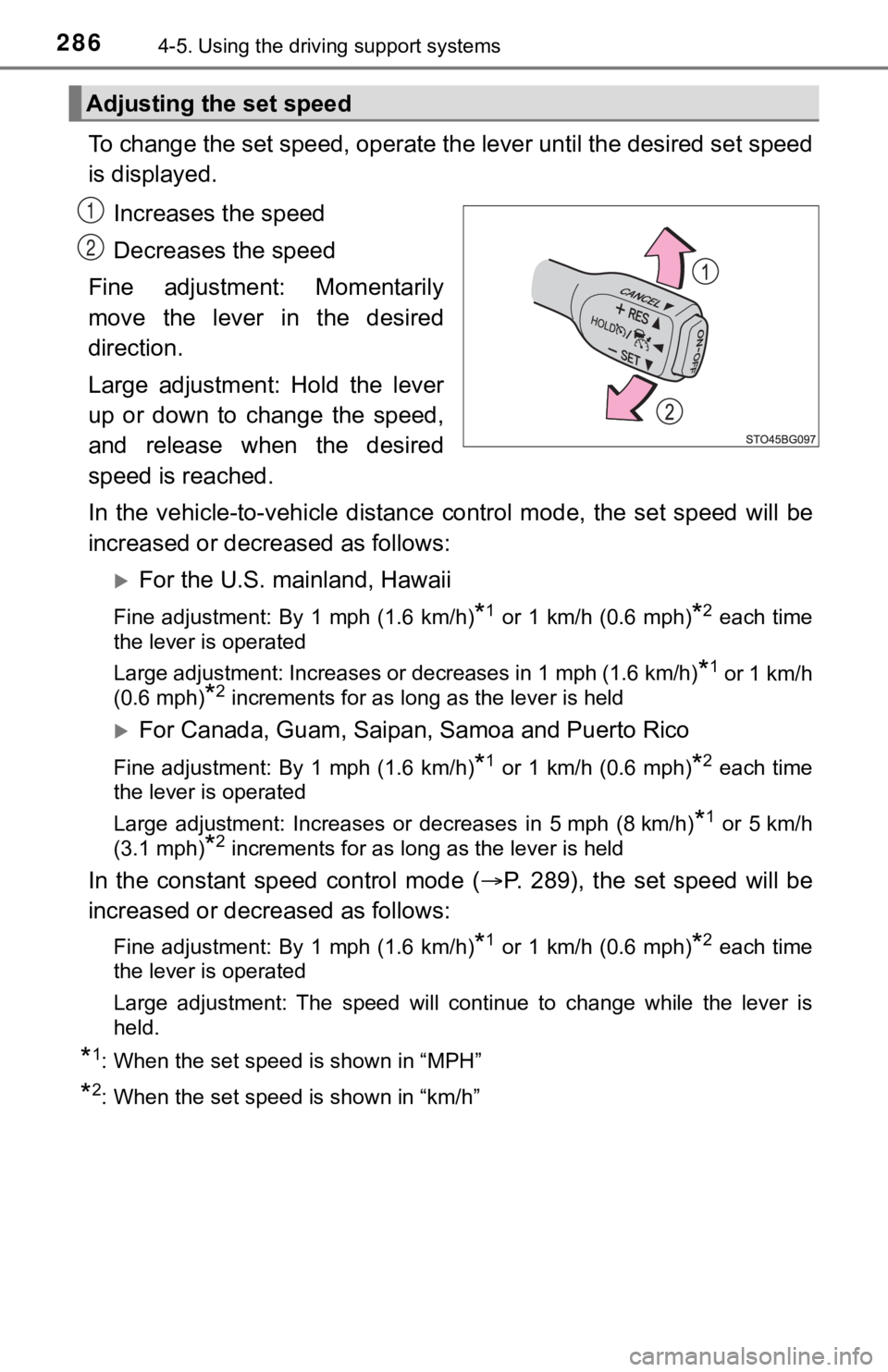
To change the set speed, operate the lever until the desired se t speed
is displayed.
Increases the speed
Decreases the speed
Fine adjustment: Momentarily
move the lever in the desired
direction.
Large adjustment: Hold the lever
up or down to change the speed,
and release when the desired
speed is reached.
In the vehicle-to-vehicle distance control mode, the set speed will be
increased or decreased as follows:
For the U.S. mainland, Hawaii
Fine adjustment: By 1 mph (1.6 km/h)*1 or 1 km/h (0.6 mph)*2 each time
the lever is operated
Large adjustment: Increases or decreases in 1 mph (1.6 km/h)
*1 or 1 km/h
(0.6 mph)
*2 increments for as long as the lever is held
For Canada, Guam, Saipan, Samoa and Puerto Rico
Fine adjustment: By 1 mph (1.6 km/h)*1 or 1 km/h (0.6 mph)*2 each time
the lever is operated
Large adjustment: Increases or decreases in 5 mph (8 km/h)
*1 or 5 km/h
(3.1 mph)
*2 increments for as long as the lever is held
In the constant speed control mode ( P. 289), the set speed will be
increased or decreased as follows:
Fine adjustment: By 1 mph (1.6 km/h)*1 or 1 km/h (0.6 mph)*2 each time
the lever is operated
Large adjustment: The speed will continue to change while the lever is
held.
*1: When the set speed is shown in “MPH”
*2: When the set speed is shown in “km/h”
Adjusting the set speed
1
2
Page 295 of 608
2954-5. Using the driving support systems
4
Driving
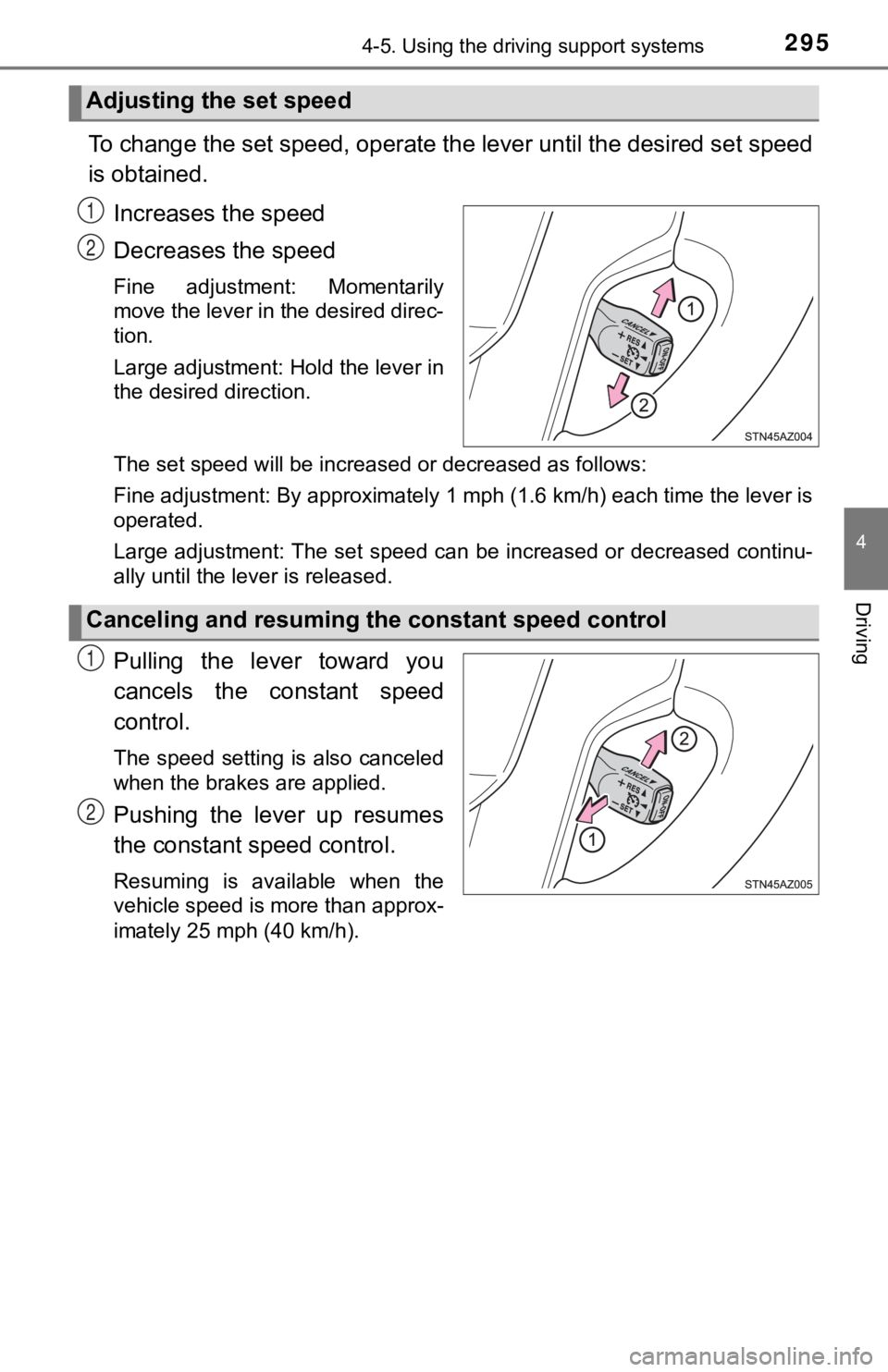
To change the set speed, operate the lever until the desired set speed
is obtained.
Increases the speed
Decreases the speed
Fine adjustment: Momentarily
move the lever in the desired direc-
tion.
Large adjustment: Hold the lever in
the desired direction.
The set speed will be increased or decreased as follows:
Fine adjustment: By approximately 1 mph (1.6 km/h) each time th e lever is
operated.
Large adjustment: The set speed can be increased or decreased c ontinu-
ally until the lever is released.
Pulling the lever toward you
cancels the c onstant speed
control.
The speed setting is also canceled
when the brakes are applied.
Pushing the lever up resumes
the constant speed control.
Resuming is available when the
vehicle speed is more than approx-
imately 25 mph (40 km/h).
Adjusting the set speed
1
2
Canceling and resuming t he constant speed control
1
2
Page 300 of 608
3004-5. Using the driving support systems
Rear center sensor
■When multiple obstacles are de tected in front and behind the
vehicle at the same time
The buzzer will change in the following manner.
● If an obstacle has been detected within 1.5 ft. (45 cm) of the front
or 2.8 ft. (85 cm) in rear of t he vehicle (a continuous buzzer is
sounding), and a new obstacle is detected at the other end of the
vehicle, the buzzer w ill sound 7 times then 1 continuous buzzer.
● If an obstacle has been detected within 1.5 ft. (45 cm) of the front
or 2.8 ft. (85 cm) in rear of t he vehicle (a continuous buzzer is
sounding), and a new obstacle is detected in the same way at th e
other end of the vehicle, the buzzer will sound 3 times then 1
continuous buzzer.
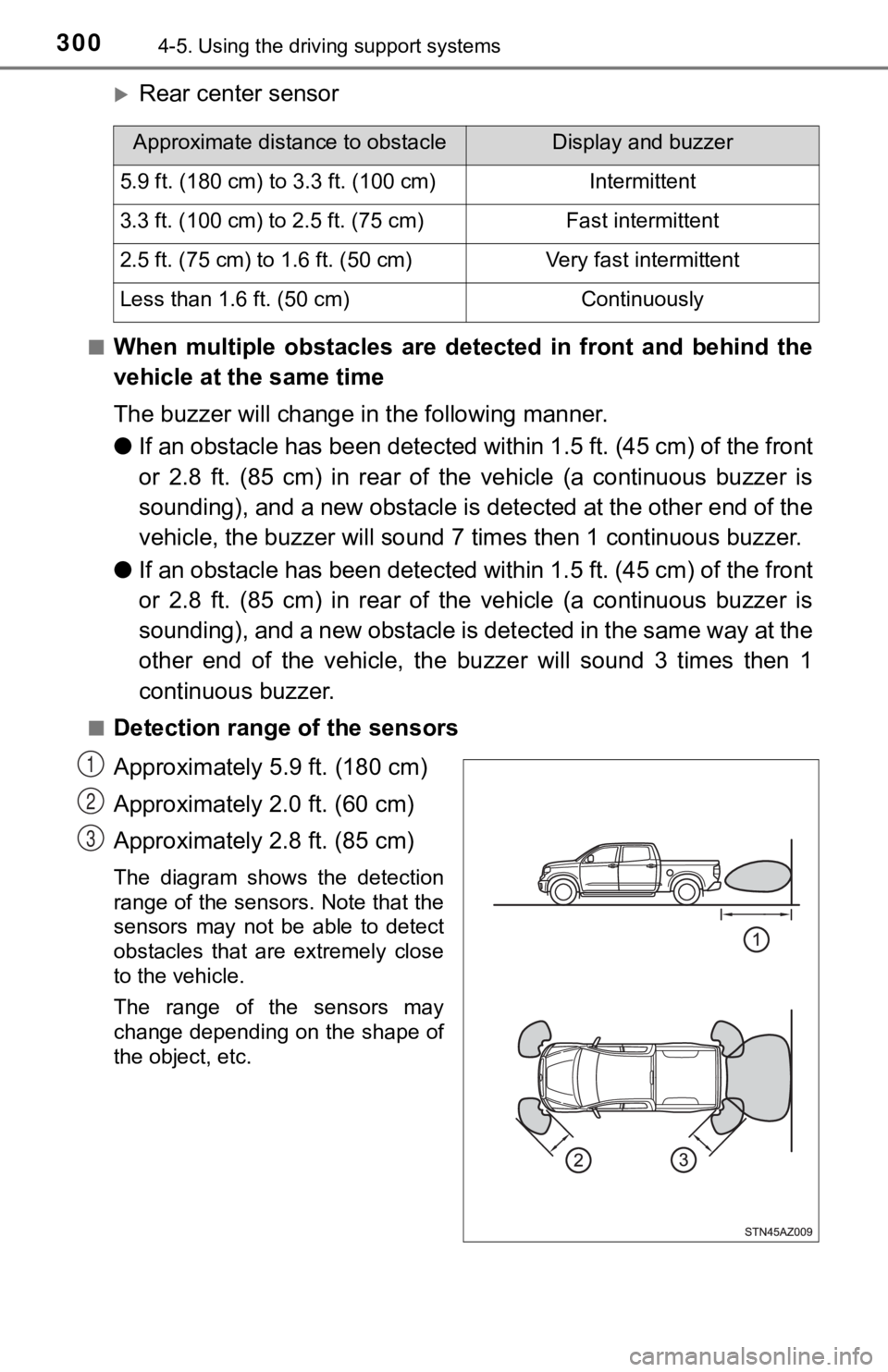
■Detection range of the sensors
Approximately 5.9 ft. (180 cm)
Approximately 2.0 ft. (60 cm)
Approximately 2.8 ft. (85 cm)
The diagram shows the detection
range of the sensors. Note that the
sensors may not be able to detect
obstacles that are extremely close
to the vehicle.
The range of the sensors may
change depending on the shape of
the object, etc.
Approximate distance to obstacleDisplay and buzzer
5.9 ft. (180 cm) to 3.3 ft. (100 cm)Intermittent
3.3 ft. (100 cm) to 2.5 ft. (75 cm)Fast intermittent
2.5 ft. (75 cm) to 1.6 ft. (50 cm)Very fast intermittent
Less than 1.6 ft. (50 cm)Continuously
1
2
3
Page 317 of 608

3174-5. Using the driving support systems
4
Driving
■When the front-wheel drive cont rol switch is shifted to “4L”
VSC is automatically turned off.
■ If the “4HI” indicator flashes
The transfer mode may not successfully change. Drive straight a head while
accelerating or decelerating, or drive in reverse.
■ If the “4LO” indicator continues to flash
The transfer mode may not successfully change. Operate the fron t-wheel
drive control switch again.
■ If the “4LO” indicator continues to flash and a buzzer sounds
The shift lever is not in N and/or the vehicle is moving. Stop the vehicle com-
pletely, shift the shift lever to N and make sure that the indi cator stops flash-
ing.
■ If the “4HI” or “4LO” indicator flashes rapidly
There may be a malfunction in the four-wheel drive system. Have the vehicle
inspected by your Toyota dealer immediately.
■ Four-wheel drive usage frequency
You should drive in four-wheel drive for at least 10 miles (16 km) each month.
This will assure that the front drive components are lubricated .
WARNING
■Shifting the front-wheel drive control switch from “2WD” to “4H ” while
driving
Never operate the front-wheel drive control switch if the wheels are slipping.
Stop the slipping or spinning before shifting.
■ When the vehicle is parked
If the shift lever is moved before the “4LO” indicator turns on/off, the transfer
mode may not be shifted completely. The transfer mode disengage s both
the front and rear driveshafts from the powertrain and allows t he vehicle to
move regardless of the shift position. (At this time, the indic ator blinks and
the buzzer sounds.)
Therefore, the vehicle is free to roll even if the automatic tr ansmission is in
P. You or someone else could be seriously injured. You must com plete the
shifting of the transfer mode before placing transmission in P.
Page 328 of 608
3284-5. Using the driving support systems
Trailer brake type
Trailer brake type can be selected by using the multi-informati on. The
combination meter will show which trailer brake type is selected in the
multi-information display.
Manual TRAILER BRAKE OUTPUT slider
Adjusting this slider position will engage the trailer’s brakes only. If the
manual TRAILER BRAKE OUTPUT slider is used while the vehicle
brake is applied, the greater of the two outputs will be sent to the trailer
brakes.
The trailer brake type can be se lected on the multi-information display
as following:
Press “ ” or “” of meter control sw itches and select .
Press “ ” or “ ” of meter control switches and select “Vehicle Set-
tings”, and press .
Press “ ” or “ ” of meter control switches and select “TBC Trailer
Type”, and press to select the correct type of trailer brakes that
are equipped on the trailer.
Changing trailer brake type will cause the current gain setting to reset
to zero. Make sure to set the gain as described in the followin g sec-
tion.
Gain setting on trailer brake controller should be set for a sp ecific tow-
ing condition. Gain setting should be adjusted each time the ve hicle
load, trailer load, road conditions, or weather changes. Settin g the
gain value to 0 will disable the tra iler brake controller output.
Make sure the trailer brakes are in good working condition and
functioning normally. See trailer dealer if necessary.
Hook up the trailer and make p roper electrical connections.
Select the correct type of trailer brakes that are equipped on the
trailer by using the multi-information display.
Drive vehicle with trailer attached on a level road surface sim ilar to
towing condition and in traffic-free environment. Driving speed
should be approximately 20 - 25 mph [35 - 40 km/h].
Changing settings of the trailer brake type
Setting the Gain
3
4
1
2
3
1
2
3
4
Page 348 of 608
3485-1. Using the air conditioning system
■Change the airflow mode
To change the airflow, press .
Air outlets are adjusted each time the button is pressed.
■
Other functions
● Switching between outside air and recirculated air modes
( P. 349)
● Defogging the windshield ( P. 3 4 9 )
● Defogging the back window (CrewMax models) ( P. 349)
● Defogging the outside rear view mirrors (if equipped) ( P. 349)
● Windshield wiper de-icer (if equipped) ( P. 3 5 0 )
Press .
Adjust the temperature setting.
To stop the operation, press .
■Automatic mode indicator
If the fan speed setting or air flow modes are operated, the au to-
matic mode indicator goes off. However, automatic mode for func -
tions other than that o perated are maintained.
■Adjusting the temperature for driver and passenger seats sep-
arately (“SYNC” mode)
The air conditioning system swi tches between individual and sim ul-
taneous mode each ti me is pressed.
Simultaneous mode (the i ndicator on is on):
The driver’s side temperature control dial can be used to adjus t the
temperature for driver’s and fr ont passenger’s side. At this ti me,
operate the front passenger’s side temperature control dial to enter
individual mode.
Individual mode (the indicator on is off):
The temperature for the driver’s and front passenger’s side can be
adjusted separately.
Using by automatic mode
1
2
3
Page 355 of 608
3555-1. Using the air conditioning system
5
Interior features
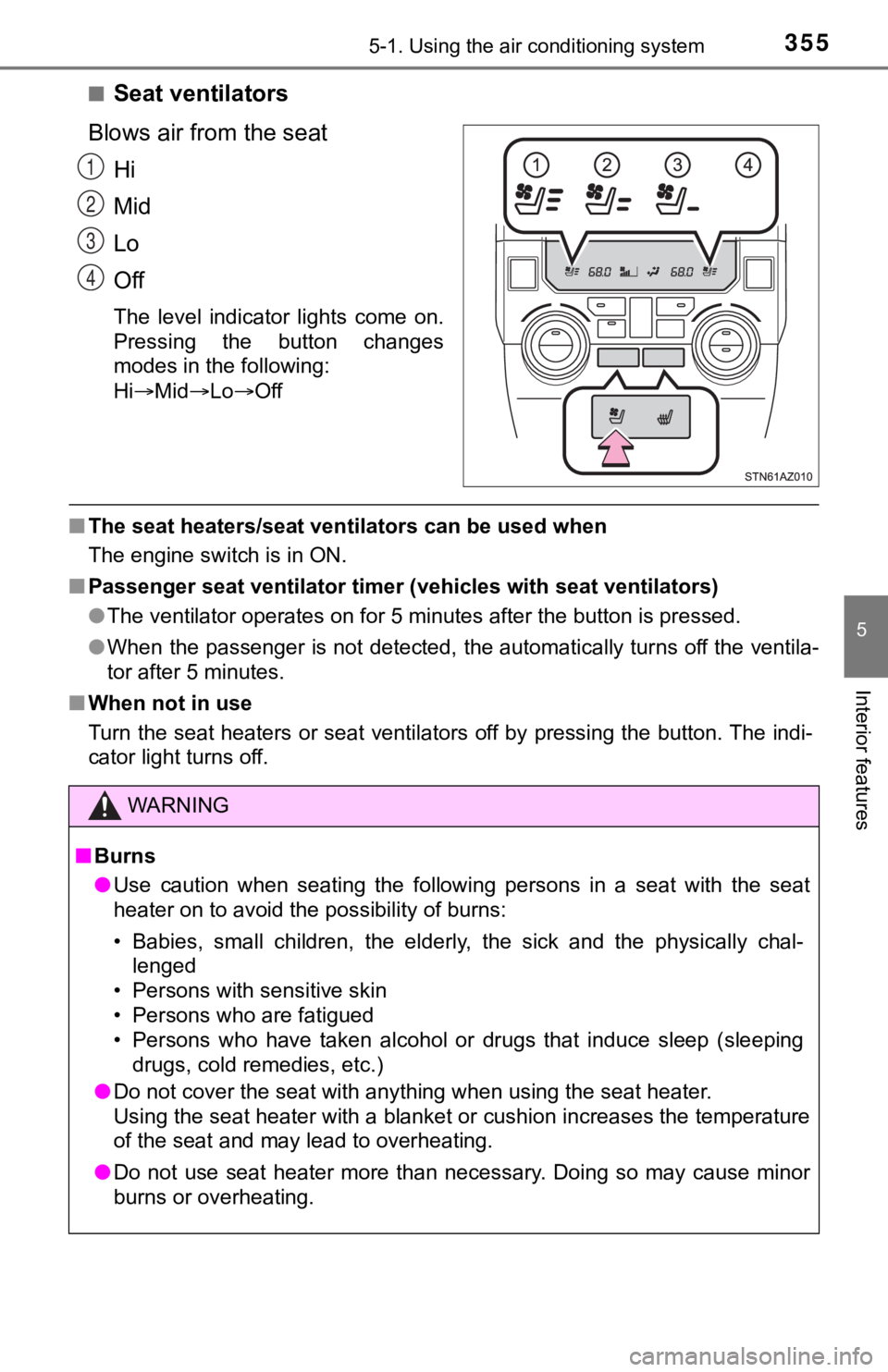
■Seat ventilators
Blows air from the seat Hi
Mid
Lo
Off
The level indicator lights come on.
Pressing the button changes
modes in the following:
HiMid LoOff
■The seat heaters/seat ventilators can be used when
The engine switch is in ON.
■ Passenger seat ventilator timer (vehicles with seat ventilators )
● The ventilator operates on for 5 minutes after the button is pr essed.
● When the passenger is not detected, the automatically turns off the ventila-
tor after 5 minutes.
■ When not in use
Turn the seat heaters or seat ventilators off by pressing the b utton. The indi-
cator light turns off.
1
2
3
4
WARNING
■ Burns
● Use caution when seating the following persons in a seat with t he seat
heater on to avoid the possibility of burns:
• Babies, small children, the elderly, the sick and the physical ly chal-
lenged
• Persons with sensitive skin
• Persons who are fatigued
• Persons who have taken alcohol or drugs that induce sleep (sle eping
drugs, cold remedies, etc.)
● Do not cover the seat with anything when using the seat heater.
Using the seat heater with a blanket or cushion increases the t emperature
of the seat and may lead to overheating.
● Do not use seat heater more than necessary. Doing so may cause minor
burns or overheating.
Page 359 of 608
3595-2. Using the interior lights
5
Interior features
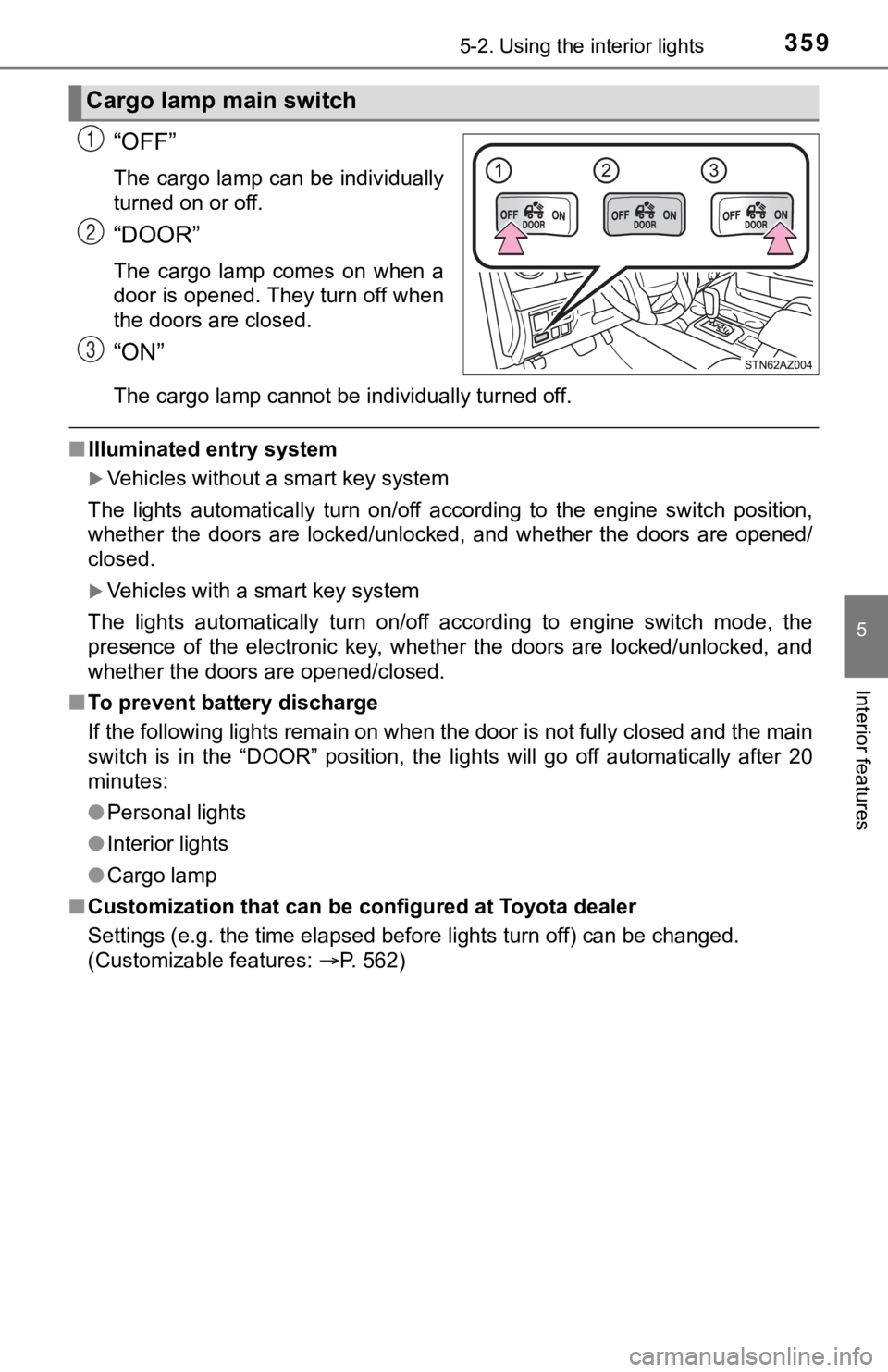
“OFF”
The cargo lamp can be individually
turned on or off.
“DOOR”
The cargo lamp comes on when a
door is opened. They turn off when
the doors are closed.
“ON”
The cargo lamp cannot be individually turned off.
■Illuminated entry system
Vehicles without a smart key system
The lights automatically turn on/off according to the engine sw itch position,
whether the doors are locked/unlocked, and whether the doors are opened/
closed.
Vehicles with a smart key system
The lights automatically turn on/off according to engine switch mode, the
presence of the electronic key, whether the doors are locked/un locked, and
whether the doors are opened/closed.
■ To prevent battery discharge
If the following lights remain on when the door is not fully closed and the main
switch is in the “DOOR” position, the lights will go off automatically after 20
minutes:
●Personal lights
● Interior lights
● Cargo lamp
■ Customization that can be configured at Toyota dealer
Settings (e.g. the time elapsed before lights turn off) can be changed.
(Customizable features: P. 562)
Cargo lamp main switch
1
2
3
Page 433 of 608

4336-3. Do-it-yourself maintenance
6
Maintenance and care
■The initialization operation
●Make sure to carry out initialization after adjusting the tire inflation pres-
sure.
Also, make sure the tires are co ld before carrying out initialization or tire
inflation pressure adjustment.
●If you have accidentally turned the engine switch off during in itialization,
it is not necessary to press the reset swit ch again as initialization will
restart automatically when the engine switch has been turned to ON for
the next time.
●If you accidentally press the reset switch when initialization is not neces-
sary, adjust the tire inflation pressure to the specified level when the
tires are cold, and cond uct initialization again.
●While the position of each tire is being determined and the inf lation pres-
sures are not being displayed on the multi-information display, if the
inflation pressure of a tire drops, the tire pressure warning l ight will come
on.
■Warning performance of the tire pressure warning system
The warning of the tire pressu re warning system will change in accor-
dance with the conditions under which it was initialized. For t his reason,
the system may give a warning even if the tire pressure does no t reach a
low enough level, or if the pressure is higher than the pressur e that was
adjusted to when the sys tem was initialized.