remote control TOYOTA TUNDRA 2020 (in English) Owner's Manual
[x] Cancel search | Manufacturer: TOYOTA, Model Year: 2020, Model line: TUNDRA, Model: TOYOTA TUNDRA 2020Pages: 608, PDF Size: 13.19 MB
Page 399 of 608

399
6Maintenance and care
6-1. Maintenance and careCleaning and protecting the vehicle exterior .......... 400
Cleaning and protecting the vehicle interior ........... 403
6-2. Maintenance Maintenance requirements ................... 406
General maintenance ........ 408
Emission inspection and maintenance (I/M)
programs ......................... 411 6-3. Do-it-yourself maintenance
Do-it-yourself service precautions ..................... 412
Hood ................................. 414
Engine compartment ......... 415
Tires .................................. 426
Tire inflation pressure ....... 440
Wheels .............................. 443
Air conditioning filter.......... 446
Wireless remote control/ electronic key battery ...... 449
Checking and replacing fuses ............................... 452
Light bulbs......................... 455
Page 423 of 608

4236-3. Do-it-yourself maintenance
6
Maintenance and care
■Before recharging
When recharging, the battery produces hydrogen gas which is flammable and
explosive. Therefore, observe the following before recharging:
●If recharging with the battery installed on the vehicle, be sur e to disconnect
the ground cable.
● Make sure the power switch on the charger is off when connectin g and dis-
connecting the charger cables to the battery.
■ After recharging/reconnecting the battery (vehicles with a smar t key sys-
tem)
The engine may not start. Follow the procedure below to initial ize the system.
Shift the shift lever to P.
Open and close any of the doors.
Restart the engine.
● Unlocking the doors using the smart key system may not be possi ble imme-
diately after reconnecting the battery. If this happens, use the wireless
remote control or the mechanical key to lock/unlock the doors.
● Start the engine with the engine switch in ACC. The engine may not start
when the engine switch turned from off. However, the engine wil l operate
normally from the second attempt.
● The engine switch mode is recorded by the vehicle. If the batte ry is recon-
nected, the vehicle will return the engine switch mode to the s tatus it was in
before the battery was disconnected. Make sure to turn off the engine
before disconnect the battery. Take extra care when connecting the battery
if the engine switch mode prior to discharge is unknown.
If the system will not start even after multiple attempts, contact your Toyota
dealer.
1
2
3
Page 449 of 608
4496-3. Do-it-yourself maintenance
6
Maintenance and care
Wireless remote control/electronic key bat-
ter y
●Flathead screwdriver
● Small flathead screwdriver
● Lithium battery CR2016 (vehicles without a smart key system), o r
CR2032 (vehicles with a smart key system)
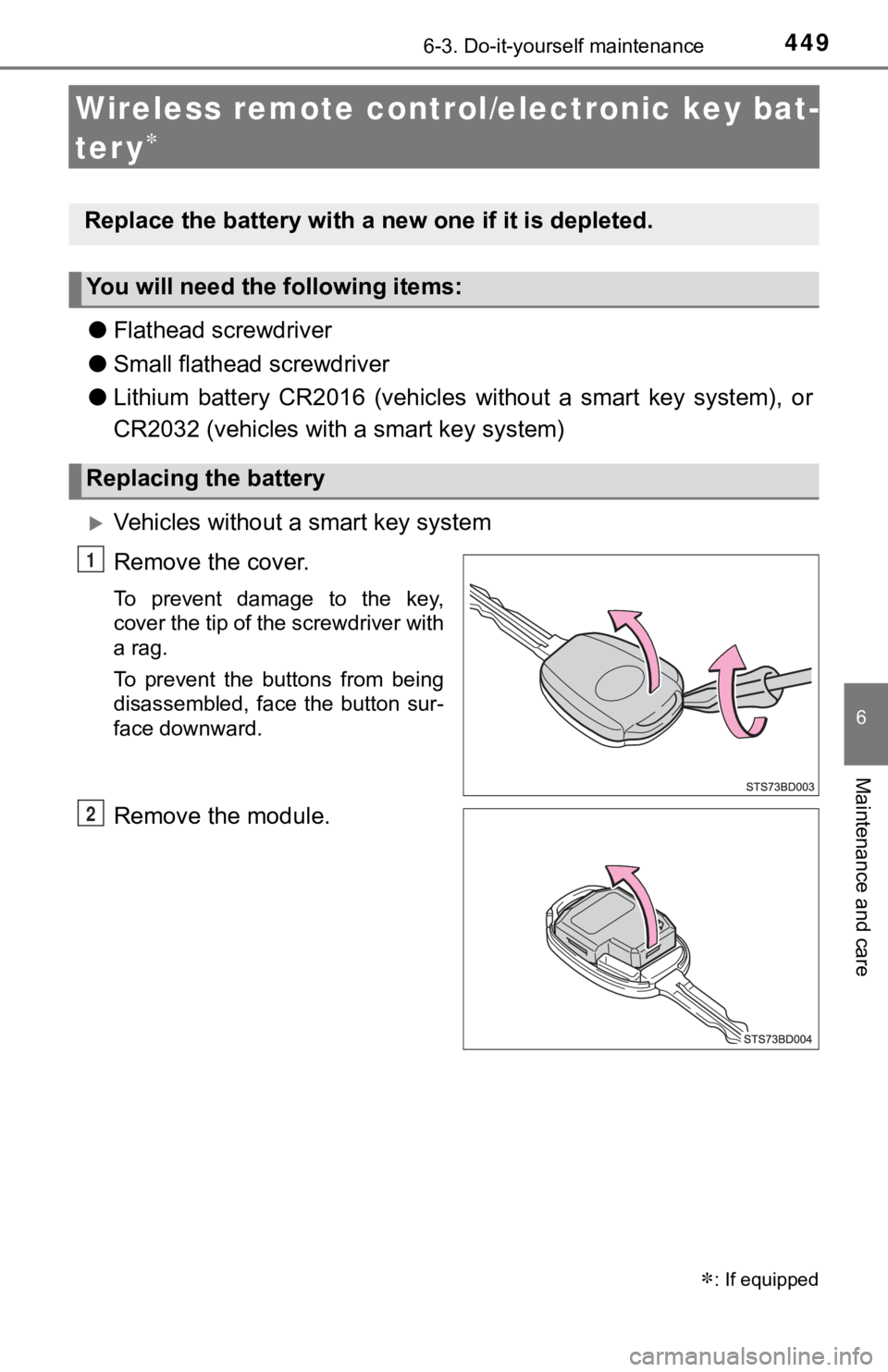
Vehicles without a smart key system
Remove the cover.
To prevent damage to the key,
cover the tip of the screwdriver with
a rag.
To prevent the buttons from being
disassembled, face the button sur-
face downward.
Remove the module.
: If equipped
Replace the battery with a n ew one if it is depleted.
You will need the following items:
Replacing the battery
1
2
Page 451 of 608
4516-3. Do-it-yourself maintenance
6
Maintenance and care
■Use a CR2016 (vehicles without a smart key system) or CR2032 (v ehicles
with a smart key system) lithium battery
● Batteries can be purchased at your Toyota dealer, local electri cal appliance
shops or camera stores.
● Replace only with the same or equivalent type recommended by the manu-
facturer.
● Dispose of used batteries according to local laws.
■ If the key battery is depleted
The following symptoms may occur:
●The smart key system (if equipped) and wireless remote control will not
function properly.
● The operational range will be reduced.
WARNING
■Removed battery a nd other parts
Keep away from children. These parts are small and if swallowed by a child,
they can cause choking. Failure to do so could result in death or serious
injury.
■ Certification for the lithium battery
CAUTION: RISK OF EXPLOSION IF BATTERY IS REPLACED BY AN
INCORRECT TYPE. DISPOSE OF USED BATTERIES ACCORDING TO
THE INSTRUCTIONS
NOTICE
■For normal operation after replacing the battery
Observe the following precautions to prevent accidents:
● Always work with dry hands.
Moisture may cause the battery to rust.
● Do not touch or move any other component inside the remote cont rol.
● Do not bend either of the battery terminals.
Page 521 of 608
521
7
When trouble arises
7-2. Steps to take in an emergency
If the electronic key does not operate
properly (vehicles with a smar t key system)
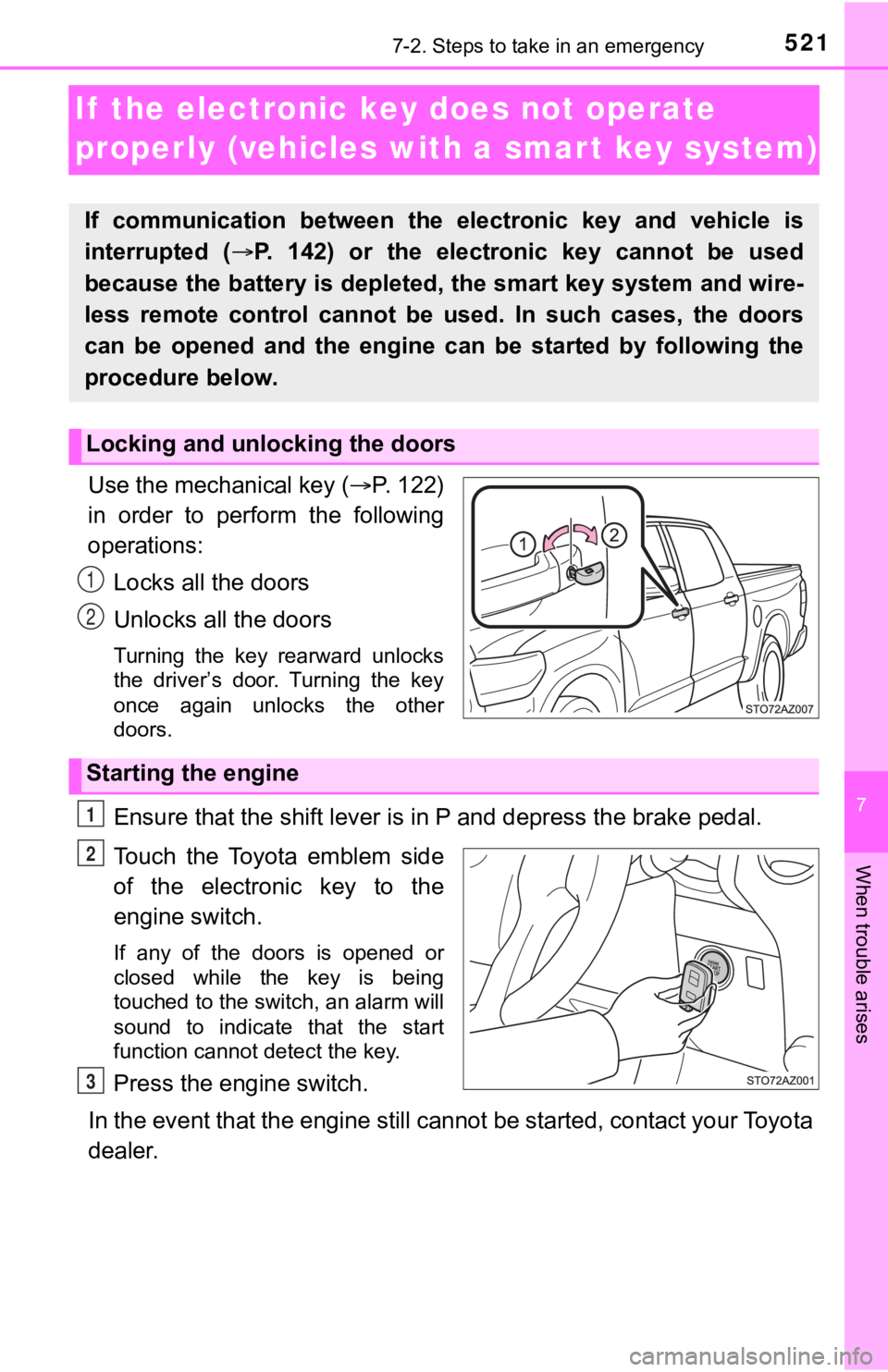
Use the mechanical key (P. 122)
in order to perform the following
operations:
Locks all the doors
Unlocks all the doors
Turning the key rearward unlocks
the driver’s door. Turning the key
once again unlocks the other
doors.
Ensure that the shift lever is in P and depress the brake pedal.
Touch the Toyota emblem side
of the electronic key to the
engine switch.
If any of the doors is opened or
closed while the key is being
touched to the switch, an alarm will
sound to indicate that the start
function cannot detect the key.
Press the engine switch.
In the event that the engine still cannot be started, contact your Toyota
dealer.
If communication between the electronic key and vehicle is
interrupted ( P. 142) or the electronic key cannot be used
because the battery is depleted, the smart key system and wire-
less remote control cannot be used. In such cases, the doors
can be opened and the engine c an be started by following the
procedure below.
Locking and unlocking the doors
1
2
Starting the engine
1
2
3
Page 525 of 608

5257-2. Steps to take in an emergency
7
When trouble arises
■When recharging or replacing the battery
●Vehicles with a smart key system: In some cases, it may not be possible to
unlock the doors using the smart key system when the battery is dis-
charged. Use the wireless remote control or the mechanical key to lock or
unlock the doors.
● The engine may not start on the first attempt after the battery has recharged
but will start normally after the second attempt. This is not a malfunction.
● Vehicles with a smart key system: The engine switch mode is mem orized by
the vehicle. When the battery is reconnected, the system will r eturn to the
mode it was in before the battery was discharged. Before discon necting the
battery, turn the engine switch off.
If you are unsure what mode the engine switch was in before the battery dis-
charged, be especially careful when reconnecting the battery.
WARNING
■ Avoiding battery fires or explosions
Observe the following precautions to prevent accidentally ignit ing the flam-
mable gas that may be emitted from the battery:
● Make sure each jumper cable is connected to the correct terminal and that
it is not unintentionally in contact with any other than the in tended terminal.
● Do not allow the + and - clamps of the jumper cables to come into contact
with each other.
● Do not smoke, use matches, cigarette lighters or allow open fla me near
the battery.
■ Battery precautions
The battery contains poisonous and corrosive acidic electrolyte , while
related parts contain lead and lead compounds. Observe the foll owing pre-
cautions when handling the battery:
● When working with the battery, always wear safety glasses and t ake care
not to allow any battery fluids (acid) to come into contact wit h skin, clothing
or the vehicle body.
● Do not lean over the battery.
● In the event that battery fluid comes into contact with the skin or eyes,
immediately wash the affected area with water and seek medical attention.
Place a wet sponge or cloth over the affected area until medica l attention
can be received.
● Always wash your hands after handling the battery support, term inals, and
other battery-related parts.
● Do not allow children near the battery.
Page 567 of 608
5678-2. Customization
8
Vehicle specifications
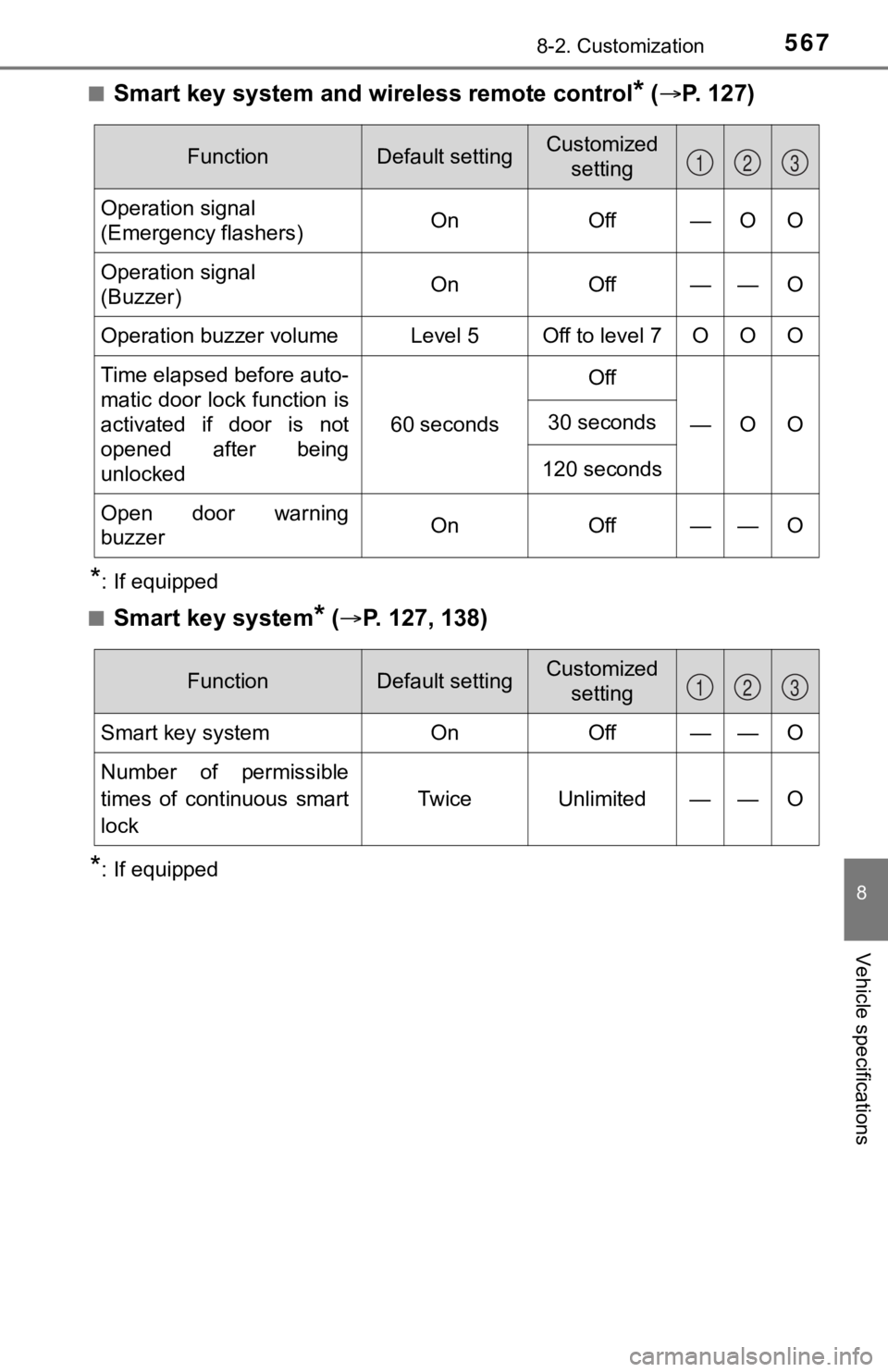
■Smart key system and wireless remote control* ( P. 1 2 7 )
*: If equipped
■
Smart key system* ( P. 127, 138)
*: If equipped
FunctionDefault settingCustomized
setting
Operation signal
(Emergency flashers) On Off — O O
Operation signal
(Buzzer) On Off — — O
Operation buzzer volume Level 5 Off to level 7 O O O
Time elapsed before auto-
matic door lock function is
activated if door is not
opened after being
unlocked 60 seconds
Off
—O O
30 seconds
120 seconds
Open door warning
buzzerOnOff — —O
123
FunctionDefault settingCustomized setting
Smart key systemOnOff——O
Number of permissible
times of continuous smart
lock Twice Unlimited — — O
123
Page 568 of 608

5688-2. Customization
■Wireless remote control* ( P. 1 2 8 )
*: If equipped
FunctionDefault settingCustomized
setting
Wireless remote control OnOff—— O
Unlocking operation Driver’s door
unlocked in one step, all doors
unlocked in two steps All doors
unlocked in
one step—O O
Automatic door lock func-
tion to be activated if door
is not opened after being
unlocked On Off
—— O
Time elapsed before auto-
matic door lock function is
activated if door is not
opened after being
unlocked60 seconds0 seconds
—O O30 seconds
120 seconds
Operation signal
(Emergency flashers) On Off
—O O
Operation signal
(Buzzer)On Off—— O
Panic function
OnOff—— O
Open door reminder
buzzer (When locking the
vehicle) On Off
—— O
123
Page 596 of 608
596Alphabetical index
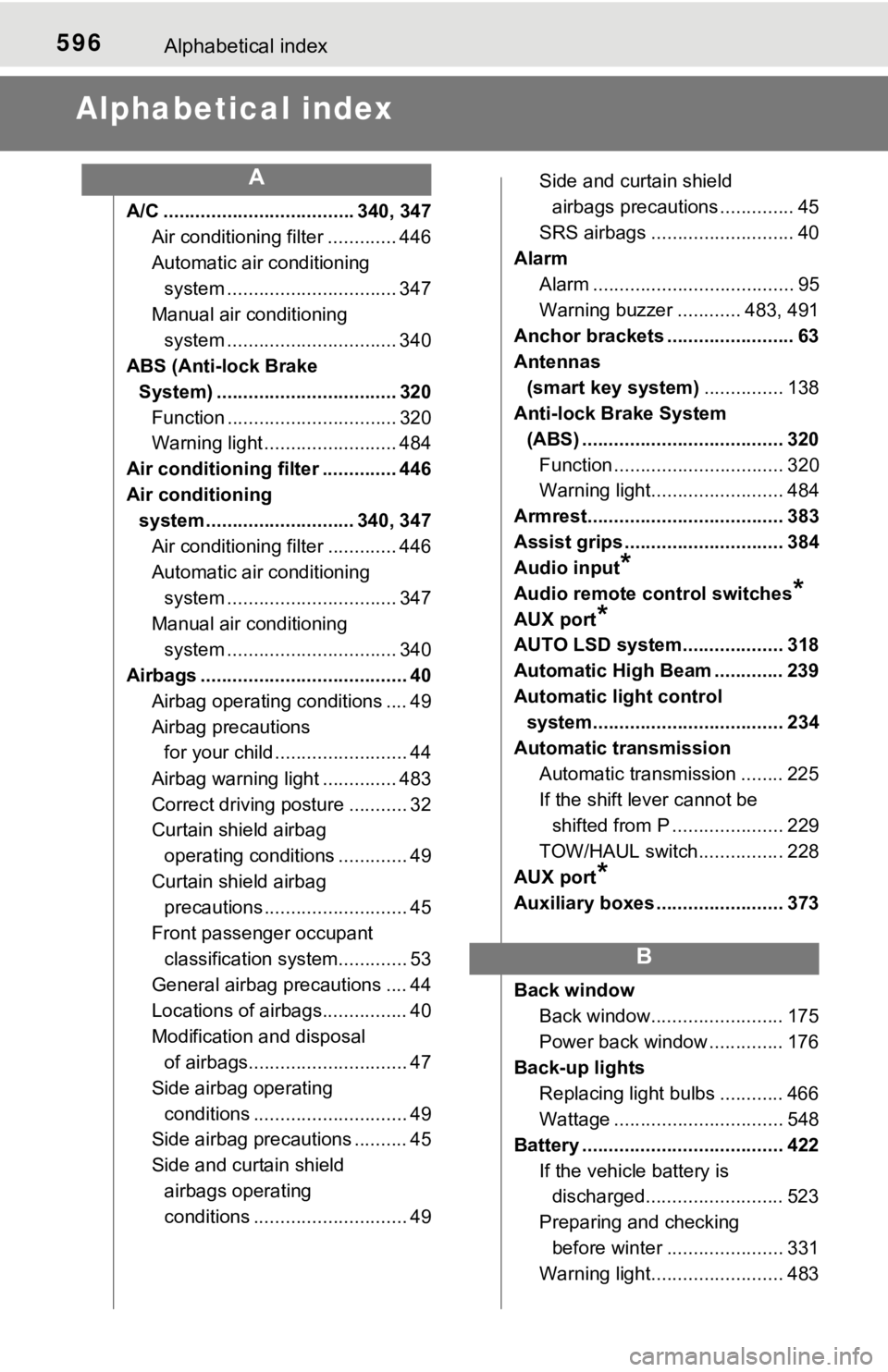
Alphabetical index
A/C .................................... 340, 347Air conditioning filter ............. 446
Automatic air conditioning system ......... ....................... 347
Manual air conditioning system ......... ....................... 340
ABS (Anti-lock Brake
System) .................................. 320 Function ................................ 320
Warning light ......................... 484
Air conditioning filter .............. 446
Air conditioning system ............................ 340, 347
Air conditioning filter ............. 446
Automatic air conditioning system ......... ....................... 347
Manual air conditioning system ......... ....................... 340
Airbags ....................................... 40
Airbag operating conditions .... 49
Airbag precautions for your child ......................... 44
Airbag warning light .............. 483
Correct driving posture ........... 32
Curtain shield airbag operating conditions ............. 49
Curtain shield airbag precautions ........................... 45
Front passenger occupant classification syst em............. 53
General airbag precautions .... 44
Locations of airbags................ 40
Modification and disposal of airbags.............................. 47
Side airbag operating conditions ............................. 49
Side airbag precautions .......... 45
Side and curtain shield
airbags operating
conditions ............................. 49 Side and curtain shield
airbags precautions .............. 45
SRS airbags ........................... 40
Alarm Alarm ...................................... 95
Warning buzzer ............ 483, 491
Anchor brackets ........................ 63
Antennas
(smart key system) ............... 138
Anti-lock Brake System
(ABS) ...................................... 320 Function ................................ 320
Warning light......................... 484
Armrest..................................... 383
Assist grips .............................. 384
Audio input
*
Audio remote control switches*
AUX port*
AUTO LSD system................... 318
Automatic High Beam ............. 239
Automatic light control system.................................... 234
Automatic transmission Automatic transmission ........ 225
If the shift lever cannot be shifted from P ..................... 229
TOW/HAUL switch................ 228
AUX port
*
Auxiliary boxes ........................ 373
Back window
Back window......................... 175
Power back window .............. 176
Back-up lights Replacing light bulbs ............ 466
Wattage ................................ 548
Battery ...................................... 422 If the vehicle battery is discharged.......................... 523
Preparing and checking before winter ...................... 331
Warning light......................... 483
A
B
Page 597 of 608
597Alphabetical index
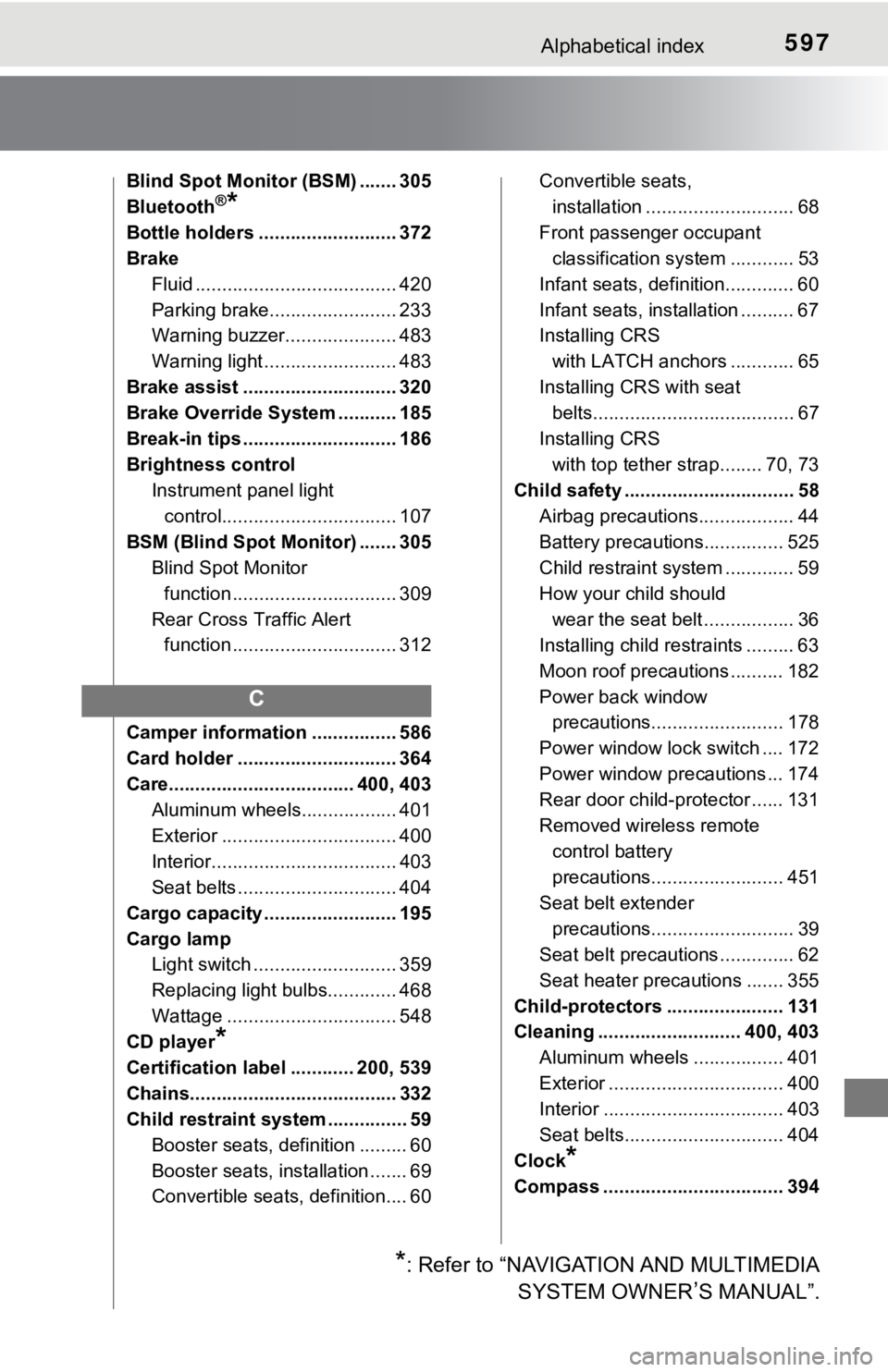
Blind Spot Monitor (BSM) ....... 305
Bluetooth®*
Bottle holders .......................... 372
BrakeFluid ...................................... 420
Parking brake........................ 233
Warning buzzer..................... 483
Warning light ......................... 483
Brake assist ............................. 320
Brake Override System ........... 185
Break-in tips ............................. 186
Brightness control Instrument panel light
control................................. 107
BSM (Blind Spot Monitor) ....... 305 Blind Spot Monitor
function ............................... 309
Rear Cross Traffic Alert function ............................... 312
Camper information ................ 586
Card holder .............................. 364
Care................................... 400, 403 Aluminum wheels.................. 401
Exterior ................................. 400
Interior................................... 403
Seat belts .............................. 404
Cargo capacity ......................... 195
Cargo lamp Light switch ........................... 359
Replacing light bulbs............. 468
Wattage ................................ 548
CD player
*
Certification label ............ 200, 539
Chains....................................... 332
Child restraint system ............... 59
Booster seats, definition ......... 60
Booster seats, installation ....... 69
Convertible seats, definition.... 60 Convertible seats,
installation ............................ 68
Front passenger occupant
classification syst em ............ 53
Infant seats, definition............. 60
Infant seats, installation .......... 67
Installing CRS with LATCH anchors ............ 65
Installing CRS with seat belts...................................... 67
Installing CRS with top tether strap........ 70, 73
Child safety ................................ 58
Airbag precautions.................. 44
Battery precautions............... 525
Child restraint system ............. 59
How your child should wear the seat belt ................. 36
Installing child restraints ......... 63
Moon roof precautions .......... 182
Power back window precautions......................... 178
Power window lock switch .... 172
Power window precautions ... 174
Rear door child-protector ...... 131
Removed wireless remote control battery
precautions......................... 451
Seat belt extender precautions........................... 39
Seat belt precautions .............. 62
Seat heater precautions ....... 355
Child-protectors ...................... 131
Cleaning ........................... 400, 403 Aluminum wheels ................. 401
Exterior ................................. 400
Interior .................................. 403
Seat belts.............................. 404
Clock
*
Compass .................................. 394
C
*: Refer to “NAVIGATION AND MULTIMEDIA SYSTEM OWNER
’S MANUAL”.