cruise control TOYOTA TUNDRA 2020 Owners Manual (in English)
[x] Cancel search | Manufacturer: TOYOTA, Model Year: 2020, Model line: TUNDRA, Model: TOYOTA TUNDRA 2020Pages: 608, PDF Size: 13.19 MB
Page 3 of 608
3
1
9 8
7 5 4
3
2
6
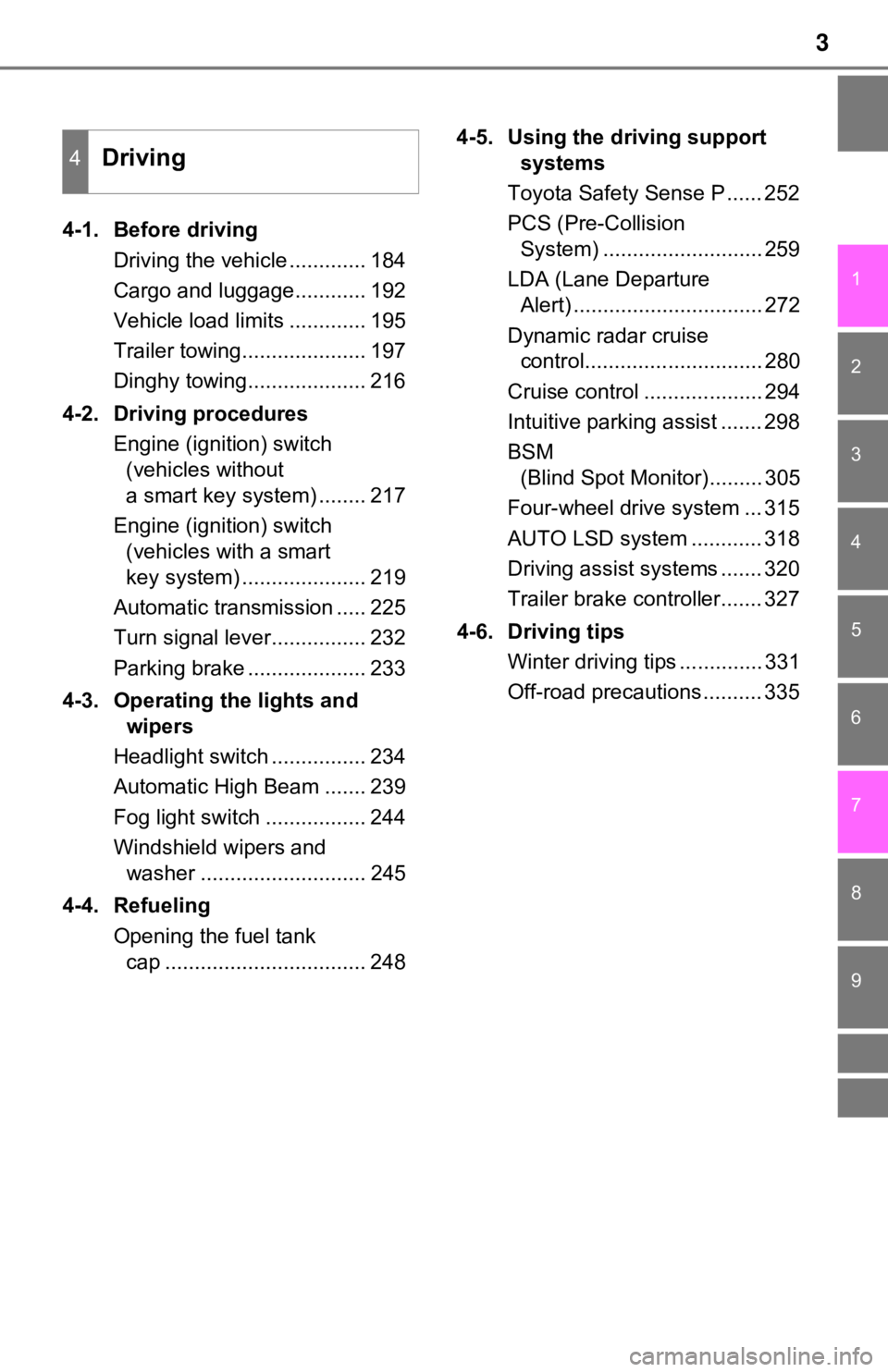
4-1. Before drivingDriving the vehicle ............. 184
Cargo and luggage............ 192
Vehicle load limits ............. 195
Trailer towing..................... 197
Dinghy towing.................... 216
4-2. Driving procedures Engine (ignition) switch (vehicles without
a smart key system) ........ 217
Engine (ignition) switch (vehicles with a smart
key system) ..................... 219
Automatic transmission ..... 225
Turn signal lever................ 232
Parking brake .................... 233
4-3. Operating the lights and wipers
Headlight switch ................ 234
Automatic High Beam ....... 239
Fog light switch ................. 244
Windshield wipers and washer ............................ 245
4-4. Refueling Opening the fuel tank cap .................................. 248 4-5. Using the driving support
systems
Toyota Safety Sense P ...... 252
PCS (Pre-Collision System) ........................... 259
LDA (Lane Departure Alert) ................................ 272
Dynamic radar cruise control.............................. 280
Cruise control .................... 294
Intuitive parking assist ....... 298
BSM (Blind Spot Monitor)......... 305
Four-wheel drive system ... 315
AUTO LSD system ............ 318
Driving assist systems ....... 320
Trailer brake controller....... 327
4-6. Driving tips Winter driving tips .............. 331
Off-road precautions .......... 335
4Driving
Page 9 of 608
9
The installation of a mobile two-way radio system in your vehicle could affect
electronic systems such as:
● Multiport fuel injection system/sequential multiport fuel injection system
● Toyota Safety Sense P (if equipped)
● Dynamic radar cruise control system (if equipped)
● Cruise control system (if equipped)
● Anti-lock brake system
● SRS airbag system
● Seat belt pretensioner system
Be sure to check with your Toyota dealer for precautionary meas ures or spe-
cial instructions regarding instal lation of a mobile two-way radio system.
The vehicle is equipped with sophisticated computers that will record certain
data, such as:
The recorded data varies according to the vehicle grade level and options
with which it is equipped
These computers do not record conversations or sounds, and only record
images outside of the vehicle in certain situations.
• Engine speed / Electric motor speed (traction motor speed)
• Accelerator status
• Brake status
• Vehicle speed
• Operation status of the driving assist systems, such as the AB S and pre-
collision system
• Images from the camera (available only when certain safety sys tems are
activated, which varies depending on the vehicle specifications).
●Data Transmission
Your vehicle may transmit the data recorded in these computers to Toyota
without notification to you.
Installation of a mobile two-way radio system
Vehicle data recording
Page 23 of 608
23Pictorial index
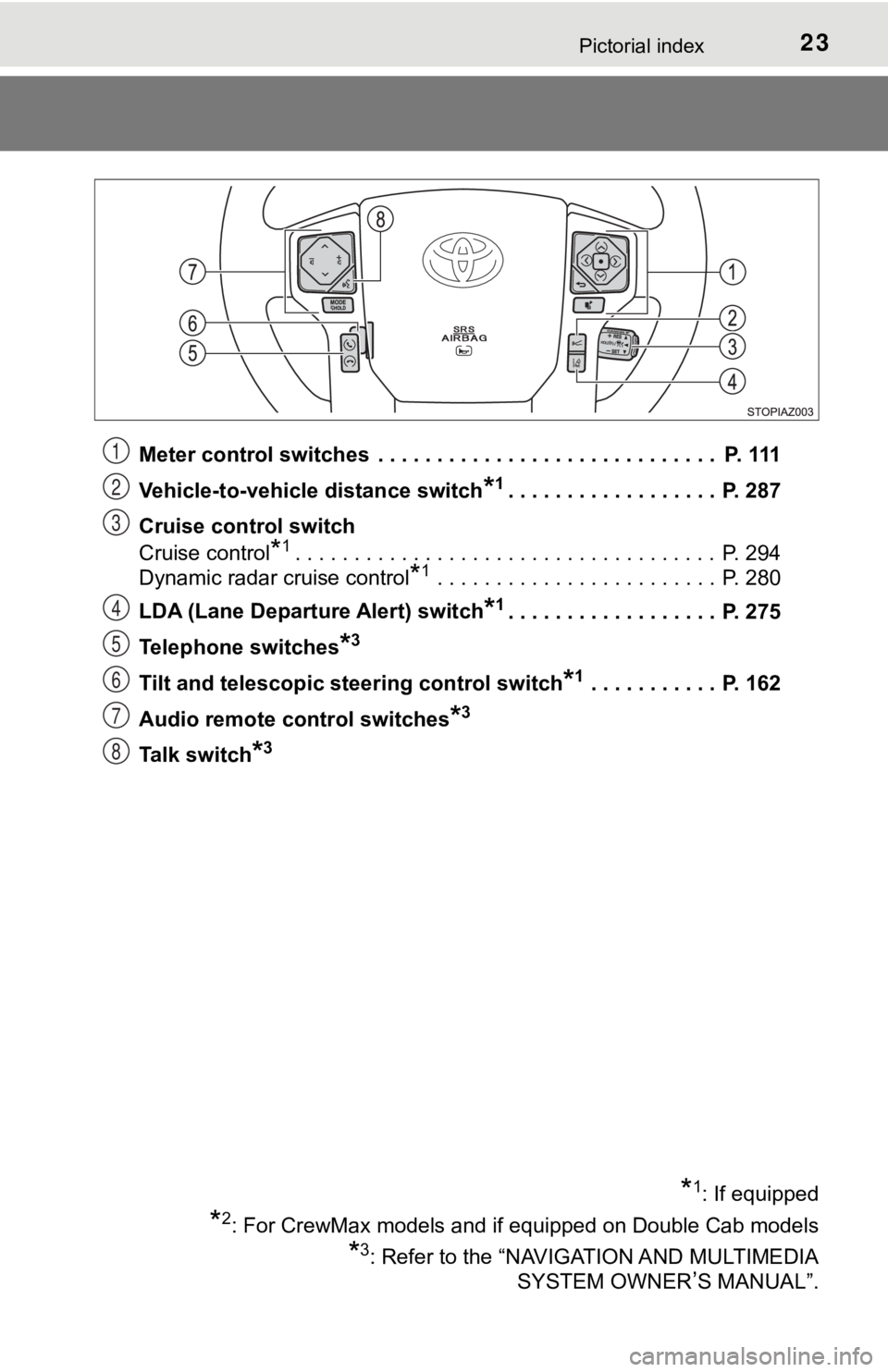
Meter control switches . . . . . . . . . . . . . . . . . . . . . . . . . . . . . P. 111
Vehicle-to-vehicle distance switch
*1. . . . . . . . . . . . . . . . . . P. 287
Cruise control switch
Cruise control
*1. . . . . . . . . . . . . . . . . . . . . . . . . . . . . . . . . . . . P. 294
Dynamic radar cruise control
*1 . . . . . . . . . . . . . . . . . . . . . . . . P. 280
LDA (Lane Departure Alert) switch
*1. . . . . . . . . . . . . . . . . . P. 275
Telephone switches
*3
Tilt and telescopic steering control switch*1 . . . . . . . . . . . P. 162
Audio remote control switches
*3
Talk switch*3
*1: If equipped
*2: For CrewMax models and if equipped on Double Cab models
*3: Refer to the “NAVIGATION AND MULTIMEDIA SYSTEM OWNER
’S MANUAL”.
1
2
3
4
5
6
7
8
Page 102 of 608
1022. Instrument cluster
*1: These lights turn on when the engine switch is turned to ON to indicate thata system check is being performed. They will turn off after the engine is
started, or after a few seconds. There may be a malfunction in a system if
the lights do not come on, or if the lights do not turn off. Ha ve the vehicle
inspected by your Toyota dealer for details.
*2: The light comes on to indicate a malfunction.
*3: The light flashes to indicate a malfunction.
*4: The light illuminates on the multi-information display.
*5: If equipped
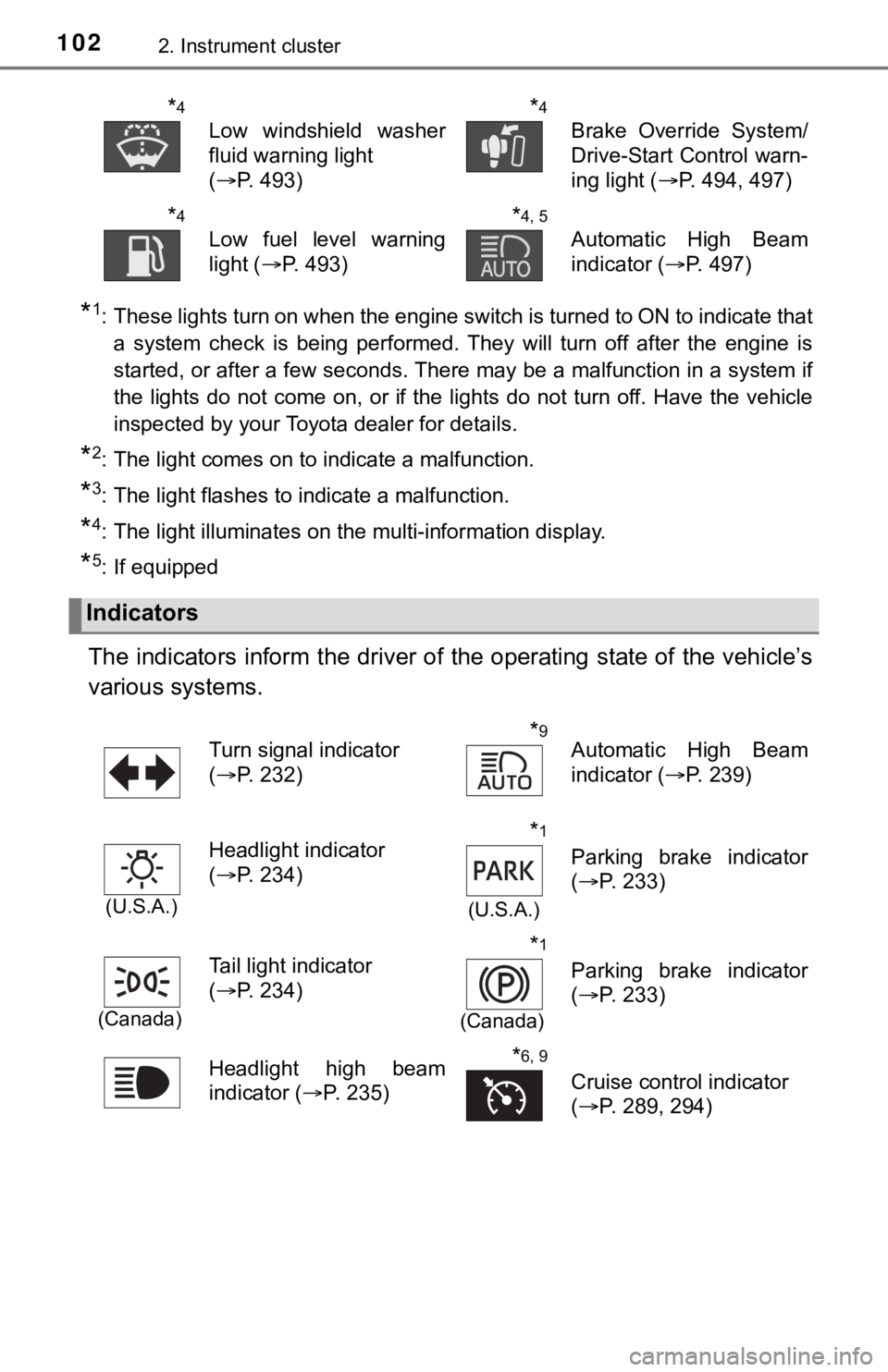
The indicators inform the driver of the operating state of the vehicle’s
various systems.
*4
Low windshield washer
fluid warning light
( P. 493)
*4
Brake Override System/
Drive-Start Control warn-
ing light ( P. 494, 497)
*4
Low fuel level warning
light (P. 493)
*4, 5
Automatic High Beam
indicator ( P. 497)
Indicators
Turn signal indicator
(P. 232)*9Automatic High Beam
indicator ( P. 239)
(U.S.A.)
Headlight indicator
(P. 234)*1
(U.S.A.)
Parking brake indicator
(P. 233)
(Canada)
Tail light indicator
(P. 234)*1
(Canada)
Parking brake indicator
(P. 233)
Headlight high beam
indicator ( P. 235)
*6, 9
Cruise control indicator
(P. 289, 294)
Page 103 of 608
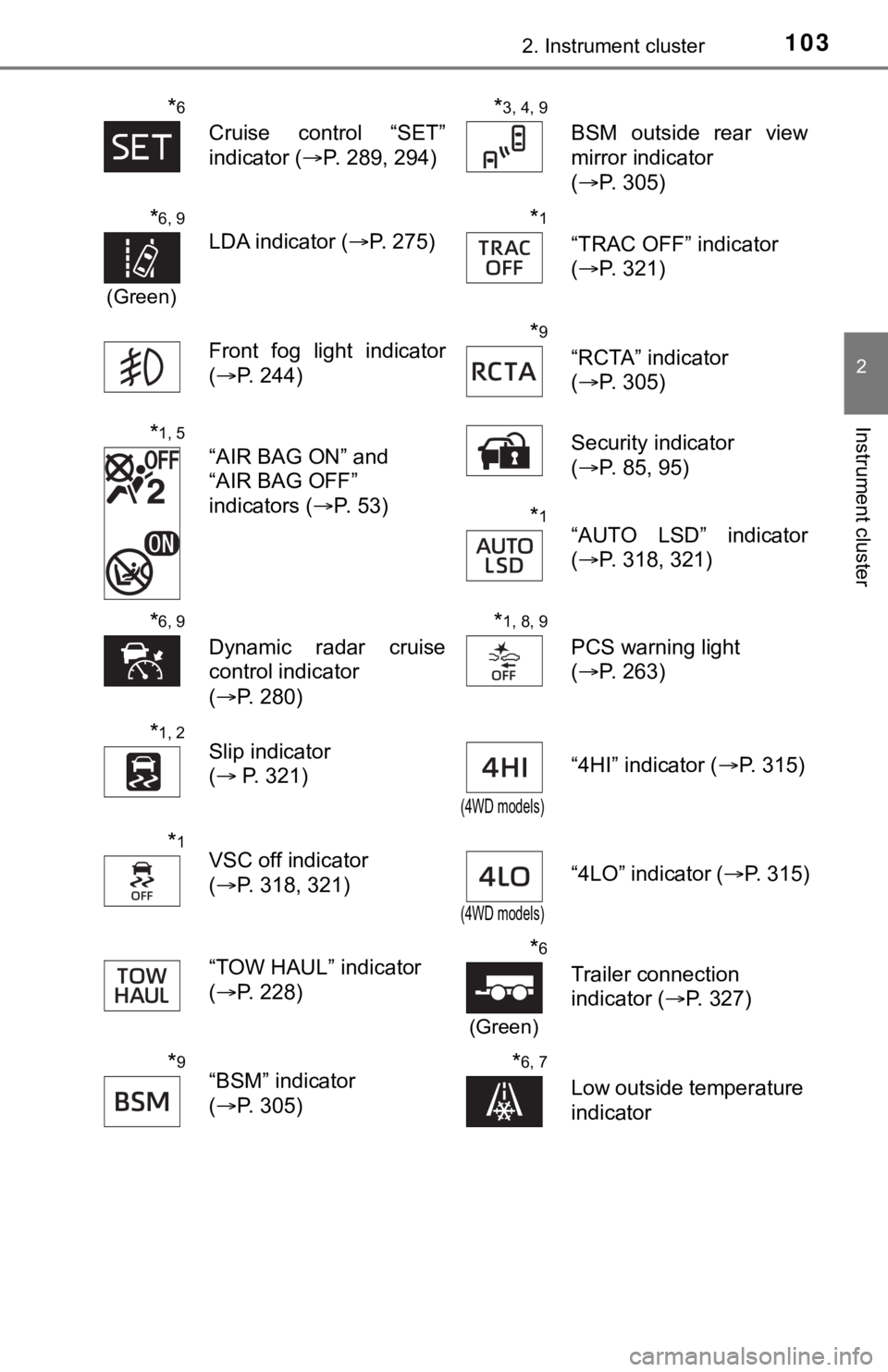
1032. Instrument cluster
2
Instrument cluster
*6
Cruise control “SET”
indicator (P. 289, 294)
*3, 4, 9
BSM outside rear view
mirror indicator
(P. 305)
*6, 9
(Green)
LDA indicator ( P. 275)
*1
“TRAC OFF” indicator
(P. 321)
Front fog light indicator
( P. 244)
*9
“RCTA” indicator
(P. 305)
*1, 5
“AIR BAG ON” and
“AIR BAG OFF”
indicators ( P. 53) Security indicator
(
P. 85, 95)
*1“AUTO LSD” indicator
(P. 318, 321)
*6, 9
Dynamic radar cruise
control indicator
(P. 280)
*1, 8, 9
PCS warning light
(P. 263)
*1, 2Slip indicator
( P. 321)
(4WD models)
“4HI” indicator ( P. 315)
*1VSC off indicator
(P. 318, 321)
(4WD models)
“4LO” indicator ( P. 315)
“TOW HAUL” indicator
( P. 228)
*6
(Green)
Trailer connection
indicator ( P. 327)
*9“BSM” indicator
(P. 305)*6, 7
Low outside temperature
indicator
Page 110 of 608
1102. Instrument cluster
Multi-infor mation display
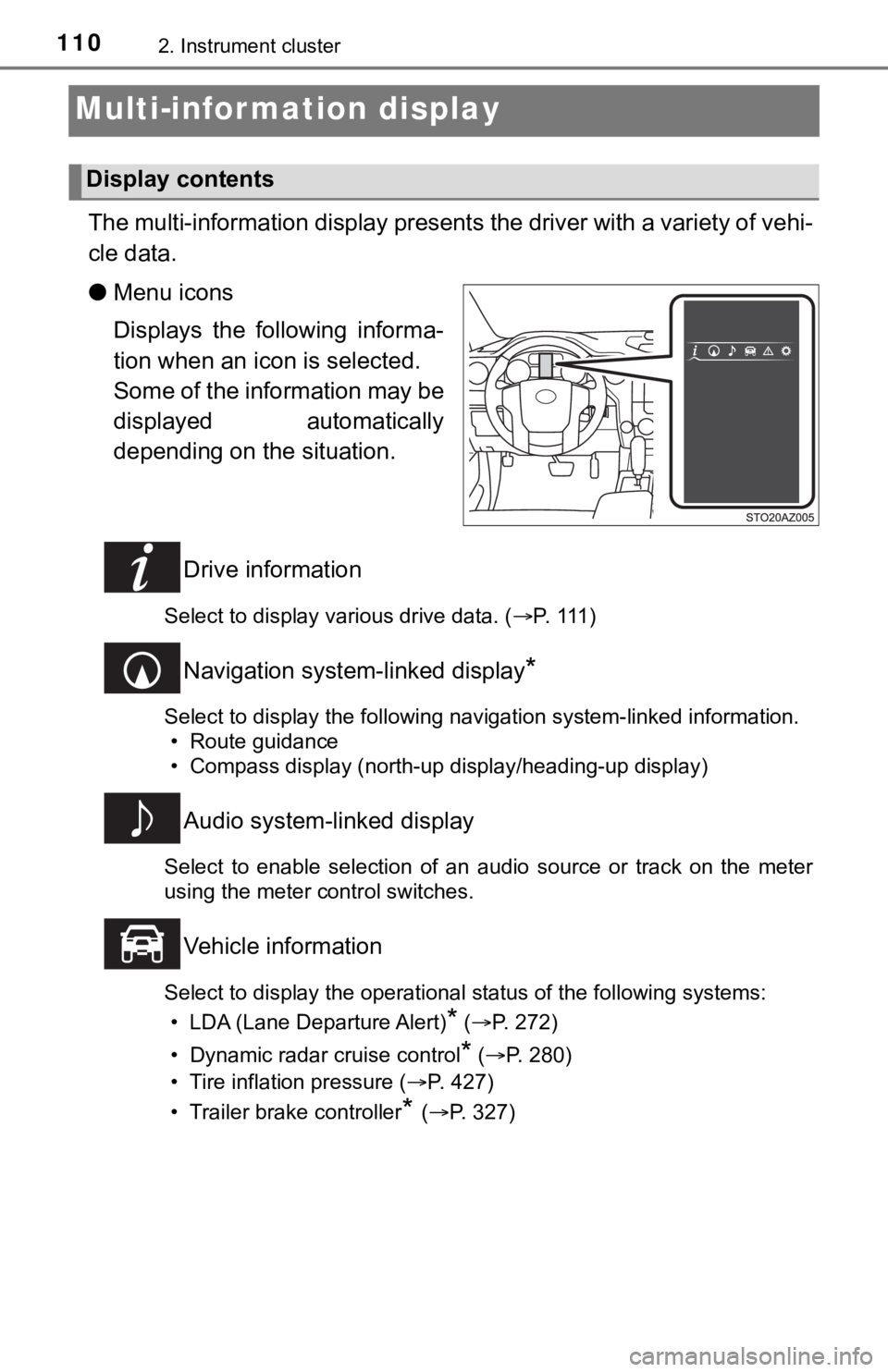
The multi-information display presents the driver with a variety of vehi-
cle data.
● Menu icons
Displays the following informa-
tion when an icon is selected.
Some of the information may be
displayed automatically
depending on the situation.
Drive information
Select to display various drive data. ( P. 1 1 1 )
Navigation system-linked display*
Select to display the following navigation system-linked information.
• Route guidance
• Compass display (north-up display/heading-up display)
Audio system-linked display
Select to enable selection of an audio source or track on the m eter
using the meter control switches.
Vehicle information
Select to display the operational status of the following syste ms:
• LDA (Lane Departure Alert)
* ( P. 272)
• Dynamic radar cruise control
* ( P. 280)
• Tire inflation pressure ( P. 427)
• Trailer brake controller
* ( P. 327)
Display contents
Page 183 of 608

183
4Driving
4-1. Before drivingDriving the vehicle ............. 184
Cargo and luggage ........... 192
Vehicle load limits ............. 195
Trailer towing..................... 197
Dinghy towing ................... 216
4-2. Driving procedures Engine (ignition) switch(vehicles without
a smart key system) ........ 217
Engine (ignition) switch (vehicles with
a smart key system) ........ 219
Automatic transmission ..... 225
Turn signal lever................ 232
Parking brake .................... 233
4-3. Operating the lights and wipers
Headlight switch ................ 234
Automatic High Beam ....... 239
Fog light switch ................. 244
Windshield wipers and washer ............................ 245
4-4. Refueling Opening the fuel tank cap .................................. 248 4-5. Using the driving support
systems
Toyota Safety Sense P ..... 252
PCS (Pre-Collision System)........................... 259
LDA (Lane Departure Alert) ............................... 272
Dynamic radar cruise control ............................. 280
Cruise control .................... 294
Intuitive parking assist....... 298
BSM (Blind Spot Monitor) ........ 305
Four-wheel drive system ... 315
AUTO LSD system............ 318
Driving assist systems ...... 320
Trailer brake controller ...... 327
4-6. Driving tips Winter driving tips ............. 331
Off-road precautions ......... 335
Page 214 of 608

2144-1. Before driving
WARNING
■Trailer towing precautions
To tow a trailer safely, use extreme care and drive the vehicle in accordance
with the trailer’s characteristics and operating conditions. Failure to do so
could cause an accident resulting in death or serious injury. V ehicle stability
and braking performance are affected by trailer stability, brak e setting and
performance, and the hitch. Your vehicle will handle differentl y when towing
a trailer.
■ To avoid accident or injury
● Do not exceed the TWR, unbraked TWR, GCWR, GVWR or GAWR.
● If the gross trailer weight is over 2000 lb. (907 kg), a sway control device
with sufficient capacity is required.
● If the gross trailer weight is over 5000 lb. (2268 kg), a weigh t distributing
hitch with sufficient capacity is required.
● Adjust the tongue weight within the appropriate range. Place he avier loads
as close to the trailer axle as possible.
● Do not exceed 65 mph (104 km/h), the posted towing speed limit or the
speed limit for your trailer as set forth in your trailer owner ’s manual,
whichever is lowest. Slow down sufficiently before making a turn, in cross-
winds, on wet or slippery surface, etc., to help avoid an accident. If you
experience a vehicle-trailer instability from reducing a certai n speed, slow
down and make sure you keep your vehicle speed under the speed of
which you experience the instability.
● Do not make jerky, abrupt or sharp turns.
● Do not apply the brakes suddenly as you may skid, resulting in jackknifing
and loss of vehicle control. This is especially true on wet or slippery sur-
faces.
● Do not exceed the trailer hitch assembly weight, gross vehicle weight,
gross axle weight and trailer tongue weight capacities.
● Do not use cruise control when towing.
● Slow down and downshift before descending steep or long downhill
grades. Do not make sudden downshifts while descending steep or long
downhill grades.
● Vehicle-trailer instability is more likely on steep long downhi lls. Before
descending steep or long downhill grades, slow down and downshi ft. Do
not make sudden downshifts when descending steep or long downhi ll
grades. Avoid holding the brake pedal down too long or applying the
brakes too frequently. This could cause the brakes to overheat and result
in reduced braking efficiency.
● Do not tow a trailer when the temporary spare tire is installed on your vehi-
cle.
Page 229 of 608

2294-2. Driving procedures
4
Driving
■AI-SHIFT
AI-SHIFT automatically selects the suitable gear according to t he driver per-
formance and driving conditions.
AI-SHIFT automatically operates when the shift lever is in the D position.
(Shifting the shift lever to the S position cancels the functio n.)
■ When driving with cruise cont rol activated (if equipped)
Even when performing the following actions with the intent of e nabling engine
braking, engine braking will not activate while driving in S mo de and down-
shifting to 5 or 4 because cruise control will not be canceled. (P. 280 294)
■ Shift lock system
The shift lock system is a system to prevent accidental operation of the shift
lever in starting.
The shift lever can be shifted from P only when the engine swit ch is in ON
and the brake pedal is being depressed.
■ If the shift lever cannot be shifted from P
First, check whether the brake pedal is being depressed.
If the shift lever cannot be shifted with your foot on the brak e pedal, there may
be a problem with the shift lock system. Have the vehicle inspected by your
Toyota dealer immediately.
The following steps may be used as an emergency measure to ensu re that
the shift lever can be shifted.
Releasing the shift lock:
Set the parking brake.
Turn the engine switch to OFF.
Depress the brake pedal.
1
2
3
Page 252 of 608
2524-5. Using the driving support systems
Toyota Safety Sense P
◆PCS (Pre-Collision System)
P. 2 5 9
◆LDA (Lane Departure Alert)
P. 2 7 2
◆Automatic High Beam
P. 2 3 9
◆Dynamic radar cruise control
P. 2 8 0
: If equipped
The Toyota Safety Sense P consists of the following drive assis t
systems and contributes to a safe and comfortable driving expe-
rience:
WARNING
■ Toyota Safety Sense P
The Toyota Safety Sense P is designed to operate under the assu mption
that the driver will drive safely, and is designed to help redu ce the impact to
the occupants and the vehicle in the case of a collision or ass ist the driver in
normal driving conditions.
As there is a limit to the degree of recognition accuracy and control perfor-
mance that this system can provide, do not overly rely on this system. The
driver is always responsible for paying attention to the vehicl e’s surround-
ings and driving safely.