key battery TOYOTA TUNDRA 2020 Owners Manual (in English)
[x] Cancel search | Manufacturer: TOYOTA, Model Year: 2020, Model line: TUNDRA, Model: TOYOTA TUNDRA 2020Pages: 608, PDF Size: 13.19 MB
Page 5 of 608

5
1
9 8
7 5 4
3
2
6
6-1. Maintenance and careCleaning and protecting the vehicle exterior .......... 400
Cleaning and protecting the vehicle interior ........... 403
6-2. Maintenance Maintenance requirements ................... 406
General maintenance ........ 408
Emission inspection and maintenance (I/M)
programs ......................... 411
6-3. Do-it-yourself maintenance Do-it-yourself service precautions ..................... 412
Hood.................................. 414
Engine compartment ......... 415
Tires .................................. 426
Tire inflation pressure........ 440
Wheels .............................. 443
Air conditioning filter .......... 446
Wireless remote control/ electronic key battery ...... 449
Checking and replacing fuses ............................... 452
Light bulbs ......................... 455 7-1. Essential information
Emergency flashers ........... 472
If your vehicle has to be stopped in
an emergency.................. 473
If the vehicle is trapped in rising water .................. 475
7-2. Steps to take in an emergency
If your vehicle needs to be towed .......................... 476
If you think something is wrong............................... 481
Fuel pump shut off system ............................. 482
If a warning light turns on or a warning buzzer
sounds ............................. 483
If a warning message is displayed ......................... 491
If you have a flat tire .......... 504
If the engine will not start ................................. 519
If the electronic key does not operate properly
(vehicles with a smart
key system) .................... 521
If the vehicle battery is discharged ....................... 523
If your vehicle overheats.... 527
If the vehicle becomes stuck ................................ 530
6Maintenance and care7When trouble arises
Page 122 of 608
1223-1. Key information
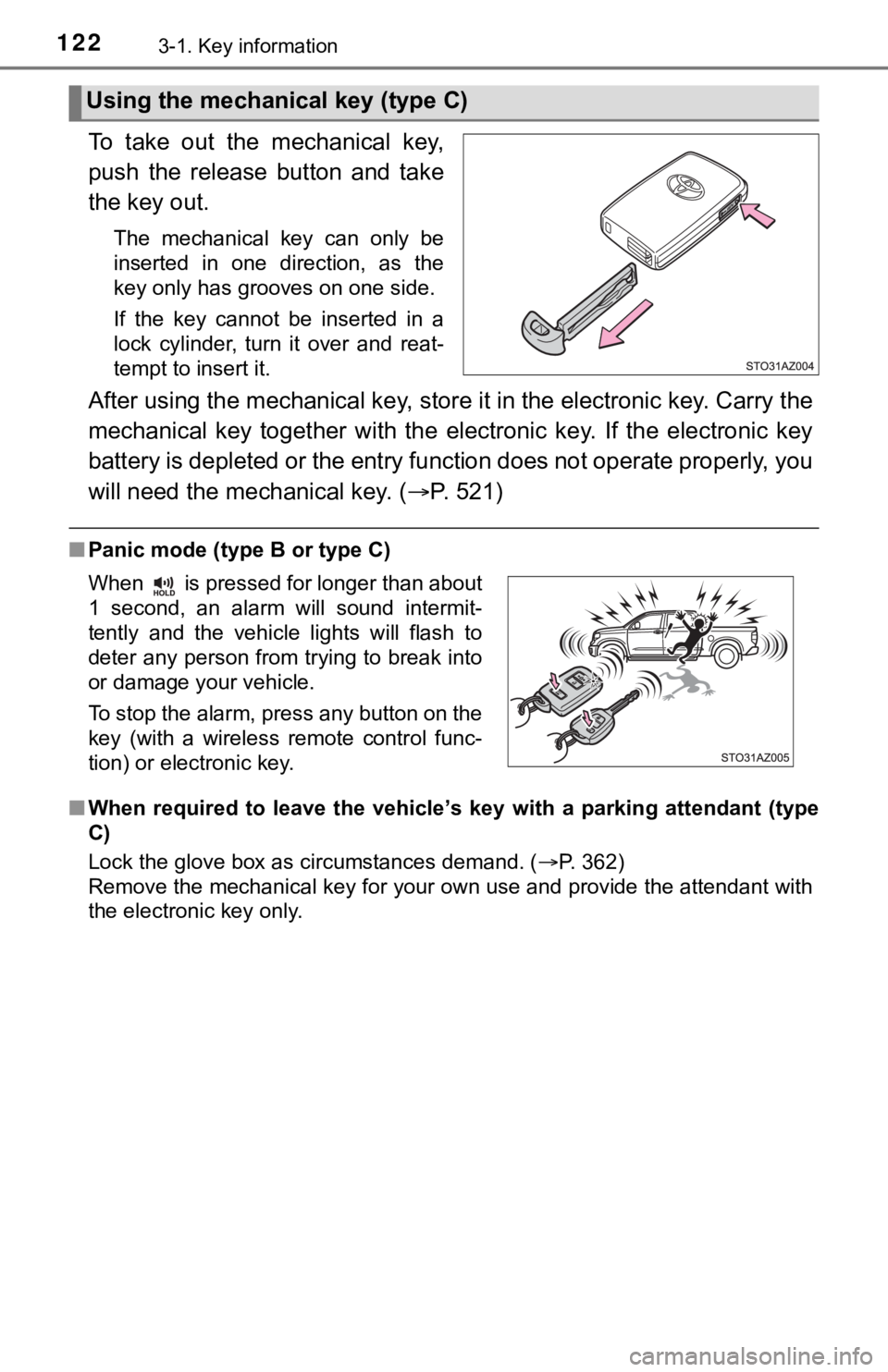
To take out the mechanical key,
push the release button and take
the key out.
The mechanical key can only be
inserted in one direction, as the
key only has grooves on one side.
If the key cannot be inserted in a
lock cylinder, turn it over and reat-
tempt to insert it.
After using the mechanical key, store it in the electronic key. Carry the
mechanical key together with the electronic key. If the electronic key
battery is depleted or the ent ry function does not operate prop erly, you
will need the mechanical key. ( P. 521)
■Panic mode (type B or type C)
■ When required to leave the vehicle ’s key with a parking attendant (type
C)
Lock the glove box as circumstances demand. ( P. 362)
Remove the mechanical key for your own use and provide the attendant with
the electronic key only.
Using the mechanical key (type C)
When is pressed for longer than about
1 second, an alarm will sound intermit-
tently and the vehicle lights will flash to
deter any person from trying to break into
or damage your vehicle.
To stop the alarm, press any button on the
key (with a wireless remote control func-
tion) or electronic key.
Page 124 of 608

1243-1. Key information
■Key battery depletion (type B or type C)
Type B
If the wireless remote control function does not operate, the b attery may be
depleted. Replace the battery when necessary. ( P. 449)
Type C
● The standard battery life is 1 to 2 years.
● If the battery becomes low, an alarm will sound in the cabin wh en the engine
stops. ( P. 501)
● As the electronic key always receives radio waves, the battery will become
depleted even if the electronic key is not used. The following symptoms indi-
cate that the electronic key battery may be depleted. Replace the battery
when necessary. ( P. 449)
• The smart key system or the wirel ess remote control does not oper-
ate.
• The detection area becomes smaller.
• The LED indicator on the key surface does not turn on.
●To avoid serious deterioration, do not leave the electronic key within 1 m
(3 ft.) of the following electrical appliances that produce a m agnetic field:
•TVs
• Personal computers
• Cellular phones, cordless phones and battery chargers
• Recharging cellular phones or cordless phones
• Table lamps
• Induction cookers
■Replacing the battery (type B or type C)
P. 449
■ Confirmation of the registered key number
The number of keys already registered to the vehicle can be confirmed. Ask
your Toyota dealer for details.
■ Customization (type B or type C)
Settings (e.g. wireless remote control system) can be changed.
(Customizable features: P. 562)
Page 125 of 608

1253-1. Key information
3
Operation of each component
■Certification for wireless remote control (type B)
For vehicles sold in the U.S.A.
FCC ID: GQ4-52T
FCC ID: GQ4-49R
NOTE:
This device complies with part 15 of the FCC Rules. Operation is subject to
the following two conditions: (1) This device may not cause har mful interfer-
ence, and (2) this device must accept any interference received, including
interference that may cause undesired operation.
FCC WARNING:
Changes or modifications not expressly approved by the party re sponsible for
compliance could void the user’s authority to operate the equip ment.
The FCC ID/IC Certification number is affixed inside the equipment. You can
find the ID/number when replacing the battery.
For vehicles sold in Canada
NOTE:
This device complies with Industry Canada’s license-exempt RSSs . Opera-
tion is subject to the following two conditions: (1) This devic e may not cause
interference; and (2) This device must accept any interference, including
interference that may cause undesired operation of the device.
The FCC ID/IC Certification number is affixed inside the equipment. You can
find the ID/number when replacing the battery.
NOTE:
Le présent appareil est conforme aux CNR d’Industrie Canada app licables
aux appareils radio exempts de licence. L’exploitation est auto risée aux deux
conditions suivantes:(1) l’appareil ne doit pas produire de bro uillage; (2) l’util-
isateur de l’appareil doit accepter tout brouillage radioélectr ique subi, même
si le brouillage est susceptible d’en compromettre le fonctionn ement.
L’identification FCC/Ie numéro d’accréditation IC est apposé(e) à l’intérieur
de l’appareil.
■ Certification for wireless remote control (type C)
P. 145
Page 129 of 608
1293-2. Opening, closing and locking the doors
3
Operation of each component
■Operation signals (vehicles with a wireless remote control or s mart key
system)
A buzzer sounds and the emergency flashers flash to indicate th at the doors
have been locked/unlocked. (Locked: once; Unlocked: twice)
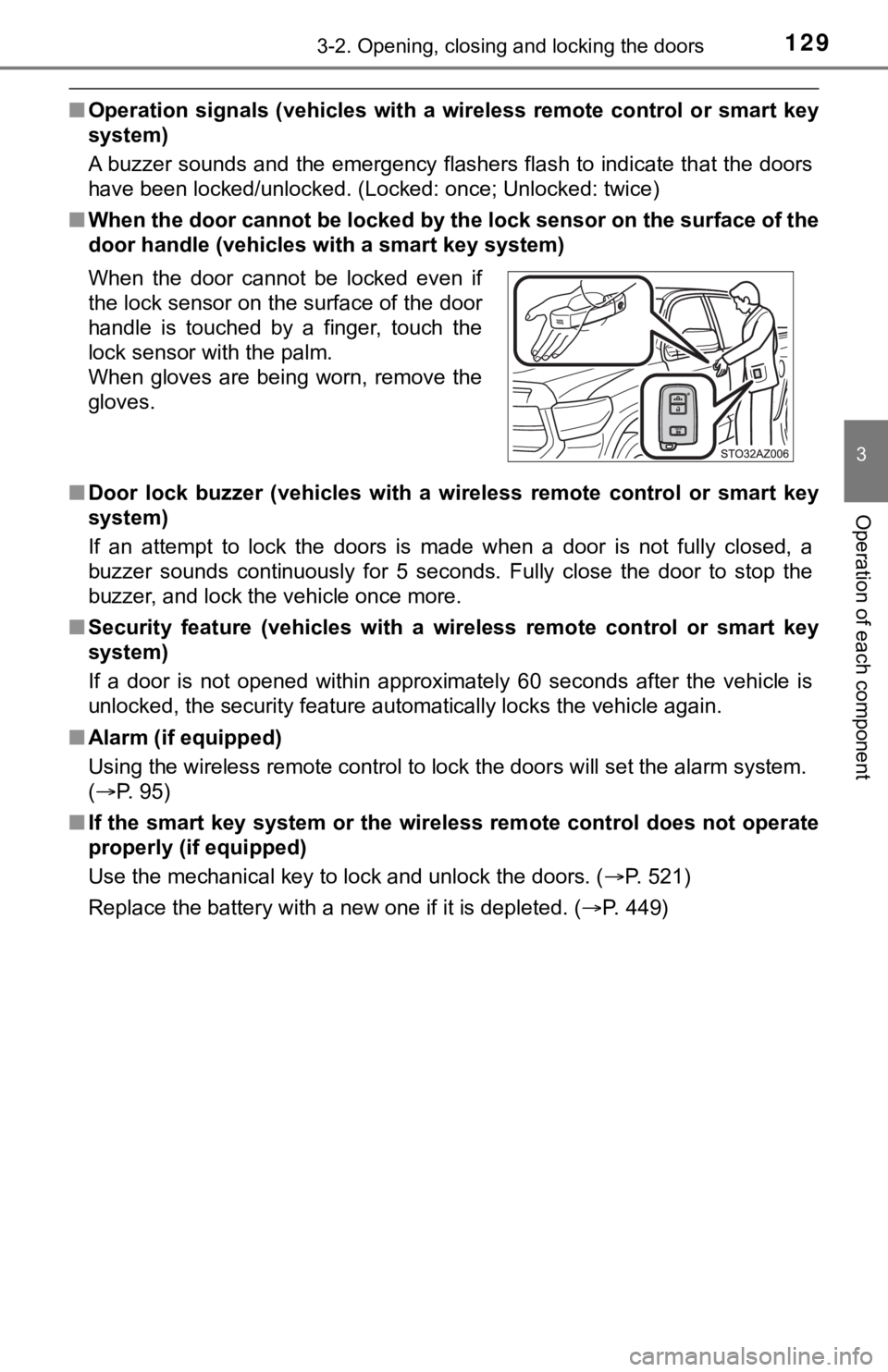
■ When the door cannot be locked by the lock sensor on the surface of the
door handle (vehicles with a smart key system)
■ Door lock buzzer (vehicles with a wireless remote control or sm art key
system)
If an attempt to lock the doors is made when a door is not full y closed, a
buzzer sounds continuously for 5 seconds. Fully close the door to stop the
buzzer, and lock the vehicle once more.
■ Security feature (vehicles with a wireless remote control or sm art key
system)
If a door is not opened within approximately 60 seconds after t he vehicle is
unlocked, the security feature automatically locks the vehicle again.
■ Alarm (if equipped)
Using the wireless remote control to lock the doors will set th e alarm system.
( P. 95)
■ If the smart key system or the wireless remote control does not operate
properly (if equipped)
Use the mechanical key to lock and unlock the doors. ( P. 521)
Replace the battery with a new one if it is depleted. ( P. 449)
When the door cannot be locked even if
the lock sensor on the surface of the door
handle is touched by a finger, touch the
lock sensor with the palm.
When gloves are being worn, remove the
gloves.
Page 141 of 608
1413-2. Opening, closing and locking the doors
3
Operation of each component
■Battery-saving function
The battery-saving function will be activated in order to preve nt the electronic
key battery and the battery from being discharged while the veh icle is not in
operation for a long time.
● In the following situations, the smart key system may take some time to
unlock the doors.
• The electronic key has been left in an area of approximately 6 ft. (2 m) of
the outside of the vehicle for 10 minutes or longer.
• The smart key system has not been used for 5 days or longer.
● If the smart key system has not been used for 14 days or longer , the doors
cannot be unlocked at any door except the driver’s door. In thi s case, take
hold of the driver’s door handle, or use the wireless remote co ntrol or the
mechanical key, to unlock the doors.
The system will resume operation when
● The vehicle is locked using the door handle lock switch when ca rrying the
electronic key on your person.
● The vehicle is locked/unlocked using the wireless remote contro l. (P. 128)
● The vehicle is locked/unlocked using the mechanical key. ( P. 521)
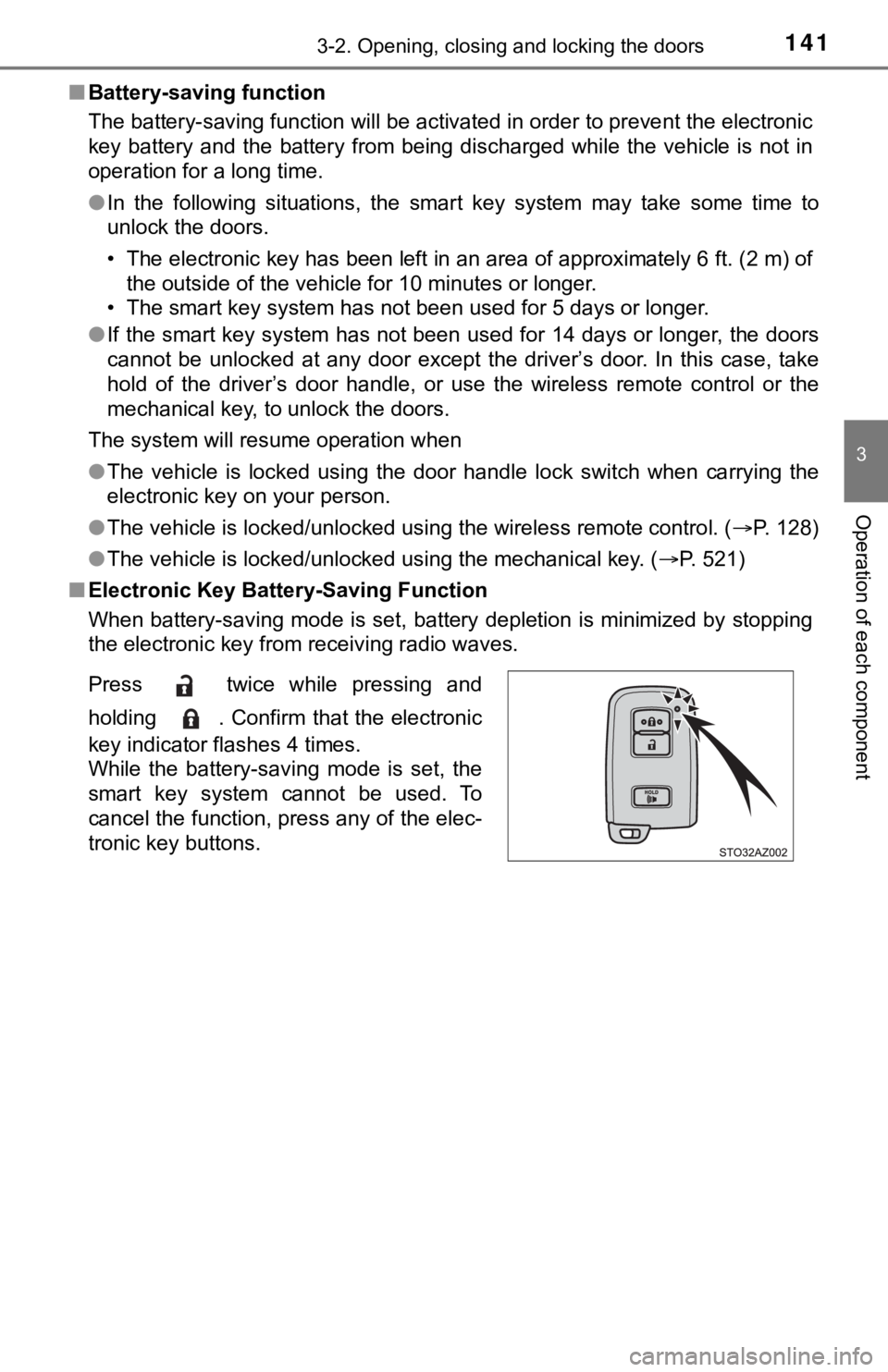
■ Electronic Key Battery-Saving Function
When battery-saving mode is set, battery depletion is minimized by stopping
the electronic key from receiving radio waves.
Press twice while pressing and
holding . Confirm that the electronic
key indicator flashes 4 times.
While the battery-saving mode is set, the
smart key system cannot be used. To
cancel the function, press any of the elec-
tronic key buttons.
Page 142 of 608

1423-2. Opening, closing and locking the doors
■Conditions affecting operation
The smart key system uses weak radio waves. In the following si tuations, the
communication between the electronic key and the vehicle may be affected,
preventing the smart key system, wireless remote control and en gine immobi-
lizer system from operating properly. (Ways of coping: P. 521)
● When the electronic key battery is depleted
● Near a TV tower, electric power plant, gas station, radio stati on, large dis-
play, airport or other facility that generates strong radio wav es or electrical
noise
● When carrying a portable radio, cellular phone, cordless phone or other
wireless communication device
● When the electronic key is in contact with, or is covered by th e following
metallic objects
• Cards to which aluminum foil is attached
• Cigarette boxes that have aluminum foil inside
• Metallic wallets or bags
• Coins
• Hand warmers made of metal
• Media such as CDs and DVDs
● When multiple electronic keys are in the vicinity
● When other wireless keys (that emit radio waves) are being used nearby
● When carrying the electronic key together with the following devices that
emit radio waves
• Another vehicle’s electronic key or a wireless key that emits radio waves
• Personal computers or personal digital assistants (PDAs)
• Digital audio players
• Portable game systems
● If window tint with a metallic content or metallic objects are attached to the
back window
● When the electronic key is placed near a battery charger or ele ctronic
devices
■ Note for the entry function
●Even when the electronic key is within the effective range (detection areas),
the system may not operate properly in the following cases:
• The electronic key is too close to the window or outside door handle, near
the ground, or in a high place when the doors are locked or unl ocked.
• The electronic key is on the instrument panel or floor, or in the console
box or glove box when the engine is started or engine switch mo des are
changed.
Page 143 of 608

1433-2. Opening, closing and locking the doors
3
Operation of each component
●Do not leave the electronic key on top of the instrument panel or near the
door pockets when exiting the vehicle. Depending on the radio w ave recep-
tion conditions, it may be detected by the antenna outside the cabin and the
door will become lockable from the outside, possibly trapping the electronic
key inside the vehicle.
● As long as the electronic key is within the effective range, th e doors may be
locked or unlocked by anyone. However, only the doors detecting the elec-
tronic key can be used to unlock the vehicle.
● Even if the electronic key is not inside the vehicle, it may be possible to start
the engine if the electronic key is near the window.
● The doors may unlock or lock if a large amount of water splashes on the
door handle, such as in the rain or in a car wash, when the electronic key is
within the effective range. (The doors will automatically be lo cked after
approximately 60 seconds if the doors are not opened and closed.)
● If the wireless remote control is used to lock the doors when t he electronic
key is near the vehicle, there is a possibility that the door m ay not be
unlocked by the entry function. (Use the wireless remote contro l to unlock
the doors.)
● Touching the door lock or unlock sensor while wearing gloves ma y prevent
lock or unlock operation. Remove the gloves and touch the lock sensor
again.
● When the lock operation is performed using the lock sensor, rec ognition sig-
nals will be shown up to two consecutive times. After this, no recognition
signals will be given.
● If the door handle becomes wet while the electronic key is with in the effec-
tive range, the door may lock and unlock repeatedly. In this case, follow the
following correction procedures to wash the vehicle:
• Place the electronic key in a location 6 ft. (2 m) or more awa y from the
vehicle. (Take care to ensure that the key is not stolen.)
• Set the electronic key to battery-saving mode to disable the s mart key
system. ( P. 141)
● If the electronic key is inside the vehicle and a door handle b ecomes wet
during a car wash, a message may be shown on the multi-informat ion dis-
play and a buzzer will sound outside the vehicle. To turn off t he alarm, lock
all the doors.
● The lock sensor may not work properly if it comes into contact with ice,
snow, mud, etc. Clean the lock sensor and attempt to operate it again, or
use the lock sensor on the lower part of the door handle.
Page 218 of 608
2184-2. Driving procedures
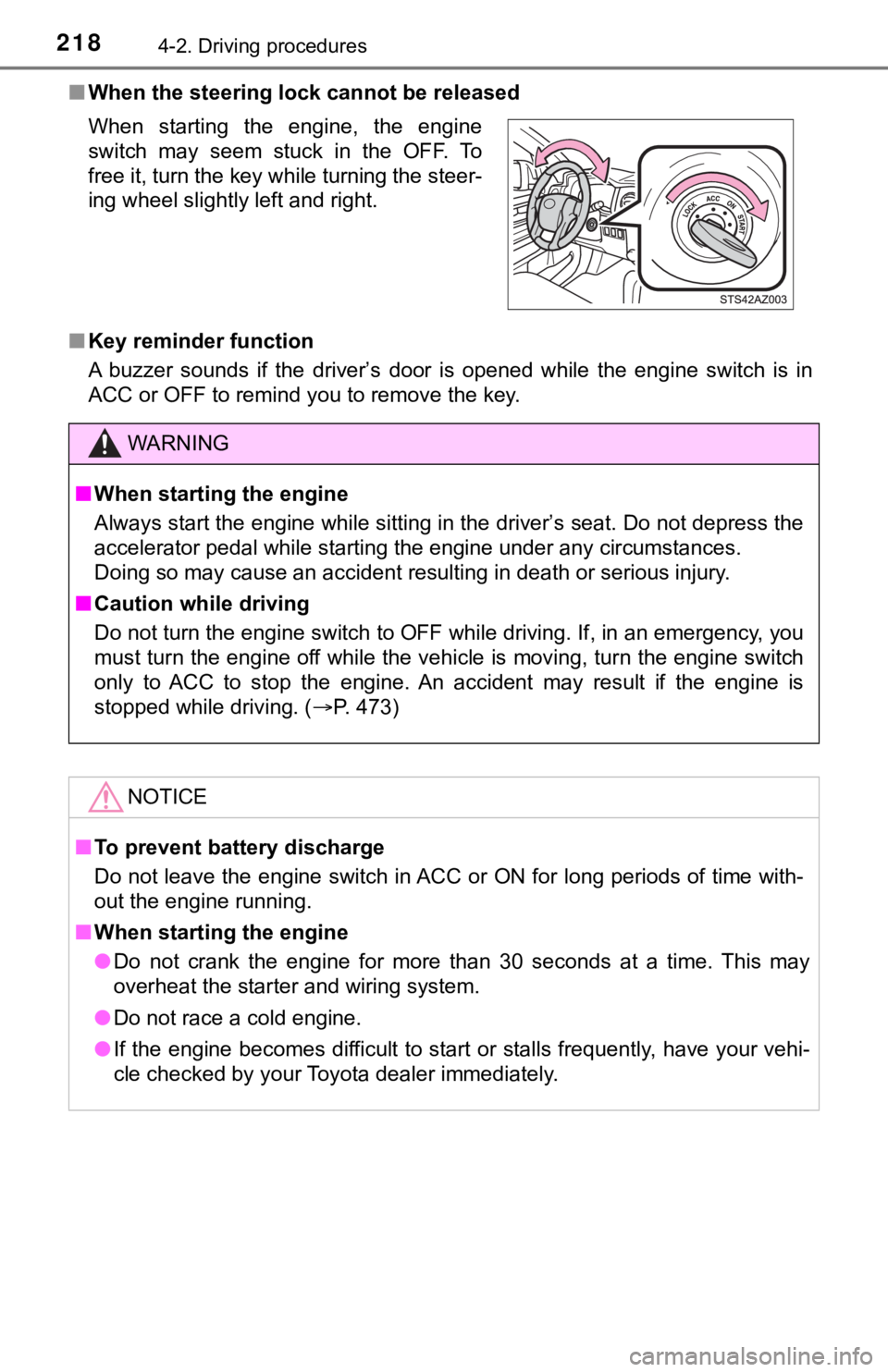
■When the steering lock cannot be released
■ Key reminder function
A buzzer sounds if the driver’s door is opened while the engine switch is in
ACC or OFF to remind you to remove the key. When starting the engine, the engine
switch may seem stuck in the OFF. To
free it, turn the key while turning the steer-
ing wheel slightly left and right.
WARNING
■ When starting the engine
Always start the engine while sitting in the driver’s seat. Do not depress the
accelerator pedal while starting the engine under any circumsta nces.
Doing so may cause an accident resulting in death or serious in jury.
■ Caution while driving
Do not turn the engine switch to OFF while driving. If, in an e mergency, you
must turn the engine off while the vehicle is moving, turn the engine switch
only to ACC to stop the engine. An accident may result if the e ngine is
stopped while driving. ( P. 473)
NOTICE
■To prevent battery discharge
Do not leave the engine switch in ACC or ON for long periods of time with-
out the engine running.
■ When starting the engine
● Do not crank the engine for more than 30 seconds at a time. This may
overheat the starter and wiring system.
● Do not race a cold engine.
● If the engine becomes difficult to start or stalls frequently, have your vehi-
cle checked by your Toyota dealer immediately.
Page 221 of 608
2214-2. Driving procedures
4
Driving
If the engine is stopped with the shift lever in a position other than P,
the engine switch will not be turn ed off but instead be turned to ACC.
Perform the following procedure to turn the switch off:
Check that the park ing brake is set.
Shift the shift lever to P.
Check that “Turn Power OFF” is displayed on the multi-informati on
display and then press the engine switch once.
Check that “Turn Power OFF” on the multi-information display is off.
■Auto power off function
If the vehicle is left in ACC for more than 20 minutes or ON (the engine is not
running) for more than an hour with the shift lever in P, the engine switch will
automatically turn off. However, this function cannot entirely prevent battery
discharge. Do not leave the vehicle with the engine switch in ACC or ON for
long periods of time when the engine is not running.
■ Automatic engine shut off feature (except for New Caledonia)
●The vehicle is equipped with a feature that automatically shuts off the
engine when the shift lever is in P with the engine running for an extended
period.
● The engine will automatically shut off after approximately 1 ho ur if it has
been left running while the shift lever is in P.
● The timer for the automatic engine shut off feature will reset if the brake
pedal is depressed or if the shift lever is in a position other than P.
● After the vehicle is parked, if the door is locked with the door lock switch
(P. 130) from the inside or the mechanical key ( P. 521) from the outside,
the automatic engine shut off feature will be disabled. The tim er for the auto-
matic engine shut off feature will be re-enabled if the driver’ s door is
opened.
When stopping the engine with the shift lever in a position other
than P
1
2
3
4