USB TOYOTA TUNDRA 2021 Accessories, Audio & Navigation (in English)
[x] Cancel search | Manufacturer: TOYOTA, Model Year: 2021, Model line: TUNDRA, Model: TOYOTA TUNDRA 2021Pages: 262, PDF Size: 8.13 MB
Page 119 of 262

1214-1. Basic operation
4
Audio/visual system
“POWER VOLUME” knob:
Press to turn the audio/visual
system on and off. The system
turns on in the last mode used.
Turn this knob to adjust the vol-
ume.1
Press the “AUDIO” button.
2 Select “Source” or press
“AUDIO” button again.
3 Select the desired source.
●Dimmed screen buttons cannot be
operated.
●When there are two pages, select
or to change the page.
●When an Apple CarPlay/Android
Auto connection is established,
some system functions, such as
the following, will be replaced by
similar Apple CarPlay/Android
Auto function or will become
unavailable
*:
• iPod (Audio Playback)
• USB audio/USB video
• Bluetooth
® audio
• Toyota apps
*: This function is not made avail-
able in some countries or areas.
Some basics
This section describes
some of the basic features
of the audio/visual system.
Some information may not
pertain to your system.
Your audio/visual system
works when the engine
switch is in ACC or ON.
NOTICE
●To prevent the 12-volt battery
from being discharged, do not
leave the audio/visual system
on longer than necessary when
the engine is not running.
Turning the system on
and off
Selecting an audio source
Page 120 of 262

1224-1. Basic operation
1Display the audio source
selection screen. ( P.121)
2 Select “Reorder”.
3 Select the desired audio
source then or to reor-
der.
4 Select “OK”.
1 Open the cover and connect
a device.
Turn on the power of the
device if it is not turned on.
●If a USB hub is plugged-in, two
devices can be connected at a
time.
●Even if a USB hub is used to con-
nect more than two USB devices,
only the first two connected
devices will be recognized.
●If a USB hub that has more than
two ports is connected to the USB
port, devices connected to the
USB hub may not charge or be
inoperable, as the supply of cur-
rent may be insufficient.
1 Display the audio control
screen. ( P.121)
2 Select “Sound”.
3 Select the desired item to be
set.
Select to set the tre-
ble/mid/bass. ( P.122)
Select to set the fader/bal-
ance. ( P.123)
Select to set the automatic
sound levelizer. ( P.123)
■Treble/Mid/Bass
How good an audio program
sounds is largely determined by
the mix of the treble, mid and
bass levels. In fact, different
kinds of music and vocal pro-
grams usually sound better with
different mixes of treble, mid
and bass.
1 Select “Treble/Mid/Bass”.
Reordering the audio
source
USB port
Sound settings
A
B
C
Page 121 of 262
1234-1. Basic operation
4
Audio/visual system
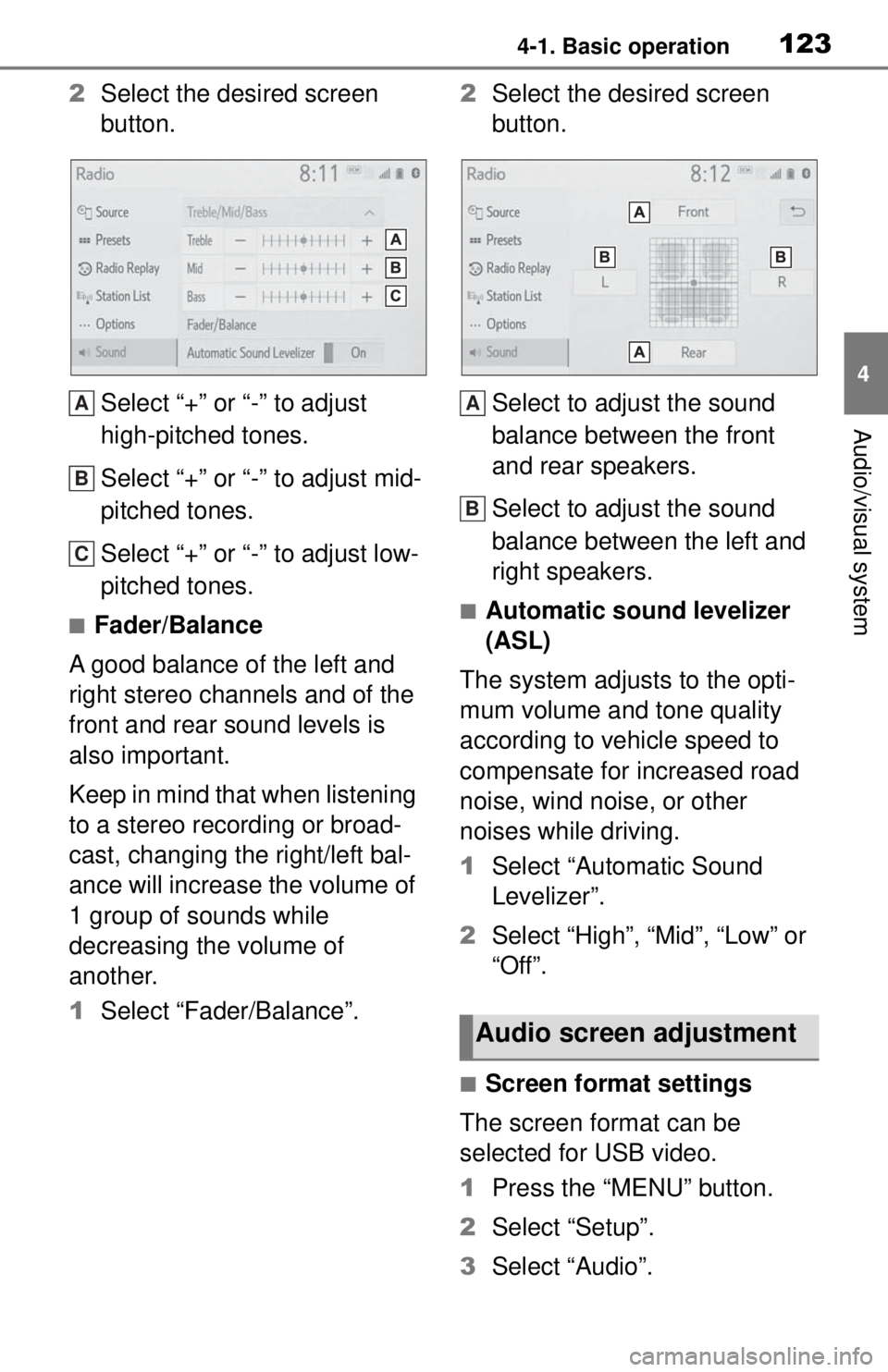
2Select the desired screen
button.
Select “+” or “-” to adjust
high-pitched tones.
Select “+” or “-” to adjust mid-
pitched tones.
Select “+” or “-” to adjust low-
pitched tones.
■Fader/Balance
A good balance of the left and
right stereo channels and of the
front and rear sound levels is
also important.
Keep in mind that when listening
to a stereo recording or broad-
cast, changing the right/left bal-
ance will increase the volume of
1 group of sounds while
decreasing the volume of
another.
1 Select “Fader/Balance”. 2
Select the desired screen
button.
Select to adjust the sound
balance between the front
and rear speakers.
Select to adjust the sound
balance between the left and
right speakers.■Automatic sound levelizer
(ASL)
The system adjusts to the opti-
mum volume and tone quality
according to vehicle speed to
compensate for increased road
noise, wind noise, or other
noises while driving.
1 Select “Automatic Sound
Levelizer”.
2 Select “High”, “Mid”, “Low” or
“Off”.
■Screen format settings
The screen format can be
selected for USB video.
1 Press the “MENU” button.
2 Select “Setup”.
3 Select “Audio”.
A
B
C
Audio screen adjustment
A
B
Page 131 of 262
1334-3. Media operation
4
Audio/visual system
4-3.Media operation
The USB memory operation
screen can be reached by the
following methods: P. 1 2 1
Connecting a USB memory
( P.122)
When an Apple Car-
Play/Android Auto connec-
tion is established, this
function will be unavailable.
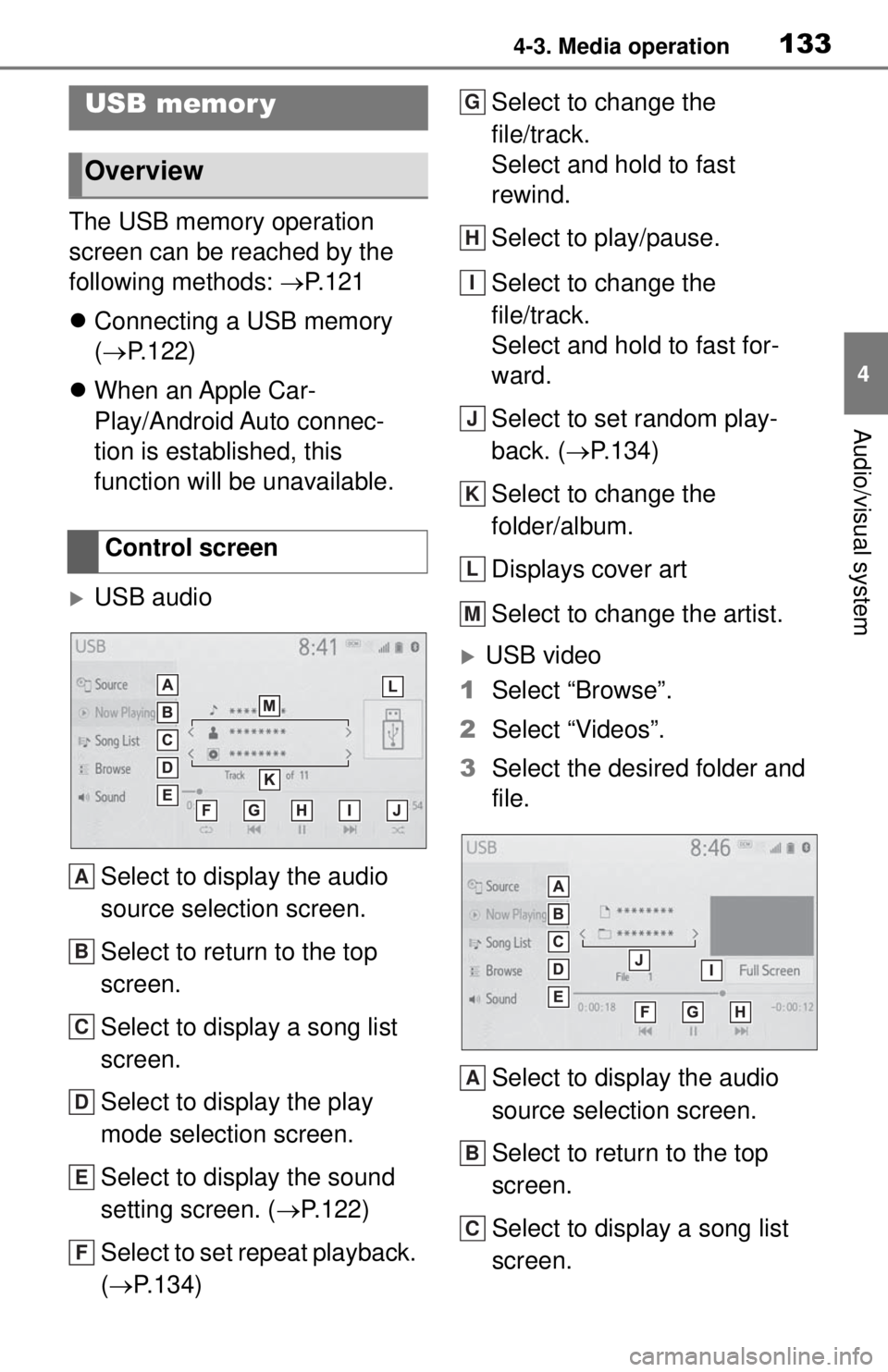
USB audio
Select to display the audio
source selection screen.
Select to return to the top
screen.
Select to display a song list
screen.
Select to display the play
mode selection screen.
Select to display the sound
setting screen. ( P.122)
Select to set repeat playback.
( P.134) Select to change the
file/track.
Select and hold to fast
rewind.
Select to play/pause.
Select to change the
file/track.
Select and hold to fast for-
ward.
Select to set random play-
back. (
P.134)
Select to change the
folder/album.
Displays cover art
Select to change the artist.
USB video
1 Select “Browse”.
2 Select “Videos”.
3 Select the desired folder and
file.
Select to display the audio
source selection screen.
Select to return to the top
screen.
Select to display a song list
screen.
USB memor y
Overview
Control screen
A
B
C
D
E
F
G
H
I
J
K
L
M
A
B
C
Page 132 of 262
1344-3. Media operation
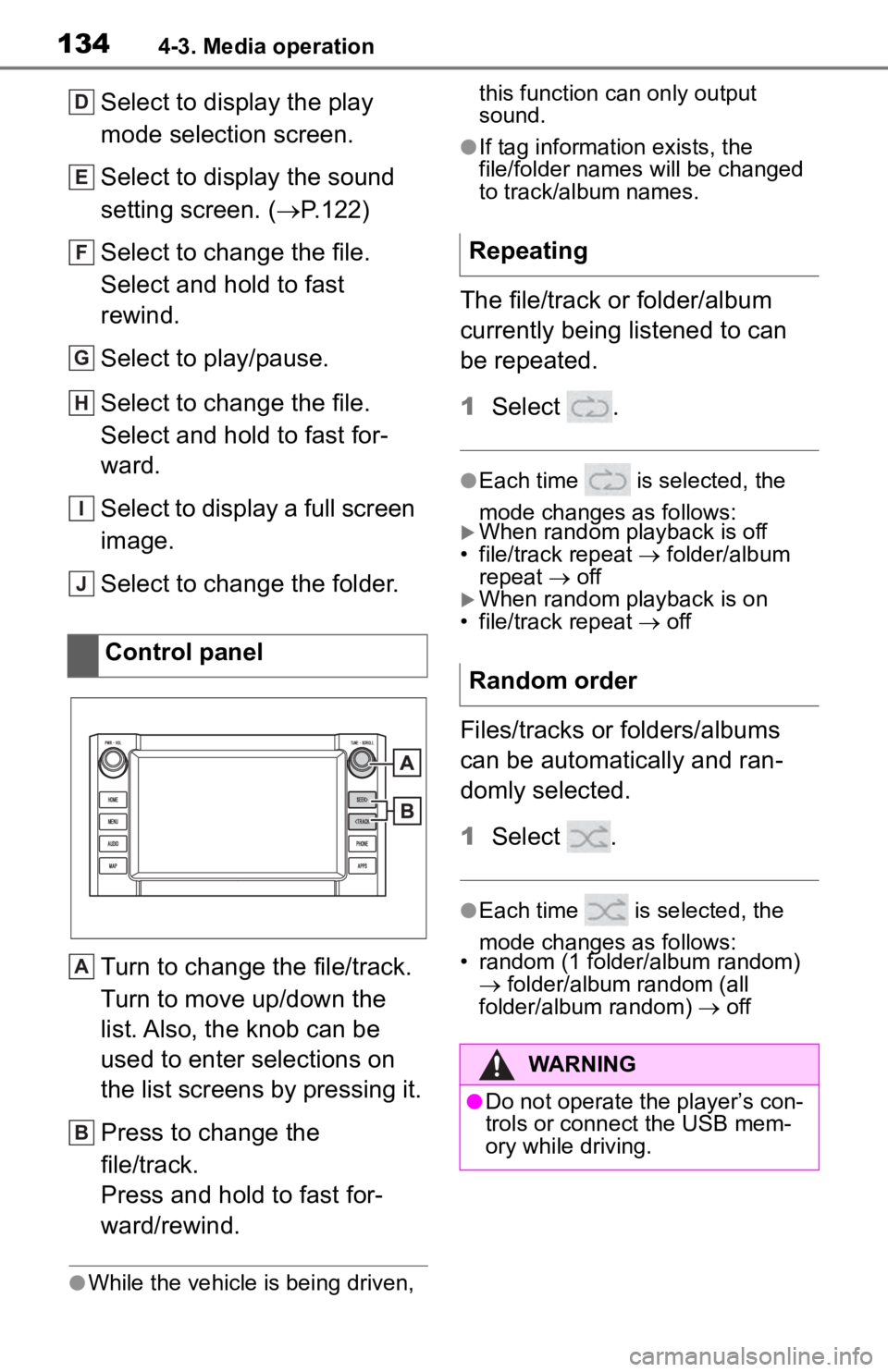
Select to display the play
mode selection screen.
Select to display the sound
setting screen. (P.122)
Select to change the file.
Select and hold to fast
rewind.
Select to play/pause.
Select to change the file.
Select and hold to fast for-
ward.
Select to display a full screen
image.
Select to change the folder.
Turn to change the file/track.
Turn to move up/down the
list. Also, the knob can be
used to enter selections on
the list screens by pressing it.
Press to change the
file/track.
Press and hold to fast for-
ward/rewind.
●While the vehicle is being driven, this function can only output
sound.
●If tag information exists, the
file/folder names will be changed
to track/album names.
The file/track or folder/album
currently being listened to can
be repeated.
1
Select .
●Each time is selected, the
mode changes as follows:
When random playback is off
• file/track repeat folder/album
repeat off
When random playback is on
• file/track repeat off
Files/tracks or folders/albums
can be automatically and ran-
domly selected.
1Select .
●Each time is selected, the
mode changes as follows:
• random (1 folder/album random)
folder/album random (all
folder/album random) off
Control panel
D
E
F
G
H
I
J
A
B
Repeating
Random order
WARNING
●Do not operate the player’s con-
trols or connect the USB mem-
ory while driving.
Page 135 of 262
1374-3. Media operation
4
Audio/visual system
●Depending on the iPod/iPhone
that is connected to the system,
certain functions may not be avail-
able.
●If an iPhone is connected via
Bluetooth® and USB at the same
time, system operation may
become unstable. For known
phone compatibilit y information,
refer to
https://www.toyota.com/
audio-multimedia.
●Tracks selected by operating a
connected iPod/iPhone may not
be recognized or displayed prop-
erly.
●The system may not function
properly if a conversion adapter is
used to connect a device.
The track currently being lis-
tened to can be repeated.
1 Select .
●Each time is selected, the
mode changes as follows:
When shuffle is off (iPhone 5 or
later)
• track repeat album repeat off
When shuffle is off (iPhone 4s or
earlier)
• track repeat off
When shuffle is on
• track repeat off
Tracks or albums can be auto-
matically and randomly
selected.
1Select .
●Each time is selected, the
mode changes as follows:
• shuffle (1 album shuffle) album
shuffle (all album shuffle) off
Repeating
Random order
WARNING
●Do not operate the player’s con-
trols or connect the iPod/iPhone
while driving.
NOTICE
●Do not leave your portable
player in the car. In particular,
high temperatures inside the
vehicle may damage the porta-
ble player.
●Do not push down on or apply
unnecessary pressure to the
portable player while it is con-
nected as this may damage the
portable player or its terminal.
●Do not insert foreign objects into
the port as this may damage the
portable player or its terminal.
Page 141 of 262
1434-4. Audio/visual remote controls
4
Audio/visual system
4-4.Audio/visual remote controls
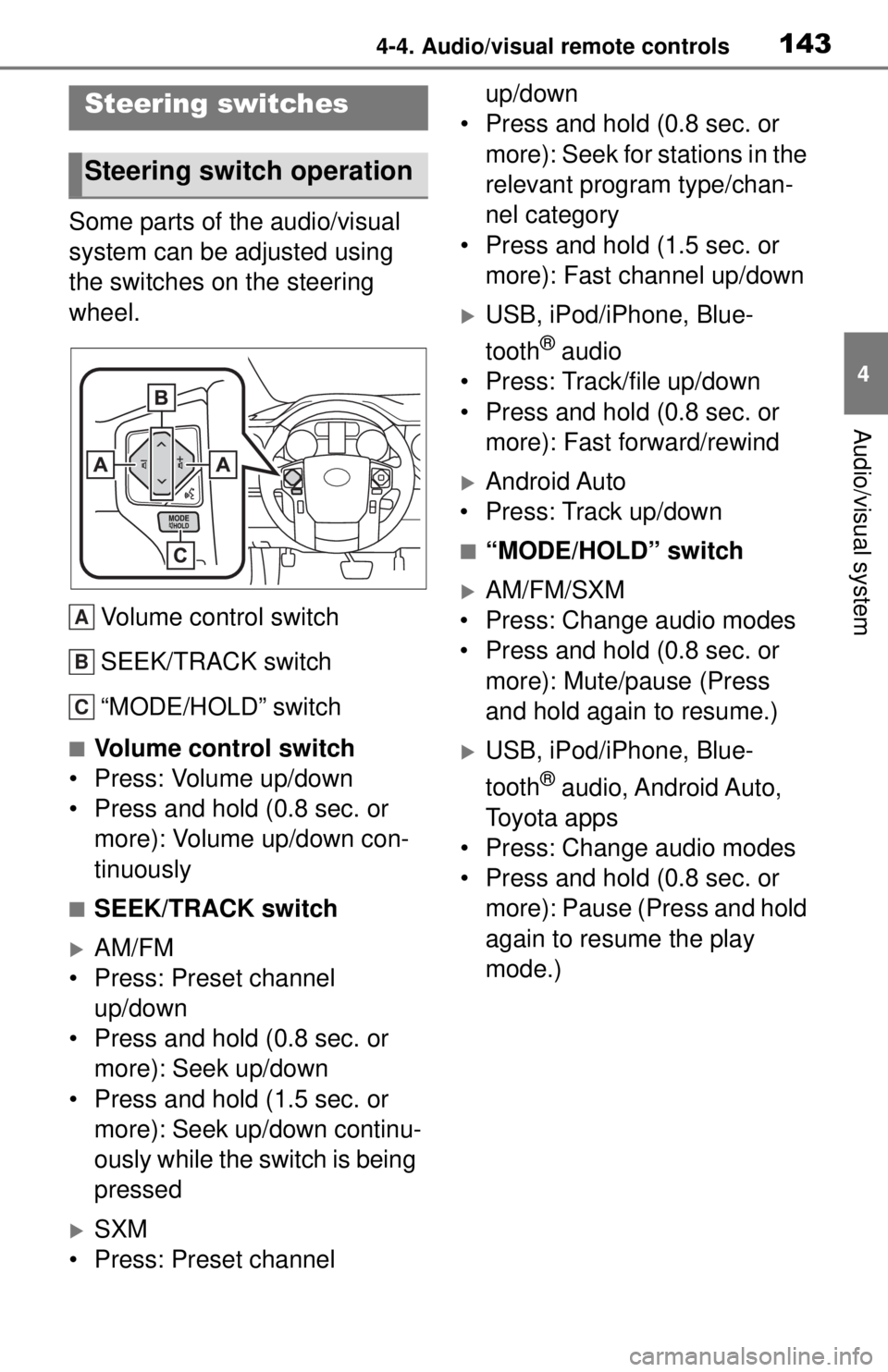
Some parts of the audio/visual
system can be adjusted using
the switches on the steering
wheel.Volume control switch
SEEK/TRACK switch
“MODE/HOLD” switch
■Volume control switch
• Press: Volume up/down
• Press and hold (0.8 sec. or more): Volume up/down con-
tinuously
■SEEK/TRACK switch
AM/FM
• Press: Preset channel up/down
• Press and hold (0.8 sec. or more): Seek up/down
• Press and hold (1.5 sec. or more): Seek up/down continu-
ously while the switch is being
pressed
SXM
• Press: Preset channel up/down
• Press and hold (0.8 sec. or
more): Seek for stations in the
relevant program type/chan-
nel category
• Press and hold (1.5 sec. or more): Fast channel up/down
USB, iPod/iPhone, Blue-
tooth
® audio
• Press: Track/file up/down
• Press and hold (0.8 sec. or more): Fast forward/rewind
Android Auto
• Press: Track up/down
■“MODE/HOLD” switch
AM/FM/SXM
• Press: Change audio modes
• Press and hold (0.8 sec. or more): Mute/pause (Press
and hold again to resume.)
USB, iPod/iPhone, Blue-
tooth
® audio, Android Auto,
Toyota apps
• Press: Change audio modes
• Press and hold (0.8 sec. or more): Pause (Press and hold
again to resume the play
mode.)
Steering switches
Steering switch operation
A
B
C
Page 142 of 262
1444-5. Setup
4-5.Setup
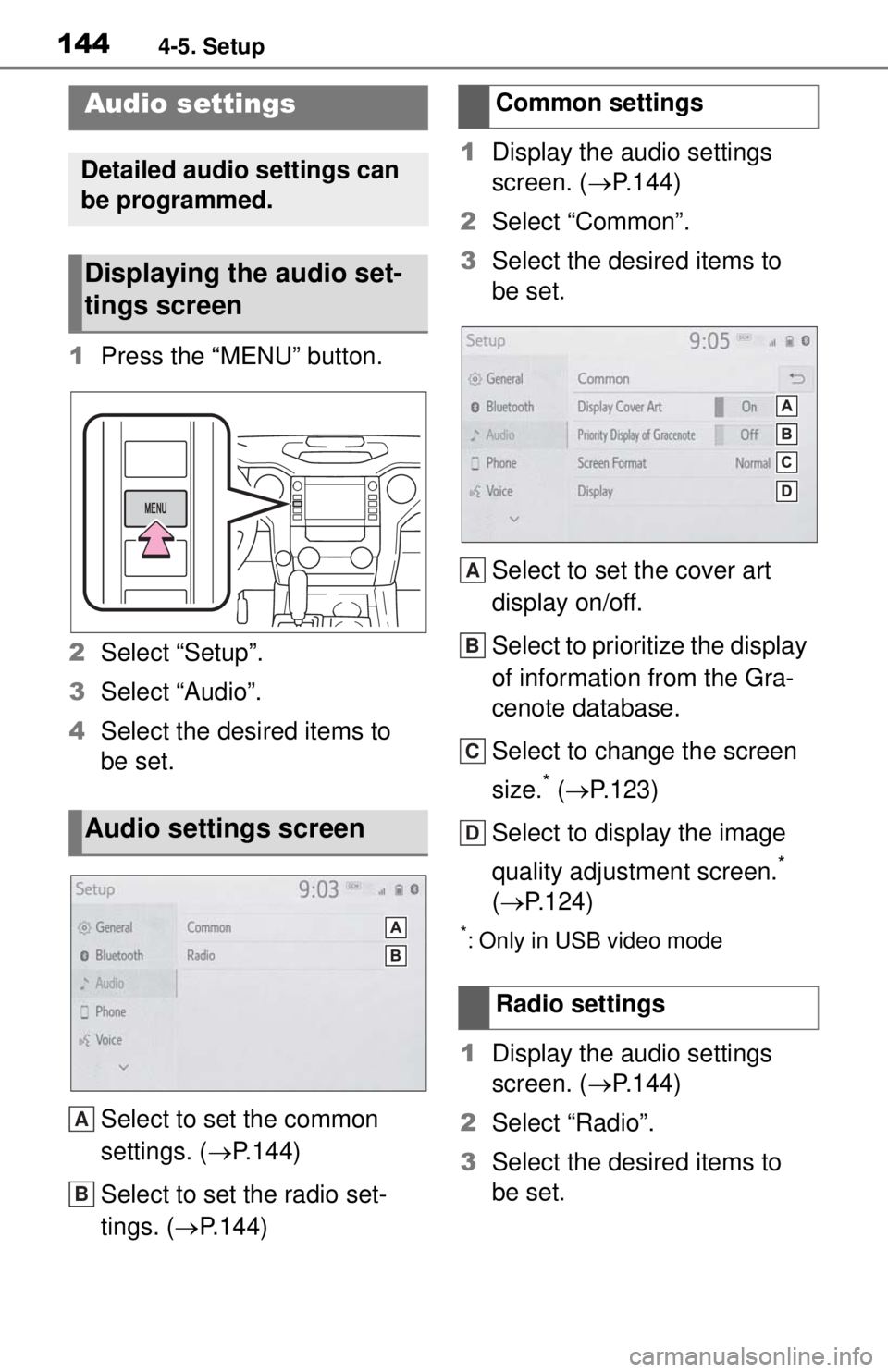
1Press the “MENU” button.
2 Select “Setup”.
3 Select “Audio”.
4 Select the desired items to
be set.
Select to set the common
settings. ( P.144)
Select to set the radio set-
tings. ( P.144) 1
Display the audio settings
screen. ( P.144)
2 Select “Common”.
3 Select the desired items to
be set.
Select to set the cover art
display on/off.
Select to prioritize the display
of information from the Gra-
cenote database.
Select to change the screen
size.
* ( P.123)
Select to display the image
quality adjustment screen.
*
( P.124)
*: Only in USB video mode
1Display the audio settings
screen. ( P.144)
2 Select “Radio”.
3 Select the desired items to
be set.
Audio settings
Detailed audio settings can
be programmed.
Displaying the audio set-
tings screen
Audio settings screen
A
B
Common settings
Radio settings
A
B
C
D
Page 146 of 262
1484-6. Tips for operating the audio/visual system
• iPhone 7 Plus
• iPhone SE
• iPhone 6s
• iPhone 6s Plus
• iPhone 6
• iPhone 6 Plus
• iPhone 5s
• iPhone 5c
• iPhone 5
• iPod touch (6th generation)
• iPod touch (5th generation)
Audio Plus
Made for
• iPhone XS Max
• iPhone XS
• iPhone XR
• iPhone X
• iPhone 8
• iPhone 8 Plus
• iPhone 7
• iPhone 7 Plus
• iPhone SE
• iPhone 6s
• iPhone 6s Plus
• iPhone 6
• iPhone 6 Plus
• iPhone 5s
• iPhone 5c
• iPhone 5
• iPod touch (6th generation)
• iPod touch (5th generation)
• iPod nano (7th generation)
Premium Audio
Made for
• iPhone X
• iPhone 8
• iPhone 8 Plus
• iPhone 7
• iPhone 7 Plus • iPhone SE
• iPhone 6s
• iPhone 6s Plus
• iPhone 6
• iPhone 6 Plus
• iPhone 5s
• iPhone 5c
• iPhone 5
• iPhone 4s
• iPod touch (6th generation)
• iPod touch (5th generation)
• iPod nano (7th generation)
●This system only supports audio
playback.
●Depending on difference between
models or software versions etc.,
some models might be incompati-
ble with this system.
This device supports high-reso-
lution sound sources.
The definition of high-resolution
is based on the standards of
groups such as the CTA (Con-
sumer Technology Association).
Supported formats and play-
able media are as follows.
■Supported formats
WAV, FLAC, ALAC, OGG Vorbis
■Playable media
USB memory
High-resolution sound
source
Page 147 of 262
1494-6. Tips for operating the audio/visual system
4
Audio/visual system
*: USB video only*1: Only compatible with Windows Media Audio Standard
*2: Sound source of 48kHz or more is down-converted to
48kHz/24bit.
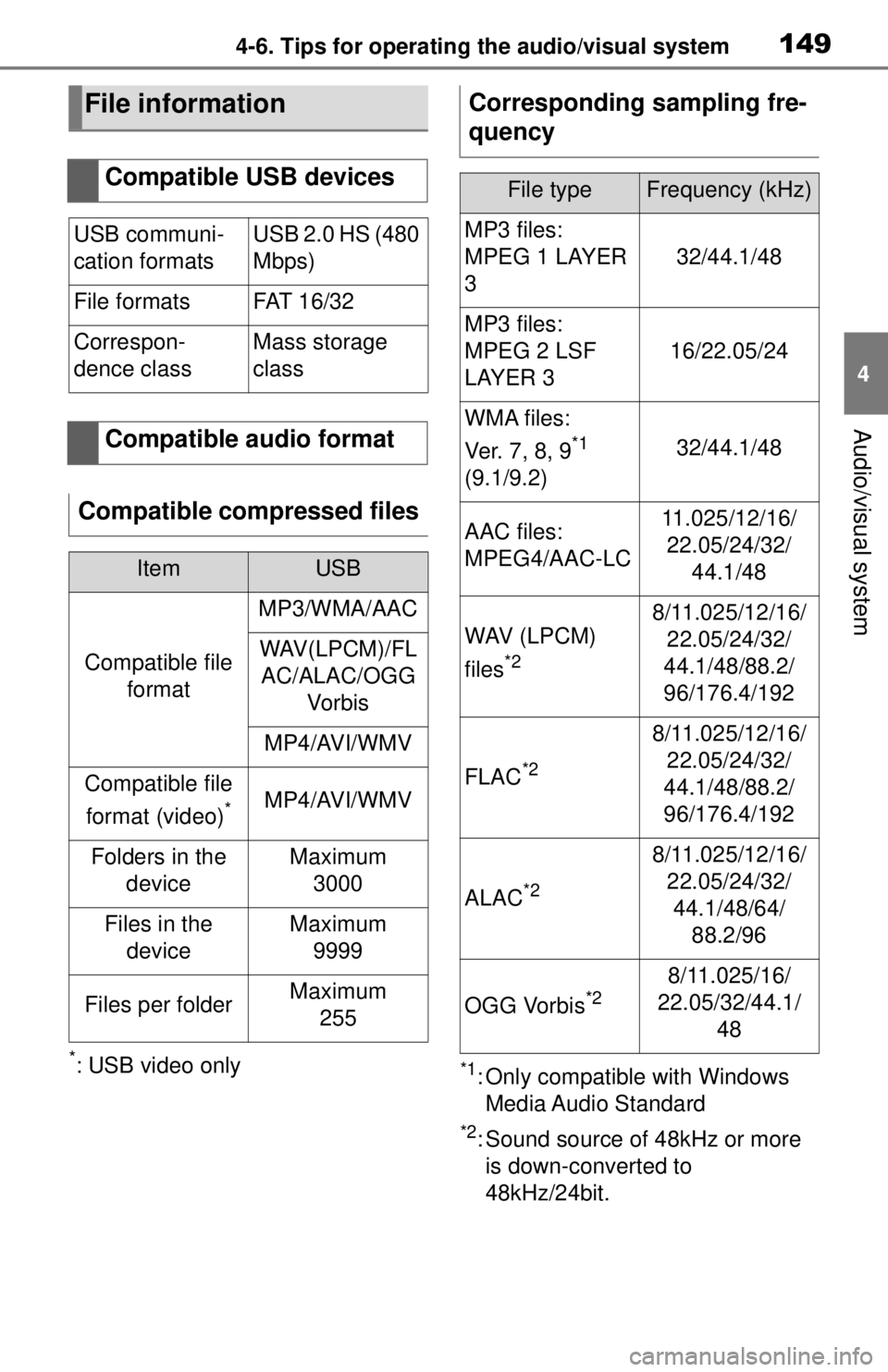
File information
Compatible USB devices
USB communi-
cation formatsUSB 2.0 HS (480
Mbps)
File formatsFAT 1 6 / 3 2
Correspon-
dence classMass storage
class
Compatible audio format
Compatible compressed files
ItemUSB
Compatible file format
MP3/WMA/AAC
WAV(LPCM)/FLAC/ALAC/OGG Vo r b i s
MP4/AVI/WMV
Compatible file
format (video)
*MP4/AVI/WMV
Folders in the deviceMaximum3000
Files in the deviceMaximum 9999
Files per folderMaximum 255
Corresponding sampling fre-
quency
File typeFrequency (kHz)
MP3 files:
MPEG 1 LAYER
3
32/44.1/48
MP3 files:
MPEG 2 LSF
LAYER 3
16/22.05/24
WMA files:
Ver. 7 , 8, 9
*1
(9.1/9.2)32/44.1/48
AAC files:
MPEG4/AAC-LC11.025/12/16/ 22.05/24/32/ 44.1/48
WAV (LPCM)
files
*2
8/11.025/12/16/22.05/24/32/
44.1/48/88.2/
96/176.4/192
FLAC*2
8/11.025/12/16/ 22.05/24/32/
44.1/48/88.2/
96/176.4/192
ALAC*2
8/11.025/12/16/ 22.05/24/32/44.1/48/64/ 88.2/96
OGG Vorbis*28/11.025/16/
22.05/32/44.1/ 48