USB TOYOTA TUNDRA 2021 Accessories, Audio & Navigation (in English)
[x] Cancel search | Manufacturer: TOYOTA, Model Year: 2021, Model line: TUNDRA, Model: TOYOTA TUNDRA 2021Pages: 262, PDF Size: 8.13 MB
Page 3 of 262
3TABLE OF CONTENTS
1
2
3
4
5
6
7
8
9
4-1. Basic operationQuick reference............. 120
Some basics ................. 121
4-2. Radio operation
AM/FM/SiriusXM
® Satellite
Radio ........................... 125
4-3. Media operation USB memory................. 133
iPod/iPhone (Apple CarPlay) .................................... 135
Android Auto ................. 138
Bluetooth
® audio ........... 139
4-4. Audio/visual remote con- trols
Steering switches .......... 143
4-5. Setup Audio settings ............... 144
4-6. Tips for operating the audio/visual system
Operating information ... 146
5-1. Voice command system operation
Voice command system 156
Natural language under- standing....................... 159
Command list ................ 1606-1. Information display
Receiving weather informa-tion............................... 166
Data services settings ... 168
7-1. Rear view monitor system Rear view monitor system.................................... 170
Rear view monitor system precautions .................. 172
Things you should know 177
8-1. Phone operation (Hands- free system for cellular
phones)
Quick reference ............. 180
Some basics .................. 181
Placing a call using the Blue- tooth
® hands-free system
.................................... 185
Receiving a call using the Bluetooth
® hands-free sys-
tem .............................. 188
Talking on the Bluetooth
®
hands-free system ....... 189
Bluetooth
® phone message
function ........................ 192
8-2. Setup Phone settings............... 197
4Audio/visual system
5Voice command system
6Information
7Peripheral monitoring
system
8Phone
Page 52 of 262
522-3. Apple CarPlay®/Android Auto™
2-3.Apple CarPlay®/Android Auto™
*: This function is not made avail-able in some countries or areas
1 Enable Siri on the device to
be connected. 2
Connect the device to the
USB port. ( P.122)
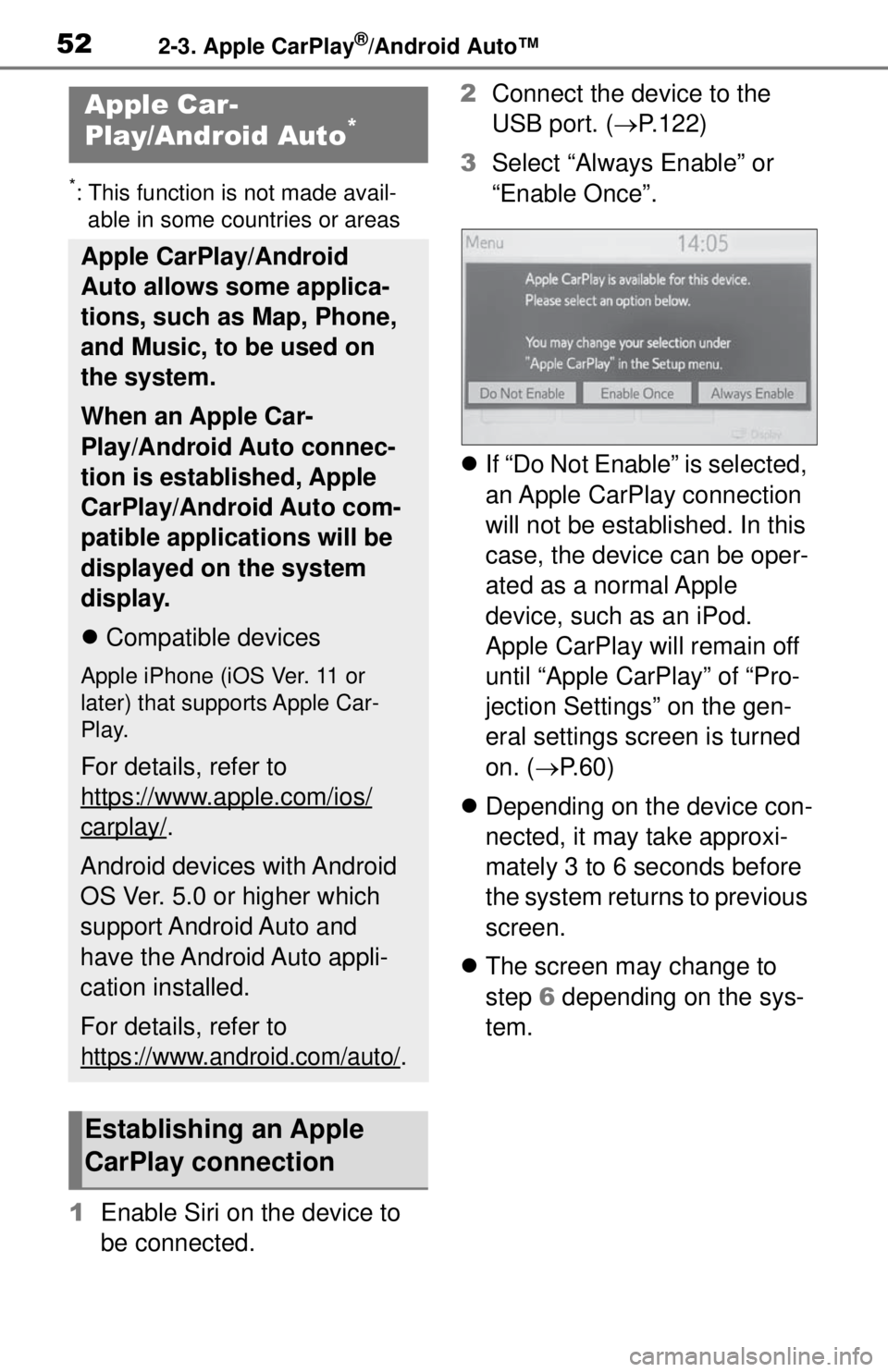
3 Select “Always Enable” or
“Enable Once”.
If “Do Not Enable” is selected,
an Apple CarPlay connection
will not be established. In this
case, the device can be oper-
ated as a normal Apple
device, such as an iPod.
Apple CarPlay will remain off
until “Apple CarPlay” of “Pro-
jection Settings” on the gen-
eral settings screen is turned
on. ( P. 6 0 )
Depending on the device con-
nected, it may take approxi-
mately 3 to 6 seconds before
the system returns to previous
screen.
The screen may change to
step 6 depending on the sys-
tem.
Apple Car-
Play/Android Auto*
Apple CarPlay/Android
Auto allows some applica-
tions, such as Map, Phone,
and Music, to be used on
the system.
When an Apple Car-
Play/Android Auto connec-
tion is established, Apple
CarPlay/Android Auto com-
patible applications will be
displayed on the system
display.
Compatible devices
Apple iPhone (iOS Ver. 11 or
later) that supports Apple Car-
Play.
For details, refer to
https://www.apple.com/ios/
carplay/.
Android devices with Android
OS Ver. 5.0 or higher which
support Android Auto and
have the Android Auto appli-
cation installed.
For details, refer to
https://www.android.com/auto/.
Establishing an Apple
CarPlay connection
Page 53 of 262
532-3. Apple CarPlay®/Android Auto™
2
Basic function
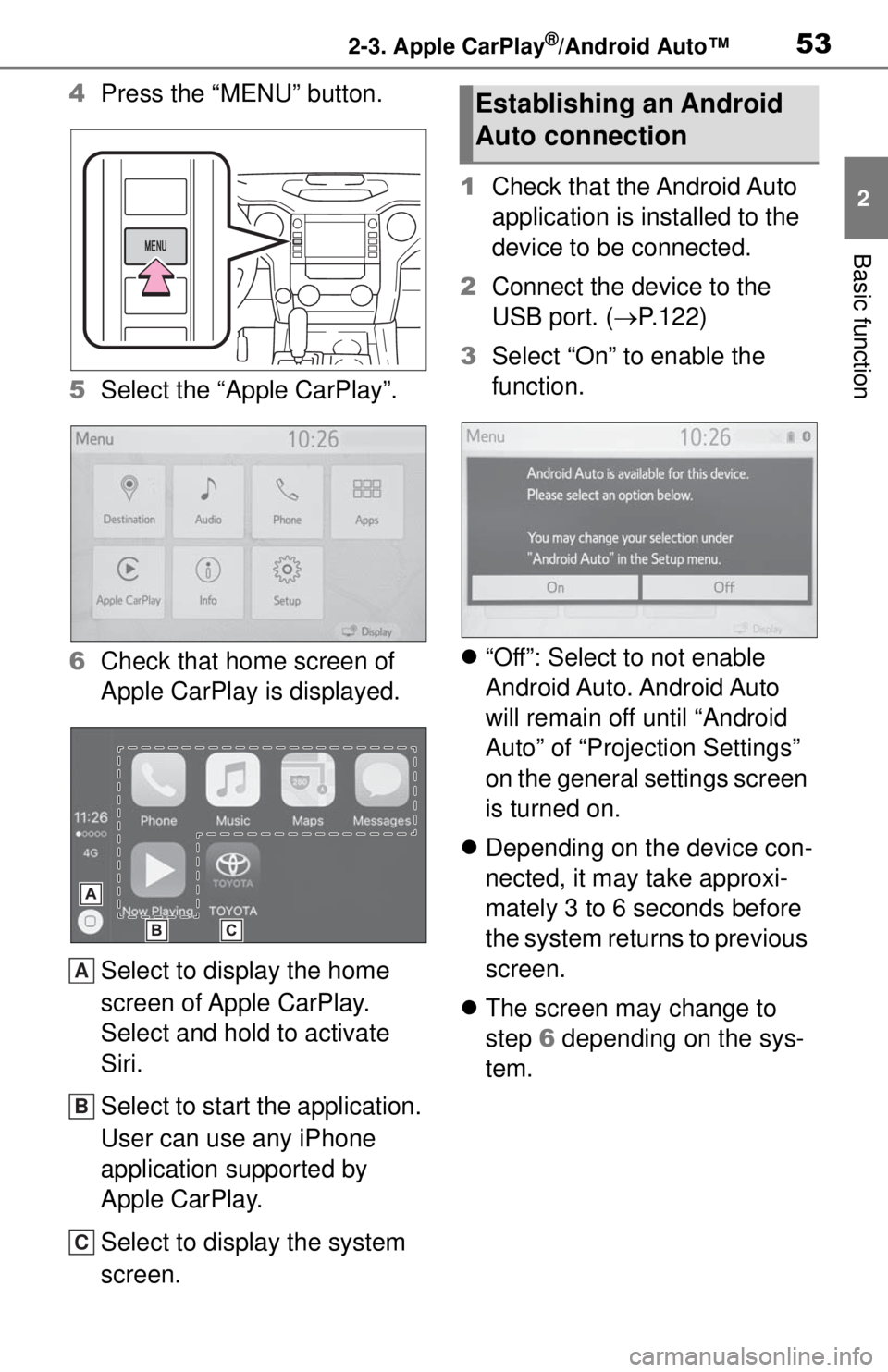
4Press the “MENU” button.
5 Select the “Apple CarPlay”.
6 Check that home screen of
Apple CarPlay is displayed.
Select to display the home
screen of Apple CarPlay.
Select and hold to activate
Siri.
Select to start the application.
User can use any iPhone
application supported by
Apple CarPlay.
Select to display the system
screen. 1
Check that the Android Auto
application is installed to the
device to be connected.
2 Connect the device to the
USB port. ( P.122)
3 Select “On” to enable the
function.
“Off”: Select to not enable
Android Auto. Android Auto
will remain off until “Android
Auto” of “Projection Settings”
on the general settings screen
is turned on.
Depending on the device con-
nected, it may take approxi-
mately 3 to 6 seconds before
the system returns to previous
screen.
The screen may change to
step 6 depending on the sys-
tem.
A
B
C
Establishing an Android
Auto connection
Page 54 of 262
542-3. Apple CarPlay®/Android Auto™
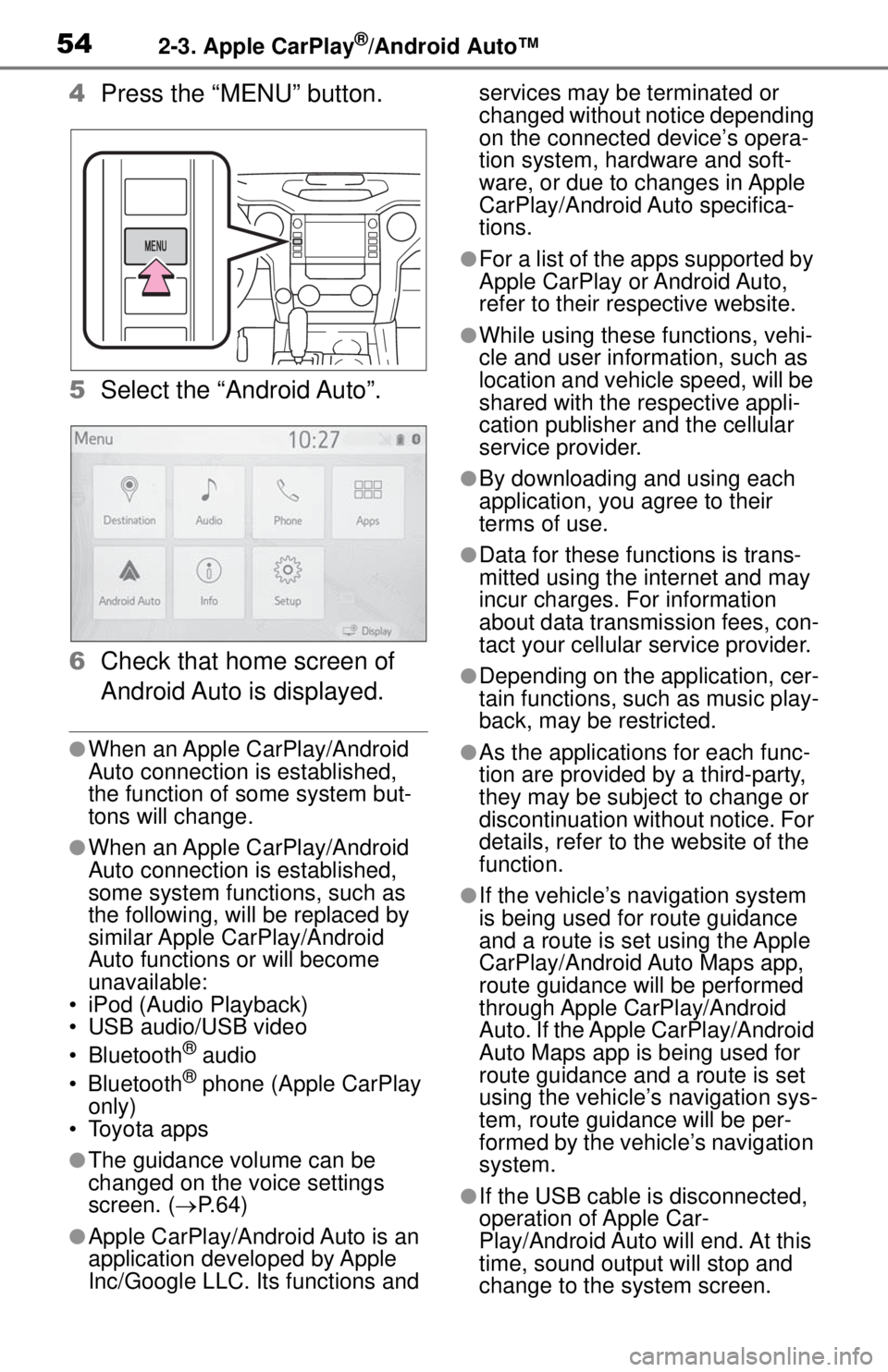
4Press the “MENU” button.
5 Select the “Android Auto”.
6 Check that home screen of
Android Auto is displayed.
●When an Apple CarPlay/Android
Auto connection is established,
the function of some system but-
tons will change.
●When an Apple CarPlay/Android
Auto connection is established,
some system functi ons, such as
the following, will be replaced by
similar Apple CarPlay/Android
Auto functions or will become
unavailable:
• iPod (Audio Playback)
• USB audio/USB video
• Bluetooth
® audio
• Bluetooth® phone (Apple CarPlay
only)
• Toyota apps
●The guidance volume can be
changed on the voice settings
screen. ( P. 6 4 )
●Apple CarPlay/Android Auto is an
application developed by Apple
Inc/Google LLC. Its functions and services may be terminated or
changed without notice depending
on the connected device’s opera-
tion system, hardware and soft-
ware, or due to changes in Apple
CarPlay/Android Auto specifica-
tions.
●For a list of the apps supported by
Apple CarPlay or Android Auto,
refer to their respective website.
●While using these functions, vehi-
cle and user information, such as
location and vehicle speed, will be
shared with the
respective appli-
cation publisher and the cellular
service provider.
●By downloading and using each
application, you agree to their
terms of use.
●Data for these fu nctions is trans-
mitted using the internet and may
incur charges. For information
about data transmission fees, con-
tact your cellular service provider.
●Depending on the application, cer-
tain functions, such as music play-
back, may be restricted.
●As the applications for each func-
tion are provided by a third-party,
they may be subject to change or
discontinuation without notice. For
details, refer to th e website of the
function.
●If the vehicle’s navigation system
is being used for route guidance
and a route is set using the Apple
CarPlay/Android Auto Maps app,
route guidance will be performed
through Apple CarPlay/Android
Auto. If the Apple CarPlay/Android
Auto Maps app is being used for
route guidance and a route is set
using the vehicle’s navigation sys-
tem, route guidan ce will be per-
formed by the vehicle’s navigation
system.
●If the USB cable is disconnected,
operation of Apple Car-
Play/Android Auto will end. At this
time, sound outp ut will stop and
change to the system screen.
Page 56 of 262
562-3. Apple CarPlay®/Android Auto™
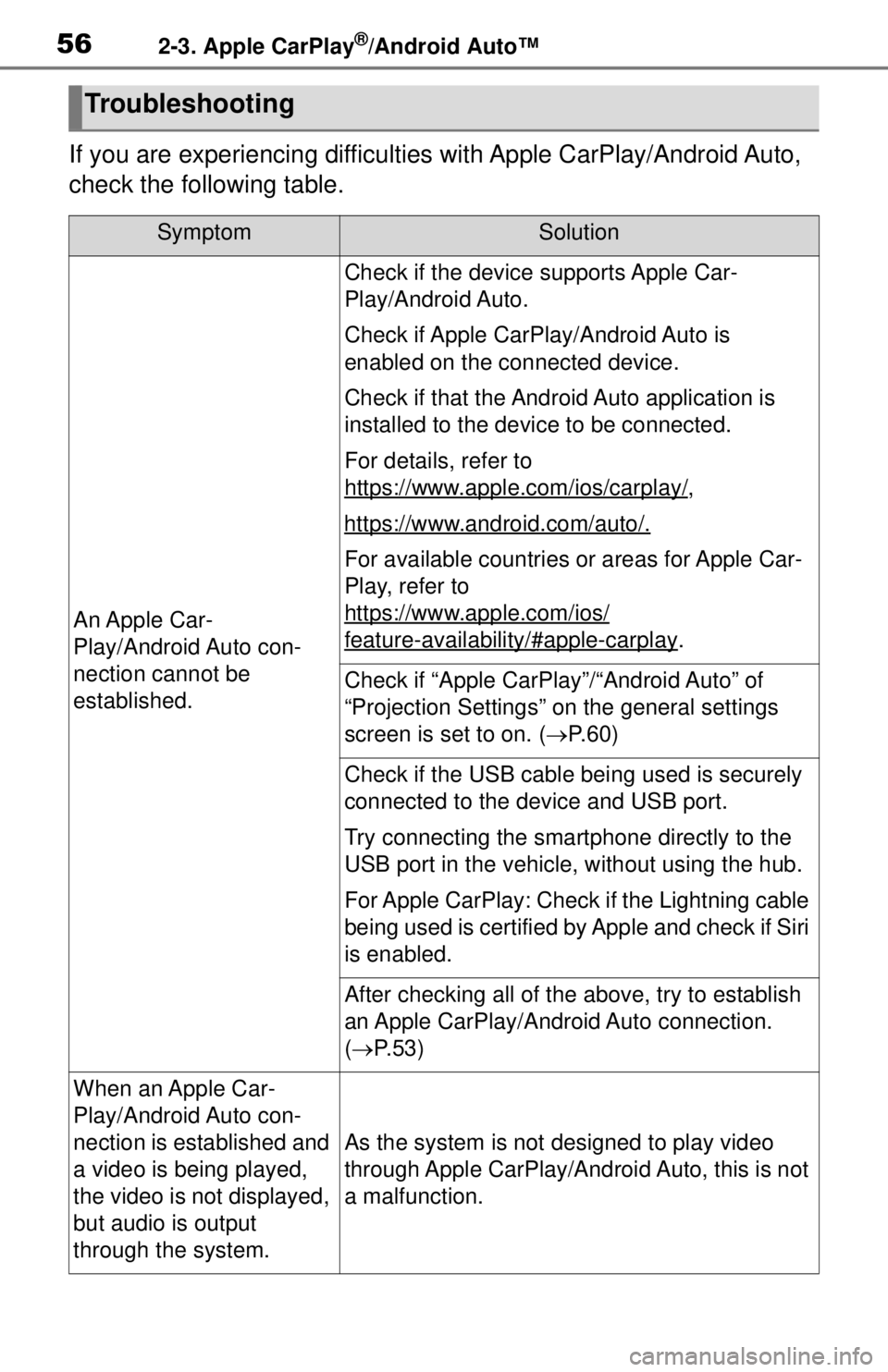
If you are experiencing difficulties with Apple CarPlay/Android Auto,
check the following table.
Troubleshooting
SymptomSolution
An Apple Car-
Play/Android Auto con-
nection cannot be
established.
Check if the device supports Apple Car-
Play/Android Auto.
Check if Apple CarPlay/Android Auto is
enabled on the connected device.
Check if that the Androi d Auto application is
installed to the device to be connected.
For details, refer to
https://www.apple.com/ios/carplay/
,
https://www.android.com/auto/.
For available countries or areas for Apple Car-
Play, refer to
https://www.apple.com/ios/
feature-availability/#apple-carplay.
Check if “Apple CarPlay”/“Android Auto” of
“Projection Settings” on the general settings
screen is set to on. ( P. 6 0 )
Check if the USB cable being used is securely
connected to the device and USB port.
Try connecting the smartphone directly to the
USB port in the vehicle, without using the hub.
For Apple CarPlay: Check if the Lightning cable
being used is certified by Apple and check if Siri
is enabled.
After checking all of the above, try to establish
an Apple CarPlay/Android Auto connection.
( P. 5 3 )
When an Apple Car-
Play/Android Auto con-
nection is established and
a video is being played,
the video is not displayed,
but audio is output
through the system.
As the system is not designed to play video
through Apple CarPlay/Android Auto, this is not
a malfunction.
Page 57 of 262
572-3. Apple CarPlay®/Android Auto™
2
Basic function
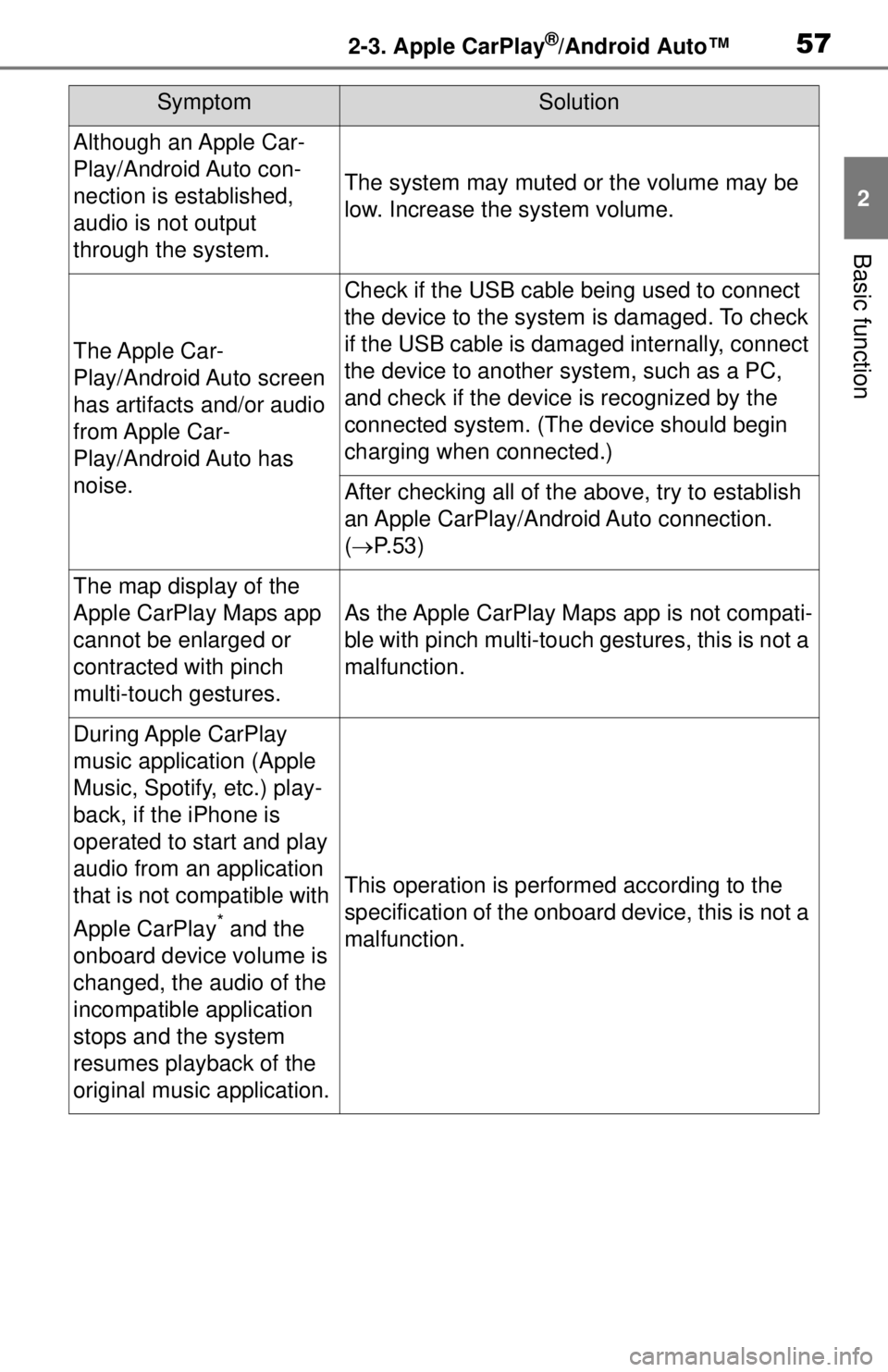
Although an Apple Car-
Play/Android Auto con-
nection is established,
audio is not output
through the system.
The system may muted or the volume may be
low. Increase the system volume.
The Apple Car-
Play/Android Auto screen
has artifacts and/or audio
from Apple Car-
Play/Android Auto has
noise.
Check if the USB cable being used to connect
the device to the system is damaged. To check
if the USB cable is damaged internally, connect
the device to another system, such as a PC,
and check if the device is recognized by the
connected system. (The device should begin
charging when connected.)
After checking all of the above, try to establish
an Apple CarPlay/Android Auto connection.
( P. 5 3 )
The map display of the
Apple CarPlay Maps app
cannot be enlarged or
contracted with pinch
multi-touch gestures.
As the Apple CarPlay Maps app is not compati-
ble with pinch multi-touch gestures, this is not a
malfunction.
During Apple CarPlay
music application (Apple
Music, Spotify, etc.) play-
back, if the iPhone is
operated to start and play
audio from an application
that is not compatible with
Apple CarPlay
* and the
onboard device volume is
changed, the audio of the
incompatible application
stops and the system
resumes playback of the
original music application.
This operation is performed according to the
specification of the onboard device, this is not a
malfunction.
SymptomSolution
Page 58 of 262
582-3. Apple CarPlay®/Android Auto™
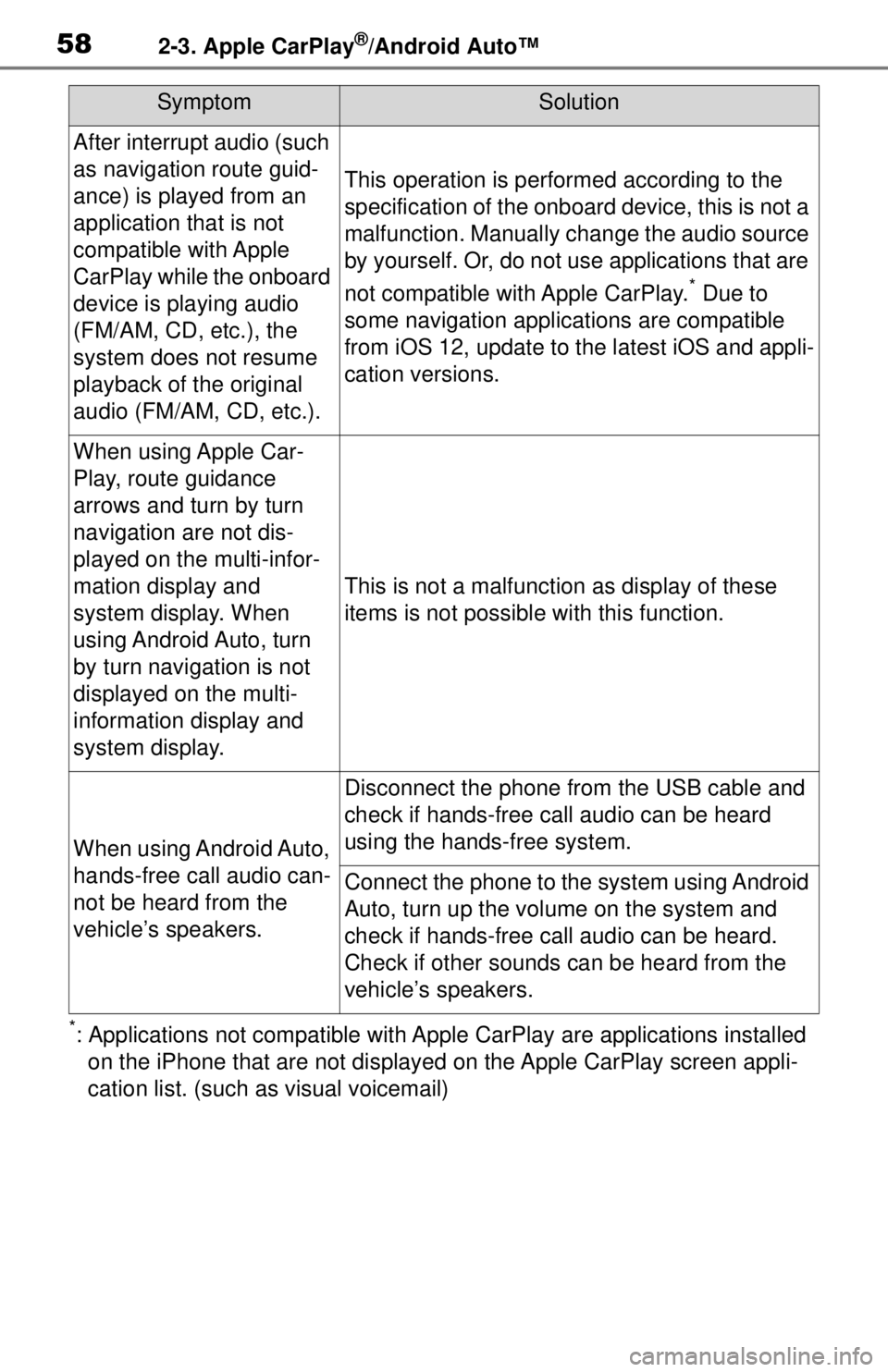
*: Applications not compatible with Apple CarPlay are applications installed
on the iPhone that are not displayed on the Apple CarPlay screen appli-
cation list. (such as visual voicemail)
After interrup t audio (such
as navigation route guid-
ance) is played from an
application that is not
compatible with Apple
CarPlay while the onboard
device is playing audio
(FM/AM, CD, etc.), the
system does not resume
playback of the original
audio (FM/AM, CD, etc.).
This operation is performed according to the
specification of the onboard device, this is not a
malfunction. Manually change the audio source
by yourself. Or, do not use applications that are
not compatible with Apple CarPlay.
* Due to
some navigation applications are compatible
from iOS 12, update to the latest iOS and appli-
cation versions.
When using Apple Car-
Play, route guidance
arrows and turn by turn
navigation are not dis-
played on the multi-infor-
mation display and
system display. When
using Android Auto, turn
by turn navigation is not
displayed on the multi-
information display and
system display.
This is not a malfunction as display of these
items is not possible with this function.
When using Android Auto,
hands-free call audio can-
not be heard from the
vehicle’s speakers.
Disconnect the phone from the USB cable and
check if hands-free call audio can be heard
using the hands-free system.
Connect the phone to the system using Android
Auto, turn up the volume on the system and
check if hands-free call audio can be heard.
Check if other sounds can be heard from the
vehicle’s speakers.
SymptomSolution
Page 61 of 262
612-4. Other settings
2
Basic function
*: Premium Audio only
1Select “Time Zone”.
2 Select the desired time zone.
Premium Audio only:
If “Auto” is selected, the time
zone is selected automatically
by current vehicle position.
When “Auto Adjust by GPS” is
turned off, the clock can be
manually adjusted.
1 Select “Auto Adjust by GPS”
to set to off.
2 Adjust the clock manually.
Select “+” to set the time for-
ward one hour and “-” to set
the time back one hour.
Select “+” to set the time for-
ward one minute and “-” to
set the time back one minute.
Select to round to the nearest
hour.
e.g.
1:00 to 1:29 1:00
1:30 to 1:59 2:00
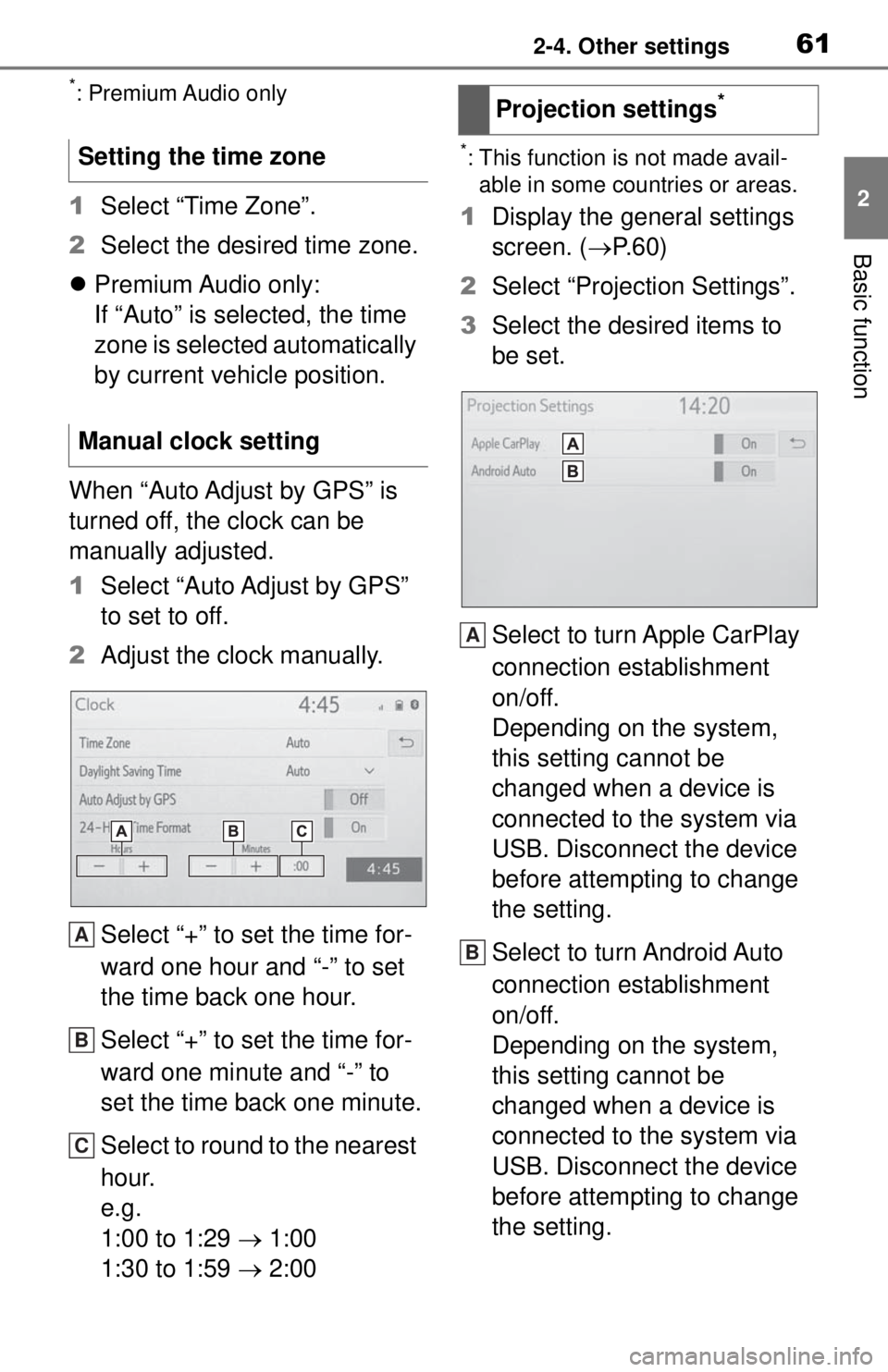
*: This function is not made avail-
able in some countries or areas.
1 Display the general settings
screen. ( P. 6 0 )
2 Select “Projection Settings”.
3 Select the desired items to
be set.
Select to turn Apple CarPlay
connection establishment
on/off.
Depending on the system,
this setting cannot be
changed when a device is
connected to the system via
USB. Disconnect the device
before attempting to change
the setting.
Select to turn Android Auto
connection establishment
on/off.
Depending on the system,
this setting cannot be
changed when a device is
connected to the system via
USB. Disconnect the device
before attempting to change
the setting.
Setting the time zone
Manual clock setting
A
B
C
Projection settings*
A
B
Page 117 of 262
119
4
4
Audio/visual system
Audio/visual system
4-1. Basic operationQuick reference........... 120
Some basics ............... 121
4-2. Radio operation
AM/FM/SiriusXM
® Satellite
Radio ......................... 125
4-3. Media operation USB memory............... 133
iPod/iPhone (Apple Car- Play) .......................... 135
Android Auto ............... 138
Bluetooth
® audio ......... 139
4-4. Audio/visual remote con- trols
Steering switches ........ 143
4-5. Setup Audio settings ............. 144
4-6. Tips for operating the audio/visual system
Operating information . 146
Page 118 of 262
1204-1. Basic operation
4-1.Basic operation
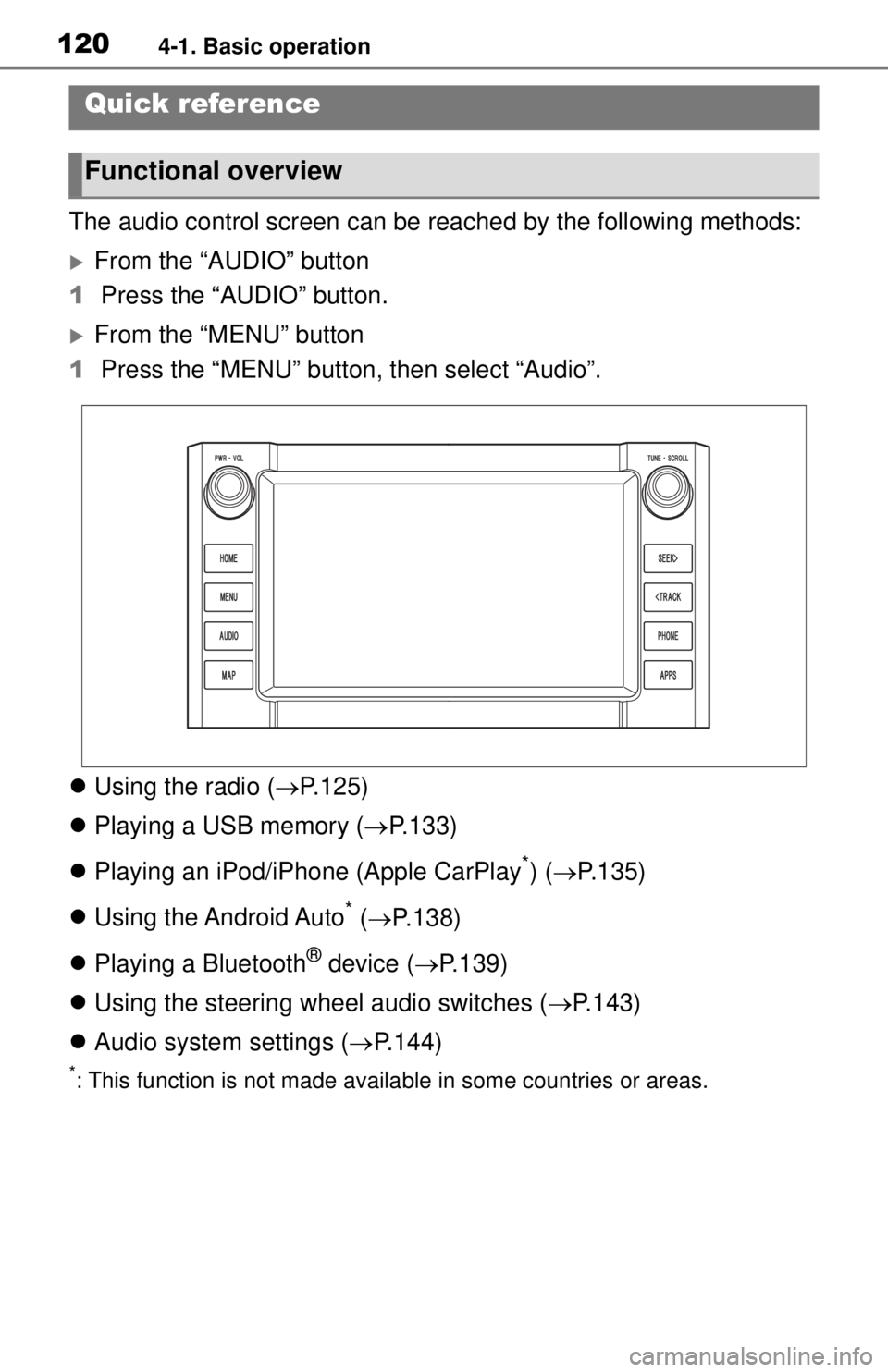
The audio control screen can be reached by the following methods:
From the “AUDIO” button
1 Press the “AUDIO” button.
From the “MENU” button
1 Press the “MENU” button, then select “Audio”.
Using the radio ( P.125)
Playing a USB memory ( P.133)
Playing an iPod/iPhone (Apple CarPlay
*) ( P.135)
Using the Android Auto
* ( P.138)
Playing a Bluetooth
® device ( P.139)
Using the steering wheel audio switches ( P.143)
Audio system settings ( P.144)
*: This function is not made availa ble in some countries or areas.
Quick reference
Functional overview