lock TOYOTA VENZA 2010 Owners Manual (in English)
[x] Cancel search | Manufacturer: TOYOTA, Model Year: 2010, Model line: VENZA, Model: TOYOTA VENZA 2010Pages: 26, PDF Size: 1.4 MB
Page 2 of 26
25
OVERVIEW
FEATURES/OPERATIONS
SAFETY AND EMERGENCY FEATURES
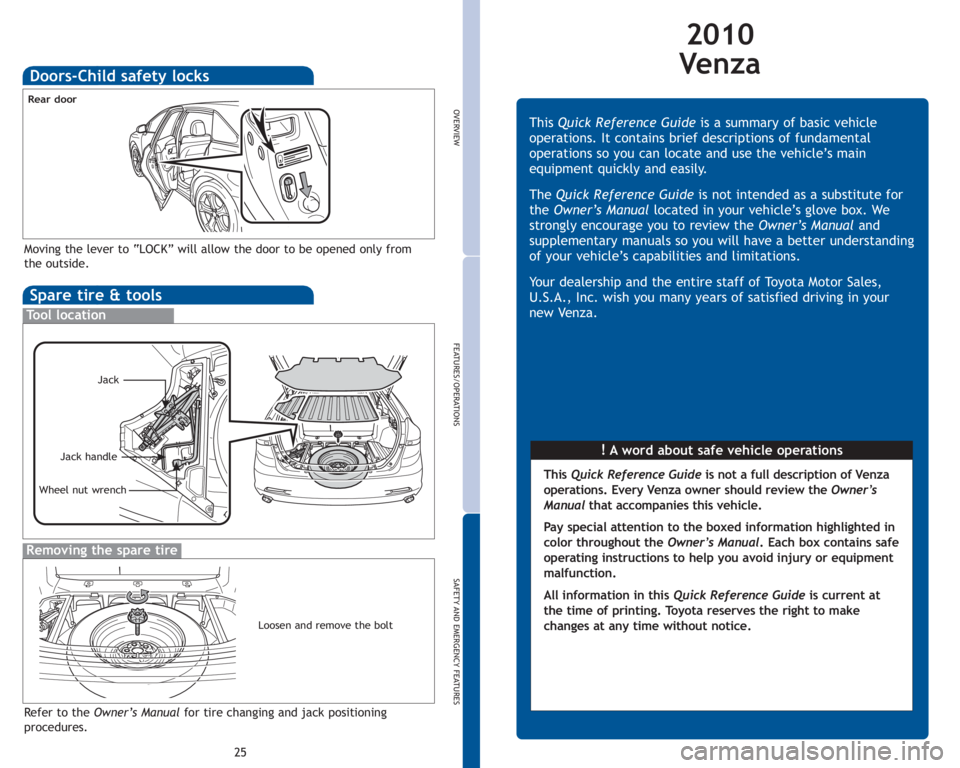
Spare tire & tools
Tool location
Removing the spare tire
Refer to the Owner’s Manualfor tire changing and jack positioning
procedures.
Wheel nut wrench
Moving the lever to “LOCK” will allow the door to be opened only from
the outside.
Rear door
Jack
Jack handle
Doors-Child safety locks
Loosen and remove the bolt
2010
Ve n z a
!A word about safe vehicle operations This Quick Reference Guideis a summary of basic vehicle
operations. It contains brief descriptions of fundamental
operations so you can locate and use the vehicle’s main
equipment quickly and easily.
The Quick Reference Guideis not intended as a substitute for
theOwner’s Manual located in your vehicle’s glove box. We
strongly encourage you to review theOwner’s Manual and
supplementary manuals so you will have a better understanding
of your vehicle’s capabilities and limitations.
Your dealership and the entire staff of Toyota Motor Sales,
U.S.A., Inc. wish you many years of satisfied driving in your
new Venza.
This Quick Reference Guideis not a full description of Venza
operations. Every Venza owner should review the Owner’s
Manualthat accompanies this vehicle.
Pay special attention to the boxed
information highlighted in
color throughout the Owner’s Manual. Each box contains safe
operating instructions to help you avoid injury or equipment
malfunction.
All information in this Quick Reference Guideis current at
the time of printing. Toyota reserves the right to make
changes at any time without notice.
Page 3 of 26
1
OVERVIEW
FEATURES/OPERATIONS
SAFETY AND EMERGENCY FEATURES
INDEX
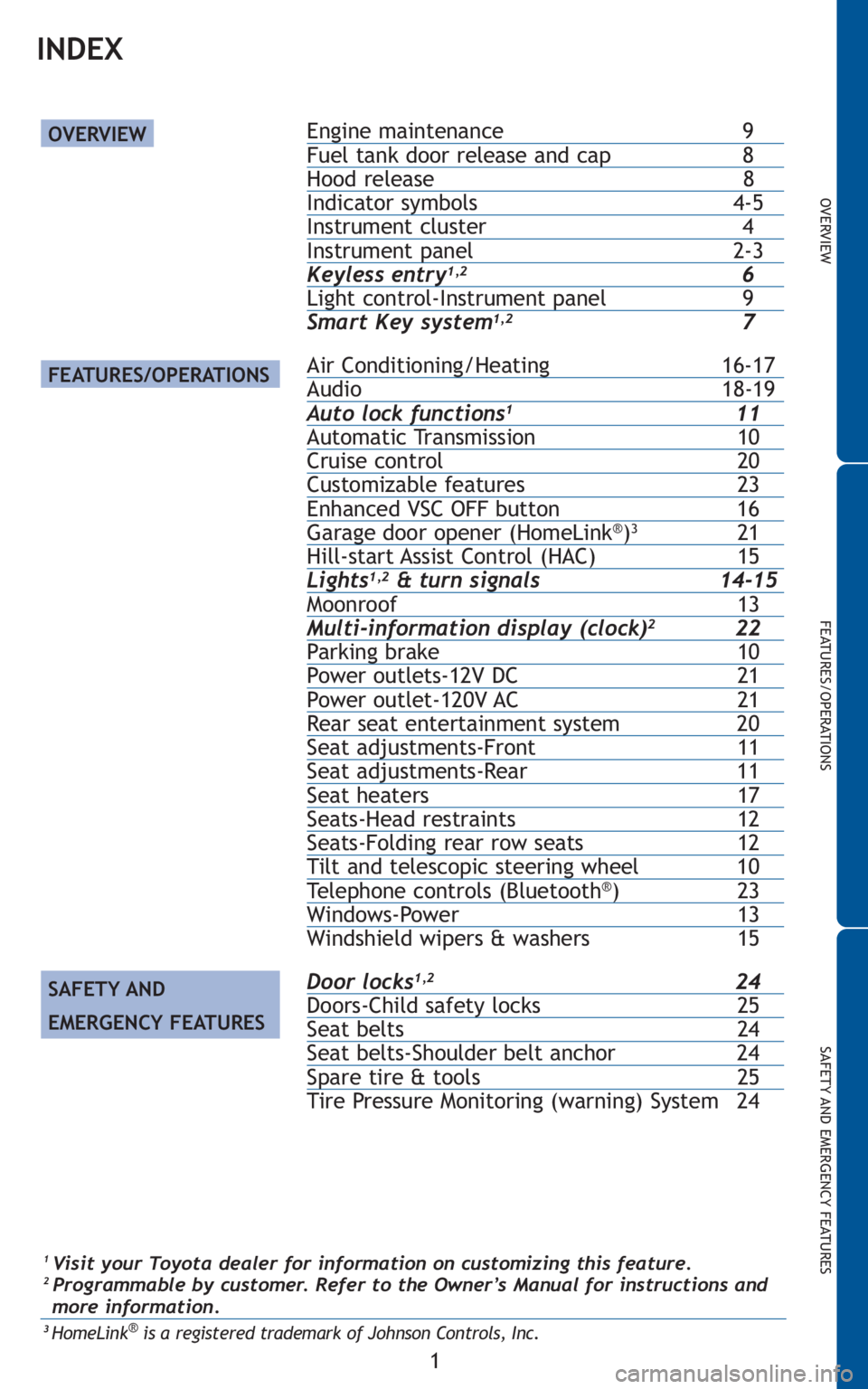
Engine maintenance 9Fuel tank door release and cap 8Hood release 8Indicator symbols 4-5Instrument cluster 4Instrument panel 2-3Keyless entry1,26Light control-Instrument panel 9
Smart Key system1,27
Air Conditioning/Heating 16-17Audio 18-19Auto lock functions111Automatic Transmission 10Cruise control 20Customizable features 23Enhanced VSC OFF button 16Garage door opener (HomeLink®)321Hill-start Assist Control (HAC) 15Lights1,2& turn signals 14-15Moonroof 13Multi-information display (clock)222Parking brake 10Power outlets-12V DC 21Power outlet-120V AC 21Rear seat entertainment system 20Seat adjustments-Front 11Seat adjustments-Rear 11Seat heaters 17Seats-Head restraints 12Seats-Folding rear row seats 12Tilt and telescopic steering wheel 10Telephone controls (Bluetooth®)23Windows-Power 13
Windshield wipers & washers 15
Door locks1,224Doors-Child safety locks 25Seat belts 24Seat belts-Shoulder belt anchor 24Spare tire & tools 25
Tire Pressure Monitoring (warning) System 24
OVERVIEW
FEATURES/OPERATIONS
SAFETY AND
EMERGENCY FEATURES
1Visit your Toyota dealer for information on customizing this feature.2 Programmable by customer. Refer to the Owner’s Manual for instructions and
more information.
3HomeLink®is a registered trademark of Johnson Controls, Inc.
Page 7 of 26
5
OVERVIEW
FEATURES/OPERATIONS
SAFETY AND EMERGENCY FEATURES
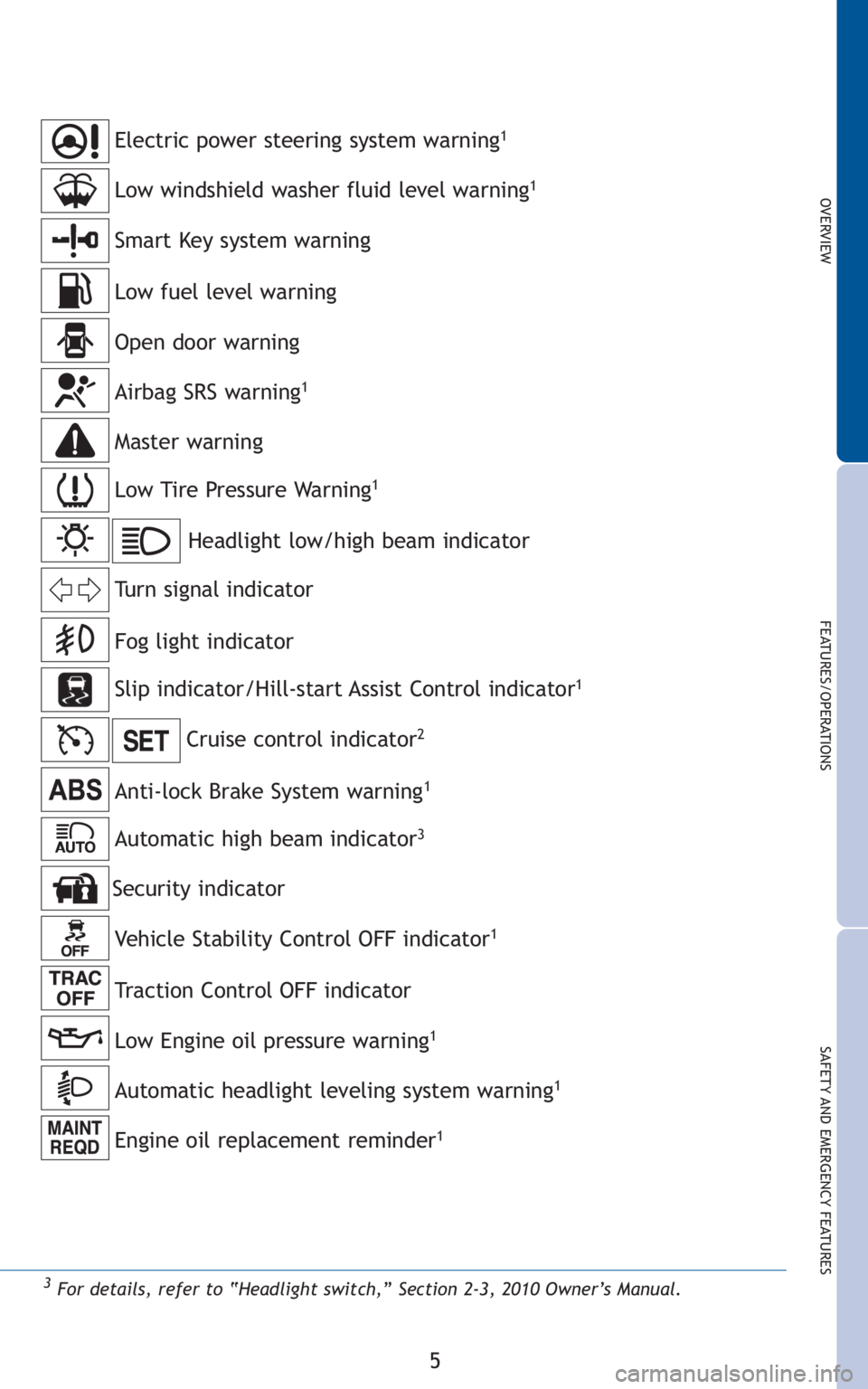
Anti-lock Brake System warning1
Headlight low/high beam indicator
Turn signal indicator
Slip indicator/Hill-start Assist Control indicator
1
Cruise control indicator2
Low Tire Pressure Warning1
Smart Key system warning
Open door warning
Airbag SRS warning1
Master warning
Low windshield washer fluid level warning1
Low fuel level warning
Electric power steering system warning1
Fog light indicator
3For details, refer to “Headlight switch,” Section 2-3, 2010 Owner’s Manual.
Vehicle Stability Control OFF indicator1
Low Engine oil pressure warning1
Automatic headlight leveling system warning1
Engine oil replacement reminder1
Security indicator
Traction Control OFF indicator
Automatic high beam indicator3
Page 8 of 26
6
OVERVIEW
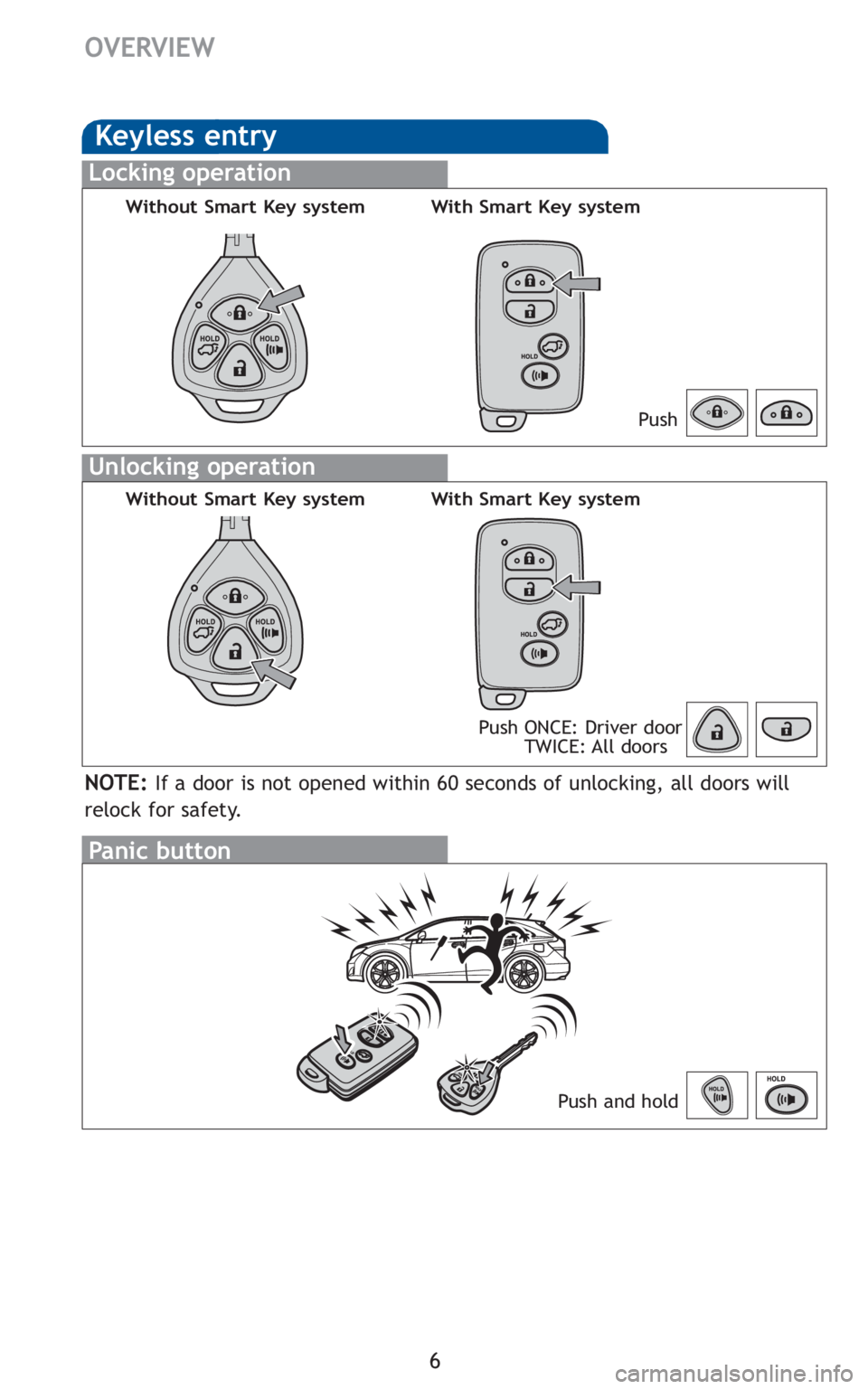
Panic button
Push and hold
Keyless entry
Locking operation
Unlocking operation
NOTE:If a door is not opened within 60 seconds of unlocking, all doors will
relock for safety.
Push ONCE: Driver door
TWICE: All doorsPush
Without Smart Key systemWith Smart Key system
Without Smart Key systemWith Smart Key system
Page 9 of 26
7
OVERVIEW
FEATURES/OPERATIONS
SAFETY AND EMERGENCY FEATURES
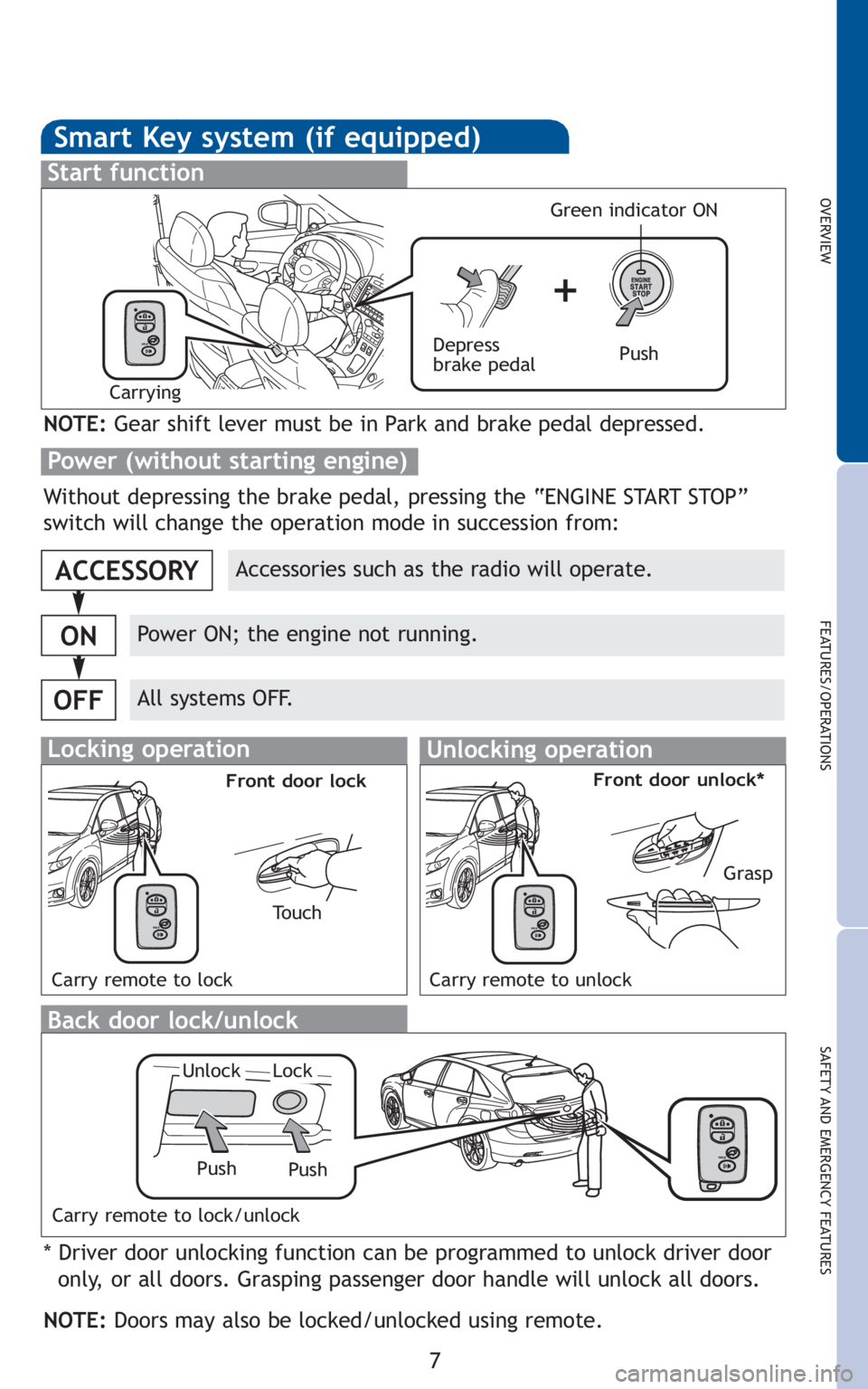
Smart Key system (if equipped)
Start function
Accessories such as the radio will operate.
Power ON; the engine not running.
All systems OFF.
ACCESSORY
ON
OFF
NOTE:Gear shift lever must be in Park and brake pedal depressed.
Push Depress
brake pedal
Carrying
Green indicator ON
Without depressing the brake pedal, pressing the “ENGINE START STOP”
switch will change the operation mode in succession from:
* Driver door unlocking function can be programmed to unlock driver door
only, or all doors. Grasping passenger door handle will unlock all doors.
NOTE:Doors may also be locked/unlocked using remote.
Power (without starting engine)
Push
Unlock
Push
Lock
Locking operationUnlocking operation
Carry remote to lockCarry remote to unlock
To u c h
Front door lockFront door unlock*
Grasp
Carry remote to lock/unlock
Back door lock/unlock
Page 12 of 26
10
FEATURES/OPERATIONS
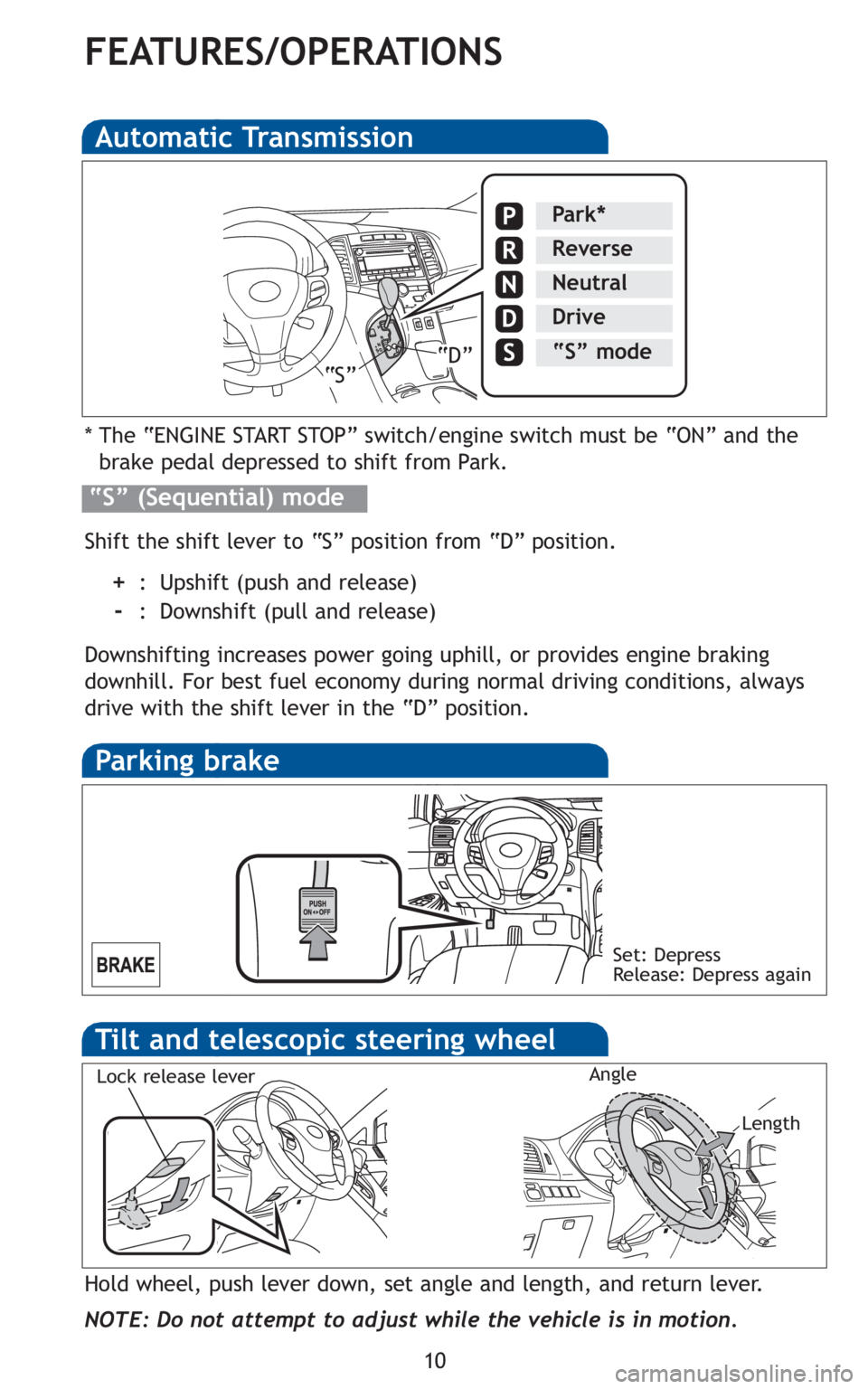
Automatic Transmission
* The “ENGINE START STOP” switch/engine switch must be “ON” and the
brake pedal depressed to shift from Park.
Shift the shift lever to “S” position from “D” position.
+: Upshift (push and release)
-: Downshift (pull and release)
Downshifting increases power going uphill, or provides engine braking
downhill. For best fuel economy during normal driving conditions, always
drive with the shift lever in the “D” position.
“S” (Sequential) mode
Park*
Reverse
Neutral
Drive
“S” mode“S”“D”
Parking brake
Set: Depress
Release: Depress again
Tilt and telescopic steering wheel
Hold wheel, push lever down, set angle and length, and return lever.
NOTE: Do not attempt to adjust while the vehicle is in motion.
Lock release lever
Length Angle
Page 13 of 26
11
OVERVIEW
FEATURES/OPERATIONS
SAFETY AND EMERGENCY FEATURES
Auto lock functions
Automatic door locks can be programmed to operate in four different
modes, or turned OFF.
-Doors lock when shifting from Park.
-Doors lock when the vehicle speed is approximately 12 mph or higher.
-Doors unlock when shifting into Park.
-Doors unlock when the driver’s door is opened within 10 seconds after
turning the “ENGINE START STOP” switch or engine switch OFF.
Refer to the Owner’s Manualfor more details.
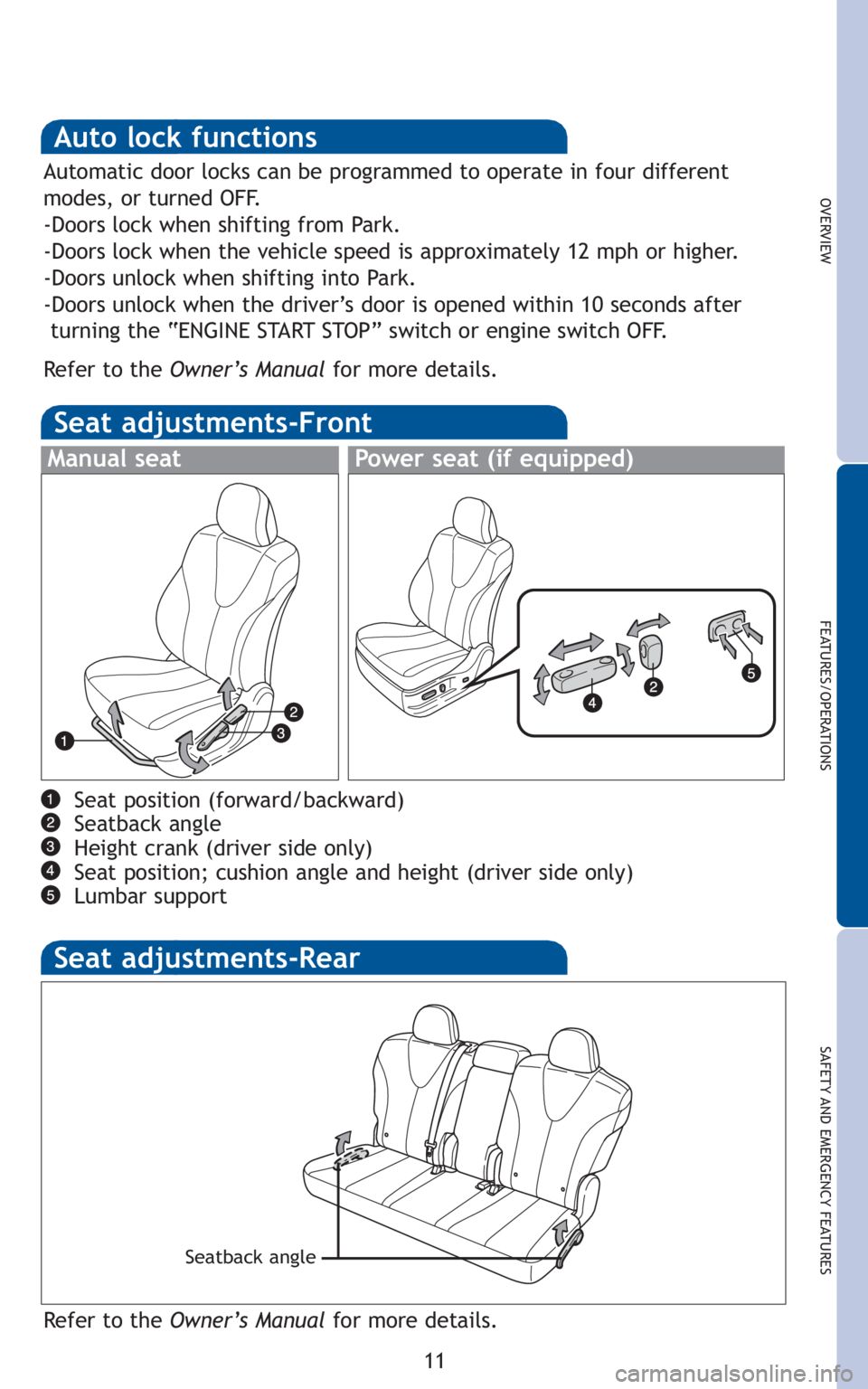
Seat adjustments-Front
Power seat (if equipped)Manual seat
Seat position (forward/backward)
Seatback angle
Height crank (driver side only)
Seat position; cushion angle and height (driver side only)
Lumbar support
Seat adjustments-Rear
Refer to the Owner’s Manualfor more details.
Seatback angle
Page 14 of 26
12
FEATURES/OPERATIONS
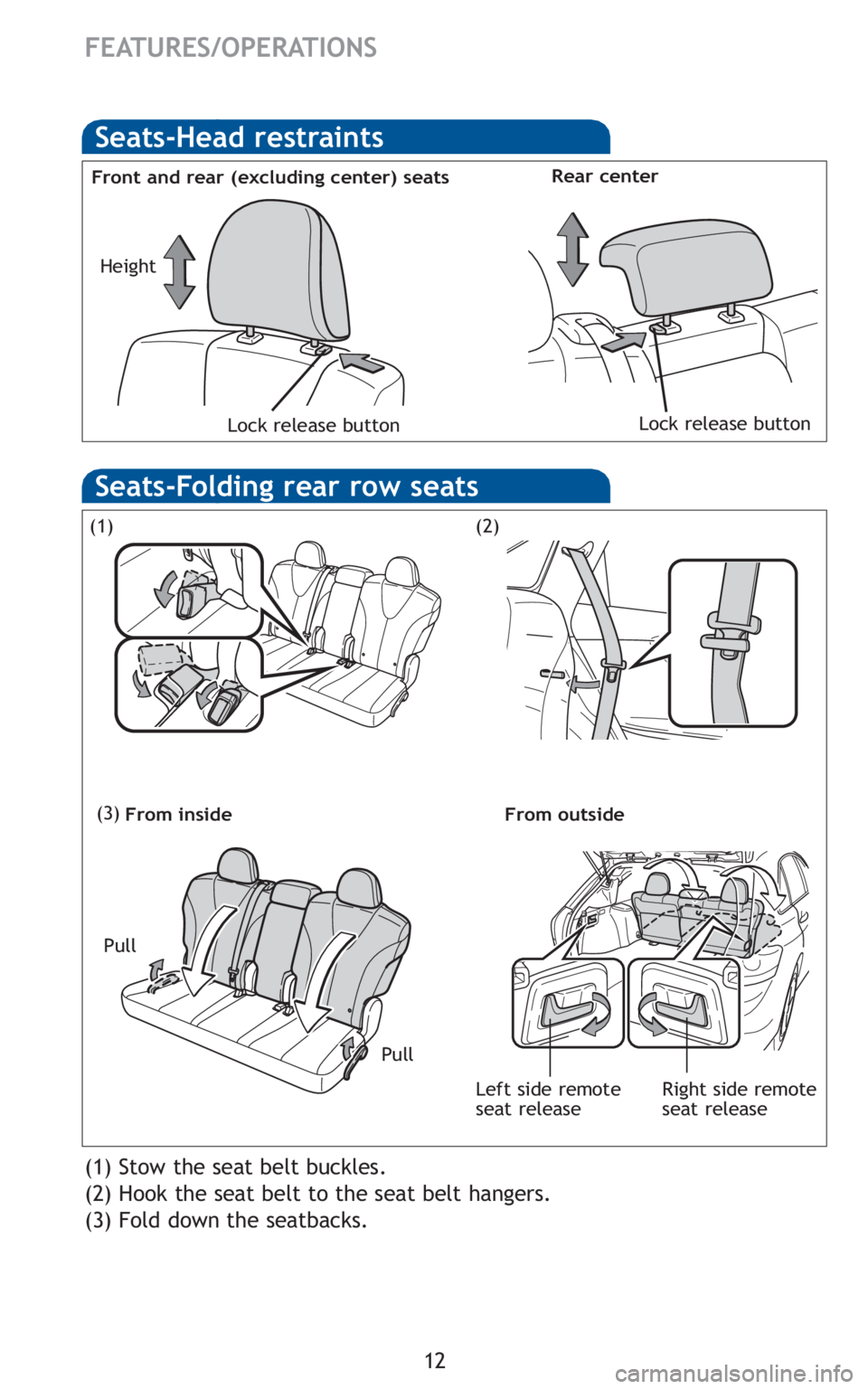
Seats-Head restraints
Front and rear (excluding center) seatsRear center
Lock release buttonLock release button
Height
(1) Stow the seat belt buckles.
(2) Hook the seat belt to the seat belt hangers.
(3) Fold down the seatbacks.
(1)
(3)
(2)
Seats-Folding rear row seats
Pull Pull
From inside From outside
Right side remote
seat release Left side remote
seat release
Page 15 of 26
13
OVERVIEW
FEATURES/OPERATIONS
SAFETY AND EMERGENCY FEATURES
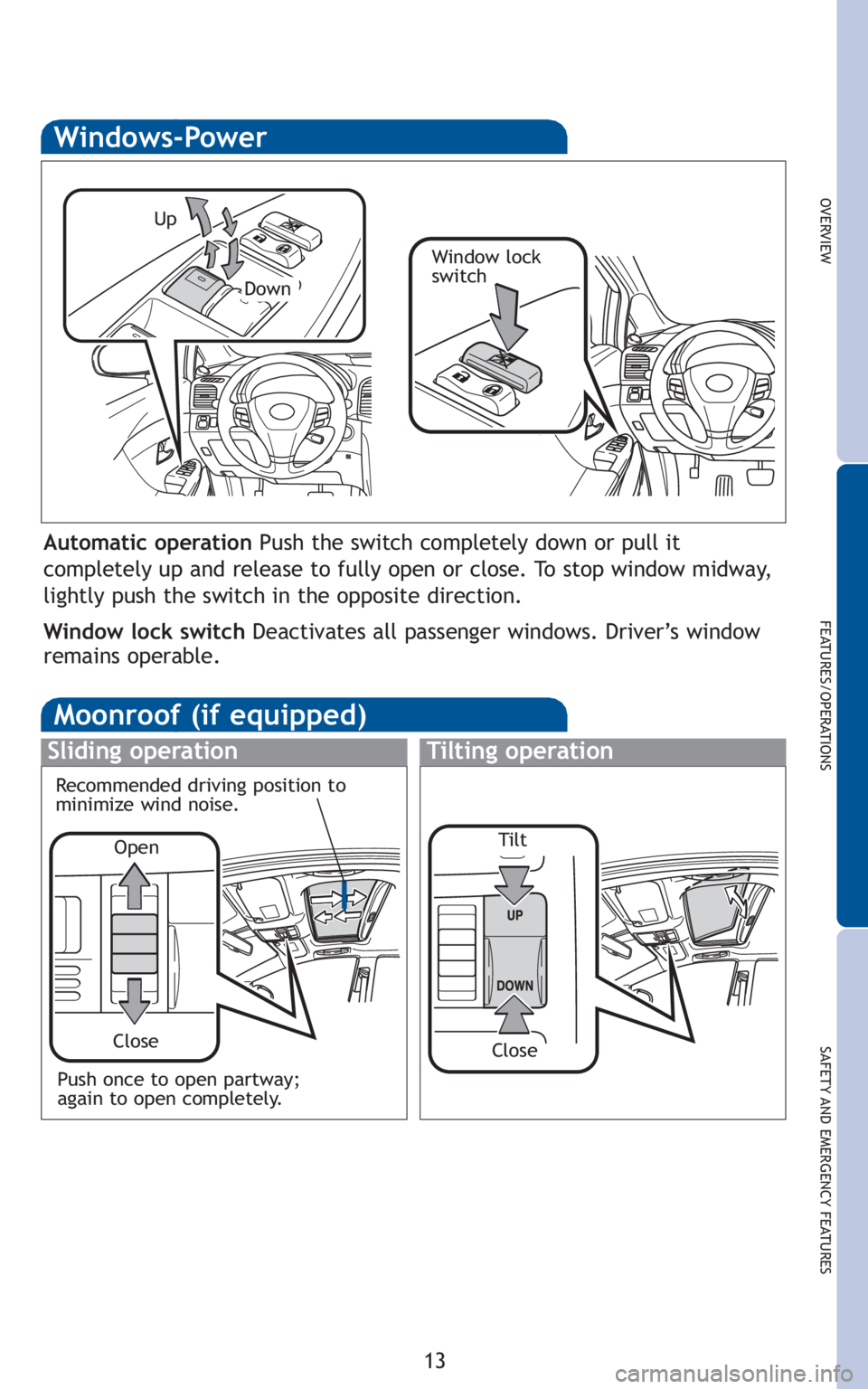
Moonroof (if equipped)
Sliding operationTilting operation
Open
Close
Recommended driving position to
minimize wind noise.
Windows-Power
Up
Down
Window lock
switch
Automatic operation Push the switch completely down or pull it
completely up and release to fully open or close. To stop window midway,
lightly push the switch in the opposite direction.
Window lock switch Deactivates all passenger windows. Driver’s window
remains operable.
Push once to open partway;
again to open completely.Tilt
Close
Page 16 of 26
14
FEATURES/OPERATIONS
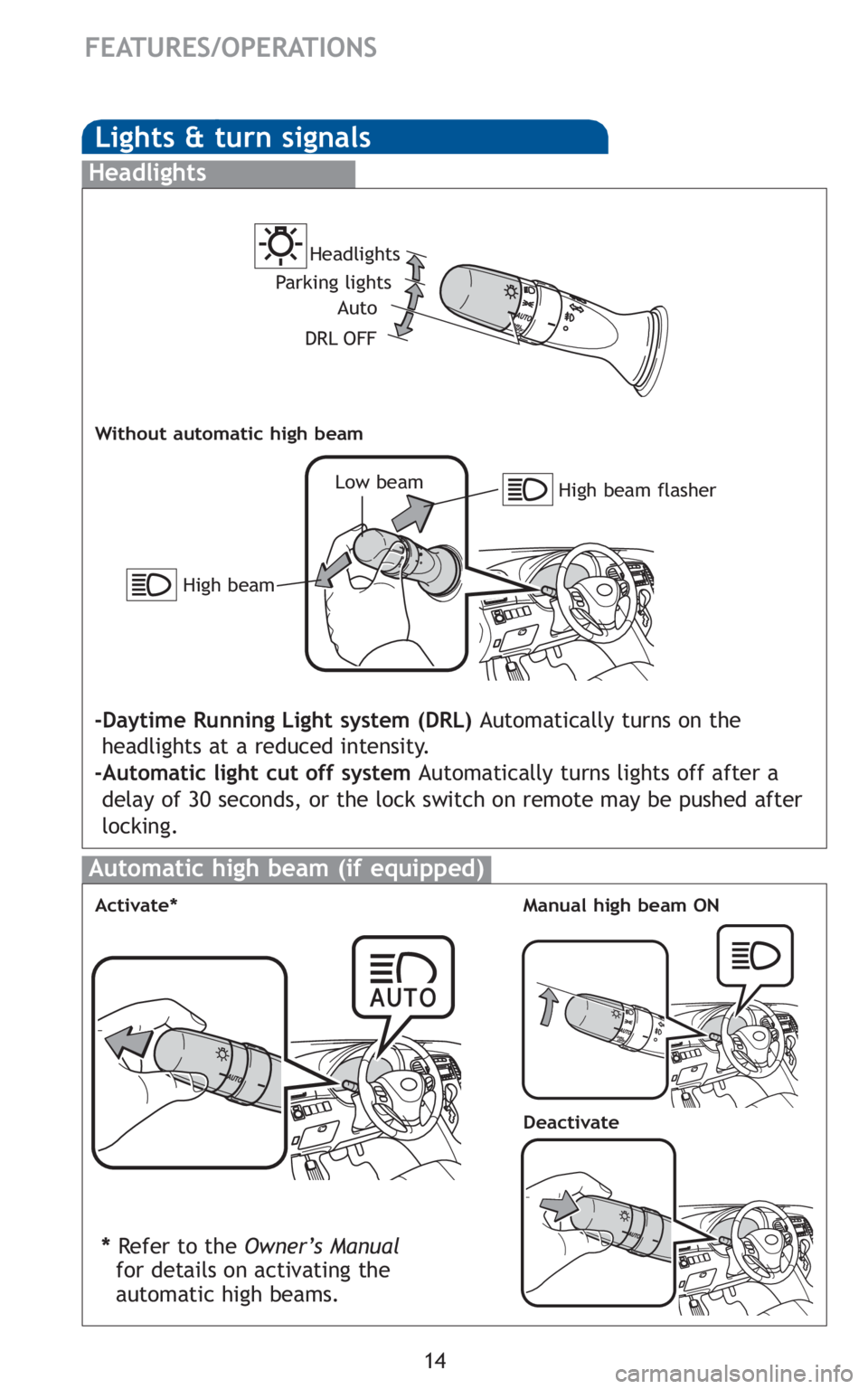
Lights & turn signals
Headlights
High beam flasher Low beam Headlights
-Daytime Running Light system (DRL) Automatically turns on the
headlights at a reduced intensity.
-Automatic light cut off system Automatically turns lights off after a
delay of 30 seconds, or the lock switch on remote may be pushed after
locking.
Parking lights
High beam
Auto
DRL OFF
Without automatic high beam
Automatic high beam (if equipped)
Manual high beam ONActivate*
Deactivate
* Refer to the Owner’s Manual
for details on activating the
automatic high beams.