steering TOYOTA VENZA 2013 Accessories, Audio & Navigation (in English)
[x] Cancel search | Manufacturer: TOYOTA, Model Year: 2013, Model line: VENZA, Model: TOYOTA VENZA 2013Pages: 228, PDF Size: 3.73 MB
Page 175 of 228
175
5
Bluetooth
® HANDS-FREE SYSTEM
2. TELEPHONE OPERATION
2. RECEIVING CALLS ON A Bluetooth® PHONE
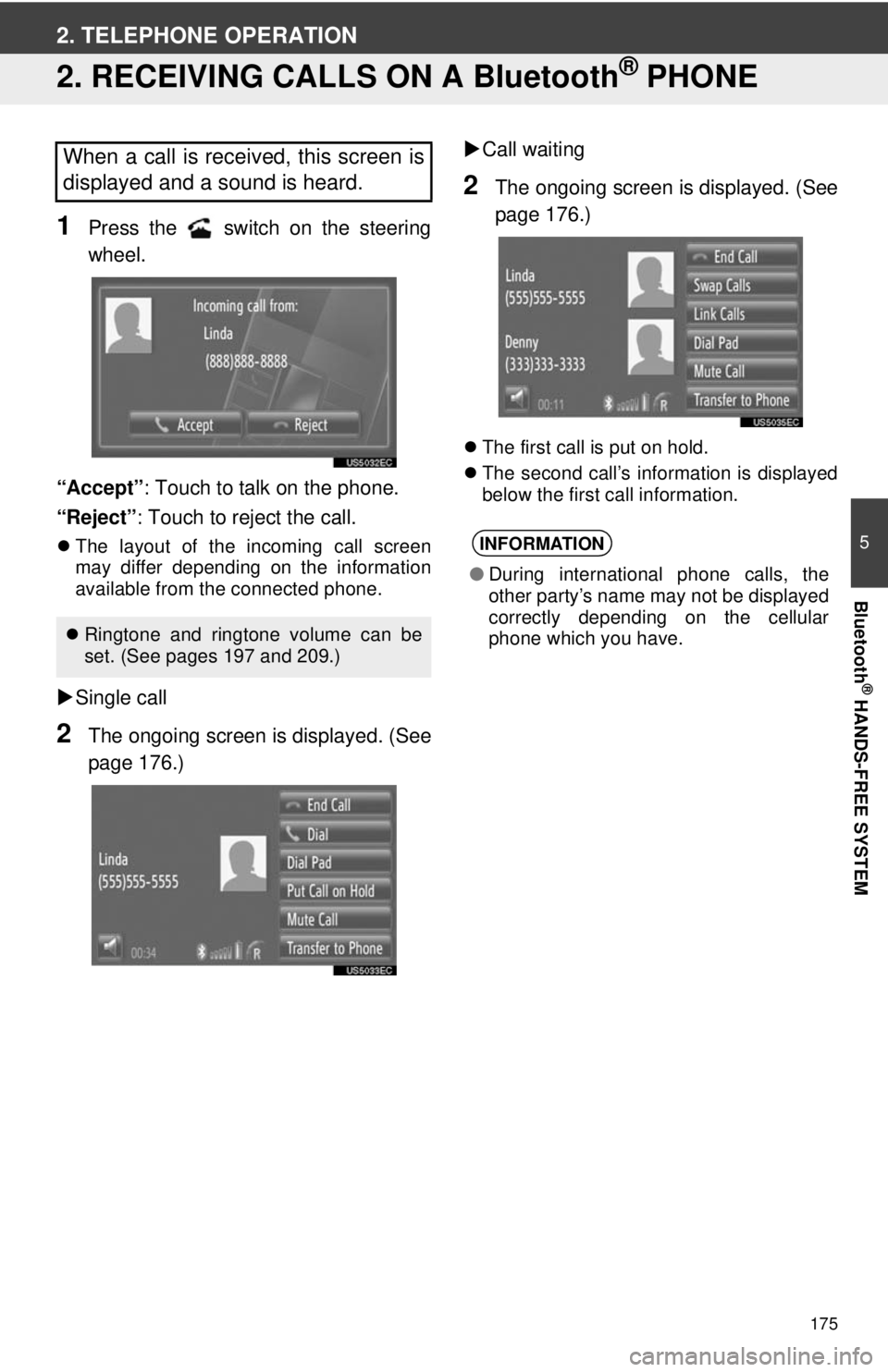
1Press the switch on the steering
wheel.
“Accept” : Touch to talk on the phone.
“Reject” : Touch to reject the call.
The layout of the incoming call screen
may differ depending on the information
available from the connected phone.
Single call
2The ongoing screen is displayed. (See
page 176.)
Call waiting
2The ongoing screen is displayed. (See
page 176.)
The first call is put on hold.
The second call’s information is displayed
below the first call information.
When a call is received, this screen is
displayed and a sound is heard.
Ringtone and ringtone volume can be
set. (See pages 197 and 209.)
INFORMATION
● During international phone calls, the
other party’s name may not be displayed
correctly depending on the cellular
phone which you have.
Page 176 of 228
176
2. TELEPHONE OPERATION
3. TALKING ON A Bluetooth® PHONE
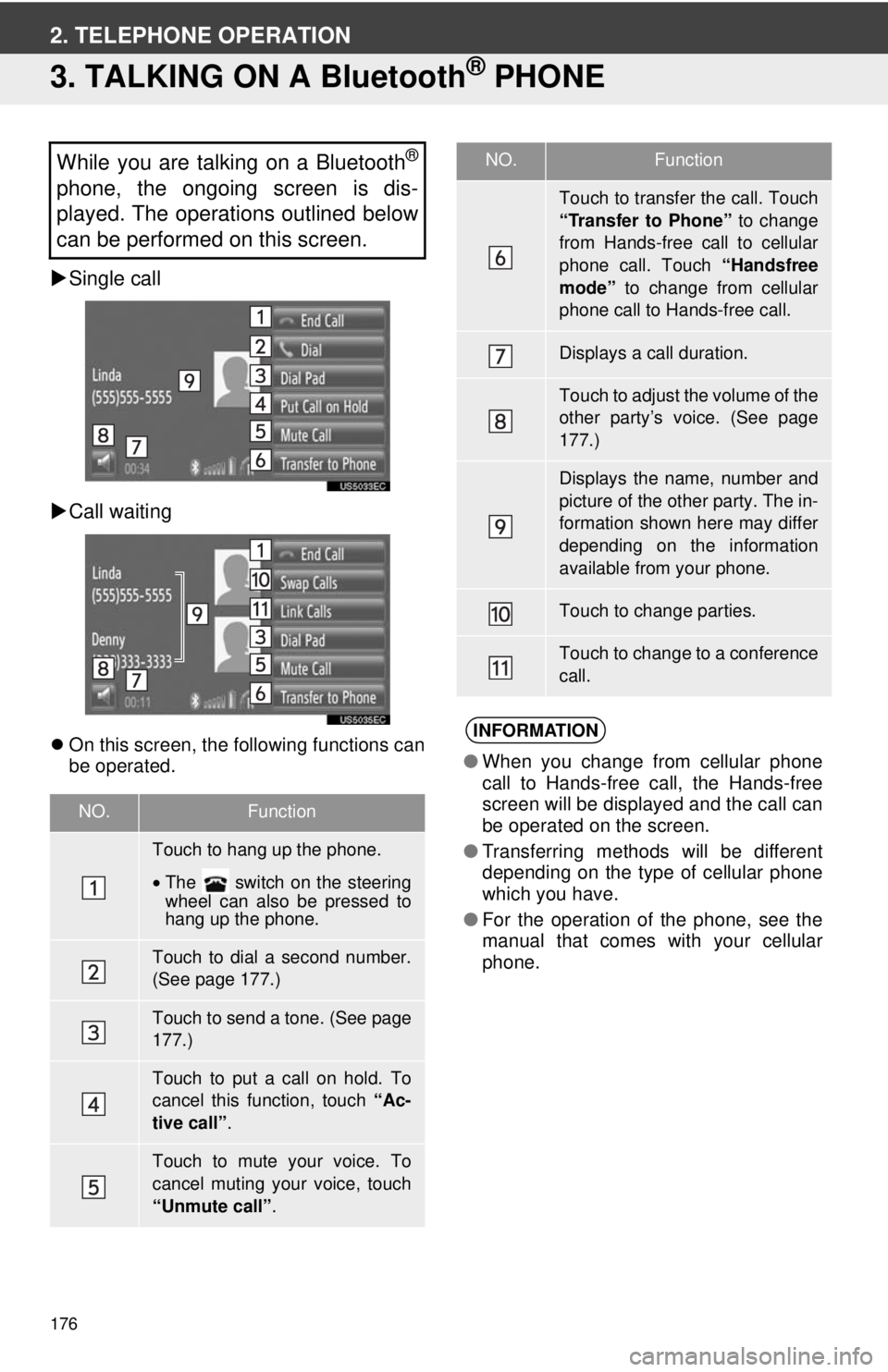
Single call
Call waiting
On this screen, the following functions can
be operated.
While you are talking on a Bluetooth®
phone, the ongoing screen is dis-
played. The operations outlined below
can be performed on this screen.
NO.Function
Touch to hang up the phone.
•The switch on the steering
wheel can also be pressed to
hang up the phone.
Touch to dial a second number.
(See page 177.)
Touch to send a tone. (See page
177.)
Touch to put a call on hold. To
cancel this function, touch “Ac-
tive call” .
Touch to mute your voice. To
cancel muting your voice, touch
“Unmute call” .
Touch to transfer the call. Touch
“Transfer to Phone” to change
from Hands-free call to cellular
phone call. Touch “Handsfree
mode” to change from cellular
phone call to Hands-free call.
Displays a call duration.
Touch to adjust the volume of the
other party’s voice. (See page
177.)
Displays the name, number and
picture of the other party. The in-
formation shown here may differ
depending on the information
available from your phone.
Touch to change parties.
Touch to change to a conference
call.
INFORMATION
● When you change from cellular phone
call to Hands-free call, the Hands-free
screen will be displayed and the call can
be operated on the screen.
● Transferring methods will be different
depending on the type of cellular phone
which you have.
● For the operation of the phone, see the
manual that comes with your cellular
phone.
NO.Function
Page 186 of 228
186
1. VOICE COMMAND SYSTEM OPERATION
1. VOICE COMMAND SYSTEM
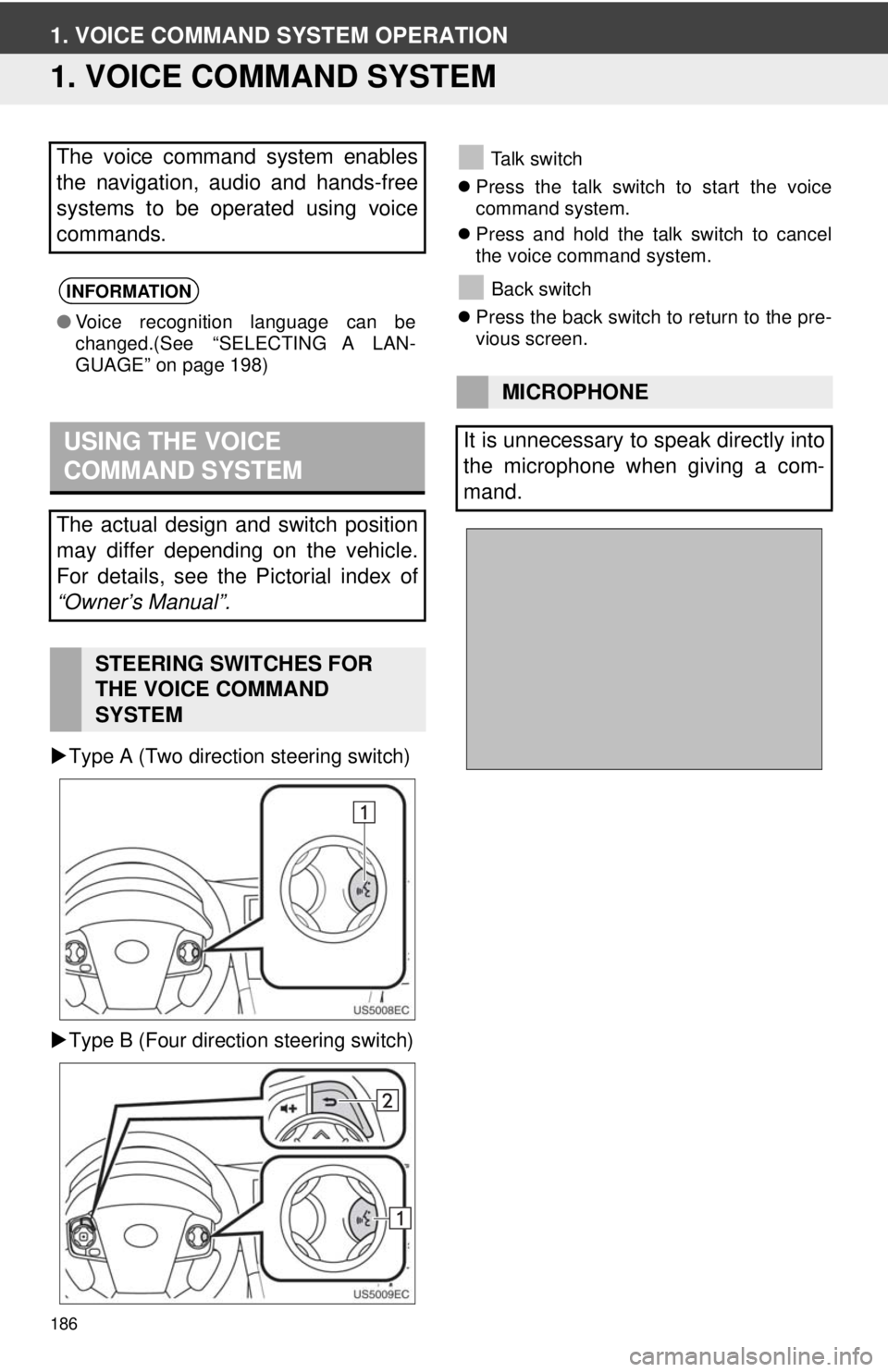
Type A (Two direction steering switch)
Type B (Four direction steering switch)
Talk switch
Press the talk switch to start the voice
command system.
Press and hold the talk switch to cancel
the voice command system.
Back switch
Press the back switch to return to the pre-
vious screen.The voice command system enables
the navigation, audio and hands-free
systems to be operated using voice
commands.
INFORMATION
●Voice recognition language can be
changed.(See “SELECTING A LAN-
GUAGE” on page 198)
USING THE VOICE
COMMAND SYSTEM
The actual design and switch position
may differ depending on the vehicle.
For details, see the Pictorial index of
“Owner’s Manual”.
STEERING SWITCHES FOR
THE VOICE COMMAND
SYSTEM
MICROPHONE
It is unnecessary to speak directly into
the microphone when giving a com-
mand.
Page 214 of 228
214
1. REAR VIEW MONITOR SYSTEM
1. REAR VIEW MONITOR SYSTEM OPERATION
1To display the rear view image on the
screen, the shift lever is in the “R” posi-
tion when the engine switch is in the
“ON” position.
If you move the shift lever out of the “R”
position, the screen returns to the previ-
ous screen.
The rear view monitor system assists
the driver by displaying an image of the
view behind the vehicle while backing
up.
The image is displayed in reverse on
the screen. This allows the image to
appear in the same manner as that of
the rear view mirror.CAUTION
●Never depend on the rear view monitor
system entirely when backing up.
Always make sure your intended path is
clear.
Use caution, just as you would when
backing up any vehicle.
● Never back up while looking only at the
screen. The image on the screen is dif-
ferent from actual conditions. Depicted
distances between objects and flat sur-
faces will differ from the actual dis-
tances. If you back up while looking only
at the screen, you may hit a vehicle, a
person or an object. When backing up,
be sure to check behind and all around
the vehicle visually and with mirrors
before proceeding.
● Do not use the system when the back
door, trunk or tailgate is not completely
closed.
● Use your own eyes to confirm the vehi-
cle’s surroundings, as the displayed
image may become faint or dark, and
moving images will be distorted, or not
entirely visible when the outside tem-
perature is low. When backing up, be
sure to check behind and all around the
vehicle visually and with mirror before
proceeding.
● Do not use the system in the following
cases:
• On icy or slick road surfaces, or in
snow.
• When using tire chains or emergency tires.
• On an uneven road, such as a slope.
With rear view monitor guide lines (If
equipped)
● Always check the vehicle surrounding
area, because the guide lines are ancil-
lary lines.
● The guide lines are ancillary lines and
do not change even if the steering wheel
is turned.
Page 222 of 228

222
ALPHABETICAL INDEX
A
Adding destinations.................................. 49
“Address” .................................................. 35
Adjust contrast/brightness...................... 201
“Advanced”................................................ 40
“AM” ........................................................ 106
Application operation ................................ 93
Apps .......................................................... 93
APPS button ....................................... 20, 74
“Audio” .................................................... 100
Audio remote controls (steering switches) ............................. 141
Audio system ....... ..................................... 99
Audio system operating hint s ................. 144
Caring for your CD player and discs.................................... ..... 146
CD-R and CD-RW discs ..................... 149
iPod .................................................... 145
MP3/WMA files ................................... 148
Radio reception .................................. 144
Terms ................................................. 150
USB memory ...................................... 146
B
“Beep” .....................................................197
Bluetooth®...............................132, 153, 202
Bluetooth® audio .................................... 132
Connecting Bluetooth® audio ............. 134
Playing Bluetooth® audio player ......... 137
Sound setting.............................. 104, 105
Switching to Bluetooth
® audio
mode ............................................... 133
Bluetooth
® hands-free system . ...............153
Bluetooth® settings ................................ 202
Bluetooth® function ON/OFF .............. 202
Displaying the paired device list ......... 206
Pairing a Bluetooth
® device................ 203
Setting pin........................................... 207
C
“Calendar” .................................................79
“Call History” ...........................................173
Calling on a Bluetooth
® phone ............... 170
By call history ..................................... 173
By dial ................................................. 170
Page 227 of 228

227
Showing the tire pressure screen ........... 193
SMS message ........................................ 179
“Speed Dials” .................................. 167, 172
Starting route guidance screen ................ 42
Steering switches.................................... 141
Switching audio source ........................... 103
Switching to AUX mode .......................... 131
Switching to Bluetooth
® audio mode ...... 133
Switching to CD mode ............................ 118
Switching to radio mode ......................... 106
Switching to satellite radio mode ............ 113
Switching to USB or iPod mode.............. 124
T
Talking on the Bluetooth® phone ........... 176
Adjusting the receiver volume ............ 177
Dialing a second number ................... 177
Incoming call waiting .......................... 175
Sending tones .................................... 177
Telephone............................................... 153
Telephone (hands-free system for cellular phone).................................... 153
About the phonebook in this system .................................. 159
Using the phone switch ...................... 158
When you sell or dispose of the vehicle ............................................ 159 Terms ...................................................... 150
ID3 tag ................................................. 150
ISO 9660 format .................................. 150
m3u ..................................................... 150
MP3 ..................................................... 150
Packet write ......................................... 150
WMA.................................................... 150
WMA tag.............................................. 150
To display map screen ............................. 25
Tone and balance ................................... 105
Balance ............................................... 105
Tone .................................................... 105
Traffic announcement ............................. 108
Traffic message setting ............................ 90
“Traffic Messages” .................................... 86
“TUNE SCROLL” knob............................ 103
Turn off display ....................................... 200
Turning the audio system on or off ......... 102
U
USB memory........................................... 146
USB memory/iPod ................................. 123 Connecting a USB memory or iPod ... 123
Playing a USB memory or iPod .......... 124
Sound setting ............................. 104, 105
Switching to USB or iPod mode ......... 124
Using the phone switch ........................... 158