change time TOYOTA VENZA 2014 Accessories, Audio & Navigation (in English)
[x] Cancel search | Manufacturer: TOYOTA, Model Year: 2014, Model line: VENZA, Model: TOYOTA VENZA 2014Pages: 363, PDF Size: 21.59 MB
Page 2 of 363

2
VENZA_Navi_OM73020U_(U)
13.05.13 14:12
Introduction
This manual explains the operation of the Navigation System. Please read this
manual carefully to ensure proper use. Keep this manual in your vehicle at all
times.
The screen shots in this document and the actual screens of the navigation sys-
tem differ depending on whether the functions and/or a contract existed and the
map data available at the time of producing this document.
The Navigation System is one of the most technologically advanced vehicle ac-
cessories ever developed. The system receives satellite signals from the Global
Positioning System (GPS) operated by the U.S. Department of Defense. Using
these signals and other vehicle sensors, the system indicates your present po-
sition and assists in locating a desired destination.
The navigation system is designed to select efficient routes from your present
starting location to your destination. The system is also designed to direct you
to a destination that is unfamiliar to you in an efficient manner. The system uses
DENSO maps. The calculated routes may not be the shortest nor the least traf-
fic congested. Your own personal local knowledge or “short cut” may at times
be faster than the calculated routes.
The navigation system’s database includes Point of Interest categories to allow
you to easily select destinations such as restaurants and hotels. If a destination
is not in the database, you can enter the street address or a major intersection
close to it and the system will guide you there.
The system will provide both a visual map and audio instructions. The audio in-
structions will announce the distance remaining and the direction to turn in when
approaching an intersection. These voice instructions will help you keep your
eyes on the road and are timed to provide enough time to allow you to maneu-
ver, change lanes or slow down.
Please be aware that all current vehicle navigation systems have certain limita-
tions that may affect their ability to perform properly. The accuracy of the vehi-
cle’s position depends on satellite conditions, road configuration, vehicle
condition or other circumstances. For more information on the limitations of the
system, refer to pages 126 through 128.
NAVIGATION SYSTEM OWNER’S MANUAL
NAVIGATION SYSTEM
Page 10 of 363
10
VENZA_Navi_OM73020U_(U)
13.05.13 14:12
1. NAVIGATION OPERATION
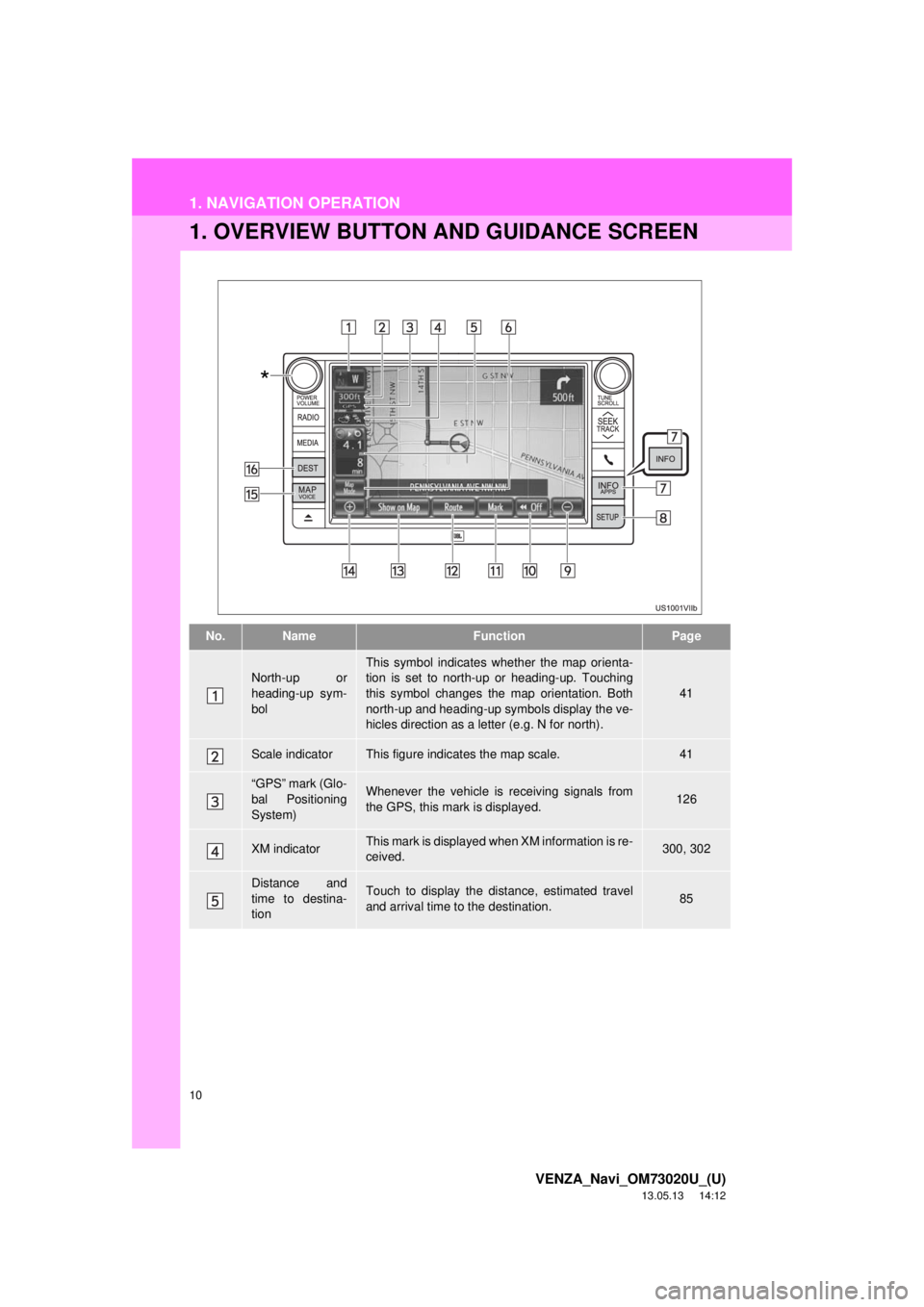
1. OVERVIEW BUTTON AND GUIDANCE SCREEN
No.NameFunctionPage
North-up or
heading-up sym-
bolThis symbol indicates whether the map orienta-
tion is set to north-up or heading-up. Touching
this symbol changes the map orientation. Both
north-up and heading-up symbols display the ve-
hicles direction as a letter (e.g. N for north).
41
Scale indicatorThis figure indicates the map scale.41
“GPS” mark (Glo-
bal Positioning
System)Whenever the vehicle is receiving signals from
the GPS, this mark is displayed.126
XM indicatorThis mark is displayed when XM information is re-
ceived.300, 302
Distance and
time to destina-
tionTouch to display the distance, estimated travel
and arrival time to the destination.85
*
Page 26 of 363
26
VENZA_Navi_OM73020U_(U)
13.05.13 14:12
1. BASIC INFORMATION BEFORE OPERATION
1. INITIAL SCREEN
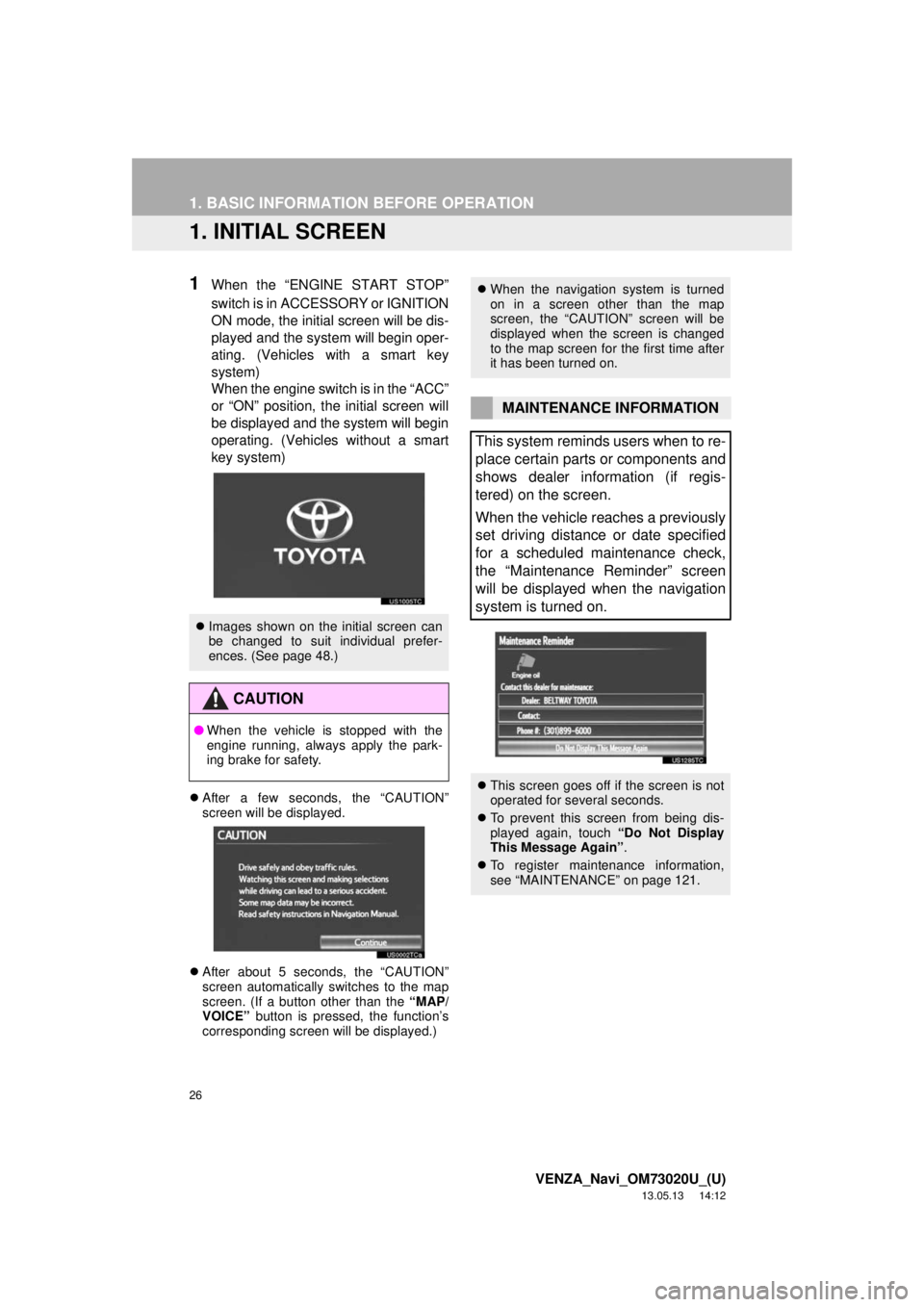
1When the “ENGINE START STOP”
switch is in ACCESSORY or IGNITION
ON mode, the initial screen will be dis-
played and the system will begin oper-
ating. (Vehicles with a smart key
system)
When the engine switch is in the “ACC”
or “ON” position, the initial screen will
be displayed and the system will begin
operating. (Vehicles without a smart
key system)
After a few seconds, the “CAUTION”
screen will be displayed.
After about 5 seconds, the “CAUTION”
screen automatically switches to the map
screen. (If a button other than the “MAP/
VOICE” button is pressed, the function’s
corresponding screen will be displayed.)
Images shown on the initial screen can
be changed to suit individual prefer-
ences. (See page 48.)
CAUTION
●When the vehicle is stopped with the
engine running, always apply the park-
ing brake for safety.
When the navigation system is turned
on in a screen other than the map
screen, the “CAUTION” screen will be
displayed when the screen is changed
to the map screen for the first time after
it has been turned on.
MAINTENANCE INFORMATION
This system reminds users when to re-
place certain parts or components and
shows dealer information (if regis-
tered) on the screen.
When the vehicle reaches a previously
set driving distance or date specified
for a scheduled maintenance check,
the “Maintenance Reminder” screen
will be displayed when the navigation
system is turned on.
This screen goes off if the screen is not
operated for several seconds.
To prevent this screen from being dis-
played again, touch “Do Not Display
This Message Again”.
To register maintenance information,
see “MAINTENANCE” on page 121.
Page 44 of 363
44
2. SETUP
VENZA_Navi_OM73020U_(U)
13.05.13 14:12
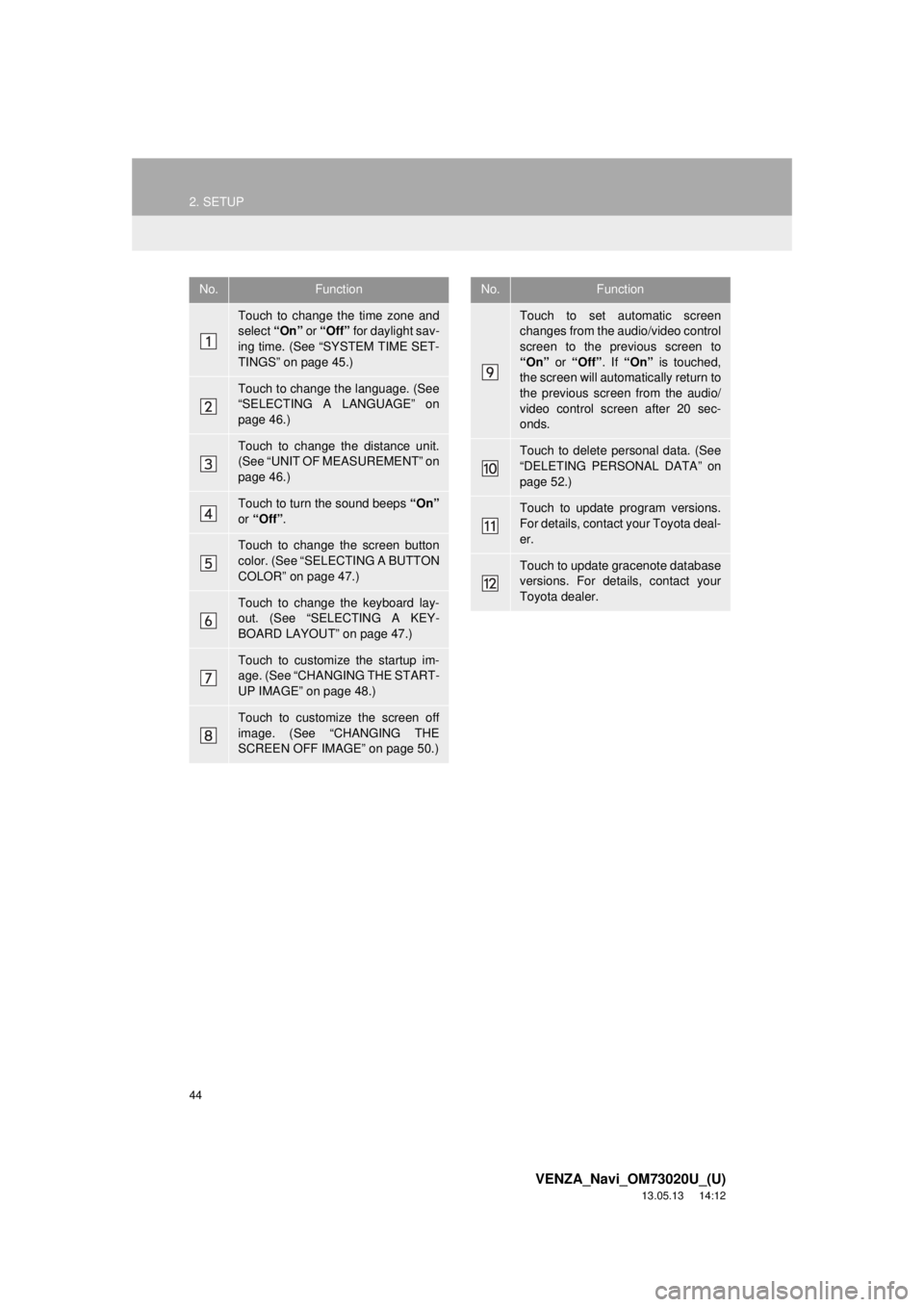
No.Function
Touch to change the time zone and
select “On” or “Off” for daylight sav-
ing time. (See “SYSTEM TIME SET-
TINGS” on page 45.)
Touch to change the language. (See
“SELECTING A LANGUAGE” on
page 46.)
Touch to change the distance unit.
(See “UNIT OF MEASUREMENT” on
page 46.)
Touch to turn the sound beeps “On”
or “Off”.
Touch to change the screen button
color. (See “SELECTING A BUTTON
COLOR” on page 47.)
Touch to change the keyboard lay-
out. (See “SELECTING A KEY-
BOARD LAYOUT” on page 47.)
Touch to customize the startup im-
age. (See “CHANGING THE START-
UP IMAGE” on page 48.)
Touch to customize the screen off
image. (See “CHANGING THE
SCREEN OFF IMAGE” on page 50.)
Touch to set automatic screen
changes from the audio/video control
screen to the previous screen to
“On” or “Off”. If “On” is touched,
the screen will automatically return to
the previous screen from the audio/
video control screen after 20 sec-
onds.
Touch to delete personal data. (See
“DELETING PERSONAL DATA” on
page 52.)
Touch to update program versions.
For details, contact your Toyota deal-
er.
Touch to update gracenote database
versions. For details, contact your
Toyota dealer.
No.Function
Page 45 of 363
45
2. SETUP
2
BASIC FUNCTION
VENZA_Navi_OM73020U_(U)
13.05.13 14:12
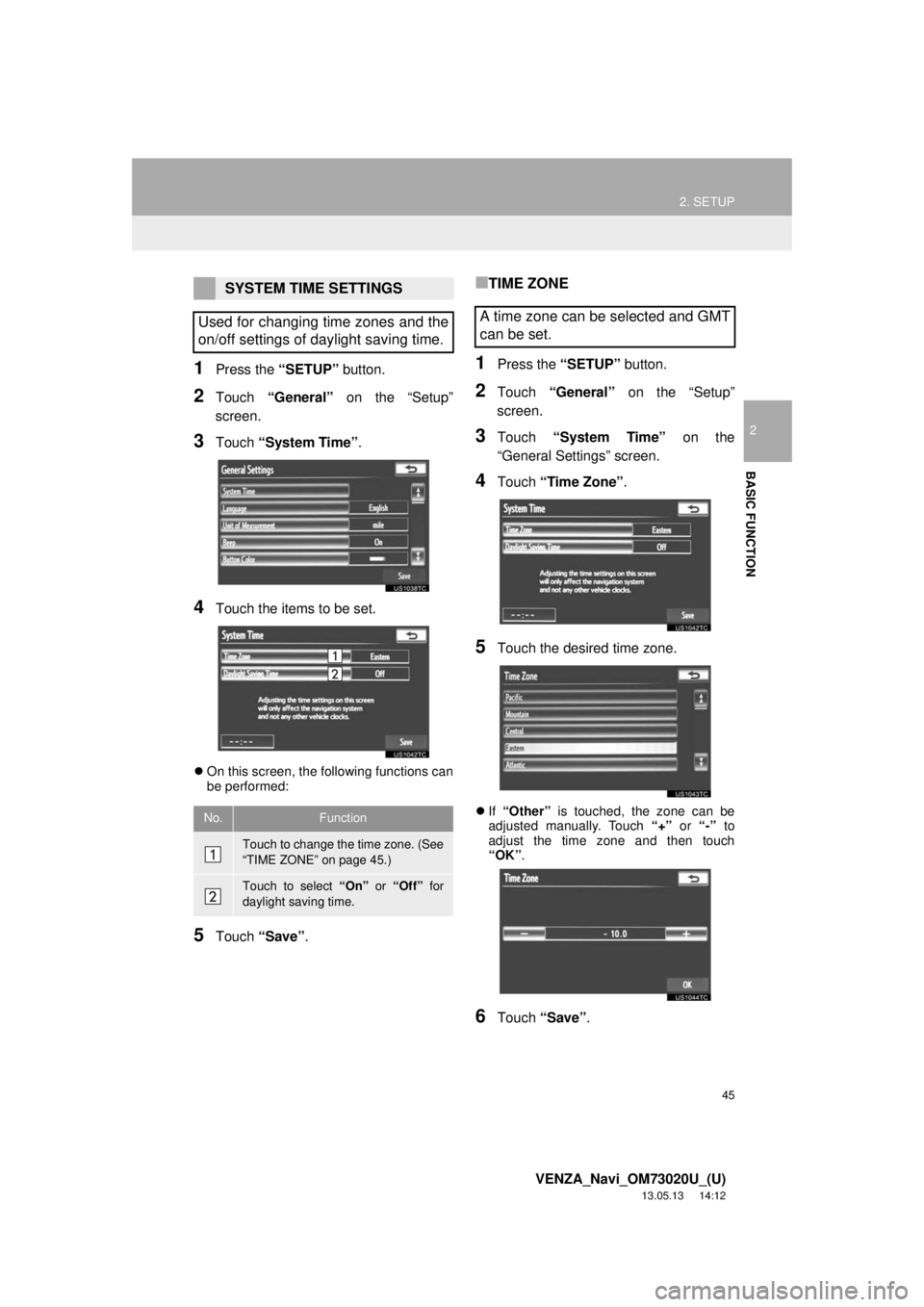
1Press the “SETUP” button.
2Touch “General” on the “Setup”
screen.
3Touch “System Time”.
4Touch the items to be set.
On this screen, the following functions can
be performed:
5Touch “Save”.
■TIME ZONE
1Press the “SETUP” button.
2Touch “General” on the “Setup”
screen.
3Touch “System Time” on the
“General Settings” screen.
4Touch “Time Zone”.
5Touch the desired time zone.
If “Other” is touched, the zone can be
adjusted manually. Touch “+” or “-” to
adjust the time zone and then touch
“OK”.
6Touch “Save”.
SYSTEM TIME SETTINGS
Used for changing time zones and the
on/off settings of daylight saving time.
No.Function
Touch to change the time zone. (See
“TIME ZONE” on page 45.)
Touch to select “On” or “Off” for
daylight saving time.
A time zone can be selected and GMT
can be set.
Page 95 of 363
95
2. ROUTE GUIDANCE
3
NAVIGATION SYSTEM
VENZA_Navi_OM73020U_(U)
13.05.13 14:12
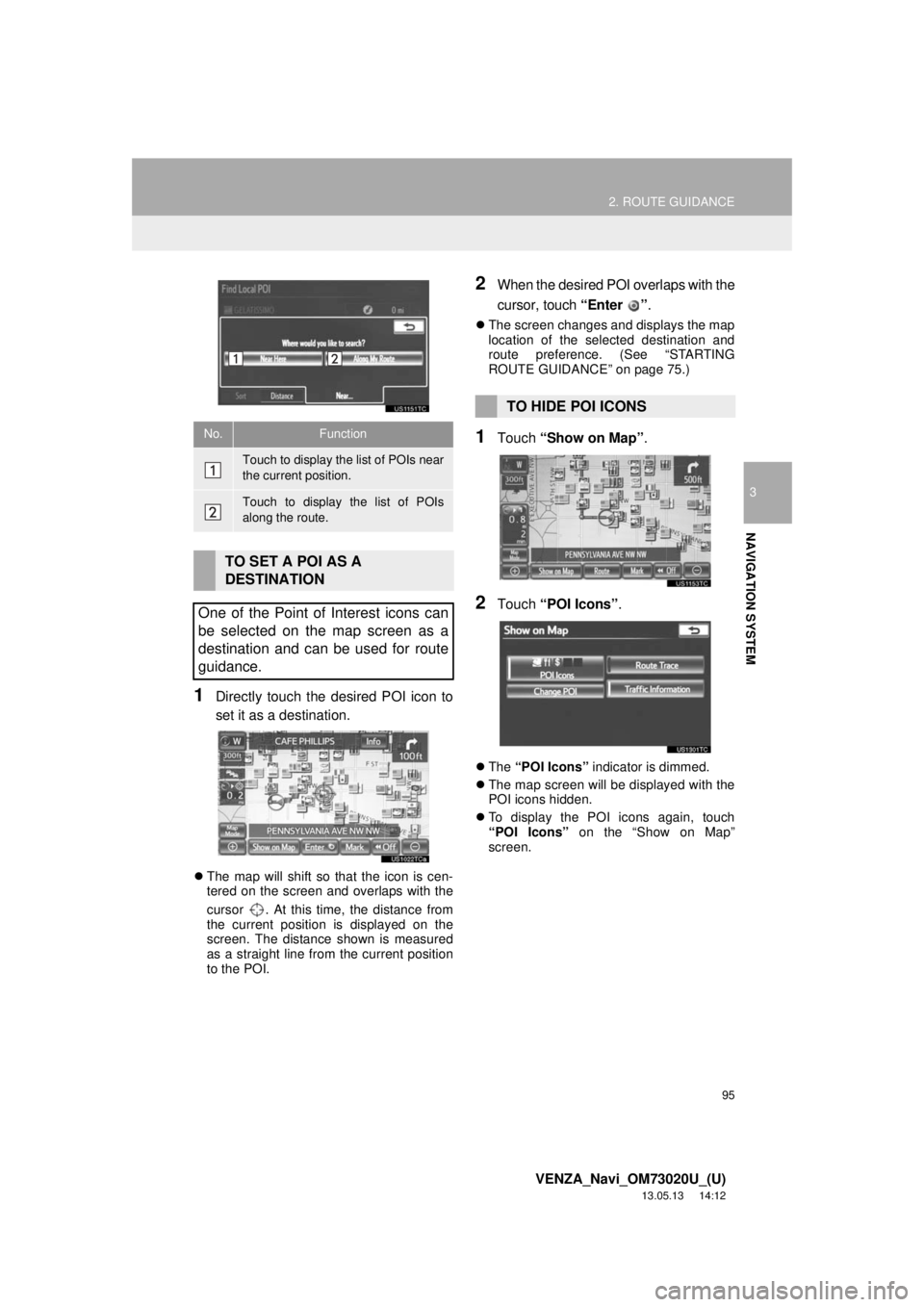
1Directly touch the desired POI icon to
set it as a destination.
The map will shift so that the icon is cen-
tered on the screen and overlaps with the
cursor . At this time, the distance from
the current position is displayed on the
screen. The distance shown is measured
as a straight line from the current position
to the POI.
2When the desired POI overlaps with the
cursor, touch “Enter ”.
The screen changes and displays the map
location of the selected destination and
route preference. (See “STARTING
ROUTE GUIDANCE” on page 75.)
1Touch “Show on Map”.
2Touch “POI Icons”.
The “POI Icons” indicator is dimmed.
The map screen will be displayed with the
POI icons hidden.
To display the POI icons again, touch
“POI Icons” on the “Show on Map”
screen.
No.Function
Touch to display the list of POIs near
the current position.
Touch to display the list of POIs
along the route.
TO SET A POI AS A
DESTINATION
One of the Point of Interest icons can
be selected on the map screen as a
destination and can be used for route
guidance.
TO HIDE POI ICONS
Page 114 of 363
114
4. SETUP
VENZA_Navi_OM73020U_(U)
13.05.13 14:12
To reset all setup items, touch “Default”.
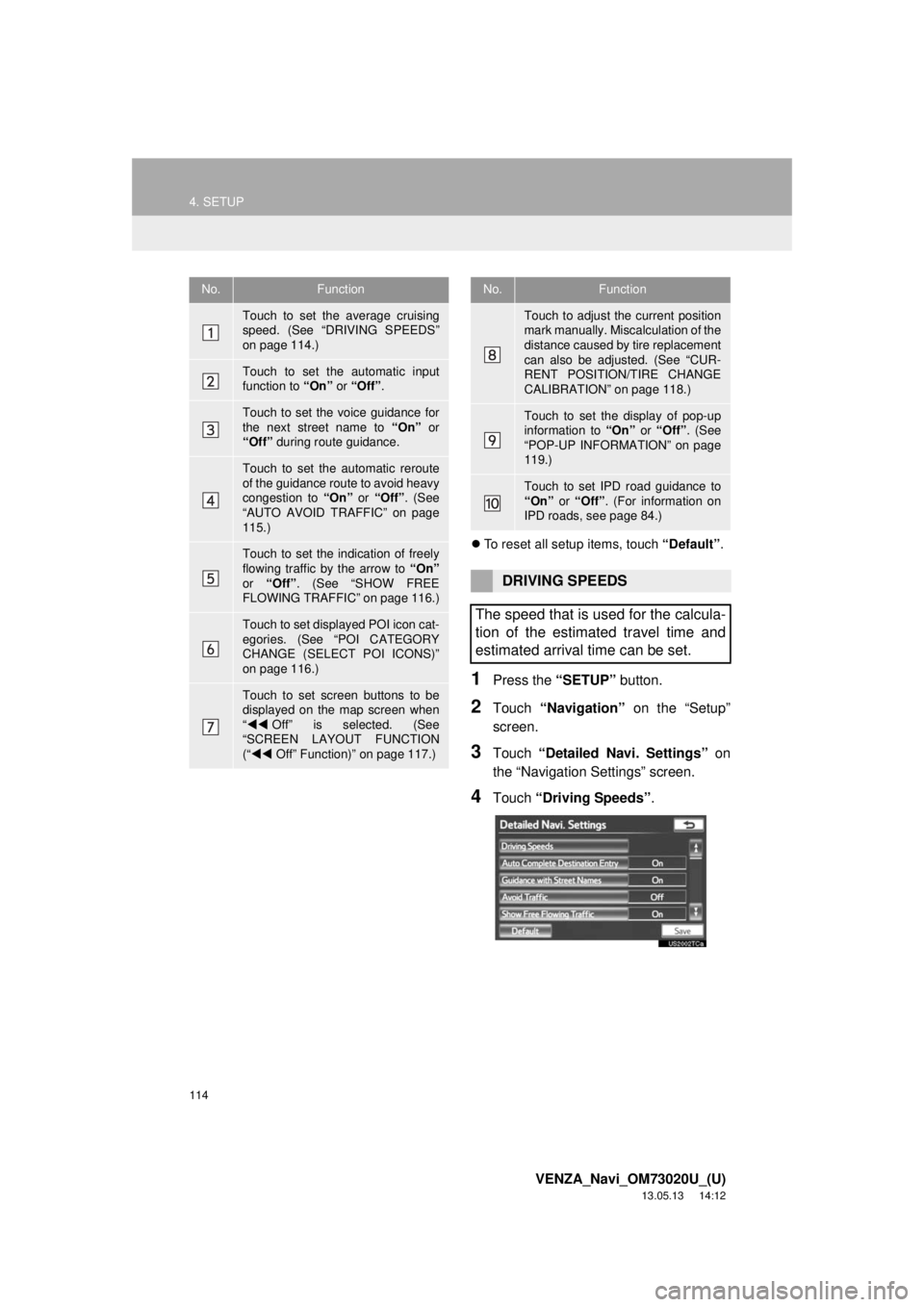
1Press the “SETUP” button.
2Touch “Navigation” on the “Setup”
screen.
3Touch “Detailed Navi. Settings” on
the “Navigation Settings” screen.
4Touch “Driving Speeds”.
No.Function
Touch to set the average cruising
speed. (See “DRIVING SPEEDS”
on page 114.)
Touch to set the automatic input
function to “On” or “Off”.
Touch to set the voice guidance for
the next street name to “On” or
“Off” during route guidance.
Touch to set the automatic reroute
of the guidance route to avoid heavy
congestion to “On” or “Off”. (See
“AUTO AVOID TRAFFIC” on page
115.)
Touch to set the indication of freely
flowing traffic by the arrow to “On”
or “Off”. (See “SHOW FREE
FLOWING TRAFFIC” on page 116.)
Touch to set displayed POI icon cat-
egories. (See “POI CATEGORY
CHANGE (SELECT POI ICONS)”
on page 116.)
Touch to set screen buttons to be
displayed on the map screen when
“Off” is selected. (See
“SCREEN LAYOUT FUNCTION
(“Off” Function)” on page 117.)
Touch to adjust the current position
mark manually. Miscalculation of the
distance caused by tire replacement
can also be adjusted. (See “CUR-
RENT POSITION/TIRE CHANGE
CALIBRATION” on page 118.)
Touch to set the display of pop-up
information to “On” or “Off”. (See
“POP-UP INFORMATION” on page
119.)
Touch to set IPD road guidance to
“On” or “Off”. (For information on
IPD roads, see page 84.)
DRIVING SPEEDS
The speed that is used for the calcula-
tion of the estimated travel time and
estimated arrival time can be set.
No.Function
Page 115 of 363
115
4. SETUP
3
NAVIGATION SYSTEM
VENZA_Navi_OM73020U_(U)
13.05.13 14:12
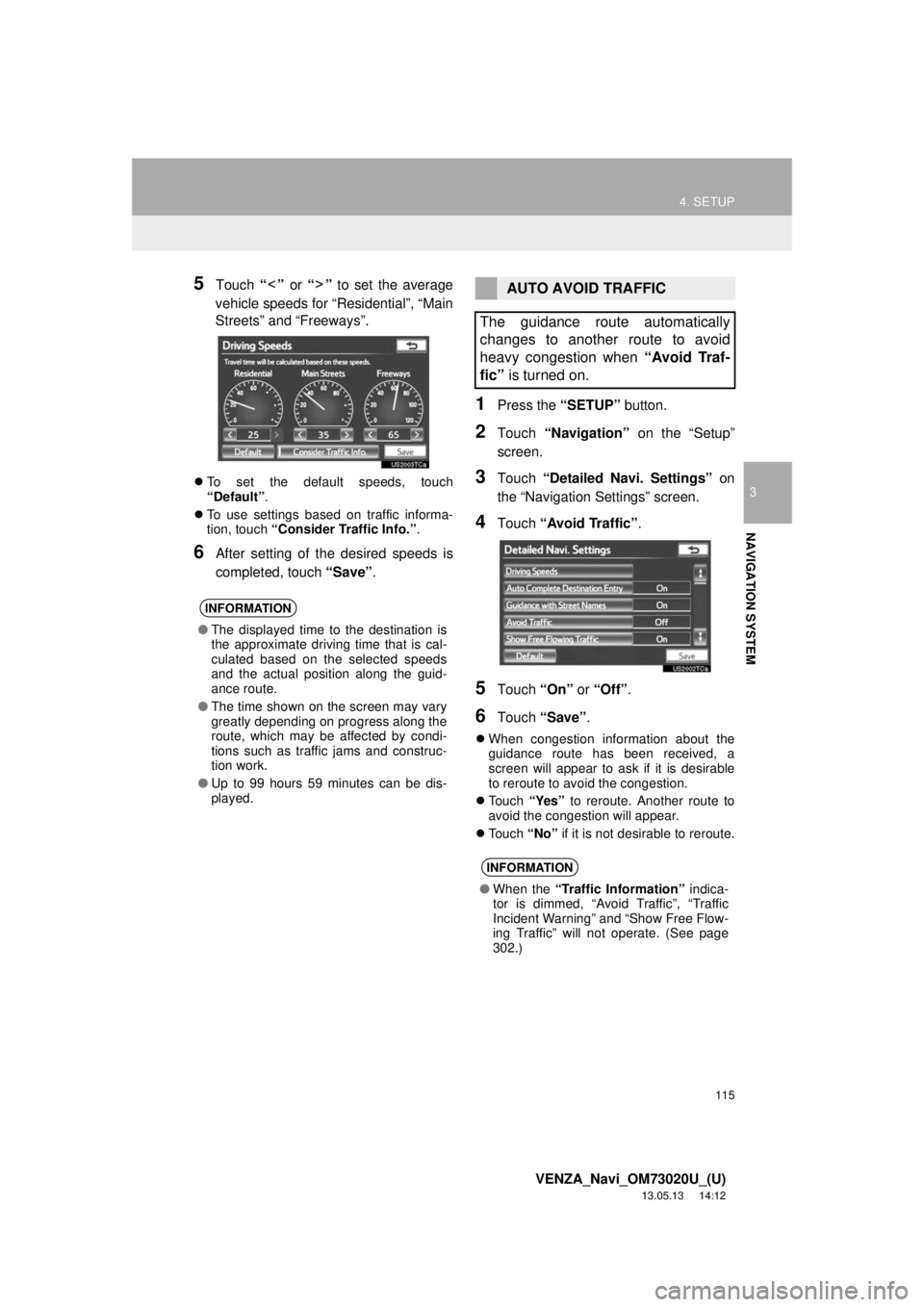
5Touch “” or “” to set the average
vehicle speeds for “Residential”, “Main
Streets” and “Freeways”.
To set the default speeds, touch
“Default”.
To use settings based on traffic informa-
tion, touch “Consider Traffic Info.”.
6After setting of the desired speeds is
completed, touch “Save”.
1Press the “SETUP” button.
2Touch “Navigation” on the “Setup”
screen.
3Touch “Detailed Navi. Settings” on
the “Navigation Settings” screen.
4Touch “Avoid Traffic”.
5Touch “On” or “Off”.
6Touch “Save”.
When congestion information about the
guidance route has been received, a
screen will appear to ask if it is desirable
to reroute to avoid the congestion.
Touch “Yes” to reroute. Another route to
avoid the congestion will appear.
Touch “No” if it is not desirable to reroute.
INFORMATION
●The displayed time to the destination is
the approximate driving time that is cal-
culated based on the selected speeds
and the actual position along the guid-
ance route.
●The time shown on the screen may vary
greatly depending on progress along the
route, which may be affected by condi-
tions such as traffic jams and construc-
tion work.
●Up to 99 hours 59 minutes can be dis-
played.
AUTO AVOID TRAFFIC
The guidance route automatically
changes to another route to avoid
heavy congestion when “Avoid Traf-
fic” is turned on.
INFORMATION
●When the “Traffic Information” indica-
tor is dimmed, “Avoid Traffic”, “Traffic
Incident Warning” and “Show Free Flow-
ing Traffic” will not operate. (See page
302.)
Page 121 of 363
121
4. SETUP
3
NAVIGATION SYSTEM
VENZA_Navi_OM73020U_(U)
13.05.13 14:12
2. VEHICLE SETTINGS
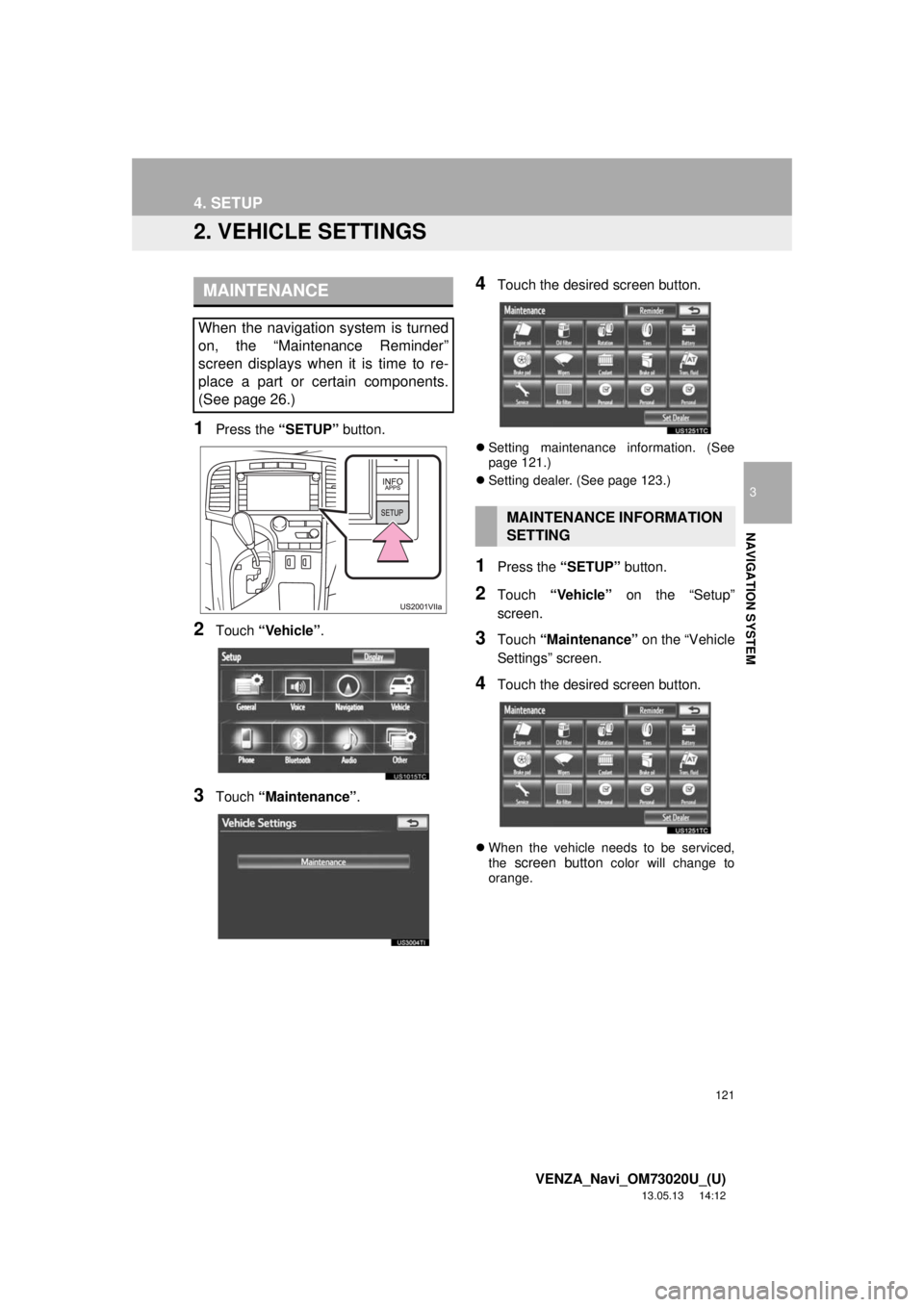
1Press the “SETUP” button.
2Touch “Vehicle”.
3Touch “Maintenance”.
4Touch the desired screen button.
Setting maintenance information. (See
page 121.)
Setting dealer. (See page 123.)
1Press the “SETUP” button.
2Touch “Vehicle” on the “Setup”
screen.
3Touch “Maintenance” on the “Vehicle
Settings” screen.
4Touch the desired screen button.
When the vehicle needs to be serviced,
the screen button color will change to
orange.
MAINTENANCE
When the navigation system is turned
on, the “Maintenance Reminder”
screen displays when it is time to re-
place a part or certain components.
(See page 26.)
MAINTENANCE INFORMATION
SETTING
Page 127 of 363
127
5. GPS (GLOBAL POSITIONING SYSTEM)
3
NAVIGATION SYSTEM
VENZA_Navi_OM73020U_(U)
13.05.13 14:12
Accurate current position may not be
shown in the following cases:
• When driving on a small angled Y-
shaped road.
• When driving on a winding road.
• When driving on a slippery road such as
in sand, gravel, snow, etc.
• When driving on a long straight road.
• When freeway and surface streets run in
parallel.
• After moving by ferry or vehicle carrier.
• When a long route is searched during
high speed driving.
• When driving without setting the current
position calibration correctly.
• After repeating a change of direction by
going forward and backward, or turning
on a turntable in a parking lot.
• When leaving a covered parking lot or
parking garage.
• When a roof carrier is installed.
• When driving with tire chains installed.
• When the tires are worn.
• After replacing a tire or tires.
• When using tires that are smaller or
larger than the factory specifications.
• When the tire pressure in any of the 4
tires is not correct.Inappropriate route guidance may occur in
the following cases:
• When turning at an intersection off the
designated route guidance.
• If you set more than 1 destination but
skip any of them, auto reroute will dis-
play a route returning to the destination
on the previous route.
• When turning at an intersection for which
there is no route guidance.
• When passing through an intersection
for which there is no route guidance.
• During auto reroute, the route guidance
may not be available for the next turn to
the right or left.
• During high speed driving, it may take a
long time for auto reroute to operate. In
auto reroute, a detour route may be
shown.
• After auto reroute, the route may not be
changed.
• If an unnecessary U-turn is shown or
announced.
• If a location has multiple names and the
system announces 1 or more of them.
• When a route cannot be searched.
• If the route to your destination includes
gravel, unpaved roads or alleys, the
route guidance may not be shown.
• Your destination point might be shown
on the opposite side of the street.
• When a portion of the route has regula-
tions prohibiting the entry of the vehicle
that vary by time or season or other rea-
sons.
• The road and map data stored in the
navigation system may not be complete
or may not be the latest version.
If the vehicle cannot receive GPS sig-
nals, the current position can be
adjusted manually. For information on
setting the current position calibration,
see page 118.
After replacing a tire, implement the
operation described in “TIRE CHANGE
CALIBRATION”. (See page 119.)