window TOYOTA VENZA 2014 Accessories, Audio & Navigation (in English)
[x] Cancel search | Manufacturer: TOYOTA, Model Year: 2014, Model line: VENZA, Model: TOYOTA VENZA 2014Pages: 15, PDF Size: 3.58 MB
Page 3 of 15
34
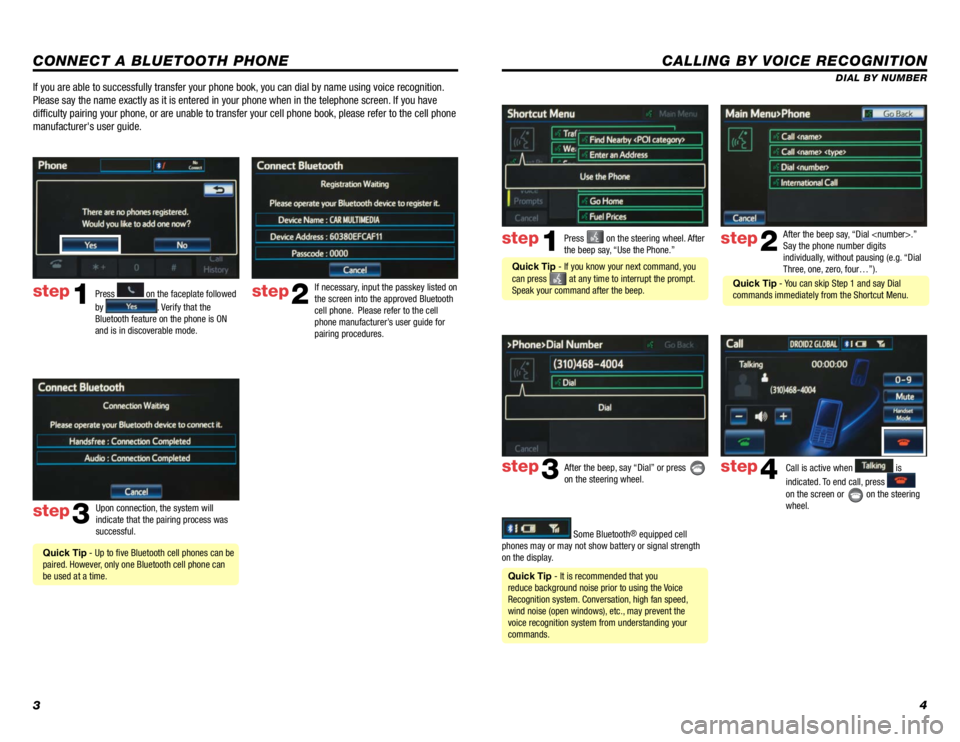
CALLING BY VOICE RECOGNITION
After the beep say, “Dial
Say the phone number digits
individually, without pausing (e.g. “Dial
Three, one, zero, four…”).step2
step3
Press on the steering wheel. After
the beep say, “Use the Phone.”step1
After the beep, say “Dial” or press
on the steering wheel. Call is active when is
indicated. To end call, press
on the screen or
on the steering
wheel.
step4
Quick Tip - It is recommended that you
reduce background noise prior to using the Voice
Recognition system. Conversation, high fan speed,
wind noise (open windows), etc., may prevent the
voice recognition system from understanding your
commands.
Quick Tip - If you know your next command, you
can press
at any time to interrupt the prompt.
Speak your command after the beep.
Some Bluetooth® equipped cell
phones may or may not show battery or signal strength
on the display. DIAL BY NUMBER
CONNECT A BLUETOOTH PHONE
Press
1
2
3
6
7
5
4
APPS
on the faceplate followed
by
. Verify that the
Bluetooth feature on the phone is ON
and is in discoverable mode.
step2
step3
step1
If necessary, input the passkey listed on
the screen into the approved Bluetooth
cell phone. Please refer to the cell
phone manufacturer’s user guide for
pairing procedures.
Upon connection, the system will
indicate that the pairing process was
successful.
Quick Tip - Up to five Bluetooth cell phones can be
paired. However, only one Bluetooth cell phone can
be used at a time.
If you are able to successfully transfer your phone book, you can dial by name using voice recognition.
Please say the name exactly as it is entered in your phone when in the t\
elephone screen. If you have
difficulty pairing your phone, or are unable to transfer your cell phone book, please refer to the cell phone
manufacturer's user guide.
Quick Tip - You can skip Step 1 and say Dial
commands immediately from the Shortcut Menu.
Page 5 of 15
78
DESTINATION INPUT
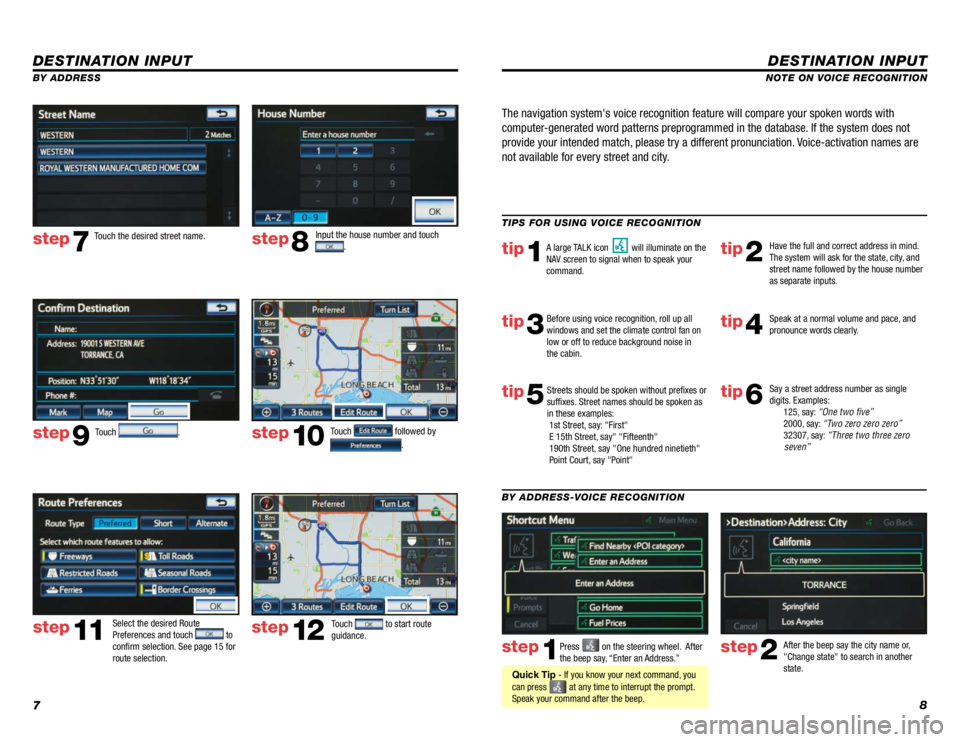
step1step2Press on the steering wheel. After
the beep say, “Enter an Address.” After the beep say the city name or,
"Change state" to search in another
state.
TIPS FOR USING VOICE RECOGNITION
NOTE ON VOICE RECOGNITION
Say a street address number as single
digits. Examples:
125, say: “One two five”
2000, say: “Two zero zero zero”
32307, say: “Three two three zero
seven”
tip1tip2
tip3tip4
tip5
Have the full and correct address in mind.
The system will ask for the state, city, and
street name followed by the house number
as separate inputs.
Before using voice recognition, roll up all
windows and set the climate control fan on
low or off to reduce background noise in
the cabin. Speak at a normal volume and pace, and
pronounce words clearly.
Streets should be spoken without prefixes or
suffixes. Street names should be spoken as
in these examples:
1st Street, say: "First"
E 15th Street, say" "Fifteenth"
190th Street, say "One hundred ninetieth"
Point Court, say "Point"
A large TALK icon will illuminate on the
NAV screen to signal when to speak your
command.
The navigation system's voice recognition feature will compare your spoken words with
computer-generated word patterns preprogrammed in the database. If the system does not
provide your intended match, please try a different pronunciation. Voice-activation names are
not available for every street and city.
BY ADDRESS-VOICE RECOGNITION
Quick Tip - If you know your next command, you
can press
at any time to interrupt the prompt.
Speak your command after the beep.
tip6
DESTINATION INPUT
BY ADDRESS
Touch
. Input the house number and touch
.
Touch the desired street name.
Touch
followed by
.
step7step8
step9step10
Select the desired Route
Preferences and touch to
confirm selection. See page 15 for
route selection.
step11
Touch to start route
guidance. step12