ignition TOYOTA VENZA 2014 Owners Manual (in English)
[x] Cancel search | Manufacturer: TOYOTA, Model Year: 2014, Model line: VENZA, Model: TOYOTA VENZA 2014Pages: 564, PDF Size: 10.51 MB
Page 3 of 564

1
2
3
4
5
6
7
3
VENZA_OM_OM73019U_(U)
2-1. Driving proceduresDriving the vehicle............... 160
Engine (ignition) switch (vehicles with smart
key system)....................... 171
Engine (ignition) switch (vehicles without smart
key system)....................... 175
Automatic transmission ....... 178
Turn signal lever ................. 183
Parking brake ...................... 184
Horn .................................... 185
2-2. Instrument cluster Gauges and meters ............ 186
Indicators and warning lights ................................. 189
Multi-information display (TFT type) ......................... 192
Multi-information display (LCD type) ........................ 204 2-3. Operating the lights and
wipers
Headlight switch ................. 208
Automatic High Beam......... 212
Fog light switch................... 219
Windshield wipers and washer.............................. 221
Rear window wiper and washer.............................. 225
2-4. Using other driving systems Cruise control ..................... 227
Intuitive parking assist ........ 231
Driving assist systems ........ 238
Hill-start assist control ........ 244
2-5. Driving information Utility vehicle precautions....................... 246
Cargo and luggage ............. 251
Vehicle load limits............... 256
Winter driving tips ............... 258
Trailer towing ...................... 263
Dinghy towing ..................... 284
2When driving
Page 14 of 564
14
VENZA_OM_OM73019U_(U)
Pictorial indexInstrument panel
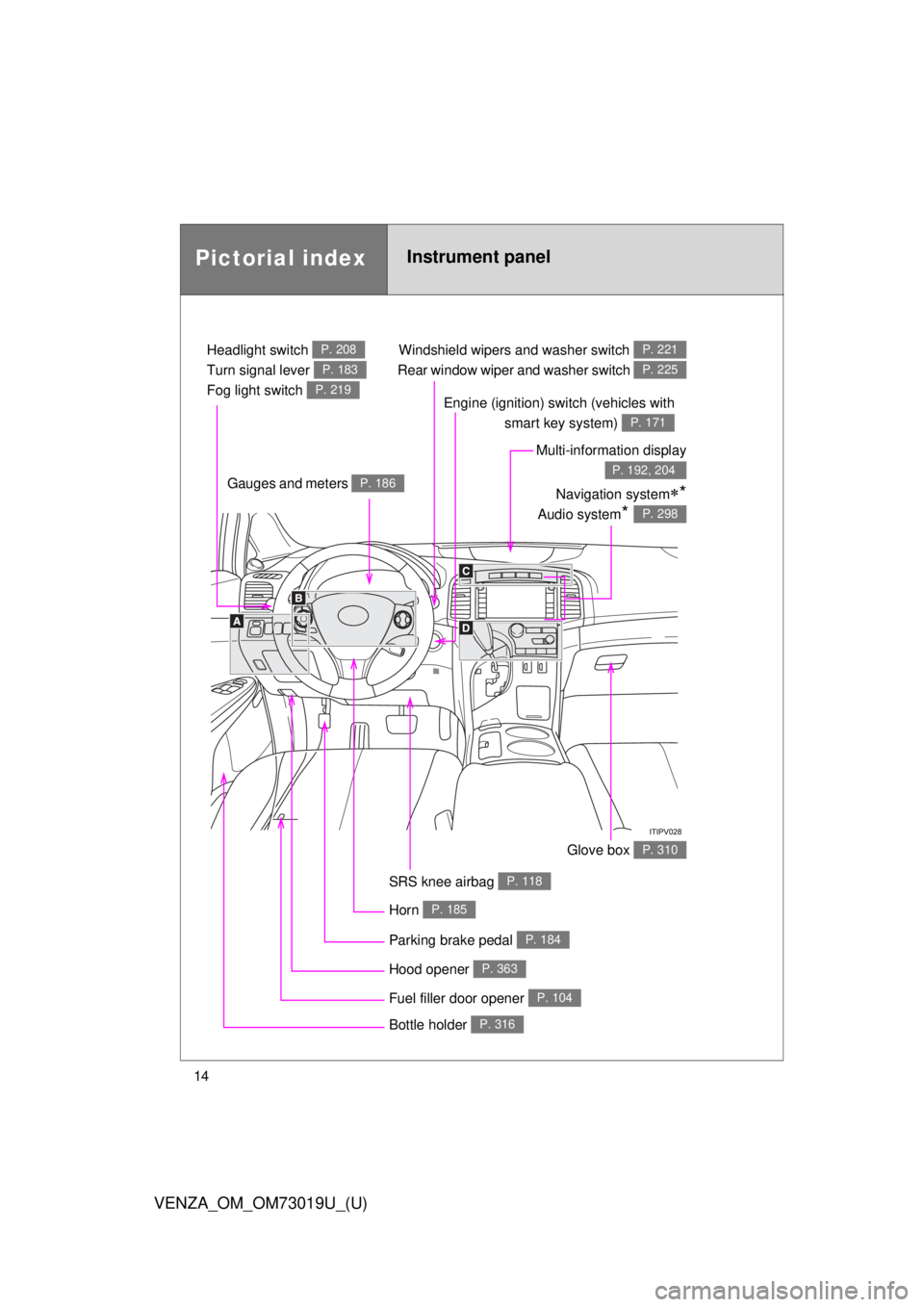
Headlight switch
Turn signal lever
Fog light switch P. 208
P. 183
P. 219
Windshield wipers and washer switch
Rear window wiper and washer switch P. 221
P. 225
Gauges and meters P. 186
Glove box P. 310
Fuel filler door opener P. 104
Hood opener P. 363
SRS knee airbag P. 118
Multi-information display
P. 192, 204
Bottle holder P. 316
Parking brake pedal P. 184
Horn P. 185
Engine (ignition) switch (vehicles with smart key system)
P. 171
Navigation system*
Audio system* P. 298
Page 16 of 564
16
VENZA_OM_OM73019U_(U)
Pictorial indexInstrument panel
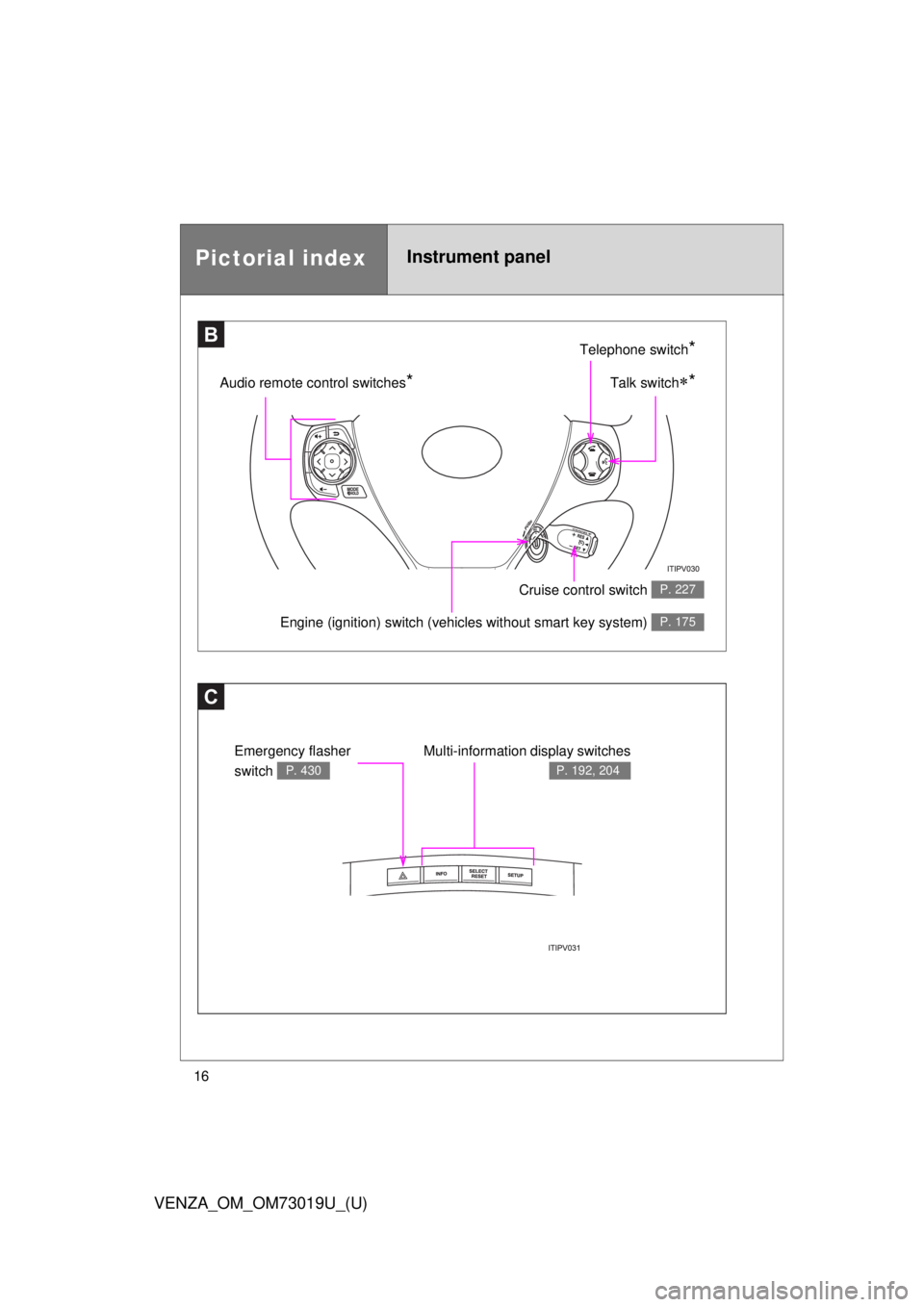
C
Multi-information display switches
P. 192, 204
Emergency flasher
switch
P. 430
BTelephone switch*
Talk switch*Audio remote control switches*
Engine (ignition) switch (vehicles without smart key system) P. 175
Cruise control switch P. 227
Page 41 of 564

41
1-2. Opening, closing and locking the doors
1
Before driving
VENZA_OM_OM73019U_(U)
AlarmSituationCorrection procedure
Interior alarm
pings continu-
ously
*1
The “ENGINE START
STOP” switch was turned
to ACCESSORY mode
while the driver’s door was
open (or the driver’s door
was opened while the
“ENGINE START STOP”
switch was in ACCES-
SORY mode) Turn the “ENGINE
START STOP” switch
OFF and close the
driver’s door
The “ENGINE START
STOP” switch was turned
OFF while the driver’s door
was open Close the driver’s
door
Interior alarm
sounds continu-
ously
*1
When the “ENGINE
START STOP” switch is in
IGNITION ON or ACCES-
SORY mode, an attempt
was made to open the
door and exit the vehicle,
and the shift lever was not
in “P” Shift the shift lever to
“P” and turn the
“ENGINE START
STOP” switch OFF
Interior and exte-
rior alarms sound
continuously
*1
When the “ENGINE
START STOP” switch is in
IGNITION ON or ACCES-
SORY mode, the driver’s
door was closed after the
key was carried outside
the vehicle, and the shift
lever not in “P” Shift the shift lever to
“P”, turn the “ENGINE
START STOP” switch
OFF and close the
driver’s door again
Page 52 of 564
52 1-2. Opening, closing and locking the doors
VENZA_OM_OM73019U_(U)
Locking the driver’s doors from the outside without a keyMove the inside lock button to the lock position.
Close the door.
Vehicles with smart key system
The door cannot be locked if the “ENGINE START STOP” switch is
in ACCESSORY or IGNITION ON mode, or the electronic key is
left inside the vehicle.
Depending on the position of the electronic key, the key may not be
detected correctly and the door may be locked.
Vehicles without smart key system
The door cannot be locked if either front door is open and the key
is in the engine switch.
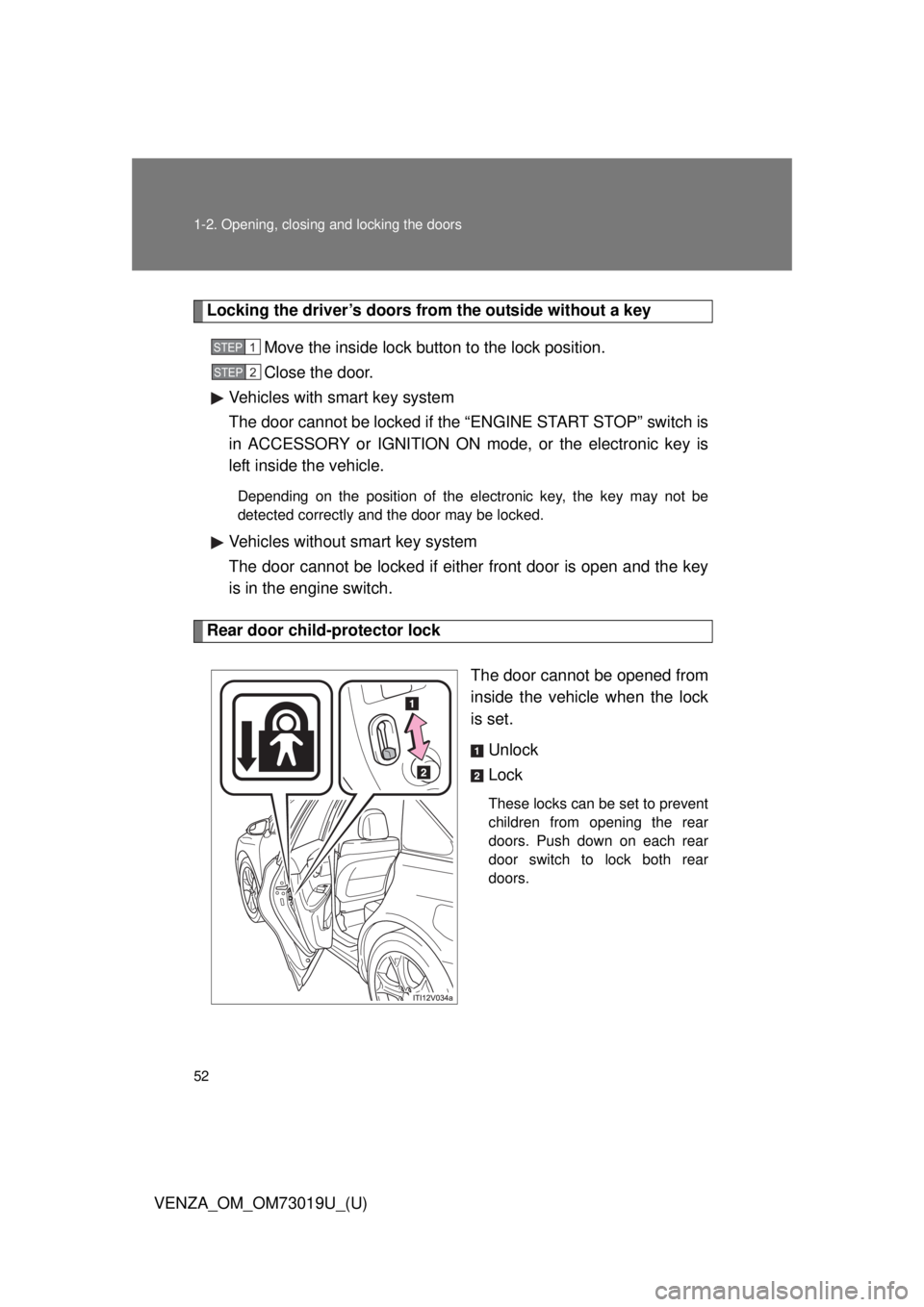
Rear door child-protector lock
The door cannot be opened from
inside the vehicle when the lock
is set.Unlock
Lock
These locks can be set to prevent
children from opening the rear
doors. Push down on each rear
door switch to lock both rear
doors.
STEP1
STEP2
Page 54 of 564
54 1-2. Opening, closing and locking the doors
VENZA_OM_OM73019U_(U)Vehicles with smart key system:
Close all the doors and switch the “ENGINE START STOP”
switch to IGNITION ON mode. (Perform within 20 sec-
onds.)
Vehicles without smart key system:
Close all the doors and switch the engine switch to the “ON”
position. (Perform within 20 seconds.)
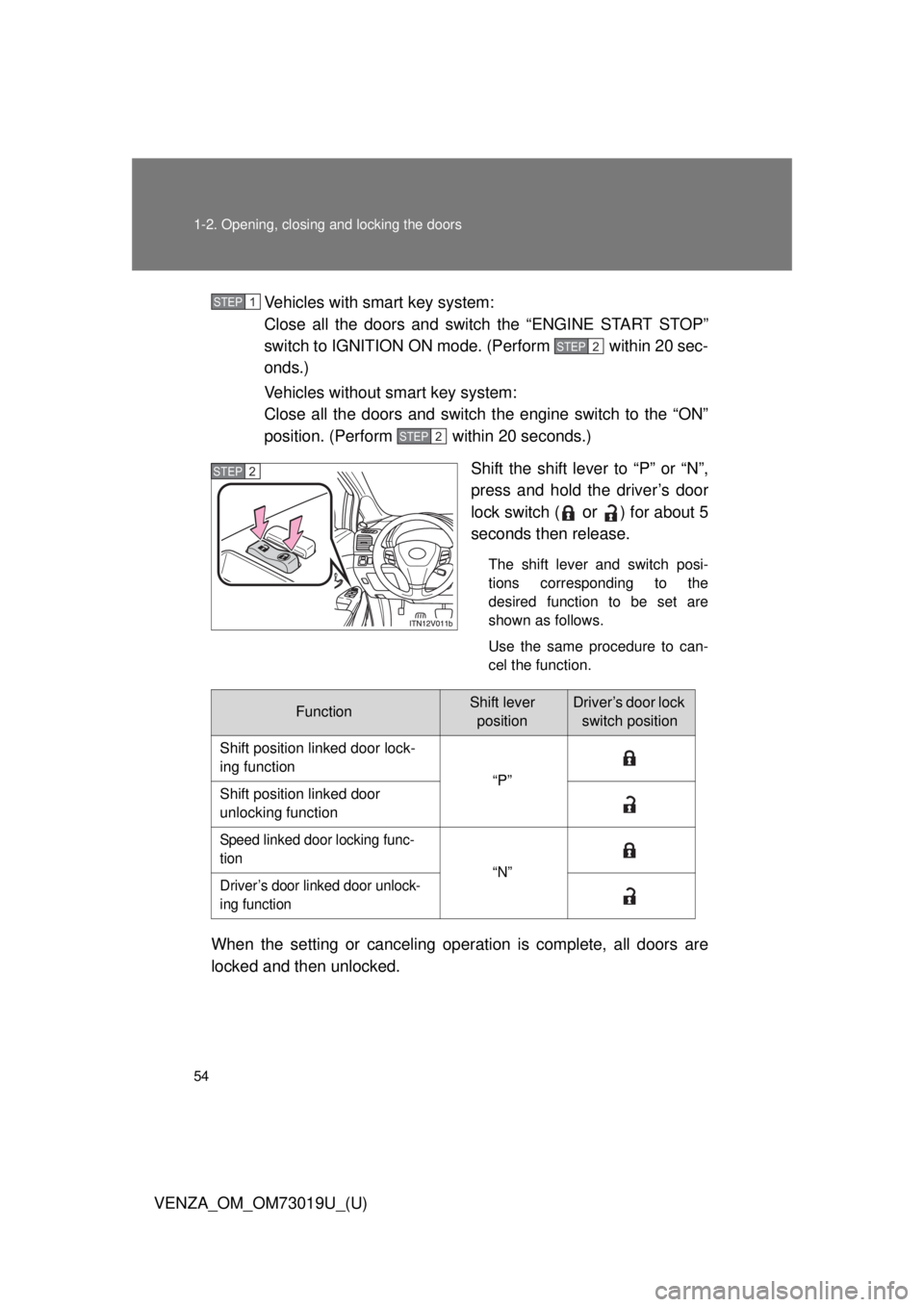
Shift the shift lever to “P” or “N”,
press and hold the driver’s door
lock switch (
or ) for about 5
seconds then release.
The shift lever and switch posi-
tions corresponding to the
desired function to be set are
shown as follows.
Use the same procedure to can-
cel the function.
When the setting or canceling operation is complete, all doors are
locked and then unlocked.
STEP1
STEP2
STEP2
STEP2
FunctionShift lever positionDriver’s door lock switch position
Shift position linked door lock-
ing function “P”
Shift position linked door
unlocking function
Speed linked door locking func-
tion “N”
Driver’s door linked door unlock-
ing function
Page 60 of 564

60 1-2. Opening, closing and locking the doors
VENZA_OM_OM73019U_(U)
■The power back door can be opened/ closed when (vehicles with power
back door)
Vehicles with smart key system
●The “ENGINE START STOP” switch is in IGNITION ON mode, and
the shift lever is in “P”.
● The “ENGINE START STOP” switch is in OFF or ACCESSORY
mode.
Vehicles without smart key system
● The engine switch is in the “ON” position, and the shift lever is in “P”.
● The engine switch is in the “LOCK” or “ACC” position.
■ Jam protection function (vehicles with power back door)
If anything obstructs the power back door while it is closing/opening, the
back door will automatically operate in the opposite direction.
■ If the power back door does not work (vehicles with power back door)
The back door must be initialized. To initialize, close the back door com-
pletely by hand.
■ Back door closer
In the event that the back door is left slightly open, the back door closer will
automatically close it to the fully closed position.
Page 64 of 564

64 1-2. Opening, closing and locking the doors
VENZA_OM_OM73019U_(U)
CAUTION
■Power back door (if equipped)
Observe the following precautions when operating the power back door.
Failure to do so may cause death or serious injury.
●Check the safety of the surrounding area to make sure there are no obsta-
cles or anything that could cause any of your belongings to get caught.
● If anyone is in the vicinity, make sure they are safe and let them know that
the back door is about to open or close.
● On an incline, the back door may suddenly shut after it opens. Make sure
the back door is fully open and secure.
● In the following situations, the power back door may detect an abnormali\
ty
and automatic operation may be stopped. In this case, the back door has
to be operated manually. Take extra care when on an incline, as the back
door may open or close abruptly.
• When the back door contacts an obstacle
• Vehicles with smart key system:
When the battery voltage suddenly drops, such as when the “ENGINE
START STOP” switch is turned to IGNITION ON mode or the engine is
started during automatic operation
Vehicles without smart key system:
When the battery voltage suddenly drops, such as when the engine
switch is turned to the “ON” position or the engine is started during
automatic operation
● If a bicycle carrier or similar heavy object is attached to the back door, the
power back door may not operate, causing itself to malfunction, or the
back door may suddenly shut again after being opened, causing some-
one’s hands, head or neck to be caught and injured. When installing an
accessory part to the back door, using a genuine Toyota part is recom-
mended.
Page 73 of 564
73
1
1-3. Adjustable components (seats, mirrors, steering wheel)
Before driving
VENZA_OM_OM73019U_(U)
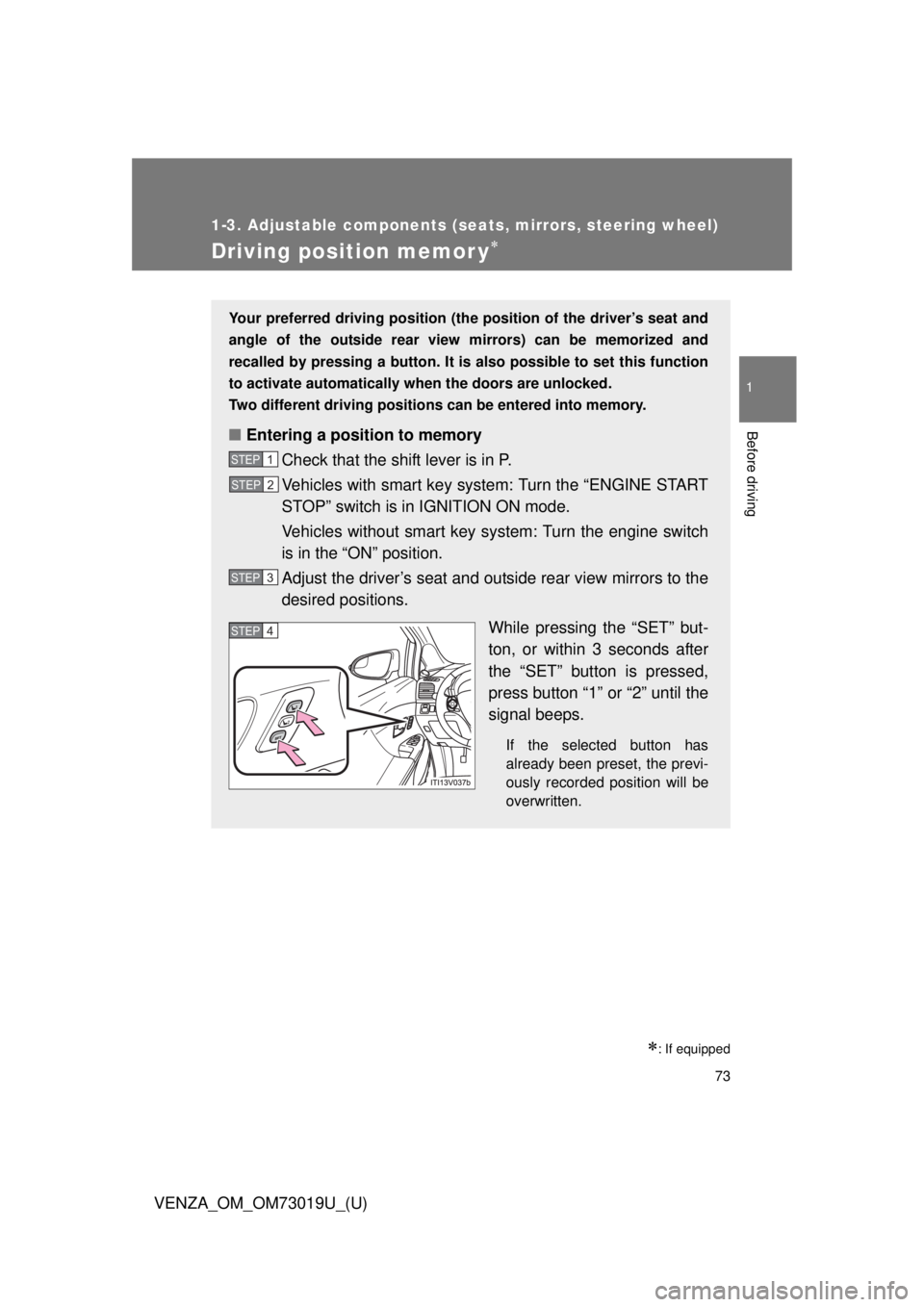
Driving position memor y
: If equipped
Your preferred driving position (the position of the driver’s seat and
angle of the outside rear view mirrors) can be memorized and
recalled by pressing a button. It is also possible to set this function
to activate automatically wh en the doors are unlocked.
Two different driving positions can be entered into memory.
■ Entering a position to memory
Check that the shift lever is in P.
Vehicles with smart key system: Turn the “ENGINE START
STOP” switch is in IGNITION ON mode.
Vehicles without smart key system: Turn the engine switch
is in the “ON” position.
Adjust the driver’s seat and outside rear view mirrors to the
desired positions.
While pressing the “SET” but-
ton, or within 3 seconds after
the “SET” button is pressed,
press button “1” or “2” until the
signal beeps.
If the selected button has
already been preset, the previ-
ously recorded position will be
overwritten.
STEP1
STEP2
STEP3
STEP4
Page 74 of 564
74 1-3. Adjustable components (seats, mirrors, steering wheel)
VENZA_OM_OM73019U_(U)
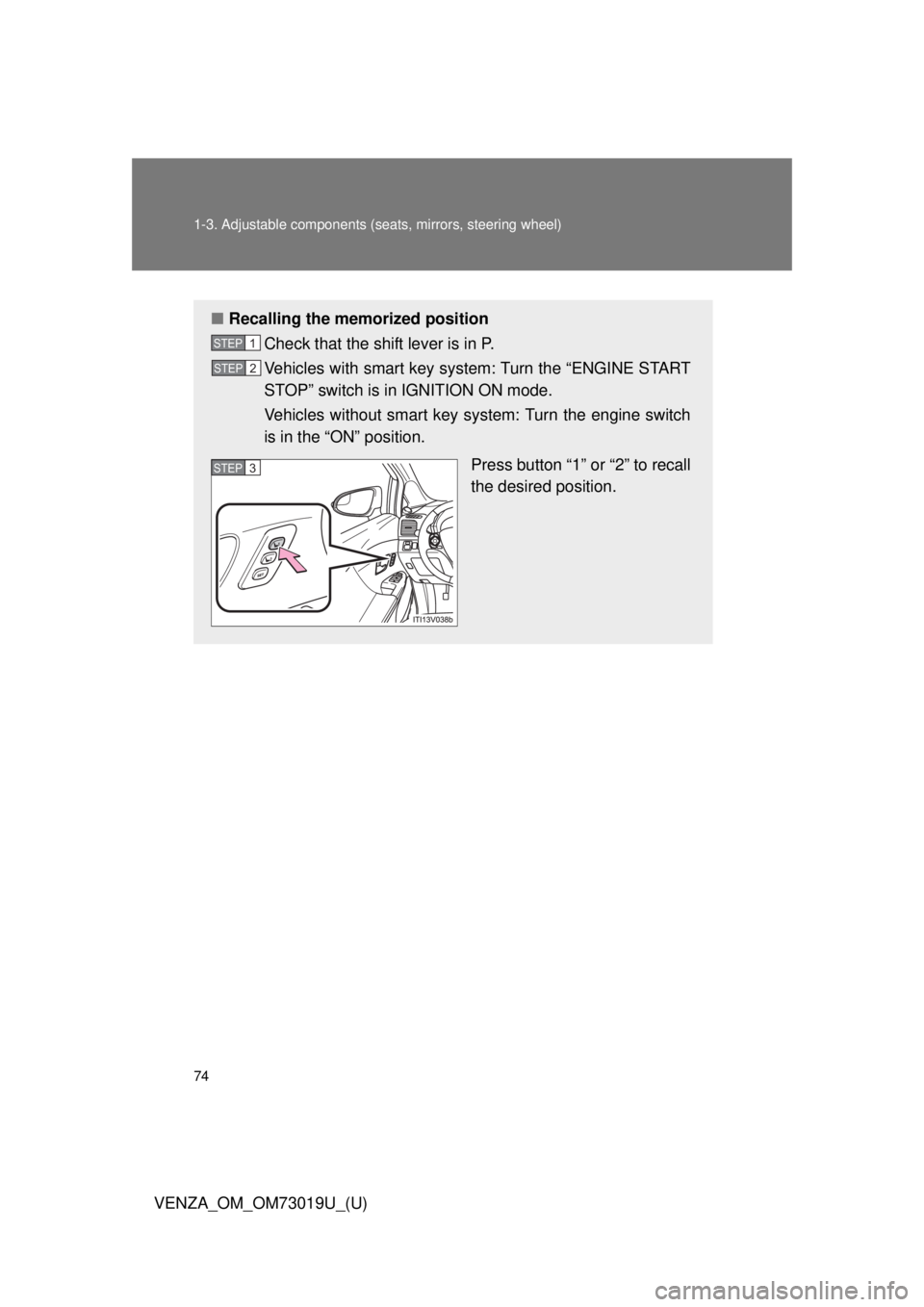
■Recalling the memorized position
Check that the shift lever is in P.
Vehicles with smart key system: Turn the “ENGINE START
STOP” switch is in IGNITION ON mode.
Vehicles without smart key system: Turn the engine switch
is in the “ON” position.
Press button “1” or “2” to recall
the desired position.
STEP1
STEP2
STEP3