bluetooth TOYOTA VENZA 2015 Owners Manual (in English)
[x] Cancel search | Manufacturer: TOYOTA, Model Year: 2015, Model line: VENZA, Model: TOYOTA VENZA 2015Pages: 689, PDF Size: 11.45 MB
Page 4 of 689

TABLE OF CONTENTSIndex
4
VENZA_OM_OM73023U_(U)
3-1. Using the air conditioning system and defogger
Automatic air conditioning system .............................. 306
Rear window defogger ....... 316
3-2. Using the audio system (Entune Audio)
Audio system types ............ 318
Audio system...................... 320
Steering wheel audio switches ........................... 323
USB Port/AUX Port ............ 325
Basic Audio Operations...... 326
Setup menu ........................ 329
General settings ................. 330
Audio settings..................... 332
Display settings .................. 333
Voice settings ..................... 335
Selecting the audio source .............................. 336
List screen operation .......... 337
Optimal use of the audio system .............................. 339
Radio operation .................. 340
CD player operation ........... 343
Listening to an iPod............ 350
Listening to a USB memory device ........ 356
Using the AUX port ............ 362
Preparations to use wireless communication ................. 363 Registering a Bluetooth
®
audio player for
the first time ...................... 366
Registering a Bluetooth
®
phone for the first time ...... 367
Registering a Bluetooth
®
device ............................... 368
Connecting a Bluetooth
®
device ............................... 370
Displaying a Bluetooth
®
device details .................... 373
Detailed Bluetooth
®
system settings................. 375
Listening to Bluetooth
®
Audio ................................ 377
Using a Bluetooth
®
Phone ............................... 379
Making a call....................... 382
Receiving a call .................. 386
Speaking on the phone....... 387
Bluetooth
® phone
message function ............. 391
Using the steering wheel switches............................ 396
Bluetooth
® phone
settings ............................. 397
Contact/Call History Settings ............................ 399
What to do if... (Troubleshooting) ............. 411
Bluetooth
®.......................... 419
Voice command system ..... 426
3Interior features
Page 304 of 689
304
VENZA_OM_OM73023U_(U)
3-1. Using the air conditioning system and defogger
Automatic air conditioning system ........................... 306
Rear window defogger ..... 316
3-2. Using the audio system (Entune Audio)
Audio system types .......... 318
Audio system ................... 320
Steering wheel audio switches ......................... 323
USB Port/AUX Port .......... 325
Basic Audio Operations ..................... 326
Setup menu...................... 329
General settings ............... 330
Audio settings .................. 332
Display settings ................ 333
Voice settings................... 335 Selecting the audio
source ............................ 336
List screen operation........ 337
Optimal use of the audio system ........................... 339
Radio operation................ 340
CD player operation ......... 343
Listening to an iPod ......... 350
Listening to a USB memory device ...... 356
Using the AUX port .......... 362
Preparations to use wireless
communication ............... 363
Registering a Bluetooth
®
audio player for
the first time ................... 366
Registering a Bluetooth
®
phone for
the first time ................... 367
Registering a Bluetooth
®
device ............................ 368
Connecting a Bluetooth
®
device ............................ 370
Interior features3
Page 305 of 689
Interior features3
305
VENZA_OM_OM73023U_(U)
Displaying a Bluetooth®
device details ................. 373
Detailed Bluetooth
®
system settings .............. 375
Listening to Bluetooth
®
Audio.............................. 377
Using a Bluetooth
®
Phone ............................ 379
Making a call .................... 382
Receiving a call ................ 386
Speaking on the phone .... 387
Bluetooth
® phone
message function........... 391
Using the steering wheel switches ......................... 396
Bluetooth
® phone
settings .......................... 397
Contact/Call History Settings .......................... 399
What to do if... (Troubleshooting)........... 411
Bluetooth
®........................ 419
Voice command system ........................... 426 3-3. Using the interior lights
Interior lights list ............... 430
• Personal/interio
r light
main sw
itch .................... 431
• Personal/interio
r lights
and luggage
compartment light
.......... 432
3-4. Using the storage features List of storage features .... 434
• Glove box....................... 435
• Console boxes ............... 436
• Overhead console .......... 438
• Cup holders ................... 439
• Bottle holders ................. 441
• Auxiliary boxes ............... 442
3-5. Other interior features Sun visors ........................ 445
Vanity mirror..................... 446
Power outlets ................... 447
Seat heaters..................... 449
Armrest ............................ 451
Assist grips (folding type) .................. 452
Floor mats ........................ 453
Luggage compartment features .......................... 455
Garage door opener......... 457
Compass .......................... 464
Page 320 of 689
320
3-2. Using the audio system (Entune Audio)
VENZA_OM_OM73023U_(U)
Audio system
: If equipped
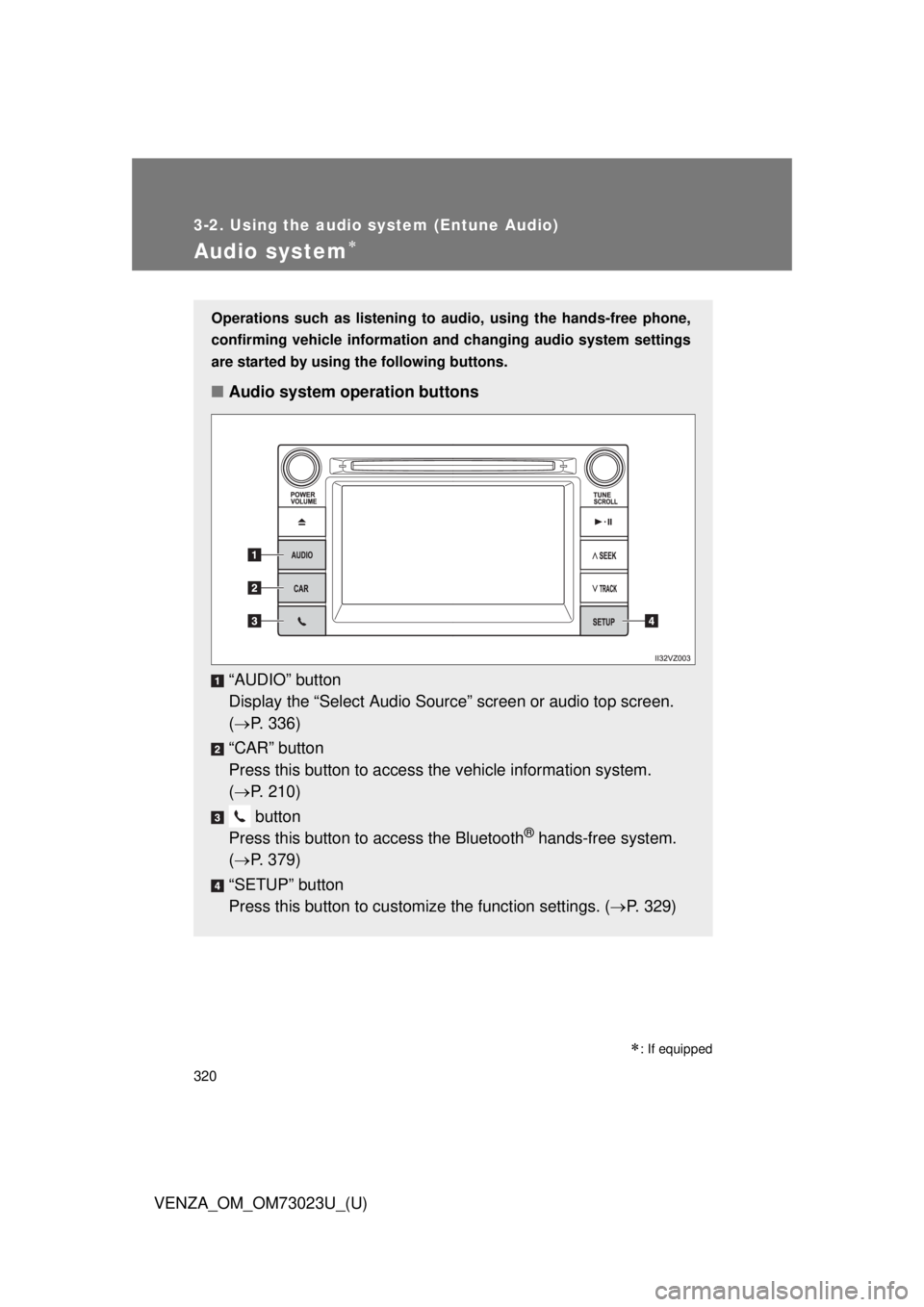
Operations such as listening to audio, using the hands-free phone,
confirming vehicle information and changing audio system settings
are started by using the following buttons.
■ Audio system operation buttons
“AUDIO” button
Display the “Select A udio Source” screen or audio top screen.
( P. 336)
“CAR” button
Press this button to access the vehicle information system.
( P. 210)
button
Press this button to access the Bluetooth
® hands-free system.
( P. 379)
“SETUP” button
Press this button to customize the function settings. ( P. 329)
Page 329 of 689
329
3-2. Using the audio system (Entune Audio)
VENZA_OM_OM73023U_(U)
3
Interior features
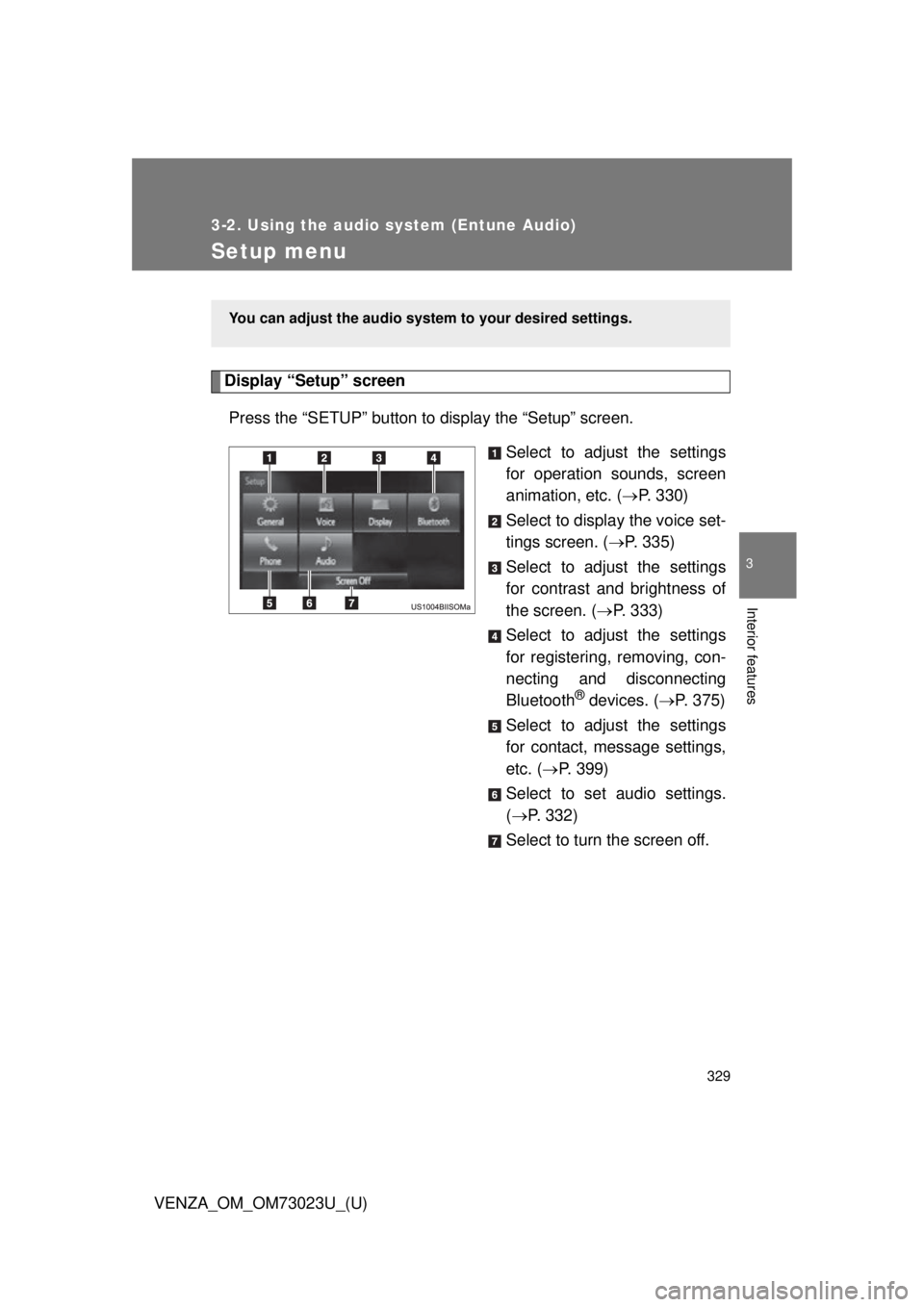
Setup menu
Display “Setup” screenPress the “SETUP” button to display the “Setup” screen. Select to adjust the settings
for operation sounds, screen
animation, etc. (P. 330)
Select to display the voice set-
tings screen. ( P. 335)
Select to adjust the settings
for contrast and brightness of
the screen. ( P. 333)
Select to adjust the settings
for registering, removing, con-
necting and disconnecting
Bluetooth
® devices. ( P. 375)
Select to adjust the settings
for contact, message settings,
etc. ( P. 399)
Select to set audio settings.
( P. 332)
Select to turn the screen off.
You can adjust the audio system to your desired settings.
Page 338 of 689
338 3-2. Using the audio system (Entune Audio)
VENZA_OM_OM73023U_(U)
Selecting, fast-forwarding and reversing tr acks/files/songs
■ Selecting a track/file/song
Press the “SEEK >” button or “< TRACK” button, or turn the
“TUNE•SCROLL” knob to select the desired track/file/song num-
ber.
To fast-forward or reverse, press and hold the “SEEK >” button or
“< TRACK” button.
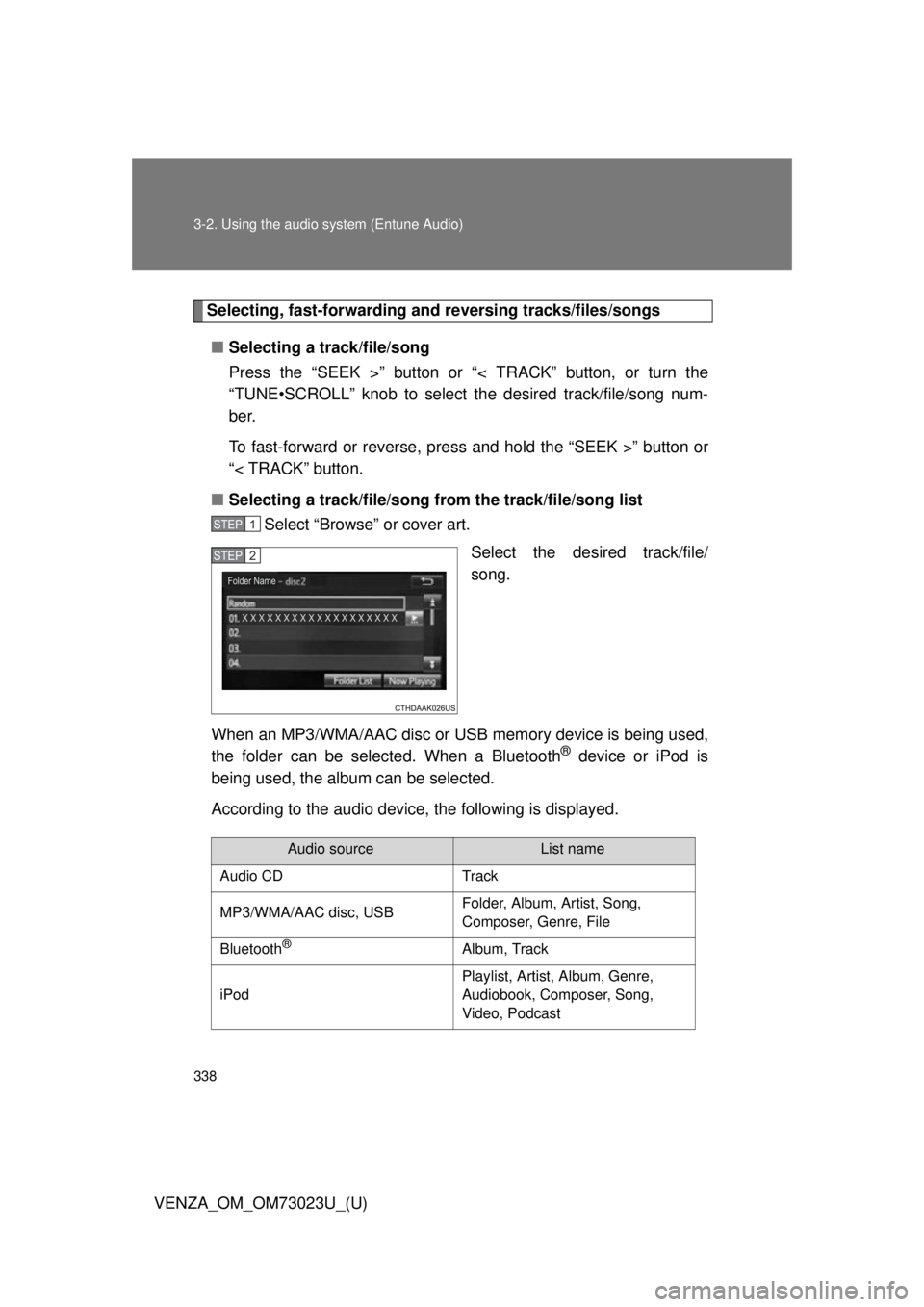
■ Selecting a track/file/song fr om the track/file/song list
Select “Browse” or cover art.
Select the desired track/file/
song.
When an MP3/WMA/AAC disc or USB memory device is being used,
the folder can be selected. When a Bluetooth
® device or iPod is
being used, the album can be selected.
According to the audio device, the following is displayed.
STEP1
STEP2
Audio sourceList name
Audio CD Track
MP3/WMA/AAC disc, USB Folder, Album, Artist, Song,
Composer, Genre, File
Bluetooth
®Album, Track
iPod Playlist, Artist, Album, Genre,
Audiobook, Composer, Song,
Video, Podcast
Page 363 of 689
363
3-2. Using the audio system (Entune Audio)
VENZA_OM_OM73023U_(U)
3
Interior features
Preparations to use wireless communication
The following can be performed using Bluetooth® wireless commu-
nication:
■ A portable audio player can be operated and listened to via
audio system
■ Hands-free phone calls can be made via a cellular phone
In order to use wireless communi cation, register and connect a
Bluetooth
® device by performing the following procedures.
Page 364 of 689

364 3-2. Using the audio system (Entune Audio)
VENZA_OM_OM73023U_(U)
Device registration/connection flow
1. Register the Bluetooth® device to be used with audio sys-
tem ( P. 366, 367, 368)
2. Connect the Bluetooth® device to be used
( P. 370)
To be used for audio To be used for hands-free
phone
3. Start Bluetooth® connec-
tion ( P. 370)3. Start Bluetooth® connec-
tion ( P. 370)
4. Check connection sta-
tus ( P. 377)4. Check connection sta-
tus ( P. 381)
5. Use Bluetooth® audio
( P. 377)5. Use Bluetooth® phone
( P. 379)
Page 365 of 689
365
3-2. Using the audio system (Entune Audio)
VENZA_OM_OM73023U_(U)
3
Interior features
Registering and connecti
ng from the “Bluetooth* Setup” screen
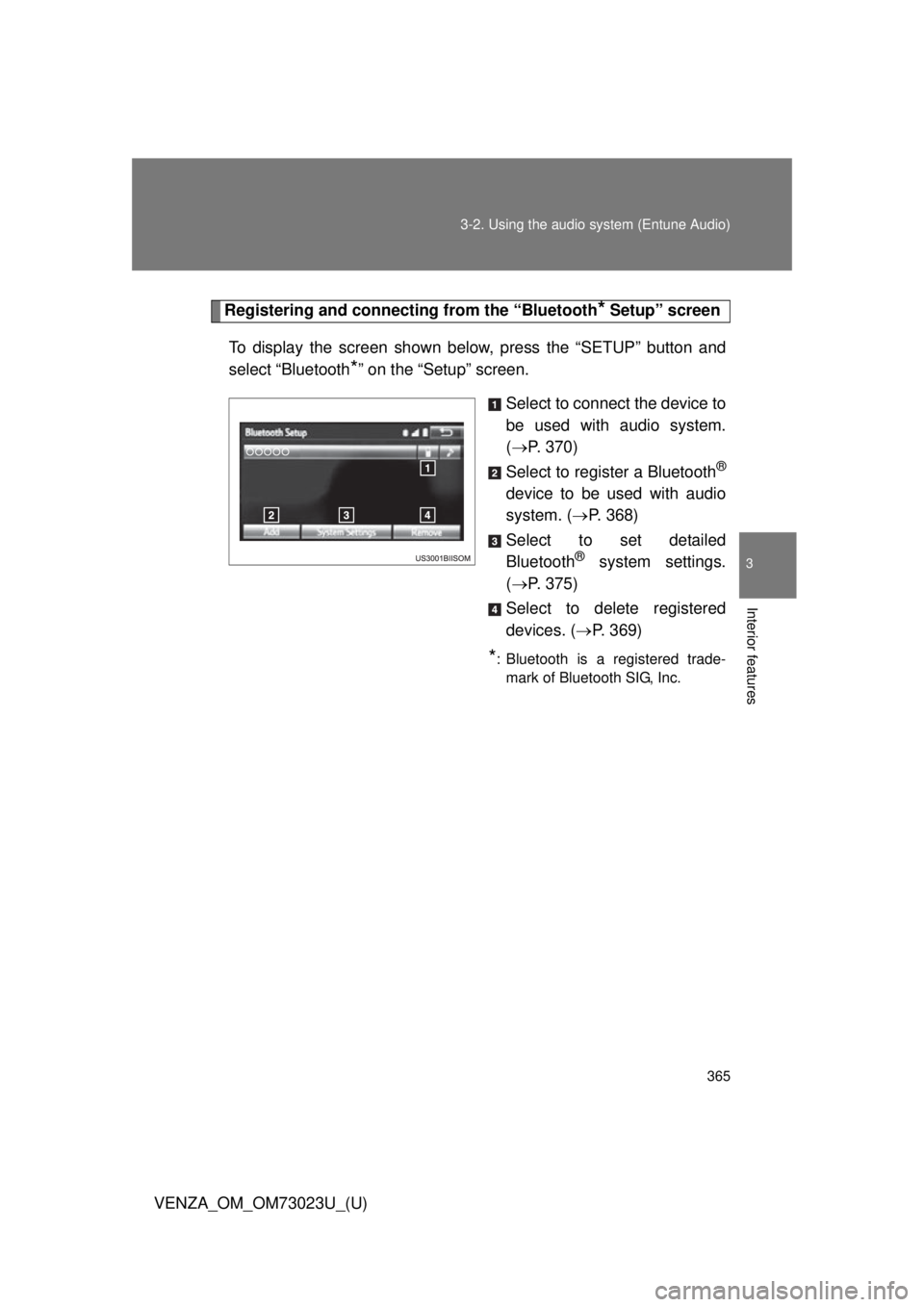
To display the screen shown below, press the “SETUP” button and
select “Bluetooth
*” on the “Setup” screen. Select to connect the device to
be used with audio system.
( P. 370)
Select to register a Bluetooth
®
device to be used with audio
system. ( P. 368)
Select to set detailed
Bluetooth
® system settings.
( P. 375)
Select to delete registered
devices. ( P. 369)
*: Bluetooth is a registered trade-
mark of Bluetooth SIG, Inc.
Page 366 of 689
366
3-2. Using the audio system (Entune Audio)
VENZA_OM_OM73023U_(U)
Registering a Bluetooth® audio player for the first time
Turn the Bluetooth® connection setting of your audio player
on.
Press the “AUDIO” button.
Select “ Audio”.
Select “Select Device”.
Follow the steps in “How to registering a Bluetooth
® device”
from . ( P. 368)
To use the Bluetooth® Audio, it is necessary to register an audio
player with the system.
Once the player has been register ed, it is possible to use the
Bluetooth
® Audio.
For details about registering a Bluetooth
® device ( P. 368)
STEP1
STEP2
STEP3
STEP4
STEP5
STEP2