ECO mode TOYOTA VENZA 2016 User Guide
[x] Cancel search | Manufacturer: TOYOTA, Model Year: 2016, Model line: VENZA, Model: TOYOTA VENZA 2016Pages: 688, PDF Size: 18.51 MB
Page 176 of 688
1762-1. Driving procedures
VENZA_OM_OM73030U_(U) CAUTION■ When starting the engine
Always start the engine while sitting in the driver’s seat. Do not depress the
accelerator pedal while starting the engine under any circumstances.
Doing so may cause an accident resulting in death or serious injury.
■ Stopping the engine in an emergency
If you want to stop the engine in an emergency while driving the vehicle,
press and hold the “ENGINE START STOP” switch for more than 2 seconds,
or press it briefly 3 times or more in succession. ( P. 608)
However, do not touch the “ENGINE START STOP” switch while driving
except in an emergency. Turning the engine off while driving will not cause
loss of steering or braking control, however, power assist to the steering will
be lost. This will make it more difficult to steer smoothly, so you should pull
over and stop the vehicle as soon as it is safe to do so.
NOTICE■ To prevent battery discharge
Do not leave the “ENGINE START STOP” switch in ACCESSORY or IGNI-
TION ON mode for long periods without the engine running.
■ When starting the engine
● Do not race a cold engine.
● If the engine becomes difficult to start or stalls frequently, have your vehi-
cle checked by your Toyota dealer immediately.
Page 181 of 688
1812-1. Driving procedures
2
When driving
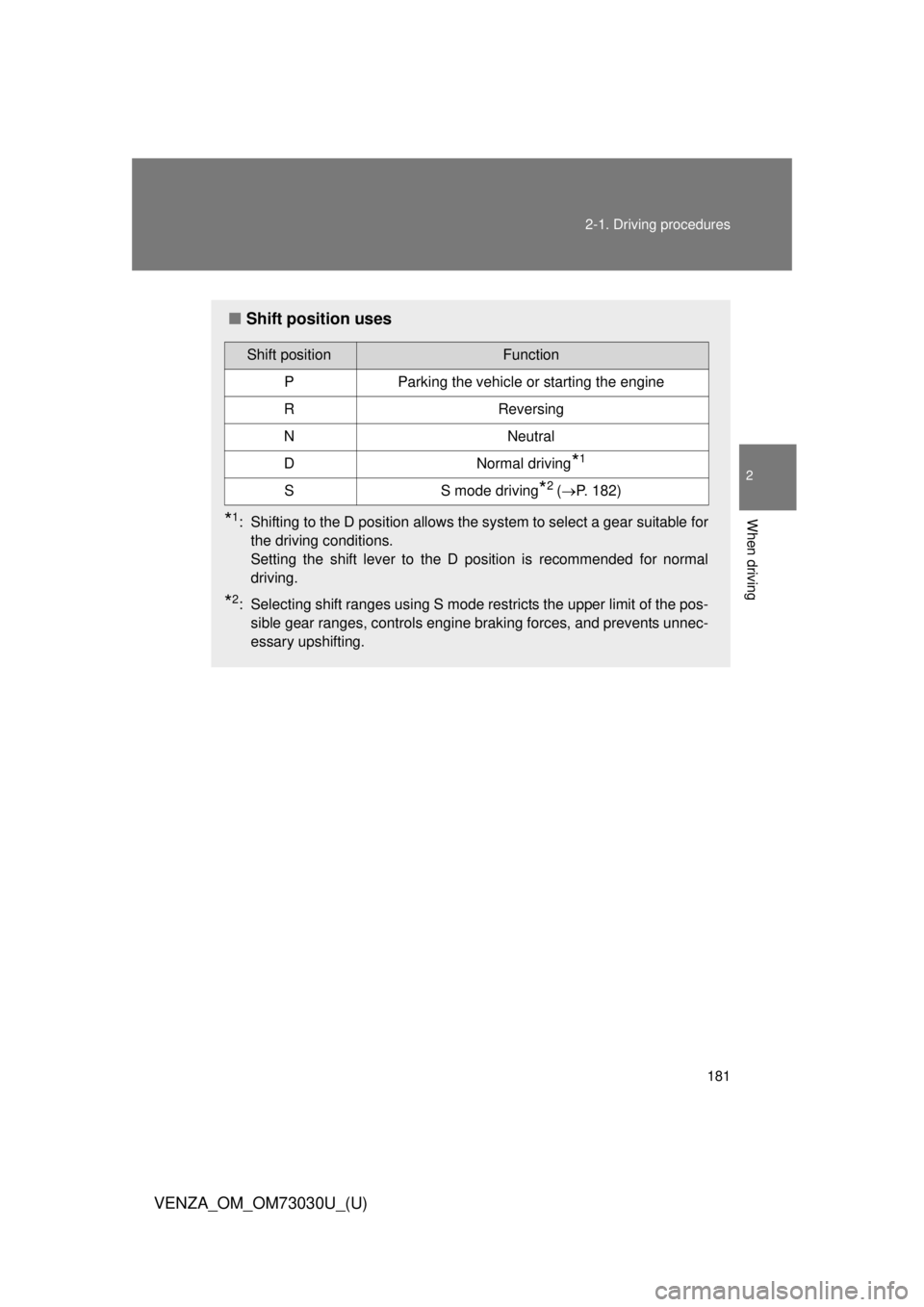
VENZA_OM_OM73030U_(U) ■ Shift position uses
* 1
: Shifting to the D position allows the system to select a gear suitable for
the driving conditions.
Setting the shift lever to the D position is recommended for normal
driving.
* 2
: Selecting shift ranges using S mode restricts the upper limit of the pos-
sible gear ranges, controls engine braking forces, and prevents unnec-
essary upshifting.Shift position Function
P Parking the vehicle or starting the engine
R Reversing
N Neutral
D Normal driving
* 1
S S mode driving
* 2
( P. 182)
Page 183 of 688
1832-1. Driving procedures
2
When driving
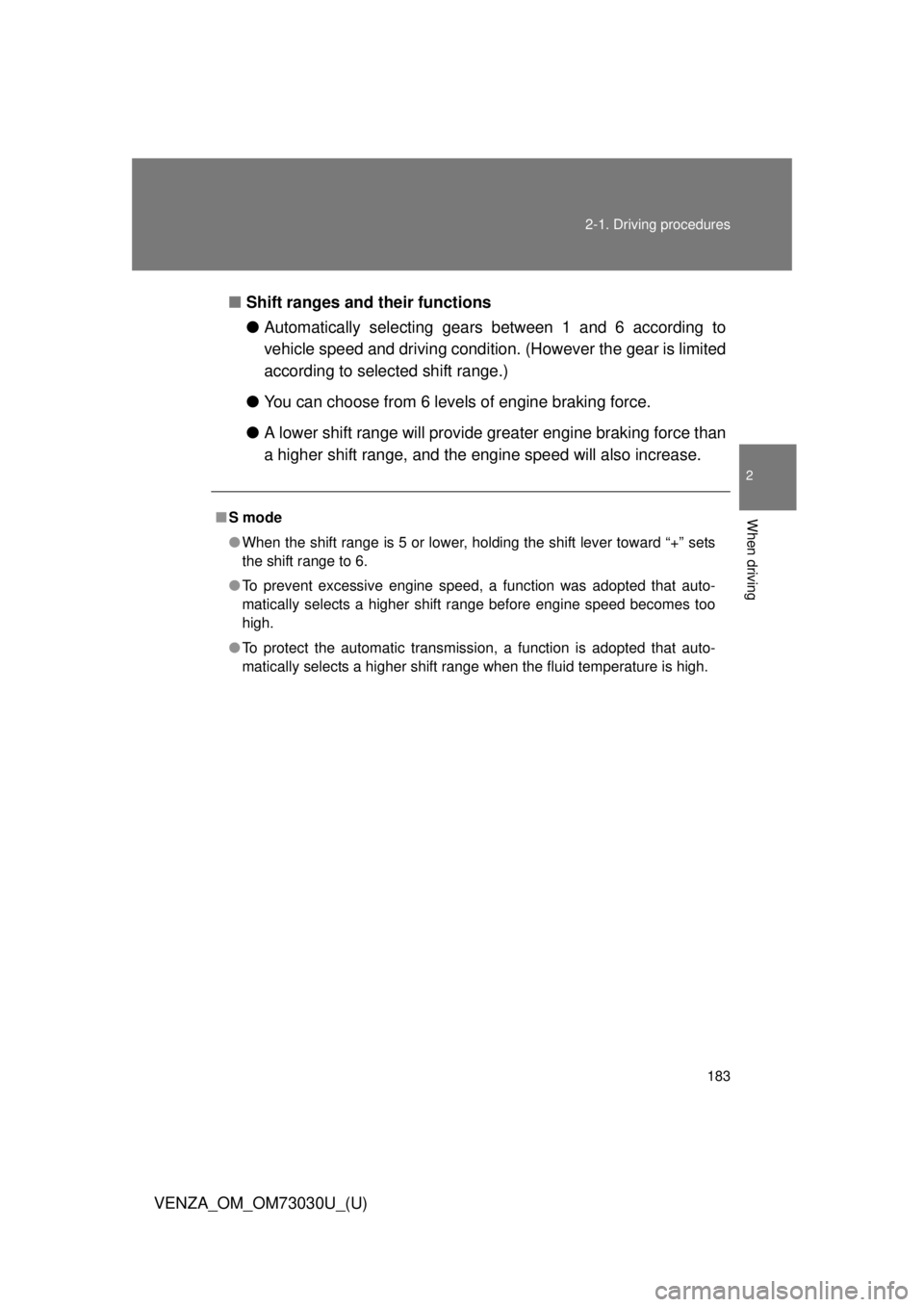
VENZA_OM_OM73030U_(U) ■ Shift ranges and their functions
● Automatically selecting gears between 1 and 6 according to
vehicle speed and driving conditio n. (However the gear is limited
according to selected shift range.)
● You can choose from 6 levels of engine braking force.
● A lower shift range will provide greater engine br aking force than
a higher shift range, and the engine speed will also increase.■ S mode
● When the shift range is 5 or lower, holding the shift lever toward “+” sets
the shift range to 6.
● To prevent excessive engine speed, a function was adopted that auto-
matically selects a higher shift range before engine speed becomes too
high.
● To protect the automatic transmission, a function is adopted that auto-
matically selects a higher shift range when the fluid temperature is high.
Page 193 of 688
1932-2. Instrument cluster
2
When driving
VENZA_OM_OM73030U_(U) CAUTION■ If a safety system warning light does not come on
Should a safety system light such as the ABS and the SRS airbag warning
lights not come on when you start the engine, this could mean that these
systems are not available to help protect you in an accident, which could
result in death or serious injury. Have the vehicle inspected by your Toyota
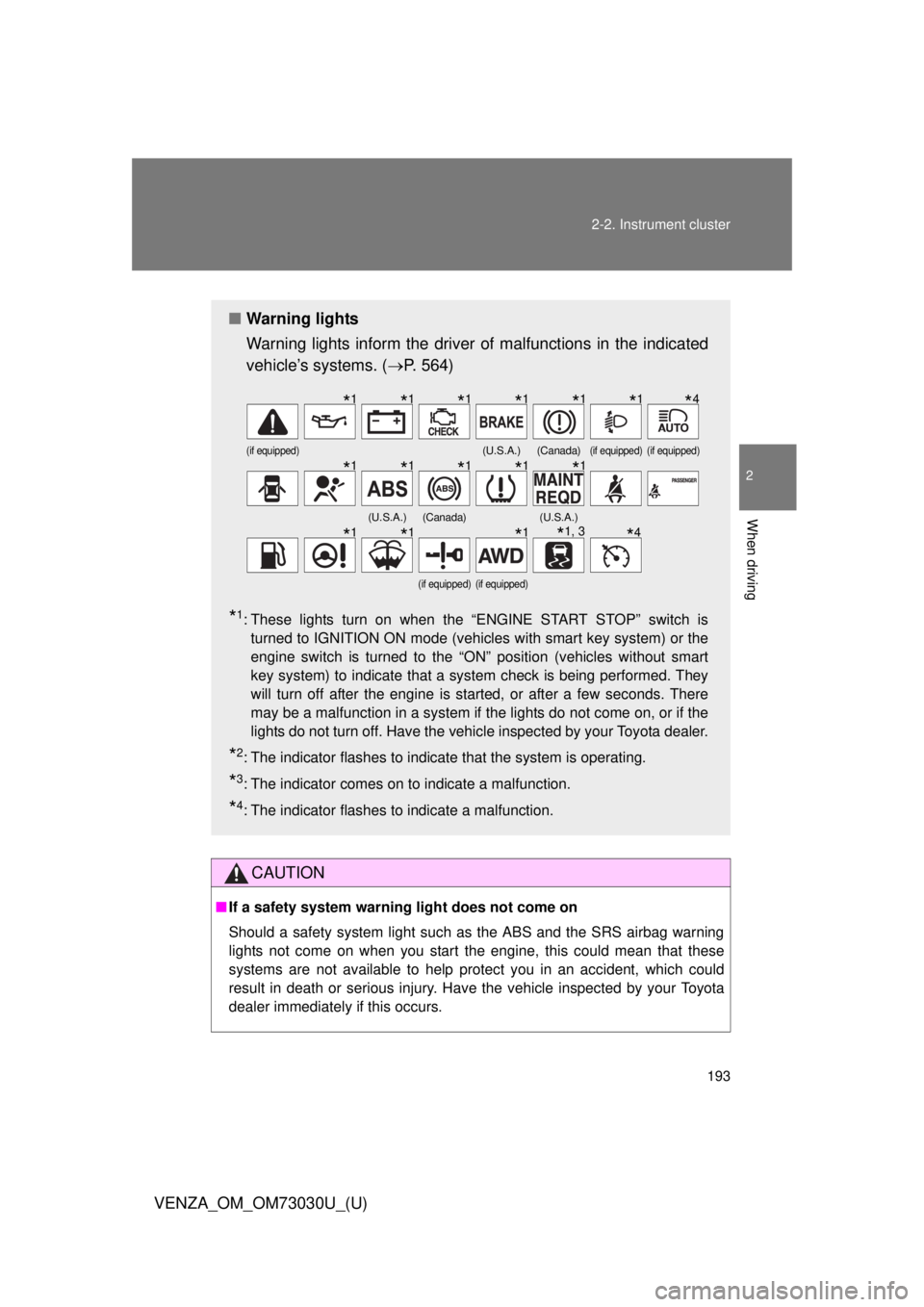
dealer immediately if this occurs.■ Warning lights
Warning lights inform the driver of malfunctions in the indicated
vehicle’s systems. ( P. 564)
* 1
: These lights turn on when the “ENGINE START STOP” switch is
turned to IGNITION ON mode (vehicles with smart key system) or the
engine switch is turned to the “ON” position (vehicles without smart
key system) to indicate that a system check is being performed. They
will turn off after the engine is started, or after a few seconds. There
may be a malfunction in a system if the lights do not come on, or if the
lights do not turn off. Have the vehicle inspected by your Toyota dealer.
* 2
: The indicator flashes to indicate that the system is operating.
* 3
: The indicator comes on to indicate a malfunction.
* 4
: The indicator flashes to indicate a malfunction. (if equipped) (U.S.A.) (Canada) (if equipped) (if equipped)
(U.S.A.) (Canada) (U.S.A.)
(if equipped) (if equipped)
* 1
* 1
* 1
* 1
* 1
* 1
* 4
* 1
* 1
* 1
* 1
* 1
* 1
* 1
* 1
* 1, 3
* 4
Page 197 of 688
1972-2. Instrument cluster
2
When driving
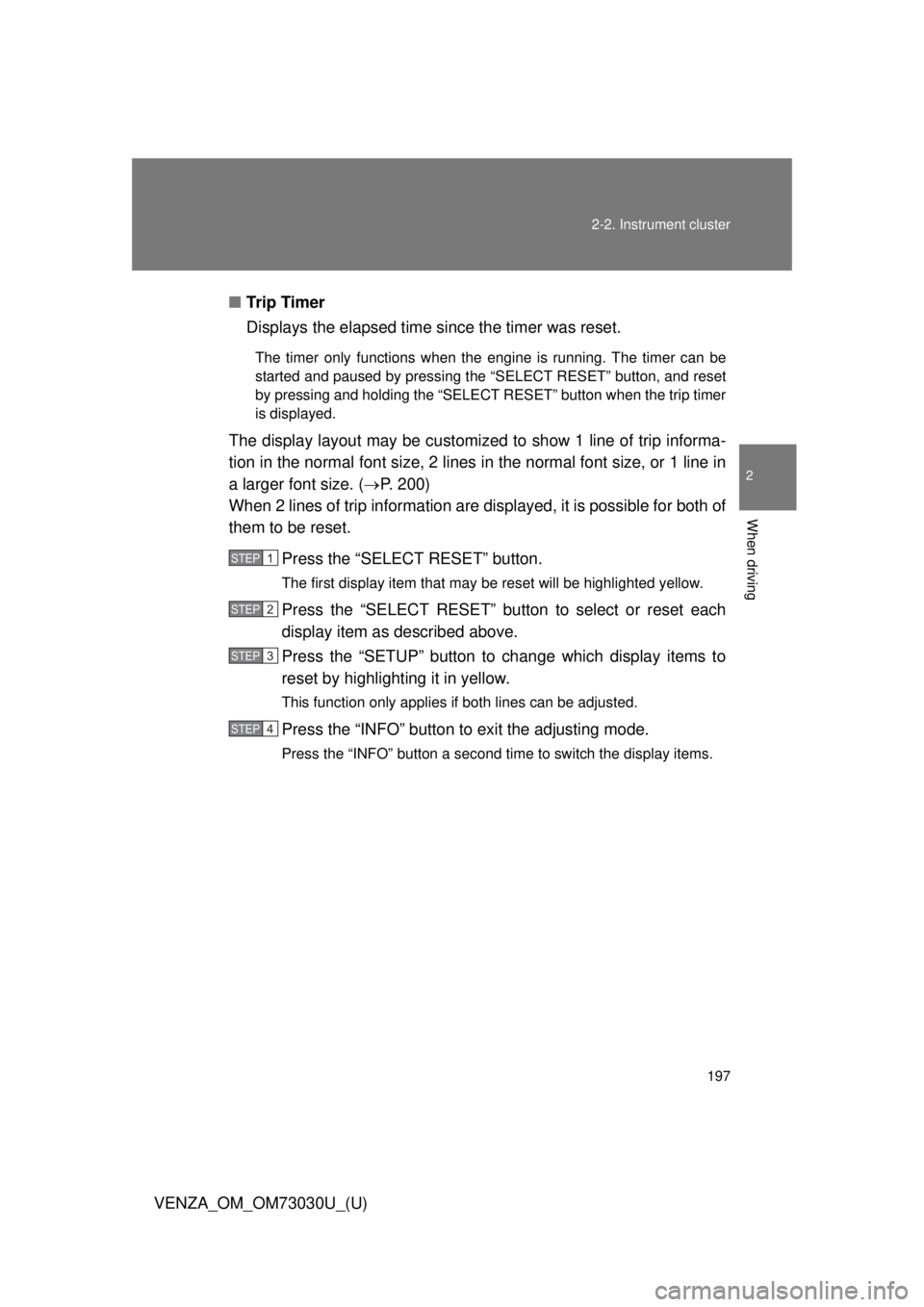
VENZA_OM_OM73030U_(U) ■ Tr i p Ti m e r
Displays the elapsed time since the timer was reset. The timer only functions when the engine is running. The timer can be
started and paused by pressing the “SELECT RESET” button, and reset
by pressing and holding the “SELECT RESET” button when the trip timer
is displayed.
The display layout may be customized to show 1 line of trip informa-
tion in the normal font size, 2 lines in the normal font size, or 1 line in
a larger font size. ( P. 200)
When 2 lines of trip information are displayed, it is possible for both of
them to be reset.
Press the “SELECT RESET” button. The first display item that may be reset will be highlighted yellow.
Press the “SELECT RESET” button to select or reset each
display item as described above.
Press the “SETUP” button to change which display items to
reset by highlighting it in yellow. This function only applies if both lines can be adjusted.
Press the “INFO” button to exit the adjusting mode.Press the “INFO” button a second time to switch the display items. STEP 1
STEP 2
STEP 3
STEP 4
Page 198 of 688
1982-2. Instrument cluster
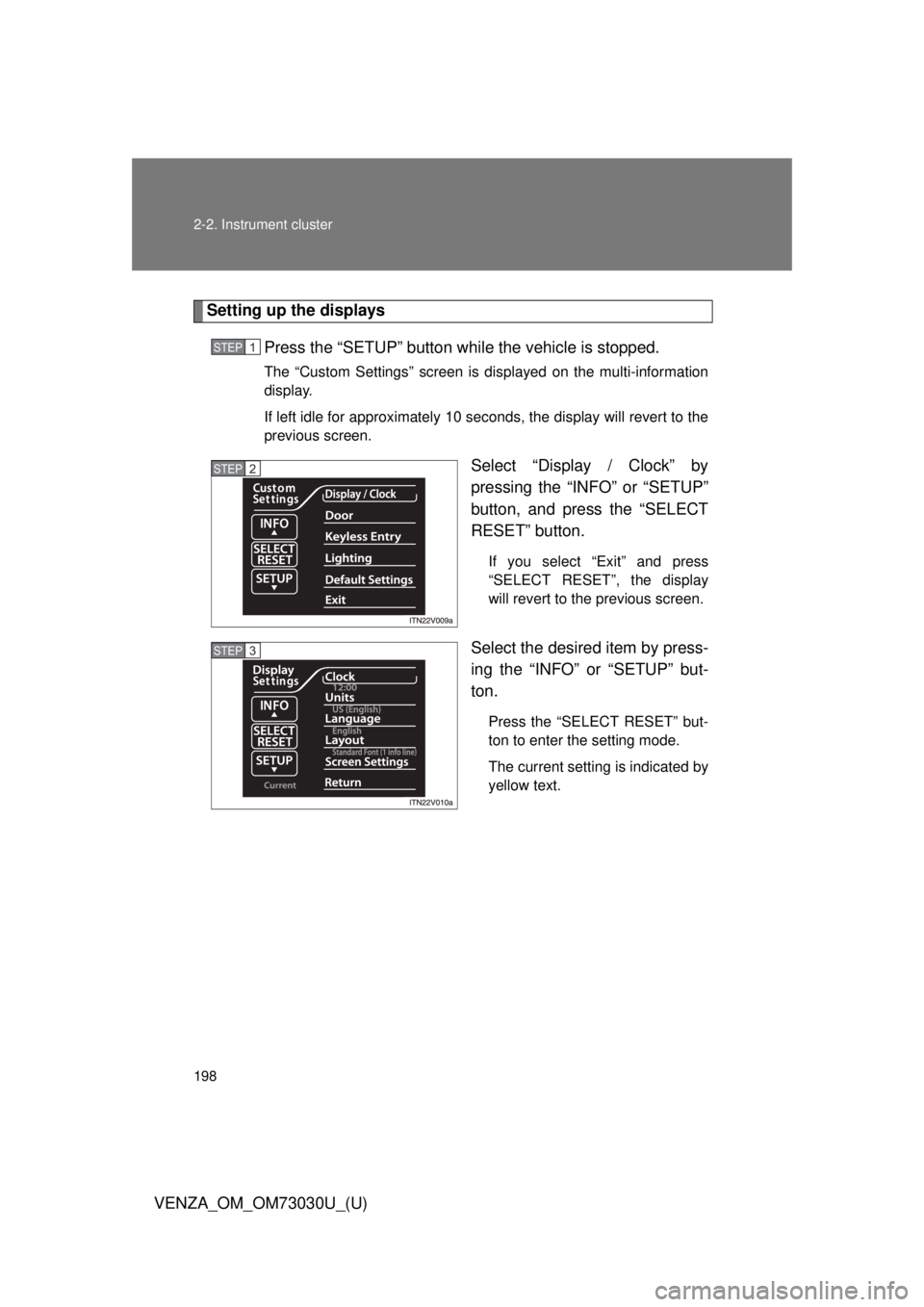
VENZA_OM_OM73030U_(U) Setting up the displays
Press the “SETUP” button wh ile the vehicle is stopped.The “Custom Settings” screen is displayed on the multi-information
display.
If left idle for approximately 10 seconds, the display will revert to the
previous screen.
Select “Display / Clock” by
pressing the “INFO” or “SETUP”
button, and press the “SELECT
RESET” button. If you select “Exit” and press
“SELECT RESET”, the display
will revert to the previous screen.
Select the desired item by press-
ing the “INFO” or “SETUP” but-
ton. Press the “SELECT RESET” but-
ton to enter the setting mode.
The current setting is indicated by
yellow text.STEP 1
STEP 2
STEP 3
Page 204 of 688
2042-2. Instrument cluster
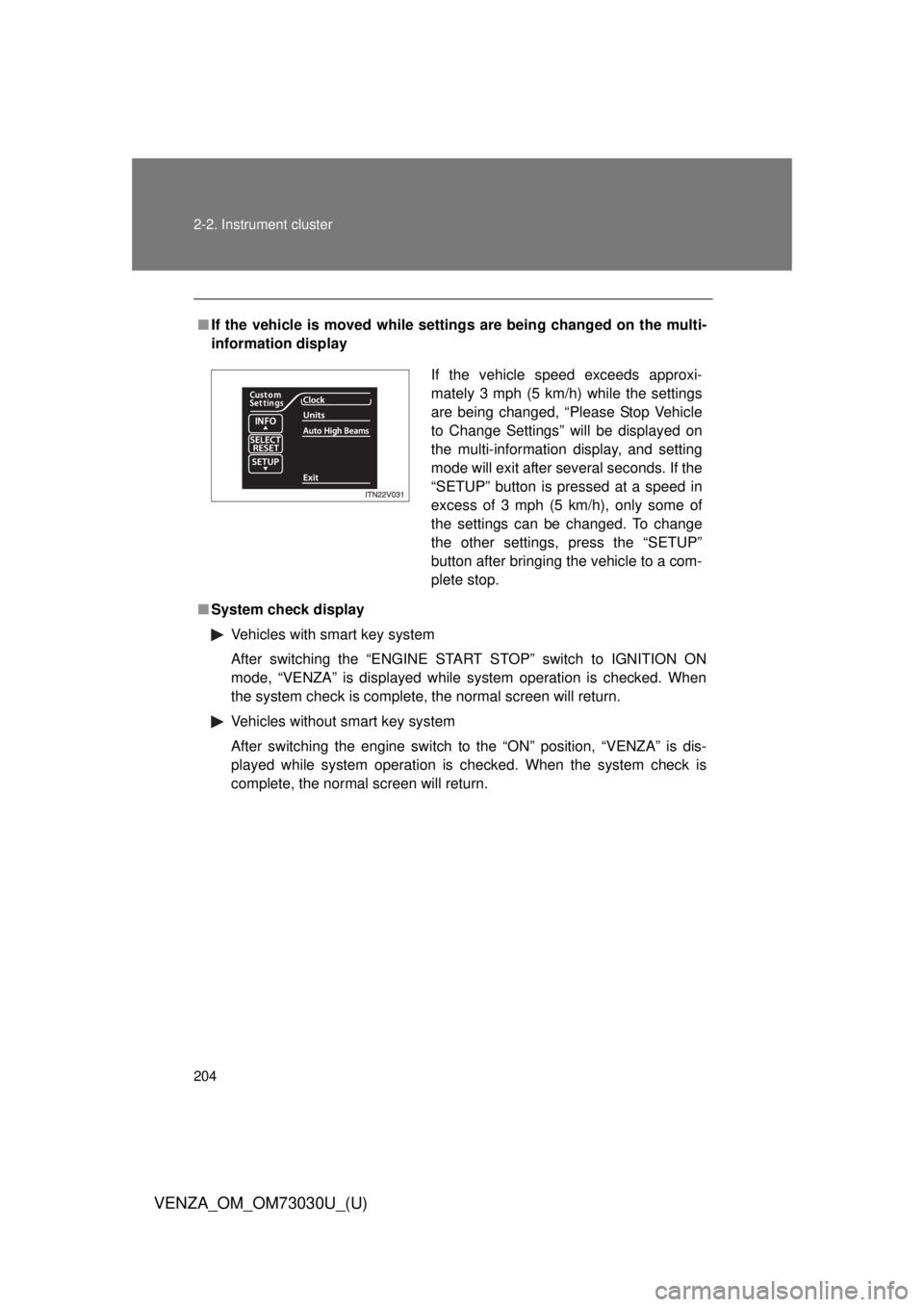
VENZA_OM_OM73030U_(U) ■ If the vehicle is moved while setti ngs are being changed on the multi-
information display
■ System check display
Vehicles with smart key system
After switching the “ENGINE START STOP” switch to IGNITION ON
mode, “VENZA” is displayed while system operation is checked. When
the system check is complete, the normal screen will return.
Vehicles without smart key system
After switching the engine switch to the “ON” position, “VENZA” is dis-
played while system operation is checked. When the system check is
complete, the normal screen will return. If the vehicle speed exceeds approxi-
mately 3 mph (5 km/h) while the settings
are being changed, “Please Stop Vehicle
to Change Settings” will be displayed on
the multi-information display, and setting
mode will exit after several seconds. If the
“SETUP” button is pressed at a speed in
excess of 3 mph (5 km/h), only some of
the settings can be changed. To change
the other settings, press the “SETUP”
button after bringing the vehicle to a com-
plete stop.
Page 210 of 688
2102-2. Instrument cluster
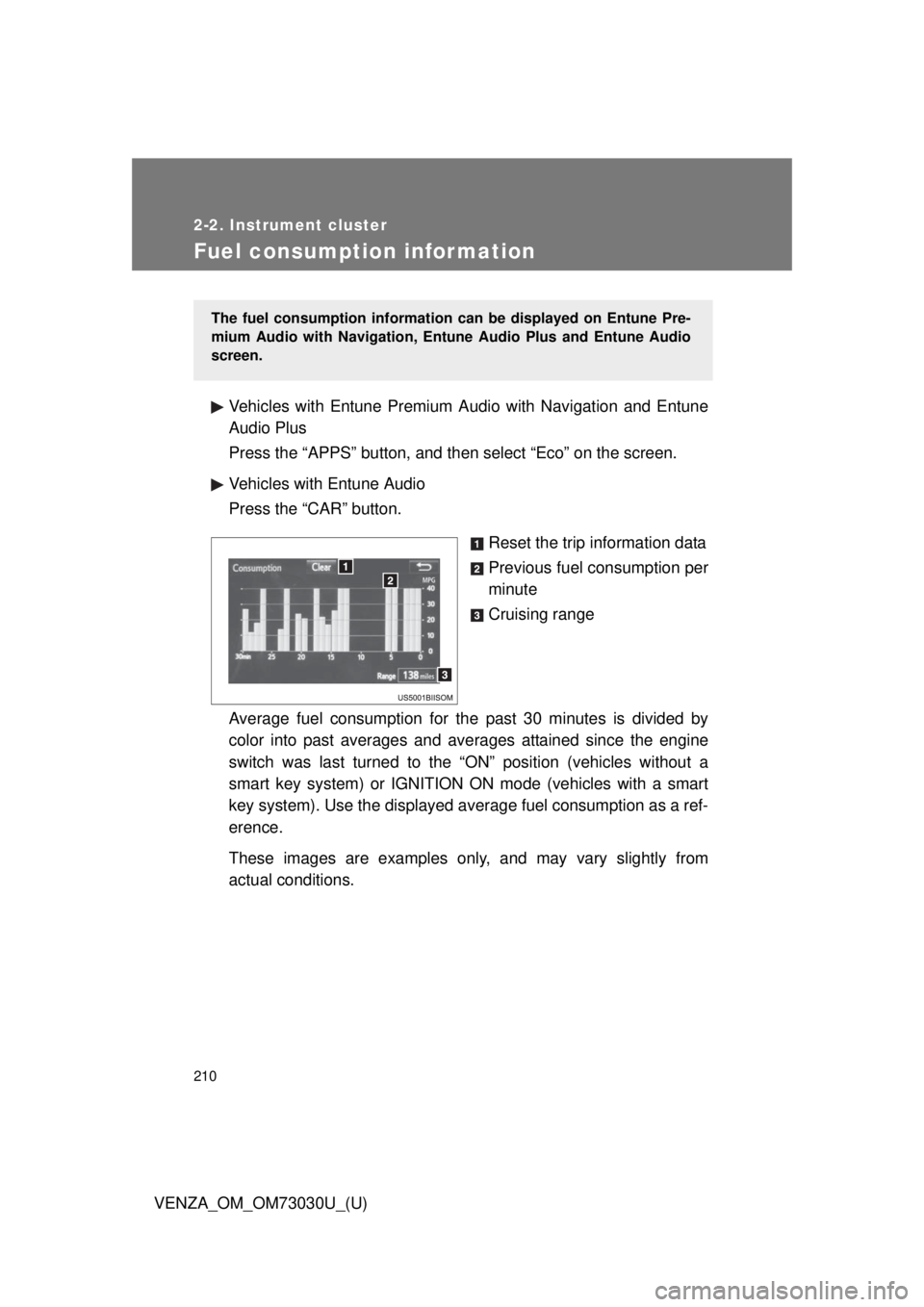
VENZA_OM_OM73030U_(U)Fuel consumption information Vehicles with Entune Premium Audio with Navigation and Entune
Audio Plus
Press the “APPS” button, and t hen select “Eco” on the screen.
Vehicles with Entune Audio
Press the “CAR” button.
Reset the trip information data
Previous fuel consumption per
minute
Cruising range
Average fuel consumption for the past 30 minutes is divided by
color into past averages and av erages attained since the engine
switch was last turned to the “ON” position (vehicles without a
smart key system) or IGNITION ON mode (vehicles with a smart
key system). Use the displayed av erage fuel consumption as a ref-
erence.
These images are examples only , and may vary slightly from
actual conditions. The fuel consumption information can be displayed on Entune Pre-
mium Audio with Navigation, Entune Audio Plus and Entune Audio
screen.
Page 214 of 688
2142-3. Operating the lights and wipers
VENZA_OM_OM73030U_(U) ■ Daytime running light system
● To make your vehicle more visible to others, the high beam headlights
turn on automatically at a reduced intensity (vehicles with halogen head-
lights) or the LED daytime running lights turn on automatically (vehicles
with discharge headlights) whenever the engine is started and the park-
ing brake is released. Daytime running lights are not designed for use at
night.
Type A: Daytime running lights can be turned off by operating the switch.
● Compared to turning on the headlights, the daytime running light system
offers greater durability and consumes less electricity, so it can help
improve fuel economy.
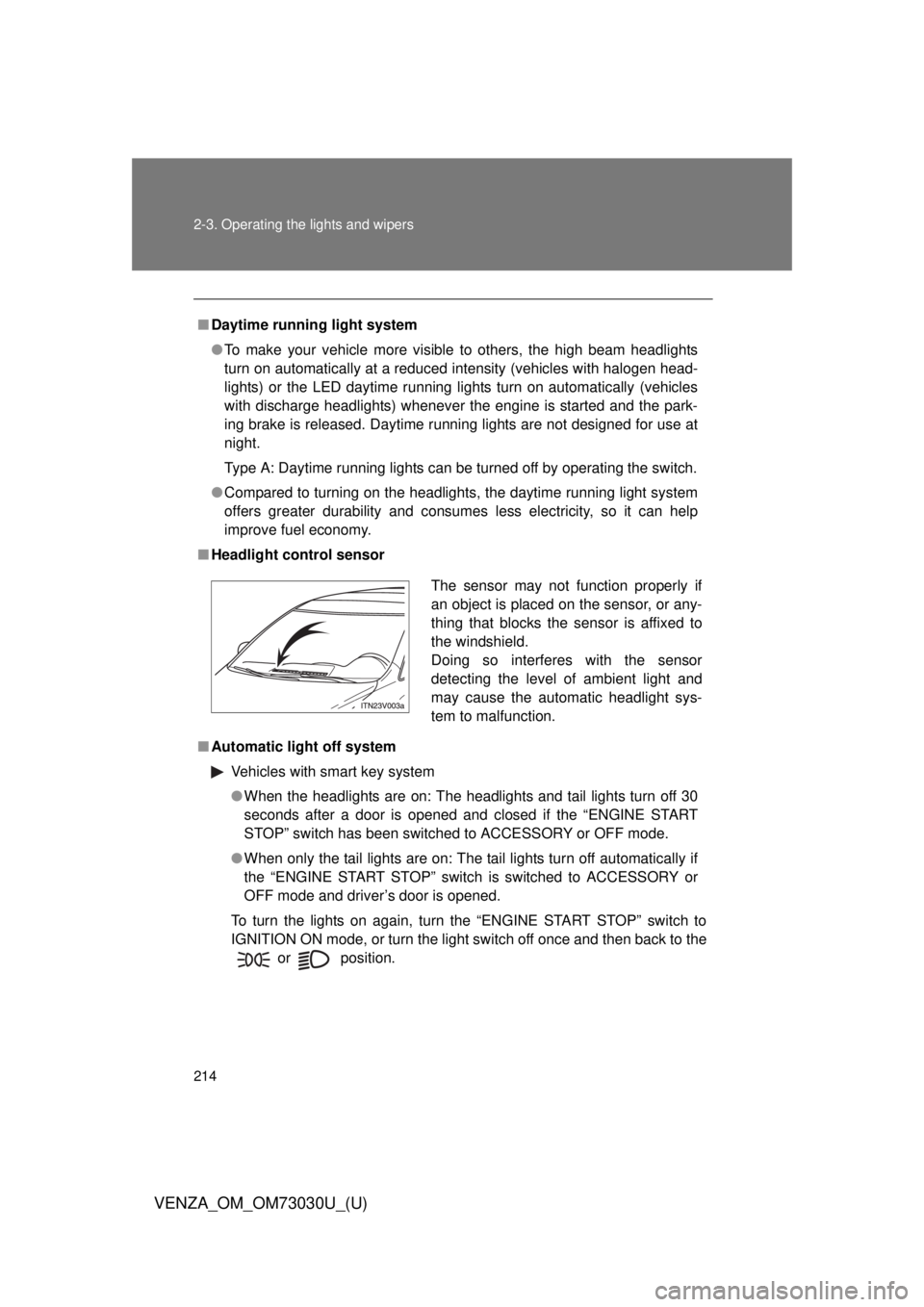
■ Headlight control sensor
■ Automatic light off system
Vehicles with smart key system
● When the headlights are on: The headlights and tail lights turn off 30
seconds after a door is opened and closed if the “ENGINE START
STOP” switch has been switched to ACCESSORY or OFF mode.
● When only the tail lights are on: The tail lights turn off automatically if
the “ENGINE START STOP” switch is switched to ACCESSORY or
OFF mode and driver’s door is opened.
To turn the lights on again, turn the “ENGINE START STOP” switch to
IGNITION ON mode, or turn the light switch off once and then back to the
or
position. The sensor may not function properly if
an object is placed on the sensor, or any-
thing that blocks the sensor is affixed to
the windshield.
Doing so interferes with the sensor
detecting the level of ambient light and
may cause the automatic headlight sys-
tem to malfunction.
Page 228 of 688
2282-3. Operating the lights and wipers
VENZA_OM_OM73030U_(U) ■ The windshield wiper and washer can be operated when
Vehicles with smart key system
The “ENGINE START STOP” switch is in IGNITION ON mode.
Vehicles without smart key system
The engine switch is in the “ON” position.
■ If no windshield washer fluid sprays
Check that the washer nozzles are not blocked if there is washer fluid in the
windshield washer fluid reservoir.
CAUTION■ Caution regarding the use of washer fluid
When it is cold, do not use the washer fluid until the windshield becomes
warm. The fluid may freeze on the windshield and cause low visibility. This
may lead to an accident, resulting in death or serious injury.
NOTICE■ When the windshield is dry
Do not use the wipers, as they may damage the windshield.
■ When there is no washer fluid spray from the nozzle
Damage to the washer fluid pump may be caused if the lever is pulled
toward you and held continually.
■ When a nozzle becomes blocked
Do not try to clear it with a pin or other object. The nozzle will be damaged.