wheel TOYOTA VENZA 2016 Repair Manual
[x] Cancel search | Manufacturer: TOYOTA, Model Year: 2016, Model line: VENZA, Model: TOYOTA VENZA 2016Pages: 688, PDF Size: 18.51 MB
Page 294 of 688

2942-5. Driving information
VENZA_OM_OM73030U_(U) ● As stopping distance is increased when towing a trailer, vehicle-to-
vehicle distance should be increased. For each 10 mph (16 km/h) of
speed, allow at least one vehicle and trailer length.
● Avoid sudden braking as you may skid, resulting in the trailer jack-
knifing and a loss of vehicle control. This is especially true on wet
or slippery surfaces.
● Avoid jerky starts or sudden acceleration.
● Avoid jerky steering and sharp turns, and slow down before mak-
ing a turn.
● Note that when making a turn, th e trailer wheels will be closer than
the vehicle wheels to the inside of the turn. Compensate by making
a wider than normal turning radius.
● Slow down before making a turn, in crosswinds, on wet or slippery
surfaces, etc.
Increasing vehicle speed c an destabilize the trailer.
● Take care when passing other v ehicles. Passing requires consider-
able distance. After passing a vehi cle, do not forget the length of
your trailer, and be sure you hav e plenty of room before changing
lanes.
● To maintain engine braking efficiency and charging system perfor-
mance when using engine braking, do not put the transmission in
D.
Transmission shift range position must be in 4 in the S mode.
● Instability happens more frequently when desce nding steep or long
downhill grades. Before descending, slow do wn and downshift. Do
not make sudden downshifts while descending steep or long down-
hill grades.
Page 295 of 688
2952-5. Driving information
2
When driving
VENZA_OM_OM73030U_(U) ● Avoid holding the brake pedal down too long or applying the
brakes too frequently. This could cause the brakes to overheat and
result in reduced braking efficiency.
● Due to the added load of the trailer, your vehicle’s engine may
overheat on hot days (at temper atures over 85°F [30°C]) when
driving up a long or steep grade. If the Engine coolant temperature
gauge indicates overheating, immedi ately turn off the air condition-
ing (if in use), pull your vehicle off the road and stop in a safe spot.
( P. 603)
● Always place wheel blocks under both the vehicle’s and the
trailer’s wheels when parking. Ap ply the parking brake firmly, and
put the transmission in P. Avoid pa rking on a slope, but if unavoid-
able, do so only after performing the following:
Apply the brakes and keep them applied.
Have someone place wheel blo cks under both the vehicle’s
and trailer’s wheels.
When the wheel blocks are in pl ace, release the brakes slowly
until the blocks absorb the load.
Apply the parking brake firmly.
Shift into P and turn off the engine. STEP 1
STEP 2
STEP 3
STEP 4
STEP 5
Page 296 of 688
2962-5. Driving information
VENZA_OM_OM73030U_(U) ● When restarting after parking on a slope:
With the transmission in P, start the engine. Be sure to keep
the brake pedal pressed.
Shift into a forward gear. If reversing, shift into R.
Release the parking brake and brake pedal, and slowly pull or
back away from the wheel blocks. Stop and apply the brakes.
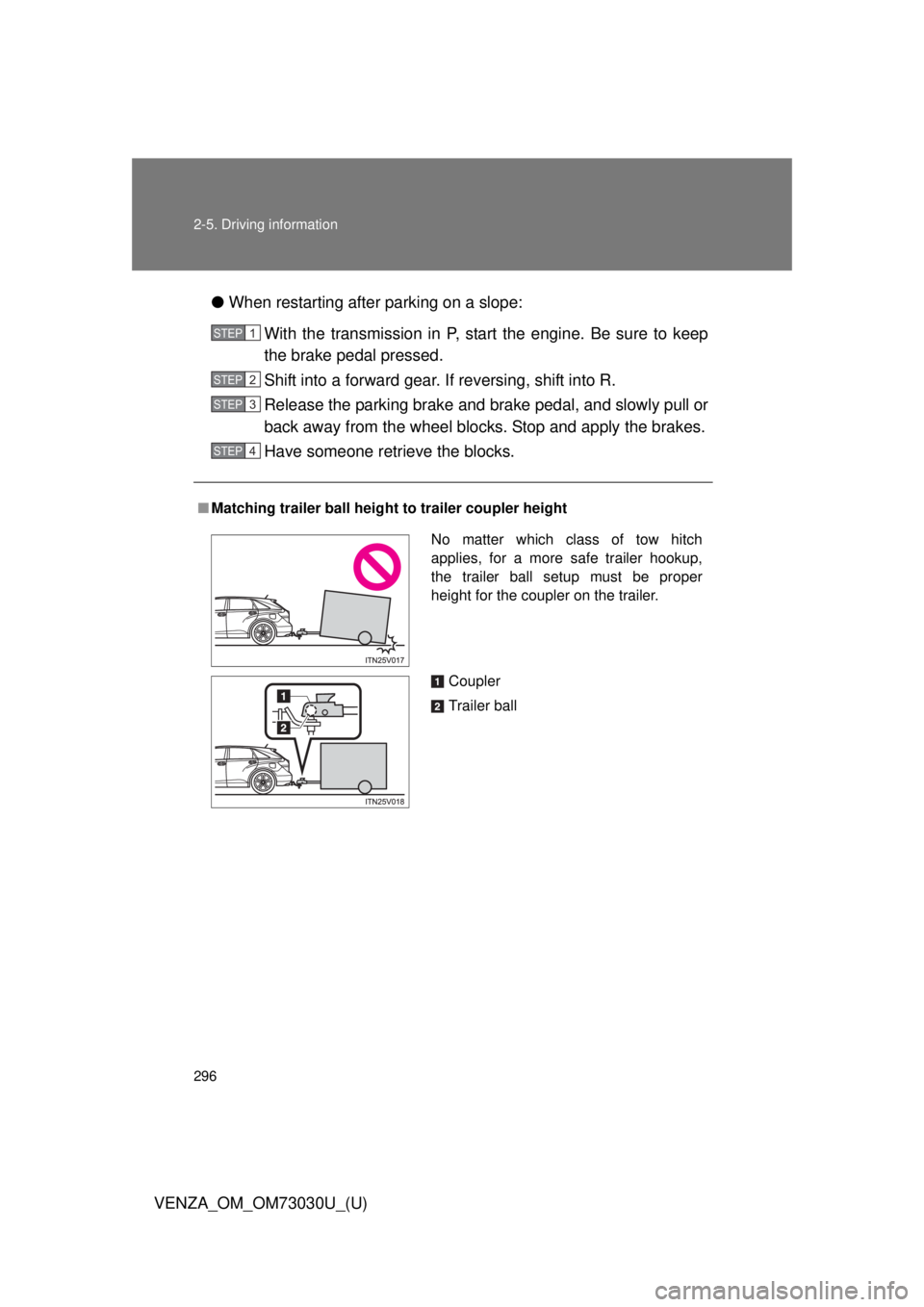
Have someone retrieve the blocks.■ Matching trailer ball height to trailer coupler heightSTEP 1
STEP 2
STEP 3
STEP 4
No matter which class of tow hitch
applies, for a more safe trailer hookup,
the trailer ball setup must be proper
height for the coupler on the trailer.
Coupler
Trailer ball
Page 297 of 688

2972-5. Driving information
2
When driving
VENZA_OM_OM73030U_(U) ■ Before towing
Check that the following conditions are met:
● Ensure that your vehicle’s tires are properly inflated. ( P. 622)
● Trailer tires are inflated according to the trailer manufacturer’s recom-
mendation.
● All trailer lights work as required by law.
● All lights work each time you connect them.
● The trailer ball is set at the proper height for the coupler on the trailer.
● The trailer is level when it is hitched.
Do not drive if the trailer is not level, and check for improper tongue
weight, overloading, worn suspension, or other possible causes.
● The trailer cargo is securely loaded.
● The rear view mirrors conform to all applicable federal, state/provincial or
local regulations. If they do not, instal l rear view mirrors appropriate for
towing purposes.
■ Break-in schedule
If your vehicle is new or equipped with any new power train components
(such as an engine, transmission, differential or wheel bearing), Toyota rec-
ommends that you do not tow a trailer until the vehicle has been driven for
over 500 miles (800 km).
After the vehicle has been driven for over 500 miles (800 km), you can start
towing. However, for the next 500 miles (800 km), drive the vehicle at a
speed of less than 50 mph (80 km/h) when towing a trailer, and avoid full
throttle acceleration.
Page 298 of 688

2982-5. Driving information
VENZA_OM_OM73030U_(U) ■ Maintenance
● If you tow a trailer, your vehicle will require more frequent maintenance
due to the additional load. (See “Scheduled Maintenance Guide” or
“Owner’s Manual Supplement”.)
● Retighten the fixing bolts of the towing ball and bracket after approxi-
mately 600 miles (1000 km) of trailer towing.
■ If trailer sway occurs
One or more factors (crosswinds, passing vehicles, rough roads, etc.) can
adversely affect handling of your vehicle and trailer, causing instability.
● If trailer swaying occurs:
• Firmly grip the steering wheel. Steer straight ahead.
Do not try to control trailer swaying by turning the steering wheel.
• Begin releasing the accelerator pedal immediately but very gradually to
reduce speed.
Do not increase speed. Do not apply vehicle brakes.
If you make no extreme correction with the steering or brakes, your vehicle
and trailer should stabilize.
● After the trailer swaying has stopped:
• Stop in a safe place. Get all occupants out of the vehicle.
• Check the tires of the vehicle and the trailer.
• Check the load in the trailer.
Make sure the load has not shifted.
Make sure the tongue weight is appropriate, if possible.
• Check the load in the vehicle.
Make sure the vehicle is not overloaded after occupants get in.
If you cannot find any problems, the speed at which trailer swaying occurred
is beyond the limit of your particul ar vehicle-trailer combination.
Drive at a lower speed to prevent instability. Remember that swaying of the
towing vehicle-trailer increases as speed increases.
Page 302 of 688
3022-5. Driving information
VENZA_OM_OM73030U_(U)Dinghy towing NOTICE■ To avoid serious damage to your vehicle
■ To prevent causing serious damage to the transmission and Active
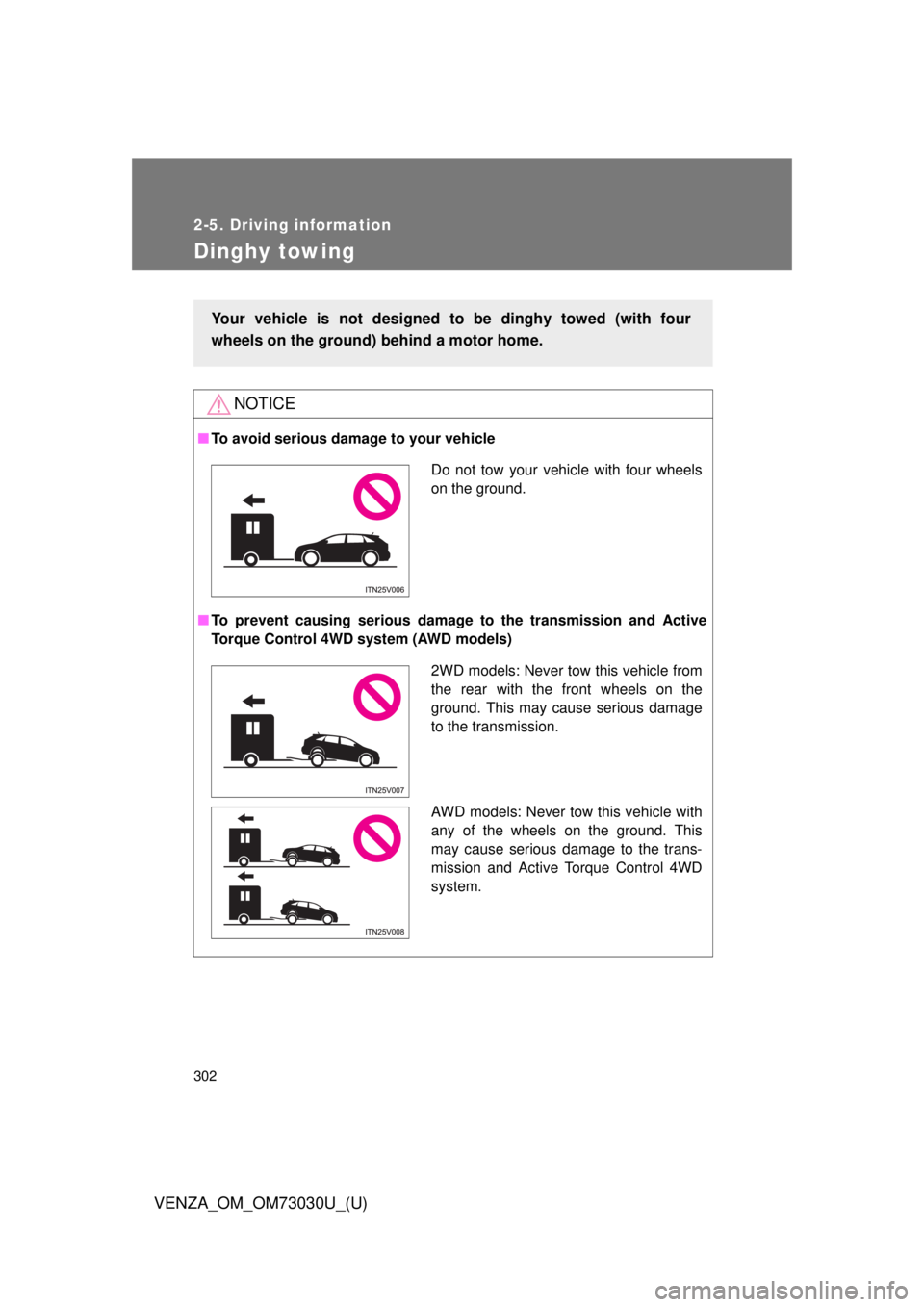
Torque Control 4WD system (AWD models)Your vehicle is not designed to be dinghy towed (with four
wheels on the ground) behind a motor home.
Do not tow your vehicle with four wheels
on the ground.
2WD models: Never tow this vehicle from
the rear with the front wheels on the
ground. This may cause serious damage
to the transmission.
AWD models: Never tow this vehicle with
any of the wheels on the ground. This
may cause serious damage to the trans-
mission and Active Torque Control 4WD
system.
Page 304 of 688
304
VENZA_OM_OM73030U_(U) 3-1. Using the air conditioning
system and defogger
Automatic air conditioning
system ........................... 306
Rear window defogger ..... 316
3-2. Using the audio system
(Entune Audio)
Audio system types .......... 318
Audio system ................... 320
Steering wheel audio
switches ......................... 323
USB Port/AUX Port .......... 325
Basic Audio
Operations ..................... 326
Setup menu...................... 329
General settings ............... 330
Audio settings .................. 332
Display settings ................ 333
Voice settings................... 335 Selecting the audio
source ............................ 336
List screen operation........ 337
Optimal use of the audio
system ........................... 339
Radio operation................ 340
CD player operation ......... 343
Listening to an iPod ......... 350
Listening to a
USB memory device ...... 356
Using the AUX port .......... 362
Preparations to use
wireless
communication ............... 363
Registering a Bluetooth ®
audio player for
the first time ................... 366
Registering a Bluetooth ®
phone for
the first time ................... 367
Registering a Bluetooth ®
device ............................ 368
Connecting a Bluetooth ®
device ............................ 370
Page 305 of 688
Interior features
3
305
VENZA_OM_OM73030U_(U) Displaying a Bluetooth ®
device details ................. 373
Detailed Bluetooth ®
system settings .............. 375
Listening to Bluetooth ®
Audio.............................. 377
Using a Bluetooth ®
Phone ............................ 379
Making a call .................... 382
Receiving a call ................ 386
Speaking on the phone .... 387
Bluetooth ®
phone
message function........... 391
Using the steering wheel
switches ......................... 396
Bluetooth ®
phone
settings .......................... 397
Contact/Call History
Settings .......................... 399
What to do if...
(Troubleshooting)........... 411
Bluetooth ®
........................ 419
Voice command
system ........................... 426 3-3. Using the interior lights
Interior lights list ............... 430
• Personal/interior light
main switch .................... 431
• Personal/interior lights
and luggage
compartment light .......... 432
3-4. Using the storage features
List of storage features .... 434
• Glove box....................... 435
• Console boxes ............... 436
• Overhead console .......... 438
• Cup holders ................... 439
• Bottle holders ................. 441
• Auxiliary boxes ............... 442
3-5. Other interior features
Sun visors ........................ 445
Vanity mirror..................... 446
Power outlets ................... 447
Seat heaters..................... 449
Armrest ............................ 451
Assist grips
(folding type) .................. 452
Floor mats ........................ 453
Luggage compartment
features .......................... 455
Garage door opener......... 457
Compass .......................... 464
Page 323 of 688
3233-2. Using the audio system (Entune Audio)
VENZA_OM_OM73030U_(U) 3
Interior features
Steering wheel audio switches
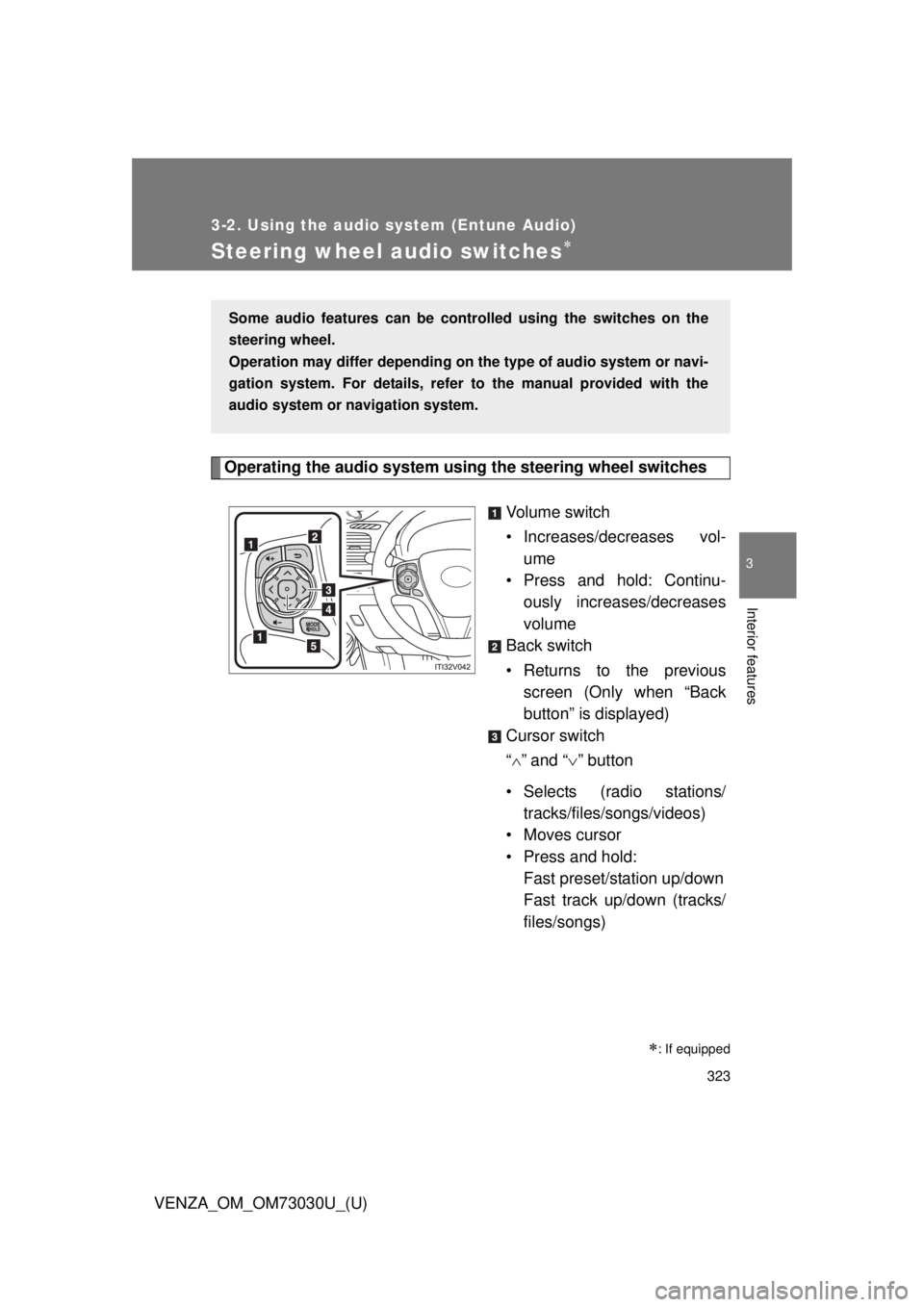
Operating the audio system using the steering wheel switches
Volume switch
• Increases/dec reases vol-
ume
• Press and hold: Continu-
ously increases/decreases
volume
Back switch
• Returns to the previous
screen (Only when “Back
button” is displayed)
Cursor switch
“ ” and “ ” button
• Selects (radio stations/
tracks/files/songs/videos)
• Moves cursor
• Press and hold:
Fast preset/station up/down
Fast track up/down (tracks/
files/songs)
: If equippedSome audio features can be contro lled using the switches on the
steering wheel.
Operation may differ depending on th e type of audio system or navi-
gation system. For details, refer to the manual provided with the
audio system or navigation system.
Page 324 of 688

3243-2. Using the audio system (Entune Audio)
VENZA_OM_OM73030U_(U) “ ” and “ ” button
• Tab change
• Press and hold:
Seek up/down (radio sta-
tions)
Fast up/down (tracks/files/
videos)
Enter switch
• Displays the audio screen
(Except when audio screen
is displayed)
• Displays the preset/list
screen (When audio screen
is displayed)
• Selects items (When audio
list screen is displayed)
“MODE/HOLD” switch
• Changes audio source
• Press and hold this switch
to mute or pause the current
operation
To cancel the mute or
pause, press and hold.
CAUTION■ To reduce the risk of an accident
Exercise care when operating the audio switches on the steering wheel.