wheel TOYOTA VENZA 2016 Manual PDF
[x] Cancel search | Manufacturer: TOYOTA, Model Year: 2016, Model line: VENZA, Model: TOYOTA VENZA 2016Pages: 688, PDF Size: 18.51 MB
Page 336 of 688
3363-2. Using the audio system (Entune Audio)
VENZA_OM_OM73030U_(U)Selecting the audio source Changing audio source
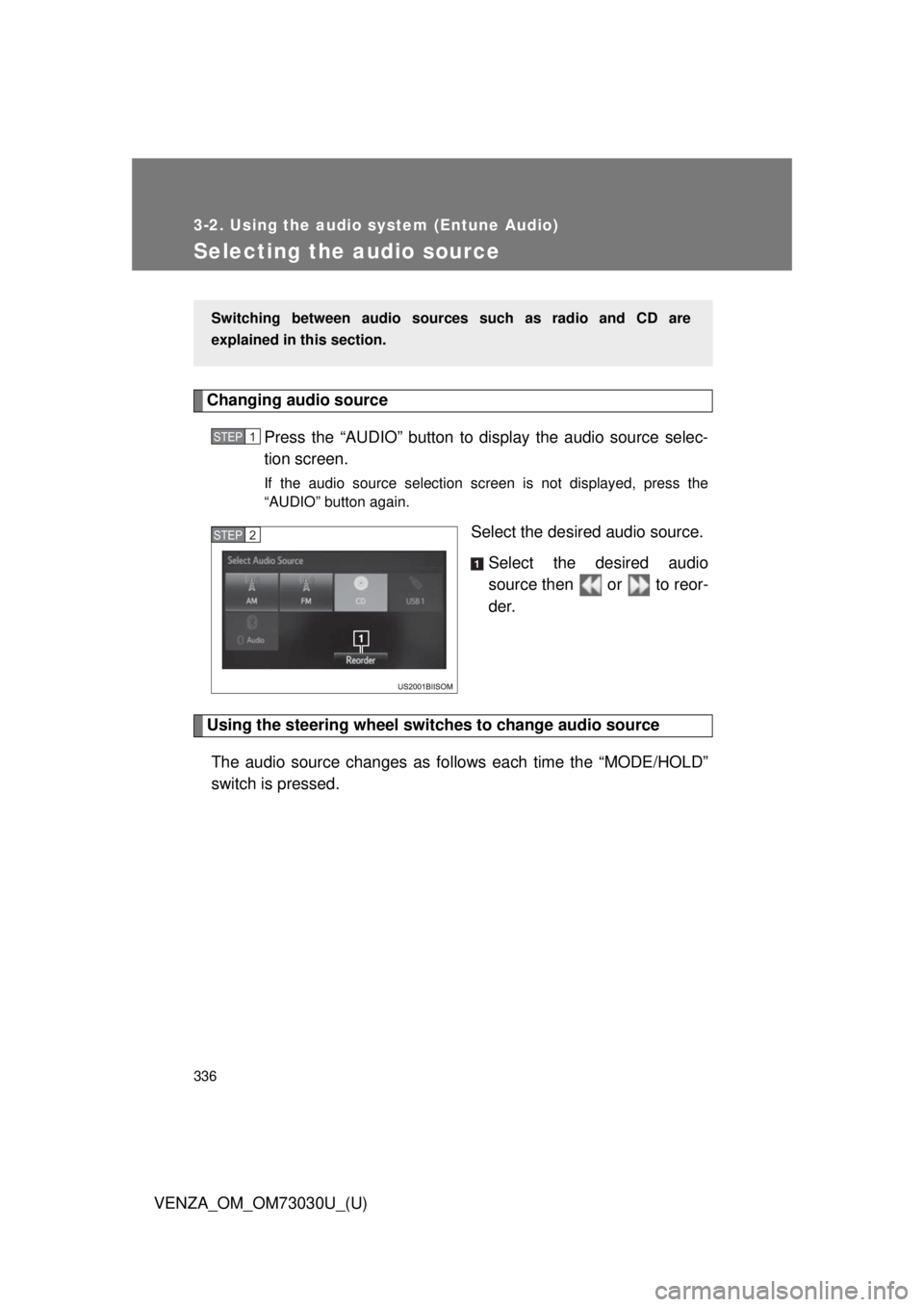
Press the “AUDIO” button to display the audio source selec-
tion screen. If the audio source selection screen is not displayed, press the
“AUDIO” button again.
Select the desired audio source.
Select the desired audio
source then or to reor-
der.
Using the steering wheel switch es to change audio source
The audio source changes as follows each time the “MODE/HOLD”
switch is pressed. Switching between audio sourc es such as radio and CD are
explained in this section. STEP 1
STEP 2
Page 379 of 688
3793-2. Using the audio system (Entune Audio)
VENZA_OM_OM73030U_(U) 3
Interior features
Using a Bluetooth ®
Phone
Phone screen
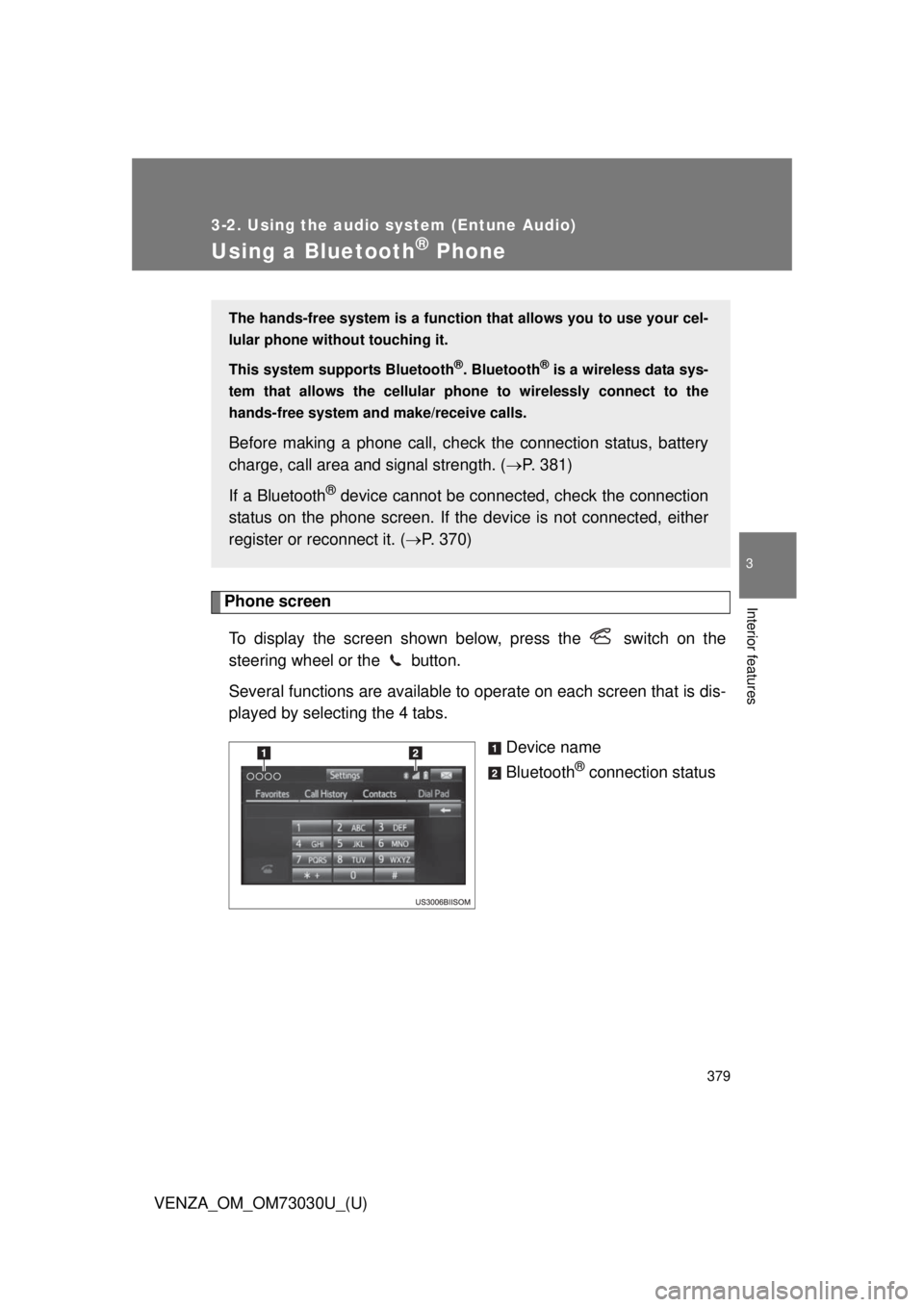
To display the screen shown below, press the switch on the
steering wheel or the button.
Several functions are available to operate on each screen that is dis-
played by selecting the 4 tabs.
Device name
Bluetooth ®
connection statusThe hands-free system is a function th at allows you to use your cel-
lular phone without touching it.
This system supports Bluetooth ®
. Bluetooth ®
is a wireless data sys-
tem that allows the cellular phone to wirelessly connect to the
hands-free system and make/receive calls.
Before making a phone call, check the connection status, battery
charge, call area and signal strength. ( P. 381)
If a Bluetooth ®
device cannot be connec ted, check the connection
status on the phone screen. If the de vice is not connected, either
register or reconnect it. ( P. 370)
Page 382 of 688
3823-2. Using the audio system (Entune Audio)
VENZA_OM_OM73030U_(U)Making a call Dialing
Display the phone screen. ( P. 379)
Select the “Dial Pad” tab and enter a phone number. To delete the input phone number, select .
For the first digit, you can enter “+” by selecting “ ” for a while.
Press the switch on the steering wheel or select .
Dialing from the contacts list
You can dial a number from the c ontact data imported from your cel-
lular phone. The system has one contact for each registered phone.
Up to 2500 contacts may be stored in each contact.
Display the phone screen. ( P. 379)
Select “Contacts” tab.
Choose the desired contact to call from the list.
Choose the number and then press the switch on the
steering wheel or select .
When the contact is empty
You can transfer the phone numbers in a Bluetooth ®
phone to the
system.
Operation methods differ between PBAP (Phone Book Access Pro-
file) compatible and PBA P incompatible Bluetooth ®
phones. If the
cellular phone does not support either PBAP or OPP (Object Push
Profile) service, you ca nnot transfer contacts.Once a Bluetooth ®
phone is registered, you can make a call using
the following procedure: STEP 1
STEP 2
STEP 3
STEP 1
STEP 2
STEP 3
STEP 4
Page 386 of 688
3863-2. Using the audio system (Entune Audio)
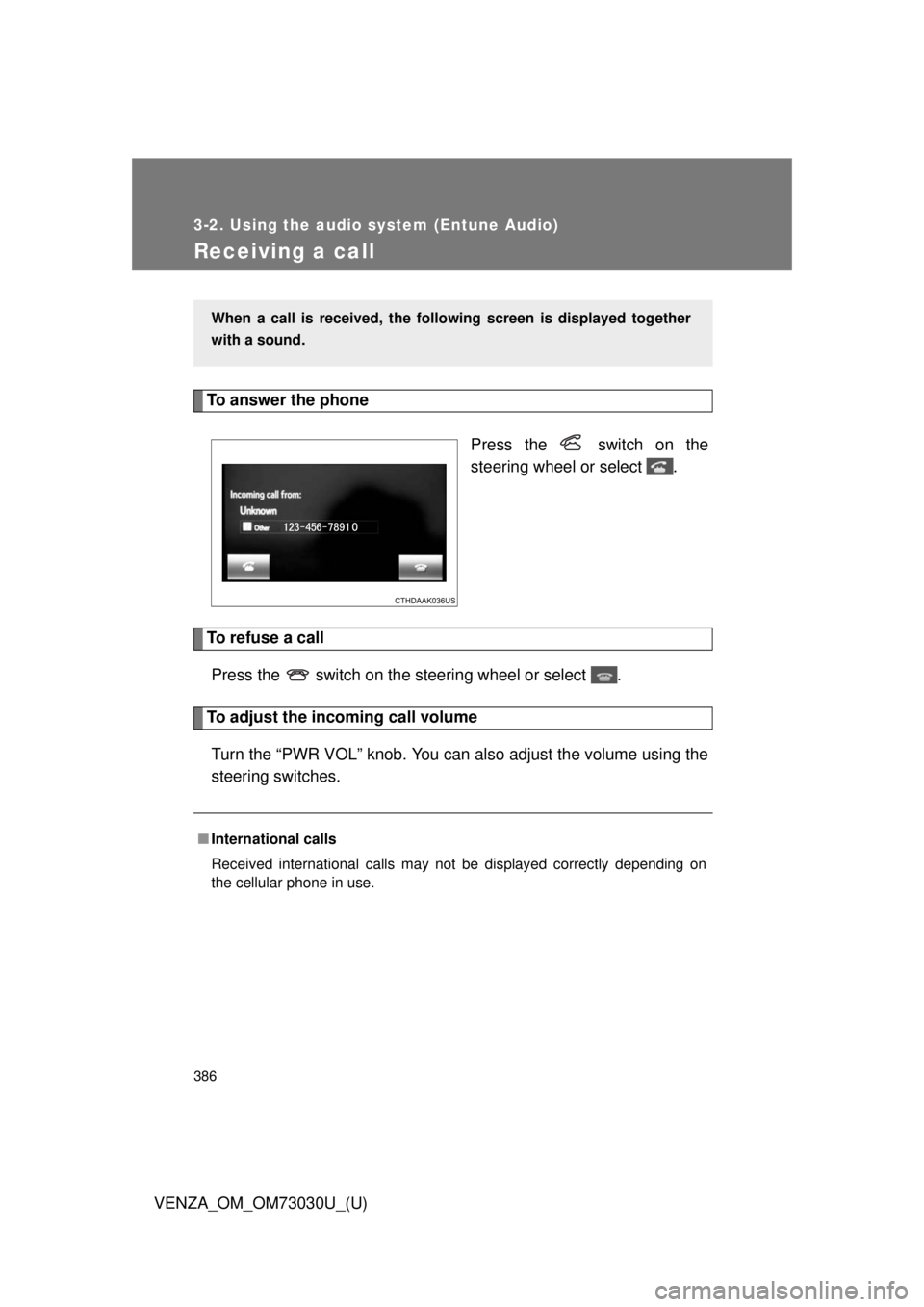
VENZA_OM_OM73030U_(U)Receiving a call To answer the phone
Press the switch on the
steering wheel or select .
To refuse a call
Press the switch on the steering wheel or select .
To adjust the incoming call volume
Turn the “PWR VOL” knob. You can also adjust the volume using the
steering switches. When a call is received, the follo wing screen is displayed together
with a sound.
■ International calls
Received international calls may not be displayed correctly depending on
the cellular phone in use.
Page 389 of 688
3893-2. Using the audio system (Entune Audio)
VENZA_OM_OM73030U_(U) 3
Interior features To transfer a call
Select “Handset Mode” to on from a hands-free call to a cellular
phone call.
Select “Handset Mode” to off from a cellular phone call to a hands-
free call.
Transmit volume setting
Select “Transmit Volume”.
Select the desired level for the transmit volume.
Select “OK”.
To hang up
Press the switch on the steering wheel or select .
Call waiting
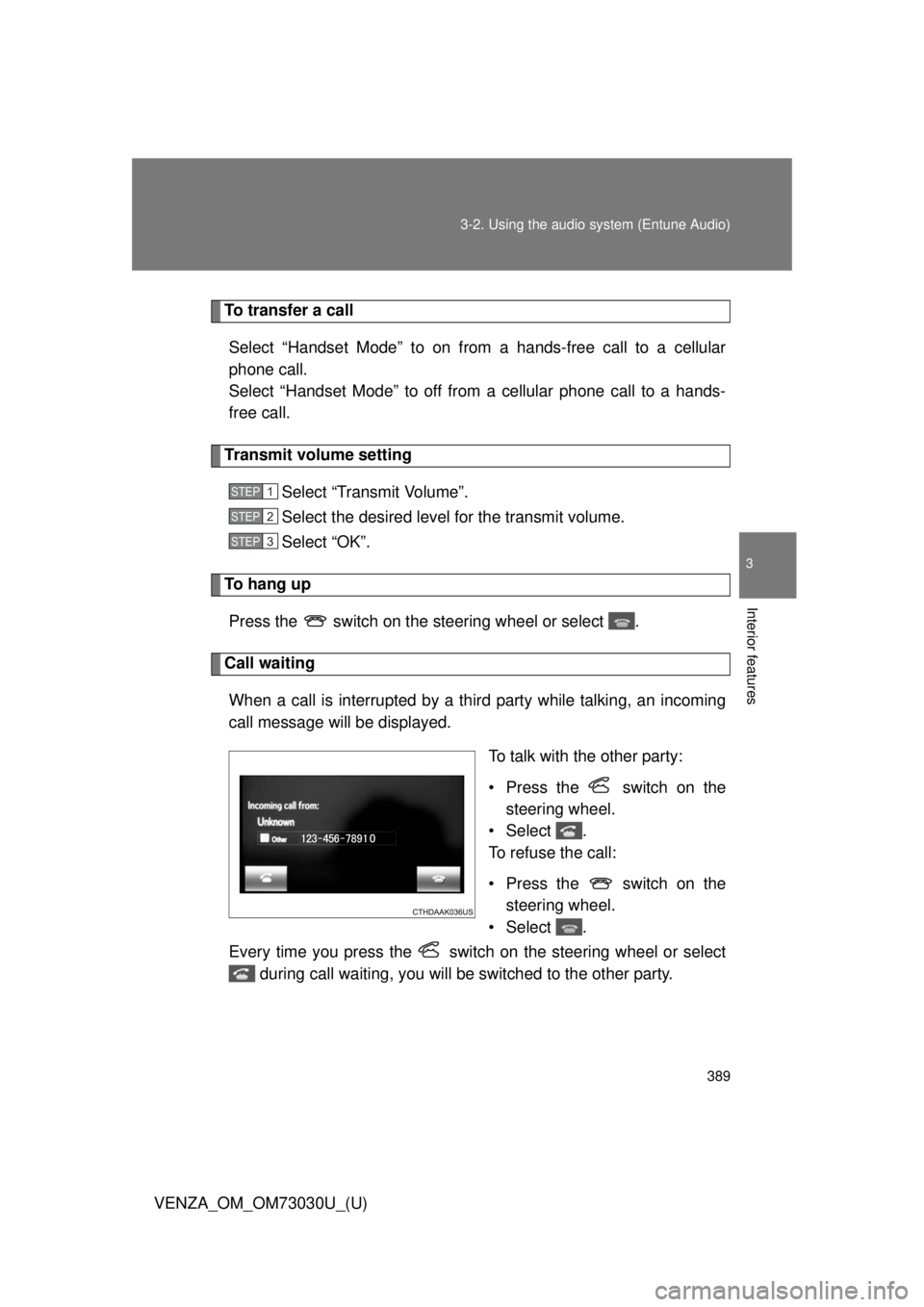
When a call is interrupted by a third party while talking, an incoming
call message will be displayed.
To talk with the other party:
• Press the switch on the
steering wheel.
•Select .
To refuse the call:
• Press the switch on the
steering wheel.
•Select .
Every time you press the switch on the steering wheel or select
during call waiting, you will be switched to the other party. STEP 1
STEP 2
STEP 3
Page 394 of 688
3943-2. Using the audio system (Entune Audio)
VENZA_OM_OM73030U_(U) Replying to a message
Display the “Messa ge Inbox” screen. ( P. 391)
Select the desired message from the list.
Select “Quick Message”.
Select the desired message.
Select “Send”. If an error message is displayed, follow the guidance on the screen
to try again.
■ Editing quick reply message
Select “Quick Message”.
Select corresponding to the desired message to edit.
Select “OK” when editing is completed.■ Check the messages
● Depending on the type of Bluetooth ®
phone being connected, it may be
necessary to perform additional steps on the phone.
● Messages are displayed in the appropriate connected Bluetooth ®
phone’s registered mail address folder.
Select the tab of the desired folder to be displayed.
● Only received messages on the connected Bluetooth ®
phone can be dis-
played.
● The text of the message is not displayed while driving.
● When “Automatic Message Readout” is set to on, messages will be auto-
matically read out. ( P. 408)
● Turn the “PWR VOL” knob, or use the volume switch on the steering
wheel to adjust the message read out volume.
● The message read out function is available even while driving. STEP 1
STEP 2
STEP 3
STEP 4
STEP 5
STEP 1
STEP 2
STEP 3
Page 396 of 688
3963-2. Using the audio system (Entune Audio)
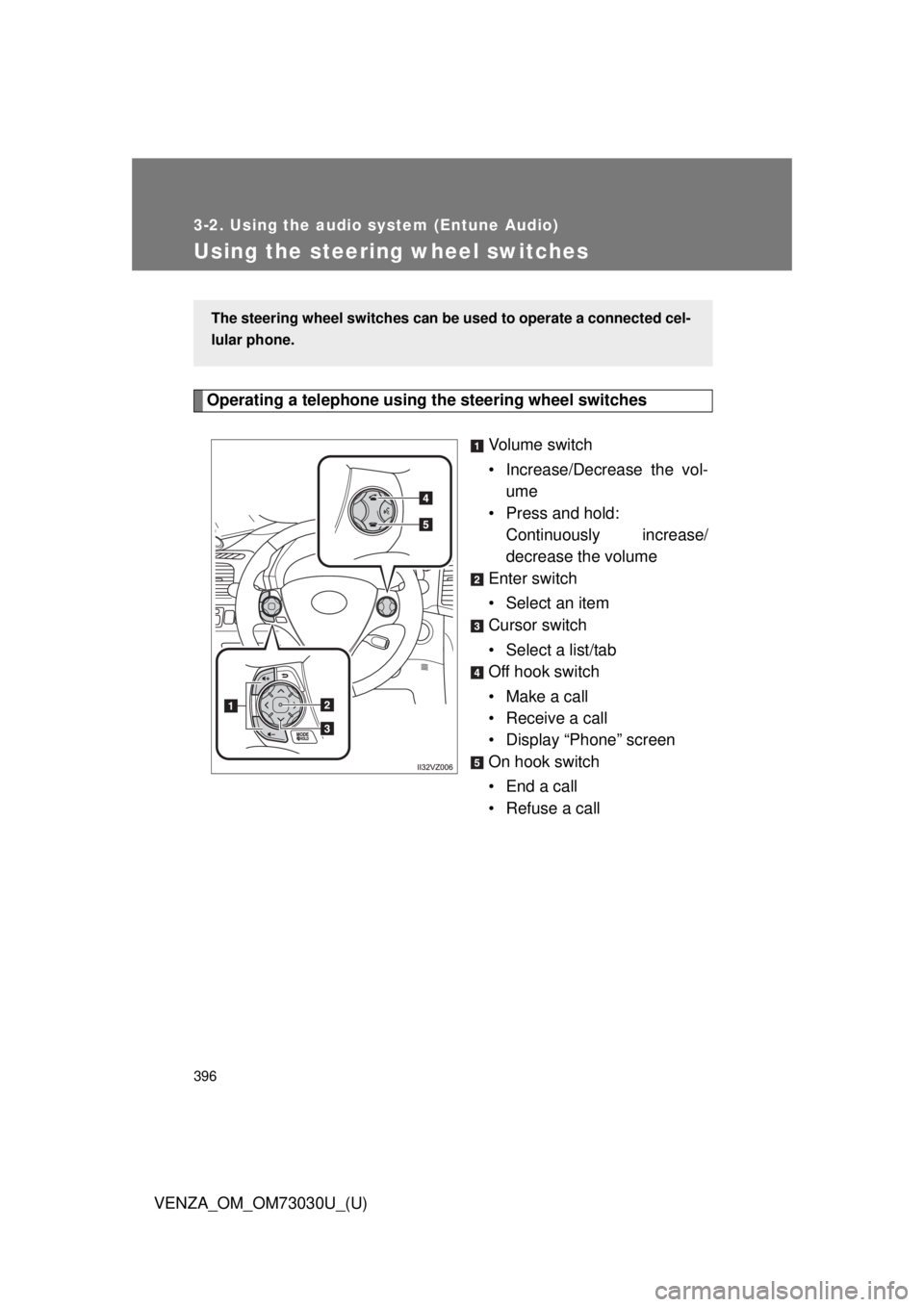
VENZA_OM_OM73030U_(U)Using the steering wheel switches Operating a telephone using the steering wheel switches
Volume switch
• Increase/Decrease the vol-
ume
• Press and hold:
Continuously increase/
decrease the volume
Enter switch
• Select an item
Cursor switch
• Select a list/tab
Off hook switch
• Make a call
• Receive a call
• Display “Phone” screen
On hook switch
•End a call
• Refuse a callThe steering wheel switches can be used to operate a connected cel-
lular phone.
Page 469 of 688
Maintenance and care
4
469
VENZA_OM_OM73030U_(U) 4-1. Maintenance and care
Cleaning and protecting
the vehicle exterior ......... 470
Cleaning and protecting
the vehicle interior .......... 473
4-2. Maintenance
Maintenance
requirements .................. 476
General maintenance....... 479
Emission inspection
and maintenance (I/M)
programs........................ 482
4-3. Do-it-yourself maintenance
Do-it-yourself service
precautions .................... 483
Hood ................................ 487
Positioning a floor jack ..... 489
Engine compartment ........ 491
Tires ................................. 506
Tire inflation pressure ...... 513
Wheels ............................. 517
Air conditioning filter......... 520
Key battery ....................... 523
Checking and
replacing fuses ............... 527
Light bulbs........................ 537
Page 470 of 688
470
VENZA_OM_OM73030U_(U) 4-1. Maintenance and care
Cleaning and protecting the vehicle exterior
■ Automatic car washes
● Before washing the vehicle, do the following.
• Fold the mirrors back.
• Turn the power back door system off.
● Brushes used in automatic car washes may scratch the vehicle surface
and harm your vehicle’s paint.
■ High pressure car washes
● Do not allow the nozzles of the car wash to come within close proximity
of the windows.
● Before car wash, check that the fuel filler door is closed.Perform the following to protect the vehicle and maintain it in prime
condition.
● Working from top to bottom, liber ally apply water to the vehicle
body, wheel wells and underside of the vehicle to remove any
dirt and dust. Wash the vehicle body using a sponge or soft cloth, such as a cham-
ois.
● For hard-to-remove marks, use car wash soap and rinse thor-
oughly with water.
● Wipe away any water.
● Wax the vehicle when the waterproof coating deteriorates. If water does not bead on a clean surface, apply wax when the vehicle
body is cool.
Page 471 of 688
4714-1. Maintenance and care
4
Maintenance and care
VENZA_OM_OM73030U_(U) ■ Aluminum wheels
● Remove any dirt immediately by using a neutral detergent. Do not use
hard brushes or abrasive cleaners. Do not use strong or harsh chemical
cleaners. Use the same mild detergent and wax as used on the paint.
● Do not use detergent on the wheels when they are hot, for example after
driving for long distance in the hot weather.
● Wash detergent from the wheels immediately after use.
■ Bumpers and side moldings
Do not scrub with abrasive cleaners.
CAUTION■ Caution about the exhaust pipe
Exhaust gasses cause the exhaust pipe to become quite hot.
When washing the vehicle, be careful not to touch the pipe until it has cooled
sufficiently, as touching a hot exhaust pipe can cause burns.
NOTICE■ To prevent paint deterioration and corrosion on the body and compo-
nents (aluminum wheels etc.)
● Wash the vehicle immediately in the following cases:
• After driving near the sea coast
• After driving on salted roads
• If you see coal tar or tree sap on the paint surface
• If you see dead insects, insect droppings or bird droppings on the paint
• After driving in an area contaminated with soot, oily smoke, mine dust,
iron powder or chemical substances
• If the vehicle becomes heavily soiled in dust or mud
• If liquids such as benzine and gasoline are spilled on the paint surface
● If the paint is chipped or scratched, have it repaired immediately.
● To prevent the wheels from corroding, remove any dirt and store in a place
with low humidity when storing the wheels.