battery TOYOTA VENZA HYBRID 2021 (in English) User Guide
[x] Cancel search | Manufacturer: TOYOTA, Model Year: 2021, Model line: VENZA HYBRID, Model: TOYOTA VENZA HYBRID 2021Pages: 548, PDF Size: 18.43 MB
Page 76 of 548
751-4. Hybrid system
1
For safety and security
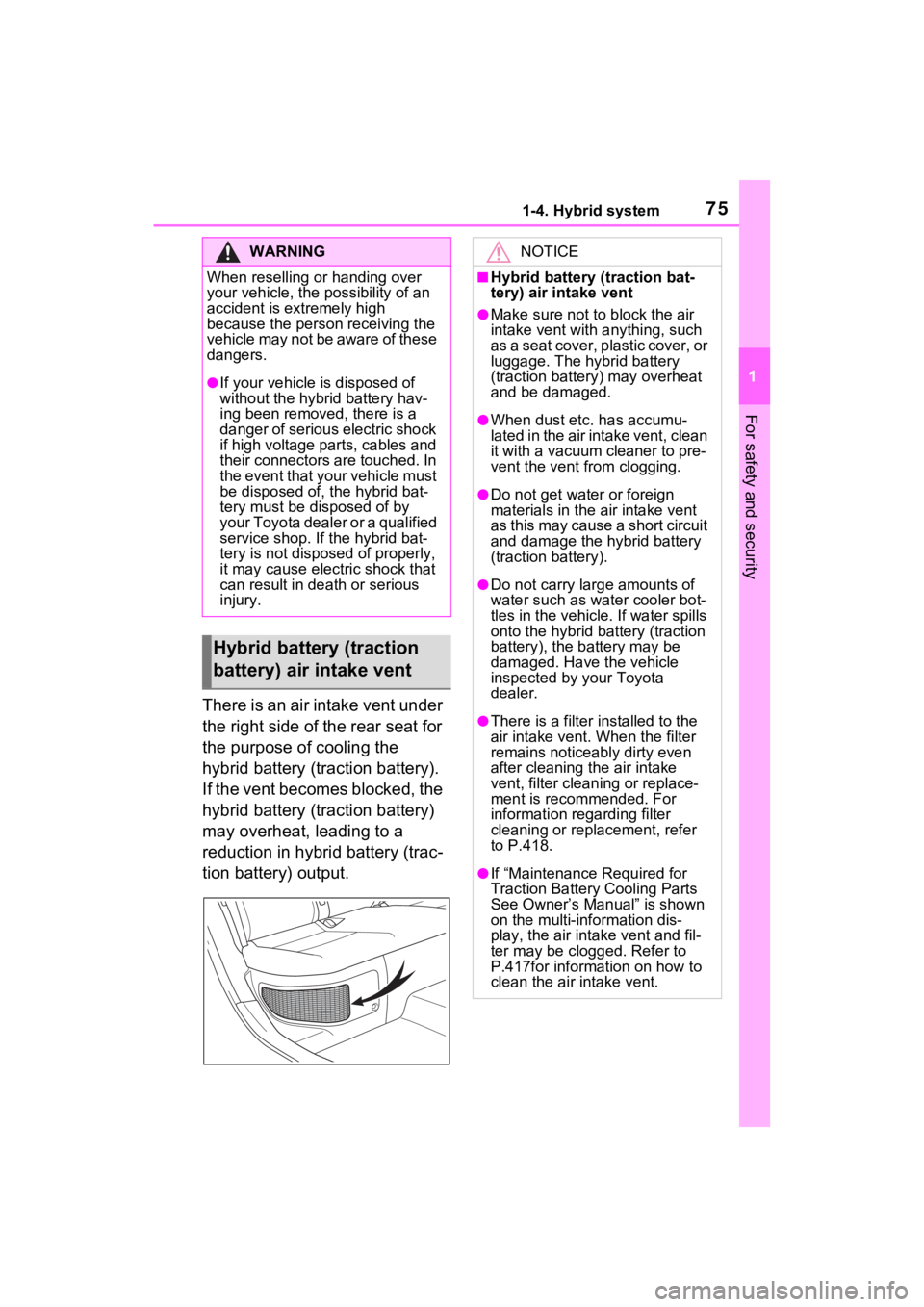
There is an air intake vent under
the right side of the rear seat for
the purpose of cooling the
hybrid battery (traction battery).
If the vent becomes blocked, the
hybrid battery (traction battery)
may overheat, leading to a
reduction in hybrid battery (trac-
tion battery) output.
WARNING
When reselling or handing over
your vehicle, the possibility of an
accident is extremely high
because the person receiving the
vehicle may not be aware of these
dangers.
●If your vehicle is disposed of
without the hybrid battery hav-
ing been removed, there is a
danger of serious electric shock
if high voltage parts, cables and
their connectors are touched. In
the event that your vehicle must
be disposed of, the hybrid bat-
tery must be disposed of by
your Toyota dealer or a qualified
service shop. If the hybrid bat-
tery is not dispos ed of properly,
it may cause electric shock that
can result in death or serious
injury.
Hybrid battery (traction
battery) air intake vent
NOTICE
■Hybrid battery (traction bat-
tery) air intake vent
●Make sure not to block the air
intake vent with anything, such
as a seat cover, plastic cover, or
luggage. The hybrid battery
(traction battery) may overheat
and be damaged.
●When dust etc. has accumu-
lated in the air intake vent, clean
it with a vacuum cleaner to pre-
vent the vent from clogging.
●Do not get wat er or foreign
materials in the air intake vent
as this may cause a short circuit
and damage the hybrid battery
(traction battery).
●Do not carry large amounts of
water such as water cooler bot-
tles in the vehicle. If water spills
onto the hybrid battery (traction
battery), the battery may be
damaged. Have the vehicle
inspected by your Toyota
dealer.
●There is a filter installed to the
air intake vent. When the filter
remains noticeably dirty even
after cleaning the air intake
vent, filter cleaning or replace-
ment is recommended. For
information regarding filter
cleaning or replacement, refer
to P.418.
●If “Maintenance Required for
Traction Battery Cooling Parts
See Owner’s Manual” is shown
on the multi-information dis-
play, the air intake vent and fil-
ter may be clogged. Refer to
P.417for information on how to
clean the air intake vent.
Page 77 of 548
761-4. Hybrid system
When a certain level of impact is
detected by the impact sensor,
the emergency shut off system
blocks the high voltage current
and stops the fuel pump to mini-
mize the risk of electrocution
and fuel leakage. If the emer-
gency shut off system activates,
your vehicle will not restart. To
restart the hybrid system, con-
tact your Toyota dealer.
A message is automatically dis-
played when a malfunction
occurs in the hybrid system or
an improper operation is
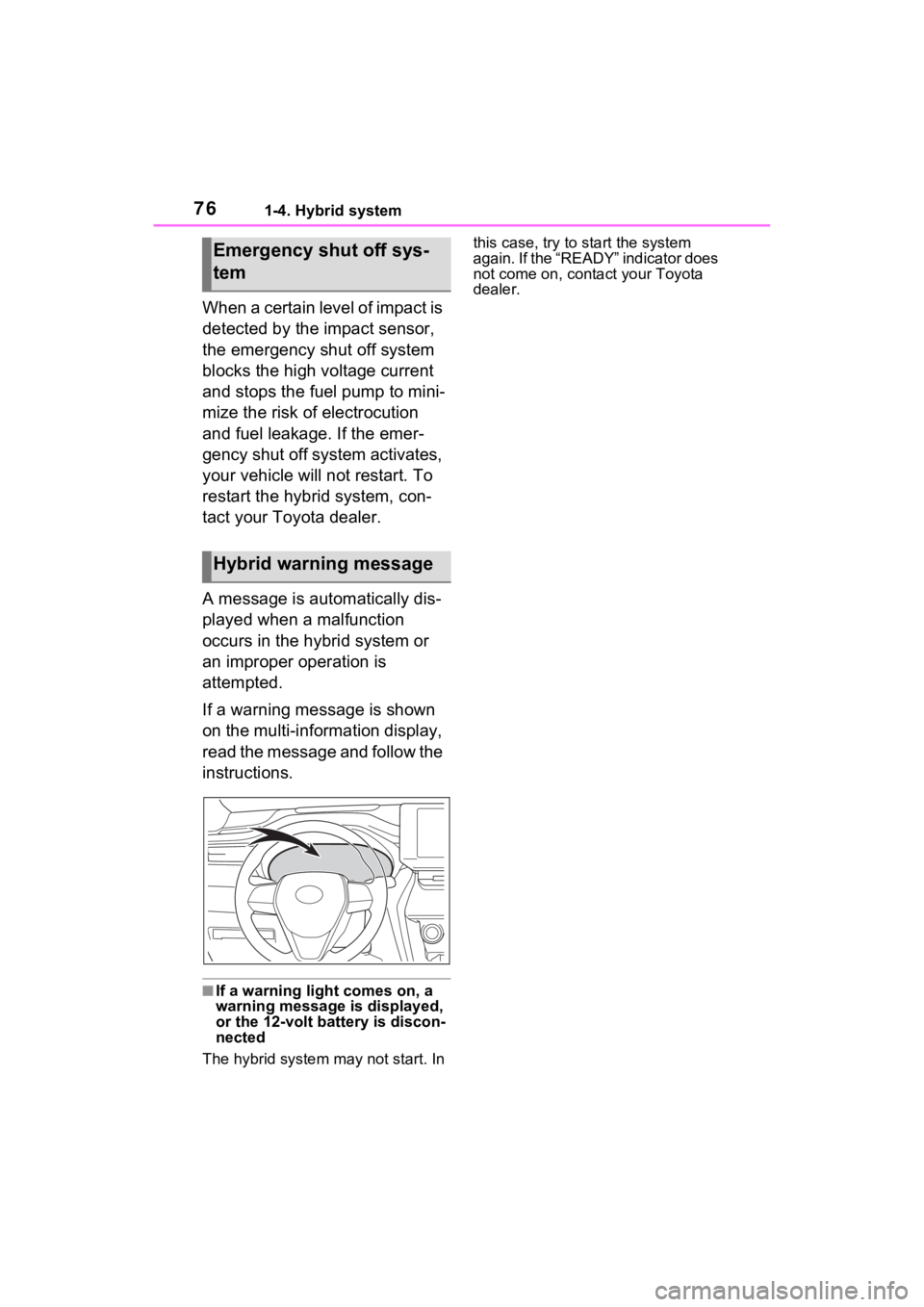
attempted.
If a warning message is shown
on the multi-information display,
read the message and follow the
instructions.
■If a warning light comes on, a
warning message is displayed,
or the 12-volt battery is discon-
nected
The hybrid system may not start. In this case, try to start the system
again. If the “READY” indicator does
not come on, contact your Toyota
dealer.
Emergency shut off sys-
tem
Hybrid warning message
Page 80 of 548
791-5. Theft deterrent system
1
For safety and security
If a door is unlocked using the
mechanical key while the alarm is
set, a warning will sound intermit-
tently for approximately 10 sec-
onds.If the alarm is not canceled or
stopped during this time, the warn-
ing pattern change s and the warn-
ing sounds for a certain period of
time.
●A person inside the vehicle opens
a door or hood, or unlocks the
vehicle using an inside lock but-
ton.
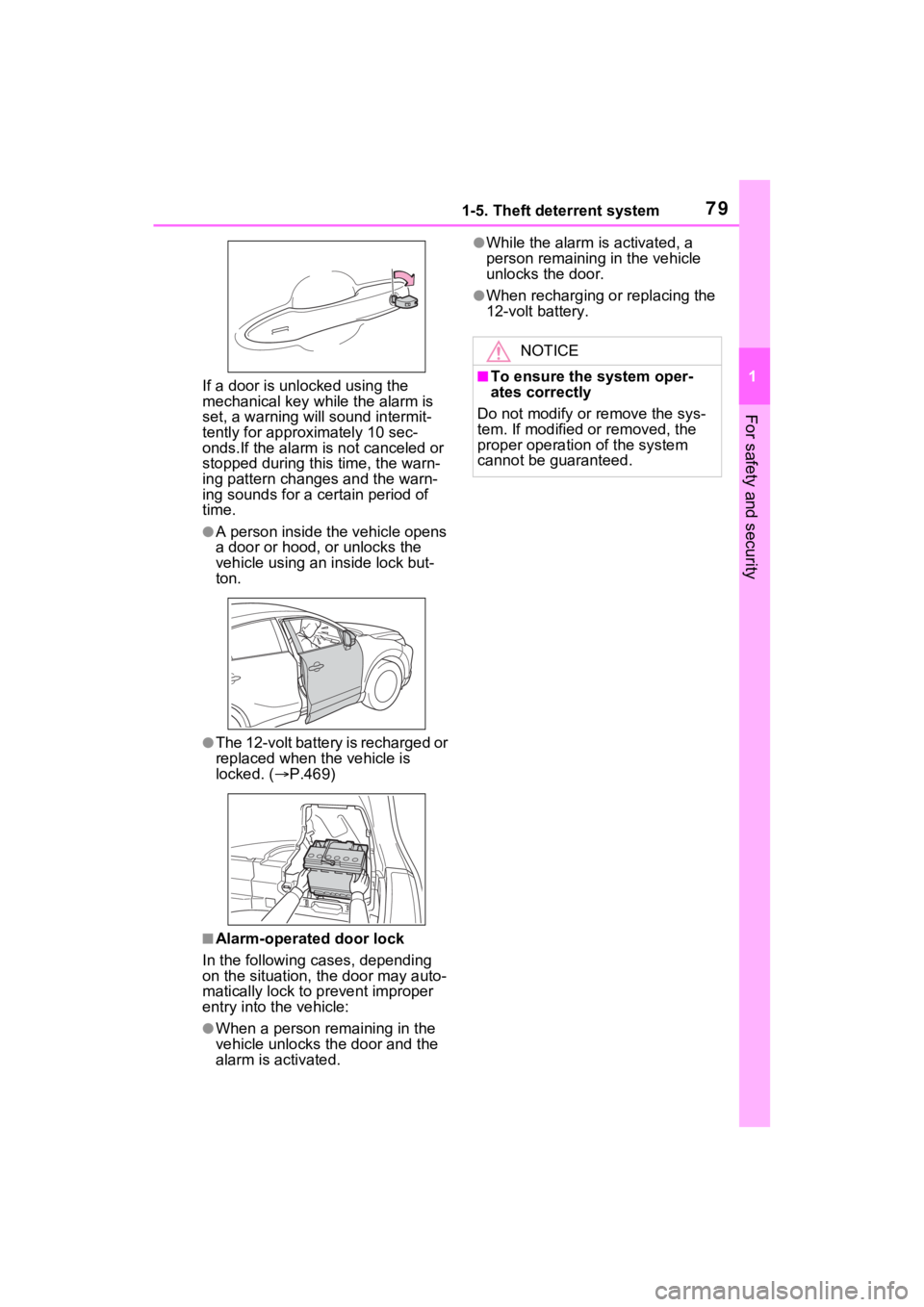
●The 12-volt battery is recharged or
replaced when the vehicle is
locked. ( P.469)
■Alarm-operated door lock
In the following cases, depending
on the situation, th e door may auto-
matically lock to p revent improper
entry into the vehicle:
●When a person remaining in the
vehicle unlocks the door and the
alarm is activated.
●While the alarm i s activated, a
person remaining in the vehicle
unlocks the door.
●When recharging or replacing the
12-volt battery.
NOTICE
■To ensure the system oper-
ates correctly
Do not modify or remove the sys-
tem. If modified or removed, the
proper operation of the system
cannot be guaranteed.
Page 89 of 548
882-1. Instrument cluster
Odometer, trip meter and oil maintenance
Odometer:
Displays the total distance that the vehicle has been driven
Trip meter:
Displays the distance the vehicle has been driven since the meter was last
reset. Trip meters “A” and “B” c an be used to record and display different
distances independently.
Oil maintenance:
Displays the distance until the next engine oil change.
Shift position and shift range indicator
Displays the selected shift posit ion or selected shift range (P.204)
Engine coolant temperature gauge
Displays the engine c oolant temperature
■The meters and display illumi-
nate when
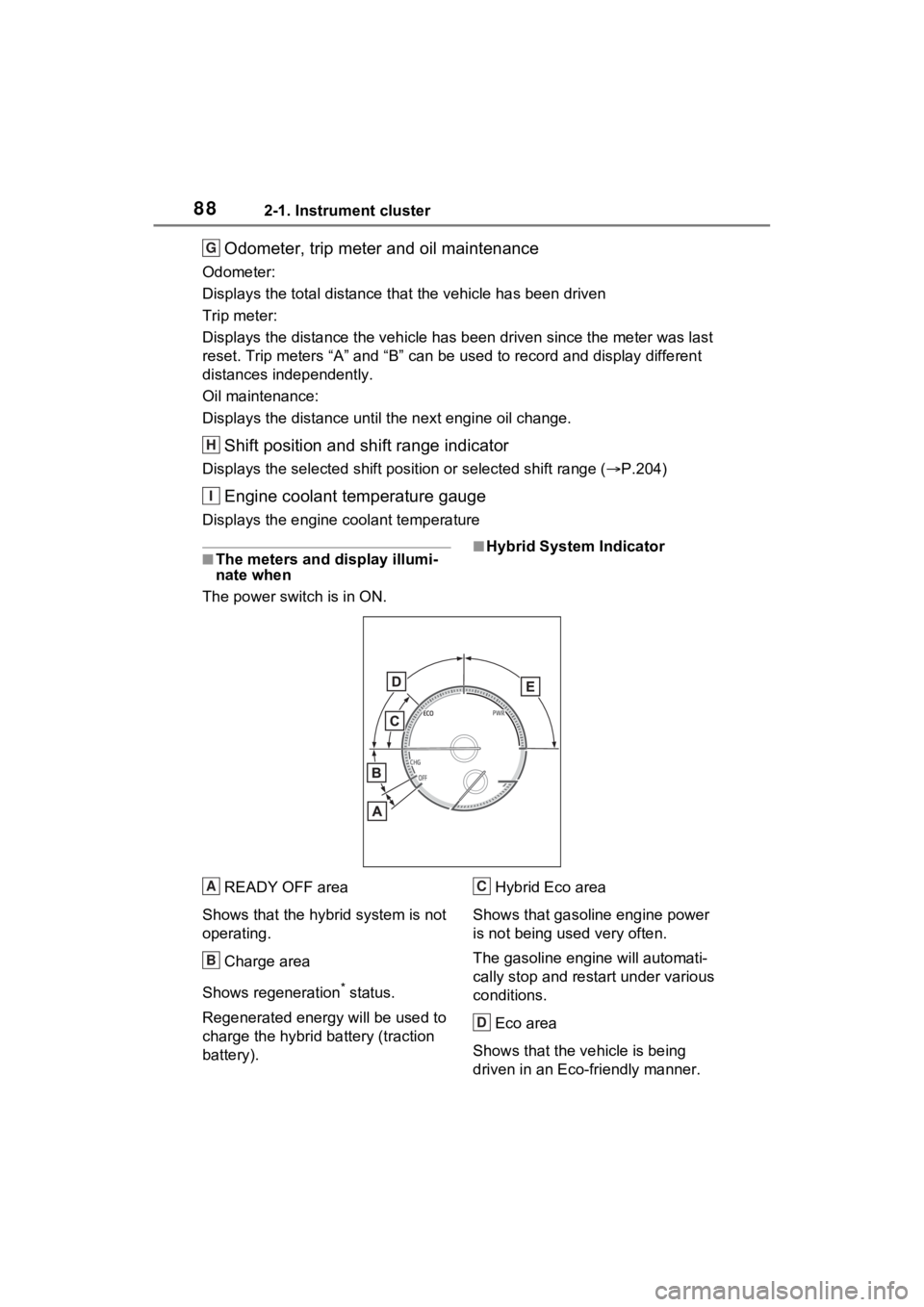
The power swit ch is in ON.■Hybrid System Indicator
READY OFF area
Shows that the hybrid system is not
operating.
Charge area
Shows regeneration
* status.
Regenerated e nergy will be used to
charge the hybrid battery (traction
battery). Hybrid Eco area
Shows that gasoline engine power
is not being used very often.
The gasoline engi ne will automati-
cally stop and restart under various
conditions.
Eco area
Shows that the vehicle is being
driven in an Eco-friendly manner.
G
H
I
A
B
C
D
Page 93 of 548
922-1. Instrument cluster
Trip meter:
Displays the distance the vehicle has been driven since the meter was last
reset. Trip meters “A” and “B” c an be used to record and display different
distances independently.
Oil maintenance:
Displays the distance until the next engine oil change.
Shift position and shift range indicator
Displays the selected shift posit ion or selected shift range (P.204)
Outside temperature ( P.92)
Engine coolant temperature gauge
Displays the engine c oolant temperature
■The meters and display illumi-
nate when
The power swit ch is in ON.■Hybrid System Indicator
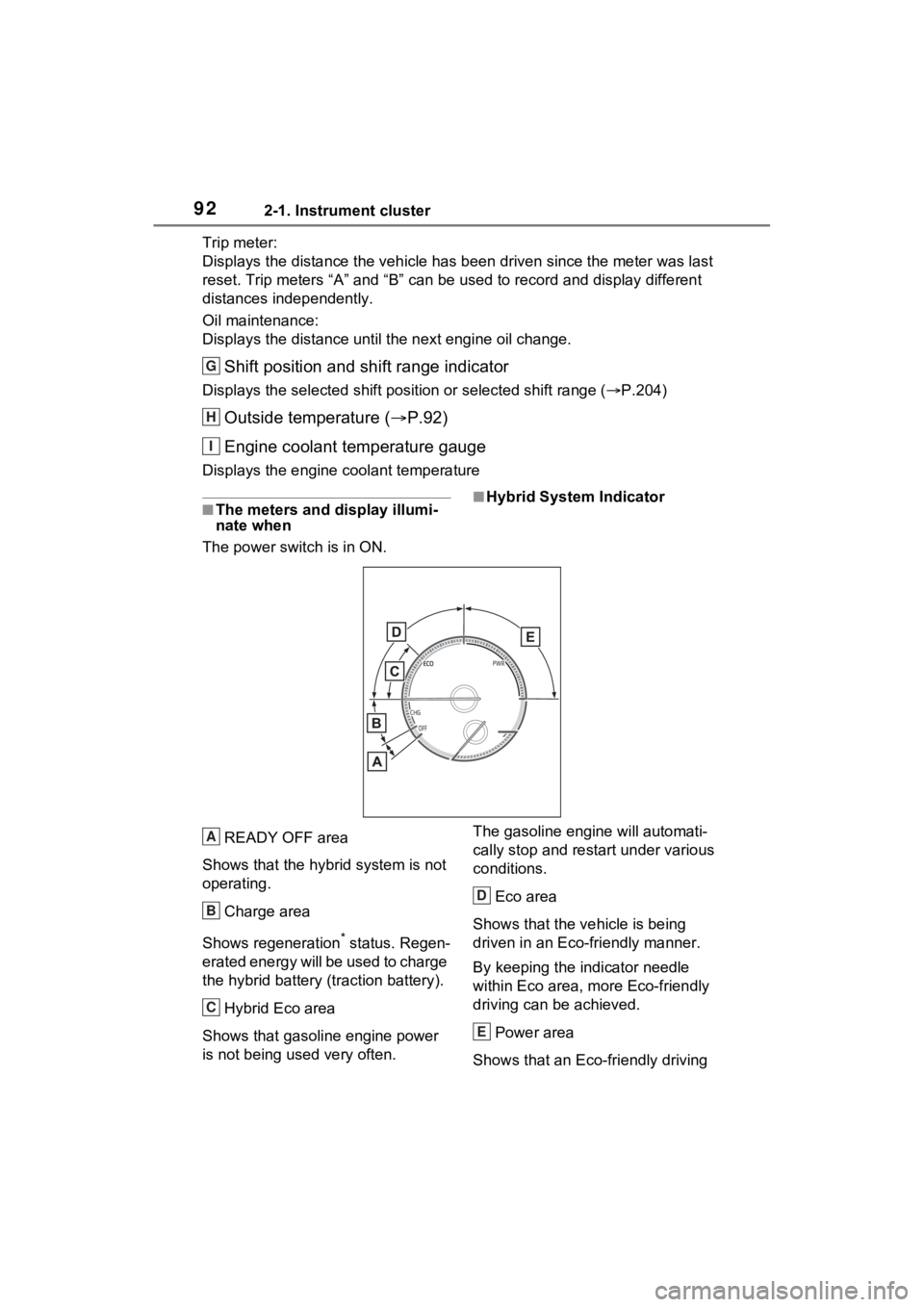
READY OFF area
Shows that the hybrid system is not
operating.
Charge area
Shows regeneration
* status. Regen-
erated energy will be used to charge
the hybrid battery (traction battery).
Hybrid Eco area
Shows that gasoline engine power
is not being used very often. The gasoline engi
ne will automati-
cally stop and restart under various
conditions.
Eco area
Shows that the vehicle is being
driven in an Eco-friendly manner.
By keeping the indicator needle
within Eco area, more Eco-friendly
driving can be achieved.
Power area
Shows that an Eco-friendly driving
G
H
I
A
B
C
D
E
Page 105 of 548
1042-1. Instrument cluster
temporarily suspended.
• When a warning message appears on the multi-information
display
• When the vehicle begins to move
●Settings for functions not
equipped to the vehicle are not
displayed.
●When a function is turned off, the
related settings for that function
are not selectable.
Select to display warning mes-
sages and measures to be
taken if a malfunction is
detected. ( P.453)
Displays suggestions to the
driver in the following situations.
To select a response to a dis- played suggestion, use the
meter control switches.
■Suggestion to enable the
power back door
If the power back door system is
disabled (setting on set to
off) and the power back door
switch on the instrument panel
is operated, a suggestion mes-
sage will be displayed asking if
you wish to enable the power
back door system. To enable
the power back door system,
select “Yes”.
After enabling the power back door
system, press the power back door
switch again to op en or close the
power back door.
■Suggestion to turn on the
headlights
If the headlight turn off, and the
vehicle speed is 3 mph (5 km/h)
or higher for a certain amount of
time when the surroundings are
dark, a suggestion message will
be displayed.
■Suggestion to turn off the
headlights
If the headlights are left on for a
certain amount of time after the
power switch has been turned
off, a suggestion message will
be displayed.
When the headlight switch is in
the AUTO position: The mes-
sage asking if you wish to turn
the headlights off is displayed.
To turn the headlights off, select
WARNING
■Cautions during setting up
the display
As the hybrid system needs to be
operating during setting up the
display, ensure that the vehicle is
parked in a place with adequate
ventilation. In a closed area such
as a garage, exhaust gases
including harmful carbon monox-
ide (CO) may collect and enter
the vehicle. This may lead to
death or a serious health hazard.
NOTICE
■During setting up the display
To prevent 12-volt battery dis-
charge, ensure t hat the hybrid
system is operating while setting
up the display features.
Warning message display
Suggestion function
Page 116 of 548
1152-1. Instrument cluster
2
Vehicle status information and indicators
Select to display warning mes-
sages and measures to be
taken if a malfunction is
detected. (P.453)
Displays suggestions to the
driver in the following situations.
To select a response to a dis-
played suggestion, use the
meter control switches.
■Suggestion to enable the
power back door
If the power back door system is
disabled (setting on set to
off) and the power back door
switch on the instrument panel
is operated, a suggestion mes- sage will be displayed asking if
you wish to enable the power
back door system. To enable
the power back door system,
select “Yes”.
After enabling the power back door
system, press the power back door
switch again to op
en or close the
power back door.
■Suggestion to turn on the
headlights
If the headlight turn off, and the
vehicle speed is 3 mph (5 km/h)
or higher for a certain amount of
time when the surroundings are
dark, a suggestion message will
be displayed.
■Suggestion to turn off the
headlights
If the headlights are left on for a
certain amount of time after the
power switch has been turned
off, a suggestion message will
be displayed.
When the headlight switch is in
the AUTO position: The mes-
sage asking if you wish to turn
the headlights off is displayed.
To turn the headlights off, select
“Yes”.
If the driver’s door is opened after
the power switch is turned off, this
suggestion message will not be dis-
played.
■Suggestion to close the
power windows (Driving at
high speeds)
If the vehicle speed exceeds a
WARNING
■Cautions during setting up
the display
As the hybrid system needs to be
operating during setting up the
display, ensure that the vehicle is
parked in a place with adequate
ventilation. In a closed area such
as a garage, exhaust gases
including harmful carbon monox-
ide (CO) may collect and enter
the vehicle. This may lead to
death or a serious health hazard.
NOTICE
■During setting up the display
To prevent 12-volt battery dis-
charge, ensure t hat the hybrid
system is operating while setting
up the display features.
Warning message display
Suggestion function
Page 120 of 548
1192-1. Instrument cluster
2
Vehicle status information and indicators
• Compass (heading-up display) (if equipped)
• Audio system operation status
*: Make sure to enable this display when using the driving support
systems
Display angle
Select to adjust the angle of the
head-up display.
■Enabling/disabling of the head-
up display
If the head-up display is disabled, it
will remain disabled when the power
switch is turned off then back to ON.
■Display brightness
The brightness of the head-up dis-
play can be adjusted on the
screen of the mult i-information dis-
play. Also, it is automatically
adjusted according to the ambient
brightness.
■Head-up display automatic
position adjustment
If the display position is recorded
into memory, the head-up display
will be automatica lly adjusted to the
desired position. ( P.159)
■When the 12-volt battery is dis-
connected
The customize settings of the head-
up display will be reset.
Displays the operational status
of the following systems:
LTA (Lane Tracing Assist)
( P.243)
Dynamic radar cruise control
with full-speed range
( P.256)
Details of content d isplayed on the
head-up display may differ from
that displayed on the multi-informa-
tion display. For details, refer to the
explanation of each system.
Pop-up displays for the following
WARNING
■Caution for changing settings
of the head-up display
As the hybrid system needs to be
operating while changing the set-
tings of the head-up display,
ensure that the vehicle is parked
in a place with adequate ventila-
tion. In a closed area such as a
garage, exhaust gases including
harmful carbon monoxide (CO)
may collect and enter the vehicle.
This may lead to death or a seri-
ous health hazard.
NOTICE
■When changing the settings
of the head-up display
To prevent 12-vo lt battery dis-
charge, ensure that the hybrid
system is operating while chang-
ing the settings of the head-up
display.
Driving support system
display area
Pop-up display
Page 124 of 548
1232-1. Instrument cluster
2
Vehicle status information and indicators
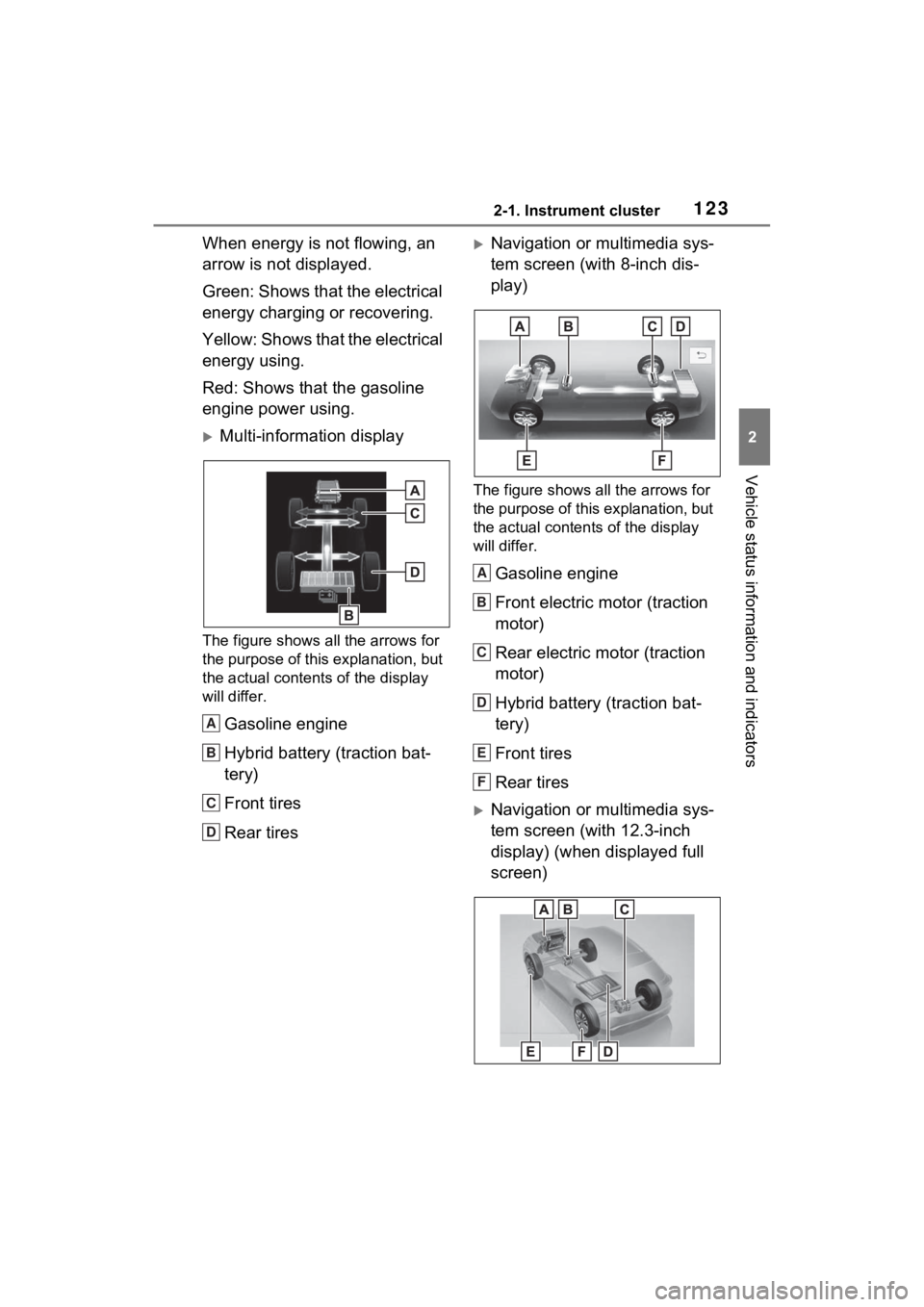
When energy is not flowing, an
arrow is not displayed.
Green: Shows that the electrical
energy charging or recovering.
Y e l l o w : S h o w s t h a t t h e e l e c t r i c a l
energy using.
Red: Shows that the gasoline
engine power using.
Multi-information display
The figure shows all the arrows for
the purpose of this explanation, but
the actual contents of the display
will differ.
Gasoline engine
Hybrid battery (traction bat-
tery)
Front tires
Rear tires
Navigation or multimedia sys-
tem screen (with 8-inch dis-
play)
The figure shows all the arrows for
the purpose of this explanation, but
the actual contents of the display
will differ.
Gasoline engine
Front electric motor (traction
motor)
Rear electric motor (traction
motor)
Hybrid battery (traction bat-
tery)
Front tires
Rear tires
Navigation or multimedia sys-
tem screen (with 12.3-inch
display) (when displayed full
screen)
A
B
C
D
A
B
C
D
E
F
Page 125 of 548
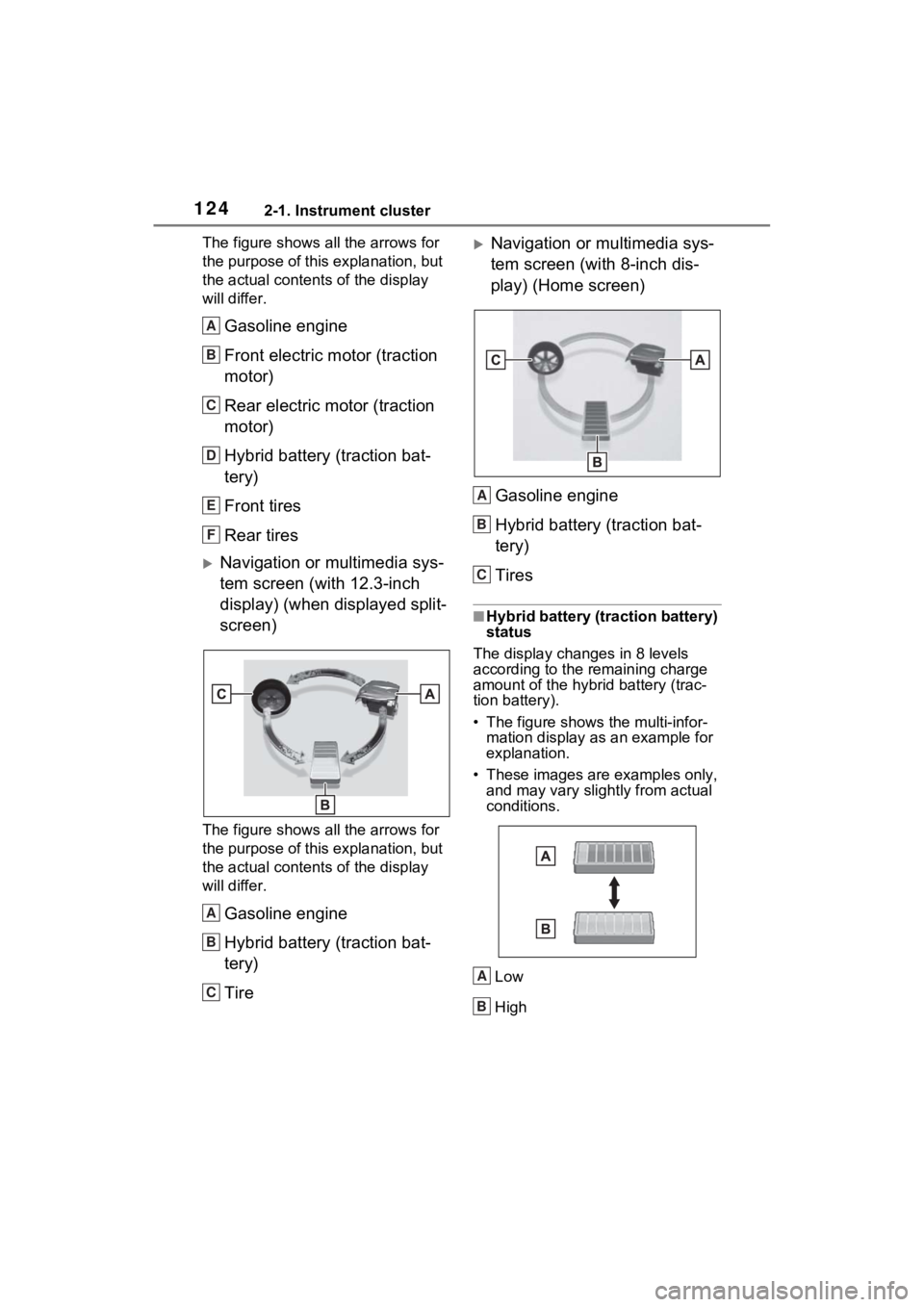
1242-1. Instrument cluster
The figure shows all the arrows for
the purpose of this explanation, but
the actual contents of the display
will differ.
Gasoline engine
Front electric motor (traction
motor)
Rear electric motor (traction
motor)
Hybrid battery (traction bat-
tery)
Front tires
Rear tires
Navigation or multimedia sys-
tem screen (with 12.3-inch
display) (when displayed split-
screen)
The figure shows all the arrows for
the purpose of this explanation, but
the actual contents of the display
will differ.
Gasoline engine
Hybrid battery (traction bat-
tery)
Tire
Navigation or multimedia sys-
tem screen (with 8-inch dis-
play) (Home screen)Gasoline engine
Hybrid battery (traction bat-
tery)
Tires
■Hybrid battery (traction battery)
status
The display changes in 8 levels
according to the remaining charge
amount of the hybrid battery (trac-
tion battery).
• The figure shows the multi-infor- mation display as an example for
explanation.
• These images are examples only, and may vary slightly from actual
conditions.
Low
High
A
B
C
D
E
F
A
B
C
A
B
C
A
B