light switch TOYOTA VERSO 2011 Owner's Guide
[x] Cancel search | Manufacturer: TOYOTA, Model Year: 2011, Model line: VERSO, Model: TOYOTA VERSO 2011Pages: 588, PDF Size: 31.32 MB
Page 190 of 588
190
2-1. Driving procedures
VERSO_WE_OM64524E
Engine (ignition) switch (vehicles with smar t entr y & star t system)
Performing the following operations when carrying the electronic
key on your person starts the engine or changes “ENGINE START
STOP” modes.
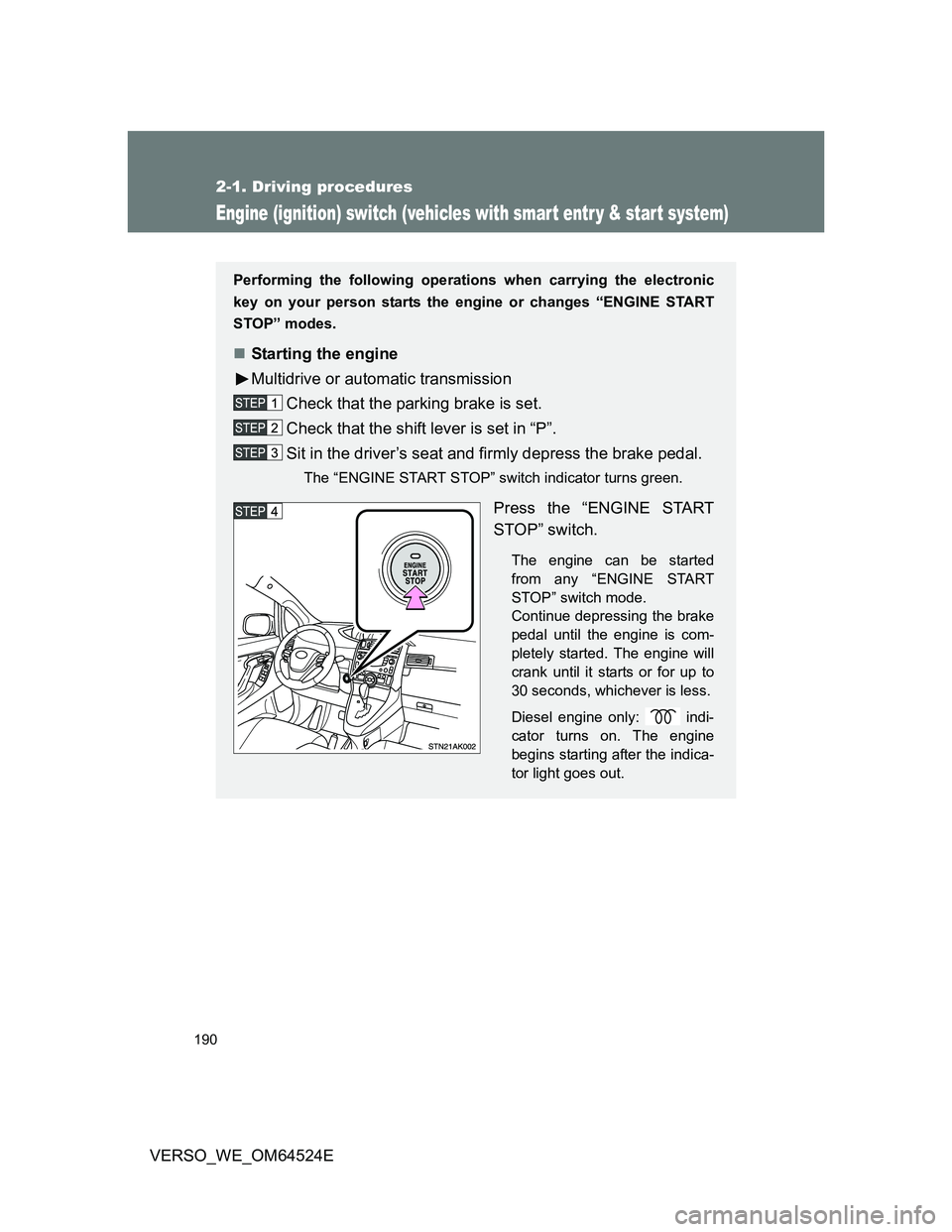
Starting the engine
Multidrive or automatic transmission
Check that the parking brake is set.
Check that the shift lever is set in “P”.
Sit in the driver’s seat and firmly depress the brake pedal.
The “ENGINE START STOP” switch indicator turns green.
Press the “ENGINE START
STOP” switch.
The engine can be started
from any “ENGINE START
STOP” switch mode.
Continue depressing the brake
pedal until the engine is com-
pletely started. The engine will
crank until it starts or for up to
30 seconds, whichever is less.
Diesel engine only: indi-
cator turns on. The engine
begins starting after the indica-
tor light goes out.
Page 191 of 588
191 2-1. Driving procedures
2
When driving
VERSO_WE_OM64524E
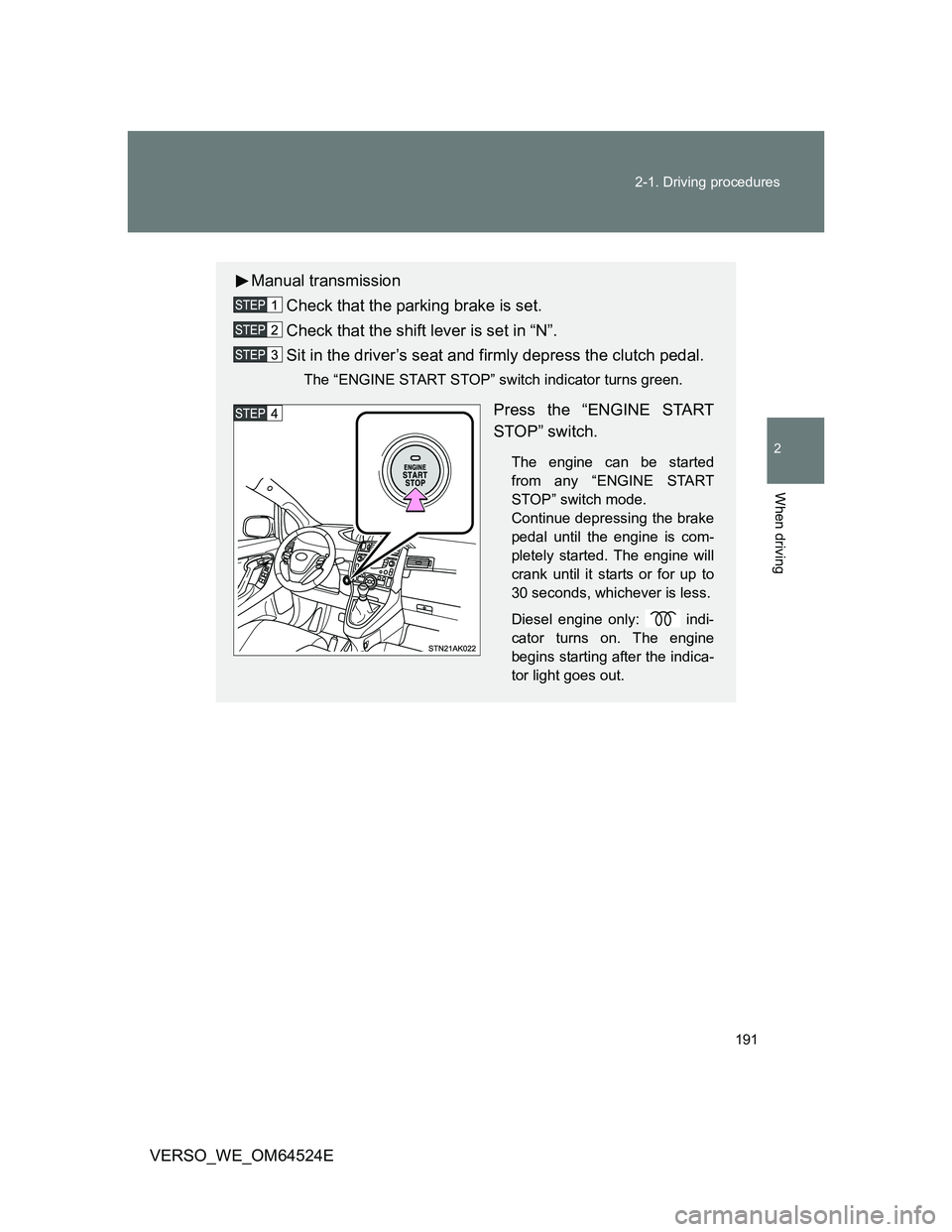
Manual transmission
Check that the parking brake is set.
Check that the shift lever is set in “N”.
Sit in the driver’s seat and firmly depress the clutch pedal.
The “ENGINE START STOP” switch indicator turns green.
Press the “ENGINE START
STOP” switch.
The engine can be started
from any “ENGINE START
STOP” switch mode.
Continue depressing the brake
pedal until the engine is com-
pletely started. The engine will
crank until it starts or for up to
30 seconds, whichever is less.
Diesel engine only: indi-
cator turns on. The engine
begins starting after the indica-
tor light goes out.
Page 193 of 588
193 2-1. Driving procedures
2
When driving
VERSO_WE_OM64524E
If the engine does not start
The engine immobilizer system may not have been deactivated. (P. 112)
Steering lock
When the “ENGINE START STOP” switch is turned off and then a door is
opened and closed, the steering lock function locks the steering wheel in its
current position. The steering lock is disabled when the “ENGINE START
STOP” switch is operated again.
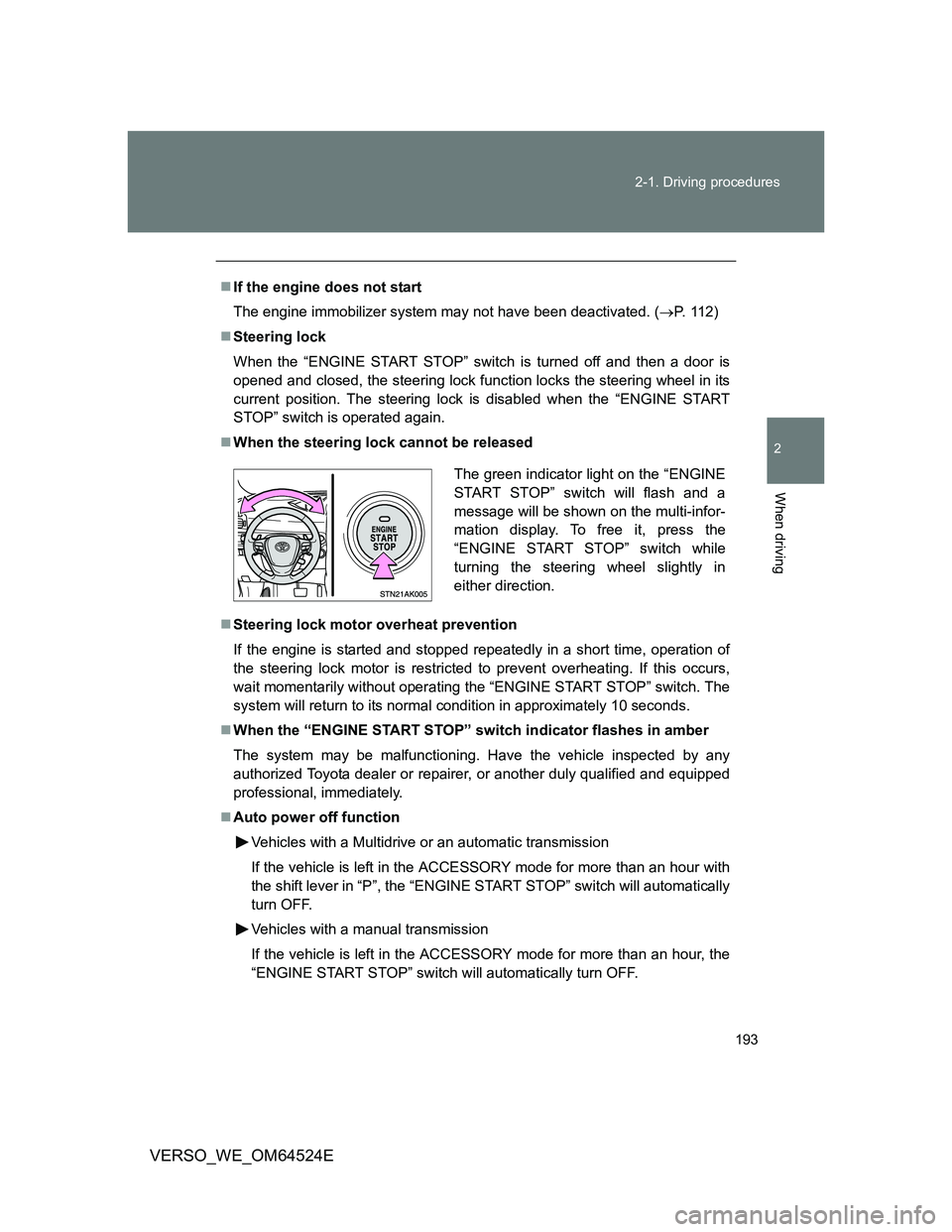
When the steering lock cannot be released
Steering lock motor overheat prevention
If the engine is started and stopped repeatedly in a short time, operation of
the steering lock motor is restricted to prevent overheating. If this occurs,
wait momentarily without operating the “ENGINE START STOP” switch. The
system will return to its normal condition in approximately 10 seconds.
When the “ENGINE START STOP” switch indicator flashes in amber
The system may be malfunctioning. Have the vehicle inspected by any
authorized Toyota dealer or repairer, or another duly qualified and equipped
professional, immediately.
Auto power off function
Vehicles with a Multidrive or an automatic transmission
If the vehicle is left in the ACCESSORY mode for more than an hour with
the shift lever in “P”, the “ENGINE START STOP” switch will automatically
turn OFF.
Vehicles with a manual transmission
If the vehicle is left in the ACCESSORY mode for more than an hour, the
“ENGINE START STOP” switch will automatically turn OFF.
The green indicator light on the “ENGINE
START STOP” switch will flash and a
message will be shown on the multi-infor-
mation display. To free it, press the
“ENGINE START STOP” switch while
turning the steering wheel slightly in
either direction.
Page 213 of 588
213
2-1. Driving procedures
2
When driving
VERSO_WE_OM64524E
Turn signal lever
Turn signals can be operated when
Vehicles without smart entry & start system
The engine switch is in the “ON” position.
Vehicles with smart entry & start system
The “ENGINE START STOP” switch is in IGNITION ON mode.
If the indicators flash faster than usual
Check that a light bulb in the front or rear turn signal lights has not burned
out.
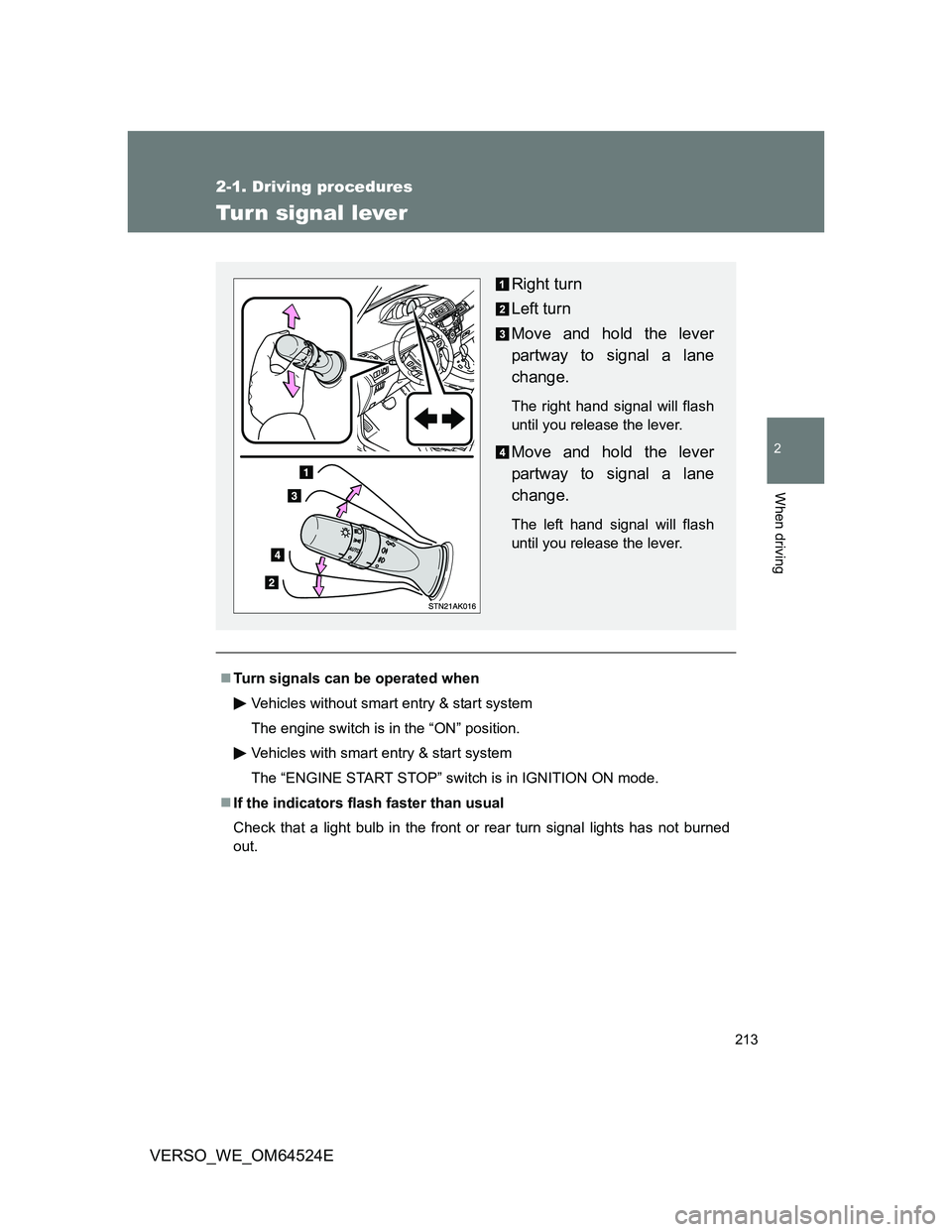
Right turn
Left turn
Move and hold the lever
partway to signal a lane
change.
The right hand signal will flash
until you release the lever.
Move and hold the lever
partway to signal a lane
change.
The left hand signal will flash
until you release the lever.
Page 217 of 588
217
2
When driving
VERSO_WE_OM64524E
2-2. Instrument cluster
Gauges and meters
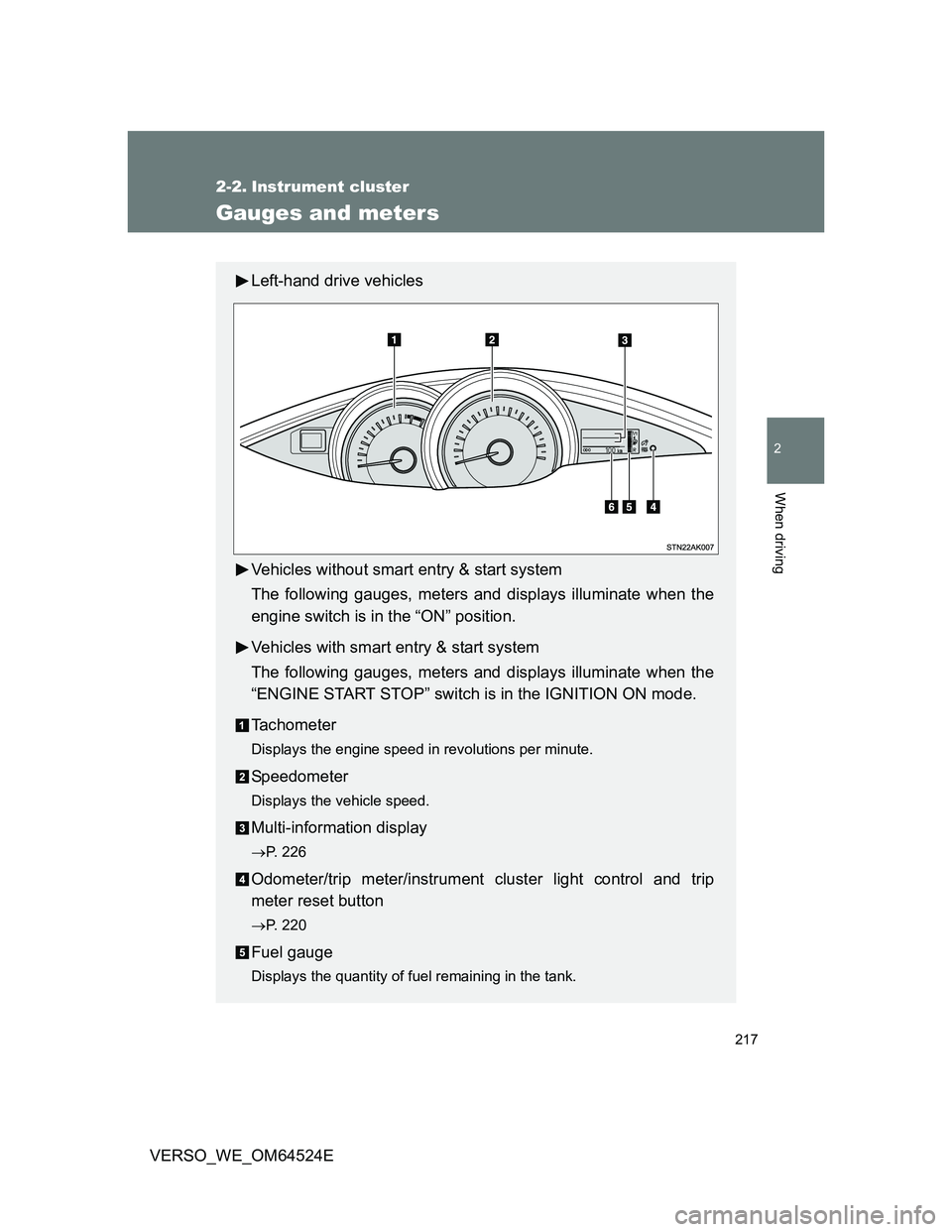
Left-hand drive vehicles
Vehicles without smart entry & start system
The following gauges, meters and displays illuminate when the
engine switch is in the “ON” position.
Vehicles with smart entry & start system
The following gauges, meters and displays illuminate when the
“ENGINE START STOP” switch is in the IGNITION ON mode.
Tachometer
Displays the engine speed in revolutions per minute.
Speedometer
Displays the vehicle speed.
Multi-information display
P. 226
Odometer/trip meter/instrument cluster light control and trip
meter reset button
P. 220
Fuel gauge
Displays the quantity of fuel remaining in the tank.
Page 218 of 588
218 2-2. Instrument cluster
VERSO_WE_OM64524E
Odometer, trip meter and instrument cluster light control display
Odometer:
Displays the total distance the vehicle has been driven.
Trip meter:
Displays the distance the vehicle has been driven since the meter was
last reset. Trip meters A and B can be used to record and display differ-
ent distances independently.
Instrument cluster light control display:
Displays the brightness of the instrument cluster light when the head-
light switch is on.
Page 220 of 588
220 2-2. Instrument cluster
VERSO_WE_OM64524E
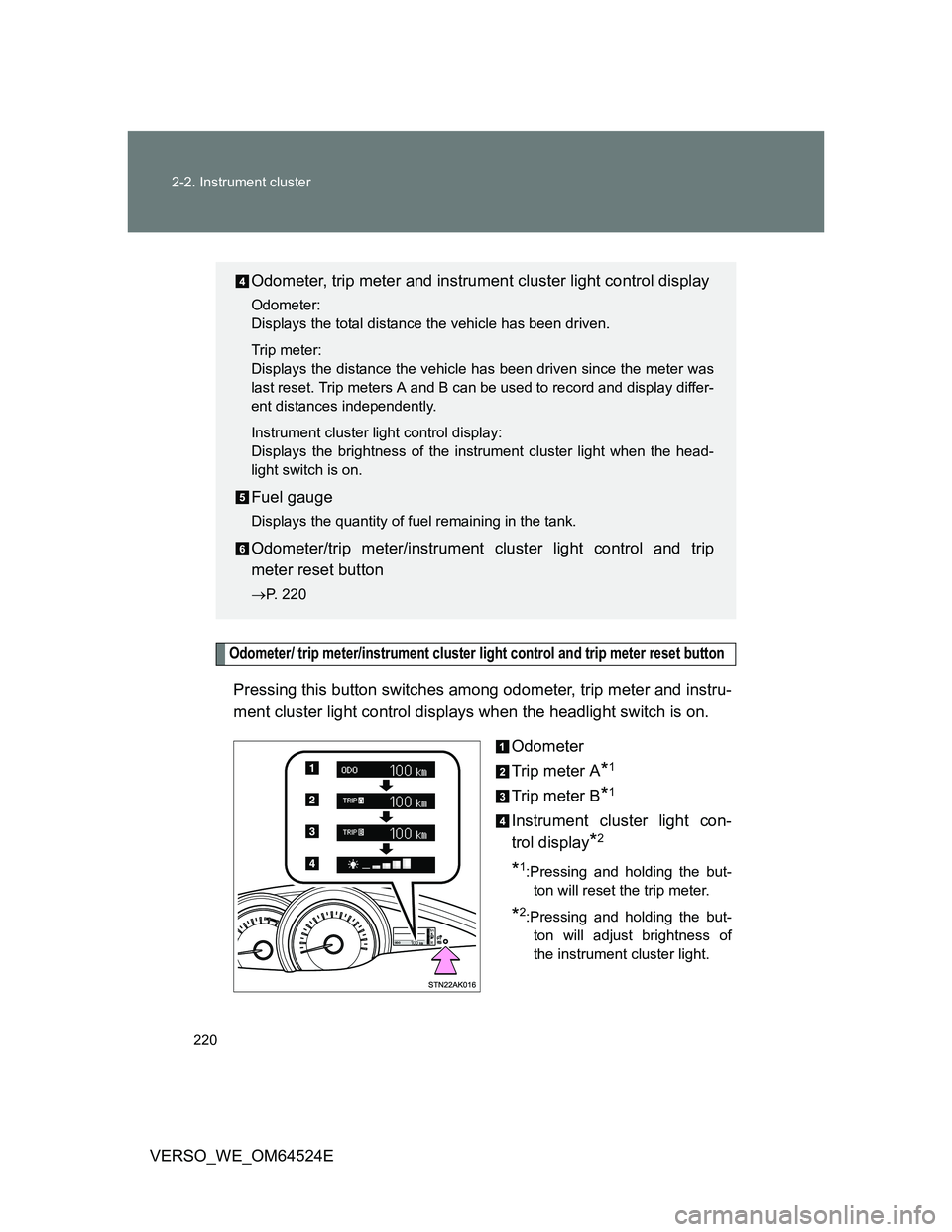
Odometer/ trip meter/instrument cluster light control and trip meter reset button
Pressing this button switches among odometer, trip meter and instru-
ment cluster light control displays when the headlight switch is on.
Odometer
Trip meter A
*1
Trip meter B*1
Instrument cluster light con-
trol display
*2
*1:Pressing and holding the but-
ton will reset the trip meter.
*2:Pressing and holding the but-
ton will adjust brightness of
the instrument cluster light.
Odometer, trip meter and instrument cluster light control display
Odometer:
Displays the total distance the vehicle has been driven.
Trip meter:
Displays the distance the vehicle has been driven since the meter was
last reset. Trip meters A and B can be used to record and display differ-
ent distances independently.
Instrument cluster light control display:
Displays the brightness of the instrument cluster light when the head-
light switch is on.
Fuel gauge
Displays the quantity of fuel remaining in the tank.
Odometer/trip meter/instrument cluster light control and trip
meter reset button
P. 220
Page 225 of 588
225 2-2. Instrument cluster
2
When driving
VERSO_WE_OM64524E
CAUTION
If a safety system warning light does not come on
Should a safety system light such as ABS and the SRS airbag warning light
not come on when you start the engine, this could mean that these systems
are not available to help protect you in an accident, which could result in
death or serious injury. Have the vehicle inspected by any authorized Toyota
dealer or repairer, or another duly qualified and equipped professional imme-
diately if this occurs.
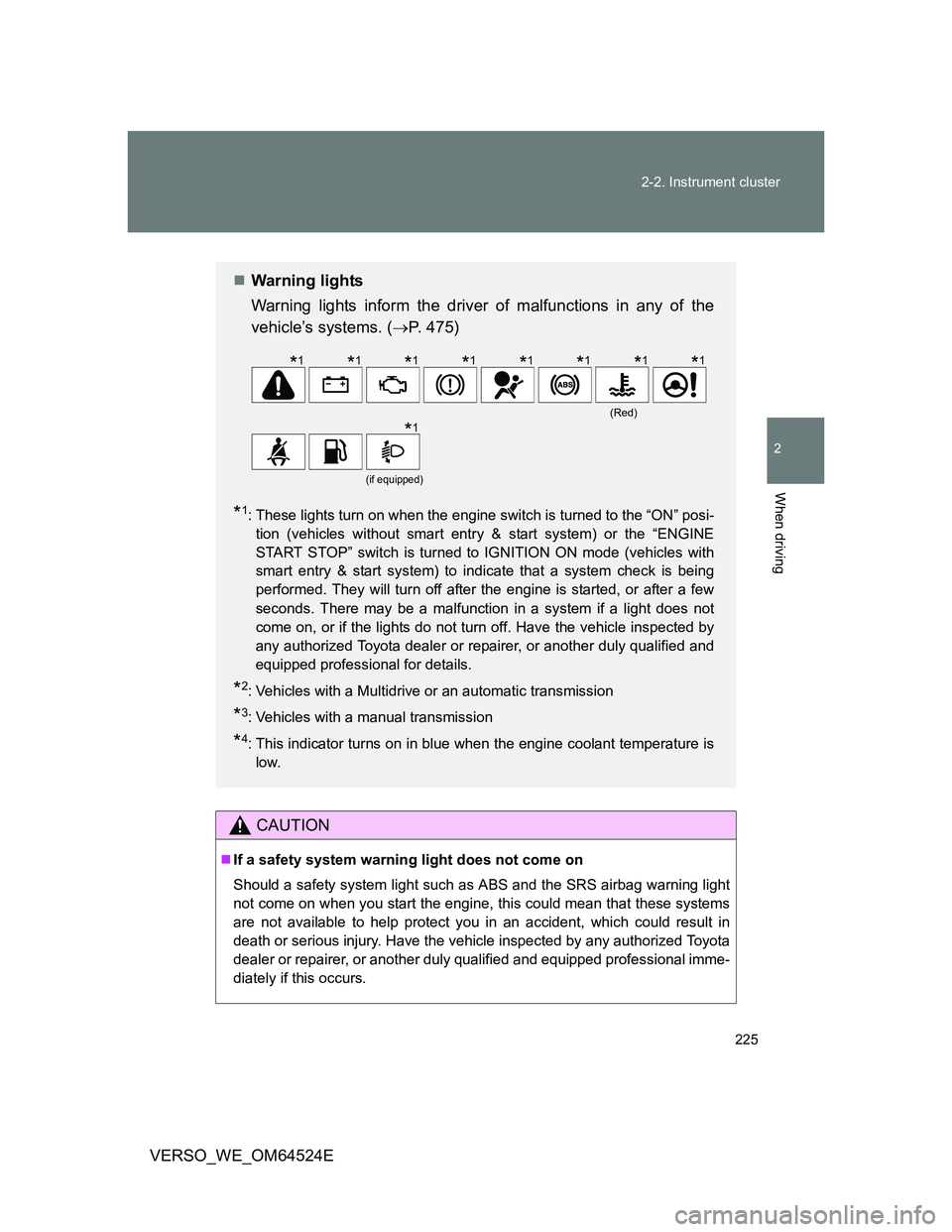
Warning lights
Warning lights inform the driver of malfunctions in any of the
vehicle’s systems. (P. 475)
*1: These lights turn on when the engine switch is turned to the “ON” posi-
tion (vehicles without smart entry & start system) or the “ENGINE
START STOP” switch is turned to IGNITION ON mode (vehicles with
smart entry & start system) to indicate that a system check is being
performed. They will turn off after the engine is started, or after a few
seconds. There may be a malfunction in a system if a light does not
come on, or if the lights do not turn off. Have the vehicle inspected by
any authorized Toyota dealer or repairer, or another duly qualified and
equipped professional for details.
*2: Vehicles with a Multidrive or an automatic transmission
*3: Vehicles with a manual transmission
*4: This indicator turns on in blue when the engine coolant temperature is
low.
(Red)
(if equipped)
*1*1*1*1*1*1*1*1
*1
Page 235 of 588
235 2-2. Instrument cluster
2
When driving
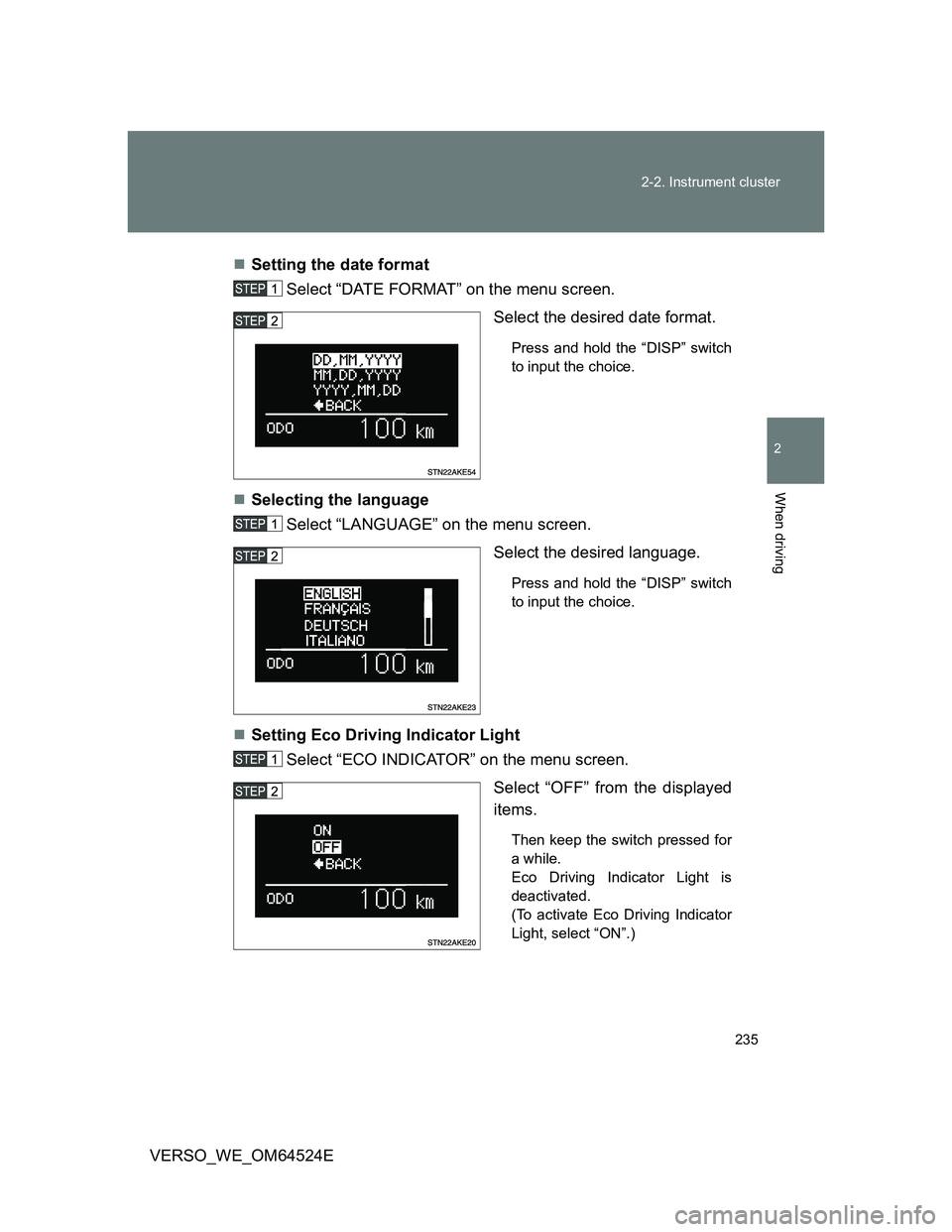
VERSO_WE_OM64524ESetting the date format
Select “DATE FORMAT” on the menu screen.
Select the desired date format.
Press and hold the “DISP” switch
to input the choice.
Selecting the language
Select “LANGUAGE” on the menu screen.
Select the desired language.
Press and hold the “DISP” switch
to input the choice.
Setting Eco Driving Indicator Light
Select “ECO INDICATOR” on the menu screen.
Select “OFF” from the displayed
items.
Then keep the switch pressed for
a while.
Eco Driving Indicator Light is
deactivated.
(To activate Eco Driving Indicator
Light, select “ON”.)
Page 237 of 588
237 2-2. Instrument cluster
2
When driving
VERSO_WE_OM64524E
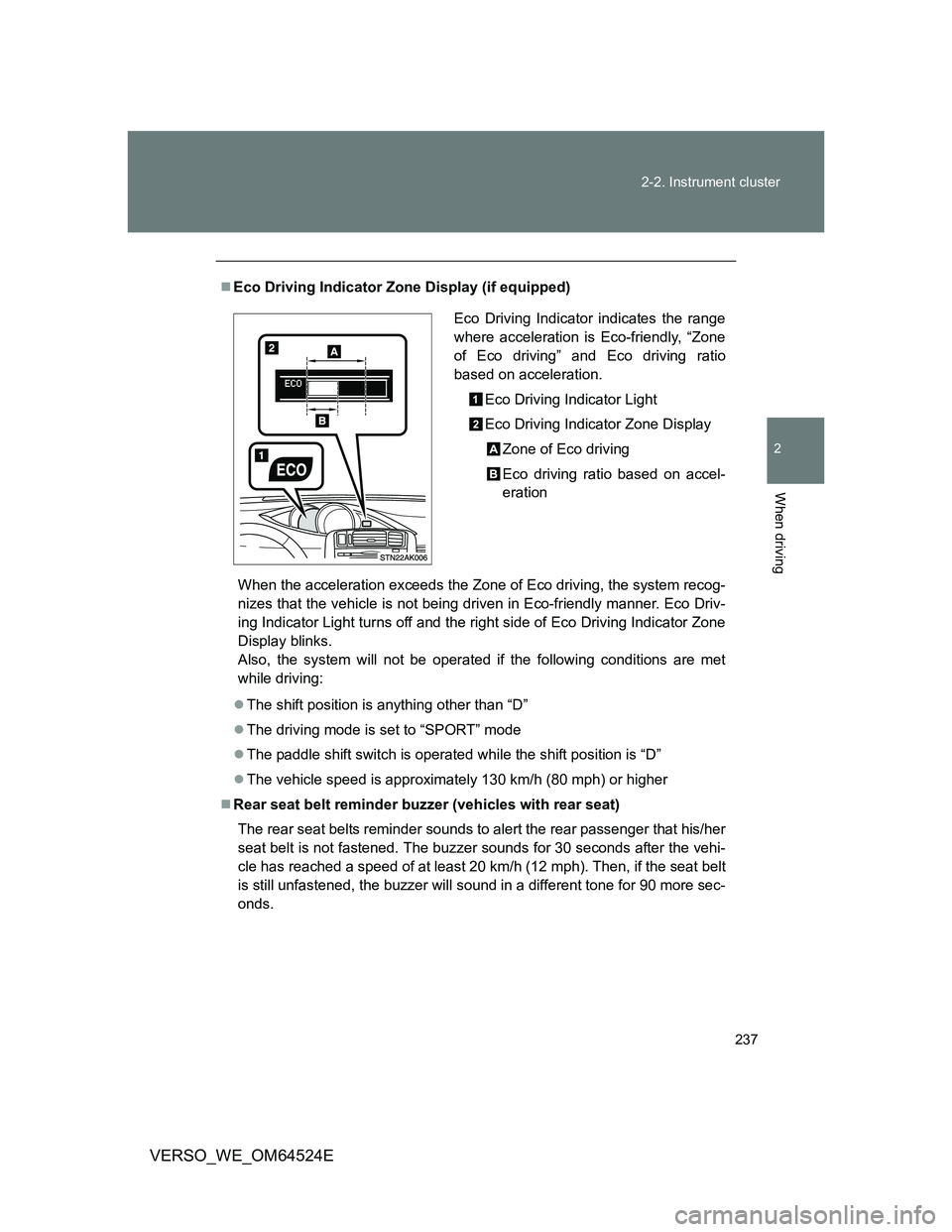
Eco Driving Indicator Zone Display (if equipped)
When the acceleration exceeds the Zone of Eco driving, the system recog-
nizes that the vehicle is not being driven in Eco-friendly manner. Eco Driv-
ing Indicator Light turns off and the right side of Eco Driving Indicator Zone
Display blinks.
Also, the system will not be operated if the following conditions are met
while driving:
The shift position is anything other than “D”
The driving mode is set to “SPORT” mode
The paddle shift switch is operated while the shift position is “D”
The vehicle speed is approximately 130 km/h (80 mph) or higher
Rear seat belt reminder buzzer (vehicles with rear seat)
The rear seat belts reminder sounds to alert the rear passenger that his/her
seat belt is not fastened. The buzzer sounds for 30 seconds after the vehi-
cle has reached a speed of at least 20 km/h (12 mph). Then, if the seat belt
is still unfastened, the buzzer will sound in a different tone for 90 more sec-
onds.
Eco Driving Indicator indicates the range
where acceleration is Eco-friendly, “Zone
of Eco driving” and Eco driving ratio
based on acceleration.
Eco Driving Indicator Light
Eco Driving Indicator Zone Display
Zone of Eco driving
Eco driving ratio based on accel-
eration