lock TOYOTA VERSO 2012 Owners Manual
[x] Cancel search | Manufacturer: TOYOTA, Model Year: 2012, Model line: VERSO, Model: TOYOTA VERSO 2012Pages: 588, PDF Size: 31.32 MB
Page 233 of 588
233 2-2. Instrument cluster
2
When driving
VERSO_WE_OM64524ESetting the clock
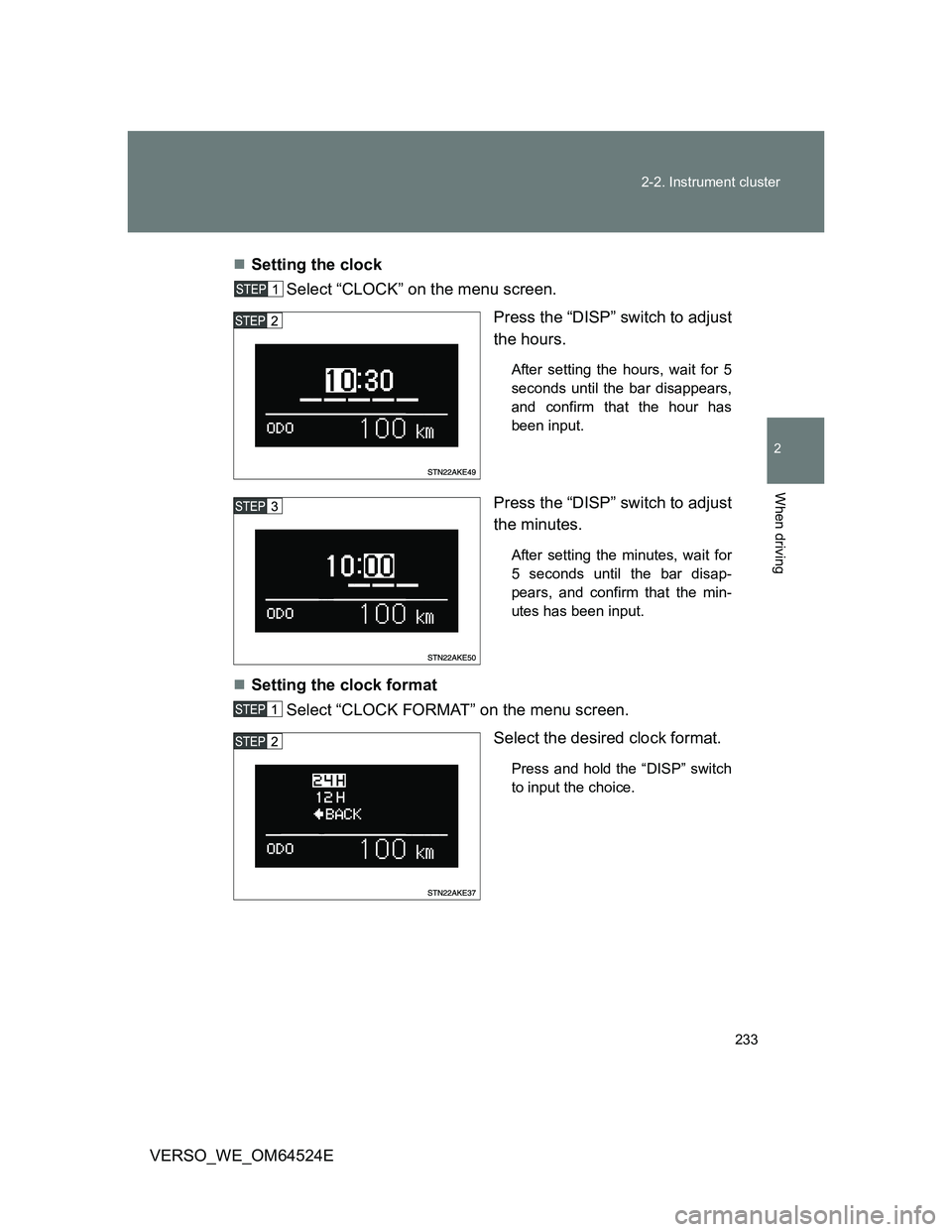
Select “CLOCK” on the menu screen.
Press the “DISP” switch to adjust
the hours.
After setting the hours, wait for 5
seconds until the bar disappears,
and confirm that the hour has
been input.
Press the “DISP” switch to adjust
the minutes.
After setting the minutes, wait for
5 seconds until the bar disap-
pears, and confirm that the min-
utes has been input.
Setting the clock format
Select “CLOCK FORMAT” on the menu screen.
Select the desired clock format.
Press and hold the “DISP” switch
to input the choice.
Page 242 of 588
242 2-3. Operating the lights and wipers
VERSO_WE_OM64524E
Daytime running light system (if equipped)
To make your vehicle more visible to other drivers, the headlights and tail
lights turn on automatically whenever the engine is started. (However, the
daytime running light system will be canceled when the headlight switch is
operated manually or the automatic headlight system turns on the tail lights.)
Daytime running lights are not designed for use at night.
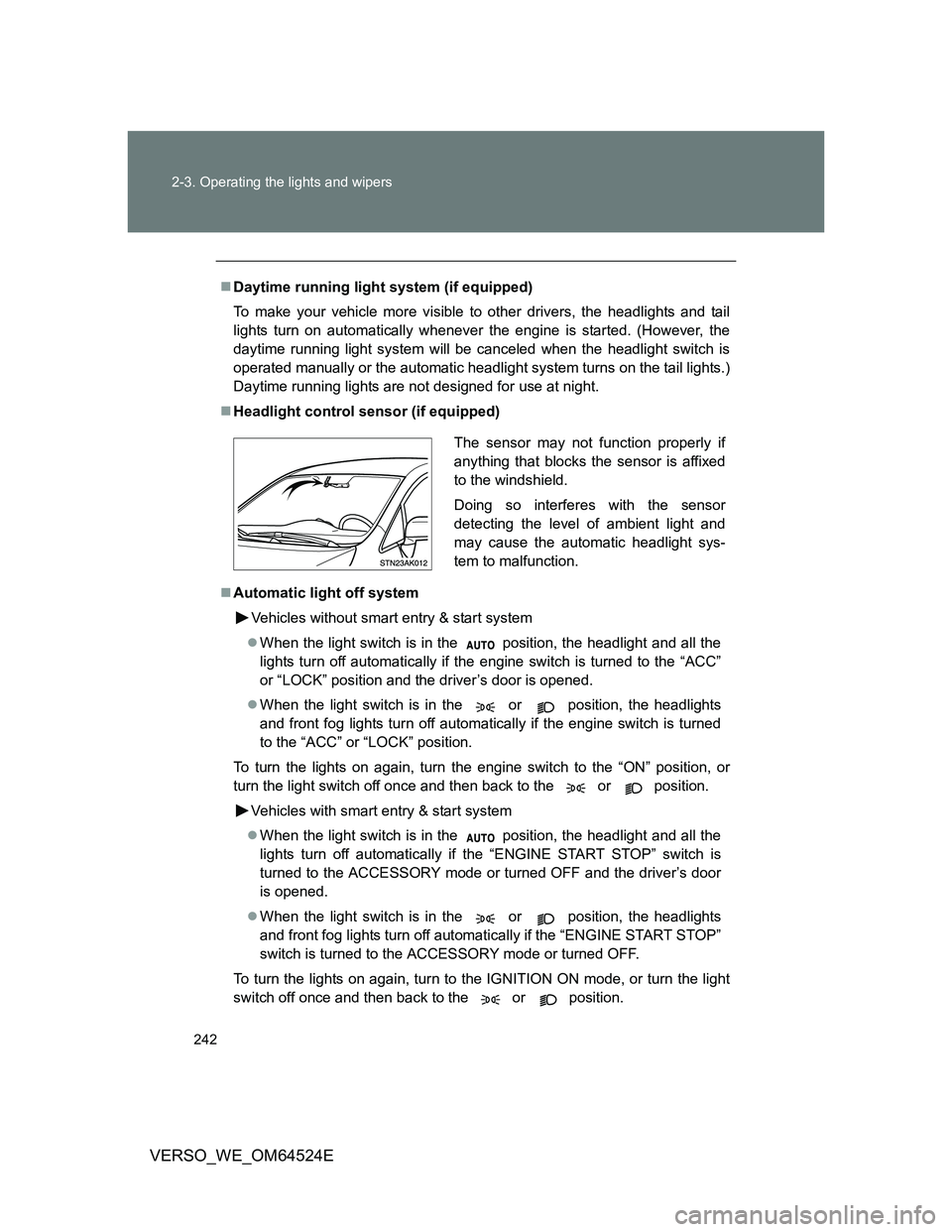
Headlight control sensor (if equipped)
Automatic light off system
Vehicles without smart entry & start system
When the light switch is in the position, the headlight and all the
lights turn off automatically if the engine switch is turned to the “ACC”
or “LOCK” position and the driver’s door is opened.
When the light switch is in the or position, the headlights
and front fog lights turn off automatically if the engine switch is turned
to the “ACC” or “LOCK” position.
To turn the lights on again, turn the engine switch to the “ON” position, or
turn the light switch off once and then back to the or position.
Vehicles with smart entry & start system
When the light switch is in the position, the headlight and all the
lights turn off automatically if the “ENGINE START STOP” switch is
turned to the ACCESSORY mode or turned OFF and the driver’s door
is opened.
When the light switch is in the or position, the headlights
and front fog lights turn off automatically if the “ENGINE START STOP”
switch is turned to the ACCESSORY mode or turned OFF.
To turn the lights on again, turn to the IGNITION ON mode, or turn the light
switch off once and then back to the or position.
The sensor may not function properly if
anything that blocks the sensor is affixed
to the windshield.
Doing so interferes with the sensor
detecting the level of ambient light and
may cause the automatic headlight sys-
tem to malfunction.
Page 243 of 588
243 2-3. Operating the lights and wipers
2
When driving
VERSO_WE_OM64524E
Light reminder buzzer
Vehicles without smart entry & start system
A buzzer sounds when the engine switch is turned to the “LOCK” or
“ACC” position and the driver’s door is opened while the lights are turned
on.
Vehicles with smart entry & start system
A buzzer sounds when the ENGINE START STOP switch is turned OFF
or to the ACCESSORY mode and the driver’s door is opened while the
lights are turned on.
Automatic headlight leveling system (vehicles with discharge head-
lights)
The level of the headlights is automatically adjusted according to the number
of passengers and the loading condition of the vehicle to ensure that the
headlights do not interfere with other road users.
Customization that can be configured at any authorized Toyota dealer
or repairer, or another duly qualified and equipped professional
Settings of the light sensor sensitivity can be changed.
(Customizable features P. 569)
NOTICE
To prevent battery discharge
Do not leave the lights on longer than necessary when the engine is not run-
ning.
Page 250 of 588
250 2-3. Operating the lights and wipers
VERSO_WE_OM64524E
Vehicles with smart entry & start system:
If the wiper switch is turned to the “AUTO” position while the “ENGINE
START STOP” switch is in the IGNITION ON mode, the wiper will operate
once to show that “AUTO” mode is activated.
If the wiper sensitivity is adjusted to higher, the wiper may operate once to
indicate the change of sensitivity.
If the temperature of the raindrop sensor is 85°C (185°F) or higher, or
-40°C (-40°F) or lower, automatic operation may not occur. In this case,
operate the wipers in any mode other than “AUTO”.
If no windshield washer fluid sprays
Check that the washer nozzles are not blocked and if there is washer fluid in
the windshield washer fluid reservoir.
CAUTION
Caution regarding the use of windshield wipers in “AUTO” mode
The windshield wipers may operate unexpectedly if the sensor is touched or
the windshield is subject to vibration in “AUTO” mode. Take care that your
fingers or anything else do not become caught in the windshield wipers.
NOTICE
When the windshield is dry
Do not use the wipers, as they may damage the windshield.
When the washer fluid tank is empty
Do not use the washer when the washer fluid tank is empty. This may cause
the washer fluid pump to overheat.
When there is no windshield washer fluid spray from the nozzle
Damage to the washer fluid pump may be caused if the lever is pulled
toward you and held continually.
Page 267 of 588
267
2-4. Using other driving systems
2
When driving
VERSO_WE_OM64524E
Driving assist systems
To help enhance driving safety and performance, the following sys-
tems operate automatically in response to various driving situations.
Be aware, however, that these systems are supplementary and
should not be relied upon too heavily when operating the vehicle.
ABS (Anti-lock Brake System)
Helps to prevent wheel lock when the brakes are applied suddenly, or if
the brakes are applied while driving on a slippery road surface.
Brake assist
Generates an increased level of braking force after the brake pedal is
depressed, when the system detects a panic stop situation.
VSC+ (Vehicle Stability Control +) (if equipped)
Helps the driver to control skidding when swerving suddenly or turning
on slippery road surfaces.
TRC (Traction Control) (if equipped)
Maintains drive power and prevents the front wheels from spinning
when starting the vehicle or accelerating on slippery roads.
EPS (Electric Power Steering)
Employs an electric motor to reduce the amount of effort needed to turn
the steering wheel.
Page 276 of 588
276 2-5. Driving information
VERSO_WE_OM64524E
CAUTION
Storage precautions
Observe the following precautions.
Failing to do so may result in death or serious injury.
Do not stack anything in the luggage compartment higher than the seat-
backs.
Such items may be thrown about and possibly injure people in the vehicle
in the event of sudden braking or in an accident.
Do not place cargo or luggage in or on the following locations as the items
may get under the clutch, brake or accelerator pedal and prevent the ped-
als from being depressed properly, block the driver’s vision, or hit the
driver or passengers, causing an accident.
• At the feet of the driver
• On the front passenger or rear seats (when stacking items)
• On the luggage cover
• On the instrument panel
• On the dashboard
Secure all items in the occupant compartment, as they may shift and injure
someone during sudden braking, sudden swerving or an accident.
Never allow anyone to ride in the luggage compartment. It is not designed
for passengers. They should ride in their seats with their seat belts prop-
erly fastened. Otherwise, they are much more likely to suffer death or seri-
ous bodily injury, in the event of sudden braking, sudden swerving or an
accident.
Load and distribution
Do not overload your vehicle.
Do not apply loads unevenly.
Improper loading may cause deterioration of steering or braking control
which may cause death or serious injury.
Page 279 of 588
279 2-5. Driving information
2
When driving
VERSO_WE_OM64524E
Before driving the vehicle
Perform the following according to the driving conditions:
Do not try to forcibly open a window or move a wiper that is
frozen. Pour warm water over the frozen area to melt the ice.
Wipe away the water immediately to prevent it from freezing.
To ensure proper operation of the climate control system fan,
remove any snow that has accumulated on the air inlet vents
in front of the windshield.
Remove any ice that has accumulated on the vehicle chassis.
Periodically check for and remove any excess ice or snow
that may have accumulated in the wheel well or on the
brakes.
When driving the vehicle
Accelerate the vehicle slowly and drive at a reduced speed suit-
able to road conditions.
When parking the vehicle
Park the vehicle and move the shift lever to “P” (Multidrive or
automatic transmission) or to “1” or “R” (manual transmission)
without setting the parking brake. The parking brake may freeze
up, preventing it from being released. If necessary, block the
wheels to prevent inadvertent sliding or creeping.
Page 288 of 588
288 2-5. Driving information
VERSO_WE_OM64524E
Guidance
Your vehicle will handle differently when towing a trailer. In order to
avoid accident, death or serious injury, keep the following in mind
when towing:
Checking connections between trailer and lights
Stop the vehicle and check the operation of the connection
between the trailer and lights after driving for a brief period as well
as before setting off.
Practicing driving with a coupled trailer
Get the feel for turning, stopping and reversing with the trailer
coupled by practicing in an area with no or light traffic.
When reversing with a coupled trailer, hold the section of the
steering wheel nearest to you and rotate clockwise to turn the
trailer left or counterclockwise to turn right. Always rotate gradu-
ally to prevent steering error. Have someone guide you when
reversing to lessen the risk of accident.
Increasing vehicle-to-vehicle distance
At a speed of 10 km/h (6 mph), the distance to the vehicle running
ahead of you should be equivalent to or greater than the combined
length of your vehicle and trailer. Avoid sudden braking that may
cause skidding. Otherwise, the vehicle may spin out of control.
This is especially true when driving on wet or slippery road sur-
faces.
Sudden acceleration/steering input/cornering
Executing sharp turns when towing may result in the trailer collid-
ing with your vehicle. Decelerate well in advance when approach-
ing turns and take them slowly and carefully to avoid sudden
braking.
Page 292 of 588
292
VERSO_WE_OM64524E
3-1. Using the air conditioning system and defogger
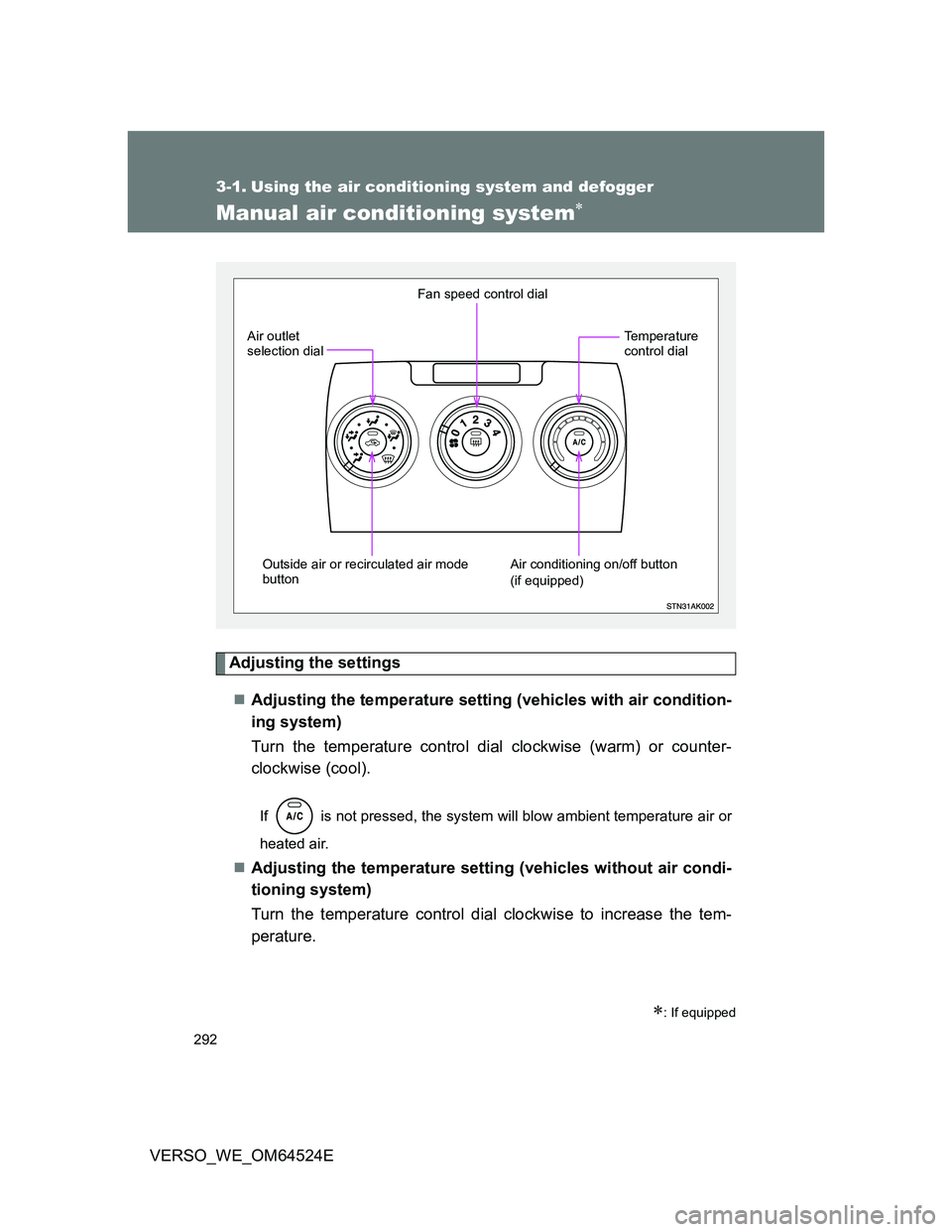
Manual air conditioning system
Adjusting the settings
Adjusting the temperature setting (vehicles with air condition-
ing system)
Turn the temperature control dial clockwise (warm) or counter-
clockwise (cool).
If is not pressed, the system will blow ambient temperature air or
heated air.
Adjusting the temperature setting (vehicles without air condi-
tioning system)
Turn the temperature control dial clockwise to increase the tem-
perature.
: If equipped
Fan speed control dial
Outside air or recirculated air mode
button Air outlet
selection dial
Air conditioning on/off button
(if equipped)Temperature
control dial
Page 293 of 588
293 3-1. Using the air conditioning system and defogger
3
Interior features
VERSO_WE_OM64524EAdjusting the fan speed
Turn the fan speed control dial clockwise (increase) or counter
clockwise (decrease).
Set the dial to “0” to turn the fan off.
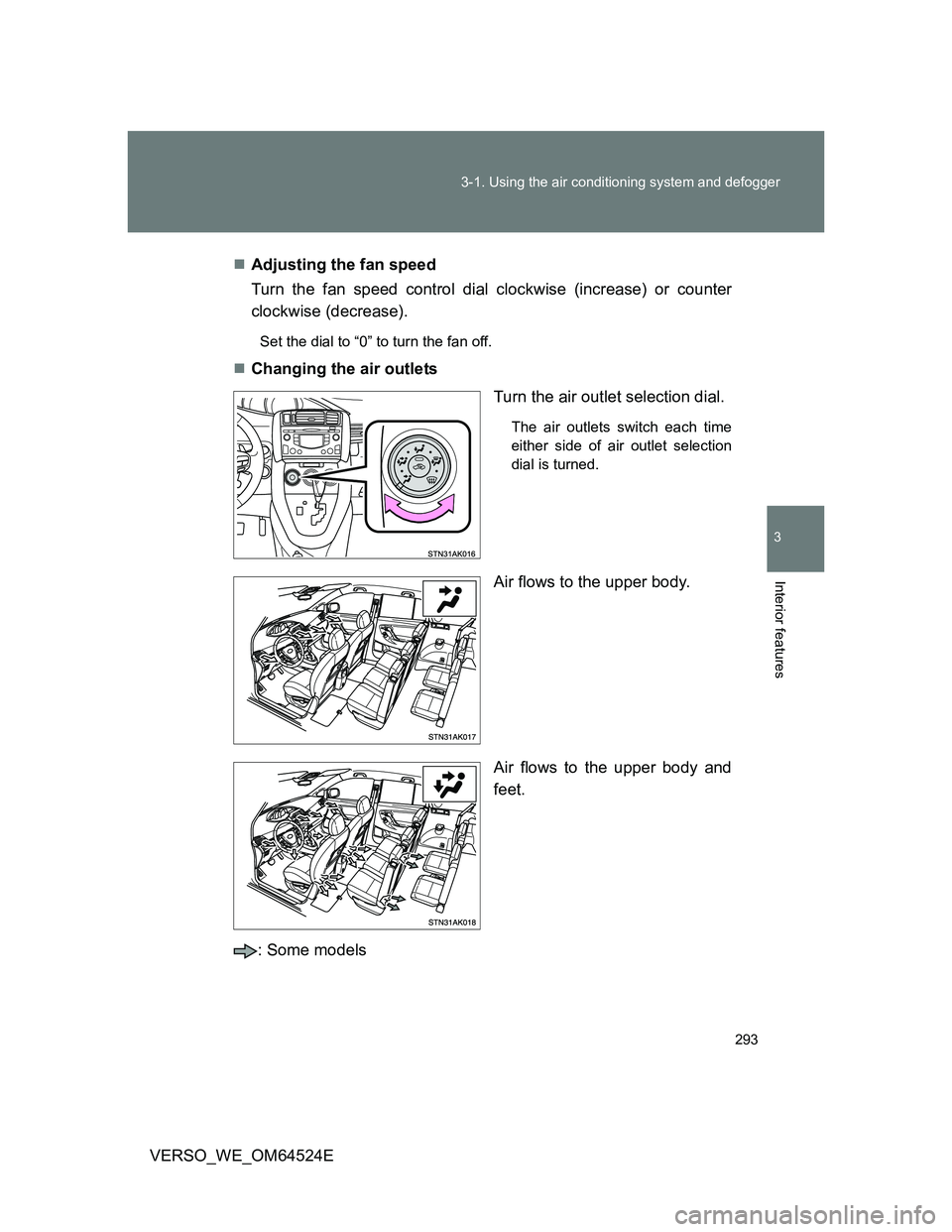
Changing the air outlets
Turn the air outlet selection dial.
The air outlets switch each time
either side of air outlet selection
dial is turned.
Air flows to the upper body.
Air flows to the upper body and
feet.
: Some models