stop start TOYOTA VERSO 2012 Owner's Guide
[x] Cancel search | Manufacturer: TOYOTA, Model Year: 2012, Model line: VERSO, Model: TOYOTA VERSO 2012Pages: 588, PDF Size: 31.32 MB
Page 193 of 588
193 2-1. Driving procedures
2
When driving
VERSO_WE_OM64524E
If the engine does not start
The engine immobilizer system may not have been deactivated. (P. 112)
Steering lock
When the “ENGINE START STOP” switch is turned off and then a door is
opened and closed, the steering lock function locks the steering wheel in its
current position. The steering lock is disabled when the “ENGINE START
STOP” switch is operated again.
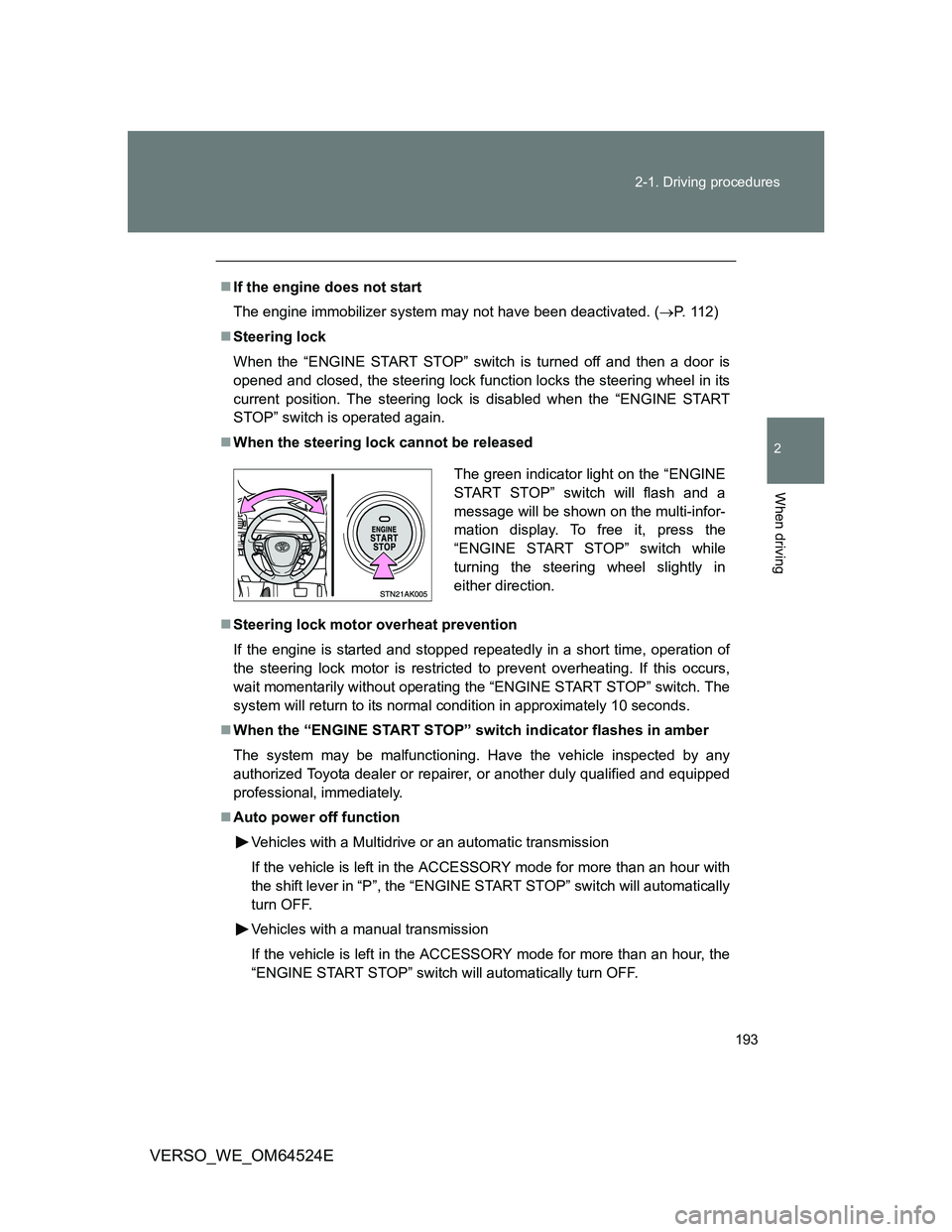
When the steering lock cannot be released
Steering lock motor overheat prevention
If the engine is started and stopped repeatedly in a short time, operation of
the steering lock motor is restricted to prevent overheating. If this occurs,
wait momentarily without operating the “ENGINE START STOP” switch. The
system will return to its normal condition in approximately 10 seconds.
When the “ENGINE START STOP” switch indicator flashes in amber
The system may be malfunctioning. Have the vehicle inspected by any
authorized Toyota dealer or repairer, or another duly qualified and equipped
professional, immediately.
Auto power off function
Vehicles with a Multidrive or an automatic transmission
If the vehicle is left in the ACCESSORY mode for more than an hour with
the shift lever in “P”, the “ENGINE START STOP” switch will automatically
turn OFF.
Vehicles with a manual transmission
If the vehicle is left in the ACCESSORY mode for more than an hour, the
“ENGINE START STOP” switch will automatically turn OFF.
The green indicator light on the “ENGINE
START STOP” switch will flash and a
message will be shown on the multi-infor-
mation display. To free it, press the
“ENGINE START STOP” switch while
turning the steering wheel slightly in
either direction.
Page 194 of 588
194 2-1. Driving procedures
VERSO_WE_OM64524E
“ENGINE START STOP” switch operation
When operating the “ENGINE START STOP” switch, push it quickly and
firmly. If the switch is not pushed firmly, the mode may not change or the
engine may not start. Furthermore, if the switch is pushed quickly and firmly,
there is no need to hold it down.
Electronic key battery depletion
P. 4 6
When the electronic key battery is discharged
P. 525
Conditions affecting operation
P. 5 7
Note for the smart entry & start system
P. 4 6
CAUTION
When starting the engine
Always start the engine while sitting in the driver’s seat. Do not depress the
accelerator while starting the engine under any circumstances.
Doing so may cause an accident resulting in death or serious injury.
Caution while driving
If the vehicle is coasting without engine power, for example if the engine
stalls, do not open a door or operate the locks until the vehicle is completely
stopped in a safe condition. Driving with the steering locked may cause an
accident, resulting in death or serious injury.
Stopping the engine in an emergency
If you want to stop the engine in an emergency while driving the vehicle,
press and hold the “ENGINE START STOP” switch for more than 3 seconds,
or press it briefly 3 times or more in succession.
However, do not touch the “ENGINE START STOP” switch while driving
except in an emergency. Turning the engine off while driving will not cause
loss of steering or braking control, but the power assist to these systems will
be lost. This will make it more difficult to steer and brake, so you should pull
over and stop the vehicle as soon as it is safe to do so.
Page 195 of 588
195 2-1. Driving procedures
2
When driving
VERSO_WE_OM64524E
NOTICE
To prevent battery discharge
Do not leave the “ENGINE START STOP” switch in the ACCESSORY or
IGNITION ON mode for long periods without the engine running.
When starting the engine
Do not race a cold engine.
If the engine becomes difficult to start or stalls frequently, have the engine
checked immediately.
“ENGINE START STOP” switch operation
If you feel something catching or sense irregular resistance when operating
the “ENGINE START STOP” switch, then there may be a malfunction. Imme-
diately contact any authorized Toyota dealer or repairer, or another duly
qualified and equipped professional.
Page 196 of 588
196
2-1. Driving procedures
VERSO_WE_OM64524E
Multidrive
: If equipped
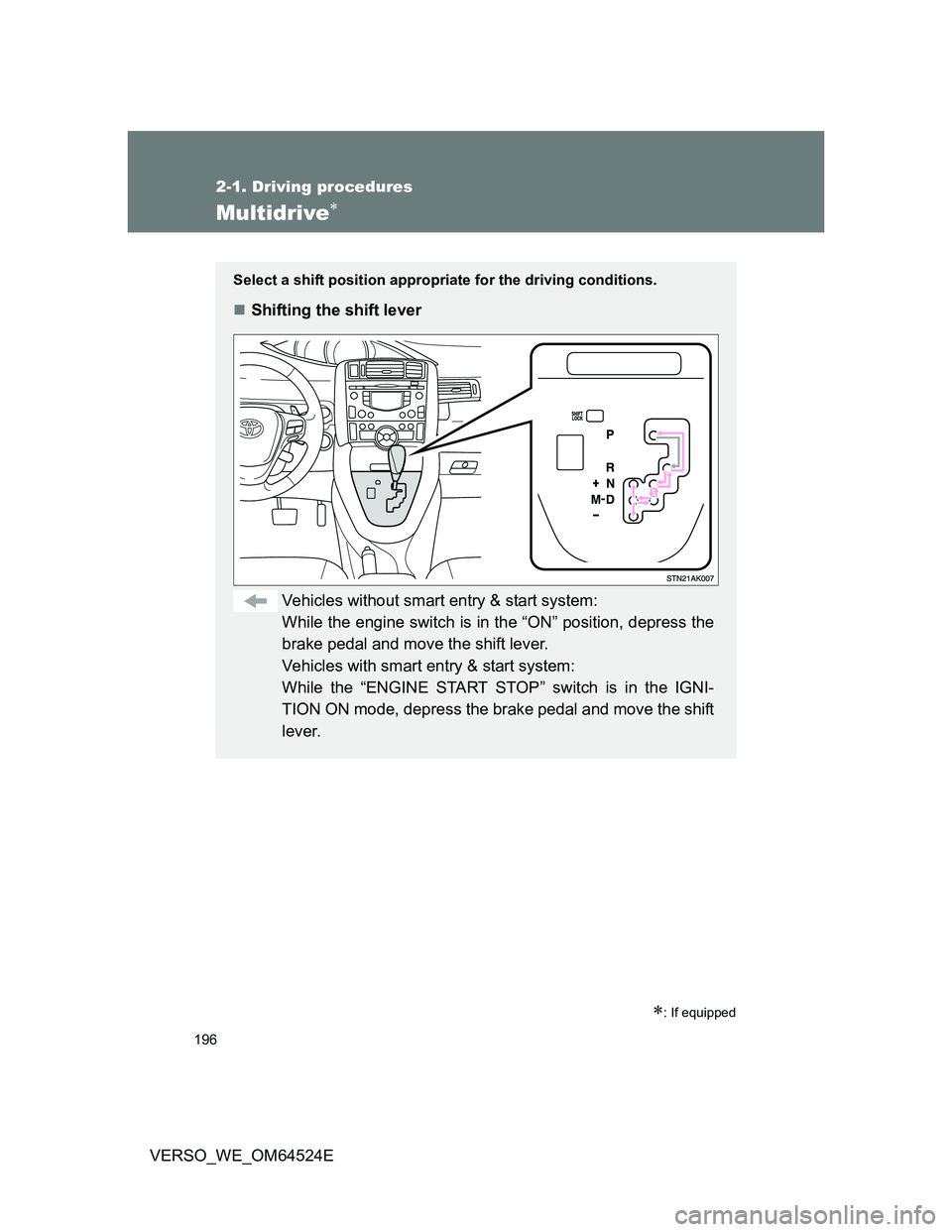
Select a shift position appropriate for the driving conditions.
Shifting the shift lever
Vehicles without smart entry & start system:
While the engine switch is in the “ON” position, depress the
brake pedal and move the shift lever.
Vehicles with smart entry & start system:
While the “ENGINE START STOP” switch is in the IGNI-
TION ON mode, depress the brake pedal and move the shift
lever.
Page 201 of 588
201 2-1. Driving procedures
2
When driving
VERSO_WE_OM64524E
Automatic deactivation of “SPORT” mode
Vehicles without smart entry & start system
If the engine switch is turned to the “LOCK” position after driving in
“SPORT” mode, the mode is automatically deactivated.
Vehicles with smart entry & start system
If the “ENGINE START STOP” switch is turned OFF after driving in
“SPORT” mode, the mode is automatically deactivated.
If the shift lever cannot be shifted from “P”
P. 522
If the “M” indicator is not displayed after shifting the shift lever to the
“M” position
If the display does not change to “M” on an occasion other than that
described above, it may indicate a malfunction in the transmission system.
Have your vehicle inspected by any authorized Toyota dealer or repairer, or
another duly qualified and equipped professional immediately.
Automatic gear step selection
When the vehicle comes to a stop, the transmission will automatically down-
shift to allow you to start off in 1st step.
Page 202 of 588
202
2-1. Driving procedures
VERSO_WE_OM64524E
Automatic transmission
: If equipped
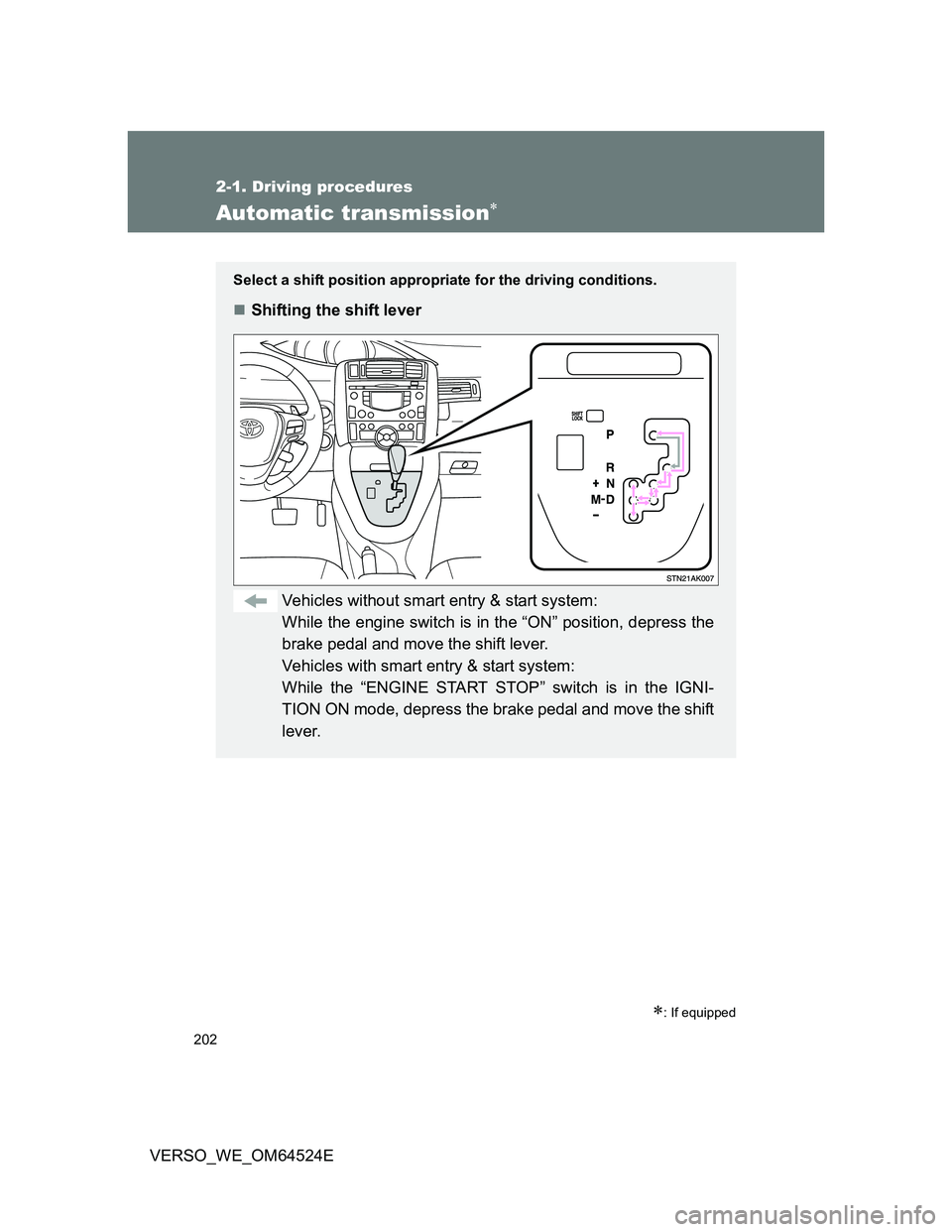
Select a shift position appropriate for the driving conditions.
Shifting the shift lever
Vehicles without smart entry & start system:
While the engine switch is in the “ON” position, depress the
brake pedal and move the shift lever.
Vehicles with smart entry & start system:
While the “ENGINE START STOP” switch is in the IGNI-
TION ON mode, depress the brake pedal and move the shift
lever.
Page 206 of 588
206 2-1. Driving procedures
VERSO_WE_OM64524E
Paddle shift switch (if equipped)
When the “-” paddle shift switch is operated in the “D” position, a shift
range will be automatically selected. The highest gear of the first shift
range will be one gear lower than the gear in use during normal “D” posi-
tion driving.
Automatic deactivation of shift range selection in the “D” position.
Shift range selection in the “D” position will be deactivated in the follow-
ing situations:
• The “+” paddle shift switch is held down for a period of time
• When the vehicle comes to a stop
• If the accelerator pedal is depressed for longer than a certain period of
time in one shift range
Downshifting restrictions warning buzzer
To help ensure safety and driving performance, downshifting operation may
sometimes be restricted. In some circumstances, downshifting may not be
possible even when the shift lever or paddle shift switches (if equipped) is
operated. (The warning buzzer will sound twice.)
When driving with the cruise control system
Engine braking will not occur during shift range selection in the “D” position,
even when downshifting to range “5” or “4”. (P. 252)
Automatic deactivation of “SPORT” mode
Vehicles without smart entry & start system
If the engine switch is turned to the “LOCK” position after driving in
“SPORT” mode, the mode is automatically deactivated.
Vehicles with smart entry & start system
If the “ENGINE START STOP” switch is turned OFF after driving in
“SPORT” mode, the mode is automatically deactivated.
Page 207 of 588
207 2-1. Driving procedures
2
When driving
VERSO_WE_OM64524E
If the shift lever cannot be shifted from “P”
P. 522
If the “M” indicator is not displayed after shifting the shift lever to the
“M” position
Vehicles without smart entry & start system: Within a few seconds of
turning the engine switch to the “ON” position, the transmission will not
go into “M” mode if the shift lever is moved to the “M” position.
Vehicles with smart entry & start system: Within a few seconds of turning
the “ENGINE START STOP” switch to IGNITION ON mode, the transmis-
sion will not go into “M” mode if the shift lever is moved to the “M” posi-
tion.
This is because a system check is being performed. In this case, wait a
moment and then try moving the shift lever to the “M” position again.
If the display does not change to “M” on an occasion other than that
described above, it may indicate a malfunction in the transmission sys-
tem. Have your vehicle inspected by any authorized Toyota dealer or
repairer, or another duly qualified and equipped professional immedi-
ately.
Automatic gear selection
When the vehicle comes to a stop, the transmission will automatically down-
shift to allow you to start off in 1st gear.
Page 213 of 588
213
2-1. Driving procedures
2
When driving
VERSO_WE_OM64524E
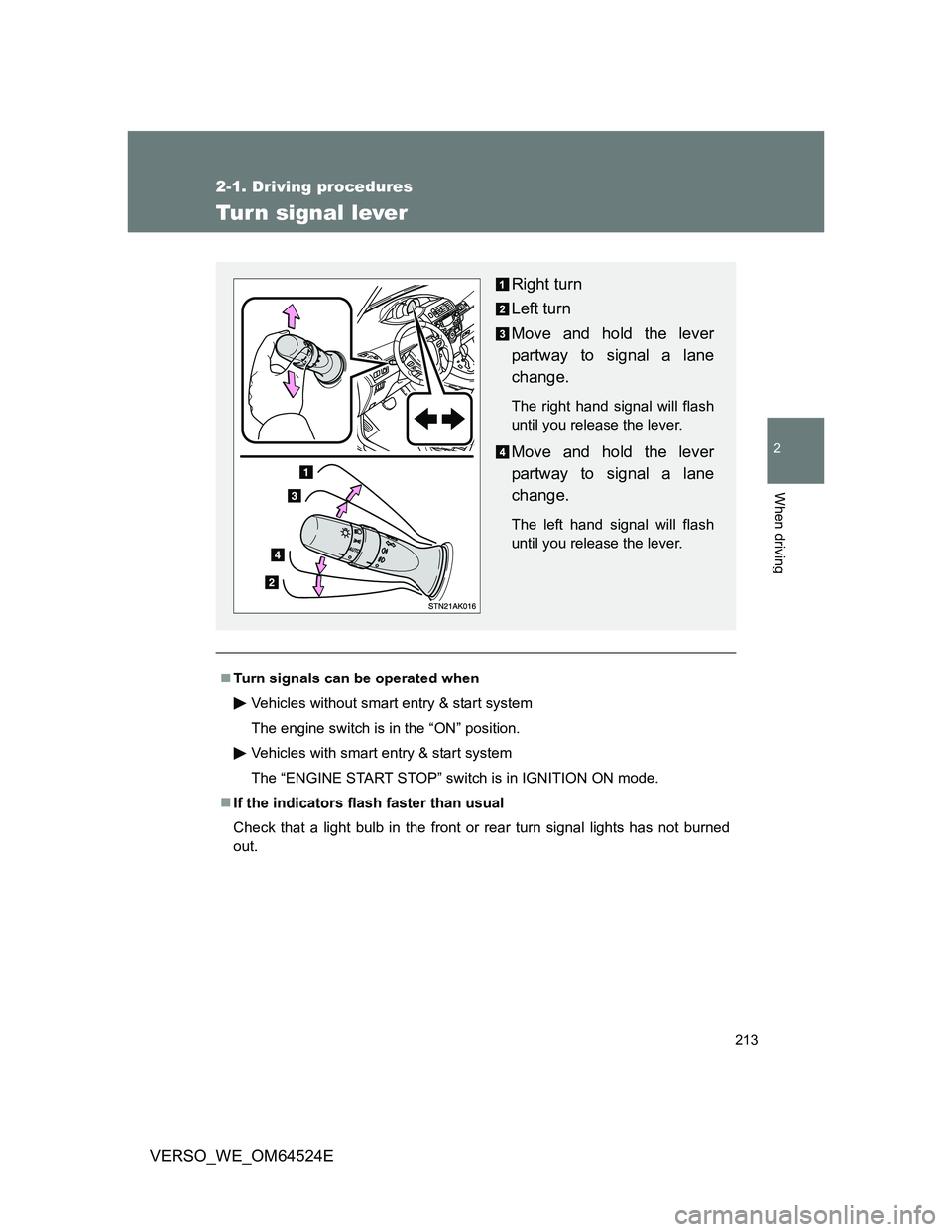
Turn signal lever
Turn signals can be operated when
Vehicles without smart entry & start system
The engine switch is in the “ON” position.
Vehicles with smart entry & start system
The “ENGINE START STOP” switch is in IGNITION ON mode.
If the indicators flash faster than usual
Check that a light bulb in the front or rear turn signal lights has not burned
out.
Right turn
Left turn
Move and hold the lever
partway to signal a lane
change.
The right hand signal will flash
until you release the lever.
Move and hold the lever
partway to signal a lane
change.
The left hand signal will flash
until you release the lever.
Page 217 of 588
217
2
When driving
VERSO_WE_OM64524E
2-2. Instrument cluster
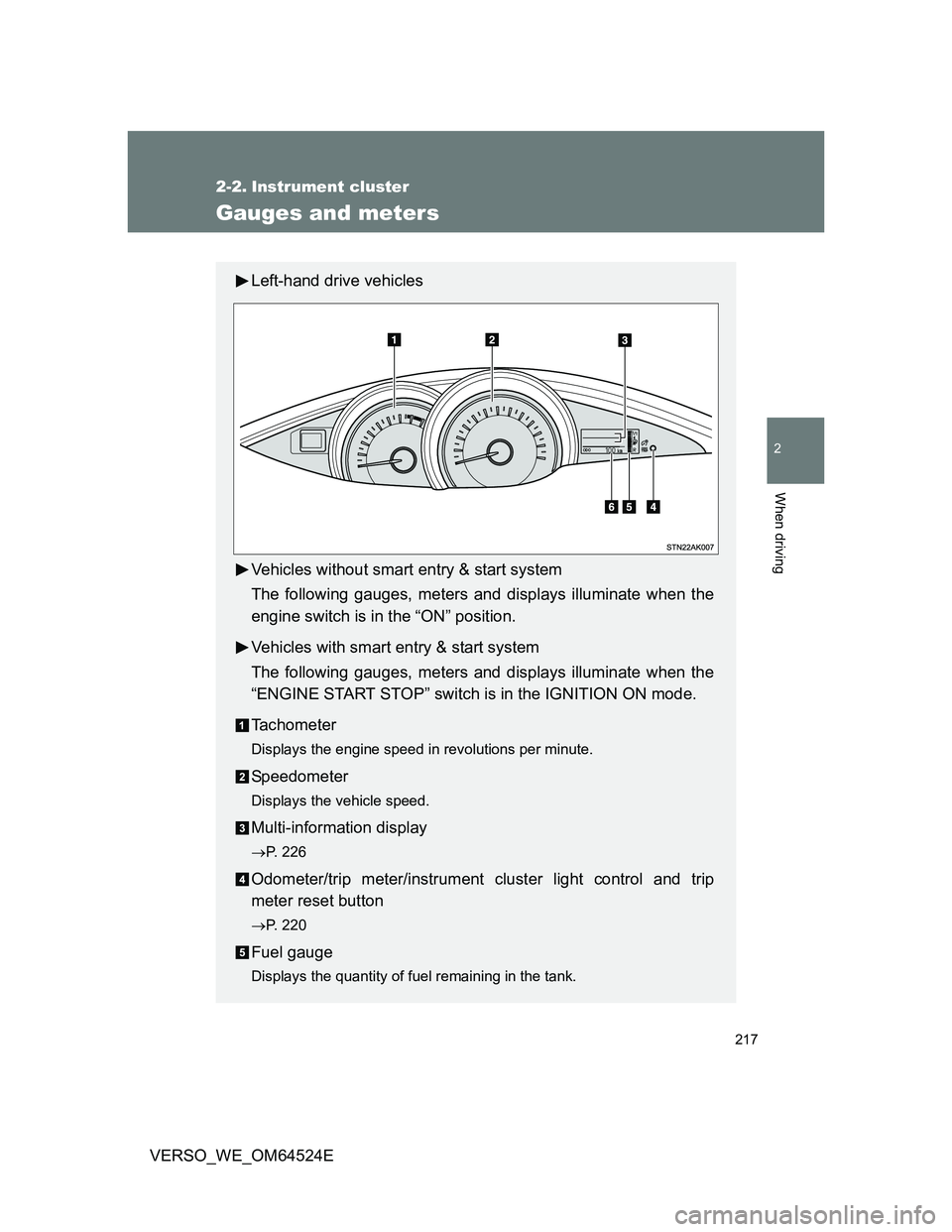
Gauges and meters
Left-hand drive vehicles
Vehicles without smart entry & start system
The following gauges, meters and displays illuminate when the
engine switch is in the “ON” position.
Vehicles with smart entry & start system
The following gauges, meters and displays illuminate when the
“ENGINE START STOP” switch is in the IGNITION ON mode.
Tachometer
Displays the engine speed in revolutions per minute.
Speedometer
Displays the vehicle speed.
Multi-information display
P. 226
Odometer/trip meter/instrument cluster light control and trip
meter reset button
P. 220
Fuel gauge
Displays the quantity of fuel remaining in the tank.