warning light TOYOTA VERSO 2016 Owner's Manual
[x] Cancel search | Manufacturer: TOYOTA, Model Year: 2016, Model line: VERSO, Model: TOYOTA VERSO 2016Pages: 664, PDF Size: 62.24 MB
Page 265 of 664
265
2-4. Toyota Safety Sense
2
When driving
VERSO_EE_OM64590E
NOTICE
■ Front sensor
Observe the following to ensure that the sensor operates correctly:
● Do not attach window tinting to the windshield.
● On cold days when there is a large temperature difference between the
vehicle interior and outside air temperatures, the windshield fogs up easily.
If the part of the windshield in front of the front sensor becomes fogged up
or covered with condensation or ice, the system temporarily stops working
and the PCS warning light flashes or illuminates. In that case, use the front
defroster to remove the fog, condensation, or ice. ( P. 334, 344)
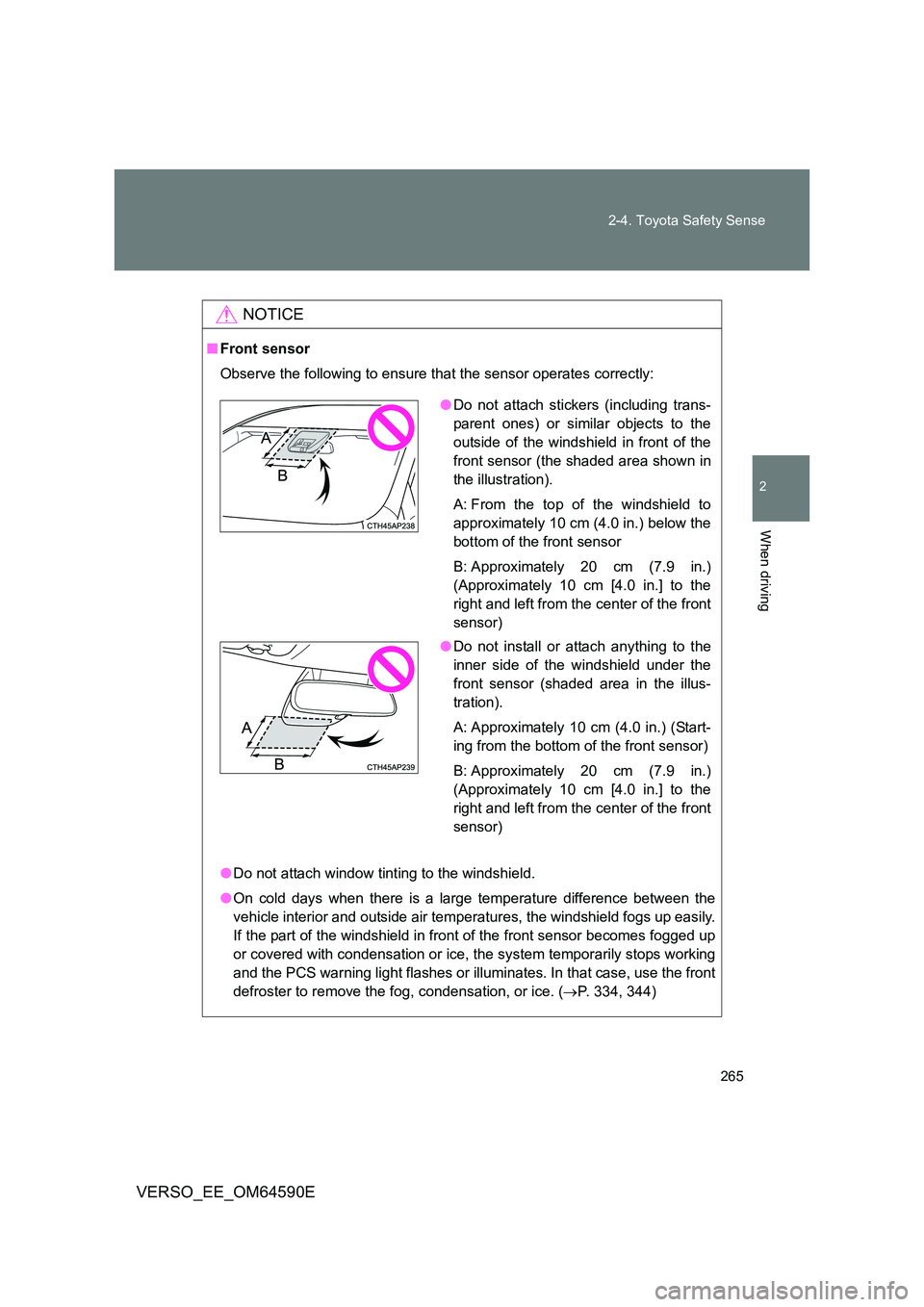
●Do not attach stickers (including trans-
parent ones) or similar objects to the
outside of the windshield in front of the
front sensor (the shaded area shown in
the illustration).
A: From the top of the windshield to
approximately 10 cm (4.0 in.) below the
bottom of the front sensor
B: Approximately 20 cm (7.9 in.)
(Approximately 10 cm [4.0 in.] to the
right and left from the center of the front
sensor)
● Do not install or attach anything to the
inner side of the windshield under the
front sensor (shaded area in the illus-
tration).
A: Approximately 10 cm (4.0 in.) (Start-
ing from the bottom of the front sensor)
B: Approximately 20 cm (7.9 in.)
(Approximately 10 cm [4.0 in.] to the
right and left from the center of the front
sensor)
Page 269 of 664
269
2-4. Toyota Safety Sense
2
When driving
VERSO_EE_OM64590E
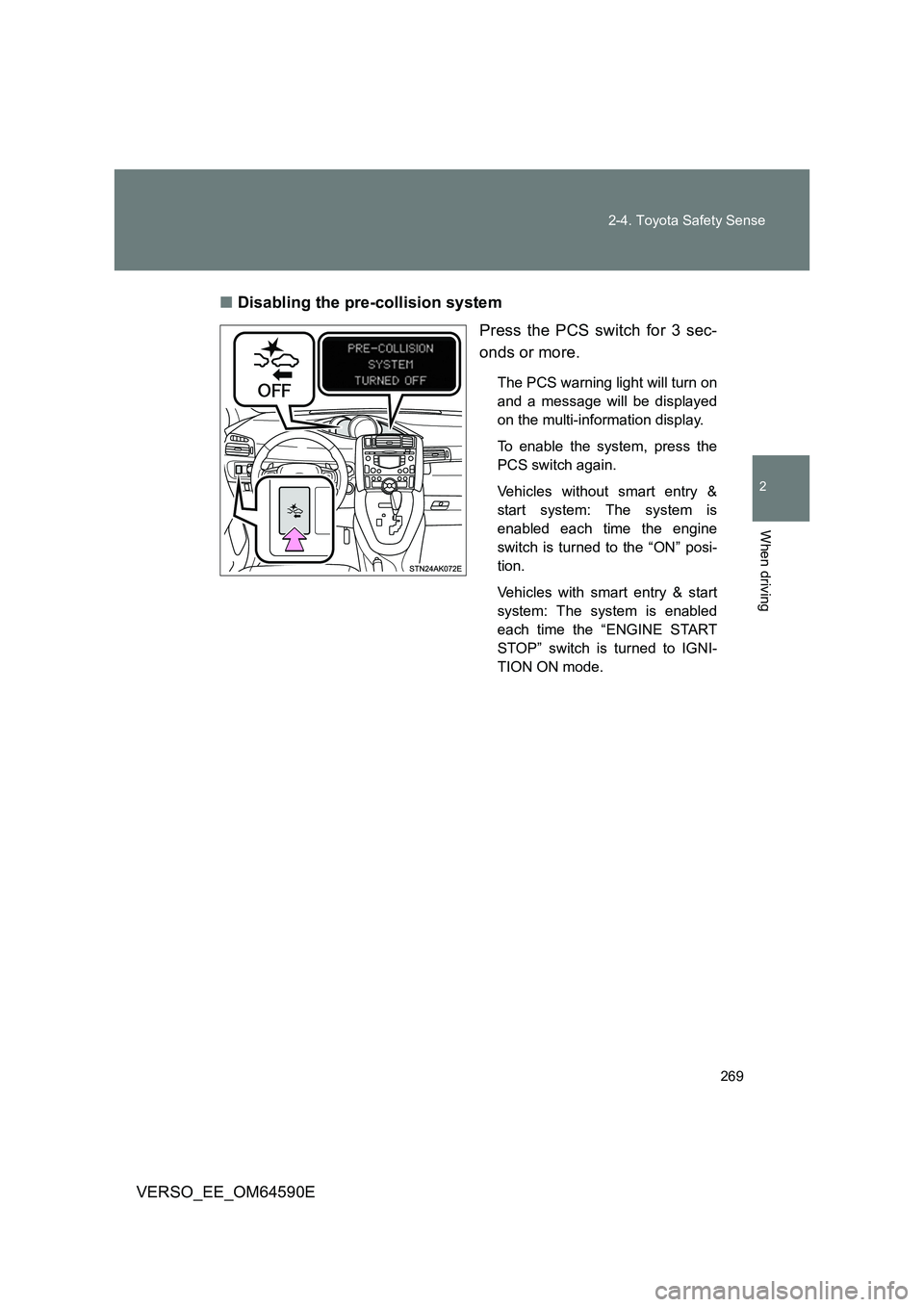
■ Disabling the pre-collision system
Press the PCS switch for 3 sec-
onds or more.
The PCS warning light will turn on
and a message will be displayed
on the multi-information display.
To enable the system, press the
PCS switch again.
Vehicles without smart entry &
start system: The system is
enabled each time the engine
switch is turned to the “ON” posi-
tion.
Vehicles with smart entry & start
system: The system is enabled
each time the “ENGINE START
STOP” switch is turned to IGNI-
TION ON mode.
Page 270 of 664
270
2-4. Toyota Safety Sense
VERSO_EE_OM64590E
■ Operational conditions
The pre-collision system is enabled and determines that the possibility of a
frontal collision with a vehicle (except motorcycles and bicycles) is high.
● Pre-collision warning:
• Vehicle speed is approximately 15 to 140 km/h (10 to 86 mph).
• The relative speed between your vehicle and the vehicle ahead is
greater than approximately 15 km/h (10 mph).
● Pre-collision brake assist:
• Vehicle speed is approximately 30 to 80 km/h (19 to 49 mph).
• The relative speed between your vehicle and the vehicle ahead is
greater than approximately 30 km/h (19 mph).
● Pre-collision braking:
• Vehicle speed is approximately 10 to 80 km/h (7 to 49 mph).
• The relative speed between your vehicle and the vehicle ahead is
greater than approximately 10 km/h (7 mph).
When the brake pedal is stepped on, the system judges if evasion actions
are being done by the driver and the start timing for pre-collision braking
may be delayed.
During the following, the driver oper ations takes precedence and the system
may not operate:
● The accelerator pedal is depressed strongly.
● The steering wheel is turned sharply or abruptly.
In case of the following, the system will not operate:
● If a battery terminal has been disconnected and reconnected and then
the vehicle has not been driven for a certain amount of time
● If VSC is disabled (only the pre-collision warning function will be opera-
tional)
● If the PCS warning light is flashing or illuminated
● When the shift position is in “R”
Page 274 of 664
274
2-4. Toyota Safety Sense
VERSO_EE_OM64590E
■ If the PCS warning light flashes or illuminates, and a warning message
is displayed on the multi-information display
The pre-collision system may be tempor arily unavailable or there may be a
malfunction in the system.
● In the following situations, the indicator and message will be cleared and
the system will become operational when normal operating conditions
return:
• When the area around the front sensor is hot, such as after the vehicle
has been parked in the sun
• When the windshield is fogged up or covered with condensation or ice
( P. 334, 344)
• If the area in front of the front sensor is obstructed, such as when the
hood is open
● If the PCS warning light continues to flash or illuminate, or the warning
message is not cleared, the system may be malfunctioning. Have the
vehicle inspected by any authorized Toyota dealer or repairer, or another
duly qualified and equipped professional immediately.
■ If the TRC and VSC+ are disabled
● If the TRC and VSC+ are disabled (P. 313), pre-collision brake assist
and pre-collision braking are also di sabled. However, the pre-collision
warning function will still operate.
● The PCS warning light will turn on and a warning message will be dis-
played on the multi-information display. ( P. 551)
Page 282 of 664
282
2-4. Toyota Safety Sense
VERSO_EE_OM64590E
■ When changing the tires
Depending on the tires used, sufficient performance may not be maintain-
able.
■ Warning messages for the LDA system
Warning messages are used to indicate a system malfunction or to inform
the driver of the need for caution while driving.
WARNING
■ Before using the LDA system
Do not rely solely on the LDA system. The LDA system does not drive the
vehicle automatically, nor does it reduce the amount of care you need to
take. As such, the driver must always assume full responsibility for under-
standing his/her surroundings, for operating the steering wheel to correct the
driving line, and for driving safely.
Inappropriate or negligent driving could lead to an accident.
■ To avoid operating the LDA by mistake
Switch the LDA system off using the LDA switch when not in use.
NOTICE
■ To prevent damage to or incorrect operation of the LDA system
● Do not modify the headlights or attach stickers to the surface of the lights.
● Do not modify the suspension. If your suspension needs repairs, contact
any authorized Toyota dealer or repairer, or another duly qualified and
equipped professional.
● Do not install or place anything on the hood or the grille. Also, do not install
a grille guard (bull bars, kangaroo bar etc.).
Page 287 of 664
287
2-4. Toyota Safety Sense
2
When driving
VERSO_EE_OM64590E
● High beam may be turned on or off when unexpected by the driver.
● In the situations below, the system may not be able to correctly detect the
surrounding brightness levels, and may flash or expose nearby pedestri-
ans to the high beam. Therefore, you should consider turning the high
beams on or off manually rather than relying on the Automatic High
Beam system.
• In bad weather (rain, snow, fog, sandstorms, etc.)
• The windshield is obscured by fog, mist, ice, dirt, etc.
• The windshield is cracked or damaged.
• The front sensor is deformed or dirty.
• The front sensor temperature is extremely high.
• Surrounding brightness levels are equal to those of headlights, tail
lights or fog lights.
• Vehicles ahead have headlights or tail lights that are either switched
off, dirty, are changing color, or are not aimed properly.
• When driving through an area of intermittently changing brightness and
darkness.
• When frequently and repeatedly driving ascending/descending roads,
or roads with rough, bumpy or uneven surfaces (such as stone-paved
roads, gravel tracks, etc.).
• When frequently and repeatedly taking curves or driving on a winding
road.
• There is a highly reflective object ahead of the vehicle, such as a sign
or a mirror.
• The back of a vehicle ahead is highly reflective, such as a container on
a truck.
• The vehicle’s headlights are damaged or dirty.
• The vehicle is listing or tilting, due to a flat tire, a trailer being towed,
etc.
• The driver believes that the high beam may be causing problems or
distress to other drivers or pedestrians nearby.
■ If a warning message of the Automatic High Beam is displayed...
It may indicate a malfunction in the system. Contact any authorized Toyota
dealer or repairer, or another duly qualified and equipped professional.
Page 295 of 664
295
2-5. Using other driving systems
2
When driving
VERSO_EE_OM64590E
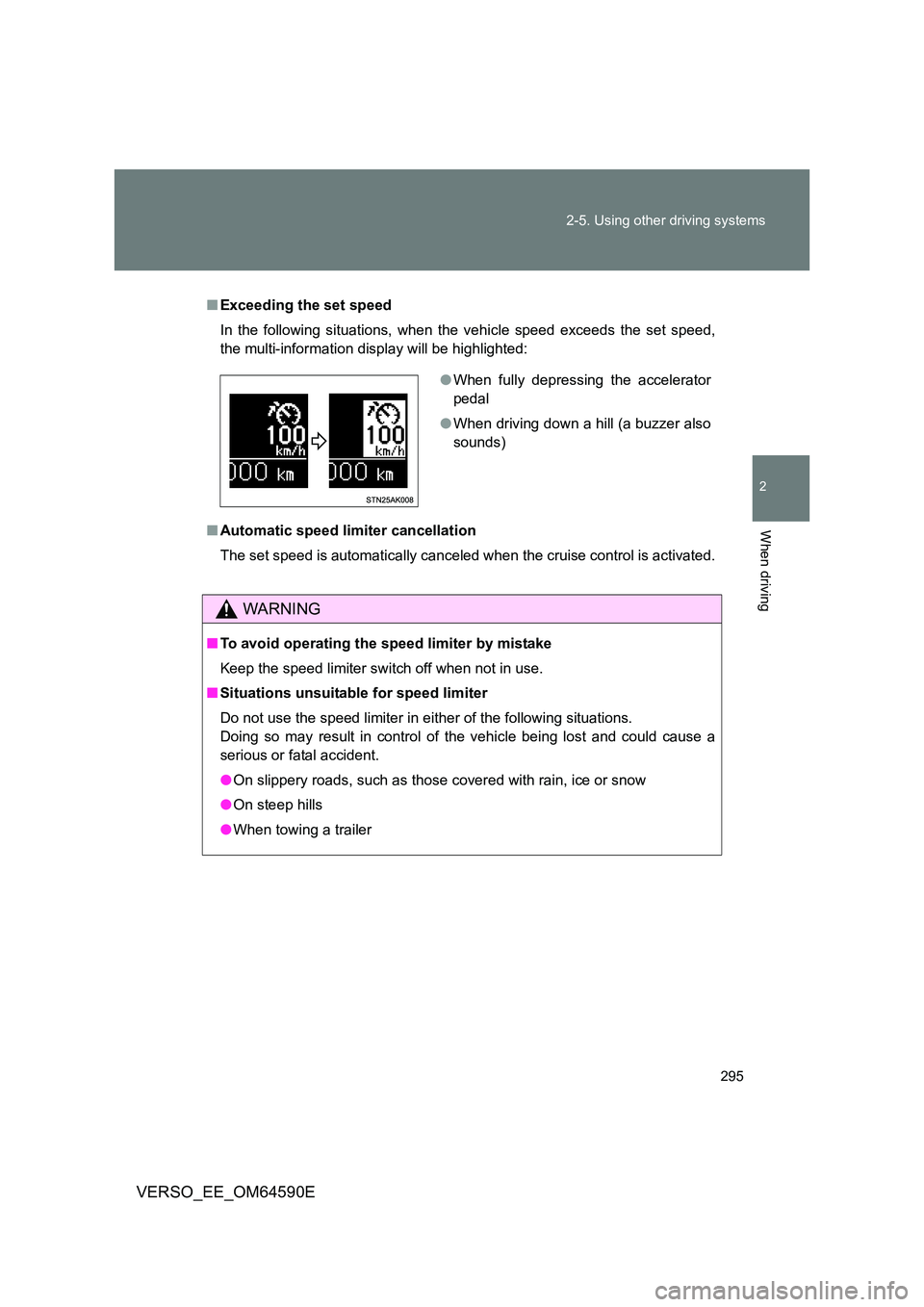
■ Exceeding the set speed
In the following situations, when the vehicle speed exceeds the set speed,
the multi-information display will be highlighted:
■ Automatic speed limiter cancellation
The set speed is automatically canceled when the cruise control is activated.
WARNING
■ To avoid operating the speed limiter by mistake
Keep the speed limiter switch off when not in use.
■ Situations unsuitable for speed limiter
Do not use the speed limiter in either of the following situations.
Doing so may result in control of the vehicle being lost and could cause a
serious or fatal accident.
● On slippery roads, such as those covered with rain, ice or snow
● On steep hills
● When towing a trailer
●When fully depressing the accelerator
pedal
● When driving down a hill (a buzzer also
sounds)
Page 308 of 664
308
2-5. Using other driving systems
VERSO_EE_OM64590E
■ The Stop & Start system protection feature
Vehicles without smart entry & start system
When an excessively loud sound is bei ng projected by the audio system,
the audio system may be automatically cut off in order to maintain power
for the Stop & Start system function.
If this occurs, turning the engine switch to the “LOCK” position then to the
“ACC” or “ON” position re-enables the audio system.
Vehicles with smart entry & start system
When an excessively loud sound is bei ng projected by the audio system,
the audio system may be automatically cut off in order to maintain power
for the Stop & Start system function.
If this occurs, turning the “ENGINE START STOP” switch off then to
ACCESSORY mode or IGNITION ON mode re-enables the audio system.
■ Steering wheel operation
When the engine is stopped by the Stop & Start system, the steering wheel
may become heavier than when driving.
■ Hood
If the hood is opened while the engine is stopped by the Stop & Start system,
the engine cannot be restarted by the Stop & Start system or by the auto-
matic engine start function. Restart the engine with the engine switch opera-
tion. ( P. 198, 202)
Even if the hood is closed after the engine is started with the hood open, the
Stop & Start system will not operate. Close the hood, turn the engine switch
off, wait 30 seconds or more, and then start the engine.
■ When to use the Stop & Start system
Use the Stop & Start system when stopping the vehicle temporarily at red
lights, intersections, etc. When stopp ing the vehicle for a longer period of
time, turn off the engine completely.
■ Stop & Start system warning buzzer
If the engine is stopped by the Stop & Start system and the following action
is performed, a buzzer will sound and the Stop & Start indicator will flash.
This indicates that the engine is only stopped by the Stop & Start system, not
that the engine has been turned off completely.
The shift lever is shifted to a position other than “N” with the clutch pedal
released.
Page 310 of 664
310
2-5. Using other driving systems
VERSO_EE_OM64590E
WARNING
■ When the Stop & Start system is operating
● Keep the shift lever in “N” and apply the brake pedal or parking brake for
safety while the engine is stopped due to the Stop & Start system (while
Stop & Start indicator is on).
Unexpected accidents may occur due to the automatic engine start func-
tion.
● Do not leave the vehicle while the engine is stopped due to the Stop &
Start system (while Stop & Start indicator is on).
Unexpected accidents may occur due to the automatic engine start func-
tion.
● Ensure that the engine is not stopped by the Stop & Start system while the
vehicle is in a poorly ventilated area. The engine may restart due to the
automatic engine start function, causing exhaust gases to collect and
enter the vehicle and resulting in death or a serious health hazard.
NOTICE
■ To ensure the system operates correctly
If any one of the following situations occurs, the Stop & Start system may not
operate correctly, thus, please have your vehicle checked by any authorized
Toyota dealer or repairer, or anot her duly qualified and equipped profes-
sional.
● While the driver’s seat belt is fastened, the driver’s and front passenger’s
seat belt reminder light flashes.
● Even when the driver’s seat belt is not fastened, the driver’s and front pas-
senger’s seat belt reminder light remains off.
● Even when the driver’s door is closed, the open door warning light comes
on, or the interior light comes on when the interior light switch is in the door
position.
● Even when the driver’s door is opened, the open door warning light does
not come on, or the interior light does not come on when the interior light
switch is in the door position.
Page 313 of 664
313
2-5. Using other driving systems
2
When driving
VERSO_EE_OM64590E
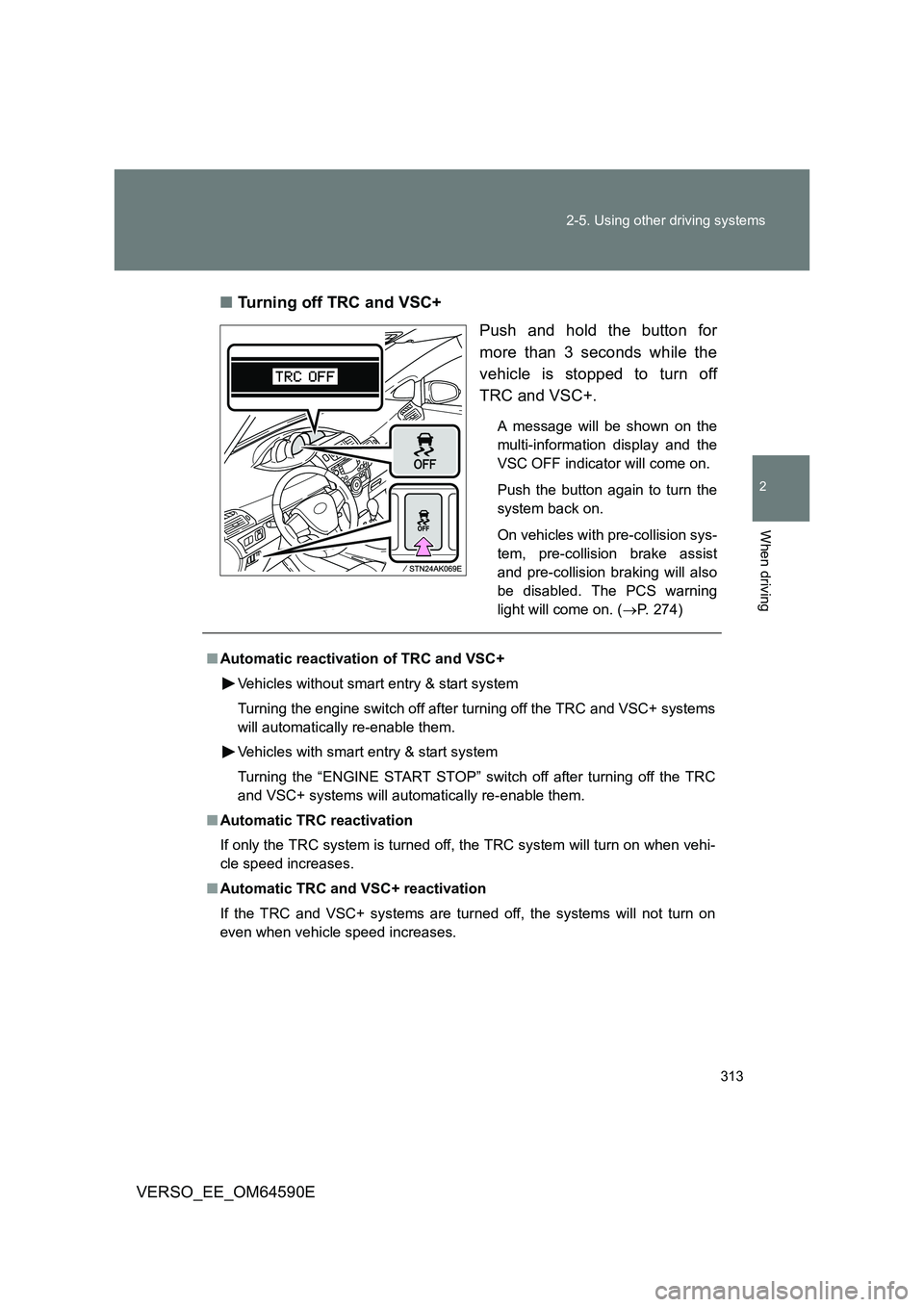
■ Turning off TRC and VSC+
Push and hold the button for
more than 3 seconds while the
vehicle is stopped to turn off
TRC and VSC+.
A message will be shown on the
multi-information display and the
VSC OFF indicator will come on.
Push the button again to turn the
system back on.
On vehicles with pre-collision sys-
tem, pre-collision brake assist
and pre-collision braking will also
be disabled. The PCS warning
light will come on. ( P. 274)
■Automatic reactivation of TRC and VSC+
Vehicles without smart entry & start system
Turning the engine switch off after turning off the TRC and VSC+ systems
will automatically re-enable them.
Vehicles with smart entry & start system
Turning the “ENGINE START STOP” switch off after turning off the TRC
and VSC+ systems will automatically re-enable them.
■ Automatic TRC reactivation
If only the TRC system is turned off, the TRC system will turn on when vehi-
cle speed increases.
■ Automatic TRC and VSC+ reactivation
If the TRC and VSC+ systems are turned off, the systems will not turn on
even when vehicle speed increases.