lock TOYOTA VERSO S 2011 Owners Manual
[x] Cancel search | Manufacturer: TOYOTA, Model Year: 2011, Model line: VERSO S, Model: TOYOTA VERSO S 2011Pages: 664, PDF Size: 160.56 MB
Page 564 of 664
5648-2. Steps to take in an emergency
The following may indicate a prob-
lem with your transmission. Contact
any authorized Toyota retailer or
Toyota authorized repairer, or any
reliable repairer or commercial tow-
ing service before towing.
The hybrid system warning mes-
sage is shown on the multi-infor-
mation display and the vehicle
does not move.
The vehicle makes an abnormal
sound.
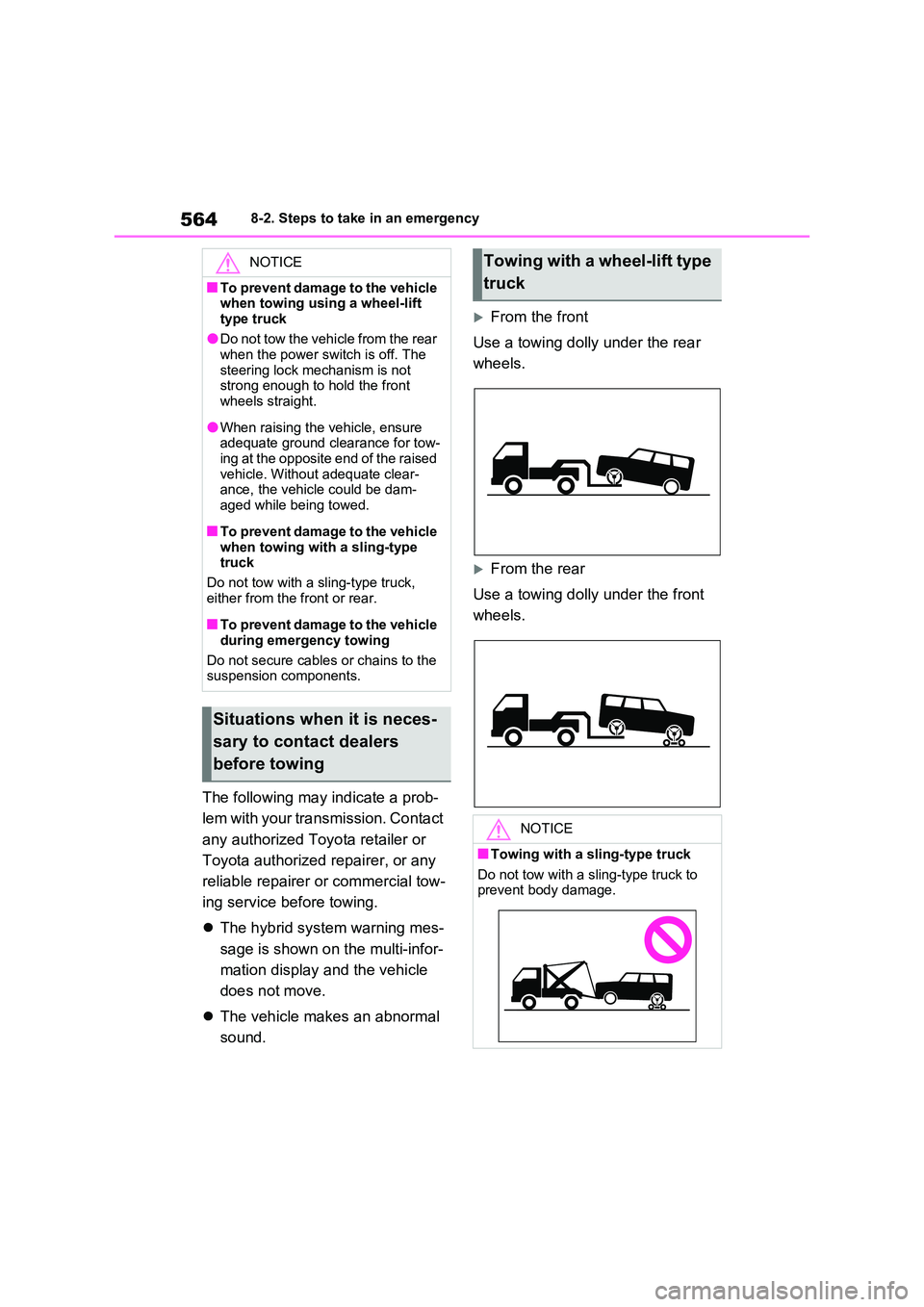
From the front
Use a towing dolly under the rear
wheels.
From the rear
Use a towing dolly under the front
wheels.
NOTICE
■To prevent damage to the vehicle when towing using a wheel-lift
type truck
●Do not tow the vehicle from the rear when the power switch is off. The
steering lock mechanism is not strong enough to hold the front wheels straight.
●When raising the vehicle, ensure adequate ground clearance for tow-
ing at the opposite end of the raised vehicle. Without adequate clear-ance, the vehicle could be dam-
aged while being towed.
■To prevent damage to the vehicle
when towing with a sling-type truck
Do not tow with a sling-type truck,
either from the front or rear.
■To prevent damage to the vehicle
during emergency towing
Do not secure cables or chains to the suspension components.
Situations when it is neces-
sary to contact dealers
before towing
Towing with a wheel-lift type
truck
NOTICE
■Towing with a sling-type truck
Do not tow with a sling-type truck to prevent body damage.
Page 580 of 664
5808-2. Steps to take in an emergency
vehicle.
• “Hybrid System Stopped” • “Engine Stopped”
●If “Maintenance required for DCDC converter cooling parts See Owner’s Manual” is shown, the filter may be
clogged, the air intake vent may be blocked, or there may be a gap in the duct. Therefore, perform the following
correction procedure. • If the air intake vent or filter of the DC/DC converter are dirty, perform
the procedures on P.536 to clean them.• If the warning message is shown
when the air intake vent and filter of the DC/DC converter are not dirty, have the vehicle inspected at any
authorized Toyota retailer or Toyota authorized repairer, or any reliable repairer.
●If “12-Volt Battery Charging System Malfunction Stop in a Safe Place See
Owner’s Manual” is shown
Indicates a malfunction in the vehicle’s
charging system. Pull over and stop the
vehicle as soon as it is safe to do so.
While the message is displayed, the
functions of the air conditioning, etc.
may be partially limited in order to
reduce the power consumption of the
12-volt battery.
■If “Hybrid System Overheated Out- put Power Reduced” is shown
The message may be shown when driv-
ing under severe operating conditions. (For example, when driving up a long steep hill or driving up a steep hill in
reverse.)
Coping method: P.611
■If “Traction Battery Needs to be Protected Refrain from the Use of N
Position” is shown
This message may be displayed when the shift lever is in N.
As the hybrid battery (traction battery) cannot be charged when the shift lever
is in N, shift the shift lever to P when the
vehicle is stopped.
■If “Traction Battery Needs to be Protected Shift into P to Restart” is shown
This message is displayed when the hybrid battery (traction battery) charge has become extremely low because the
shift lever has been left in N for a certain amount of time.
When operating the vehicle, shift to P
and restart the hybrid system.
■If “Shift to P when Parked” is shown
Message is displayed when the driver’s
door is opened without turning the power switch to OFF with the shift lever in any position other than P.
Shift the shift lever to P.
■If “Shift is in N Release Accelerator Before Shifting” is shown
Message is displayed when the acceler-
ator pedal has been depressed and the shift lever is in N. Release the accelera-tor pedal and shift the shift lever to D or
R.
■If “Press Brake when Vehicle is Stopped Hybrid System may Over-heat” is shown
Message is displayed when the acceler- ator pedal is depressed to maintain the vehicle position when stopped on a
upward slope, etc.
If this continues, the hybrid system may overheat.
Release the accelerator pedal and depress the brake pedal.
■If “Auto Power OFF to Conserve Battery” is shown
Power was turned off due to the auto- matic power off function.
Next time when starting the hybrid sys-
tem, operate the hybrid system for approximately 5 minutes to recharge the 12-volt battery.
Page 587 of 664
587
8
8-2. Steps to take in an emergency
When trouble arises
Therefore keep it in a safe place.
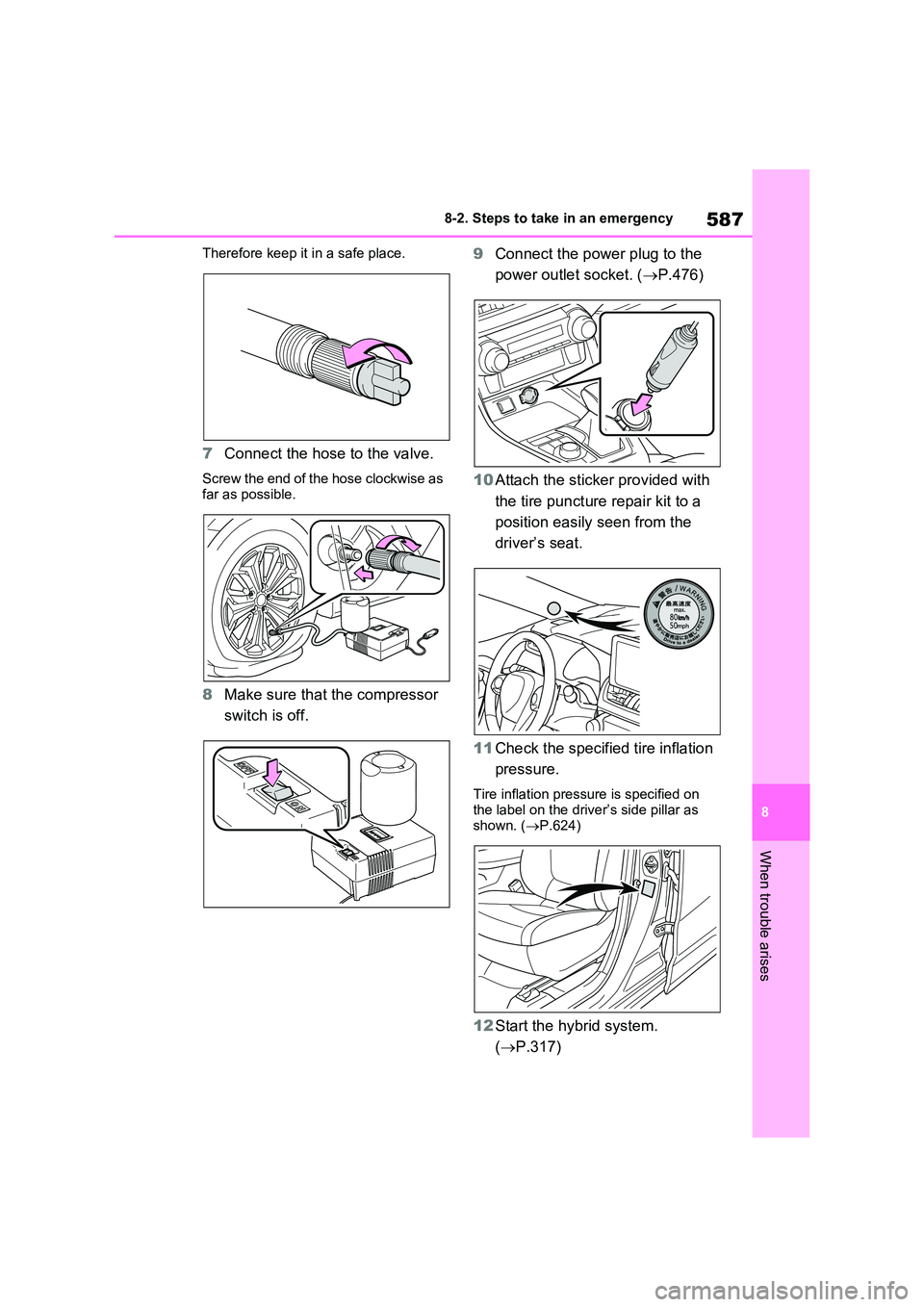
7 Connect the hose to the valve.
Screw the end of the hose clockwise as
far as possible.
8 Make sure that the compressor
switch is off.
9 Connect the power plug to the
power outlet socket. ( P.476)
10 Attach the sticker provided with
the tire puncture repair kit to a
position easily seen from the
driver’s seat.
11 Check the specified tire inflation
pressure.
Tire inflation pressure is specified on the label on the driver’s side pillar as
shown. ( P.624)
12Start the hybrid system.
( P.317)
Page 595 of 664
595
8
8-2. Steps to take in an emergency
When trouble arises
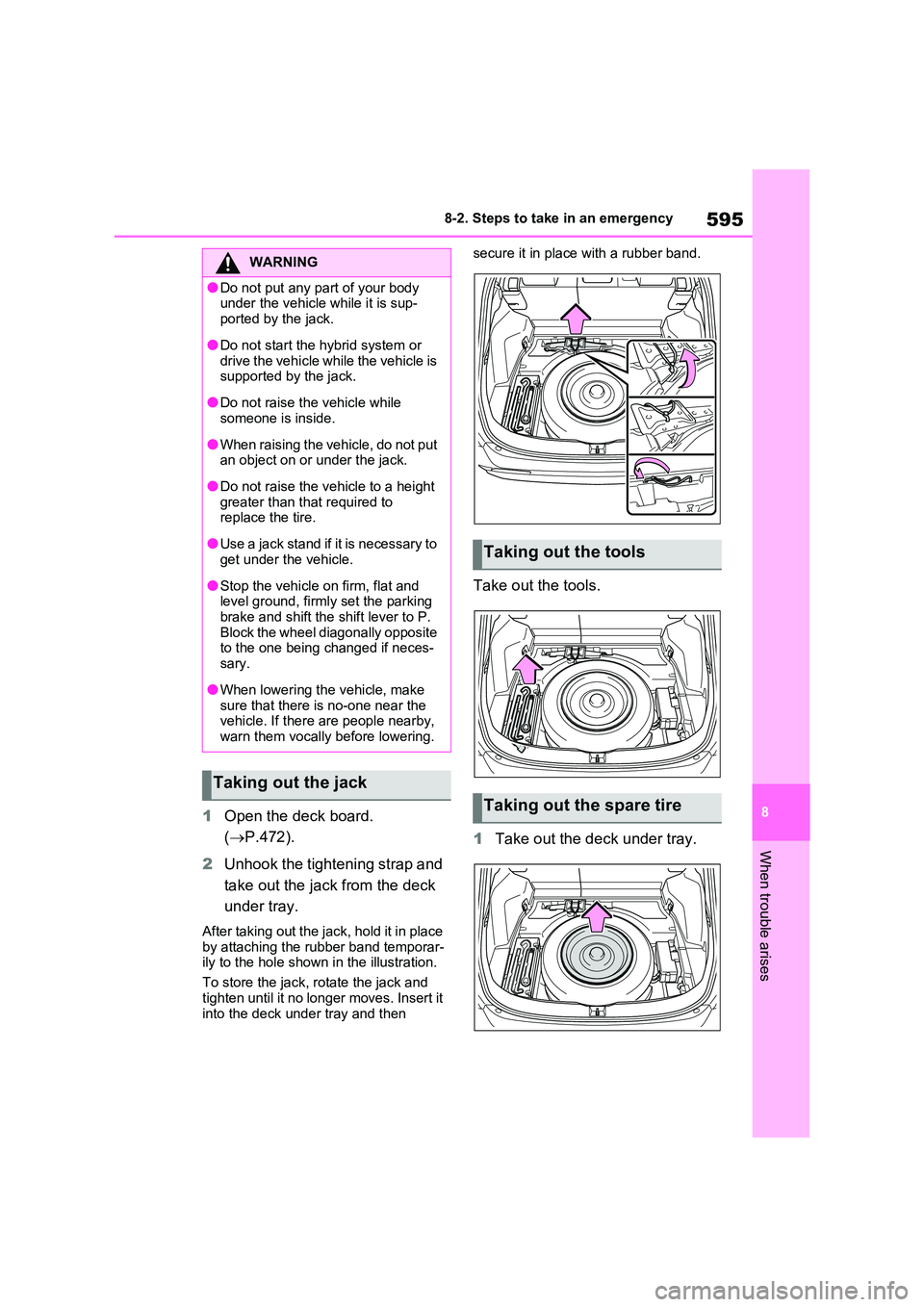
1 Open the deck board.
( P.472).
2 Unhook the tightening strap and
take out the jack from the deck
under tray.
After taking out the jack, hold it in place
by attaching the rubber band temporar- ily to the hole shown in the illustration.
To store the jack, rotate the jack and
tighten until it no longer moves. Insert it into the deck under tray and then
secure it in place with a rubber band.
Take out the tools.
1 Take out the deck under tray.
WARNING
●Do not put any part of your body under the vehicle while it is sup-
ported by the jack.
●Do not start the hybrid system or
drive the vehicle while the vehicle is supported by the jack.
●Do not raise the vehicle while someone is inside.
●When raising the vehicle, do not put an object on or under the jack.
●Do not raise the vehicle to a height greater than that required to replace the tire.
●Use a jack stand if it is necessary to get under the vehicle.
●Stop the vehicle on firm, flat and level ground, firmly set the parking
brake and shift the shift lever to P. Block the wheel diagonally opposite to the one being changed if neces-
sary.
●When lowering the vehicle, make
sure that there is no-one near the vehicle. If there are people nearby, warn them vocally before lowering.
Taking out the jack
Taking out the tools
Taking out the spare tire
Page 601 of 664
601
8
8-2. Steps to take in an emergency
When trouble arises
One of the following may be the
cause of the problem:
The AC charging cable may be
attached to the vehicle.
( P.135)
The electronic key may not be
functioning properly. ( P.604)
There may not be sufficient fuel
in the vehicle’s tank.
Refuel the vehicle. ( P.342)
There may be a malfunction in
the immobilizer system. ( P.76)
There may be a malfunction in
the steering lock system.
The hybrid system may be mal-
functioning due to an electrical
problem such as electronic key
battery depletion or a blown fuse.
However, depending on the type
of malfunction, an interim mea-
sure is available to start the
hybrid system. ( P.602)
There is a possibility that the
NOTICE
■Driving with tire chains and the compact spare tire
Do not fit tire chains to the compact spare tire.
Tire chains may damage the vehicle
body and adversely affect driving per- formance.
■When replacing the tires
When removing or fitting the wheels, tires or the tire pressure warning
valve and transmitter, contact any authorized Toyota retailer or Toyota authorized repairer, or any reliable
repairer as the tire pressure warning valve and transmitter may be dam-aged if not handled correctly.
If the hybrid system will
not start
Reasons for the hybrid system
not starting vary depending on
the situation. Check the follow-
ing and perform the appropri-
ate procedure:
The hybrid system will not
start even though the cor-
rect starting procedure is
being followed ( P.317)
Page 604 of 664
6048-2. Steps to take in an emergency
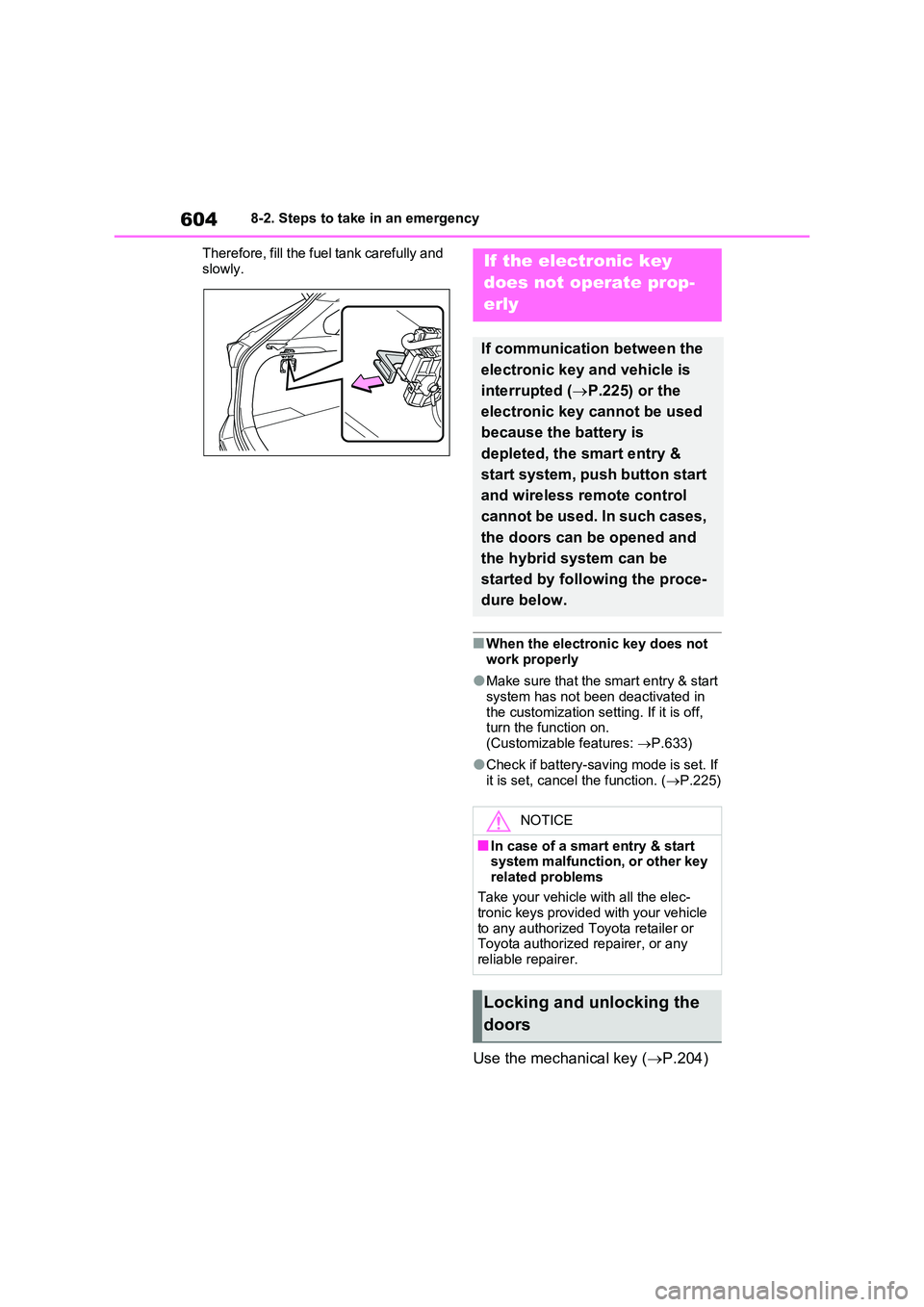
Therefore, fill the fuel tank carefully and
slowly.
■When the electronic key does not work properly
●Make sure that the smart entry & start system has not been deactivated in
the customization setting. If it is off, turn the function on. (Customizable features: P.633)
●Check if battery-saving mode is set. If it is set, cancel the function. ( P.225)
Use the mechanical key (P.204)
If the electronic key
does not operate prop-
erly
If communication between the
electronic key and vehicle is
interrupted ( P.225) or the
electronic key cannot be used
because the battery is
depleted, the smart entry &
start system, push button start
and wireless remote control
cannot be used. In such cases,
the doors can be opened and
the hybrid system can be
started by following the proce-
dure below.
NOTICE
■In case of a smart entry & start system malfunction, or other key
related problems
Take your vehicle with all the elec- tronic keys provided with your vehicle
to any authorized Toyota retailer or Toyota authorized repairer, or any reliable repairer.
Locking and unlocking the
doors
Page 605 of 664
605
8
8-2. Steps to take in an emergency
When trouble arises
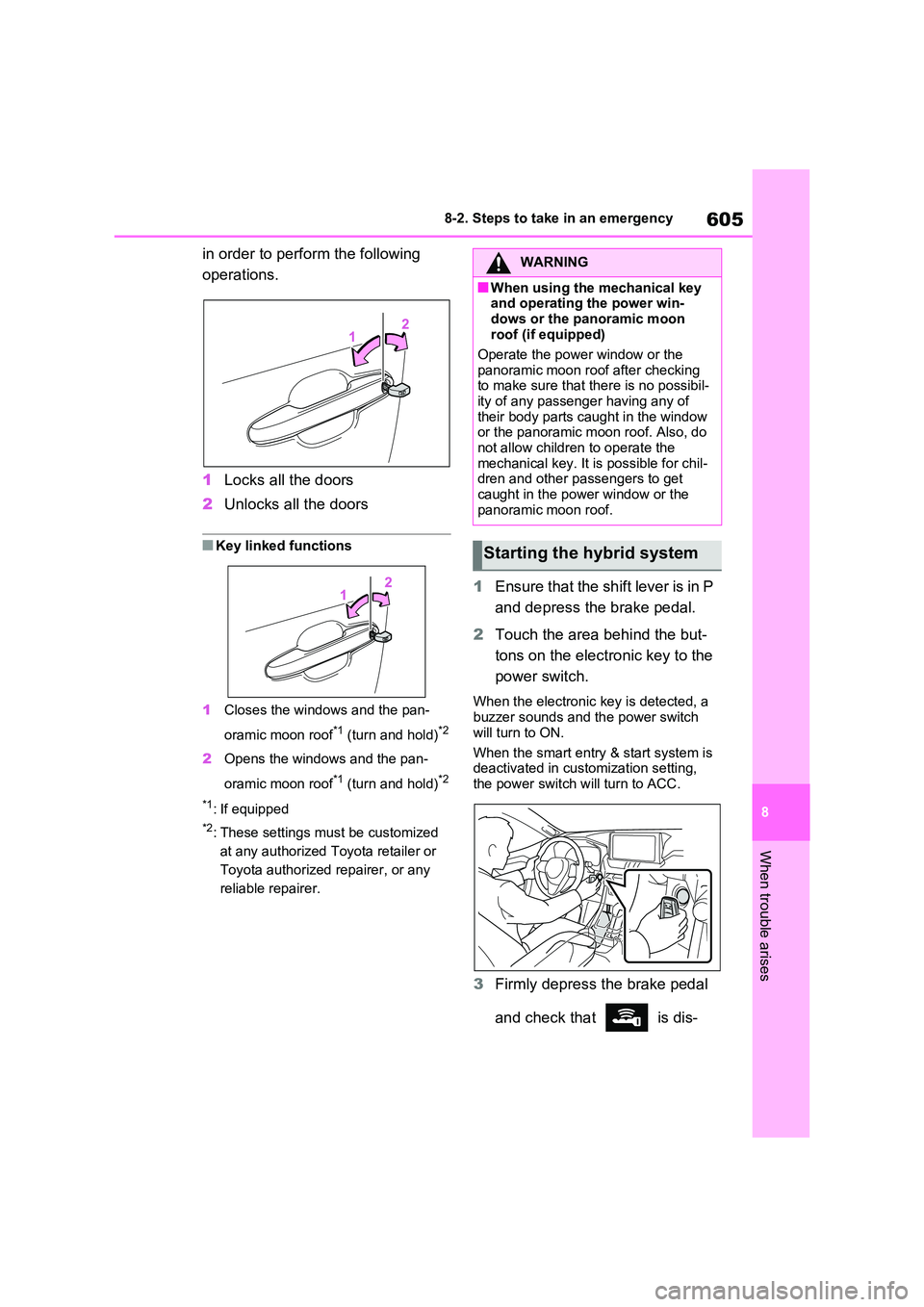
in order to perform the following
operations.
1 Locks all the doors
2 Unlocks all the doors
■Key linked functions
1 Closes the windows and the pan-
oramic moon roof*1 (turn and hold)*2
2 Opens the windows and the pan-
oramic moon roof*1 (turn and hold)*2
*1: If equipped
*2: These settings must be customized
at any authorized Toyota retailer or
Toyota authorized repairer, or any
reliable repairer.
1 Ensure that the shift lever is in P
and depress the brake pedal.
2 Touch the area behind the but-
tons on the electronic key to the
power switch.
When the electronic key is detected, a buzzer sounds and the power switch
will turn to ON.
When the smart entry & start system is deactivated in customization setting,
the power switch will turn to ACC.
3 Firmly depress the brake pedal
and check that is dis-
WARNING
■When using the mechanical key and operating the power win-
dows or the panoramic moon roof (if equipped)
Operate the power window or the
panoramic moon roof after checking to make sure that there is no possibil-ity of any passenger having any of
their body parts caught in the window or the panoramic moon roof. Also, do not allow children to operate the
mechanical key. It is possible for chil- dren and other passengers to get caught in the power window or the
panoramic moon roof.
Starting the hybrid system
Page 606 of 664
6068-2. Steps to take in an emergency
played on the multi-information
display.
4 Press the power switch shortly
and firmly.
In the event that the hybrid system
still cannot be started, contact any
authorized Toyota retailer or Toyota
authorized repairer, or any reliable
repairer.
■Stopping the hybrid system
Shift the shift lever to P, set the parking
brake and press the power switch as you normally do when stopping the hybrid system.
■Replacing the key battery
As the above procedure is a temporary measure, it is recommended that the electronic key battery be replaced
immediately when the battery is depleted. ( P.543)
■Alarm (if equipped)
Using the mechanical key to lock the
doors will not set the alarm system.
If a door is unlocked using the mechani- cal key when the alarm system is set,
the alarm may be triggered. ( P.78)
■Changing power switch modes
Release the brake pedal and press the power switch in step 3 above.
The hybrid system does not start and modes will be changed each time the switch is pressed. ( P.320)
If you have a set of jumper (or
booster) cables and a second vehi-
cle with a 12-volt battery, you can
jump start your vehicle by following
the steps below.
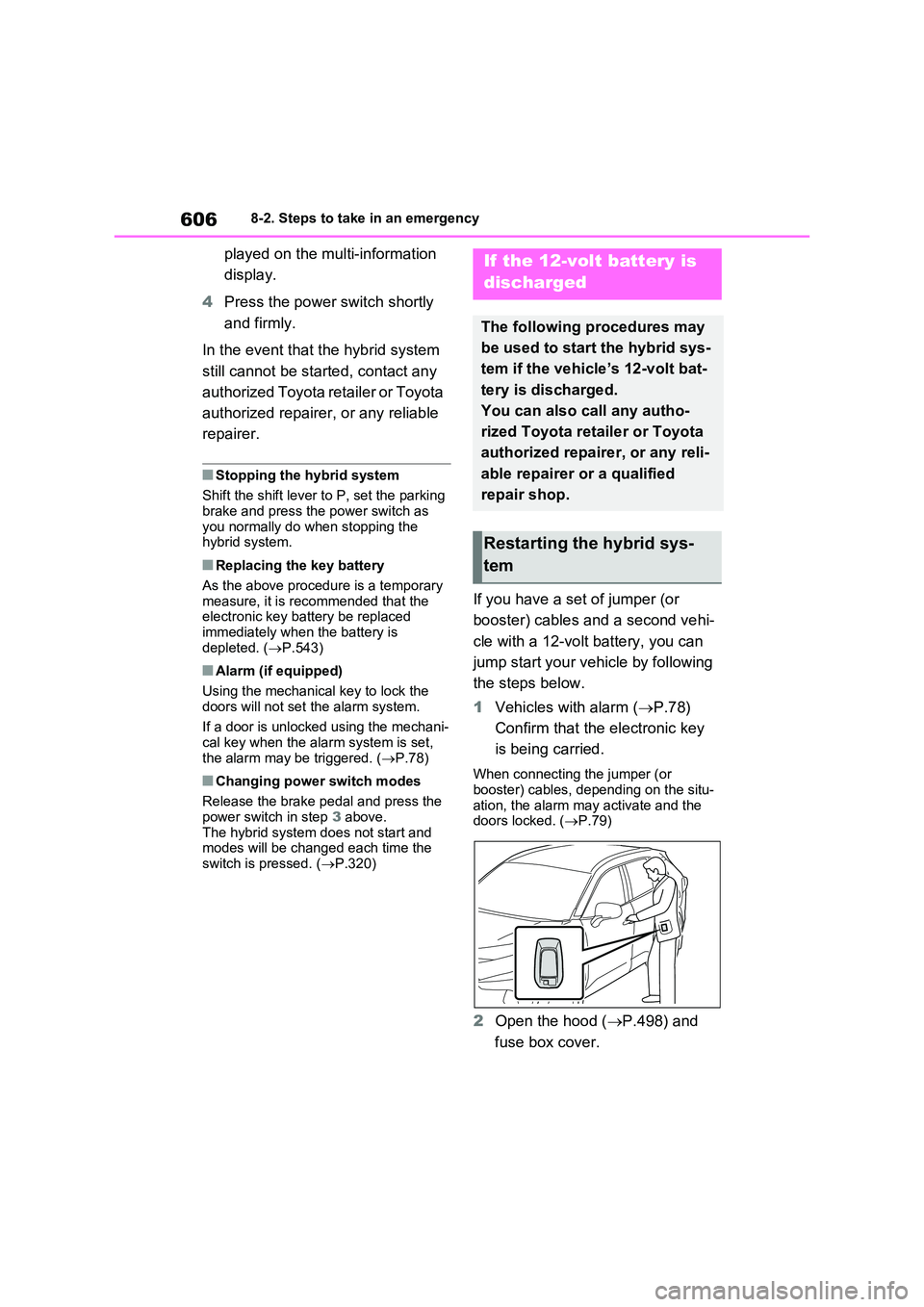
1 Vehicles with alarm (P.78)
Confirm that the electronic key
is being carried.
When connecting the jumper (or booster) cables, depending on the situ-
ation, the alarm may activate and the doors locked. ( P.79)
2Open the hood (P.498) and
fuse box cover.
If the 12-volt battery is
discharged
The following procedures may
be used to start the hybrid sys-
tem if the vehicle’s 12-volt bat-
tery is discharged.
You can also call any autho-
rized Toyota retailer or Toyota
authorized repairer, or any reli-
able repairer or a qualified
repair shop.
Restarting the hybrid sys-
tem
Page 607 of 664
607
8
8-2. Steps to take in an emergency
When trouble arises
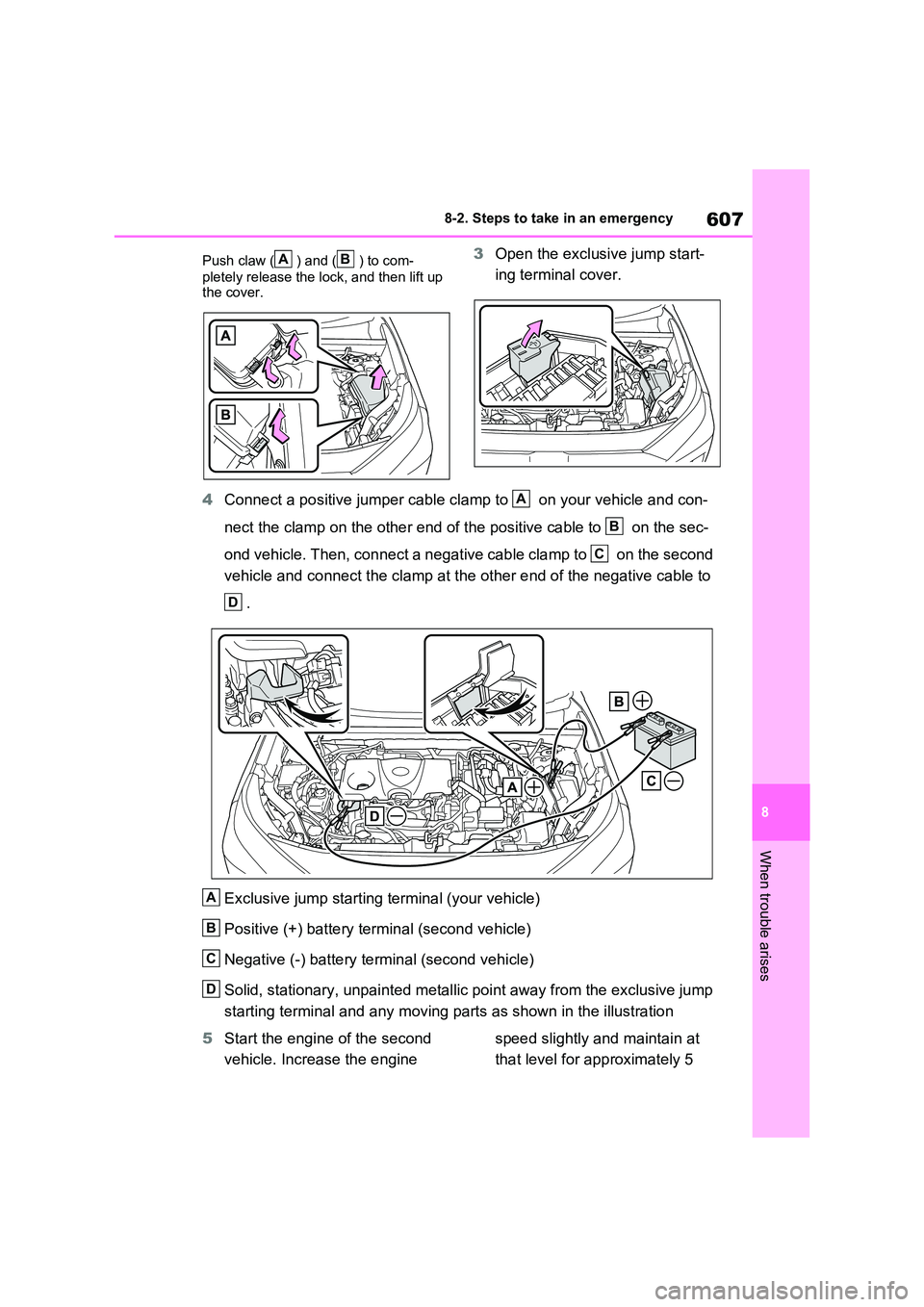
Push claw ( ) and ( ) to com-
pletely release the lock, and then lift up the cover.
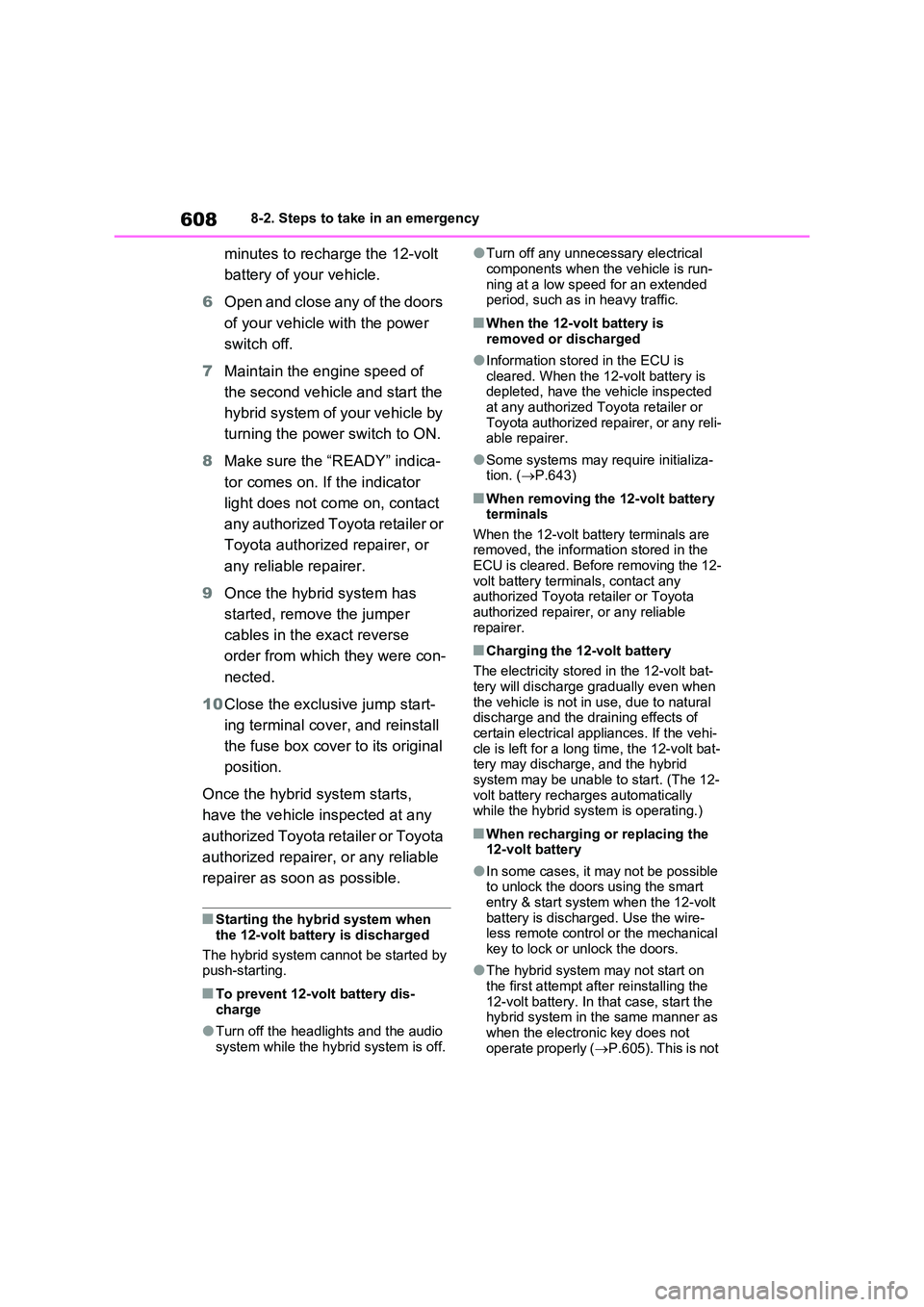
3 Open the exclusive jump start-
ing terminal cover.
4 Connect a positive jumper cable clamp to on your vehicle and con-
nect the clamp on the other end of the positive cable to on the sec-
ond vehicle. Then, connect a negative cable clamp to on the second
vehicle and connect the clamp at the other end of the negative cable to
.
Exclusive jump starting terminal (your vehicle)
Positive (+) battery terminal (second vehicle)
Negative (-) battery terminal (second vehicle)
Solid, stationary, unpainted metallic point away from the exclusive jump
starting terminal and any moving parts as shown in the illustration
5 Start the engine of the second
vehicle. Increase the engine
speed slightly and maintain at
that level for approximately 5
AB
A
B
C
D
A
B
C
D
Page 608 of 664
6088-2. Steps to take in an emergency
minutes to recharge the 12-volt
battery of your vehicle.
6 Open and close any of the doors
of your vehicle with the power
switch off.
7 Maintain the engine speed of
the second vehicle and start the
hybrid system of your vehicle by
turning the power switch to ON.
8 Make sure the “READY” indica-
tor comes on. If the indicator
light does not come on, contact
any authorized Toyota retailer or
Toyota authorized repairer, or
any reliable repairer.
9 Once the hybrid system has
started, remove the jumper
cables in the exact reverse
order from which they were con-
nected.
10 Close the exclusive jump start-
ing terminal cover, and reinstall
the fuse box cover to its original
position.
Once the hybrid system starts,
have the vehicle inspected at any
authorized Toyota retailer or Toyota
authorized repairer, or any reliable
repairer as soon as possible.
■Starting the hybrid system when
the 12-volt battery is discharged
The hybrid system cannot be started by push-starting.
■To prevent 12-volt battery dis-
charge
●Turn off the headlights and the audio
system while the hybrid system is off.
●Turn off any unnecessary electrical
components when the vehicle is run- ning at a low speed for an extended period, such as in heavy traffic.
■When the 12-volt battery is
removed or discharged
●Information stored in the ECU is
cleared. When the 12-volt battery is depleted, have the vehicle inspected at any authorized Toyota retailer or
Toyota authorized repairer, or any reli- able repairer.
●Some systems may require initializa-tion. ( P.643)
■When removing the 12-volt battery terminals
When the 12-volt battery terminals are removed, the information stored in the ECU is cleared. Before removing the 12-
volt battery terminals, contact any authorized Toyota retailer or Toyota authorized repairer, or any reliable
repairer.
■Charging the 12-volt battery
The electricity stored in the 12-volt bat- tery will discharge gradually even when
the vehicle is not in use, due to natural discharge and the draining effects of certain electrical appliances. If the vehi-
cle is left for a long time, the 12-volt bat- tery may discharge, and the hybrid system may be unable to start. (The 12-
volt battery recharges automatically while the hybrid system is operating.)
■When recharging or replacing the 12-volt battery
●In some cases, it may not be possible to unlock the doors using the smart
entry & start system when the 12-volt battery is discharged. Use the wire-less remote control or the mechanical
key to lock or unlock the doors.
●The hybrid system may not start on
the first attempt after reinstalling the 12-volt battery. In that case, start the hybrid system in the same manner as
when the electronic key does not operate properly ( P.605). This is not