lock TOYOTA VERSO S 2011 Owners Manual
[x] Cancel search | Manufacturer: TOYOTA, Model Year: 2011, Model line: VERSO S, Model: TOYOTA VERSO S 2011Pages: 664, PDF Size: 160.56 MB
Page 619 of 664
619
9
9-1. Specifications
Vehicle specifications
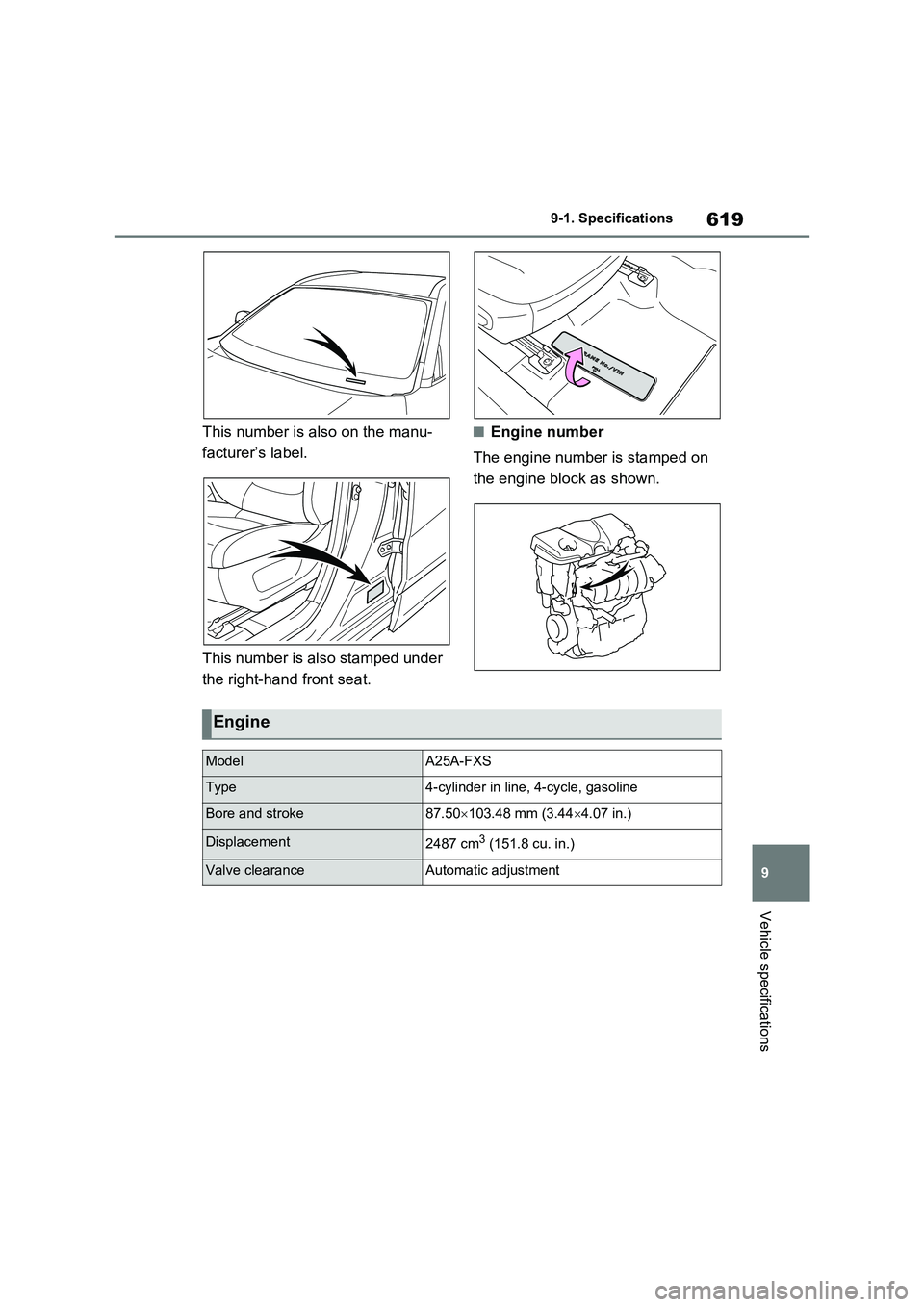
This number is also on the manu-
facturer’s label.
This number is also stamped under
the right-hand front seat.
■Engine number
The engine number is stamped on
the engine block as shown.
Engine
ModelA25A-FXS
Type4-cylinder in line, 4-cycle, gasoline
Bore and stroke87.50 103.48 mm (3.444.07 in.)
Displacement2487 cm3 (151.8 cu. in.)
Valve clearanceAutomatic adjustment
Page 630 of 664
6309-2. Customization
Some function settings are changed simultaneously with other functions
being customized. Contact any authorized Toyota retailer or Toyota autho-
rized repairer, or any reliable repairer for further details.
Vehicles with navigation system or multimedia system: Settings that can
be changed using the navigation system or multimedia system
Settings that can be changed using the multi-information display
Settings that can be changed by any authorized Toyota retailer or
Toyota authorized repairer, or any reliable repairer
Definition of symbols: O = Available, – =Not available
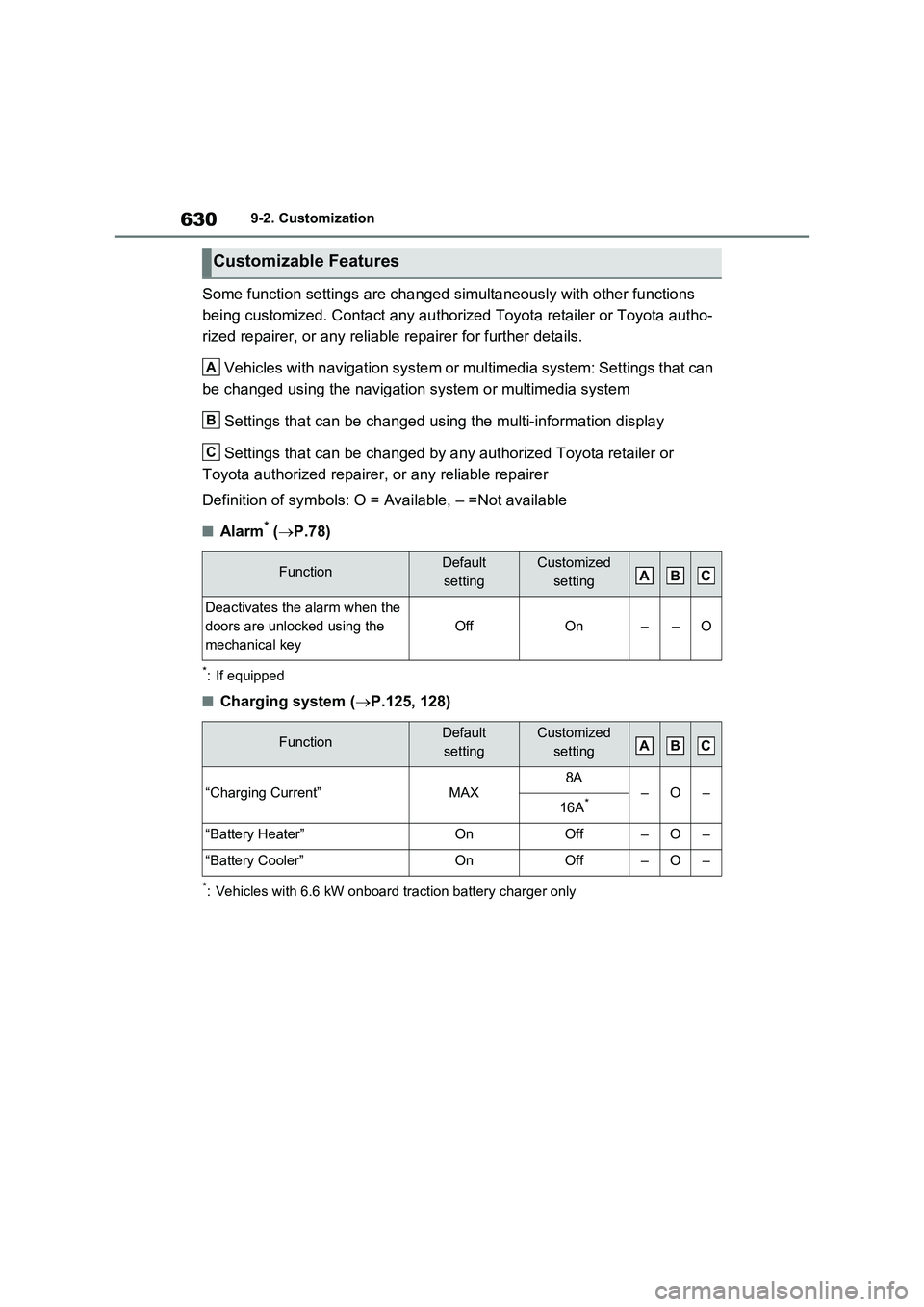
■Alarm* (P.78)
*: If equipped
■Charging system (P.125, 128)
*: Vehicles with 6.6 kW onboard traction battery charger only
Customizable Features
FunctionDefault
settingCustomized
setting
Deactivates the alarm when the
doors are unlocked using the
mechanical key
OffOn––O
FunctionDefault
settingCustomized
setting
“Charging Current”MAX8A–O–16A*
“Battery Heater”OnOff–O–
“Battery Cooler”OnOff–O–
A
B
C
ABC
ABC
Page 632 of 664
6329-2. Customization
*1: For details about each function: P.186
*2: The default setting varies according to country.
*3: Available languages may differ depending on the target region.
*4: If equipped
*5: This can only be set if GPS calibration of clock is turned off in the multimedia sys-
tem settings.
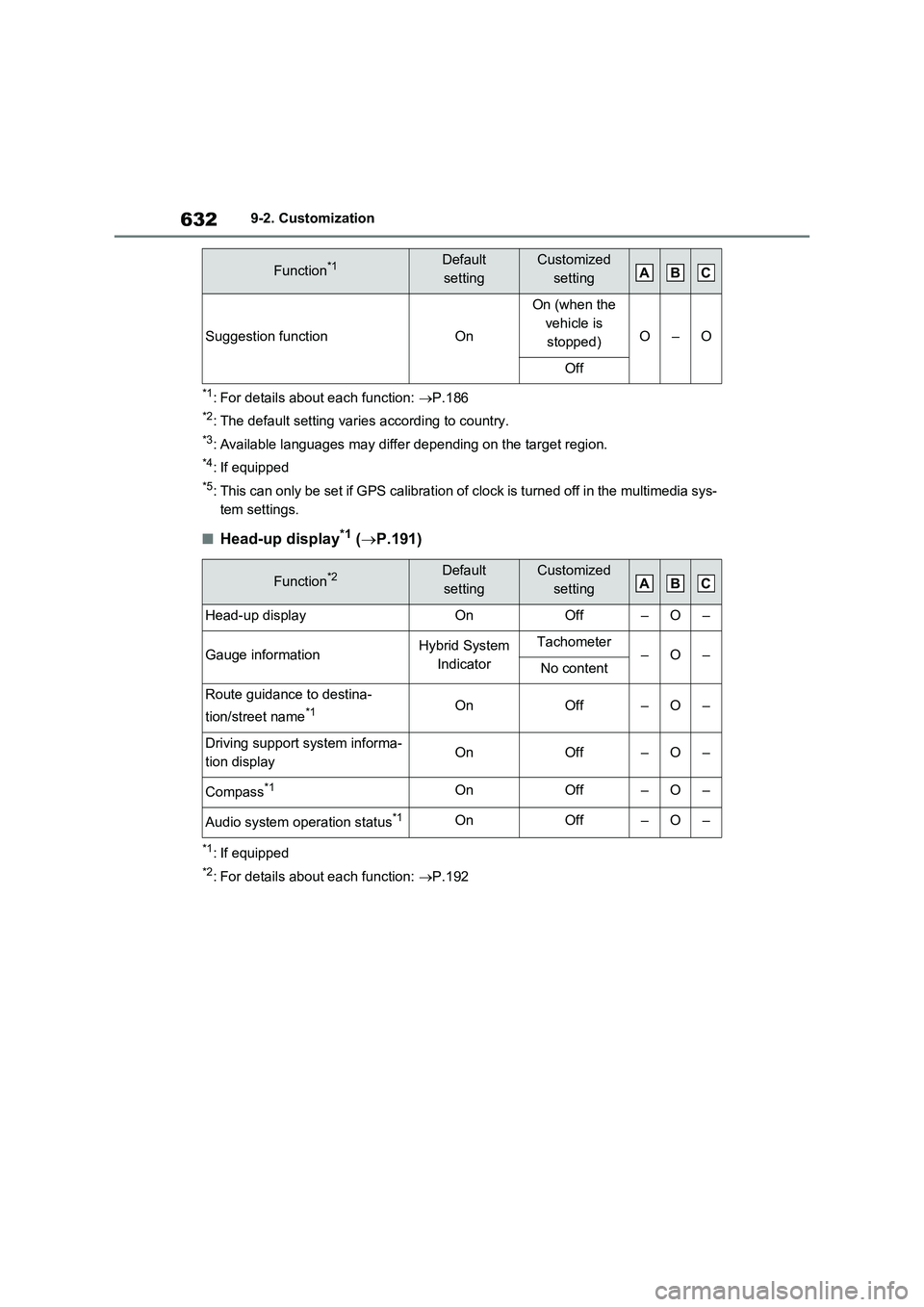
■Head-up display*1 (P.191)
*1: If equipped
*2: For details about each function: P.192
Suggestion functionOn
On (when the
vehicle is
stopped)
O–O
Off
Function*2Default
settingCustomized
setting
Head-up displayOnOff–O–
Gauge informationHybrid System
IndicatorTachometer–O–No content
Route guidance to destina-
tion/street name
*1OnOff–O–
Driving support system informa-
tion displayOnOff–O–
Compass*1OnOff–O–
Audio system operation status*1OnOff–O–
Function*1Default
settingCustomized
settingABC
ABC
Page 633 of 664
633
9 9-2. Customization
Vehicle specifications
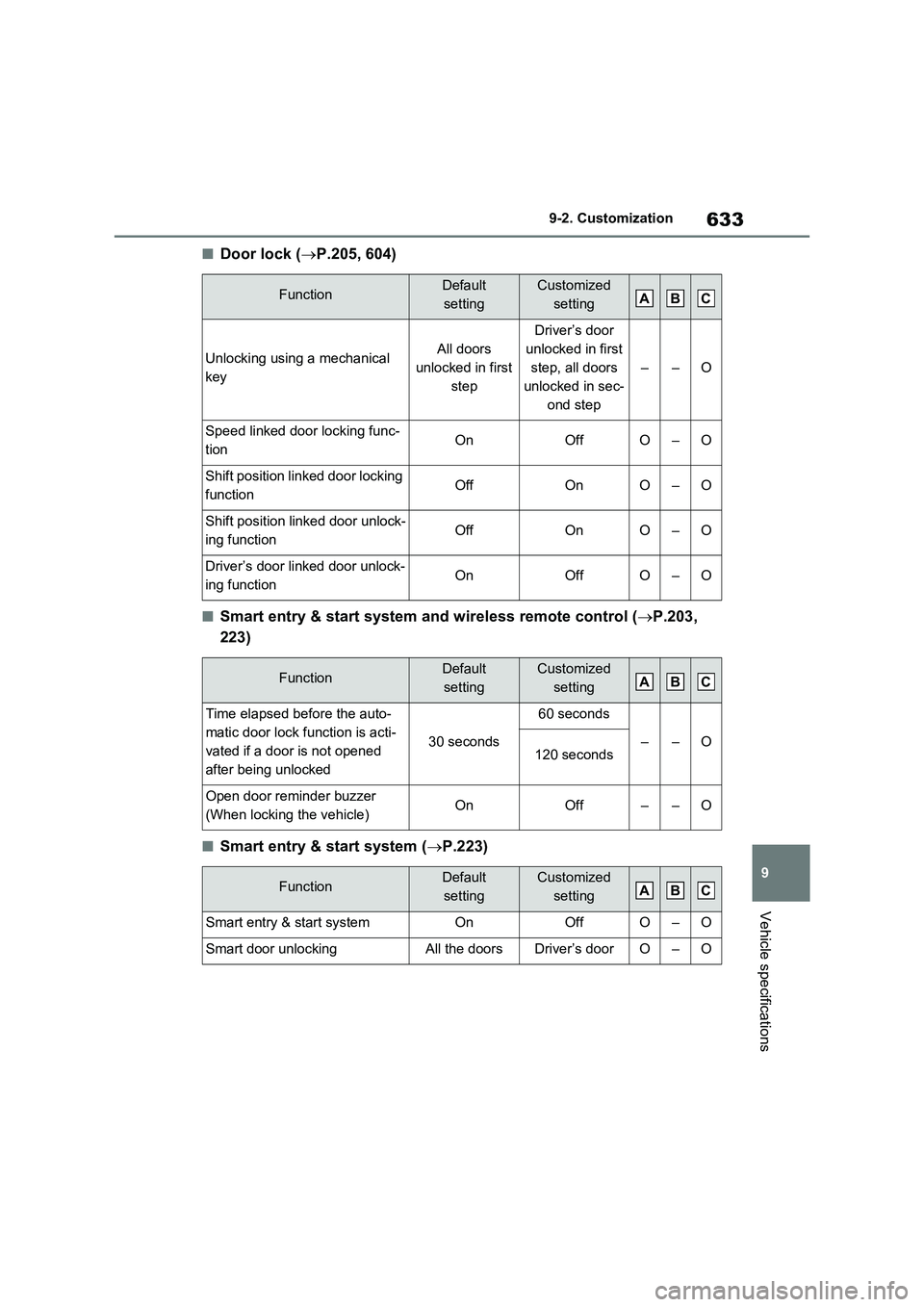
■Door lock (P.205, 604)
■Smart entry & start system and wireless remote control (P.203,
223)
■Smart entry & start system (P.223)
FunctionDefault
settingCustomized
setting
Unlocking using a mechanical
keyAll doors
unlocked in first
step
Driver’s door
unlocked in first
step, all doors
unlocked in sec-
ond step
––O
Speed linked door locking func-
tionOnOffO–O
Shift position linked door locking
functionOffOnO–O
Shift position linked door unlock-
ing functionOffOnO–O
Driver’s door linked door unlock-
ing functionOnOffO–O
FunctionDefault
settingCustomized
setting
Time elapsed before the auto-
matic door lock function is acti-
vated if a door is not opened
after being unlocked
30 seconds
60 seconds
––O120 seconds
Open door reminder buzzer
(When locking the vehicle)OnOff––O
FunctionDefault
settingCustomized
setting
Smart entry & start systemOnOffO–O
Smart door unlockingAll the doorsDriver’s doorO–O
ABC
ABC
ABC
Page 634 of 664
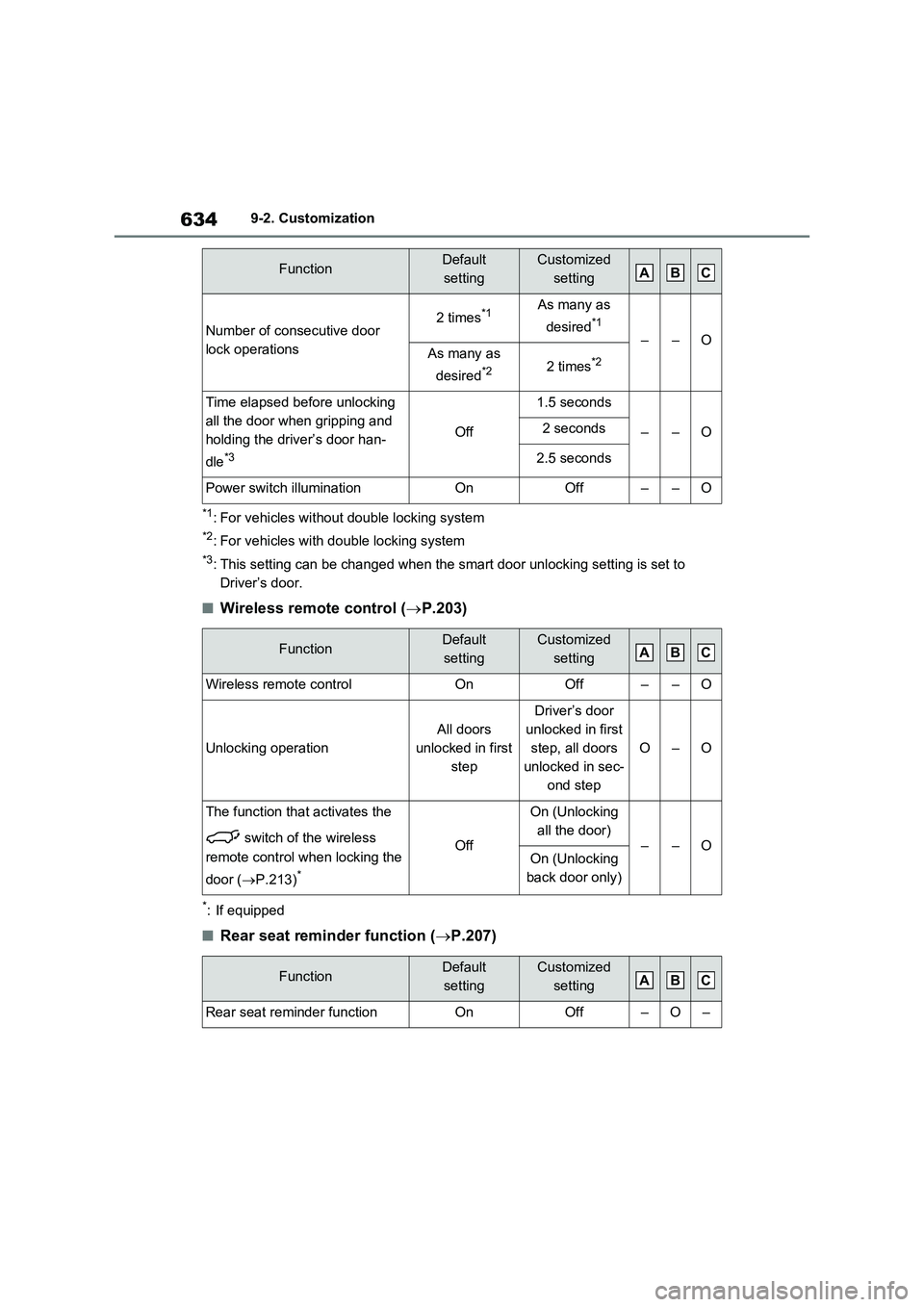
6349-2. Customization
*1: For vehicles without double locking system
*2: For vehicles with double locking system
*3: This setting can be changed when the smart door unlocking setting is set to
Driver’s door.
■Wireless remote control (P.203)
*: If equipped
■Rear seat reminder function (P.207)
Number of consecutive door
lock operations2 times*1As many as
desired
*1
––OAs many as
desired
*22 times*2
Time elapsed before unlocking
all the door when gripping and
holding the driver’s door han-
dle
*3
Off
1.5 seconds
––O2 seconds
2.5 seconds
Power switch illuminationOnOff––O
FunctionDefault
settingCustomized
setting
Wireless remote controlOnOff––O
Unlocking operation
All doors
unlocked in first
step
Driver’s door
unlocked in first
step, all doors
unlocked in sec-
ond step
O–O
The function that activates the
switch of the wireless
remote control when locking the
door (P.213)
*
Off
On (Unlocking
all the door)
––OOn (Unlocking
back door only)
FunctionDefault
settingCustomized
setting
Rear seat reminder functionOnOff–O–
FunctionDefault
settingCustomized
settingABC
ABC
ABC
Page 636 of 664
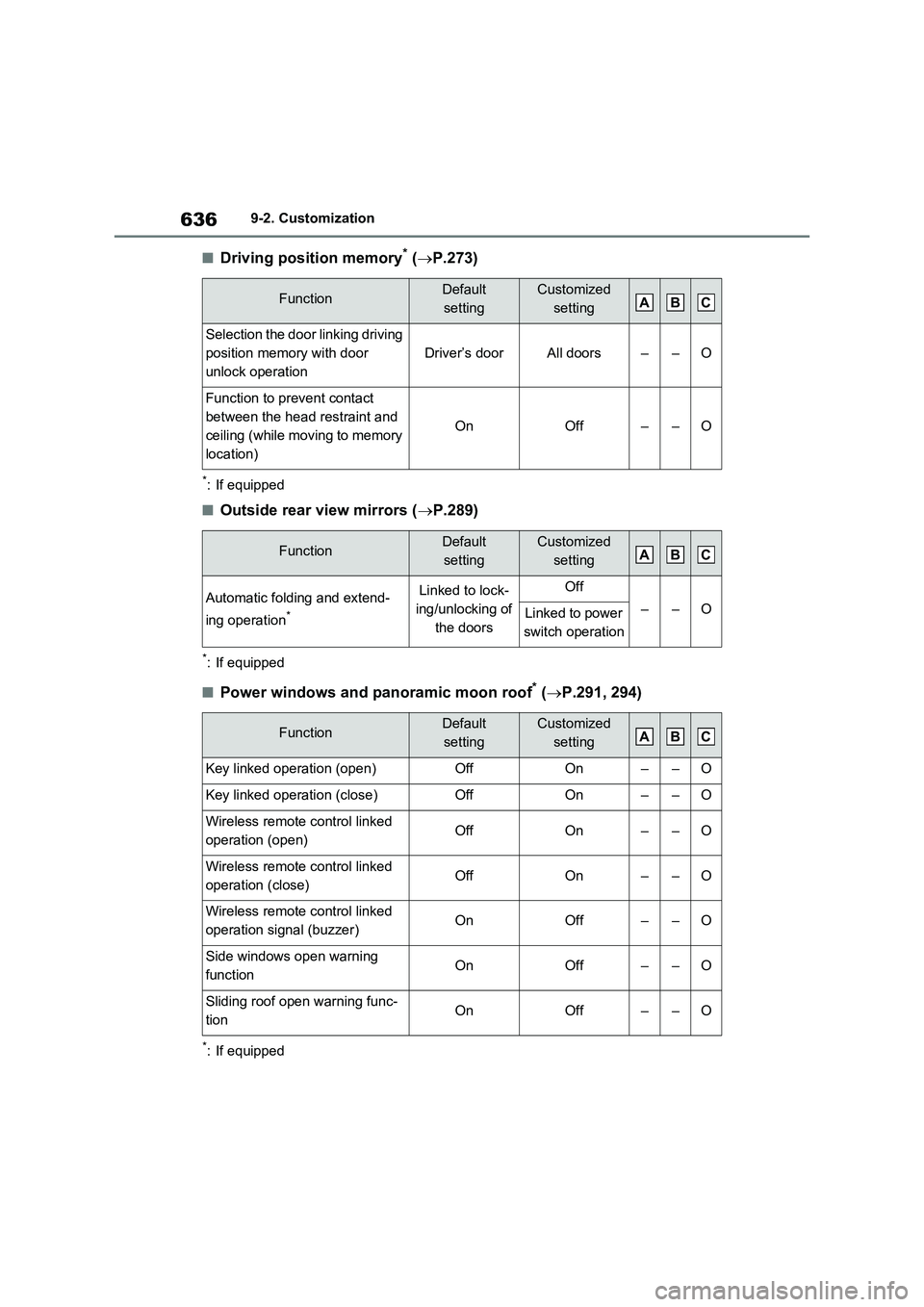
6369-2. Customization
■Driving position memory* (P.273)
*: If equipped
■Outside rear view mirrors (P.289)
*: If equipped
■Power windows and panoramic moon roof* (P.291, 294)
*: If equipped
FunctionDefault
settingCustomized
setting
Selection the door linking driving
position memory with door
unlock operation
Driver’s doorAll doors––O
Function to prevent contact
between the head restraint and
ceiling (while moving to memory
location)
OnOff––O
FunctionDefault
settingCustomized
setting
Automatic folding and extend-
ing operation
*
Linked to lock-
ing/unlocking of
the doorsOff
––OLinked to power
switch operation
FunctionDefault
settingCustomized
setting
Key linked operation (open)OffOn––O
Key linked operation (close)OffOn––O
Wireless remote control linked
operation (open)OffOn––O
Wireless remote control linked
operation (close)OffOn––O
Wireless remote control linked
operation signal (buzzer)OnOff––O
Side windows open warning
functionOnOff––O
Sliding roof open warning func-
tion OnOff––O
ABC
ABC
ABC
Page 641 of 664
641
9 9-2. Customization
Vehicle specifications
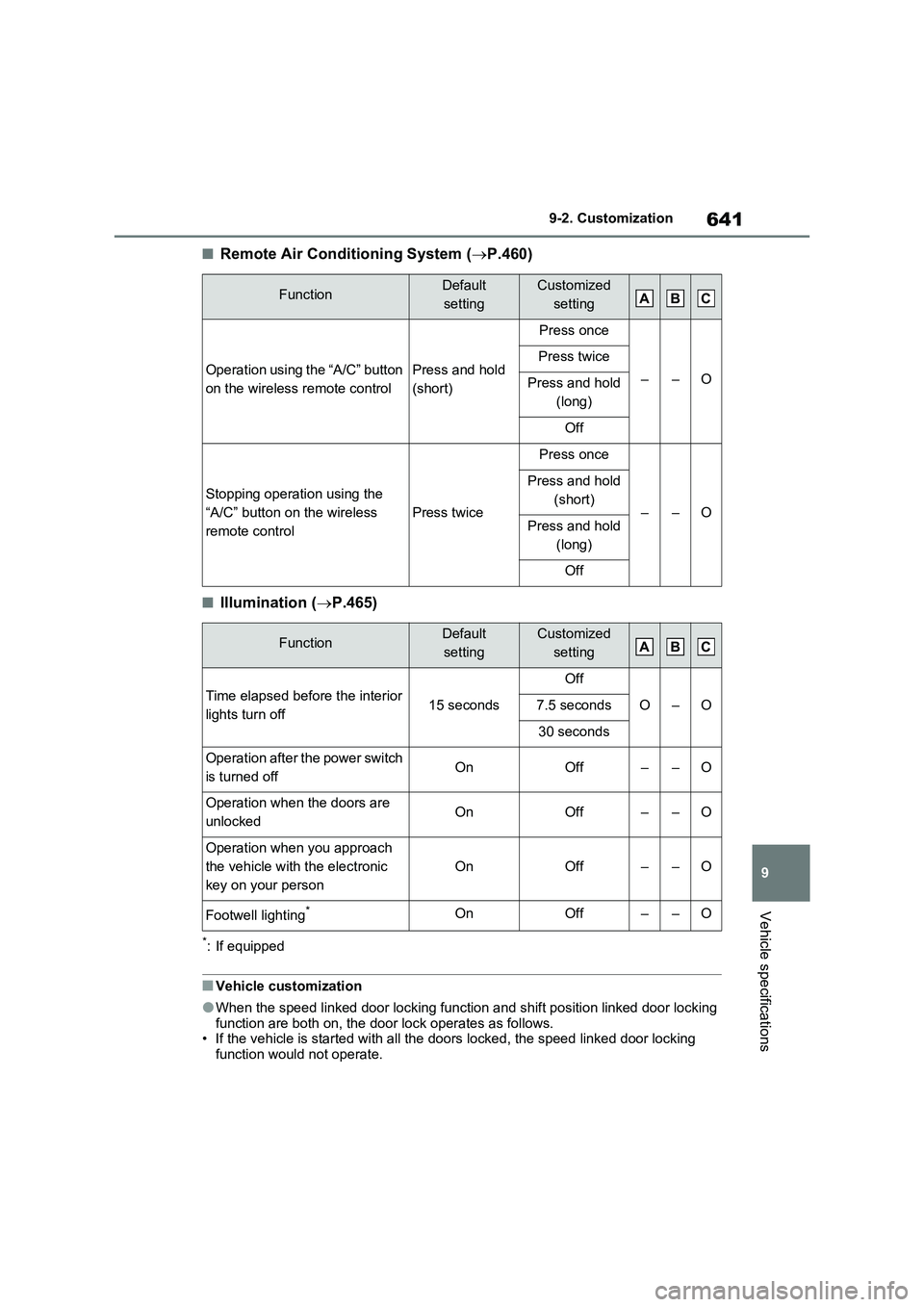
■Remote Air Conditioning System (P.460)
■Illumination (P.465)
*: If equipped
■Vehicle customization
●When the speed linked door locking function and shift position linked door locking
function are both on, the door lock operates as follows.
• If the vehicle is started with all the doors locked, the speed linked door locking
function would not operate.
FunctionDefault
settingCustomized
setting
Operation using the “A/C” button
on the wireless remote controlPress and hold
(short)
Press once
––O
Press twice
Press and hold
(long)
Off
Stopping operation using the
“A/C” button on the wireless
remote control
Press twice
Press once
––O
Press and hold
(short)
Press and hold
(long)
Off
FunctionDefault
settingCustomized
setting
Time elapsed before the interior
lights turn off15 seconds
Off
O–O7.5 seconds
30 seconds
Operation after the power switch
is turned offOnOff––O
Operation when the doors are
unlockedOnOff––O
Operation when you approach
the vehicle with the electronic
key on your person
OnOff––O
Footwell lighting*OnOff––O
ABC
ABC
Page 642 of 664
6429-2. Customization
• If the vehicle is started with any door unlocked, the speed linked door locking func-
tion will operate.
• When shifting the shift lever to any position other than P, all the doors will be
locked.
●When the smart entry & start system is off, the selecting door to unlock cannot be
customized.
●When the doors remain closed after unlocking the doors and the automatic door
lock function is activated, the signals will be generated in accordance with the
Operation signal (emergency flashers) settings.
Page 646 of 664
646What to do if... (Troubleshooting)
1-1.What to d o if... (Tro ubleshoo ting)What to do if... (Troubleshooting)
If you lose your mechanical keys,
new genuine mechanical keys
can be made by any authorized
Toyota retailer or Toyota autho-
rized repairer, or any reliable
repairer. ( P.603)
If you lose your electronic keys,
the risk of vehicle theft increases
significantly. Contact any autho-
rized Toyota retailer or Toyota
authorized repairer, or any reli-
able repairer immediately.
( P.603)
Is the key battery weak or
depleted? ( P.543)
Is the power switch in ON?
When locking the doors, turn the
power switch off. ( P.320)
Is the electronic key left inside
the vehicle?
When locking the doors, make
sure that you have the electronic
key on your person.
The function may not operate
properly due to the condition of
the radio wave. ( P.225)
Is the child-protector lock set?
The rear door cannot be opened
from inside the vehicle when the
lock is set. Open the rear door
from outside and then unlock the
child-protector lock. ( P.209)
Did you press the power switch
while firmly depressing the brake
pedal? ( P.317)
Is the shift lever in P? (P.317)
Is the electronic key anywhere
detectable inside the vehicle?
( P.224)
Is the steering wheel unlocked?
( P.318)
Is the electronic key battery
weak or depleted?
In this case, the hybrid system
can be started in a temporary
If you have a problem, check
the following before contacting
any authorized Toyota retailer
or Toyota authorized repairer,
or any reliable repairer.
The doors cannot be locked,
unlocked, opened or closed
You lose your keys
The doors cannot be locked
or unlocked
The rear door cannot be
opened
If you think something is
wrong
The hybrid system does not
start
Page 647 of 664
647What to do if... (Troubleshooting)
way. (P.605)
Is the 12-volt battery dis-
charged? ( P.606)
Is the power switch in ON? If you
cannot release the shift lever by
depressing the brake pedal with
the power switch in ON.
( P.323)
It is locked automatically to pre-
vent theft of the vehicle.
( P.318)
Is the window lock switch
pressed?
The power window except for the
one at the driver’s seat cannot
be operated if the window lock
switch is pressed. ( P.293)
The auto power off function will
be operated if the vehicle is left
in ACC or ON (the hybrid system
is not operating) for a period of
time. ( P.320)
The seat belt reminder light is
flashing
Are the driver and the passengers
wearing the seat belts? ( P.575, 576)
The parking brake indicator is on
Is the parking brake released?
( P.326)
Depending on the situation, other
types of warning buzzer may also
sound. ( P.568, 578)
Did anyone inside the vehicle
open a door during setting the
alarm?
The sensor detects it and the
alarm sounds. ( P.78)
To stop the alarm, turn the power
switch to ON or start the hybrid system.
Is the message displayed on the
multi-information display?
Check the message on the multi-
information display. ( P.578)
When a warning light turns on or
a warning message is displayed,
The shift lever cannot be
shifted from P even if you
depress the brake pedal
The steering wheel cannot
be turned after the hybrid
system is stopped
The windows do not open or
close by operating the
power window switches
The power switch is turned
off automatically
A warning buzzer sounds
during driving
An alarm is activated and the
horn sounds (if equipped)
A warning buzzer sounds
when leaving the vehicle
A warning light turns on or a
warning message is dis-
played