lane assist TOYOTA VERSO S 2011 User Guide
[x] Cancel search | Manufacturer: TOYOTA, Model Year: 2011, Model line: VERSO S, Model: TOYOTA VERSO S 2011Pages: 664, PDF Size: 160.56 MB
Page 366 of 664
3665-5. Using the driving support systems
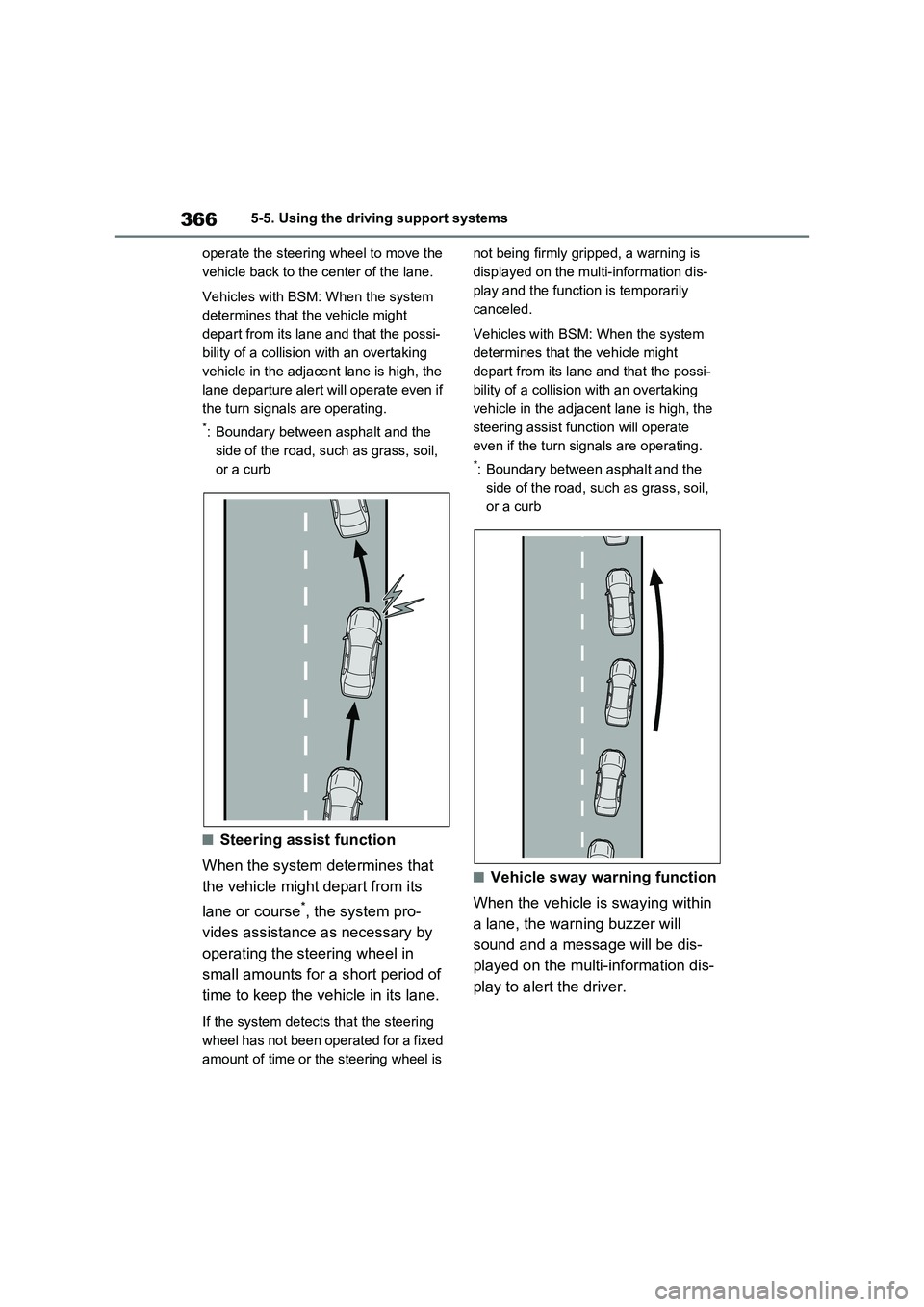
operate the steering wheel to move the
vehicle back to the center of the lane.
Vehicles with BSM: When the system
determines that the vehicle might
depart from its lane and that the possi-
bility of a collision with an overtaking
vehicle in the adjacent lane is high, the
lane departure alert will operate even if
the turn signals are operating.
*: Boundary between asphalt and the
side of the road, such as grass, soil,
or a curb
■Steering assist function
When the system determines that
the vehicle might depart from its
lane or course
*, the system pro-
vides assistance as necessary by
operating the steering wheel in
small amounts for a short period of
time to keep the vehicle in its lane.
If the system detects that the steering
wheel has not been operated for a fixed
amount of time or the steering wheel is not being firmly gripped, a warning is
displayed on the multi-information dis-
play and the function is temporarily
canceled.
Vehicles with BSM: When the system
determines that the vehicle might
depart from its lane and that the possi-
bility of a collision with an overtaking
vehicle in the adjacent lane is high, the
steering assist function will operate
even if the turn signals are operating.
*: Boundary between asphalt and the
side of the road, such as grass, soil,
or a curb
■Vehicle sway warning function
When the vehicle is swaying within
a lane, the warning buzzer will
sound and a message will be dis-
played on the multi-information dis-
play to alert the driver.
Page 367 of 664
367
5 5-5. Using the driving support systems
Driving
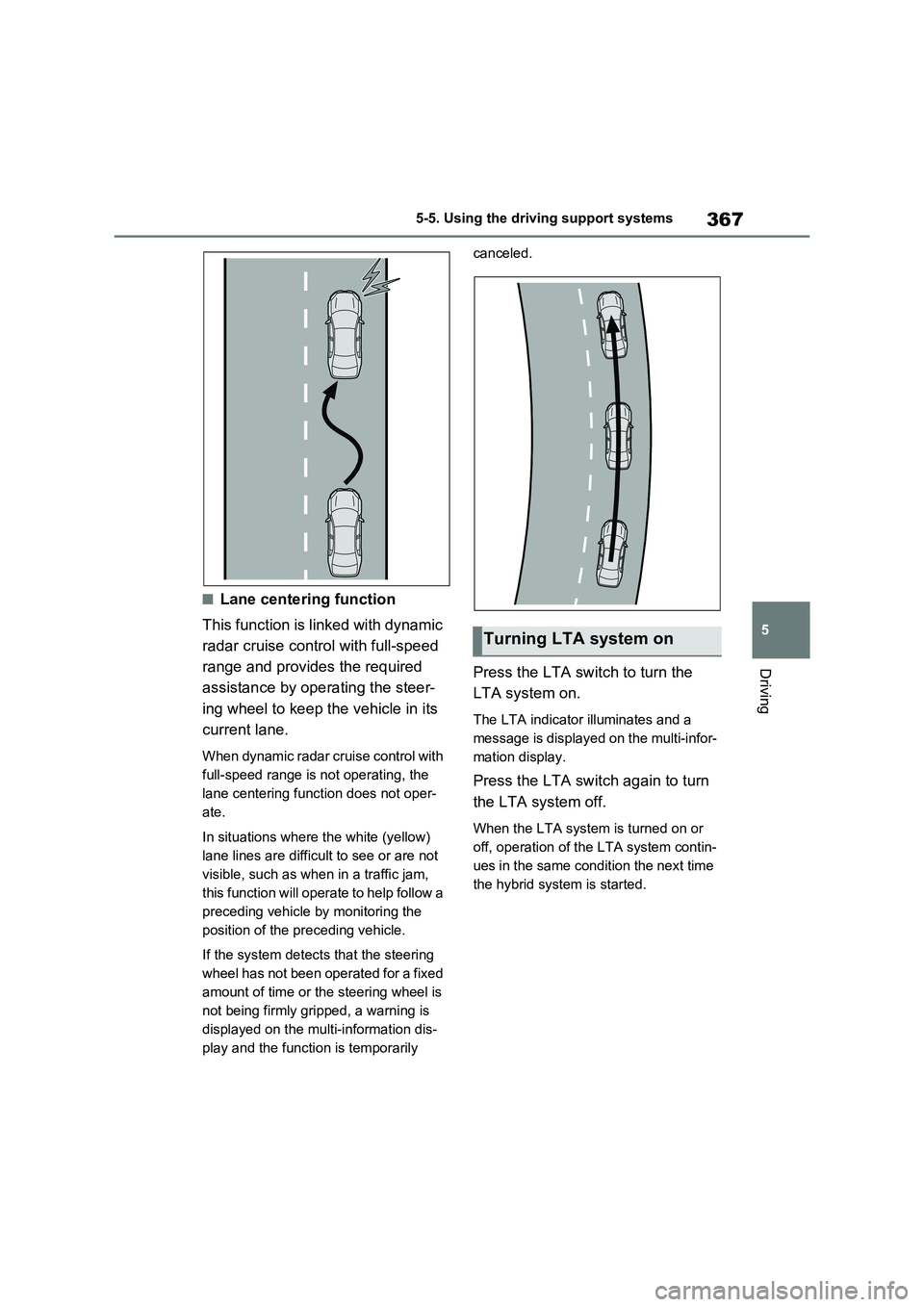
■Lane centering function
This function is linked with dynamic
radar cruise control with full-speed
range and provides the required
assistance by operating the steer-
ing wheel to keep the vehicle in its
current lane.
When dynamic radar cruise control with
full-speed range is not operating, the
lane centering function does not oper-
ate.
In situations where the white (yellow)
lane lines are difficult to see or are not
visible, such as when in a traffic jam,
this function will operate to help follow a
preceding vehicle by monitoring the
position of the preceding vehicle.
If the system detects that the steering
wheel has not been operated for a fixed
amount of time or the steering wheel is
not being firmly gripped, a warning is
displayed on the multi-information dis-
play and the function is temporarily canceled.
Press the LTA switch to turn the
LTA system on.
The LTA indicator illuminates and a
message is displayed on the multi-infor-
mation display.
Press the LTA switch again to turn
the LTA system off.
When the LTA system is turned on or
off, operation of the LTA system contin-
ues in the same condition the next time
the hybrid system is started.
Turning LTA system on
Page 368 of 664
3685-5. Using the driving support systems
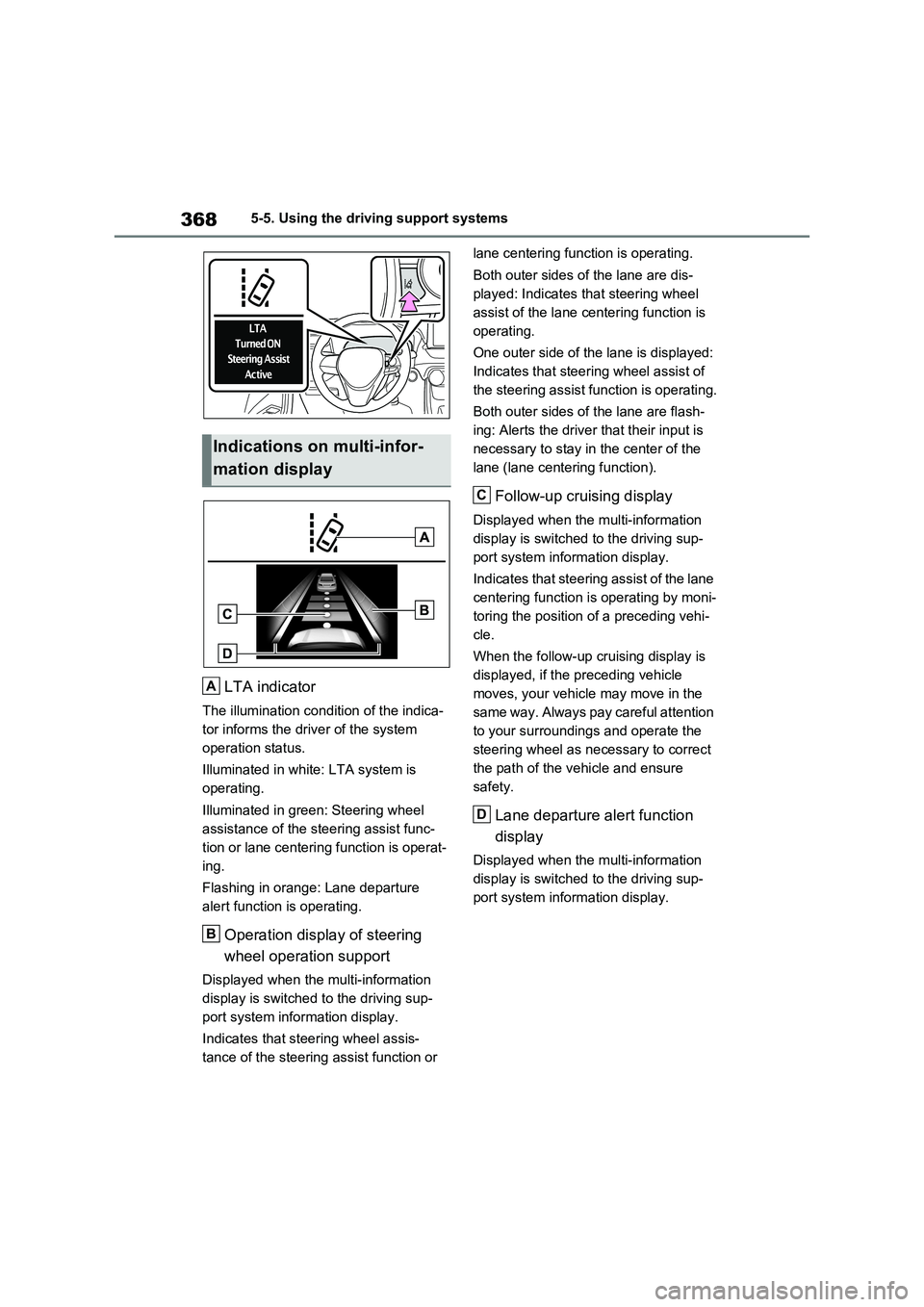
LTA indicator
The illumination condition of the indica-
tor informs the driver of the system
operation status.
Illuminated in white: LTA system is
operating.
Illuminated in green: Steering wheel
assistance of the steering assist func-
tion or lane centering function is operat-
ing.
Flashing in orange: Lane departure
alert function is operating.
Operation display of steering
wheel operation support
Displayed when the multi-information
display is switched to the driving sup-
port system information display.
Indicates that steering wheel assis-
tance of the steering assist function or lane centering function is operating.
Both outer sides of the lane are dis-
played: Indicates that steering wheel
assist of the lane centering function is
operating.
One outer side of the lane is displayed:
Indicates that steering wheel assist of
the steering assist function is operating.
Both outer sides of the lane are flash-
ing: Alerts the driver that their input is
necessary to stay in the center of the
lane (lane centering function).
Follow-up cruising display
Displayed when the multi-information
display is switched to the driving sup-
port system information display.
Indicates that steering assist of the lane
centering function is operating by moni-
toring the position of a preceding vehi-
cle.
When the follow-up cruising display is
displayed, if the preceding vehicle
moves, your vehicle may move in the
same way. Always pay careful attention
to your surroundings and operate the
steering wheel as necessary to correct
the path of the vehicle and ensure
safety.
Lane departure alert function
display
Displayed when the multi-information
display is switched to the driving sup-
port system information display.
Indications on multi-infor-
mation display
A
B
C
D
Page 369 of 664
369
5 5-5. Using the driving support systems
Driving
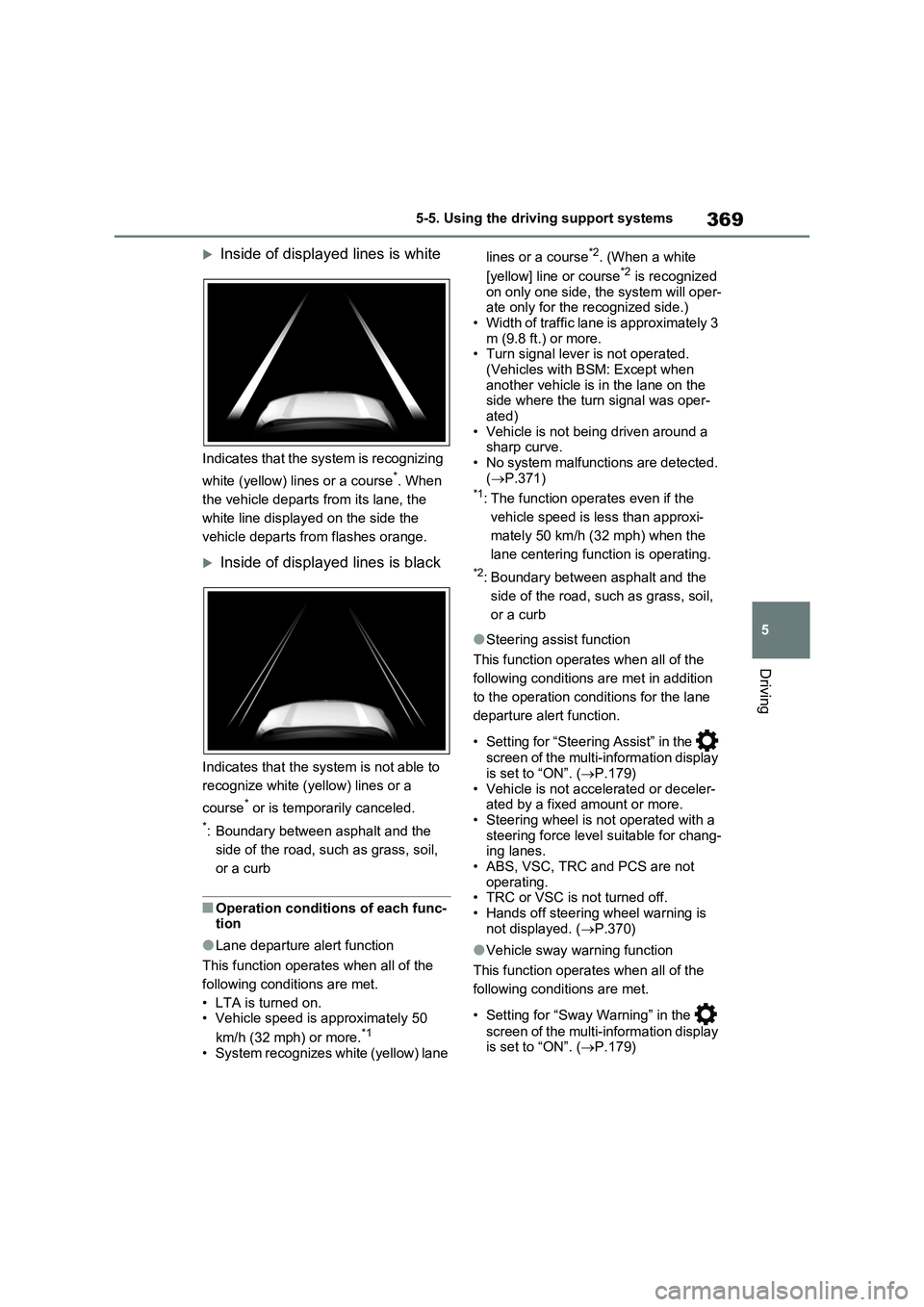
Inside of displayed lines is white
Indicates that the system is recognizing
white (yellow) lines or a course
*. When
the vehicle departs from its lane, the
white line displayed on the side the
vehicle departs from flashes orange.
Inside of displayed lines is black
Indicates that the system is not able to
recognize white (yellow) lines or a
course
* or is temporarily canceled.
*: Boundary between asphalt and the
side of the road, such as grass, soil,
or a curb
■Operation conditions of each func-
tion
●Lane departure alert function
This function operates when all of the
following conditions are met.
• LTA is turned on.
• Vehicle speed is approximately 50
km/h (32 mph) or more.
*1
• System recognizes white (yellow) lane lines or a course
*2. (When a white
[yellow] line or course*2 is recognized
on only one side, the system will oper-
ate only for the recognized side.)
• Width of traffic lane is approximately 3
m (9.8 ft.) or more.
• Turn signal lever is not operated.
(Vehicles with BSM: Except when
another vehicle is in the lane on the
side where the turn signal was oper-
ated)
• Vehicle is not being driven around a
sharp curve.
• No system malfunctions are detected.
(P.371)
*1: The function operates even if the
vehicle speed is less than approxi-
mately 50 km/h (32 mph) when the
lane centering function is operating.
*2: Boundary between asphalt and the
side of the road, such as grass, soil,
or a curb
●Steering assist function
This function operates when all of the
following conditions are met in addition
to the operation conditions for the lane
departure alert function.
• Setting for “Steering Assist” in the
screen of the multi-information display
is set to “ON”. (P.179)
• Vehicle is not accelerated or deceler-
ated by a fixed amount or more.
• Steering wheel is not operated with a
steering force level suitable for chang-
ing lanes.
• ABS, VSC, TRC and PCS are not
operating.
• TRC or VSC is not turned off.
• Hands off steering wheel warning is
not displayed. (P.370)
●Vehicle sway warning function
This function operates when all of the
following conditions are met.
• Setting for “Sway Warning” in the
screen of the multi-information display
is set to “ON”. (P.179)
Page 370 of 664
3705-5. Using the driving support systems
• Vehicle speed is approximately 50
km/h (32 mph) or more.
• Width of traffic lane is approximately 3
m (9.8 ft.) or more.
• No system malfunctions are detected.
(P.371)
●Lane centering function
This function operates when all of the
following conditions are met.
• LTA is turned on.
• Setting for “Steering Assist” and “Lane
Center” in the screen of the multi-
information display are set to “ON”.
(P.179)
• This function recognizes white (yel-
low) lane lines or the position of a pre-
ceding vehicle (except when the
preceding vehicle is small, such as a
motorcycle).
• The dynamic radar cruise control with
full-speed range is operating in vehi-
cle-to-vehicle distance control mode.
• Width of traffic lane is approximately 3
to 4 m (10 to 13 ft.).
• Turn signal lever is not operated.
• Vehicle is not being driven around a
sharp curve.
• No system malfunctions are detected.
(P.371)
• Vehicle does not accelerate or decel-
erate by a fixed amount or more.
• Steering wheel is not operated with a
steering force level suitable for chang-
ing lanes.
• ABS, VSC, TRC and PCS are not
operating.
• TRC or VSC is not turned off.
• Hands off steering wheel warning is
not displayed. (P.370)
• The vehicle is being driven in the cen-
ter of a lane.
• Steering assist function is not operat-
ing.
■Temporary cancelation of functions
●When operation conditions are no lon-
ger met, a function may be temporar-
ily canceled. However, when the
operation conditions are met again,
operation of the function is automati-
cally restored. (P.369)
●If the operation conditions (P.369)
are no longer met while the lane cen-
tering function is operating, the steer-
ing wheel may vibrate and the buzzer
may sound to indicate that the func-
tion has been temporarily canceled.
However, if the “Alert” customization
setting is set to “Steering wheel vibra-
tion”, the system will notify the driver
by vibrating the steering wheel instead
of sounding the buzzer.
■Steering assist function/lane cen-
tering function
●Depending on the vehicle speed, lane
departure situation, road conditions,
etc., the driver may not feel the func-
tion is operating or the function may
not operate at all.
●The steering control of the function is
overridden by the driver’s steering
wheel operation.
●Do not attempt to test the operation of
the steering assist function.
■Lane departure alert function
●The warning buzzer may be difficult to
hear due to external noise, audio play-
back, etc. Also, it may be difficult to
feel steering wheel vibrations due to
the road conditions, etc.
●If the edge of the course* is not clear
or straight, the lane departure alert
function may not operate.
●Vehicles with BSM: It may not be pos-
sible for the system to determine if
there is a danger of a collision with a
vehicle in an adjacent lane.
●Do not attempt to test the operation of
the lane departure alert function.
*: Boundary between asphalt and the
side of the road, such as grass, soil,
or a curb
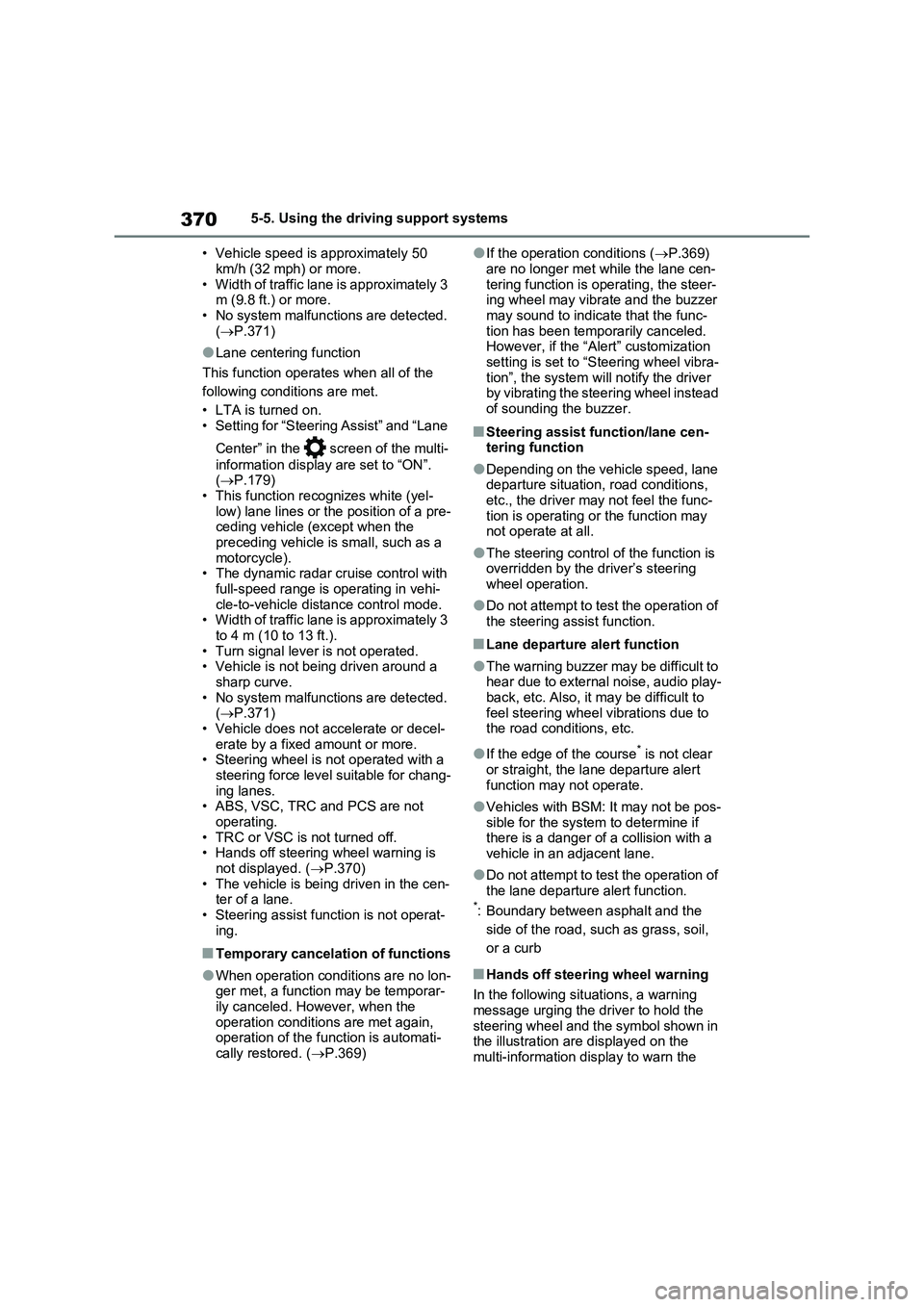
■Hands off steering wheel warning
In the following situations, a warning
message urging the driver to hold the
steering wheel and the symbol shown in
the illustration are displayed on the
multi-information display to warn the
Page 371 of 664
371
5 5-5. Using the driving support systems
Driving
driver. The warning stops when the sys-
tem determines that the driver holds the
steering wheel. Always keep your hands
on the steering wheel when using this
system, regardless of warnings.
●When the system determines that the
driver is driving without holding the
steering wheel while the system is
operating
If the driver continues to keep their
hands off of the steering wheel, the
buzzer sounds, the driver is warned and
the function is temporarily canceled.
This warning also operates in the same
way when the driver continuously oper-
ates the steering wheel only a small
amount.
The buzzer also sounds even if the alert
type is set to “Steering wheel vibration”.
●When the system determines that the
vehicle may not turn and instead
depart from its lane while driving
around a curve
Depending on the vehicle condition and
road conditions, the warning may not
operate. Also, if the system determines
that the vehicle is driving around a
curve, warnings will occur earlier than
during straight-lane driving.
●When the system determines that the
driver is driving without holding the
steering wheel while the steering
wheel assist of the steering assist
function is operating.
If the driver continues to keep their
hands off of the steering wheel and the
steering wheel assist is operating, the
buzzer sounds and the driver is warned. Each time the buzzer sounds, the con-
tinuing time of the buzzer becomes lon-
ger.
The buzzer also sounds even if the alert
type is set to “Steering wheel vibration”.
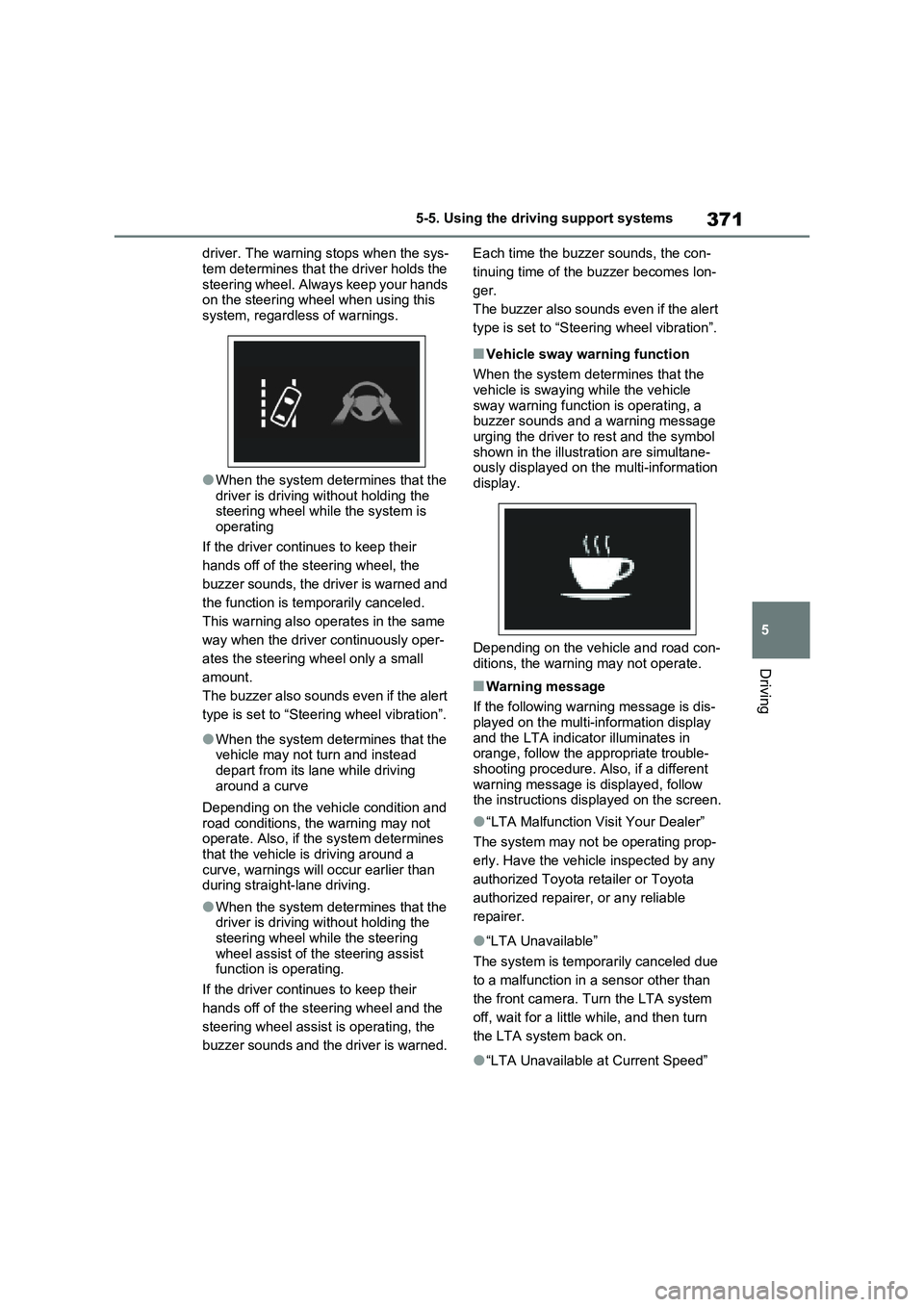
■Vehicle sway warning function
When the system determines that the
vehicle is swaying while the vehicle
sway warning function is operating, a
buzzer sounds and a warning message
urging the driver to rest and the symbol
shown in the illustration are simultane-
ously displayed on the multi-information
display.
Depending on the vehicle and road con-
ditions, the warning may not operate.
■Warning message
If the following warning message is dis-
played on the multi-information display
and the LTA indicator illuminates in
orange, follow the appropriate trouble-
shooting procedure. Also, if a different
warning message is displayed, follow
the instructions displayed on the screen.
●“LTA Malfunction Visit Your Dealer”
The system may not be operating prop-
erly. Have the vehicle inspected by any
authorized Toyota retailer or Toyota
authorized repairer, or any reliable
repairer.
●“LTA Unavailable”
The system is temporarily canceled due
to a malfunction in a sensor other than
the front camera. Turn the LTA system
off, wait for a little while, and then turn
the LTA system back on.
●“LTA Unavailable at Current Speed”
Page 386 of 664
3865-5. Using the driving support systems
●Actual vehicle speed is more than
approximately 16 km/h (10 mph) below the set vehicle speed.
●Actual vehicle speed falls below approximately 30 km/h (20 mph).
●VSC is activated.
●TRC is activated for a period of time.
●When the VSC or TRC system is turned off.
●Pre-collision braking is activated.
●The parking brake is operated.
If constant speed control mode is auto-
matically canceled for any reasons other
than the above, there may be a malfunc-
tion in the system. Contact any autho-
rized Toyota retailer or Toyota
authorized repairer, or any reliable
repairer.
■The Dynamic Radar Cruise Control with Road Sign Assist may not
operate properly when (vehicles with RSA)
As the Dynamic Radar Cruise Control
with Road Sign Assist may not operate properly in conditions in which RSA may not operate or detect correctly
( P.375), when using this function, make sure to check the speed limit sign displayed.
In the following situations, the set speed may not be changed to the recognized speed limit by pressing and holding the
“+RES”/“-SET” switch.
●If speed limit information is not avail-
able
●When the recognized speed limit is
the same as the set speed
●When the recognized speed limit is
outside of the speed range that the dynamic radar cruise control system can operate
■Brake operation
A brake operation sound may be heard and the brake pedal response may change, but these are not malfunctions.
■Warning messages and buzzers for
dynamic radar cruise control with full-speed range
Warning messages and buzzers are
used to indicate a system malfunction or to inform the driver of the need for cau-tion while driving. If a warning message
is shown on the multi-information dis- play, read the message and follow the instructions. ( P.353, 578)
■When the sensor may not be cor-
rectly detecting the vehicle ahead
In the case of the following and depend- ing on the conditions, operate the brake
pedal when deceleration of the system is insufficient or operate the accelerator pedal when acceleration is required.
As the sensor may not be able to cor- rectly detect these types of vehicles, the approach warning ( P.383) may not be
activated.
●Vehicles that cut in suddenly
●Vehicles traveling at low speeds
●Vehicles that are not moving in the same lane
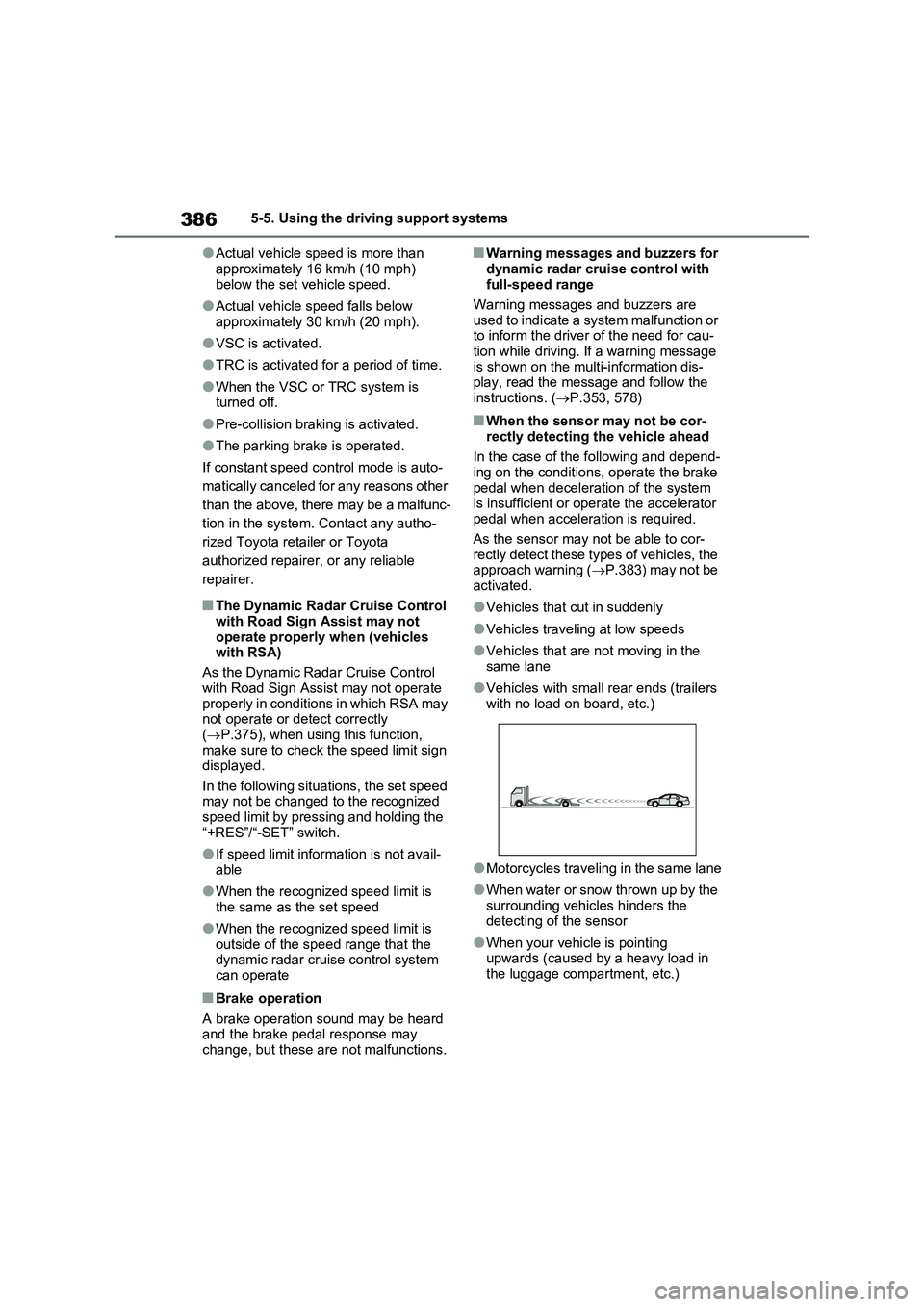
●Vehicles with small rear ends (trailers with no load on board, etc.)
●Motorcycles traveling in the same lane
●When water or snow thrown up by the
surrounding vehicles hinders the detecting of the sensor
●When your vehicle is pointing upwards (caused by a heavy load in the luggage compartment, etc.)
Page 393 of 664
393
5
5-5. Using the driving support systems
Driving
*: If equipped
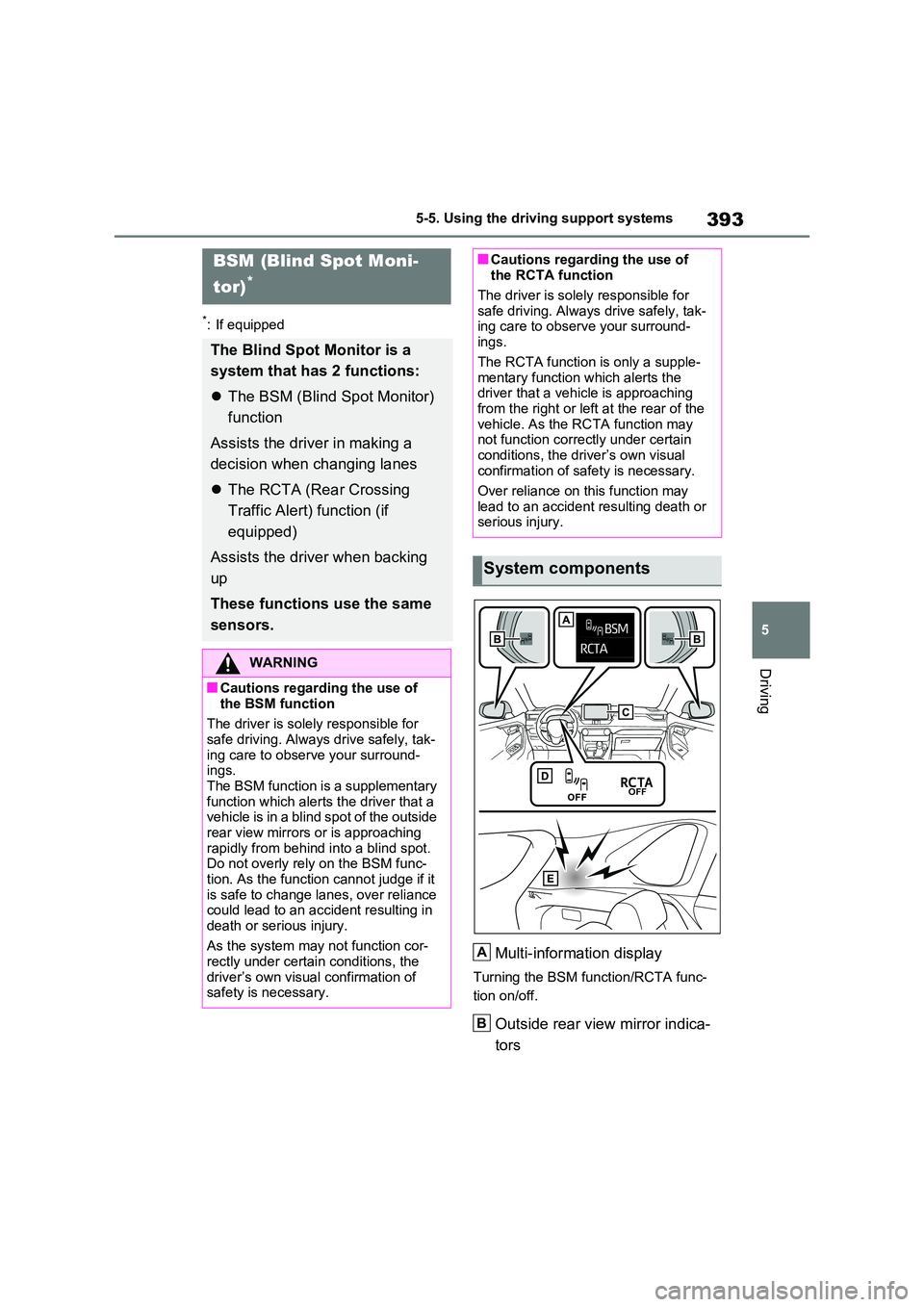
Multi-information display
Turning the BSM function/RCTA func-
tion on/off.
Outside rear view mirror indica-
tors
BSM (Blind Spot Moni-
tor)*
The Blind Spot Monitor is a
system that has 2 functions:
The BSM (Blind Spot Monitor)
function
Assists the driver in making a
decision when changing lanes
The RCTA (Rear Crossing
Traffic Alert) function (if
equipped)
Assists the driver when backing
up
These functions use the same
sensors.
WARNING
■Cautions regarding the use of
the BSM function
The driver is solely responsible for
safe driving. Always drive safely, tak- ing care to observe your surround-ings.
The BSM function is a supplementary function which alerts the driver that a vehicle is in a blind spot of the outside
rear view mirrors or is approaching rapidly from behind into a blind spot. Do not overly rely on the BSM func-
tion. As the function cannot judge if it is safe to change lanes, over reliance could lead to an accident resulting in
death or serious injury.
As the system may not function cor- rectly under certain conditions, the
driver’s own visual confirmation of safety is necessary.
■Cautions regarding the use of the RCTA function
The driver is solely responsible for
safe driving. Always drive safely, tak- ing care to observe your surround-ings.
The RCTA function is only a supple- mentary function which alerts the driver that a vehicle is approaching
from the right or left at the rear of the vehicle. As the RCTA function may not function correctly under certain
conditions, the driver’s own visual confirmation of safety is necessary.
Over reliance on this function may
lead to an accident resulting death or serious injury.
System components
A
B
Page 411 of 664
411
5 5-5. Using the driving support systems
Driving
●Instances of the BSM function unnec-
essarily detecting a vehicle and/or
object may increase in the following
situations:
• When the sensor is misaligned due to
a strong impact to the sensor or its
surrounding area
• When the distance between your vehi-
cle and a guardrail, wall, etc. that
enters the detection area is short
• When driving up and down consecu-
tive steep inclines, such as hills, dips
in the road, etc.
• When vehicle lanes are narrow, or
when driving on the edge of a lane,
and a vehicle traveling in a lane other
than the adjacent lanes enters the
detection area
• When driving on roads with sharp
bends, consecutive curves, or uneven
surfaces
• When the tires are slipping or spinning
• When the distance between your vehi-
cle and a following vehicle is short
• When an accessory (such as a bicycle
carrier) is installed to the rear of the
vehicle
• When the vehicle throws up water or
snow behind.
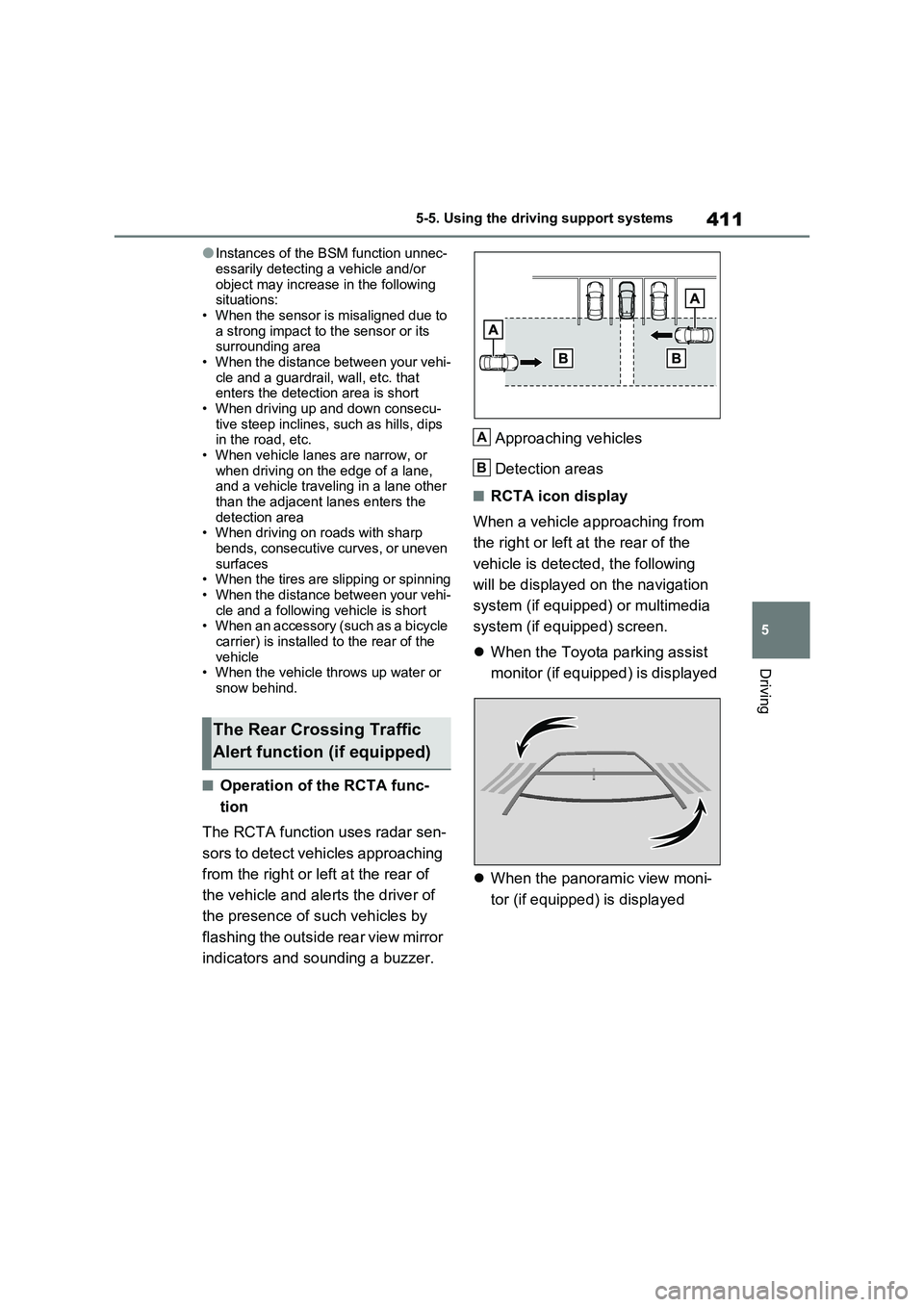
■Operation of the RCTA func-
tion
The RCTA function uses radar sen-
sors to detect vehicles approaching
from the right or left at the rear of
the vehicle and alerts the driver of
the presence of such vehicles by
flashing the outside rear view mirror
indicators and sounding a buzzer.Approaching vehicles
Detection areas
■RCTA icon display
When a vehicle approaching from
the right or left at the rear of the
vehicle is detected, the following
will be displayed on the navigation
system (if equipped) or multimedia
system (if equipped) screen.
When the Toyota parking assist
monitor (if equipped) is displayed
When the panoramic view moni-
tor (if equipped) is displayed
The Rear Crossing Traffic
Alert function (if equipped)
A
B
Page 445 of 664
445
5
5-6. Driving tips
Driving
5-6.Driving tips
Use fluids that are appropriate to
the prevailing outside tempera-
tures.
• Engine oil
• Engine coolant
• Power control unit coolant
• Washer fluid
Have a service technician
inspect the condition of the 12-
volt battery.
Have the vehicle fitted with four
snow tires or purchase a set of
tire chains for the front tires.
Ensure that all tires are the same size
and brand, and that chains match the
size of the tires.*
*: Tire chains cannot be mounted on
vehicles with 235/55R19 tires.
Winter driving tips
Carry out the necessary prepa-
rations and inspections before
driving the vehicle in winter.
Always drive the vehicle in a
manner appropriate to the pre-
vailing weather conditions.
Pre-winter preparations
WARNING
■Driving with snow tires
Observe the following precautions to reduce the risk of accidents.
Failure to do so may result in a loss of vehicle control and cause death or serious injury.
●Use tires of the specified size.
●Maintain the recommended level of air pressure.
●Do not drive at speeds in excess of the speed limit or the speed limit specified for the snow tires being
used.
●Use snow tires on all, not just some
wheels.
■Driving with tire chains (except
235/55R19 tires)
Observe the following precautions to reduce the risk of accidents.
Failure to do so may result in the vehi- cle being unable to be driven safely, and may cause death or serious
injury.
●Do not drive in excess of the speed
limit specified for the tire chains being used, or 50 km/h (30 mph), whichever is lower.
●Avoid driving on bumpy road sur-faces or over potholes.
●Avoid sudden acceleration, abrupt steering, sudden braking and shift-
ing operations that cause sudden engine braking.
●Slow down sufficiently before enter-ing a curve to ensure that vehicle control is maintained.
●Do not use LTA (Lane Tracing Assist) system (if equipped).
NOTICE
■Repairing or replacing snow tires
Request repairs or replacement of snow tires from any authorized
Toyota retailer or Toyota authorized repairer, or any reliable repairer or legitimate tire retailers.
This is because the removal and attachment of snow tires affects the operation of the tire pressure warning
valves and transmitters.