headlight TOYOTA VERSO S 2011 Owner's Manual
[x] Cancel search | Manufacturer: TOYOTA, Model Year: 2011, Model line: VERSO S, Model: TOYOTA VERSO S 2011Pages: 664, PDF Size: 160.56 MB
Page 346 of 664
3465-5. Using the driving support systems
WARNING
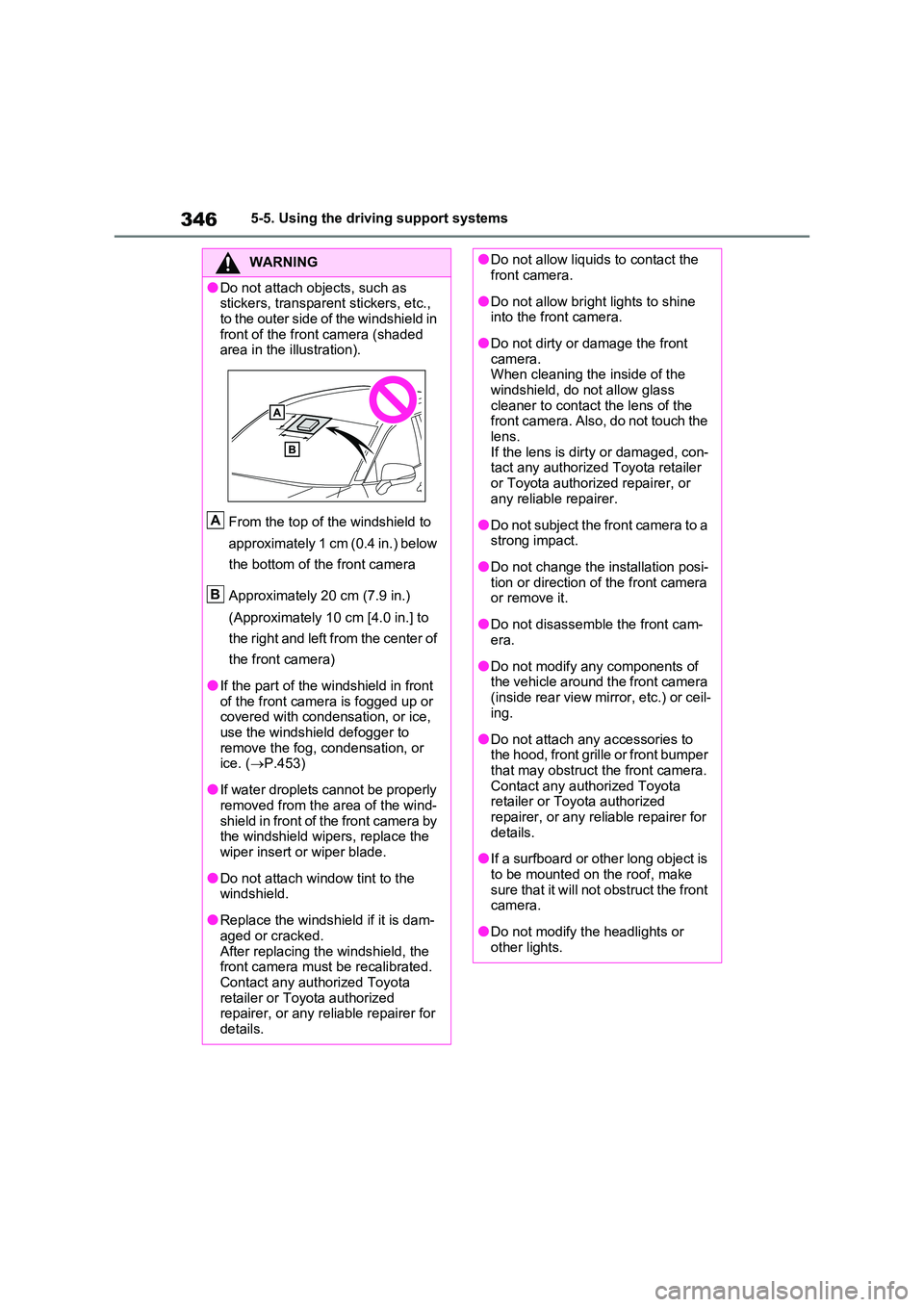
●Do not attach objects, such as stickers, transparent stickers, etc.,
to the outer side of the windshield in front of the front camera (shaded area in the illustration).
From the top of the windshield to
approximately 1 cm (0.4 in.) below
the bottom of the front camera
Approximately 20 cm (7.9 in.)
(Approximately 10 cm [4.0 in.] to
the right and left from the center of
the front camera)
●If the part of the windshield in front of the front camera is fogged up or covered with condensation, or ice,
use the windshield defogger to remove the fog, condensation, or ice. ( P.453)
●If water droplets cannot be properly removed from the area of the wind-
shield in front of the front camera by the windshield wipers, replace the wiper insert or wiper blade.
●Do not attach window tint to the windshield.
●Replace the windshield if it is dam-aged or cracked.
After replacing the windshield, the front camera must be recalibrated. Contact any authorized Toyota
retailer or Toyota authorized repairer, or any reliable repairer for details.
A
B
●Do not allow liquids to contact the front camera.
●Do not allow bright lights to shine into the front camera.
●Do not dirty or damage the front camera. When cleaning the inside of the
windshield, do not allow glass cleaner to contact the lens of the front camera. Also, do not touch the
lens. If the lens is dirty or damaged, con-tact any authorized Toyota retailer
or Toyota authorized repairer, or any reliable repairer.
●Do not subject the front camera to a strong impact.
●Do not change the installation posi-tion or direction of the front camera or remove it.
●Do not disassemble the front cam-era.
●Do not modify any components of the vehicle around the front camera
(inside rear view mirror, etc.) or ceil- ing.
●Do not attach any accessories to the hood, front grille or front bumper that may obstruct the front camera.
Contact any authorized Toyota retailer or Toyota authorized repairer, or any reliable repairer for
details.
●If a surfboard or other long object is
to be mounted on the roof, make sure that it will not obstruct the front camera.
●Do not modify the headlights or other lights.
Page 360 of 664
3605-5. Using the driving support systems
• When there is a metal object (man-
hole cover, steel plate, etc.), steps, or
a protrusion in front of your vehicle
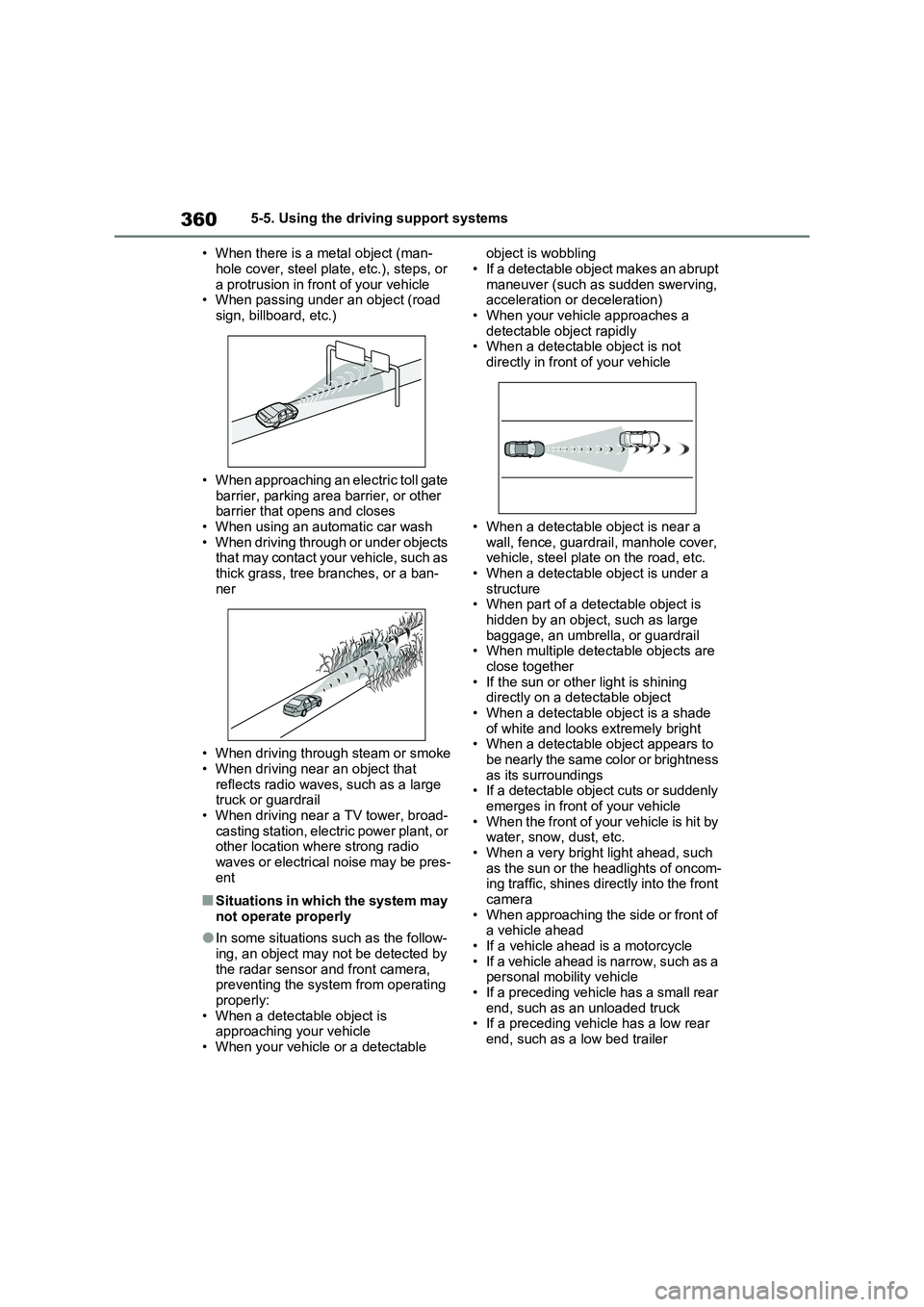
• When passing under an object (road
sign, billboard, etc.)
• When approaching an electric toll gate
barrier, parking area barrier, or other
barrier that opens and closes
• When using an automatic car wash
• When driving through or under objects
that may contact your vehicle, such as
thick grass, tree branches, or a ban-
ner
• When driving through steam or smoke
• When driving near an object that
reflects radio waves, such as a large
truck or guardrail
• When driving near a TV tower, broad-
casting station, electric power plant, or
other location where strong radio
waves or electrical noise may be pres-
ent
■Situations in which the system may
not operate properly
●In some situations such as the follow-
ing, an object may not be detected by
the radar sensor and front camera,
preventing the system from operating
properly:
• When a detectable object is
approaching your vehicle
• When your vehicle or a detectable object is wobbling
• If a detectable object makes an abrupt
maneuver (such as sudden swerving,
acceleration or deceleration)
• When your vehicle approaches a
detectable object rapidly
• When a detectable object is not
directly in front of your vehicle
• When a detectable object is near a
wall, fence, guardrail, manhole cover,
vehicle, steel plate on the road, etc.
• When a detectable object is under a
structure
• When part of a detectable object is
hidden by an object, such as large
baggage, an umbrella, or guardrail
• When multiple detectable objects are
close together
• If the sun or other light is shining
directly on a detectable object
• When a detectable object is a shade
of white and looks extremely bright
• When a detectable object appears to
be nearly the same color or brightness
as its surroundings
• If a detectable object cuts or suddenly
emerges in front of your vehicle
• When the front of your vehicle is hit by
water, snow, dust, etc.
• When a very bright light ahead, such
as the sun or the headlights of oncom-
ing traffic, shines directly into the front
camera
• When approaching the side or front of
a vehicle ahead
• If a vehicle ahead is a motorcycle
• If a vehicle ahead is narrow, such as a
personal mobility vehicle
• If a preceding vehicle has a small rear
end, such as an unloaded truck
• If a preceding vehicle has a low rear
end, such as a low bed trailer
Page 363 of 664
363
5
5-5. Using the driving support systems
Driving
WARNING
■Before using LTA system
●Do not rely solely upon the LTA
system. The LTA system does not automatically drive the vehicle or reduce the amount of attention that
must be paid to the area in front of the vehicle. The driver must always assume full responsibility for driving
safely by paying careful attention to the surrounding conditions and operating the steering wheel to cor-
rect the path of the vehicle. Also, the driver must take adequate breaks when fatigued, such as from
driving for a long period of time.
●Failure to perform appropriate driv-
ing operations and pay careful attention may lead to an accident, resulting in death or serious injury.
●When not using the LTA system, use the LTA switch to turn the sys-
tem off.
■Situations unsuitable for LTA
system
In the following situations, use the LTA switch to turn the system off.
Failure to do so may lead to an acci- dent, resulting in death or serious injury.
●Vehicle is driven on a road surface which is slippery due to rainy
weather, fallen snow, freezing, etc.
●Vehicle is driven on a snow-cov-
ered road.
●White (yellow) lines are difficult to
see due to rain, snow, fog, dust, etc.
●Vehicle is driven in a temporary lane or restricted lane due to con-struction work.
●Vehicle is driven in a construction zone.
●A spare tire, tire chains, etc. are equipped.
●When the tires have been exces-sively worn, or when the tire infla-tion pressure is low.
●When tires of a size other than specified are installed.
●Vehicle is driven in traffic lanes other than that highways and free-
ways.
●When your vehicle is towing a
trailer or during emergency towing
■Preventing LTA system malfunc-
tions and operations performed by mistake
●Do not modify the headlights or
place stickers, etc. on the surface of the lights.
●Do not modify the suspension etc. If the suspension etc. needs to be replaced, contact any authorized
Toyota retailer or Toyota authorized repairer, or any reliable repairer.
●Do not install or place anything on the hood or grille. Also, do not install a grille guard (bull bars, kan-
garoo bar, etc.).
●If your windshield needs repairs,
contact any authorized Toyota retailer or Toyota authorized repairer, or any reliable repairer.
■Conditions in which functions may not operate properly
In the following situations, the func- tions may not operate properly and the vehicle may depart from its lane.
Drive safely by always paying careful attention to your surroundings and operate the steering wheel to correct
the path of the vehicle without relying solely on the functions.
Page 365 of 664
365
5
5-5. Using the driving support systems
Driving
■Lane departure alert function
When the system determines that
the vehicle might depart from its
lane or course*, a warning is dis-
played on the multi-information dis-
play, and either a warning buzzer
will sound or the steering wheel will
vibrate to alert the driver.
When the warning buzzer sounds or
the steering wheel vibrates, check the
area around your vehicle and carefully
WARNING
●The vehicle is driven in an area without white (yellow) lines, such as
in front of a tollgate or checkpoint, or at an intersection, etc.
●The white (yellow) lines are cracked, “Raised pavement marker” or stones are present.
●The white (yellow) lines cannot be seen or are difficult to see due to
sand, etc.
●The vehicle is driven on a road sur-
face that is wet due to rain, pud- dles, etc.
●The traffic lines are yellow (which may be more difficult to recognize than lines that are white).
●The white (yellow) lines cross over a curb, etc.
●The vehicle is driven on a bright surface, such as concrete.
●If the edge of the road is not clear or straight.
●The vehicle is driven on a surface that is bright due to reflected light,
etc.
●The vehicle is driven in an area
where the brightness changes sud- denly, such as at the entrances and exits of tunnels, etc.
●Light from the headlights of an oncoming vehicle, the sun, etc.
enters the camera.
●The vehicle is driven on a slope.
●The vehicle is driven on a road which tilts left or right, or a winding
road.
●The vehicle is driven on an
unpaved or rough road.
●The traffic lane is excessively nar-
row or wide.
●The vehicle is extremely tilted due to carrying heavy luggage or having improper tire pressure.
●The distance to the preceding vehi-cle is extremely short.
●The vehicle is moving up and down a large amount due to road condi-
tions during driving (poor roads or road seams).
●When driving in a tunnel or at night with the headlights off or when a headlight is dim due to its lens
being dirty or it being misaligned.
●The vehicle is struck by a cross-
wind.
●The vehicle is affected by wind from
a vehicle driven in a nearby lane.
●The vehicle has just changed lanes
or crossed an intersection.
●Tires which differ by structure, man-
ufacturer, brand or tread pattern are used.
●Snow tires, etc. are equipped.
●The vehicle is being driven at
extremely high speeds.
Functions included in LTA
system
Page 548 of 664
5487-3. Do-it-yourself maintenance
Check the wattage of the light bulb
to be replaced. ( P.625)
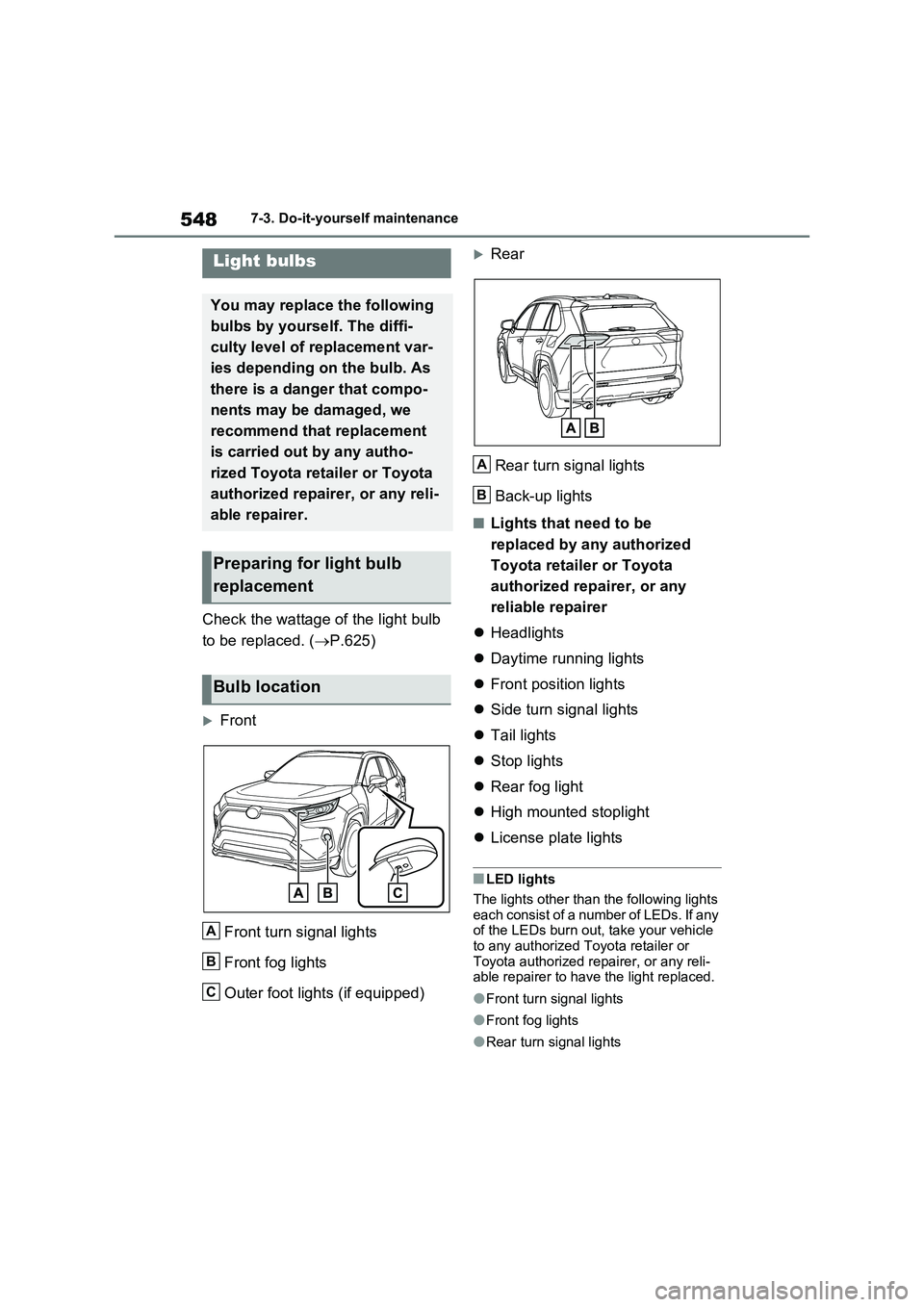
Front
Front turn signal lights
Front fog lights
Outer foot lights (if equipped)
Rear
Rear turn signal lights
Back-up lights
■Lights that need to be
replaced by any authorized
Toyota retailer or Toyota
authorized repairer, or any
reliable repairer
Headlights
Daytime running lights
Front position lights
Side turn signal lights
Tail lights
Stop lights
Rear fog light
High mounted stoplight
License plate lights
■LED lights
The lights other than the following lights each consist of a number of LEDs. If any of the LEDs burn out, take your vehicle
to any authorized Toyota retailer or Toyota authorized repairer, or any reli-able repairer to have the light replaced.
●Front turn signal lights
●Front fog lights
●Rear turn signal lights
Light bulbs
You may replace the following
bulbs by yourself. The diffi-
culty level of replacement var-
ies depending on the bulb. As
there is a danger that compo-
nents may be damaged, we
recommend that replacement
is carried out by any autho-
rized Toyota retailer or Toyota
authorized repairer, or any reli-
able repairer.
Preparing for light bulb
replacement
Bulb location
A
B
C
A
B
Page 608 of 664
6088-2. Steps to take in an emergency
minutes to recharge the 12-volt
battery of your vehicle.
6 Open and close any of the doors
of your vehicle with the power
switch off.
7 Maintain the engine speed of
the second vehicle and start the
hybrid system of your vehicle by
turning the power switch to ON.
8 Make sure the “READY” indica-
tor comes on. If the indicator
light does not come on, contact
any authorized Toyota retailer or
Toyota authorized repairer, or
any reliable repairer.
9 Once the hybrid system has
started, remove the jumper
cables in the exact reverse
order from which they were con-
nected.
10 Close the exclusive jump start-
ing terminal cover, and reinstall
the fuse box cover to its original
position.
Once the hybrid system starts,
have the vehicle inspected at any
authorized Toyota retailer or Toyota
authorized repairer, or any reliable
repairer as soon as possible.
■Starting the hybrid system when
the 12-volt battery is discharged
The hybrid system cannot be started by push-starting.
■To prevent 12-volt battery dis-
charge
●Turn off the headlights and the audio
system while the hybrid system is off.
●Turn off any unnecessary electrical
components when the vehicle is run- ning at a low speed for an extended period, such as in heavy traffic.
■When the 12-volt battery is
removed or discharged
●Information stored in the ECU is
cleared. When the 12-volt battery is depleted, have the vehicle inspected at any authorized Toyota retailer or
Toyota authorized repairer, or any reli- able repairer.
●Some systems may require initializa-tion. ( P.643)
■When removing the 12-volt battery terminals
When the 12-volt battery terminals are removed, the information stored in the ECU is cleared. Before removing the 12-
volt battery terminals, contact any authorized Toyota retailer or Toyota authorized repairer, or any reliable
repairer.
■Charging the 12-volt battery
The electricity stored in the 12-volt bat- tery will discharge gradually even when
the vehicle is not in use, due to natural discharge and the draining effects of certain electrical appliances. If the vehi-
cle is left for a long time, the 12-volt bat- tery may discharge, and the hybrid system may be unable to start. (The 12-
volt battery recharges automatically while the hybrid system is operating.)
■When recharging or replacing the 12-volt battery
●In some cases, it may not be possible to unlock the doors using the smart
entry & start system when the 12-volt battery is discharged. Use the wire-less remote control or the mechanical
key to lock or unlock the doors.
●The hybrid system may not start on
the first attempt after reinstalling the 12-volt battery. In that case, start the hybrid system in the same manner as
when the electronic key does not operate properly ( P.605). This is not
Page 623 of 664
623
9
9-1. Specifications
Vehicle specifications
authorized repairer, or any reliable repairer.
*: The fluid capacity is the quantity of reference.
If replacement is necessary, contact any authorized Toyota retailer or Toyota
authorized repairer, or any reliable repairer.
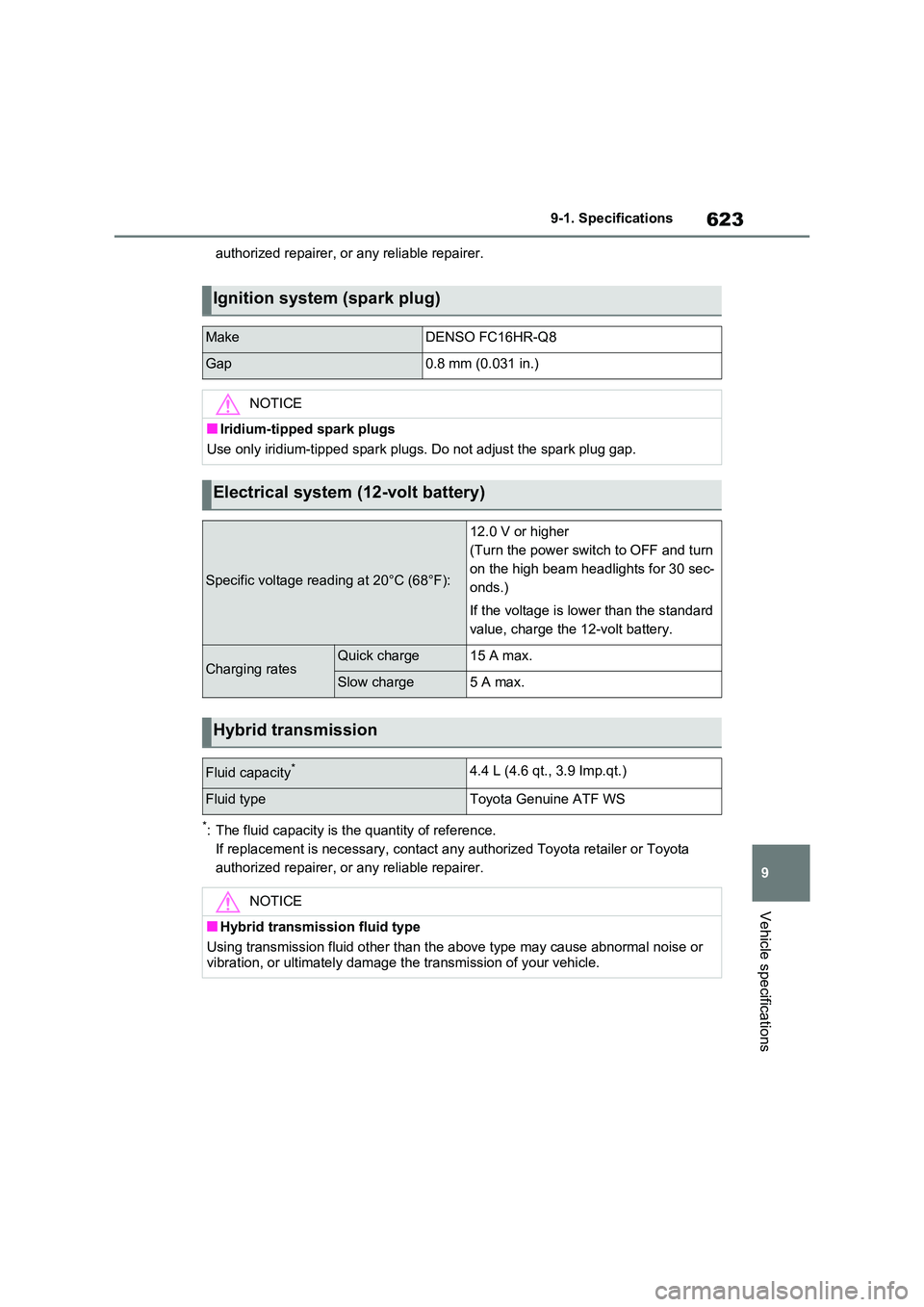
Ignition system (spark plug)
MakeDENSO FC16HR-Q8
Gap0.8 mm (0.031 in.)
NOTICE
■Iridium-tipped spark plugs
Use only iridium-tipped spark plugs. Do not adjust the spark plug gap.
Electrical system (12-volt battery)
Specific voltage reading at 20°C (68°F):
12.0 V or higher
(Turn the power switch to OFF and turn
on the high beam headlights for 30 sec-
onds.)
If the voltage is lower than the standard
value, charge the 12-volt battery.
Charging ratesQuick charge15 A max.
Slow charge5 A max.
Hybrid transmission
Fluid capacity*4.4 L (4.6 qt., 3.9 Imp.qt.)
Fluid typeToyota Genuine ATF WS
NOTICE
■Hybrid transmission fluid type
Using transmission fluid other than the above type may cause abnormal noise or
vibration, or ultimately damage the transmission of your vehicle.
Page 637 of 664
637
9 9-2. Customization
Vehicle specifications
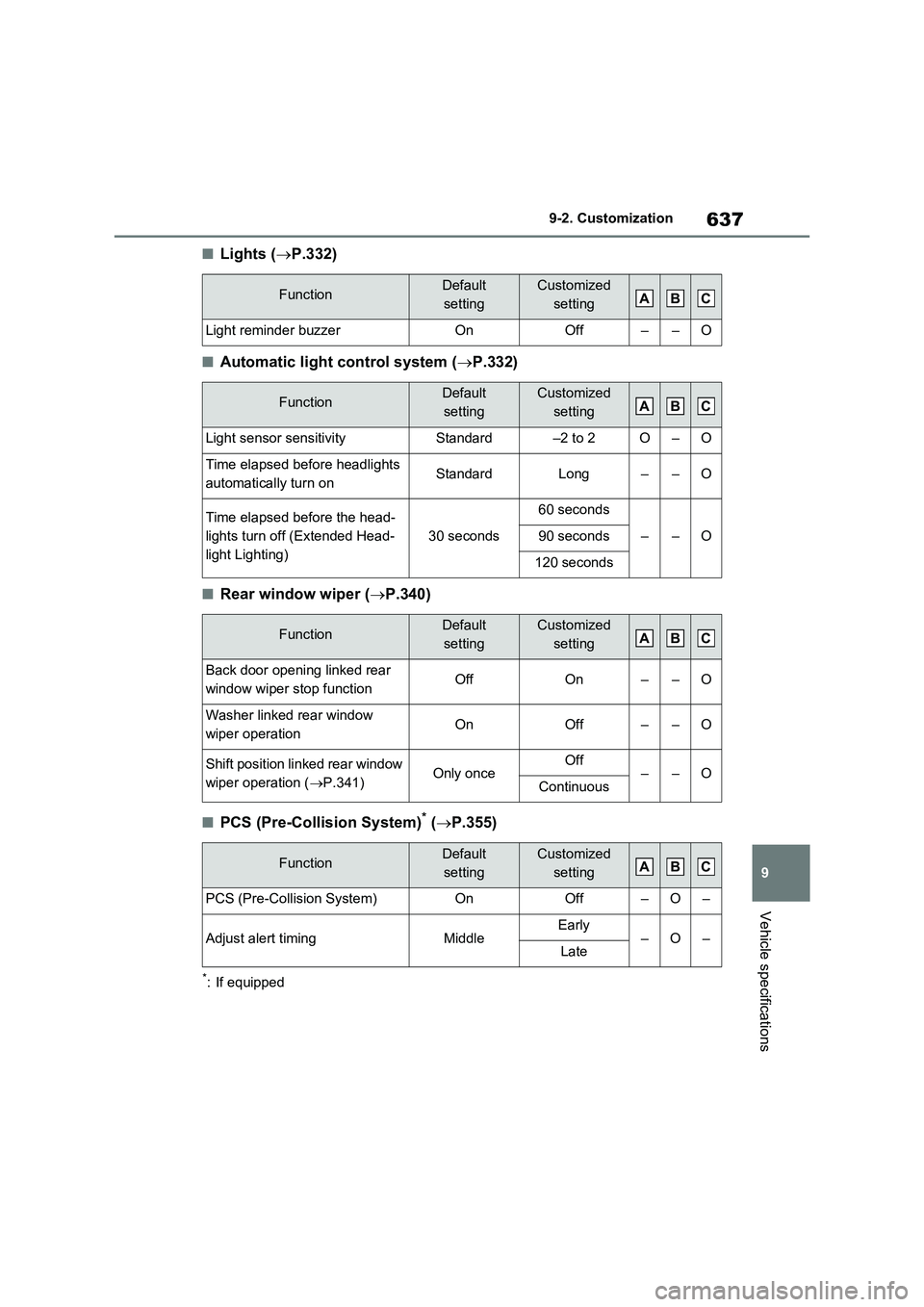
■Lights (P.332)
■Automatic light control system (P.332)
■Rear window wiper (P.340)
■PCS (Pre-Collision System)* (P.355)
*: If equipped
FunctionDefault
settingCustomized
setting
Light reminder buzzerOnOff––O
FunctionDefault
settingCustomized
setting
Light sensor sensitivityStandard–2 to 2O–O
Time elapsed before headlights
automatically turn onStandardLong––O
Time elapsed before the head-
lights turn off (Extended Head-
light Lighting)
30 seconds
60 seconds
––O90 seconds
120 seconds
FunctionDefault
settingCustomized
setting
Back door opening linked rear
window wiper stop functionOffOn––O
Washer linked rear window
wiper operationOnOff––O
Shift position linked rear window
wiper operation (P.341)Only onceOff––OContinuous
FunctionDefault
settingCustomized
setting
PCS (Pre-Collision System)OnOff–O–
Adjust alert timingMiddleEarly–O–Late
ABC
ABC
ABC
ABC
Page 650 of 664
650Alphabetical Index
Blower customization ................. 454
Front seat concentrated airflow
mode (S-FLOW) ...................... 457
Humidity sensor ......................... 459
Remote Air Conditioning System460
Automatic headlight leveling system
..................................................... 333
Automatic High Beam (AHB) ....... 334
Automatic light control system ... 332
Auxiliary box ................................. 471
Average fuel consumption .......... 198
Average fuel economy ................. 181
Average vehicle speed ......... 185, 198
B
Back door ...................................... 210
Hands Free Power Back Door ... 215
Power back door ........................ 213
Wireless remote control ............. 213
Back-up lights
Replacing light bulbs .................. 548
Wattage...................................... 625
Battery (12-volt battery) ............... 506
If the 12-volt battery is discharged
................................................. 606
Preparing and checking before win-
ter ............................................ 445
Replacing ................................... 609
Warning light .............................. 569
Battery (traction battery)................ 94
Charging .................................... 135
Location ....................................... 94
Specification............................... 621
Blind Spot Monitor (BSM) ............ 393
Blind Spot Monitor function ........ 408
Rear Crossing Traffic Alert function
................................................. 411
Bottle holders ............................... 470
Brake
Brake Hold ................................. 329
Parking brake ............................. 326Regenerative braking ................... 90
Warning light .............................. 568
Brake assist...................................438
Brake Hold ..................................... 329
Brake Override System ................ 301
Break-in tips .................................. 301
BSM (Blind Spot Monitor) ............393
Blind Spot Monitor function ........ 408
Rear Crossing Traffic Alert function
................................................. 411
C
Card holder.................................... 471
Care
Aluminum wheels .......................488
Exterior ....................................... 488
Front camera .............................. 345
Interior ........................................491
Radar sensor.............................. 345
Seat belts ...................................491
Water-repellent coating .............. 489
Cargo hooks .................................. 472
Chains ............................................ 447
Charging
“My Room Mode” .......................153
AC charging cable ...................... 108
Charging equipment ................... 105
Charging indicator ...................... 106
Charging messages ................... 160
Charging procedure ................... 135
Charging schedule function........ 144
Charging time may increase ...... 128
High voltage components............. 94
How to charge ............................ 135
Information related to charging dis-
play .......................................... 131
Opening and closing the charging
port lid ...................................... 106
Power sources precautions ........ 125
Power sources that can be used 124
Safety functions.......................... 132
Page 653 of 664
653Alphabetical Index
If a warning light turns on ........... 568
If a warning message is displayed
................................................. 578
If the 12-volt battery is discharged
................................................. 606
If the electronic key does not operate
properly.................................... 604
If the fuel filler door cannot be
opened..................................... 603
If the hybrid system will not start 601
If the vehicle is trapped in rising
water ........................................ 561
If you have a flat tire........... 582, 593
If you lose your keys .................. 603
If you think something is wrong.. 566
If your vehicle becomes stuck .... 615
If your vehicle has to be stopped in
an emergency .......................... 560
If your vehicle needs to be towed
................................................. 563
If your vehicle overheats ............ 611
Emergency brake signal .............. 439
Emergency flashers ..................... 560
Emergency tire puncture repair kit
..................................................... 582
Energy monitor ............................. 195
Engine
Compartment ............................. 501
Exhaust gas precautions.............. 47
Hood .......................................... 498
How to start the hybrid system... 317
Identification number.................. 619
If the hybrid system will not start 601
If your vehicle has to be stopped in
an emergency .......................... 560
Overheating ............................... 611
Power switch .............................. 317
Engine coolant
Capacity ..................................... 622
Checking .................................... 503
High coolant temperature warning light .......................................... 569
Preparing and checking before win-
ter ............................................. 445
Warning light .............................. 569
Engine coolant temperature gauge
..................................................... 174
Engine oil
Capacity ..................................... 621
Checking .................................... 501
Preparing and checking before win-
ter ............................................. 445
Warning light .............................. 569
EPS (Electric Power Steering)
Function ..................................... 438
Warning light .............................. 570
EV/HV mode selection switch........ 86
EV driving range ........................... 102
EV mode ..........................................85
Exhaust gas precautions ............... 47
Extended Headlight Lighting system
..................................................... 333
F
Flat tire ................................... 582, 593
Tire pressure warning system .... 511
Floor mats ....................................... 32
Fluid
Brake .......................................... 624
Hybrid transmission.................... 623
Rear differential .......................... 624
Washer ....................................... 505
Fog lights
Replacing light bulbs ..................548
Switch......................................... 337
Wattage ...................................... 625
Footwell lights............................... 465
Front fog lights
Replacing light bulbs ..................548
Switch......................................... 337
Wattage ...................................... 625
Front passenger’s seat belt reminder