mirror TOYOTA VERSO S 2011 Owner's Manual
[x] Cancel search | Manufacturer: TOYOTA, Model Year: 2011, Model line: VERSO S, Model: TOYOTA VERSO S 2011Pages: 664, PDF Size: 160.56 MB
Page 285 of 664
285
4
4-4. Adjusting the steering wheel and mirrors
Before driving
If you notice any of the following symptoms, refer to the following table for
the likely cause and the solution.
If the symptom is not resolved by the solution, have the vehicle inspected
by any authorized Toyota retailer or Toyota authorized repairer, or any reli-
able repairer.
NOTICE
●Do not subject the camera to a strong impact as this could cause a
malfunction. If this happens, have the vehicle inspected by any authorized Toyota
retailer or Toyota authorized repairer, or any reliable repairer as soon as possible.
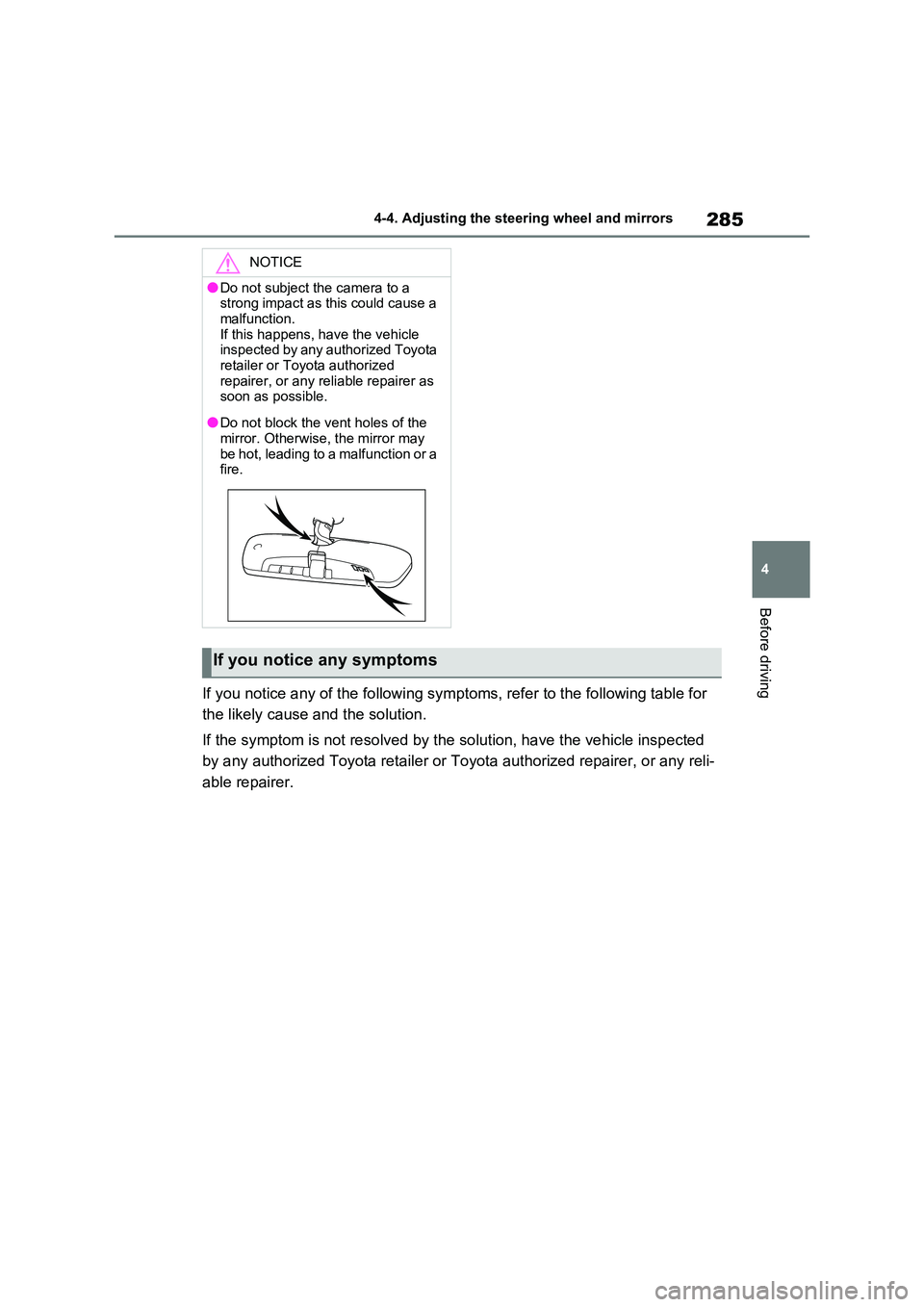
●Do not block the vent holes of the mirror. Otherwise, the mirror may
be hot, leading to a malfunction or a fire.
If you notice any symptoms
Page 286 of 664
2864-4. Adjusting the steering wheel and mirrors
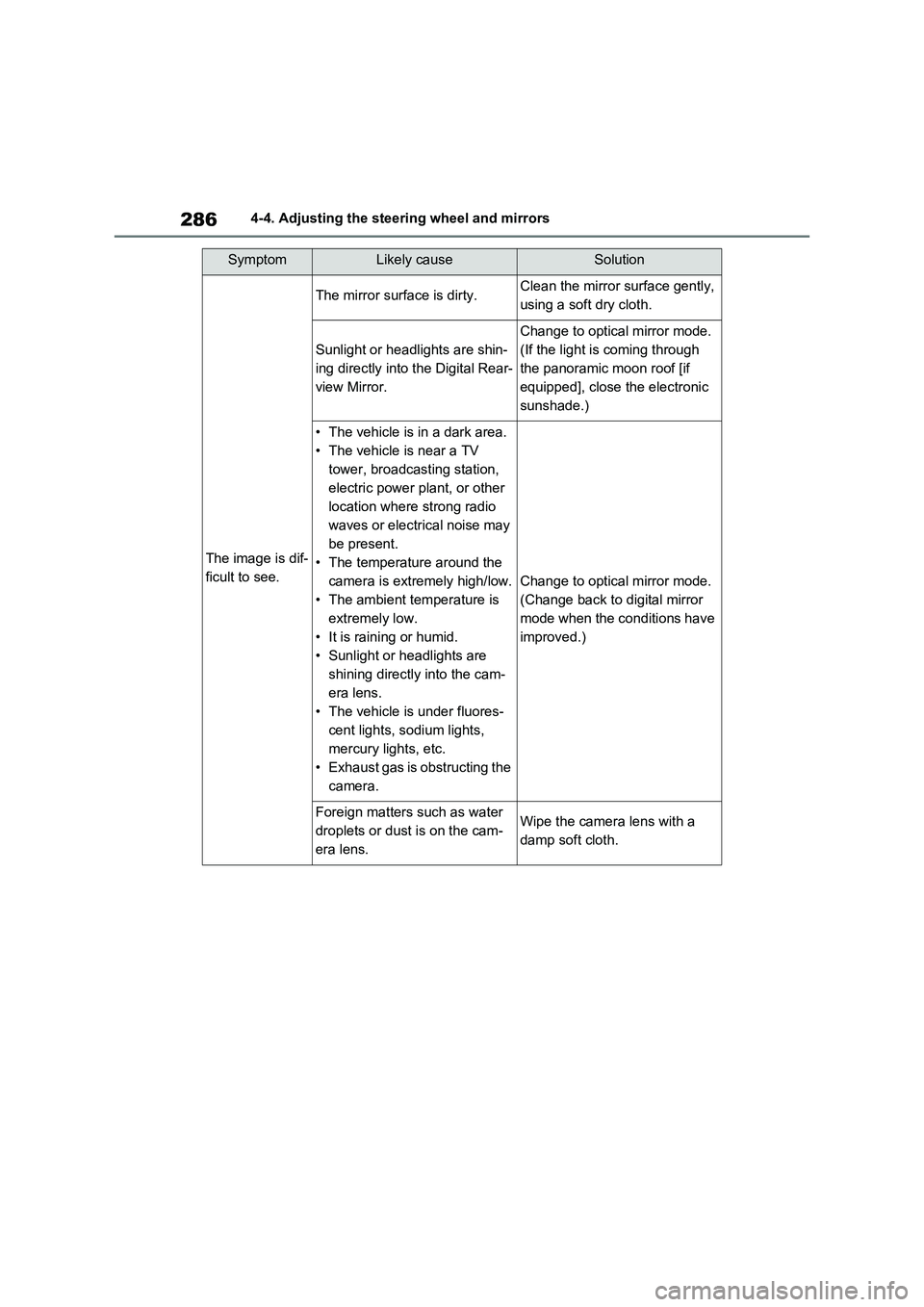
SymptomLikely causeSolution
The image is dif-
ficult to see.
The mirror surface is dirty.Clean the mirror surface gently,
using a soft dry cloth.
Sunlight or headlights are shin-
ing directly into the Digital Rear-
view Mirror.
Change to optical mirror mode.
(If the light is coming through
the panoramic moon roof [if
equipped], close the electronic
sunshade.)
• The vehicle is in a dark area.
• The vehicle is near a TV
tower, broadcasting station,
electric power plant, or other
location where strong radio
waves or electrical noise may
be present.
• The temperature around the
camera is extremely high/low.
• The ambient temperature is
extremely low.
• It is raining or humid.
• Sunlight or headlights are
shining directly into the cam-
era lens.
• The vehicle is under fluores-
cent lights, sodium lights,
mercury lights, etc.
• Exhaust gas is obstructing the
camera.
Change to optical mirror mode.
(Change back to digital mirror
mode when the conditions have
improved.)
Foreign matters such as water
droplets or dust is on the cam-
era lens.Wipe the camera lens with a
damp soft cloth.
Page 287 of 664
287
4 4-4. Adjusting the steering wheel and mirrors
Before driving
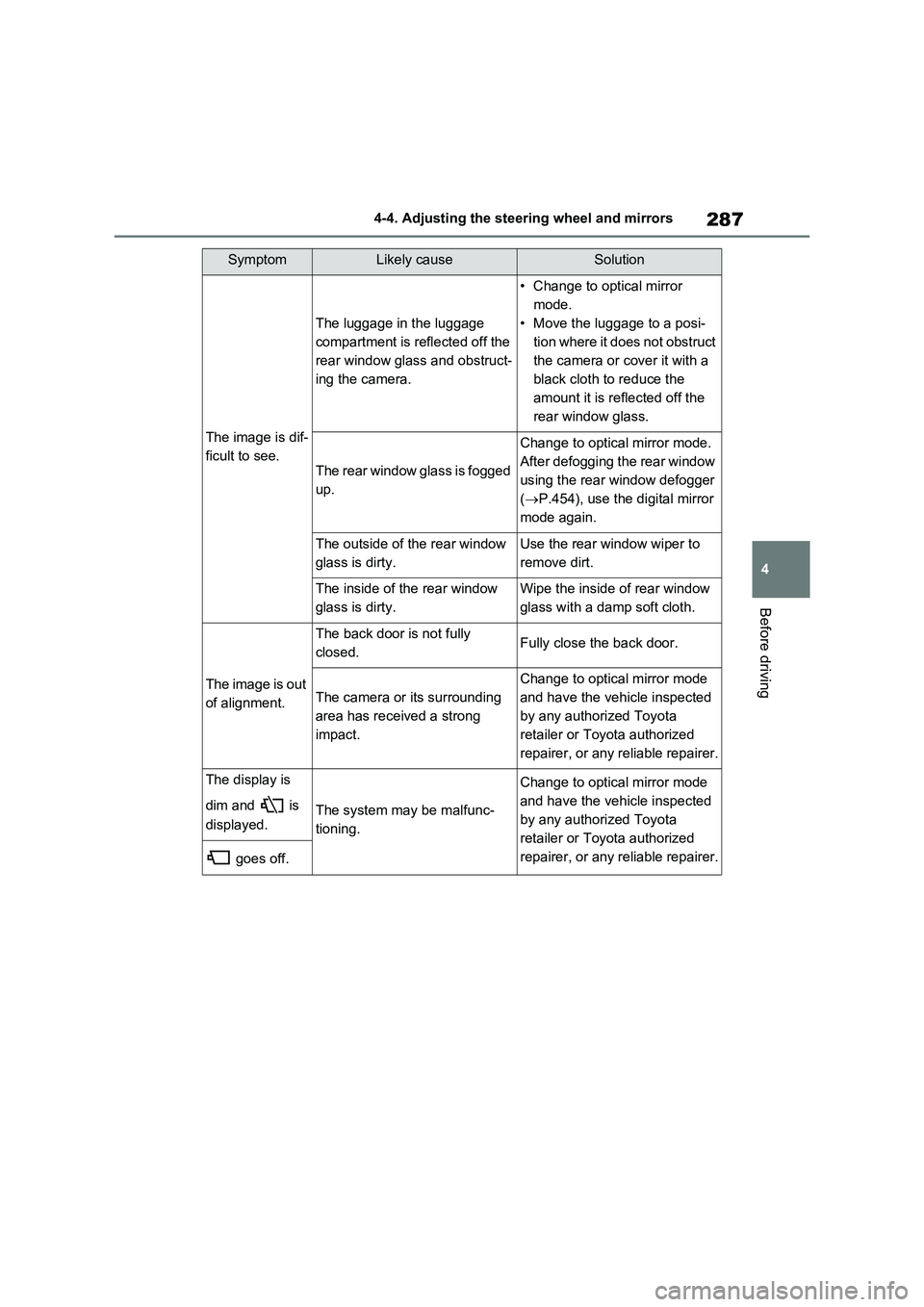
The image is dif-
ficult to see.
The luggage in the luggage
compartment is reflected off the
rear window glass and obstruct-
ing the camera.
• Change to optical mirror
mode.
• Move the luggage to a posi-
tion where it does not obstruct
the camera or cover it with a
black cloth to reduce the
amount it is reflected off the
rear window glass.
The rear window glass is fogged
up.
Change to optical mirror mode.
After defogging the rear window
using the rear window defogger
(P.454), use the digital mirror
mode again.
The outside of the rear window
glass is dirty.Use the rear window wiper to
remove dirt.
The inside of the rear window
glass is dirty.Wipe the inside of rear window
glass with a damp soft cloth.
The image is out
of alignment.
The back door is not fully
closed.Fully close the back door.
The camera or its surrounding
area has received a strong
impact.
Change to optical mirror mode
and have the vehicle inspected
by any authorized Toyota
retailer or Toyota authorized
repairer, or any reliable repairer.
The display is
dim and is
displayed.
The system may be malfunc-
tioning.
Change to optical mirror mode
and have the vehicle inspected
by any authorized Toyota
retailer or Toyota authorized
repairer, or any reliable repairer.
goes off.
SymptomLikely causeSolution
Page 288 of 664
2884-4. Adjusting the steering wheel and mirrors
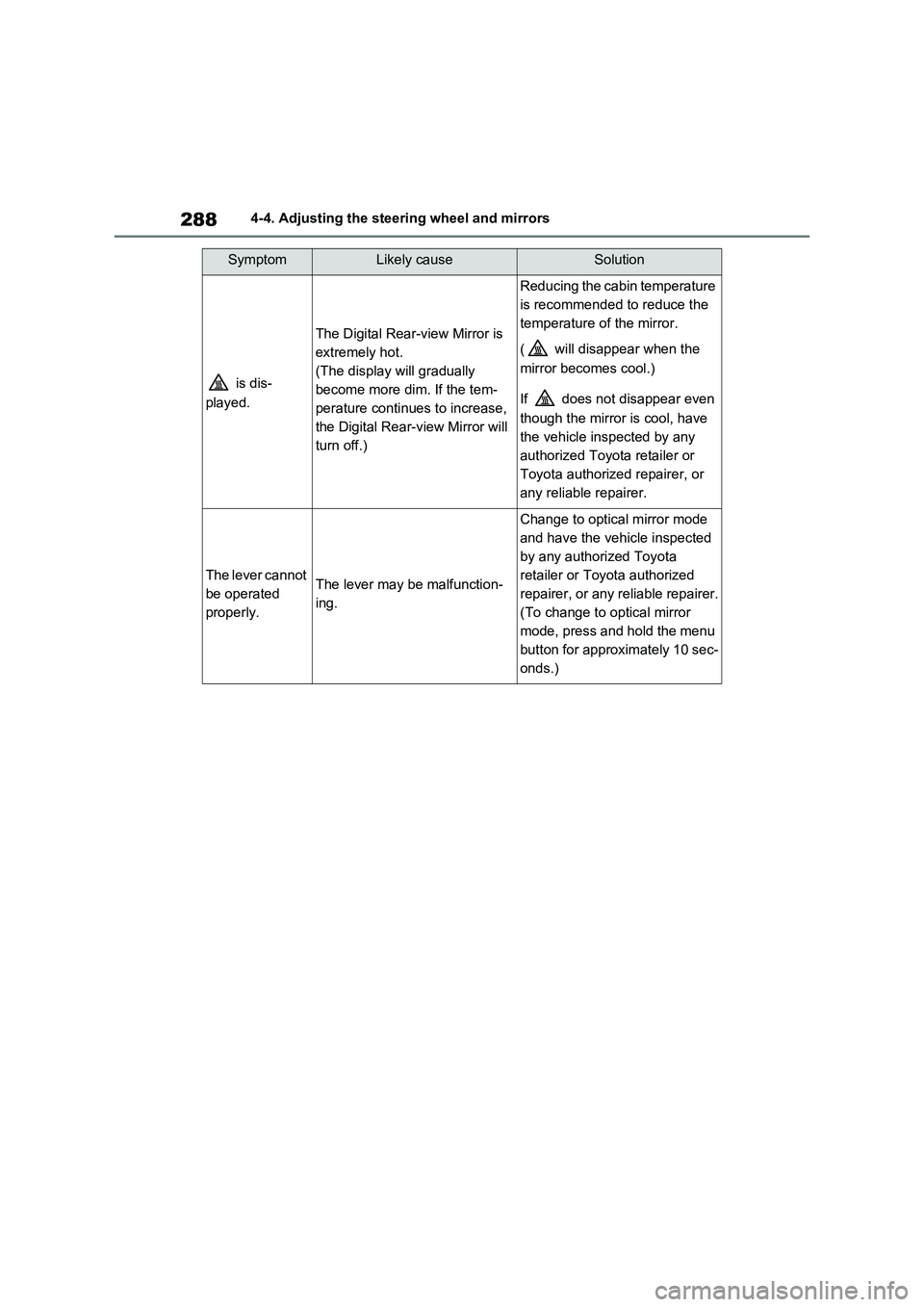
is dis-
played.
The Digital Rear-view Mirror is
extremely hot.
(The display will gradually
become more dim. If the tem-
perature continues to increase,
the Digital Rear-view Mirror will
turn off.)
Reducing the cabin temperature
is recommended to reduce the
temperature of the mirror.
( will disappear when the
mirror becomes cool.)
If does not disappear even
though the mirror is cool, have
the vehicle inspected by any
authorized Toyota retailer or
Toyota authorized repairer, or
any reliable repairer.
The lever cannot
be operated
properly.The lever may be malfunction-
ing.
Change to optical mirror mode
and have the vehicle inspected
by any authorized Toyota
retailer or Toyota authorized
repairer, or any reliable repairer.
(To change to optical mirror
mode, press and hold the menu
button for approximately 10 sec-
onds.)
SymptomLikely causeSolution
Page 289 of 664
289
4
4-4. Adjusting the steering wheel and mirrors
Before driving
■Defogging the mirrors
The outside rear view mirrors can be
cleared using the mirror defoggers. Turn on the rear window defogger to turn on the outside rear view mirror defoggers.
( P.454)
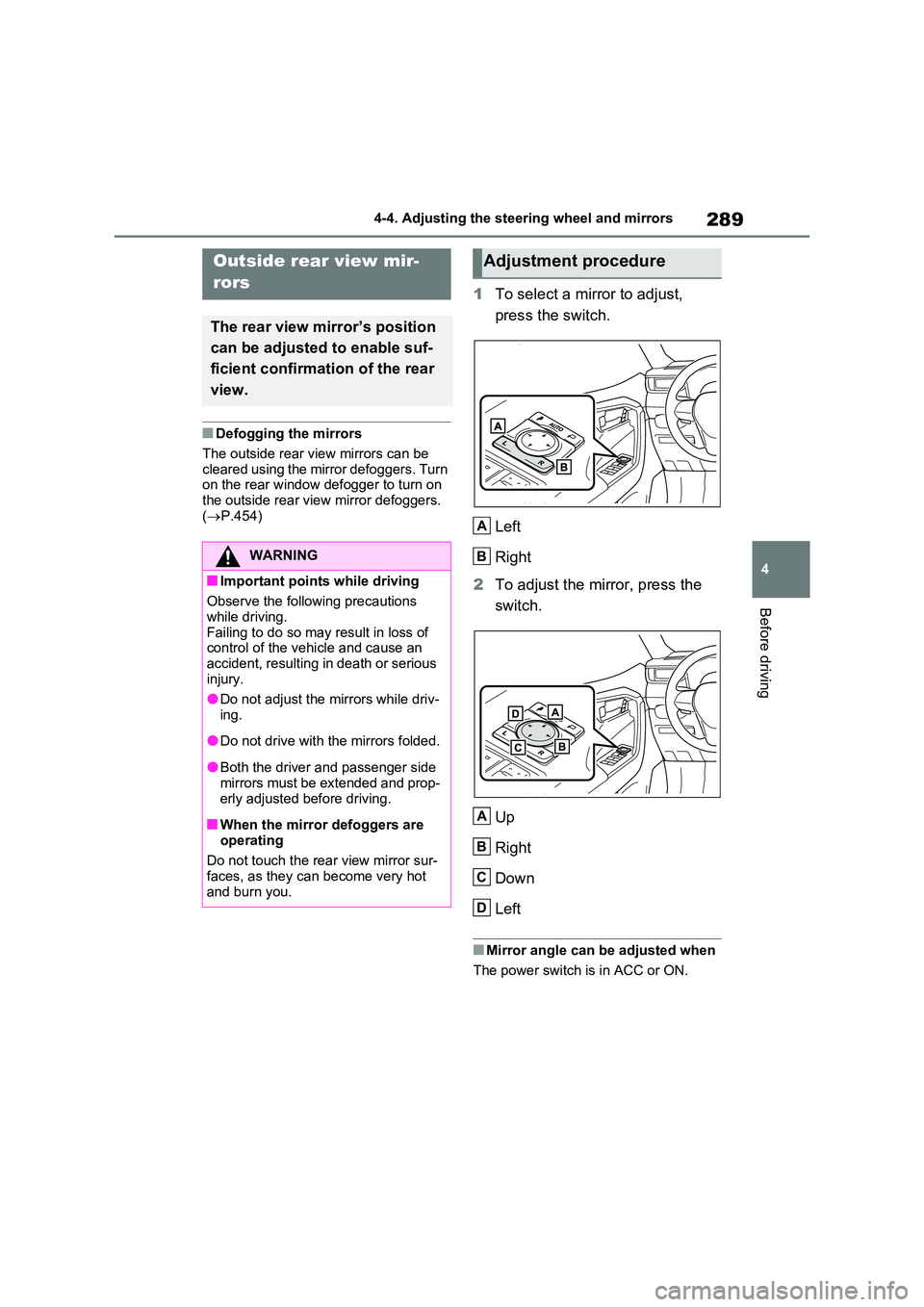
1To select a mirror to adjust,
press the switch.
Left
Right
2 To adjust the mirror, press the
switch.
Up
Right
Down
Left
■Mirror angle can be adjusted when
The power switch is in ACC or ON.
Outside rear view mir-
rors
The rear view mirror’s position
can be adjusted to enable suf-
ficient confirmation of the rear
view.
WARNING
■Important points while driving
Observe the following precautions
while driving. Failing to do so may result in loss of control of the vehicle and cause an
accident, resulting in death or serious injury.
●Do not adjust the mirrors while driv-
ing.
●Do not drive with the mirrors folded.
●Both the driver and passenger side mirrors must be extended and prop-
erly adjusted before driving.
■When the mirror defoggers are
operating
Do not touch the rear view mirror sur- faces, as they can become very hot
and burn you.
Adjustment procedure
A
B
A
B
C
D
Page 290 of 664
2904-4. Adjusting the steering wheel and mirrors
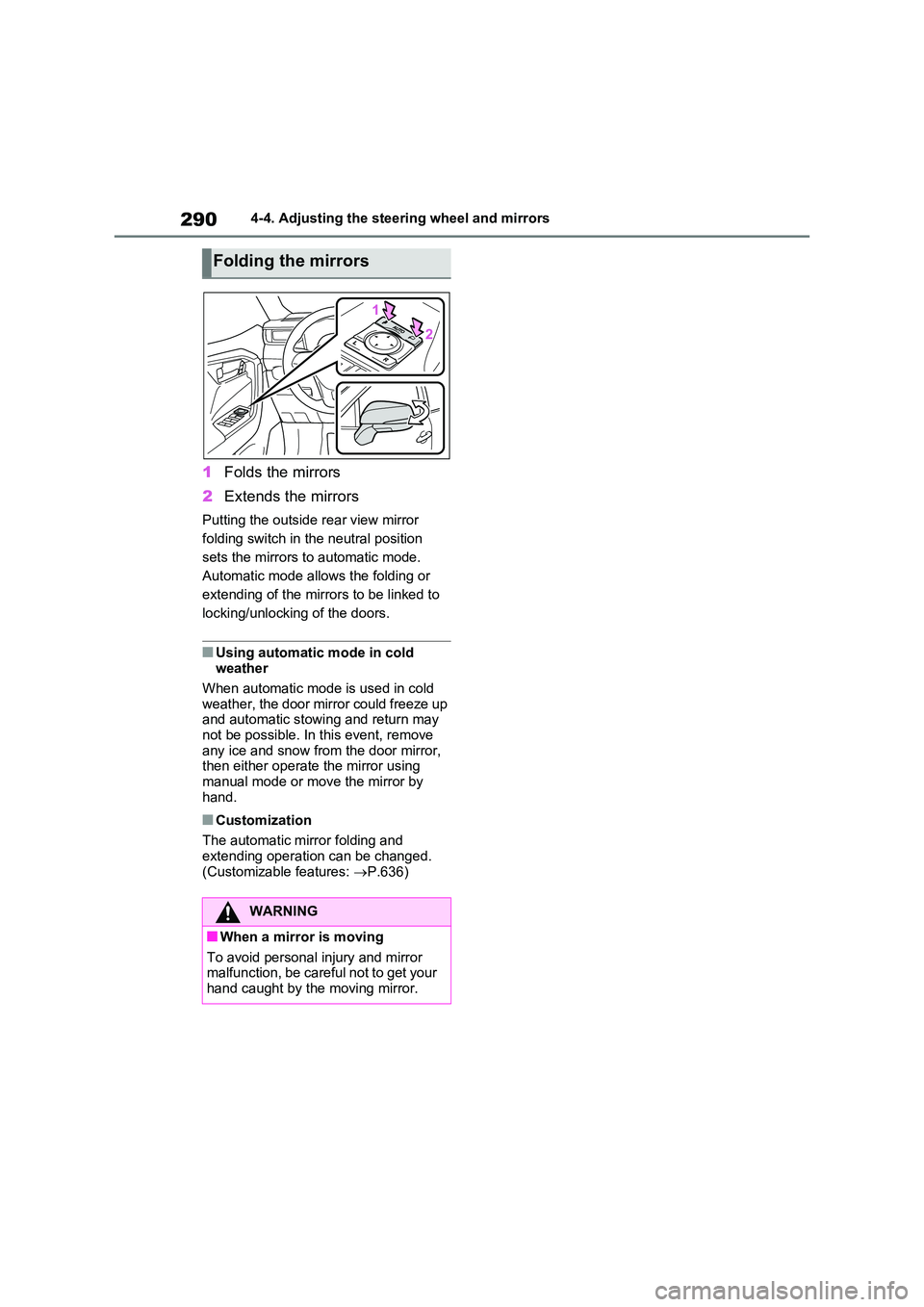
1Folds the mirrors
2 Extends the mirrors
Putting the outside rear view mirror
folding switch in the neutral position
sets the mirrors to automatic mode.
Automatic mode allows the folding or
extending of the mirrors to be linked to
locking/unlocking of the doors.
■Using automatic mode in cold weather
When automatic mode is used in cold
weather, the door mirror could freeze up and automatic stowing and return may not be possible. In this event, remove
any ice and snow from the door mirror, then either operate the mirror using manual mode or move the mirror by
hand.
■Customization
The automatic mirror folding and extending operation can be changed.
(Customizable features: P.636)
Folding the mirrors
WARNING
■When a mirror is moving
To avoid personal injury and mirror malfunction, be careful not to get your hand caught by the moving mirror.
Page 302 of 664
3025-1. Before driving
■Operating your vehicle in a foreign
country
Comply with the relevant vehicle regis- tration laws and confirm the availability
of the correct fuel. ( P.620)
WARNING
Observe the following precautions. Failure to do so may result in death or
serious injury.
■When starting the vehicle
Always keep your foot on the brake pedal while stopped with the “READY” indicator is illuminated. This
prevents the vehicle from creeping.
■When driving the vehicle
●Do not drive if you are unfamiliar with the location of the brake and accelerator pedals to avoid
depressing the wrong pedal.
• Accidentally depressing the accel- erator pedal instead of the brake
pedal will result in sudden accelera- tion that may lead to an accident.
• When backing up, you may twist
your body around, leading to a diffi- culty in operating the pedals. Make sure to operate the pedals properly.
• Make sure to keep a correct driving posture even when moving the vehicle only slightly. This allows
you to depress the brake and accel- erator pedals properly.
• Depress the brake pedal using your
right foot. Depressing the brake pedal using your left foot may delay response in an emergency, result-
ing in an accident.
●The driver should pay extra atten- tion to pedestrians when the vehicle is powered only by the electric
motor (traction motor). As there is no engine noise, the pedestrians may misjudge the vehicle’s move-
ment. Even though the vehicle is equipped with the Acoustic Vehicle Alerting System, drive with care as
pedestrians in the vicinity may still not notice the vehicle if the sur-rounding area is noisy.
●Do not drive the vehicle over or stop the vehicle near flammable
materials such as leaves, paper or rags.The exhaust system and exhaust
gases can be extremely hot. These hot parts may cause a fire if there is any flammable material nearby.
●During normal driving, do not turn off the hybrid system. Turning the
hybrid system off while driving will not cause loss of steering or brak-ing control, however, power assist
to the steering will be lost. This will make it more difficult to steer smoothly, so you should pull over
and stop the vehicle as soon as it is safe to do so. In the event of an emergency, such
as if it becomes impossible to stop the vehicle in the normal way: P.560
●Use engine braking (downshift) to maintain a safe speed when driving
down a steep hill. Using the brakes continuously may cause the brakes to overheat and
lose effectiveness. ( P.321)
●Do not adjust the position of the
steering wheel, the seat, or the inside or outside rear view mirrors while driving.
Doing so may result in a loss of vehicle control.
Page 308 of 664
3085-1. Before driving
■Tire information
●Increase the tire inflation pressure to
20.0 kPa (0.2 kgf/cm2 or bar, 3 psi) greater than the recommended value when towing. ( P.624)
●Increase the air pressure of the trailer
tires in accordance with the total
trailer weight and according to the val- ues recommended by the manufac-turer of your trailer.
■Safety checks before towing
●Check that the maximum load limit for the towing hitch/bracket and hitch ball
is not exceeded. Bear in mind that the coupling weight of the trailer will add to the load exerted on the vehicle.
Also make sure that the total load exerted on the vehicle is within the range of the weight limits. ( P.309)
●Ensure that the trailer load is secure.
●Supplementary outside rear view mir- rors should be added to the vehicle if the traffic behind cannot be clearly
seen with standard mirrors. Adjust the extending arms of these mirrors on both sides of the vehicle so that they
always provide maximum visibility of the road behind.
Trailer towing
Your vehicle is designed pri-
marily as a passenger carry-
ing vehicle. Towing a trailer
will have an adverse effect on
handling, performance, brak-
ing, durability, and fuel con-
sumption. Your safety and
satisfaction depend on the
proper use of correct equip-
ment and cautious driving hab-
its. For your safety and the
safety of others, do not over-
load the vehicle or trailer.
To tow a trailer safely, use
extreme care and drive the
vehicle in accordance with the
trailer’s characteristics and
operating conditions.
Toyota warranties do not apply
to damage or malfunction
caused by towing a trailer for
commercial purposes.
Ask your local authorized
Toyota retailer or Toyota
authorized repairer, or any reli-
able repairer for further details
before towing, as there are
additional legal requirements
in some countries.
WARNING
Follow all the instructions described in
this section. Failure to do so could cause an acci-dent resulting in death or serious
injury.
■Trailer towing precautions
When towing, make sure that none of
the weight limits are exceeded. ( P.309)
■To avoid accident or injury
●Vehicles with compact spare tire: Do not tow a trailer when the com-
pact spare tire is installed on your vehicle.
●Vehicles with emergency tire punc-ture repair kit:Do not tow a trailer when the tire
installed is repaired with the emer- gency tire puncture repair kit.
Page 336 of 664
3365-3. Operating the lights and wipers
equal to those of headlights, tail lights
or fog lights
• When headlights or tail lights of vehi-
cles ahead are turned off, dirty,
changing color, or not aimed properly
• When the vehicle is hit by water,
snow, dust, etc. from a preceding
vehicle
• When driving through an area of inter-
mittently changing brightness and
darkness
• When frequently and repeatedly driv-
ing ascending/descending roads, or
roads with rough, bumpy or uneven
surfaces (such as stone-paved roads,
gravel roads, etc.)
• When frequently and repeatedly tak-
ing curves or driving on a winding
road
• There is a highly reflective object
ahead of the vehicle, such as a sign or
mirror
• The back of a vehicle ahead is highly
reflective, such as a container on a
truck
• The vehicle’s headlights are damaged
or dirty, or are not aimed properly
• The vehicle is listing or titling due to a
flat tire, a trailer being towed, etc.
• The high beams and low beams are
repeatedly being switched between in
an abnormal manner
• The driver believes that the high
beams may be causing problems or
distress to other drivers or pedestrians
nearby
• The vehicle is used in a territory in
which vehicles travel on the opposite
side of the road of the country for
which the vehicle is approved, for
example using a vehicle designed for
right-hand traffic in a left-hand traffic
territory, or vice versa
• When going through the Straits of
Dover
■If “Headlight System Malfunction
Visit Your Dealer” is displayed on
the multi-information display
The system may be malfunctioning.
Have the vehicle inspected by any
authorized Toyota retailer or Toyota
authorized repairer, or any reliable repairer.
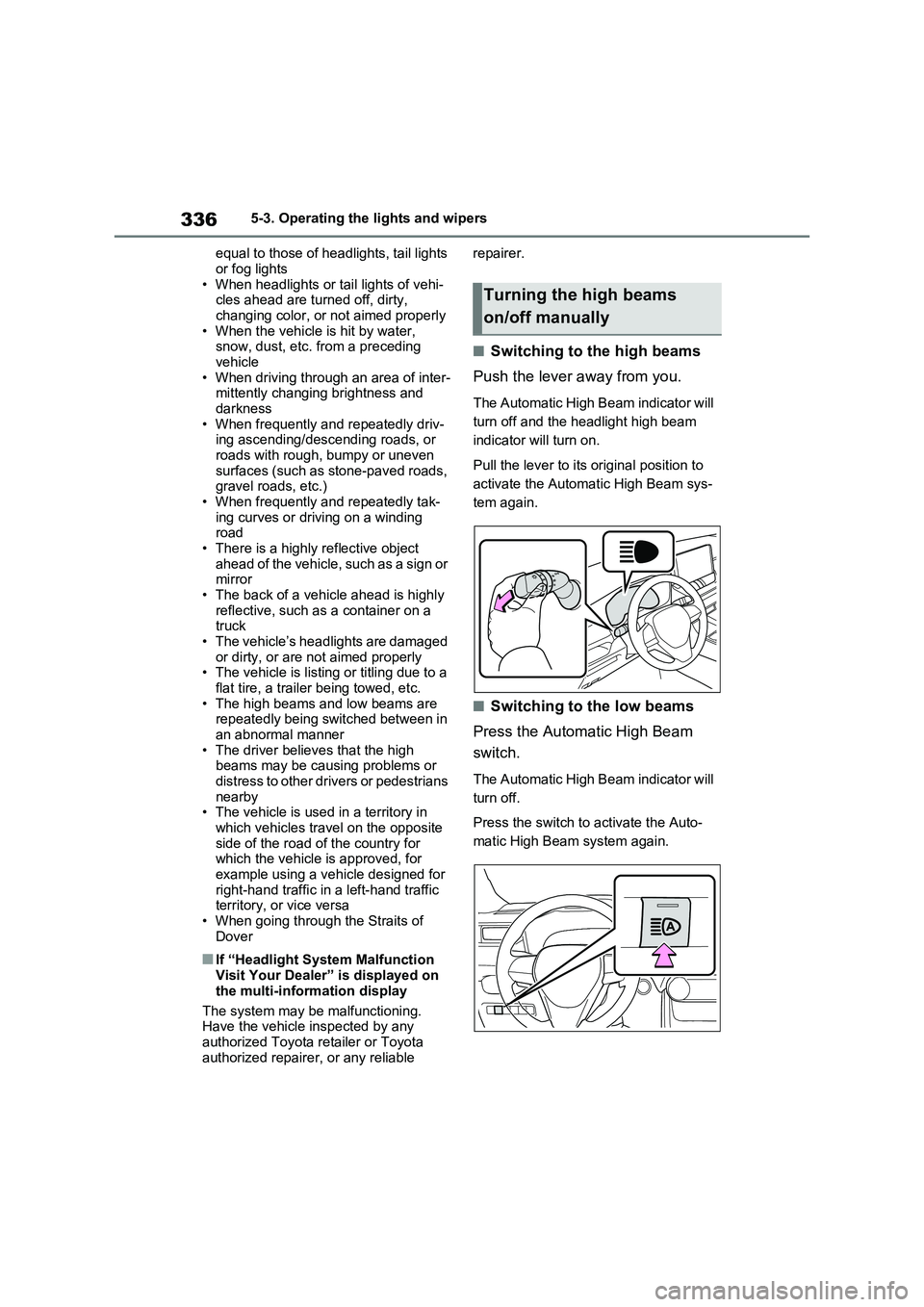
■Switching to the high beams
Push the lever away from you.
The Automatic High Beam indicator will
turn off and the headlight high beam
indicator will turn on.
Pull the lever to its original position to
activate the Automatic High Beam sys-
tem again.
■Switching to the low beams
Press the Automatic High Beam
switch.
The Automatic High Beam indicator will
turn off.
Press the switch to activate the Auto-
matic High Beam system again.
Turning the high beams
on/off manually
Page 346 of 664
3465-5. Using the driving support systems
WARNING
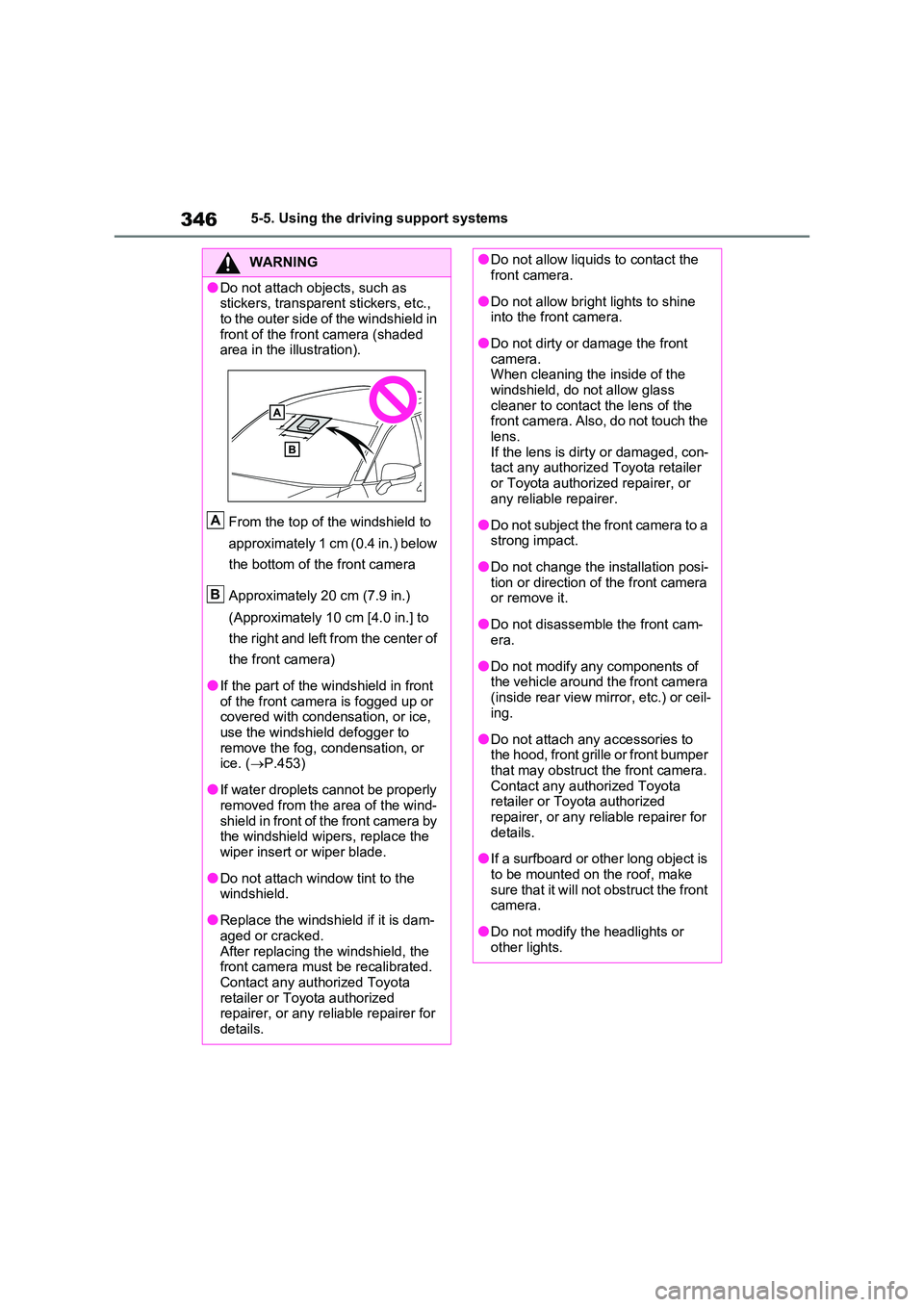
●Do not attach objects, such as stickers, transparent stickers, etc.,
to the outer side of the windshield in front of the front camera (shaded area in the illustration).
From the top of the windshield to
approximately 1 cm (0.4 in.) below
the bottom of the front camera
Approximately 20 cm (7.9 in.)
(Approximately 10 cm [4.0 in.] to
the right and left from the center of
the front camera)
●If the part of the windshield in front of the front camera is fogged up or covered with condensation, or ice,
use the windshield defogger to remove the fog, condensation, or ice. ( P.453)
●If water droplets cannot be properly removed from the area of the wind-
shield in front of the front camera by the windshield wipers, replace the wiper insert or wiper blade.
●Do not attach window tint to the windshield.
●Replace the windshield if it is dam-aged or cracked.
After replacing the windshield, the front camera must be recalibrated. Contact any authorized Toyota
retailer or Toyota authorized repairer, or any reliable repairer for details.
A
B
●Do not allow liquids to contact the front camera.
●Do not allow bright lights to shine into the front camera.
●Do not dirty or damage the front camera. When cleaning the inside of the
windshield, do not allow glass cleaner to contact the lens of the front camera. Also, do not touch the
lens. If the lens is dirty or damaged, con-tact any authorized Toyota retailer
or Toyota authorized repairer, or any reliable repairer.
●Do not subject the front camera to a strong impact.
●Do not change the installation posi-tion or direction of the front camera or remove it.
●Do not disassemble the front cam-era.
●Do not modify any components of the vehicle around the front camera
(inside rear view mirror, etc.) or ceil- ing.
●Do not attach any accessories to the hood, front grille or front bumper that may obstruct the front camera.
Contact any authorized Toyota retailer or Toyota authorized repairer, or any reliable repairer for
details.
●If a surfboard or other long object is
to be mounted on the roof, make sure that it will not obstruct the front camera.
●Do not modify the headlights or other lights.