lights TOYOTA VERSO S 2011 Owner's Guide
[x] Cancel search | Manufacturer: TOYOTA, Model Year: 2011, Model line: VERSO S, Model: TOYOTA VERSO S 2011Pages: 664, PDF Size: 160.56 MB
Page 281 of 664
281
4
4-4. Adjusting the steering wheel and mirrors
Before driving
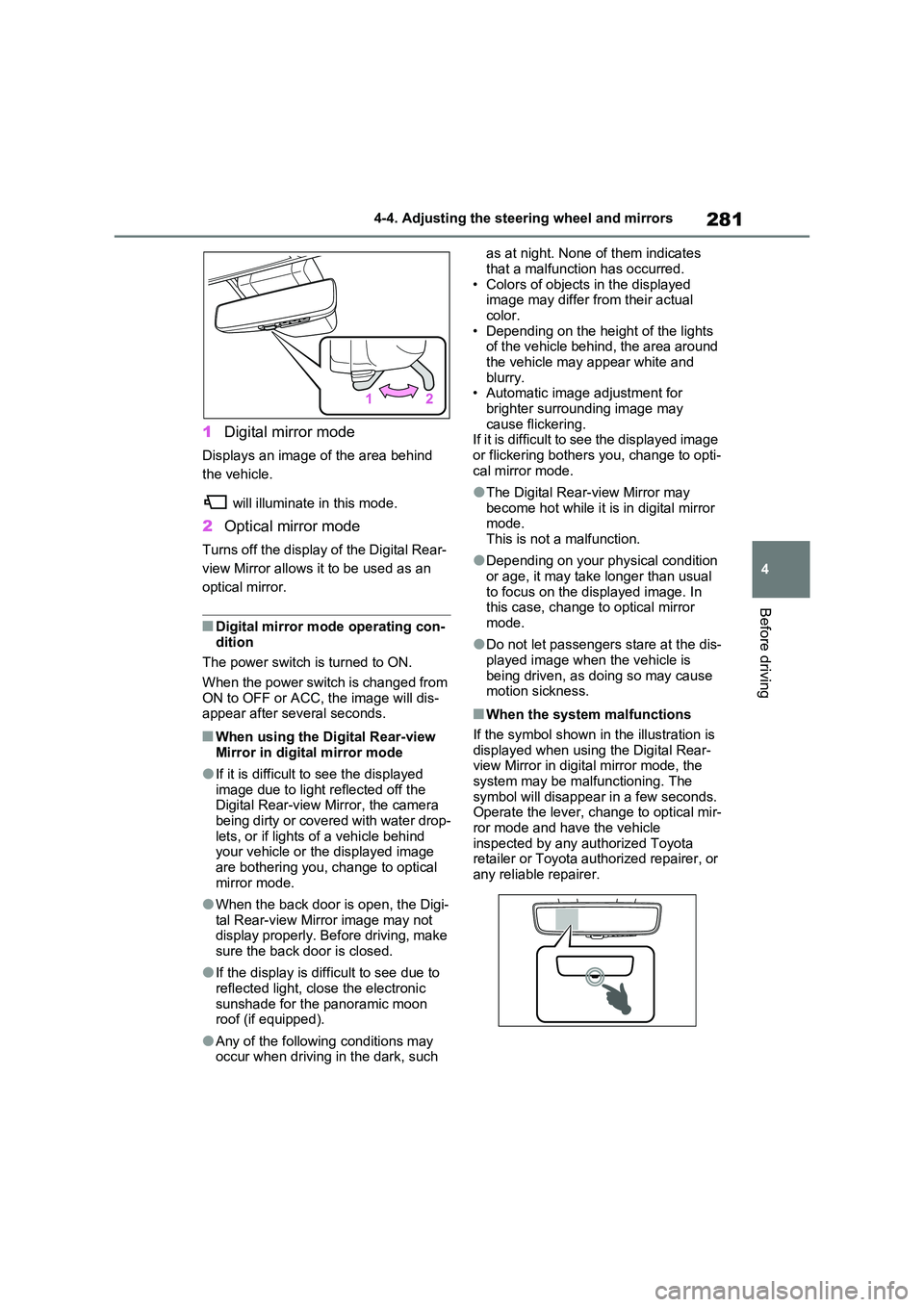
1 Digital mirror mode
Displays an image of the area behind
the vehicle.
will illuminate in this mode.
2 Optical mirror mode
Turns off the display of the Digital Rear-
view Mirror allows it to be used as an
optical mirror.
■Digital mirror mode operating con- dition
The power switch is turned to ON.
When the power switch is changed from ON to OFF or ACC, the image will dis-appear after several seconds.
■When using the Digital Rear-view
Mirror in digital mirror mode
●If it is difficult to see the displayed
image due to light reflected off the Digital Rear-view Mirror, the camera being dirty or covered with water drop-
lets, or if lights of a vehicle behind your vehicle or the displayed image are bothering you, change to optical
mirror mode.
●When the back door is open, the Digi-
tal Rear-view Mirror image may not display properly. Before driving, make sure the back door is closed.
●If the display is difficult to see due to reflected light, close the electronic
sunshade for the panoramic moon roof (if equipped).
●Any of the following conditions may occur when driving in the dark, such
as at night. None of them indicates
that a malfunction has occurred. • Colors of objects in the displayed image may differ from their actual
color. • Depending on the height of the lights of the vehicle behind, the area around
the vehicle may appear white and blurry.• Automatic image adjustment for
brighter surrounding image may cause flickering.If it is difficult to see the displayed image
or flickering bothers you, change to opti- cal mirror mode.
●The Digital Rear-view Mirror may become hot while it is in digital mirror mode.
This is not a malfunction.
●Depending on your physical condition
or age, it may take longer than usual to focus on the displayed image. In this case, change to optical mirror
mode.
●Do not let passengers stare at the dis-
played image when the vehicle is being driven, as doing so may cause motion sickness.
■When the system malfunctions
If the symbol shown in the illustration is displayed when using the Digital Rear-view Mirror in digital mirror mode, the
system may be malfunctioning. The symbol will disappear in a few seconds. Operate the lever, change to optical mir-
ror mode and have the vehicle inspected by any authorized Toyota retailer or Toyota authorized repairer, or
any reliable repairer.
Page 282 of 664
2824-4. Adjusting the steering wheel and mirrors
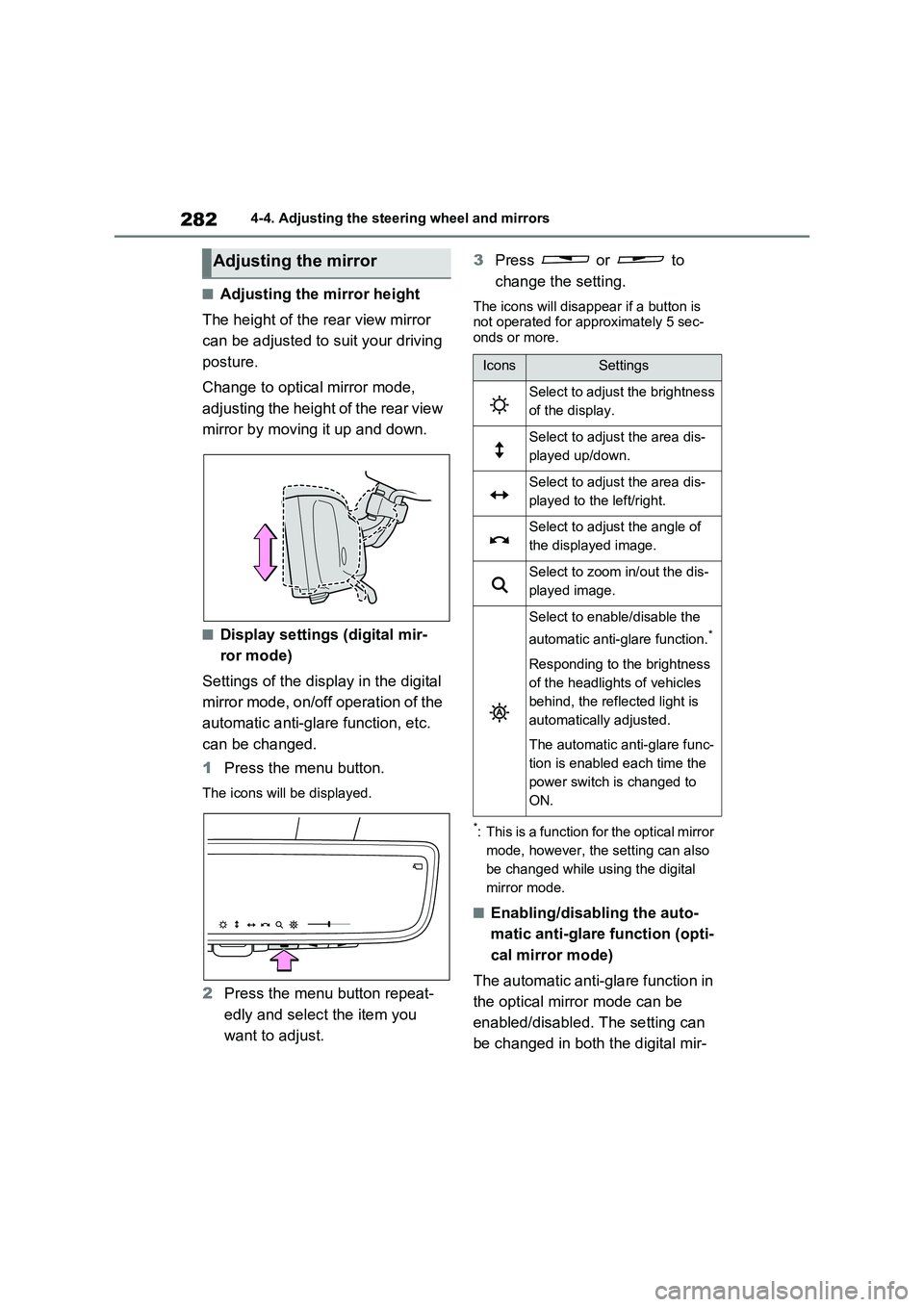
■Adjusting the mirror height
The height of the rear view mirror
can be adjusted to suit your driving
posture.
Change to optical mirror mode,
adjusting the height of the rear view
mirror by moving it up and down.
■Display settings (digital mir-
ror mode)
Settings of the display in the digital
mirror mode, on/off operation of the
automatic anti-glare function, etc.
can be changed.
1Press the menu button.
The icons will be displayed.
2Press the menu button repeat-
edly and select the item you
want to adjust.3Press or to
change the setting.
The icons will disappear if a button is
not operated for approximately 5 sec-
onds or more.
*: This is a function for the optical mirror
mode, however, the setting can also
be changed while using the digital
mirror mode.
■Enabling/disabling the auto-
matic anti-glare function (opti-
cal mirror mode)
The automatic anti-glare function in
the optical mirror mode can be
enabled/disabled. The setting can
be changed in both the digital mir-
Adjusting the mirror
IconsSettings
Select to adjust the brightness
of the display.
Select to adjust the area dis-
played up/down.
Select to adjust the area dis-
played to the left/right.
Select to adjust the angle of
the displayed image.
Select to zoom in/out the dis-
played image.
Select to enable/disable the
automatic anti-glare function.
*
Responding to the brightness
of the headlights of vehicles
behind, the reflected light is
automatically adjusted.
The automatic anti-glare func-
tion is enabled each time the
power switch is changed to
ON.
Page 286 of 664
2864-4. Adjusting the steering wheel and mirrors
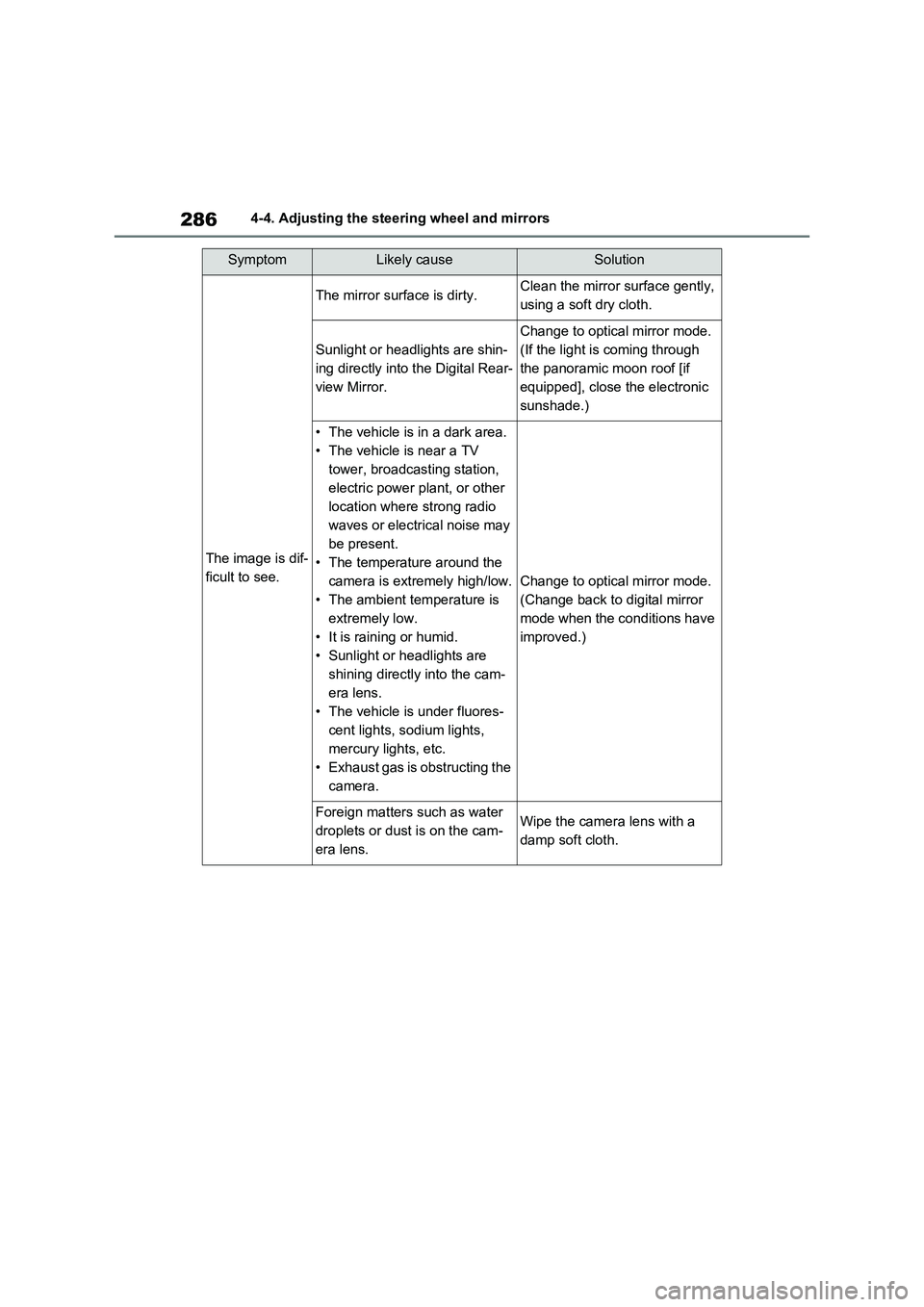
SymptomLikely causeSolution
The image is dif-
ficult to see.
The mirror surface is dirty.Clean the mirror surface gently,
using a soft dry cloth.
Sunlight or headlights are shin-
ing directly into the Digital Rear-
view Mirror.
Change to optical mirror mode.
(If the light is coming through
the panoramic moon roof [if
equipped], close the electronic
sunshade.)
• The vehicle is in a dark area.
• The vehicle is near a TV
tower, broadcasting station,
electric power plant, or other
location where strong radio
waves or electrical noise may
be present.
• The temperature around the
camera is extremely high/low.
• The ambient temperature is
extremely low.
• It is raining or humid.
• Sunlight or headlights are
shining directly into the cam-
era lens.
• The vehicle is under fluores-
cent lights, sodium lights,
mercury lights, etc.
• Exhaust gas is obstructing the
camera.
Change to optical mirror mode.
(Change back to digital mirror
mode when the conditions have
improved.)
Foreign matters such as water
droplets or dust is on the cam-
era lens.Wipe the camera lens with a
damp soft cloth.
Page 299 of 664
5
299
5
Driving
Driving
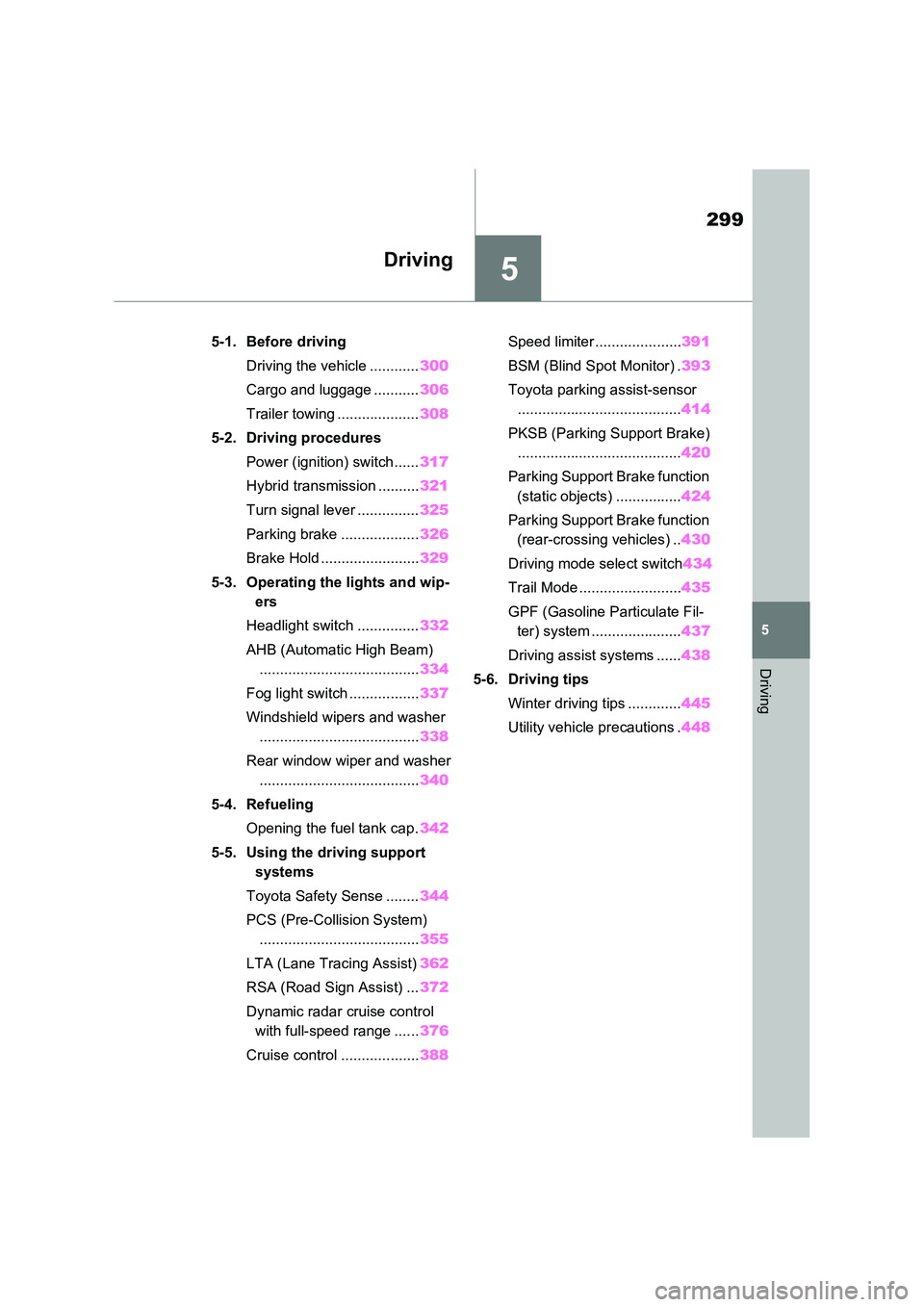
5-1. Before driving
Driving the vehicle ............ 300
Cargo and luggage ........... 306
Trailer towing .................... 308
5-2. Driving procedures
Power (ignition) switch ...... 317
Hybrid transmission .......... 321
Turn signal lever ............... 325
Parking brake ................... 326
Brake Hold ........................ 329
5-3. Operating the lights and wip-
ers
Headlight switch ............... 332
AHB (Automatic High Beam)
....................................... 334
Fog light switch ................. 337
Windshield wipers and washer
....................................... 338
Rear window wiper and washer
....................................... 340
5-4. Refueling
Opening the fuel tank cap. 342
5-5. Using the driving support
systems
Toyota Safety Sense ........ 344
PCS (Pre-Collision System)
....................................... 355
LTA (Lane Tracing Assist) 362
RSA (Road Sign Assist) ... 372
Dynamic radar cruise control
with full-speed range ...... 376
Cruise control ................... 388
Speed limiter ..................... 391
BSM (Blind Spot Monitor) . 393
Toyota parking assist-sensor
........................................ 414
PKSB (Parking Support Brake)
........................................ 420
Parking Support Brake function
(static objects) ................ 424
Parking Support Brake function
(rear-crossing vehicles) .. 430
Driving mode select switch 434
Trail Mode ......................... 435
GPF (Gasoline Particulate Fil-
ter) system ...................... 437
Driving assist systems ...... 438
5-6. Driving tips
Winter driving tips ............. 445
Utility vehicle precautions . 448
Page 309 of 664
309
5
5-1. Before driving
Driving
Check the allowable towing capac-
ity, GVM (Gross Vehicle Mass),
MPAC (Maximum Permissible Axle
Capacity), and permissible drawbar
load before towing. ( P.618)
Toyota recommends the use of the
Toyota hitch/bracket for your vehi-
cle. Other products of a suitable
nature and comparable quality may
also be used.
For vehicles where the towing
device blocks any of the lights or
license plate, the following shall be
observed:
Do not use towing device that
cannot be easily removed or
repositioned.
Towing devices must be
removed or repositioned when
not in use.
Please consult any authorized
Toyota retailer or Toyota authorized
repairer, or any reliable repairer
when installing trailer lights, as
incorrect installation may cause
damage to the vehicle’s lights.
Please take care to comply with
your state’s laws when installing
trailer lights.
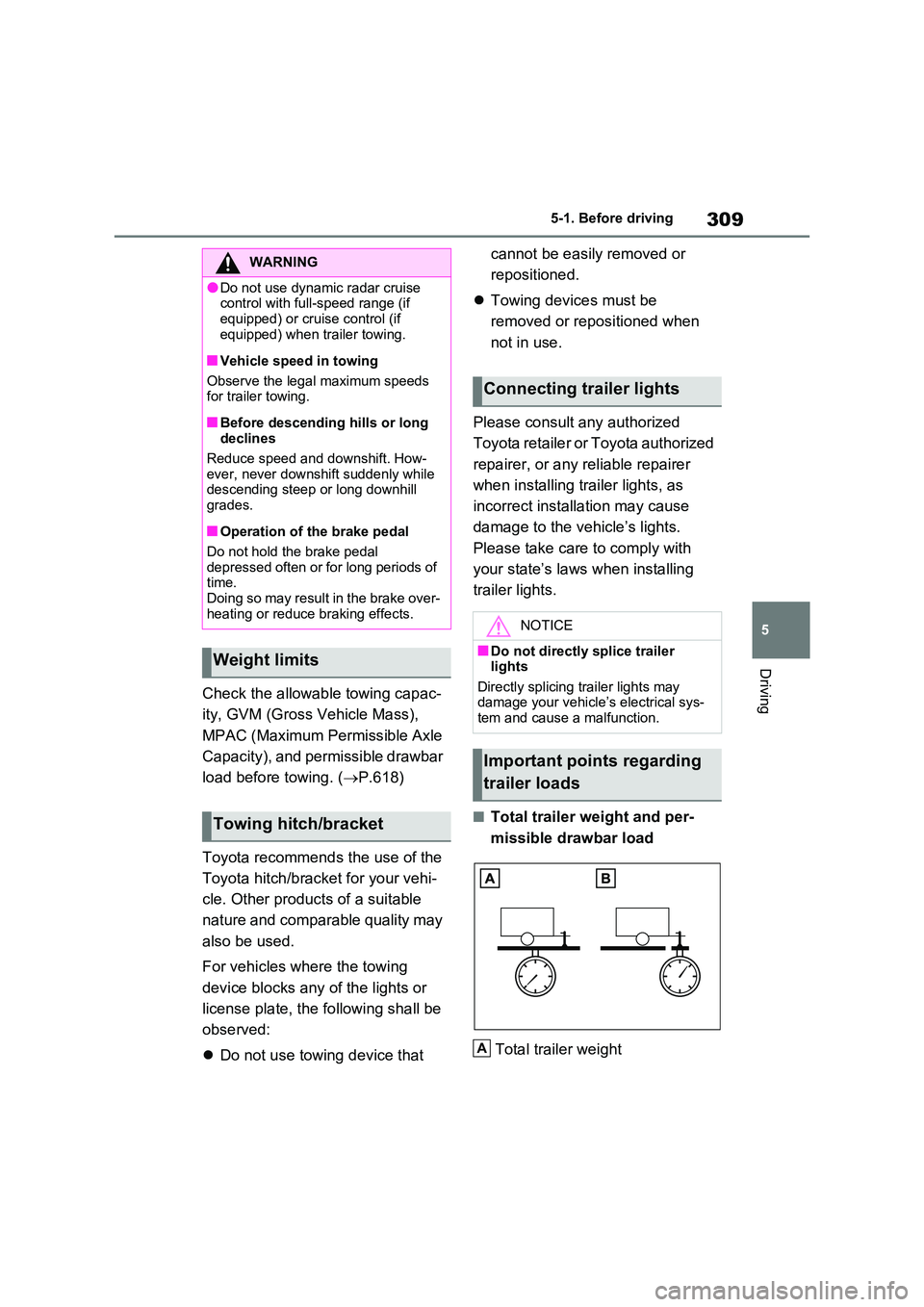
■Total trailer weight and per-
missible drawbar load
Total trailer weight
WARNING
●Do not use dynamic radar cruise control with full-speed range (if
equipped) or cruise control (if equipped) when trailer towing.
■Vehicle speed in towing
Observe the legal maximum speeds for trailer towing.
■Before descending hills or long declines
Reduce speed and downshift. How- ever, never downshift suddenly while descending steep or long downhill
grades.
■Operation of the brake pedal
Do not hold the brake pedal depressed often or for long periods of time.
Doing so may result in the brake over- heating or reduce braking effects.
Weight limits
Towing hitch/bracket
Connecting trailer lights
NOTICE
■Do not directly splice trailer lights
Directly splicing trailer lights may damage your vehicle’s electrical sys-tem and cause a malfunction.
Important points regarding
trailer loads
A
Page 314 of 664
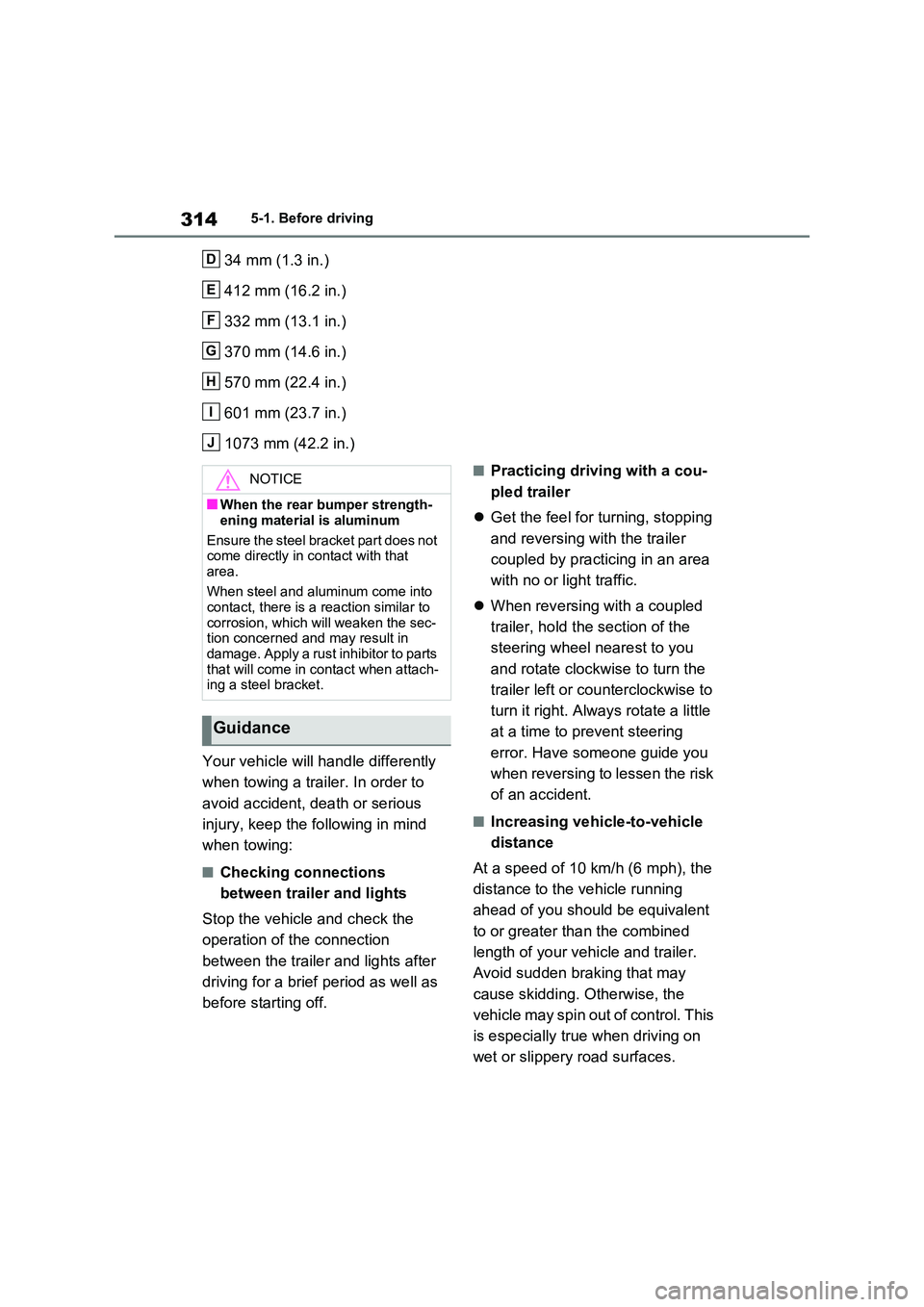
3145-1. Before driving
34 mm (1.3 in.)
412 mm (16.2 in.)
332 mm (13.1 in.)
370 mm (14.6 in.)
570 mm (22.4 in.)
601 mm (23.7 in.)
1073 mm (42.2 in.)
Your vehicle will handle differently
when towing a trailer. In order to
avoid accident, death or serious
injury, keep the following in mind
when towing:
■Checking connections
between trailer and lights
Stop the vehicle and check the
operation of the connection
between the trailer and lights after
driving for a brief period as well as
before starting off.
■Practicing driving with a cou-
pled trailer
Get the feel for turning, stopping
and reversing with the trailer
coupled by practicing in an area
with no or light traffic.
When reversing with a coupled
trailer, hold the section of the
steering wheel nearest to you
and rotate clockwise to turn the
trailer left or counterclockwise to
turn it right. Always rotate a little
at a time to prevent steering
error. Have someone guide you
when reversing to lessen the risk
of an accident.
■Increasing vehicle-to-vehicle
distance
At a speed of 10 km/h (6 mph), the
distance to the vehicle running
ahead of you should be equivalent
to or greater than the combined
length of your vehicle and trailer.
Avoid sudden braking that may
cause skidding. Otherwise, the
vehicle may spin out of control. This
is especially true when driving on
wet or slippery road surfaces.
D
E
F
G
H
I
J
NOTICE
■When the rear bumper strength-
ening material is aluminum
Ensure the steel bracket part does not come directly in contact with that
area.
When steel and aluminum come into contact, there is a reaction similar to
corrosion, which will weaken the sec- tion concerned and may result in damage. Apply a rust inhibitor to parts
that will come in contact when attach- ing a steel bracket.
Guidance
Page 325 of 664
325
5
5-2. Driving procedures
Driving
■S mode
●You can choose from 6 levels of accelerating force and engine braking force.
●A lower shift range will provide greater accelerating force and engine braking
force than a higher shift range, and the engine revolutions will also increase.
●To prevent the engine from over-rev-ving, upshifting may automatically
occur when the shift range is 3 or lower.
●When the shift range is 4 or lower, holding the shift lever toward “+” sets the shift range to 6.
■Downshifting restriction warning
buzzer
To help ensure safety and driving per- formance, downshifting operation may
sometimes be restricted. In some cir- cumstances, downshifting may not be possible even when the shift lever or
paddle shift switches (if equipped) is operated. (A buzzer will sound twice.)
■If the “S” indicator does not come on or the “D” indicator is displayed
even after shifting the shift lever to S
This may indicate a malfunction in the
transmission system. Have the vehicle inspected by any authorized Toyota
retailer or Toyota authorized repairer, or any reliable repairer immediately. (In this situation, the transmission will oper-
ate in the same manner as when the shift lever is in D.)
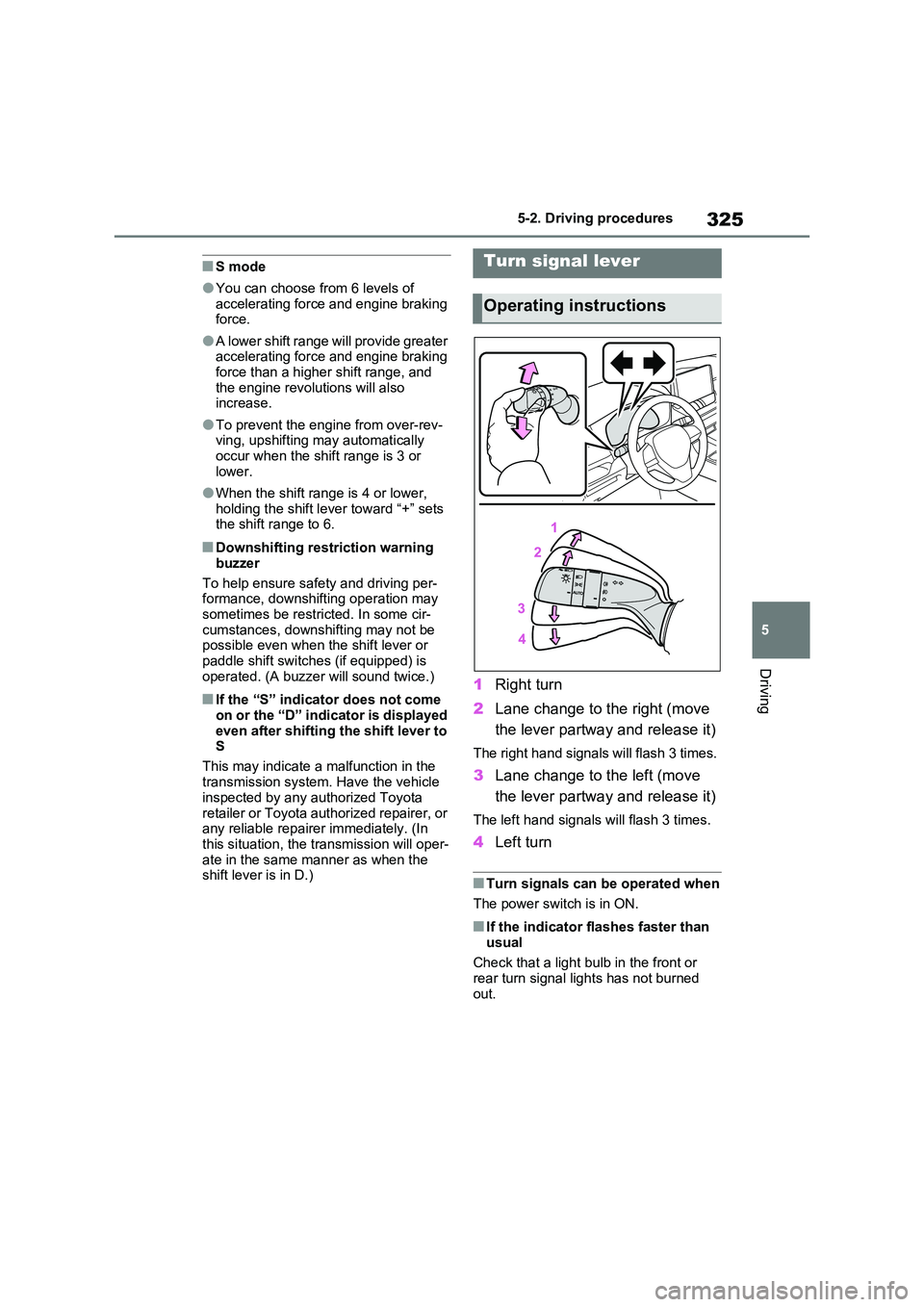
1 Right turn
2 Lane change to the right (move
the lever partway and release it)
The right hand signals will flash 3 times.
3 Lane change to the left (move
the lever partway and release it)
The left hand signals will flash 3 times.
4 Left turn
■Turn signals can be operated when
The power switch is in ON.
■If the indicator flashes faster than
usual
Check that a light bulb in the front or rear turn signal lights has not burned
out.
Turn signal lever
Operating instructions
Page 332 of 664
3325-3. Operating the lights and wipers
5-3.Operating the lights and wipers
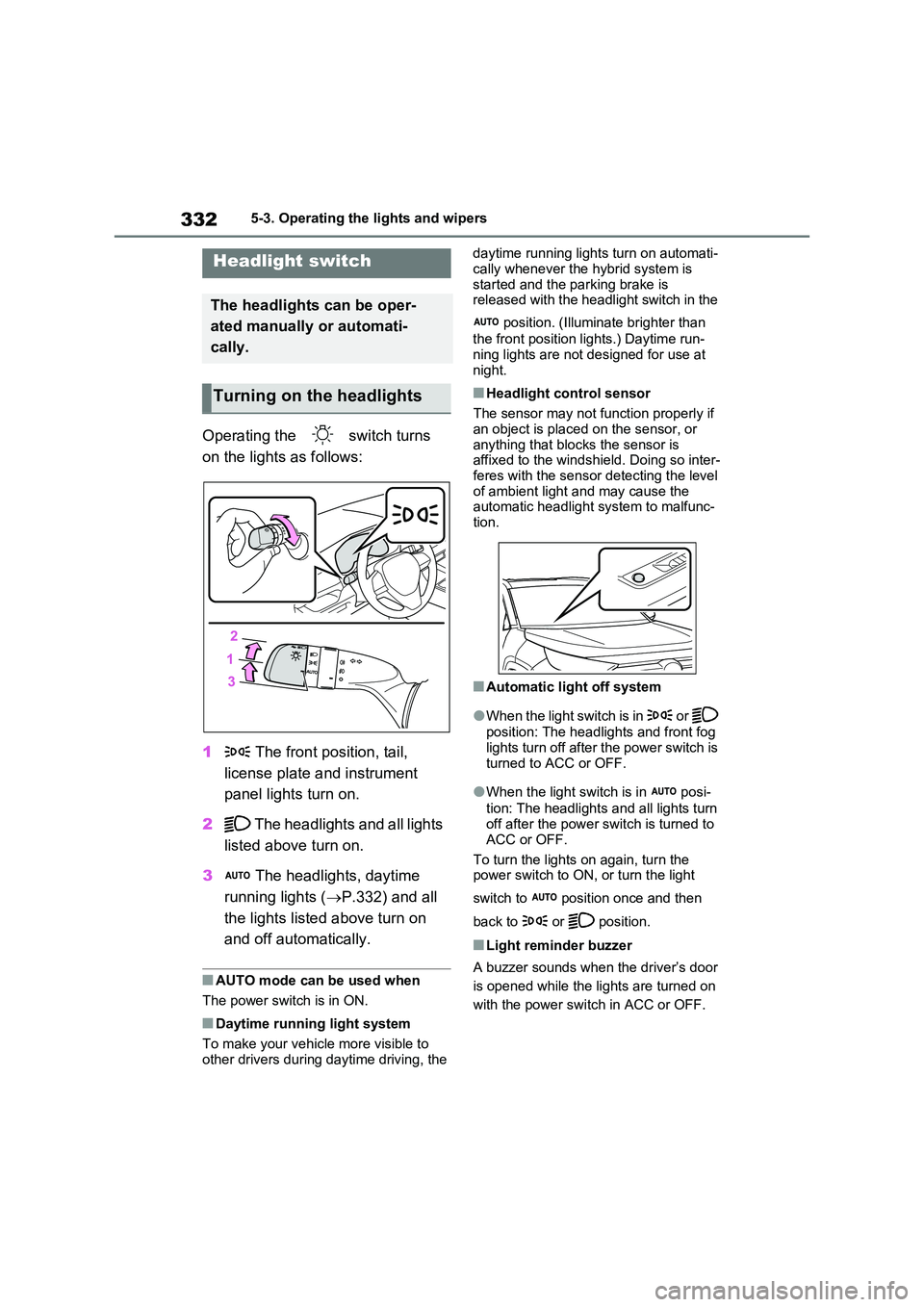
Operating the switch turns
on the lights as follows:
1 The front position, tail,
license plate and instrument
panel lights turn on.
2 The headlights and all lights
listed above turn on.
3 The headlights, daytime
running lights ( P.332) and all
the lights listed above turn on
and off automatically.
■AUTO mode can be used when
The power switch is in ON.
■Daytime running light system
To make your vehicle more visible to
other drivers during daytime driving, the
daytime running lights turn on automati-
cally whenever the hybrid system is started and the parking brake is released with the headlight switch in the
position. (Illuminate brighter than
the front position lights.) Daytime run- ning lights are not designed for use at
night.
■Headlight control sensor
The sensor may not function properly if an object is placed on the sensor, or
anything that blocks the sensor is affixed to the windshield. Doing so inter-feres with the sensor detecting the level
of ambient light and may cause the automatic headlight system to malfunc-tion.
■Automatic light off system
●When the light switch is in or
position: The headlights and front fog
lights turn off after the power switch is turned to ACC or OFF.
●When the light switch is in posi-
tion: The headlights and all lights turn off after the power switch is turned to
ACC or OFF.
To turn the lights on again, turn the power switch to ON, or turn the light
switch to position once and then
back to or position.
■Light reminder buzzer
A buzzer sounds when the driver’s door
is opened while the lights are turned on
with the power switch in ACC or OFF.
Headlight switch
The headlights can be oper-
ated manually or automati-
cally.
Turning on the headlights
Page 333 of 664
333
5
5-3. Operating the lights and wipers
Driving
■Automatic headlight leveling sys-
tem
The level of the headlights is automati- cally adjusted according to the number
of passengers and the loading condition of the vehicle to ensure that the head-lights do not interfere with other road
users.
■12-volt battery-saving function
In order to prevent the 12-volt battery of the vehicle from discharging, if the light
switch is in position when the
power switch is turned to OFF, the 12- volt battery-saving function will operate
and automatically turn off all the lights after approximately 20 minutes.
When any of the following are per-
formed, the 12-volt battery-saving func- tion is canceled once and then reactivated. All the lights will turn off
automatically 20 minutes after the 12- volt battery-saving function has been reactivated:
●When the headlight switch is operated
●When a door is opened or closed
■If “Headlight System Malfunction Visit Your Dealer” is displayed on the multi-information display
The system may be malfunctioning. Have the vehicle inspected by any authorized Toyota retailer or Toyota
authorized repairer, or any reliable repairer.
■Customization
Settings (e.g. light sensor sensitivity)
can be changed. (Customizable features: P.637)
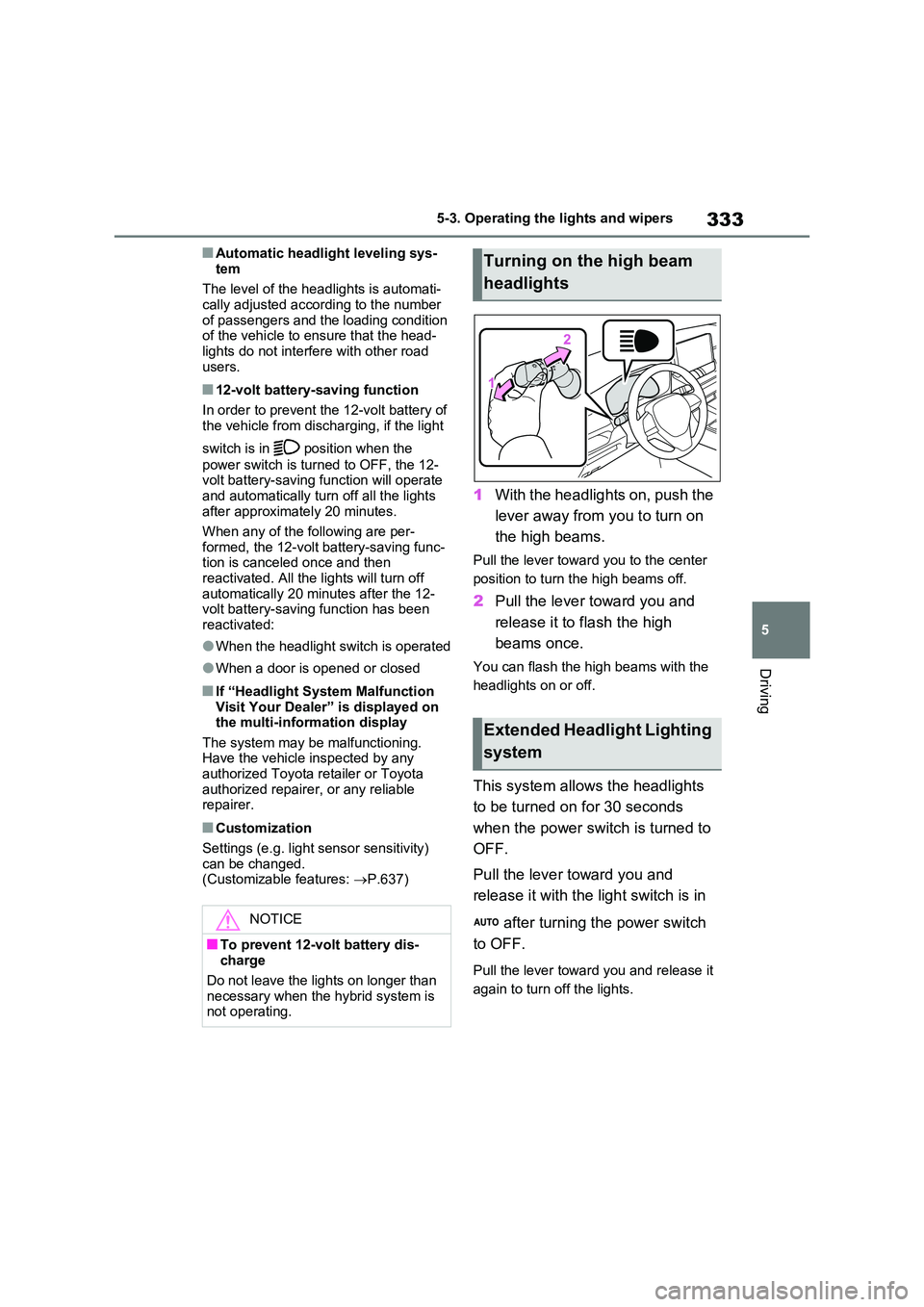
1With the headlights on, push the
lever away from you to turn on
the high beams.
Pull the lever toward you to the center
position to turn the high beams off.
2 Pull the lever toward you and
release it to flash the high
beams once.
You can flash the high beams with the
headlights on or off.
This system allows the headlights
to be turned on for 30 seconds
when the power switch is turned to
OFF.
Pull the lever toward you and
release it with the light switch is in
after turning the power switch
to OFF.
Pull the lever toward you and release it
again to turn off the lights.
NOTICE
■To prevent 12-volt battery dis- charge
Do not leave the lights on longer than
necessary when the hybrid system is not operating.
Turning on the high beam
headlights
Extended Headlight Lighting
system
Page 334 of 664
3345-3. Operating the lights and wipers
*: If equipped
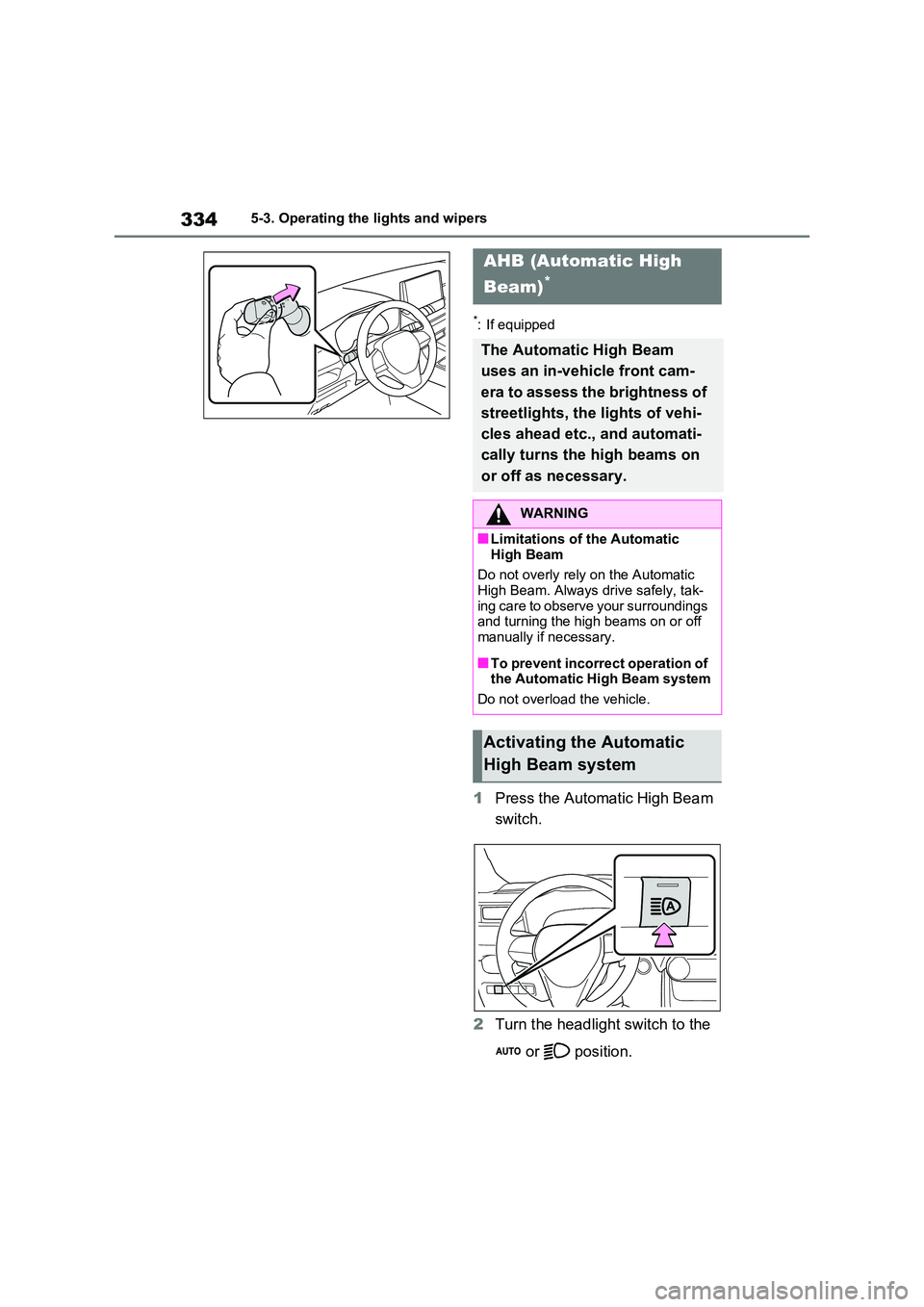
1Press the Automatic High Beam
switch.
2 Turn the headlight switch to the
or position.
AHB (Automatic High
Beam)*
The Automatic High Beam
uses an in-vehicle front cam-
era to assess the brightness of
streetlights, the lights of vehi-
cles ahead etc., and automati-
cally turns the high beams on
or off as necessary.
WARNING
■Limitations of the Automatic
High Beam
Do not overly rely on the Automatic High Beam. Always drive safely, tak-
ing care to observe your surroundings and turning the high beams on or off manually if necessary.
■To prevent incorrect operation of the Automatic High Beam system
Do not overload the vehicle.
Activating the Automatic
High Beam system