warning TOYOTA VERSO S 2011 Owner's Guide
[x] Cancel search | Manufacturer: TOYOTA, Model Year: 2011, Model line: VERSO S, Model: TOYOTA VERSO S 2011Pages: 664, PDF Size: 160.56 MB
Page 54 of 664
541-2. Child safety
■Child restraint system compat-
ibility for each seating posi-
tion
Compatibility of each seating posi-
tion with child restraint systems
( P.56) displays the type of child
restraint systems that can be used
and possible seating positions for
installation using symbols. Also, the
recommended child restraint sys-
tem that is suitable for your child
can be selected.
Otherwise, check [Recommended
child restraint systems and Com-
patibility table] for recommended
WARNING
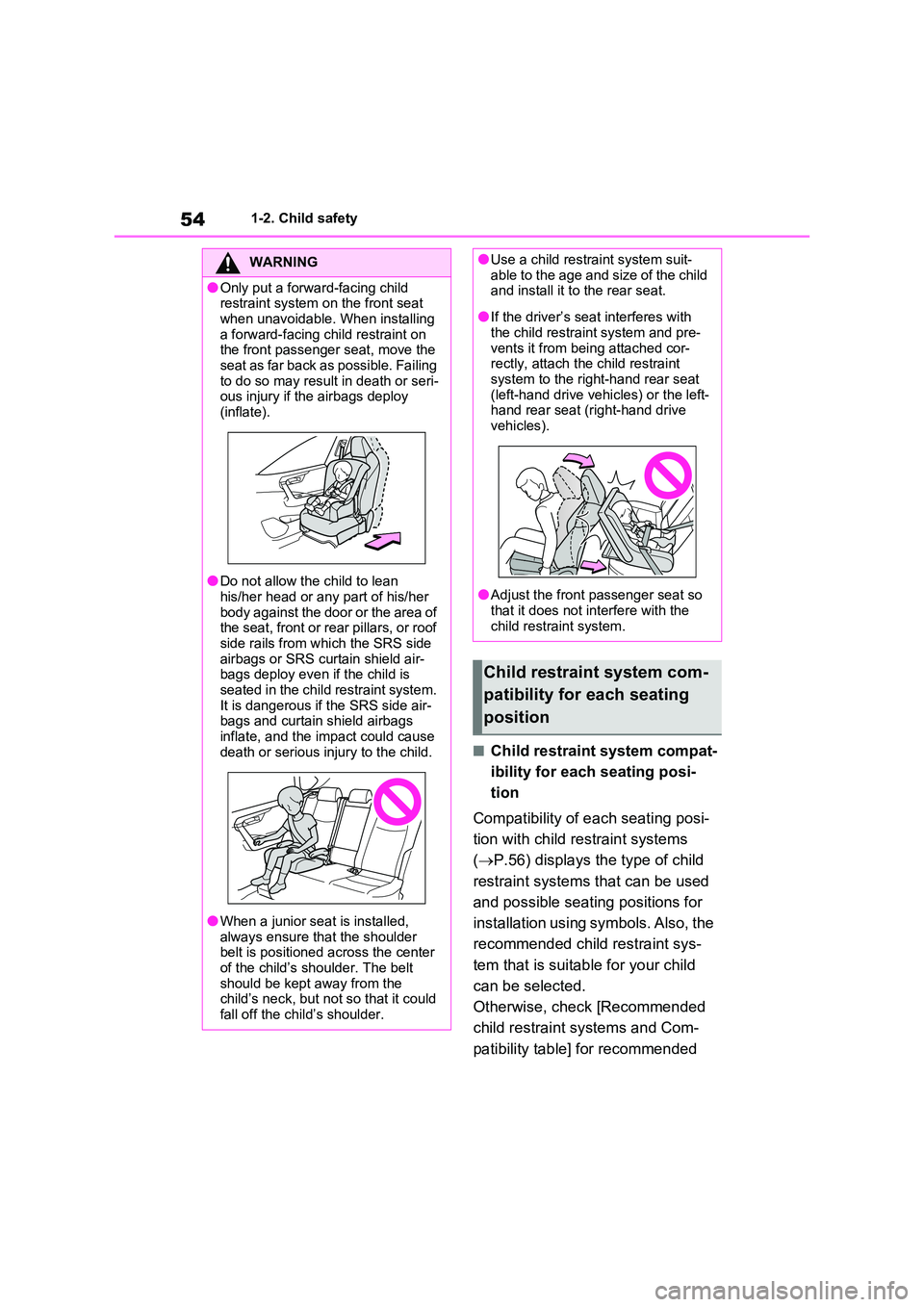
●Only put a forward-facing child restraint system on the front seat
when unavoidable. When installing a forward-facing child restraint on the front passenger seat, move the
seat as far back as possible. Failing to do so may result in death or seri-ous injury if the airbags deploy
(inflate).
●Do not allow the child to lean
his/her head or any part of his/her body against the door or the area of the seat, front or rear pillars, or roof
side rails from which the SRS side airbags or SRS curtain shield air-bags deploy even if the child is
seated in the child restraint system. It is dangerous if the SRS side air-bags and curtain shield airbags
inflate, and the impact could cause death or serious injury to the child.
●When a junior seat is installed, always ensure that the shoulder belt is positioned across the center
of the child’s shoulder. The belt should be kept away from the child’s neck, but not so that it could
fall off the child’s shoulder.
●Use a child restraint system suit- able to the age and size of the child and install it to the rear seat.
●If the driver’s seat interferes with the child restraint system and pre-
vents it from being attached cor- rectly, attach the child restraint system to the right-hand rear seat
(left-hand drive vehicles) or the left- hand rear seat (right-hand drive vehicles).
●Adjust the front passenger seat so that it does not interfere with the
child restraint system.
Child restraint system com-
patibility for each seating
position
Page 62 of 664
621-2. Child safety
■Removing a child restraint
system installed with a seat
belt
Press the buckle release button
and fully retract the seat belt.
When releasing the buckle, the child
restraint system may spring up due to
the rebound of the seat cushion.
Release the buckle while holding down
the child restraint system.
Since the seat belt automatically reels
itself, slowly return it to the stowing
position.
■When installing a child restraint system
You may need a locking clip to install the child restraint system. Follow the instructions provided by the manufac-
turer of the system. If your child restraint system does not provide a locking clip, you can purchase the following item
from any authorized Toyota retailer or Toyota authorized repairer, or any reli-able repairer: Locking clip for child
restraint system (Part No. 73119-22010)
■ISOFIX lower anchorages
(ISOFIX child restraint system)
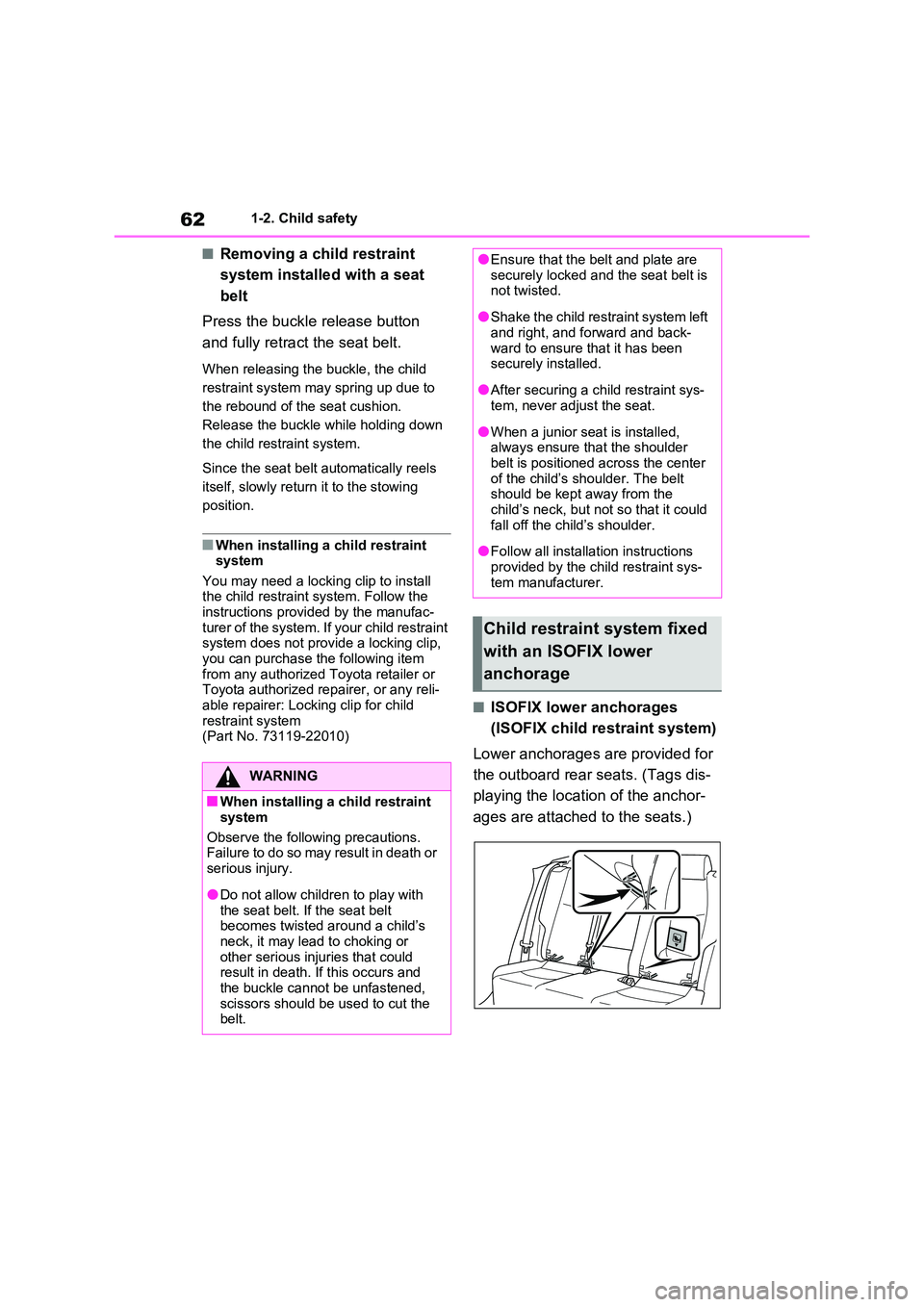
Lower anchorages are provided for
the outboard rear seats. (Tags dis-
playing the location of the anchor-
ages are attached to the seats.)
WARNING
■When installing a child restraint
system
Observe the following precautions. Failure to do so may result in death or
serious injury.
●Do not allow children to play with
the seat belt. If the seat belt becomes twisted around a child’s neck, it may lead to choking or
other serious injuries that could result in death. If this occurs and the buckle cannot be unfastened,
scissors should be used to cut the belt.
●Ensure that the belt and plate are securely locked and the seat belt is not twisted.
●Shake the child restraint system left and right, and forward and back-
ward to ensure that it has been securely installed.
●After securing a child restraint sys-tem, never adjust the seat.
●When a junior seat is installed, always ensure that the shoulder belt is positioned across the center
of the child’s shoulder. The belt should be kept away from the child’s neck, but not so that it could
fall off the child’s shoulder.
●Follow all installation instructions
provided by the child restraint sys- tem manufacturer.
Child restraint system fixed
with an ISOFIX lower
anchorage
Page 63 of 664
63
1
1-2. Child safety
For safety and security
■Installation with ISOFIX lower
anchorage (ISOFIX child
restraint system)
Install the child restraint system in
accordance to the operation man-
ual enclosed with the child restraint
system.
If the child restraint system on hand
is not within the “universal” cate-
gory (or the necessary information
is not in the table), refer to the
“Vehicle List” provided by the child
restraint system maker for various
possible installation positions, or
check the compatibility after asking
the retailer of the child seat.
( P.55, 56)
1 Adjust the seatback angle to the
most upright position. When
installing a forward-facing child
seat, if there is a gap between
the child seat and the seatback,
adjust the seatback angle until
good contact is achieved.
2 If the head restraint interferes
with the child restraint system
installation and the head
restraint can be removed,
remove the head restraint. Oth-
erwise, put the head restraint in
the upper most position.
( P.276)
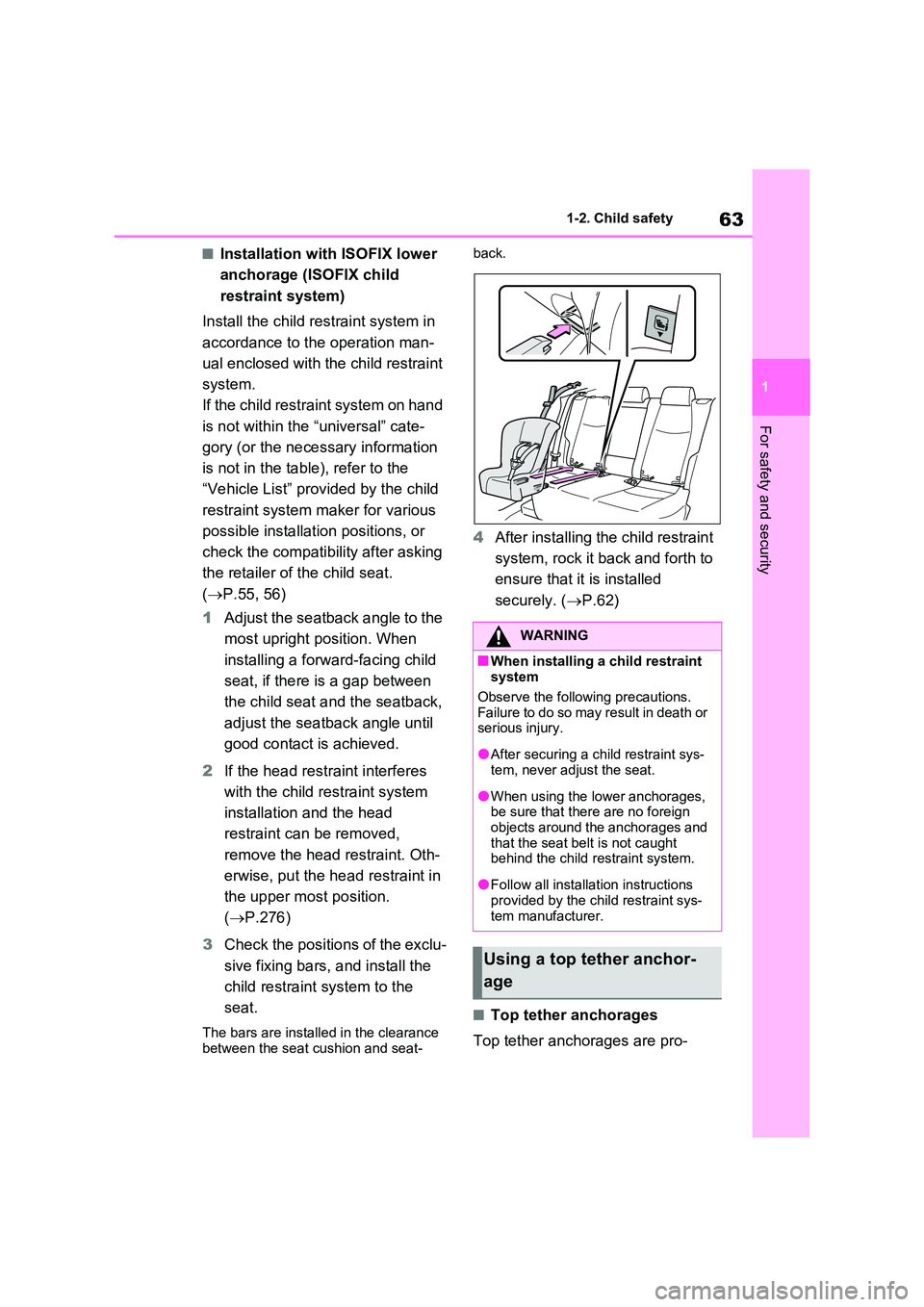
3 Check the positions of the exclu-
sive fixing bars, and install the
child restraint system to the
seat.
The bars are installed in the clearance between the seat cushion and seat-
back.
4 After installing the child restraint
system, rock it back and forth to
ensure that it is installed
securely. ( P.62)
■Top tether anchorages
Top tether anchorages are pro-
WARNING
■When installing a child restraint system
Observe the following precautions. Failure to do so may result in death or serious injury.
●After securing a child restraint sys-tem, never adjust the seat.
●When using the lower anchorages, be sure that there are no foreign
objects around the anchorages and that the seat belt is not caught behind the child restraint system.
●Follow all installation instructions provided by the child restraint sys-
tem manufacturer.
Using a top tether anchor-
age
Page 64 of 664
641-2. Child safety
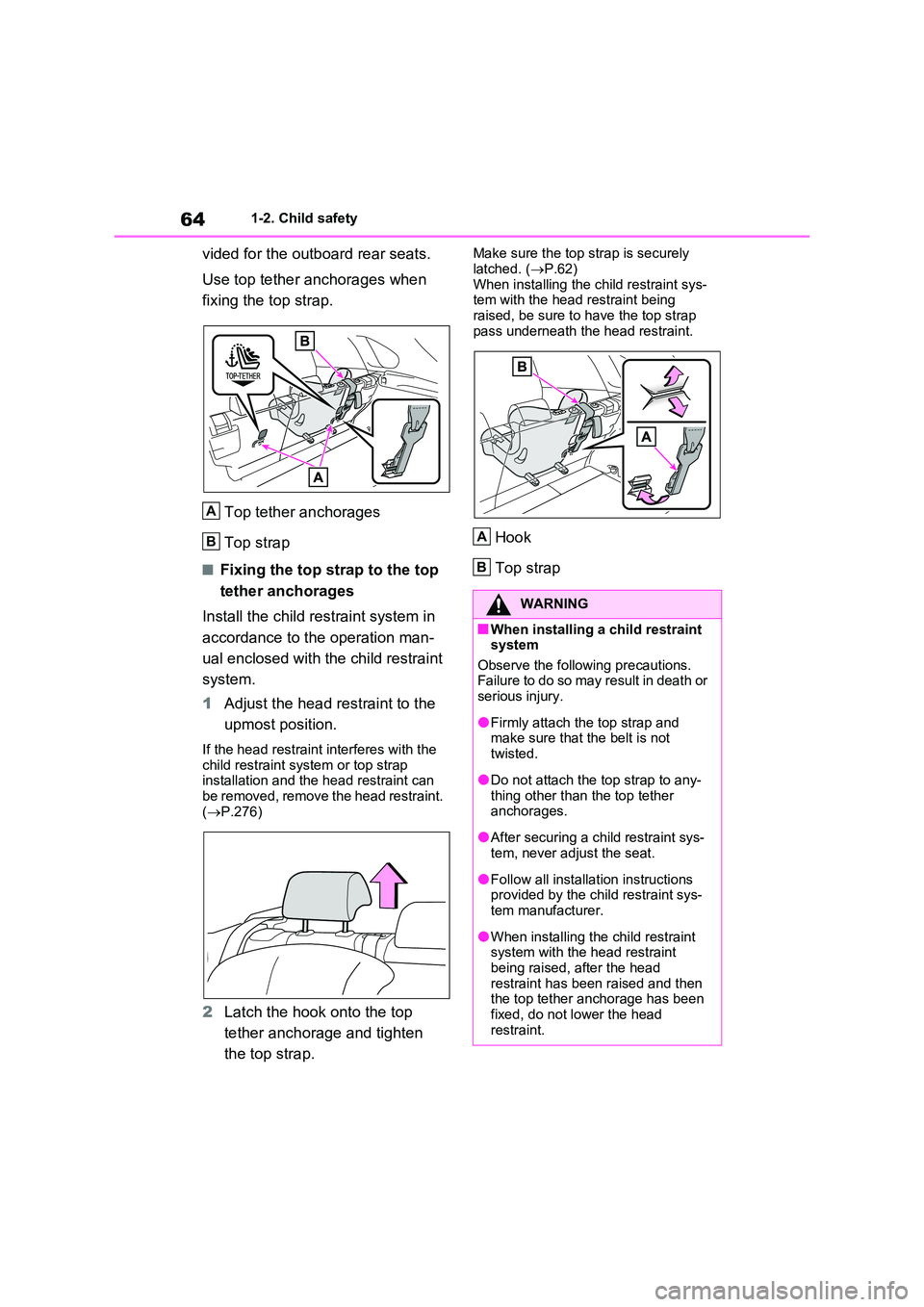
vided for the outboard rear seats.
Use top tether anchorages when
fixing the top strap.
Top tether anchorages
Top strap
■Fixing the top strap to the top
tether anchorages
Install the child restraint system in
accordance to the operation man-
ual enclosed with the child restraint
system.
1 Adjust the head restraint to the
upmost position.
If the head restraint interferes with the
child restraint system or top strap installation and the head restraint can be removed, remove the head restraint.
( P.276)
2Latch the hook onto the top
tether anchorage and tighten
the top strap.
Make sure the top strap is securely
latched. ( P.62) When installing the child restraint sys-tem with the head restraint being
raised, be sure to have the top strap pass underneath the head restraint.
Hook
Top strap
A
B
WARNING
■When installing a child restraint system
Observe the following precautions. Failure to do so may result in death or serious injury.
●Firmly attach the top strap and make sure that the belt is not
twisted.
●Do not attach the top strap to any-
thing other than the top tether anchorages.
●After securing a child restraint sys-tem, never adjust the seat.
●Follow all installation instructions provided by the child restraint sys-tem manufacturer.
●When installing the child restraint system with the head restraint
being raised, after the head restraint has been raised and then the top tether anchorage has been
fixed, do not lower the head restraint.
A
B
Page 67 of 664
67
1
1-3. Emergency assistance
For safety and security
at the following URL.
http://www.opensourceautomotive.com/dcm/toyota/
WARNING
■When the Emergency Call may
not be made
●It may not be possible to make Emergency Calls in any of the fol-
lowing situations. In such cases, report to emergency services pro-vider (112 system etc.) by other
means such as nearby public phones.
• Even when the vehicle is in the cel-
lular phone service area, it may be difficult to connect to the eCall con-trol center if the reception is poor or
the line is busy. In such cases, even though the system attempts to connect to the eCall control center,
you may not be able to connect to the eCall control center to make Emergency Calls and contact emer-
gency services.
• When the vehicle is out of the cellu-
lar phone service area, the Emer- gency Calls cannot be made.
• When any related equipment (such as the “SOS” button panel, indicator lights, microphone, speaker, DCM,
antenna, or any wires connecting the equipment) is malfunctioning, damaged or broken, the Emer-
gency Call cannot be made.
• During an Emergency Call, the sys-
tem makes repeated attempts to connect to the eCall control center. However, if it cannot connect to the
eCall control center due to poor radio wave reception, the system may not be able to connect to the
cellular network and the call may finish without connecting. The red indicator light will blink for approxi-
mately 30 seconds to indicate this disconnection.
●If the 12-volt battery’s voltage decreases or there is a disconnec-tion, the system may not be able to
connect to the eCall control center.
■When the Emergency Call sys-
tem is replaced with a new one
The Emergency Call system should be registered. Contact any authorized
Toyota retailer or Toyota authorized repairer, or any reliable repairer.
■For your safety
●Please drive safely.The function of this system is to
assist you in making the Emer- gency Call in case of accidents such as traffic accidents or sudden
medical emergencies, and it does not protect the driver or passengers in any way. Please drive safely and
fasten your seatbelts at all times for your safety.
●In case of an emergency, make lives the top priority.
●If you smell anything burning or other unusual smells, leave the vehicle and evacuate to a safe area
immediately.
●If the airbags deploy when the sys-
tem is operating normally, the sys- tem makes emergency call. The system also makes emergency call
when the vehicle is struck from the rear or rolls over, even if the air-bags do not deploy.
●For safety, do not make the Emer-gency Call while driving.
Making calls during driving may cause mishandling of the steering wheel, which may lead to unex-
pected accidents. Stop the vehicle and confirm the safety of your surroundings before
making the Emergency Call.
Page 68 of 664
681-3. Emergency assistance
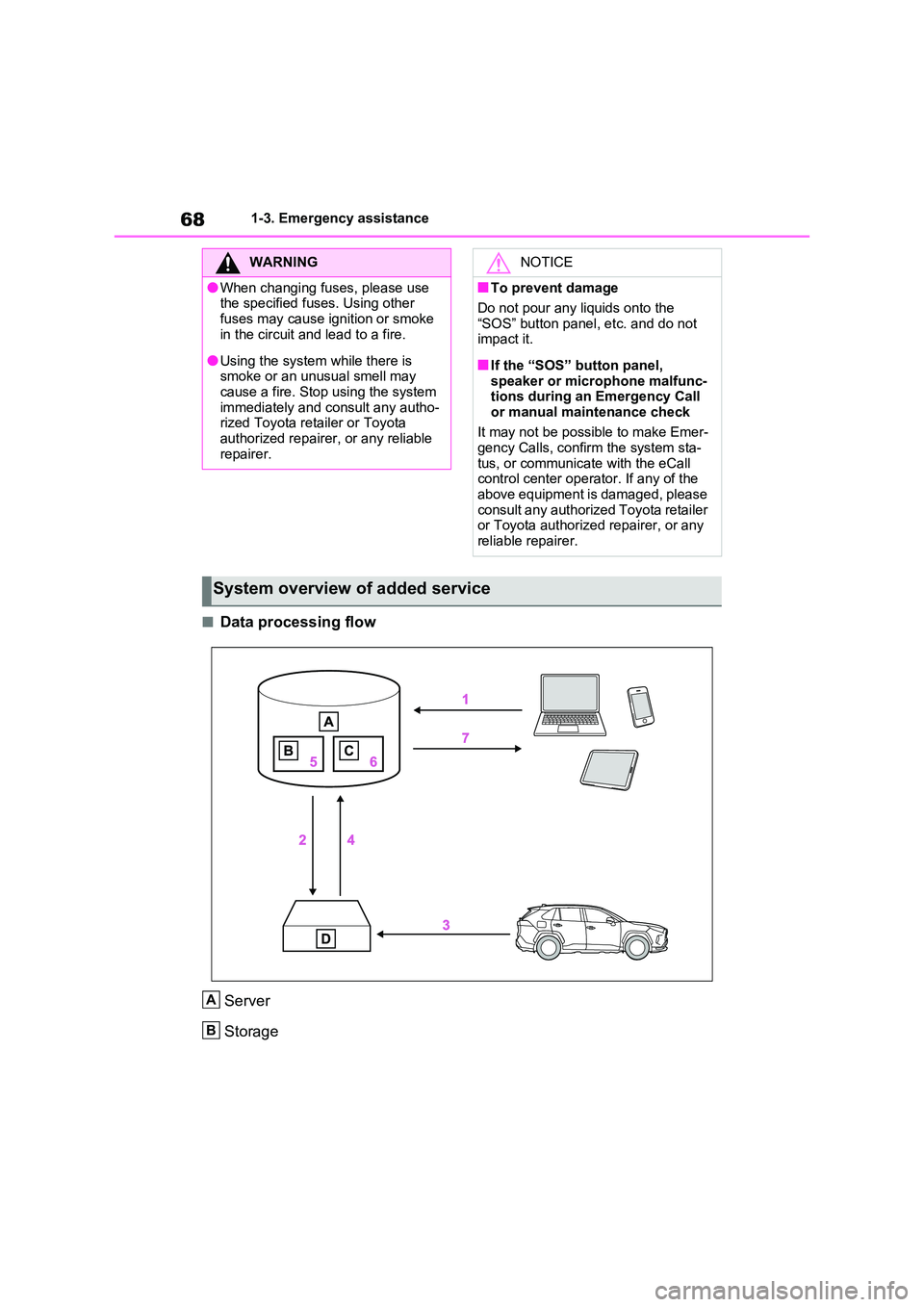
■Data processing flow
Server
Storage
WARNING
●When changing fuses, please use the specified fuses. Using other
fuses may cause ignition or smoke in the circuit and lead to a fire.
●Using the system while there is smoke or an unusual smell may cause a fire. Stop using the system
immediately and consult any autho- rized Toyota retailer or Toyota authorized repairer, or any reliable
repairer.
NOTICE
■To prevent damage
Do not pour any liquids onto the
“SOS” button panel, etc. and do not impact it.
■If the “SOS” button panel, speaker or microphone malfunc-tions during an Emergency Call
or manual maintenance check
It may not be possible to make Emer- gency Calls, confirm the system sta-
tus, or communicate with the eCall control center operator. If any of the above equipment is damaged, please
consult any authorized Toyota retailer or Toyota authorized repairer, or any reliable repairer.
System overview of added service
A
B
Page 69 of 664
69
1
1-3. Emergency assistance
For safety and security
Processing
DCM
1 Customer activates service on Toyota Customer portal & accepts terms
of services according to GDPR.
2 Server activates the service in the DCM and defines which vehicle data
to collect.
3 Defined vehicle data is collected by the DCM.
4 Data is shared with the server.
5 Data is stored in the server.
6 Data is processed in the server for fulfilling the service.
7 Processed data is presented to the customer.
For a list of eligible service please visit the Toyota Customer portal.
Implementing Regulation
Implementing Regulation Annex1 PART3 User InformationConformity
1. DESCRIPTION OF THE ECALL IN-VEHICLE SYSTEM
1.1.Overview of the 112-based eCall in-vehicle sys-
tem, its operation and functionalitiesO
1.2.
The 112-based eCall service is a public service
of general interest and is accessible free of
charge.
O
1.3.
The 112-based eCall in-vehicle system is acti-
vated by default. It is activated automatically by
means of in-vehicle sensors in the event of a
severe accident. It will also be triggered automat-
ically when the vehicle is equipped with a TPS
system which does not function in the event of a
severe accident.
O
1.4.
The 112-based eCall in-vehicle system can also
be triggered manually, if needed. Instructions for
manual activation of the system
O
1.5.
In the event of a critical system failure that would
disable the 112-based eCall in-vehicle system,
the following warning will be given to the occu-
pants of the vehicle
O
C
D
Page 77 of 664
77
1
1-4. Theft deterrent system
For safety and security
*: If equipped
■Setting
Turn the power switch to OFF, have
all the passengers exit the vehicle
and ensure that all the doors are
closed.
Using the entry function:
Touch the sensor area on the front
outside door handle twice within 5
seconds.
Using the wireless remote control:
Press twice within 5 sec-
onds.
■Canceling
Using the entry function:
Hold the front outside door handle.
Using the wireless remote control:
Press .
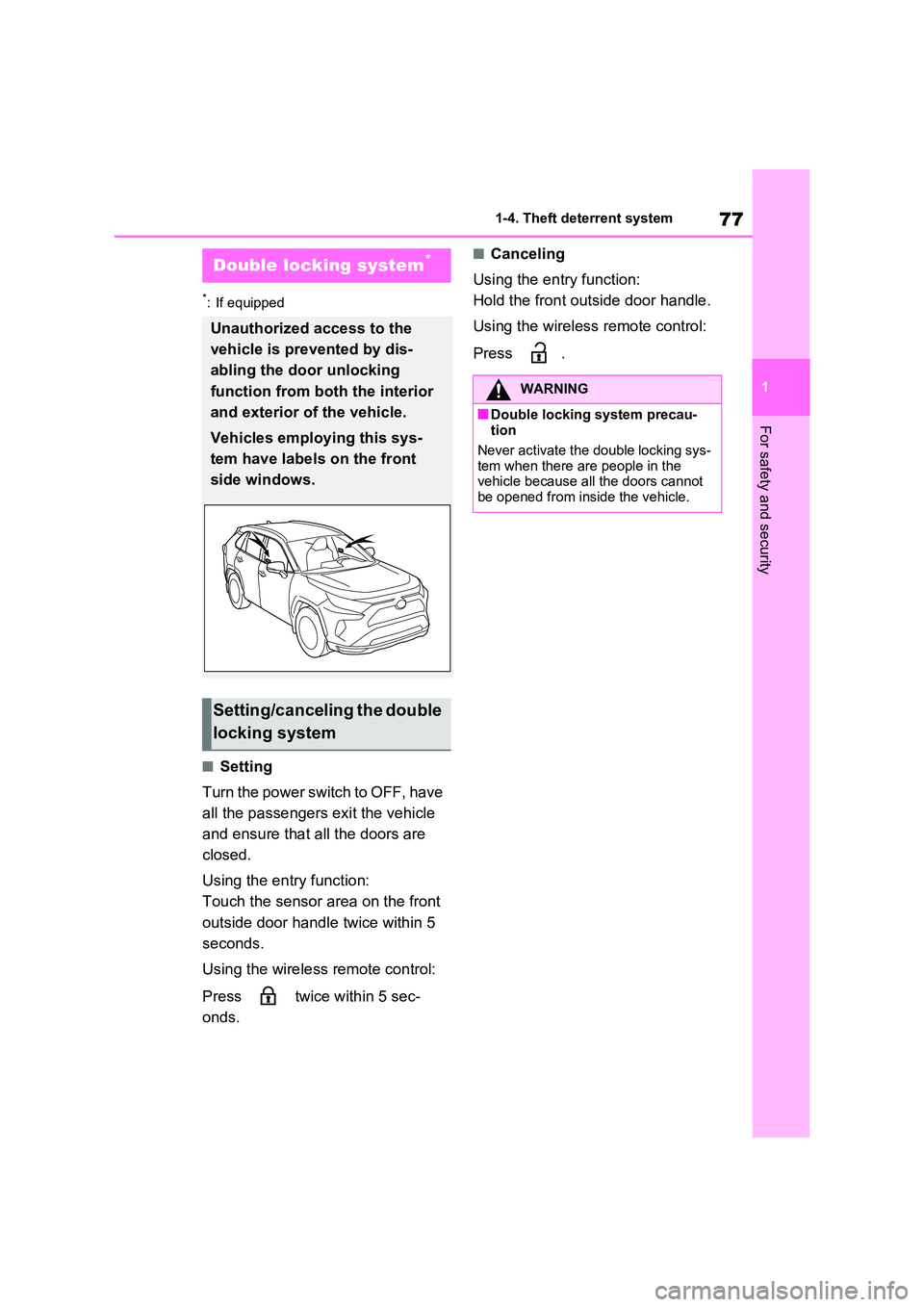
Double locking system*
Unauthorized access to the
vehicle is prevented by dis-
abling the door unlocking
function from both the interior
and exterior of the vehicle.
Vehicles employing this sys-
tem have labels on the front
side windows.
Setting/canceling the double
locking system
WARNING
■Double locking system precau- tion
Never activate the double locking sys-
tem when there are people in the vehicle because all the doors cannot be opened from inside the vehicle.
Page 88 of 664
882-1. Plug-in hybrid system
be changed even if the AUTO EV/HV
mode switch or EV/HV mode selection switch is pressed. (In this case, the warning message is displayed on the
multi-information display when the switch is pressed.)
●When electricity needed for EV driving is not remaining (when in EV mode or AUTO EV/HV mode)
●When the traction battery is almost completely charged (hybrid battery
[traction battery] charge mode)
■When switching from EV mode to another mode using the switch
●After switching from EV mode to HV
mode or hybrid battery (traction bat- tery) charge mode and the power
switch is turned off, the system returns to EV mode the next time the
vehicle is started.*
●After switching from EV mode to
AUTO EV/HV mode and the power switch is turned off, the system does not return to EV mode the next time
the vehicle is started.*
*: If there is not enough charge remain-
ing in the hybrid battery (traction bat-
tery) to allow EV driving, the system
switches to HV mode.
■Hybrid battery (traction battery) charge mode
●The following may occur to protect the system, etc.• Cannot switch to hybrid battery (trac-
tion battery) charge mode or cannot cancel it• Gasoline engine does not start or
stops even after switching to hybrid battery (traction battery) charge mode
●If a load to the system is large, such as when the power consumption of the air conditioning system is large or
when the temperature of the engine coolant is high, it may take longer time than usual to charge using the hybrid
battery (traction battery) charge mode, or charging to the hybrid bat-tery (traction battery) may not be per-
formed.
■When in EV mode
In EV mode, EV driving (driving
using only the electric motor)* is
possible. However, depending on
the situation, EV driving may be
canceled and both gasoline engine
and electric motor are used
( P.90). Also, if a little electricity is
remaining in the hybrid battery
(traction battery), HV mode is auto-
matically selected. To drive in EV
mode long, observe the followings.
Avoid sudden acceleration and
sudden deceleration, and be
sure to drive smoothly.
If you repeatedly accelerate, the
hybrid battery (traction battery)
WARNING
■When using the hybrid battery (traction battery) charge mode
Observe the following precautions
when using the hybrid battery (trac- tion battery) charge mode while park-ing.
Failure to do so may lead to death or serious health hazard, as the gasoline engine operates when in the hybrid
battery (traction battery) charge mode.
●Do not stop the vehicle near flam-
mable materials.
●Do not use the hybrid battery (trac-
tion battery) charge mode in a closed area where ventilation is insufficient, such as in a garage or
area with snow buildup.
Control when driving in
each mode
Page 95 of 664
95
2
2-1. Plug-in hybrid system
Plug-in hybrid system
Hybrid battery (traction battery)
Front electric motor (traction motor)
Air conditioning compressor
Junction box
■Running out of fuel
When the vehicle has run out of fuel and
the hybrid system cannot be started, refuel the vehicle with at least enough gasoline to make the low fuel level warn-
ing light ( P.575) go off. If there is only a small amount of fuel, the hybrid sys-tem may not be able to start. (The stan-
dard amount of fuel is about 8.8 L [2.3 gal., 1.9 Imp.gal.], when the vehicle is on a level surface. This value may vary
when the vehicle is on a slope. Add extra fuel when the vehicle is inclined.)
■Electromagnetic waves
●High voltage parts and cables on the hybrid vehicles incorporate electro-magnetic shielding, and therefore emit
approximately the same amount of electromagnetic waves as conven-tional gasoline powered vehicles or
home electronic appliances.
●Your vehicle may cause sound inter-
ference in some third party-produced radio parts.
■Effect of magnetic forces
If objects that generate strong magnetic
forces, such as large speakers, are placed inside the luggage compartment or installed nearby, the generated mag-
netic forces may negatively affect the hybrid system.
■Hybrid battery (traction battery) (lithium-ion battery)
The hybrid battery (traction battery) has a limited service life.
The hybrid battery (traction battery)
capacity (the ability to hold a charge) reduces with time and use in the same way as other rechargeable batteries.
The extent at which capacity reduces
changes drastically depending on the environment (ambient temperature, etc.)
and usage conditions, such as how the vehicle is driven and how the hybrid bat-tery (traction battery) is charged. This is
a natural characteristic of lithium-ion batteries, and is not a malfunction. Also, even though the EV driving range
becomes shorter when the hybrid bat- tery (traction battery) capacity reduces, vehicle performance does not signifi-
cantly become worse.
In order to reduce the possibility of the capacity reducing, follow the directions
listed on P.134, “Capacity reduction of the hybrid battery (traction battery)”.
■Starting the hybrid system in an extremely cold environment
When the hybrid battery (traction bat- tery) is extremely cold (below approxi-mately -30°C [-22°F]) under the
influence of the outside temperature, it may not be possible to start the hybrid system. In this case, try to start the
hybrid system again after the tempera- ture of the hybrid battery increases due to the outside temperature increase etc.
■Declaration of conformity
This model conforms to hydrogen emis- sions according to regulation ECE100 (Battery electric vehicle safety).
I
J
K
L
WARNING
■High voltage precautions
The vehicle has high voltage DC and
AC systems as well as a 12-volt sys- tem. DC and AC high voltage is very dangerous and can cause severe
burns and electric shock that may result in death or serious injury.