ECU TOYOTA VERSO S 2011 Service Manual
[x] Cancel search | Manufacturer: TOYOTA, Model Year: 2011, Model line: VERSO S, Model: TOYOTA VERSO S 2011Pages: 664, PDF Size: 160.56 MB
Page 122 of 664
1222-2. Charging
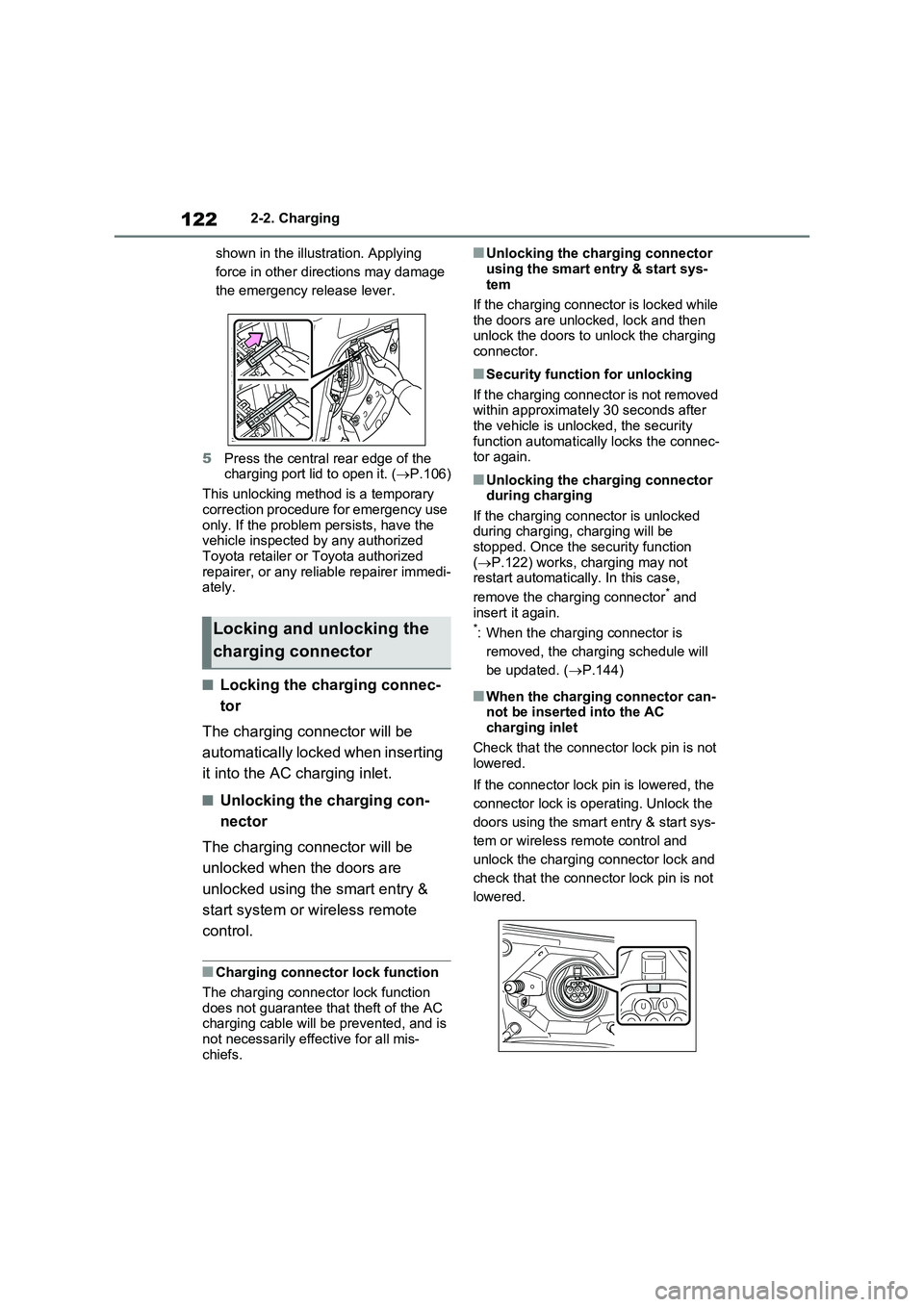
shown in the illustration. Applying
force in other directions may damage
the emergency release lever.
5Press the central rear edge of the
charging port lid to open it. (P.106)
This unlocking method is a temporary
correction procedure for emergency use
only. If the problem persists, have the
vehicle inspected by any authorized
Toyota retailer or Toyota authorized
repairer, or any reliable repairer immedi-
ately.
■Locking the charging connec-
tor
The charging connector will be
automatically locked when inserting
it into the AC charging inlet.
■Unlocking the charging con-
nector
The charging connector will be
unlocked when the doors are
unlocked using the smart entry &
start system or wireless remote
control.
■Charging connector lock function
The charging connector lock function
does not guarantee that theft of the AC
charging cable will be prevented, and is
not necessarily effective for all mis-
chiefs.
■Unlocking the charging connector
using the smart entry & start sys-
tem
If the charging connector is locked while
the doors are unlocked, lock and then
unlock the doors to unlock the charging
connector.
■Security function for unlocking
If the charging connector is not removed
within approximately 30 seconds after
the vehicle is unlocked, the security
function automatically locks the connec-
tor again.
■Unlocking the charging connector
during charging
If the charging connector is unlocked
during charging, charging will be
stopped. Once the security function
(P.122) works, charging may not
restart automatically. In this case,
remove the charging connector
* and
insert it again.
*: When the charging connector is
removed, the charging schedule will
be updated. (P.144)
■When the charging connector can-
not be inserted into the AC
charging inlet
Check that the connector lock pin is not
lowered.
If the connector lock pin is lowered, the
connector lock is operating. Unlock the
doors using the smart entry & start sys-
tem or wireless remote control and
unlock the charging connector lock and
check that the connector lock pin is not
lowered.
Locking and unlocking the
charging connector
Page 137 of 664
137
2 2-2. Charging
Plug-in hybrid system
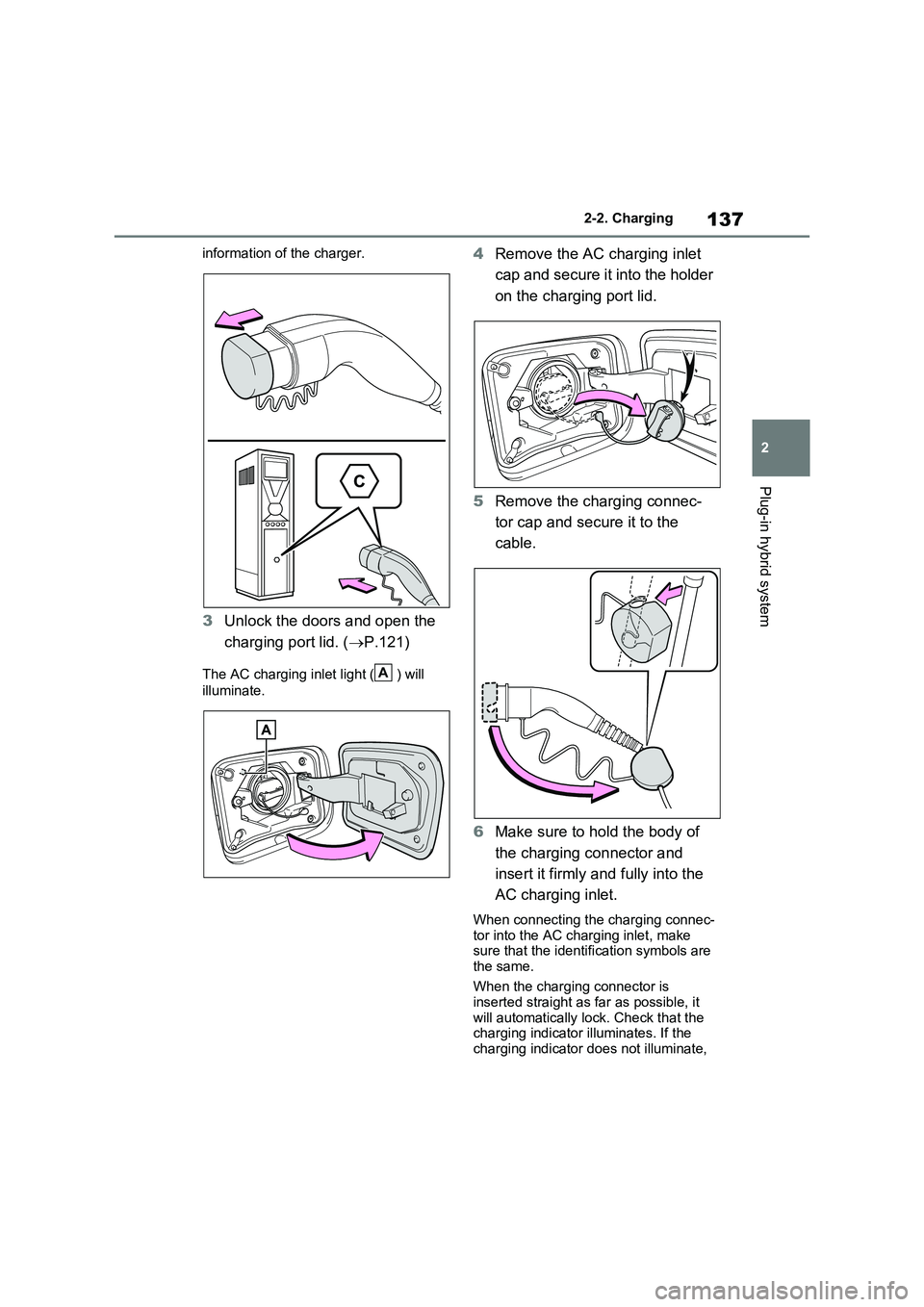
information of the charger.
3Unlock the doors and open the
charging port lid. (P.121)
The AC charging inlet light ( ) will
illuminate.
4Remove the AC charging inlet
cap and secure it into the holder
on the charging port lid.
5Remove the charging connec-
tor cap and secure it to the
cable.
6Make sure to hold the body of
the charging connector and
insert it firmly and fully into the
AC charging inlet.
When connecting the charging connec-
tor into the AC charging inlet, make
sure that the identification symbols are
the same.
When the charging connector is
inserted straight as far as possible, it
will automatically lock. Check that the
charging indicator illuminates. If the
charging indicator does not illuminate,
A
Page 139 of 664
139
2
2-2. Charging
Plug-in hybrid system
charging is displayed ( P.195).
■Charging at a public charging sta-
tion with authentication function
When a door is unlocked during charging, the charging connector is
unlocked and charging will be stopped. In this case, the charging station authentication is canceled and charging
may not be able to restart. Reconnect the charging connector and perform authentication for the charging station.
■Protection function of AC charging
inlet overheating (vehicles with 6.6 kW onboard traction battery char-ger)
By installing a temperature sensor to the AC charging inlet, prevents parts from melting when the temperature rises due
to foreign matter entering the charging connector. When a certain temperature increase is detected, charging is
stopped immediately and a message is displayed on the multi-information dis-play. After the temperature has
decreased, charging resumes by per- forming the operation to start charging again.
WARNING
■When charging
Observe the following precautions.
Failure to do so may cause an unex-
pected accident, resulting in death or serious injury.
●Connect to a power source suitable
for charging. ( P.124)
●Check that the AC charging cable,
plug and socket are free of foreign matter.
●Before charging, check that the AC charging inlet is not deformed, damaged or corroded, and check
that the inlet is free of foreign mat- ter such as dirt, snow and ice. If there is dirt or dust in these areas,
remove completely before inserting the charging connector.
●Before inserting the charging plug into the charger, make sure there is no dirt or dust on the terminal
areas. If there is dirt or dust in these areas, remove completely before inserting the charging plug.
●Do not get the terminals of the AC charging inlet wet.
●Only use sockets where the plug can be securely inserted.
●Do not bundle or wind the AC charging cable while charging, as
doing so may result in overheating.
●Do not touch the terminals of the
charging connector and AC charging inlet with a sharp metal objects (needles etc.) or hands, or
short them with foreign objects.
●When charging outdoors, make
sure to connect to a rain-tight socket for outdoor use. Ensure the rain-tight cover closes completely. If
the rain-tight cover cannot be closed, install a rain-tight cover that will close.
●In order to stop charging at the charging station, follow the instruc-
tions of the charger.
●If any heat, smoke, odors, noise or
other abnormalities are noticed during charging, stop charging immediately.
●Do not insert the plug if the socket is submerged in water or snow.
●When charging while it is raining or snowing, do not connect or discon-
nect the plug if your hands are wet. Also, do not get the plug or outlet wet.
●Do not charge the vehicle during a lightning storm.
●Prevent the AC charging cable from being caught in the door or back
door.
Page 146 of 664
1462-2. Charging
connected.
●After connecting the AC charging
cable, check that the charging indica-
tor of the charging port flashes
(P.106)
●Do not use an socket that has a power
cut off function (including a timer func-
tion)
Use an socket that constantly supplies
electricity. For sockets where the
power is cut off due to a timer func-
tion, etc., charging may not be carried
out according to plan if the power is
cut off during the set time.
■When the AC charging cable
remains connected to the vehicle
Even if multiple consecutive charging
schedules are registered, the next
charge will not be carried out according
to the charging schedule until the AC
charging cable is removed and recon-
nected after charging completes. Also,
when the hybrid battery (traction battery)
is fully charged, charging according to
the charging schedule will not be carried
out.
■“Climate Prep”
●When the air conditioning-linked set-
ting is turned on, the air conditioning
operates until the set departure time.
Therefore, the air conditioning will
consume electricity and charging may
not complete by the set departure
time.
●If the hybrid battery (traction battery)
is fully charged, charging will not be
carried out, even if the charging
schedule is set. However, if “Climate
Prep” is turned on, the air conditioning
will operate only once when it nears
the time set in “Departure”. If this
occurs, the air conditioning will con-
sume electricity and the remaining
charge of the hybrid battery (traction
battery) when departing may be
decreased.
●When the doors are unlocked, the air
conditioning system does not operate.
■When charging schedules are
ignored
When the following operations are per-
formed while the charging schedule is
on standby, charging schedule is tempo-
rarily canceled and charging is started.
●When the Remote Air Conditioning
System (P.460) is operated
●When turning “My Room Mode” on
(P.153)
●When turning “Charge Now” on
(P.150)
●When an operation that temporarily
cancel charging using the charging
schedule (P.138)
■Effects of outside temperature
When the charging mode is set to
“Departure”, charging schedule may be
ignored due to the outside temperature
and charging may start.
■“Battery Heater” (P.128) /“Battery
Cooler” (P.129)
When charging is carried out using the
charging schedule, the hybrid battery
(traction battery) heating or cooling func-
tion may operate according to the tem-
perature of the hybrid battery (traction
battery).
●When the charging mode is set to
“Start”, the function starts at the set
charging start time.
●“Battery Heater”: When the charging
mode is set to “Departure”, the func-
tion starts automatically to complete
heating by the desired departure time.
●“Battery Cooler”: When the charging
mode is set to “Departure”, cooling
starts approximately 30 minutes
before the charging start time. How-
ever, if there is no time to finish
charging by the charging schedule,
the hybrid battery (traction battery)
cooling time may be shortened and
“Battery Cooler” may not operate.
Page 157 of 664
157
2 2-2. Charging
Plug-in hybrid system
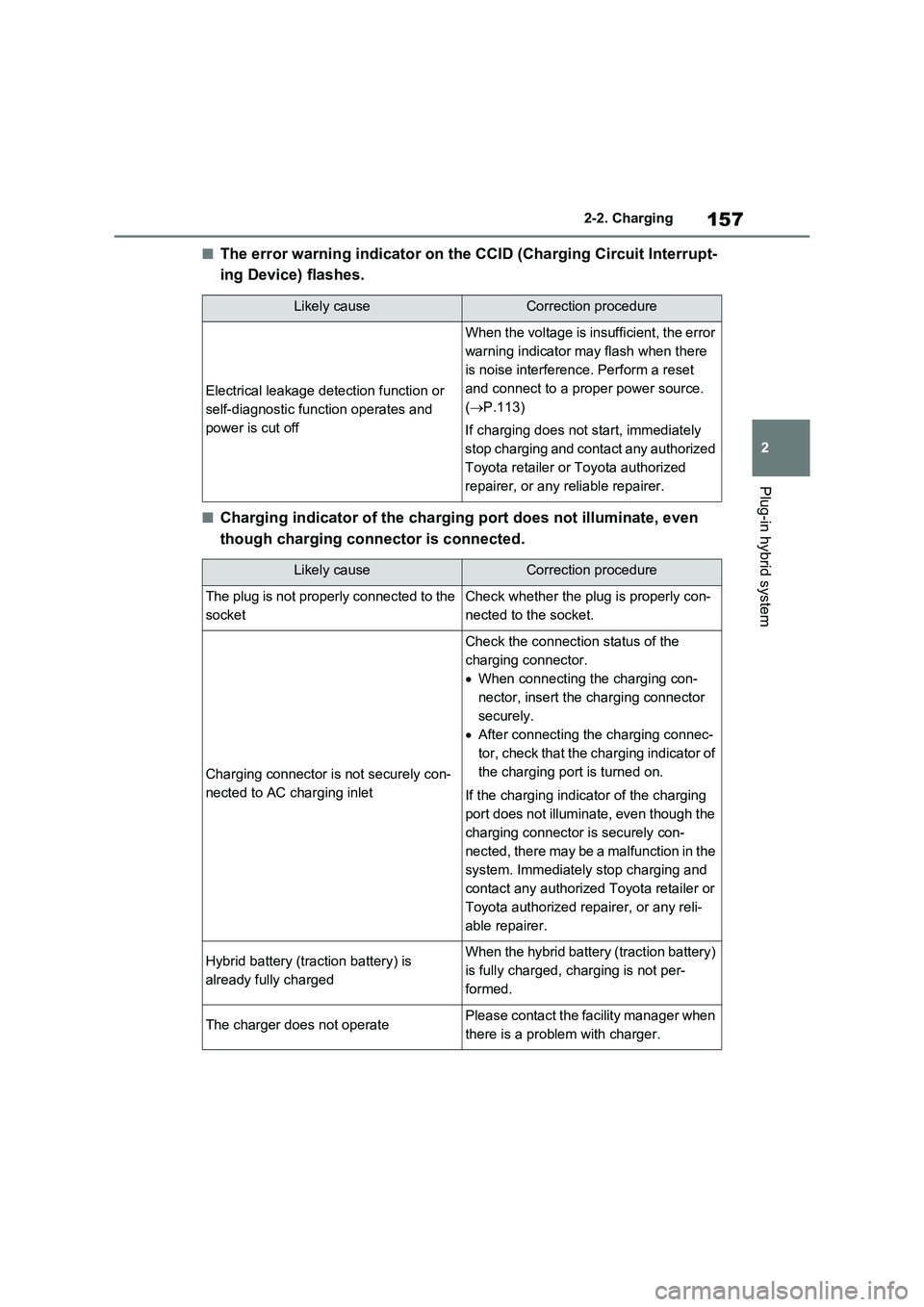
■The error warning indicator on the CCID (Charging Circuit Interrupt-
ing Device) flashes.
■Charging indicator of the charging port does not illuminate, even
though charging connector is connected.
Likely causeCorrection procedure
Electrical leakage detection function or
self-diagnostic function operates and
power is cut off
When the voltage is insufficient, the error
warning indicator may flash when there
is noise interference. Perform a reset
and connect to a proper power source.
(P.113)
If charging does not start, immediately
stop charging and contact any authorized
Toyota retailer or Toyota authorized
repairer, or any reliable repairer.
Likely causeCorrection procedure
The plug is not properly connected to the
socketCheck whether the plug is properly con-
nected to the socket.
Charging connector is not securely con-
nected to AC charging inlet
Check the connection status of the
charging connector.
When connecting the charging con-
nector, insert the charging connector
securely.
After connecting the charging connec-
tor, check that the charging indicator of
the charging port is turned on.
If the charging indicator of the charging
port does not illuminate, even though the
charging connector is securely con-
nected, there may be a malfunction in the
system. Immediately stop charging and
contact any authorized Toyota retailer or
Toyota authorized repairer, or any reli-
able repairer.
Hybrid battery (traction battery) is
already fully chargedWhen the hybrid battery (traction battery)
is fully charged, charging is not per-
formed.
The charger does not operatePlease contact the facility manager when
there is a problem with charger.
Page 161 of 664
161
2 2-2. Charging
Plug-in hybrid system
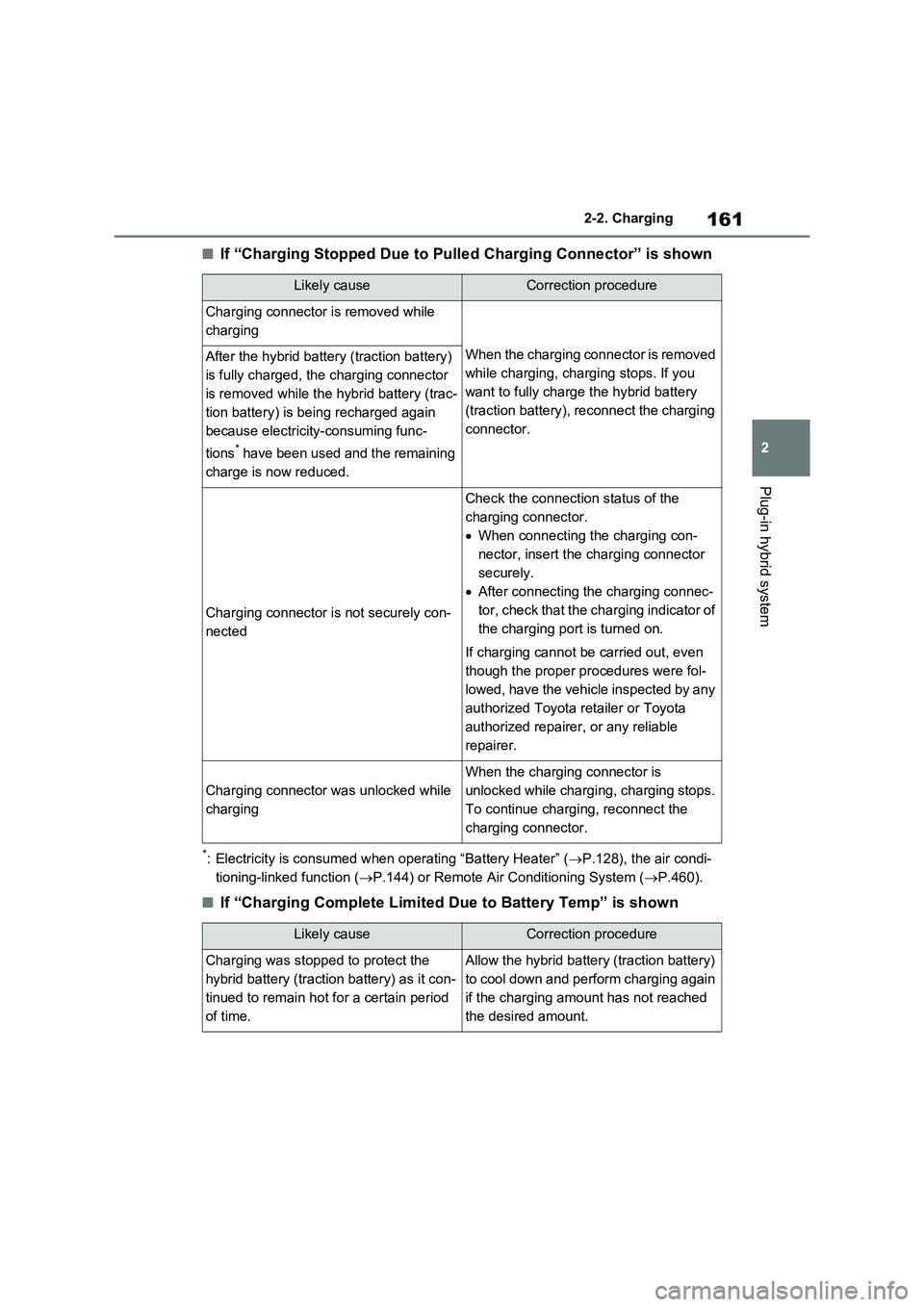
■If “Charging Stopped Due to Pulled Charging Connector” is shown
*: Electricity is consumed when operating “Battery Heater” (P.128), the air condi-
tioning-linked function (P.144) or Remote Air Conditioning System (P.460).
■If “Charging Complete Limited Due to Battery Temp” is shown
Likely causeCorrection procedure
Charging connector is removed while
charging
When the charging connector is removed
while charging, charging stops. If you
want to fully charge the hybrid battery
(traction battery), reconnect the charging
connector.After the hybrid battery (traction battery)
is fully charged, the charging connector
is removed while the hybrid battery (trac-
tion battery) is being recharged again
because electricity-consuming func-
tions
* have been used and the remaining
charge is now reduced.
Charging connector is not securely con-
nected
Check the connection status of the
charging connector.
When connecting the charging con-
nector, insert the charging connector
securely.
After connecting the charging connec-
tor, check that the charging indicator of
the charging port is turned on.
If charging cannot be carried out, even
though the proper procedures were fol-
lowed, have the vehicle inspected by any
authorized Toyota retailer or Toyota
authorized repairer, or any reliable
repairer.
Charging connector was unlocked while
charging
When the charging connector is
unlocked while charging, charging stops.
To continue charging, reconnect the
charging connector.
Likely causeCorrection procedure
Charging was stopped to protect the
hybrid battery (traction battery) as it con-
tinued to remain hot for a certain period
of time.Allow the hybrid battery (traction battery)
to cool down and perform charging again
if the charging amount has not reached
the desired amount.
Page 164 of 664
1642-2. Charging
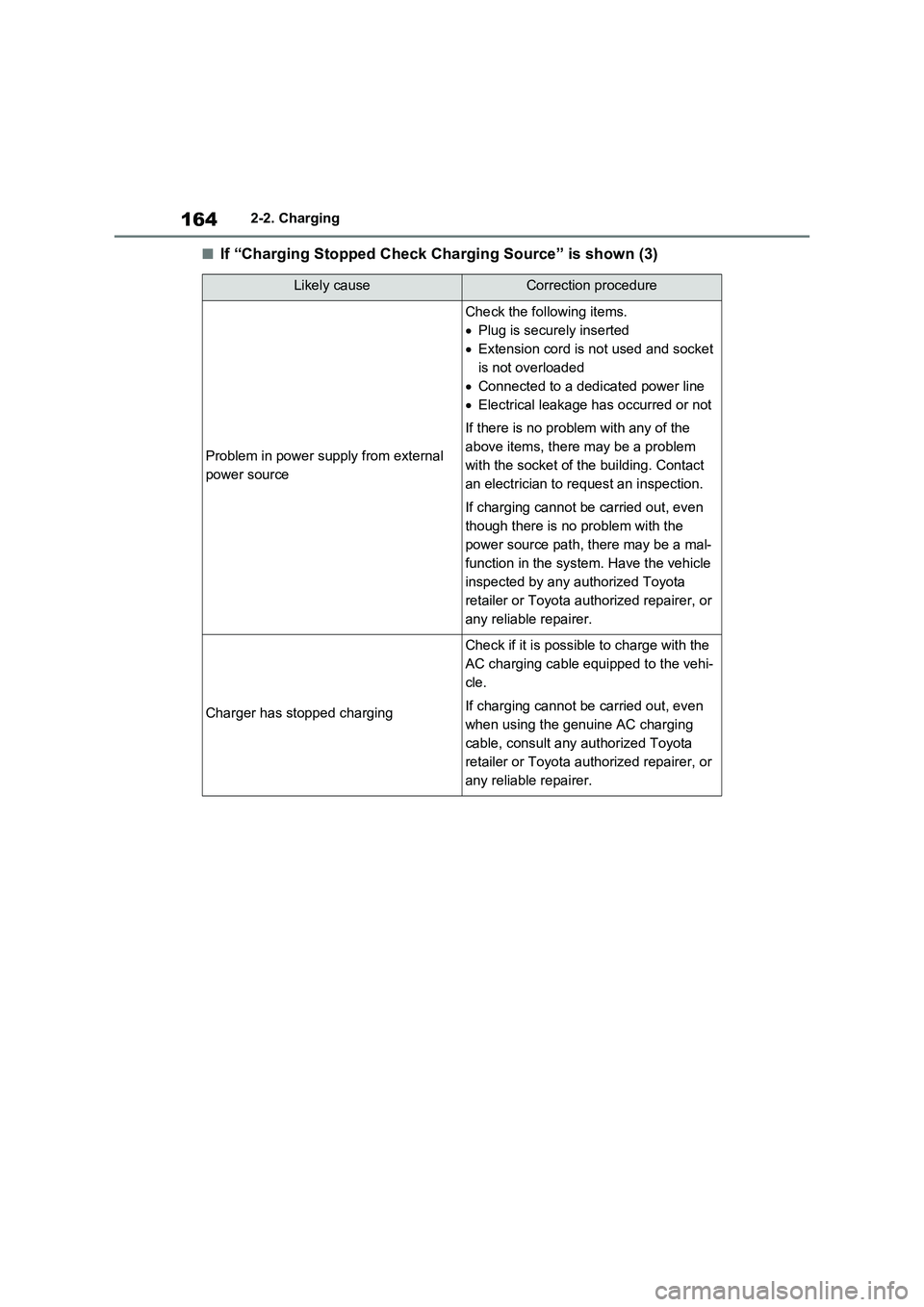
■If “Charging Stopped Check Charging Source” is shown (3)
Likely causeCorrection procedure
Problem in power supply from external
power source
Check the following items.
Plug is securely inserted
Extension cord is not used and socket
is not overloaded
Connected to a dedicated power line
Electrical leakage has occurred or not
If there is no problem with any of the
above items, there may be a problem
with the socket of the building. Contact
an electrician to request an inspection.
If charging cannot be carried out, even
though there is no problem with the
power source path, there may be a mal-
function in the system. Have the vehicle
inspected by any authorized Toyota
retailer or Toyota authorized repairer, or
any reliable repairer.
Charger has stopped charging
Check if it is possible to charge with the
AC charging cable equipped to the vehi-
cle.
If charging cannot be carried out, even
when using the genuine AC charging
cable, consult any authorized Toyota
retailer or Toyota authorized repairer, or
any reliable repairer.
Page 172 of 664
1723-1. Instrument cluster
*1: This light illuminates on the multi-
information display with a message.
*2: Depending on the operating condi-
tion, the color and illuminating/flash-
ing state of the light change.
*3: The light comes on when the system
is turned off.
*4: Toyota parking assist-sensor OFF
indicator turns on when the power
switch is turned to ON while the
Toyota parking assist-sensor func-
tion is on. It will turn off after a few
seconds.
*5: These lights turn on when the power
switch is turned to ON to indicate
that a system check is being per-
formed. They will turn off after the
hybrid system is on, or after a few
seconds. There may be a malfunc-
tion in a system if the lights do not
turn on, or turn off. Have the vehicle
inspected by any authorized Toyota
retailer or Toyota authorized
repairer, or any reliable repairer.
*6: This light illuminates on the outside
rear view mirrors.
*7: When the outside temperature is
approximately 3°C (37°F) or lower,
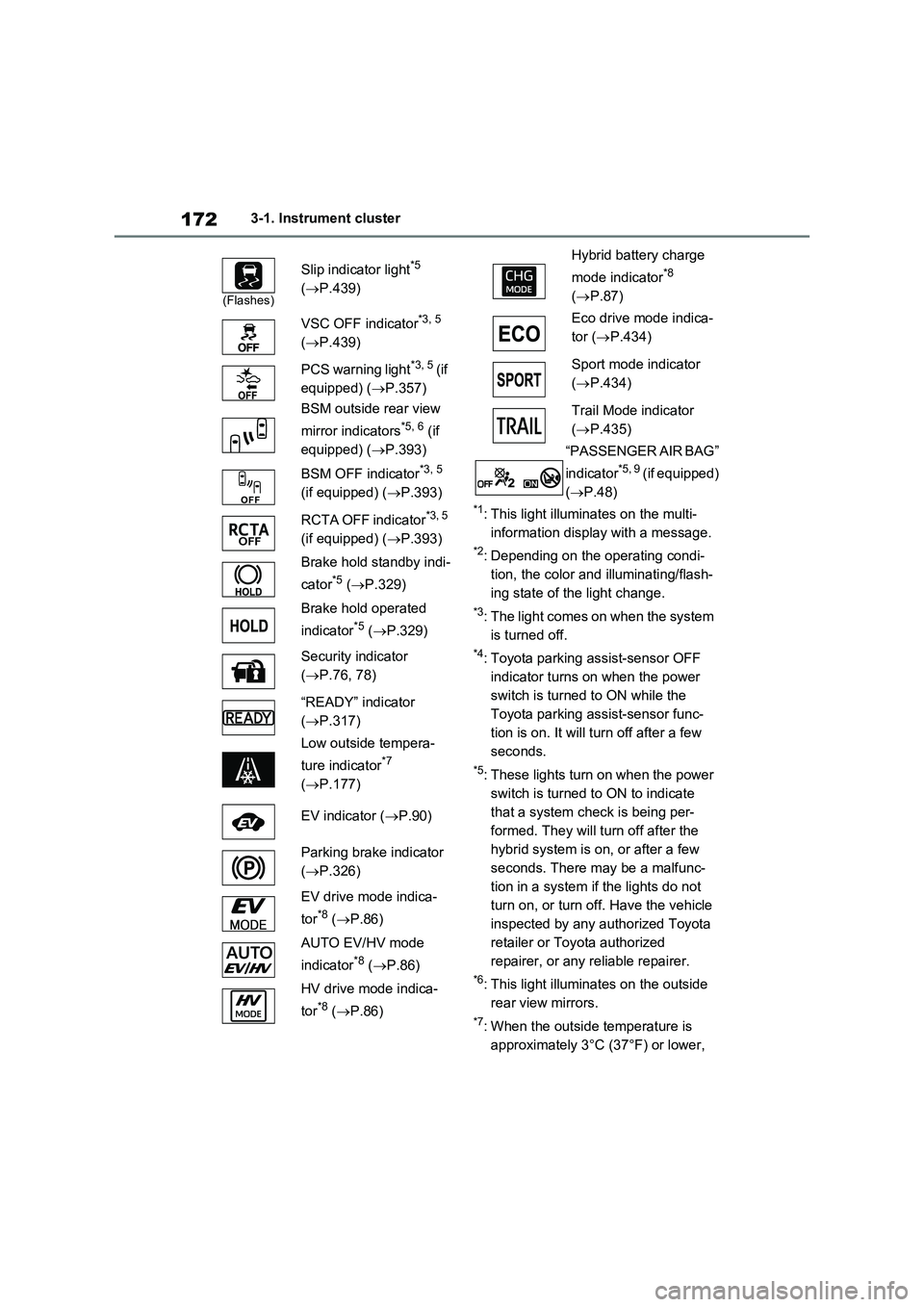
(Flashes)
Slip indicator light*5
(P.439)
VSC OFF indicator
*3, 5
(P.439)
PCS warning light
*3, 5 (if
equipped) (P.357)
BSM outside rear view
mirror indicators
*5, 6 (if
equipped) (P.393)
BSM OFF indicator
*3, 5
(if equipped) (P.393)
RCTA OFF indicator
*3, 5
(if equipped) (P.393)
Brake hold standby indi-
cator
*5 (P.329)
Brake hold operated
indicator
*5 (P.329)
Security indicator
(P.76, 78)
“READY” indicator
(P.317)
Low outside tempera-
ture indicator
*7
(P.177)
EV indicator (P.90)
Parking brake indicator
(P.326)
EV drive mode indica-
tor
*8 (P.86)
AUTO EV/HV mode
indicator
*8 (P.86)
HV drive mode indica-
tor
*8 (P.86)
Hybrid battery charge
mode indicator
*8
(P.87)
Eco drive mode indica-
tor (P.434)
Sport mode indicator
(P.434)
Trail Mode indicator
(P.435)
“PASSENGER AIR BAG”
indicator
*5, 9 (if equipped)
(P.48)
Page 205 of 664
205
4
4-2. Opening, closing and locking the doors
Before driving
4-2.Opening, closing and lo cking th e d oors
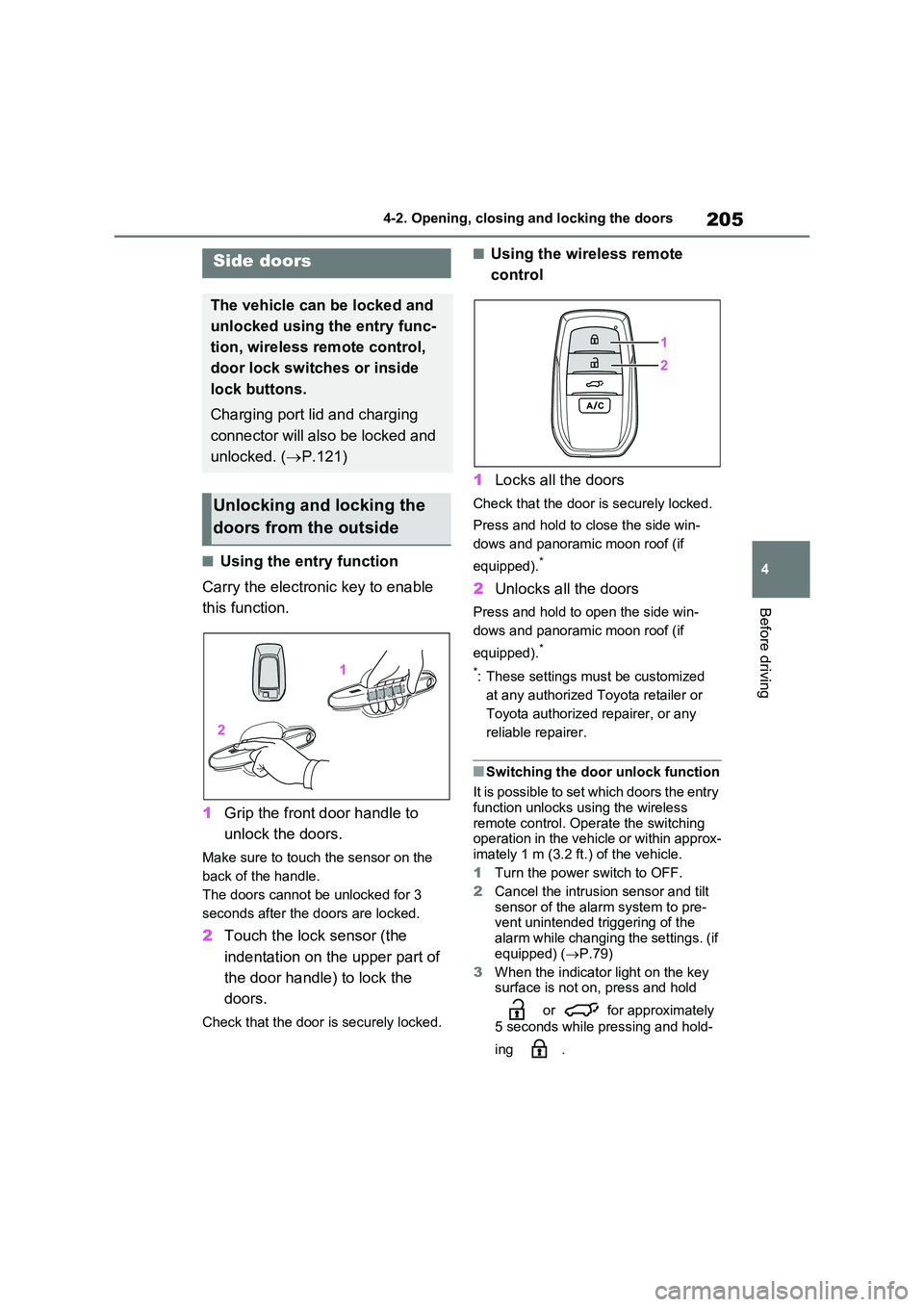
■Using the entry function
Carry the electronic key to enable
this function.
1 Grip the front door handle to
unlock the doors.
Make sure to touch the sensor on the
back of the handle.
The doors cannot be unlocked for 3
seconds after the doors are locked.
2 Touch the lock sensor (the
indentation on the upper part of
the door handle) to lock the
doors.
Check that the door is securely locked.
■Using the wireless remote
control
1 Locks all the doors
Check that the door is securely locked.
Press and hold to close the side win-
dows and panoramic moon roof (if
equipped).*
2 Unlocks all the doors
Press and hold to open the side win-
dows and panoramic moon roof (if
equipped).*
*: These settings must be customized
at any authorized Toyota retailer or
Toyota authorized repairer, or any
reliable repairer.
■Switching the door unlock function
It is possible to set which doors the entry function unlocks using the wireless
remote control. Operate the switching operation in the vehicle or within approx-imately 1 m (3.2 ft.) of the vehicle.
1 Turn the power switch to OFF.
2 Cancel the intrusion sensor and tilt
sensor of the alarm system to pre- vent unintended triggering of the
alarm while changing the settings. (if equipped) ( P.79)
3 When the indicator light on the key surface is not on, press and hold
or for approximately
5 seconds while pressing and hold-
ing .
Side doors
The vehicle can be locked and
unlocked using the entry func-
tion, wireless remote control,
door lock switches or inside
lock buttons.
Charging port lid and charging
connector will also be locked and
unlocked. ( P.121)
Unlocking and locking the
doors from the outside
Page 206 of 664
2064-2. Opening, closing and locking the doors
The setting changes each time an oper-
ation is performed, as shown below.
(When changing the setting continu-
ously, release the buttons, wait for at
least 5 seconds, and repeat step 3.)
Vehicles with alarm: To prevent unin-
tended triggering of the alarm, unlock
the doors using the wireless remote
control and open and close a door once
after the settings have been changed. (If
a door is not opened within 30 seconds
after is pressed, the doors will
be locked again and the alarm will auto-
matically be set.)
In a case that the alarm is triggered,
immediately stop the alarm. (P.78)
■Impact detection door lock release
system
In the event that the vehicle is subject to
a strong impact, all the doors are
unlocked. Depending on the force of the
impact or the type of accident, however,
the system may not operate.
■Operation signals
Doors: The emergency flashers flash to
indicate that the doors have been
locked/unlocked. (Locked: Once;
Unlocked: Twice)
Side windows and panoramic moon roof
(if equipped): A buzzer sounds to indi-
cate that the side windows and pan-
oramic moon roof are operating.
■Security feature
If a door is not opened within approxi-
mately 30 seconds after the vehicle is
unlocked, the security feature automati-
cally locks the vehicle again. (However,
depending on the location of the elec-
tronic key, the key may be detected as
being in the vehicle. In this case, vehicle
may be unlocked.)
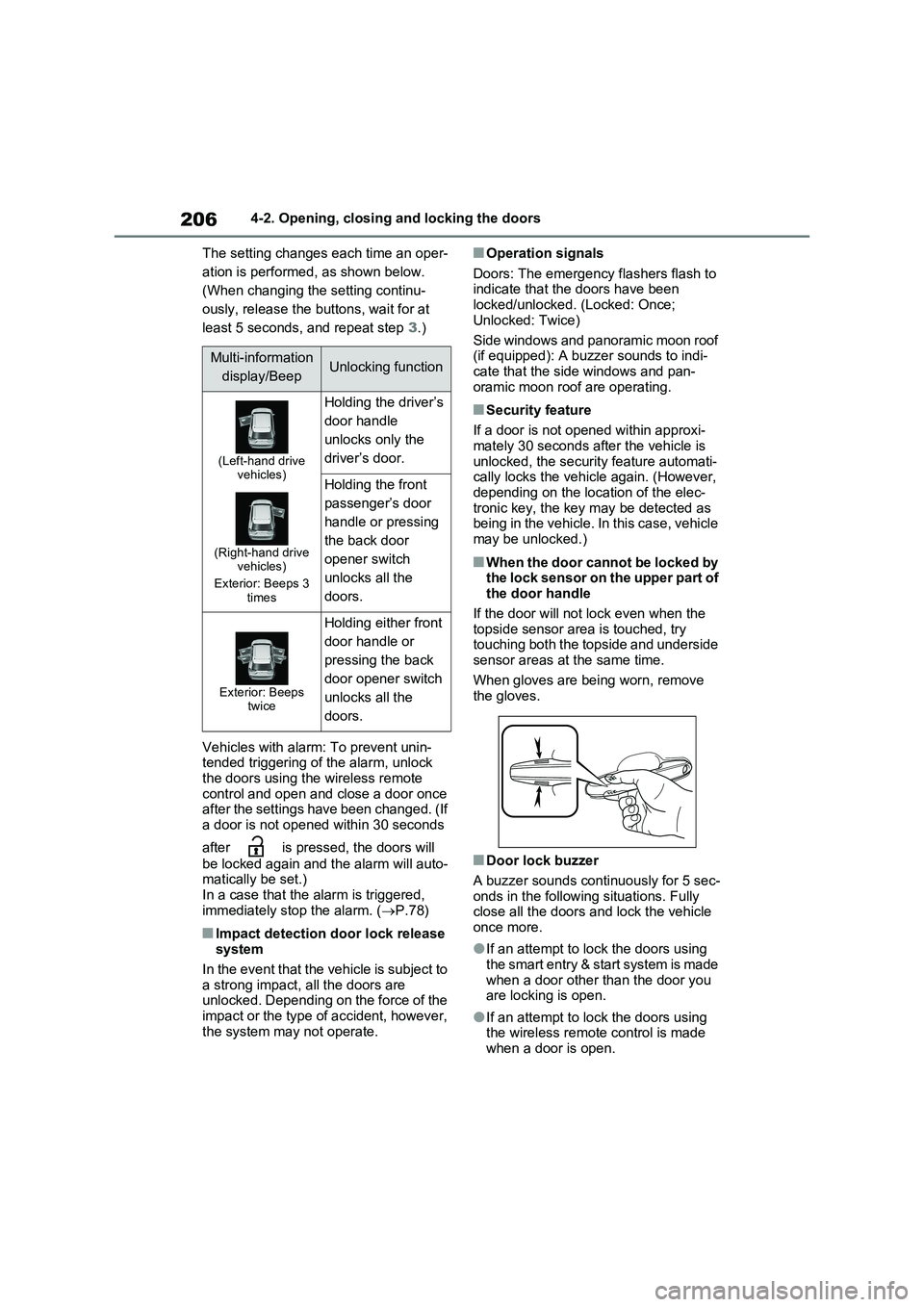
■When the door cannot be locked by
the lock sensor on the upper part of
the door handle
If the door will not lock even when the
topside sensor area is touched, try
touching both the topside and underside
sensor areas at the same time.
When gloves are being worn, remove
the gloves.
■Door lock buzzer
A buzzer sounds continuously for 5 sec-
onds in the following situations. Fully
close all the doors and lock the vehicle
once more.
●If an attempt to lock the doors using
the smart entry & start system is made
when a door other than the door you
are locking is open.
●If an attempt to lock the doors using
the wireless remote control is made
when a door is open.
Multi-information
display/BeepUnlocking function
(Left-hand drive
vehicles)
(Right-hand drive
vehicles)
Exterior: Beeps 3
times
Holding the driver’s
door handle
unlocks only the
driver’s door.
Holding the front
passenger’s door
handle or pressing
the back door
opener switch
unlocks all the
doors.
Exterior: Beeps
twice
Holding either front
door handle or
pressing the back
door opener switch
unlocks all the
doors.