ECU TOYOTA VERSO S 2011 Workshop Manual
[x] Cancel search | Manufacturer: TOYOTA, Model Year: 2011, Model line: VERSO S, Model: TOYOTA VERSO S 2011Pages: 664, PDF Size: 160.56 MB
Page 211 of 664
211
4
4-2. Opening, closing and locking the doors
Before driving
■Using the entry function
Carry the electronic key to enable
this function.
1 Unlocks all the doors
The doors cannot be unlocked for 3
WARNING
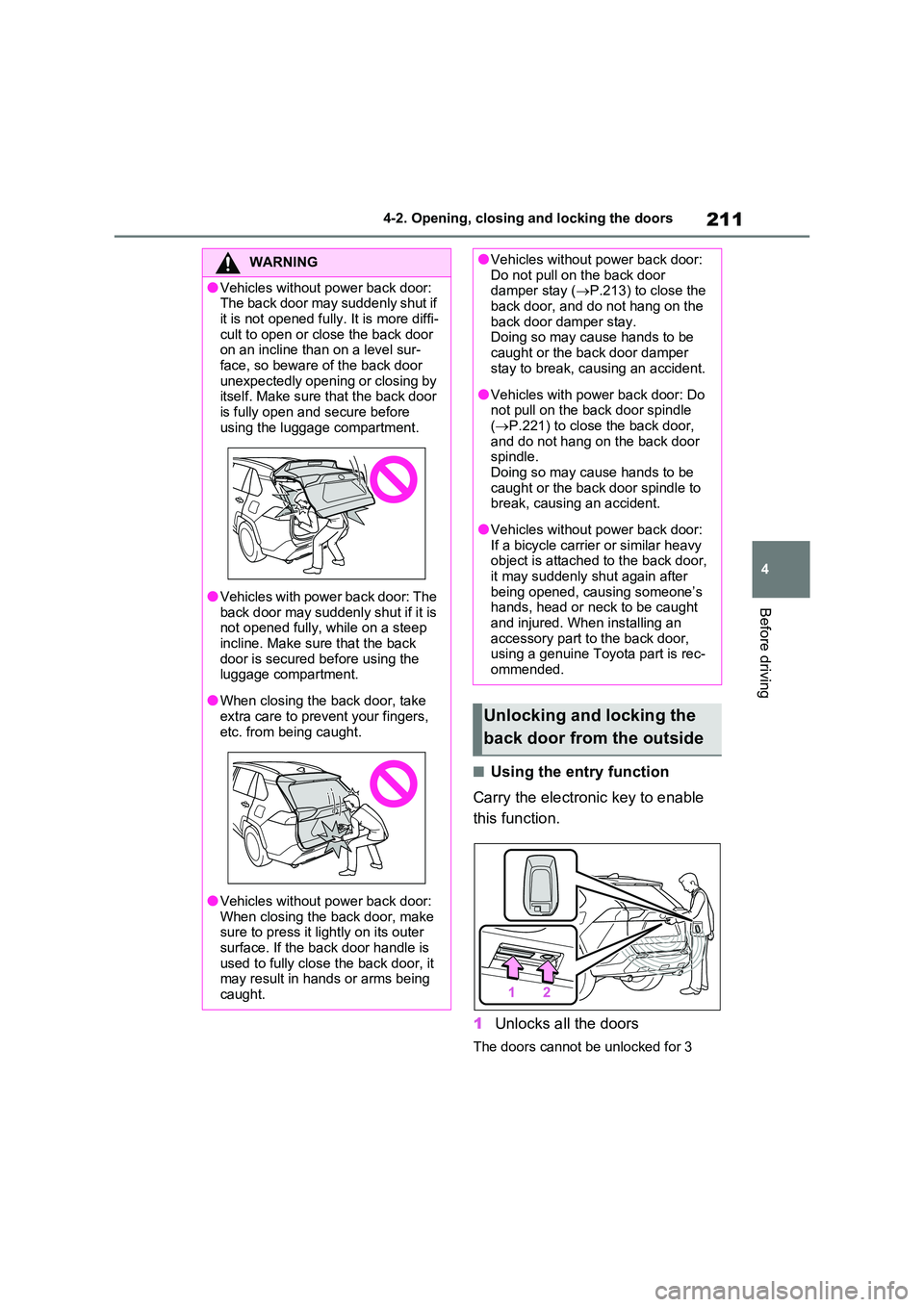
●Vehicles without power back door: The back door may suddenly shut if
it is not opened fully. It is more diffi- cult to open or close the back door on an incline than on a level sur-
face, so beware of the back door unexpectedly opening or closing by itself. Make sure that the back door
is fully open and secure before using the luggage compartment.
●Vehicles with power back door: The back door may suddenly shut if it is not opened fully, while on a steep
incline. Make sure that the back door is secured before using the luggage compartment.
●When closing the back door, take extra care to prevent your fingers,
etc. from being caught.
●Vehicles without power back door:
When closing the back door, make sure to press it lightly on its outer surface. If the back door handle is
used to fully close the back door, it may result in hands or arms being caught.
●Vehicles without power back door: Do not pull on the back door damper stay ( P.213) to close the
back door, and do not hang on the back door damper stay. Doing so may cause hands to be
caught or the back door damper stay to break, causing an accident.
●Vehicles with power back door: Do not pull on the back door spindle ( P.221) to close the back door,
and do not hang on the back door spindle. Doing so may cause hands to be
caught or the back door spindle to break, causing an accident.
●Vehicles without power back door: If a bicycle carrier or similar heavy object is attached to the back door,
it may suddenly shut again after being opened, causing someone’s hands, head or neck to be caught
and injured. When installing an accessory part to the back door, using a genuine Toyota part is rec-
ommended.
Unlocking and locking the
back door from the outside
Page 212 of 664
2124-2. Opening, closing and locking the doors
seconds after the doors are locked.
2 Locks all the doors
Check that the door is securely locked.
■Using the wireless remote
control
P.205
■Operation signals
P.206
■Security feature
P.206
■Using the door lock switches
P.208
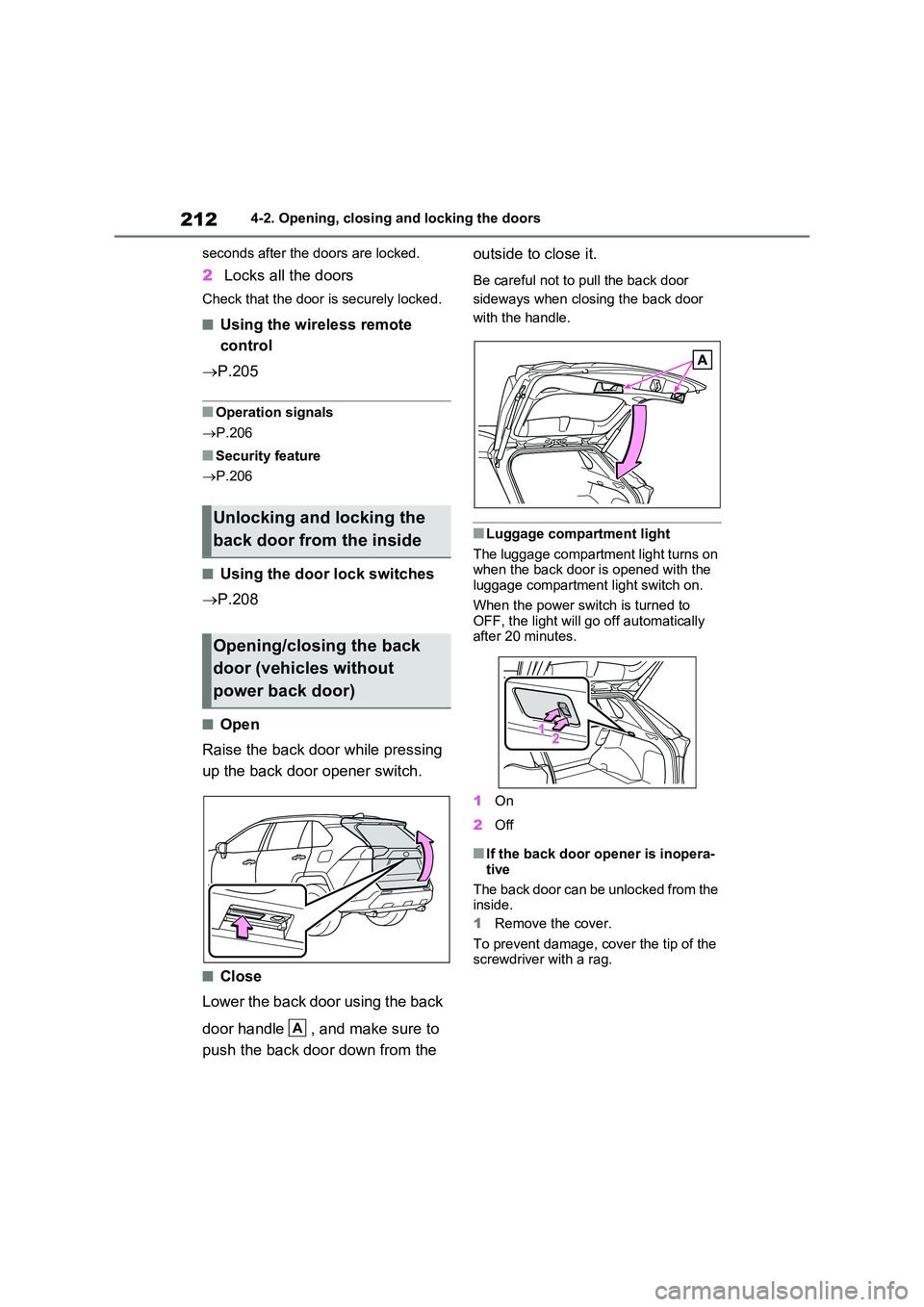
■Open
Raise the back door while pressing
up the back door opener switch.
■Close
Lower the back door using the back
door handle , and make sure to
push the back door down from the
outside to close it.
Be careful not to pull the back door
sideways when closing the back door
with the handle.
■Luggage compartment light
The luggage compartment light turns on when the back door is opened with the luggage compartment light switch on.
When the power switch is turned to OFF, the light will go off automatically after 20 minutes.
1 On
2 Off
■If the back door opener is inopera-
tive
The back door can be unlocked from the inside.
1 Remove the cover.
To prevent damage, cover the tip of the screwdriver with a rag.
Unlocking and locking the
back door from the inside
Opening/closing the back
door (vehicles without
power back door)
A
Page 220 of 664
2204-2. Opening, closing and locking the doors
WARNING
●If the operating conditions of the power back door are no longer met,
a buzzer may sound and the back door may stop opening or closing. The back door then has to be oper-
ated manually. Take extra care when on an incline, as the back door may open or close abruptly.
●On an incline, the back door may suddenly shut after it opens. Make
sure the back door is fully open and secure.
●In the following situations, the power back door may detect an abnormality and automatic opera-
tion may be stopped. In this case, the back door has to be operated manually. Take extra care when on
an incline, as the back door may open or close abruptly.
• When the back door contacts an
obstacle
• When the 12-volt battery voltage suddenly drops, such as when the
power switch is turned to ON or the hybrid system is started during automatic operation
●If a bicycle carrier or similar heavy object is attached to the back door,
the power back door may not oper- ate, causing itself to malfunction, or the back door may suddenly shut
again after being opened, causing someone’s hands, head or neck to be caught and injured. When
installing an accessory part to the back door, using a genuine Toyota part is recommended.
■Jam protection function
Observe the following precautions.
Failure to do so may cause death or serious injury.
●Never use any part of your body to
intentionally activate the jam pro- tection function.
●The jam protection function may not work if something gets caught just before the back door fully closes.
Be careful not to catch fingers or anything else.
●The jam protection function may not work depending on the shape of the object that is caught. Be careful not
to catch fingers or anything else.
■Hands Free Power Back Door (if
equipped)
Observe the following precautions when operating the Hands Free
Power Back Door. Failure to do so may cause death or serious injury.
●Check the safety of the surrounding area to make sure there are no obstacles or anything that could
cause any of your belongings to get caught.
●When putting your foot near the lower center part of the rear bumper and moving it from the rear bumper,
be careful not to touch the exhaust pipes until they have cooled down sufficiently, as touching hot exhaust
pipes can cause burns.
●Do not leave the electronic key
within the effective range (detection area) of the luggage compartment.
Page 226 of 664
2264-2. Opening, closing and locking the doors
• The electronic key is too close to the
window or outside door handle, near
the ground, or in a high place when
the doors are locked or unlocked.
• The electronic key is on the instru-
ment panel, luggage cover or floor, or
in the door pockets or glove box when
the hybrid system is started or power
switch modes are changed.
●Do not leave the electronic key on top
of the instrument panel or near the
door pockets when exiting the vehicle.
Depending on the radio wave recep-
tion conditions, it may be detected by
the antenna outside the cabin and the
door will become lockable from the
outside, possibly trapping the elec-
tronic key inside the vehicle.
●As long as the electronic key is within
the effective range, the doors may be
locked or unlocked by anyone. How-
ever, only the doors detecting the
electronic key can be used to lock or
unlock the vehicle.
●Even if the electronic key is not inside
the vehicle, it may be possible to start
the hybrid system if the electronic key
is near the window.
●The doors may unlock if a large
amount of water splashes on the door
handle, such as in the rain or in a car
wash when the electronic key is within
the effective range. (The doors will
automatically be locked after approxi-
mately 30 seconds if the doors are not
opened and closed.)
●If the wireless remote control is used
to lock the doors when the electronic
key is near the vehicle, there is a pos-
sibility that the door may not be
unlocked by the entry function. (Use
the wireless remote control to unlock
the doors.)
●Touching the door lock sensor while
wearing gloves may delay or prevent
lock operation. Remove the gloves
and touch the lock sensor again.
●When the lock operation is performed
using the lock sensor, recognition sig-
nals will be shown up to two consecu-tive times. After this, no recognition
signals will be given.
●If the door handle becomes wet while
the electronic key is within the effec-
tive range, the door may lock and
unlock repeatedly. In that case, follow
the following correction procedures to
wash the vehicle:
• Place the electronic key in a location 2
m (6 ft.) or more away from the vehi-
cle. (Take care to ensure that the key
is not stolen.)
• Set the electronic key to battery-sav-
ing mode to disable the smart entry &
start system. (P.225)
●If the electronic key is inside the vehi-
cle and a door handle becomes wet
during a car wash, a message may be
shown on the multi-information dis-
play and a buzzer will sound outside
the vehicle. To turn off the alarm, lock
all the doors.
●The lock sensor may not work prop-
erly if it comes into contact with ice,
snow, mud, etc. Clean the lock sensor
and attempt to operate it again, or use
the lock sensor on the lower part of
the door handle.
●A sudden approach to the effective
range or door handle may prevent the
doors from being unlocked. In this
case, return the door handle to the
original position and check that the
doors unlock before pulling the door
handle again.
●If there is another electronic key in the
detection area, it may take slightly lon-
ger to unlock the doors after the door
handle is gripped.
■When the vehicle is not driven for
extended periods
●To prevent theft of the vehicle, do not
leave the electronic key within 2 m (6
ft.) of the vehicle.
●The smart entry & start system can be
deactivated in advance. (P.633)
●Battery-saving mode can reduce the
power consumption of electronic keys.
(P.225)
Page 272 of 664
2724-3. Adjusting the seats
■Before folding down the seat-
backs
1 Park the vehicle in a safe place.
Apply the parking brake (P.326) and shift the shift lever to P. ( P.322)
2Adjust the position of the front
seat and the angle of the seat-
back. ( P.270)
Depending on the position of the front
seat, if the seatback is folded back- ward, it may interfere with the operation of the rear seat.
3 Lower the head restraint of the
rear seat. ( P.276)
4 Stow the armrest of the rear
seat if it is pulled out. ( P.484)
This step is not necessary when oper-
ating the left side seat only.
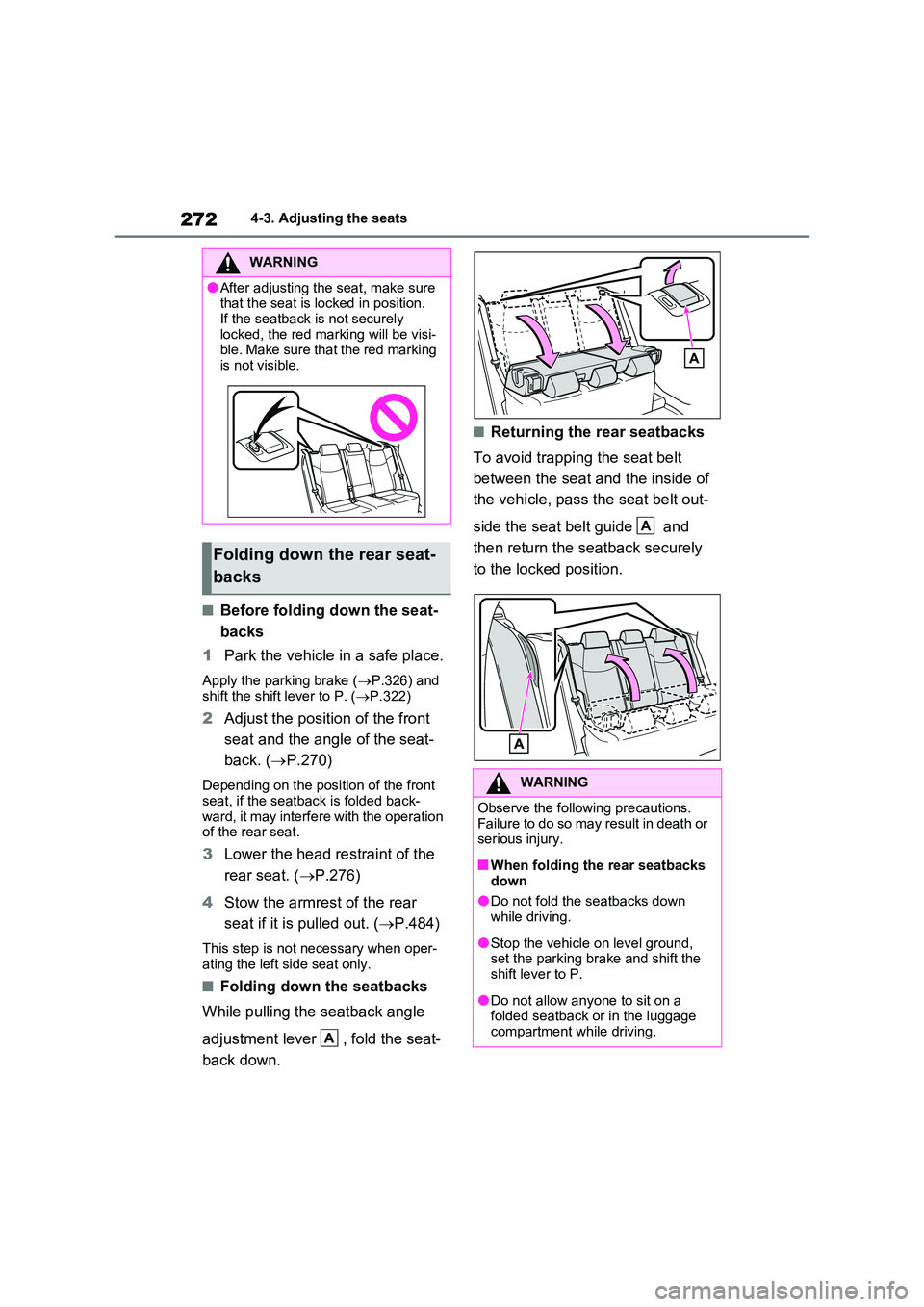
■Folding down the seatbacks
While pulling the seatback angle
adjustment lever , fold the seat-
back down.
■Returning the rear seatbacks
To avoid trapping the seat belt
between the seat and the inside of
the vehicle, pass the seat belt out-
side the seat belt guide and
then return the seatback securely
to the locked position.
WARNING
●After adjusting the seat, make sure that the seat is locked in position.
If the seatback is not securely locked, the red marking will be visi-ble. Make sure that the red marking
is not visible.
Folding down the rear seat-
backs
A
WARNING
Observe the following precautions. Failure to do so may result in death or serious injury.
■When folding the rear seatbacks down
●Do not fold the seatbacks down while driving.
●Stop the vehicle on level ground, set the parking brake and shift the shift lever to P.
●Do not allow anyone to sit on a folded seatback or in the luggage
compartment while driving.
A
Page 273 of 664
273
4
4-3. Adjusting the seats
Before driving
*: If equipped
■Recording procedure
1 Check that the shift lever is in P.
2 Turn the power switch to ON.
3 Adjust the driver’s seat to the
desired positions.
4 While pressing the “SET” but-
ton, or within 3 seconds after the
“SET” button is pressed, press
button “1” or “2” until the buzzer
sounds.
If the selected button has already been preset, the previously recorded position
WARNING
●Do not allow children to enter the luggage compartment.
●Do not operate the rear seat if it is occupied.
●Be careful not to get feet or hands caught in the moving parts or joints
of the seats during operation.
●Do not allow children to operate the
seat.
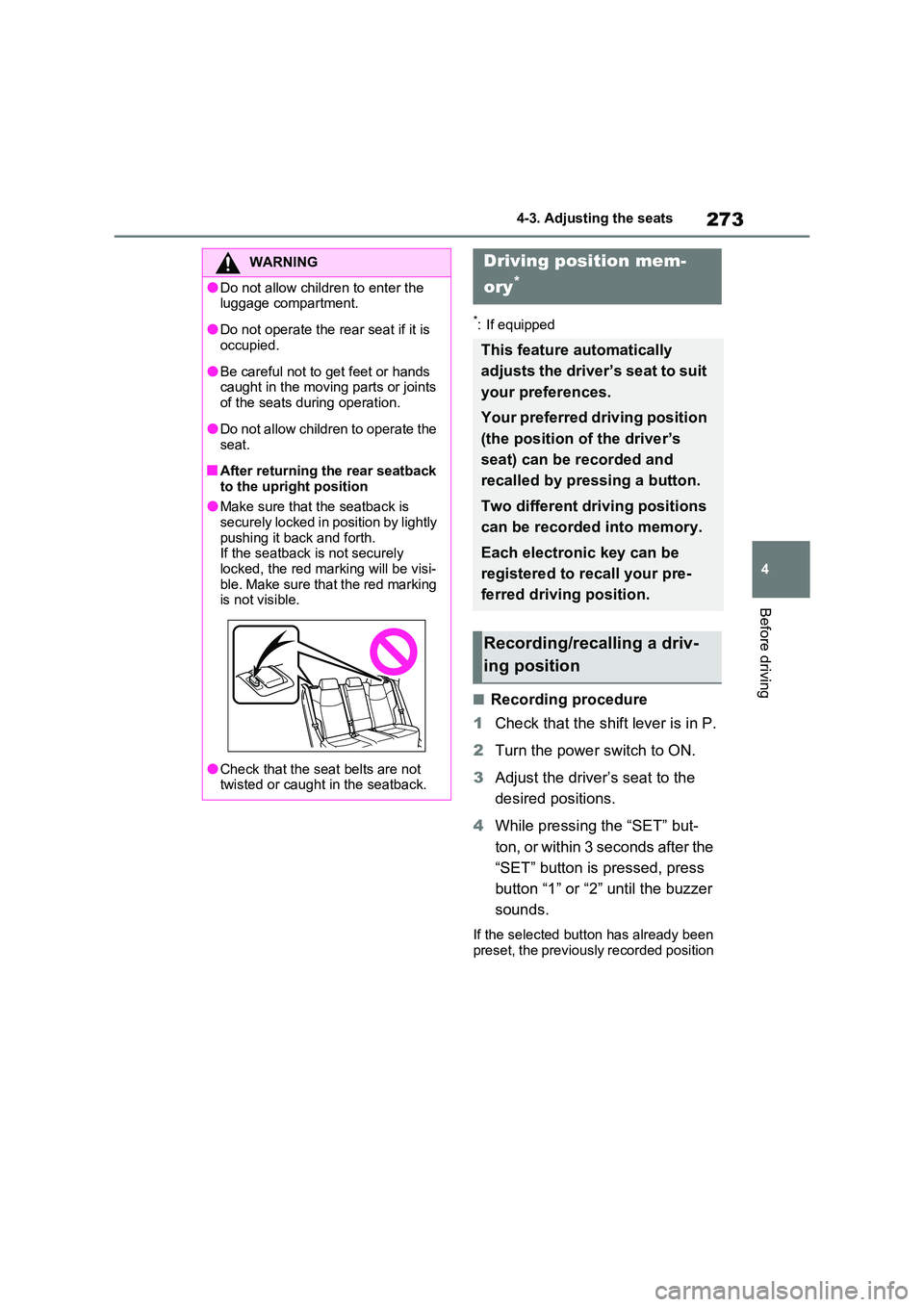
■After returning the rear seatback
to the upright position
●Make sure that the seatback is securely locked in position by lightly
pushing it back and forth. If the seatback is not securely locked, the red marking will be visi-
ble. Make sure that the red marking is not visible.
●Check that the seat belts are not twisted or caught in the seatback.
Driving position mem-
ory*
This feature automatically
adjusts the driver’s seat to suit
your preferences.
Your preferred driving position
(the position of the driver’s
seat) can be recorded and
recalled by pressing a button.
Two different driving positions
can be recorded into memory.
Each electronic key can be
registered to recall your pre-
ferred driving position.
Recording/recalling a driv-
ing position
Page 278 of 664
2784-4. Adjusting the steering wheel and mirrors
4-4.Adjusting the steering whe el an d mirrors
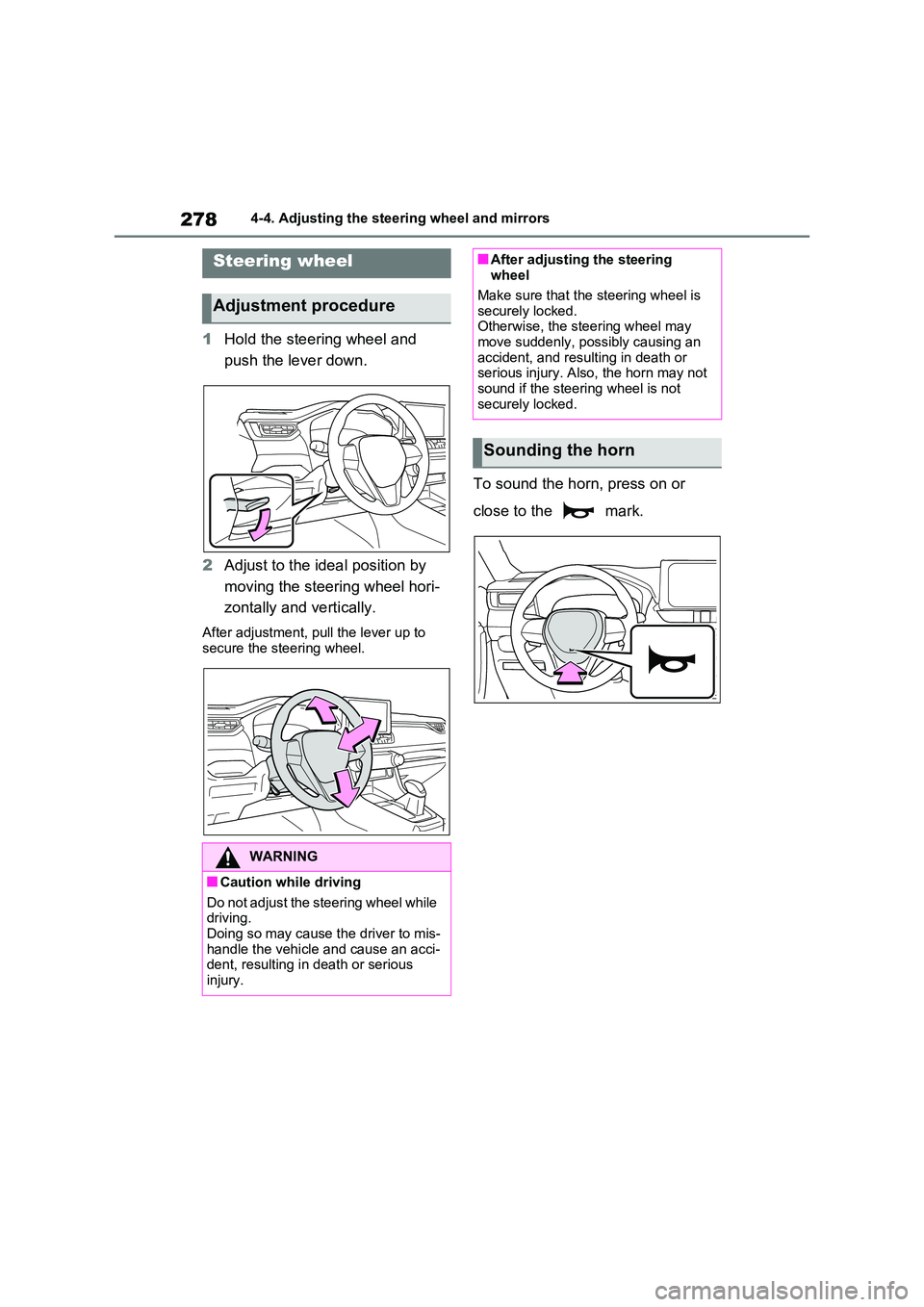
1Hold the steering wheel and
push the lever down.
2 Adjust to the ideal position by
moving the steering wheel hori-
zontally and vertically.
After adjustment, pull the lever up to
secure the steering wheel.
To sound the horn, press on or
close to the mark.
Steering wheel
Adjustment procedure
WARNING
■Caution while driving
Do not adjust the steering wheel while driving.Doing so may cause the driver to mis-
handle the vehicle and cause an acci- dent, resulting in death or serious injury.
■After adjusting the steering wheel
Make sure that the steering wheel is
securely locked. Otherwise, the steering wheel may move suddenly, possibly causing an
accident, and resulting in death or serious injury. Also, the horn may not sound if the steering wheel is not
securely locked.
Sounding the horn
Page 304 of 664
3045-1. Before driving
WARNING
●In order to prevent accidents due to the vehicle rolling away, always
keep depressing the brake pedal while stopped with the “READY” indicator is illuminated, and apply
the parking brake as necessary.
●If the vehicle is stopped on an
incline, in order to prevent acci- dents caused by the vehicle rolling forward or backward, always
depress the brake pedal and securely apply the parking brake as needed.
●Avoid revving or racing the engine.Running the engine at high speed
while the vehicle is stopped may cause the exhaust system to over-heat, which could result in a fire if
combustible material is nearby.
■When the vehicle is parked
●Do not leave glasses, cigarette lighters, spray cans, or soft drink cans in the vehicle when it is in the
sun. Doing so may result in the follow-ing:
• Gas may leak from a cigarette lighter or spray can, and may lead to a fire.
• The temperature inside the vehicle may cause the plastic lenses and plastic material of glasses to
deform or crack.
• Soft drink cans may fracture, caus- ing the contents to spray over the
interior of the vehicle, and may also cause a short circuit in the vehicle’s electrical components.
●Do not leave cigarette lighters in the vehicle. If a cigarette lighter is in a
place such as the glove box or on the floor, it may be lit accidentally when luggage is loaded or the seat
is adjusted, causing a fire.
●Do not attach adhesive discs to the windshield or windows. Do not place containers such as air fresh-
eners on the instrument panel or dashboard. Adhesive discs or con-tainers may act as lenses, causing
a fire in the vehicle.
●Do not leave a door or window
open if the curved glass is coated with a metallized film such as a sil-ver-colored one. Reflected sunlight
may cause the glass to act as a lens, causing a fire.
●Always apply the parking brake, shift the shift lever to P, stop the hybrid system and lock the vehicle.
Do not leave the vehicle unat- tended while the “READY” indicator is illuminated.
If the vehicle is parked with the shift lever in P but the parking brake is not set, the vehicle may start to
move, possibly leading to an acci- dent.
●Do not touch the exhaust pipes while the “READY” indicator is illu-minated or immediately after turn-
ing the hybrid system off. Doing so may cause burns.
■When taking a nap in the vehicle
Always turn the hybrid system off. Otherwise, if you accidentally move
the shift lever or depress the acceler- ator pedal, this could cause an acci-dent or fire due to hybrid system
overheating. Additionally, if the vehi- cle is parked in a poorly ventilated area, exhaust gases may collect and
enter the vehicle, leading to death or a serious health hazard.
Page 305 of 664
305
5
5-1. Before driving
Driving
WARNING
■When braking
●When the brakes are wet, drive
more cautiously. Braking distance increases when the brakes are wet, and this may
cause one side of the vehicle to brake differently than the other side. Also, the parking brake may
not securely hold the vehicle.
●If the electronically controlled brake
system does not operate, do not fol- low other vehicles closely and avoid hills or sharp turns that require
braking. In this case, braking is still possible, but the brake pedal should be
depressed more firmly than usual. Also, the braking distance will increase. Have your brakes fixed
immediately.
●The brake system consists of 2 or
more individual hydraulic systems; if one of the systems fails, the other will still operate. In this case, the
brake pedal should be depressed more firmly than usual and the braking distance will increase. Have
your brakes fixed immediately.
■If the vehicle becomes stuck
Do not spin the wheels excessively when any of the tires is up in the air, or the vehicle is stuck in sand, mud,
etc. This may damage the driveline components or propel the vehicle for-ward or backward, causing an acci-
dent.
NOTICE
■When driving the vehicle
●Do not depress the accelerator and brake pedals at the same time during driving, as this may restrain
the hybrid system output.
●Do not use the accelerator pedal or depress the accelerator and brake pedals at the same time to hold the
vehicle on a hill.
■Avoiding damage to vehicle
parts
●Do not turn the steering wheel fully in either direction and hold it there
for an extended period of time. Doing so may damage the power steering motor.
●When driving over bumps in the road, drive as slowly as possible to
avoid damaging the wheels, under- side of the vehicle, etc.
■If you get a flat tire while driving
A flat or damaged tire may cause the following situations.
●It may be difficult to control your vehicle.
●The vehicle will make abnormal sounds or vibrations.
●The vehicle will lean abnormally.
Hold the steering wheel firmly and gradually depress the brake pedal to
slow down the vehicle.
Information on what to do in case of a flat tire ( P.582, 593)
■When encountering flooded roads
Do not drive on a road that has flooded after heavy rain, etc. Doing so may cause the following serious dam-
age to the vehicle:
●Engine stalling
●Short in electrical components
●Engine damage caused by water
immersion
Page 307 of 664
307
5
5-1. Before driving
Driving
WARNING
●Do not place cargo or luggage in or on the following locations.
• At the feet of the driver
• On the front passenger or rear seats (when stacking items)
• On the luggage cover (if equipped)
• On the instrument panel
• On the dashboard
●Secure all items in the occupant compartment.
■Load and distribution
●Do not overload your vehicle.
●Do not apply loads unevenly.
Improper loading may cause deterio-
ration of steering or braking control which may cause death or serious injury.
■When loading cargo on the roof luggage carrier (if equipped)
Observe the following precautions:
●Place the cargo so that its weight is distributed evenly between the front
and rear axles.
●If loading long or wide cargo, never
exceed the vehicle overall length or width. ( P.618)
●Before driving, make sure the cargo is securely fastened on the roof lug-gage carrier.
●Loading cargo on the roof luggage carrier will make the center of grav-
ity of the vehicle higher. Avoid high speeds, sudden starts, sharp turns, sudden braking or abrupt maneu-
vers, otherwise it may result in loss of control or vehicle rollover due to failure to operate this vehicle cor-
rectly and result in death or serious injury.
●If driving for a long distance, on rough roads, or at high speeds, stop the vehicle now and then
during the trip to make sure the cargo remains in its place.
●Do not exceed 80 kg (176.4 lb.) cargo weight on the roof luggage carrier.
NOTICE
■When loading cargo on the roof luggage carrier (if equipped)
Be careful not to scratch the surface
of the panoramic moon roof (if equipped).