lock TOYOTA VERSO S 2011 Service Manual
[x] Cancel search | Manufacturer: TOYOTA, Model Year: 2011, Model line: VERSO S, Model: TOYOTA VERSO S 2011Pages: 664, PDF Size: 160.56 MB
Page 145 of 664
145
2 2-2. Charging
Plug-in hybrid system
to the set time.
By adjusting the cabin temperature in
advance, passengers can enjoy a
pleasant interior immediately after
entering the vehicle.
*: Operation starts approximately 20
minutes before the set departure
time.
■Turning “Charge Now” on and
off
If even one charging schedule is
registered, charging does not start
until the set time, even if the AC
charging cable is connected to the
vehicle. To start charging without
changing the charging schedule
setting, turn “Charge Now” on to
temporarily cancel the charging
schedule and enable charging after
connecting the AC charging cable.
*
*: If the charging connector is removed
during charging while the charging
schedule is registered and “Charge
Now” is on, “Charge Now” turns off.
■Changing “Next Event”*1
It is possible to temporarily set the
time of the next charging schedule
without changing the registered
repeated setting.
*2
*1: The “Next Event” refers to the clos-
est charging schedule from the cur-
rent time among the registered
charging schedules. Charging
schedule is performed based on the
“Next Event”.
*2: When “Next Event” is changed, the
current charging schedule will be
temporarily ignored and charging will
not be carried out until the time specified by “Next Event”. (For
example, when “Next Event” is set
for 2 days later, even if items are
registered on the charging schedule,
charging will not be carried out until
the time specified by “Next Event”.)
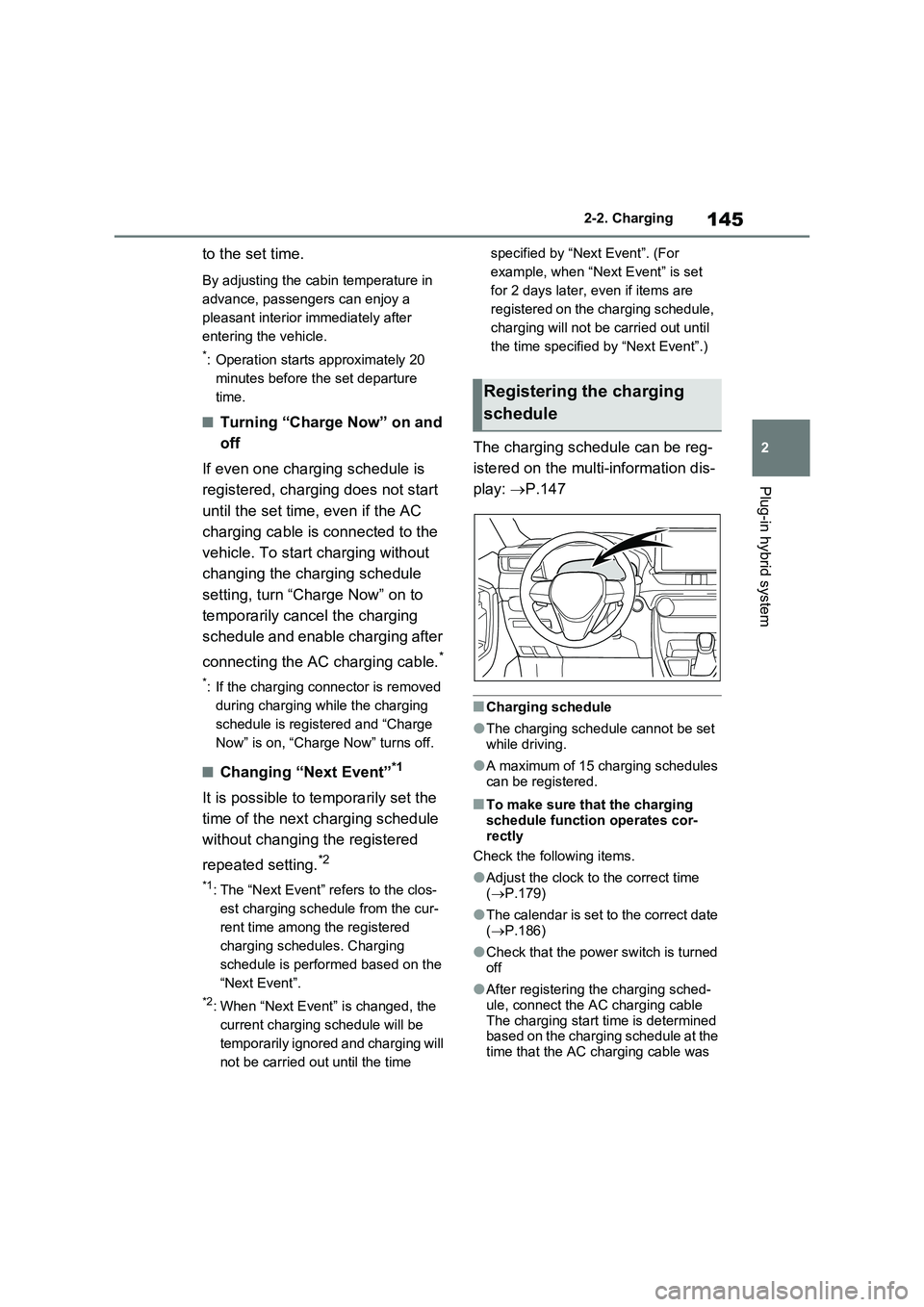
The charging schedule can be reg-
istered on the multi-information dis-
play: P.147
■Charging schedule
●The charging schedule cannot be set
while driving.
●A maximum of 15 charging schedules
can be registered.
■To make sure that the charging
schedule function operates cor-
rectly
Check the following items.
●Adjust the clock to the correct time
(P.179)
●The calendar is set to the correct date
(P.186)
●Check that the power switch is turned
off
●After registering the charging sched-
ule, connect the AC charging cable
The charging start time is determined
based on the charging schedule at the
time that the AC charging cable was
Registering the charging
schedule
Page 146 of 664
1462-2. Charging
connected.
●After connecting the AC charging
cable, check that the charging indica-
tor of the charging port flashes
(P.106)
●Do not use an socket that has a power
cut off function (including a timer func-
tion)
Use an socket that constantly supplies
electricity. For sockets where the
power is cut off due to a timer func-
tion, etc., charging may not be carried
out according to plan if the power is
cut off during the set time.
■When the AC charging cable
remains connected to the vehicle
Even if multiple consecutive charging
schedules are registered, the next
charge will not be carried out according
to the charging schedule until the AC
charging cable is removed and recon-
nected after charging completes. Also,
when the hybrid battery (traction battery)
is fully charged, charging according to
the charging schedule will not be carried
out.
■“Climate Prep”
●When the air conditioning-linked set-
ting is turned on, the air conditioning
operates until the set departure time.
Therefore, the air conditioning will
consume electricity and charging may
not complete by the set departure
time.
●If the hybrid battery (traction battery)
is fully charged, charging will not be
carried out, even if the charging
schedule is set. However, if “Climate
Prep” is turned on, the air conditioning
will operate only once when it nears
the time set in “Departure”. If this
occurs, the air conditioning will con-
sume electricity and the remaining
charge of the hybrid battery (traction
battery) when departing may be
decreased.
●When the doors are unlocked, the air
conditioning system does not operate.
■When charging schedules are
ignored
When the following operations are per-
formed while the charging schedule is
on standby, charging schedule is tempo-
rarily canceled and charging is started.
●When the Remote Air Conditioning
System (P.460) is operated
●When turning “My Room Mode” on
(P.153)
●When turning “Charge Now” on
(P.150)
●When an operation that temporarily
cancel charging using the charging
schedule (P.138)
■Effects of outside temperature
When the charging mode is set to
“Departure”, charging schedule may be
ignored due to the outside temperature
and charging may start.
■“Battery Heater” (P.128) /“Battery
Cooler” (P.129)
When charging is carried out using the
charging schedule, the hybrid battery
(traction battery) heating or cooling func-
tion may operate according to the tem-
perature of the hybrid battery (traction
battery).
●When the charging mode is set to
“Start”, the function starts at the set
charging start time.
●“Battery Heater”: When the charging
mode is set to “Departure”, the func-
tion starts automatically to complete
heating by the desired departure time.
●“Battery Cooler”: When the charging
mode is set to “Departure”, cooling
starts approximately 30 minutes
before the charging start time. How-
ever, if there is no time to finish
charging by the charging schedule,
the hybrid battery (traction battery)
cooling time may be shortened and
“Battery Cooler” may not operate.
Page 154 of 664
1542-2. Charging
■When a door is unlocked while
using “My Room Mode”
The charging connector unlocks,
charging stops and “My Room Mode”
stops. In order to use “My Room Mode”
again, reconnect the AC charging cable
and start “My Room Mode” (P.153).
When using “My Room Mode” with pub-
lic charging station, operation to start
charging using the charger may be
required again before starting “My Room
Mode”.
■Meter display during charging
If “My Room Mode” is not turned on for
approximately 100 seconds after the
power switch is turned on during
charging, the power switch will automat-
ically turn off.
■While using “My Room Mode”
Any of the following may occur.
●When the remaining charge of the
hybrid battery (traction battery)
reaches the lower limit, the air condi-
tioning system automatically turns off.
In this situation, the air conditioning
system cannot be used until the
remaining charge of the hybrid battery
(traction battery) increases. Turn the
power switch off and use “My Room
Mode” after the remaining charge of
the hybrid battery (traction battery) is
restored.
●When the outside temperature is low,
the heater output may be limited due
to the air conditioning system opera-
tion being restricted.
●Warning lights and indicators such as
electric power steering system warn-
ing light (yellow) and malfunction indi-
cator lamp may turn on, but this is not
a malfunction.
Also, when the surrounding area is
dark, the headlights are turned on.
(P.332)
■When a charging schedule is regis-
tered
When “My Room Mode” starts while the
charging schedule is on standby, charging schedules are ignored and
charging starts.
■When “My Room Mode” is used
while the hybrid battery (traction
battery) is fully charged
When the power switch is turned on
while the hybrid battery (traction battery)
is fully charged and the charging con-
nector that supplies power is connected,
“Charging Port Lid is Open” is displayed
on the multi-information display. In this
case, press of the meter control
switches to display the setting screen of
“My Room Mode”, and then select “My
Room Mode”.
When “My Room Mode” is used while
the hybrid battery (traction battery) is
fully charged, the electric power of the
hybrid battery (traction battery) may be
consumed. In this case, charging may
be performed again.
■When a message related to “My
Room Mode” is displayed
When a message is displayed on the
multi-information display while using or
attempting to start “My Room Mode”,
take the following correction proce-
dures.
●“Traction battery is too low for “My
Room Mode””
There is insufficient remaining charge in
the hybrid battery (traction battery) for
starting “My Room Mode”.
Wait until the charge of the hybrid bat-
tery (traction battery) increases, then
start “My Room Mode”.
●““My Room Mode” has stopped due to
low traction battery”
The remaining charge in the hybrid bat-
tery (traction battery) is insufficient.
Stop using “My Room Mode” and
charge the hybrid battery (traction bat-
tery).
●““My Room Mode” will stop when trac-
tion battery is too low Reduce power
usage to continue using “My Room
Page 158 of 664
1582-2. Charging
■Charging indicator of the charging port flashes and charging can-
not be carried out.
*: Refer to P.106 for details regarding charging indicator of the charging port illumi-
nation and flashing.
Refer to the following table and carry out the appropriate correction proce-
dure.
■Cannot charge at desired time
Likely causeCorrection procedure
When charging indicator of the charging
port flashes
*: charging schedule is regis-
tered
When you wish to charge according to
the charging schedule, wait until the set
time.
To start charging, set “Charge Now” to
on. (P.150)
When charging indicator of the charging
port rapidly flashes
*: Malfunction
occurred in an external power source or
the vehicleStart the hybrid system and follow the
instructions displayed by the message on
the multi-information display. (P.160)
When charging schedule function does not operate normally
Likely causeCorrection procedure
Vehicle clock is not properly adjustedCheck the clock settings and adjust it to
the proper time. (P.179)
The vehicle calendar is not set correctly.Check the calendar setting and set it to
the correct date. (P.186)
AC charging cable is not connected to
vehicleBefore using the charging schedule, con-
nect the AC charging cable.
Incorrect charging mode selected
Check the charging mode setting.
(P.144)
When the charging mode is “Start”,
charging starts at the set time, but when
it is “Departure”, charging is completed
by the set time. (The charging start time
is automatically controlled by the sys-
tem.)
Page 161 of 664
161
2 2-2. Charging
Plug-in hybrid system
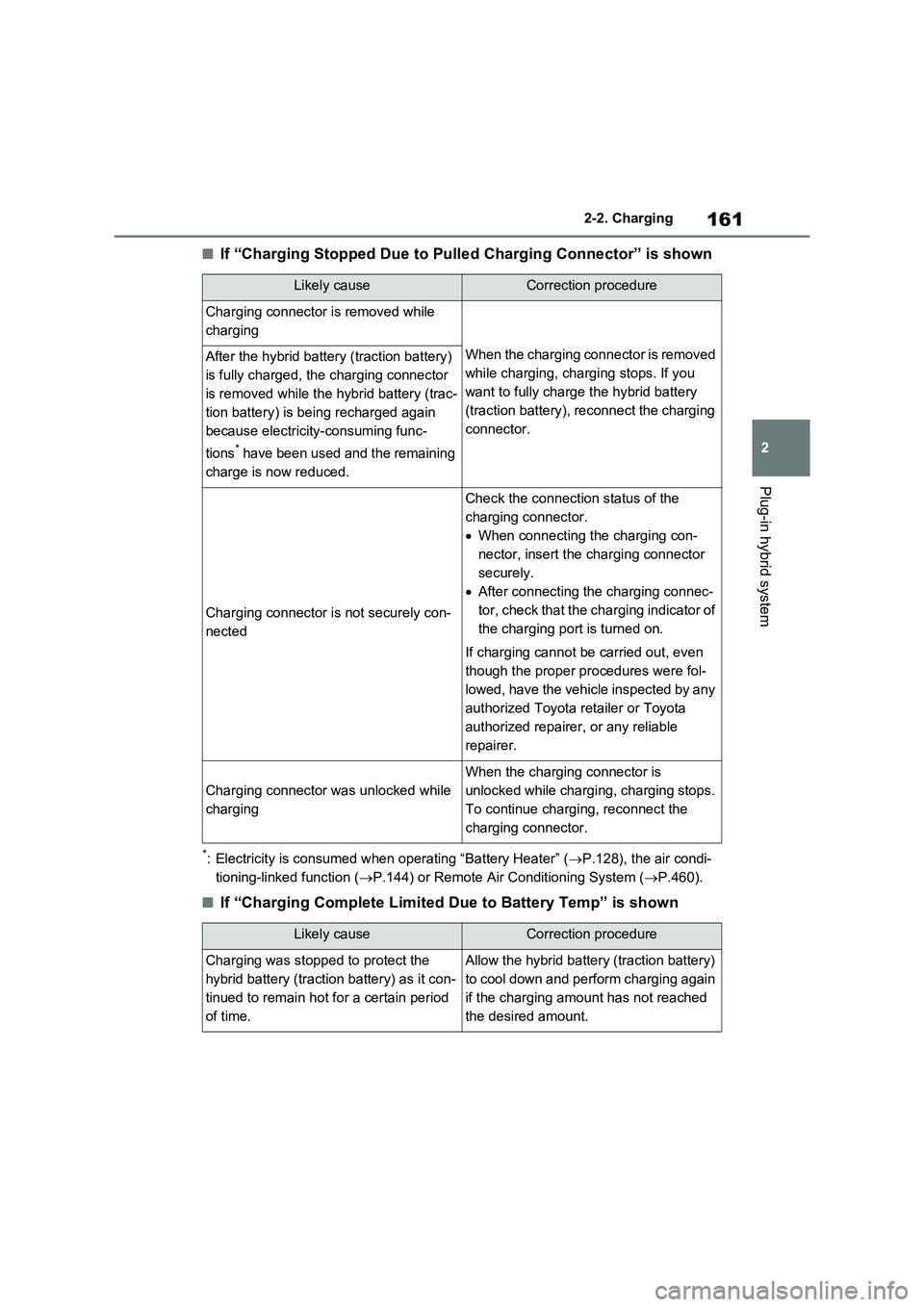
■If “Charging Stopped Due to Pulled Charging Connector” is shown
*: Electricity is consumed when operating “Battery Heater” (P.128), the air condi-
tioning-linked function (P.144) or Remote Air Conditioning System (P.460).
■If “Charging Complete Limited Due to Battery Temp” is shown
Likely causeCorrection procedure
Charging connector is removed while
charging
When the charging connector is removed
while charging, charging stops. If you
want to fully charge the hybrid battery
(traction battery), reconnect the charging
connector.After the hybrid battery (traction battery)
is fully charged, the charging connector
is removed while the hybrid battery (trac-
tion battery) is being recharged again
because electricity-consuming func-
tions
* have been used and the remaining
charge is now reduced.
Charging connector is not securely con-
nected
Check the connection status of the
charging connector.
When connecting the charging con-
nector, insert the charging connector
securely.
After connecting the charging connec-
tor, check that the charging indicator of
the charging port is turned on.
If charging cannot be carried out, even
though the proper procedures were fol-
lowed, have the vehicle inspected by any
authorized Toyota retailer or Toyota
authorized repairer, or any reliable
repairer.
Charging connector was unlocked while
charging
When the charging connector is
unlocked while charging, charging stops.
To continue charging, reconnect the
charging connector.
Likely causeCorrection procedure
Charging was stopped to protect the
hybrid battery (traction battery) as it con-
tinued to remain hot for a certain period
of time.Allow the hybrid battery (traction battery)
to cool down and perform charging again
if the charging amount has not reached
the desired amount.
Page 174 of 664
1743-1. Instrument cluster
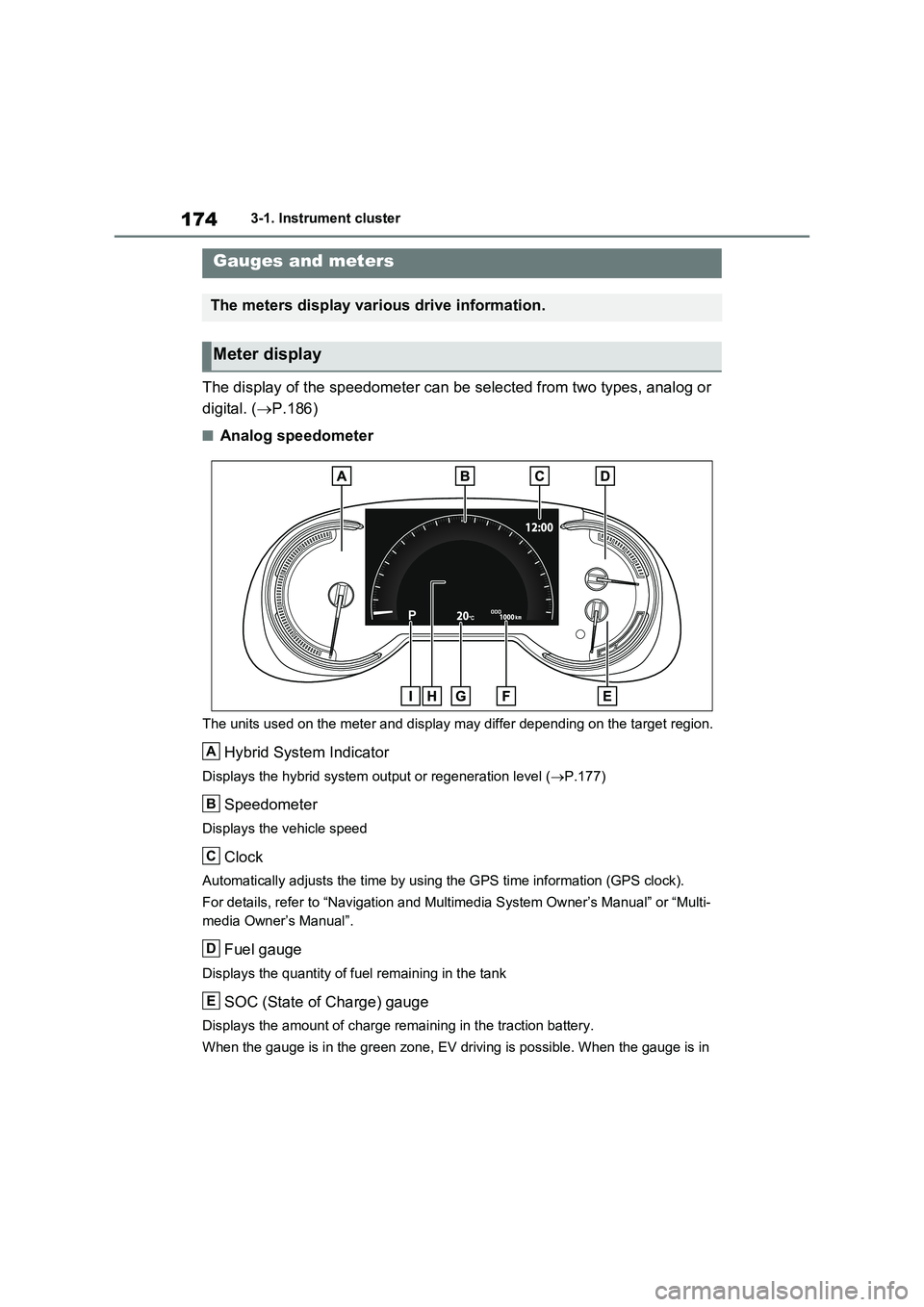
The display of the speedometer can be selected from two types, analog or
digital. ( P.186)
■Analog speedometer
The units used on the meter and display may differ depending on the target region.
Hybrid System Indicator
Displays the hybrid system output or regeneration level (P.177)
Speedometer
Displays the vehicle speed
Clock
Automatically adjusts the time by using the GPS time information (GPS clock).
For details, refer to “Navigation and Multimedia System Owner’s Manual” or “Multi-
media Owner’s Manual”.
Fuel gauge
Displays the quantity of fuel remaining in the tank
SOC (State of Charge) gauge
Displays the amount of charge remaining in the traction battery.
When the gauge is in the green zone, EV driving is possible. When the gauge is in
Gauges and meters
The meters display various drive information.
Meter display
A
B
C
D
E
Page 176 of 664
1763-1. Instrument cluster
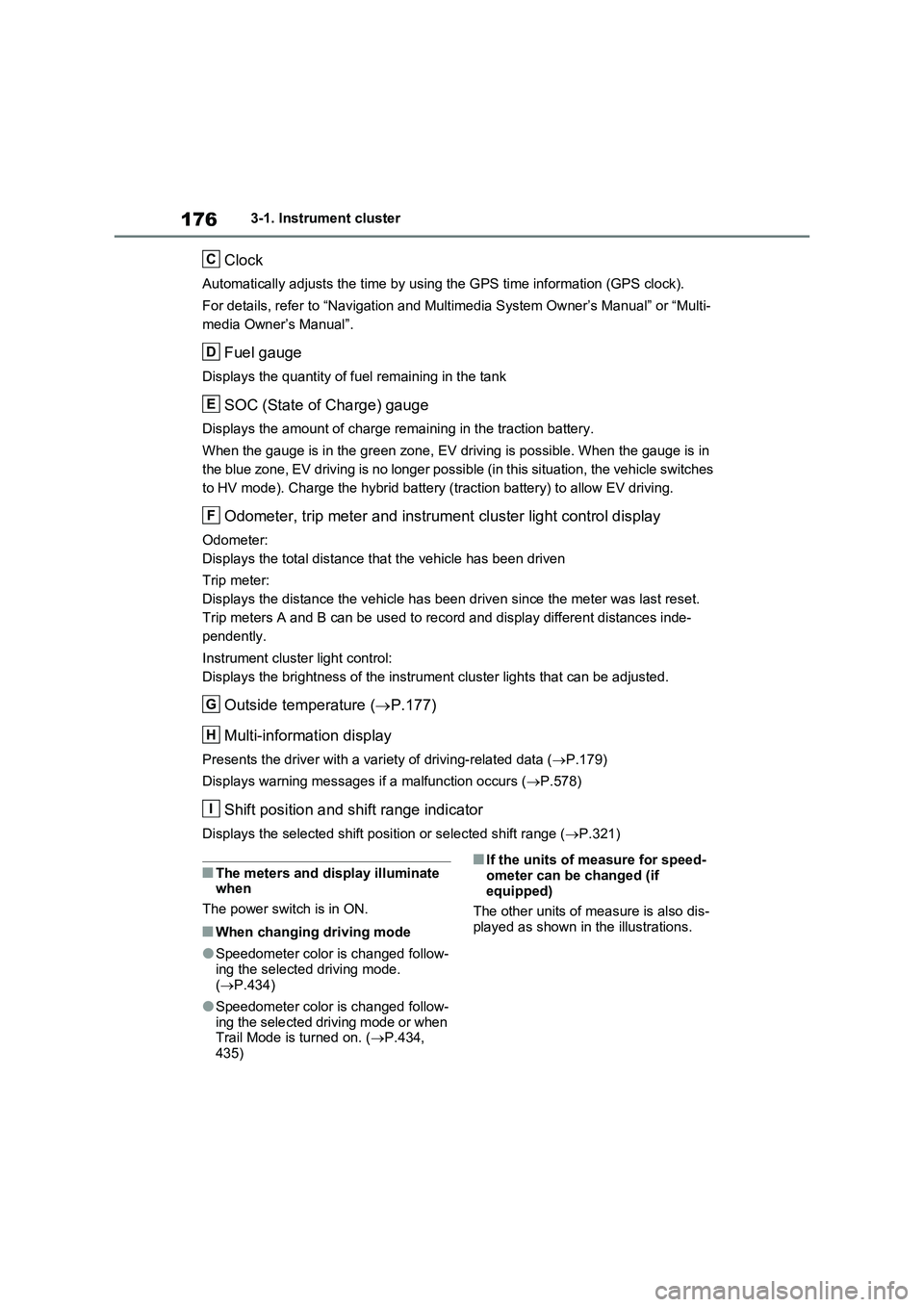
Clock
Automatically adjusts the time by using the GPS time information (GPS clock).
For details, refer to “Navigation and Multimedia System Owner’s Manual” or “Multi-
media Owner’s Manual”.
Fuel gauge
Displays the quantity of fuel remaining in the tank
SOC (State of Charge) gauge
Displays the amount of charge remaining in the traction battery.
When the gauge is in the green zone, EV driving is possible. When the gauge is in
the blue zone, EV driving is no longer possible (in this situation, the vehicle switches
to HV mode). Charge the hybrid battery (traction battery) to allow EV driving.
Odometer, trip meter and instrument cluster light control display
Odometer:
Displays the total distance that the vehicle has been driven
Trip meter:
Displays the distance the vehicle has been driven since the meter was last reset.
Trip meters A and B can be used to record and display different distances inde-
pendently.
Instrument cluster light control:
Displays the brightness of the instrument cluster lights that can be adjusted.
Outside temperature (P.177)
Multi-information display
Presents the driver with a variety of driving-related data (P.179)
Displays warning messages if a malfunction occurs (P.578)
Shift position and shift range indicator
Displays the selected shift position or selected shift range (P.321)
■The meters and display illuminate
when
The power switch is in ON.
■When changing driving mode
●Speedometer color is changed follow-
ing the selected driving mode.
(P.434)
●Speedometer color is changed follow-
ing the selected driving mode or when
Trail Mode is turned on. (P.434,
435)
■If the units of measure for speed-
ometer can be changed (if
equipped)
The other units of measure is also dis-
played as shown in the illustrations.
C
D
E
F
G
H
I
Page 179 of 664
179
3
3-1. Instrument cluster
Vehicle status information and indicators
adjusted individually. However, when
the surroundings are bright (daytime, etc.), turning on the tail lights will not change the instrument cluster bright-
ness.
The clock can be adjusted on the
navigation/multimedia system.
Refer to “Navigation and multime-
dia system Owner’s manual” or
“Multimedia Owner’s Manual”.
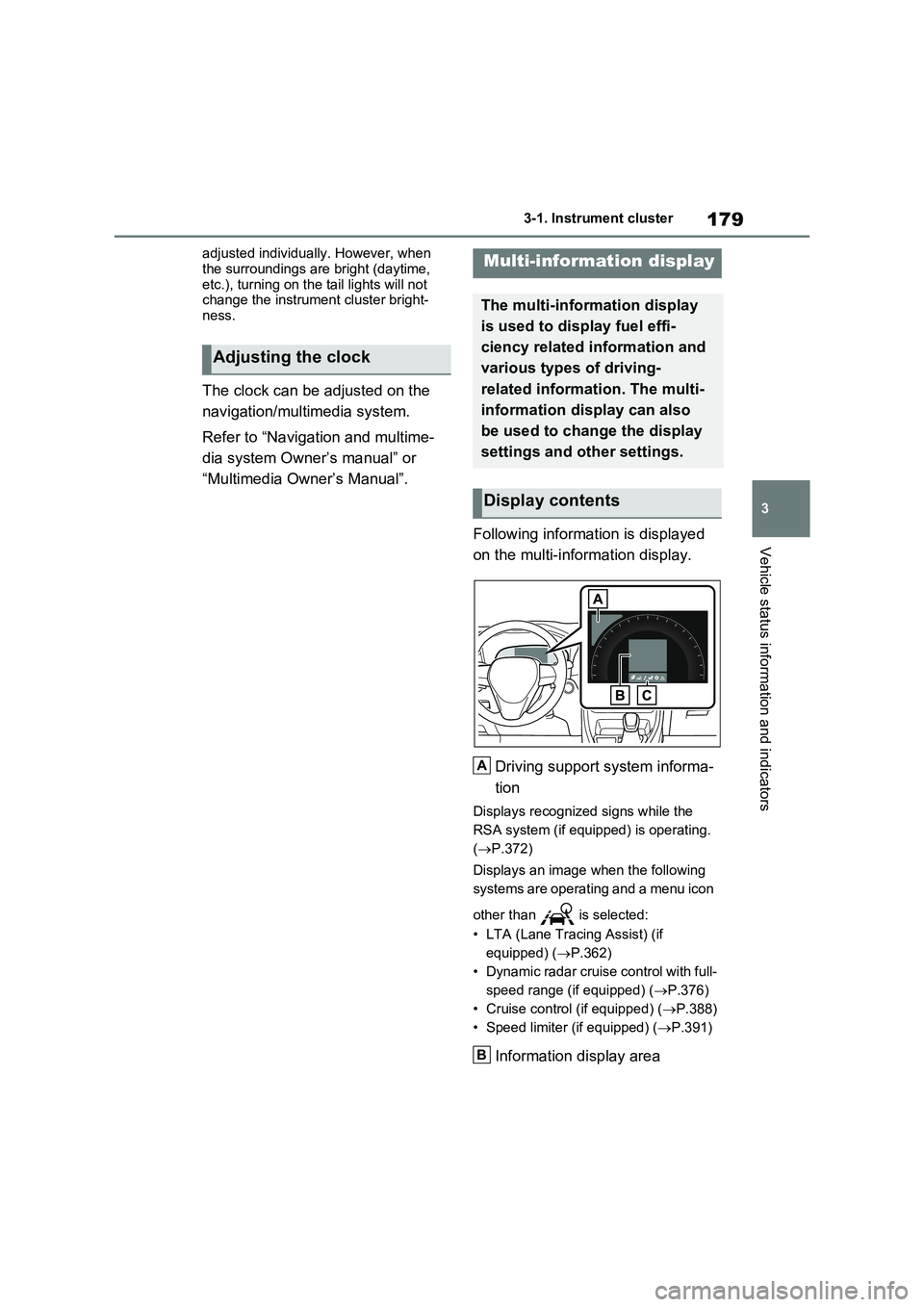
Following information is displayed
on the multi-information display.
Driving support system informa-
tion
Displays recognized signs while the
RSA system (if equipped) is operating.
( P.372)
Displays an image when the following
systems are operating and a menu icon
other than is selected:
• LTA (Lane Tracing Assist) (if
equipped) ( P.362)
• Dynamic radar cruise control with full-
speed range (if equipped) ( P.376)
• Cruise control (if equipped) ( P.388)
• Speed limiter (if equipped) ( P.391)
Information display area
Adjusting the clock
Multi-information display
The multi-information display
is used to display fuel effi-
ciency related information and
various types of driving-
related information. The multi-
information display can also
be used to change the display
settings and other settings.
Display contents
A
B
Page 189 of 664
189
3
3-1. Instrument cluster
Vehicle status information and indicators
• “Drive Info Type”
Select to change the drive information
type display between trip and total.
( P.185).
• “Drive Info Items”
Select to set the items on the upper and
lower side of the drive information
screen from three items, average
speed, distance and total time.
“Closing Display”
Select to set the items displayed when
the power switch is turned off.
“Pop-Up Display” (if equipped)
Select to enable/disable the following
pop-up displays, which may appear in
some situations.
• Intersection guidance display of the
navigation system-linked system (if
equipped)
• Incoming call display of the hands-
free phone system (if equipped)
• Audio operation
• Volume operation
• Voice control (if equipped)
“Calender”
Select to set up the calender.
This can only be set if GPS calibration
of clock is turned off in the multimedia
system settings.
“MID OFF”
A blank screen is displayed
“Default Settings”
Select to reset the meter display set-
tings.
■Suspension of the settings display
●In the following situations, operation of the settings display will be temporarily suspended.
• When a warning message appears on
the multi-information display
• When the vehicle begins to move
●Settings for functions not equipped to
the vehicle are not displayed.
●When a function is turned off, the
related settings for that function are not selectable.
Select to display warning mes-
sages and measures to be taken if
a malfunction is detected.
( P.578)
Displays suggestions to the driver
in the following situations. To select
a response to a displayed sugges-
tion, use the meter control
switches.
WARNING
■Cautions during setting up the
display
As the hybrid system needs to be operating during setting up the dis-
play, ensure that the vehicle is parked in a place with adequate ventilation. In a closed area such as a garage,
exhaust gases including harmful car- bon monoxide (CO) may collect and enter the vehicle. This may lead to
death or a serious health hazard.
NOTICE
■During setting up the display
To prevent 12-volt battery discharge, ensure that the hybrid system is oper-
ating while setting up the display fea- tures.
Warning message display
Suggestion function
Page 201 of 664
4
201
4
Before driving
Before driving
4-1. Key information
Keys.................................. 202
4-2. Opening, closing and locking
the doors
Side doors ........................ 205
Back door ......................... 210
Smart entry & start system 223
4-3. Adjusting the seats
Front seats........................ 270
Rear seats ........................ 271
Driving position memory ... 273
Head restraints ................. 276
4-4. Adjusting the steering wheel
and mirrors
Steering wheel .................. 278
Inside rear view mirror ...... 279
Digital Rear-view Mirror .... 280
Outside rear view mirrors . 289
4-5. Opening, closing the win-
dows and moon roof
Power windows................. 291
Panoramic moon roof ....... 294