sensor TOYOTA VERSO S 2011 Service Manual
[x] Cancel search | Manufacturer: TOYOTA, Model Year: 2011, Model line: VERSO S, Model: TOYOTA VERSO S 2011Pages: 664, PDF Size: 160.56 MB
Page 371 of 664
371
5 5-5. Using the driving support systems
Driving
driver. The warning stops when the sys-
tem determines that the driver holds the
steering wheel. Always keep your hands
on the steering wheel when using this
system, regardless of warnings.
●When the system determines that the
driver is driving without holding the
steering wheel while the system is
operating
If the driver continues to keep their
hands off of the steering wheel, the
buzzer sounds, the driver is warned and
the function is temporarily canceled.
This warning also operates in the same
way when the driver continuously oper-
ates the steering wheel only a small
amount.
The buzzer also sounds even if the alert
type is set to “Steering wheel vibration”.
●When the system determines that the
vehicle may not turn and instead
depart from its lane while driving
around a curve
Depending on the vehicle condition and
road conditions, the warning may not
operate. Also, if the system determines
that the vehicle is driving around a
curve, warnings will occur earlier than
during straight-lane driving.
●When the system determines that the
driver is driving without holding the
steering wheel while the steering
wheel assist of the steering assist
function is operating.
If the driver continues to keep their
hands off of the steering wheel and the
steering wheel assist is operating, the
buzzer sounds and the driver is warned. Each time the buzzer sounds, the con-
tinuing time of the buzzer becomes lon-
ger.
The buzzer also sounds even if the alert
type is set to “Steering wheel vibration”.
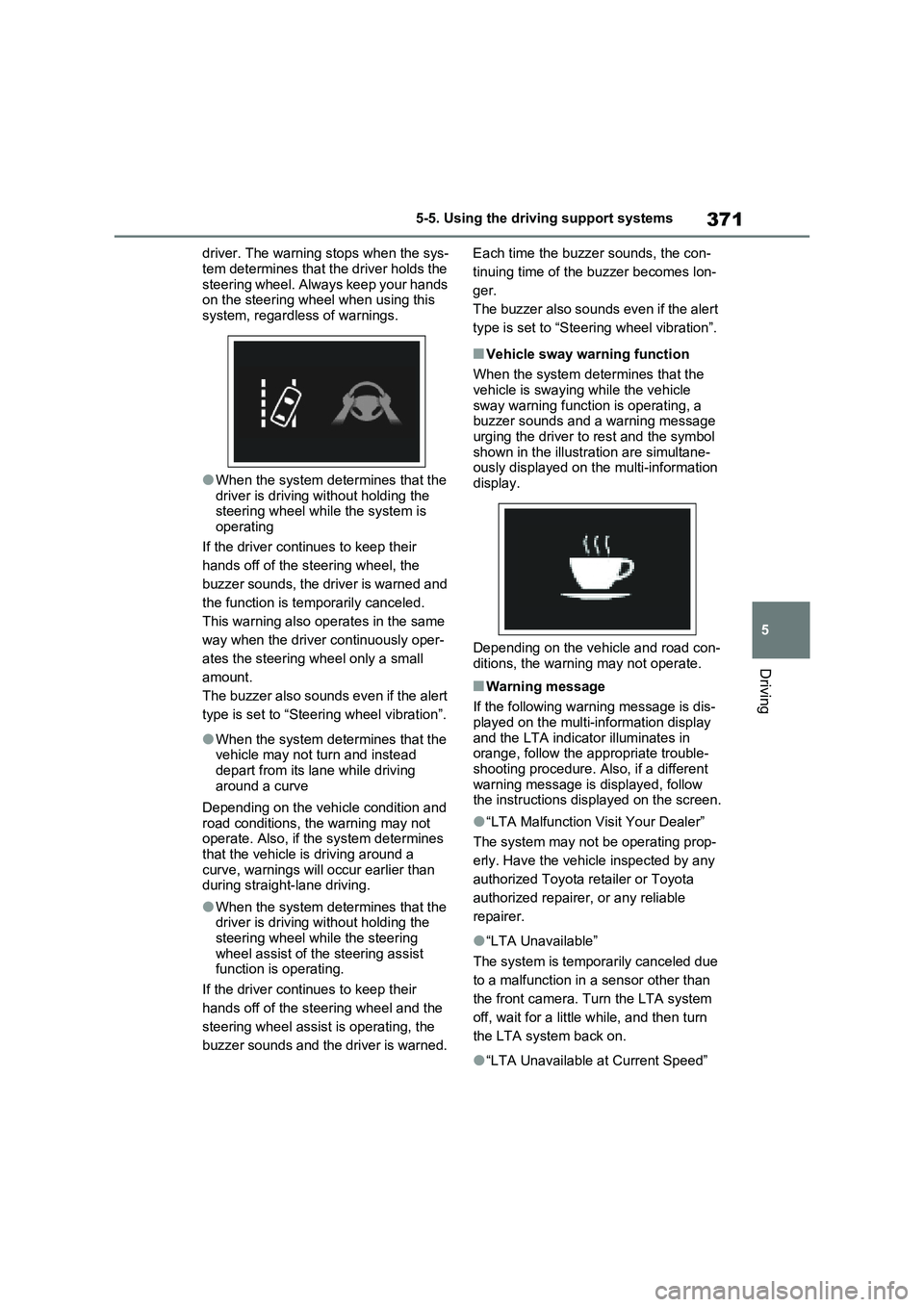
■Vehicle sway warning function
When the system determines that the
vehicle is swaying while the vehicle
sway warning function is operating, a
buzzer sounds and a warning message
urging the driver to rest and the symbol
shown in the illustration are simultane-
ously displayed on the multi-information
display.
Depending on the vehicle and road con-
ditions, the warning may not operate.
■Warning message
If the following warning message is dis-
played on the multi-information display
and the LTA indicator illuminates in
orange, follow the appropriate trouble-
shooting procedure. Also, if a different
warning message is displayed, follow
the instructions displayed on the screen.
●“LTA Malfunction Visit Your Dealer”
The system may not be operating prop-
erly. Have the vehicle inspected by any
authorized Toyota retailer or Toyota
authorized repairer, or any reliable
repairer.
●“LTA Unavailable”
The system is temporarily canceled due
to a malfunction in a sensor other than
the front camera. Turn the LTA system
off, wait for a little while, and then turn
the LTA system back on.
●“LTA Unavailable at Current Speed”
Page 375 of 664
375
5 5-5. Using the driving support systems
Driving
system will notify the driver.
When the vehicle speed exceeds
the speed notification threshold
of the speed limit sign displayed,
the sign display will be empha-
sized and a buzzer will sound.
When the RSA system recog-
nizes a no-entry sign and detects
that the vehicle has entered a
no-entry area based on the map
information of the navigation sys-
tem, the no-entry sign flashes
and a buzzer will sound. (For
vehicles with navigation system)
If it is detected that your vehicle
is overtaking when a no overtak-
ing sign is displayed on the multi-
information display, the dis-
played sign will flash and a steer-
ing wheel will vibrate.
Depending on the situation, traffic
environment (traffic direction,
speed unit) may be detected incor-
rectly and a notification function
may not operate properly.
■Setting procedure
P.186
■Automatic turn-off of RSA sign dis-
play
One or more signs automatically turn off
in the following situations.
●No sign has been recognized for a
certain distance.
●The road changes due to a left or right
turn, etc.
■Conditions in which the function
may not operate or detect correctly
In the following situations, RSA does not
operate normally and may not recognize signs, display the incorrect sign, etc.
However, this does not indicate a mal-
function.
●The front camera is misaligned due to
a strong impact being applied to the
sensor, etc.
●Dirt, snow, stickers, etc. are on the
windshield near the front camera.
●In inclement weather such as heavy
rain, fog, snow or sand storms.
●Light from an oncoming vehicle, the
sun, etc. enters the front camera.
●The sign is dirty, faded, tilted or bent.
●The contrast of electronic sign is low.
●All or part of the sign is hidden by the
leaves of a tree, a pole, etc.
●The sign is only visible to the front
camera for a short amount of time.
●The driving scene (turning, lane
change, etc.) is judged incorrectly.
●If a sign not appropriate for the cur-
rently traveled lane, but the sign exists
directly after a freeway branches, or in
an adjacent lane just before merging.
●Stickers are attached to the rear of the
preceding vehicle.
●A sign resembling a system compati-
ble sign is recognized.
●Side road speed signs may be
detected and displayed (if positioned
in sight of the front camera) while the
vehicle is traveling on the main road.
●Roundabout exit road speed signs
may be detected and displayed (if
positioned in sight of the front camera)
while traveling on a roundabout.
●The front of the vehicle is raised or
lowered due to the carried load.
●The surrounding brightness is not suf-
ficient or changes suddenly.
●When a sign intended for trucks, etc.
is recognized.
●The vehicle is driven in a country with
a different direction of traffic.
●The navigation system map data is
Page 377 of 664
377
5
5-5. Using the driving support systems
Driving
Indicators
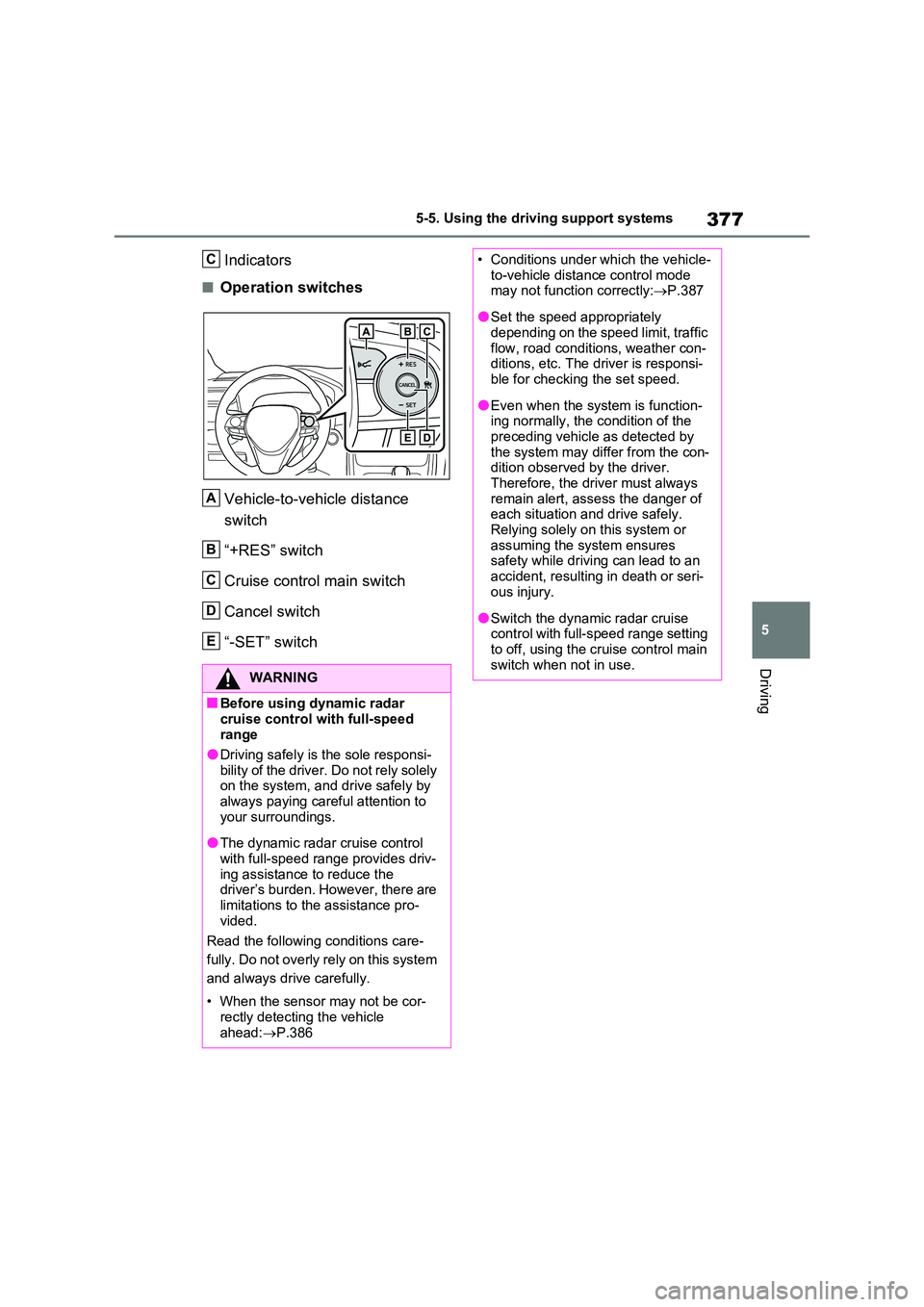
■Operation switches
Vehicle-to-vehicle distance
switch
“+RES” switch
Cruise control main switch
Cancel switch
“-SET” switch
WARNING
■Before using dynamic radar
cruise control with full-speed range
●Driving safely is the sole responsi-
bility of the driver. Do not rely solely on the system, and drive safely by always paying careful attention to
your surroundings.
●The dynamic radar cruise control
with full-speed range provides driv- ing assistance to reduce the driver’s burden. However, there are
limitations to the assistance pro- vided.
Read the following conditions care-
fully. Do not overly rely on this system
and always drive carefully.
• When the sensor may not be cor-
rectly detecting the vehicle ahead: P.386
C
A
B
C
D
E
• Conditions under which the vehicle- to-vehicle distance control mode may not function correctly: P.387
●Set the speed appropriately depending on the speed limit, traffic
flow, road conditions, weather con- ditions, etc. The driver is responsi-ble for checking the set speed.
●Even when the system is function-ing normally, the condition of the
preceding vehicle as detected by the system may differ from the con-dition observed by the driver.
Therefore, the driver must always remain alert, assess the danger of each situation and drive safely.
Relying solely on this system or assuming the system ensures safety while driving can lead to an
accident, resulting in death or seri- ous injury.
●Switch the dynamic radar cruise control with full-speed range setting to off, using the cruise control main
switch when not in use.
Page 378 of 664
3785-5. Using the driving support systems
WARNING
■Cautions regarding the driving assist systems
Observe the following precautions, as there are limitations to the assistance provided by the system. Failure to do
so may cause an accident resulting in death or serious injury.
●Assisting the driver to measure fol-
lowing distance
The dynamic radar cruise control with
full-speed range is only intended to
help the driver in determining the fol-
lowing distance between the driver’s
own vehicle and a designated vehicle
traveling ahead. It is not a mechanism
that allows careless or inattentive
driving, and it is not a system that can
assist the driver in low-visibility condi-
tions.
It is still necessary for driver to pay
close attention to the vehicle’s sur-
roundings.
●Assisting the driver to judge proper following distance
The dynamic radar cruise control with
full-speed range determines whether
the following distance between the
driver’s own vehicle and a designated
vehicle traveling ahead is within a set
range. It is not capable of making any
other type of judgement. Therefore, it
is absolutely necessary for the driver
to remain vigilant and to determine
whether or not there is a possibility of
danger in any given situation.
●Assisting the driver to operate the vehicle
The dynamic radar cruise control with
full-speed range does not include
functions which will prevent or avoid
collisions with vehicles ahead of your
vehicle. Therefore, if there is ever any
possibility of danger, the driver must
take immediate and direct control of
the vehicle and act appropriately in
order to ensure the safety of all
involved.
■Situations unsuitable for dynamic radar cruise control
with full-speed range
Do not use dynamic radar cruise con- trol with full-speed range in any of the
following situations. Doing so may result in inappropriate speed control and could cause an accident resulting
in death or serious injury.
●Roads where there are pedestrians, cyclists, etc.
●In heavy traffic
●On roads with sharp bends
●On winding roads
●On slippery roads, such as those covered with rain, ice or snow
●On steep downhills, or where there are sudden changes between sharp
up and down gradients
Vehicle speed may exceed the set
speed when driving down a steep hill.
●At entrances to freeways and high- ways
●When weather conditions are bad enough that they may prevent the sensors from detecting correctly
(fog, snow, sandstorm, heavy rain, etc.)
Page 385 of 664
385
5 5-5. Using the driving support systems
Driving
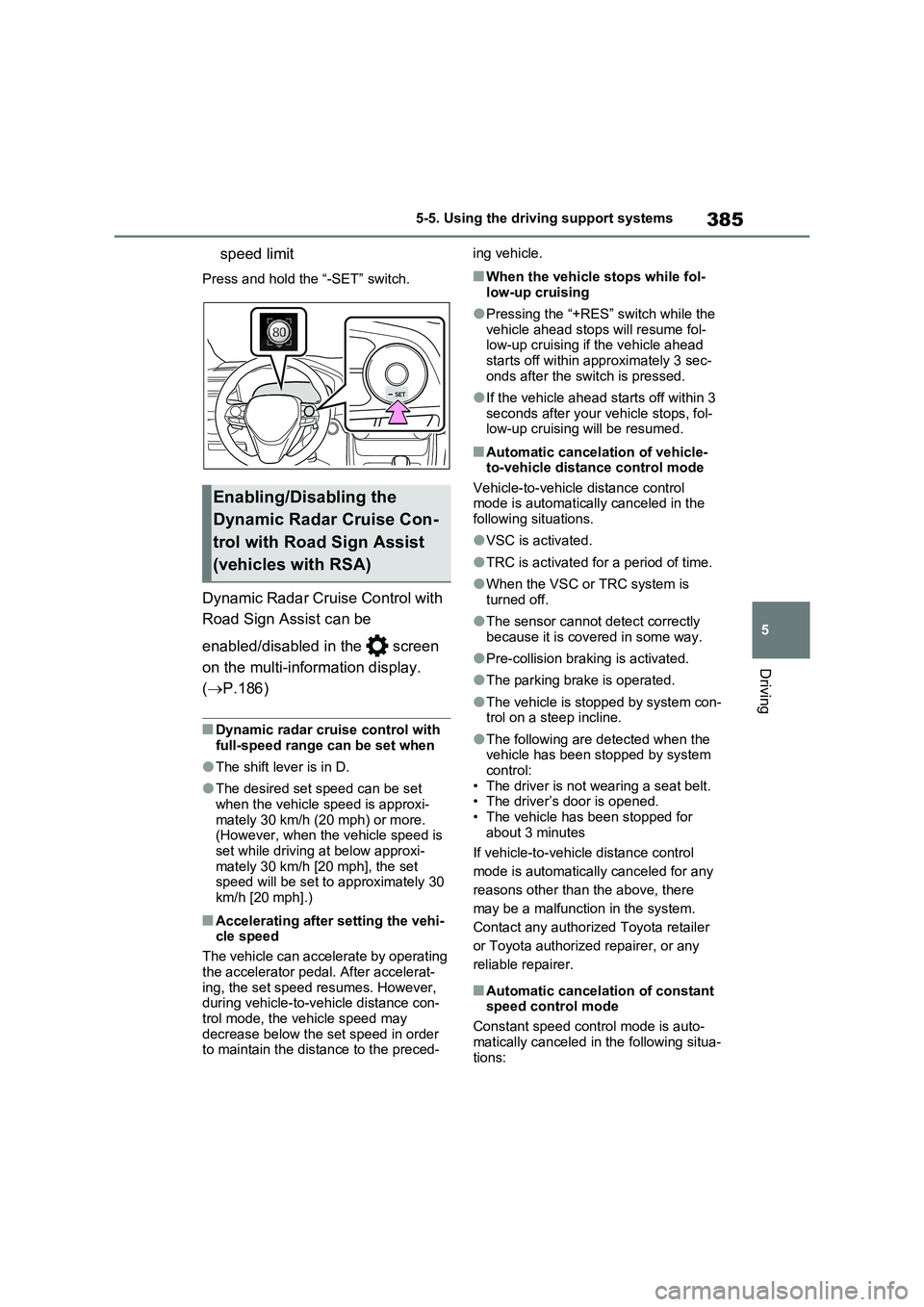
speed limit
Press and hold the “-SET” switch.
Dynamic Radar Cruise Control with
Road Sign Assist can be
enabled/disabled in the screen
on the multi-information display.
(P.186)
■Dynamic radar cruise control with
full-speed range can be set when
●The shift lever is in D.
●The desired set speed can be set
when the vehicle speed is approxi-
mately 30 km/h (20 mph) or more.
(However, when the vehicle speed is
set while driving at below approxi-
mately 30 km/h [20 mph], the set
speed will be set to approximately 30
km/h [20 mph].)
■Accelerating after setting the vehi-
cle speed
The vehicle can accelerate by operating
the accelerator pedal. After accelerat-
ing, the set speed resumes. However,
during vehicle-to-vehicle distance con-
trol mode, the vehicle speed may
decrease below the set speed in order
to maintain the distance to the preced-ing vehicle.
■When the vehicle stops while fol-
low-up cruising
●Pressing the “+RES” switch while the
vehicle ahead stops will resume fol-
low-up cruising if the vehicle ahead
starts off within approximately 3 sec-
onds after the switch is pressed.
●If the vehicle ahead starts off within 3
seconds after your vehicle stops, fol-
low-up cruising will be resumed.
■Automatic cancelation of vehicle-
to-vehicle distance control mode
Vehicle-to-vehicle distance control
mode is automatically canceled in the
following situations.
●VSC is activated.
●TRC is activated for a period of time.
●When the VSC or TRC system is
turned off.
●The sensor cannot detect correctly
because it is covered in some way.
●Pre-collision braking is activated.
●The parking brake is operated.
●The vehicle is stopped by system con-
trol on a steep incline.
●The following are detected when the
vehicle has been stopped by system
control:
• The driver is not wearing a seat belt.
• The driver’s door is opened.
• The vehicle has been stopped for
about 3 minutes
If vehicle-to-vehicle distance control
mode is automatically canceled for any
reasons other than the above, there
may be a malfunction in the system.
Contact any authorized Toyota retailer
or Toyota authorized repairer, or any
reliable repairer.
■Automatic cancelation of constant
speed control mode
Constant speed control mode is auto-
matically canceled in the following situa-
tions:
Enabling/Disabling the
Dynamic Radar Cruise Con-
trol with Road Sign Assist
(vehicles with RSA)
Page 386 of 664
3865-5. Using the driving support systems
●Actual vehicle speed is more than
approximately 16 km/h (10 mph) below the set vehicle speed.
●Actual vehicle speed falls below approximately 30 km/h (20 mph).
●VSC is activated.
●TRC is activated for a period of time.
●When the VSC or TRC system is turned off.
●Pre-collision braking is activated.
●The parking brake is operated.
If constant speed control mode is auto-
matically canceled for any reasons other
than the above, there may be a malfunc-
tion in the system. Contact any autho-
rized Toyota retailer or Toyota
authorized repairer, or any reliable
repairer.
■The Dynamic Radar Cruise Control with Road Sign Assist may not
operate properly when (vehicles with RSA)
As the Dynamic Radar Cruise Control
with Road Sign Assist may not operate properly in conditions in which RSA may not operate or detect correctly
( P.375), when using this function, make sure to check the speed limit sign displayed.
In the following situations, the set speed may not be changed to the recognized speed limit by pressing and holding the
“+RES”/“-SET” switch.
●If speed limit information is not avail-
able
●When the recognized speed limit is
the same as the set speed
●When the recognized speed limit is
outside of the speed range that the dynamic radar cruise control system can operate
■Brake operation
A brake operation sound may be heard and the brake pedal response may change, but these are not malfunctions.
■Warning messages and buzzers for
dynamic radar cruise control with full-speed range
Warning messages and buzzers are
used to indicate a system malfunction or to inform the driver of the need for cau-tion while driving. If a warning message
is shown on the multi-information dis- play, read the message and follow the instructions. ( P.353, 578)
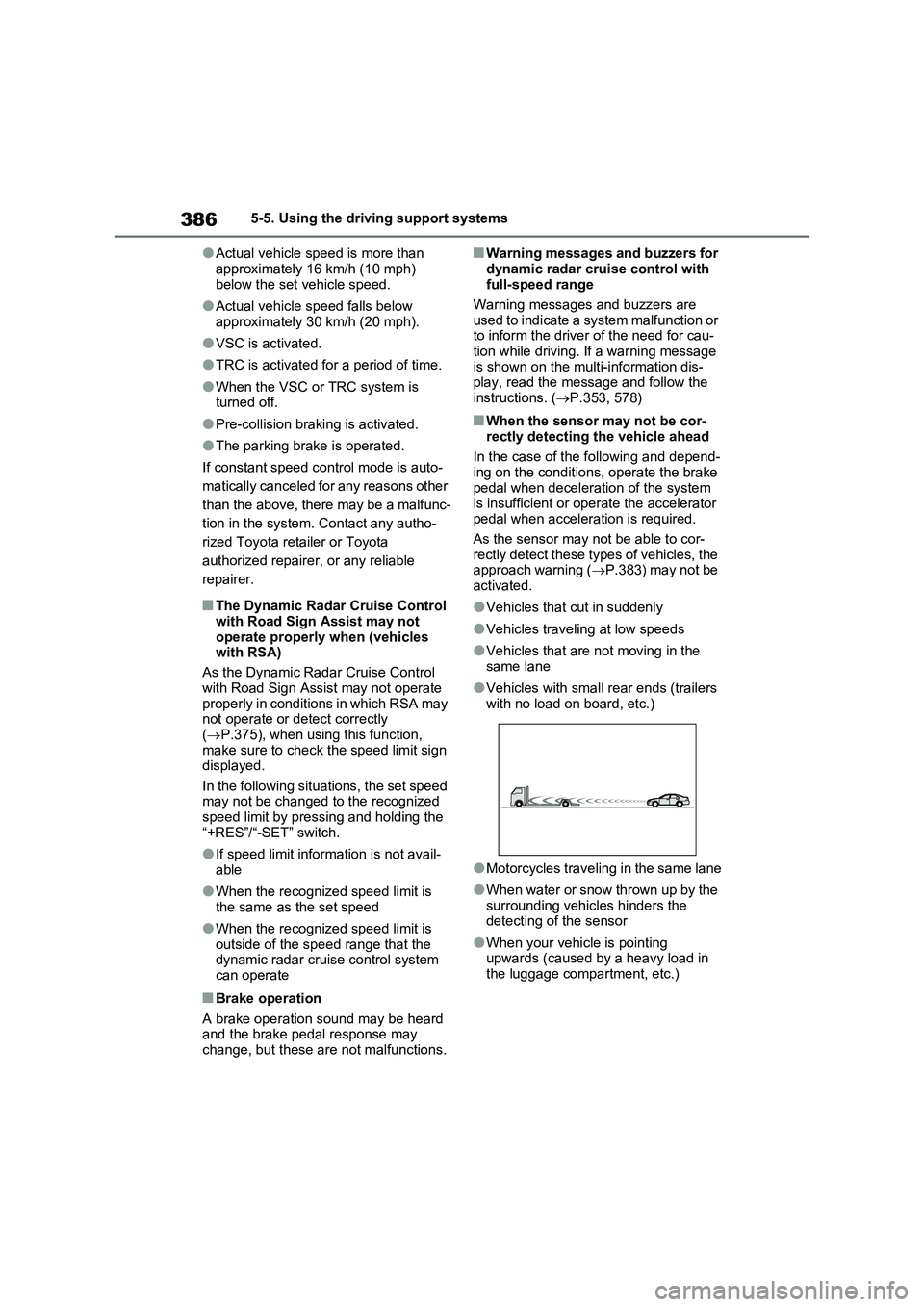
■When the sensor may not be cor-
rectly detecting the vehicle ahead
In the case of the following and depend- ing on the conditions, operate the brake
pedal when deceleration of the system is insufficient or operate the accelerator pedal when acceleration is required.
As the sensor may not be able to cor- rectly detect these types of vehicles, the approach warning ( P.383) may not be
activated.
●Vehicles that cut in suddenly
●Vehicles traveling at low speeds
●Vehicles that are not moving in the same lane
●Vehicles with small rear ends (trailers with no load on board, etc.)
●Motorcycles traveling in the same lane
●When water or snow thrown up by the
surrounding vehicles hinders the detecting of the sensor
●When your vehicle is pointing upwards (caused by a heavy load in the luggage compartment, etc.)
Page 387 of 664
387
5 5-5. Using the driving support systems
Driving
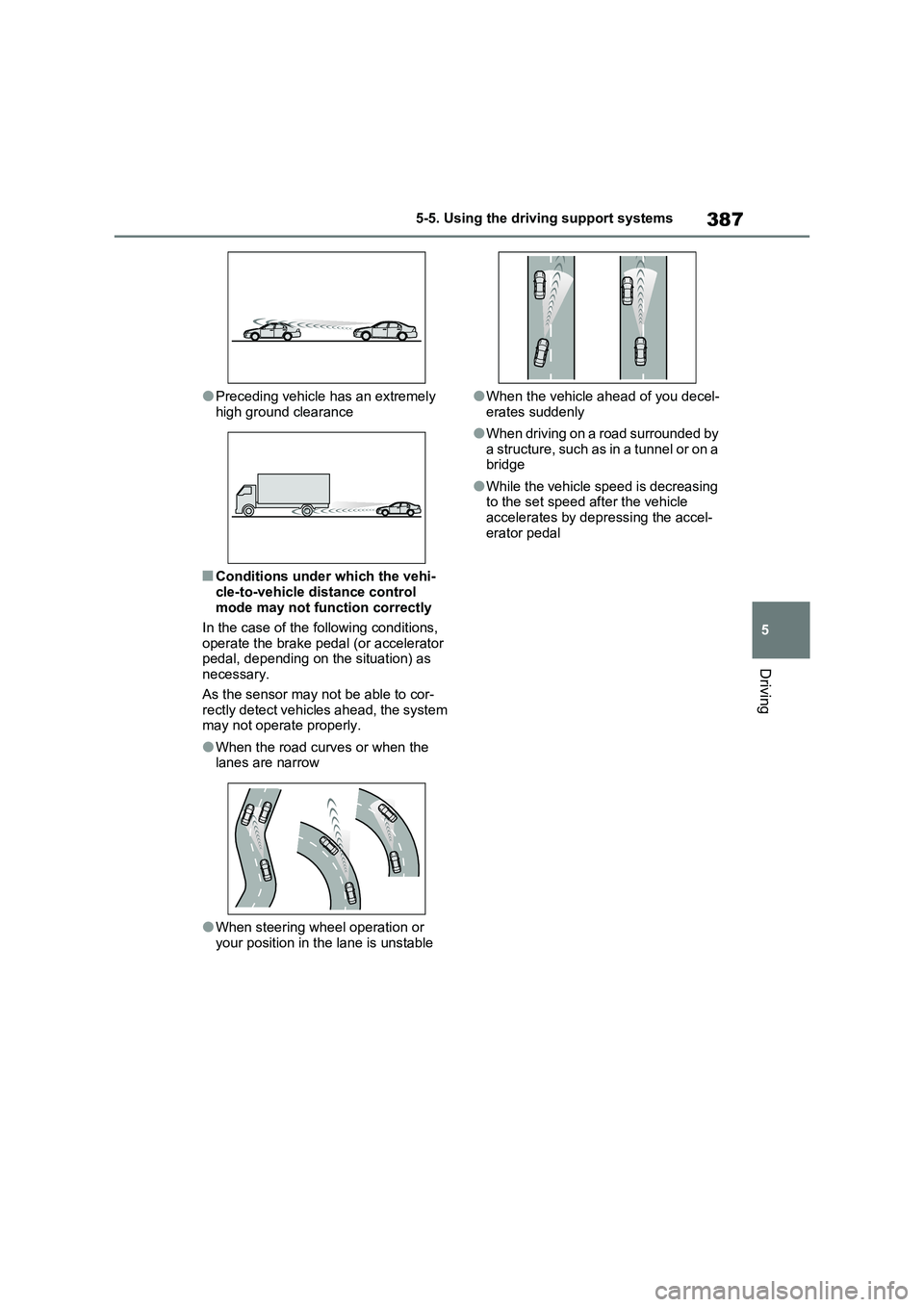
●Preceding vehicle has an extremely
high ground clearance
■Conditions under which the vehi-
cle-to-vehicle distance control
mode may not function correctly
In the case of the following conditions,
operate the brake pedal (or accelerator
pedal, depending on the situation) as
necessary.
As the sensor may not be able to cor-
rectly detect vehicles ahead, the system
may not operate properly.
●When the road curves or when the
lanes are narrow
●When steering wheel operation or
your position in the lane is unstable
●When the vehicle ahead of you decel-
erates suddenly
●When driving on a road surrounded by
a structure, such as in a tunnel or on a
bridge
●While the vehicle speed is decreasing
to the set speed after the vehicle
accelerates by depressing the accel-
erator pedal
Page 393 of 664
393
5
5-5. Using the driving support systems
Driving
*: If equipped
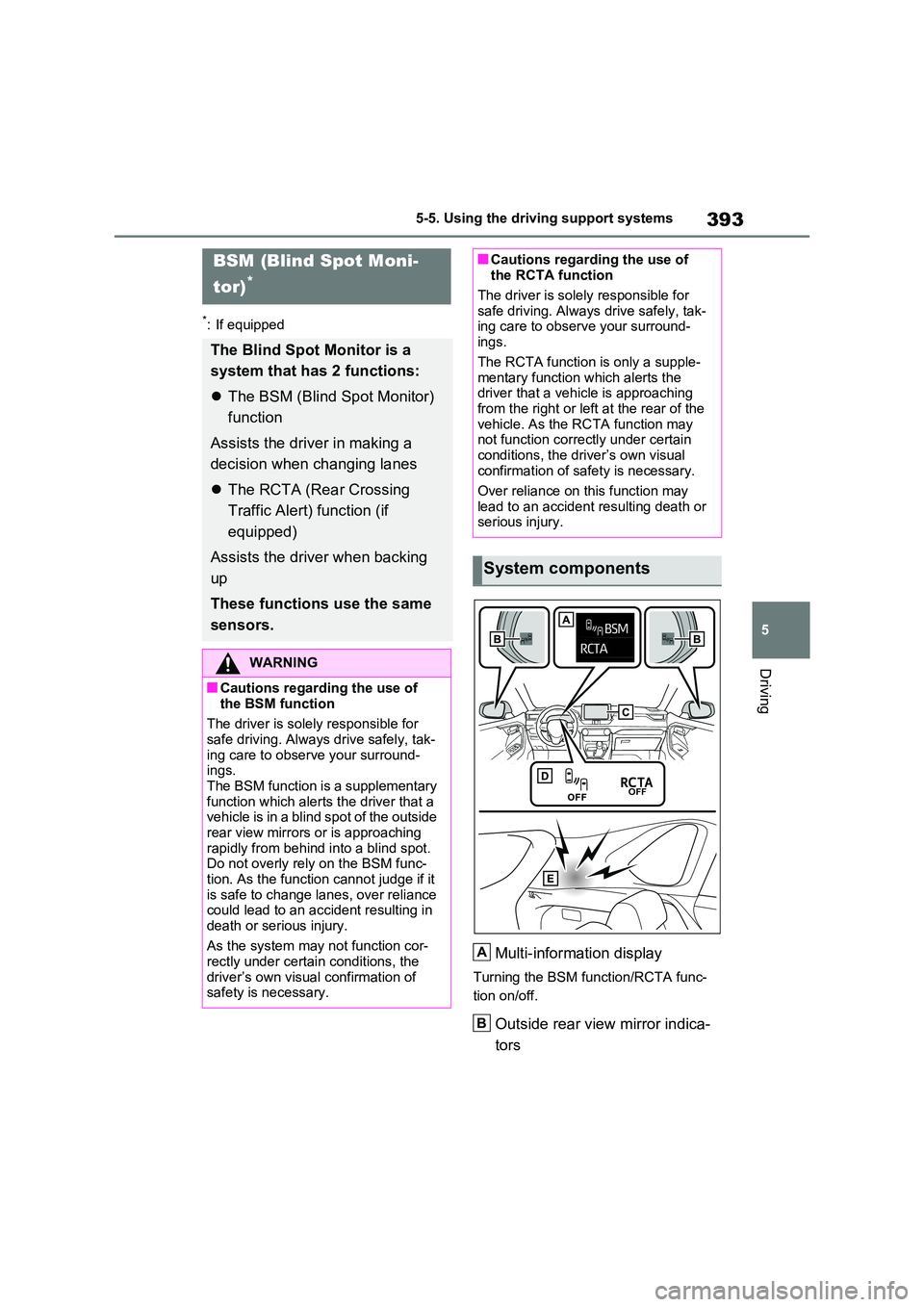
Multi-information display
Turning the BSM function/RCTA func-
tion on/off.
Outside rear view mirror indica-
tors
BSM (Blind Spot Moni-
tor)*
The Blind Spot Monitor is a
system that has 2 functions:
The BSM (Blind Spot Monitor)
function
Assists the driver in making a
decision when changing lanes
The RCTA (Rear Crossing
Traffic Alert) function (if
equipped)
Assists the driver when backing
up
These functions use the same
sensors.
WARNING
■Cautions regarding the use of
the BSM function
The driver is solely responsible for
safe driving. Always drive safely, tak- ing care to observe your surround-ings.
The BSM function is a supplementary function which alerts the driver that a vehicle is in a blind spot of the outside
rear view mirrors or is approaching rapidly from behind into a blind spot. Do not overly rely on the BSM func-
tion. As the function cannot judge if it is safe to change lanes, over reliance could lead to an accident resulting in
death or serious injury.
As the system may not function cor- rectly under certain conditions, the
driver’s own visual confirmation of safety is necessary.
■Cautions regarding the use of the RCTA function
The driver is solely responsible for
safe driving. Always drive safely, tak- ing care to observe your surround-ings.
The RCTA function is only a supple- mentary function which alerts the driver that a vehicle is approaching
from the right or left at the rear of the vehicle. As the RCTA function may not function correctly under certain
conditions, the driver’s own visual confirmation of safety is necessary.
Over reliance on this function may
lead to an accident resulting death or serious injury.
System components
A
B
Page 394 of 664
3945-5. Using the driving support systems
BSM function:
When a vehicle is detected in a blind
spot of the outside rear view mirrors or
approaching rapidly from behind into a
blind spot, the outside rear view mirror
indicator on the detected side will illumi-
nate. If the turn signal lever is operated
toward the detected side, the outside
rear view mirror indicator will flash.
RCTA function:
When a vehicle approaching from the
right or left at the rear of the vehicle is
detected, both outside rear view mirror
indicators will flash.
Monitor screen display (RCTA
function only)
If a vehicle approaching from the right
or left at the rear of the vehicle is
detected, the RCTA icon (P.411) for
the detected side will be displayed.
BSM OFF indicator/RCTA OFF
indicator
When the Blind Spot Monitor is dis-
abled, the BSM OFF indicator illumi-
nates.
When the RCTA function is disabled,
the RCTA OFF indicator illuminates.
RCTA buzzer (RCTA function
only)
If a vehicle approaching from the right
or left at the rear of the vehicle is
detected, a buzzer will sound from
behind the rear seat.
The BSM function and the RCTA
function can be enabled/disabled
on the screen of the multi-infor-mation display. (P.186)
The BSM function/RCTA function will
be enabled each time the power switch
is turned to ON.
■Outside rear view mirror indicators
visibility
In strong sunlight, the outside rear view
mirror indicator may be difficult to see.
■Hearing the RCTA buzzer
The RCTA buzzer may be difficult to
hear over loud noises such as high
audio volume.
■When “Blind Spot Monitor Unavail-
able” or “RCTA Unavailable” is
shown on the multi-information
display
The sensor voltage has become abnor-
mal, or water, snow, mud, etc., may be
built up in the vicinity of the sensor area
of the rear bumper. (P.408)
Removing the water, snow, mud, etc.,
from the vicinity of the sensor area
should return it to normal.
Also, the sensor may not function nor-
mally when used in extremely hot or
cold weather.
■When “Blind Spot Monitor Malfunc-
tion Visit Your Dealer” or “RCTA
Malfunction Visit Your Dealer” is
shown on the multi-information
display
There may be a sensor malfunction or
misaligned. Have the vehicle inspected
at any authorized Toyota retailer or
Toyota authorized repairer, or any reli-
able repairer.
■Customization
Some functions can be customized.
(P.186)
Turning the BSM func-
tion/RCTA function on/off
C
D
E
Page 408 of 664
4085-5. Using the driving support systems
■Vehicles that can be detected
by the Blind Spot Monitor
The BSM function uses radar sen-
sors to detect the following vehicles
traveling in adjacent lanes and
advises the driver of the presence
of such vehicles via the indicators
WARNING
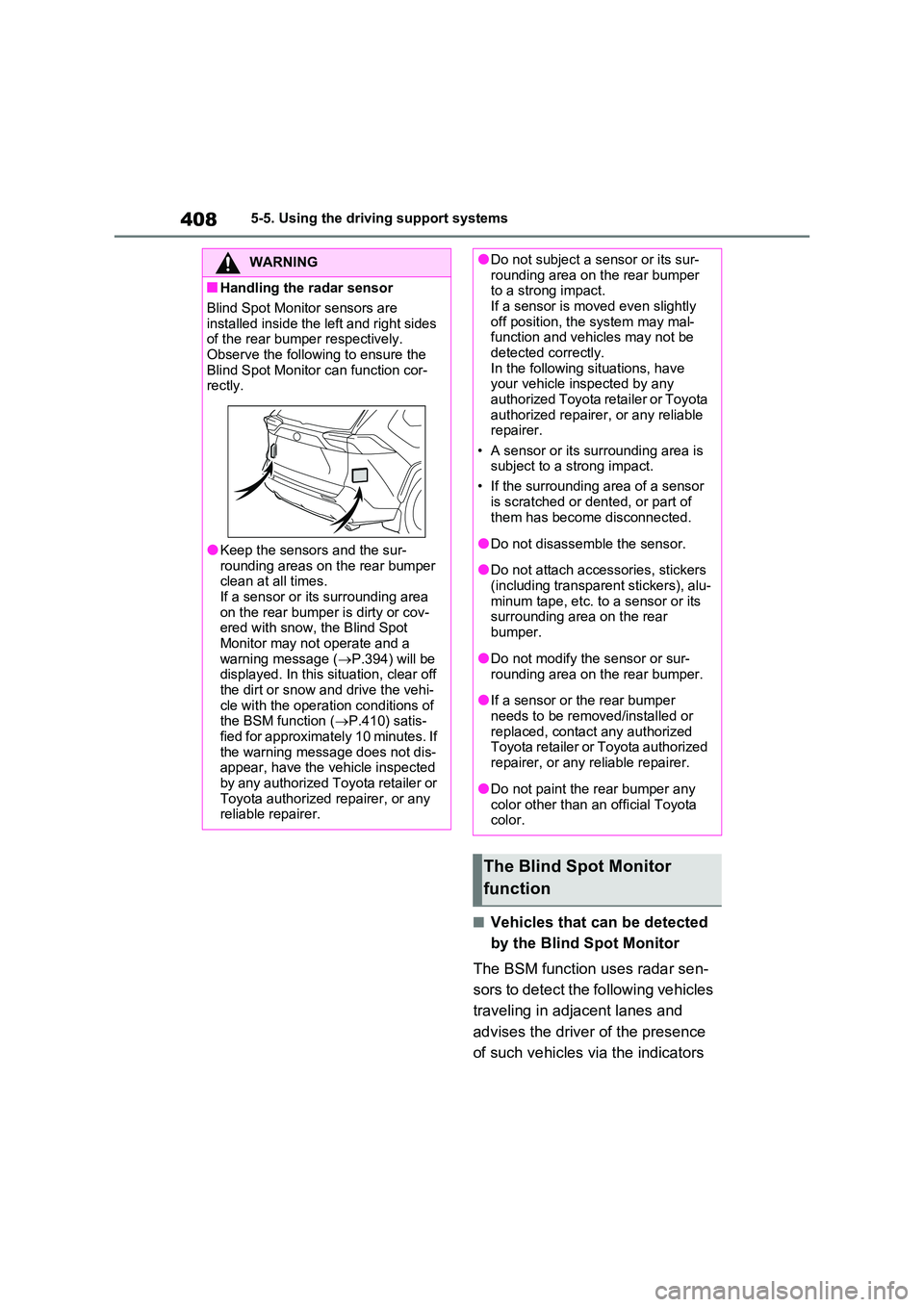
■Handling the radar sensor
Blind Spot Monitor sensors are
installed inside the left and right sides of the rear bumper respectively. Observe the following to ensure the
Blind Spot Monitor can function cor- rectly.
●Keep the sensors and the sur-rounding areas on the rear bumper clean at all times.
If a sensor or its surrounding area on the rear bumper is dirty or cov-ered with snow, the Blind Spot
Monitor may not operate and a warning message ( P.394) will be displayed. In this situation, clear off
the dirt or snow and drive the vehi- cle with the operation conditions of the BSM function ( P.410) satis-
fied for approximately 10 minutes. If the warning message does not dis-appear, have the vehicle inspected
by any authorized Toyota retailer or Toyota authorized repairer, or any reliable repairer.
●Do not subject a sensor or its sur-rounding area on the rear bumper to a strong impact.
If a sensor is moved even slightly off position, the system may mal-function and vehicles may not be
detected correctly. In the following situations, have your vehicle inspected by any
authorized Toyota retailer or Toyota authorized repairer, or any reliable repairer.
• A sensor or its surrounding area is subject to a strong impact.
• If the surrounding area of a sensor
is scratched or dented, or part of them has become disconnected.
●Do not disassemble the sensor.
●Do not attach accessories, stickers
(including transparent stickers), alu- minum tape, etc. to a sensor or its surrounding area on the rear
bumper.
●Do not modify the sensor or sur-
rounding area on the rear bumper.
●If a sensor or the rear bumper
needs to be removed/installed or replaced, contact any authorized Toyota retailer or Toyota authorized
repairer, or any reliable repairer.
●Do not paint the rear bumper any
color other than an official Toyota color.
The Blind Spot Monitor
function