maintenance TOYOTA VERSO S 2011 Workshop Manual
[x] Cancel search | Manufacturer: TOYOTA, Model Year: 2011, Model line: VERSO S, Model: TOYOTA VERSO S 2011Pages: 664, PDF Size: 160.56 MB
Page 527 of 664
527
7 7-3. Do-it-yourself maintenance
Maintenance and care
●ID codes can be registered by your-
self, but depending on the driving con-
ditions and driving environment,
registration may take some time to
complete.
●As the tires will be warm when regis-
tration is completed, make sure to
allow the tires to cool before perform-
ing initialization.
■Canceling ID code registration
●To cancel ID code registration after it
has been started, select “Identifying
Each Wheel & Position” on the multi-
information display and press and
hold again.
●If ID code registration has been can-
celed, the tire pressure warning light
will blink for approximately 1 minute
when the power switch is turned to
ON and then illuminate. The tire pres-
sure warning system will be opera-
tional when the tire pressure warning
light turns off.
●If the warning light does not turn off
even after several minutes have
elapsed, ID code registration may not
have been canceled correctly. To can-
cel registration, perform the ID code
registration start procedure again and
then turn the power switch off before
driving.
■If ID codes are not registered prop-
erly
●In the following situations, ID code
registration may take longer than
usual to be completed or may not be
possible. Normally, registration com-
pletes within approximately 30 min-
utes.
If ID code registration is not complete
after driving for approximately 30 min-
utes, continue driving for a while.
• Vehicle is not parked for approxi-
mately 20 minutes or more before
driving
• Vehicle is not driven at approximately
40 km/h (25 mph) or more
• Vehicle is driven on unpaved roads
• Vehicle is driven near other vehicles and system cannot recognize tire
pressure warning valve and transmit-
ters of your vehicle over those of other
vehicles
• Wheel with tire pressure warning
valve and transmitter installed is
inside or near the vehicle
If registration does not complete after
driving for 1 hour or more, perform the
ID code registration procedure again
from the beginning.
●If the vehicle is reversed during regis-
tration, the data up to that point is
reset, so perform the registration pro-
cedure again from the beginning.
●In the following situations, ID code
registration will not be started or was
not completed properly and the sys-
tem will not operate properly. Perform
the ID code registration procedure
again.
• If, when attempting to start ID code
registration, the tire pressure warning
light does not blink slowly 3 times.
• If, when the vehicle has been driven
for about 10 minutes after performing
ID code registration, the tire pressure
warning light blinks for approximately
1 minute and then illuminates.
●If ID code registration cannot be com-
pleted after performing the above pro-
cedure, contact any authorized
Toyota retailer or Toyota authorized
repairer, or any reliable repairer.
Your vehicle is equipped with tire
pressure warning system with the
function to have ID codes regis-
tered for a second wheel set, for
example a winter set. You can reg-
ister a second wheel set by your-
self, any authorized Toyota retailer
or Toyota authorized repairer, or
any reliable repairer.
Selecting wheel set
Page 528 of 664
5287-3. Do-it-yourself maintenance
After registration of a second wheel
set, either of these two wheel sets
can be selected for usage with the
tire pressure warning system.
■Operating conditions for the
function
This function will perform the
change of wheel set only if a sec-
ond wheel set has been regis-
tered. If no second wheel set has
been registered, no change will
be made when selecting this
function in the menu.
Only a change between both
registered wheel set is possible,
mixing between these wheel sets
is not supported.
■How to change between wheel
sets
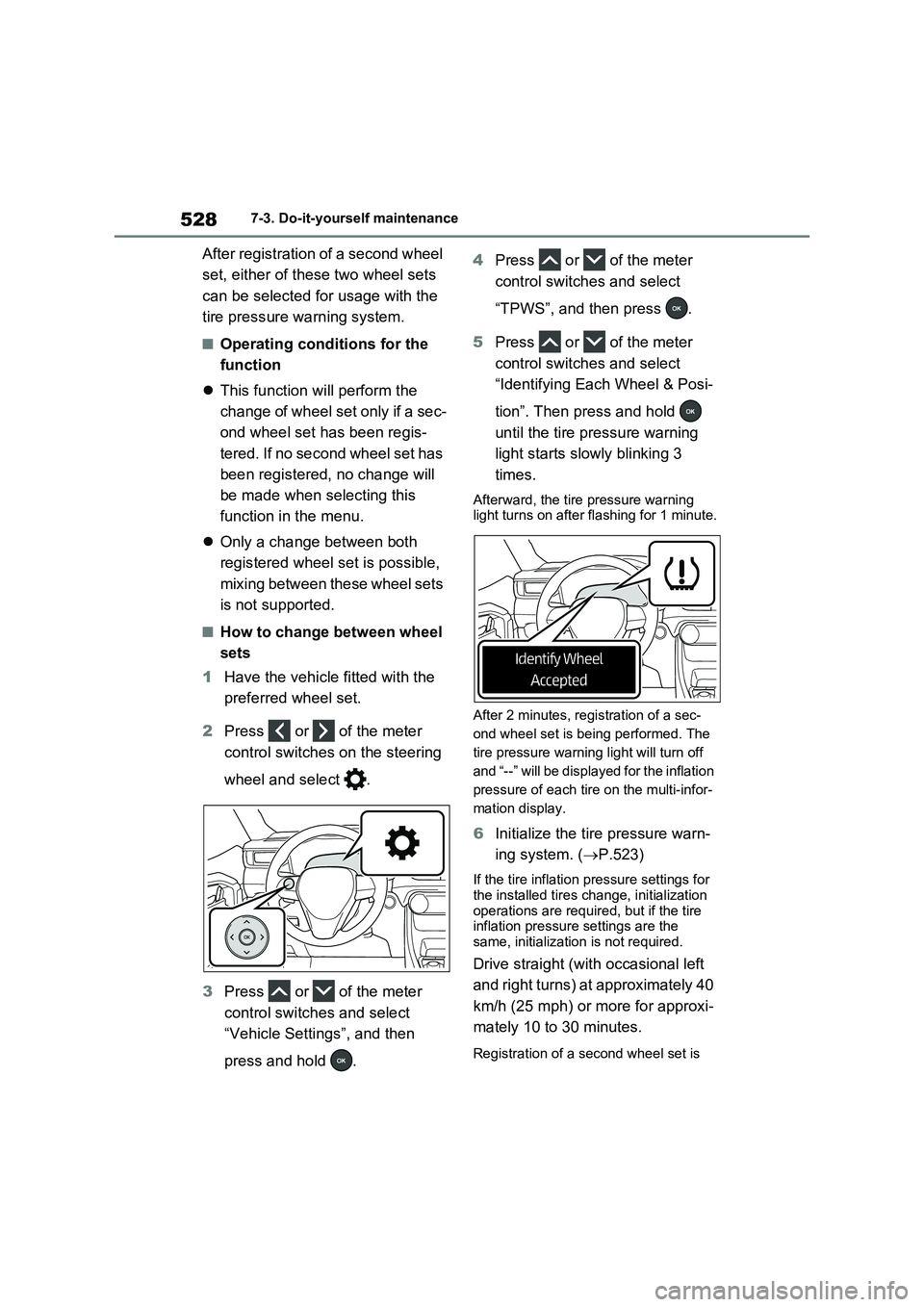
1Have the vehicle fitted with the
preferred wheel set.
2Press or of the meter
control switches on the steering
wheel and select .
3Press or of the meter
control switches and select
“Vehicle Settings”, and then
press and hold .4Press or of the meter
control switches and select
“TPWS”, and then press .
5Press or of the meter
control switches and select
“Identifying Each Wheel & Posi-
tion”. Then press and hold
until the tire pressure warning
light starts slowly blinking 3
times.
Afterward, the tire pressure warning
light turns on after flashing for 1 minute.
After 2 minutes, registration of a sec-
ond wheel set is being performed. The
tire pressure warning light will turn off
and “--” will be displayed for the inflation
pressure of each tire on the multi-infor-
mation display.
6Initialize the tire pressure warn-
ing system. (P.523)
If the tire inflation pressure settings for
the installed tires change, initialization
operations are required, but if the tire
inflation pressure settings are the
same, initialization is not required.
Drive straight (with occasional left
and right turns) at approximately 40
km/h (25 mph) or more for approxi-
mately 10 to 30 minutes.
Registration of a second wheel set is
Page 529 of 664
529
7 7-3. Do-it-yourself maintenance
Maintenance and care
complete when the tire pressure warn-
ing light turns off and the inflation pres-
sure of each tire is displayed on the
multi-information display.
■Effects of incorrect tire inflation
pressure
Driving with incorrect tire inflation pres-
sure may result in the following:
●Reduced fuel economy
●Reduced driving comfort and poor
handling
●Reduced tire life due to wear
●Reduced safety
●Damage to the drive train
If a tire needs frequent inflating, have it
checked by any authorized Toyota
retailer or Toyota authorized repairer, or
any reliable repairer.
■Instructions for checking tire infla-
tion pressure
When checking tire inflation pressure,
observe the following:
●Check only when the tires are cold.
If your vehicle has been parked for at
least 3 hours or has not been driven
for more than 1.5 km or 1 mile, you
will get an accurate cold tire inflation
pressure reading.
●Always use a tire pressure gauge.
It is difficult to judge if a tire is properly
inflated based only on its appearance.
●It is normal for the tire inflation pres-
sure to be higher after driving as heat
is generated in the tire. Do not reduce
tire inflation pressure after driving.
●Passengers and luggage weight
Tire inflation pressure
Make sure to maintain the
proper tire inflation pressure.
Tire inflation pressure should
be checked at least once per
month. However, Toyota rec-
ommends that tire inflation
pressure be checked once
every two weeks. (P.624)
Page 530 of 664
5307-3. Do-it-yourself maintenance
should be placed so that the vehicle is
balanced.
When replacing wheels, care
should be taken to ensure that they
are equivalent to those removed in
load capacity, diameter, rim width
and inset*.
Replacement wheels are available
at any authorized Toyota retailer or
Toyota authorized repairer, or any
reliable repairer.
*: Conventionally referred to as offset.
Toyota does not recommend using
the following:
Wheels of different sizes or types
Used wheels
Bent wheels that have been
straightened
■When replacing wheels
The wheels of your vehicle are equipped with tire pressure warning valves and
transmitters that allow the tire pressure warning system to provide advance warning in the event of a loss in tire
inflation pressure. Whenever wheels are replaced, tire pressure warning valves and transmitters must be installed.
( P.511, 531)
WARNING
■Proper inflation is critical to save tire performance
Keep your tires properly inflated. If the tires are not properly inflated, the following conditions may occur
which could lead to an accident resulting in death or serious injury:
●Excessive wear
●Uneven wear
●Poor handling
●Possibility of blowouts resulting
from overheated tires
●Air leaking from between tire and
wheel
●Wheel deformation and/or tire dam-
age
●Greater possibility of tire damage
while driving (due to road hazards, expansion joints, sharp edges in the road, etc.)
NOTICE
■When inspecting and adjusting
tire inflation pressure
Be sure to put the tire valve caps back on.
If a valve cap is not installed, dirt or moisture may get into the valve and cause an air leak, resulting in
decreased tire inflation pressure.
Wheels
If a wheel is bent, cracked or
heavily corroded, it should be
replaced. Otherwise, the tire
may separate from the wheel
or cause a loss of handling
control.
Wheel selection
Page 531 of 664
531
7
7-3. Do-it-yourself maintenance
Maintenance and care
Use only Toyota wheel nuts and
wrenches designed for use with
your aluminum wheels.
When rotating, repairing or
changing your tires, check that
the wheel nuts are still tight after
driving 1600 km (1000 miles).
Be careful not to damage the
aluminum wheels when using
tire chains.
Use only Toyota genuine bal-
ance weights or equivalent and a
plastic or rubber hammer when
balancing your wheels.
WARNING
■When replacing wheels
●Do not use wheels that are a differ-
ent size from those recommended in the Owner’s Manual, as this may result in a loss of handling control.
●Never use an inner tube in a leak-ing wheel which is designed for a
tubeless tire. Doing so may result in an accident, causing death or seri-ous injury.
■When installing the wheel nuts
●Be sure to install the wheel nuts
with the tapered ends facing inward. ( P.597) Installing the nuts with the tapered ends facing out-
ward can cause the wheel to break and eventually cause the wheel to come off while driving, which could
lead to an accident resulting in death or serious injury.
●Never use oil or grease on the wheel bolts or wheel nuts. Oil and grease may cause the wheel nuts
to be excessively tightened, leading to bolt or disc wheel damage. In addition, the oil or grease can
cause the wheel nuts to loosen and the wheel may fall off, causing an accident and resulting in death or
serious injury. Remove any oil or grease from the wheel bolts or wheel nuts.
■Use of defective wheels prohib-ited
Do not use cracked or deformed wheels.
Doing so could cause the tire to leak
air during driving, possibly causing an accident.
NOTICE
■Replacing tire pressure warning valves and transmitters
●Because tire repair or replacement may affect the tire pressure warning valves and transmitters, make sure
to have tires serviced by any autho- rized Toyota retailer or Toyota authorized repairer, or any reliable
repairer or other qualified service shop. In addition, make sure to pur-chase your tire pressure warning
valves and transmitters at any authorized Toyota retailer or Toyota authorized repairer, or any reliable
repairer.
●Ensure that only genuine Toyota
wheels are used on your vehicle. Tire pressure warning valves and transmitters may not work properly
with non-genuine wheels.
Aluminum wheel precau-
tions
Page 532 of 664
5327-3. Do-it-yourself maintenance
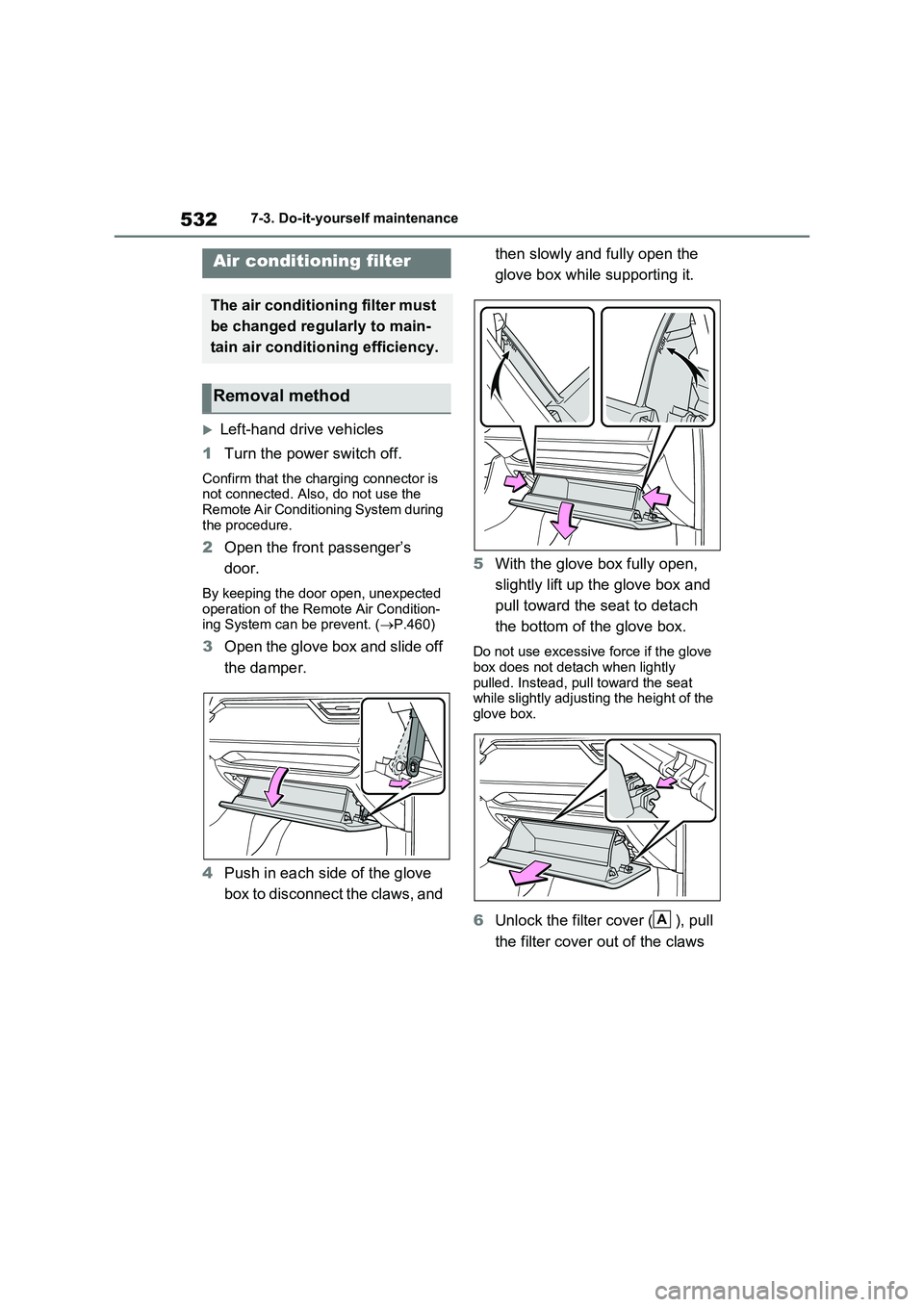
Left-hand drive vehicles
1Turn the power switch off.
Confirm that the charging connector is
not connected. Also, do not use the
Remote Air Conditioning System during
the procedure.
2Open the front passenger’s
door.
By keeping the door open, unexpected
operation of the Remote Air Condition-
ing System can be prevent. (P.460)
3Open the glove box and slide off
the damper.
4Push in each side of the glove
box to disconnect the claws, and then slowly and fully open the
glove box while supporting it.
5With the glove box fully open,
slightly lift up the glove box and
pull toward the seat to detach
the bottom of the glove box.Do not use excessive force if the glove
box does not detach when lightly
pulled. Instead, pull toward the seat
while slightly adjusting the height of the
glove box.
6Unlock the filter cover ( ), pull
the filter cover out of the claws
Air conditioning filter
The air conditioning filter must
be changed regularly to main-
tain air conditioning efficiency.
Removal method
A
Page 533 of 664
533
7
7-3. Do-it-yourself maintenance
Maintenance and care
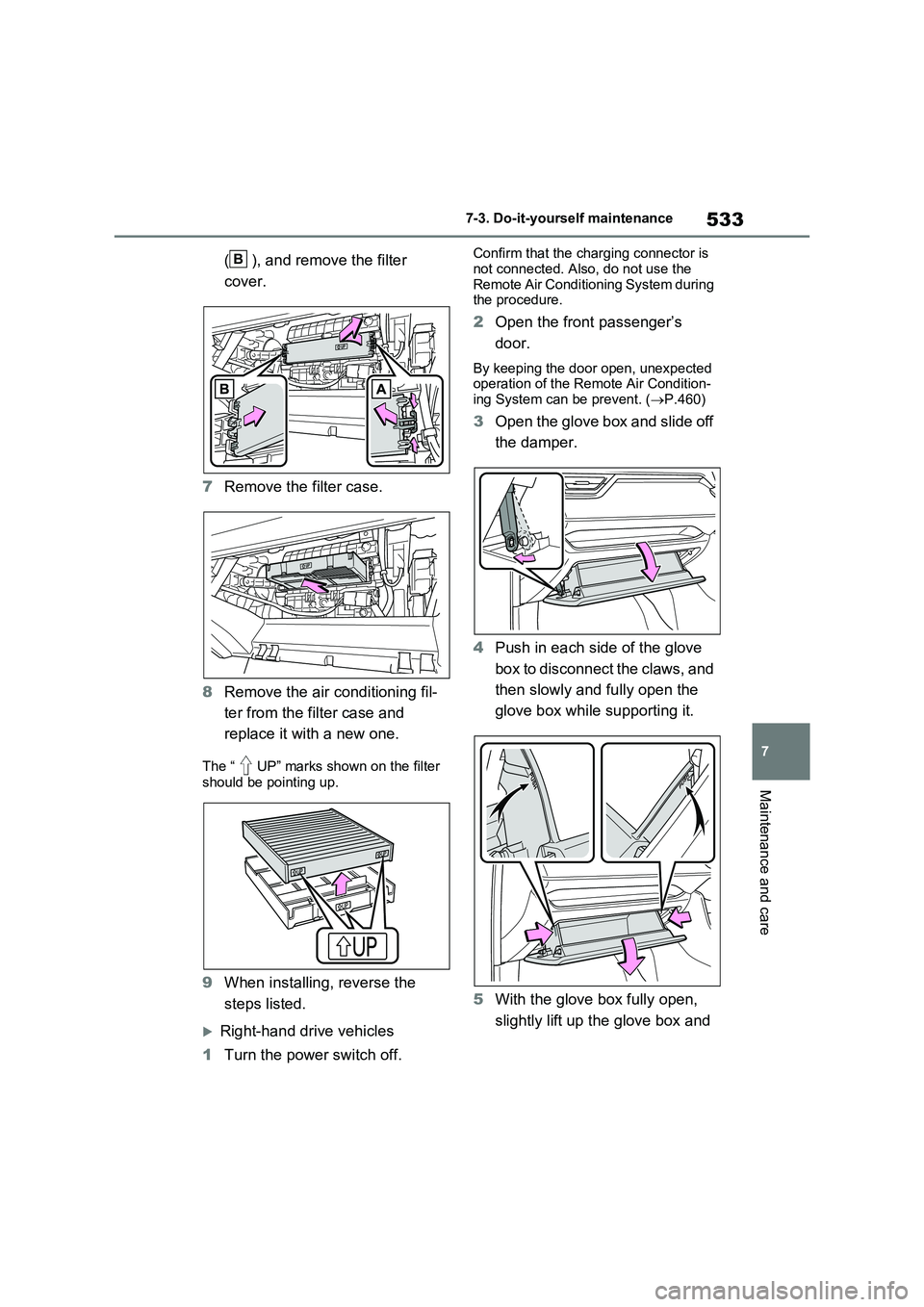
( ), and remove the filter
cover.
7 Remove the filter case.
8 Remove the air conditioning fil-
ter from the filter case and
replace it with a new one.
The “ UP” marks shown on the filter
should be pointing up.
9 When installing, reverse the
steps listed.
Right-hand drive vehicles
1 Turn the power switch off.
Confirm that the charging connector is
not connected. Also, do not use the Remote Air Conditioning System during the procedure.
2 Open the front passenger’s
door.
By keeping the door open, unexpected operation of the Remote Air Condition-
ing System can be prevent. ( P.460)
3Open the glove box and slide off
the damper.
4 Push in each side of the glove
box to disconnect the claws, and
then slowly and fully open the
glove box while supporting it.
5 With the glove box fully open,
slightly lift up the glove box and
B
Page 534 of 664
5347-3. Do-it-yourself maintenance
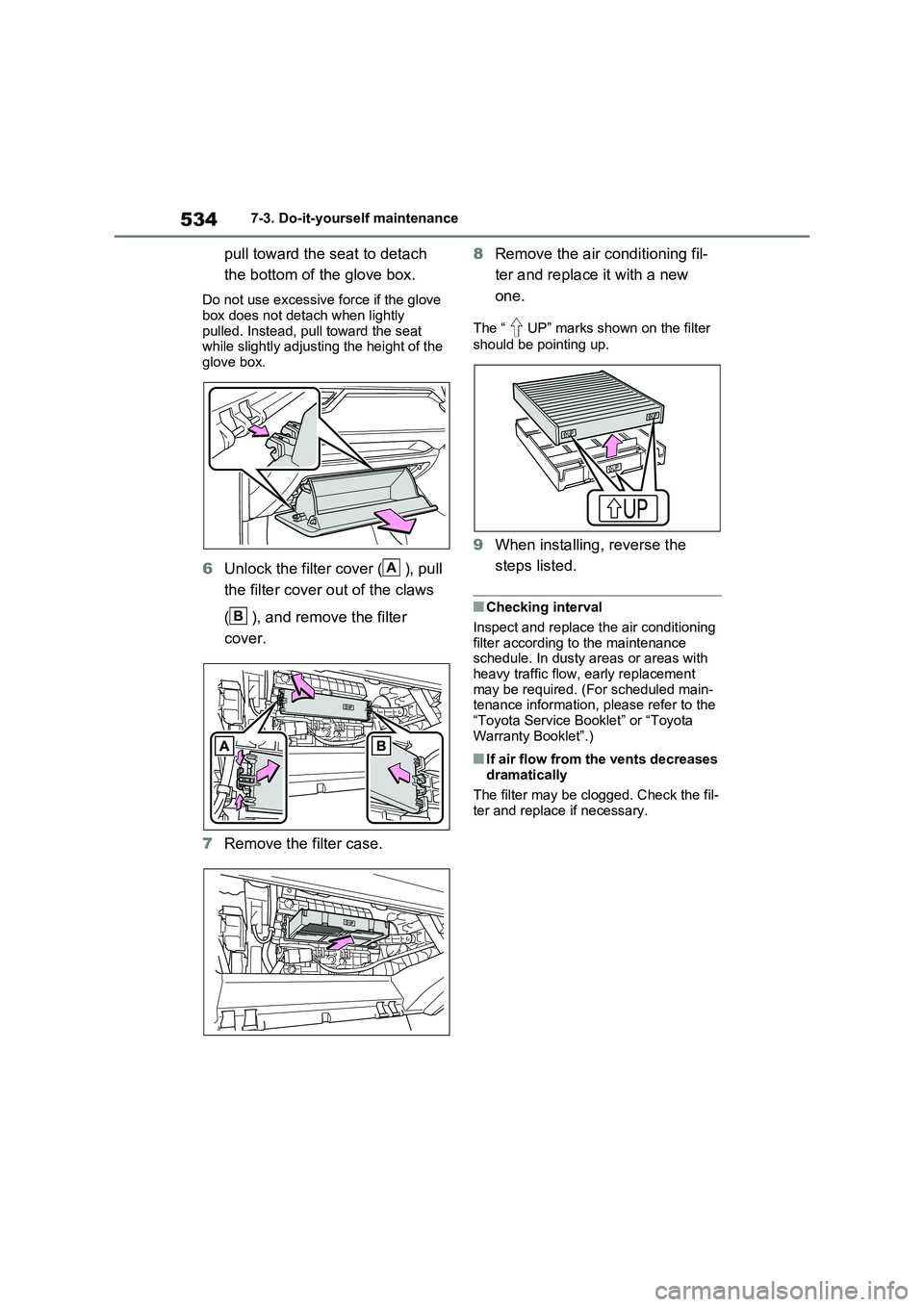
pull toward the seat to detach
the bottom of the glove box.
Do not use excessive force if the glove
box does not detach when lightly pulled. Instead, pull toward the seat while slightly adjusting the height of the
glove box.
6 Unlock the filter cover ( ), pull
the filter cover out of the claws
( ), and remove the filter
cover.
7 Remove the filter case.
8 Remove the air conditioning fil-
ter and replace it with a new
one.
The “ UP” marks shown on the filter
should be pointing up.
9 When installing, reverse the
steps listed.
■Checking interval
Inspect and replace the air conditioning filter according to the maintenance schedule. In dusty areas or areas with
heavy traffic flow, early replacement may be required. (For scheduled main-tenance information, please refer to the
“Toyota Service Booklet” or “Toyota Warranty Booklet”.)
■If air flow from the vents decreases dramatically
The filter may be clogged. Check the fil- ter and replace if necessary.
A
B
Page 535 of 664
535
7
7-3. Do-it-yourself maintenance
Maintenance and care
WARNING
■When replacing the air condition- ing filter
Observe the following precautions. Failure to do so may result in the air conditioning system operating during
the procedure, possibly resulting in injury.
●Check that the charging connector
is not connected
Check that the charging connector is not connected
The air conditioning may operate due to the “Climate Prep” ( P.144) set- ting.
●Do not use the Remote Air Condi-tioning System
NOTICE
■When using the air conditioning system
Make sure that a filter is always installed.
Using the air conditioning system without a filter may cause damage to the system.
■When removing the glove box
Always follow the specified procedure
to remove the glove box ( P.532). If the glove box is removed without fol-lowing the specified procedure, the
hinge of the glove box may become damaged.
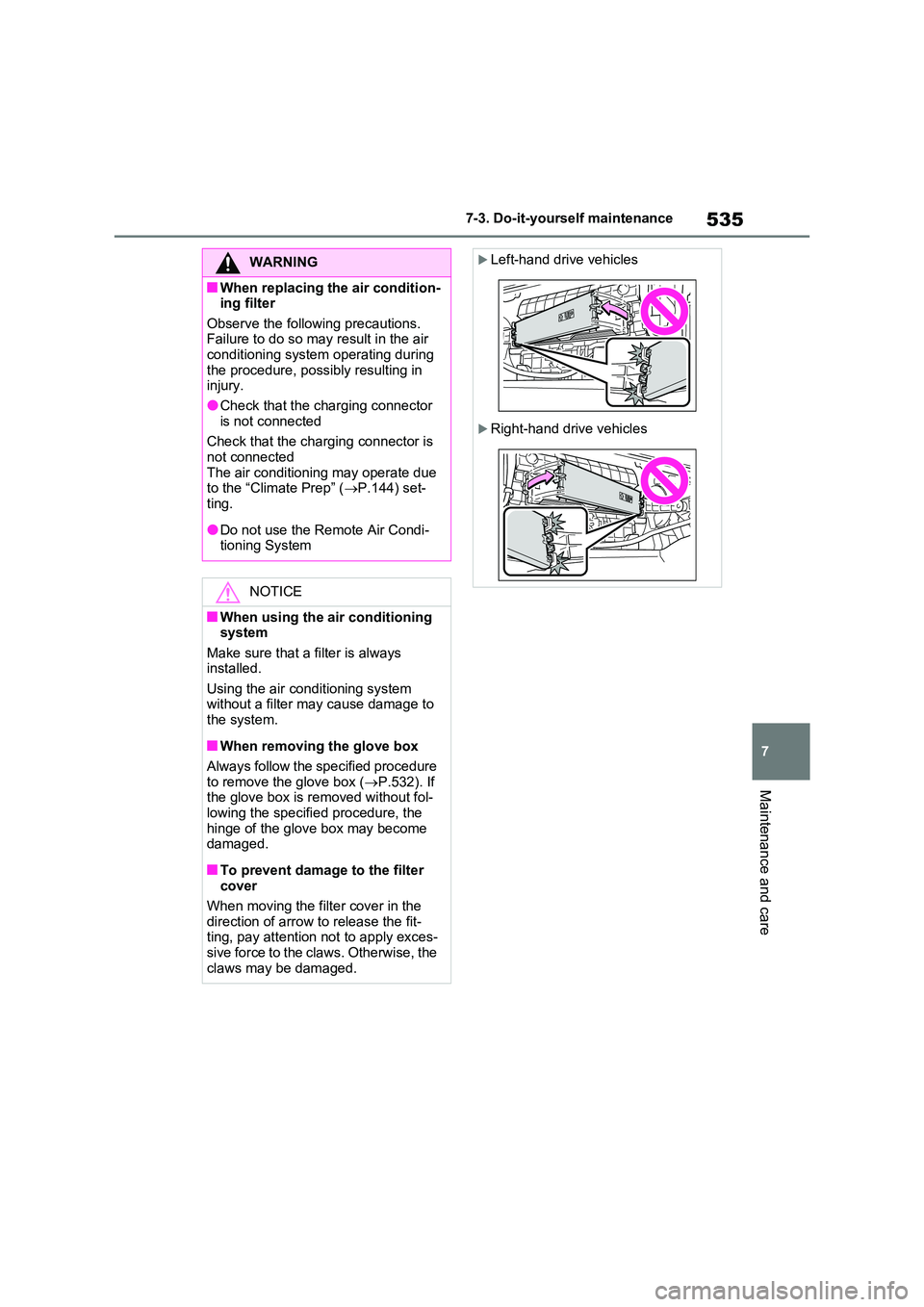
■To prevent damage to the filter cover
When moving the filter cover in the
direction of arrow to release the fit- ting, pay attention not to apply exces-sive force to the claws. Otherwise, the
claws may be damaged.
Left-hand drive vehicles
Right-hand drive vehicles
Page 536 of 664
5367-3. Do-it-yourself maintenance
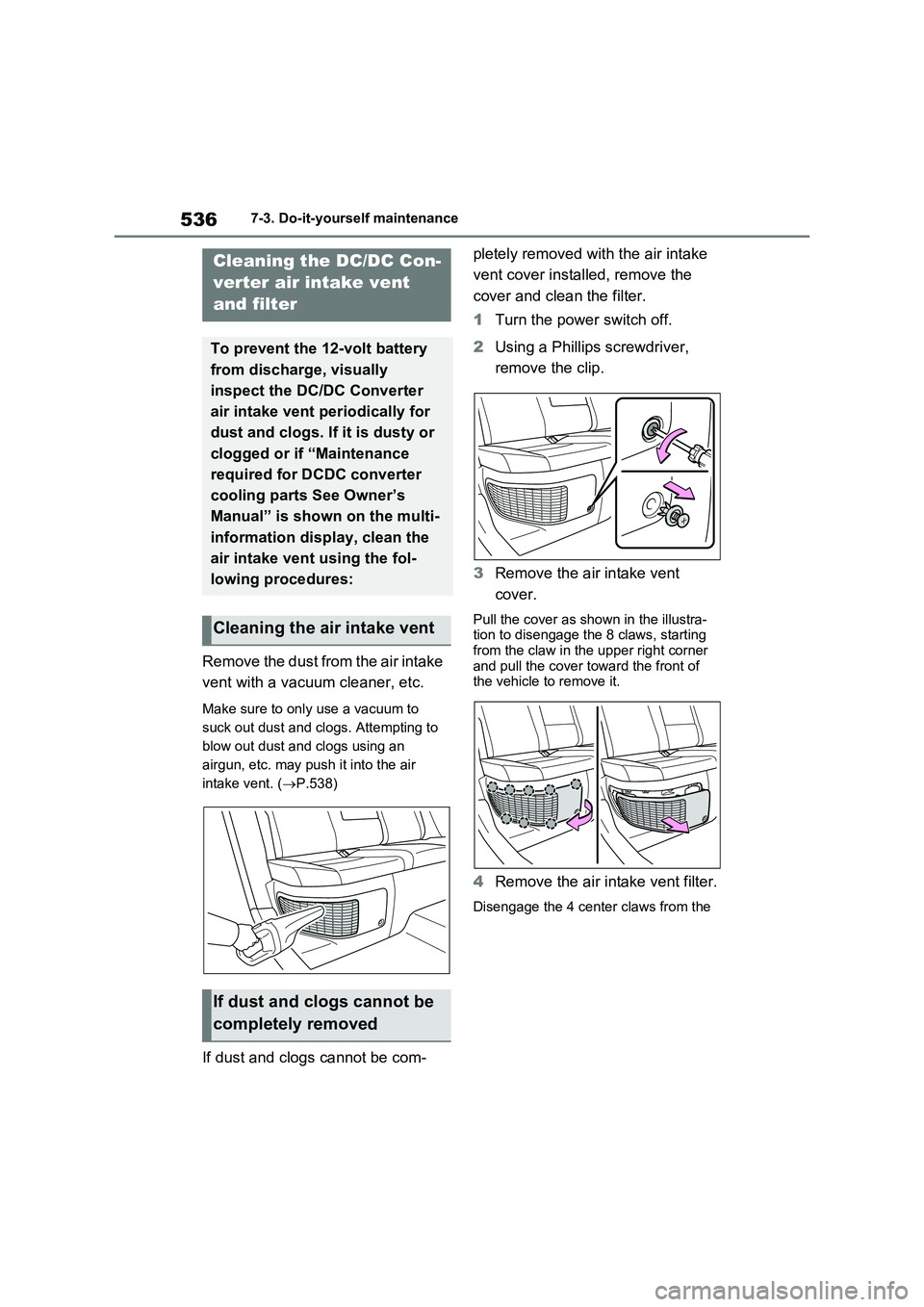
Remove the dust from the air intake
vent with a vacuum cleaner, etc.
Make sure to only use a vacuum to
suck out dust and clogs. Attempting to
blow out dust and clogs using an
airgun, etc. may push it into the air
intake vent. (P.538)
If dust and clogs cannot be com-pletely removed with the air intake
vent cover installed, remove the
cover and clean the filter.
1Turn the power switch off.
2Using a Phillips screwdriver,
remove the clip.
3Remove the air intake vent
cover.
Pull the cover as shown in the illustra-
tion to disengage the 8 claws, starting
from the claw in the upper right corner
and pull the cover toward the front of
the vehicle to remove it.
4Remove the air intake vent filter.
Disengage the 4 center claws from the
Cleaning the DC/DC Con-
verter air intake vent
and filter
To prevent the 12-volt battery
from discharge, visually
inspect the DC/DC Converter
air intake vent periodically for
dust and clogs. If it is dusty or
clogged or if “Maintenance
required for DCDC converter
cooling parts See Owner’s
Manual” is shown on the multi-
information display, clean the
air intake vent using the fol-
lowing procedures:
Cleaning the air intake vent
If dust and clogs cannot be
completely removed