warning light TOYOTA VERSO S 2011 Manual PDF
[x] Cancel search | Manufacturer: TOYOTA, Model Year: 2011, Model line: VERSO S, Model: TOYOTA VERSO S 2011Pages: 664, PDF Size: 160.56 MB
Page 524 of 664
5247-3. Do-it-yourself maintenance
2Adjust the tire inflation pressure
to the specified cold tire inflation
pressure level. (P.624)
Make sure to adjust the tire pressure to
the specified cold tire inflation pressure
level. The tire pressure warning system
will operate based on this pressure
level.
3Start the hybrid system.
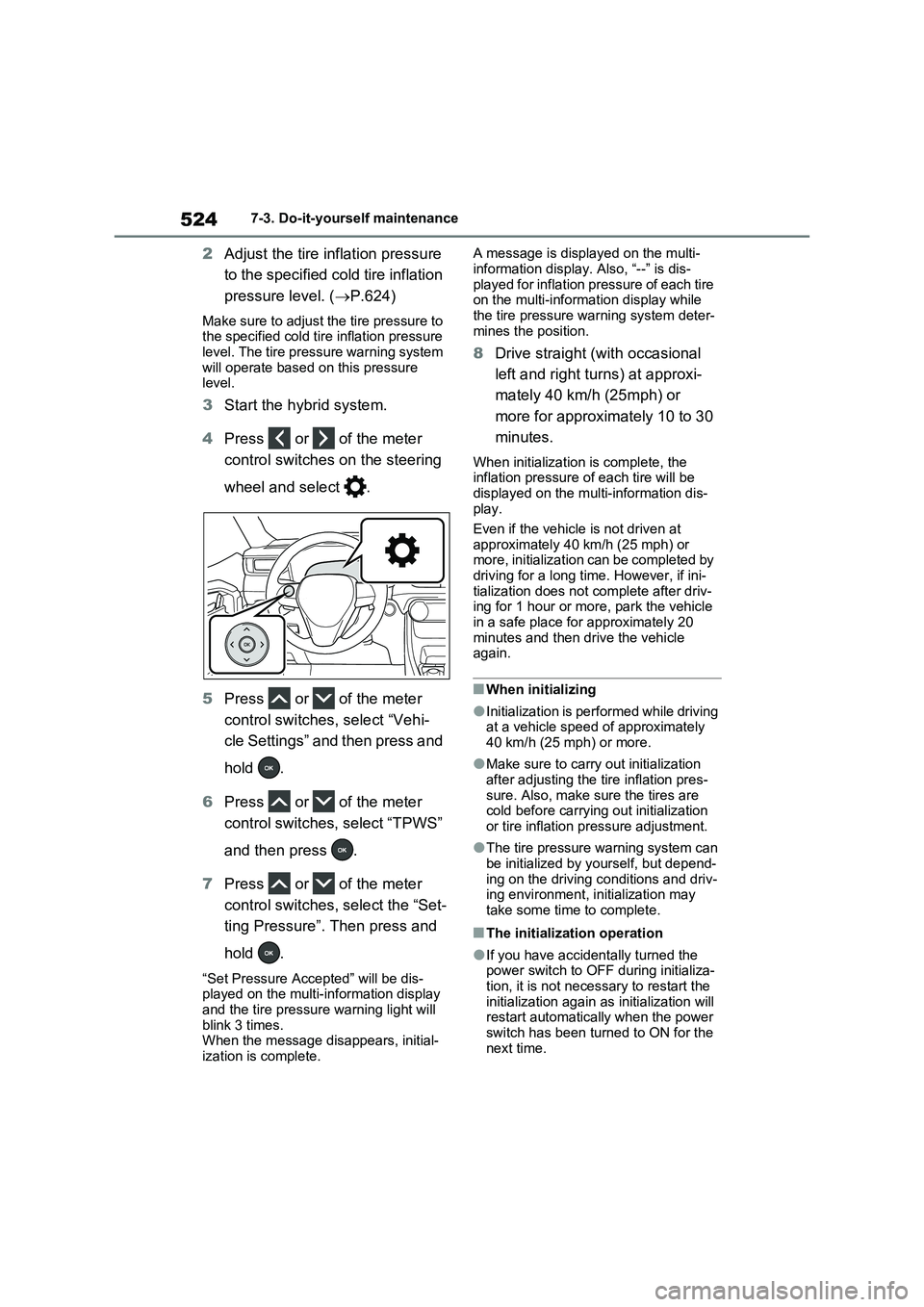
4Press or of the meter
control switches on the steering
wheel and select .
5Press or of the meter
control switches, select “Vehi-
cle Settings” and then press and
hold .
6Press or of the meter
control switches, select “TPWS”
and then press .
7Press or of the meter
control switches, select the “Set-
ting Pressure”. Then press and
hold .
“Set Pressure Accepted” will be dis-
played on the multi-information display
and the tire pressure warning light will
blink 3 times.
When the message disappears, initial-
ization is complete.A message is displayed on the multi-
information display. Also, “--” is dis-
played for inflation pressure of each tire
on the multi-information display while
the tire pressure warning system deter-
mines the position.
8Drive straight (with occasional
left and right turns) at approxi-
mately 40 km/h (25mph) or
more for approximately 10 to 30
minutes.
When initialization is complete, the
inflation pressure of each tire will be
displayed on the multi-information dis-
play.
Even if the vehicle is not driven at
approximately 40 km/h (25 mph) or
more, initialization can be completed by
driving for a long time. However, if ini-
tialization does not complete after driv-
ing for 1 hour or more, park the vehicle
in a safe place for approximately 20
minutes and then drive the vehicle
again.
■When initializing
●Initialization is performed while driving
at a vehicle speed of approximately
40 km/h (25 mph) or more.
●Make sure to carry out initialization
after adjusting the tire inflation pres-
sure. Also, make sure the tires are
cold before carrying out initialization
or tire inflation pressure adjustment.
●The tire pressure warning system can
be initialized by yourself, but depend-
ing on the driving conditions and driv-
ing environment, initialization may
take some time to complete.
■The initialization operation
●If you have accidentally turned the
power switch to OFF during initializa-
tion, it is not necessary to restart the
initialization again as initialization will
restart automatically when the power
switch has been turned to ON for the
next time.
Page 525 of 664
525
7
7-3. Do-it-yourself maintenance
Maintenance and care
●If you accidentally perform initializa-
tion when initialization is not neces- sary, adjust the tire inflation pressure to the specified level when the tires
are cold, and conduct initialization again.
●While the position of each tire is being determined and the inflation pres-sures are not being displayed on the
multi-information display, if the infla- tion pressure of a tire drops, the tire pressure warning light will come on.
■If the tire pressure warning system
is not initialized properly
●In the following situations, initialization
may take longer than usual to be com- pleted or may not be possible. Nor-mally, initialization completes within
approximately 30 minutes. • Vehicle is not driven at approximately 40 km/h (25 mph) or more
• Vehicle is driven on unpaved roads • Vehicle is driven near other vehicles and system cannot recognize tire
pressure warning valve and transmit- ters of your vehicle over those of other vehicles.
• If the vehicle is driven in heavy traffic or another situation where other vehi-cles are driven close by, it may take
time for the system to recognize the tire pressure warning valve and trans-mitters of your vehicle over those of
other vehicles.
●If initialization does not complete after
driving for 1 hour or more, park the vehicle in a safe place for approxi-mately 20 minutes and then drive the
vehicle again.
●If the vehicle is reversed during initial-
ization, the data up to that point is reset, so perform the initialization pro-cedure again from the beginning.
●In the following situations, initialization will not be started or was not com-
pleted properly and the system will not operate properly. Perform the initial-ization procedure again.
• If, when attempting to start initializa- tion, the tire pressure warning light
does not blink 3 times.
• If, when the vehicle has been driven for about 20 minutes after performing initialization, the tire pressure warning
light blinks for approximately 1 minute and then illuminates.
If initialization cannot be completed after
performing the above procedure, con-
tact any authorized Toyota retailer or
Toyota authorized repairer, or any reli-
able repairer.
Every tire pressure warning valve
and transmitter has a unique ID
code. When replacing a tire pres-
sure warning valve and transmitter,
it is necessary to register the ID
code.
When registering the ID codes, per-
form the following procedure.
1 Park the vehicle in a safe place,
wait for approximately 20 min-
utes, and then start the hybrid
system.
WARNING
■When initializing the tire pres-
sure warning system
Do not initialize tire inflation pressure without first adjusting the tire inflation
pressure to the specified level. Other- wise, the tire pressure warning light may not come on even if the tire infla-
tion pressure is low, or it may come on when the tire inflation pressure is actually normal.
Registering ID codes
Page 526 of 664
5267-3. Do-it-yourself maintenance
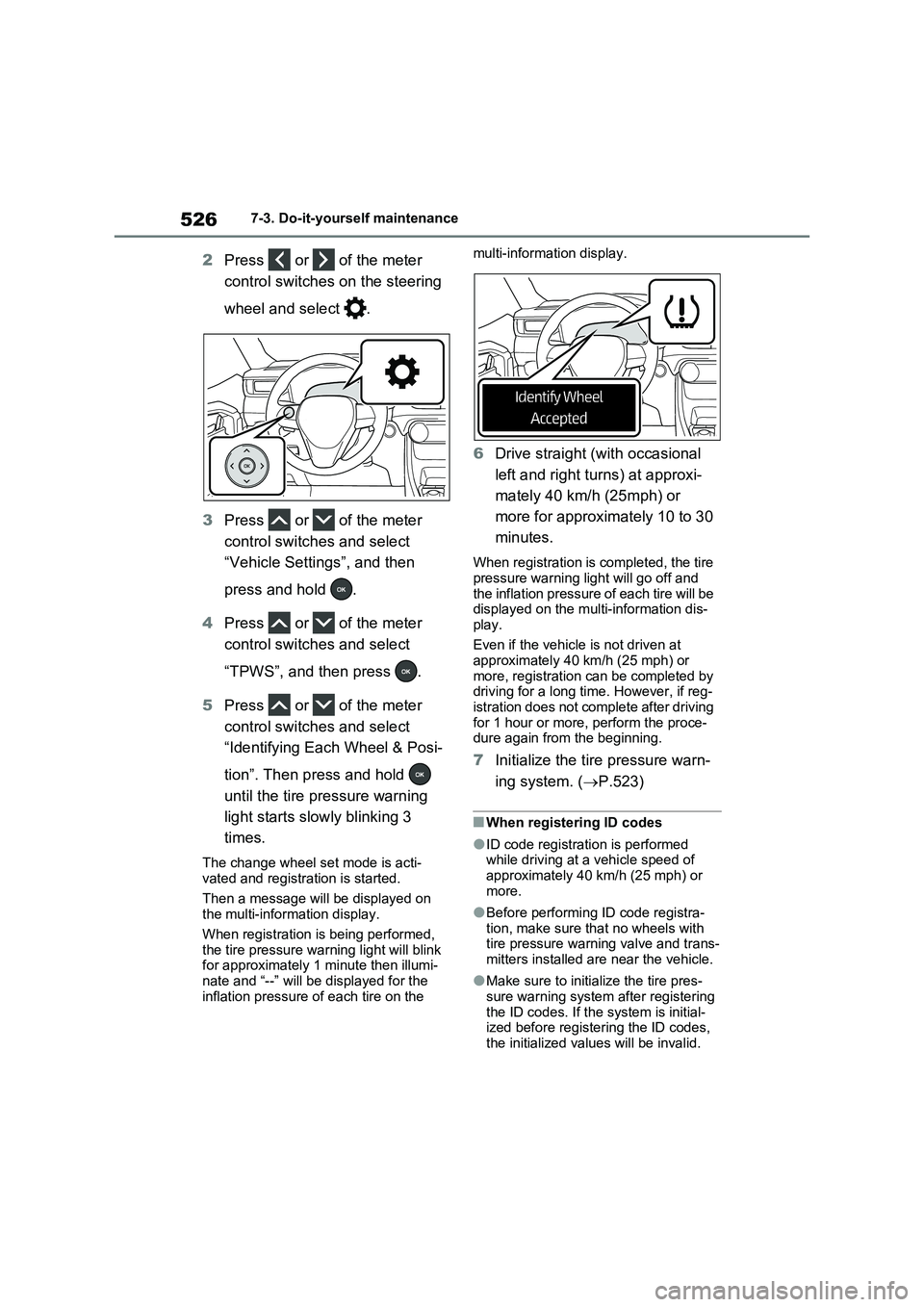
2Press or of the meter
control switches on the steering
wheel and select .
3Press or of the meter
control switches and select
“Vehicle Settings”, and then
press and hold .
4Press or of the meter
control switches and select
“TPWS”, and then press .
5Press or of the meter
control switches and select
“Identifying Each Wheel & Posi-
tion”. Then press and hold
until the tire pressure warning
light starts slowly blinking 3
times.
The change wheel set mode is acti-
vated and registration is started.
Then a message will be displayed on
the multi-information display.
When registration is being performed,
the tire pressure warning light will blink
for approximately 1 minute then illumi-
nate and “--” will be displayed for the
inflation pressure of each tire on the multi-information display.
6Drive straight (with occasional
left and right turns) at approxi-
mately 40 km/h (25mph) or
more for approximately 10 to 30
minutes.
When registration is completed, the tire
pressure warning light will go off and
the inflation pressure of each tire will be
displayed on the multi-information dis-
play.
Even if the vehicle is not driven at
approximately 40 km/h (25 mph) or
more, registration can be completed by
driving for a long time. However, if reg-
istration does not complete after driving
for 1 hour or more, perform the proce-
dure again from the beginning.
7Initialize the tire pressure warn-
ing system. (P.523)
■When registering ID codes
●ID code registration is performed
while driving at a vehicle speed of
approximately 40 km/h (25 mph) or
more.
●Before performing ID code registra-
tion, make sure that no wheels with
tire pressure warning valve and trans-
mitters installed are near the vehicle.
●Make sure to initialize the tire pres-
sure warning system after registering
the ID codes. If the system is initial-
ized before registering the ID codes,
the initialized values will be invalid.
Page 527 of 664
527
7 7-3. Do-it-yourself maintenance
Maintenance and care
●ID codes can be registered by your-
self, but depending on the driving con-
ditions and driving environment,
registration may take some time to
complete.
●As the tires will be warm when regis-
tration is completed, make sure to
allow the tires to cool before perform-
ing initialization.
■Canceling ID code registration
●To cancel ID code registration after it
has been started, select “Identifying
Each Wheel & Position” on the multi-
information display and press and
hold again.
●If ID code registration has been can-
celed, the tire pressure warning light
will blink for approximately 1 minute
when the power switch is turned to
ON and then illuminate. The tire pres-
sure warning system will be opera-
tional when the tire pressure warning
light turns off.
●If the warning light does not turn off
even after several minutes have
elapsed, ID code registration may not
have been canceled correctly. To can-
cel registration, perform the ID code
registration start procedure again and
then turn the power switch off before
driving.
■If ID codes are not registered prop-
erly
●In the following situations, ID code
registration may take longer than
usual to be completed or may not be
possible. Normally, registration com-
pletes within approximately 30 min-
utes.
If ID code registration is not complete
after driving for approximately 30 min-
utes, continue driving for a while.
• Vehicle is not parked for approxi-
mately 20 minutes or more before
driving
• Vehicle is not driven at approximately
40 km/h (25 mph) or more
• Vehicle is driven on unpaved roads
• Vehicle is driven near other vehicles and system cannot recognize tire
pressure warning valve and transmit-
ters of your vehicle over those of other
vehicles
• Wheel with tire pressure warning
valve and transmitter installed is
inside or near the vehicle
If registration does not complete after
driving for 1 hour or more, perform the
ID code registration procedure again
from the beginning.
●If the vehicle is reversed during regis-
tration, the data up to that point is
reset, so perform the registration pro-
cedure again from the beginning.
●In the following situations, ID code
registration will not be started or was
not completed properly and the sys-
tem will not operate properly. Perform
the ID code registration procedure
again.
• If, when attempting to start ID code
registration, the tire pressure warning
light does not blink slowly 3 times.
• If, when the vehicle has been driven
for about 10 minutes after performing
ID code registration, the tire pressure
warning light blinks for approximately
1 minute and then illuminates.
●If ID code registration cannot be com-
pleted after performing the above pro-
cedure, contact any authorized
Toyota retailer or Toyota authorized
repairer, or any reliable repairer.
Your vehicle is equipped with tire
pressure warning system with the
function to have ID codes regis-
tered for a second wheel set, for
example a winter set. You can reg-
ister a second wheel set by your-
self, any authorized Toyota retailer
or Toyota authorized repairer, or
any reliable repairer.
Selecting wheel set
Page 528 of 664
5287-3. Do-it-yourself maintenance
After registration of a second wheel
set, either of these two wheel sets
can be selected for usage with the
tire pressure warning system.
■Operating conditions for the
function
This function will perform the
change of wheel set only if a sec-
ond wheel set has been regis-
tered. If no second wheel set has
been registered, no change will
be made when selecting this
function in the menu.
Only a change between both
registered wheel set is possible,
mixing between these wheel sets
is not supported.
■How to change between wheel
sets
1Have the vehicle fitted with the
preferred wheel set.
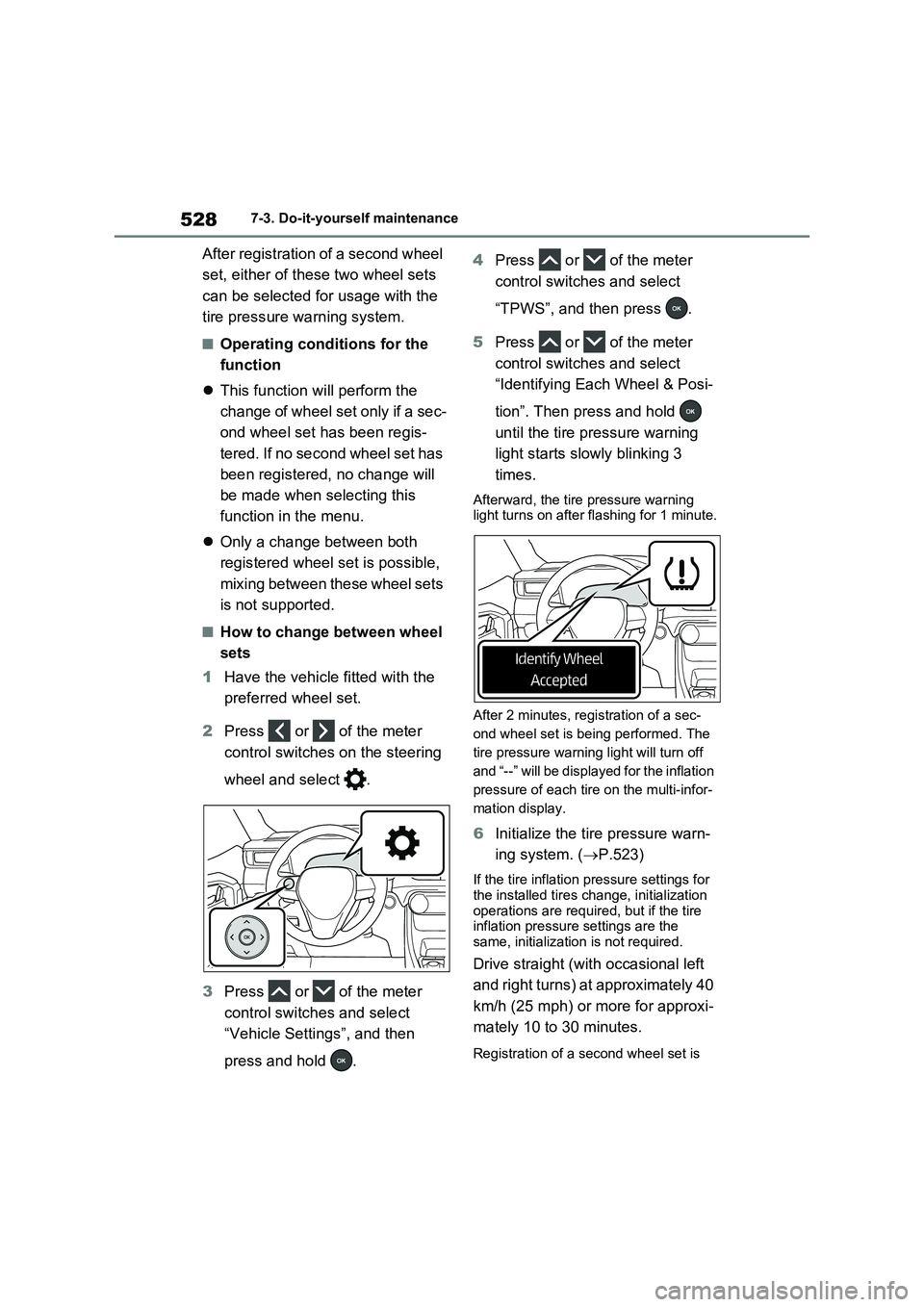
2Press or of the meter
control switches on the steering
wheel and select .
3Press or of the meter
control switches and select
“Vehicle Settings”, and then
press and hold .4Press or of the meter
control switches and select
“TPWS”, and then press .
5Press or of the meter
control switches and select
“Identifying Each Wheel & Posi-
tion”. Then press and hold
until the tire pressure warning
light starts slowly blinking 3
times.
Afterward, the tire pressure warning
light turns on after flashing for 1 minute.
After 2 minutes, registration of a sec-
ond wheel set is being performed. The
tire pressure warning light will turn off
and “--” will be displayed for the inflation
pressure of each tire on the multi-infor-
mation display.
6Initialize the tire pressure warn-
ing system. (P.523)
If the tire inflation pressure settings for
the installed tires change, initialization
operations are required, but if the tire
inflation pressure settings are the
same, initialization is not required.
Drive straight (with occasional left
and right turns) at approximately 40
km/h (25 mph) or more for approxi-
mately 10 to 30 minutes.
Registration of a second wheel set is
Page 547 of 664
547
7
7-3. Do-it-yourself maintenance
Maintenance and care
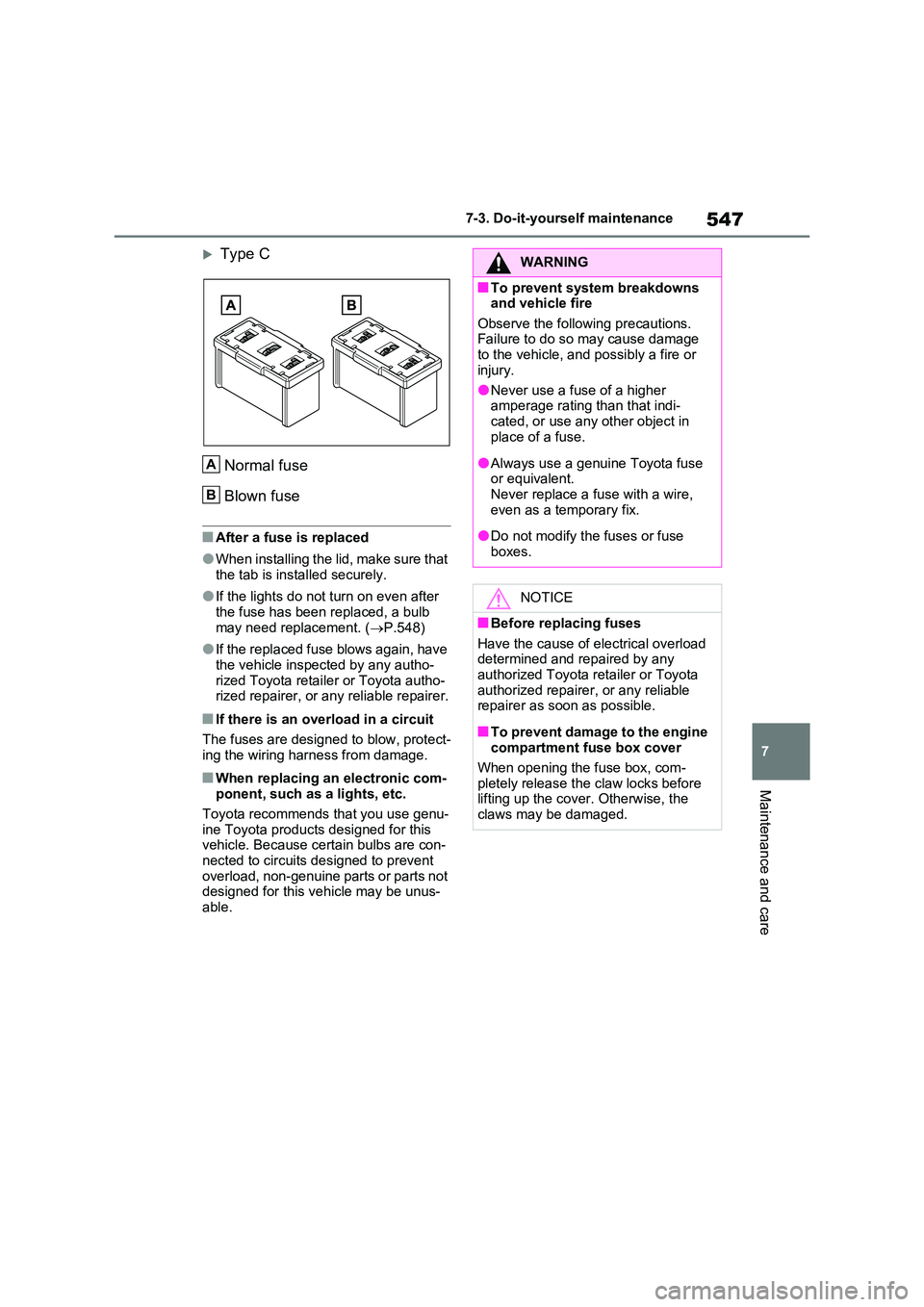
Type C
Normal fuse
Blown fuse
■After a fuse is replaced
●When installing the lid, make sure that
the tab is installed securely.
●If the lights do not turn on even after
the fuse has been replaced, a bulb may need replacement. ( P.548)
●If the replaced fuse blows again, have the vehicle inspected by any autho-
rized Toyota retailer or Toyota autho- rized repairer, or any reliable repairer.
■If there is an overload in a circuit
The fuses are designed to blow, protect-
ing the wiring harness from damage.
■When replacing an electronic com- ponent, such as a lights, etc.
Toyota recommends that you use genu-
ine Toyota products designed for this vehicle. Because certain bulbs are con-nected to circuits designed to prevent
overload, non-genuine parts or parts not designed for this vehicle may be unus-able.
A
B
WARNING
■To prevent system breakdowns and vehicle fire
Observe the following precautions. Failure to do so may cause damage to the vehicle, and possibly a fire or
injury.
●Never use a fuse of a higher amperage rating than that indi-
cated, or use any other object in place of a fuse.
●Always use a genuine Toyota fuse or equivalent.Never replace a fuse with a wire,
even as a temporary fix.
●Do not modify the fuses or fuse
boxes.
NOTICE
■Before replacing fuses
Have the cause of electrical overload determined and repaired by any authorized Toyota retailer or Toyota
authorized repairer, or any reliable repairer as soon as possible.
■To prevent damage to the engine compartment fuse box cover
When opening the fuse box, com- pletely release the claw locks before lifting up the cover. Otherwise, the
claws may be damaged.
Page 557 of 664
557
7
7-3. Do-it-yourself maintenance
Maintenance and care
WARNING
■Replacing light bulb
●Turn off the light. Do not attempt to
replace the bulb immediately after turning off the light. The bulb become very hot and may
cause burns.
●Do not touch the glass portion of
the light bulb with bare hands. When it is unavoidable to hold the glass portion, use and hold with a
clean dry cloth to avoid getting moisture and oils on the bulb. Also, if the bulb is scratched or
dropped, it may blow out or crack.
●Fully install light bulb and any parts
used to secure it. Failure to do so may result in heat damage, fire, or water entering the light unit. This
may damage the light or cause con- densation to build up on the lens.
●Do not attempt to repair or disas-semble light bulbs, connectors, electric circuits or component parts.
Doing so may result in death or serious injury due to electric shock.
■To prevent damage or fire
●Make sure bulb is fully seated and locked.
●Check the wattage of the bulb before installing to prevent heat
damage.
Page 559 of 664
8
559
8
When trouble arises
When trouble arises
8-1. Essential information
Emergency flashers .......... 560
If your vehicle has to be
stopped in an emergency 560
If the vehicle is trapped in rising
water............................... 561
8-2. Steps to take in an emer-
gency
If your vehicle needs to be
towed .............................. 563
If you think something is wrong
....................................... 566
If a warning light turns on or a
warning buzzer sounds... 568
If a warning message is dis-
played ............................. 578
If you have a flat tire (vehicles
without spare tire) ........... 582
If you have a flat tire (vehicles
with spare tire) ................ 593
If the hybrid system will not
start ................................ 601
If you lose your keys ......... 603
If the fuel filler door cannot be
opened ........................... 603
If the electronic key does not
operate properly ............. 604
If the 12-volt battery is dis-
charged .......................... 606
If your vehicle overheats... 611
If the vehicle becomes stuck
....................................... 615
Page 568 of 664
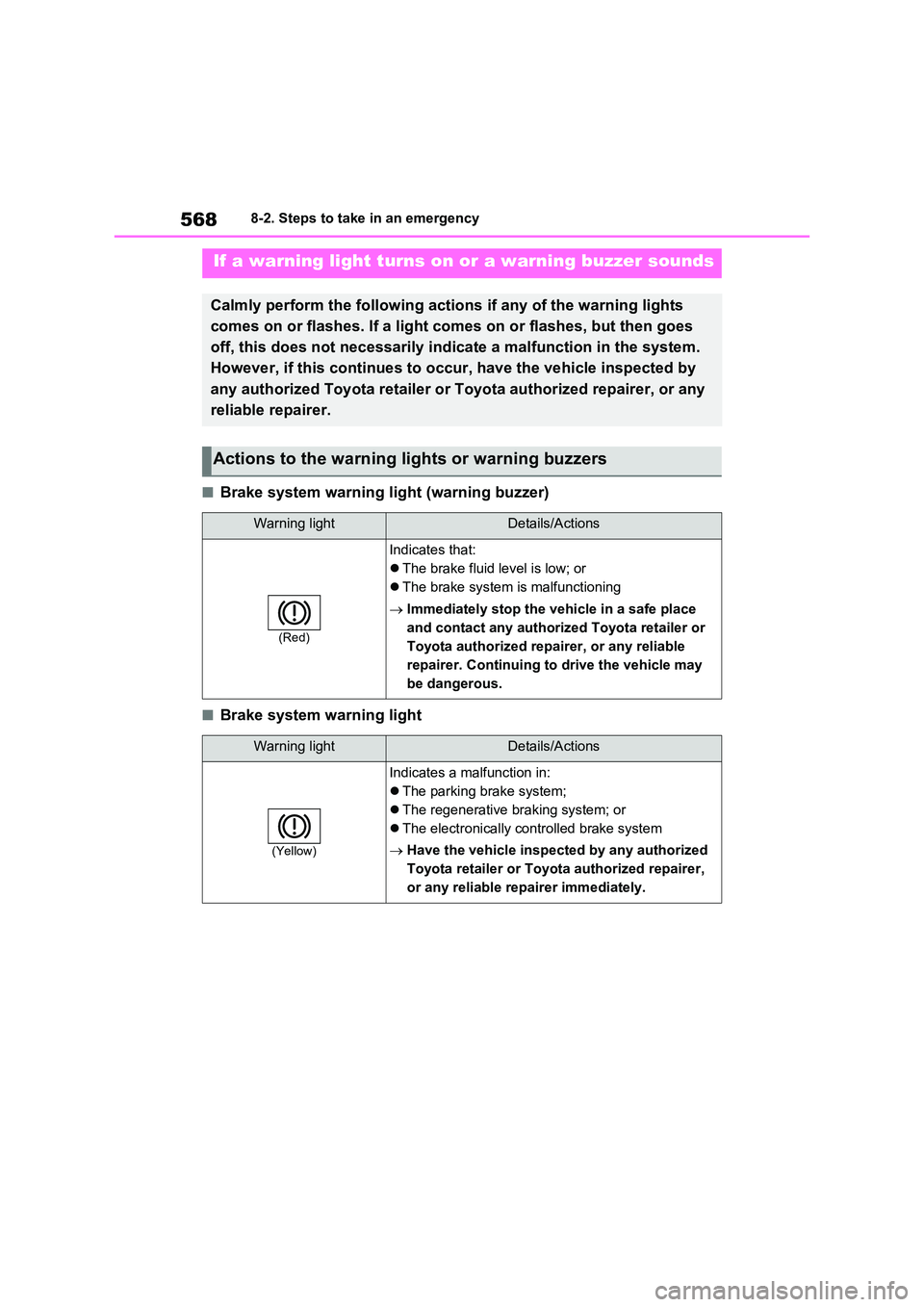
5688-2. Steps to take in an emergency
■Brake system warning light (warning buzzer)
■Brake system warning light
If a warning light turns on or a warning buzzer sounds
Calmly perform the following actions if any of the warning lights
comes on or flashes. If a light comes on or flashes, but then goes
off, this does not necessarily indicate a malfunction in the system.
However, if this continues to occur, have the vehicle inspected by
any authorized Toyota retailer or Toyota authorized repairer, or any
reliable repairer.
Actions to the warning lights or warning buzzers
Warning lightDetails/Actions
(Red)
Indicates that:
The brake fluid level is low; or
The brake system is malfunctioning
Immediately stop the vehicle in a safe place
and contact any authorized Toyota retailer or
Toyota authorized repairer, or any reliable
repairer. Continuing to drive the vehicle may
be dangerous.
Warning lightDetails/Actions
(Yellow)
Indicates a malfunction in:
The parking brake system;
The regenerative braking system; or
The electronically controlled brake system
Have the vehicle inspected by any authorized
Toyota retailer or Toyota authorized repairer,
or any reliable repairer immediately.
Page 569 of 664
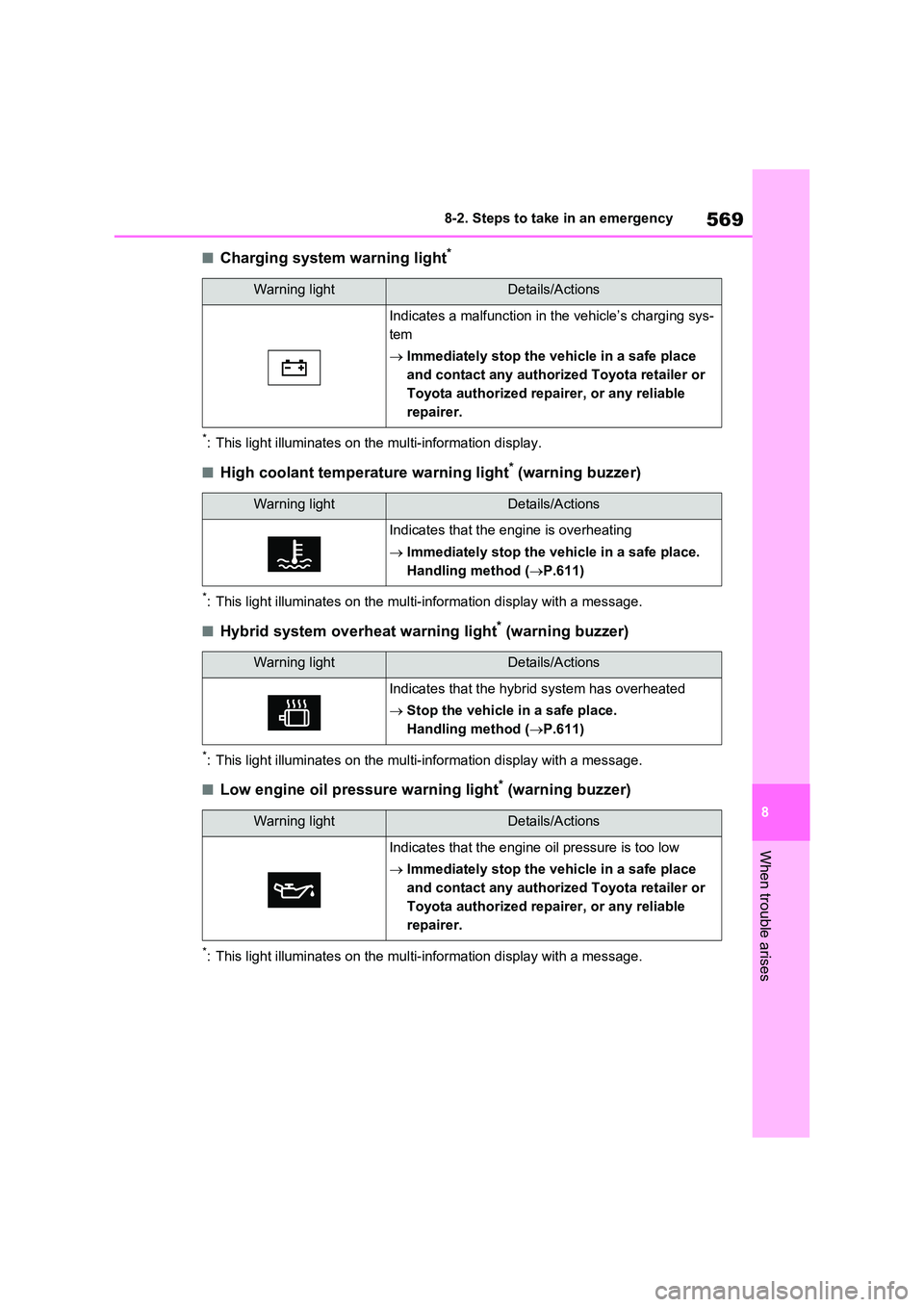
569
8
8-2. Steps to take in an emergency
When trouble arises
■Charging system warning light*
*: This light illuminates on the multi-information display.
■High coolant temperature warning light* (warning buzzer)
*: This light illuminates on the multi-information display with a message.
■Hybrid system overheat warning light* (warning buzzer)
*: This light illuminates on the multi-information display with a message.
■Low engine oil pressure warning light* (warning buzzer)
*: This light illuminates on the multi-information display with a message.
Warning lightDetails/Actions
Indicates a malfunction in the vehicle’s charging sys-
tem
Immediately stop the vehicle in a safe place
and contact any authorized Toyota retailer or
Toyota authorized repairer, or any reliable
repairer.
Warning lightDetails/Actions
Indicates that the engine is overheating
Immediately stop the vehicle in a safe place.
Handling method ( P.611)
Warning lightDetails/Actions
Indicates that the hybrid system has overheated
Stop the vehicle in a safe place.
Handling method ( P.611)
Warning lightDetails/Actions
Indicates that the engine oil pressure is too low
Immediately stop the vehicle in a safe place
and contact any authorized Toyota retailer or
Toyota authorized repairer, or any reliable
repairer.